Summary
- Skyvia fits no-code migrations into databases, warehouses and SaaS apps, with volume-based pricing and visual mapping.
- Fivetran suits data teams that want managed warehouse pipelines, but its Monthly Active Rows pricing needs modeling before a big backfill.
- Airbyte suits developer-heavy teams that need custom connectors and infrastructure control.
- Informatica PowerCenter – still relevant for enterprises with large existing PowerCenter estates, but standard support for 10.5.x ended in March 2026. I would treat it as a legacy platform to maintain or modernize, not a first-choice tool for a new migration project.
- AWS, Azure and Google offer database migration services for moves into their own clouds.
Running the first export is like opening the storage room on the eve of an office move.
On paper the task is simple: take everything from the old place and put it in the new one. That is what data migration software promises to do.
Then someone opens the door.
There are boxes with no labels and folders called “final”. A cable nobody recognizes, but nobody wants to throw away. One cabinet belongs to finance, except sales has been using the bottom drawer for years. And, somehow, there is a spreadsheet from 2018 that still matters.
Data migration works the same way.
Once in a while you catch a break. The tables are tidy, the IDs match, and the target swallows the data without a murmur. The dates even behave.
More often, the export tells a different story.
Customer IDs are missing. Date fields use several formats. A “required” column is empty in hundreds of rows. Product names follow old rules. Some CSV files look like they were edited by five people over six years, because they probably were.
From there on it’s more than copying.
You end up cleaning, mapping, validating and chasing down what failed, all while trying to keep the business running. The records still have to get from PostgreSQL to BigQuery, from Salesforce to Snowflake, or from a legacy CRM into a new one, though. Getting the data there is the easy bit. Making sure it still means something on arrival is harder.
A long connector list shouldn’t drive how you choose data migration tools in 2026.
For me, what matters is how a tool holds up when the work gets messy.
Will it show you which rows failed? Can it rerun just the broken part? Can it handle a new column halfway through the job? Can someone read the logs without waiting for an engineer to translate them? Can the pricing survive a large backfill without turning into its own meeting?
To write this review, our engineering team and I tested several leading platforms in isolated environments. The test moved 1 million records from PostgreSQL into Google BigQuery, with a schema change added mid-sync. We also looked at setup effort, sync behavior, pricing transparency and the amount of custom work each platform demanded.
A quick disclosure: I work on Skyvia’s side of this market. We build a no-code data integration platform, so no, I am not a neutral reviewer floating above the category.
At the same time, I don’t think every team should pick Skyvia.
Some should use Fivetran or Airbyte. Some teams already have years of PowerCenter workloads they cannot simply replace, which is a different problem from choosing a platform for a new migration. Everything depends on the situation, though.
The point is simpler. I want to show where each tool makes sense, where it starts to feel like the wrong fit, and what your team will have to own after the first successful run.
So What Is Data Migration Software?
Data migration software moves data between systems. Think database to database, a legacy system into a new CRM, or SaaS apps into a warehouse. It reads the source, maps the fields, loads the target and reports failures. Some tools run the move once. Others keep the two systems in sync until cutover.
The phrase also gets used for something else. Disk cloning and PC transfer tools, like those that move Windows onto a new SSD, appear for the same search. This guide covers business data: tables, records and SaaS objects. Moving an operating system or a personal folder between computers is out of scope.
Quick Pick: Which Tool Fits Which Job?
Short version first. The sections that follow cover the test, the criteria and the trade-offs.
| If you need… | Start with | Why |
|---|---|---|
| A no-code migration into a database, warehouse or SaaS app | Skyvia | Visual mapping, no scripts, volume-based pricing |
| Managed warehouse pipelines with little upkeep | Fivetran | Managed connectors, but the MAR bill needs modeling |
| Custom connectors and full infrastructure control | Airbyte | Open source and extensible, with more to operate |
| Enterprise estates already built on PowerCenter | Informatica PowerCenter | Mature mappings, but 10.5.x reached its end-of-support date on March 31, 2026 |
| A database-to-database move inside one cloud | AWS, Azure or Google migration service | Built into the cloud platform; see the table further down |
How Did We Test These Data Migration Tools?
For this review, our engineering team and I spent about a week setting up, breaking, rerunning, and comparing the tools in isolated environments.
Not in a perfect demo setup. We wanted something closer to the kind of migration that looks reasonable at the start and then starts asking questions back.
The test was simple on paper:
Move 1 million records from PostgreSQL to Google BigQuery.
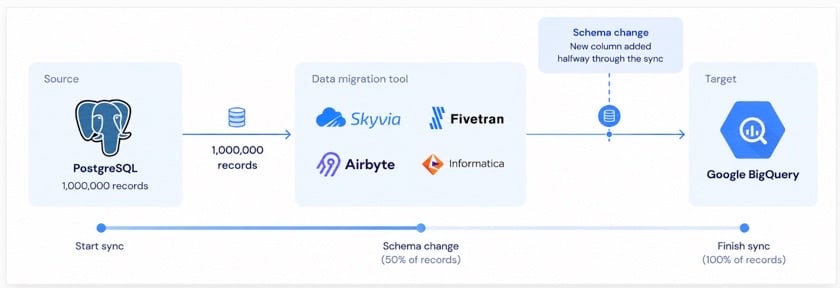
That was the clean version of the task.
Then we made it less polite.
Halfway through the sync, we changed the source schema by adding a new column. Nothing exotic. Just the kind of thing that happens all the time when a CRM admin adds a field, a product team changes tracking, or someone updates a database table without warning the reporting team.
That one change told us a lot.
Some tools handled it quietly. Some needed more attention. Some made the problem easy to see. Others made us dig around longer than I’d like.
We looked at four things during the test:
- Schema drift behavior. What happened when the source table changed during the migration?
- Failure visibility. Could we see what failed, where, and what needed a rerun, without digging?
- API and setup complexity. Was setup a visual flow, or did it turn into scripts, containers, credentials and environment work?
- Pricing transparency. Could we explain the cost before the migration ran at full size, or did every backfill, resync and changed row need modeling?
I also thought about the daily routine: who would own this after the first successful run?
A lot of migration projects get awkward right here. Setup might look great, yet the tool still becomes a headache if only one person knows how to restart it, read its logs or fix a broken mapping.
We weren’t trying to crown a single winner. That rarely helps anyone.
Where does each platform fit? Fivetran for managed pipelines, Airbyte for developer-heavy control, Informatica PowerCenter for enterprise complexity, and Skyvia for teams who need the data moved without a full engineering project. That’s what we were after.
What Should You Weigh When Choosing Data Migration Tools for 2026?
In a demo, a migration tool can seem flawless, then turn out wrong when real data shows up.
So a feature checklist isn’t my starting point. Almost every serious platform links to the common databases, runs on a schedule and loads a warehouse. The real gap is what the tool then asks of your team.
For this review, I focused on how pricing behaves, how often the pipeline can run, and how much technical ownership the setup needs.
Pricing model: where surprises tend to hide
Pricing is a dull topic in a migration project until, suddenly, it isn’t.
This usually happens during a backfill.
A normal daily sync may look harmless. Then you move a large historical table, reload a source, or update thousands of records at once, and the pricing model starts showing its teeth.
The main models I paid attention to were:
Monthly Active Rows, or MAR. This is the model people usually associate with Fivetran. You are not only thinking about how many records exist in the source. What matters is how many records get inserted, updated or deleted in the billing period.
That works well once the team knows its change volume. But a busy source, a big resync or a messy backfill can swing the cost picture fast.
Compute-based pricing. It shows up more in open-source or infrastructure-heavy setups. Airbyte self-hosted is the obvious example. The license can be free while the work still has to run somewhere.
So the cost shifts to cloud infrastructure, worker size, storage, orchestration, monitoring and DevOps time. At scale it can come out cheaper, if the team knows what it’s doing. It can also become one of those “free” systems that quietly eats engineering hours.
Transparent volume-based pricing. This is the model Skyvia uses. It comes down to how much data you move, rather than user counts or enabled connectors.
For teams that have to justify the budget before the migration begins, I like this model. You still need to know your volume. No tool removes that. Still, planning around a clear usage tier is easier than guessing how a heavy-update source will hit next month’s bill.
The short version: pricing should be tested against your worst migration day, not your calmest one.
Migration cadence: a one-off load, or a temporary sync?
A migration isn’t always a single move between two systems. Quite often the old and new systems run side by side for a while, with data moving between them until cutover, or beyond. Depending on the project, you may need a one-time load, a temporary incremental sync or an ongoing synchronization between the two.
So, I would look at these scenarios:
One-time batch migration. Best when the source can be paused and the business accepts a clear maintenance window.
Staged migration with temporary incremental sync. Best when historical data can move first, but new changes must continue flowing until cutover.
Note: In some setups both systems stay in use after the migration. From then on, the temporary sync is simply ongoing data synchronization rather than part of the migration.
The right option depends less on the fastest available schedule and more on how much downtime, data lag, and overlap the business can accept.
API and setup complexity: who has to keep this alive?
This is the part many comparison tables soften too much.
Some tools feel like a guided setup. Connect source and destination, pick objects or tables, set the schedule and run it.
Other tools hand you far more control, and they expect far more from your team. Docker. Kubernetes. Worker sizing. Connector configuration. Environment variables. Logs you can read only if you know where to look.
Neither approach is better in itself.
Who owns the migration decides it.
A data engineering team running the project may be happy with a more technical tool. A data engineering team may want version control, custom connectors, direct log access and full command of how the pipeline behaves.
For an analyst, RevOps manager, consultant, systems admin or small data team, the same flexibility can turn into a burden. They have to move data, validate it and make sense of failures without turning each one into a development ticket.
That is why setup complexity matters as much as connector coverage.
If the job is common and speed matters, a visual SaaS tool can fit better. If the source is unusual, the environment is locked down or the team needs custom logic around the migration, a developer-first or self-hosted tool may be the better pick.
My practical test
Before choosing any platform, I would ask these questions:
- What happens to the bill during a large backfill?
- How quickly does the data actually need to refresh?
- Who will restart the job when it fails?
- Can the team understand the logs without a specialist?
- What happens when the source schema changes halfway through?
- Is this a one-time migration, or will it become a pipeline that runs for years?
Those questions are not as exciting as a connector list.
But they are much closer to how data migration projects succeed or fail.
How Do the Top Tools Stack Up?
Before the detailed review, here is the quick comparison.
| Feature / Metric | Skyvia | Fivetran | Airbyte | Informatica PowerCenter |
|---|---|---|---|---|
| Best for | Visual, no-code migration. Best when the team needs data moved without writing scripts. | Managed enterprise ELT. Best when a data team wants pipelines to run with little daily maintenance. | Developer-owned pipelines. Best when engineers need control over connectors and deployment. | Complex enterprise migration. Best when governance, legacy systems, and hybrid deployment matter. |
| Pricing model | Records written per month, by plan. Cost is easier to plan around expected data volume. | Monthly Active Rows. Cost depends on how many distinct rows are inserted, updated or deleted in the billing month. | Airbyte Core is free and self-managed, but infrastructure and maintenance still cost money. Standard and Plus are volume-based; Pro and Enterprise Flex are capacity-based, on Data Workers. | Custom quote. Ask Informatica. |
| Sync frequency | Every 1 minute on Professional and Enterprise plans, hourly on Standard, daily on Free and Basic. | Every 1 minute on Enterprise and Business Critical plans, 5 to 30 minutes and longer on others. The default is every 6 hours. | Up to every 1 hour on Standard, 15 minutes on Plus, 5 minutes on Pro and Enterprise Flex. | Depends on the architecture and the modules you run. |
| API and infrastructure complexity | Low. Skyvia is SaaS-based. | Low. Fivetran manages most of the infrastructure. | High for self-managed deployments, where the team owns hosting, scaling, and upgrades. Lower with Airbyte’s fully managed plans. | High. Powerful, but not lightweight to administer. |
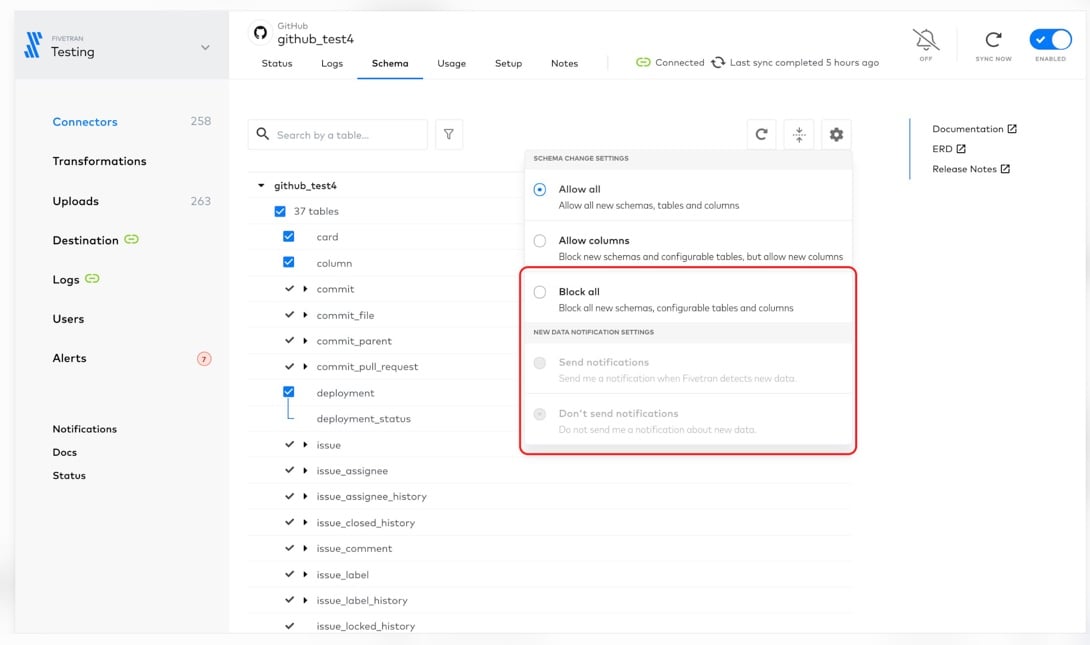
| Schema Drift | Refresh-based handling. Skyvia does not detect metadata changes in cloud apps on its own: clear the connection’s metadata cache and edit the integration, then select the new fields. A renamed or deleted field makes a replication fail until you edit it. Database and warehouse connections read the current metadata each time. | Strongest in our test. Fivetran has a Schema Change Handling setting: allow all new data, allow only new columns, or block all new data. For warehouse destinations, new columns are added to the destination by default. | Configurable propagation. Each connection can propagate field changes only, propagate field and stream changes, wait for your approval, or stop syncing. New columns are created in the destination, removed columns are kept with NULLs going forward, and breaking changes pause the connection. | Controlled, but maintenance-heavy. In our experience, changes to sources and mappings need manual review, and renames, datatype changes or removed columns can invalidate mappings. |
Which Tool Fits Your Specific Migration Scenario?
People group tools by deployment, licensing model or processing method. Cloud-based, or self-hosted? Open source or commercial? Is it ETL, ELT, replication or broader integration underneath?
Labels like these narrow the field, but they won’t always show whether a tool suits the real project. One platform can be cloud-based, commercial and ELT-focused all at once. The type of migration matters more, along with who manages it and how much control the team needs.
Nobody starts a migration by saying, “I need one cloud-based tool from category A.”
They usually start with a much messier sentence:
“We need to move this data without breaking reporting.”
Or:
“We need to get out of these scripts because nobody wants to maintain them.”
Or:
“We have a legacy system, strict governance rules, and too many downstream teams to make mistakes.”
That is why I narrowed the hands-on review to four tools. Not because the others do not exist, but because these four represent the main situations I see teams run into. Three cloud migration services are covered separately, from their own pricing pages, and were not part of the test.
The next sections go deeper into each scenario, with the trade-offs that did not fit neatly into the table.
Which Tool Works Best for No-Code Business Teams?
Skyvia
The job is real and so is the deadline, and nobody wants a routine sync to turn into a side project. That is when Skyvia makes the most sense.
That’s the lane it fits.
Plenty of companies lack a spare data engineer to wire HubSpot into Snowflake, pull customer data out of an old CRM or clean up a CSV export from a system being retired. More often than not, the person doing it is a marketing ops manager, data analyst, RevOps lead or IT generalist who needs data to move and keep moving.
That is where Skyvia feels practical.
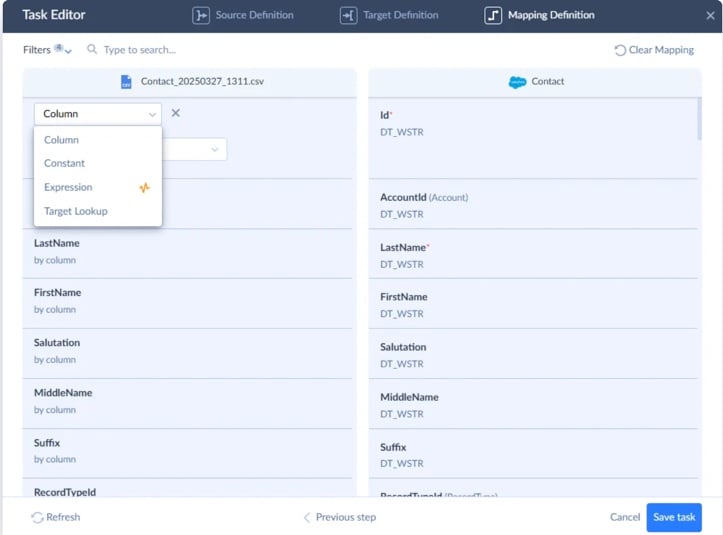
The interface is visual, nothing needs coding, and the platform reaches more than 200 connectors across SaaS apps, databases, cloud storage and warehouses. Nobody has to build a pipeline from scratch. You connect systems, choose what moves, map the fields, set the schedule and check run history when something breaks.
What I like most here is not the connector count. It is the pricing model.
Skyvia Data Integration is priced by the number of records written per month, which is a lot easier to explain than a model where every changed row turns into a billing puzzle. A migration or sync project is stressful enough without needing a second spreadsheet just to estimate next month’s connector bill.
The first load rarely closes the story. After the data arrives in the new system, teams often find they still need updates from the old one for a while. Maybe daily. Maybe every hour. Maybe only when the source changes. At that point a plain loader feels too small, and a tool with replication and synchronization support makes more sense.
Best for
Skyvia is for teams that favor a simple visual setup and predictable volume-based pricing over deep infrastructure control.
Warehouse loads are only one of the things it does well. A team can take data from a database or an older business system, map it to a new structure and load it straight into a SaaS application, with no migration code.
That might be moving customer records from a legacy CRM into Salesforce or HubSpot, switching SaaS platforms, or replacing an old operational system with a newer cloud app. That’s separate from copying tables into Snowflake or BigQuery for analytics.
One example is a hotel management company that used Skyvia to migrate data from its legacy CRM into HubSpot. The project involved duplicate contacts, email records spread across multiple tables, and API restrictions. Skyvia helped the team clean and map the data, move it into HubSpot, and verify the results. The full CRM migration case study covers the process.
I’d go for Skyvia when the team knows what has to move and would rather not build and maintain scripts for it. Once the migration ends, the same setup can carry on, for example as a scheduled sync after a one-time move.
Rating
- G2 rating: 4.8/5 overall, October 2026
Pricing
Skyvia Data Integration uses volume-based pricing, billed by records written per month and by plan, with unlimited users and connections. Each product has a free plan, and signing up needs no credit card.
Planning gets much easier, especially for businesses that want to know the project’s cost before they scale.
Pros
- A genuinely no-code setup with a visual wizard.
- Transparent pricing tied to actual data volume.
- 200+ connectors that span apps, databases, files and warehouses.
- Handles one-time migrations, recurring replication, bulk transfers and bidirectional synchronization.
- A fit for analysts, RevOps and business teams that want results without code.
Cons
Skyvia runs as a fully cloud-native SaaS platform.
That suits most teams, but it excludes the product from tightly restricted environments. A Windows on-premise Agent can reach databases behind a firewall over outbound HTTPS. Still, if your company bans internet-connected SaaS tools entirely and everything must stay in an air-gapped on-premise setup, Skyvia won’t meet that requirement.
Then I’d look at an enterprise platform built for tightly controlled on-premise estates, including Informatica’s current offerings.

Which Tool Is Best for Enterprise and High-Volume Legacy Data?
Informatica PowerCenter
Informatica PowerCenter needs a different introduction in 2026.
It is still running some large and complicated enterprise data estates. The mappings are mature, the teams know the platform, and replacing years of ETL logic is not something a bank or manufacturer does over a weekend.
But I would not recommend PowerCenter as a new deployment today.
Informatica’s own page gives March 31, 2026 as the end-of-support date for PowerCenter 10.5.x. It points customers to its Product Lifecycle Guide for what follows, and third-party sources disagree on the later dates, so read the guide before planning around any extended option. Either way, PowerCenter doesn’t return to a long-term product roadmap because of it.
That changes how I look at the platform.
The mapping and workflow controls are still extensive. PowerCenter handles complicated transformations, large batch workloads, hybrid environments and the legacy dependencies that pile up over many years. Those strengths did not disappear when the end-of-support date passed.
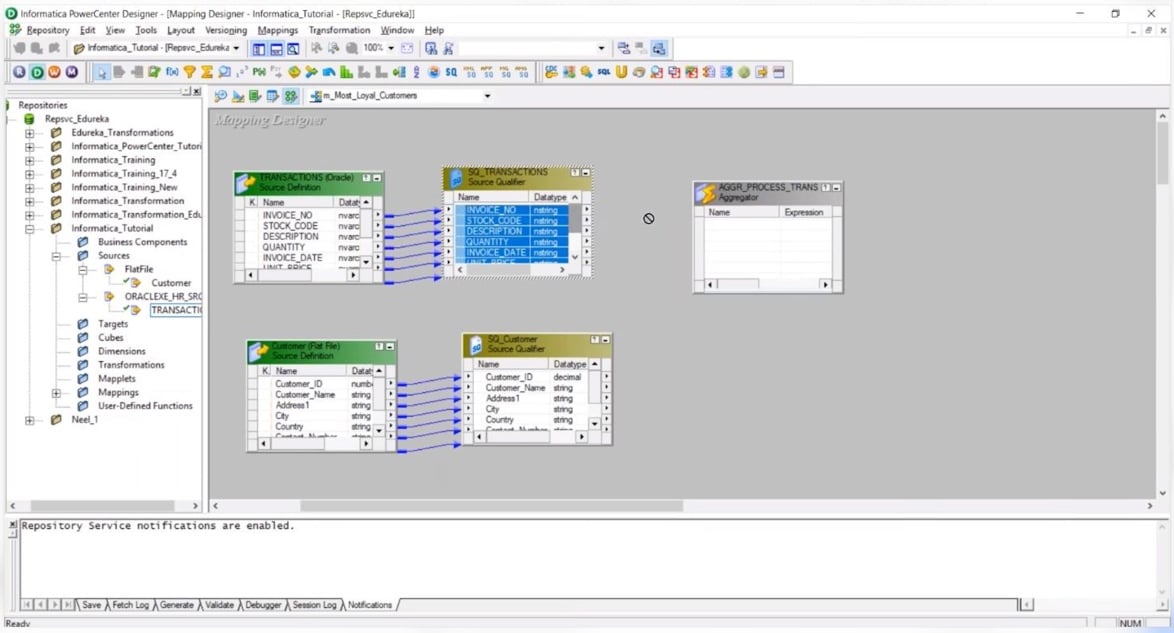
Its own direction is toward the Intelligent Data Management Cloud. The modernization paths let PowerCenter customers reuse existing assets and move workloads gradually toward Cloud Data Integration, with no need to rebuild everything at once.
Best for
I’d keep PowerCenter in this comparison for organizations that already have a substantial PowerCenter estate.
It still makes sense when removing it now would add more risk than keeping it for a while: thousands of existing mappings, old on-premise systems, complex batch jobs, strict audit requirements, or an integration team that already knows the platform.
For a company choosing a new migration platform in 2026, I would look elsewhere or evaluate Informatica’s current cloud products instead.
Pricing
Existing customers need to ask Informatica what support costs if they plan to remain on PowerCenter beyond the 10.5.x end-of-support date.
So, for PowerCenter, the meaningful number is whatever sits in the customer’s existing license, maintenance, and support agreement.
Pros
- Mature mapping and transformation capabilities for complicated ETL estates.
- Strong fit for legacy and hybrid environments already built around PowerCenter.
- Detailed workflow control and monitoring.
- Large installed base and experienced enterprise integration teams.
- Existing PowerCenter assets can be part of Informatica’s modernization path to IDMC.
Cons
The biggest drawback in 2026 is no longer the learning curve. It is the product lifecycle.
The end-of-support date for PowerCenter 10.5.x, March 31, 2026, has already passed. Any support Informatica still offers beyond that should be treated as migration runway rather than a reason to start a new PowerCenter implementation.
There is also the operational weight. PowerCenter needs people who understand the platform, its infrastructure, mappings, upgrades, and dependencies. That was acceptable when it was the strategic enterprise ETL platform. That is harder to justify for a new project when Informatica itself is steering customers toward IDMC.
Which Tool Is Best for Developer-Heavy Teams That Need Custom Connectors?
Airbyte
Airbyte is the tool I would bring up when the source is awkward.
Not “awkward” as in slightly annoying. I mean the kind of source that does not sit neatly inside a managed connector catalog.
An internal API. A niche SaaS product. A custom endpoint with strange pagination. A database that needs a specific extraction pattern. A team that wants to see what the connector is actually doing.
That is where Airbyte makes sense.
It’s open source, community-driven and built for teams that want more control over how data moves. Connector extensibility is a big focus too: Airbyte’s own connector page describes a no-code connector builder, a low-code CDK and language-specific CDKs for building custom connectors.
That flexibility is the good part.
The less fun part is that flexibility does not maintain itself.
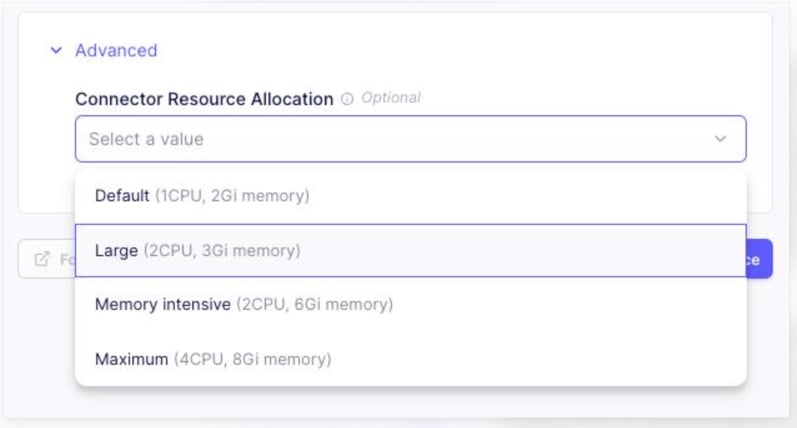
During our test, Airbyte gave us plenty of room to work close to the system. But that also meant more pieces to watch: workers, connector behavior, logs, memory, deployment settings, and the environment around the pipeline.
Pulling 1 million rows, I saw a clear memory spike on the source worker container. It wasn’t a job I’d hand to a non-technical team before walking away. Nodes that are sized wrong can leave pipelines slow, stalled or crashed.
That is not a reason to avoid Airbyte.
It is just the deal you make with it.
You get control. You also get the responsibility for the parts that control depends on.
Best for
If you have a team of data engineers who like writing Python, building connectors, and managing Docker containers, Airbyte can be fantastic.
I would consider it when:
- The source is not well covered by managed tools.
- The team needs to build or modify connectors.
- Self-hosting is a requirement.
- Infrastructure ownership is acceptable.
- Engineers want control over how syncs run.
- The migration is part of a larger custom data platform.
I’d be more careful if the migration owner is an analyst, RevOps manager or small IT team that just needs data moved into a warehouse. Airbyte can do the work, but someone still has to own the machinery.
Pricing
Airbyte’s pricing depends on how you run it.
Because you can self-host the open-source version, the license cost isn’t the main issue. The real cost moves into infrastructure, compute, monitoring, maintenance, and engineering time.
For managed plans, Airbyte’s official pricing page lists Standard, Plus, Pro and Enterprise Flex. Standard and Plus are volume-based; Pro and Enterprise Flex use capacity-based pricing built on Data Workers, the dedicated compute units that power the pipelines.
My practical read: Airbyte can be cost-effective when the team already has the engineering muscle to run it. It becomes less attractive when “free” turns into a second infrastructure project.
Pros
- Open-source flexibility, built for teams that want control of the stack.
- Strong fit for custom connectors and unusual APIs.
- Connector Builder and CDK options for building or adapting sources.
- Self-hosting option for teams that need infrastructure control.
- Good fit for developer-heavy teams building a broader data platform.
Cons
Infrastructure overhead is the main one.
During our 1M-row pull, the source worker container showed a noticeable memory spike. That is exactly the kind of thing that matters in production. If the environment is undersized, the pipeline can become unstable fast. Airbyte’s scaling guide names memory as the most common constraint when sizing connector pods.
Airbyte also expects someone technical to stay close to the system. Failed syncs, connector changes, worker sizing, upgrades, logs and deployment issues don’t vanish just because the tool is open source.
A team with strong engineering resources may find that trade-off fine.
For teams that just want a migration to run without adding another platform to maintain, it can be more work than expected.
Which Tool is Best for Fully Managed, “Set-and-Forget” Pipelines?
Fivetran
I’d expect to see Fivetran when a data team wants the pipeline to mostly look after itself.
So goes the promise.
Connect the source, aim it at the warehouse, pick what to sync, and Fivetran takes on much of the work that usually eats engineering time: connector maintenance, sync logic, schema updates and load behavior.
In our test, schema drift was the place where Fivetran looked strongest.
That is a big part of why Fivetran has become one of the default names in managed ELT.
It is also why I would not dismiss the cost conversation as a finance-only detail.
Fivetran pricing is based on Monthly Active Rows, or MAR. Their pricing page defines monthly usage as the number of MAR processed in a calendar month, including inserted, updated and deleted rows, while unchanged rows and initial syncs are excluded.
That model is not automatically bad. It just needs to be understood.
A quiet pipeline can look predictable. Then a busy SaaS source, a large resync, or a non-relational source with normalized child tables can change the math. You may think of the job as “100k records”, but the billed activity can feel much larger once updates, deletes, nested records, and table expansion come into play.
In its 2025 pricing updates Fivetran moved tiering from the account to the connection level, which matters if you run several similar-sized connectors instead of one dominant source.
So yes, Fivetran is strong if you want managed reliability.
I just would not call it “set and forget” until someone has modeled the MAR side against a bad week, not only a normal one.
Best for
Mature data teams that want managed warehouse pipelines, and don’t want to maintain connector code, are Fivetran’s natural fit.
I’d look at it when:
- The team has many standard SaaS or database sources.
- You’re loading a warehouse such as Snowflake, BigQuery, Redshift or Databricks.
- Automated schema drift handling matters more to you than deep customization.
- You have data engineers or analytics engineers who can model the downstream transformations.
- Budget is less sensitive than pipeline maintenance time.
- The team can forecast MAR before a large rollout.
It’s a weaker fit when predictable cost comes above all else, or when the source is unusual enough that a managed connector gives too little control.
Pricing
Mostly, Fivetran charges by MAR, short for Monthly Active Rows. A row turns billable when it’s inserted, updated or deleted, and it counts once per calendar month no matter how often it changes.
The initial historical sync is treated differently. According to Fivetran’s pricing documentation, initial syncs count toward free MAR, not paid MAR.
Re-syncs sit outside normal incremental usage, yet a schema change that forces a full table re-sync, or a row that’s truly new or modified, can still add to MAR.
The distinction matters for cost estimates. Ten million existing rows loaded for the first time are a different billing event from ten million rows that become active later through inserts, updates or deletes.
Pros
- Schema drift handling is strongly automated for supported connectors.
- Compared with scripts or self-hosted tools, day-to-day maintenance stays low.
- Reliable CDC options for databases and enterprise sources.
- A broad connector catalog covering standard SaaS apps, databases and warehouses.
- A good fit for teams that want ingestion handled and prefer to transform downstream.
Cons
Cost is hard to predict when the team doesn’t understand MAR.
Some non-relational sources are normalized into relational tables, so a single source object can produce records across several destination tables in Fivetran. That means frequent changes, deletes and History Mode can produce more paid MAR than a plain source-record count suggests: with History Mode, every changed record adds a row that counts.
This is the core trade-off.
A lot of maintenance leaves your plate, but the usage model behind that convenience needs careful planning. For a large data team, that can be completely reasonable. A smaller team with volatile source data can find it uncomfortable sooner than expected.
Which Other Data Migration Tools Deserve a Look?
The four tools above are the ones we tested. Three cloud migration services appear on nearly every shortlist, and their job is narrower: moving a database into that provider’s cloud. We didn’t test them, so the table below sticks to what each provider’s own pages state.
| Tool | What it does | How it bills |
|---|---|---|
| AWS Database Migration Service | Migrates data once, or replicates ongoing changes to keep source and target in sync | On-demand instances are billed by the hour; DMS Serverless is billed in DMS capacity units (1 DCU is 2 GB of RAM) |
| Azure Database Migration Service | A fully managed service for operational database and data warehouse migrations | The Standard tier (1, 2 or 4 vCores) supports offline migrations and is free; the Premium tier supports offline and online migrations |
| Google Database Migration Service | Moves databases to Google Cloud | No additional charge for homogeneous native migrations to Cloud SQL or AlloyDB for PostgreSQL; heterogeneous migrations are billed per GiB processed, and the first 500 GiB of backfill each month is free |
As a rule of thumb, go with a cloud provider’s service when both ends are databases and the target sits in that cloud. Go with an integration platform when the source is a SaaS app, the structure changes between systems, or the job runs on after cutover.
Can You Use a Free Data Migration Tool?
Yes, with limits. Every Skyvia product has a free plan, and the Data Integration free plan loads up to 10k records a month. Airbyte Core is open source and self-managed, so the license is free and the infrastructure is not. Azure Database Migration Service offers a free Standard tier for offline migrations. AWS offers Free Tier credits for new accounts, which cover DMS among other services.
A free plan often covers a one-time move of a small dataset. Read the limits first, though: a free tier that runs once a day can’t keep two systems in sync through a long cutover.
What Are the Most Common Data Migration Pitfalls I’ve Encountered?
The ugly part of data migration is that the big failures rarely start big.
A column mapping is slightly off. Some IDs are not as unique as everyone hoped. The API limit looks fine during testing because the sample is tiny.
A few years ago, I learned this during a HubSpot-to-Redshift migration.
It looked harmless at first. The plan was to pull contacts from HubSpot, clean up a few fields, load them into Redshift and let the reporting team build from there. We wrote a basic custom script, since the first version seemed too small to justify a proper pipeline tool.
The test run did not tell us much. There wasn’t enough data to hit the API limits, and the duplicate cases we later found weren’t in that sample.
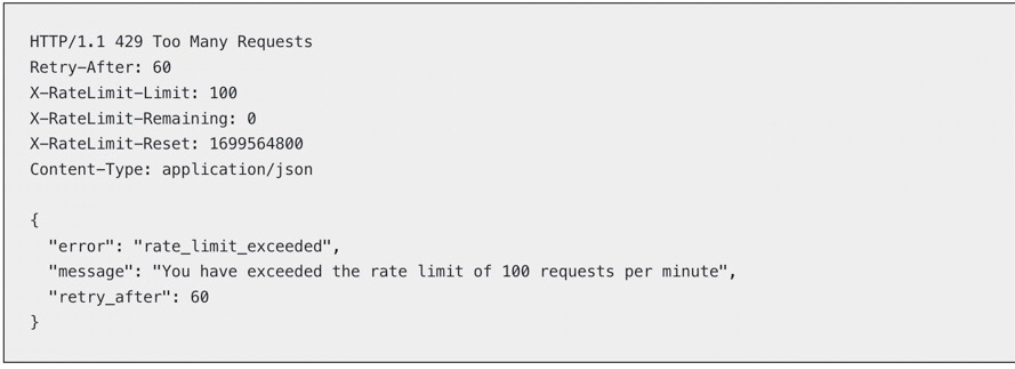
The full load was different. HubSpot began returning rate-limit errors, and the retries left us with a mix of completed, repeated, and missing records. Our dedupe rule also failed on cases we had not planned for.
The reporting team caught most of the issues when their numbers did not match HubSpot. Since then, I have not taken a clean test run as proof that the full migration will behave the same way.
1. Mapping errors
Mapping took longer than we expected. Company Name and Account Name didn’t cause much trouble. Lifecycle Stage and Status did, because the systems used those fields differently even though the labels looked similar.
We could copy the value in seconds. That did not mean we were copying the same rule.
That is not a technical mismatch. The mismatch is in business logic.
A good migration setup lets you review mappings before the run, try them on a small batch and catch obvious problems ahead of the full load.
So, I wouldn’t trust a mapping just because the field names look similar. I’ve seen fields with nearly identical labels carry completely different business meaning.
A small test load usually exposes the issue faster than another hour at the mapping screen. Open a few records in the target and check that the values still make sense. Look hardest at required fields and anything feeding reporting, segmentation or billing.
Record the agreed mapping for the key fields somewhere the team can find it. Nothing fancy. A basic spreadsheet often keeps the same argument from coming back halfway through the migration.
2. Duplicate records
A migration can finish without one error and still leave duplicates all over the target.
Maybe email was used as the unique key even though several contacts share an address. Or each system has its own customer IDs. Or the record was already in the target under a slightly different company name, so the load made a second one.
Reporting is usually the first place you notice. Customer counts jump, revenue is double-counted, or a sales rep finds two records for one account.
Settle the merge logic before the migration begins. It’s the safest approach.
What is the real unique key, then?
Email? Customer ID? External ID? Account domain? A combination of several fields?
Without an answer from the team, the tool can’t safely guess. Whatever the key turns out to be, the rule has to be clear enough that the same record isn’t treated as new every time it appears.
Updates need a rule too. Should the incoming value replace the existing one, fill only empty fields, or be sent for review when the two records disagree?
I would also keep questionable records out of the main load. A few rows waiting for review are much easier to deal with than a target full of duplicates that have already made their way into reports.
3. API limits
The problem isn’t just the limit itself. The problem is what happens after the limit.
Does the job retry safely? Does it wait and continue? Does it skip records? Does it load partial data and pretend everything is fine?
That is where basic scripts can get risky.
A script can hit a 429, retry the same batch, load part of it twice, and still end with a reassuring “success” message. I have seen that happen.
For a large migration, I would rather make the job slower and easier to follow. Pull only new or changed records where possible. Skip parallel requests just because they make the test run quicker. Keep failed batches separate, so you can check and rerun them without touching the rest.
The final row count alone isn’t proof the migration worked, in my view. Failed batches and the retry history usually say much more about what happened during the load.
Conclusion
In practice the best data migration software is what your team can realistically support, not what has the longest feature list.
Need a migration built fast, with no code to write or maintain? Skyvia offers a visual, no-code option with volume-based pricing.
With engineers or DevOps resources, no objection to managing infrastructure and a wish to keep software costs down, Airbyte is a sensible option.
If budget matters less and you want a managed pipeline with the least maintenance possible, Fivetran is the more natural fit.
Already running a large PowerCenter estate? Plan its modernization with Informatica’s Product Lifecycle Guide in hand rather than starting a new deployment.
None of these tools lets you skip the checks. I’d still run a small batch first, open a few records in the target and check where the failed rows ended up.
The tool can move the data. It cannot tell you whether “Customer” means the same thing in both systems.
FAQ for Data Migration Software

What are the three data migration tools available?
There isn’t a fixed list of three. It helps to split by who owns the migration: a no-code platform such as Skyvia, a managed pipeline such as Fivetran, or an open-source tool such as Airbyte. Cloud providers’ migration services cover the narrower case of moving a database into their cloud.
Is there free data migration software?
Yes, with limits. Every Skyvia product has a free plan, and the Data Integration free plan loads up to 10k records a month. Airbyte Core is open source, but you host it. Azure Database Migration Service also has a free Standard tier, for offline migrations. Check the limits before relying on a free plan for a long cutover.
Is data migration software the same as disk cloning or PC transfer software?
No. Disk cloning and PC transfer tools move an operating system or personal files between computers. Here, data migration software means tools that move business data, such as tables, records and SaaS objects, between databases, warehouses and applications.
Why does some data migration software cost more than expected?
It mostly comes down to how the tool counts usage. Fivetran bills by Monthly Active Rows, so a large backfill or a busy source can move the bill. Self-hosted Airbyte moves the cost into infrastructure and engineering time. Skyvia Data Integration is priced by records written per month. Check any price against your worst migration day, not your calmest.
What happens to my pipeline if the source schema changes mid-migration?
It depends on the tool. In Fivetran, a setting decides whether new columns get synced. Airbyte lets a connection propagate changes, wait for your approval or stop syncing, and a breaking change pauses the connection. In Skyvia, cloud-app metadata must be refreshed and new fields selected by hand. To test this, we added a column halfway through a sync.
Is a dedicated data engineer needed to set up migration software?
Not always. A no-code tool can handle a common migration without one. Someone technical has to manage workers, logs and upgrades in a self-hosted tool such as Airbyte. Custom APIs and strict infrastructure rules call for engineering time too.
Why do most data migrations fail?
Poor preparation. Mappings that look alike but mean different things, unclear unique keys, API limits and bad source data cause more damage than the transfer itself. A small test load, with a few records opened in the target, usually shows these problems early.
Want to move data between apps, databases and warehouses without scripts? Skyvia Data Integration puts import, replication and synchronization in one no-code platform, and you can start free with no credit card.