Summary
- Skyvia – works behind the scenes, quietly forcing messy systems to agree with each other before your dashboards ever get a chance to argue.
- Microsoft Power BI – gives you answers fast, then slowly introduces DAX to remind you that those answers weren’t supposed to be that easy.
- Tableau – where data stops looking like tables and starts behaving like something you could almost present without apologizing first.
- Looker – insists on defining reality upfront, so later no one can reinterpret the numbers to win an argument.
- Apache Spark – not a tool you “open,” but something you deploy when your dataset stops fitting into polite conversations with regular software.
The best data analysis tools in 2026 aren’t universal; they’re situational and always depend on what you work with. Power BI has dominated corporate dashboards for the better part of a decade. You can’t ignore Apache Spark when data scale breaks normal tools. And there are solutions like Skyvia that sit upstream, making sure the data is usable for both.
We should be upfront here. We’re the team behind Skyvia, and that naturally shapes how we look at data integration. But we know that Skyvia alone can’t satisfy everyone. Claiming otherwise, we risk damaging our reputation more than any honest limitation ever could.
So, we were deadly serious about this article. Our engineers have worked hands-on with these tools –setting up pipelines, breaking things, fixing them again (no pipeline was harmed during this experiment) – and we’re thrilled to share what we found.
How We Tested
As a data integration company, we deal with large datasets daily, so we approached this review the same way we approach real projects.
For this guide, our team spent around 40 hours testing these tools in a controlled setup (don’t worry, reading this will take much less). We took a mock dataset (about 1 million rows of e-commerce data) and ran it through typical workflows – querying, basic transformations, and building dashboards.
We focused on a few things that tend to matter in practice – the four “Hows”:
- How quickly can you get something working?
- How does the tool behave once the data grows?
- How much effort does it take to maintain?
- How well does it fit into a broader stack?
Because in most cases, the tool itself isn’t the problem. It’s how it behaves once real data shows up.
The Foundation: Why Data Integration Comes Before Analysis
Before you build a dashboard in Tableau or Power BI, you need something far less glamorous: data without an identity crisis.
We’ve seen this many times. You, probably, too. Salesforce shows one number, the warehouse shows another, and marketing somehow has a third version in their spreadsheet. And no matter how beautiful and bold the dashboard you build on top of that, it will still be wrong.
Skyvia
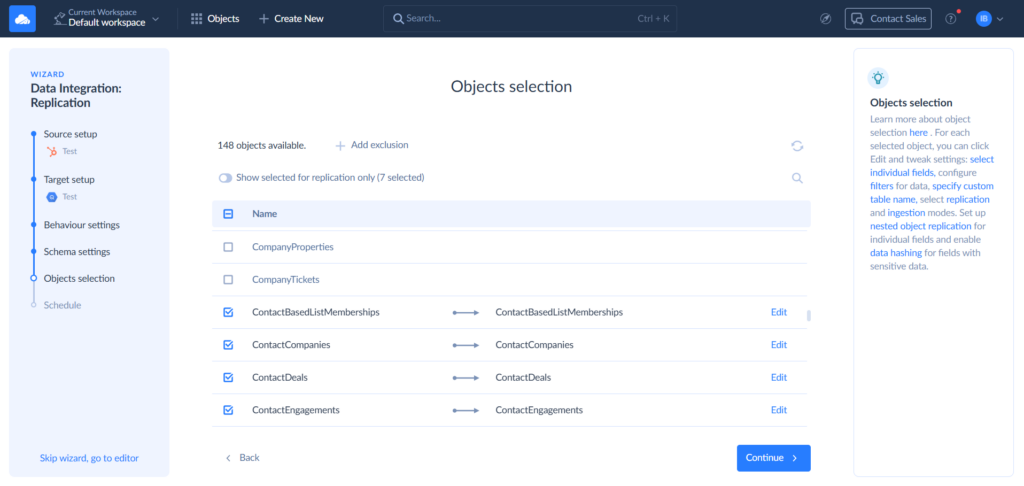
Skyvia replicates data from multiple sources into your DWH on a schedule, without engineering having to maintain the pipeline by hand. Connect the sources, map the fields once, and the sync stays reliable as the data keeps flowing in.
Get that layer right, and analysis starts to feel almost boring, the nice sort of “boring,” one where numbers don’t spark existential crises in everyone involved. Your dashboards aren’t synonymous with unresolved debates anymore.
G2 / Capterra Rating
G2 – 4.8/5 based on 293 reviews.
Capterra – 4.8/5 based on 109 reviews.
Best For
Teams that need clean, structured data flowing into a warehouse before analytics starts. Skyvia handles the extraction, mapping, and scheduling so the data lands in the DWH ready to query.
Pros
- You don’t need to be “the data person” to get things moving. The setup feels closer to assembling something than configuring it, so non-engineers can build pipelines without getting stuck halfway through.
- Beyond replication, Skyvia covers other DWH-centered scenarios, including Reverse ETL – syncing modeled data back out to operational tools – and SQL Builder for transforming data once it lands in the warehouse.
- Coverage isn’t an afterthought. With 200+ connectors, you’re not trying to squeeze what can’t be squeezed into a shortlist of “supported” apps or hunting for workarounds.
- Pricing doesn’t punish curiosity. It’s based on records, not how many systems you connect, so SMB teams can expand their stack without watching the bill jump every time they add a new tool.
Cons
- Skyvia exists only in the cloud. If compliance mandates fully on-prem, air-gapped systems with no internet access whatsoever, this won’t satisfy those needs. In those cases, legacy enterprise platforms like Informatica are usually the safer bet.
Best for Enterprise BI & Complex Data Modeling
That is where things stop being casual. Data isn’t just something you look at – it’s something you govern, define, and defend.
At this level, a dashboard isn’t just a chart. It’s a statement someone will question. So the tools here are built to hold their ground – structured models, controlled access, and numbers that don’t quietly change depending on who opened the report.
Microsoft Power BI
Power BI anchors the enterprise BI world and shows up in Gartner Magic Quadrant rankings – the surest evidence of market dominance. It’s genuinely capable, but it operates under the philosophy that users should adapt to the tool, not the other way around.
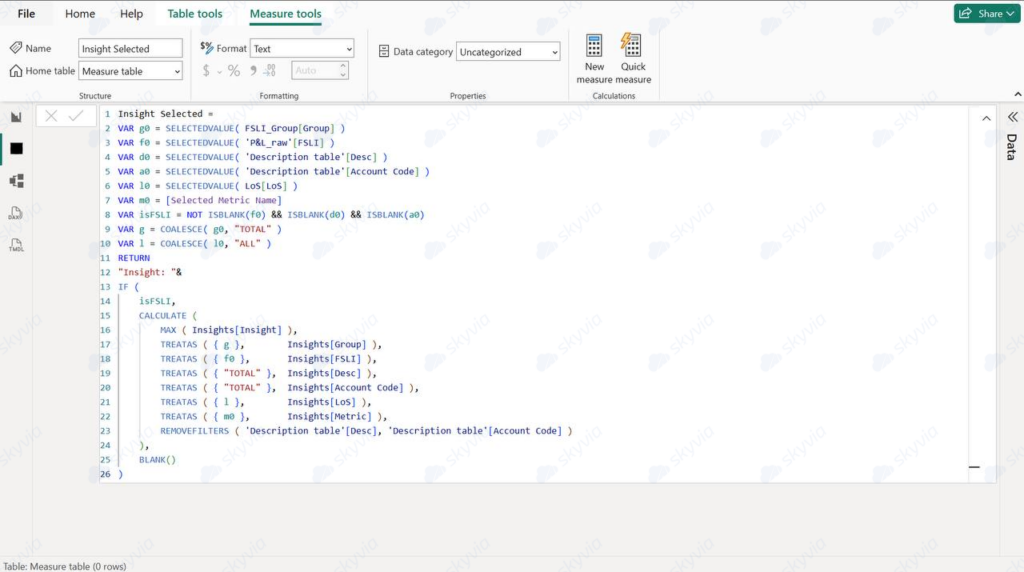
During our tests, Power BI handled a 1M-row dataset with its eyes closed and one hand tied behind its back. Loading, filtering, and slicing went smoothly. The friction showed up elsewhere. As soon as we moved beyond basic visuals, DAX entered the chat, and for non-technical folks on the team, that curve was quite noticeable. Not mission impossible, but definitely not something you just pick up between meetings.
G2 / Capterra Rating
G2 – 4.5/5 based on 1,556 reviews.
Capterra – 4.6/5 with 1,869 reviews.
Best For
If you’re living in Azure, Excel, or Teams, Power BI integrates like it owns the place, which, given Microsoft’s strategy, it does. Great for analysts who prefer exploring Salesforce or warehouse data themselves over submitting requests to engineering that disappear into a void where tickets go to die peacefully.
Key Features
- Copilot in Power BI now provides chat-based experiences ranging from on-the-fly analysis for business users to DAX generation for advanced creators, and is enabled by default across the platform.
- Connections aren’t really a concern. Salesforce, Snowflake, databases – it plugs in without much drama.
- Dashboards are interactive and easy to share, especially if your team already lives in Teams.
- The real backbone sits in the model – relationships, DAX, and access rules. Get that right, and everything else falls into place.
- And if you’re deep in Microsoft land, Fabric keeps the whole setup nicely tied together.
Pricing Deep Dive
Power BI pricing has something to offer to every type of team:
- Free – desktop only, no sharing.
- Pro ($14/user/month) – sharing, workspaces, limited model size.
- Premium ($24/user/month) – larger datasets, more frequent refresh.
- Premium Capacity (custom) – dedicated resources, enterprise scale.
Security & Compliance
Power BI checks all the enterprise boxes: row-level security, encryption in transit and at rest, audit logs, and integration with Microsoft Purview. It supports standards like GDPR, SOC 2, and HIPAA, which matter if your reports contain sensitive personal or financial information instead of just colorful charts about product performance.
Strengths & Limitations
Comfort zone:
- Fits into the Microsoft stack like no other tool (no surprises there).
- Strong community. If you’re struggling with DAX, someone else already walked that path and might help.
- Once the model is in place, data becomes accessible to non-engineers.
Friction zone:
- DAX becomes unavoidable for anything beyond basic reports, and sometimes that community experience isn’t of much help.
- Some connectors (including Salesforce) can be temperamental with auth.
- Advanced features and scale wait behind higher pricing tiers.
Tableau
We used Tableau on the same dataset and, unsurprisingly, it’s still one of the best tools if you care about how things look and feel. You can take a messy dataset and turn it into something that actually tells a story, not just shows numbers.
One correction to the usual myth: you don’t need Python or R just to get data into Tableau. That part is handled either natively or via Tableau Prep, their own data preparation layer. Still, once transformations get more involved, you’ll feel where Prep ends and where a proper pipeline tool should’ve stepped in earlier.
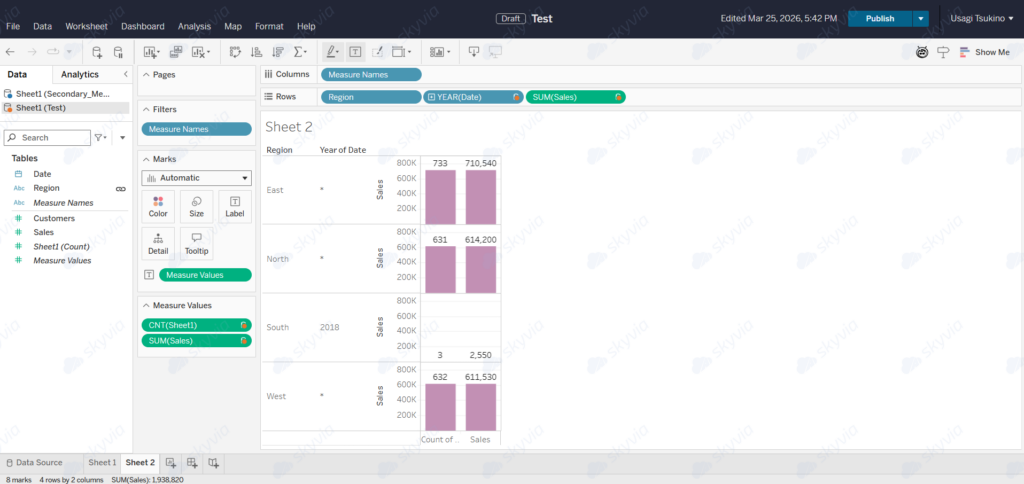
We did run into a classic Tableau moment during testing – blending multiple sources and suddenly getting asterisks instead of actual data. It appears when the secondary source returns multiple values for a dimension, and ATTR() is the aggregation Tableau uses that surfaces this ambiguity as * rather than hiding it silently.
G2 / Capterra Rating
G2 – 4.4/5 based on 3,526 reviews.
Capterra – 4.6/5 with 2,348 reviews.
Best For
Organizations that understand dashboards are sometimes the product itself. If you’re creating visuals for clients, executives, or anyone who’ll judge your competence based partly on whether charts look expensive and thoughtful, Tableau does this better than platforms that treat design as optional.
Key Features
- Drag-and-drop visual engine with extensive control over how you display your data.
- Tableau Prep for shaping and blending data before analysis.
- Hyper engine for fast, in-memory querying.
- Advanced visuals, including geospatial and predictive analytics.
- AI-assisted insights (in higher-tier plans).
Pricing Deep Dive
Tableau’s pricing won’t make you go through torment choice, offering only 3 options and being very straightforward here:
- Tableau starts at $15 per user per month and is great for getting to know your data.
- Tableau Enterprise starts at $35 per user per month and is an advanced option for managing and analysing.
- Tableau + Bundle plan is for those who want to bring AI to their data analysis and won’t mind chit-chatting with sales to find out how much it costs and other details.
Security & Compliance
Tableau supports row- and column-level security, SAML/OIDC authentication, encryption, and audit logs. It also aligns with standards like GDPR, SOC 2, and HIPAA. Enterprise setups can go deeper with private networking and external key management.
Strengths & Limitations
Comfort zone:
- Best-in-class visualization flexibility – you can make dashboards look exactly how you want.
- Well-suited for storytelling and executive reporting.
Friction zone:
- Pricing and licensing structure can get complicated fast.
- Data prep is not its strongest side – you’ll feel it on larger pipelines.
- Learning curve is real once you go beyond basic charts.
If Power BI feels like Excel evolved, Tableau feels more like a design tool for analysts – powerful, but a bit more demanding once you go off the happy path.
Best for Embedded Analytics & Cloud-Native Teams
If the previous category was about making data look good, this one is about making data behave. Less about aesthetics, more about architecture. The kind of tools that cloud-native teams fall in love with are precisely because they’re the least romantic options in the room.
Looker (Google Cloud)
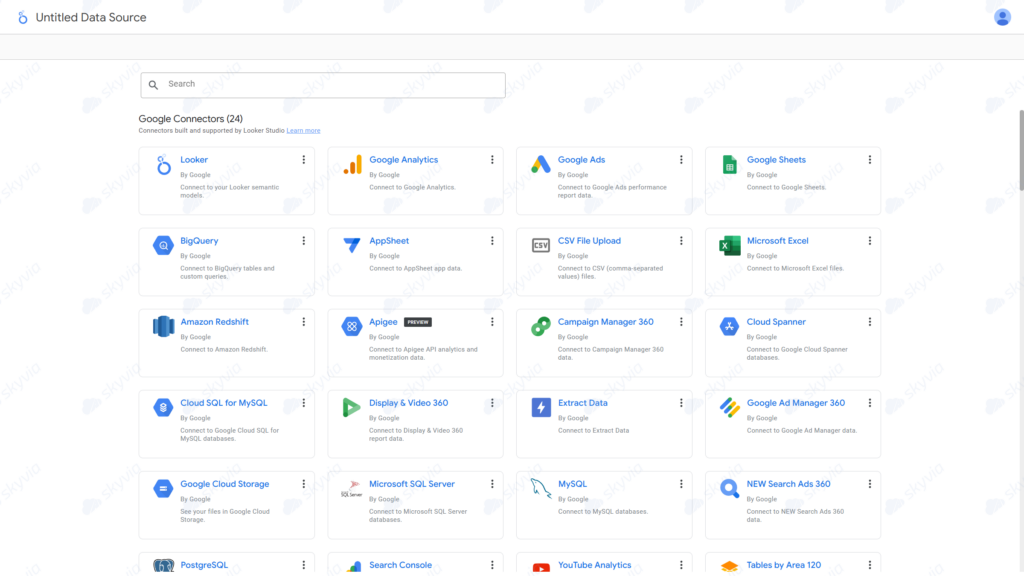
Looker makes you set the rules before letting you play with charts. Surely, at the beginning, it feels like extra work no one would like to volunteer for. You define metrics in LookML, map relationships, and decide what counts and what doesn’t. We must admit that it slows down the process a bit, but once that foundation is in place, something interesting happens. The usual “same data, different answer” problem just fades out.
G2 / Capterra Rating
G2 – 4.4/5 based on 1,610 reviews.
Capterra – 4.5/5 with 282 reviews.
Best For
Teams that need everyone to see identical numbers, full stop. If multiple departments depend on shared data and “close enough” stopped being acceptable three discrepancies ago, Looker delivers. Works particularly well when BigQuery’s already running your data infrastructure.
Key Features
- The LookML modeling layer will define metrics, joins, and logic upfront for you.
- The shared semantic layer will keep dashboards in alignment across teams.
- Native integration with Google Cloud and BigQuery.
- Controlled exploration through the “Explore” interface.
- Embedded analytics for product use cases.
Pricing Deep Dive
Looker is a “talk to sales” tool. Pricing is usage-based and usually falls into the enterprise territory.
Security & Compliance
Backed by Google Cloud, it includes IAM roles, SSO, encryption, and audit logs. You can control access at the model itself, so sensitive data doesn’t leak into reports for people who lack clearance or need-to-know.
Strengths & Limitations
Comfort zone:
- Metrics stay consistent once defined.
- Strong fit for warehouse-first architectures.
- Works well when analytics is part of a product, not just internal reporting.
Friction zone:
- You have to model first, visualize later, and no shortcuts in between.
- Less friendly for quick, ad-hoc exploration.
- Pricing and onboarding are better suited to larger teams.
If Tableau is about shaping the story and Power BI is about getting answers quickly, Looker is about making sure everyone tells the same story in the first place.
Qlik Sense
Qlik Sense lays everything out and lets you move through the data almost like you’re tracing connections on a map with your finger. In practice, that means one click reshapes the whole view. Some values stay active, some fade, and others stand out in unexpected ways. You start noticing patterns you didn’t set out to find, which is exactly the point.
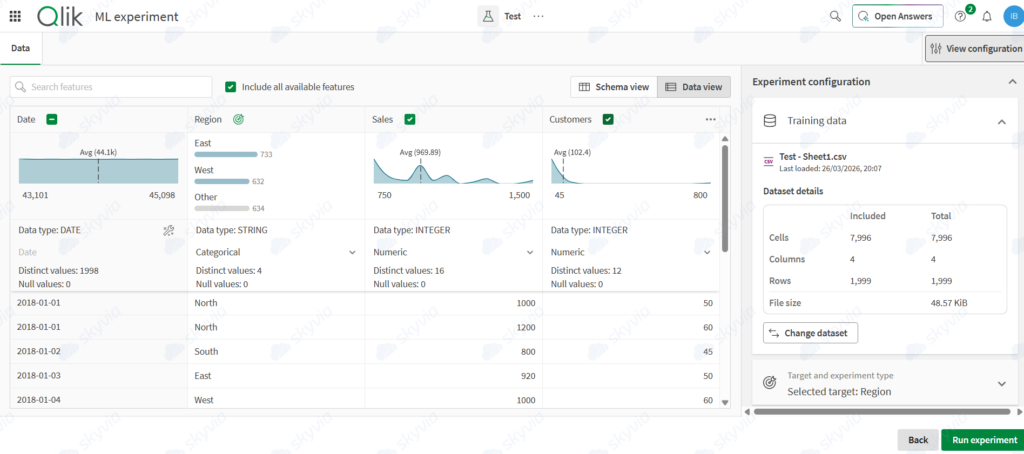
It might take a bit of time to get comfortable with that flow, especially if you spend years watching and managing something with an entirely different approach. But once it “qliks,” you stop thinking in terms of “filters” and start thinking in terms of relationships.
G2 / Capterra Rating
G2 – 4.4/5 based on 925 reviews.
Capterra – 4.5/5 based on 260 reviews.
Best For
When discovery is deliberate practice rather than a happy accident, Qlik supports that investigative approach exceptionally well. Data analysts who are comfortable wandering through data will find it more powerful than those who arrive with precise questions already crafted and answers anticipated.
Key Features
- The associative engine exposes connections between data, so users don’t have to reconstruct relationships manually every time.
- Visual interface to create dashboards without prerequisite design sessions or whiteboard rituals.
- AI-driven suggestions will help with insights, especially when you don’t know what you’re looking for yet.
- Integrates with databases, cloud services, and spreadsheets that are immortal by now because of organizational inertia.
Pricing Deep Dive
- Qlik Sense prices start at around $30/user/month for the Starter plan, but you will need to buy at least 10 users.
- AI features start supporting your analytics in the Standard plan at $825 per month per 25GB.
- For larger organizations, Qlik Sense offers a Premium plan that starts at $2,750 per month per 50GB.
- The Enterprise plan offers 250GB for analysis, but at what price? Only sales will tell you, depending on your needs and desired workflow.
Expect the cost to shift as you move into larger, governed environments.
Security & Compliance
Supports role-based access, encryption, and governance controls, so that your compliance officer won’t develop a stress rash. It can be deployed in the cloud, hybrid, or on-prem environments, making it easier to fit into more restrictive environments. Also, plays nice with GDPR, SOC 2, and other acronyms that sound boring until they’re the reason a deal falls apart.
Strengths & Limitations
Comfort zone:
- Shows context, not just filtered results.
- Encourages exploration instead of forcing a path.
- Handles multiple data sources without much friction.
Friction zone:
- Takes time to “get” how it thinks.
- Advanced use still leans on technical skills.
- Pricing grows with scale.
If most tools feel like slicing data into neat pieces, Qlik feels more like pulling on a loose thread and watching the whole thing unravel in interesting ways.
Best for SMBs & Quick Real-Time Dashboards
If you need dashboards up and running fast, without pulling in engineers or building out a full data stack, tools like Klipfolio, Zoho Analytics, and Domo are built for that kind of work.
They’re not trying to solve complex data modeling. Their goal is much simpler: connect your sources, pick a starting point, and get a working dashboard in front of the team in minutes.
Klipfolio
Klipfolio is built around the idea that your team should always be looking at the same numbers, updated continuously, without refreshing reports or exporting data.
Where it stands out is the balance between flexibility and speed. And setup time is much shorter, thanks to pre-built templates. For KPI tracking specifically, it’s almost suspiciously fast to set up.
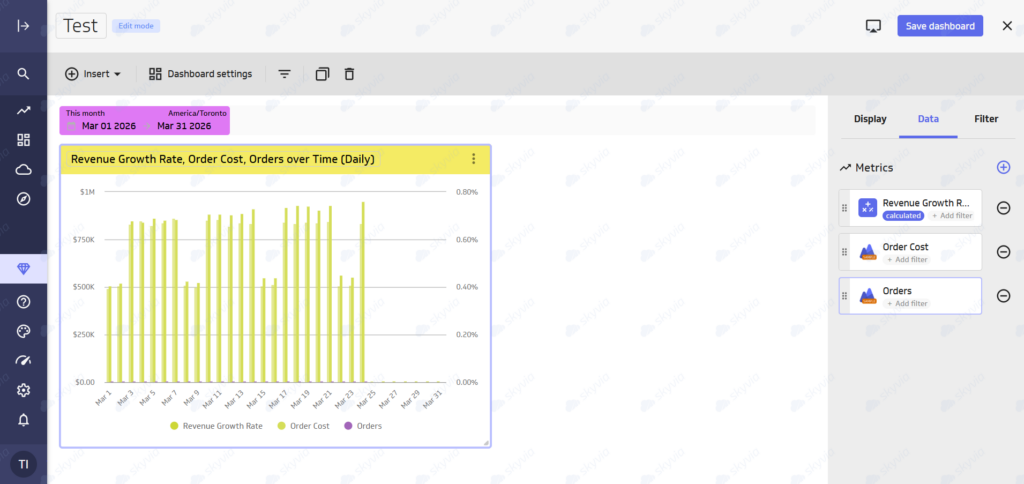
The “almost” matters, though. Large datasets slow it down, somehow equalizing the time saved during the initial setup. Customization has limits, and some configurations still expect a certain level of technical comfort or at least one dedicated developer.
Klipfolio pricing plans range from $140 per month for 3 dashboards to $690 per month for 40 dashboards. The best part of Klipfolio’s subscription plans is that they do not limit the number of active users.
Best fit:
Teams that want live KPI tracking with minimal setup and are comfortable making light adjustments to metrics and structure.
G2 / Capterra ratings:
- G2 – 4.5/5 based on 258 reviews.
- Capterra – not presented.
Zoho Analytics
Zoho Analytics is more structured. It’s less about assembling dashboards from scratch and more about organizing and shaping data across systems into a consistent, reusable format.
It comes with a large set of pre-built reports and dashboards, especially if you’re already using Zoho products. That makes the initial setup noticeably faster – you’re often starting from something close to what you need, not from zero.
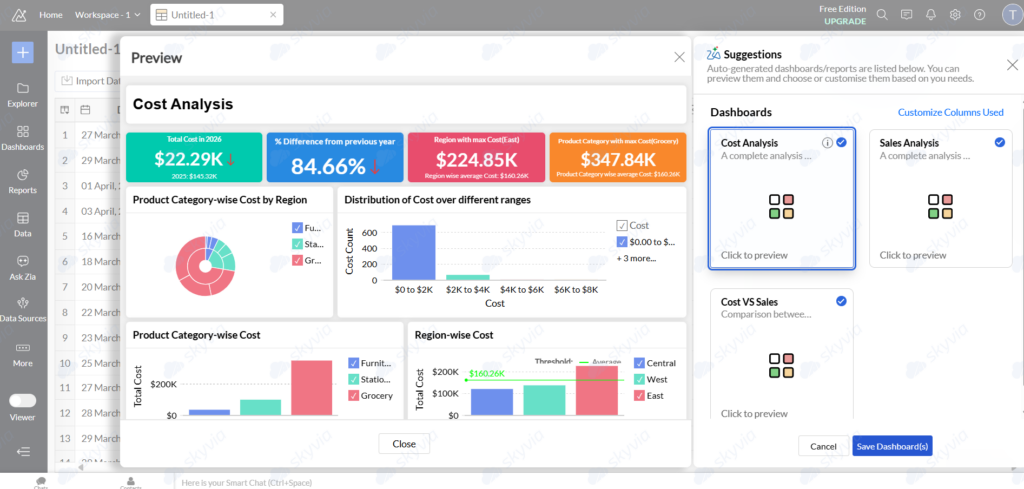
Where it starts to tighten is in advanced customization. For most SMB use cases, it’s enough. But if you’re trying to push into more complex modeling or highly tailored visuals, you’ll feel the boundaries. Also, larger datasets take time to load.
When it comes to Zoho Analytics’ pricing, you can start on the free plan and build quite a lot (up to 500,000 rows). For smaller teams or early-stage setups, it’s noticeably easier to justify before moving to higher tiers.
Best fit:
Organizations that live in Zoho-land, or teams who’d rather follow a map to dashboards than machete their way through the jungle from scratch.
G2 / Capterra ratings:
Domo
Domo wants you to feel like BI is easy. You connect your data sources, use built-in connectors, and start building dashboards with pre-configured components.
The strength here is how quickly you can move from data to insight. Real-time reporting, automated updates, and built-in visualization tools are all part of the core experience. You don’t need to assemble multiple tools to get there.
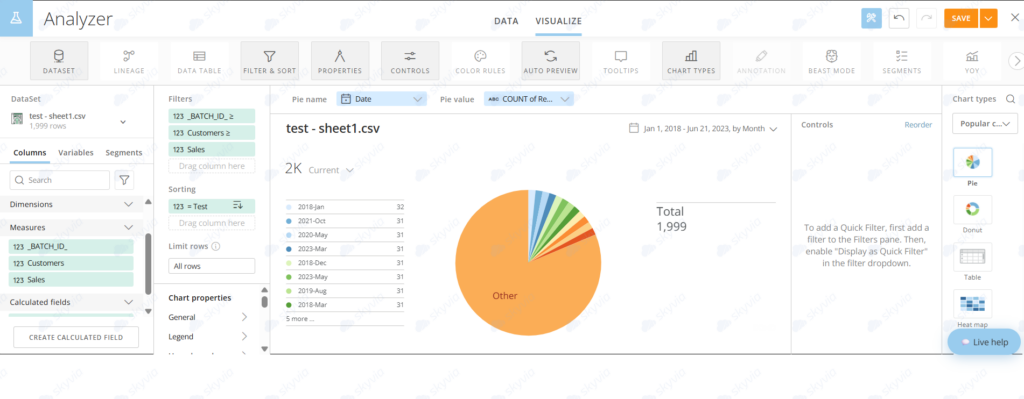
There’s also room for predictive modeling and more advanced analysis, but the platform still orients toward usability rather than deep technical control.
Here comes the catch. Domo’s pricing hides behind “contact us” buttons, so your wallet takes the bigger hit. And if you want to customize something weird, you might be out of luck compared to tools that let engineers bend reality.
Best fit:
Teams that want BI up and running quickly, without the existential suffering, even if it means accepting guardrails instead of infinite architectural possibilities.
G2 / Capterra ratings:
Best for Data Scientists & Big Data Processing
Not everything on this list is a BI tool. Some tools don’t care about dashboards at all – they care about moving, transforming, and crunching serious volumes of data. That is that category.
If BI tools are where you look at data, tools like Spark are where data actually gets shaped before anyone sees it. Different job, different mindset.
Apache Spark
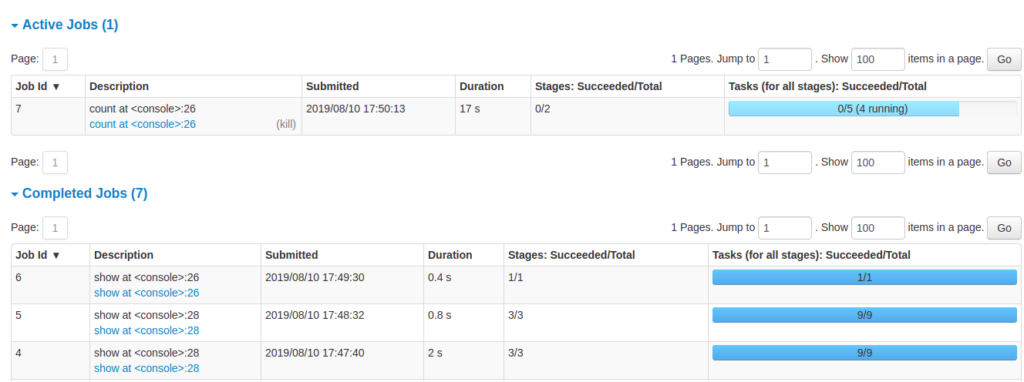
Four words from the Spark team: simple, fast, scalable, unified. The fast part is true – once it’s running, in-memory processing is hard to argue with. The simple part depends on whom you ask. It’s the only open-source option here, approachable enough for non-technical users on small jobs, and a different animal entirely when the dataset grows. We handed the cluster setup to our DevOps engineer. Three hours later, we started processing.
G2 / Capterra Rating
G2 – 4.3/5 based on 54 reviews.
Capterra – 4.6/5 based on 16 reviews.
Best For
If your data starts to feel “too big for SQL,” this is where Spark enters the conversation. It’s built for distributed processing –batch jobs, streaming pipelines, and machine learning workloads. Not dashboards. Not quick reports. Actual data processing at scale.
Key Features
- Spark works as a unified engine. You can run batch transformations, stream data in real time, and train models, all within the same framework.
- It supports Python, Scala, SQL, and Java – so teams can bring their own terms to projects.
- In-memory processing does most of the work, so it’s impressively fast (but memory usage impressively skyrockets once datasets get bigger).
Pricing Deep Dive
Spark’s free, gloriously open-source, yours for the taking. But infrastructure sends the real bill:
- Databricks: usage-based (compute + DBUs).
- AWS EMR / Azure HDInsight: hourly cluster pricing.
- Self-hosted: infra + maintenance.
It makes sense when you’re processing data at an industrial scale every day, but using it for minor tasks or just to try something is like getting on a private jet for a grocery run.
Security & Compliance
By design, Apache Spark supports enterprise-grade security: Kerberos authentication, role-based access, encryption in transit and at rest, and integration with tools such as Ranger. Works across secured cloud and on-prem environments.
Strengths & Limitations
Comfort zone:
- Extremely fast for large-scale data processing.
- Handles batch, streaming, and ML in one framework.
- Flexible across cloud and on-prem setups.
Friction zone:
- Requires infrastructure setup and ongoing tuning.
- Memory usage can get heavy on large workloads.
- Not designed for business users or quick reporting.
Spark is not where you build dashboards. It’s what makes those dashboards possible once the data gets too big to handle any other way.
Altair AI Studio (RapidMiner)
RapidMiner sits in an interesting middle ground. It’s not a fully lightweight dashboard tool, nor is it a fully developer-first ML framework. Its project structure means continuity, where teammates can extend your work through workflows or automation instead of playing detective.
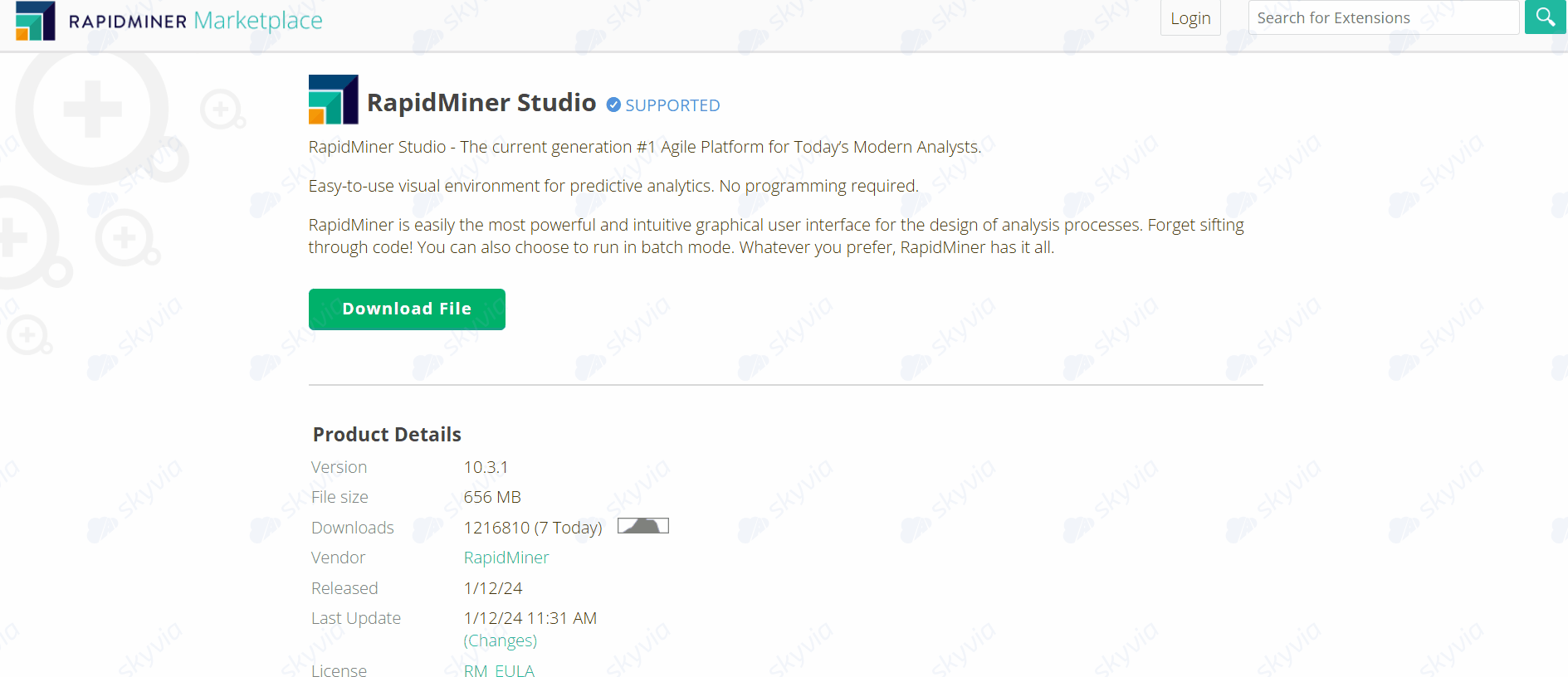
One thing worth noting. RapidMiner is now harder to get. Earlier versions were grab-it-and-go, with no bureaucracy that slows down even the most ambitious projects. In the post-Altair buyout phase, access got reined in. Direct downloads are now elusive, and trial access typically flows through demo requests or account creation rituals. No way to escape that call with the sales.
G2 / Capterra Rating
G2 – 4.6/5 based on 513 reviews.
Capterra – 4.4/5 based on 23 reviews.
Best For
Analysts who handle data transformation easily but don’t want to turn into full-time developers just to keep doing their jobs will find it quite useful. This tool isn’t a starting point. More like the next step once dashboards stop being enough.
Key Features
- A large library of building blocks (1,500+ operators) for data prep, modeling, validation, and deployment.
- Most real workflows rely on a small subset, but the depth is there when needed.
- AutoML is built into the workflow.
- ETL, feature engineering, model training, and deployment all live in one place. No context switching between tools.
- The platform lets you deploy models as APIs, score data in real time, and manage the full model lifecycle.
- Text mining, time series analysis, geospatial data, and extensions for Python and R when needed.
Pricing Deep Dive
RapidMiner offers three editions with different functionality, yet for all of them, you will need to get a quote first to learn how much you’re going to pay.
Security & Compliance
RapidMiner offers role-based permissions, audit logs, and user-level controls. Encrypted storage and secure communication across environments are there, too. For enterprise setups, the platform supports SSO, private connectors, and VPC-based isolation. And the cherry on the top –ISO 27001 alignment is achievable depending on the configuration.
Strengths & Limitations
Comfort zone:
- Visual workflows make machine learning accessible while control remains in your team’s hands.
- Strong AutoML capabilities reduce time spent on model tuning.
- The wide operator library covers most common analytical scenarios.
Friction zone:
- Performance can lag with very large datasets compared to distributed engines like Spark.
- The interface is easy to start with, but complex workflows require understanding how operators interact.
Data-Driven Comparison Matrix
| Tool Name | Pricing Model | Primary Interface | Native Cloud Data Warehouse Support | Steepest Learning Curve |
|---|---|---|---|---|
| Skyvia | Volume-based + feature-tiered (freemium available) | No-code visual + optional SQL | Excellent (Snowflake, BigQuery, Redshift, Azure SQL, etc.) | Low |
| Microsoft Power BI | Per user (Pro / Premium) + capacity-based | GUI (drag-and-drop) + DAX | Moderate to Excellent (strong with Azure, good via connectors) | Moderate (DAX, data modeling) |
| Tableau | Per user (Creator / Explorer / Viewer) | GUI (drag-and-drop) + R/Python | Moderate to Excellent (broad warehouse support) | Moderate to High (calculations, modeling) |
| Qlik Sense | Per user (tiered subscription) | GUI (drag-and-drop) + scripting | Moderate (requires modeling effort) | High (associative model, scripting) |
| Looker | Usage-based (compute/query via Google Cloud) | Code-first (LookML) | Excellent (native with BigQuery, strong across warehouses) | High (LookML, modeling layer) |
| Klipfolio | Subscription-based (metrics/users) + free tier | No-code / low-code visual | Moderate (connectors available, limited optimization) | Moderate (metric setup, data shaping) |
| Zoho Analytics | Tiered subscription (cloud) + on-prem license | GUI (drag-and-drop) + formula language | Moderate (not warehouse-first) | Moderate to High (data prep, modeling limits) |
| Domo | Subscription-based (custom, usage factors) | GUI (drag-and-drop) + optional scripting | Moderate (strong connectors, less warehouse-centric) | Moderate (platform breadth, data flows) |
| RapidMiner | Subscription-based (tiered, no free version) | GUI (visual workflows) + scripting | Poor to Moderate (not warehouse-focused) | High (ML workflows, complexity) |
| Apache Spark | Open-source (compute-based infrastructure) | Code-first (Scala, Python, Java, R) | Excellent (core engine for large-scale data processing) | Very High (distributed systems, engineering overhead) |
Conclusion
Different teams need different things. A tool that’s perfect for a data engineering team with weeks to configure a pipeline is the wrong call for an analyst who needs answers by Friday. The decision comes down to three questions:
- What does your data look like?
- Who’s going to run this?
- And what happens when something breaks?
What matters more is what you’re standing on.
Dashboards, models, forecasts – they all run on the same fuel: clean, consistent data. If that part is off, the rest just looks convincing while quietly drifting out of sync.
So if you’ve already found your BI tool but your data is still scattered across systems, fix that layer first. Start a free trial of Skyvia and set up pipelines that move your data where it needs to be –automatically, and without the usual back-and-forth.
FAQ Top 10 Data Analysis Tools

What are the best embedded dashboard providers for enterprise data analytics?
Looker, Power BI Embedded, and Tableau stand out here. They let you place dashboards inside your product without breaking consistency in permissions, performance, or data logic.
How do real-time ETL tools compare in pricing and features for startups?
Pricing models vary – some scale with data volume, others with connectors or compute. Early on, simplicity wins. As data grows, the differences in cost control and flexibility become harder to ignore.
What tool provides governed access to warehouse data directly from Excel and Google Sheets?
Solutions like Skyvia Connect expose warehouse data through SQL or OData. Excel and Google Sheets can query it directly, without exports or manual syncing.
What is the best data import tool on the market right now?
There’s no single leader. Fivetran prioritizes automation, Hevo focuses on ease of setup, and Skyvia offers more control over how data is moved and shaped. The right choice depends on how involved you want to be.
Do we need both a data import (ETL) tool and a data analysis tool?
Yes. One prepares and delivers the data, the other interprets it. Trying to stretch a single tool across both usually leads to compromises on one side or the other.