Summary
- Fivetran – automated enterprise ELT for high-volume, log-based CDC that handles schema drift seamlessly at a premium usage-based cost.
- Skyvia – cloud-native, no-code platform with visual mapping and predictable, tiered pricing based on record volume.
- Airbyte (Self-hosted) – open-source, highly customizable integration framework for developer-led teams capable of handling hosting and infrastructure maintenance.
- Python + AWS S3 (Custom) – cost-effective option for one-time migrations or simple batch snapshots, requiring custom code to handle logical replication and schemas.
Does your direct PostgreSQL and Snowflake integration seem perfect for your small and cozy workflow? What will happen if someone slightly modifies the source metadata? Or what would you do if your database hits millions of records and your workflow breaks down? In this article, I will share my practical insights about integrating Postgres and Snowflake using third-party integration platforms, such as Skyvia, Fivetran, and Airbyte. Although I am actually Skyvia employee, I won’t pretend that Skyvia is a sure cure for everything. I conducted a realistic test of available tools as a data integration professional and share the results with you.
As a business scales, traditional processes become obsolete. New processes emerge, and the company grows with departments and functions that need to be constantly synchronized. This is where the need arises to move from traditional databases to comprehensive data warehouses that can handle data from different functions.
Why Is Moving Data from Postgres to Snowflake So Challenging?
Hypothetically, connecting Postgres to Snowflake seems like a weekend project. You copy your source tables to your destination schema and watch the data flow. It feels perfect until the moment it enters production and encounters reality.
In my experience, the true headache of data integration isn’t the initial bulk load. It’s everything that happens after that, when something unexpected shows up. Here are the real operational challenges that turn a pipeline into a maintenance nightmare.
Two Databases Built for Entirely Different Jobs
To understand the pain points, you have to realize that Postgres and Snowflake speak completely different languages because they have different purposes.
- Postgres is an operational database. It’s designed to handle millions of tiny, lightning-fast tasks for your live application, such as updating a single user’s password or processing a single checkout. It thinks row by row.
- Snowflake is an analytical data warehouse. It’s designed to scan hundreds of millions of rows simultaneously to tell you your total revenue trends over the last three years.
Trying to feed Postgres’s constant stream of tiny updates directly into Snowflake is like trying to fuel a commercial cruise ship with an eyedropper. If you send data too frequently, Snowflake gets cluttered with millions of tiny files, which slows down your reports and sends your cloud computing bill through the roof. You have to build complex logic just to bundle and “batch” the data properly before Snowflake receives it.
SQL Dialect Differences
Despite being SQL-compliant databases, both PostgreSQL and Snowflake have different dialects. Should your company move analytical views, stored procedures, or dbt models, prepare yourself for reviewing them. Regular expressions, STRING_AGG, or DATE functions in Postgres behave differently in Snowflake.
Some functions of PostgreSQL that are not supported by Snowflake include DISTINCT ON or filtering within aggregations. It means that you should rewrite them by using window functions or CASE expressions.
Data Type Differences
Data type differences can be complicated due to silent data changes that may occur. While loads are executed successfully, values are changed without any issues. For example, precise values of NUMERIC in PostgreSQL can be automatically converted to integer values in Snowflake if you do not specify precision and scale during table creation.
Moreover, Postgres data types that do not exist in Snowflake (e.g., timestamp ranges or geometrical types) should be separated into columns before moving.
Performance Architecture Shift
Postgres relies on indexes for row lookups, while Snowflake does not support indexes. In Snowflake, data is stored in a columnar format with micro-partitions, and it utilizes metadata to bypass unnecessary blocks. Query that would run instantly on Postgres due to indexing can take quite some time on Snowflake if your data is not sorted (like in the case of Auto-Clustering). Just be aware that although Auto-Clustering improves performance, it may also lead to increased costs for Snowflake if not monitored properly.
CDC Challenges
If a simple once-in-a-while copy will not do and you want real-time replication, you would have to resort to CDC and read write-ahead logs (WAL) from Postgres. This will bring much more operational complexity into the picture.
For instance, lagging behind on the part of your replication tooling can lead to the open replication slot causing Postgres to accumulate WAL files and fill up disks that will eventually lead to database outages. Moreover, Snowflake storage is basically immutable and, therefore, frequent row-level changes and deletions are inefficient there.
Managing Schema Changes
Changes in the schema in the upper stream can cause chaos downstream. This is because applications and database schemas are always changing and evolving, so your integration must be able to manage the schema changes.
A simple change such as a renaming or changing a field can make a difference; for instance, a renamed field in Postgres can disrupt the entire Snowflake model. To avoid this, implement the data validation.
How Did We Test the Postgres to Snowflake Replication Tools?
To provide an objective, hands-on evaluation of Fivetran, Skyvia, and Airbyte, I didn’t just rely on marketing documentation or high-level feature lists. Instead, I tried to build PostgreSQL Snowflake integration from scratch in each tool and evaluate how it went. I’ve established connections to PostgreSQL and Snowflake, and set up the integration in each tool.
Learning Curve
You know how frustrating it is when you open a new tool, see the crooked menus, and stay confused, wondering where to start. I work for Skyvia, and I am used to it, but I have never used Fivetran or Airbyte before. Thus, I decided to check how easy it is to learn these tools. If a person who sees them for the first time can set up an integration.
Pricing Model and Volatility
Integration billing models vary widely and can drastically impact your total cost of ownership (TCO) as your data expands. We compared how each platform behaves when running continuous replication workloads into Snowflake.
Availability of Free Plans
Startups, SMBs, and architecture teams creating a PoC need to have the freedom to work within their budgets. This section was used to explore the limits that exist for the features offered within the free tier of each platform, such as the limit on the amount of data that can be handled and synchronization capabilities.
Key Feature Integrations
Lastly, we explored the technical limits of the features available from each tool. An efficient pipeline will not only allow you to move data once; it has to meet other requirements as well. In this part of our evaluation, we paid attention to schema drift management, processing of nested semi-structured data blocks, and data flushing in order not to keep your Snowflake virtual warehouse awake.

What Are the Best Tools for Postgres to Snowflake Migration?
If you search the web for the “absolute best” data integration tool, you will see endless marketing headers claiming a particular platform wears the crown. In reality, there is no generic number one tool.
Choosing the right platform for a PostgreSQL to Snowflake migration entirely depends on your specific infrastructure constraints, your engineering budget, your internal technical bandwidth, and your daily transactional data volume, etc.
To help you decide what platform is best for your PostgreSQL Snowflake handshake, I set up my personal tests and compared three market leaders:
Rather than giving you a generic overview, the table below breaks down exactly how these engines operate under the hood when moving data into Snowflake.
| Feature / Metric | Fivetran | Skyvia | Airbyte (Self-Hosted) |
|---|---|---|---|
| Best For | Enterprise corporations running high-volume, automated continuous CDC workloads. | Teams looking for fast, intuitive, no-code solutions. | Developer-heavy engineering teams demanding deep code customizability. |
| Pricing Model | Usage-based MAR: Billed dynamically on Monthly Active Rows (the number of unique rows updated or inserted each month). | Flat-Rate Tiered Subscriptions: Transparent pricing based on explicit per-record counts or overall data volume. | Free Open-Source Core: No software license fee. You pay only for your own underlying infrastructure and compute costs. |
| Setup Complexity | Medium: Fully managed SaaS, but requires deep, manual source-database configurations (such as logical replication slot permissions). | Low: A 100% cloud-native, visual wizard that guides you through connection handshakes without infrastructure overhead. | High: Requires deploying, orchestrating, and maintaining the engine via Docker or Kubernetes (K8s) clusters. |
| Sync Frequency | Highly granular; scales continuously up to 1-minute intervals. | Highly granular; scales continuously up to 1-minute intervals. | Highly granular; scales continuously up to 1-minute intervals. |
| Postgres CDC Method | Log-Based: Exclusively handles incremental loads via Logical Replication slots, parsing the Write-Ahead Log (WAL). | Metadata-based: Skyvia Incremental Replication works based on object metadata, such as primary keys, creation timestamps, modification timestamps, and (where available) deletion indicators. | Log or Engine-Based: Supports Logical Replication (WAL) as well as internal Xmin system column tracking for incremental reads. |
The key takeaways from this
- Fivetran operates on a “set-it-and-forget-it” model for deep enterprise pockets. It heavily abstracts away configuration, but its MAR pricing can become unpredictable during massive historical table backfills or bulk database updates.
- Skyvia is the ideal choice if you need enterprise-level capabilities, such as quick log-based CDC, without requiring any engineering expertise. Thanks to its consistent volume tier pricing, it becomes easier for finance departments to predict costs, even in the absence of unpredictable consumption peaks.
- Airbyte (Self-Hosted) provides the ultimate playground for code-heavy teams. While the open-source software is free, it trades away simplicity. Your engineers are fully responsible for managing container scaling, dealing with JVM memory leaks, and keeping the replication engine alive.
Best for Enterprise & Massive Scale: Fivetran
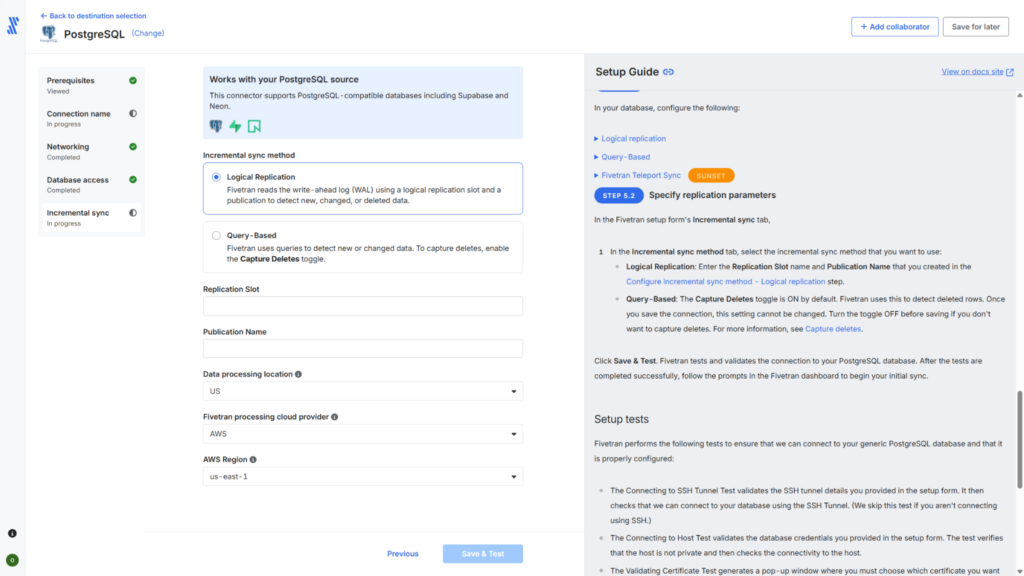
- G2 Rating: 4.3 / 5 Stars
- Capterra Rating: 4.4 / 5 Stars
If you have a massive dataset, a complex corporate infrastructure, and a healthy budget, Fivetran is usually the enterprise favorite.
Its whole philosophy boils down to complete automation. In high-volume environments, software engineers are constantly tweaking database schemas. Managing those changes manually is a notorious bottleneck for data teams, but Fivetran handles schema drift seamlessly. If a field gets added, dropped, or changed in your Postgres database, it updates Snowflake automatically without crashing your dashboards or requiring a frantic late-night fix from your team.
Under the hood, its log-based Change Data Capture (CDC) reads your Postgres Write-Ahead Logs (WAL) incredibly efficiently, staging data smoothly without putting a heavy load on your production systems.
Best For
Enterprise corporations with large budget allocations, extensive data volumes, and a strict requirement for hands-off, highly resilient ELT pipelines.
Pricing
Fivetran operates entirely on a dynamic consumption-based model tier. You can review their full pricing tiers and calculate your operational costs directly on the official Fivetran Pricing Page.
Pros
- Schema Drift Management: Can automatically map, align, and create target DDL changes in Snowflake whenever schema drift happens in the upstream Postgres database.
- Set-It-and-Forget-It Process: Entirely abstracted from the complexities of the underlying code, pipeline scheduling, and failover process.
- Interaction With the Warehouse: Batches incoming WAL rows to avoid frequent and costly wake-ups of the virtual warehouses.
Cons
- Cost Predictability: Monthly Active Rows (MAR) model of pricing can get expensive if you often update the same rows in Postgres, since each updated row is charged per month for MAR.
- Configuration Limits: Advanced developers may find the lack of deep environmental control or custom scheduling capabilities restrictive.
Best for Fast No-Code Solutions: Skyvia
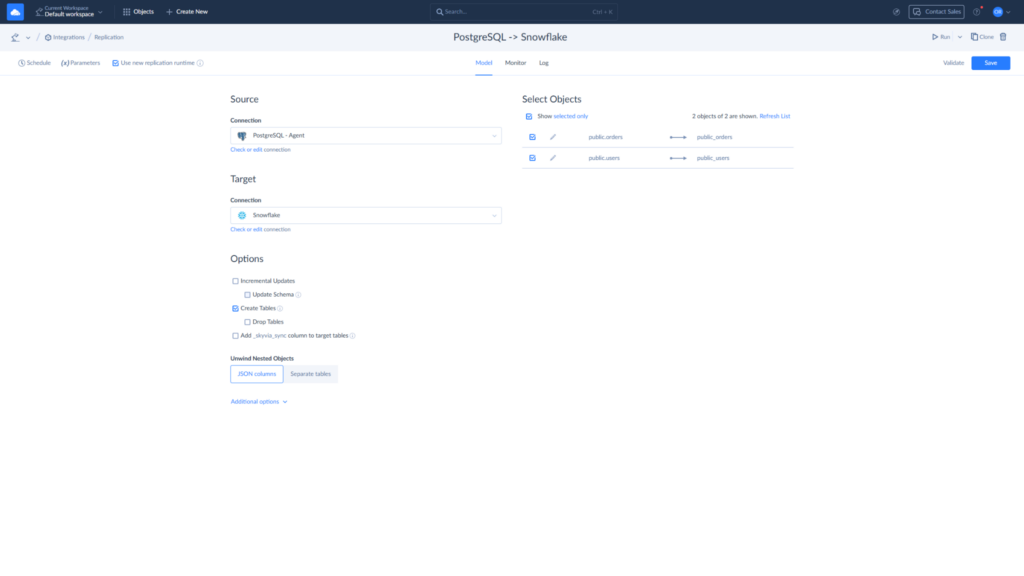
- G2 Rating: 4.9 / 5 Stars
- Capterra Rating: 4.8 / 5 Stars
If you don’t have a massive squad of DevOps engineers on hand and want a pipeline running without a massive headache, Skyvia is your sweet spot. It trades complex infrastructure configuration for speed, ease of use, and highly predictable pricing.
Instead of assuming you have time to manage local runtime engines, write custom scripts, or wrangle API tokens, Skyvia relies on a completely cloud-native, visual wizard. You simply connect your endpoints through a clean interface, and the platform natively handles the heavy lifting like schema mapping, incremental syncs, and data type conversions.
For standard replication workloads, it cuts down implementation time from days of engineering work to a few quick minutes, making it an excellent fit for agile teams and growing businesses that need results fast.
Best For
Fast-moving data teams, and business analysts who require a completely code-free data integration environment with clear, predictable monthly software costs.
Pricing
Skyvia offers a highly predictable, tiered subscription framework based explicitly on record sync counts or data volumes, completely eliminating the fear of sudden usage spikes. You can evaluate their plans and find the perfect fit on the Skyvia Pricing Page.
Pros
- Predictable Pricing Framework: Billed transparently based on actual record volumes synced, allowing finance teams to forecast expenditures without surprise consumption spikes.
- True Zero-Coding Required: A clean visual wizard completely eliminates the need for Python, SQL refactoring scripts, or container management.
- Ultra-Fast Time to Value: Pipelines can be easily configured. Loads are fast because data is transferred by batches, not record-by-record.
Cons
- Strictly Cloud-Native: Skyvia is a 100% cloud-hosted solution. If your company operates in a hyper-regulated sector (such as top-tier clinical health networks or defense banking) that mandates a completely air-gapped, on-premise infrastructure layout without outbound internet access, a fully cloud-hosted platform won’t align. In those rare architectural scenarios, a self-hosted open-source or local on-prem tool is necessary.

Best for Developer-Heavy Teams: Airbyte (Self-Hosted)
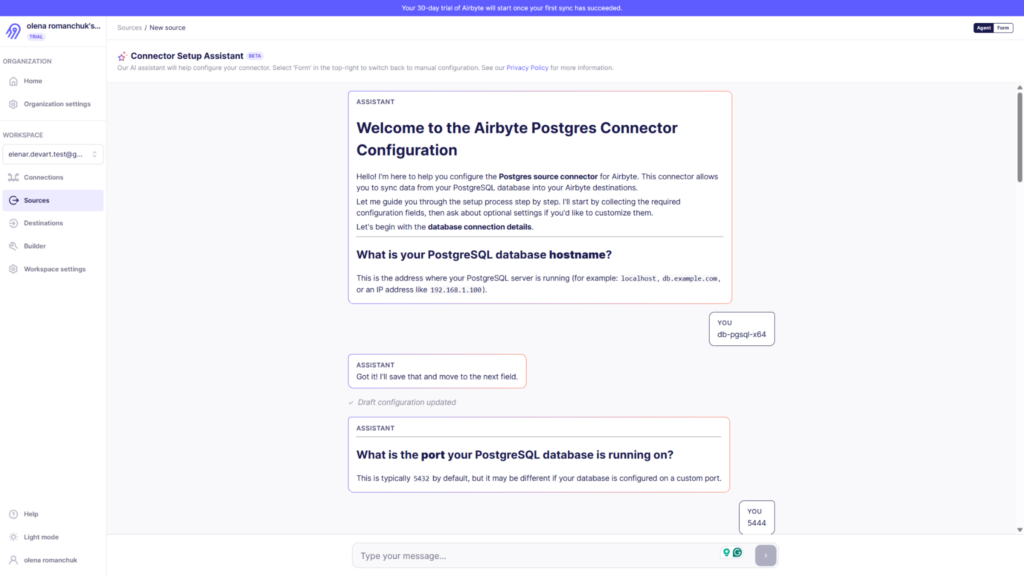
- G2 Rating: 4.4 / 5 Stars
- Capterra Rating: Not Rated / 0 Reviews
If your company has an engineering department with strong DevOps resources and a desire for full architectural control, Airbyte’s self-hosted, open-source model is an exceptionally powerful alternative.
Airbyte is built explicitly under an “open-core” philosophy, making it highly customizable. Because the entire framework is extensible, your engineers can jump straight into the source code, build custom connectors using their Python Connector Development Kit (CDK), or fine-tune sync behaviors to match highly specific network constraints.
When replicating from a legacy database like Postgres 9.6, Airbyte allows engineers to choose precisely how they want to track data mutations—whether that is standard log-based Change Data Capture (CDC) or utilizing the internal PostgreSQL Xmin system columns for incremental reads.
However, running Airbyte on your own infrastructure strips away the typical “hands-off” luxury found in managed SaaS environments. Setting it up requires deploying and orchestrating the platform within a local containerized environment or an enterprise Kubernetes (K8s) cluster.
Best For
Code-heavy development shops, data engineering teams with dedicated DevOps infrastructure capacity, and organizations that demand an open-source framework to avoid SaaS vendor lock-in.
Pricing
The core Airbyte Open Source Software (OSS) engine is completely free to download and use under an open-source license. However, if you choose to transition off your local infrastructure and onto their fully managed cloud infrastructure, you can review their volume-based consumption metrics via the Airbyte Pricing Page.
Pros
- High Customizability: Deeply flexible code architecture backed by a Python CDK that allows engineers to edit existing connectors or write entirely original internal endpoints.
- Zero Software Licensing Costs: Completely free to deploy, run, and scale infinitely if you utilize the self-hosted open-source version.
- Open-Source Ecosystem: Backed by an extensive community of thousands of data engineers continuously refining edge-case connectors.
Cons
- The Hidden Cost of Maintenance: While the software is free, the engineering time required to host, scale, monitor, and debug failed connectors or container memory leaks represents a significant hidden total cost of ownership (TCO). You are entirely responsible for keeping the replication infrastructure alive.
How Can You Build a Custom Pipeline Using Python?
Whenever a data team discusses moving data between systems, someone in the room will inevitably bring up the classic “Build vs. Buy” debate. The argument usually sounds something like this: “Why should we pay a vendor a monthly subscription when we have Python developers who can spin up a custom script to do this for free?”
It is an alluring argument. For a one-time, historical lift-and-shift migration or a basic weekly batch script, a custom Python data pipeline is quite feasible. However, senior data engineers know that the cost of building an initial pipeline is cheap. While the cost of maintenance can become a real problem.
I built a custom Python script for this exact task early in my career. While it works for weekly batch loads, maintaining custom CDC logic using Postgres triggers quickly turned into a nightmare.
If you are evaluating whether to build a proprietary pipeline to move data from PostgreSQL to Snowflake, it helps to understand exactly what that architecture looks like under the hood.
The Architecture of a Custom Python Pipeline
When handling data volumes beyond a few megabytes, you cannot simply select rows out of Postgres into application memory and loop over INSERT statements into Snowflake. Doing so will cause your script to hit an Out-Of-Memory (OOM) exception, and row-by-row inserts into Snowflake are painfully slow, driving your virtual warehouse costs through the roof.
Instead, you must design a three-stage, decoupled orchestration architecture using AWS S3 as an intermediate staging environment.
Here is the technical blueprint for how this pipeline operates across three distinct stages:
Stage 1: Fast Extraction via psycopg2
To retrieve large amounts of data from PostgreSQL in an efficient manner, the program uses the psycopg2 module for Postgres’ built-in streaming engine as an alternative to SELECT query. Using the capabilities of Python’s gzip module in combination with the highly efficient copy_expert function, the program directs Postgres to stream out the data as a compressed CSV file.
import gzip
import psycopg2

# Stream compressed CSV data directly from Postgres to disk
query = "COPY (SELECT * FROM orders) TO STDOUT WITH CSV HEADER DELIMITER ','"

pg_creds = {"dbname": "prod_db", "user": "postgres", "password": "password", "host": "localhost"}

with psycopg2.connect(**pg_creds) as pg_conn:
    with pg_conn.cursor() as pg_cur:
        with gzip.open("orders_dump.csv.gz", "wb") as f:
            pg_cur.copy_expert(query, f)
Stage 2: Staging the Files via boto3
Snowflake cannot read the data from any other transactional database networks securely or effectively. Thus, in the Python code, we use the AWS SDK for Python (Boto3) library for uploading these files to a secure Amazon S3 bucket. In a production environment, this will involve multipart uploads and handling of network timeout exceptions.
Stage 3: Bulk Ingestion via snowflake-connector-python
Once the data files are securely resting in S3, the script opens a connection to Snowflake using the native snowflake-connector-python. Rather than executing raw inserts, it triggers an enterprise-grade bulk data load by executing a COPY INTO command.
This tells Snowflake’s centralized metadata layer to grab the files directly from the S3 location—configured within Snowflake as an External Stage—and parallelize the ingestion straight into Snowflake’s columnar micro-partitions.
import snowflake.connector

sf_creds = {"account": "xy12345.us-east-1", "user": "dw_admin", "password": "password", "warehouse": "SMALL_WH", "database": "ANALYTICS_DB", "schema": "RAW"}

copy_sql = """
    COPY INTO ANALYTICS_DB.RAW.ORDERS
    FROM @my_s3_external_stage/postgres_sync/orders/
    FILE_FORMAT = (TYPE = 'CSV' SKIP_HEADER = 1 COMPRESSION = 'GZIP' FIELD_OPTIONALLY_ENCLOSED_BY = '"');
"""

with snowflake.connector.connect(**sf_creds) as sf_conn:
    with sf_conn.cursor() as sf_cur:
        sf_cur.execute(copy_sql)
The Hidden Maintenance Overhead of “Free” Pipelines
While the architectural blueprint above looks straightforward on paper, running it reliably at production scale introduces massive operational vulnerabilities that your team will have to code, monitor, and maintain manually:
- The CDC Nightmare: The code pattern above works perfectly for a full, destructive overwrite. But what happens when you need to sync only data that has changed in the last 5 minutes? If you don’t buy a tool, your developers must manually build a Change Data Capture framework. Writing custom Postgres database triggers to track updates or trying to write a state-management engine in Python to track logical replication log sequences (LSNs) is incredibly complex and prone to data drops.
- Schema Drift Failures: The moment an upstream application developer alters a column from an INT to a FLOAT or renames a field in PostgreSQL, your Python script will fail mid-execution. Your team must build a custom schema parsing engine to pre-check DDL changes before triggering the bulk upload, or accept that pipelines will crash frequently.
- Alerting and Monitoring Redundancies: If the script fails due to an AWS network glitch, how does your team find out? To make a custom script production-ready, you must surround it with an external orchestration framework (like Apache Airflow or Prefect), build failure retry logic, and wire up notification webhooks into Slack or PagerDuty.
The Verdict
Building your own pipeline using Python, psycopg2, and S3 is an excellent, cost-effective option for one-time data migrations or static, low-frequency historical snapshots where data schemas never change.
However, if your business operations require real-time analytics, continuous data freshness, and zero data loss, the engineering salary hours spent building, monitoring, and patch-fixing a custom replication engine will quickly surpass the cost of utilizing a dedicated data integration platform.
Which Postgres to Snowflake Strategy Should You Choose?
When it comes to migrating or replicating data from PostgreSQL to Snowflake, there is no universally superior strategy. The ideal architecture depends entirely on your team’s size, engineering bandwidth, budget predictability, and data volume constraints.
To help you make the definitive final decision for your data stack, let’s look at the exact operational scenarios where each path makes the most sense:
- Choose Fivetran if your company is large, needs continuous high-volume CDC, and has a healthy budget. It provides a turnkey, low-maintenance pipeline, but Monthly Active Rows (MAR) pricing can make costs unpredictable.
- Choose Airbyte (self-hosted) if your team prefers full control and has DevOps bandwidth. It’s open-source and highly customizable, but you must manage containers/clusters, memory, and connector failures yourself.
- Choose Python + AWS S3 for one-time migrations or infrequent batch loads with a stable schema. Custom scripts are cheap and simple when you don’t need real-time streaming.
- Choose Skyvia if you want an easy, middle-ground option. It’s good for SMBs and growing BI teams: visual, no-code setup, predictable tiered pricing, and built-in log-based CDC without heavy engineering work.
Making the Final Move
The best way to validate a data pipeline is to see how it handles your specific source schemas and data distribution tables in real time.
If you have an engineering team and a massive budget, Fivetran is a safe bet. If you want a pipeline built internally and have the DevOps resources, deploy Airbyte. But if you want a reliable, cost-effective pipeline running in the next 10 minutes without writing a line of code, try setting up a free connection in Skyvia today.

F.A.Q. for Postgres to Snowflake

How do I handle Postgres JSONB data types when migrating to Snowflake?
There is no need for you to change them to string data types. Snowflake has a data type called VARIANT that is specifically designed for semi-structured data blocks. The latest ELT solutions automatically convert Postgres JSONB data to VARIANT data types.
What happens to my Snowflake pipeline if a developer adds a new column in Postgres?
With a managed service like Fivetran or Skyvia, the pipeline handles schema drift automatically, creating the new field in Snowflake on the fly. If you deploy an open-source tool like Airbyte or run a custom Python script, the pipeline will typically crash mid-execution and require a manual DDL update.
Can I use AWS DMS (Database Migration Service) to move data to Snowflake?
Not directly, as Snowflake is not a supported target endpoint in AWS DMS. To build this pipeline, you must configure AWS DMS to stream your Postgres data into an Amazon S3 bucket staging layer first, then utilize Snowpipe or copy commands to bulk load those staged files into Snowflake tables.
What is the most cost-effective way to replicate high-transaction Postgres tables?
A flat-rate, volume-based data integration platform like Skyvia is the most predictable option. Highly active tables with frequent updates trigger astronomical usage spikes on consumption-based models (like Fivetran’s MAR pricing), causing your monthly software integration bill to fluctuate wildly.
Do I really need real-time (1-minute) replication from Postgres to Snowflake?
Rarely. While 1-minute intervals sound ideal, they keep your Snowflake virtual warehouses awake continuously, resulting in massive cloud compute bills. Unless your business requires true event-driven operational monitoring, batching data every 15 to 30 minutes is far more cost-effective.