Summary
- Fivetran feels almost invisible once it’s running, quietly handling schema changes and large volumes, right up until a backfill reminds you that convenience at scale tends to come with a noticeable price tag.
- Airbyte gives you the freedom to connect anything and shape pipelines exactly how you want, which is great if your team enjoys building systems and less great if they don’t.
- Skyvia focuses on getting data from point A to point B without turning it into a project, letting analysts and business users set up pipelines quickly while keeping costs and complexity within reason.
Let me burst the bubble early. We’re the team behind Skyvia. We built one of the ELT tools on this list, so yes – we’re biased. But pretending to be a neutral third party and quietly placing ourselves at #1 helps no one.
So we did it differently. We took a set of ELT tools that keep showing up in every top ELT tools comparison and ran them through the same scenarios we deal with daily. Same data, same pipelines, same moments where things usually start to wobble. Including our own tool.
Spoiler: there’s no single winner here. What you’ll get instead is a grounded look at how these tools behave once they’re part of a real workflow – especially if you’re choosing between ELT tools with no-code or low-code interface, or building tools for modern ELT pipelines data architecture.
How Did We Actually Test These ELT Platforms?
The most “best ETL tools” lists skip some interesting parts that can lift the curtain:
- Who on your team is now in charge of keeping that thing alive?
- How often do things break in surprising new ways?
- When it breaks, are we talking quick fix or existential crisis?
That’s why we believe that a test drive is the only reliable way to discover the best ELT tools for data integration, so we didn’t write this by skimming product pages. We set these ELT tools up the way you would when there’s real work to do.
Our team spun up live environments for each tool. It ran the same scenario across all of them: moving a 1M-row dataset of messy e-commerce data – JSON with nested fields and CSVs with broken formats – into a Snowflake warehouse.
The dataset wasn’t “prepared.” It had mismatched schemas, mixed types, and enough odd records to keep things interesting.
Everything looked fine at the start. Then something small changed, and we found out how the tool reacts. Some kept going. Some stopped and waited for us to do something. But all in a good time.
How Do the Top ELT Tools Compare in Real-World Scenarios?
| Fivetran | Airbyte | Skyvia | Talend | |
|---|---|---|---|---|
| Best For (Segmentation) | Enterprise teams that want pipelines to run reliably without managing infrastructure | Dev-focused teams building custom connectors or AI pipelines | Data teams that need no-code ELT and end-to-end DWH pipelines | Large organizations with complex workflows, governance, and strict data control |
| Pricing Model (The Truth) | Since 2025, MAR is now calculated per connector, not per account, which can sizably increase costs for multi-source environments | Open-source free; Cloud adds usage pricing + infra overhead | Transparent, volume-based tiers; unlimited users and no per-connector fees | Subscription + usage. Free dev tools, but production setups are costly |
| Sync Frequency | ~15 min minimum (some near real-time via webhooks) | From ~1 min (Cloud), flexible with custom setups | ~15 min minimum + event-driven reverse ETL | From ~1 min, supports real-time CDC |
| API Complexity | Low. Managed connectors, minimal custom work | Medium. YAML/Python/CLI for custom connectors | Low. No-code connectors, optional API access | High. Java-based, requires development effort |
| Deployment Environment | Fully SaaS | Cloud or self-hosted (Docker/K8s) | SaaS with optional on-prem agent | Cloud, on-prem, or hybrid |
Still look similar? That won’t last.
Which ELT Tool is Best for High-Volume Enterprise Environments?
Before we get into tools, it’s worth resetting expectations.
At enterprise scale, ELT stops being about connectors. Now, it’s about behavior under pressure, so no pipeline bites the dust. Here are features that become super important at scale (you can use them as a checklist if you’re considering a tool we didn’t cover on this list):
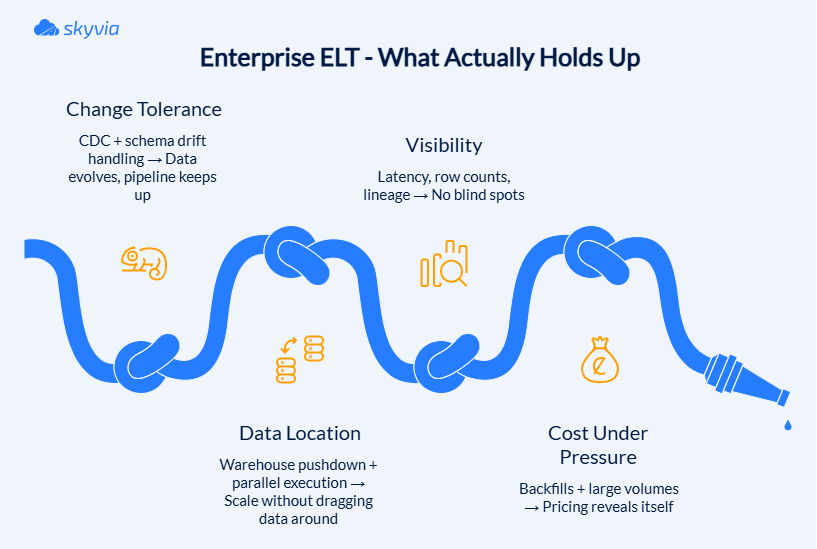
- Incremental loads and CDC (Change Data Capture)
CDC is what keeps pipelines sane and is essential for delta captures in CRM/ERP without full rescans.
- Schema drift handling (a.k.a. “the column that showed up uninvited”)
In systems like Salesforce, schemas evolve constantly. Good tools adapt quietly, while others treat it like a breaking event.
- Warehouse pushdown
You paid for a warehouse that scales, handles joins, and manages aggregations on its own. Dragging data out to process it elsewhere is just paying twice to do it worse.
- Parallel processing & micro-batching
At TB+ volumes, data comes in waves. Micro-batching and parallel execution keep things moving without creating bottlenecks that turn one slow step into everyone’s problem.
- Pricing under stress (backfills are the moment of truth)
Incremental syncs behave. Backfills don’t. That’s when pricing models stop being theoretical and start showing their personality. MAR/credit models scale linearly (avoid per-row explosions), while fixed tiers are great for budgeting.
Fivetran & Talend
When we tested these in high-volume scenarios, they ended up solving the same problem in completely different ways.
With Fivetran, the experience was almost suspiciously smooth at first. We pointed a PostgreSQL database to BigQuery, let it run, and then changed the schema mid-stream – added a new column just to see what would happen. It picked it up, mapped it, and kept going as if nothing had changed. No redeploy, no manual fix. That part is genuinely impressive.
Note: Fivetran emails you when schema changes come through. It works well if you’re watching those alerts, but it’s easy to miss if they land in an inbox you don’t check often.
That smoothness has a limit, though. The logic flips depending on which way you’re moving: when a new column appears, Fivetran maps it and keeps going; when an explicitly mapped column disappears, it stops the sync entirely. In one of our runs, a mapped column disappeared from the source (well, we helped it disappear), and Fivetran stopped the entire sync rather than continuing with partial data. The error shows up in the sync history, but the run itself is marked as failed.
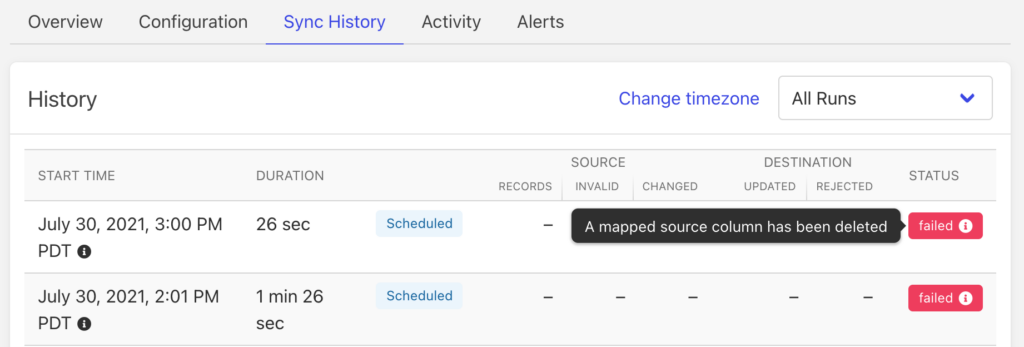
That is very much by design. If a column was explicitly mapped, Fivetran assumes it’s critical and refuses to proceed without it.
Talend took the opposite route, providing more control and more moving parts. We ran a Salesforce → BigQuery flow using dynamic schema handling, and on the surface, it worked well. New fields flowed through, and I didn’t even need to redesign the initial job. But once that change touched a wider job chain, things got heavier.
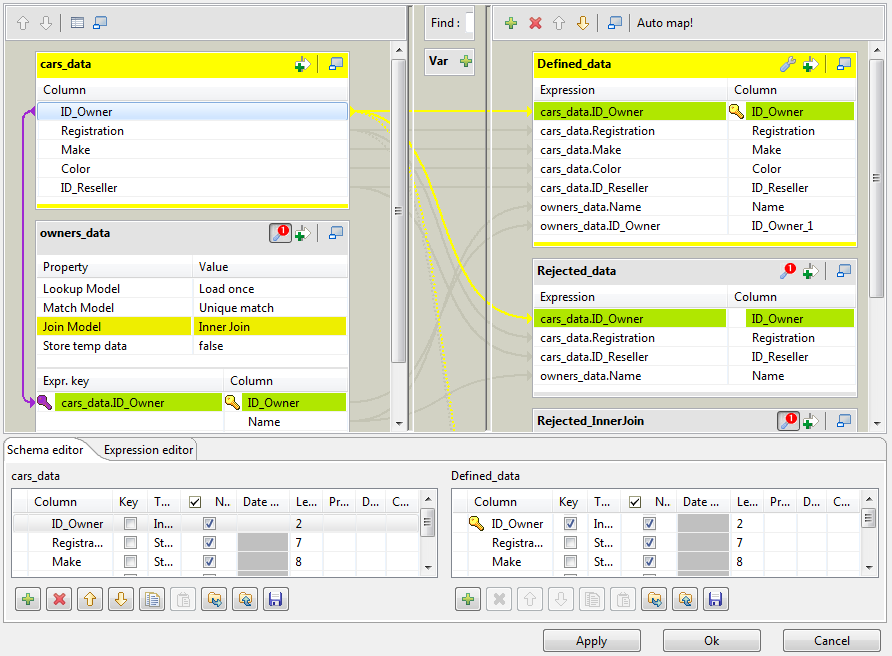
One schema update upstream meant revisiting multiple dependent jobs. They are not broken; they just spread out across more places than I expected. At some point, I felt like an additional hand and a pair of eyes would help.
Best for
- Fivetran → Enterprise pipelines where reliability and minimal maintenance matter more than customization
- Talend → Complex, multi-system workflows where full control and custom logic are required
Rating
- Fivetran – G2: 4.4/5 (996 reviews) | Capterra: 4.4/5 (25 reviews)
- Talend – G2: 4.6/5 (13 reviews) | Capterra: 4.3/5 (24 reviews)
See Fivetran pricing to find out what “no maintenance” costs to maintain, and check Talend pricing to see how much “battle-tested” is in 2026. For both, you will need to contact sales first.
Pros
Fivetran
- Handles schema drift without interrupting pipelines.
- Minimal setup and near-zero maintenance after launch.
- Stable performance at large volumes.
Talend
- Deep customization with code-level control.
- Strong support for hybrid environments (cloud + on-prem).
- Built-in tools for data quality and complex transformations.
Cons
Fivetran
- MAR pricing becomes difficult to predict during backfills.
- Limited transformation logic without external tools like dbt.
- Entry cost is high for smaller teams.
Talend
- Job dependencies grow quickly as pipelines expand.
- Schema changes can ripple across multiple jobs.
- Requires developer involvement for most adjustments.
Which ELT Solution is Best for Developer-Heavy Teams?
At this point, ELT tools stop being products and start acting more like frameworks. The priorities shift pretty quickly once code enters the picture and occupies it.
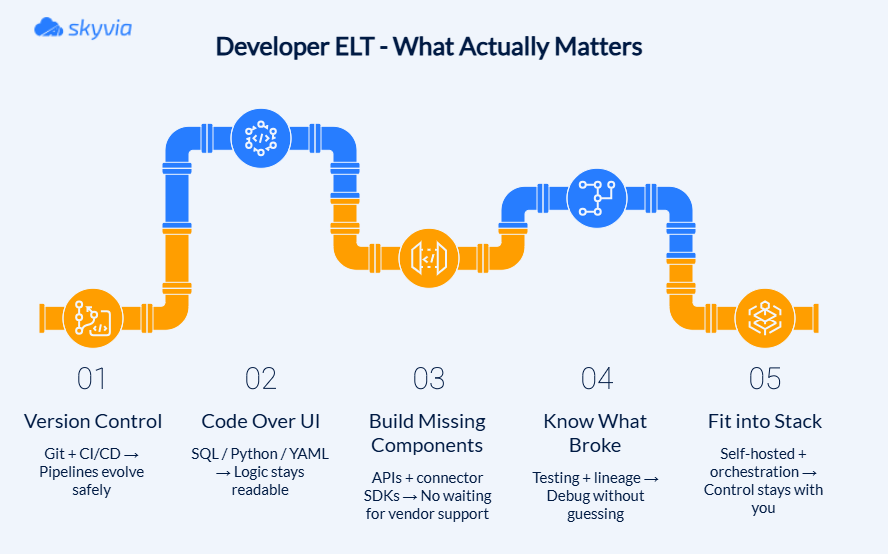
- Git-first workflows (because pipelines are code now).
Pipelines living in the UI are not enough. Branching, PRs, or CI/CD are just the baseline.
- Code-based transformations (SQL, Python, YAML).
GUIs are fine until logic gets complex. Once you’re dealing with layered transformations, dbt models, or custom business rules, code becomes the only format that stays readable.
- APIs and SDKs (for when your data source doesn’t exist yet).
Eventually, you’ll need to connect something that isn’t in the catalog. Tools with open APIs or connector SDKs let you build what’s missing instead of waiting for it.
- Testing and lineage (so you know what broke, and where).
Freshness, uniqueness, schema modifications, and lineage tests are necessary to demonstrate how data flowed through the pipeline.
- Extensibility (because the pipeline won’t stay simple).
For complicated DAGs beyond basic syncs, you’ll need to reach for self-hosting, Docker, Kubernetes, or hybrid configurations. Not because they’re fashionable, but rather because environments vary.
- Orchestration beyond “run every 15 minutes.”
Real pipelines have dependencies. Airflow, Dagster, custom DAGs – this is where simple sync schedules stop being enough.
Airbyte
Airbyte felt solid until we started spending more time in the UI than in the pipeline itself.
At one point, the interface just stopped being consistent. Pages would load, then fail, then load again. The logs pointed to timeouts when fetching connector definitions – nothing dramatic, just repeated Failed to fetch remote definitions errors. In some cases, it escalated to 401s or 500s, even though authentication looked fine.
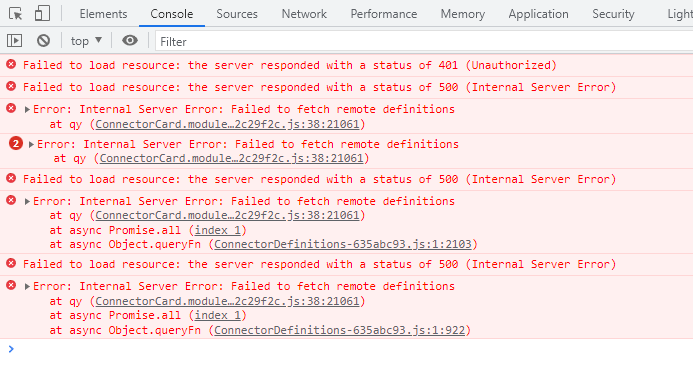
What made it tricky is that nothing was clearly broken. The system was up, connectors existed, pipelines ran, but parts of the UI depended on remote definition calls that didn’t always return in time, especially in more restricted or unstable environments.
It’s the kind of issue you can work through (tweak configs, check network paths, retry), but it adds a layer of unpredictability. Not in the core pipeline logic, but in the day-to-day experience of actually using the tool.
Best for
Developer-heavy teams that:
- Build custom connectors for internal or niche APIs.
- Run pipelines in Docker/Kubernetes environments.
- Prefer code-first workflows over managed SaaS.
Rating
G2: 4.4/5 (76 reviews) | Capterra: no reviews and no ratings yet.
Check Airbyte pricing to see how “free and open-source” translates.
Pros
- 400+ native connectors, with thousands more community-built.
- Open-source → full control, no vendor lock-in.
- Custom connector SDK (Python/YAML) for unsupported sources.
- Flexible deployment: cloud, self-hosted, hybrid.
- Cost-efficient at scale compared to row-based pricing models.
Cons
- Requires DevOps setup (Docker, K8s, environments).
- Connector quality varies (especially community ones).
- Debugging can take time (env issues, dependency conflicts).
- No native transformation layer → relies on dbt or downstream tools.
- Less predictable behavior in OSS compared to managed platforms.
What is the Best ELT Tool for No-Code Data Teams?
Here, flexibility stops being the thing you evaluate ELT tools on. They’re judged by how little friction they introduce between “we need this data” and “it’s already there.”
Some things that look basic on paper end up doing most of the work.
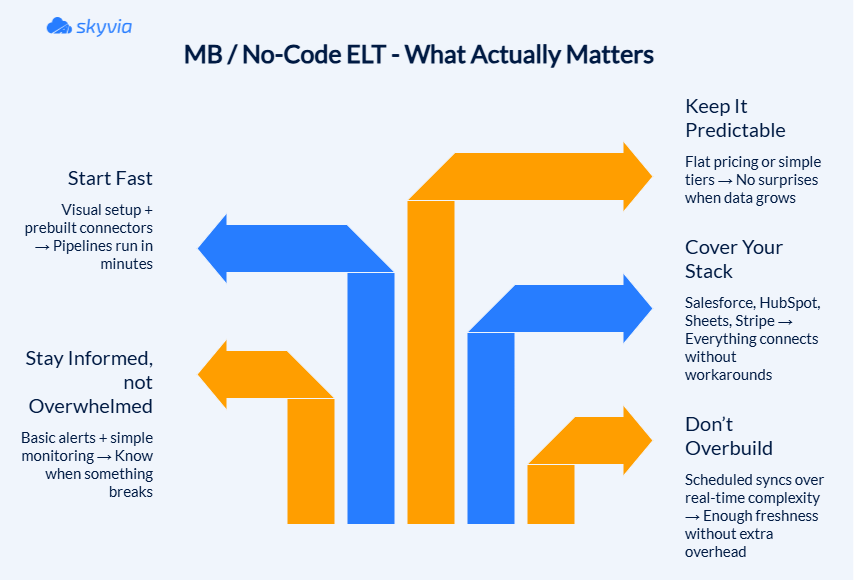
- Visual pipelines (because not everything needs to be code).
Dragging a source into a destination, adding a filter, joining two datasets – that’s usually enough. Not every team wants to open a code editor just to move Salesforce data into a report.
- The setup process shouldn’t turn into a weekly task.
If setup takes longer than a coffee break, it already feels heavier than it should.
- Pre-built patterns (so you’re not starting from zero).
Some flows repeat across teams – Salesforce to Google Sheets, HubSpot to Snowflake, Stripe to dashboards, etc. Tools that recognize and encourage, saving time immediately.
- Pricing you don’t have to monitor constantly.
That is the stumbling block for many companies. Fixed tiers or predictable limits are easier to live with than models where cost depends on how often your data changes.
- Scheduling that’s “good enough.”
Not everything needs real-time CDC. 15-60 minute syncs handle most BI use cases without adding complexity.
- Basic visibility (just enough to know things are working).
You don’t need full lineage graphs. But you do need to know if a sync failed, if data stopped updating, or if something changed upstream.
Skyvia
We’ve reached the part where we review our own product, which is always a slightly awkward position to be in.
We built Skyvia, we use Skyvia, and yes – we like Skyvia. But that doesn’t mean it gets a free pass here. If anything, it just means we’ve had more chances to notice where it works well, and where it doesn’t.
During the same 1M-row test, I set up a Salesforce → Snowflake pipeline using the visual builder. Connection, mapping, test run – done in about four minutes: no schema definitions, no YAML, no CLI. The data wasn’t perfect (it never is, and we’re supposed to love it the way it is), but the pipeline didn’t make that a separate task.
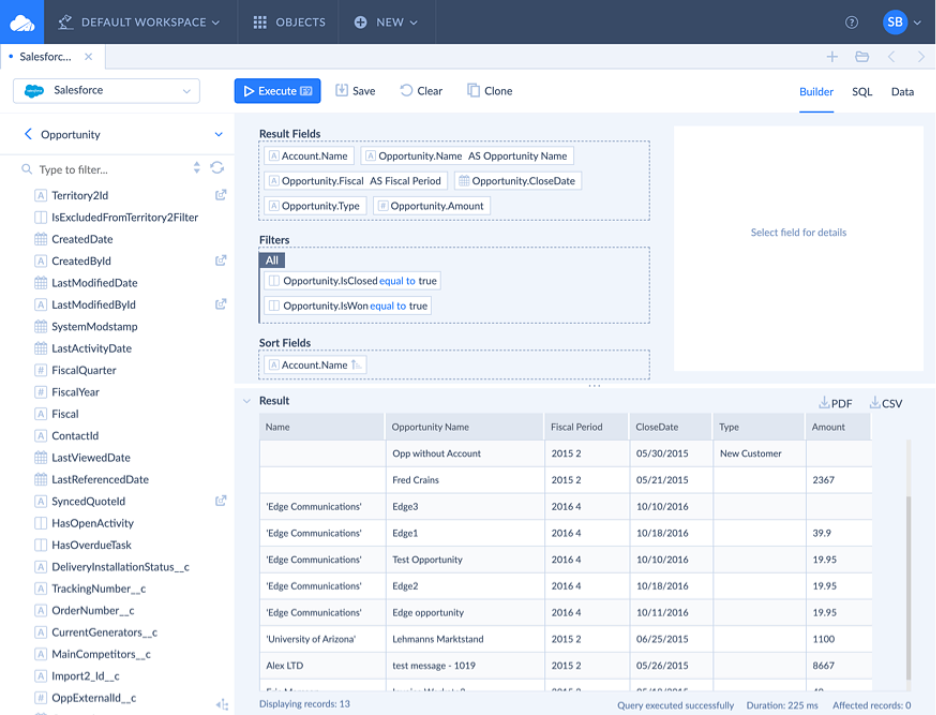
That fast setup is only the starting point. Skyvia can carry the workflow beyond ingestion, with warehouse-side transformation, Reverse ETL, and orchestration available in the same platform.
Best for
- Data teams building and managing cloud data warehouse pipelines.
- Salesforce / HubSpot → Snowflake, BigQuery, Power BI pipelines.
- Teams that need ETL, ELT, and reverse ETL in one place.
- Fast setup without writing or maintaining code.
Rating
Skyvia – G2: 4.8/5 (303 reviews) | Capterra: 4.9/5 (116 reviews)
Check Skyvia pricing – there’s a free tier, the paid plans start where you’d expect, and we don’t have the “contact sales” wall.
Pros
- Predictable pricing (no per-row surprises during backfills).
- No-code setup with visual mappings.
- However, if you need a bit of code from time to time, SQL Builder lets you avoid visual setup.
- Very fast time to first pipeline.
- Supports multiple integration patterns.
- Strong Salesforce support (Bulk API, CDC, soft deletes).
- Certified Snowflake partner if that is your warehouse of choice.
Cons
- Cloud-only platform (no fully air-gapped on-prem deployment). If you represent a highly regulated entity, like a tier-1 bank or a government healthcare provider, we are not the right fit for you. Sorry.
- Not designed for highly customized, code-heavy pipelines.
- Advanced transformations are simpler compared to dbt-level workflows.
Conclusion
At some point, all ELT tools start sounding the same: hundreds of connectors, scales with your data, built for modern pipelines, etc.
You read five pages like that, and everything blends. Then you pick one because you have to, and all those ad bits stop being important at all. The secret most listings don’t talk about is that there isn’t a best tool here and nowhere, no matter the goal. There’s just the one that annoys you the least after the setup is done.
- Fivetran, Talend → The premium you pay is the hands you save.
- Airbyte → You control everything, including the parts that break (especially, the parts that break).
- Skyvia → Fast no-code setup with an end-to-end DWH workflow and predictable pricing.
In the end, you don’t remember how long and impressive the feature list was. You remember whether it worked. If that sounds appealing, start with Skyvia.
FAQ for Top ELT tools

Are open-source ELT tools like Airbyte or Meltano actually free?
The code is free. Running it isn’t. You still pay for infrastructure, storage, and the time to maintain it. “Free” usually shifts the cost from licensing to engineering effort.
Why do ELT costs spike unexpectedly, and how can I avoid it?
Backfills and frequent updates are the usual culprits. Row-based pricing models amplify both. To avoid spikes, estimate historical loads upfront and favor predictable pricing over usage-based surprises.
Which ELT tool is best for non-technical teams (Marketing & Sales Ops)?
Fast setup and visual pipelines matter more than features here. From our testing, Skyvia fits best: no code, no engineer needed, predictable pricing. If evaluating independently, those three criteria are your checklist.
Do I really need an ELT tool that supports Change Data Capture (CDC)?
If your data changes often, yes. CDC tracks only what changed instead of reloading everything. Without it, you either miss updates or waste time and incur reprocessing costs for full datasets.
Can cloud-native ELT tools handle highly sensitive, air-gapped data?
Generally, no. Most cloud ELT tools require internet access. In strict environments (banking, government), on-prem or hybrid tools remain the safer choice.