
Summary
- Skyvia: A no-code platform that handles ETL, sync, and automation in one place, with predictable pricing and minimal setup.
- Fivetran: A fully managed ELT tool known for reliability and fast setup, but costs can grow quickly with data volume.
- Airbyte: An open-source option with strong flexibility and a large connector library, best suited for teams with engineering resources.
- Estuary Flow: A real-time data pipeline platform focused on streaming and CDC, built for teams that need continuously updated data at scale.
Are Stitch Data’s pricing changes or slow connector updates starting to get in the way? You’re not the only one running into that. Stitch was one of the early players in ELT, and for a while, it did the job just fine. But things have moved on. Teams now look for clearer pricing, better API coverage, and fewer issues when dealing with things like nested JSON or evolving schemas.
Fair warning — we’re the ones behind Skyvia. So yeah, we have a take. That said, it’s not for everything.
Some setups need more flexibility, some go open source, and sometimes you just want to get data
moving without overthinking it. We’ll call it as it is.
Instead of another generic “top tools” list, this guide walks through the main alternatives based onhow they actually behave depending on your team size, budget, and how comfortable you are working with code.
How Did We Test These Stitch Alternatives?
Feature lists weren’t especially useful for this comparison, so we focused more on running actual replication workflows through each platform.
Most of the testing revolved around Salesforce replication into Azure SQL or Databricks, schema evolution during syncs, nested JSON handling, incremental updates, and CDC behavior once the pipelines were already live.
The bigger differences rarely showed up during the first sync itself. They usually appeared later once schemas changed, authentication broke, logging became important, or the pipelines needed to keep running continuously without constant babysitting.
That’s also where each tool’s philosophy becomes a lot more obvious — managed simplicity, open-source flexibility, or real-time streaming infrastructure.
That’s usually the point where these tools stop feeling interchangeable.
How Do the Alternatives Compare at a Glance?
If you put them side by side, the differences show up pretty quickly. Each tool is built for a slightly different kind of team, even if they overlap on the surface.
| Tool Name | Target Persona | Pricing Model | Min Sync | API Complexity | Deployment |
|---|---|---|---|---|---|
| Skyvia | Non-technical | Per records/ month | ~1 minute | Visual (no code) | Cloud SaaS |
| Fivetran | Enterprise teams | Per-row (MAR) | ~1 minute | Low (fully managed) | Cloud SaaS |
| Airbyte | Developers | Compute-based / free | ~5 minutes | Medium (Python / CLI) | Self-hosted / Cloud |
| Estuary Flow | Real-time pipelines | Usage-based (credits) | Near real-time | Medium–High (config + code) | Cloud / Hybrid |
No surprise here. The trade-off is pretty clear: ease of use vs control vs real-time.
Which Alternative is Best for No-Code Data Pipelines?
Skyvia
What works especially well with Skyvia is how flexible the workflows stay once the data actually landed in the warehouse.
The replication setup in Skyvia ended up being one of the smoother ones to get running during testing. We connected Salesforce to Azure SQL first, configured incremental updates and soft delete handling, and let Skyvia create the destination tables automatically during the initial sync.
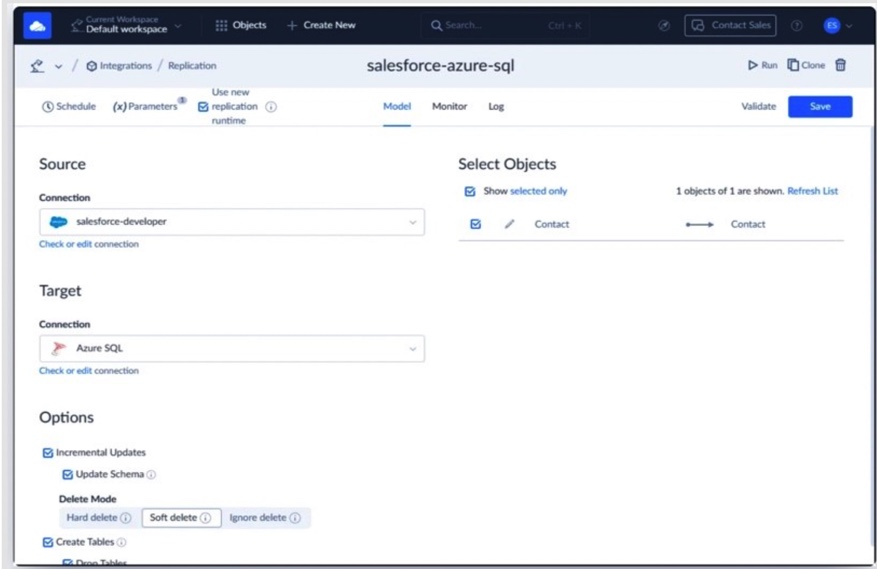
Most of the setup itself was fairly straightforward, though we did hit one small issue when the target schema didn’t exist yet in Azure SQL. Once the schema was created manually, the replication pipeline started running normally.
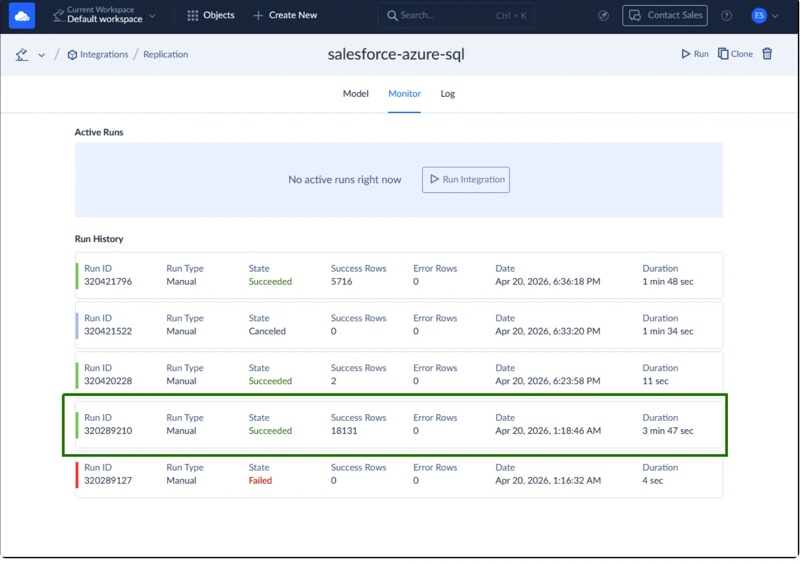
The first full sync loaded a little over 18,000 Salesforce rows into Azure SQL in under a few minutes. What became more interesting afterward was how the replication behaved once we started changing the source data. Edited Salesforce records were picked up correctly during the next incremental sync, and adding a new field exposed how the schema refresh behavior worked depending on the replication settings.
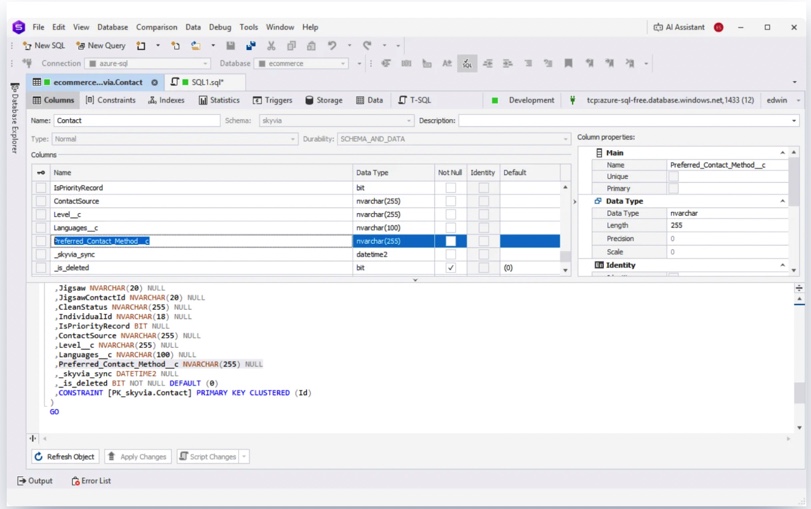
After refreshing the schema and re-running the replication, the new column appeared correctly in Azure SQL without rebuilding the pipeline from scratch.
We also checked how Skyvia handled nested Salesforce objects during replication. The MailingAddress object, for example, was replicated directly as text instead of being silently flattened or transformed behind the scenes. If deeper JSON transformation is needed, you still have to configure that intentionally, but at least the raw structure remains predictable during replication.
That’s also where it starts to feel different from tools like Stitch. It’s mainly built around one-way ELT pipelines. Skyvia also supports ETL-style transformations, bi-directional sync, and reverse flows back into operational systems.
You can start with a simple replication then gradually move into more advanced transformations or workflow automation without rebuilding everything from scratch.
Best for
Teams that want more than just one-way warehouse loading — especially data teams or solo data analysts handling both analytics and operational syncs.
Rating
G2: 4.9 / 5
Capterra: 4.9 / 5
Pricing
Subscription-based, with a free tier available.
Pros
- No coding required for setup and maintenance
- Predictable pricing without volume-based spikes
- Strong integrations with CRMs, ERPs, and cloud apps
Cons
Everything runs in the cloud. That’s fine for most teams, but if you’re dealing with strict internal-only policies, you’ll likely need a more on-prem-focused tool.

Which Alternative Excels in Enterprise High-Volume Syncs?
Fivetran
This is probably the closest thing to a “set it and forget it” ELT platform once you get into larger warehouse setups.
The strongest part during testing wasn’t even the sync itself — it was how smoothly the warehouse workflow fit together around it.
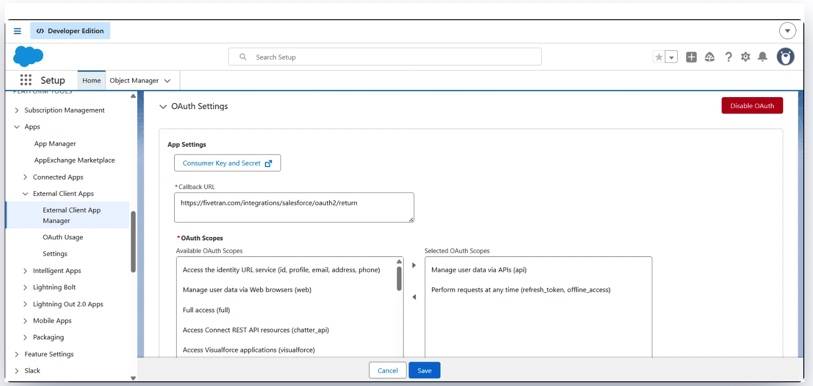
We used Fivetran also to replicate Salesforce data into Azure SQL during testing. Most of the setup was fairly guided, but a few small details still managed to slow things down at first. Salesforce authentication required creating a separate External Client App specifically for Fivetran, and even small things like an extra slash in the domain URL were enough to break the connection.
Once everything was configured, though, the pipeline itself became extremely stable. The initial sync finished quickly, additional incremental loads stayed fast, and enabling “Allow new columns” meant schema changes in Salesforce didn’t break the replication flow afterward.
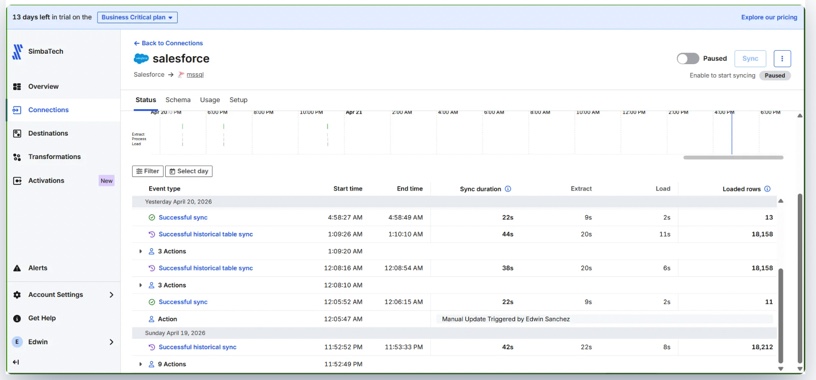
We also liked how warehouse-oriented the overall workflow felt. Fivetran automatically created metadata tables alongside the replicated Salesforce data, and schema evolution mostly happened in the background without much intervention once the syncs were running.
There were still a few limitations around nested Salesforce objects. Fields like MailingAddress didn’t come through as fully structured objects during replication, so working with that data still meant relying on Salesforce’s separate address fields or transforming it later in the warehouse.
The trade-off is pricing. During larger historical loads, the usage-based model can ramp up faster than expected, especially once you start moving serious volume through the pipeline.
Best for
Enterprise teams running warehouse-first analytics stacks with heavy ELT and dbt workflows.
Rating
G2: 4.4 / 5
Capterra: 4.4 / 5
Pricing
Usage-based (MAR model)
Pros
- Extremely reliable connectors and CDC pipelines
- Excellent dbt integration
- Strong fit for modern warehouse-centric ELT workflows
Cons
The MAR pricing model gets expensive quickly at scale. For startups or smaller teams, costs can become hard to justify once historical syncs and large event volumes enter the picture.
What is the Best Choice for Developer-Heavy Data Teams?
Airbyte
Airbyte felt much closer to managing infrastructure than using a traditional SaaS integration platform.
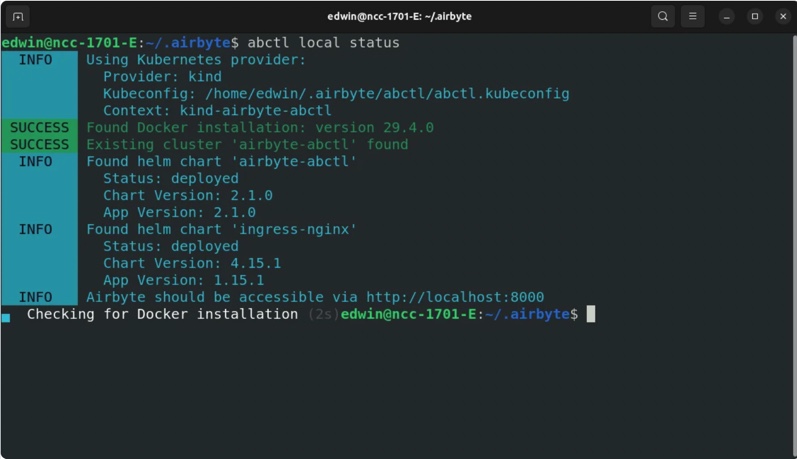
We deployed the open-source version locally through Docker using Airbyte’s abctl tool. The installation itself wasn’t especially difficult, but getting everything fully operational on Ubuntu still took noticeably longer than the more managed platforms in this comparison.
Once the environment was running, though, the actual pipeline setup moved fairly quickly. We first tested a smaller PostgreSQL → Azure SQL migration as a quick proof of concept before setting up the larger Salesforce replication workflow afterward.
The Salesforce setup took a little extra work too because Airbyte needs its own External Client App and separate OAuth configuration.
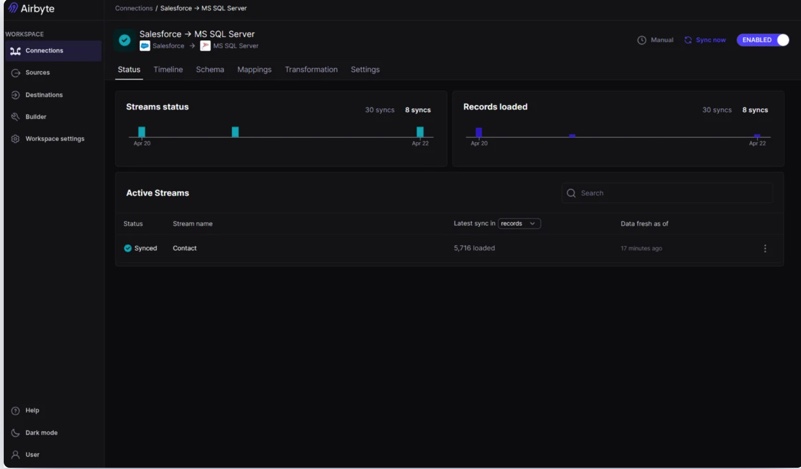
The replication itself ended up performing well. Syncing roughly 18,000 Salesforce Contact records into Azure SQL took only a few minutes, and schema evolution worked fairly similarly to Skyvia once the schema was refreshed between syncs. New columns appeared correctly after updates without rebuilding the connection from scratch.
One thing we noticed immediately was how differently nested Salesforce objects were handled compared to some of the other tools. Fields like MailingAddress came through directly as JSON objects instead of flattened text or separated warehouse fields. Depending on the workflow, that can either feel very flexible or create extra transformation work later on.
That flexibility is really the core trade-off with Airbyte overall. You get a huge connector ecosystem, open-source deployment, API-driven workflows, and full infrastructure control. But you’re also responsible for the environment itself once the pipelines become production infrastructure.
Best for
Engineering-heavy teams that want full control over connectors, infrastructure, and deployment.
Rating
G2: 4.4 / 5
Capterra: Limited review data available
Pricing
Free if self-hosted, plus paid cloud plans
Pros
- Huge connector library, especially for niche or less common tools
- You control the deployment, infrastructure, and connector logic yourself
- Self-hosted setup means you’re not locked into a vendor ecosystem
Cons
You’re also the one maintaining it. Infrastructure, upgrades, broken connectors after API changes — all of that lands on your side eventually.
Which Tool Should You Choose for Real-Time Data Streaming?
Estuary Flow
Estuary Flow felt pretty different from the rest of the tools almost immediately because nothing really waited for scheduled sync windows. The whole platform feels much more built around continuous data movement than traditional ELT batches.
We started with the managed version by building Salesforce and PostgreSQL CDC pipelines into Databricks. The interface itself was fairly easy to work through, although some of the naming took a little getting used to. “Captures” and “Materializations” aren’t especially complicated, but they feel different if you’re used to the usual source-and-destination flow most ELT tools use.
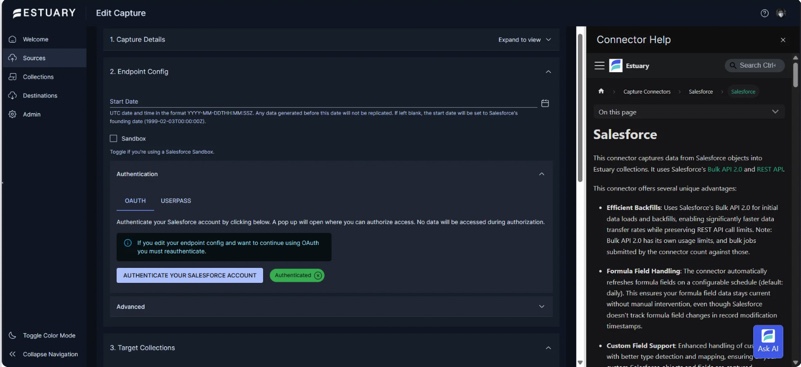
The Salesforce setup was pretty quick overall. After connecting the account and configuring the capture bindings, records started flowing into Databricks continuously instead of waiting for scheduled sync runs. Nested Salesforce fields also came through as JSON objects, which looked very similar to what we saw in Airbyte.
PostgreSQL took more effort. Estuary needed logical replication enabled beforehand, and our original Supabase setup didn’t support the configuration required for CDC testing. We ended up switching the database over to Neon and enabling the necessary WAL settings before the pipeline would start properly.
Once the pipelines were up and running, the difference in behavior became pretty obvious. Changes in the source systems started appearing downstream in Databricks almost immediately rather than waiting around for scheduled incremental syncs.
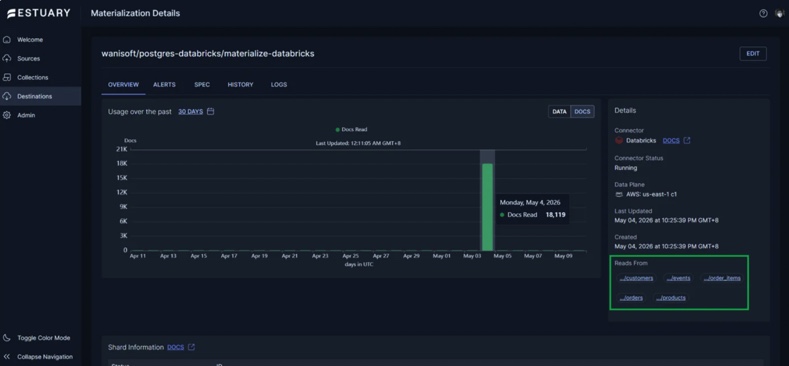
Once the pipelines were live, the replicated tables stayed consistent with the source systems and continuous updates flowed without much maintenance afterward.
The logging side felt a little harder to work with, though. Estuary exposes a huge amount of detailed process information, but basic operational details still take some digging to track down.
It also becomes pretty clear during testing that Estuary is built more for real-time CDC and event-driven workloads than traditional warehouse sync jobs. If your pipelines only run a few times a day, the streaming model can feel unnecessarily heavy.
Best for
A good fit for teams building around real-time data flows.
Rating
G2: Any reviews yet
Capterra: Any reviews yet
Pricing
Volume-based pricing
Pros
- Very low latency for streaming and CDC workloads
- Strong fit for Kafka, Kinesis, and event-driven architectures
- Handles continuous syncs better than traditional batch ELT tools
Cons
If your use case is mostly dashboards and daily reports, this can feel like bringing streaming infrastructure to a problem that doesn’t really need it.
How Should You Make Your Final Decision?
At the end of the day, the “best” alternative mostly depends on how your team works and what kind of pipelines you’re actually building.
- Fivetran feels strongest in teams that mostly want the pipelines to keep running reliably without spending time maintaining the integration layer themselves.
- Airbyte is the perfect choice for teams that prefer open-source tools and don’t mind getting their hands into the infrastructure when something breaks.
- Estuary Flow is helpful if low-latency streaming and real-time CDC matter more than scheduled batch syncs. It makes the most sense for operational analytics or event-driven pipelines.
- Skyvia is a good fit if you want a more flexible no-code platform that can handle ETL, ELT, sync, and reverse flows without turning everything into an engineering project.
A lot of teams start with simple warehouse syncs, then later run into transformations, reverse updates, operational workflows, or real-time requirements. That’s usually where the differences between these tools become a lot more obvious.
Want to see whether Skyvia fits your stack? Try the free plan and test the visual pipeline setup yourself.

FAQ for Best Stitch Data Alternatives

Which Stitch competitor offers the most predictable pricing?
Skyvia tends to be easier to estimate because pricing is tied more to records and plans instead of aggressive usage-based scaling during large syncs.
How hard is it to migrate pipelines from Stitch to Skyvia?
Usually not that difficult. Most teams recreate the connections and mappings fairly quickly, especially for standard SaaS-to-warehouse pipelines.
Which alternative is best for real-time data streaming instead of batch processing?
Estuary Flow is the strongest fit here. It’s built around CDC and event-driven streaming rather than scheduled batch syncs.
Are there scenarios where I should stick with Stitch Data instead of switching?
Yes. If your current pipelines are stable, your sync needs are simple, and pricing still makes sense for your volume, there may not be a strong reason to move yet.