Summary
- Skyvia – a no-code platform that gets a working BigQuery Reverse ETL pipeline running in under 10 minutes; no engineering skills are needed.
- Hightouch – a premium Reverse ETL layer built around dbt models, engineered for high-volume, low-latency activation at enterprise scale.
- RudderStack – a warehouse-native, open-source platform that treats Reverse ETL like software engineering, with event streaming and full pipeline control.
Reverse ETL is what turns your one-way data hoarding habit into a two-way conversation. It takes your modeled BigQuery data and pushes it back out into the tools where people make decisions – Salesforce, HubSpot, Slack – so “we have the data” finally becomes “the data does something.” That’s why BigQuery Reverse ETL has quietly become the backbone of operational analytics.
Full disclosure: we’re the Skyvia team, and we build a no-code integration platform that does exactly this. Biased? Absolutely. But we’ve watched enough integration projects go sideways to know no single tool fits every company, so this guide stacks Skyvia honestly against Hightouch and RudderStack, use case by use case, including the reverse ETL limitations for Google BigQuery that the sales decks conveniently skip.
What Is BigQuery Reverse ETL And Why Do You Need It?
Standard ETL has one job: grab data from wherever it’s scattered, and load it into BigQuery, where it gets cleaned up and modeled into something trustworthy. It’s a one-way ticket. Data checks in, but doesn’t check out.
Reverse ETL is the return flight. It takes that same gorgeous, modeled, and trustworthy data and syncs it back out into the SaaS tools your teams live in: Salesforce, HubSpot, Zendesk, Marketo, etc. BigQuery stops being a data mausoleum and starts acting like a nervous system, sending signals wherever they’re needed.
Now, some teams try to build this themselves, and credit where it’s due – it’s technically possible. You can wire up Cloud Functions, or write continuous SQL queries that poll BigQuery for changes, or go full architect and build a real-time pipeline on Pub/Sub that streams row-level updates the moment they land. It works, and you’ll get somewhere, eventually, after months spent on schema drift, failed syncs, rate-limit throttling, and the special joy of debugging a Cloud Function.
Dedicated Reverse ETL tools exist precisely to skip that part – trading a DIY science project for a few config screens and hundreds of engineering hours you get to spend on literally anything else.
How Did We Test These BigQuery Integration Tools?
Instead of paraphrasing each tool’s own homepage, we did the annoying thing: we actually ran the syncs ourselves – 35 hours and one engineering team.
We kept the setup simple on purpose – a Google Cloud sandbox with a BigQuery dataset of 1,000 customer records, deliberately messy: a few null values, a couple of malformed rows, the kind of imperfections your production data throws at you eventually. Then, tool by tool, we synced that same dataset out to both HubSpot and Salesforce.
For each platform, we tracked:
- Setup time – how long from signup to first successful connection.
- Sync speed – how fast 1,000 records landed.
- Error handling – what happened to the null values and malformed rows.
- Field mapping accuracy – whether data arrived in the right place, correctly typed.
What follows isn’t a ranking built from press releases. It’s what we actually watched happen when 1,000 rows left BigQuery and went looking for a new home.
How Do The Top BigQuery Reverse ETL Solutions Compare?
| Tool | Pricing Model | Sync Frequency | API Complexity | BigQuery Specifics |
|---|---|---|---|---|
| Skyvia | Usage-and-feature based: pay for what you use; free tier available | Scheduled recurring jobs with incremental replication by timestamp; near-real-time possible via Skyvia Connect (REST/OData) | Visual, no-code wizard – drag, map, schedule; auto-generated APIs mean most flows need zero custom code | Works as both source and destination, auto-creates and updates schemas, and can expose BigQuery tables directly as REST/SQL/OData endpoints |
| Hightouch | Tiered subscription with usage/volume factored in; enterprise contracts for heavy production loads | CDC-driven, sub-minute activation for warehouse changes, or scheduled syncs on your own clock | GUI-first with SQL models underneath – analysts can start fast, but custom transformations and large-scale tuning pull in SQL and infra know-how | Reads tables or SQL models straight from BigQuery; built for high-throughput, low-latency activation at production scale |
| RudderStack | Free / Growth / Enterprise tiers, gated by connection count (10 / 25 / unlimited) | Scheduled Reverse ETL pipelines; “real-time” is achievable but depends on your destination and configuration, not a default | Dashboard-configured with real engineering behind it – service accounts, IAM permissions, and mapping logic before the first sync runs | Documented BigQuery connection flow with defined required permissions; strongest if BigQuery data needs to sit alongside existing event-routing pipelines |
Which Tool Is Best For No-Code Integration?
Not every data pipeline needs an engineer to get it started and keep it alive. Sometimes it just needs to work the way a light switch works.
Skyvia
That wasn’t my first pipeline in Skyvia, so this BigQuery reverse ETL test was about seeing if Skyvia held up under a specific, slightly messy dataset.
Short answer – it did.
I didn’t have to open API docs in one tab and Postman in another, no hand-built JSON while I try to remember HubSpot’s field naming conventions – just BigQuery fields dragged onto HubSpot fields in the visual mapper, a couple of transformations added, the package scheduled, done.
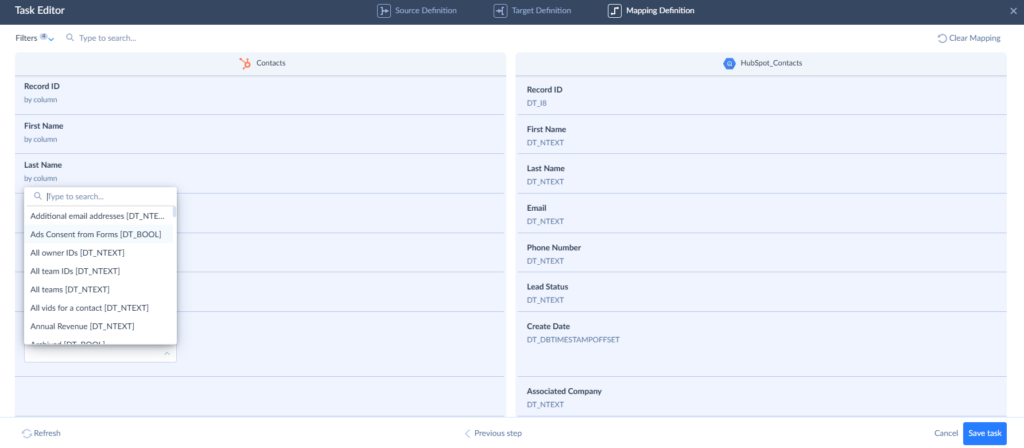
What is important is that simplicity doesn’t come at the expense of capability. Skyvia covers the entire warehouse activation cycle in one platform.
Another thing I appreciate is how forgiving the platform is when reality inevitably gets messy. Source schemas evolve, APIs change, and someone always adds a few new columns behind your back. Skyvia automatically adapts to those changes, keeps connectors up to date as vendor APIs evolve, and alerts you whenever something needs manual attention.
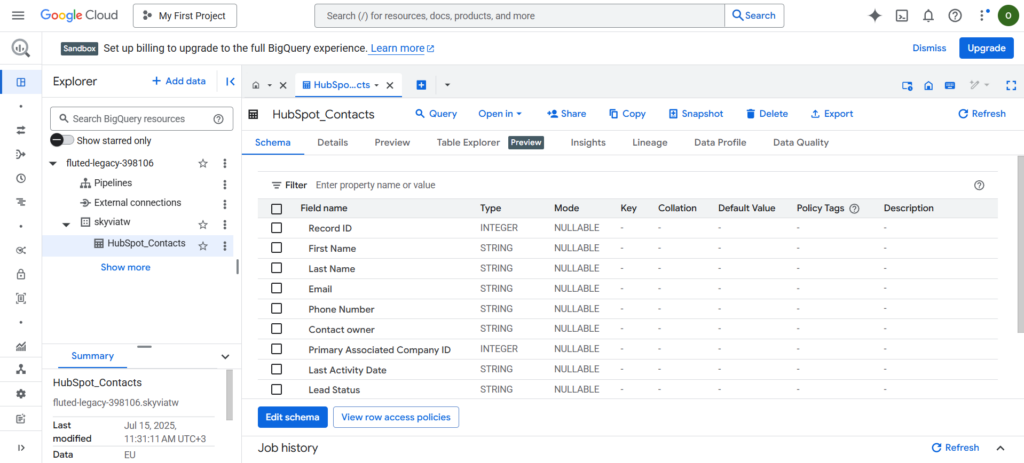
And, as a result, you get your data (in this case, HubSpot contacts) in your warehouse.
Best for
Best for analysts, engineers, IT managers, RevOps professionals, and analytics leaders responsible for the entire warehouse loop. They bring operational data in, send modeled data back out, and need the machinery in between to run without demanding daily rescue missions.
Rating
G2: 4.8/5 (based on 332 reviews) | Capterra: 4.8/5 (based on 116 reviews)
Pricing
Volume-based, with unlimited users on every plan and a real free tier – no credit card required. See Skyvia’s pricing page for current tiers.
Pros
- Zero coding, start to finish – connection, mapping, and scheduling all live in the interface.
- That visual mapping survives change – when a source field shifts shape, the sync adjusts instead of breaking, turning a usual small emergency into a non-event.
- 200+ pre-built connectors across SaaS apps, databases, and warehouses, plus a REST option for anything custom.
- One roof for the whole pipeline – ingestion, transformation, and Reverse ETL together, no stitching three vendors (and three invoices) into one workflow.
- You get detailed execution logs, row-level statistics, error reporting, and email notifications if something goes sideways. That means you’re much more likely to catch an issue early.
- Security that stays out of the way – SOC 2 Type II certified, GDPR-compliant, role-based access, and encryption in transit and at rest.
Cons
- Skyvia is cloud-native by design, so if you’re an enterprise that needs a strictly on-premise, fully air-gapped gateway with zero internet access, this isn’t the tool for that specific requirement.

Which Tool Is Best For Enterprise And High-Volume Syncs?
When you’re syncing millions of rows across a dozen destinations with a compliance team watching every field mapping, “it works” isn’t a high enough bar. You need governance, throughput, and a vendor who’s already handled your scale of data without breaking a sweat.
Hightouch
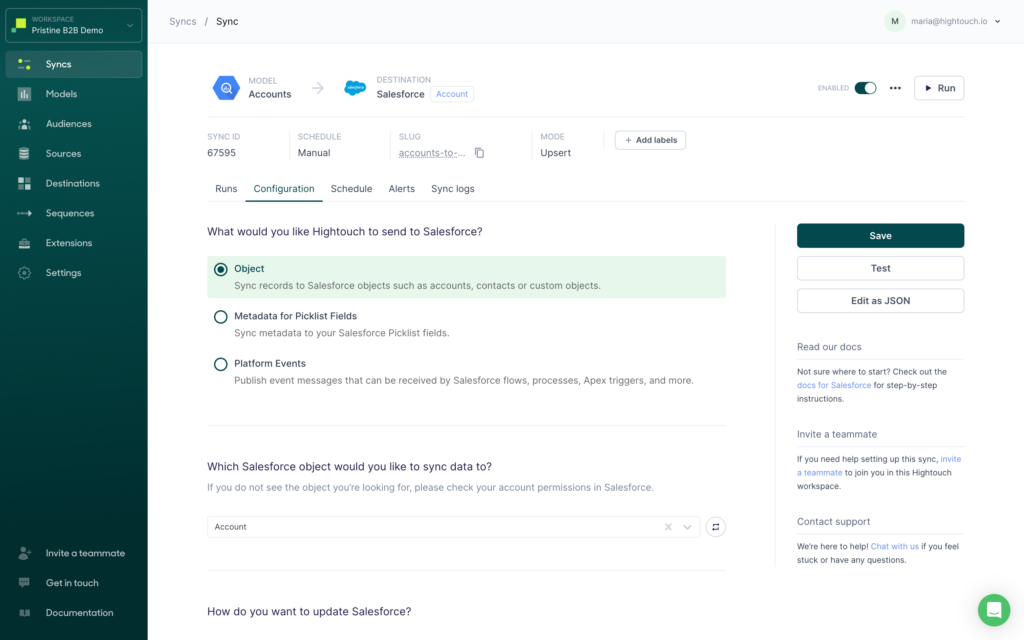
During our tests, pushing data through Hightouch’s interface was incredibly stable – the tool reads tables and SQL models straight out of BigQuery, and its warehouse-native change detection meant updates activated in near-real-time without us watching over the pipeline.
That stability comes at a cost, though: we noticed the pricing scales aggressively as data volume increases, which we expected, since Hightouch is positioned as a premium Reverse ETL layer with usage and volume baked into every tier.
The setup itself sits in an interesting middle ground – GUI-first with SQL models under the hood, so an analyst can get a sync running quickly, but the moment you need custom transformations or serious tuning for large-scale models, you’re back to writing SQL and coordinating with infra. That’s the trade-off for the throughput you get in return.
Best for
Large enterprises that need robust governance and guaranteed throughput at production scale, plus marketing teams building complex audiences for activation.
Rating
G2: 4.6/5 (based on 398 reviews) | Capterra: 4.5/5 (based on 2 reviews)
Pricing
Hightouch has a separate Basic Reverse ETL tier for teams that only need reverse ETL. The pricing page shows it as a free tier with up to 2 active syncs, unlimited destinations, and unlimited user seats, which is clearly positioned for limited-use reverse ETL use cases.
Above that, Hightouch’s current published pricing structure is increasingly framed around Monthly Tracked Rows (MTRs) across Starter, Growth, Business, and Enterprise tiers.
Pros
- First-class BigQuery support, reading tables or SQL models directly.
- Built specifically for massive, high-throughput enterprise workloads.
- CDC-driven low-latency activation when near-real-time matters.
Cons
- Pricing scales aggressively with data volume, which adds up fast at high frequency.
- Advanced setups (custom transformations, large model tuning) require SQL and infra involvement, not just the GUI.
- Can be overkill for teams that just need a simple CRM sync running on a schedule.
Which Tool Is Best For Developer-Heavy Teams?
Some teams want to see the wires. They want the service accounts, the IAM roles, the satisfying click of a well-configured YAML file. If your team reacts to “it just works” the way Neo reacts to being told to trust the machines, keep reading.
RudderStack
RudderStack is warehouse-native to its core, open-source if you want to self-host it, and stitched together with event streaming SDKs and in-flight transformations – the kind of toolkit that assumes you want to get your hands dirty, not that you’re hoping someone else already did.
Setting up BigQuery as a source in RudderStack was a negotiation – service account permissions here, JSON credentials there, each side slowly agreeing to trust the other. Nothing about it was hand-held, and that’s kind of the point.
Midway through, the warehouse pushed back with a schema fetch failure. In plain terms, our IP was a stranger to the allowlist and SSL wasn’t enforced, so the door stayed shut before a single row got through.
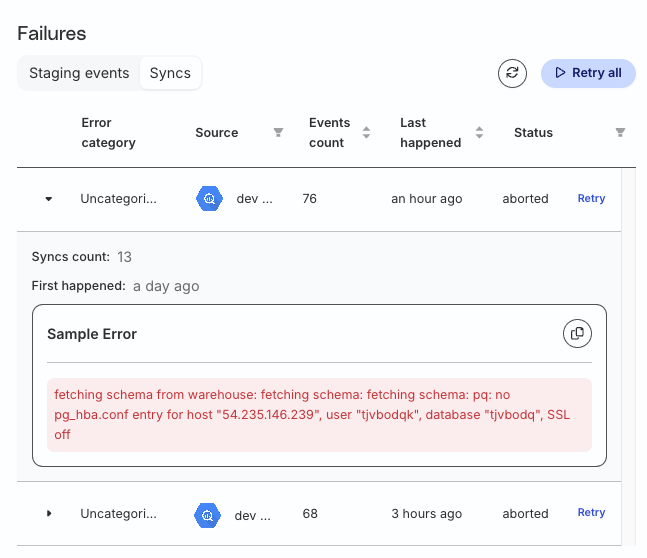
The fix had nothing to do with RudderStack itself – allowlist the IP, enforce SSL, try again. That’s the pattern running through this whole section: RudderStack won’t quietly smooth over a misconfigured network, but it also won’t leave you guessing. It named the exact failure, which is a gift if you speak fluent pg_hba.conf, and a small mystery if you don’t.
RudderStack isn’t a tool that hides its architecture from you – it’s a tool that expects you to understand it. For teams that want to own their pipeline rather than rent a black box, that’s the entire appeal.
Best for
Data engineering, product engineering, and analytics teams that want their reverse ETL treated like software engineering – event streaming, Git integration, custom transformations, and full architectural control, provided you have the technical staff to back it up.
Rating
G2: 4.7/5 (based on 52 reviews) | Capterra: 5/5 (though that one’s based on a single review, so treat it more as a nice compliment than a statistically meaningful data point.)
Pricing
Instead of charging by connector, RudderStack measures usage through event volume. Today, the platform offers Free, Growth, and Enterprise plans. Free supports 250,000 events each month, and Growth starts at $265/month for 1 million events, with discounted annual pricing available.
Reverse ETL isn’t unlimited, though. Destination limits vary by plan, topping out at 10 on Free and 25 on Growth. The old Starter plan has quietly been phased out.
Pros
- Open-source and self-hostable, giving technical teams full transparency and deployment control.
- Strong developer tooling – SDKs, real-time event streaming, custom JavaScript transformations.
- Broad routing coverage, with 200+ sources and destinations.
- Solid fit for regulated environments, with SOC 2, GDPR, and HIPAA positioning.
Cons
- High technical barrier to entry – not suitable for business users or marketers who just want to sync a list.
- Self-hosting adds real DevOps overhead for scaling and monitoring.
- Free tier limits get restrictive fast once event volume grows.
- Documentation gaps show up around advanced or less common integrations.
- Pricing climbs meaningfully as volume and enterprise requirements increase.
How Can You Build A Reverse ETL Pipeline Using Only SQL?
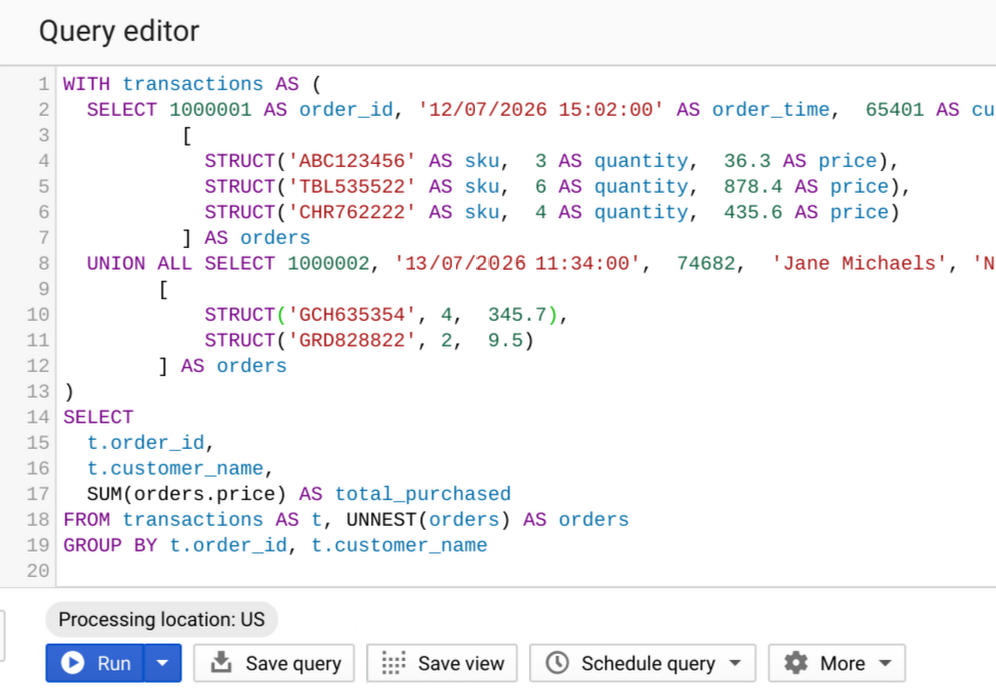
This is technically possible – and someone out there is definitely doing it right now purely to prove a point. Developers can build real-time Reverse ETL using nothing but SQL, leaning on BigQuery continuous queries, Pub/Sub, and Dataflow to skip dedicated Reverse ETL tools entirely.
Instead of a batch job politely checking in every few minutes, continuous queries sit there watching a source table like a hawk, firing the instant a new row lands and pushing it straight into an event-driven pipeline. The catch is that this always-on behavior isn’t free: it runs on a dedicated slot reservation with autoscaling, and it’s gated behind BigQuery’s Enterprise or Enterprise Plus editions — real-time doesn’t come cheap, and it doesn’t come by default.
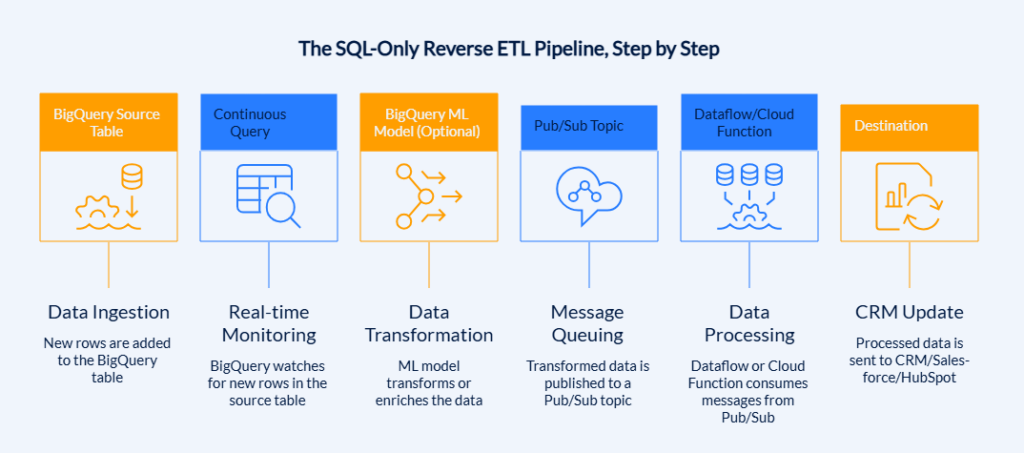
From there, the pipeline can get genuinely elaborate. A typical setup reads incoming records, optionally transforms them with a BigQuery ML model, and writes the result out – to a second BigQuery table, a Bigtable instance, or, for actual Reverse ETL to an external system, a Pub/Sub topic. From Pub/Sub, Dataflow or a Cloud Function picks up the message and forwards it on to wherever it needs to land, whether that’s a CRM or another operational tool.
That’s a lot of moving parts for what started as “just SQL”:
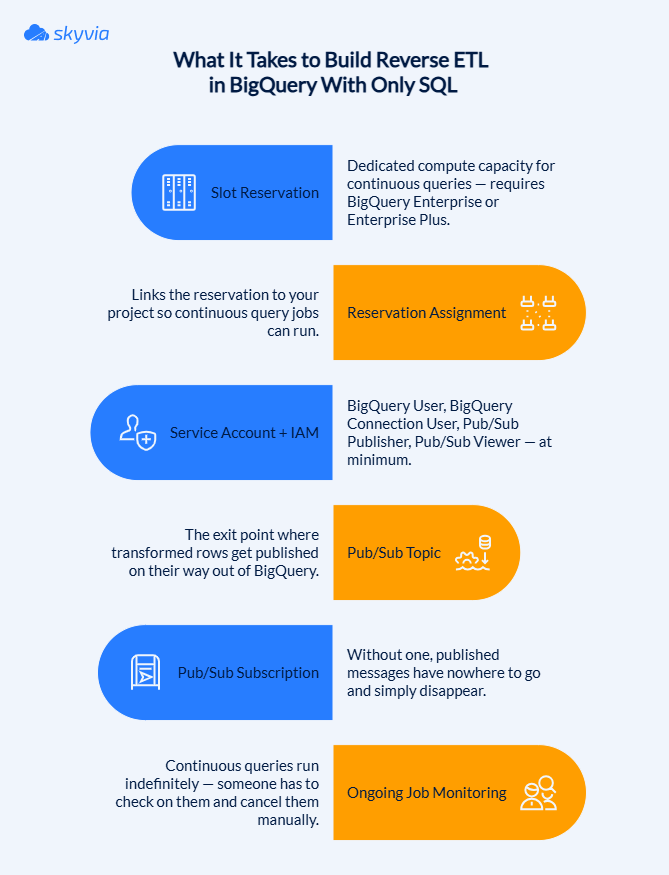
And continuous queries are long-running jobs, so someone has to actively remember to monitor and cancel them rather than let them run indefinitely.
Our experience shows you should only reach for this method if you have dedicated Google Cloud architects on staff and a genuine requirement for millisecond-latency streaming – not if a standard 5-minute batch sync would do the job just fine.
This is also exactly where the reverse ETL for Google BigQuery limitations of the DIY approach show up most clearly. Standard tools sync on a schedule and call it done. Continuous queries hand you a slot reservation to manage, a model to maintain, a topic to take care of, and a job you must remember to cancel before your SQL starts writing checks your budget can’t cash.
For companies chasing real sub-second activation, that trade-off is worth making. For everyone syncing lead scores into Salesforce once every few minutes, it’s a lot of infrastructure to maintain for a latency improvement nobody downstream will notice.
How Should You Choose The Right Reverse ETL Tool For Your Team?
Here’s a shortcut that skips the entire comparison table: don’t ask which tool has more features. Ask which tool matches how your team already works, because that’s the part that determines whether this pipeline is still running a year from now – or abandoned in a Slack thread nobody wants to reopen.
- RudderStack matches teams that already build their own infrastructure. If engineers are going to own this pipeline the way they own everything else – in code, in Git, self-hosted if that’s the standard – this is the tool that respects that instinct instead of fighting it.
- Hightouch matches teams where dbt is already the center of gravity and the budget reflects enterprise scale. High-volume activations, serious governance, and a price tag that assumes you’ve already decided this matters enough to pay for properly.
- Skyvia matches teams who’d rather have the pipeline running than have numerous meetings about who’s going to build it. No-code setup, automatic schema handling, and pricing that stays sane as your team grows.
Don’t take our word for any of this, though – the fastest way to know if a tool fits is to point it at your own data. Skyvia’s free tier is a real free tier, no credit card required, so grab your BigQuery dataset and see how long it actually takes to get your first sync running. Our guess: less time than it took to read this article.

FAQ for BigQuery Reverse ETL

Can I build my own BigQuery Reverse ETL pipeline using just SQL and Google Cloud?
You can, with continuous queries and Pub/Sub. Just know you’re signing up for reservation management and job monitoring, not a quick afternoon build.
Do I need a data engineer to set up a Reverse ETL pipeline?
Depends on the tool. No-code platforms like Skyvia skip the engineer entirely. DIY SQL routes and developer-first tools like RudderStack assume you have one.
Is “real-time” Reverse ETL actually possible with Google BigQuery?
Sort of – continuous queries and CDC tools get you close, sub-minute in many cases. True millisecond streaming is possible too, just not cheap or simple.
Will Google charge me for extracting data out of BigQuery during Reverse ETL?
Usually, yes – query processing and sometimes egress both show up on the bill. The exact damage depends on your sync frequency and data volume.
What are the most common destinations for BigQuery Reverse ETL?
Salesforce and HubSpot lead by a mile, with Slack, Marketo, and Zendesk close behind – basically, anywhere a human needs to act on data instead of just look at it.