Summary
- After 40 hours of hands-on testing, our analysis reveals that the three best ways to connect Shopify to BigQuery are Skyvia for cost-effective no-code scheduling, Fivetran for automated enterprise-grade schema drift handling, and Airbyte (or custom scripts) for developer-heavy teams requiring absolute control.
Do you want to calculate Customer Lifetime Value (CLV) in Shopify? Or maybe combine your Google Ads spend with your store transactions? Exporting to CSVs and using spreadsheets may not cut it. You need a data warehousing solution like Google BigQuery to analyze from there. But you need tools to move data from Shopify to BigQuery.
Before we jump into this guide, here’s the thing: we are the team behind Skyvia, a cloud-based data integration platform. We built a tool that handles Shopify-to-BigQuery integrations, so we are naturally biased. However, in my 10+ years of building e-commerce data pipelines, I have learned that no tool fits every workflow. Our goal in this guide is to provide an objective, scenario-based review of the top extraction methods (including our competitors like Fivetran and Airbyte), so you can make the right architectural choice for your business.
How Did We Test These Shopify-to-BigQuery Integration Methods?
As we did in HubSpot to Snowflake and BigCommerce to Google Drive, we did a 40-hour test of the chosen tools, including our own Skyvia. We did real pipelines that will move data into the target platform. This time, Fivetran, Airbyte, and a custom Python script are up for the test.
Why a custom script?
Because we understand that you may need the total flexibility you’re looking for in your pipelines without the abstraction that ready-made tools and libraries may provide.
Let me show you first the data that we’re going to move into BigQuery. Shopify has many objects that hold your store’s data, but we chose only 3 for this test that will fit into the 40-hour duration, and they are Customers, Companies, and Orders. Note that the data are all fictitious and for testing purposes only.
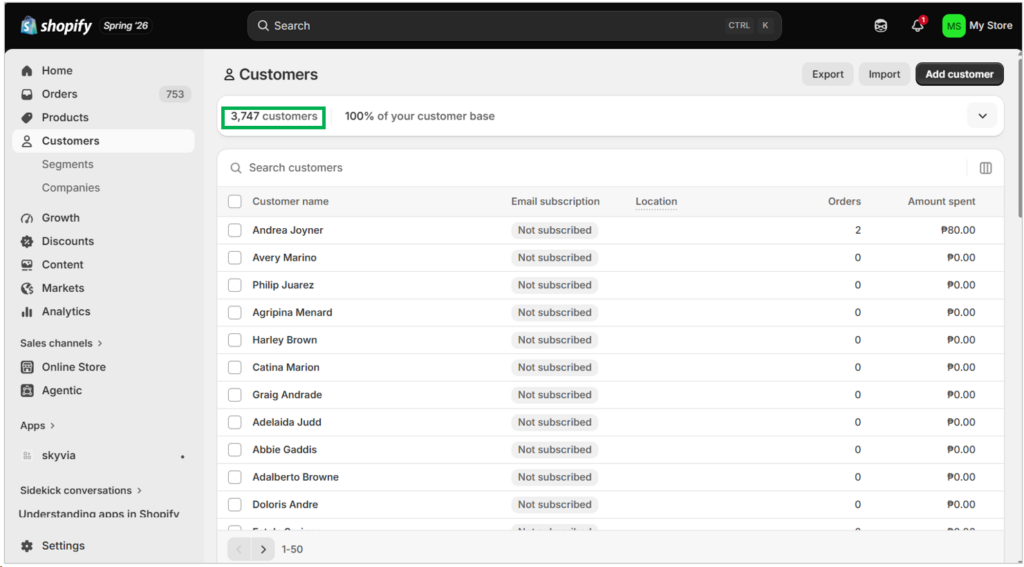
We have 3,747 customers, as you can see below from my trial Shopify store:
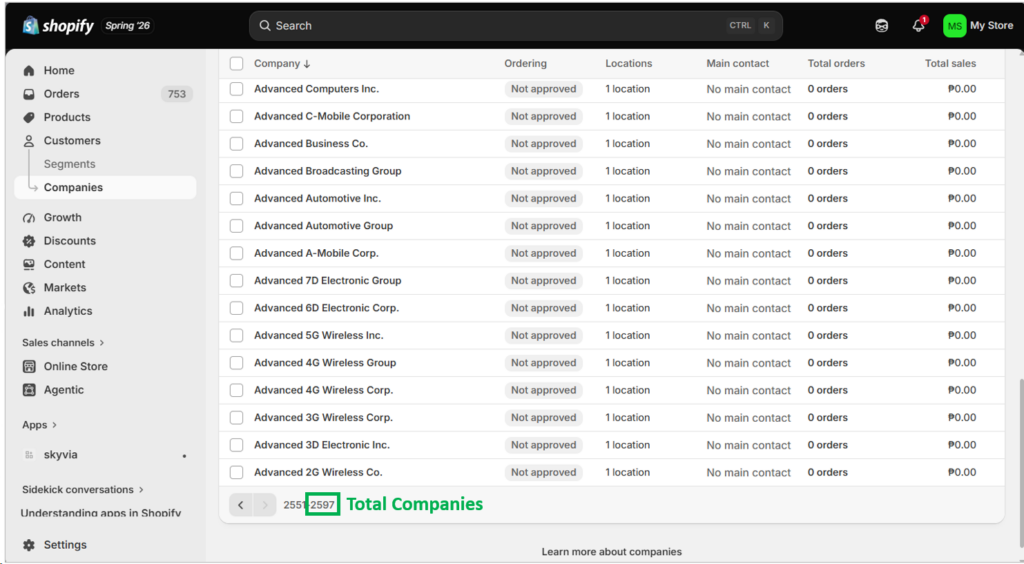
We also have 2,597 companies:
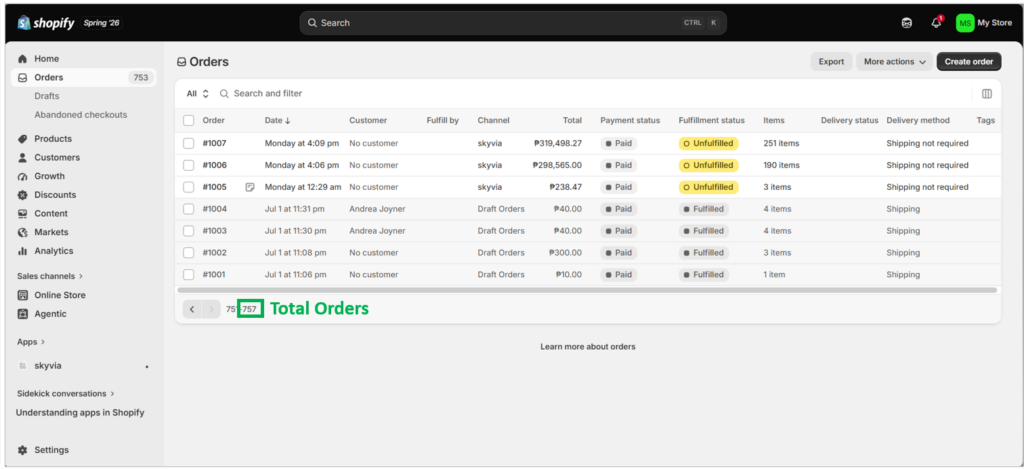
And 757 orders:
You may ask, “Why just hundreds to a few thousand records?” Here’s why, and it’s tied to how trial Shopify accounts behave and how the data is organized in Shopify:
- I’m only allowed to insert 5 orders per minute for a trial account. That means 1,000 orders will take around 3.3 hours to insert, and a million orders will take roughly 3,333 hours (~139 days). And that’s only for having test data for orders. It doesn’t include customers and companies, and definitely doesn’t include our real pipelines.
- Shopify’s data structure contains nested arrays and objects. That means 1 order may have 1 or more line items, like the one below:
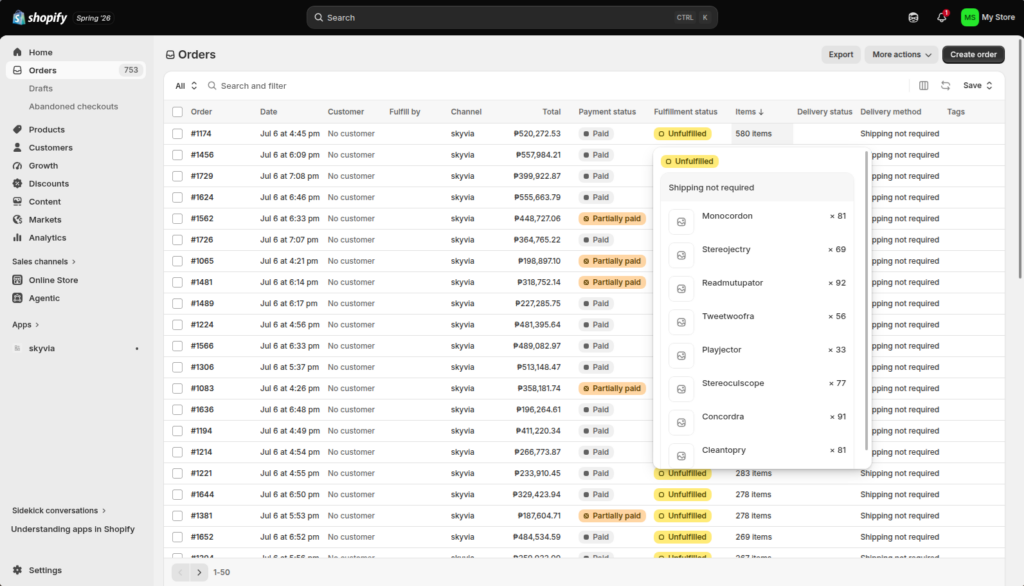
This means 757 orders actually includes more than a thousand rows.
Shopify to BigQuery Output
There will be 4 main BigQuery datasets, each corresponding to the tool we used: Fivetran, Skyvia, Airbyte, and the custom script. We wanted to see the result each tool will produce. Is it flattened to relational columns or tables, or is it maintained as JSON columns in BigQuery? Neither is better than the other. Your role is to determine what’s best for your company.
There will be corresponding tables for customers, companies, and orders for each dataset.
We’re going to check how fast the data will move from Shopify to BigQuery and whether the data we expect is all there. Fivetran, Skyvia, and Airbyte already handle the API rate limits and the nitty-gritty of the Shopify data structure. But our custom script will have to handle the fetching without hitting the rate limits.
Why Should You Load Shopify Data into Google BigQuery?
The trial Shopify store also allowed me to see the reports they have. There are more than a hundred, including customer behavior and conversion rates. I didn’t check all of them. But what if you want to join Shopify transactions to, let’s say, Facebook Ads?
With a data warehouse like BigQuery where nested JSON is a natural fit in querying, you can run complex queries or build machine learning models. Combine these with other sources like Facebook Ads or QuickBooks.
Your decision on how to format the Shopify data in BigQuery will determine whether it’s flexible to Shopify changes or if it’s convenient to query. It’s hard to target both. You need to decide before designing the data warehouse which is which. Your choice of the Shopify to BigQuery tool is just a means to take you there.
To make it immune to Shopify changes so it won’t break, store the entire JSON payload in a BigQuery table column. But querying it will not be simple.
To make querying simple, flatten the nested objects to separate columns and the arrays to another table. But the possibility of breaking the data pipeline when Shopify changes is great.

The Challenge: GraphQL
GraphQL is new to me. Working with it today is like knowing about SQL for the first time. It also won’t be challenging if I don’t need to create a custom script. Tools like Skyvia, Fivetran, and even Airbyte hide these details from us.
In my first attempt, I thought of Shopify giving me all the fields it got from the customer, company, and order data. Like a SELECT * that gives all columns of a relational table.
But GraphQL is not relational. Inside, let’s say, order, are nested arrays and objects. It may contain line items or details that a customer bought – the product, price, quantity, or taxes. These line items are not in a separate table like in relational databases. They live inside the order.
Even more, I can’t use something similar to SELECT * just to give me an idea of what information is available. I have to look into Shopify’s GraphQL Admin API Reference for that. It’s not a straight list because of the nested arrays and objects.
In short, to get data from Shopify, whether it be customers or orders, I have to be specific about what fields or information I want. This is similar to SELECT column1, column2, columnN. There’s no SELECT *.
Come to think of it, choosing what you only need is not just about being clear of the query intent. It’s also practical and good for performance reasons.
What Is the Best Method to Connect Shopify to BigQuery for Your Specific Use Case?
What’s your use case? Big data, high volume? Or Cloud-native and no-code? How about open source? Or maybe you want to do it yourself?
Best for High-Volume Enterprise & Automated Schema Management (Fivetran)
Fivetran uses ELT (Extract, Load, Transform) as its model to continuously replicate raw data from Shopify to BigQuery. When Shopify schema changes, Fivetran handles the changes automatically. It also has a reputation for high-volume processing.
It requires a source, a destination, and a link (or connection, as Fivetran calls it) between the two. Within the connection lie your chosen tables to replicate.
I’ve used Fivetran a few times already, so I did the setup in 8 minutes.
Setting Up the Source and Target
Below is a setup of an actual Shopify connection to my trial store:
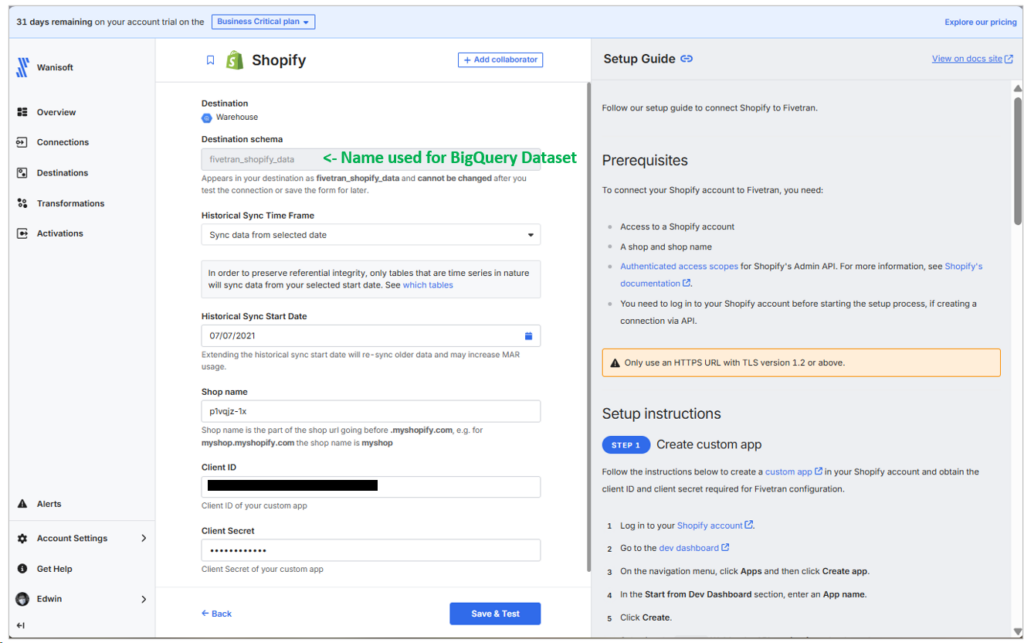
Note the Destination schema. This will be the name of the target dataset in BigQuery. It’s quite annoying at first. Once this is set, there’s no changing it.
The Client ID and Secret come from the Shopify Custom App you created. I followed the setup instructions on how to do that on the right side of the page.
Below is a real connection to my own BigQuery account. I used a test project for this purpose.
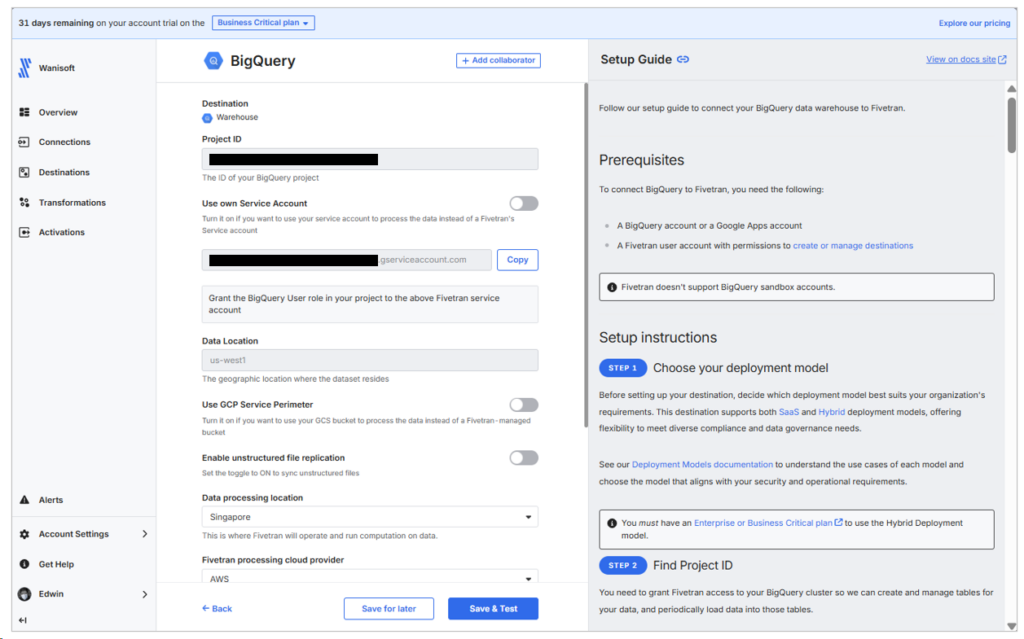
Note the Service account. I used what Fivetran provided as default and got back to my BigQuery setup and granted access to my project through the Project ID and that service account.
Choosing the Data to Replicate
The next part is setting the connection. I chose company, customer, and order. But as seen below, there are further tables that come with the order table. I can’t uncheck one without removing the order table. These are the arrays within orders that will be flattened to tables in BigQuery.
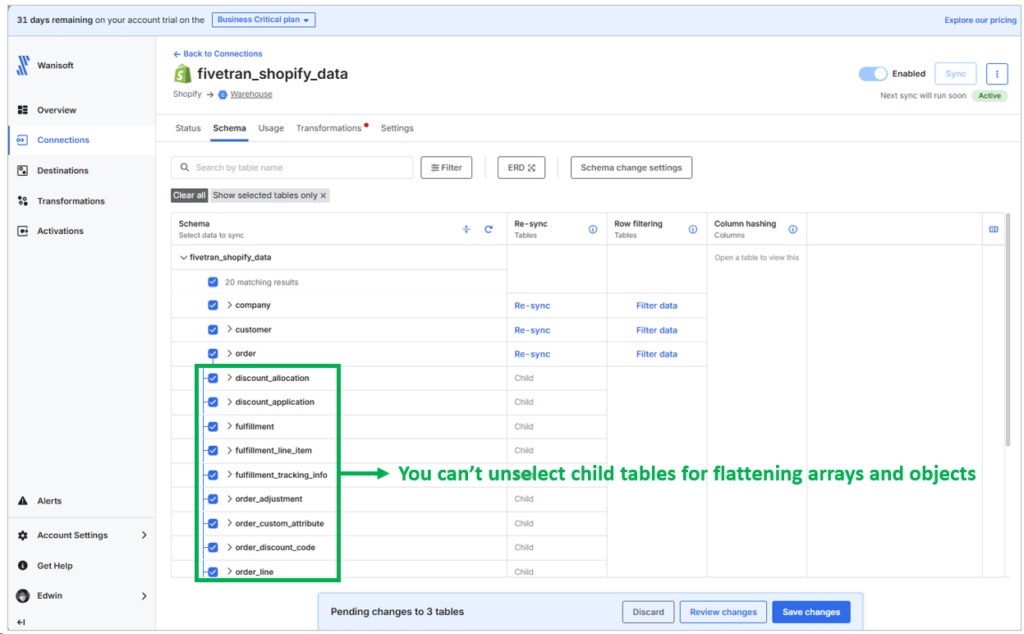
This means Fivetran decided what to flatten for you, and they chose your convenience for querying. It’s up to them to handle the changes Shopify makes. This is where Fivetran shines.
Notice the initial sync below:
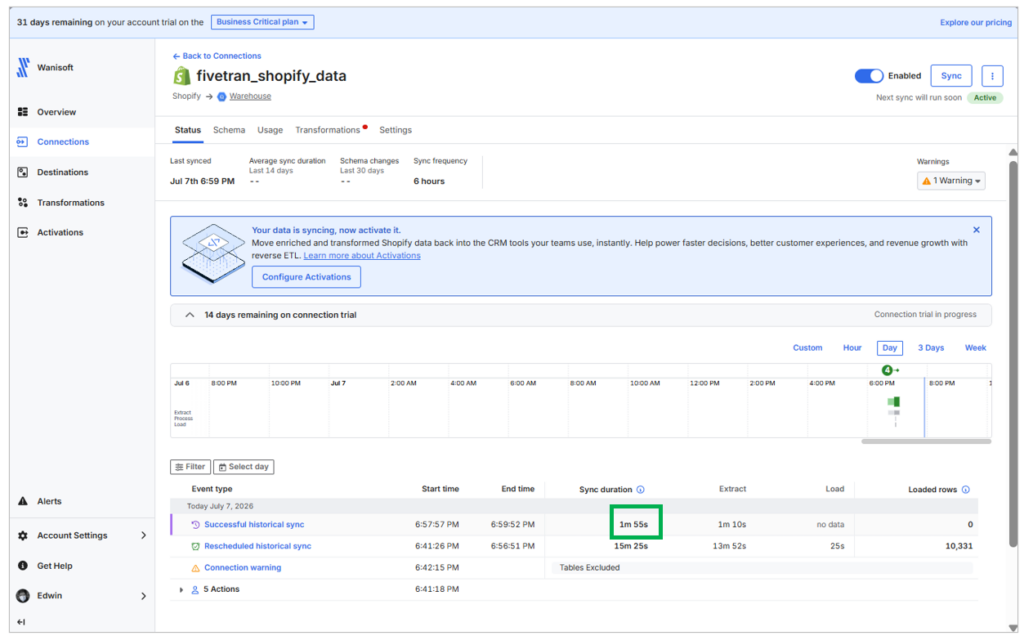
There are some tables below, and the ones boxed in green are the same as the numbers we had in Shopify earlier.
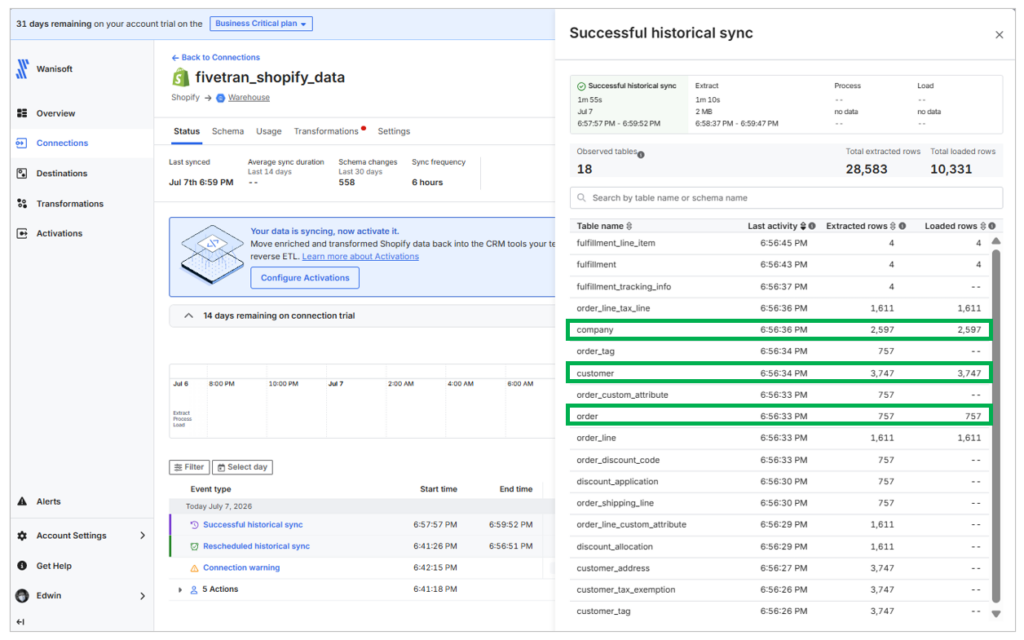
The number of order lines are exactly 1611 scattered within the 757 orders.
Checking the Output in BigQuery
Fivetran created two more datasets for staging and processing:
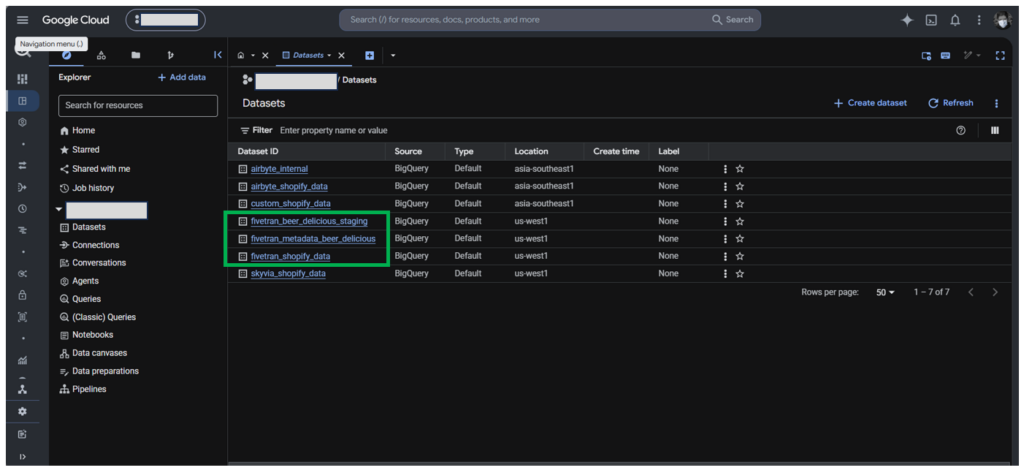
Now, don’t be bothered by the fivetran_beer_delicious_staging and fivetran_metadata_beer_delicious. That’s how Fivetran named their staging area, and our Shopify store is not for wines and beers.
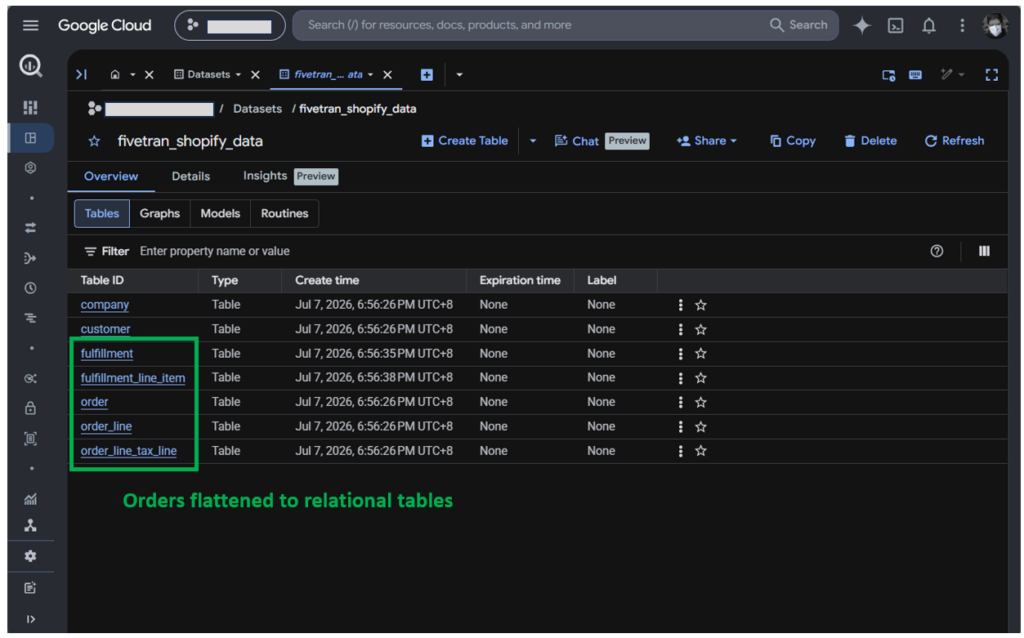
Then, the customer and company are single tables, while the orders have been flattened to several tables. This will make joining tables in reports much easier.
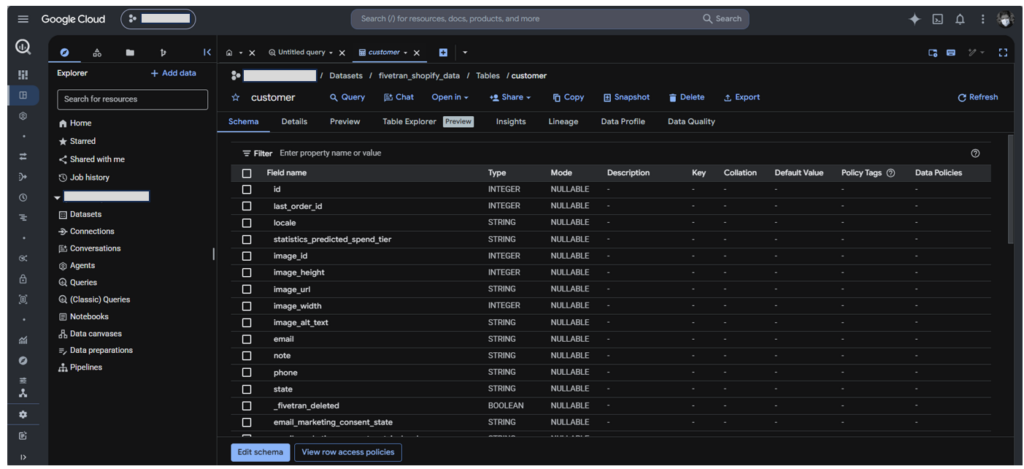
I checked the customer table, and Fivetran added a _fivetran_deleted column, probably for tracking deletions in Shopify.
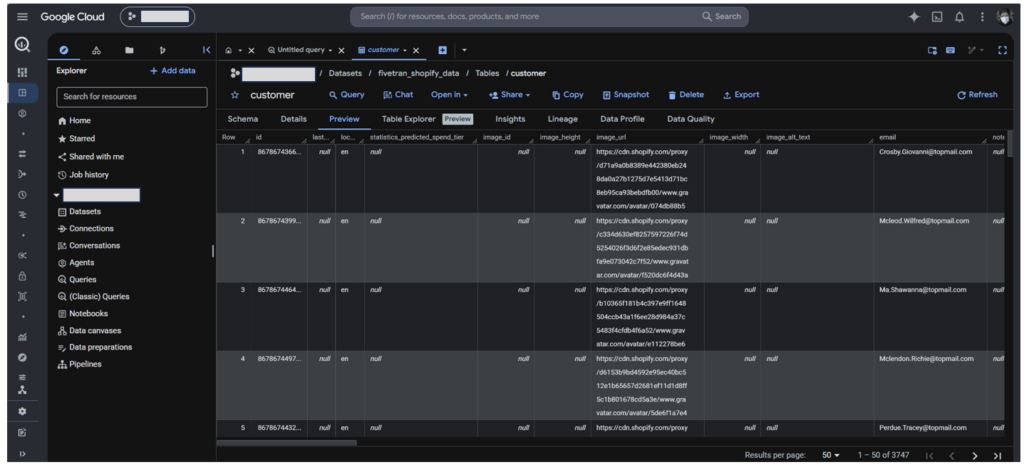
When I preview the data, below is a part of what I saw for the customer data:
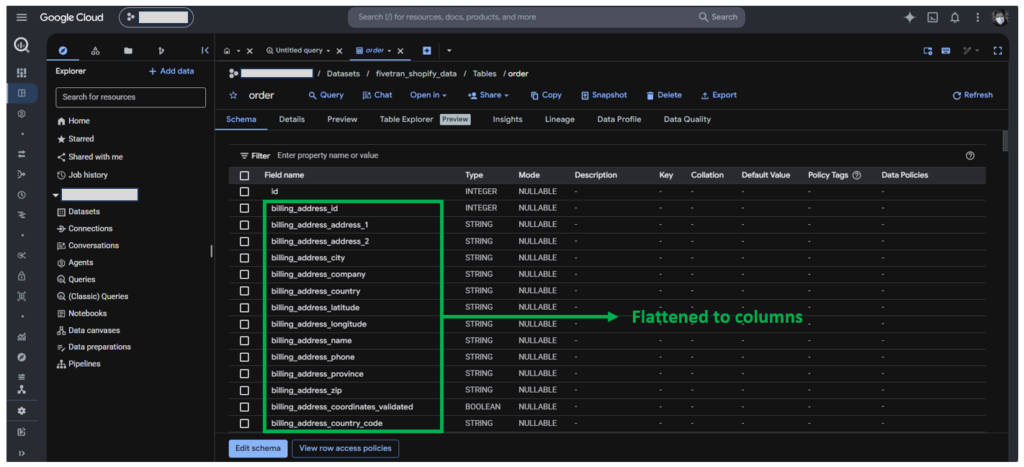
Inside the order table, I saw flattened data into columns, like the billing address below. This is an object in Shopify.
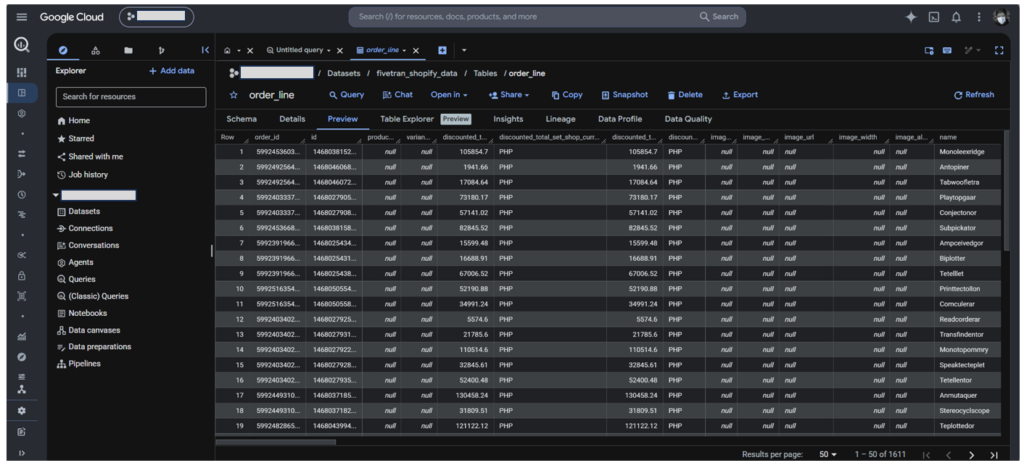
The order_line table, on the other hand, also has flattened data into columns, like the discounted total. See them below:
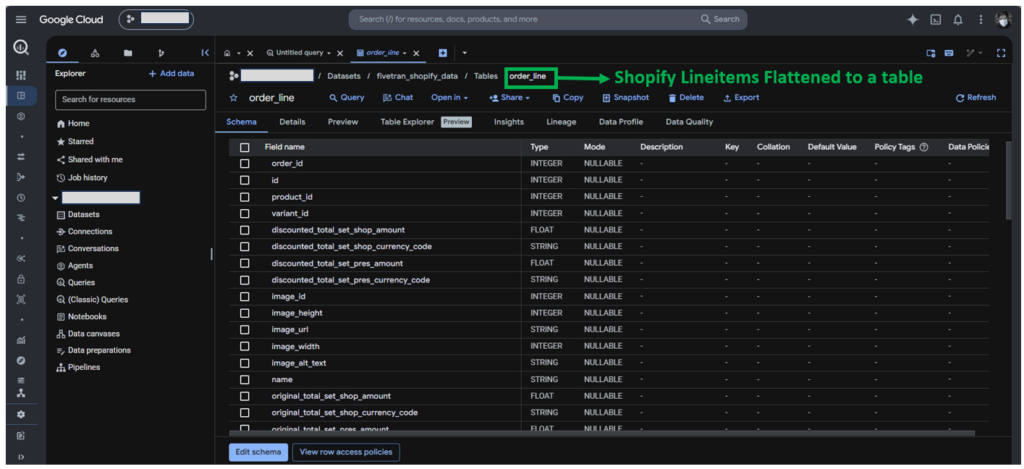
Below is what I saw in the flattened order line table:
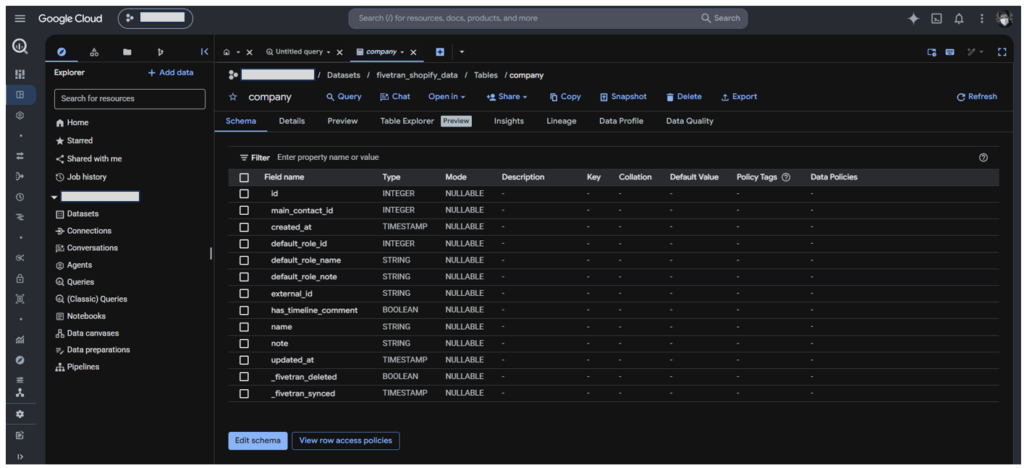
Meanwhile, below is the Shopify company table. It shows the original columns plus the ones added by Fivetran for incremental updates in the future:
Below is the preview of the replicated Shopify company table:
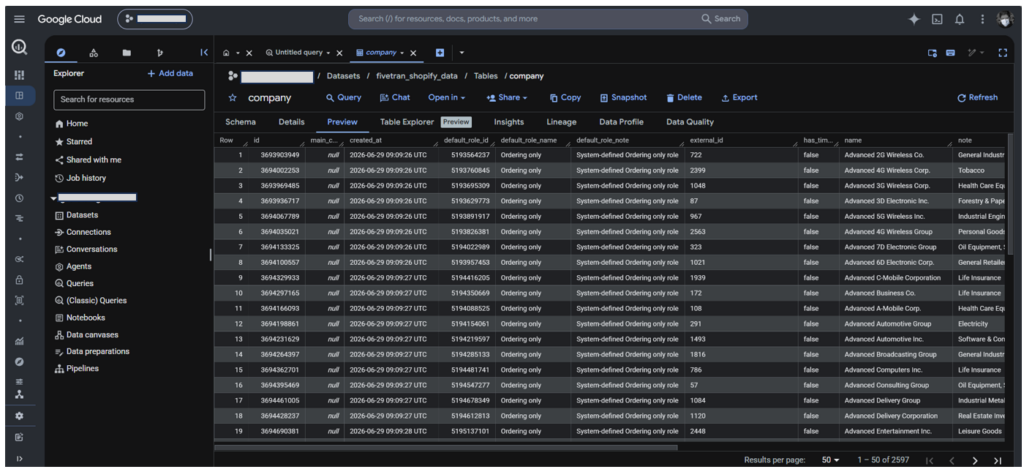
Fivetran flattened the columns for you and your analysts for easy querying in reports. If query convenience is important to you, you may consider Fivetran.
Though at this point, I can’t vouch for how fast Fivetran can adjust to the Shopify changes of the affected schema with its automatic schema drift handling. There’s no schema drift during the test.
Best for
When Shopify adds or changes columns, Fivetran handles them well. So, there’s minimal maintenance when these changes happen though this is not so frequent. It’s most at home in mid-market and enterprise environments.
This is for you if you are a big data company and you prioritize fast scaling, broad connectivity options, and hassle-free schema management.
Rating
- G2 : 800 reviewers rated 4.3/5
- Capterra : 25 reviewers rated 4.4/5
Pricing
Fivetran billing is based on Monthly Active Rows (MAR) – their usage-based model.
- Free Tier. Up to 5k model runs per month for 500k MARs
- Standard Plan. “Pay as you go” includes unlimited users and faster sync intervals.
- Enterprise & Business Critical Tiers. Adds granular access controls, private networking, and compliance certifications (e.g., PCI DSS).
Monitoring of usage and costs is a must. Multiple connectors, each tracking MAR separately, can complicate budgeting. Don’t wait for a spike with growing row volume, frequently changing schemas, and real-time sync needs.
For more details, visit Fivetran’s pricing page.
Pros
- Pipeline setup is simple with a few clicks and no coding
- Exceptional handling of schema drift (automatically adds columns to BigQuery when Shopify changes data fields).
- Robust handling of Shopify’s GraphQL “leaky bucket” API rate limits.
- Focus on security and compliance
- Cloud and hybrid setups available
- Developers can use the Fivetran API and CDK for flexible pipeline setups. This is available even with the 14-day trial, though I haven’t tried this myself.
Cons
- Pricing unpredictability. MAR-based billing grows with growing data volumes.
- Not practical for startups and medium-sized businesses
- When the free trial ends, you can’t use the Fivetran API and CDK.
Best for No-Code & Cost-Effective Scheduled Integrations (Skyvia)
Skyvia operates as a cloud-hosted SaaS. It offers several tools to move data, like Replication (which we will use here), Import/Export, Data Flow, and Control Flow. It handles schema relations (Shopify fields to BigQuery schemas) automatically, so you have complete control over the mappings and scheduling.
I’ve used Skyvia many times. I chose Skyvia Replication, and the setup took me 5 minutes to complete.
Setting Up the Source and Target
Below is a successful connection to my trial Shopify store:
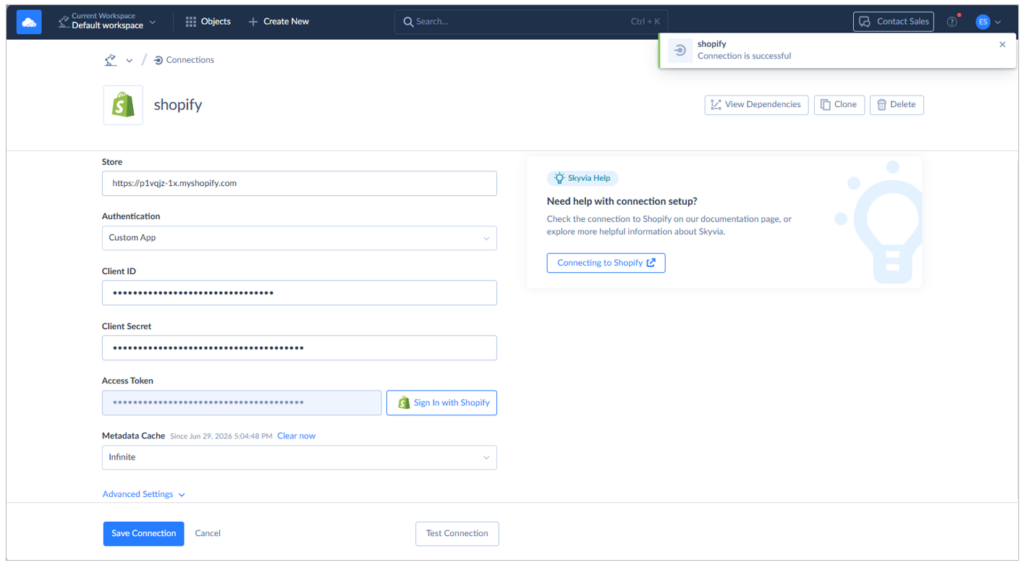
The Client ID and Secret are the same ones used in Fivetran. Though this wants me to sign in to Shopify for the Access token, instead of using a Service Account. That alone reduces the setup time compared to Fivetran.
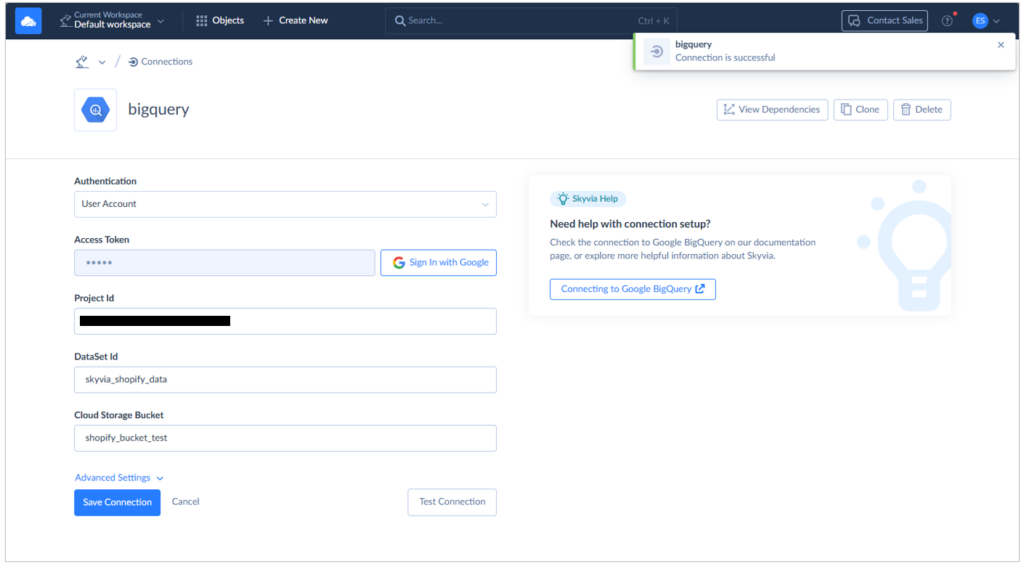
I made sure I used the correct Dataset ID. If you’re having problems, just click the Connecting to Google BigQuery button for instructions.
Choosing the Data to Replicate
Below is the Replication setup indicating the Companies, Customers, and Orders.
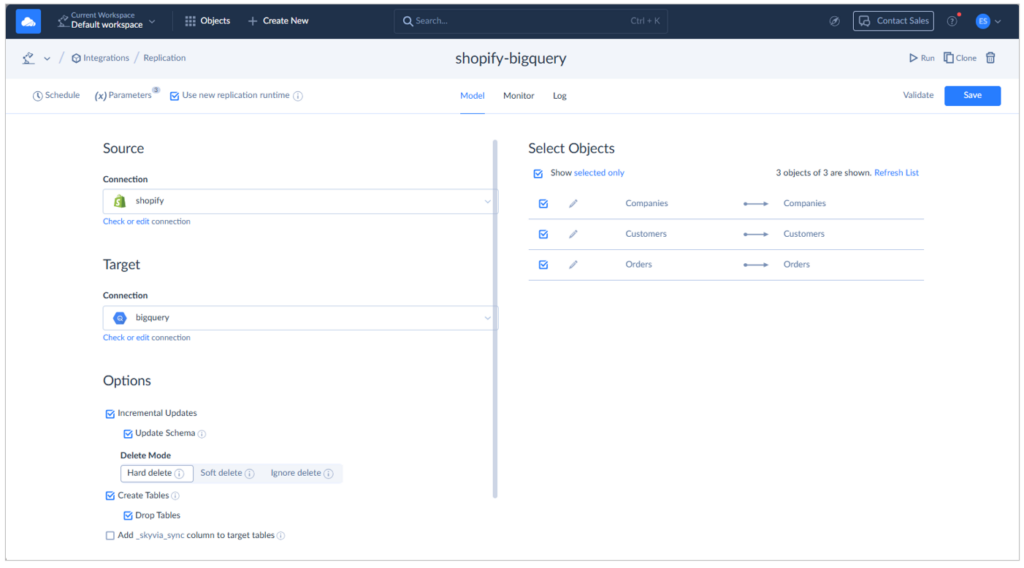
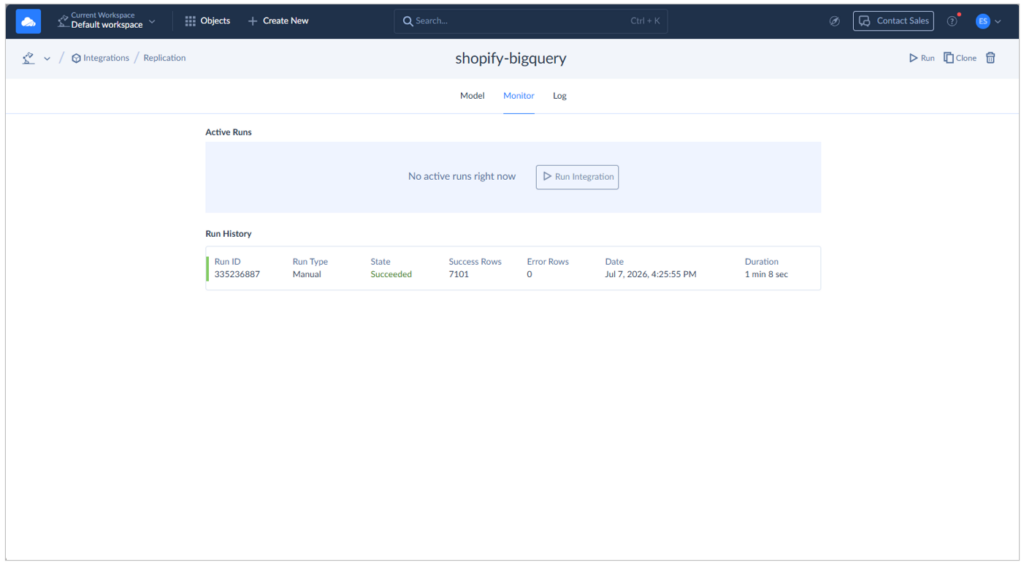
I ran it manually, and the initial sync took 1 minute and 8 seconds. See below:
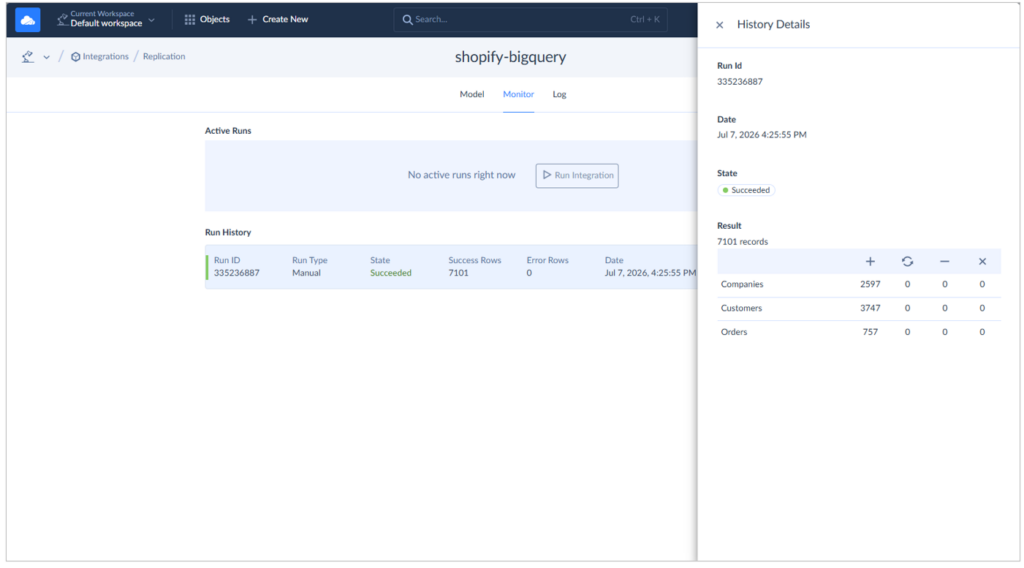
The row counts for each table match the numbers in Shopify earlier.
Checking the Output in BigQuery
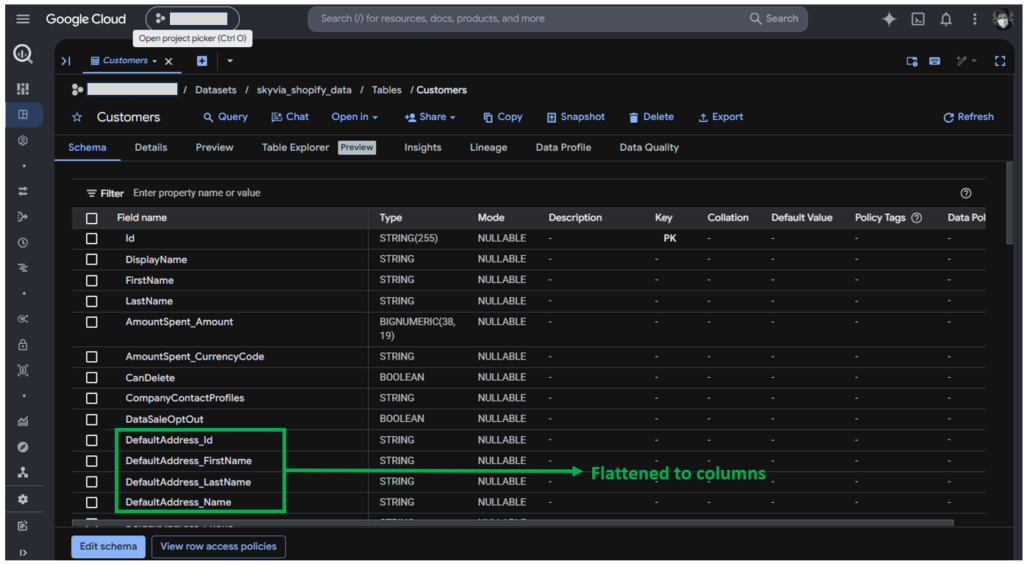
Skyvia also flattened the loaded data in BigQuery. Consider the Shopify Customers table columns below:
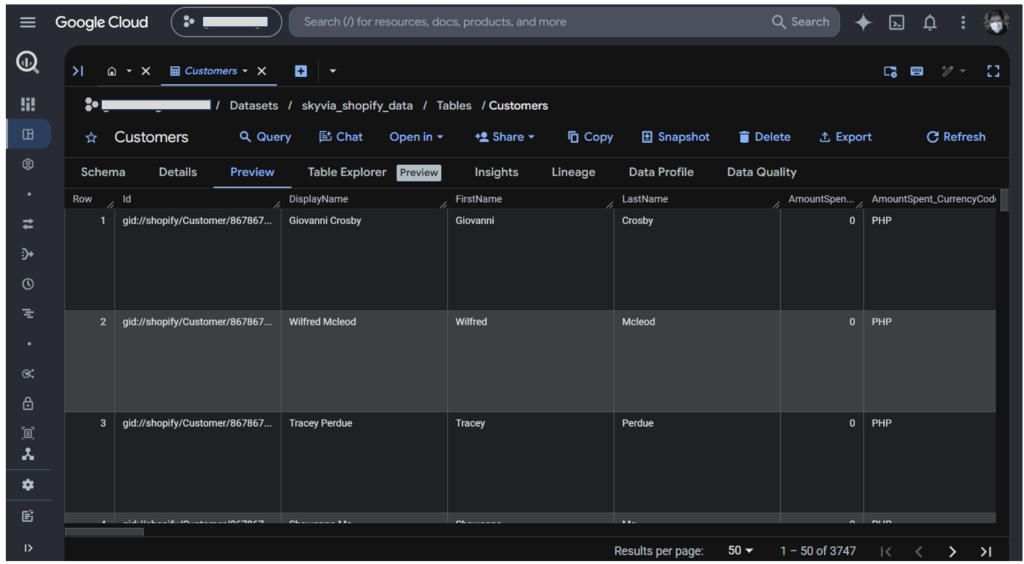
Below is the data preview of the Shopify Customers:
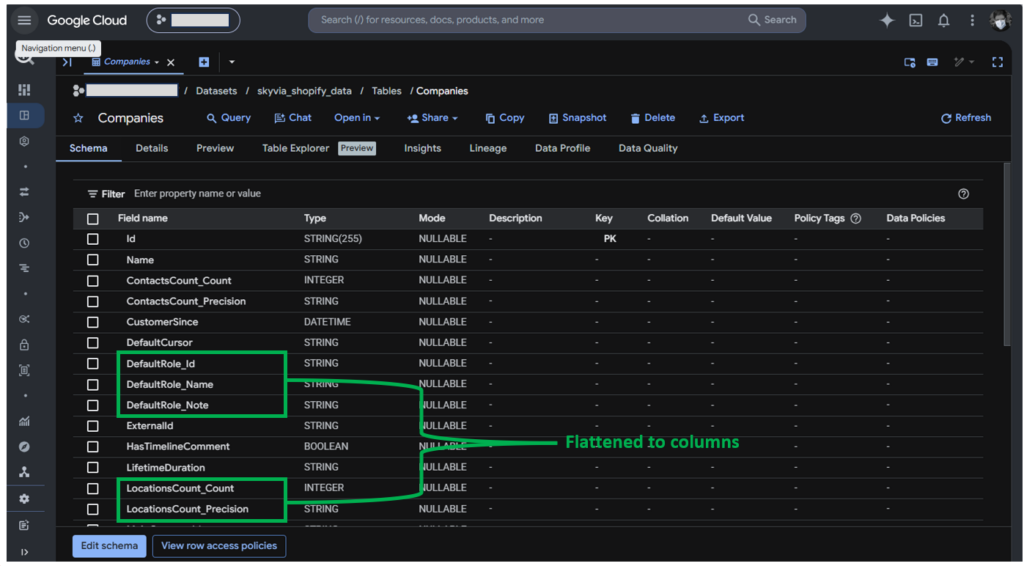
Same thing in Shopify Companies. Objects are flattened to columns. See below:
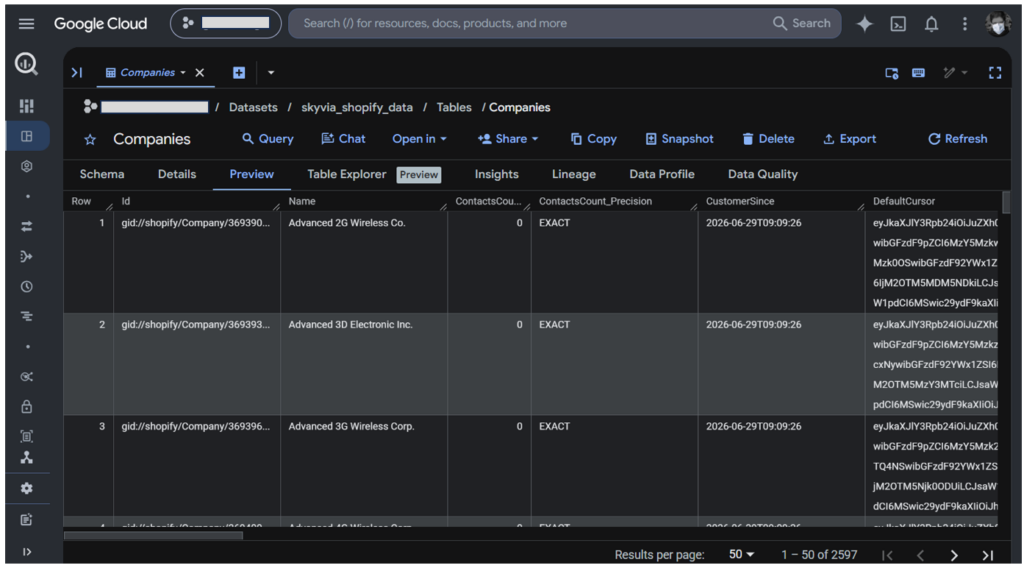
I’m not sure if the DefaultCursor is the pointer of the exact row in Shopify, but it’s there. See the preview below:
Meanwhile, below are the Shopify Orders:
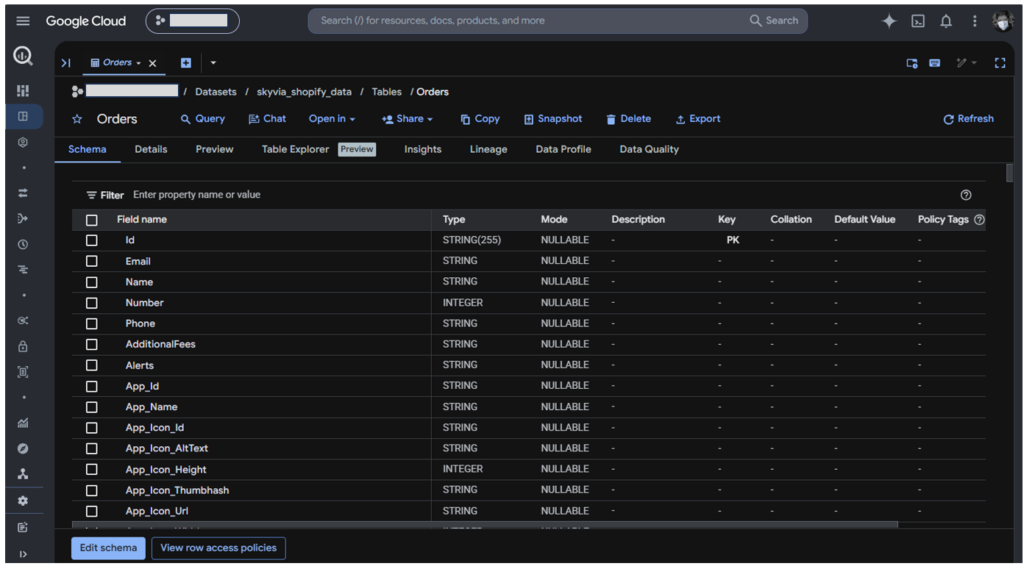
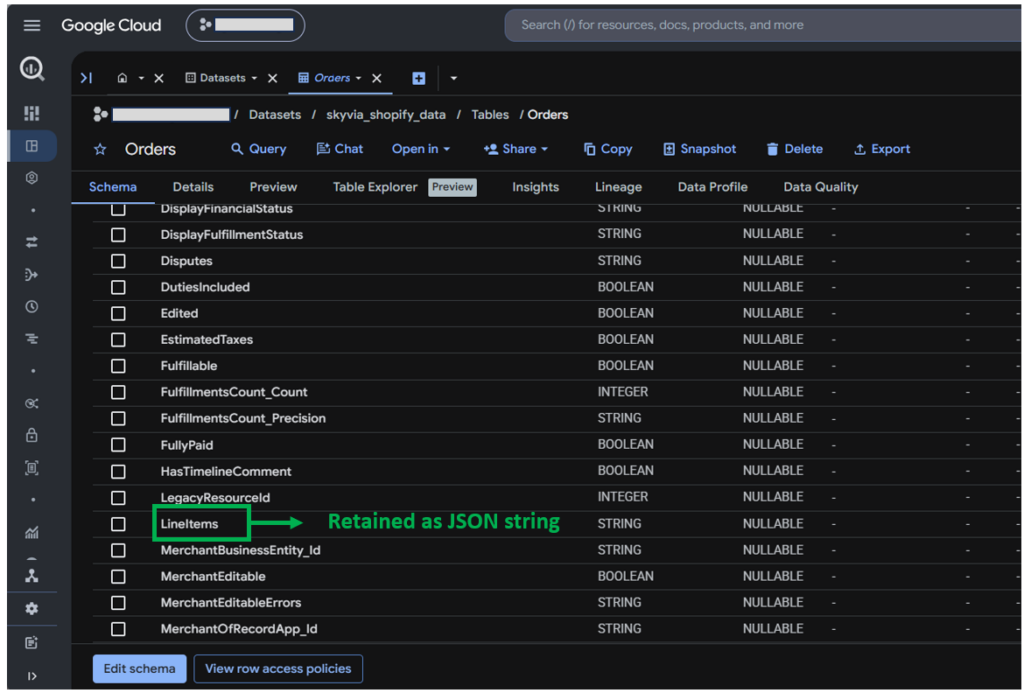
Further down, I saw the Lineitems retained as a JSON column, not as a flattened table.
Below is the preview of the Shopify Orders:
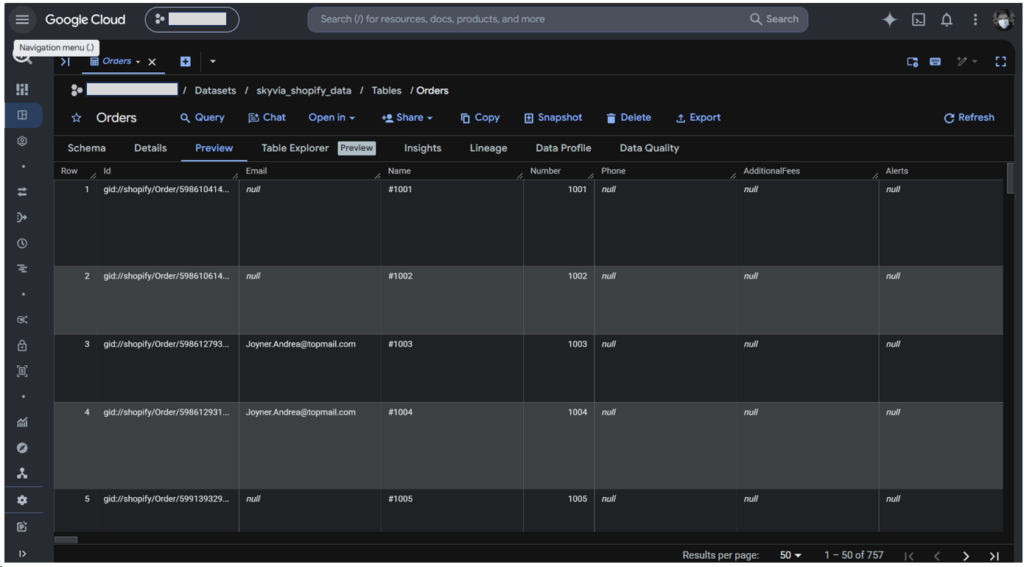
Skyvia strikes a balance between easy querying and flexibility. It flattened objects but retained the line items. The moment Shopify added some line item info, there’s no need for Skyvia to adjust. However, this requires JSON parsing in BigQuery to flatten the line items in reports.
Best for
This is for developers and analysts who want to start immediately. No work email address required. It’s good for anyone who wants to get rid of manual imports and exports quickly. Both SMBs and larger enterprises will find it attractive.
Rating
- G2 : 333 reviewers rated 4.8/5
- Capterra : 116 reviewers rated 4.9/5
Pricing
My free tier plan is enough for the small dataset to test for Shopify to BigQuery with 10k processed rows per month. But Skyvia offers Basic, Standard, Professional, and Enterprise plans. Move up to the higher plan, and you will have more rows allowed monthly, more scheduled integrations, better integration scenarios, and improved mapping functionality.
You can also start with a free tier to test it out, or have the Basic plan at $79/month. Refer to the Skyvia pricing page for additional information.
Pros
- Highly cost-effective; pricing is based on volume/credits rather than variable “active rows”.
- Visual mapping allows you to flatten nested JSON structures directly during extraction, saving warehouse compute costs in BigQuery.
- No coding required; cloud-hosted with zero infrastructure to manage.
Cons
- You can’t install it on-premises. If your company operates on strict localized data privacy laws requiring all pipelines to run behind a corporate firewall, Skyvia’s purely cloud nature may not be suitable.
- Not built for real-time webhooks; the minimum scheduled sync frequency is 1 minute (incremental).

Best for Developer-Heavy Teams & Self-Hosted Pipelines (Airbyte / Custom Script)
In this section, we are going to test Airbyte Cloud and a custom Python script for developer-heavy teams.
Airbyte
I’ve used Airbyte several times in tests like this. I tried Airbyte Cloud, installing Airbyte myself, and coding with PyAirbyte. For this test, my first attempt is to install Airbyte to a Linux Mint virtual machine. I installed Docker, abctl (Airbyte’s CLI), and Airbyte itself using abctl. I also set the credentials using
abctl local credentials --email <youremail> --password <yourpassword>After 56 minutes of the install process, I can’t get past the login page. I keep getting the Minified React error #185. I tried the suggestions here to no avail. My VM also started lagging, like in my previous experience in Ubuntu 22.04. So, I decided to use Airbyte Cloud again as the interface is similar.
Setting Up the Source and Target
Shopify connection in Airbyte is a simple sign-in to Shopify to get authenticated using OAuth 2.0. See below:
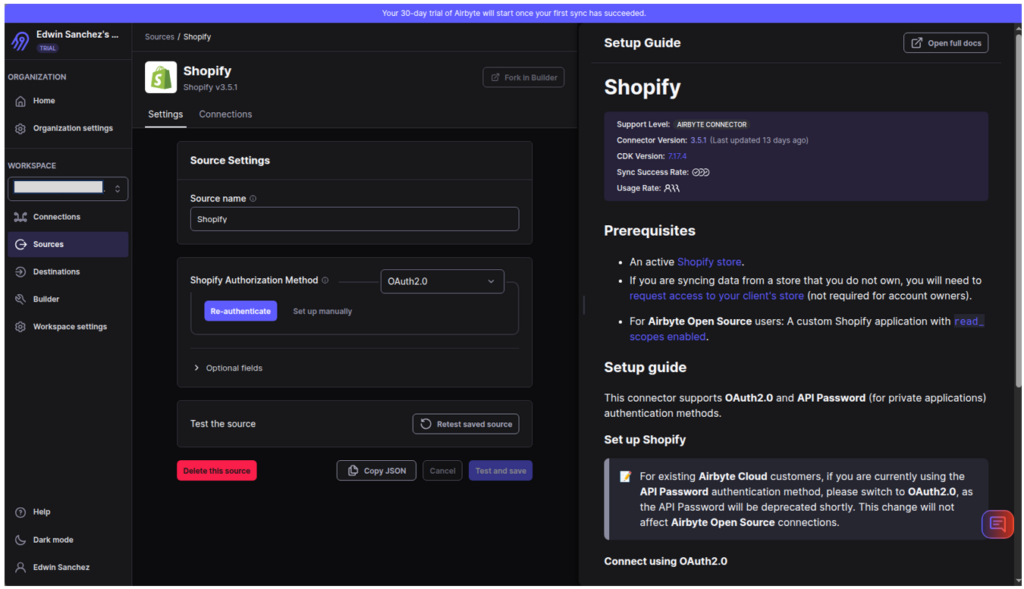
For BigQuery, I needed the same Project ID and the default Dataset ID, which is the target dataset.
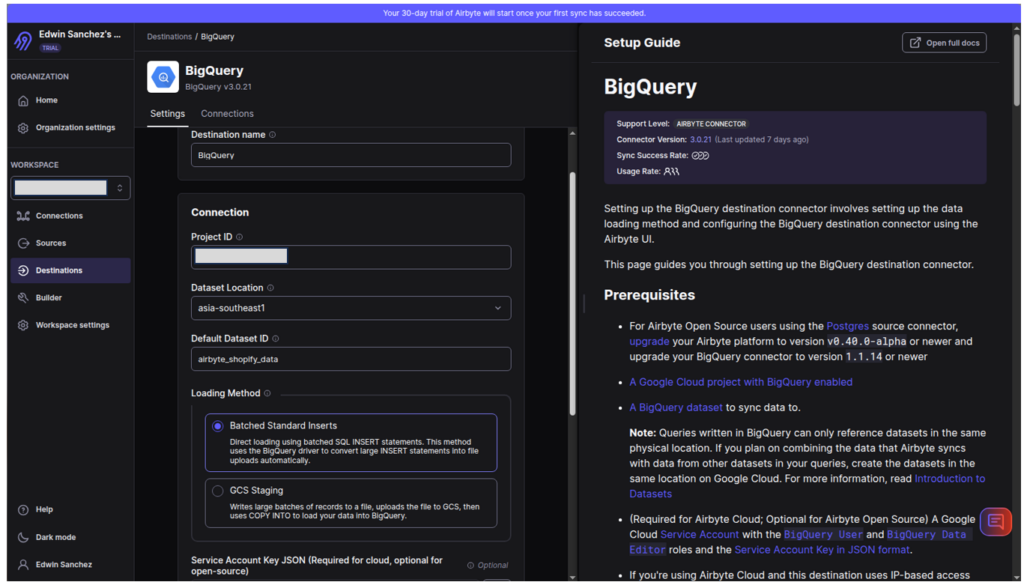
Choosing the Data to Replicate
Then, I need to make a Connection for the source and target. I need to choose streams (or tables) to replicate. I noticed that the Shopify Companies are not available, as seen below:
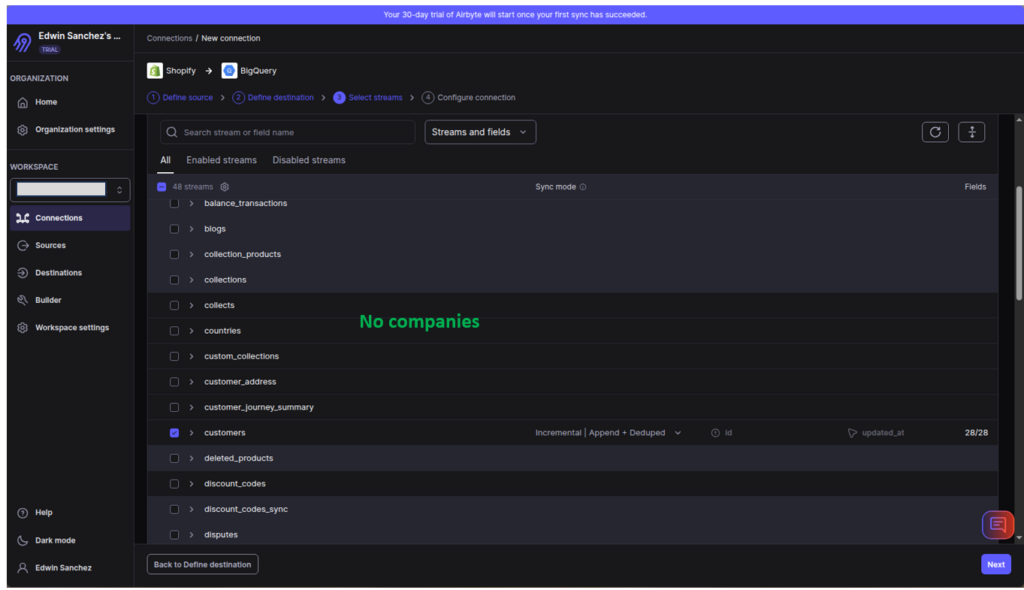
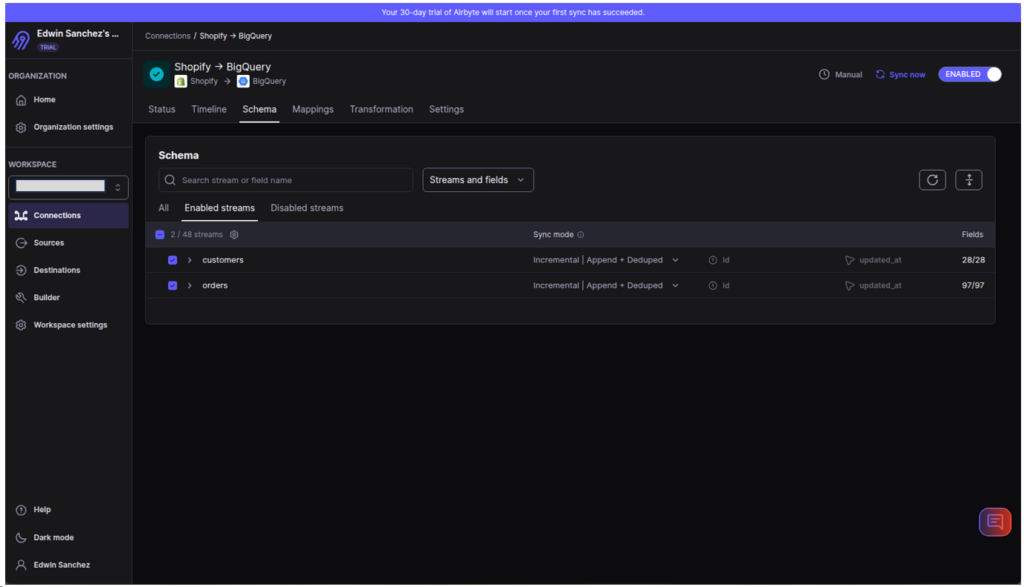
So, in this test, only Customers and Orders are available.
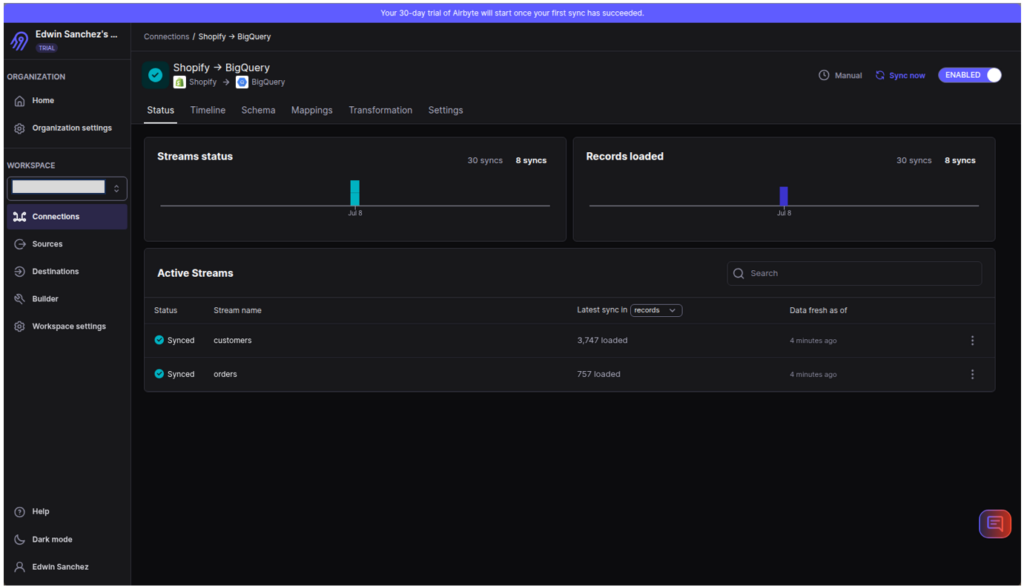
Initial Sync took 4 minutes and 22 seconds. Check it out below:

The rows processed are consistent with the Shopify pages we saw earlier. See the numbers below:
Checking the Output in BigQuery
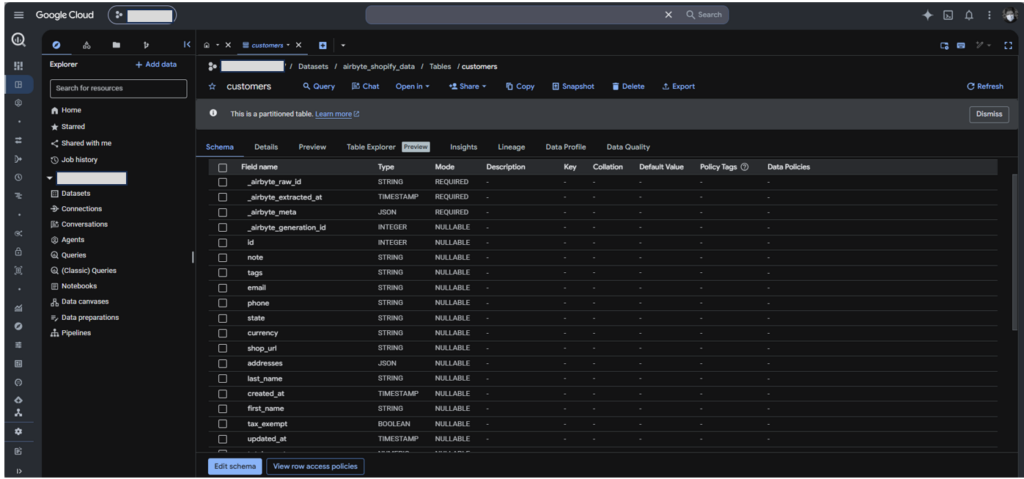
Airbyte replicated the customers table by adding Airbyte-specific columns (see columns beginning with underscores). However, objects like addresses were stored as JSON columns.
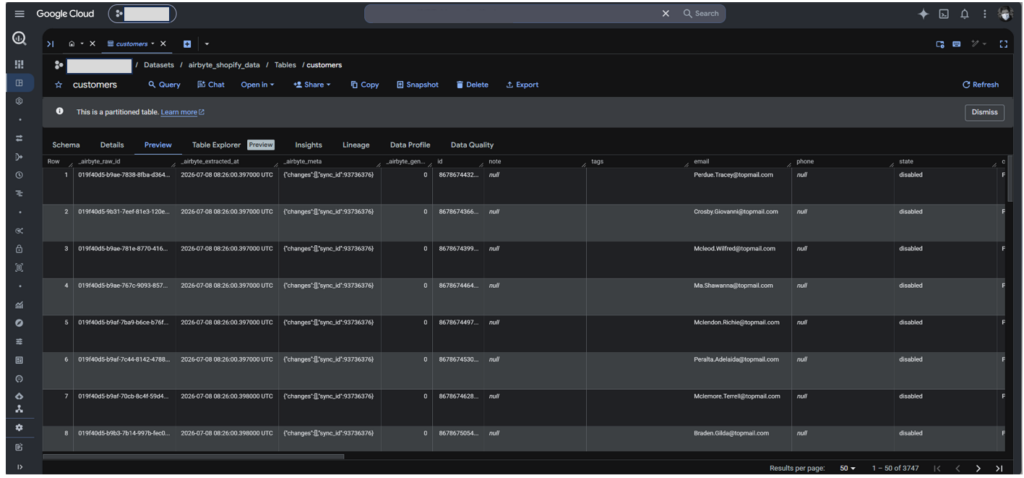
Check out the data preview of the Customers table below:
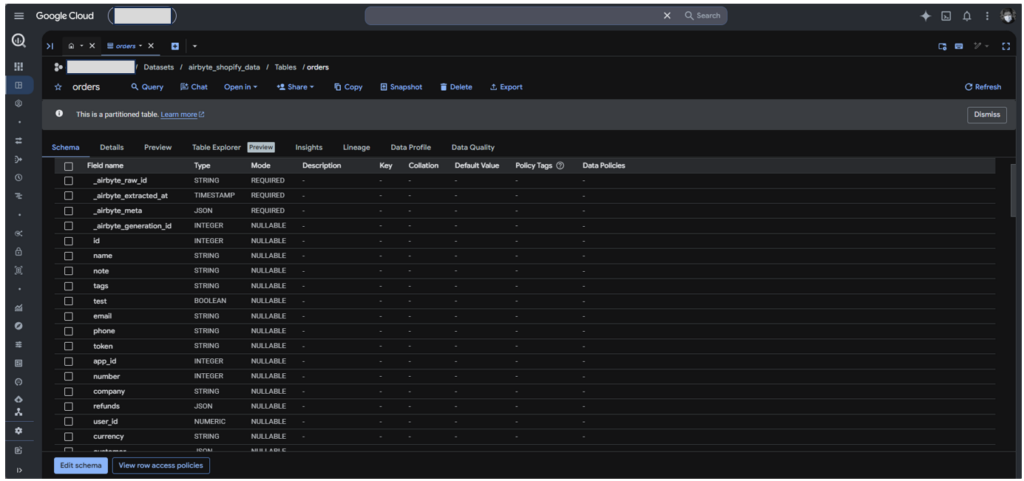
Same with the replicated Shopify Orders. Additional columns were added, and refunds, lineitems, and taxlines are kept as JSON columns.
See the data preview below, where you will see the 2 JSON columns.
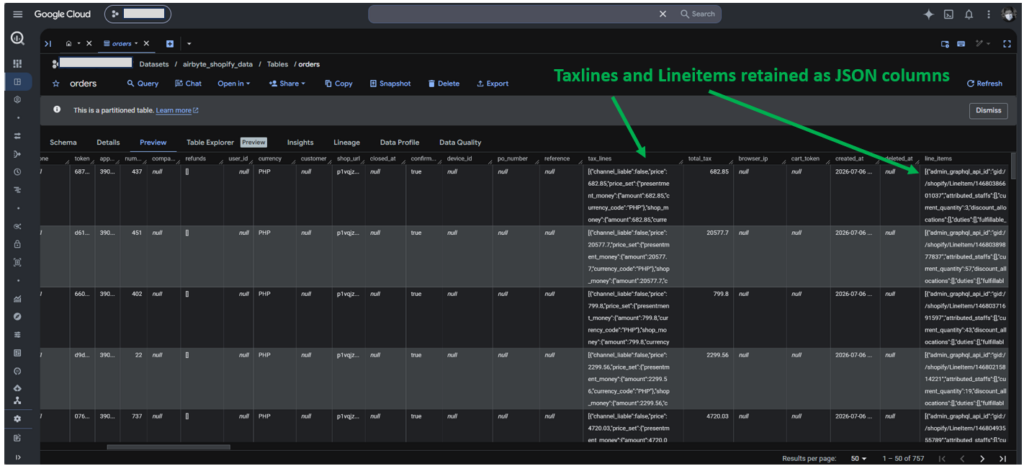
So, Airbyte flattened some data and retained the arrays as JSON columns. My setup time for this is 5 minutes, including searching for the companies that didn’t exist.
Best for
Airbyte is best for teams looking for an open-source solution for Shopify to BigQuery or other sources and targets. If you want an open-source, fully managed platform, you can choose Airbyte Cloud.
Meanwhile, you can install Airbyte Core into your own servers if you need an on-premises solution.
Finally, you can use PyAirbyte if you need flexible pipelines without reliance on an Airbyte account and want to avoid maintaining a self-hosted Airbyte Core.
Rating
- G2 : 77 reviewers rated 4.4/5
- Capterra: no reviews yet
Pricing
Airbyte Core, PyAirbyte, and the Airbyte API are always free and open source.
Meanwhile, Airbyte Cloud pricing plans include Standard, Plus, and Pro, using capacity-based pricing. You need to contact sales for a tailored quote. For more details, visit the Airbyte pricing page.
Pros
- Complete control over how data is processed and formatted with PyAirbyte, but ease of use for Airbyte Cloud.
- No SaaS vendor lock-in or subscription costs (other than infrastructure costs).
Cons
- High Maintenance: You will manage API rate limits, error handling, debugging, and more yourself. Coding takes time.
- Fragile Connectors: APIs change often, and community connectors may lag on support. You may need a custom connector in cases like these.
- Infrastructure burden: If you self-host, expect to manage scaling, monitoring, and upgrades. Costs may be higher than having a cloud-managed service.
Custom Script
The data pipeline here uses a do-it-yourself Python script using standard Python requests and the BigQuery library. It has the following features:
- Extracts Shopify data using GraphQL
- Supports cursor-based pagination
- Loads Customers, Companies, and Orders
- Automatically creates BigQuery tables
- Stores the complete Shopify object in a BigQuery JSON column
- Preserves nested arrays and objects without flattening
- Uses environment variables for configuration
- Written using Python with minimal dependencies
The architectural decision is leaning more to flexibility and simplicity rather than ease of querying. Developers and analysts can create BigQuery views to make querying easier. Or use dbt.
The Main Pipeline
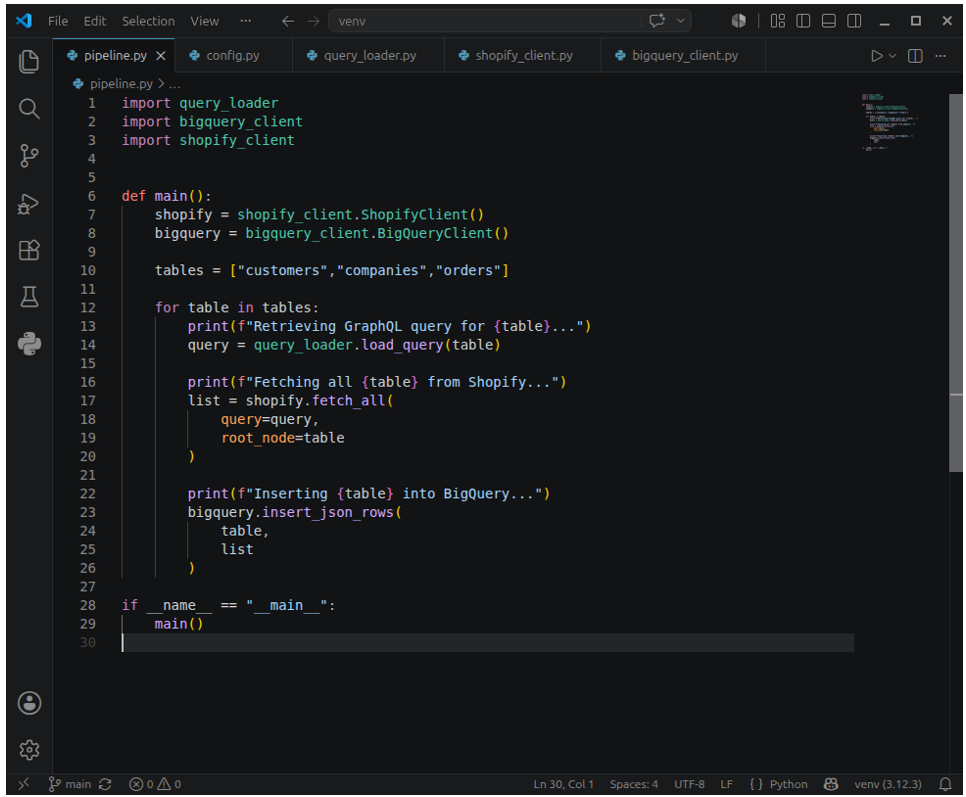
The main pipeline module is just a few lines initializing our Shopify and BigQuery connections and looping through an array of table names to process. The loop starts by getting the GraphQL query file for the table, using that query string to fetch the rows, and finally inserting the rows into BigQuery.
The Configuration
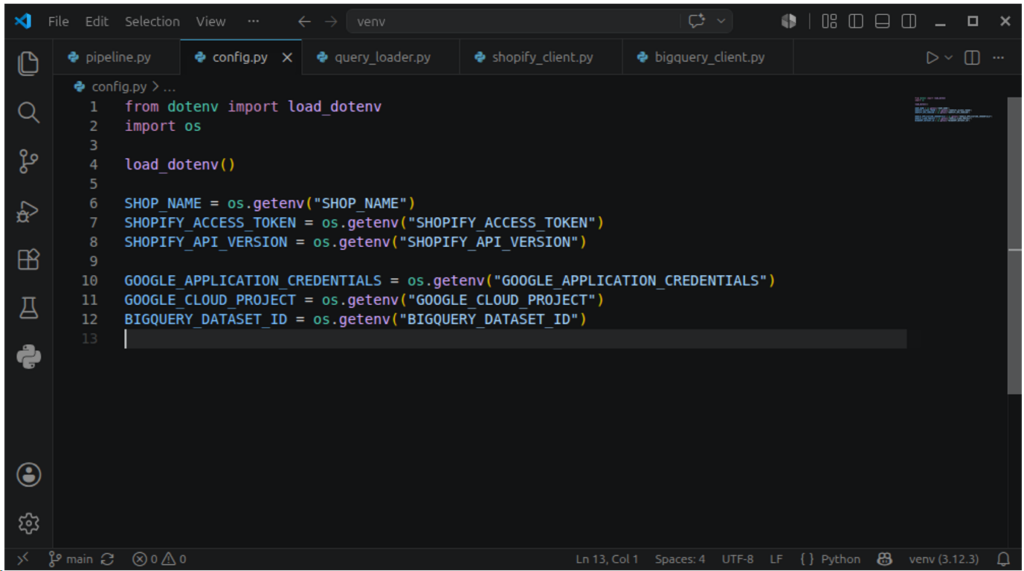
The setup uses a .env file for the necessary credentials, like API access token, Project ID, etc. See it below.
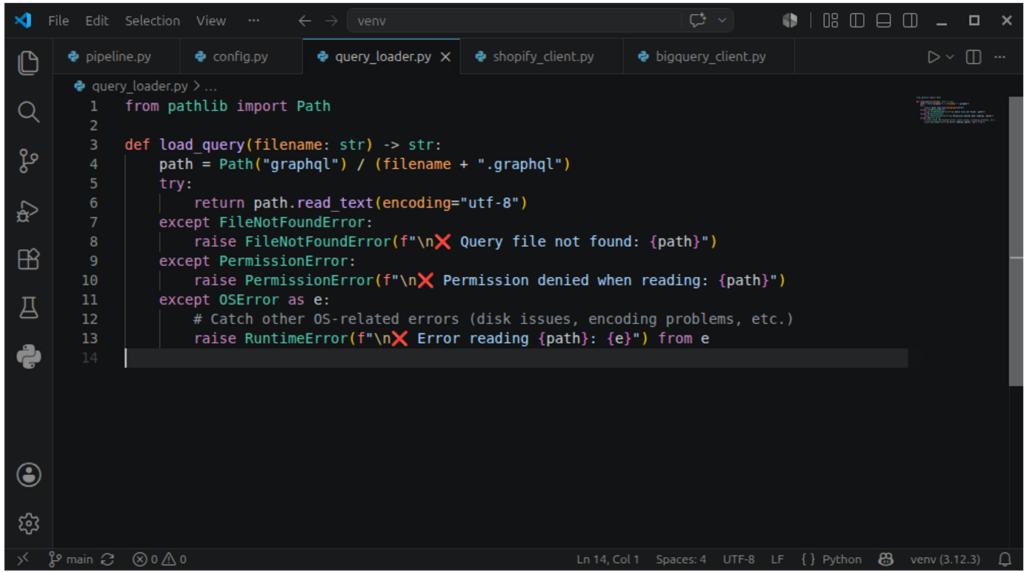
I separated the GraphQL query into a file so that when changes happen to Shopify schemas, it won’t affect the code. Notice that I handle the errors with a try..except.
The Shopify Client Class
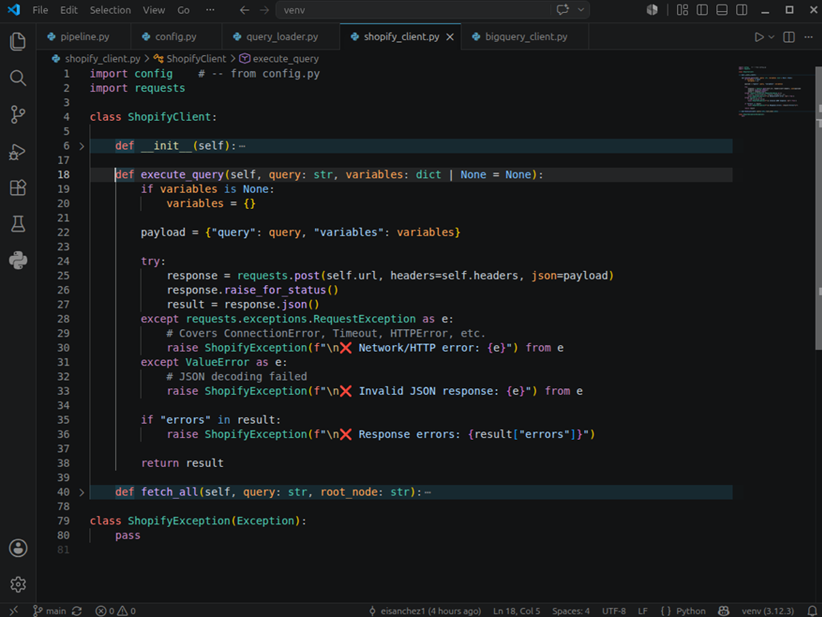
Below is our Shopify Client class. This class will handle all Shopify-related methods needed for this pipeline. It starts by initializing the URL and headers with values based on config.py.
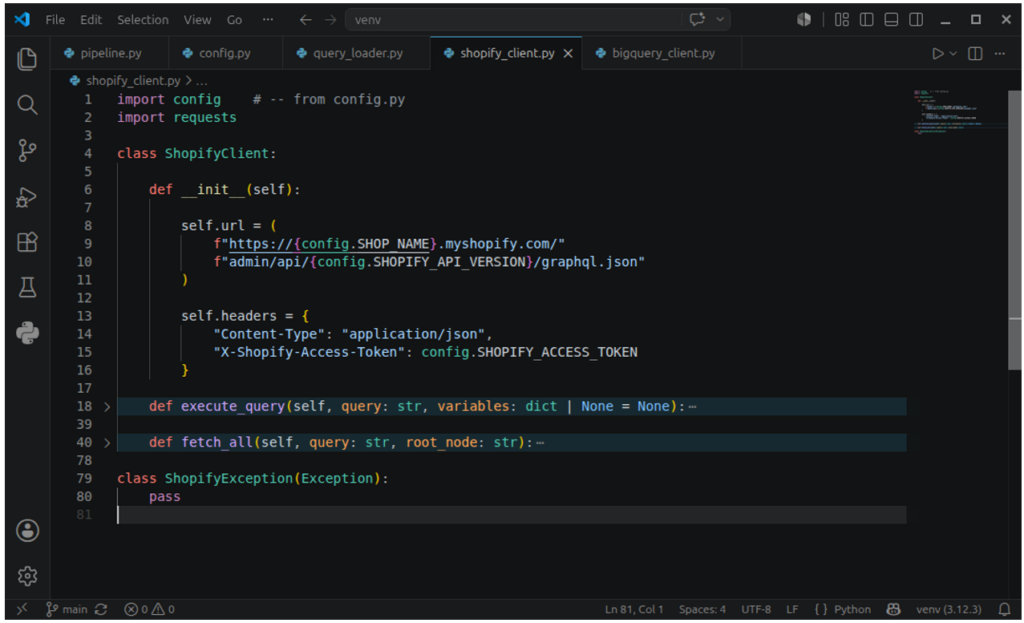
Then, it includes an execute_query method to run the query and return the payload.
For convenience, I added a fetch_all() method to loop over the pages returned by Shopify. Note that 250 rows are the maximum number of rows per page.
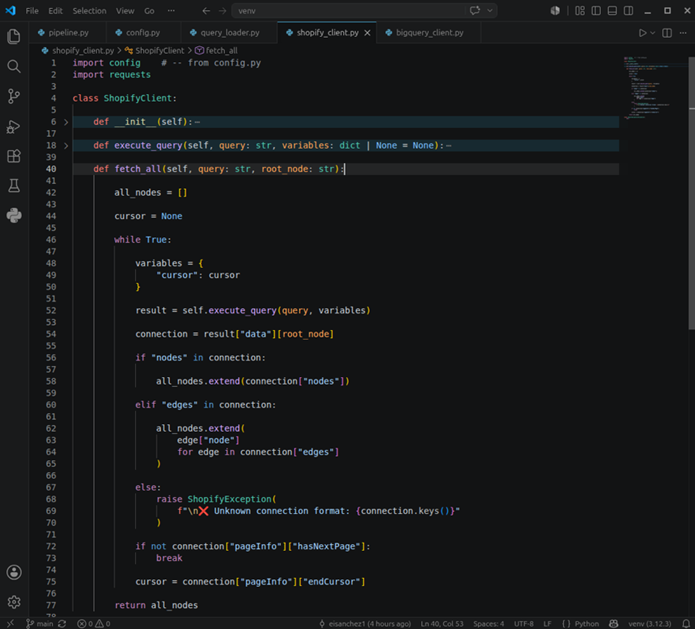
Each payload returns an indicator if there are further pages or if it’s the end or last page.
The BigQuery Client Class
All BigQuery-related methods are in this class. Note that this needs a JSON file containing BigQuery credentials. You can make one in BigQuery, download it to a safe folder, and use it in code to authenticate.
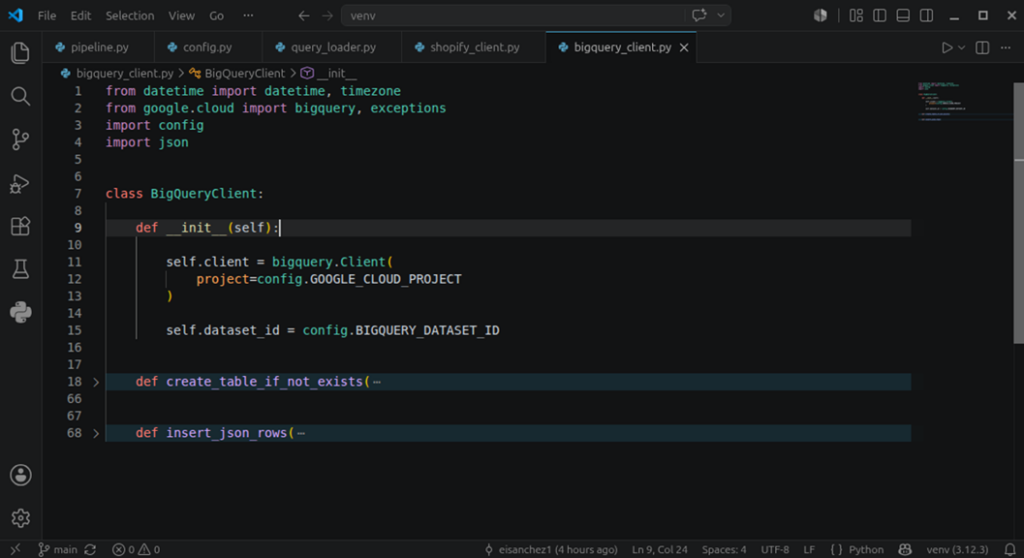
It also includes a method for creating the tables under a set project and dataset defined in the config. We will use the same columns for the 3 tables: shopify_id, extracted_at, api_version, and payload. The payload column will store the entire payload returned for an order, customer, or company.
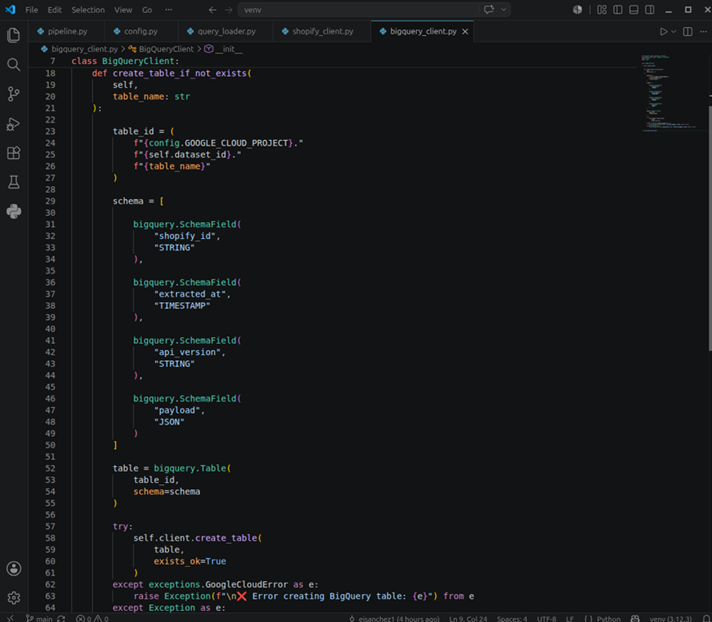
Finally, the method for inserting rows in BigQuery:
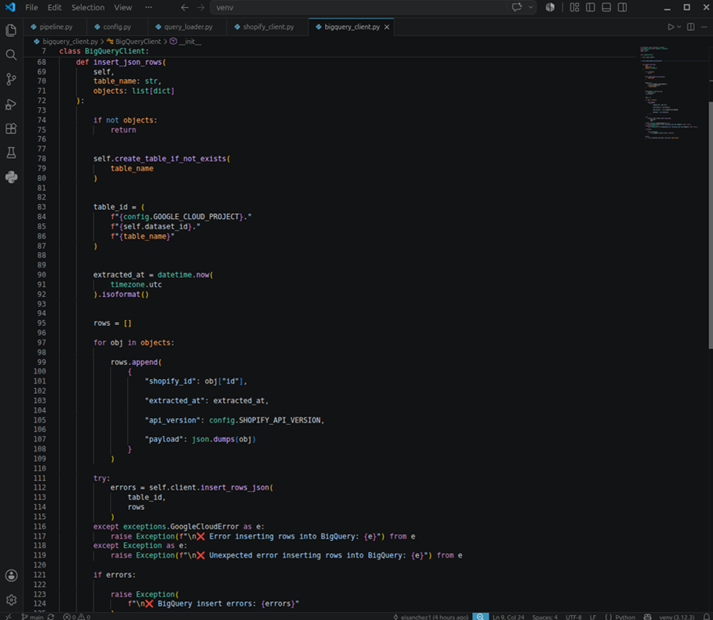
Notice that we didn’t handle the API rate limits here. Querying Shopify, creating the BigQuery table, and loading the query results take time. So, by the time we query Shopify again, the used credits are reclaimed.
Sample Script Output
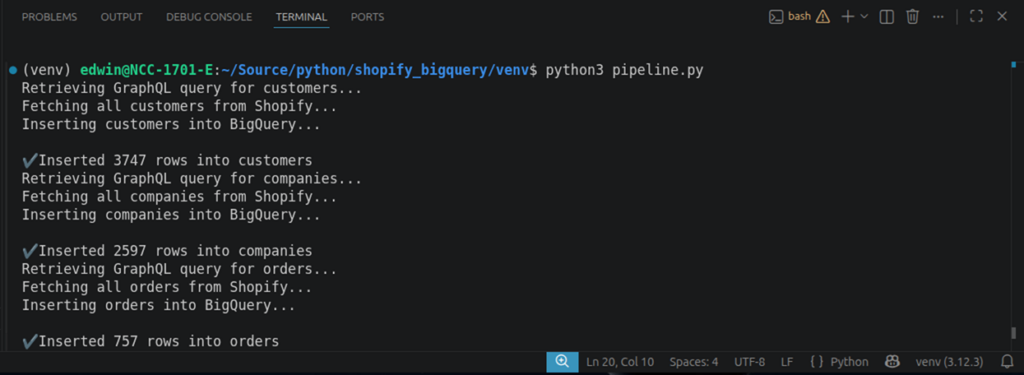
Below is the output in the console. The table rows inserted into BigQuery are consistent with the Shopify samples earlier.
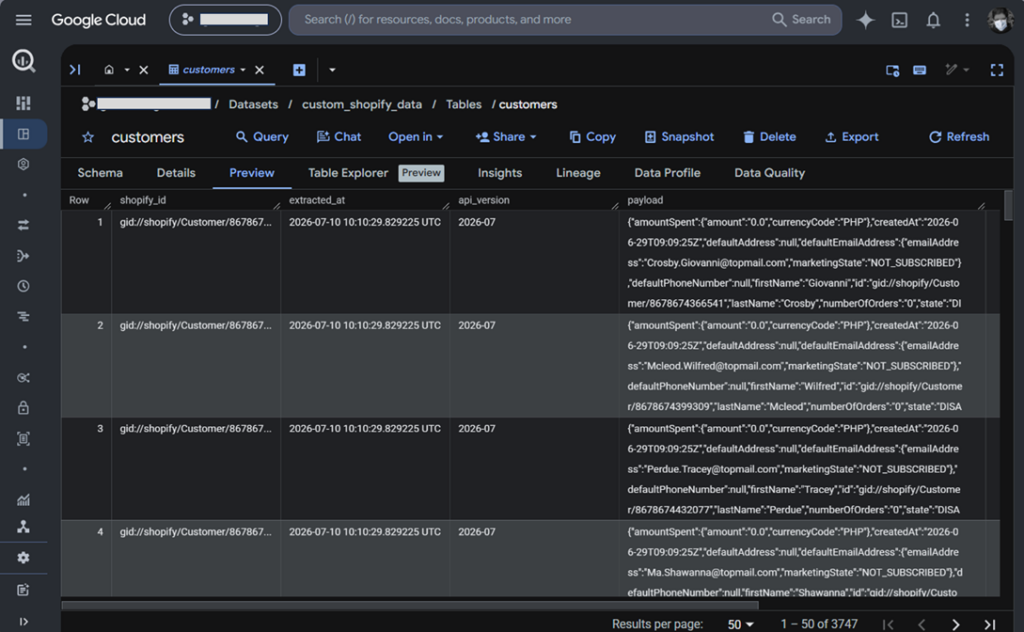
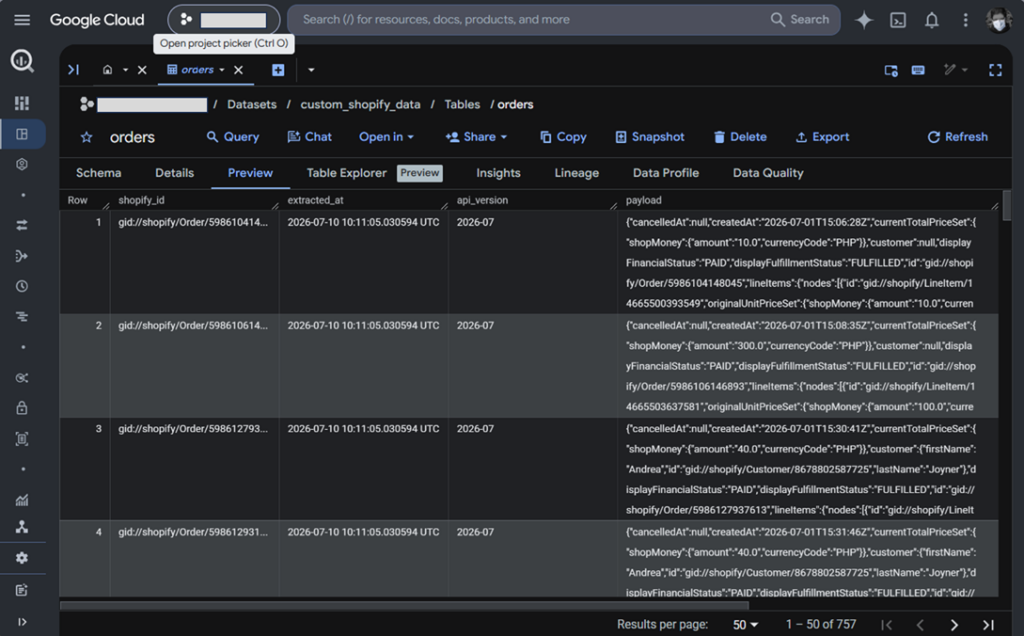
Since we didn’t flatten, here’s a preview of the Shopify Companies:
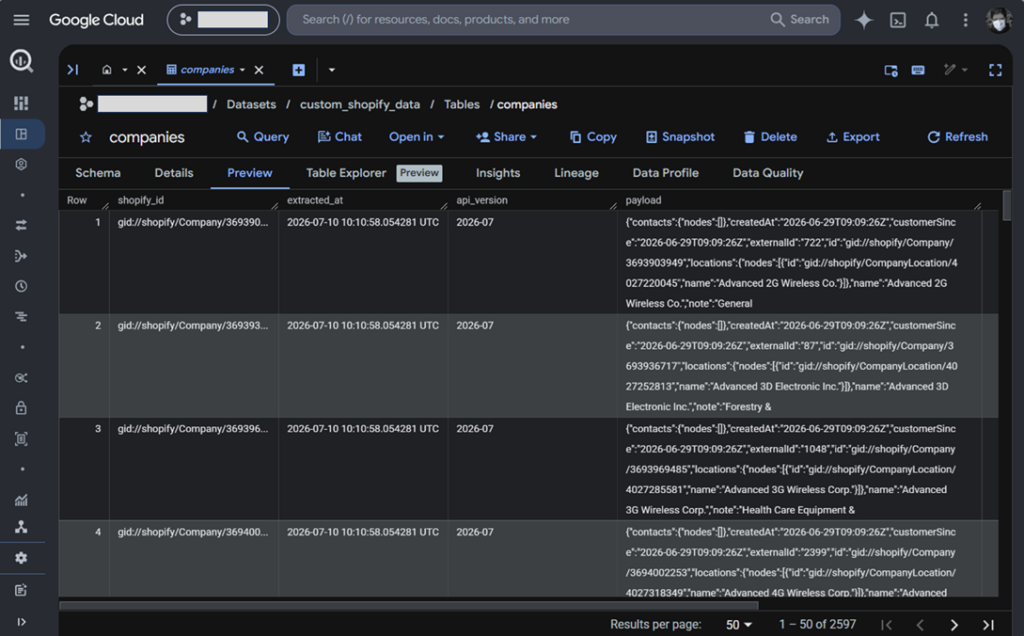
The Shopify Customers:
And finally, the Shopify Orders:
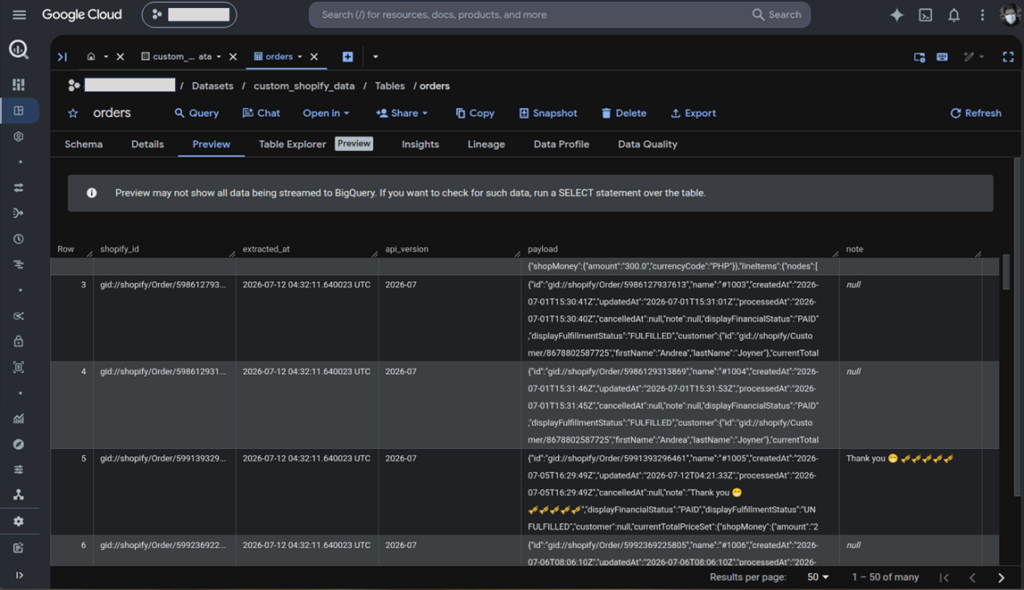
After a successful run, I modified the orders table and pipeline a bit to separate a note column. This is to check if it can handle emojis. It did (see below):
Once everything is in place in BigQuery, you can run queries like the one below:
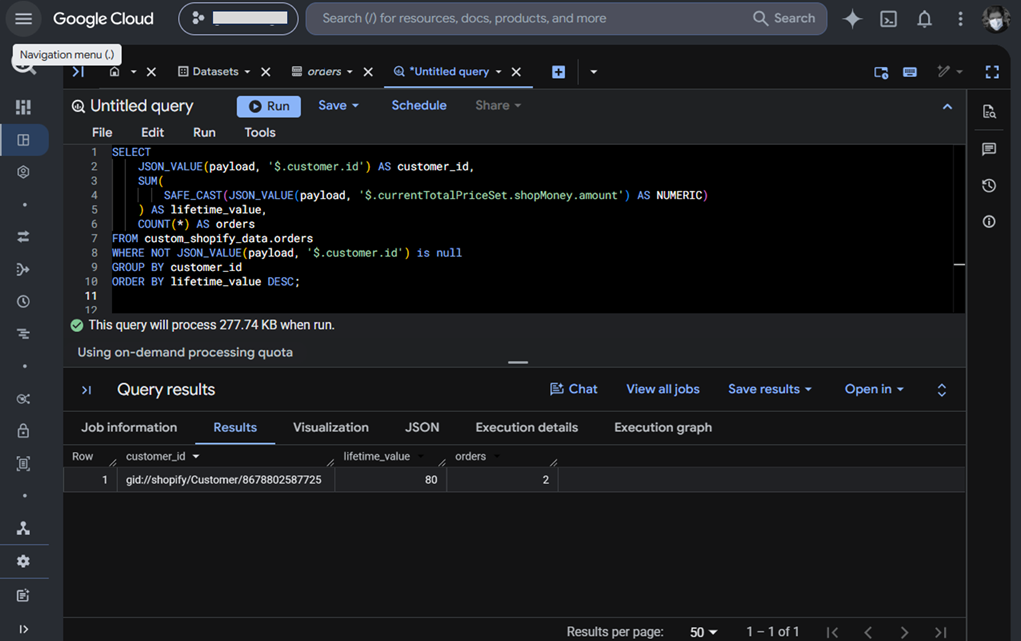
It calculates a simple customer lifetime value using JSON functions to traverse the needed columns in the payload. That’s how it is when you don’t flatten the nested arrays and objects. It’s an architectural decision favoring flexibility vs. ease of querying.
I did this code in 2 days, unlike the 3 tools with setup in minutes only. You can clone a copy of this modular Python code on GitHub. The setup instructions are there too.
Best for
Teams with senior developers who want total control over how pipelines behave and achieve an output that fully fits the company needs.
Rating
No ratings for custom-made scripts.
Pricing
Costs will come from your developer salaries and infrastructure.
Pros
- You decide and control how data is processed and formatted. Your decision may be flexibility vs. query convenience when loading data into data warehouses like BigQuery.
- Zero vendor lock-in or subscription costs (other than infrastructure costs).
Cons
- Same as using PyAirbyte or any developer APIs, you will handle coding, debugging, error handling, rate limits, and more – all of these will take time.
- You may not catch up with Shopify API updates, which can cause downtime.
How Do These Methods Compare Side-by-Side?
This section will provide you with a side-by-side comparison of the methods we used.
Evaluation Criteria:
- Pricing Predictability: How easy is it to estimate your monthly integration costs?
- Schema Drift Handling: What happens when Shopify modifies its API schema?
- Sync Frequency Limits: How frequently can you sync data (real-time vs. batch)?
- Setup Complexity: Does it require writing code or managing infrastructure?
- API Compatibility: Does it use Shopify’s modern GraphQL API or deprecated REST routes?
| Comparison Metric | Fivetran | Skyvia | Airbyte (Self-Hosted) | Custom Python/Bash Script |
|---|---|---|---|---|
| Pricing Model | Usage-based (Active rows) — Can be volatile and high | Predictable monthly tier (No active-row premium) | Free open-source engine (Pay for your own cloud compute) | Free (Pay for cloud functions/VM compute) |
| Sync Frequency | Every 5 mins to daily | Scheduled intervals (down to 1 min) | Scheduled intervals | Manual schedule via cron job |
| Schema Drift Support | Full Auto-Detection (creates new columns instantly) | Manual mapping adjustment via web UI | Auto-detection (with manual reset triggers) | Requires hand-coded schema adjustments |
| API Type Used | GraphQL Admin API | GraphQL Admin API | GraphQL Admin API | GraphQL Admin API (or legacy REST if unmaintained) |
| Hosting Requirement | Pure SaaS (Managed) | Pure SaaS (Managed) | Self-Hosted (EC2/Kubernetes) | Self-Hosted (Cloud Functions / VMs) |
| Data Transformation | Via dbt integrations | Visual mapper (Flatten/Rename during pipeline) | Via basic JSON normalized schemas | Custom code in Python/Pandas |
What Common Failures Should You Watch Out For?
Tools like Skyvia, Fivetran, and Airbyte already abstracted the technical details. Custom code, however, is prone to the following issues:
The Dreaded 429 Too Many Requests API limit
While we didn’t encounter this in all methods, a bigger dataset and a faster sync frequency may trigger this problem, especially in custom code. You can use a retry logic with exponential backoff to mitigate this problem.
BigQuery JSON Parsing Issues
The issues I encountered writing to BigQuery are in the custom script. One is the extraction date and time, which is not serializable to JSON. This has been fixed by transforming the date/time value to text. Next is writing the payload in the JSON column. I realized it’s a Python list and a json.dumps() did the trick.
Conclusion
You saw how each tool transformed the data in Shopify to BigQuery. Fivetran flattens most of the nested objects. Skyvia and Airbyte strike a balance between flexibility and ease of querying. But our custom script leans more on flexibility to avoid breaking the pipeline when Shopify changes a schema.
None of these are bad. It’s a decision you have to make as a developer on which is better for your needs. In the end, you can choose Fivetran for a high-volume, enterprise-focused solution. If you’re serious about open source and control, you can either use Airbyte or do it yourself with a Python script.
But if you need a working Shopify-to-BigQuery pipeline by tomorrow morning with an easy-to-use, clean interface, go for Skyvia. You can start here for free.

FAQ for Shopify to Google BigQuery

Do you need to flatten nested Shopify objects like line items in BigQuery?
Not necessarily. Storing the raw Shopify object in a BigQuery JSON column preserves flexibility. You can later expose flattened views or tables for reporting while retaining the original payload.
Should you use incremental syncs or full historical refreshes?
Incremental syncs are recommended after the initial load because they reduce API calls and processing time. Full refreshes are useful for initial migrations or when rebuilding the dataset.
What happens when Shopify updates its API version and changes the schema?
GraphQL queries may need updating if fields change. Keeping queries in separate .graphql files makes maintenance easier without requiring changes to the rest of the pipeline.
Can you stream Shopify data to BigQuery in real time?
Yes. Shopify webhooks can notify your application when data changes, allowing near real-time ingestion into BigQuery instead of relying only on scheduled batch syncs.
How do you handle multiple Shopify stores syncing into BigQuery?
Store each shop’s credentials separately and include a store_name or store_id column in every table. This allows multiple Shopify stores to share the same BigQuery dataset while keeping data identifiable.