Summary
- Business intelligence integration brings data from many systems into one dataset a BI tool can report on.
- Decide first whether the BI tool imports a snapshot or queries the source live, because that shapes the pipeline.
- ETL and ELT suit scheduled, reconciled reporting; virtualization suits ad hoc analysis; streaming is for decisions that cannot wait.
- Define the metrics before you build, and test the result against the source.
- Skyvia covers the ELT and visual ETL paths and feeds Power BI, Tableau and Excel, but it is not a streaming tool.
Picture the Monday meeting: sales shows one revenue figure, finance shows another, and half the hour goes to arguing over whose spreadsheet is the real one. The BI tool isn’t wrong. The data underneath it was never brought together.
That gap is what business intelligence integration closes. It hooks up the systems where your numbers live, cleans and lines them up (no small job), and leaves the BI tool one place to read from.
Here’s the plan: five data integration approaches teams use for BI, a look at what a BI tool actually does with the result, and a way to choose that avoids over-building.
What Does Business Intelligence Integration Mean?
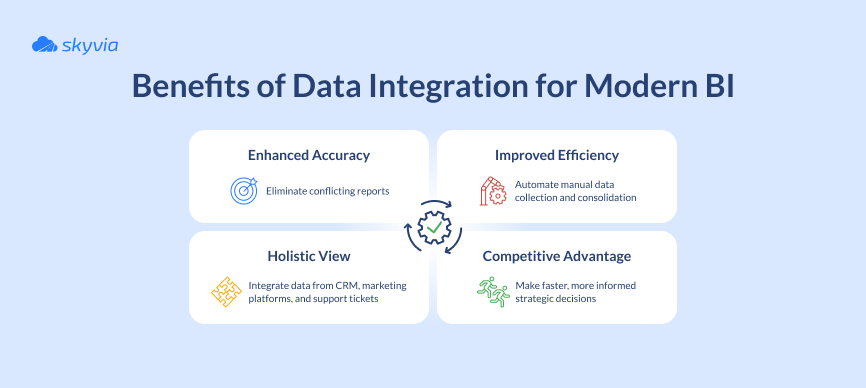
Put plainly, business intelligence integration is getting data from many sources into a form a BI tool can report on. Pipelines that move and transform the data come with it, and so do the agreed metric definitions and the connection between the finished dataset and the dashboards.
Think of bees making honey. Foragers bring nectar from many flowers to one hive, and the hive turns it into something people can actually use. Data integration does the foraging for your systems; business intelligence integration is the honey on the shelf and the way it reaches the table.
Three terms tend to get tangled, so here is how this guide uses them:
| Term | What it covers | Example |
|---|---|---|
| Data integration | Moving and combining data between systems, everything up to the point where a chart could exist | Customer records from a CRM and invoices from an accounting system end up in one warehouse table, matched on a customer ID |
| Business intelligence integration | Data integration, plus the model, the metric definitions and the way the BI tool connects | A dashboard of revenue per customer, drawn from that table |
| Analytics integration | Usually analytics embedded inside another application | A usage chart that appears inside a SaaS product’s own screens |
Why BI Needs Integrated Data
One system’s report only answers that one team’s question. The questions worth asking span systems: which campaigns brought in customers who renewed, and how does the forecast compare with actual revenue? Answering them takes a join across a CRM, a marketing tool and a billing system, and each speaks in its own formats and keys.
Doing that join inside the BI tool, report after report, is slow to build and hard to keep consistent. So most teams load everything into a warehouse (Snowflake, BigQuery, Redshift, take your pick), standardize it there, and let the BI tool read the curated result.
How Your BI Tool Reads the Data: Import, Extract or Live Query
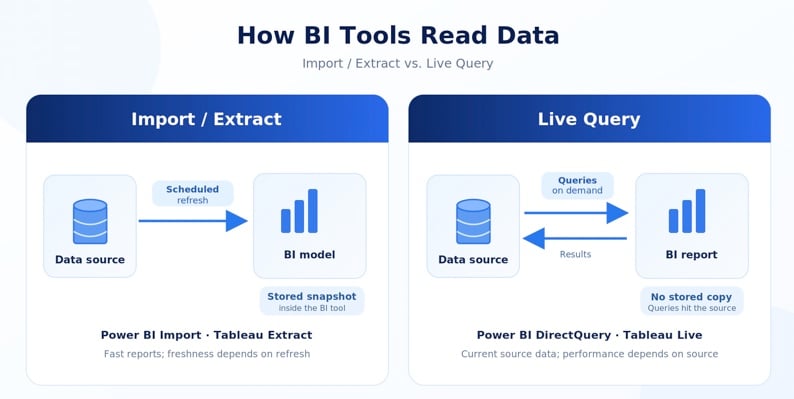
Settle how the BI tool will read the data first; the integration approach comes after. The two popular tools make the choice explicit.
Power BI has Import and DirectQuery. Import keeps a snapshot of the data inside the model, so visuals load fast; to get newer data, you refresh the model. DirectQuery doesn’t import the data into the model. Instead, it queries the source when a visual needs data. That can provide more current results, although performance depends on the source and how quickly it responds.
Tableau offers the same trade. A live connection passes the queries a view needs straight to the source database. An extract is a saved snapshot, refreshed from the source on a schedule, and Tableau suggests using extracts when queries are slow.
This choice shapes everything upstream:
| The BI tool reads by | What the pipeline has to do | What fits |
|---|---|---|
| Import or extract | Deliver clean data on a schedule. The pipeline’s schedule decides how fresh the dashboard can be. | ETL or ELT into a warehouse |
| Live query | Let the source, or the warehouse, answer BI queries quickly. Heavy dashboards on an operational database can slow the app that database serves. | A warehouse fed by ELT, or a virtualization layer |
The Five Data Integration Approaches for BI
No approach wins outright. Each suits a particular kind of data, a particular team and a particular freshness need. The five below cover most BI setups.
1. ETL, or Extract, Transform, Load
In ETL, data is extracted, cleaned, formatted, joined and enriched on the way, and only then loaded into a warehouse or database. The BI tool then reads data that is already tidy. If you want a deeper comparison, see our guide to ETL tools.
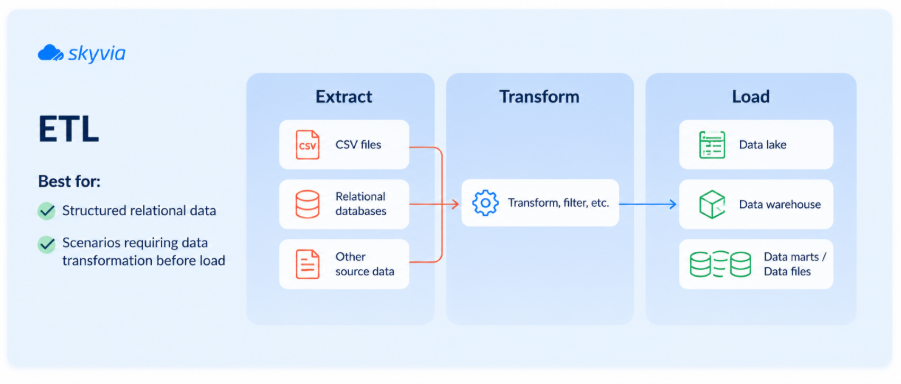
Think of a restaurant kitchen. Ingredients arrive from many suppliers, get washed, chopped and portioned in the back, and only then reach the pass. The BI tool is the diner: it sees the plated result, never the crates. Three steps do the work:
- Extract. Collect data from spreadsheets, API feeds, SQL tables and log files. Nothing has to match yet.
- Transform. Fix inconsistencies, standardize formats, join the pieces. This is where most of the effort goes.
- Load. Write the result into the warehouse or database your BI tool reads from.
ETL works well for structured data and for reports that need predictable, clean output, monthly financial reporting for one. It struggles a bit more when sources change often or hold unstructured data.
2. ELT, or Extract, Load, Transform
ELT swaps the last two steps. Raw data goes into the warehouse first and is transformed there, using the warehouse’s own compute. Cloud data warehouses such as Snowflake, BigQuery and Redshift are what made this practical.
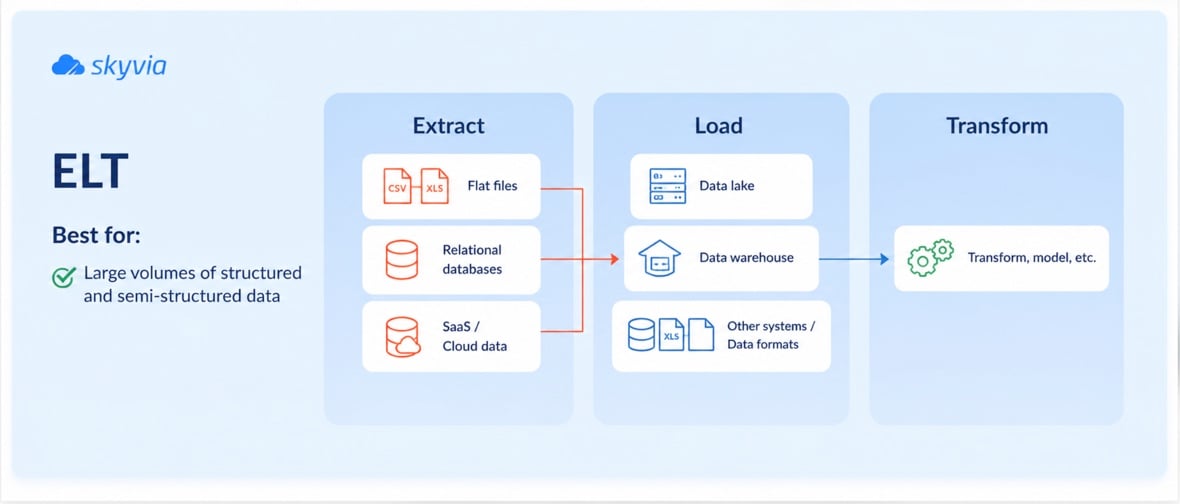
Think of tipping a whole box of LEGO into one big bin and sorting it only when you start building a particular set. Loading is fast, and the raw data is still there when the business asks something new. The catch is cost. Storing and querying all that raw data adds up, and the warehouse needs enough capacity to run the transformations.
ELT suits large or varied datasets and teams that want to reshape data as requirements change.
3. Data Virtualization
Virtualization doesn’t copy data at all; it brings it together in place. Between the BI tool and the sources sits a layer with a virtual model of what each source holds. Run a query and the layer works out where the data lives, sends sub-queries to each source and joins the answers.
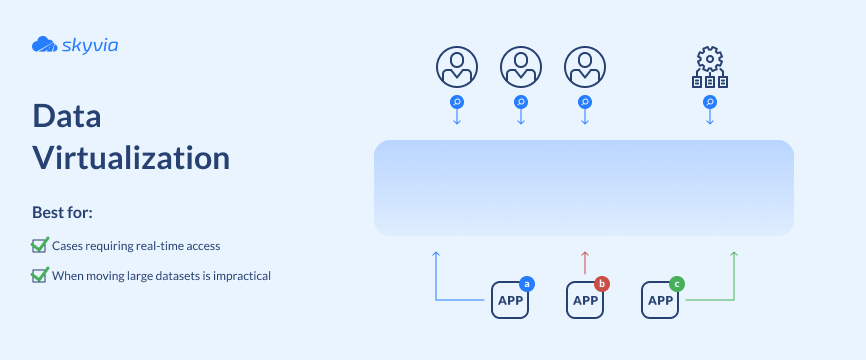
Think of a streaming service next to a DVD shelf: you don’t own a copy, you watch the film where it lives, whenever you press play. That’s quick to set up, and handy for ad hoc analysis, prototypes or data that changes too fast to replicate. The cost is dependency. If a source is slow or unavailable, the query is too, and huge joins can struggle.
4. API and Application-Based Integration
Here applications exchange data through their APIs. The API defines how one system requests or sends data to another. Depending on the setup, the data can be retrieved when needed or copied into another system for reporting.
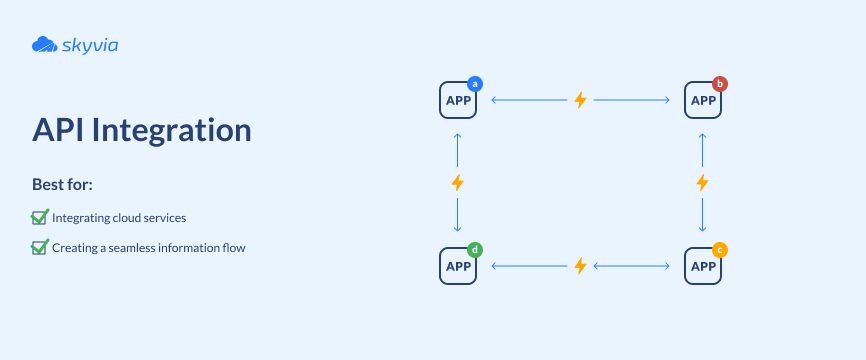
Direct integration works well for transactional data from SaaS applications. It has limits too. A rate limit, an outage or a version change can break a flow, so a busy or unreliable API slows the whole conversation.
5. Real-Time Streaming
Streaming moves data nonstop, as events happen. It’s the most demanding of the five. The pipeline has to stay up, ride out failures without dropping events, and often keep state, for instance to spot unusual logins within a time window or to keep a running total per account. Exactly-once delivery, with no event lost or duplicated, takes extra engineering in a stream.
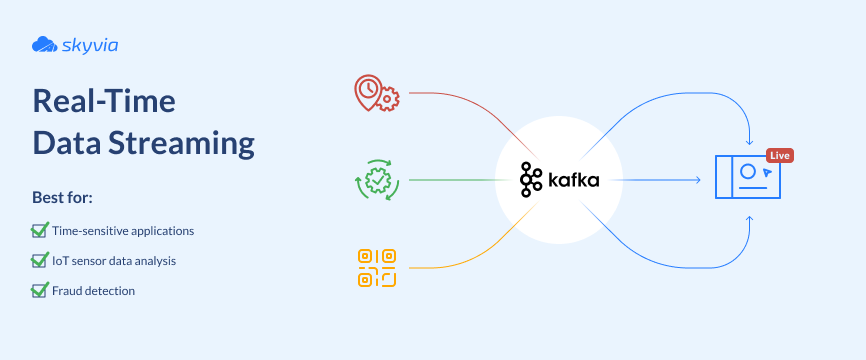
If batch processing is reading yesterday’s paper, streaming is watching the live broadcast. That is worth it for fraud detection, IoT telemetry or live operations, and costly if nobody will act on a number within seconds.
Data Integration Approaches for BI Compared
| Approach | Freshness | Data it suits | Strengths | Trade-offs |
|---|---|---|---|---|
| ETL | Batch, on a schedule | Structured data, repeatable reports | Clean, predictable output; good for historical analysis | Slower to change; less suited to unstructured data |
| ELT | Batch, on a schedule, transformed after load | Large or varied datasets, raw plus modeled | Quick to load; keeps raw data; scales with a cloud warehouse | Storage and compute costs; needs a capable warehouse |
| Data virtualization | At query time | Mixed sources, ad hoc questions | No copy to maintain; fast to set up | Depends on source availability and speed; large joins can struggle |
| API and application-based | On demand, or on a poll | Transactional data from SaaS apps | Direct application access; flexible data exchange | Rate limits, downtime and version changes can break flows |
| Real-time streaming | Continuous | High-velocity events | Instant insight for time-sensitive work | Complex, costly, needs strong engineering |
Which Approach Matches Your BI Situation?
Start from the question the BI tool has to answer, not from the technology.
| BI situation | Usually fits | Why |
|---|---|---|
| Monthly finance reporting and board packs | ETL or ELT into a warehouse, read by import or extract | Needs clean, reconciled numbers more than speed |
| A sales pipeline dashboard fed by a CRM and a marketing tool | ELT into a warehouse on a schedule | Several SaaS sources, joined and modeled in one place |
| An operations monitor that has to react within seconds | Streaming | Decisions can’t wait for a batch |
| Ad hoc analysis or a quick prototype | Virtualization, or a live query on one source | Fast to set up, no copy to maintain |
| One SaaS app feeding one report | API-based, or a scheduled replication | Simple, with no extra layer |
Three questions settle most cases. What data do you have, and where does it live? How fresh must the numbers be, honestly? And who runs the pipelines: engineers who enjoy maintaining them, or analysts who need no-code? Pick the simplest approach that meets the freshness need. When decisions can wait for a nightly update, streaming just adds complexity.
The Stages of Business Intelligence Integration
A BI integration project runs like the crew in a heist film: every stage has a hand-over, and the plan falls apart if one of them is skipped.
| Stage | What you do | What you hand over |
|---|---|---|
| 1. Inventory the sources | List every system behind a report, who owns it and what it holds | A source list |
| 2. Define the metrics | Agree on what terms like “revenue,” “customer,” and “conversion” mean, and document the calculation rules | A shared metric dictionary |
| 3. Choose an approach per source | Match each source to ETL, ELT, virtualization, API integration, or streaming based on freshness, volume, and reporting needs | A documented integration approach |
| 4. Build and validate the pipelines | Load sample data, test mappings, compare source and destination totals, and check calculations against the agreed definitions | Tested pipelines and reconciled metrics |
| 5. Hand over to the dashboards | Connect the BI tool, configure refresh schedules, and assign ownership for pipelines and metrics | Dashboards with clear ownership |
Skip stage two and you get the argument from the top of this article: two reports disagree because each one calculates the metric its own way.
A Worked Example With Three SaaS Sources and One Dashboard
This is an illustrative scenario, not an actual customer case.
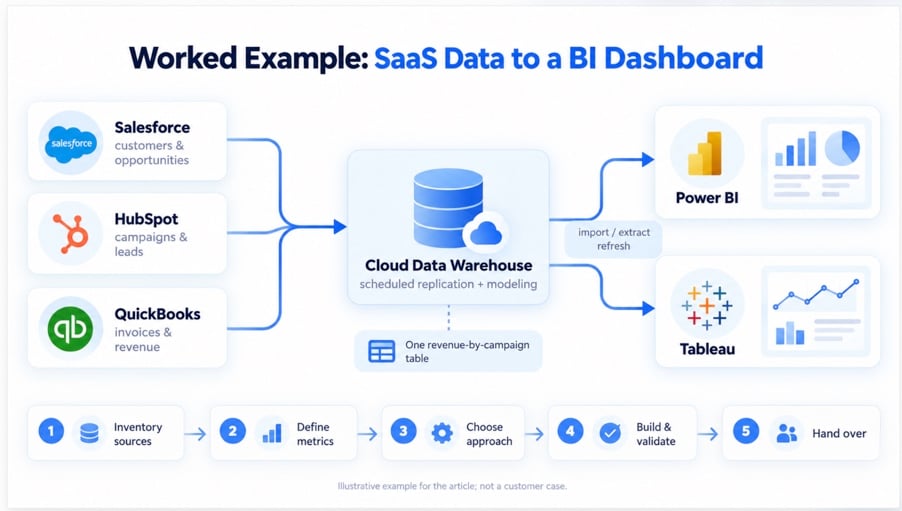
A small team uses Salesforce to manage customers, HubSpot to track marketing campaigns, and QuickBooks for invoices. They want a dashboard that shows how much revenue each campaign brings in.
- Inventory. Customer records sit in Salesforce, campaign data in HubSpot, and invoices in QuickBooks. The team identifies how records can be matched across all three systems.
- Define the metrics. Sales and finance agree on what counts as revenue, which invoice statuses to include, and how to attribute customers to campaigns.
- Choose an approach. Since the dashboard only needs daily updates, the team chooses scheduled replication into a warehouse. The BI tool will read the prepared data through an import or extract.
- Build and validate. They load the three sources into the warehouse, create a revenue-by-campaign table, and compare its invoice totals with QuickBooks. Any mismatches are investigated before the dashboard goes live.
- Hand over. The BI tool connects to the prepared table and refreshes daily. One person takes responsibility for maintaining the revenue definition.
Doing This With an Integration Platform
You can write the pipelines by hand, and for one source that may be fine. But hand-written pipelines have to be monitored, extended to every new source and maintained after their author moves on. That is the point where teams look at an integration platform, and our overview of iPaaS solutions is a good place to start.
Skyvia
Skyvia is a no-code cloud platform with several ways to prepare and deliver data for BI:
- Replication loads cloud app and database data into BigQuery, Snowflake, Redshift, Azure Synapse, Databricks or a database. It creates the tables and runs a full load, then loads new and changed records. That is the ELT path.
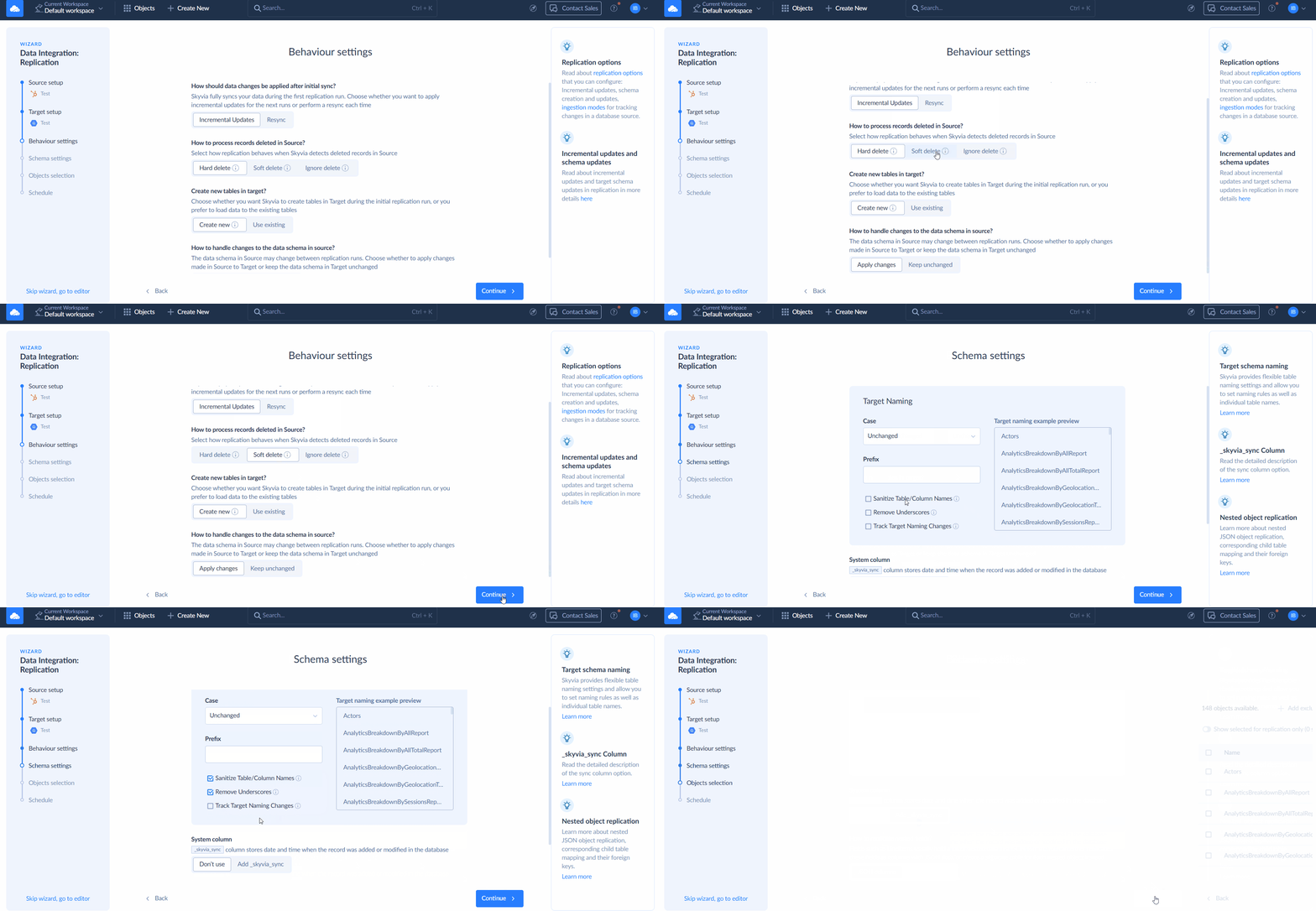
- Data Flow, available from the Standard plan up, builds visual ETL pipelines with several sources, lookups and calculated columns, which suits transformation before the load.
- Skyvia Connect sets up OData and SQL endpoints that Power BI, Tableau and Excel can read live. That helps when the BI tool should query a source through one endpoint.
- Query runs SQL or a visual query in the browser, and comes with a Google Sheets add-on and an Excel add-in. The Data Studio connector powers reports in Google’s Data Studio (formerly Looker Studio).
Mind the limits. Skyvia’s incremental updates are timestamp-based for most sources; SQL Server is the only source with native change capture, through its Change Tracking. Schedules go down to every minute on the Professional and Enterprise plans, hourly on Standard and daily on Free and Basic, so it is not a streaming tool. For cloud apps, Skyvia can’t detect metadata changes by itself, so new fields must be refreshed and selected manually.

Conclusion
Business intelligence integration comes down to two choices: how data reaches one place, and how the BI tool reads it. Pick the simplest approach that meets the freshness the business truly needs, define the metrics before building, and test the result against the source.
Do that and the dashboards stop being a debate about whose number is right.
FAQ for Business Intelligence Integration

Which three types of integration are there?
No single standard list exists. For BI, it helps to split by how the data moves: copied on a schedule (ETL or ELT), read in place when someone queries it (data virtualization or a live connection), or exchanged directly between applications through APIs. Streaming is a fourth option, for continuous event data.
Can you give an example of data integration?
Customer records from a CRM and invoices from an accounting system are loaded into one warehouse table and matched on a customer ID. After that, a BI tool reads the table and shows revenue per customer.
What separates import from live query in a BI tool?
Import, or an extract in Tableau, keeps a snapshot of the data inside the tool and refreshes it on a schedule, so visuals load fast. A live query, called DirectQuery in Power BI, asks the source each time a visual loads, so results are closer to real time but can be slower.
How are ETL and ELT different?
ETL transforms the data before it’s loaded into the warehouse. ELT loads the raw data first and transforms it in the warehouse, which suits large or varied datasets but can raise storage and compute costs.
When is data virtualization better than ETL or ELT?
Pick it for quick, ad hoc analysis without copying data, such as a prototype or data that changes too fast to replicate. It does depend on the sources being available and fast.
Which approach is best for cloud apps like Salesforce or HubSpot?
For BI, replicating the app data into a warehouse on a schedule and reading it from there is the usual path. Direct API integration also works for transactional data, but API limits and downtime can break the flow.
Looking to feed Power BI, Tableau or Excel from your cloud apps with no pipeline building? Skyvia Data Integration replicates app data into a warehouse, Skyvia Connect gives BI tools OData and SQL endpoints, and you can start free, no credit card needed.