Summary
- Point-to-point integration connects two systems directly, without a hub, so it is quick to build for a few apps.
- Fully connecting n systems takes n × (n − 1) / 2 links: 10 for five systems and 45 for ten.
- Each link needs its own maintenance, credentials and monitoring, and an API change can break it.
- A hub, ESB or iPaaS centralizes control, but the hub becomes a single point of failure.
- Direct links fit two or three stable systems with a named owner; growing stacks need a central layer.
Usually it begins with a single script. Sales wants paid invoices in the CRM, so somebody writes a quick job between billing and the CRM. It works fine. Then marketing asks for those customers in the email tool. Support wants them in the help desk. A year later, nobody can say how many integrations are running, let alone which one broke last night’s report.
That’s how most point to point integration setups grow: fast to build, easy to understand, and harder to run with every system you add. Links can pile up with the square of the system count. And the bill? A lot of it lands later, in upkeep, months after anyone remembers the first build.
Below: how P2P works, where it earns its place, where it bites, and the arithmetic of the sprawl. Then there’s a checklist for deciding if direct links will do or a hub, ESB or iPaaS is worth it.
What Is Point-to-Point Integration, Exactly?
Point-to-point (P2P) integration is about as plain as an integration architecture model gets: system A talks to system B, directly. No central hub or bus manages the traffic. Usually one app reads from the other or writes into it, and whatever mapping or reshaping the data needs gets done inside that same link. AWS calls it an early form of enterprise application integration. IBM adds that it runs with no centralized management plane at all.
You can build one in three common ways.
| Method | How it works | Example |
|---|---|---|
| Custom code | A script or small service calls both systems and moves the data | A nightly Python job copies paid orders from an e-commerce store into the inventory system |
| Vendor APIs and webhooks | One app calls the other’s API, or reacts to its webhook | The CRM calls the email tool’s API to add every new lead to a mailing list |
| Code plus APIs | Code transforms the data, APIs load it into one or more targets | A script reshapes CRM deals, then posts them to the accounting system and a warehouse |
Our verdict, in short: P2P is fine for a handful of systems that rarely change. Scalability is its weak spot. Add more systems and running it gets pricey, since the links multiply faster than the systems themselves.
How Many Links Does Point to Point Integration Need?
Imagine every system needs to swap data with all of the others. Then you’re looking at n × (n − 1) / 2 links for n systems. A hub design needs one link per system.
| Systems | Point-to-point links (all pairs) | Hub links |
|---|---|---|
| 2 | 1 | 2 |
| 3 | 3 | 3 |
| 5 | 10 | 5 |
| 10 | 45 | 10 |
| 20 | 190 | 20 |
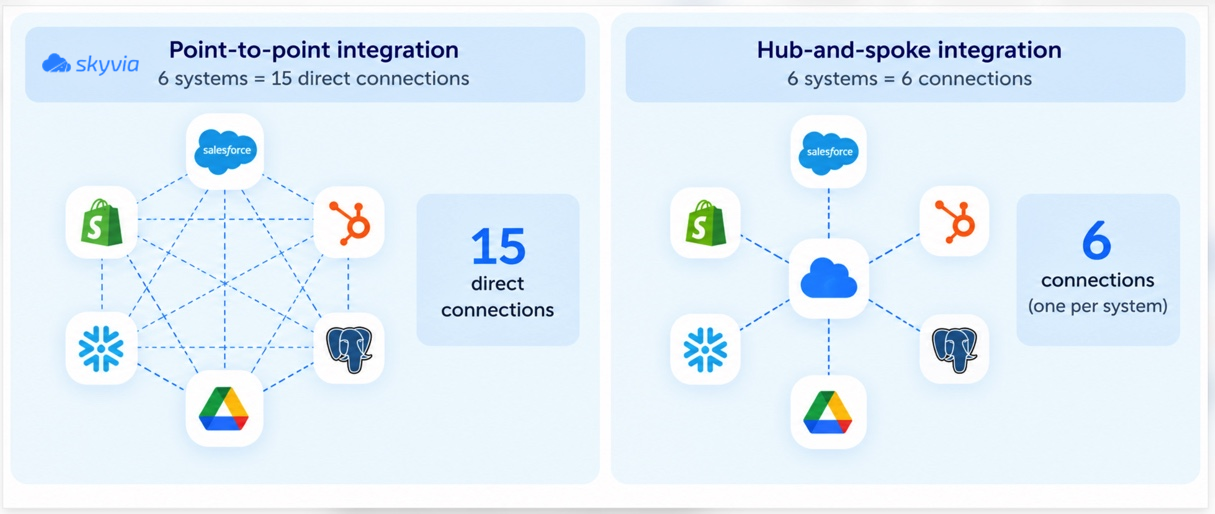
MuleSoft and AWS both publish numbers that line up with this. Three components? Three connections. Five gets you to 10, and with 10 applications it’s 45. Many articles call this growth exponential. It isn’t. It grows with the square of the number of systems. That is still fast enough to hurt, since doubling the systems from 10 to 20 more than quadruples the links.
Look at the small rows, too: at two or three systems a hub saves nothing, so wiring them directly is perfectly fine. And most stacks never connect every pair anyway, so read the table as the worst case. Counting the links you run today helps more. Write down what each one carries, and before building for a new app, check how many links it would add.
Benefits of Point-to-Point Integration
Fast to set up
If someone knows both apps, they can wire them together right away, with no central layer to design first. For one integration, that keeps the job small. Nobody has to roll out a platform.
No platform to buy
There’s no middleware license or subscription for a single link. The cost is the developer’s time plus whatever it takes to host the code.
You control the logic
Odd file formats, quirky rules, one-off mappings (custom code bends to all of it, exactly how the business wants). No platform feature list gets to decide what the link can or can’t do.
No shared hub to fail
Each link stands alone. If one breaks, the others keep running, which isn’t true of a hub that every flow passes through.
Cons of Point-to-Point Integration
Every new system adds several links
A sixth system that must exchange data with the other five means five new links to build and look after. That’s painful when a new CRM or billing tool arrives, because each existing integration then needs a matching link on the new system’s side.
Maintenance is per link
Each link has its own schedule, credentials, error handling and logs. Ten links mean ten places to check when numbers in a report look wrong.
Tight coupling
Direct wiring ties the two systems to each other’s API and data format. A vendor renames a field or changes an endpoint? The link breaks. Swap out either system and you’re rewriting every link attached to it.
The knowledge lives in one developer’s head
Plenty of direct integrations were never documented. Once the builder leaves the company, or simply goes on vacation, nobody else can say which jobs exist, what data they move, or how to restart one that failed.
No single view
Nothing lists every integration and when it last ran. IBM’s term for the resulting tangle is spaghetti integration, and it’s hard to find a bottleneck in it when no central layer is watching the traffic.
Security is configured link by link
Credentials and access rules are set separately in every link. So each link is only as secure as its builder was careful. One forgotten API key with broad permissions is enough to leave a gap, and auditors have to check the links one at a time.
When Does Point-to-Point Integration Still Fit?
Wiring apps straight to each other isn’t a mistake on its own. Look at these signals first.
| Signal | Point-to-point is fine | Consider a hub or platform |
|---|---|---|
| Systems that exchange data | Two or three | Four or more, or new ones planned this year |
| How often the apps or their APIs change | Rarely | Several vendor updates a year |
| Who maintains the code | A named owner with time for it | Whoever is free when it breaks |
| Monitoring needs | A failed run can wait a day | Finance or operations depend on fresh data daily |
| Flow logic | Simple field mapping | Lookups, merges, several targets |
Three situations usually favor a direct link:
- Two apps, one job. The invoicing tool marks a customer as paid, and the CRM record for that customer updates without anyone touching it. There’s one link with one owner, so little can break.
- Embedding a third-party feature. A product calls a maps, payments or email API to add a feature it doesn’t build itself. That’s a direct integration by design, and a hub adds nothing.
- A temporary bridge. A legacy ERP, for example, may need to feed a new cloud CRM until the migration is finished. A direct link with an end date costs less for a few months than rolling out a platform would.
Signs You’ve Outgrown Point-to-Point Integration
- Listing every integration means digging through servers and scripts.
- A vendor API update broke a link and it took days to notice.
- One person is the only one who can restart a failed job.
- Adding a new app turned into several integration projects.
- Reports from two systems disagree, and nobody can say which link is responsible.
Two or more of these usually mean the complexity now costs more than a central layer would. That layer could be middleware you host yourself, or a cloud platform you subscribe to.
How Point-to-Point Compares With Hub-and-Spoke, ESB and iPaaS
| Aspect | Point-to-point | Hub-and-spoke | Enterprise service bus (ESB) | iPaaS |
|---|---|---|---|---|
| Architecture | Direct links between pairs of systems | Systems (spokes) connect to one central hub | A central software component routes messages and converts formats and protocols | Integration platform delivered as a cloud service |
| Links to manage | Up to n × (n − 1) / 2 | One per system | One per system | One connection per system, plus one flow per job |
| Setup for the first integration | Fast | Slower: the hub comes first | Slowest: the bus and its standards come first | Fast with prebuilt connectors |
| Monitoring | Per link | Central, at the hub | Central, at the bus | Central, in the platform |
| Main risk | Sprawl and hidden dependencies | The hub is a single point of failure | Cost and effort to maintain and scale the bus | Dependence on the vendor’s connectors and pricing |
| Runs where | Wherever the code runs | Traditionally on premises | Traditionally on premises | The vendor’s cloud |
| Fits | Few stable systems | Many internal systems with one integration team | Large enterprises with service-oriented architecture | Cloud apps and teams without integration developers |
AWS’s own example makes the trade-off concrete. With 10 applications you’d manage 45 direct links or just 10 spokes, but then the hub is the one spot that can halt everything. IBM points out that keeping a central ESB updated and scaled proved expensive enough to slow down the projects it was meant to speed up. An iPaaS moves that central layer to a vendor’s cloud, and many larger companies run it next to their older on-premises integration tools. Don’t confuse it with PaaS, which gives developers a cloud platform to build and run their own applications.
For a closer look at the cloud option, see our explainer on what iPaaS is and our comparison of iPaaS solutions. Our guide to common data integration patterns covers the flows themselves.
Do Integration Platforms Remove Point-to-Point Connections?
Not entirely. Say your CRM needs billing data, and billing in turn needs data from the warehouse. A platform still runs one flow for each of those jobs. What changes is everything around the flow.
- The code becomes a configured job with a visual mapping.
- Credentials are stored once, in one place, instead of inside each script.
- One screen shows the schedules, the run history and the failure alerts.
- And if you replace a system, you swap one connection and remap its jobs (a lot less work than rewriting every script that touched it).
The flows stay. What you gain is being able to see them and replace them. Most teams with aching direct links were missing exactly that.
How to Build a Point-to-Point Integration That Lasts
Sometimes a direct link is the right call. If so, a few habits will keep it from turning into a problem later.
- Keep an inventory. One line per link does it: source, target, data moved, schedule, owner, and where the code lives.
- Name an owner for each link, plus a backup who has restarted it at least once.
- Handle failure on purpose. Add retries for timeouts and rate limits, log each run, and send failure alerts to a person, not to an inbox nobody reads.
- Store credentials once, give them the narrowest permissions the job can work with, and rotate them on a regular schedule.
- Test with bad data. Before going live, try the job on a sample with a duplicate, an empty required field and a deleted record in it.
- Watch the vendors’ changelogs too, because the APIs your links call won’t ask before they change.
- Write down the exit plan: the link count, or the business change, that will move you to a hub or platform.
Point-to-Point Integration With Skyvia
Skyvia is our no-code cloud data platform, and its 200+ connectors reach cloud apps, databases, data warehouses and file storage services. It covers the jobs teams usually hand-code as direct links, without the scripts:
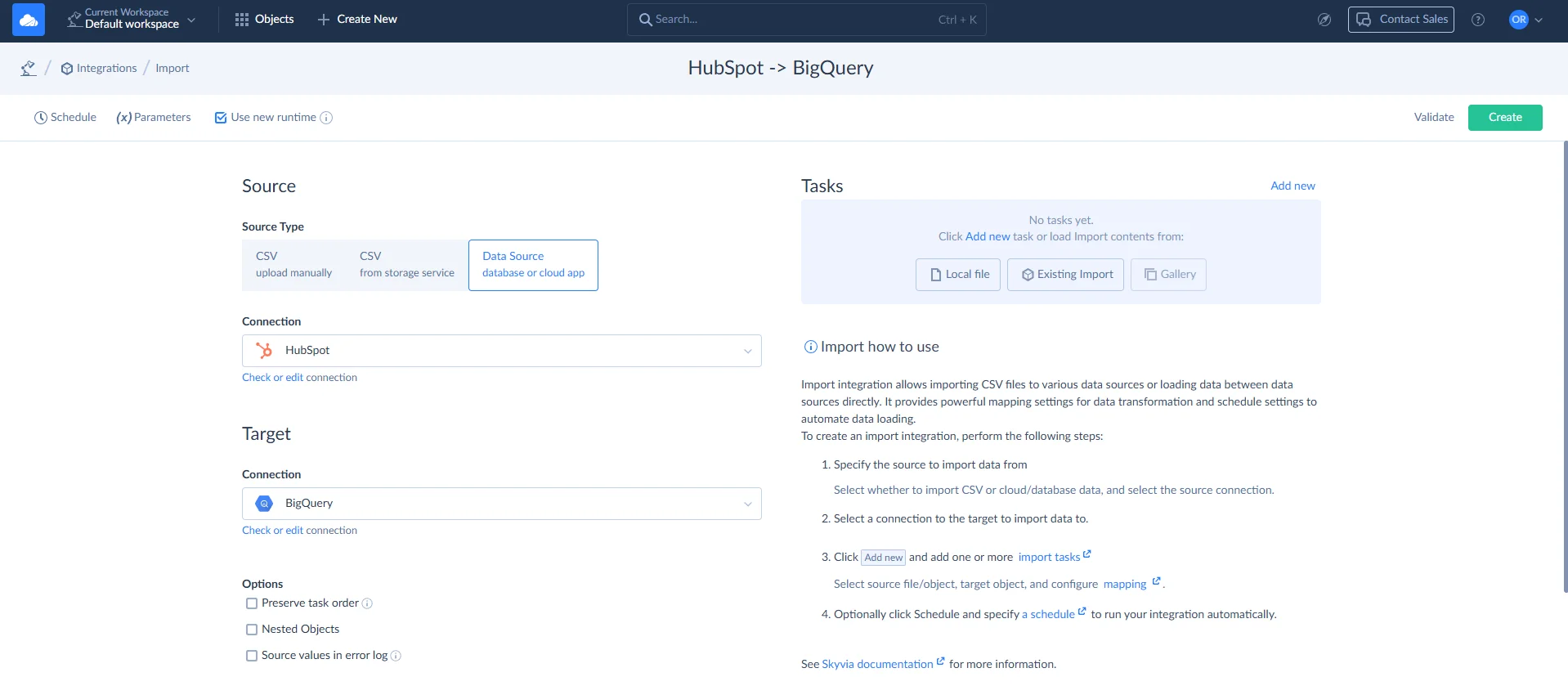
- With Import, data from an app, a database or a CSV file lands in another system as inserts, updates, upserts or deletes.
- Two-way synchronization keeps a pair of apps, or an app and a database, in sync in both directions.
- Replication fills a warehouse like BigQuery or Snowflake with app data, then keeps it fresh incrementally.
- Automation fires workflows on a schedule, when records are added or changed, or when a webhook arrives, with execution logs.
Teesing ran into a similar problem when connecting its website and CRM. Moving data involved CSV files, custom Python scripts and manual imports, none of which made the job easy to maintain. The company switched to Skyvia to automate the process, first using SFTP and later connecting directly to PostgreSQL. The result was less manual work and no need to maintain custom Python scripts for those transfers. You can read the full story in the Teesing case study.
It all lives in a single account. Each job may only link two systems, but the inventory, the connections and the schedules still sit side by side. How often can jobs run? Once a day on the Free and Basic plans, hourly on Standard, every minute on Professional. There’s a free plan for every product and no credit card at signup. Paid Data Integration plans are priced by records written per month, with unlimited users and connections. Pay annually and you save 20%.

Have your direct links started to multiply? Move the busiest one into Skyvia first, then compare the setup and monitoring time. Start with a free account.
FAQ for Point-to-Point Integration

When are there too many systems for point-to-point integration?
There’s no fixed number, but the warning signs start around four systems that all need each other’s data. With five fully connected systems you’re already at 10 links, and 10 systems need 45, every one with its own schedule, credentials and error handling to look after.
Are point-to-point integration and API integration the same thing?
Not quite. Most P2P links do use APIs. Middleware and integration platforms call APIs too, though. Where the logic lives is what sets them apart. In P2P it’s inside every link, whereas a hub or platform keeps it in one central place.
What happens to a point-to-point integration when an API changes?
Most of the time the link fails until somebody updates the code, because the two systems are tightly coupled to each other’s API and data format. Without central monitoring, the first sign may be a report that looks off. So each direct link needs an alert of its own.
Is point-to-point integration quicker than middleware?
It can be, since there’s no extra hop through a hub. Where they differ more is upkeep. Middleware gives you a single place to watch and change flows, and direct links trade that away for less infrastructure. Pick based on how many systems you’re connecting and who’ll maintain them.
What’s one example of an iPaaS?
An iPaaS is an integration platform that comes as a cloud service. Skyvia is one. It connects 200+ cloud apps, databases and data warehouses with import, replication, two-way synchronization and automation jobs, and none of them need code.
How does iPaaS differ from PaaS?
PaaS gives developers a cloud platform to build and run their own applications on. An iPaaS does one narrower job: it’s a cloud service for building, running and monitoring integrations between applications and data sources, usually with prebuilt connectors.
Are your app-to-app links scattered across scripts, and nobody’s quite sure what runs when? Put them in one account where they’re listed, scheduled and monitored. Create a free Skyvia account, then move one direct integration over as an import or sync job and compare.