Summary
- Raw data is data as its source produced it, before anyone cleaned, filtered or added it up.
- Raw is a stage, not a quality grade: processed data can be wrong, and raw rows are how you find out.
- Business apps keep records in their current state, so a raw copy needs timestamps, historical versions and a way to track deletions.
- A raw, staged and processed layer split lets you rebuild any reported number from the rows.
- Skyvia Replication can load app data into a warehouse, preserve record versions with History Mode, handle deleted records, and hash sensitive fields.
The pipeline report says 41 open deals. The CRM says 38. Your manager wants to know which one is right before the forecast call, and the report was built six months ago by someone who’s moved teams. Where do you even start?
You start with the raw data: the rows exactly as the CRM sent them, with the time each one arrived. If your pipeline kept that copy, the gap is a query away. If it didn’t, you’re rebuilding history from memory.
So what counts as raw, and what should that copy hold? One deal will show it.
What is raw data?
Raw data is data exactly as its source produced it, before anyone cleaned, filtered, joined or added it up. A row in a CRM export, a line in a server log, one answer in a survey: all raw. You’ll also see it called source data, primary data or atomic data. Same thing.
Processed data is the result of somebody’s decisions: which duplicates to drop, which date format wins, which deal stages count as “open”, how rows get summed by month. It’s what dashboards and analysis run on. Raw data is what you go back to when one of those decisions turns out wrong, because it’s the only version you can run the rules over again.
One trap here. People hear “raw” and think “dirty”, and hear “processed” and think “correct”. Neither holds. Raw is a stage, not a quality grade: a raw table can be perfectly accurate, and a processed report can be wrong because someone wrote the wrong rule. When that happens, the raw rows are how you find out.
Raw is also relative. The output of one team is the next team’s input, so “raw” usually means “the earliest copy we have”. Some data scholars go further and argue there’s no such thing as raw data at all, since every instrument and form already made choices about what to record. They have a point, and it matters more than you’d think for app data.
How practitioners see it
“You didn’t save the raw input. You only saved the broken output.”
Harsh Kathiriya, author of the Query & Context newsletter
“Bronze preserves raw data exactly as received, adding only metadata for tracking and auditability.” Aaron Wiegel, data engineer
Raw data from apps is a snapshot, not a log
Most definitions picture raw data as a stream: a thermometer adds a reading every minute, a website adds an event every click. Nothing gets overwritten. You just get more rows.
Business apps don’t work that way. A CRM keeps each record in its current state. When a deal moves from Proposal to Negotiation, the stage field changes, and the old value is gone from the record. Pull the deal through the API tomorrow and you get one row, as it looks tomorrow.
So what’s raw data for an app? Our answer: what the API returned, with enough metadata to tell when each version was captured or valid. A load timestamp records when data arrived, while history timestamps may describe when a record changed at the source. That context turns a pile of snapshots into something you can reason about later.
And the app has already done some processing before you see anything:
- Formula fields arrive as computed values. The formula ran inside the app.
- Picklists can come back as the stored value or the label a user sees, depending on how you query them.
- Record IDs come in two forms in Salesforce. The 15-character ID is case-sensitive; the 18-character ID adds three characters that encode the casing. Salesforce warns that case-insensitive tools like Microsoft Access can treat two different 15-character IDs as the same value.
None of this is a reason to distrust the API. It’s a reason to store what it sent you as text, untouched, and do your interpreting one layer up.
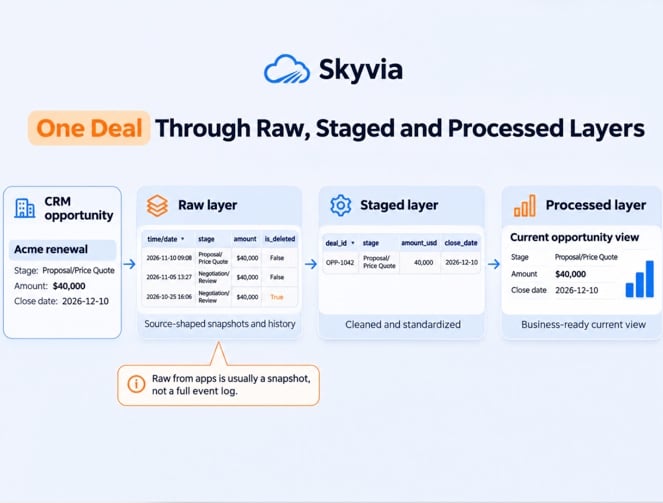
One deal, three layers: raw, staged, processed
Here’s the example we’ll use throughout this guide, based on a test we ran with Skyvia Replication. We replicated Salesforce Opportunities into a Neon PostgreSQL database, then changed one deal, “Acme renewal”, twice.
It started in Proposal/Price Quote at $40,000, moved to Negotiation/Review at $36,000, and finally reached Closed Won at the same amount. We also replicated a second deal in Qualification and then deleted it from Salesforce. Each change gave us a way to check what PostgreSQL retained.
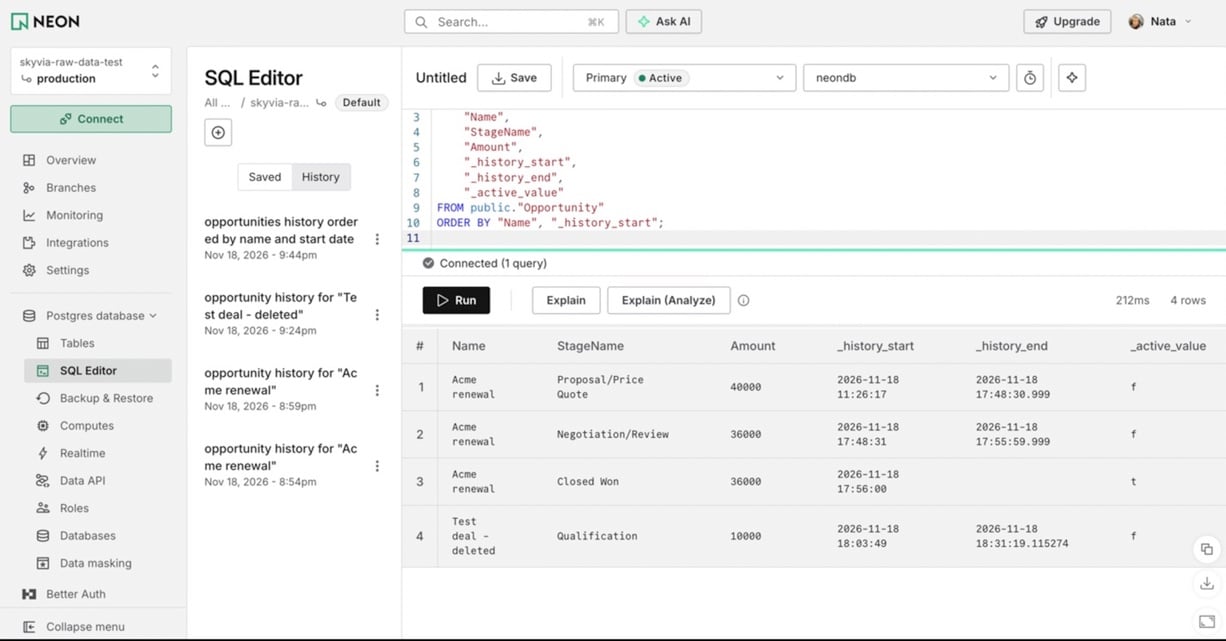
The raw layer keeps the versions captured during each load. In our Skyvia test, Acme renewal produced three rows as its stage changed from Proposal/Price Quote to Negotiation/Review and then Closed Won. A second deal was deleted after its initial replication, but its historical row remained in PostgreSQL with _active_value set to false. The earlier versions of Acme were also marked inactive, leaving only its Closed Won version as current. These records stay available for tracing changes unless a retention rule or privacy request requires their removal.
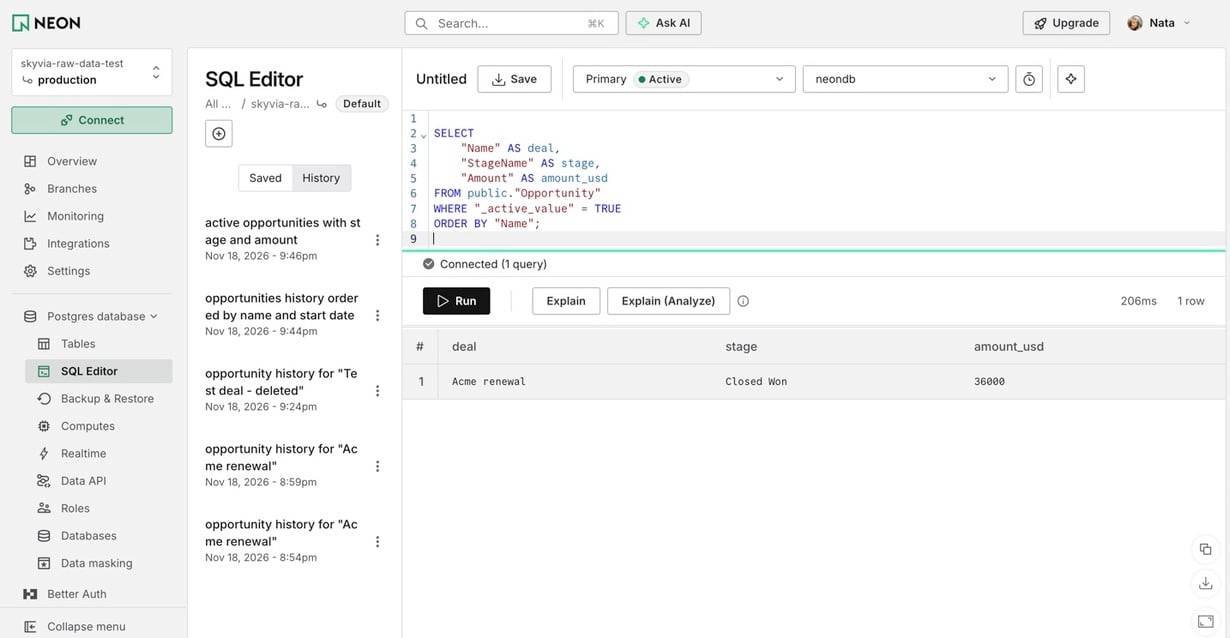
The staged layer turns historical records into a current-state table, with one row per active deal. In our test, Skyvia’s _active_value column identified the latest version of Acme renewal and excluded both its earlier versions and the deleted Opportunity. We then selected the deal name, stage, and amount, giving us a single current record: Acme renewal, Closed Won, $36,000.
The processed layer is what people actually look at: pipeline by month, win rate by owner, and closed revenue this quarter. In our example, Acme renewal appears once as a $36,000 Closed Won deal. The earlier versions and deleted Opportunity don’t count toward current pipeline metrics.
| Layer | What it holds | Who reads it | What may change there |
|---|---|---|---|
| Raw | Rows exactly as loaded, with load time and versions | Data engineers, whoever debugs a number | Historical versions are retained; tracking fields may be updated to mark a version as inactive. |
| Staged | One clean current row per record, typed and renamed | Analysts building models | Logic, when a rule changes |
| Processed | Metrics and reports | Everyone else | Definitions, with an owner |
Databricks calls the same pattern a medallion architecture, with Bronze, Silver and Gold layers. Databricks explains that Bronze tables keep the source structure “as-is” plus columns for the load time and process ID, so you can reprocess without reading the source again. Different names, same idea.
For this test, the staged step takes just one query. Skyvia History Mode uses _active_value to identify current records, so filtering for TRUE excludes both earlier versions and deleted opportunities:
SELECT "Name" AS deal, "StageName" AS stage, "Amount" AS amount_usd
FROM public."Opportunity"
WHERE "_active_value" = TRUE
ORDER BY "Name";
We tested this with Skyvia Replication, moving two Salesforce Opportunities into a Neon PostgreSQL database. History Mode kept all three versions of Acme renewal as its stage changed from Proposal/Price Quote to Negotiation/Review and then Closed Won. The amount changed from $40,000 to $36,000. We also deleted a second Opportunity after replicating it. Its historical row remained in PostgreSQL, but _active_value changed to false. The raw table contained four rows, while our query filtering for active records returned just one: Acme renewal, Closed Won, $36,000.
Now go back to the report that said 41 open deals while the CRM said 38. With historical records retained, you can check which deals the report counted, what their stages were at the time, and whether any have since been changed or deleted. Without that history, it’s much harder to explain the difference.
Deletes and overwrites: how a raw copy lies
Raw data collected from an app can be wrong in two quiet ways.
The first is deletes. When someone deletes a deal in the CRM, your copy can do one of three things: delete it too, keep it as if nothing happened, or keep it with a flag. Each choice gives a different total. Keep-as-is is the dangerous one, because the deleted deal keeps counting in every report and nobody notices.
Catching deletes isn’t automatic either. In Salesforce, the standard query doesn’t return deleted records at all. QueryAll does, if you filter on isDeleted = true, but only until the records are permanently removed from the Recycle Bin. The getDeleted() call has a shorter memory still: Salesforce’s API documentation says it returns results for no more than 15 days back, or less if an administrator has purged the Recycle Bin.
A loader that wakes up after that has nothing left to see.
The second is overwrites. If you replace each record on every load, you get today’s state and lose yesterday’s. That’s fine for a contact’s phone number. It’s not fine for a deal’s stage or amount, where “what did the pipeline look like last Friday” is a normal question.
Doesn’t the CRM keep history itself? Partly. Salesforce’s Field History Tracking covers only the fields you pick, and without Field Audit Trail it keeps that history for up to 18 months, or 24 months through the API. Good for an audit of one record. Not a replacement for versions in your own warehouse.
Our position: track deletions and retain historical versions for every object someone reports on. Whether your pipeline uses a delete flag or marks historical records as inactive, you need a way to distinguish deleted records from current ones.
How do you get raw data out of business apps?
Three ways to get raw data out of a CRM or any other app, and the right one depends on how often you need it.
A manual export. A CSV from the app’s own export screen. It works for a one-time look, an audit, a migration test. It has no history, no deletes and no schedule, so don’t build reporting on it.
The API. Full control. You choose objects, fields and timing, and you can ask for deleted records where the API allows it. You also own the pagination, retries, rate limits, schema changes and the code that does all of it. Teams with an engineer to spare do fine here; teams without one end up with a script nobody wants to touch.
Replication into a warehouse. A tool copies the app’s objects into warehouse tables on a schedule: a full load first, then new and changed records. This is what a raw layer usually looks like in practice.
Skyvia’s replication works this way. It creates the tables in BigQuery, Snowflake, Redshift, Azure Synapse, Databricks or a database, loads everything once, then loads new and changed records incrementally. Deleted source records can be deleted in the target, flagged in an _is_deleted column, or kept. History mode keeps every version of a record, which is exactly the Acme case. Personal data can be hashed with SHA-256 on the way in.
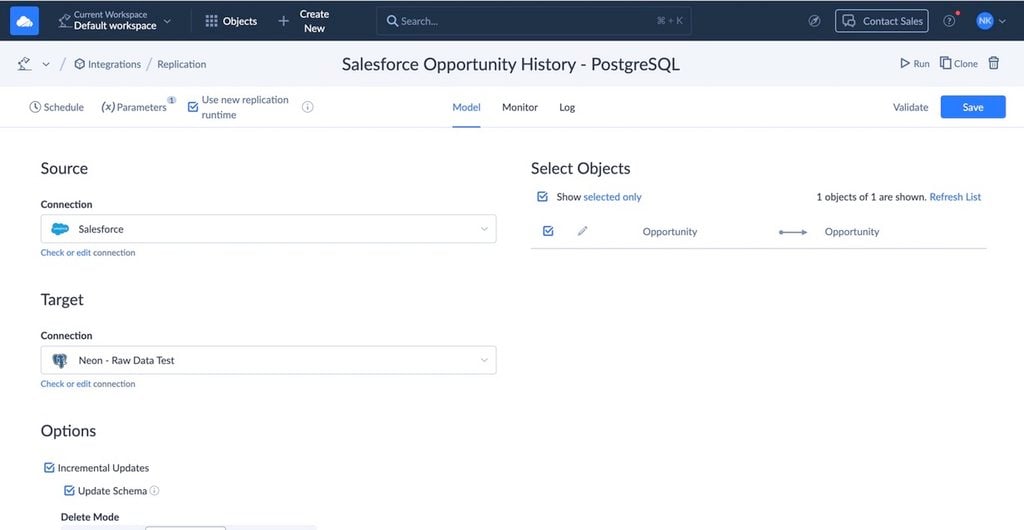
Replication copies objects and fields as they are, with no custom mapping, which suits a raw layer fine. Two limits to plan for. Replication doesn’t detect metadata changes in the source: a new field isn’t copied until you add it to the integration, and a renamed or deleted field makes runs fail until you update it.
How often it runs also depends on the plan, from once a day on Free and Basic to every minute on Professional. If your staging logic lives in dbt, Skyvia can run your dbt Core project right after replication in a Control Flow (Professional and up).
What to keep in the raw layer: a checklist
Use this when you set up a new source, or audit an old one:
- Load and history timestamps. Record when data arrived and when source records changed. These timestamps may differ, so don’t treat them as interchangeable.
- The source system and object name. Two CRMs can both have an “Account”.
- Source keys stored as text, exactly as sent. Case-sensitive IDs break in case-insensitive comparisons.
- A delete flag, or a documented decision that deletes are removed.
- Versions for every object someone reports on: deals, orders, subscriptions, tickets.
- Personal data handled on the way in: hashed, left out, or access-restricted. Raw tables tend to be the least protected and the most detailed. They’re also where deletion requests start: Databricks’ GDPR guidance recommends deleting data in the bronze layer first.
- Preserve original source values. Make corrections in the staged layer rather than rewriting historical data. History-tracking fields may change, and retention rules or privacy requests may require records to be removed.
- A retention period in writing. How long raw rows stay, and who decided.
- A note when the source schema changes: a new field, a renamed one, a changed picklist.
If you can tick the first five, you can trace a reported number back to the rows and the load it came from.
Raw data examples and types
What a raw row looks like depends on where it comes from:
| Source | One raw row is |
|---|---|
| CRM | A deal, contact or account as the API returned it at load time |
| Store or ERP | One order line: product, quantity, price, status |
| Website or app | One event: user, page or action, timestamp |
| Support desk | One ticket with its status and timestamps |
| Sensor or device | One reading with its time |
| Survey or form | One answer from one respondent |
The usual split by type is quantitative raw data (counts, amounts, readings) and qualitative raw data (free text, comments, recordings). Most pipelines carry both in the same table: a ticket has a numeric priority and a free-text description. For raw data, the type matters less than whether you kept it as it arrived.
What’s it used for once it’s kept? Three jobs come up again and again. Analysts rebuild a metric when its definition changes. Engineers trace a wrong number back to the load that brought it in. And data scientists train machine learning models on rows rather than totals, because a model can’t learn patterns from a monthly sum.
If you’re moving app data into a warehouse, start with the raw layer and build the rest on top. Skyvia Replication in History Mode stores each version of a record with a flag for the current one. That gives you a way to investigate changes and deletions when two reports disagree.

FAQ for raw data

Should you clean data before loading it into a warehouse?
For app data, usually not. Load it as it arrived, then clean it in a staged layer on top. If the cleaning rule turns out wrong, you fix the rule and run it again over the raw rows; if you cleaned on the way in, the original values are gone.
Why doesn’t my warehouse count match the CRM?
Three causes cover most cases. The copy may still hold records that were deleted in the CRM, the last load may have run before the latest changes, or a report may count every version of a record instead of the newest one. Check the delete flag, the load timestamps and the version logic, in that order.
Can you rebuild raw data from a report?
No. A report usually contains aggregated results, not the original records behind them. Once those details are lost, you can’t reliably reconstruct them from the totals. That’s why the raw layer should preserve historical source values, even if metadata changes or retention rules require certain records to be removed.
Can analysts work with raw tables that hold personal data?
They can, but they rarely need to. Raw tables tend to be the most detailed and the least protected tables in a warehouse. Hash or leave out personal fields when you load them, or restrict the raw layer to the people who maintain the pipeline and give analysts the staged tables.
Want a raw layer you can trust without writing loaders? Skyvia Replication copies your CRM and other apps into BigQuery, Snowflake, Redshift or a database on a schedule. History Mode keeps earlier record versions and tracks which ones are still active. Start a free trial and connect your first source.