Ask around about data integration patterns and everyone's list looks a little different (though ETL, ELT, change data capture, streaming, APIs and sync show up on nearly all of them). The labels vary. The job underneath them doesn't. Some data lives in one system, it's needed in another, and somebody has to choose the route and the schedule.
Most stacks mix several. On a typical day, ELT refills the warehouse overnight, CDC trails production with a reporting replica, and a two-way sync keeps the CRM and the ERP on speaking terms. No harm in that. Trouble starts when a pattern gets picked for a job it wasn't built for, like streaming data that nobody needs before tomorrow morning.
The sections below take the patterns in four groups (foundational, real-time, architectural, plus a few others), with a definition, use cases and trade-offs for each. If you'd rather skip straight to the decision, there's a comparison table near the end.
What Are Data Integration Patterns?
Each data integration pattern is a standardized approach that aims to address integration challenges. It provides a pre-defined framework that determines how data should flow between the source and target systems. It also outlines the rules for extracting and processing information.
Understanding integration patterns provides immense opportunities for enhancing organizational data management. Businesses can select the approach and architecture style that can sustain volumes of data and ensure the required level of scalability.
With the right data integration pattern implemented, companies obtain the following benefits:
- Improved data quality
- Enhanced cooperation between teams
- Increased operational efficiency
- Data-driven decision-making
Foundational Data Integration Patterns
Let’s start with the widely used approaches within organizations worldwide: ETL and ELT. Probably, you are already familiar with these techniques, but don’t know how they can benefit your company. So, let’s discover each of these patterns along with their typical use cases, benefits, and limitations.
ETL (Extract, Transform, Load): The Traditional Workhorse
Definition
The ETL operation is similar to coffee production. Can you believe that? Let’s explore together how these two processes are remarkably similar.
Once coffee beans are collected on the plantation, they must be dried, roasted, and blended. Afterwards, a barista uses them to make your favorite cappuccino or espresso.
The same applies to the ETL process, where data is first collected from various systems, including CRMs, ad platforms, accounting systems, and e-commerce platforms. Then, it’s being cleansed, transformed, blended, and loaded into the destination tool so that data analysts can use it for their conclusions.

The ETL pipeline comprises three principal stages:
- Extraction. Data collection across sources (cloud platforms, spreadsheets, databases, etc.) takes place. It can be carried out either on a schedule or manually.
- Transformation. This is where the data standardization happens. Given that each source has its own data structure, it’s essential to cleanse and reformat bits of information.
- Loading. At this stage, the polished data travels to the destination (data warehouse, data lake, or an analytics-ready platform). It’s now ready for use by specialists who shape data-driven recommendations for businesses.
Use Cases
- Legacy system integration. Since legacy systems may eventually cease to receive vendor support, this can significantly impact daily business operations. Therefore, it makes sense to transfer data from such services to cloud-based platforms to keep data safe and usable. Given that legacy system information may have a peculiar format, ETL would be a lifesaver, making it compatible with modern systems.
- Building unified dashboards. Comprehensive reports are a key to the success of an organization. To obtain a holistic view of organizational processes and operations, data from various sources is collected. Thanks to ETL, heterogeneous data is standardized and properly displayed.
- Data warehousing. To create unified dashboards, the data should reside in a unique place. A data warehouse often appears to be a single platform where data from various systems is consolidated and updated regularly. Owing to ETL, the information arrives already cleaned and ready for use.
- CRM enrichment. Having comprehensive customer profiles in the internal systems is essential for personalizing offers and enhancing user experiences. CRM enrichment is the technique that aims to make client profiles accurate and complete. ETL automates such a procedure by integrating external data and transforming it before loading it into a CRM system.
Pros
- Enhanced data quality and consistency
- Creating an SSOT (Single source of truth)
- Improved business efficiency
- Historical analysis
- Enhanced data compliance and governance
Cons
- Not suitable for real-time operational pace
- Complex scaling
- Maintenance complexity
- Restricted analytics capabilities
- Ongoing costs
ELT (Extract, Load, Transform): The Modern Approach
Definition
While ETL is similar to coffee bean elaboration, ELT is like orange juice production. Don’t you believe it? Again, let’s find that out by looking at the analogies.
Once oranges are picked from the trees and put into boxes, they travel directly to the morning bar, let’s say. It’s where they got squeezed, and you receive a glass of fresh orange juice.
The same goes for the ELT process, as the data is first collected from dispersed systems and instantly delivered to the destination. It may stay there for some time in its raw form, without being processed or elaborated on demand.
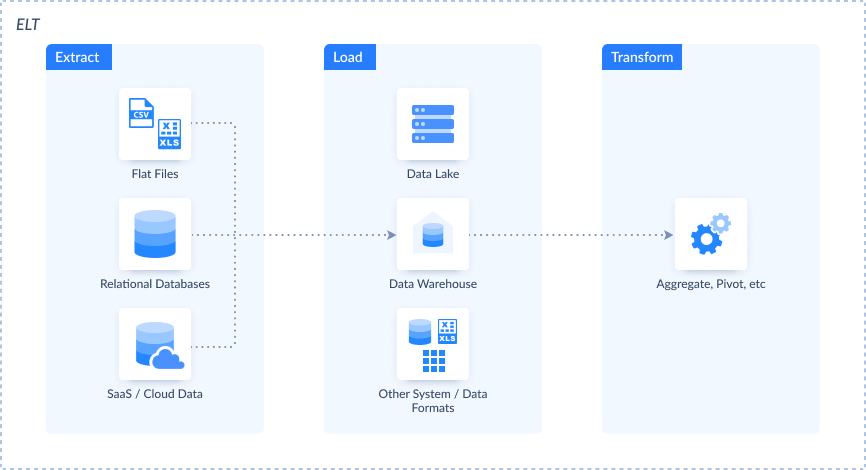
What is the difference between ELT and ELT?
The core distinctions between these two technologies are:
- The place of data transformation in the sequence of stages.
- The speed of data processing.
- The availability of fast scaling.
Use Cases
- Modern data warehousing. Cloud data warehouses like Snowflake and BigQuery are designed to handle large volumes of data. They also offer powerful processing capabilities that enable built-in operations on data. ELT is a natural fit, allowing you to load data directly into these warehouses and then transform it afterwards.
- Big data analytics. Given that ELT promotes scalability, it lets you load large amounts of data from multiple sources simultaneously. Then, this data can be processed on demand whenever it’s needed.
- Real-time reporting. Thanks to ELT, data is loaded quickly to the destination system. It can be transformed on the go, enabling real-time or near-real-time analytics. As a result, you get dashboards with the latest data.
- Deep learning. ELT plays a crucial role in machine learning and artificial intelligence. Given that it loads raw data into the system, it retains all its initial characteristics, which are crucial when ML algorithms are applied.
Pros
- Much easier to set up and configure than ETL.
- High reliability compared to ETL since transformation and loading are separate.
- Much better scaling opportunities compared to ETL.
- Costs are usually lower than those of ETL.
Cons
- Data quality issues.
- Potential exposure of sensitive information.
- Regulatory compliance challenges.
- Powerful transformation capabilities are required on the destination.

Real-Time and Event-Driven Patterns
While the two approaches mentioned above are known as batch-processing methods, they won’t be applicable when instant elaboration is necessary. Therefore, we present real-time and event-driven patterns here: CDC, streaming, and API-based integration.
Change Data Capture (CDC): Tracking Changes in Real-Time
Definition
The CDC concept is a pattern that identifies changes to data in the source system. That could be new record inserts, updates, or deletions, for instance. All these modifications appear on the so-called CDC feed. Afterwards, these changes are instantly reflected in the target system in real-time.
The importance of the CDC can’t be underestimated since there is no need to scan the entire source dataset. Only the changes in the affected records matter, which makes data processing much faster. With CDC, you can easily keep the systems in sync thanks to reliable data replication and zero-downtime cloud migrations.
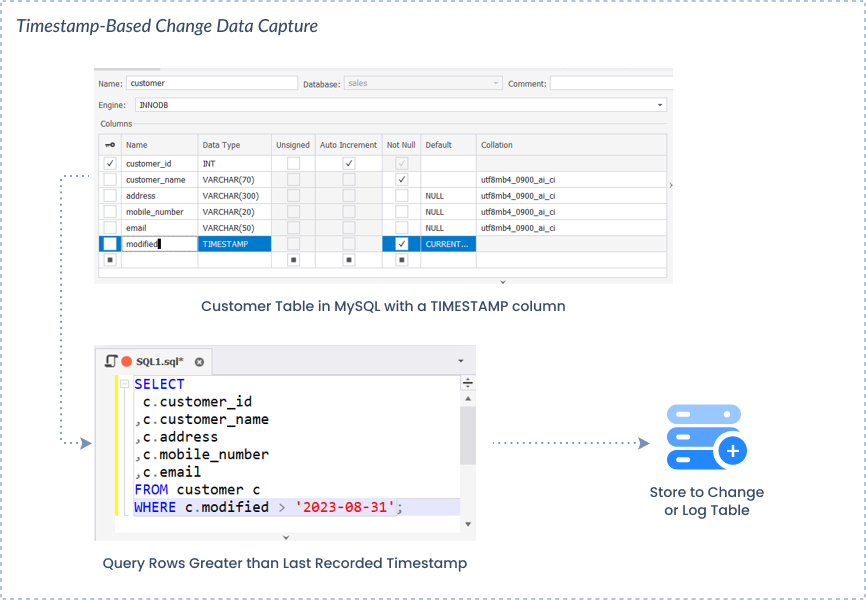
It’s important to note that CDC isn’t a standalone data integration process, but it’s rather an approach used together with other techniques. There are several CDC types, each of which is used appropriately with a definite data integration method.
- Trigger-based
- Log-based
- Timestamp-based
- Snapshot-based
Use Cases
- Database replication. Thanks to the CDC, there’s no need to resave all data every time the replication runs. Instead, only the most recent changes that took place after the preceding replication are added.
- ETL integrations. The DML operation called UPSERT represents the CDC principle in action. When it’s selected, only new or updated records from the source system will appear in the destination.
- Data synchronization between systems. The CDC helps detect changes that occur in one of the data sources. Based on that, the new information is reflected correspondingly in both.
- Real-time analytics. Since the CDC can detect changes instantly, it supports real-time analytics. It eliminates the performance bottlenecks and ensures scalability, allowing users to get their analytic reports supplied with actual data.
Pros
- Efficient resource use since there is no need for full database scans.
- Low latency is ensured since changes to data are captured once they take place.
- Historical record of changes.
- Highly scalable and capable of handling large data volumes.
Cons
- Risk of data loss and duplication.
- Possible complications of schema modification.
- Need to coordinate many parts of the operation.
- Security inconsistencies for log-based CDC, which requires higher access levels to the database.
To overcome these challenges, it’s necessary to utilize a reliable CDC tool that can effectively detect, address, and manage them.
Data Streaming: Processing Data in Motion
Definition
Stream data integration is the process of collecting, processing, and managing information flows in real time. They might come from a single source or several sources simultaneously.
The data streaming approach is different from the batch-based integration. It interacts with many complex schemas and has a more complex architecture than batch pipelines. Thus, streaming integration is a resource-consuming technique.
Use Cases
- Fraud detection. The systems based on real-time data streaming can prevent and mitigate digital fraud. They contain mechanisms for instant collection of transaction data, which is then assessed with ML algorithms that can instantly identify any suspicious activities.
- IoT data processing. Connected devices generate large volumes of data each second. Such data streams are instantly analyzed to detect anomalies in the IoT system and send immediate alerts.
- Stock market analysis. It’s also possible to collect data from stock exchanges in real time. This helps traders to make informed and well-weighed buying and selling decisions.
- Route optimization. Data streams from satellites are collected and analyzed. Therefore, the route is deviated in real-time to avoid traffic jams.
Pros
- Possibility to get immediate insights from a large amount of data.
- Increased efficiency through continuous monitoring and improvement.
- Personalized customer interactions on e-commerce platforms.
- Optimization of resource usage.
- Increased agility and adaptability to circumstances.
Cons
- Compound architecture and complex setup.
- Requires substantial initial investments in data infrastructure.
- Higher vulnerability to data breaches.
API-Based Integration: Connecting Applications and Services
Definition
API-based integration is the mechanism that allows applications to talk to each other programmatically. It works like Gefestus, the messenger of the Olympic Gods, delivering a request from one system to another, and then getting back a response.
API integration provides access to data from other applications through a well-designed system of communication channels. As a rule, an API is based on a pre-defined model, such as REST, SOAP, etc.
Use Cases
- SaaS platform integration. API integration enables the connection between two cloud-based platforms. For instance, it allows you to embed a payment gateway into an e-commerce store.
- Mobile app development. Thanks to APIs, mobile applications can access external services with minimal effort. For instance, they can be connected to social media platforms, payment gateways, geo services, and other third-party programs.
- Microservice architecture. It heavily relies on the API-based integration since each microservice exposes its data via an application programming interface. That way, services can interact with each other.
Pros
- Utilizes standardized models and architectural styles at the base.
- Expanded feature set thanks to added functionality from third-party services.
- Enhanced user experience and satisfaction rates.
- Real-time data exchange.
Cons
- Some services don’t share API documentation with the public.
- API integration configuration might take much time and resources.
- High complexity of setup and solid technical skills required.
Architectural and Strategic Patterns
The methods presented in this section are more about data organization and management rather than movement and integration. They represent approaches for the utilization of the information within the organization.
Data Virtualization: A Unified View Without Moving Data
Definition
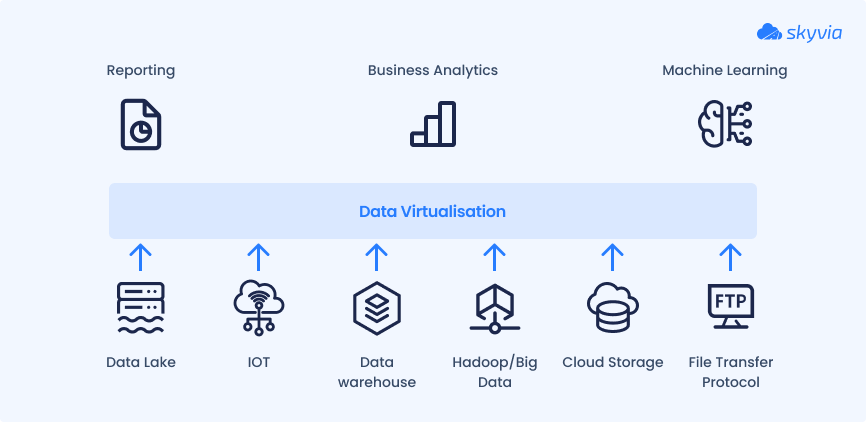
Data virtualization is a contemporary approach to information management in enterprise systems. It unites data from various sources, such as databases, data lakes, documents, CML files, cloud applications, data warehouses, and many others in a single logical layer. However, data isn’t physically moved from these systems.
The underlying technology of the virtualization techniques uses abstraction layers and metadata. Thanks to that, data is represented in a centralized layer and appears to users as if it were consolidated in a single database.
Users can interact with data from a single location and create queries in real-time. Such an approach is faster than obtaining insights from replicated data in a data warehouse, for instance. Overall, data virtualization streamlines the access and management of enterprise data, enabling informed decision-making.
Use Cases
- Self-service Business Intelligence (BI). Data virtualization enables independent business users to access analytics without IT intervention. It simplifies the collection of information and drives insights from it within a single platform.
- IoT analytics. Smart connected devices usually generate a vast amount of data every second. Data virtualization can work with real-time processing of IoT data streams and visualize their analytics on a dashboard.
- 360-degree customer view. Instead of consolidating data about the same customer in a single location, you can benefit from its virtualization. It creates a holistic view of all client data, providing a comprehensive understanding of customer behavior patterns.
- Storage redundancy reduction. Replication of data into a DWH or another unified platform requires additional storage resources and extra costs. With a virtualization approach, it’s possible to minimize expenses and reduce the complexity of data management.
Pros
- Real-time access to data.
- Optimization of resource use and reduction of storage-related costs.
- Agility that allows businesses to quickly respond to changing business needs.
- Reduced time-to-insights.
Cons
- Potential latency issues when handling complex queries on big data.
- Probable exposure of sensitive data.
- Single point of failure.
Data Mesh: Decentralizing Data Ownership
Definition
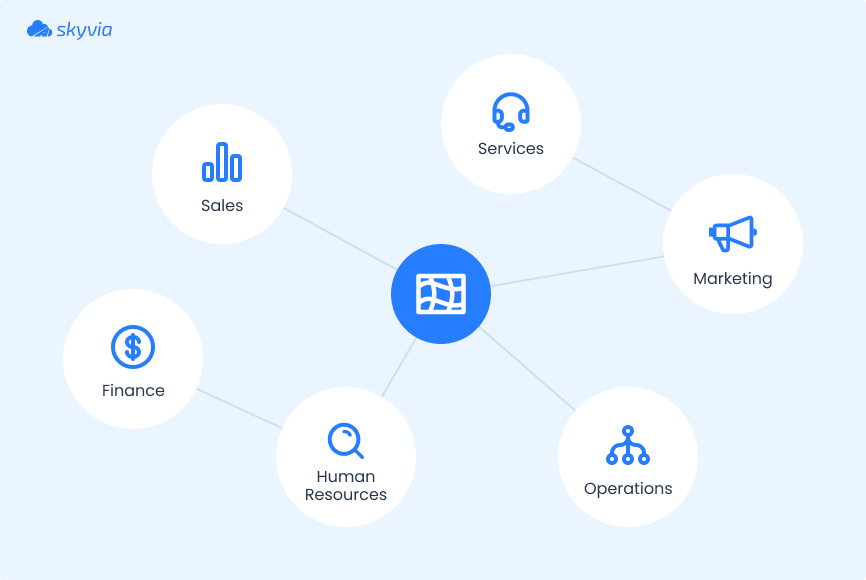
Data mesh is another innovative approach to information management. Unlike virtualization, though, it takes a decentralized model as its base. Data mesh heavily relies on a distributed architecture, where each organizational department has its data storage assets, access control rules, and pipelines.
In a nutshell, this technique entails a shift from monolithic systems to domain-specific ones. As a result, teams get faster access to data and obtain better control over it. Additionally, data mesh bypasses central IT teams, which often serve as a bottleneck in organizational analytics.
Use Cases
- Decentralized data management. Information is stored and processed across independent nodes rather than in a centralized storage repository. This promotes faster access to data and more detailed analysis.
- Data-as-a-product. When a dataset exists only within a specific organizational department, it’s usually narrowly focused. Therefore, it can be shared or sold to other third-party companies. For instance, wine quality assessment departments can share their datasets with supermarkets to help them make weighted decisions on winery stock.
- ML models creation. When a dataset is industry-specific, it typically requires minimal cleaning and transformation. Therefore, it could perfectly serve as a training dataset for ML model training.
- Security enforcement. Thanks to the decentralized concept, employees have access only to the data generated by their department. This underpins data security within an organization, as the information is available only to authorized personnel.
Pros
- Eliminated bottlenecks and single points of failure.
- Improved data quality.
- Increased scalability and agility.
- Support of diverse data storage systems and locations.
Cons
- Possible data duplicates across departments.
- Infrastructure complexity.
- Difficulty in implementation.
- No alignment between different teams.
Other Important Data Integration Patterns
Data Migration
Description
Data migration is a one-time movement of information from one system to another. As a rule, this operation is deliberately planned in advance. The migration procedure outline usually contains details on which data needs to be transferred, how it should be processed, and where it should be moved. Afterwards, the validation of migrated data on the target system takes place.
Even though this process is often associated with the switch from legacy systems to modern infrastructures, it usually covers a broader range of use cases, such as:
- Moving data from one storage system to another for cost reasons or data use purposes.
- Transferring organizational information from an on-premises data center to the cloud.
- Migration of an application from one environment to another.
- Copying data from legacy systems to modern infrastructure.
The main benefit of data migration is that it helps companies to switch to modern technologies that address contemporary workloads. What’s more, it drives process optimization within the organization and contributes to enhancing data security and quality.
At the same time, migration is known to be a long-lasting and effort-consuming procedure, which may cause downtime and disruption in business processes. It also often results in broken object dependencies and requires additional validation on post-migration.
Broadcasting
Data broadcasting refers to the transmission of data from a single source to multiple destinations simultaneously. It aims to reach a wider number of recipients with low latency.
This approach is primarily used with multimedia data, such as video and sound. Information is encoded on the source side using specific algorithms and decoded on the target side to minimize delays on the transfer. A great example of data broadcasting is a film streaming service like Netflix.
As a data integration pattern, broadcasting enables continuous data flow to several systems in real-time.
This approach can benefit one-to-many transfer use cases. However, it requires very complex infrastructure and middleware that ensures a continuous flow of information.
Bi-Directional Sync
This data integration pattern is often used to ensure consistency between two systems. Some classical examples include synchronization between CRM and ERP tools, inventory management software and e-commerce platforms, support systems and sales pipelines, etc.
The core advantage of data sync is the consistency of information between two applications. It also greatly contributes to aligning information across departments.
A significant challenge of bi-directional data sync is the creation of duplicates if it’s not managed properly. It’s also associated with growing complexity when the number of connected systems grows.
Data Aggregation
Data aggregation is the process of collecting information from multiple sources and consolidating it into one target. Then, this data is transformed into a summarized dataset by applying one of the aggregation functions. Therefore, it appears in a clearer and consumable way.
This data integration approach is often used for preparing datasets for reporting and analysis. It’s also often used in market research to identify key points from surveys and competitor analysis.
By aggregating data, businesses can get a clear picture of trends, patterns, and key performance indicators. On the other hand, this approach prevents companies from obtaining granular details, which might be of particular importance sometimes.
Correlation: Syncing Only the Records Both Systems Share
Correlation is what you get when a two-way sync learns to be picky. A record moves between two systems only if both of them already have it, and anything that exists on one side alone stays there.
Here's where that helps. Suppose two sales teams keep separate CRMs. A few customers buy from both, so their contacts got entered twice, by hand, once per team. When a rep edits a phone number in one CRM, correlation recognizes the same contact in the other and carries the edit across. The contacts only one team works with never leave home.
| Bi-directional sync | Correlation | |
|---|---|---|
| Which records move | Every record in scope, from either side | Only records present in both systems |
| New record in system A | Gets created in system B | Stays in system A |
| Result | Both systems hold the same full dataset | Both systems agree on the overlap and keep their own extras |
| Fits when | Both sides need the complete picture | Each side owns its data and shares only common customers, patients or products |
The pattern earns its keep when copying everything would cost more than it's worth. The usual illustration is a hospital group: two hospitals share treatment history for patients who've been to both, and neither one inherits the other's entire patient list.
Where it bites is matching. None of this works unless the sync can tell that two records are the same customer, which is why it needs a key both systems trust, for example an email address, a tax ID or a product SKU. Names make a poor key, because "Jon Smith" and "John Smith" look like different people, and the overlap the sync depends on gets smaller without anyone seeing it happen.
How to Choose the Right Data Integration Patterns
We have presented 12 common data integration patterns in this article. Each business decides on the most appropriate approach for them. To help you make informed decisions, we have prepared a comparison table that provides a brief overview of each method.
| Pattern | Data Volume | Real-time Support | Scalability | Use Cases |
|---|---|---|---|---|
| ETL | Datasets that require transformations | No | High | – Legacy system integration – CRM enrichment – Dashboard creation |
| ELT | Can handle large datasets effectively | No | High | – Modern data warehousing – Comprehensive reporting – Deep learning |
| CDC | Large datasets with frequent updates | Yes | High | – Data replication – Data sync – Real-time analytics |
| Data streaming | Varying data loads, from low to high | Yes | High | – IoT data processing – Fraud detection – Stock market analysis |
| APIs | Varying data loads, from low to high | Yes | High | – SaaS integration – Mobile app development – Microservices architecture |
| Data virtualization | Various datasets | Yes | Medium | – Self-service BI – IoT analytics – 360-degree customer view |
| Data mesh | Specialized datasets of varying volumes | No | Medium | – Decentralized data management – Data-as-a-product – ML model creation |
| Data migration | Can handle TB of organizational datasets | No | High | – Moving data from one storage to another – Data transfer from on-premises to cloud – Data copy from legacy systems to modern ones |
| Broadcast | Big data streams | Yes | High | – Streaming services |
| Bi-directional sync | Two equal datasets | No | Medium | – Data alignment between two systems |
| Data aggregation | Different datasets of varying volume | No | Medium | – Reporting and analytics |
ETL pipeline pattern would be suitable for organizations that work with large volumes of data requiring transformations. Meanwhile, ELT works even with larger datasets that don’t need to be processed beforehand but are loaded into a central repository. Both these methods are known as batch processing and don’t require real-time intervention.
If you don’t want to spend much on data storage resources but want comprehensive reporting in place, then data virtualization would work for you.
In case you need real-time capabilities for fraud detection, IoT diagnosis, or stock market analysis, then data streaming would be a good choice. This technology allows you to work with changing data volumes and instantly process them.
To enable your internal systems to exchange data seamlessly, consider API-based integration. If the data between certain sources needs to be aligned, then bi-directional synchronization would be a good choice.
As a rule, organizations adopt a hybrid approach, where several data integration patterns are adopted. The choice of these methods may also change over time as the data processing requirements change.
At this point, we’d like to introduce Skyvia as a universal data platform. It effectively handles various data integration patterns, from ETL to API integration.
Skyvia comprises several modules, each of which supports different integration patterns:
- Data Integration tool handles ETL, ELT, Reverse ETL, data migration, bi-directional sync, and data aggregation scenarios.
- Connect tool allows you to create API endpoints for any data source.
- Automation tool optimizes repetitive workflows.
With a 4.8/5 rating on G2, Skyvia has proved to be one of the favorite data integration tools in the market.
- Web-based access
- 200+ pre-configured connectors to data sources that allow you to connect to your favorite apps, databases, and data warehouses in just several clicks.
- Flexible pricing plans that are suitable for varying business needs.
- No-code intuitive interface for fast and easy setup of integration scenarios.
Conclusion
In this article, we have discussed 12 important data integration patterns. Some of them concern batch processing, while others are suitable for real-time access.
If you need to process large amounts of data, ETL and ELT would work well for you. In case you need instant reporting, streaming, and virtualization techniques would be a good choice. To perform a one-time data transfer from one system to another, a migration approach could be the best option.
Whichever data integration pattern works best for you, Skyvia is there to help you implement it. This platform supports most of the techniques presented in this article and suits various kinds of businesses due to its flexible plans.

FAQ for Common Data Integration Patterns

What is the most widely used data integration pattern?
ETL has been in use longer than the other data integration patterns, although these days it frequently shares the job with ELT, which loads raw data into a cloud warehouse and transforms it there. Operational apps are a separate case. Since they can’t afford to disagree, these apps lean on bi-directional sync or API integration, and change data capture picks up near real-time replication.
What separates ETL from ELT?
The whole ETL vs ELT debate comes down to where the transformation happens. In ETL, data is transformed while it moves, so it reaches the target already prepared. ELT does it the other way around: the raw data is loaded into the destination first, usually a cloud data warehouse, and transformed there later, since there’s no need to do it immediately.
What’s the difference between bi-directional sync and correlation?
Bi-directional sync copies each in-scope record both ways, so in the end both systems hold the full dataset. Correlation keeps a tighter guest list. Records get synced only when both systems already have them (think customers two CRMs share), and the rest is simply ignored. And since it matches on a shared key, a shaky key leaves correlation with nothing to grip.
What data integration pattern works for a large enterprise?
If you’re running a large enterprise, expect to juggle more than one data integration pattern. The warehouse usually gets fed by ELT or ETL, fresh data comes through change data capture or streaming, and APIs or bi-directional sync keep the business applications talking. Data mesh joins in once domain teams are expected to own their data and share it company-wide.
How do batch and real-time integration patterns work together?
Batch and real-time patterns can share a stack happily, as long as each one keeps to its own lane. Let ETL or ELT haul full history into the warehouse at night, then let change data capture or a data stream carry each new change during the day. Use the same record key in both, though, or live updates will miss the rows that the batch load wrote.
Does data virtualization make a data warehouse unnecessary?
No. A data warehouse and data virtualization just do different jobs. Your warehouse is the long-term memory: historical data comes in and stays. Virtualization moves nothing at all. What you get instead is a live, unified view of data that never leaves its source systems. That’s why plenty of teams keep both around, one for quick self-service access (virtualization) and one for history and heavy analytics (the warehouse).