Summary
- Skyvia: A flexible no-code platform that combines ETL, ELT, sync, and reverse workflows without requiring a dedicated engineering team.
- Fivetran: A warehouse-focused ELT platform built for reliability and automation, especially in large dbt-driven analytics stacks.
- Meltano: An open-source, developer-oriented data integration framework that gives teams full control over pipelines and Singer-based connectors.
- Stitch: A lightweight ELT tool that still works well for simple warehouse loading, though it starts feeling limited once workflows become more complex.
- Peliqan: A managed, EU-hosted platform that bundles ELT, a data warehouse, transformations and AI access, for teams who do not want to own infrastructure.
Airbyte usually starts out as a pretty solid setup. Then, over time, you run into the parts nobody really thinks about early on — sync limits, connector maintenance, infrastructure overhead, things like that.
That’s usually the point where teams start looking around. Not necessarily because Airbyte is bad — it’s still one of the more flexible tools in this space — but because different setups start needing different things. Better reliability, less infrastructure to maintain, more predictable pricing, stronger reverse syncs, or just something non-engineers can actually work with.
We build Skyvia. But honestly, some teams are going to be happier with Airbyte, and some are going to prefer something like Fivetran. Depends a lot on who’s maintaining the stack and how much infrastructure they actually want to deal with.
So instead of ranking tools for the sake of ranking them, this guide looks at where each option actually fits — based on technical trade-offs, pricing models, and the kind of team that will end up maintaining it day to day.
How Did We Test and Evaluate These Data Integration Tools?
Instead of comparing feature lists, we ran the same pipeline across every platform and watched how they behaved once real data started moving through them.
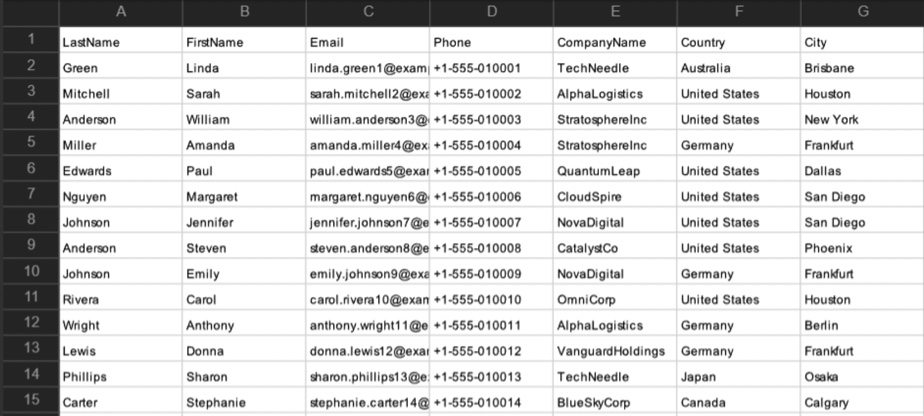
The test setup was fairly realistic — CSV imports from HubSpot to Snowflake. Enough records and schema changes to stop things from looking like a clean product demo.
What ended up mattering more was how the tools behaved once the pipelines got heavier. API throttling, larger syncs, historical loads, pricing jumps – that’s usually where the real differences start showing up.
Which Airbyte Alternative Fits Your Team Best?
| Tool | Best Used For | Pricing Model | Sync Frequency | API Complexity | Schema Change Handling |
|---|---|---|---|---|---|
| Skyvia | No-code teams, reverse syncs | Volume-based subscription | ~1 minute | Visual (no code) | Automatic alerts and mapping updates |
| Peliqan | All-in-one ELT, data warehouse, AI access | Per data source (flat) | Scheduled, plus real-time federated | Visual, SQL and Python | Automatic detection and incremental syncs |
| Fivetran | Enterprise ELT and large warehouse pipelines | Monthly Active Rows (MAR) | ~1 minute | Low-code / SQL workflows | Fully automated |
| Meltano | Developer-heavy and open-source stacks | Free (self-hosted compute) | Custom scheduling | CLI-first, Python-heavy | Manual / code-managed |
| Stitch | Simple warehouse replication | Rows replicated | 30 min – 24 hours | Basic UI | Limited automation |
What Is the Best Airbyte Alternative for No-Code Integration?
Skyvia
Not every integration project comes with a dedicated engineering team behind it. Not every team building warehouse pipelines wants to spend time managing connectors and infrastructure around them. Sometimes the priority is simply getting data into Snowflake reliably, then syncing the transformed results back into operational apps without creating another engineering project in the process.
If that’s closer to your situation, Skyvia is probably worth a serious look.
With Airbyte, the flexibility is great, but somebody usually ends up owning the infrastructure, connector maintenance, and debugging side of the stack. Skyvia takes a much more managed approach.
Setting Up HubSpot to Snowflake in Skyvia
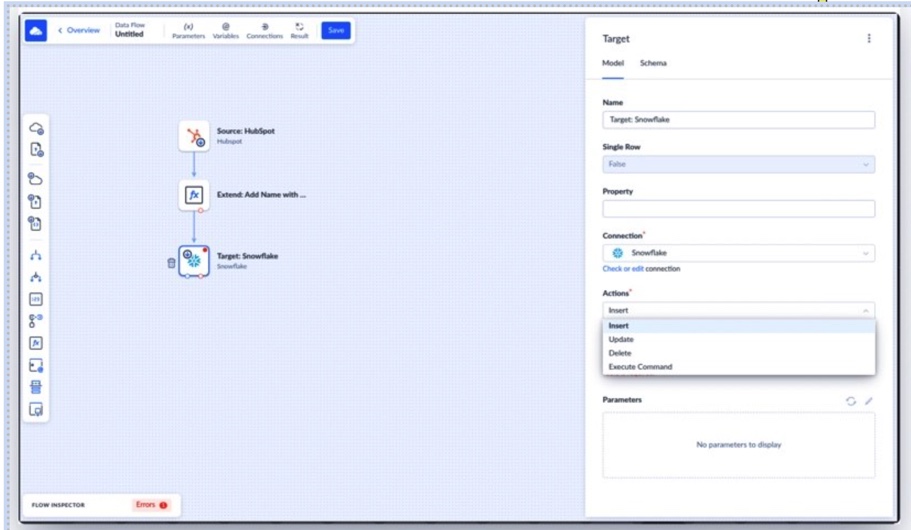
The setup itself stays pretty straightforward. You create separate HubSpot and Snowflake connections through the UI, authenticate both systems, choose the target Snowflake schema, and move directly into the replication workflow.
After the connection is created, the next step is the data replication. HubSpot becomes the source, Snowflake becomes the destination, and from there you choose which HubSpot objects should be replicated. Contacts in our case.
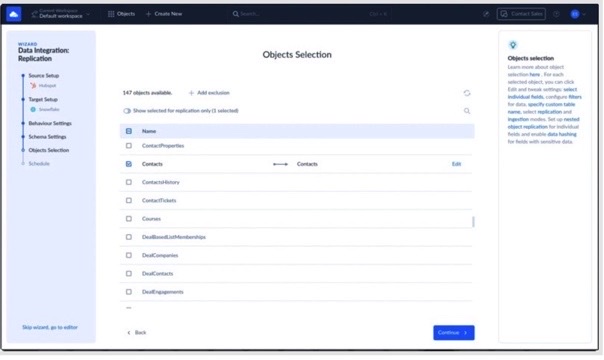
From there, the workflow becomes mostly visual: selecting the objects to sync, configuring incremental replication, choosing scheduling behavior, and reviewing how Skyvia automatically loads HubSpot objects into Snowflake tables.
One thing that impressed during testing is how much of the warehouse setup Skyvia handled automatically in the background. The platform created the Snowflake tables itself, loaded the columns, and tracked incremental changes.
The incremental replication side also felt practical for larger datasets because only new or updated HubSpot records were synced after the initial load instead of reprocessing the entire dataset every run.
Where the workflows became more interesting was after the data landed in Snowflake.
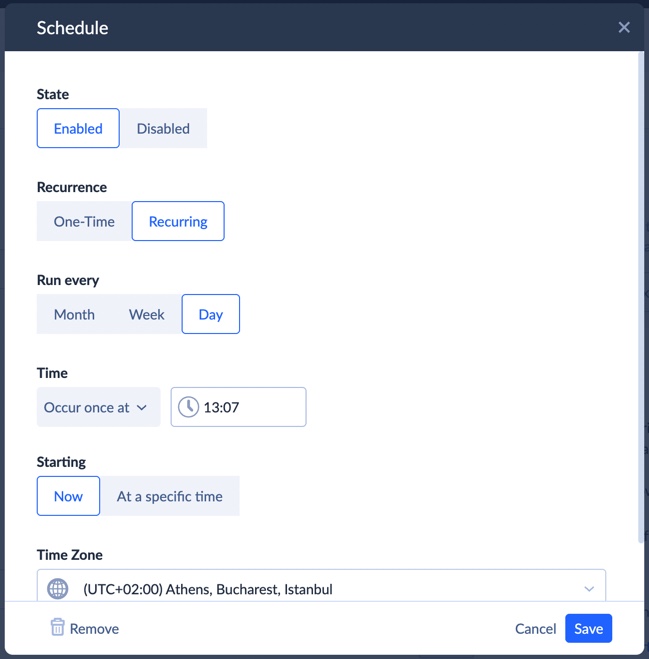
Once the replication task is configured, the pipeline could either be launched manually or scheduled. The scheduling options are flexible enough for most operational workflows — specific dates, weekdays, or recurring syncs every few minutes.
For example, Snowflake calculations like churn-risk scoring, CAC tiers, or customer lifetime value can be pushed back into HubSpot properties so operational teams can work directly from enriched CRM data instead of static warehouse reports. Go here for more details.
Skyvia also supports ETL-style Data Flows and Control Flows, which means the pipeline doesn’t necessarily end at replication. More complex visual workflows, transformations, scheduled orchestration, and reverse operational updates can all be handled from the same environment.
Best for
Teams that are tired of maintaining integration infrastructure themselves and want pipelines that business users can actually work with.
Rating
G2: 4.9 / 5 (25 reviews)
Capterra: 4.9 / 5 (116 reviews)
Pricing
Subscription-based. A free tier is available.
Pros
- All-in-one platform allowing a lot of data integration scenarios without extra fees.
- Most of the maintenance stays out of your way
- Flexible enough to grow from simple replication into ETL workflows, orchestration, and reverse sync scenarios without replacing the platform later
- Doesn’t require engineering to stay involved every time something changes
Cons
Less customizable than fully open-source stacks. If your team enjoys having full control over the stack and customizing things deeply, Airbyte or Meltano will give you more room to work with.
Peliqan
Airbyte gives you the catalog and the source code. What comes with that, eventually, is somebody on the team owning the infrastructure, the connector upgrades and the debugging. That trade is worth it for some teams and quietly expensive for others.
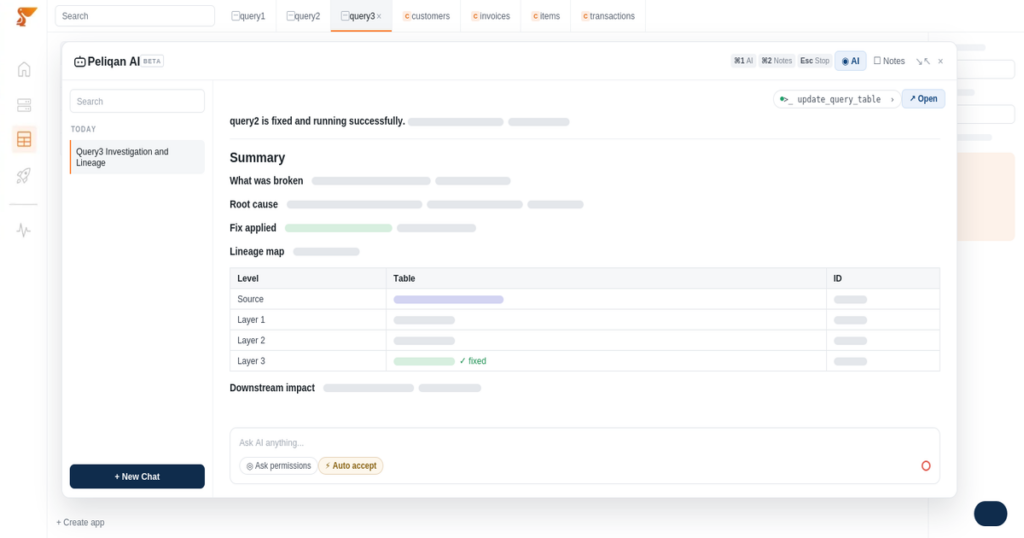
Peliqan sits at the other end of it. Ingestion, storage, transformation and activation already sit together in one managed, EU-hosted platform: 300+ connectors, a built-in Postgres and Trino data warehouse, SQL and low-code Python transformations, reverse ETL into business apps, and a native MCP server so AI agents query governed data rather than raw APIs. When a source is missing, Peliqan builds the connector within 2 weeks instead of handing over a development kit.
The practical difference shows up after the pipelines are running. With Airbyte, the data lands and the rest of the stack is still your problem: a data warehouse to buy, a transformation tool to add, something for pushing results back into operational apps. With Peliqan those are already there, which is either redundant or the entire point depending on what you have already bought.
The other difference is jurisdiction. Hosting is EU-only on AWS Frankfurt, with SOC 2 Type II, ISO 27001, GDPR, HIPAA and CCPA. For European teams that has a way of ending the evaluation early, in both directions.
Best for
Teams that want the pipeline, the data warehouse and AI-ready access to arrive together, without an engineer permanently assigned to keeping the stack alive. Common profile: finance and ERP consultancies, Odoo partners, and SaaS companies embedding analytics for their own customers.
Rating
G2: 4.8/5 (83 reviews)
Pricing
Per data source (flat monthly), from EUR 75 per source. A free trial is available. Pricing details.
Pros
- Nothing to self-host, patch or scale, unlike an Airbyte deployment you own
- A data warehouse is included rather than assumed, so there is no second contract
- Transformations, reverse ETL and API publishing live in the same product as ingestion
- Flat per-source pricing instead of credits, so the bill stays predictable as volumes grow
- EU-only hosting with SOC 2 Type II, ISO 27001, GDPR, HIPAA and CCPA
- A native MCP server for scoped AI agent access to governed data
Cons
Less open than Airbyte by design. You cannot fork a connector or run the platform yourself, so teams that specifically want to own and extend the integration layer will find it restrictive. The connector count is also smaller than Airbyte’s community catalog, though the 2-week custom build closes most of that gap in practice. Getting full value from the transformation layer assumes some SQL on the team.
Which Platform Dominates Enterprise and High-Volume Data Movement?
Fivetran
The bigger the pipelines got, the more Fivetran started making sense.
We changed part of the HubSpot schema mid-sync at one point, expecting at least some cleanup afterward. Instead, Fivetran updated the Snowflake schema automatically and the pipeline just kept running. That’s the kind of thing teams start caring about once the syncs become large enough to stop watching manually.
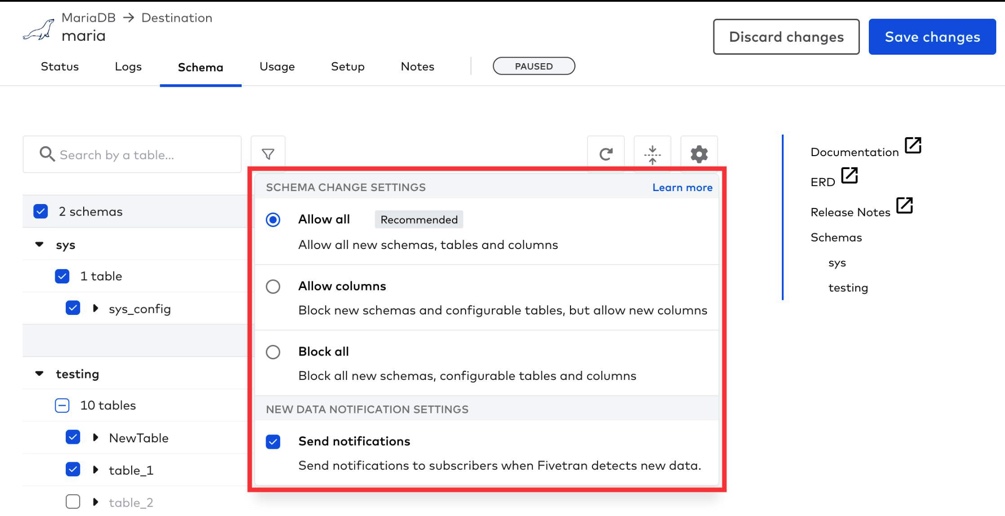
This is really where Fivetran separates itself from more engineering-heavy platforms. The goal isn’t giving you low-level control over every connector or workflow step. The goal is making the pipeline feel almost invisible once it’s running.
Once the data volume gets large enough, most teams stop caring about customizing every little thing and start caring a lot more about whether the pipelines just keep running.
Best for
Enterprise teams that care more about reliability and low operational overhead than deep connector customization.
Rating
G2: 4.4 / 5 (1009 reviews)
Capterra: 4.4 / 5 (25 reviews)
Pricing
Usage-based (Monthly Active Rows model)
Pros
- Pipelines require very little day-to-day maintenance
- Large connector ecosystem across SaaS apps and databases
- Handles schema changes automatically without constant intervention
Cons
Costs can escalate pretty quickly once historical loads and large sync volumes enter the picture. Teams using MAR pricing without careful monitoring sometimes end up paying for far more processed data than expected.
What Is the Top Choice for Developer-Heavy Teams Seeking Open-Source?
Meltano
Meltano feels much closer to an engineering framework than a typical integration platform. If Airbyte still feels too managed or UI-driven, this is usually the direction more technical teams start looking next.
The whole workflow is heavily CLI-oriented. During testing, most of the setup happened directly in the terminal — configuring Singer taps, defining targets, wiring transformations, and scheduling syncs without really touching a graphical interface at all.
That’s also where a lot of developers end up liking it. The stack feels lightweight, transparent, and easy to control once you’re comfortable working in Python, dbt, and orchestration tooling like Airflow.
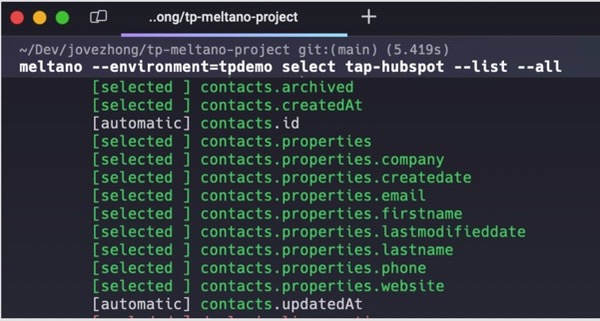
At the same time, this is very clearly not a platform built for non-technical users. There’s no visual workflow layer sitting on top to simplify things for ops or business teams. Everything assumes you’re comfortable working directly with the stack itself.
Best for
Engineering-heavy teams that prefer working from the CLI and want full control over open-source data workflows.
Rating
G2: 4.9 / 5 (7 reviews)
Capterra: No reviews available
Pricing
Open-source and free to self-host
Pros
- Very flexible for engineering-driven workflows
- Fits naturally into dbt- and Airflow-heavy stacks
- No platform licensing costs if you manage the infrastructure yourself
Cons
There’s basically no abstraction layer for non-technical users. If your team isn’t comfortable with CLI workflows and Python-based tooling, the learning curve gets steep pretty quickly.
Is There a Reliable Option for Lightweight Developer Replication?
Stitch
Stitch still works well for the use cases it was built for. But after several ownership changes and the increasing emphasis on Qlik Talend Cloud, I’d spend a little time thinking about the platform’s future before making it a core part of a new data stack.
It still makes sense for teams that just want to get data moving quickly without spending days setting up infrastructure around it.
We also tried the social media here, and during testing, the initial Facebook Ads extraction was up and running surprisingly fast — probably one of the quickest setups out of all the tools we tried.
You can see why smaller teams still use Stitch. For simple replication jobs, it’s easy to get going and doesn’t ask for much from you upfront.
The annoying parts started later for us. Once the syncs got larger, we ran into API limits that weren’t very obvious initially, and figuring out what actually failed took more trial and error than it probably should have.

The error notifications Stitch sends are technically informative but don’t make it obvious what actually needs fixing or where to start. A Status 500 with “An unknown error occurred” doesn’t give you much to work with when you’re trying to figure out whether the problem is on your end or theirs.
This is also not really the kind of tool you pick for heavy transformation workflows or more advanced operational syncing. Stitch works best when the goal is still fairly close to straightforward replication.
Best for
Smaller teams that need lightweight warehouse replication without building a large integration stack around it.
Rating
G2: 4.5/ 5 (2 reviews)
Capterra: 4.3 / 5 (4 reviews)
Pricing
Row-based pricing
Pros
- Very quick to get running for simple replication use cases
- Feels manageable while the syncs stay relatively lightweight
- Lightweight setup compared to heavier ELT platforms
Cons
Transformation capabilities stay fairly limited, and troubleshooting sync failures can become frustrating once pipelines grow more complex. As the error notification above shows, when something breaks, the feedback Stitch gives you — a Status 500 and “An unknown error occurred” — doesn’t leave you with much to act on. Whether the problem is on your end or theirs isn’t always clear, and working that out takes more time than it should.
Why Are Data Teams Actively Migrating Away From Airbyte?
One complaint that comes up fairly often with Airbyte Cloud is sync frequency. For a lot of reporting workflows, hourly updates are completely fine. The problem starts when teams expect something closer to operational or near real-time data movement.
The limitation usually shows up later once the data is being used more actively. Waiting around for the next scheduled sync starts feeling slow pretty quickly in operational workflows.
The maintenance side gets heavier over time.
The other issue usually doesn’t show up immediately. Airbyte is fairly easy to like early on, especially for engineering teams comfortable with open-source tooling.
The harder part tends to come later, once the pipelines become production infrastructure. Community connectors break, APIs change, workloads grow, and somebody on the team ends up maintaining the stack behind the scenes.
None of that is unusual for open-source platforms, but it does create a hidden operational cost that smaller teams often underestimate at the beginning.
That’s usually the point where teams start reconsidering whether they actually want full ownership of the integration layer or just want the pipelines to keep running reliably in the background.
Where the Biggest Differences Between These Tools Start Showing Up
At this point, the choice mostly comes down to how much control your team wants versus how much infrastructure you actually want to maintain long term.
- Choose Fivetran if reliability matters more than flexibility and your team is moving large amounts of enterprise data into warehouse platforms continuously.
- Choose Meltano if your engineers prefer open-source tooling, CLI workflows, and direct control over the pipeline stack itself.
- Choose Stitch if your main goal is lightweight warehouse replication and you want something relatively simple without managing a larger integration ecosystem around it.
- Choose Peliqan if you want a managed, EU-hosted platform where the data warehouse, transformations and AI access are already included, and nobody on the team wants to maintain integration infrastructure.
- Choose Skyvia if you want a more operationally simple setup with visual workflows, bidirectional syncs, and less engineering involvement in day-to-day pipeline maintenance.
Most teams start with basic warehouse syncs. The differences usually become more noticeable later once reverse flows, operational updates, larger sync volumes, or infrastructure maintenance enter the picture.
Want to see whether Skyvia fits your stack? Try the free plan and test the workflows yourself without setting up extra infrastructure first.

FAQ for What Are the Best Airbyte Alternatives

What is the best open-source alternative to Airbyte?
Meltano is one of the strongest open-source alternatives, especially for teams comfortable with CLI workflows, Python tooling, and managing pipelines directly.
Is Fivetran actually more expensive than Airbyte?
It can be, especially at larger scale. Fivetran trades flexibility for automation and reliability, but MAR pricing grows quickly once data volumes and historical syncs increase.
Which Airbyte alternative is best for Reverse ETL?
Skyvia is a strong option here because it handles bidirectional syncs and operational workflows without needing separate reverse ETL tooling.
Can I get a completely no-code alternative to Airbyte?
Yes. Platforms like Skyvia focus much more on visual workflows and managed infrastructure instead of developer-oriented setup and maintenance.
Are there free alternatives to Airbyte for small projects?
Yes. Meltano is fully open-source, and some managed platforms also offer free tiers that work well for smaller sync volumes or lightweight project.