Summary
- Data silos are data held in one system or team that others can't use without exports or asking.
- In SaaS companies they come from each team buying its own tool, with its own customer ID.
- The hard part is matching records: pick a shared key such as a domain or an external ID first.
- A one-hour audit table shows which silo costs the most: the one copied by hand that disagrees with another system.
- Sync between apps, replication into a warehouse and reverse ETL solve different silo problems.
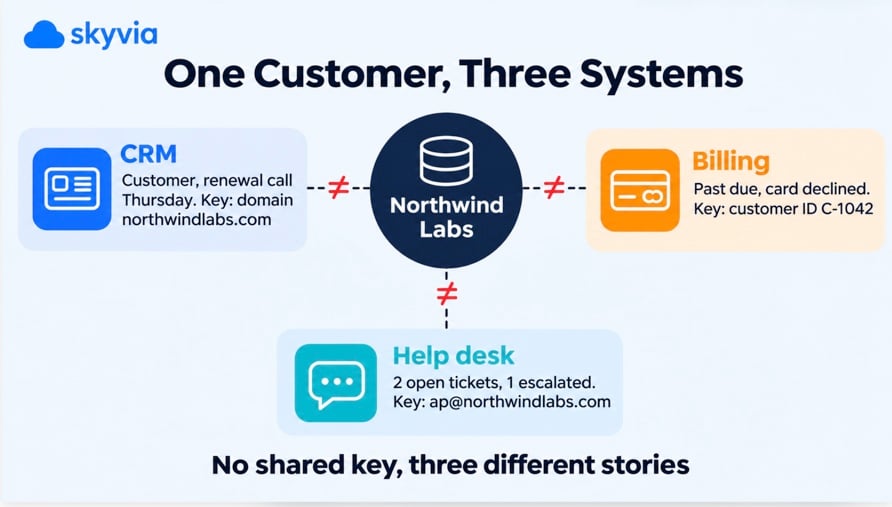
A renewal call is on the calendar for Thursday. In the CRM, the account looks healthy and ready for an upsell. In billing, the card failed three weeks ago. In the help desk, there are two open tickets, and one is escalated. Nobody did anything wrong: each app holds one piece of the customer, and none of them can see the others.
That’s what data silos look like in a SaaS company. It isn’t a dramatic failure. It’s three tools that were each the right choice and were never introduced to each other.
So how do you tell which silos are costing you, and which way of connecting them fits? One customer, followed field by field, will show it.
What are data silos?
Data silos are sets of data that live in one system or one team and can’t be used by others without manual work: exports, copy and paste, or someone asking in a chat. The data exists. It just can’t be joined with the rest, so nobody trusts it outside the team that owns it.
You’ll also hear “information silo” or “data island”. Same idea.
How much data are we talking about? In Salesforce’s State of Data and Analytics report, based on surveys of more than 7,600 leaders in 2025, data and analytics leaders estimate that 19% of their company’s data is siloed, inaccessible, or otherwise unusable.
In a SaaS company, silos rarely come from a bad decision. They come from good ones made separately. Sales picked a CRM, finance picked a billing tool, support picked a help desk, marketing picked an automation platform. Each tool keeps its own customer record with its own ID, and nobody planned how they’d meet. It adds up fast: in Salesforce’s 2026 Connectivity Benchmark, a survey of 1,050 IT leaders, the number of apps in enterprises grew from 897 to 957 in a year, with only 27% of them integrated together.
So a silo isn’t about where the data is stored. A warehouse table that only one analyst understands is a silo too. The question is simpler: can this data be matched to the same customer, order or product in the other systems, and does anyone trust the result?
Why do data silos form?
Data silos rarely start as a technical problem. Six causes cover almost every case:
- Each department buys its own tool. It’s the fastest way to get work done, and integration isn’t in anyone’s budget for that purchase.
- Each tool keys records differently. The CRM keys on an account, billing on its own customer ID, the help desk on the requester’s email. Without a shared key, the records can’t be lined up.
- Growth and acquisitions. A merger brings a second CRM or ERP, and both keep running “for now”.
- Rules that keep data apart on purpose. HR records, health data, or customer data stored by region for privacy law. Some of these silos should stay.
- No owner for the cross-system view. Every app has an admin. The question “which system is right about this customer?” usually has nobody, because data governance stops at each tool’s border.
- A culture of “our data”. When a team treats its records as its own property, sharing them feels like extra work with no payoff, and the silo hardens.
What do data silos cost a business?
The costs are rarely a line in a budget. They show up as time and as decisions made on part of the picture:
- Decisions on partial data. Each department sees its own slice, so the forecast, the churn list and the support priorities can each be right and still contradict each other.
- Duplicated work. Someone rebuilds the same customer list in a spreadsheet every week, and someone else fixes the same duplicate in two systems.
- Harder data security. Every copy in a spreadsheet or a shared drive needs its own access control, and exports tend to have none.
- Weaker AI and analytics. A model or an assistant can only use the data it can reach, which we cover in the AI section below.
Which of these costs you the most depends on where your data silos sit, so look at one.
One customer, three systems: a data silo up close
Here’s what the renewal call above looks like at the field level. Northwind Labs is an invented example, but the shape will be familiar.
| Field | CRM | Billing | Help desk |
|---|---|---|---|
| Name | Northwind Labs | Northwind Labs Inc. | northwind |
| Identifier | Account record, domain northwindlabs.com | Customer ID C-1042, billing email ap@northwindlabs.com | Requester ap@northwindlabs.com |
| Status | Customer, renewal call on Thursday | Past due, card declined | 2 open tickets, 1 escalated |
| Revenue | Opportunity: upsell to 50 seats | $1,200 a month, 35 seats | Not stored |
| Main contact | VP of Operations | Accounts payable mailbox | Support admin |
| Last updated by | Account executive, last week | Payment processor, 3 weeks ago | Agent, yesterday |
Each team reads its own column and reaches a reasonable conclusion. Sales sees an expansion deal. Finance sees a collection problem. Support sees an unhappy customer. Put the three columns side by side, and the real picture is a churn risk, and the upsell pitch on Thursday would land badly.
Now look at the identifier row. That’s what keeps these data silos apart. There’s no field all three systems share. The CRM has a domain, billing has its own ID, the help desk has an email address. Before any tool can join these records, someone has to decide what makes two records the same customer.
The apps themselves give hints. HubSpot deduplicates contacts by email address and companies by domain name. Salesforce lets you use external ID fields on import so that matching records are updated instead of duplicated.
For Northwind Labs, the company domain gives us a starting point for matching records across the three systems. We’d still need to check for duplicates and confirm the match before using a stable account ID across integrations.
That’s the part most silo projects underestimate. Moving data is the easy half. Matching it is where the time goes.
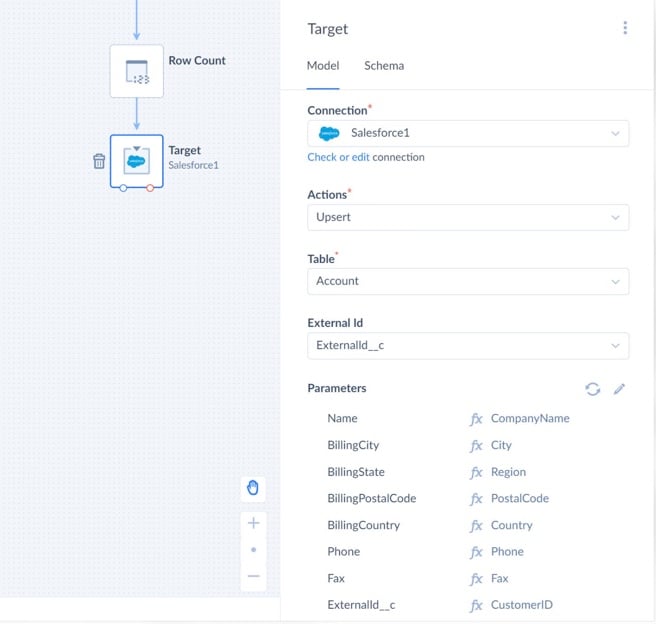
For example, Skyvia can use an external ID to match records during an upsert. In the configuration below, the source CustomerID field is mapped to Salesforce’s ExternalId__c field, allowing Salesforce to identify which account to update or whether to create a new one.
Want to see how big the gap is before you connect anything? If you can get exports of two systems into one database, a query like this lists every customer that exists in only one system or disagrees on status. We ran it on sample data in SQLite (3.39 or later supports FULL OUTER JOIN); in PostgreSQL or BigQuery, use STRPOS instead of INSTR.
SELECT
  COALESCE(a.domain, LOWER(SUBSTR(b.email, INSTR(b.email, '@') + 1))) AS domain,
  a.name    AS crm_name,
  a.stage   AS crm_stage,
  b.company AS billing_name,
  b.status  AS billing_status,
  CASE
    WHEN b.customer_id IS NULL THEN 'in CRM only'
    WHEN a.account_id IS NULL THEN 'in billing only'
    WHEN a.stage = 'Customer' AND b.status <> 'active' THEN 'status mismatch'
    ELSE 'ok'
  END AS check_result
FROM crm_accounts a
FULL OUTER JOIN billing_customers b
  ON LOWER(a.domain) = LOWER(SUBSTR(b.email, INSTR(b.email, '@') + 1))
ORDER BY check_result;
On our four sample rows it returned one “in CRM only”, one “in billing only”, one “status mismatch” (Northwind) and one “ok”. The count of non-ok rows is a decent first measure of how siloed two systems are, and a number you can track as you connect them.
How do you know you have a data silo?
Data silos announce themselves in small, annoying ways. You probably have one if two or more of these are true:
- Two reports give different numbers for the same metric, and the meeting turns into a debate about whose number is right.
- Someone exports CSV files every week to combine data in a spreadsheet.
- The same customer exists twice, with two spellings, in one system or across two.
- People ask another team for data in a chat message instead of looking it up.
- Nobody can say which system is the source of truth for a field such as the billing contact.
- A new tool went live without a plan for how its data connects to the rest.
- Teams define the same term differently: “active customer” means paying in finance and logged in last month in product.
Then spend an hour on an audit. One row per system:
| System | Owner | Records it holds | Customer key it uses | Who copies data out by hand, how often | Numbers that disagree with |
|---|---|---|---|---|---|
| CRM | Sales ops | Accounts, contacts, deals | Account ID, domain | RevOps, weekly export for the forecast | Billing (MRR) |
| Billing | Finance | Customers, invoices, payments | Customer ID, email | Finance, monthly | CRM (customer status) |
| Help desk | Support lead | Tickets, requesters | Requester email | Nobody | Not compared |
The last two columns tell you where to start. The silo that someone copies by hand every week, and that disagrees with another system, is the one costing you the most.
How to break down data silos: three ways to connect apps
There are three common ways to break down data silos between apps, and they solve different problems. Pick by what the people need, not by what sounds most modern.
| Pattern | Use it when | How data moves | What to watch |
|---|---|---|---|
| Sync between apps | Two teams need the same records inside their own tools (CRM and help desk share contacts) | Both ways, on a schedule | Which side wins a conflict; duplicates on the first run |
| Replication into a warehouse | One report needs data from three or more systems (revenue by account from CRM and billing) | One way, into a warehouse, a data lake or a database, then joined in SQL | Definitions: the join only works if the key and terms are agreed |
| Reverse ETL | A number built in the warehouse is needed back in an app (health score or MRR on the CRM account) | One way, from a table or query into the app, updating by key | Run it only once the warehouse model is trusted |
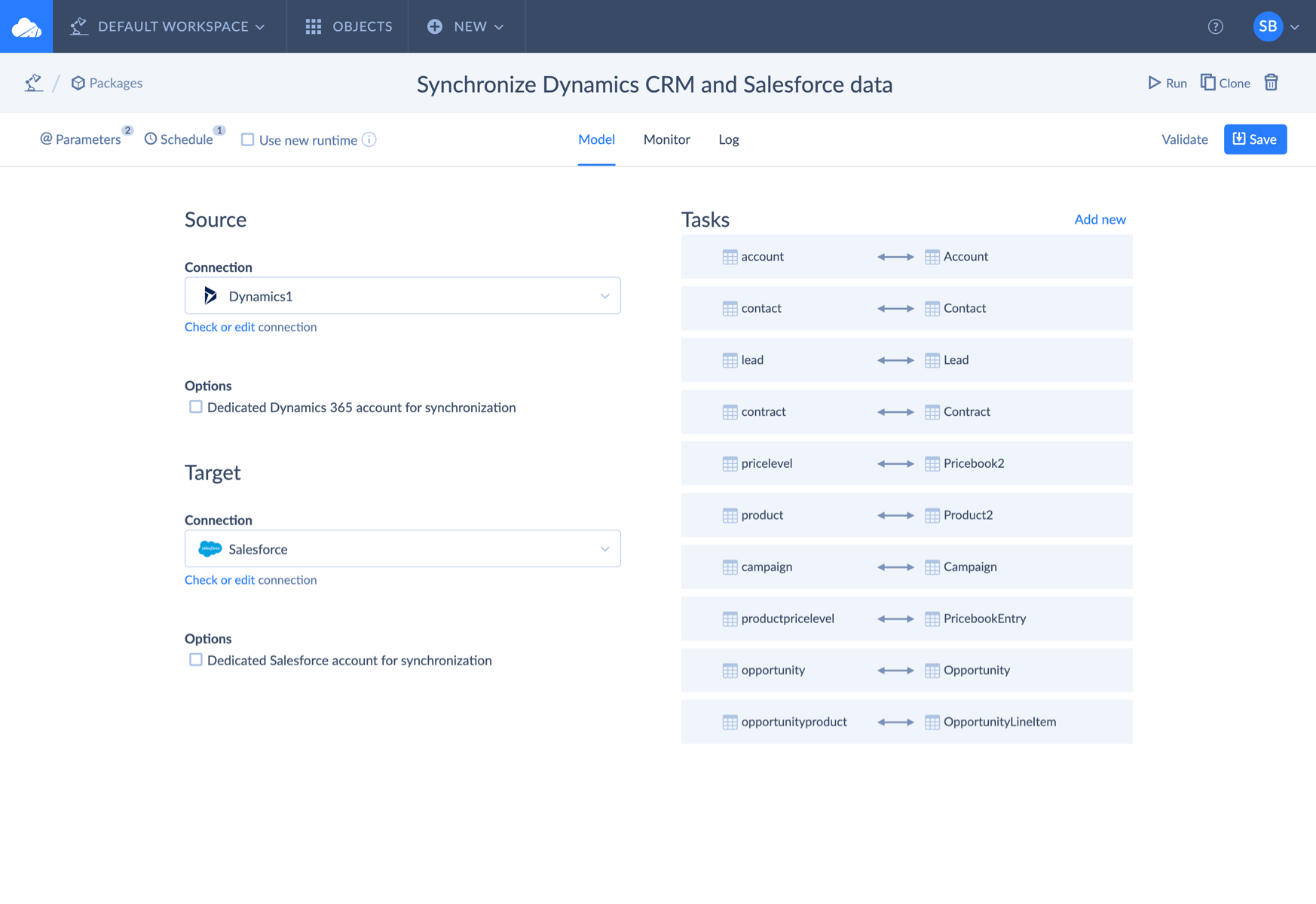
Our take: if two tools are involved and the people work in those tools, start with a sync. When three or more systems feed the same report, bringing their data into a warehouse is often easier to maintain than building separate integrations between every app. Reverse ETL comes last, because it pushes numbers back to the people who act on them, and a wrong number in the CRM does more damage than a wrong number in a dashboard.
A real example comes from an e-commerce company using Skyvia. Its customer and billing information was scattered across two QuickBooks Online organizations and payment platforms. The company used Skyvia to bring that data into Salesforce, preserving the original QuickBooks IDs and setting up rules to identify duplicate records. Sales, Marketing, and Customer Service could then access billing contacts they previously couldn’t see.
And sometimes the right move is to leave a data silo alone. HR records or health data are often kept apart on purpose. There, the goal is controlled access to what other teams need (a headcount, a status), not a full copy.
Where Skyvia fits
Skyvia’s Data Integration covers all three patterns without code:
- Synchronization runs two-way sync between cloud apps and databases. It tracks changes with the apps’ created and modified timestamp fields, so objects without those fields can’t be synced. When a record changes on both sides between runs, the source side’s changes win.
- For the first run, Skyvia recommends leaving one side empty to avoid creating duplicate records.
- Replication copies app data into BigQuery, Snowflake, Redshift, Azure Synapse, Databricks or a database, then loads only new and changed records. History mode keeps every version of a record, and personal data can be hashed with SHA-256 on the way in.
- Import handles reverse ETL: a table, a view or a SQL query as the source, with upsert in the target, including Salesforce external ID upserts.
Schedules depend on the plan: once a day on Free, every hour on Standard, every minute on Professional. For steps triggered by an event, such as a new paid invoice, Automation runs workflows on a webhook, a schedule or new and changed records.
A step order that works
- Audit first. Fill in the table above and pick the silo that costs the most. For many SaaS companies, that’s customer data between the CRM and billing.
- Choose the shared key and clean it on both sides. Domain, email or an external ID. Fix duplicates now; they get harder to fix after the systems are connected.
- Agree on definitions for the fields you’ll share. “Active customer”, “MRR”, “account owner”. Write them down.
- Connect one object with one pattern. Accounts or customers first, not everything at once.
- Give the connected data an owner. Someone who answers “which value is right?” when the systems disagree. That’s the job a data steward does, and the start of data governance across tools rather than inside each one.
- Check after the first runs. Rerun the query above or compare counts. When the mismatches are near zero, add the next system.
Data silos and AI assistants
Data silos matter more now that teams ask AI assistants about their data. An assistant connected to the CRM answers from the CRM. Ask it which accounts are at risk, and it won’t know about the failed payment in billing, because it never saw it. The answer sounds confident and is built on one column of the table above.
Connecting the data first does more for those answers than picking a smarter model. Data leaders see the same gap: in a 2025 survey of 505 data and analytics leaders by Drexel University’s LeBow College of Business and Precisely, 43% named data readiness among their biggest obstacles to AI. If you can see where your data lives and how it flows, you can also trace why an answer came out wrong, which is what data lineage is for.
Ready to connect your first two systems? Start with Skyvia for free: set up a sync or a replication between your CRM and billing in the browser, no credit card needed.

FAQ for Data Silos

Can a data warehouse become a data silo?
Yes. A warehouse removes silos only if the teams that need the data can use it. If one analyst built the tables, the definitions live in their head, and nobody else queries them, the warehouse is one more silo, just a bigger one.
Does moving to cloud apps get rid of data silos?
Usually the opposite. Each team can sign up for its own SaaS tool in an afternoon, and every tool keeps its own customer records and IDs. Cloud apps make data easier to reach through APIs, but someone still has to connect them and agree on a shared key.
Who is responsible for breaking down data silos?
Each system already has an admin, so the gap is the cross-system view. Give each shared data area, such as customers or products, one owner who decides which system is right when they disagree and who checks the numbers after each new connection. In many companies that’s a data steward working with the app admins.
What should you connect first?
Start where the manual copying is heaviest and the numbers disagree the most. For a typical SaaS team, that means the accounts shared by sales and finance. Connect one object first, such as accounts, and add the next system once the mismatches are close to zero.
Two apps that should share customers but don’t? Skyvia synchronization keeps records in step between your CRM, billing and help desk on a schedule, and replication brings them together in a warehouse when you need one report across all of them. Both run on the free plan.