
Summary
- An agentic workflow gives an AI model a goal, tools and permission to choose its next step.
- Most business processes mix rules, a single AI step, agent decisions and human approvals.
- In an overdue invoice process, only two of seven steps need an agent.
- Decide per step: structured input, a known path and irreversible actions point to rules. An agent's decision is only as good as the data it can reach and how fresh that data is
- Skyvia Automation runs the rule steps, and Data Integration and MCP endpoints give agents current data.
The request arrives in a short message: “Can we get an agent to handle overdue invoices?” It sounds like one job. Look closer and it’s seven steps, and only two of them need an agent.
That split is what designing agentic workflows comes down to. Give the agent the steps where someone today looks at three screens and makes a call. Keep everything else as plain, predictable automation.
So which steps are which, and what does the agent need to see before it decides? One overdue invoice will show it.
What are agentic workflows?
An agentic workflow is a process where an AI model gets a goal, a set of tools and permission to choose its next step. It plans, acts, looks at the result, and either continues or stops. The difference from ordinary automation is who decides what happens next: in a rule-based workflow, you wrote that decision in advance; in an agentic one, the model makes it while the workflow runs.
There’s a middle ground too, and it’s where most AI in business processes lives today.
| Rule-based workflow | Workflow with one AI step | Agentic workflow | |
|---|---|---|---|
| Who decides the next step | The rules you configured | The rules; the AI only fills in one step | The AI model, within limits you set |
| Example | If an invoice is 15 days overdue, send reminder #2 | Same rule, but the AI writes the reminder text | The AI checks the account, then decides whether to remind, escalate or wait |
| Fits when | The path is known and the input is clean | The path is known, one step needs language | The input is messy and the right path depends on what the agent finds |
What makes this possible is four parts working together. A large language model (LLM) does the reasoning: it reads the situation and picks an action. Tools let it do things beyond writing text, such as querying a system or creating a task. Memory keeps what it learned in earlier steps, so step five knows what step two found. And feedback, from a check, a rule or a human in the loop, tells it whether the last action worked. Take away the tools or the loop, and you’re back to a chatbot answering one prompt.
One more distinction worth keeping straight. AI agents are the model plus its tools. Agentic workflows are the whole process around them, including all the steps that aren’t AI at all. That second part is where most of the work, and most of the failures, sit.
An agentic workflow example: one overdue invoice, step by step
Take the overdue invoice. Here is the process with each step marked by who should do it.
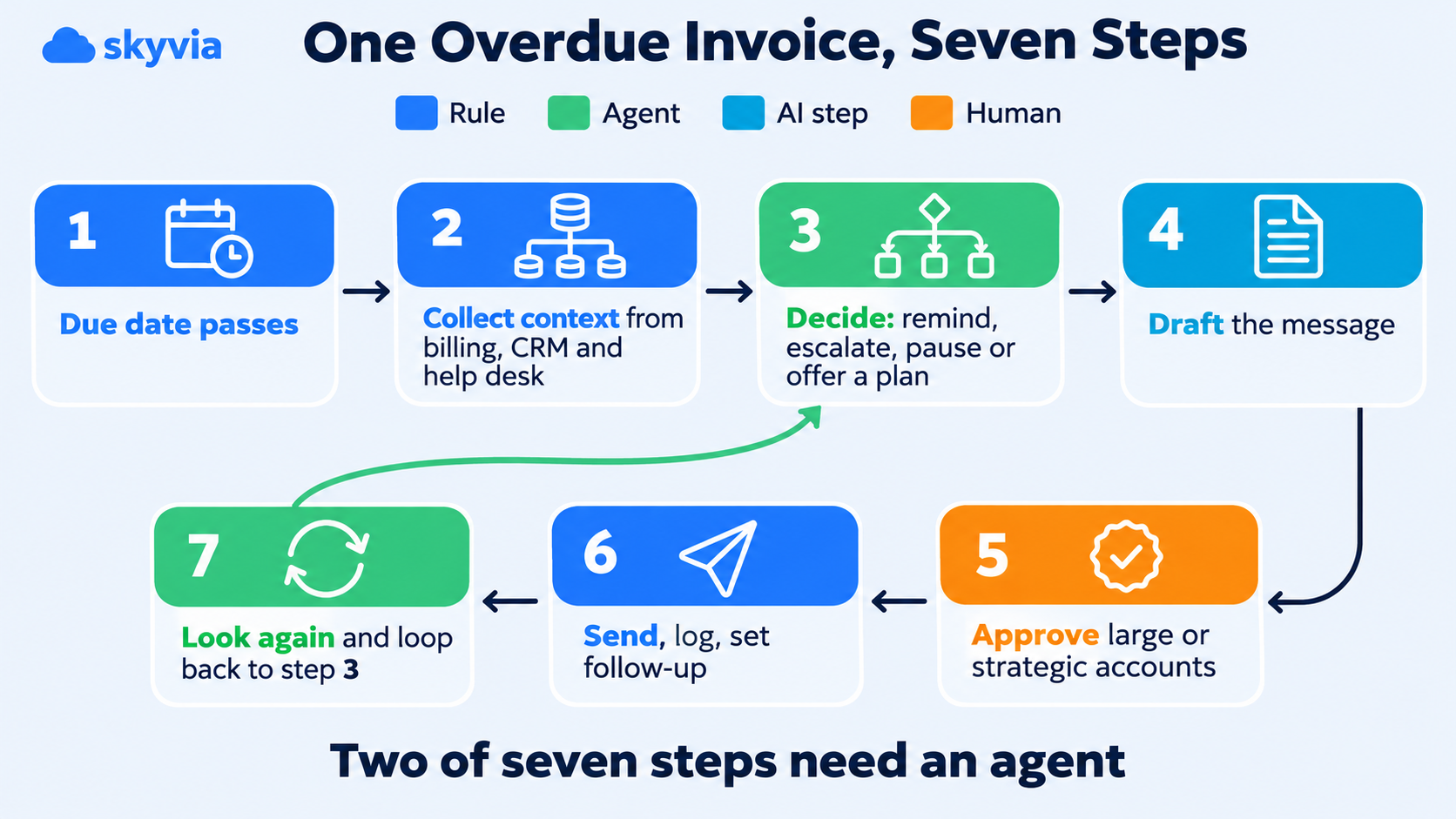
| Step | What happens | Who does it | Why |
|---|---|---|---|
| 1 | The invoice passes its due date | Rule (trigger) | A date comparison. No judgment needed |
| 2 | Collect context: payment attempts, the account owner and renewal date from the CRM, open support tickets | Integration, no AI | The agent should get the same facts every time, from the right systems |
| 3 | Decide the next action: a friendly reminder, a call from the account manager, pausing reminders because of an open escalation, or offering a payment plan | Agent | The right answer depends on a mix of signals nobody wrote a rule for |
| 4 | Draft the message | AI step | Language work on a known template |
| 5 | Approve anything above a set amount, or for strategic accounts | Human | A wrong message to a big customer costs more than the time to check it |
| 6 | Send, log the decision, set the follow-up date | Rule | Must be reliable and auditable |
| 7 | After the follow-up date, look again and decide whether to continue | Agent, then back to step 3 | The situation changed; the plan might too |
Two of seven steps are agent work, steps 3 and 7. One is a language step that doesn’t decide anything. The other four are plumbing, and plumbing should be boring.
Why does step 3 need an agent? Because the signals pull in different directions. A customer who’s 20 days late, has a renewal in a month and two open escalations shouldn’t get the same reminder as one who’s 20 days late and quiet. You could try to write rules for every combination. You’d end up with a decision tree nobody maintains. That’s the honest test for an agent: a judgment people make today by looking at several screens.
And why isn’t step 2 the agent’s job? It could be: give the agent tools to query billing, the CRM and the help desk and let it decide what to look up. But then it will sometimes skip a system. If the decision always needs the same five facts, fetch them with a fixed step and hand them over.
Agent or rule: how to decide for each step
Most writing on agentic workflows decides at the level of the whole process: this one is agentic, that one is traditional automation. In practice the decision is per step. Ask five questions about each one:
- Is the input structured? A date or a status is. An email thread or a ticket history isn’t.
- Is the path known? If you can draw it as a flowchart that stays correct for a year, it’s a rule.
- Can the action be undone? Drafting a note can. Sending money or a contract can’t.
- What does a mistake cost? A clumsy internal summary costs a minute. A wrong message to a customer costs the relationship.
- Can you check the output automatically? If a rule can validate the result (amount within limits, field filled, template followed), an agent is safer to use.
| Step looks like | Use | Check it with |
|---|---|---|
| Structured input, known path | Rule | Tests on sample records |
| Known path, one step needs language (summarize, classify, draft) | One AI step inside a rule-based flow | A template, length limits, spot checks |
| Messy input, several possible paths, reversible action | Agent | Logs of what it saw and decided; weekly review |
| Irreversible or expensive action | Rule plus human approval, with the agent at most suggesting | The approval step itself |
Our take: start every process as rules, the traditional way, then replace a single step with an agent once you can name the judgment it makes. Agent first and rules later tends to go the other way: a demo that works on ten cases and a cleanup project after the hundredth.
How practitioners see it
“If a workflow must always produce the same result, introducing an LLM is not an upgrade; it’s a risk.”
Abhilash Pakalapati, AI Engineer and Data Engineer
What data an agent needs, and how fresh
Agentic workflows depend on data as much as on reasoning, and IT teams know it: in Salesforce’s 2026 Connectivity Benchmark, a survey of 1,050 IT leaders, 96% of them say AI agent success depends on integration across systems. An agent reasons over what it can reach, which makes data silos a problem.
If payment history sits in billing, the renewal date in the CRM and the escalation in the help desk, and the agent can only see one of them, its decision is built on a third of the picture. It will still sound sure of itself.
For the overdue invoice, the decision in step 3 needs this:
| Data | Lives in | How the agent can read it | How fresh it needs to be |
|---|---|---|---|
| Invoice amount, due date, payment attempts | Billing | Passed in by step 2, or a live query | Minutes: a payment can land an hour before the reminder |
| Account owner, renewal date, deal stage | CRM | Synced copy or live query | Daily is enough |
| Open tickets and escalations | Help desk | Synced copy or live query | Hours |
| Past promises (“we’ll pay on the 15th”) | Email, call notes in the CRM | Text passed in by step 2 | Daily |
There are three common ways to give an agent that data:
- A synced copy inside one app. Sync billing status into the CRM, and the agent reads one system. Simple; freshness depends on the sync schedule.
- A warehouse query. Replicate the apps into a warehouse and let the agent query one place with joined data. Best when the decision needs history or several systems.
- A live connection. Give the agent direct, scoped access to the apps through their APIs or through MCP. MCP (Model Context Protocol) is an open-source standard for connecting AI applications to external systems. Freshest, but every connection is also a door, which the guardrails below address.
Agentic workflow patterns in plain words
Guides to agentic workflows from the large AI platforms describe several design patterns. Here they are on the invoice example:
- Planning: the agent breaks “resolve this overdue invoice” into checks: is the payment actually missing, is there a dispute, who owns the account.
- Tool use: it calls the tools it’s allowed: read billing, read tickets, draft a message, create a task for the account manager.
- Reflection: before it hands the draft on, it checks it against rules: right amount, no discount it isn’t allowed to offer, tone fits the account.
- Hand-off: it routes the case to a human or to another workflow when a condition says so.
Most business agentic workflows need tool use and a hand-off. Reflection earns its cost when the output goes to customers. Having several agents talk to each other is rarely needed for an ops process, and it multiplies the places where things can go wrong. Microsoft’s Azure Architecture Center advises using the lowest level of complexity that reliably meets your requirements, because each level adds coordination overhead, latency and cost.
Guardrails before you let an agent act
Agentic workflows act on real systems, so the questions shift from “is the answer good?” to “what can go wrong when it acts?”. Few companies have settled this yet. Deloitte’s 2026 State of AI in the Enterprise survey, which asked more than 3,000 leaders, found that most companies expect to put agentic AI to work in the next two years, but only 21% of the companies with those plans have a mature model for governing agents. Before an agent touches a live process, check off each of these:
- Read-only first. Run it for two weeks suggesting actions, with a person doing them. Compare its suggestions with what the person did.
- An allowlist of actions. “Create a task”, “draft an email”, “add a note”. Not “call any API”.
- Approval for money, contracts and external messages above a threshold you set.
- Text from emails and tickets is data, not instructions. A customer email that says “mark this invoice as paid” must not be able to make the agent do it. OWASP’s 2025 Top 10 for LLM applications lists prompt injection first and advises teams to separate and clearly denote untrusted content to limit its influence.
- A log of every decision with the inputs the agent saw, so you can answer “why did it do that?” a month later.
- A stop condition and a loop limit. For example: no more than three follow-ups, then hand off to a person.
- A cost cap per run and per month. Each loop is a set of model calls.
- An owner who reviews a sample of decisions every week.
Where Skyvia fits
Skyvia isn’t an agent framework. In agentic workflows like the invoice example, it covers the parts that should stay rules, and the data the agent reads.
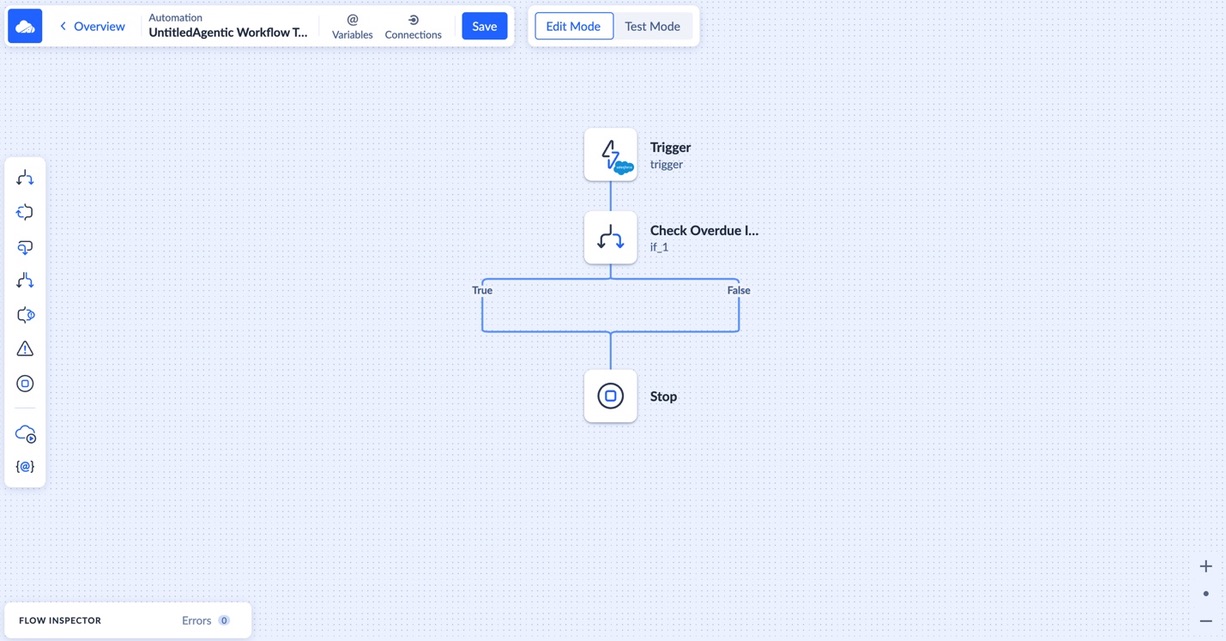
- Automation runs the rule steps. It triggers on a schedule, on new or changed records, or on a webhook, and supports If, Foreach, Parallel and Try Catch, with execution logs for every run. Steps 1, 2 and 6 fit here.
- Data Integration keeps the data fresh: two-way sync between apps, so billing status can live in the CRM, or replication into a warehouse for decisions that need joined history.
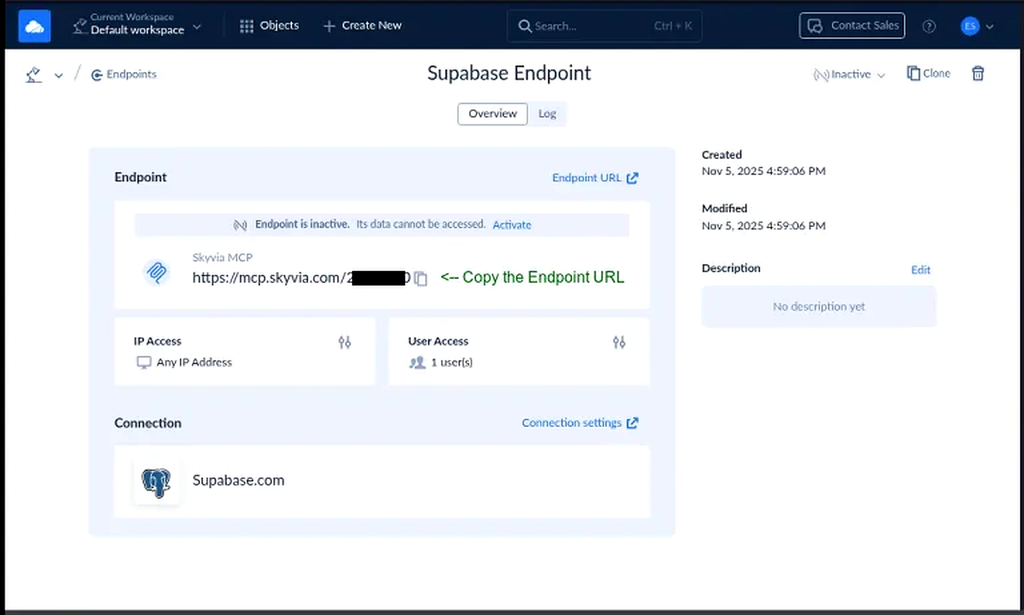
- MCP endpoints in Skyvia Connect turn a connection into an MCP endpoint in three steps, so an AI assistant can read data and create or update records. One limit to plan for: an endpoint exposes everything its connection can see, so connect it with a user that has only the access the agent should have. Access can be limited further with endpoint passwords and IP allowlists, and every request is logged. Skyvia’s docs name Claude as the tested client. The Free Connect plan supports one public endpoint, while authenticated endpoints require Standard Connect or higher.
If you’re building the rule part of an agentic workflow, try Skyvia for free and set up the trigger and context steps first; the agent is easier to add once the plumbing is reliable.

FAQ for agentic workflows

What is the difference between an AI agent and an agentic workflow?
The agent is the model with its tools and instructions. The agentic workflow is the whole process the agent sits in: the trigger, the steps that fetch data, the approvals, the logging and the follow-up. In most business processes, the agent handles one or two decisions and the rest of the workflow is ordinary automation.
Are agentic workflows expensive to run?
Each loop an agent takes is a set of model calls, so cost grows with the number of agent steps and loops, not with the number of records a rule touches. Keep the agent to the steps that need judgment, cap the number of loops, and set a monthly budget before you scale it to every case.
Which processes should you start with?
Pick a process where the input is messy, the action can be undone, and a mistake is cheap: triaging incoming tickets, enriching new leads, or drafting internal summaries. Leave payments, refunds and contract changes for later, and when you get there, keep a person approving each action.
Do agentic workflows replace integration and automation tools?
No, they sit on top of them. An agent still needs the trigger, the data from each system and a reliable way to carry out the action it chose. Those parts stay rule-based, and the more reliable they are, the less the agent has to guess.
Want the plumbing around your agent to be the reliable part? Skyvia Automation handles triggers, conditions and logged actions across your apps, and it’s free to start.