Summary
- Skyvia: A no-code cloud data integration platform with 200+ connectors for ETL/ELT, Reverse ETL, orchestration, and end-to-end data pipelines.
- Hevo Data: Intuitive, event-based ELT platform offering simple source-to-destination replication with flexible Python-based transformations.
- Fivetran: Fully managed, enterprise-grade ELT that automates schema management and syncs high-volume data with strict governance.
- Airbyte: Open-source data replication platform offering flexible deployment options and a massive connector ecosystem for developer-heavy teams.
- dbt: The industry standard for the "T" in ELT, enabling teams to execute complex data transformations directly inside the warehouse using SQL.
This guide will explore 13 known data pipeline tools with actual usage and results that can help tool evaluators choose the right tool for them.
I know that when you search for “best data pipeline tools”, you really want to know which tool won’t screw you later.
You have other responsibilities. It’s overwhelming already, and yet, you need to come up with the right tool for your next data pipeline project. So, you need to get this right the first time. You need what a developer will say, not what some marketing guy who wants you to buy their brand.
But I’ll be honest. I write for Skyvia. You can see other articles written under my name. We built Skyvia for data teams that want one platform for ETL/ELT, transformation, Reverse ETL, and orchestration without maintaining custom pipeline infrastructure. So, yes, we are biased. But I’m also a developer who built pipelines myself, so I know there’s no one-size-fits-all.
In this guide, I will objectively compare our platform against industry leaders like Fivetran and Airbyte, highlighting exactly where we shine — and where you are better off using a competitor.
How We Tested and Evaluated These Tools
We’re going to move data from PostgreSQL to Snowflake. I’ll be using Supabase as my PostgreSQL cloud provider. Below is the visual structure of my sample e-commerce PostgreSQL database.
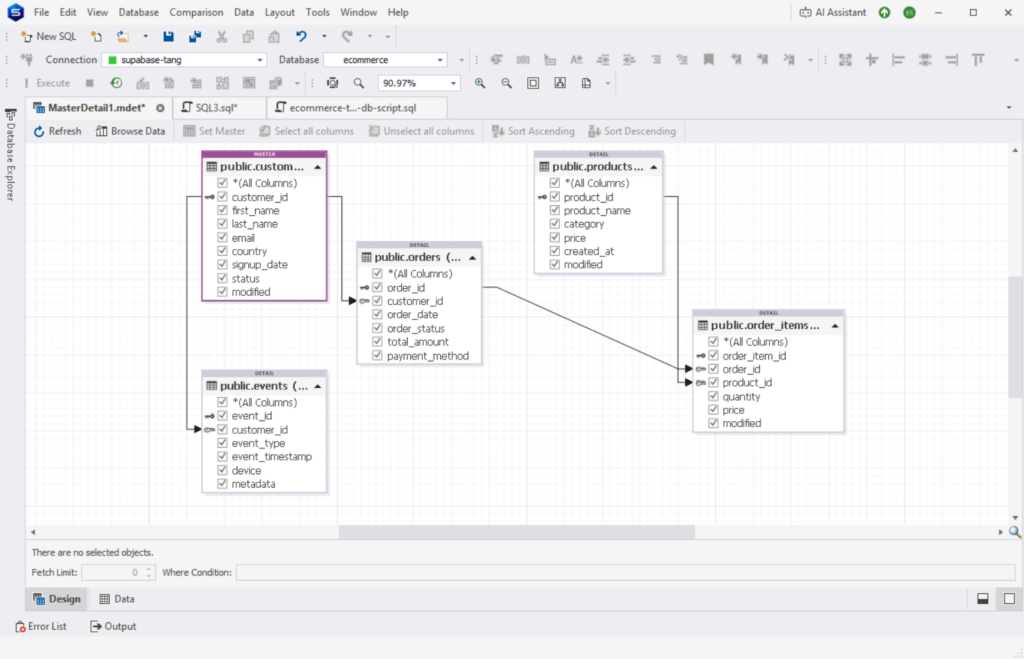
Find the details of each table below:
CREATE TABLE customers (
    customer_id BIGSERIAL PRIMARY KEY,
    first_name TEXT,
    last_name TEXT,
    email TEXT,
    country TEXT,
    signup_date TIMESTAMP,
    status TEXT
);

CREATE TABLE products (
    product_id BIGSERIAL PRIMARY KEY,
    product_name TEXT,
    category TEXT,
    price NUMERIC(10,2),
    created_at TIMESTAMP
);

CREATE TABLE orders (
    order_id BIGSERIAL PRIMARY KEY,
    customer_id BIGINT,
    order_date TIMESTAMP,
    order_status TEXT,
    total_amount NUMERIC(10,2),
    payment_method TEXT
);

CREATE TABLE order_items (
    order_item_id BIGSERIAL PRIMARY KEY,
    order_id BIGINT,
    product_id BIGINT,
    quantity INT,
    price NUMERIC(10,2)
);

CREATE TABLE events (
    event_id BIGSERIAL PRIMARY KEY,
    customer_id BIGINT,
    event_type TEXT,
    event_timestamp TIMESTAMP,
    device TEXT,
    metadata JSONB
);
I’ve included data types you most likely care about like TEXT, TIMESTAMPS, INT, NUMERIC, and JSONB.
After creating the PostgreSQL database, I populated a total of 10k rows to the tables for our sample data using dbForge Studio for PostgreSQL. Below is the distribution for each table:
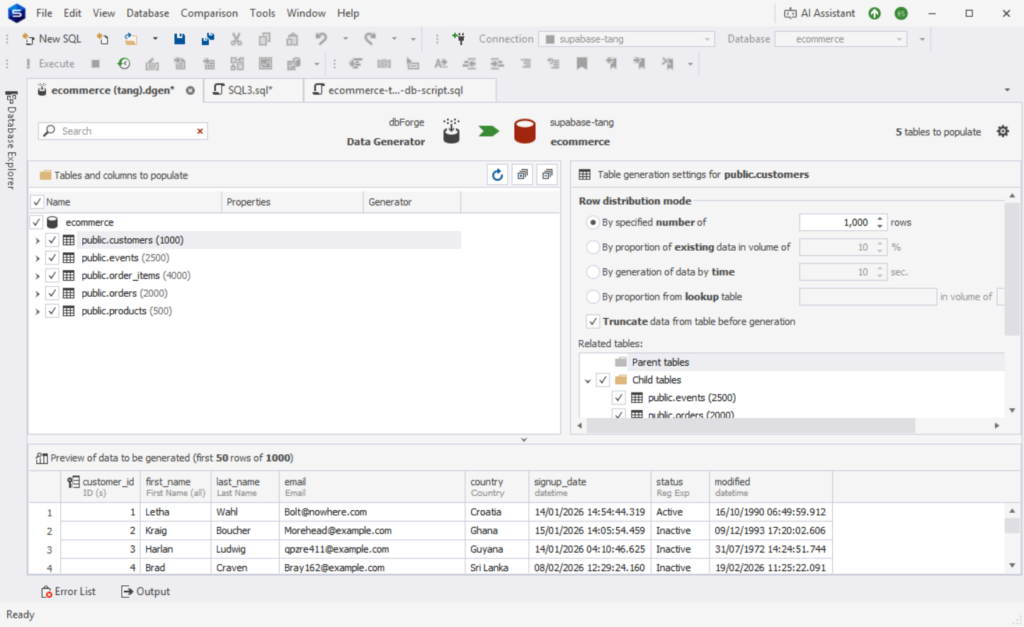
The number after the table name is the number of rows generated after the run.
You will have my first impressions as I use the data pipeline tools here for the first time – from registration to creating the connections and the pipelines.
Note also that based on our internal survey of 200 data teams in 2026, we found that 68% are migrating away from code-heavy pipelines in favor of managed ELT.
Let’s go back to the basics before moving on to each tool.
What Are Data Pipelines and How Do They Work?
Data pipelines are automated processes that move data from source to destination, transforming it along the way. Think of them like a conveyor belt: raw data goes in, useful data comes out.
Core components
I’ve listed below the core components for running a data pipeline.
- Source – where your data comes from, like our sample PostgreSQL database.
- Ingestion – how data is collected (batch or real-time)
- Transformation – This is the process of cleaning, joining, or reshaping your data.
- Storage/Destination – where data lands (e.g., Snowflake)
- Orchestration – This part is the scheduling and workflow control
- Monitoring – This is about tracking failures, retries, and performance
How They Work (Key Patterns)
Data doesn’t flow in pipelines the same way. Depending on how you want the data to address business problems, it could be any of the following.
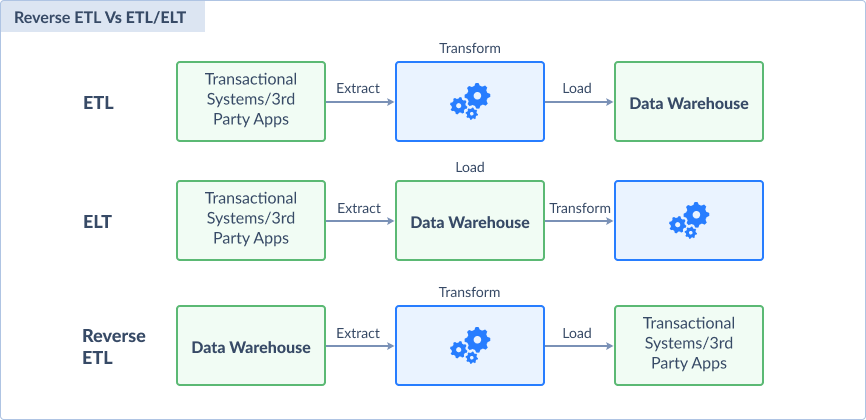
ETL vs. ELT vs. Reverse ETL
- ETL (Extract → Transform → Load)
Data is cleaned before loading. Good for strict control. - ELT (Extract → Load → Transform)
Raw data is loaded first, then transformed inside the warehouse. Faster and scalable. - Reverse ETL
Moves processed data back to operational tools (e.g., CRM). Closes the loop.
Below is a visual comparison:
The Ultimate Comparison: 13 Best Data Pipeline Tools for 2026
I’m giving you a table comparison summary for your overview before you jump to the details of each data pipeline tool.
| Tool | Best For | Pricing Model | Sync Frequency | Complexity |
|---|---|---|---|---|
| Skyvia | Data teams running ETL/ELT and DWH pipelines | Usage-based, freemium | Up to 1 min. sync | Wizard, Drag-and-drop |
| Hevodata | SMBs & No-Code teams | Event-based | Up to near real-time | Wizard |
| BladePipe | SMBs & No-Code teams | Usage-based; free Community edition | Up to near real-time | Wizard |
| Rivery | SMBs & No-Code teams | Usage credits (Boomi Data Units) | Up to 5 min. sync | Wizard |
| Fivetran | Enterprise, High-Volume Data, Strict Governance | Usage-based (Monthly Active Rows) | Up to 1 min. sync | Wizard |
| Qlik Talend | Enterprise, High-Volume Data, Strict Governance | Not publicly listed | Up to near real-time | Wizard, Drag-and-drop |
| Informatica Data Integration | Enterprise, High-Volume Data, Strict Governance | Volume-based (Informatica Processing Units) | Up to near real-time | Wizard, Drag-and-drop |
| Airbyte | Developer Teams & Pipeline Flexibility | Capacity-based. Pricing not publicly listed | Up to < 5 mins sync | Wizard |
| Apache Airflow | Developer Teams & Pipeline Flexibility | Free Open source | Up to near real-time | Requires coding |
| dbt | Data Transformation | Developer account free, $100/per user | Up to 1 min. | Requires coding |
| Dagster | Developer Teams & Pipeline Flexibility | Open source and Paid credit-based | Up to near real-time | Requires coding |
| Striim | Streaming pipelines | Free Developer account and Paid events-based | Real-time data streaming | Wizard, Drag-and-drop |
| Snowflake Snowpipe | Snowflake users who need file uploads from GCS, AWS, or Azure into their data warehouses. | Compute credits-based | Up to near real-time | Requires coding |
Now, let’s examine each in detail.
Best Data Pipeline Tools for No-Code Teams
If you’re just starting out with data pipelines or you don’t have much data volume, these are the tools that will give you that.
1 – Skyvia
Skyvia is a no-code cloud data pipeline tool built to simplify data movement, transformation, and synchronization across your business systems. When Skyvia was built, the goal was to provide minimal barriers to entry and a clean visual interface. That’s what I found out when I first used Skyvia. There’s nothing to install since it’s a cloud-based tool. Only a free registration using my Gmail. And since I came from SSIS prior to Skyvia, I immediately got at home with it because of the drag-and-drop pipeline design with the Control Flow and Data Flow.
Creating the PostgreSQL and Snowflake Connections
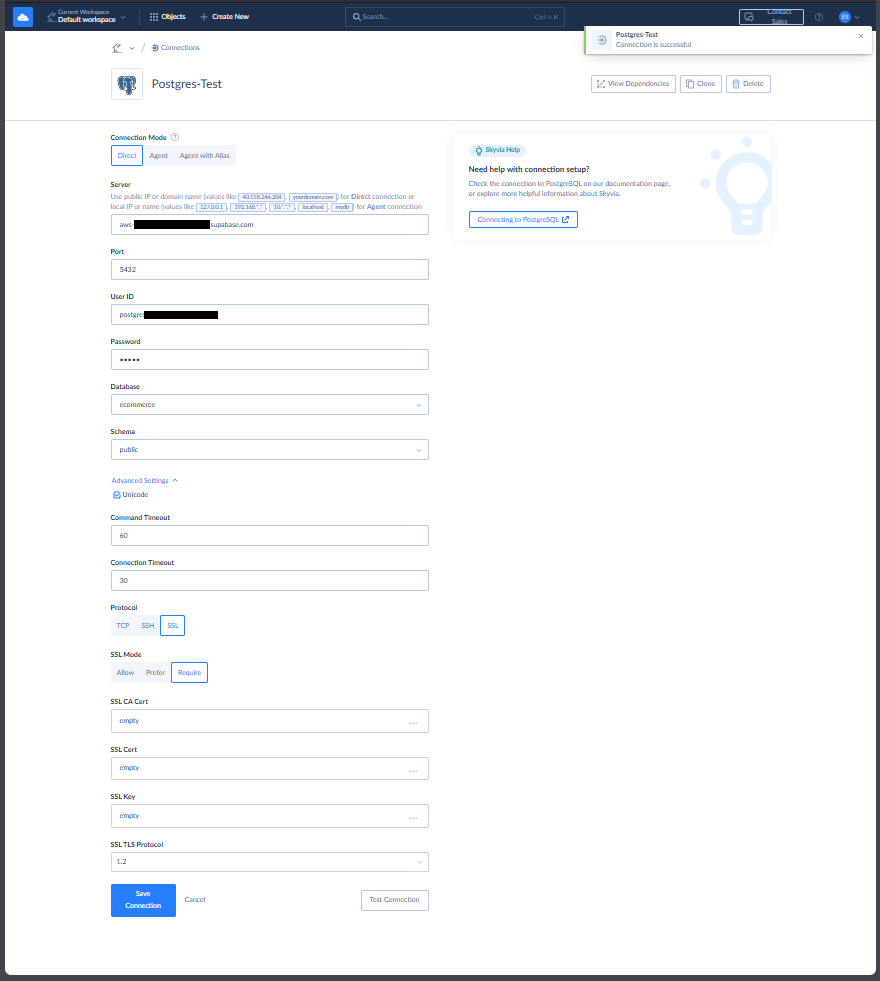
I only need the credentials for my PostgreSQL database and Snowflake before I start creating the Skyvia connections.
My PostgreSQL connection requires SSL, and Skyvia got it covered, though this is optional. Check out my successful connection to Supabase PostgreSQL below:
Meanwhile, below is my successful Snowflake connection:
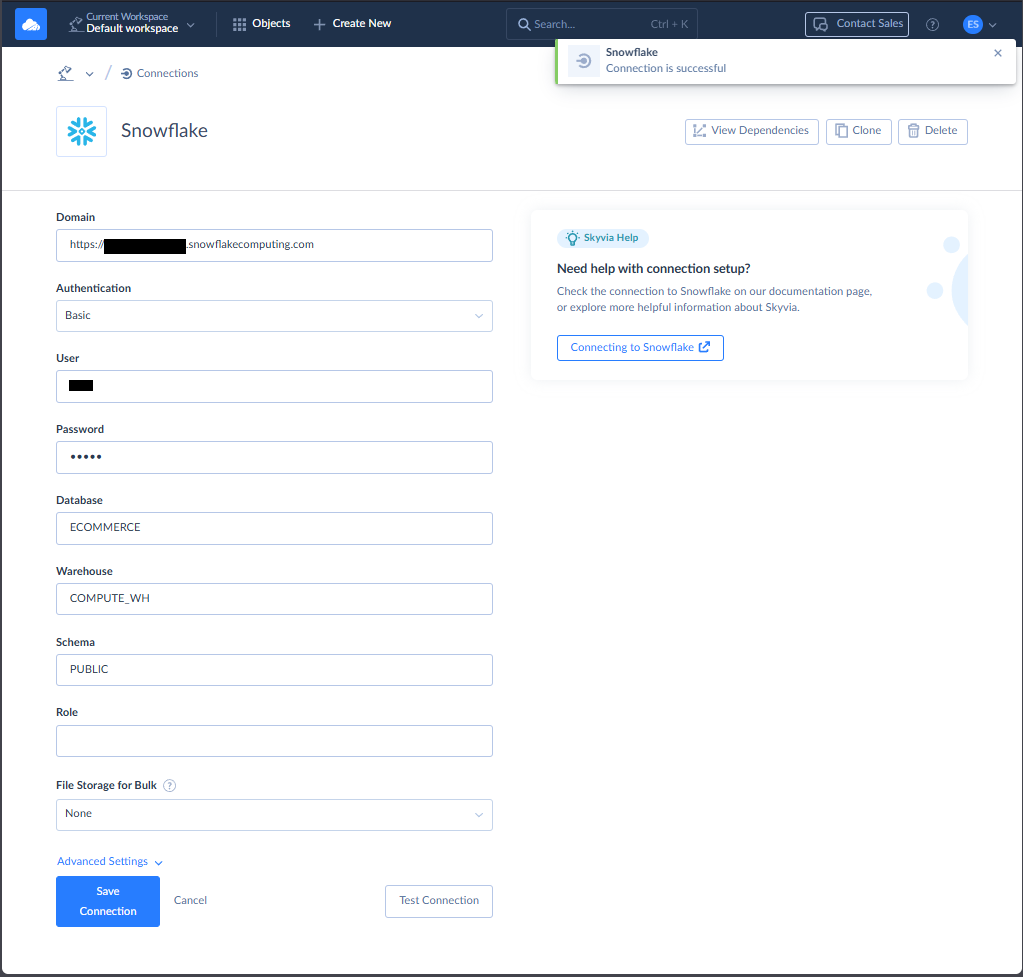
The above connections can be reused with other data pipelines. I don’t have to enter the configurations and credentials again.
Creating the Data Pipeline
There are a few ways to move data in Skyvia. But in this test, I chose a straightforward replication from PostgreSQL to Snowflake. The result of this integration can be used for ELT scenarios. You can find my setup below:
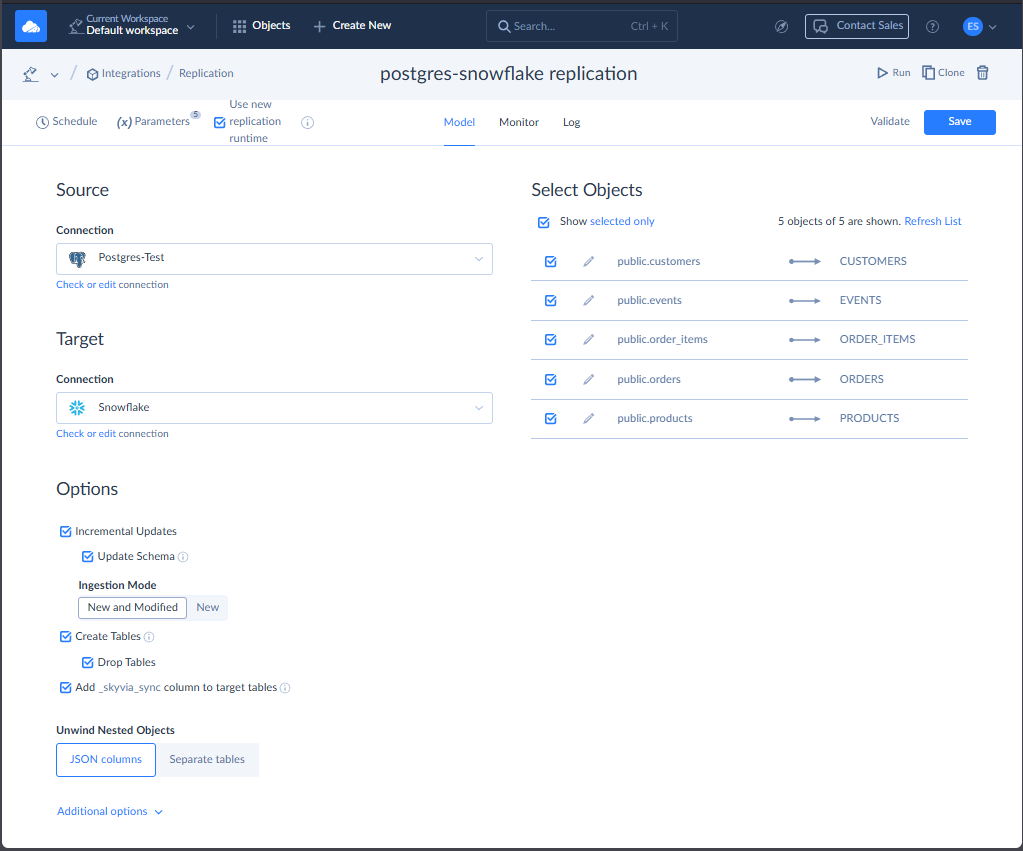
I used the 2 connections I created earlier for PostgreSQL and Snowflake. Then, I chose the tables to replicate. The simplest is to let Skyvia create the tables for the first replication and let Incremental Updates take care of the changes in succeeding replications. At first, I intentionally didn’t let Skyvia create the tables. There are also some problems with the data in both source and target (also intentional). So Skyvia properly flagged me for the errors, like this one:
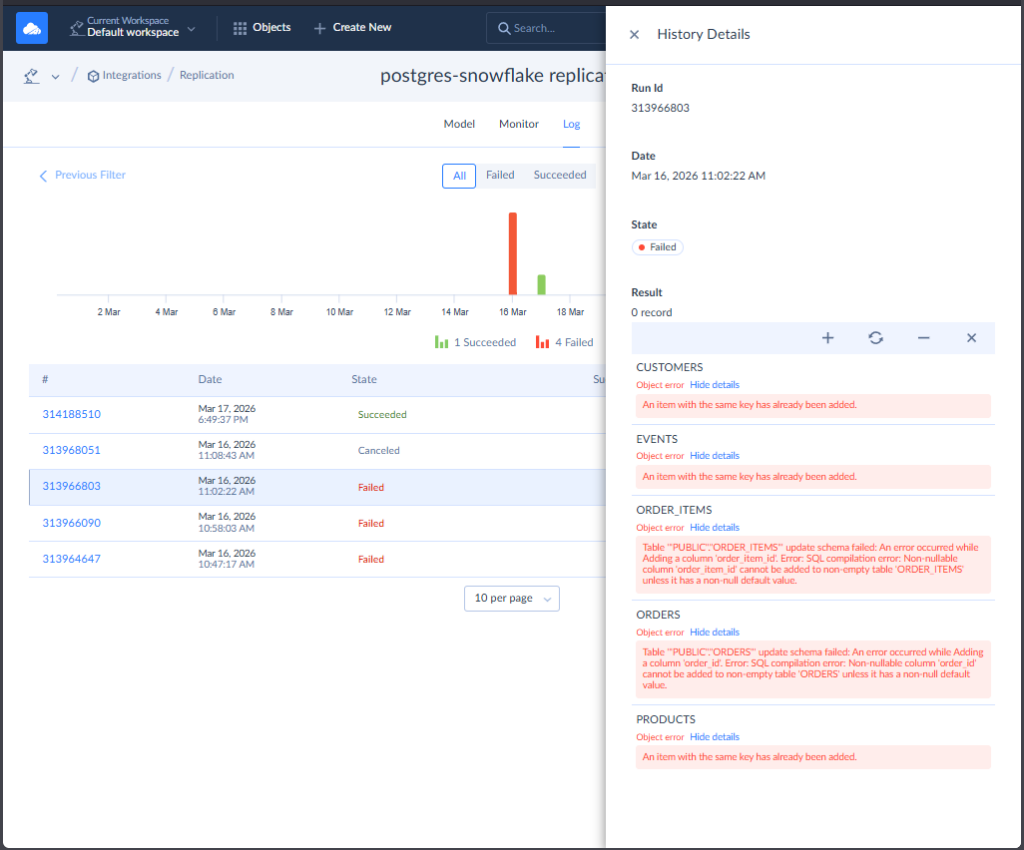
I also tried to cancel a running pipeline and see how it goes. And it went to the logs.
Once fixed and cleaned in Snowflake side, I let Skyvia create the tables, and it’s good. See the expected results below:
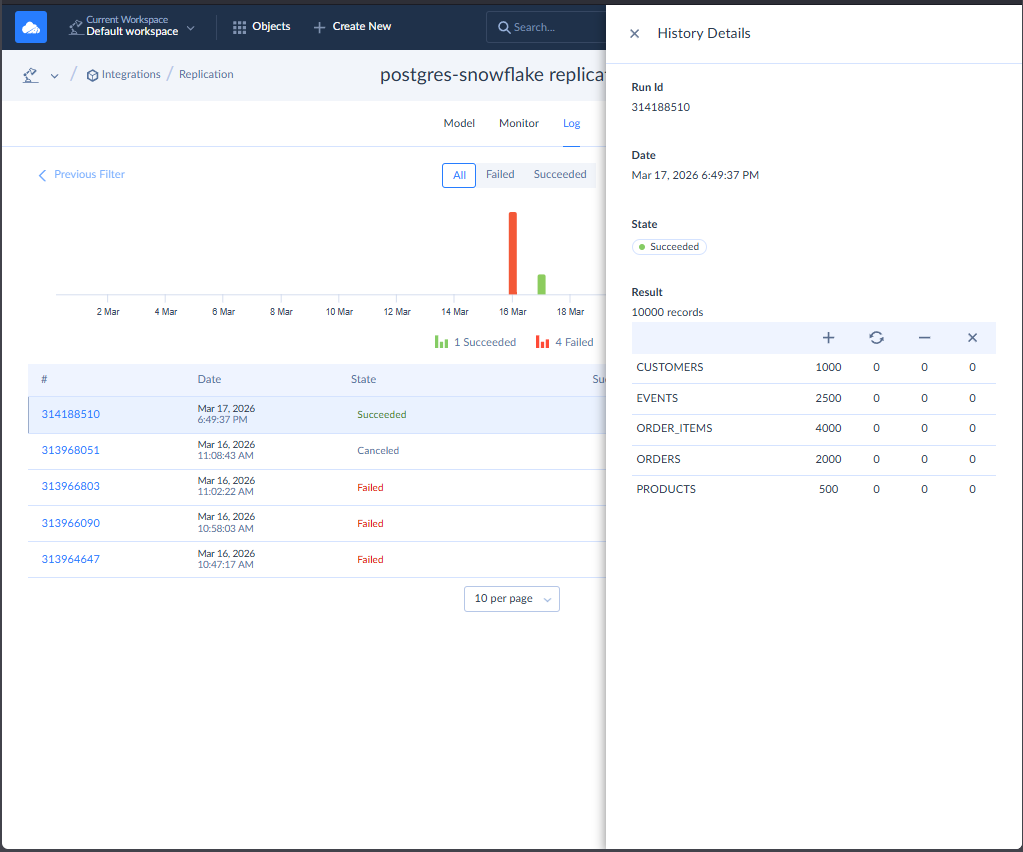
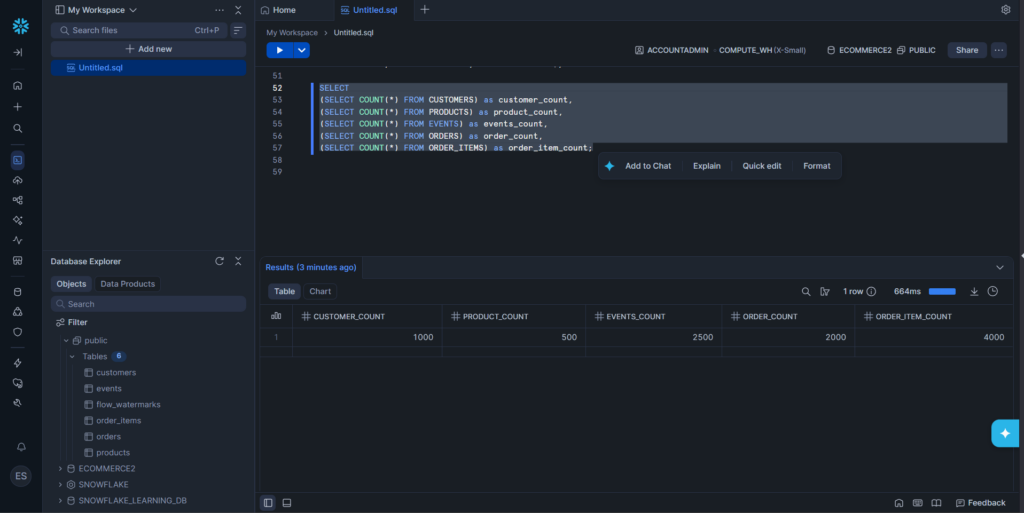
It also checks fine in Snowflake with consistent record counts to Skyvia logs:
Be aware of the number of rows you process and the Skyvia plan you have. Here, I’m using the Free tier with a monthly limit of 10,000 rows. The paid plans have higher limits, and Skyvia will compensate for the higher load with better speed. Though the exact speed limits are not published in the docs.
G2/Capterra Rating
At the time of writing, below are notable reviews of Skyvia from G2 and Capterra:
- G2 : 300 reviewers rated 4.8/5
- Capterra : 116 reviewers rated 4.9/5
Best For
Skyvia is ideal for teams looking for a versatile, no-code data integration platform that supports ELT, ETL, and reverse ETL workflows. Also for those who want to start with data pipelines as soon as possible and achieve quick wins.
“We’re thrilled to be recognized as Top Data Integration and Data Pipeline Tool by TrustRadius and our customers. Our mission is to make data integration accessible to businesses of all sizes and to all clients, regardless of their coding expertise. Receiving this award confirms that we are moving in the right direction by creating an easy-to-use yet feature-rich solution capable of handling complex scenarios.” Oleksandr Khirnyi, Chief Product Officer at Skyvia, stated.
Key Features
Skyvia continues to improve, but at the time of writing, these are the key features I found to be useful:
- Visual no-code pipeline design for ETL/ELT, Reverse ETL, replication, synchronization, and orchestration.
- 200 + prebuilt connectors for SaaS apps, cloud and on-premises databases, and major data warehouses, with private connectivity available for hybrid environments.
- Offers data pipelines with transformation (using Skyvia Expression Builder or dbt), OData, API creation, email alerts, and error logging.
- Recognized for exceptional ease of use, responsive support, and cost efficiency.
Pricing Deep Dive
Skyvia’s pricing model includes Free, Basic, Standard, Professional, and Enterprise. As you go higher, you get more records per month, more scheduled integrations, better integration scenarios, and advanced mapping features.
The number of rows begins at 10,000 with the Free tier (the one I used in this tool test), and you start paying with the Basic tier at $79/month.
Check the Skyvia pricing page for more details.

Security & Compliance
- Encryption. Supports both SSL and SSH connections to secure data in transit.
- Access Control. Offers centralized role-based access management.
- Compliance. SOC 2 certified and GDPR-compliant. With AES-256 encryption and MS Azure hosting. Recognized leader on G2 and rated high on trust metrics for enterprise readiness.
- Also features logging, monitoring, and configurable alerts for auditability.
Strengths & Limitations
The following are the things I consider the strengths and weaknesses of Skyvia:
Strengths
- Clean, intuitive user interface. Learning curve is minimal.
- Broad connector library. The sources and targets I need are supported.
- Covers multiple integration scenarios in one platform, from ETL/ELT and replication to Reverse ETL, sync, and orchestration.
- Documentation is enough for my needs. I haven’t tried technical support yet
Limitations
- The Free tier is limited to 10,000 records per month, so production workloads typically require a paid Data Integration plan.
- Skyvia is a 100% cloud-native platform. If you are a bank or healthcare provider requiring a strictly air-gapped, on-premise installation with no internet access, Skyvia is not for you. You should look at Talend or Airbyte Self-Hosted.
2 – Hevo Data
Hevo Data is another data pipeline tool that supports ELT. It’s also built in the cloud, so there’s nothing to install. Registering requires a work email, so if you want to test it out, you can’t use your free Gmail or Outlook. However, you can use a paid version of Gmail in Google Workspace.
It’s my first time with Hevo for this comparison. I got it in my first try, and their pipelines are fixed with a source and destination (hence ELT).
There are no drag-and-drop components, just forms to fill in the source and destination. I haven’t tried the models for transformation yet because the first thing I saw was a Python template. Their drag-and-drop transformation is still in beta as of this writing.
Creating the Data Pipeline
You start with a pipeline wizard to define your source, select the objects to ingest, and then select the destination.
Here’s the connection to PostgreSQL:
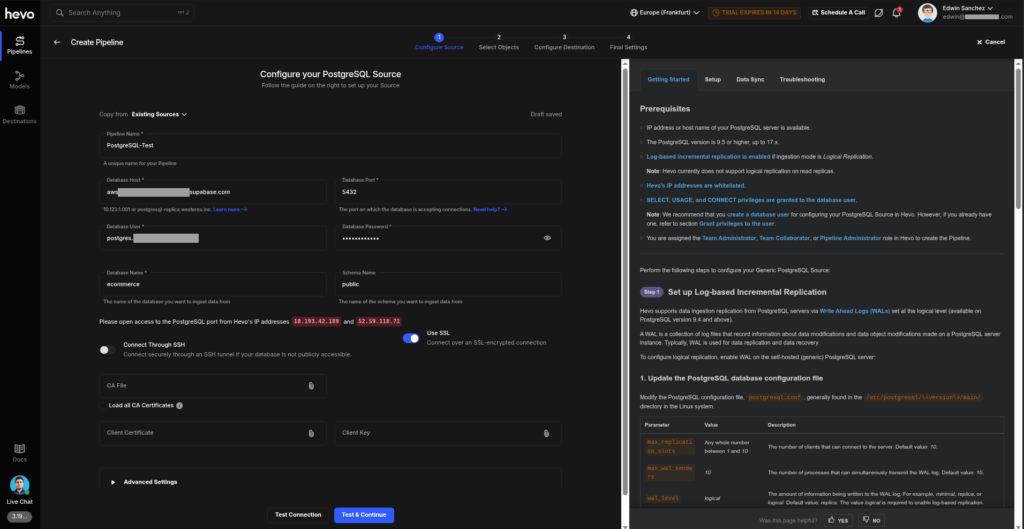
There’s a lot of text on the page, mostly for those who are starting out. Sources are not a separate object in Hevo, so when you need to create another pipeline for the same credentials, you will face a blank form again. You can either copy an existing source to it (which you can do with Copy from Existing Sources from the top) or retype them again if you want.
Then, the pipeline wizard now wants you to select the PostgreSQL objects to include. Check it out below:
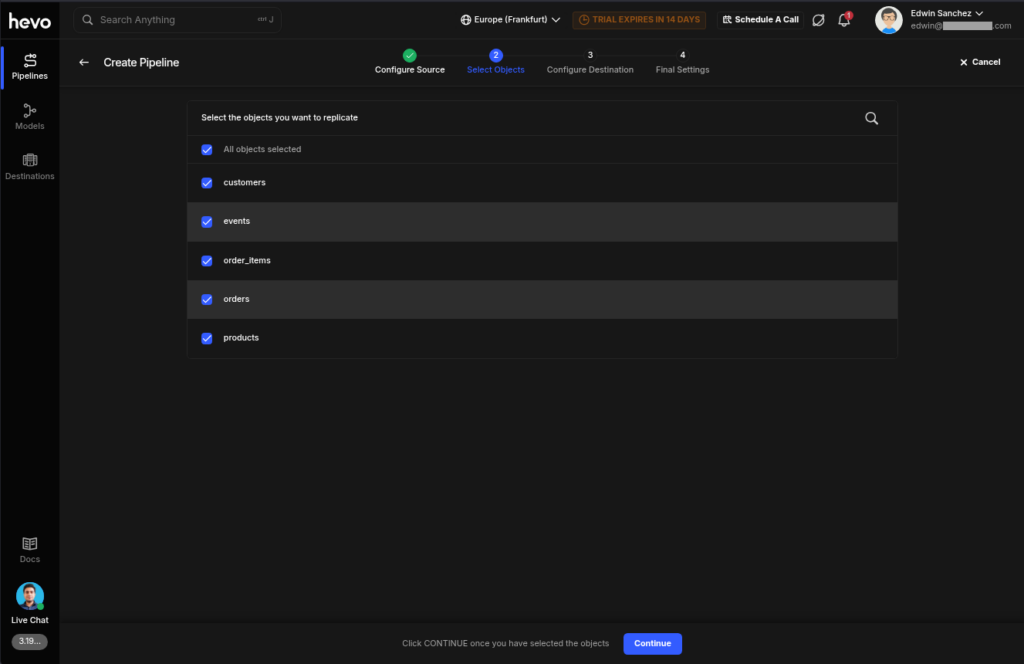
Then, you need to choose the Query Mode for each table:
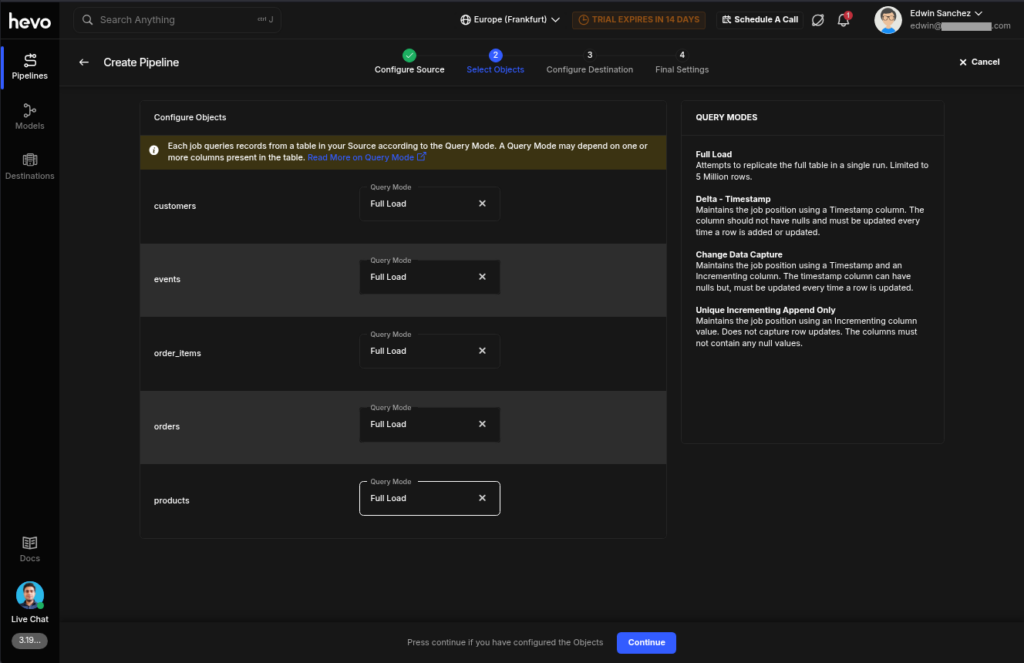
Then, you need to configure the destination. Below is the Snowflake configuration:
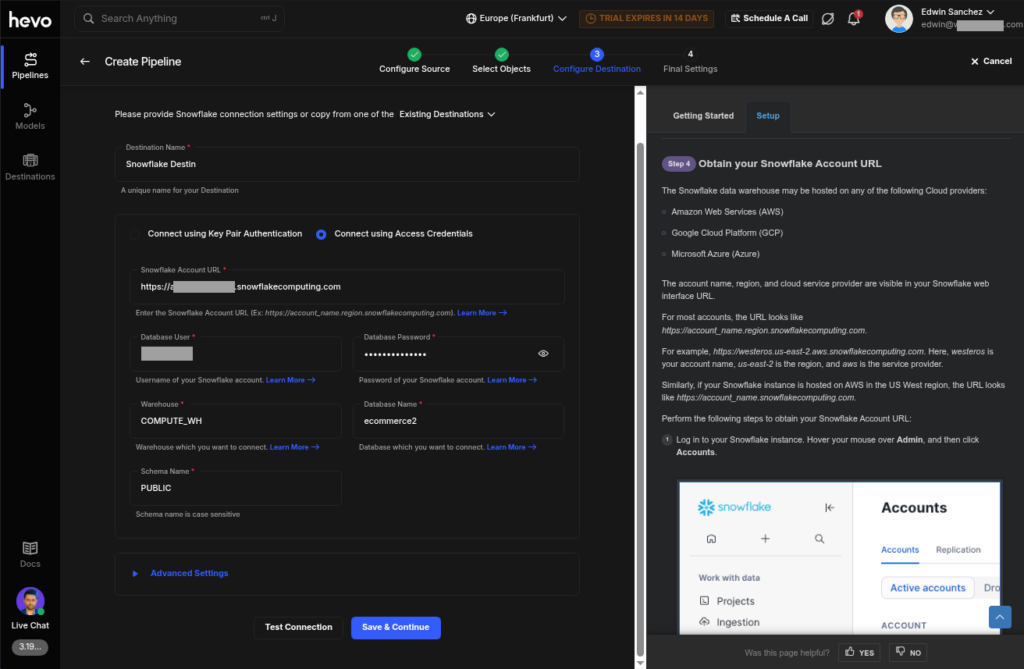
The final step is to set the schedule. You can’t set it up later and run first. Check it out below:
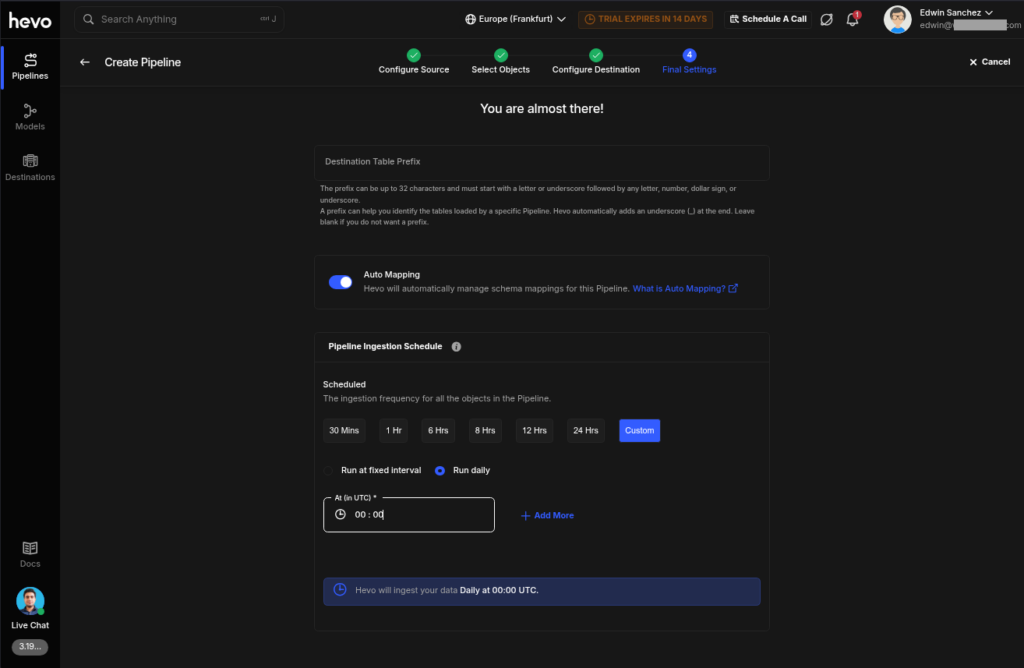
Once you’re good, you can check the pipeline activity. See below, and it’s consistent with the results from Skyvia:
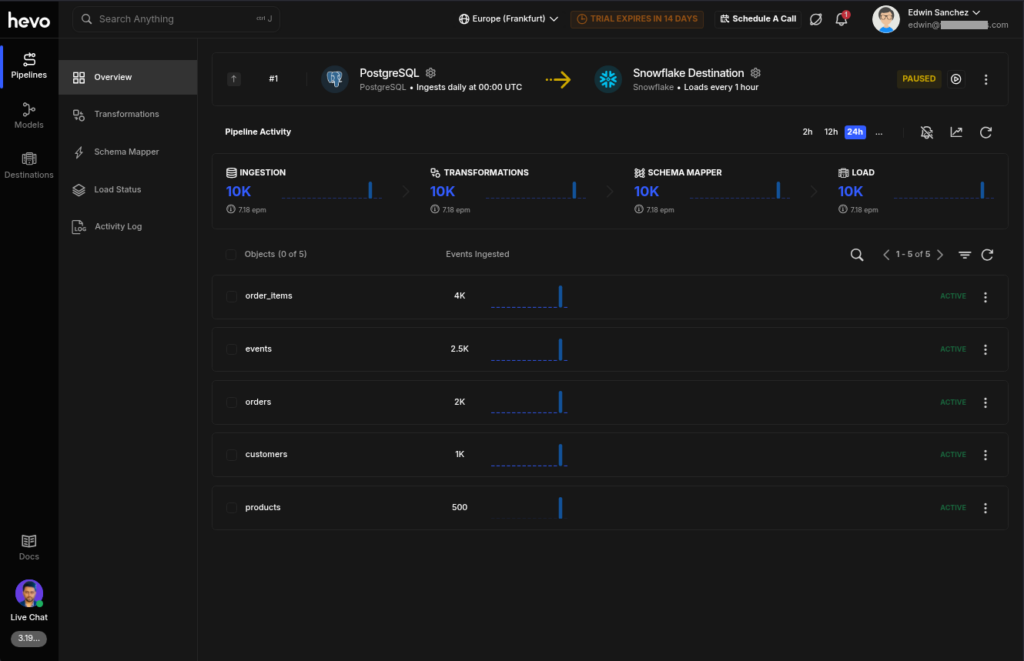
The Snowflake side also checks out fine.
G2/Capterra Rating
At the time of writing, below are notable reviews of Hevo Data from G2 and Capterra:
- G2 : 276 reviewers rated 4.4/5
- Capterra : 110 reviewers rated 4.7/5
Best For
Ideal for SMB teams looking for simple source-to-destination pipelines and ELT setups. If you’re at home with Python coding for transformations, this is a versatile way of doing it.
Key Features
- Simple replication setup in a few clicks
- Connect to 150+ sources like SaaS tools, databases, or APIs with Change Data Capture (CDC)
- Flexible transformation with Python
Pricing Deep Dive
Hevo Data’s pricing plans include Free, Starter, Professional, and Business Critical. Billing is per event, meaning a table insert, update, or delete in the destination counts as one event.
The Free tier includes 1 million events per month, up to 5 users, for a limited number of connectors. Then $239/month for the Starter for up to 10 users and 150+ connectors.
For more details, visit their pricing page.
Security & Compliance
- Encryption: Supports SSH and SSL starting from the Starter plan.
- Compliance: GDPR, CCPA, AICPA, HIPAA compliant
- Includes logs, monitoring, and a configurable Data Spike alert.
Strengths & Limitations
As a developer, below are my likes and dislikes about Hevo Data.
Strengths
- Simple replication setup
- A broad enough number of connectors for my needs
- Configurable Data Spike alert
- Black theme default
- Python transformations
Limitations
- ETL is not straightforward but mentioned as supported in docs.
- Very limited free tier with no SSL/SSH
- I didn’t find how to edit an existing pipeline.
- Source and destination configuration instructions can’t be hidden for non-newbies.
3 – BladePipe
BladePipe is a real-time data integration and CDC platform for moving data across databases, warehouses, queues, search systems, and AI destinations. It supports the full pipeline lifecycle, from schema initialization and historical loading to continuous change delivery, monitoring, and data verification.
Creating the Data Pipeline
For this walkthrough, I used MySQL as the source and PostgreSQL as the target. I first created the MySQL data source and entered the required connection details.
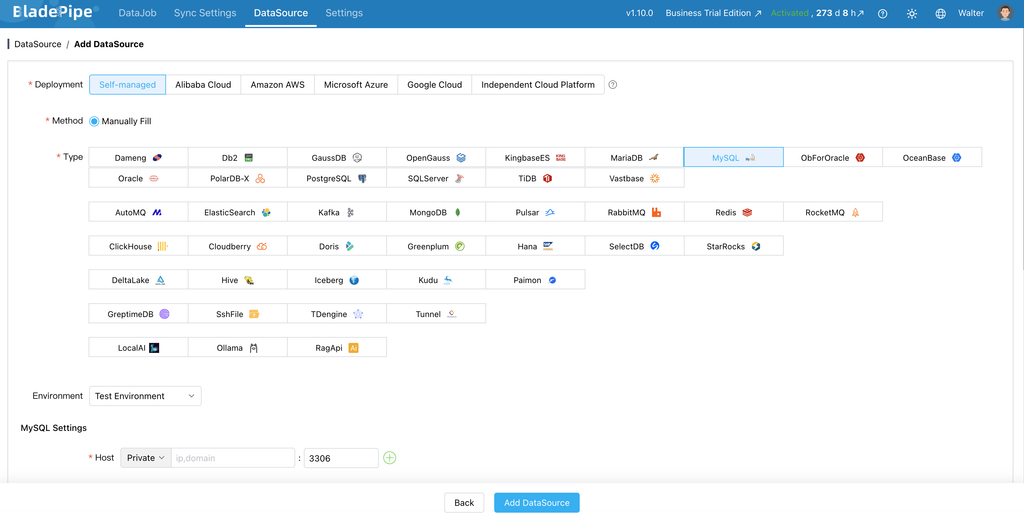
After configuring the source, I added PostgreSQL as the target and tested the connection settings before creating the pipeline.
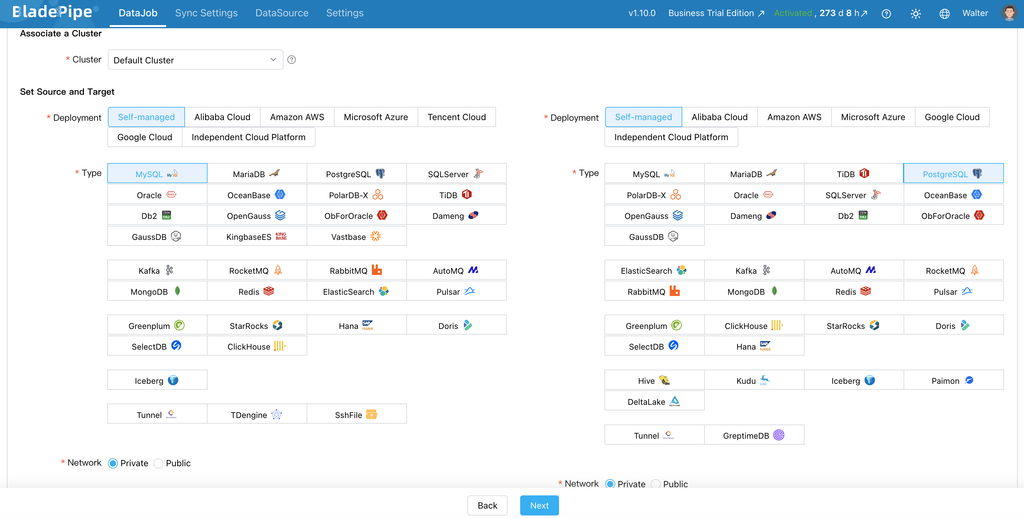
With both connections ready, I created a data synchronization task and selected an initial full load followed by incremental synchronization through CDC. I then selected the tables to replicate and reviewed the available schema and field-mapping options.
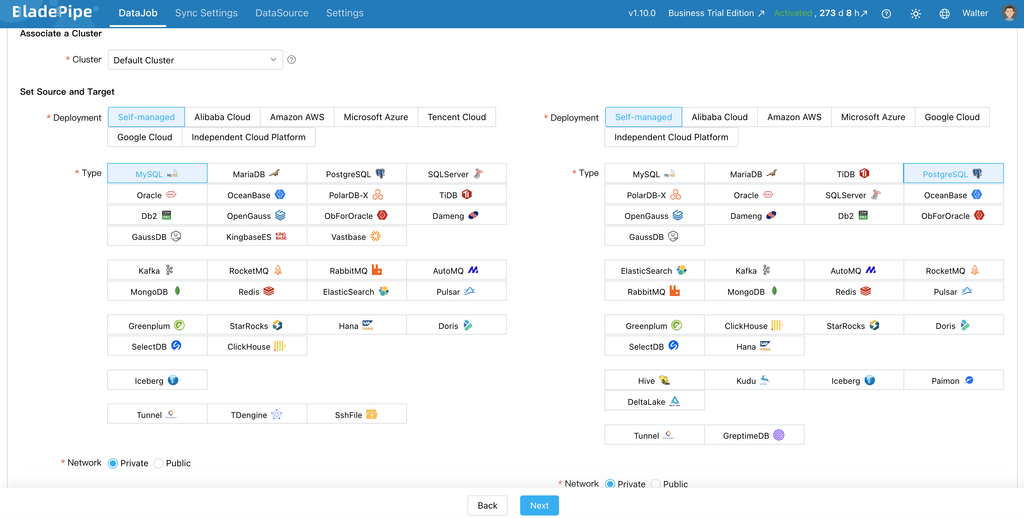
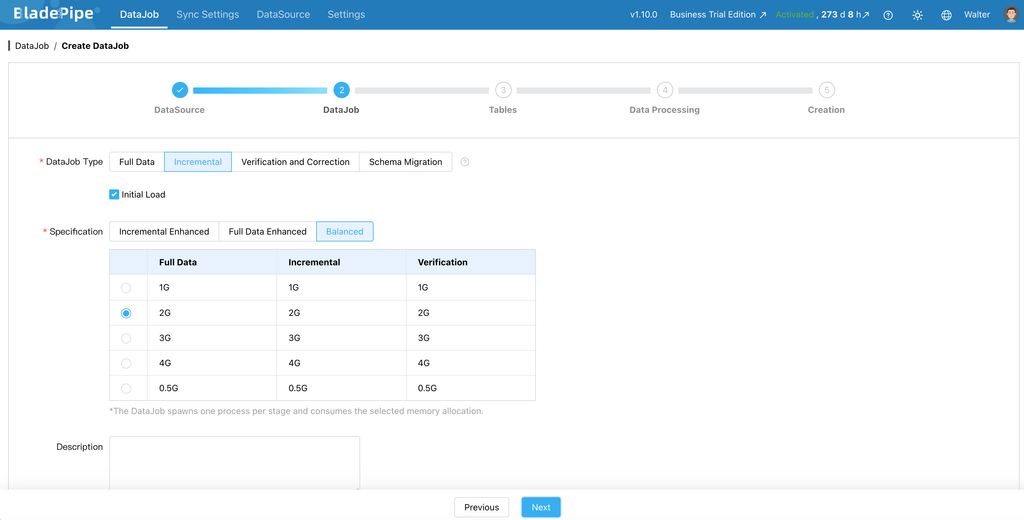
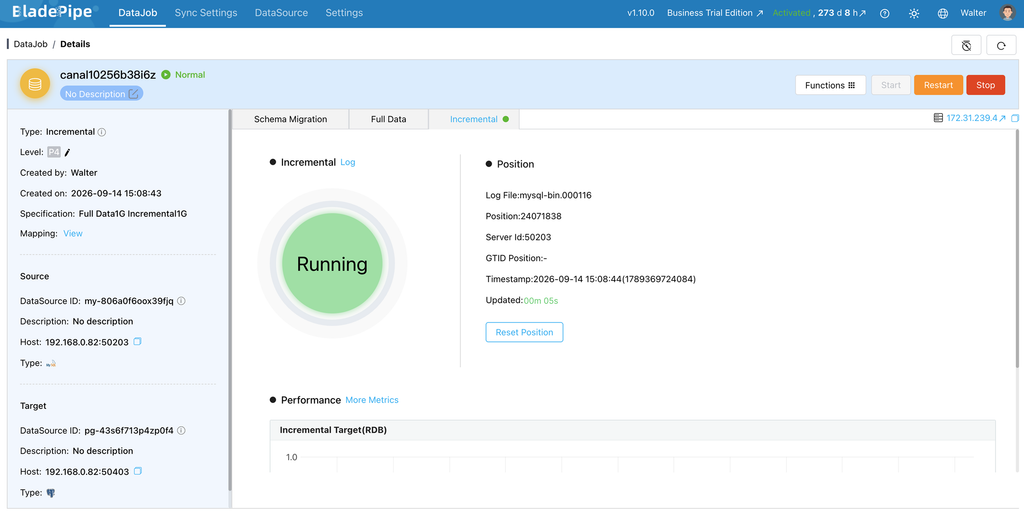
BladePipe first loads the existing data into PostgreSQL and then captures subsequent changes from MySQL. Once the task starts, the monitoring page can be used to review the synchronization status, migration progress, latency, and error information.
G2/Capterra Rating
⦁ G2 – no reviews.
⦁ Capterra – no reviews.
Best for
BladePipe is best for teams building low-latency database-to-warehouse pipelines, migrating between heterogeneous databases, or keeping sensitive data within a controlled network. It also suits projects where deployment flexibility and schema changes matter.
Key Features
- Full and incremental migration with log-based CDC.
- 60+ connectors for databases, warehouses, queues, caches, search, and lakehouse systems.
- Schema migration, DDL synchronization, type conversion, and transformations.
- Verification, correction, monitoring, alerts, and checkpoint recovery.
- Cloud, BYOC, and on-premise deployment.
Pricing Deep Dive
The Community edition is free. Cloud pricing starts at $0.01 per million ETL rows, while CDC replication is charged at $10 per million rows, including rows added, edited, or deleted. Enterprise pricing is quote-based.
Check the BladePipe pricing page for more details.
Security & Compliance
- Encryption. Supports encryption in transit, access monitoring, and secure backups.
- Access Control. Enterprise plans support role-based access control, SSO, MFA, and audit logging.
- Compliance. BladePipe has completed a SOC 2 Type II audit, supports GDPR compliance, and maintains ISO/IEC 27001:2022 certification.
- Security Operations. Provides incident response, vulnerability assessment, and private VPC or on-premise deployment options for stronger control over data and infrastructure.
Strengths & Limitations
Strengths
- Combines database migration, CDC, and continuous synchronization.
- Supports heterogeneous databases and analytical destinations.
- Provides a free Community edition for evaluation.
Limitations
- More database- and infrastructure-oriented than SaaS-connector-focused tools.
- Smaller ecosystem and brand recognition than long-established vendors.
4 – Rivery (Boomi Data Integration)
Rivery, now Boomi Data Integration, is for building end-to-end ELT data pipelines quickly. They call data pipelines as Rivers, and they use separate development and production environments. I notice they have templates known as Rivery Kits to make integration to known sources and targets easier to build.
Registering for Rivery is easy, and you can use a free email like Gmail or Outlook. Rivers can be a simple extract to a source and load to a target, or a Logic River, which you can use to orchestrate data workflows. To make the comparison equal, I used the extract and load River.
It is also my first time using Rivery, and I got it on the first try. It has data workflows, but not using drag-and-drop. Instead, a series of steps is defined.
Creating the PostgreSQL and Snowflake Connections
Similar to Skyvia, the connections are separate, so you can reuse the connections in another pipeline.
Below is a sample PostgreSQL connection using the same credentials to Supabase:
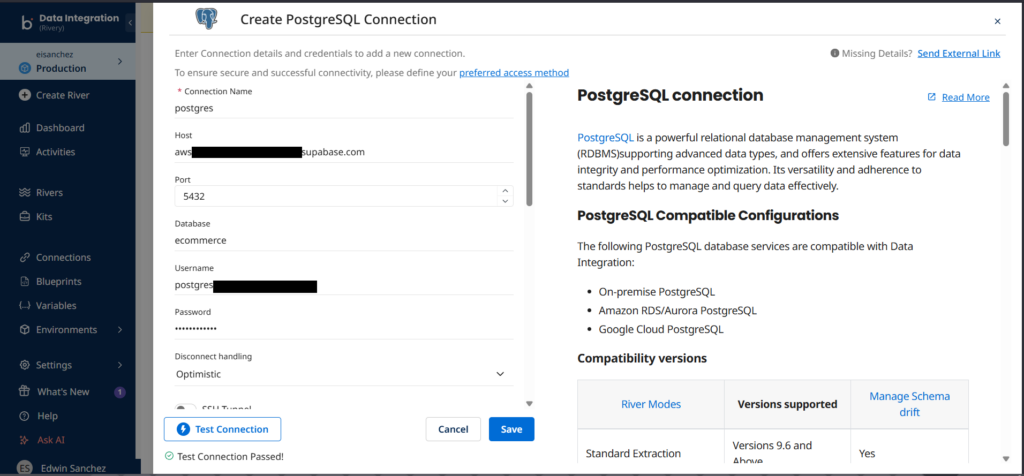
The style is similar to Hevo, which shows connection instructions to the right. Good for newbies.
And below is the Snowflake connection:
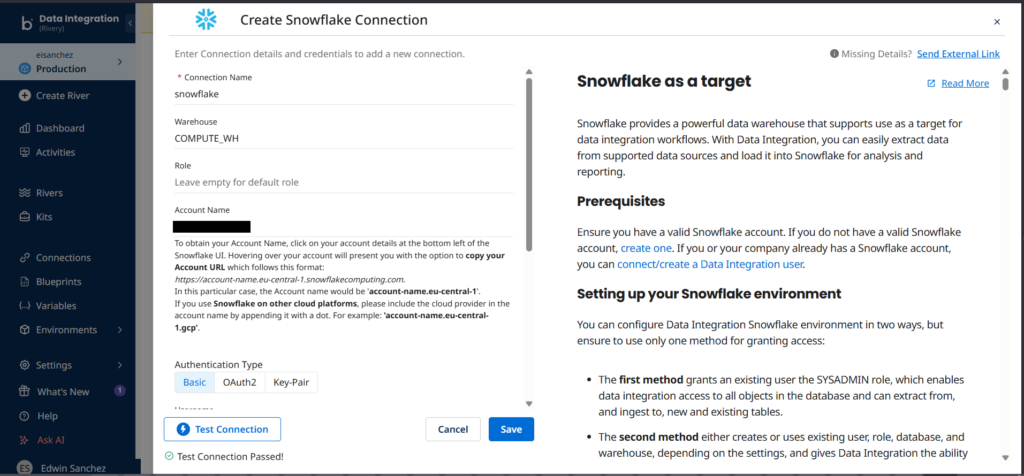
You can see that the connections I made to Supabase and Snowflake are both successful.
Creating the Data Pipeline
I set the source and target connections. Then I chose an extraction mode (CDC, Standard, or Custom Query). I used Standard and chose the tables, as seen below:
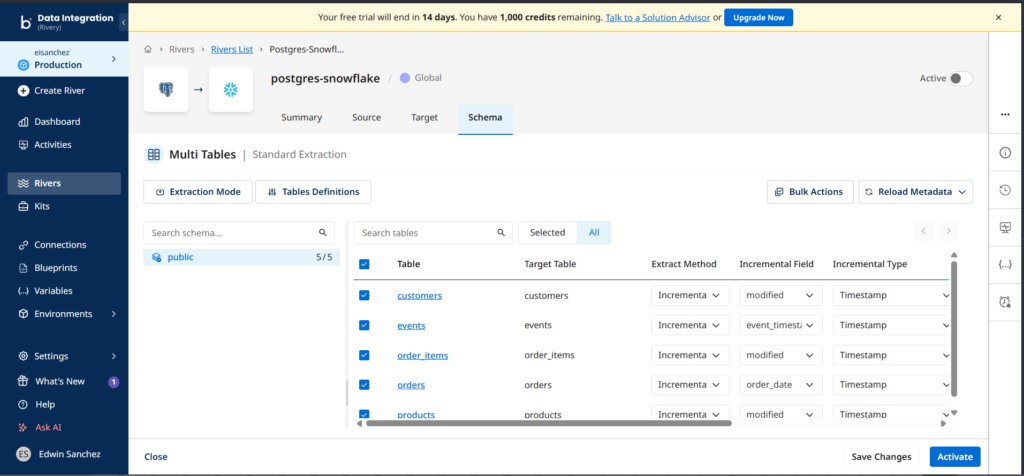
Notice I used Incremental and specified the Incremental Field. Finally, I saved and activated the River.
I checked the River activity after the run, and it went fine. See below:
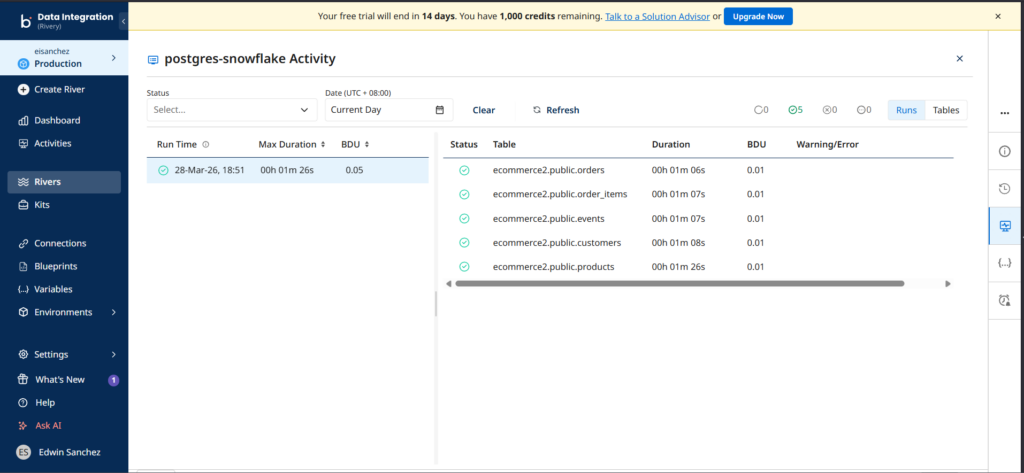
Notice that it displays the duration for each table, not the number of rows loaded. You have to click each table to see the number of rows. Like Skyvia and Hevo, the duration is almost the same.
Upon checking in Snowflake side, the numbers are consistent with both Hevo and Skyvia.
G2/Capterra Rating
At the time of writing, below are notable reviews of Rivery from G2 and Capterra:
- G2 : 121 reviewers rated 4.7/5
- Capterra : 12 reviewers rated 5/5
Best For
SMB teams looking for both simple and workflow-based integrations with API support. Those who are adept with SQL and Python can find flexibility in making transformations.
Key Features
At the time of writing, these are the key features of Rivery:
- Integrate with 200+sources in a few clicks.
- Rivery Kits for faster building of pipelines.
- Flexible transformation with Python or SQL
Pricing Deep Dive
Rivery pricing includes Base, Professional, Pro Plus, and Enterprise. While there is a free trial with 1,000 free usage credits, there is no free tier or always free. Pricing is based on BDU credits or Boomi Data Units which is the amount of data transferred down to the byte. Meanwhile, API sources are charged for each execution of the pipeline.
Price starts at $0.9 / BDU credit for the Base pricing plan. For more details on pricing, check their pricing page.
Security & Compliance
- Security: Supports SSH and Reverse SSH tunnel, SSL, Custom File Zone.
- Compliance: SOC 2 Type II and HIPAA, GDPR
- Also supports VPN, SSO, Audit log, AWS and Azure PrivateLinks in higher pricing plans.
Strengths & Limitations
At the time of writing, these are the points I consider as strengths and weaknesses.
Strengths
- Both simple integrations and data workflows supported.
- SQL and Python transformations.
- Rivery Kits for faster development.
Limitations
- No free tier or developer accounts.
- River activity can be improved by adding the number of rows processed to avoid clicking each table just to see the rows processed.
- Source and destination configuration instructions can’t be hidden for non-newbies.
Best for Enterprise, High-Volume & Governance
If you need big data volumes and stricter governance, the following tools will help you.
5 – Fivetran
Fivetran is a data pipeline tool that supports ELT, ETL, and Reverse ETL in a few clicks. It focuses on fully managed, standardized data replication into cloud data warehouses. It removes much of the operational overhead by automating schema management, incremental updates, and maintenance.
When I first visited Fivetran’s console, I notice some similarities with Rivery and Hevo, but when I created connections, the difference is noticeable when it asked for a deployment model and data processing location – proof of compliance and security focus.
It is also my first time to use Fivetran, and it’s easy to adapt like the other data pipeline tools so far.
Creating the Data Pipeline
They call data pipelines Connections in Fivetran. Both sources and destinations I already made are reusable, though it’s not so straightforward for sources.
Here’s the configuration page for the PostgreSQL source:
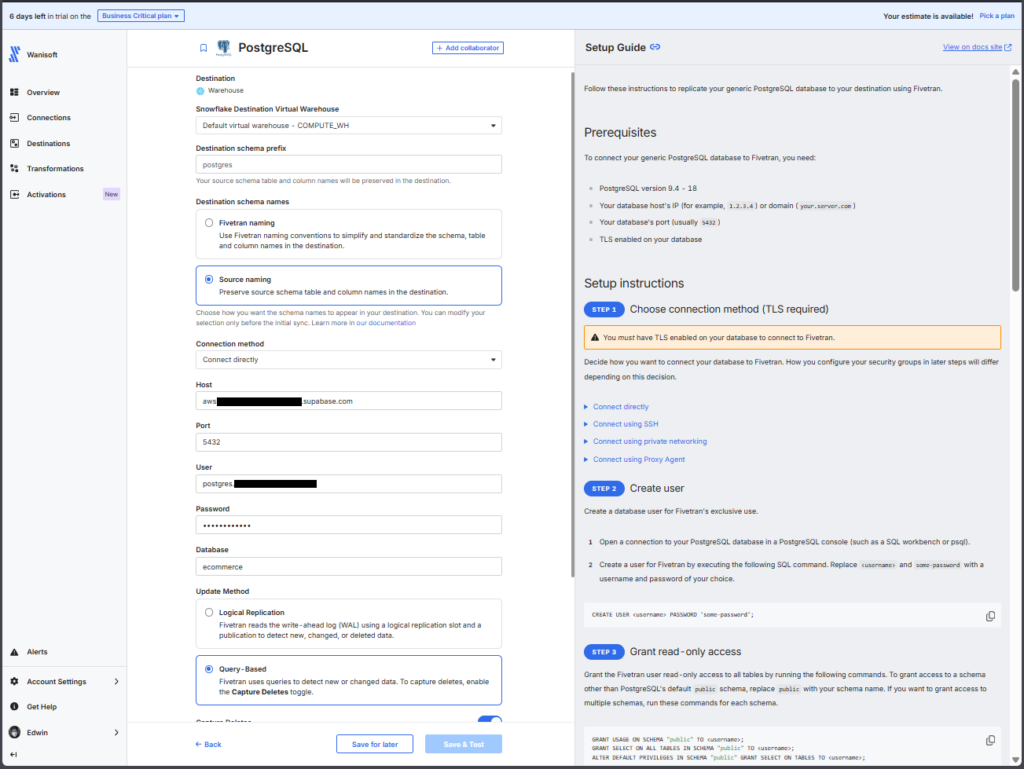
The page is similar to Hevo and Rivery in terms of instructions appearing at the right part of the page.
And below is the Snowflake configuration page for the target:
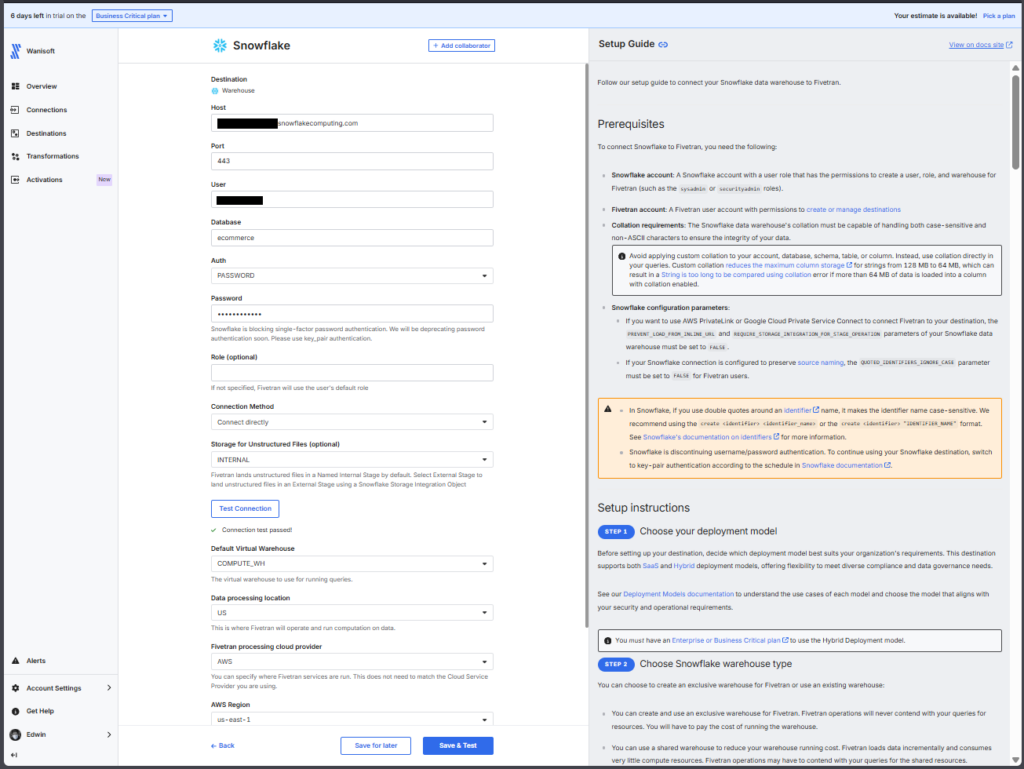
The setup of the pipeline is the same. Choose the source, the tables to move, and the destination. The difference lies in the deployment options.
Below is the successful run for the same source and target:
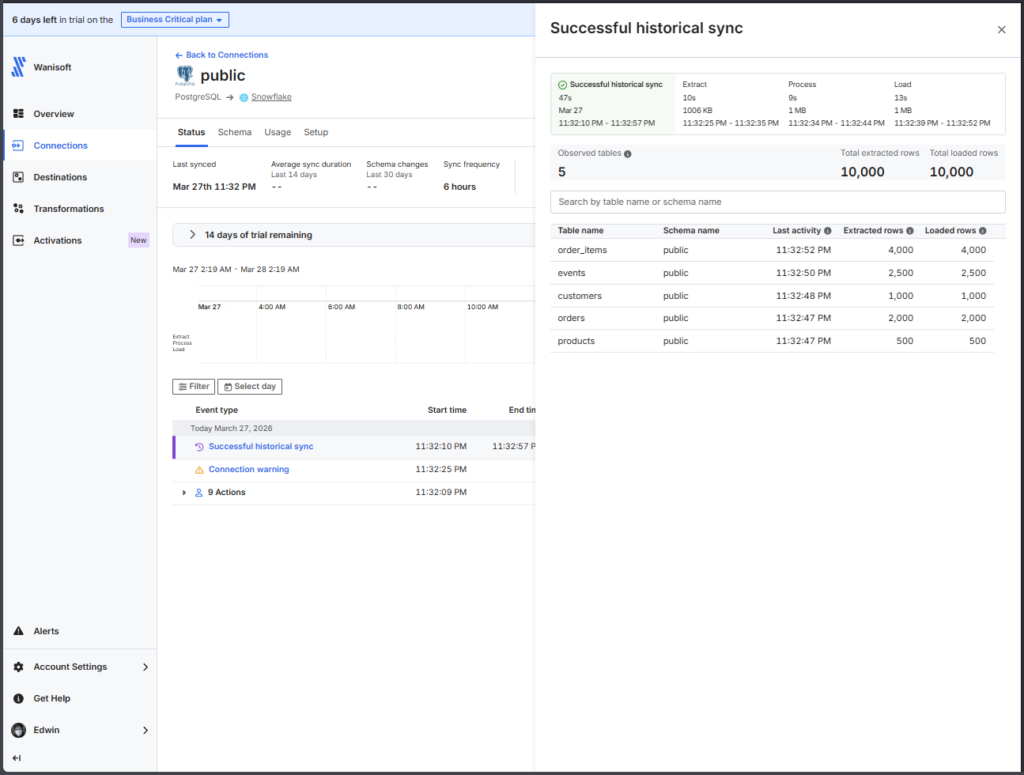
The report is clean, yet detailed enough to see in one glance the rows processed and the duration.
It also checks out fine in Snowflake side.
G2/Capterra Rating
Below are the notable ratings of Fivetran reviewers for G2 and Capterra at the time of writing:
- G2 : 782 reviewers rated 4.3/5
- Capterra : 25 reviewers rated 4.4/5
Best For
Teams that need robust, automated ELT pipelines with minimal maintenance.
Ideal for data-intensive enterprises, especially teams focused on rapid scaling, diverse connector coverage, and seamless schema management without coding.
Key Features
The following are the key features at the time of writing:
- Simple and easy data pipelines in a few clicks
- Supports 700+ sources and 200 destinations
- Choice of Fivetran-managed or your own private network for deployments.
- Supports ETL, ELT, and reverse ETL
- Fast syncs: every 15 minutes on Standard plans, down to 1 minute on Enterprise.
- Built-in integration with dbt for in-warehouse transformations.
- High reliability: strong uptime SLAs and continuous monitoring.
Pricing Deep Dive
Fivetran uses a usage-based model billed on Monthly Active Rows (MAR).
- Free Tier. Up to 500k MARs and 5k model runs per month.
- Standard Plan. “Pay as you go” includes unlimited users and faster sync intervals.
- Enterprise & Business Critical Tiers. Adds granular access controls, private networking, and compliance certifications (e.g., PCI DSS).
What drives the costs up? Spikes in active row volume, frequently changing schemas, and real-time sync needs. Multiple connectors, each tracking MAR separately, which can complicate budgeting.
Fivetran recommended the Enterprise plan for me based on the pipeline test I made.
Security & Compliance
- Data encryption. End-to-end (in transit and at rest)—data isn’t stored longer than necessary.
- Secure deployment options. VPN or SSH tunnels, proxy and private network support, and optional customer-managed encryption keys.
- Compliance: SOC 1 and 2, HIPAA BAA, PCI DSS level 1, HITRUST, GDPR
Strengths & Limitations
These are the strengths and limitations I noticed from Fivetran:
Strengths
- Simple setup, few clicks
- Supports a wider range of connectors
- Heavy on security and compliance
- dbt transformations
Limitations
- Pricing unpredictability. MAR-based billing can spike unexpectedly with growing data volumes.
- Not practical for startups and medium-sized businesses
6 – Qlik Talend
Qlik Talend or Talend Data Integration has a drag-and-drop data pipeline designer for data integration, and the suite also includes data quality, automation, and analytics. It is an enterprise-grade data integration platform with strong support for governance, data quality, and compliance. It offers both cloud and on-prem deployment models and is commonly used in regulated industries.
Qlik Talend requires a business email to register.
It’s also my first time using Qlik Talend, but it took me a little while to figure out the Snowflake connection problem. Thanks to the detailed logs, I got it fixed. After that, I adapted to its graphical designer.
Creating the PostgreSQL and Snowflake Connections
Qlik Talend Data Integration has reusable source and target connections.
Creating the PostgreSQL connection is smooth. Below is the configuration page:
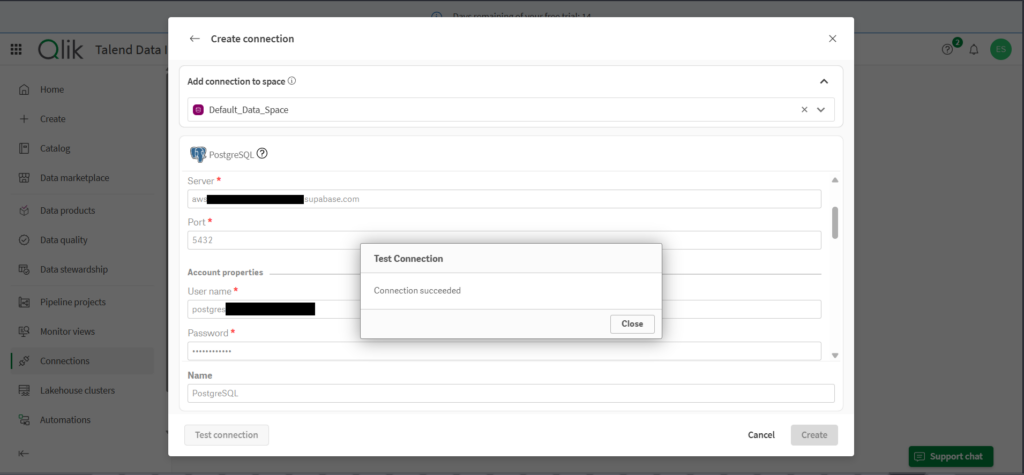
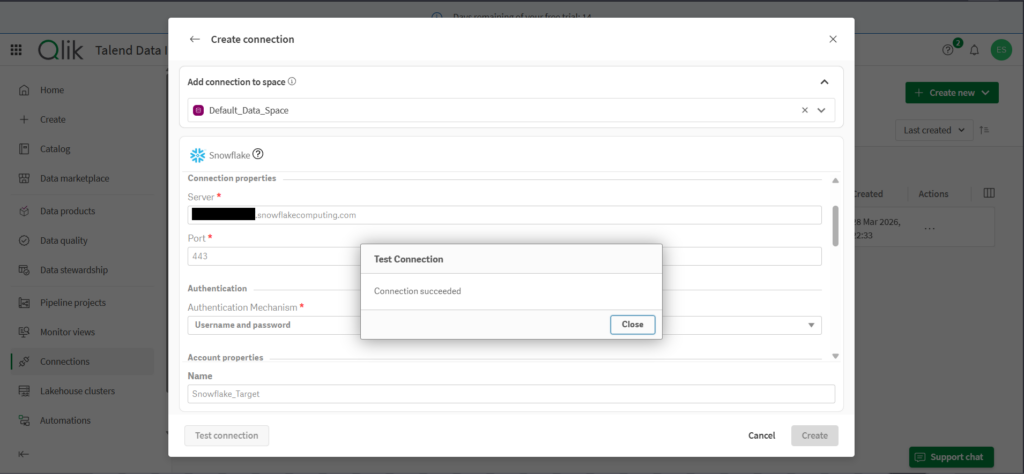
Like the other data pipeline tools, I used Username/Password authentication first for the Snowflake connection. It tests okay, as you can see below:
Creating the Data Pipeline
Creating a new replication data pipeline uses a wizard. Same thing, define the source, specify the tables to replicate, and set the destination.
While connection checks are good, the Prepare part shows a problem in Snowflake. While I used a Username/Password authentication, it triggered a missing Private Key File. See below:
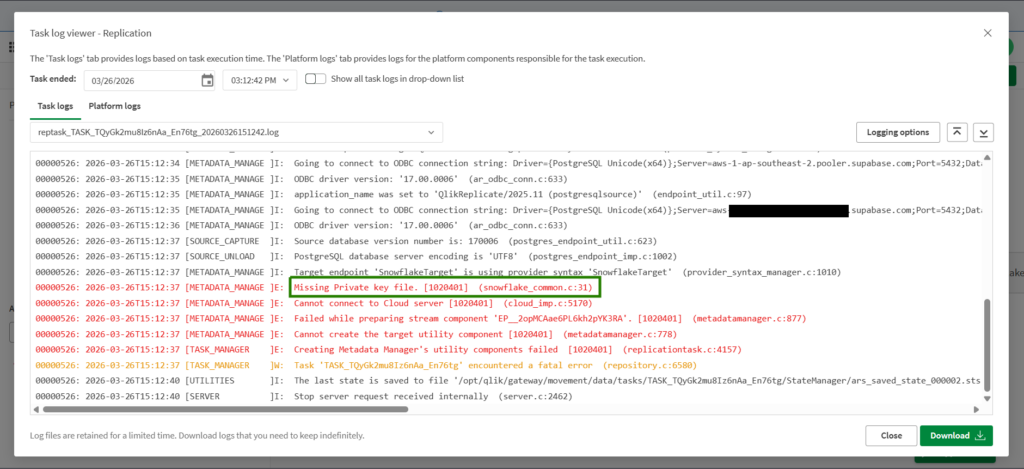
So, I changed the connection to Key Pair. I have to do additional configuration in Snowflake to have the key file. Then everything went fine.
Below is the pipeline design:
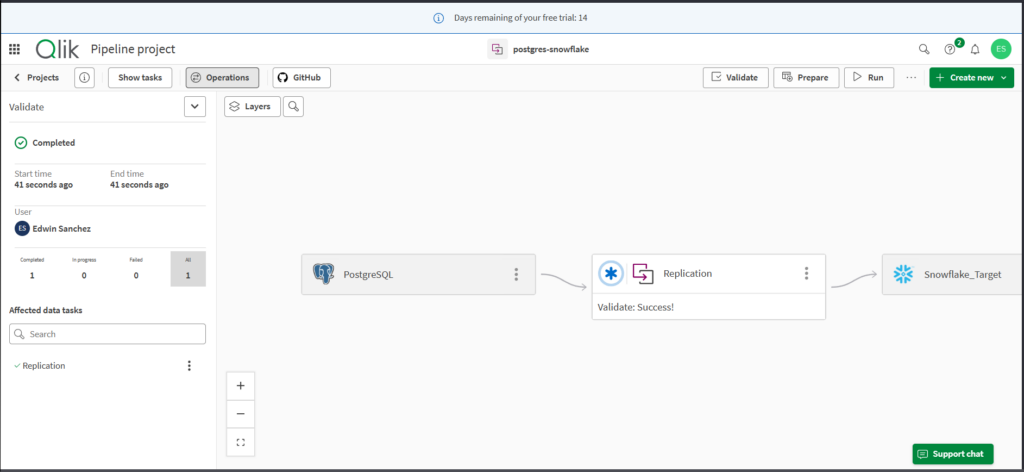
And below are the logs for the successful run:
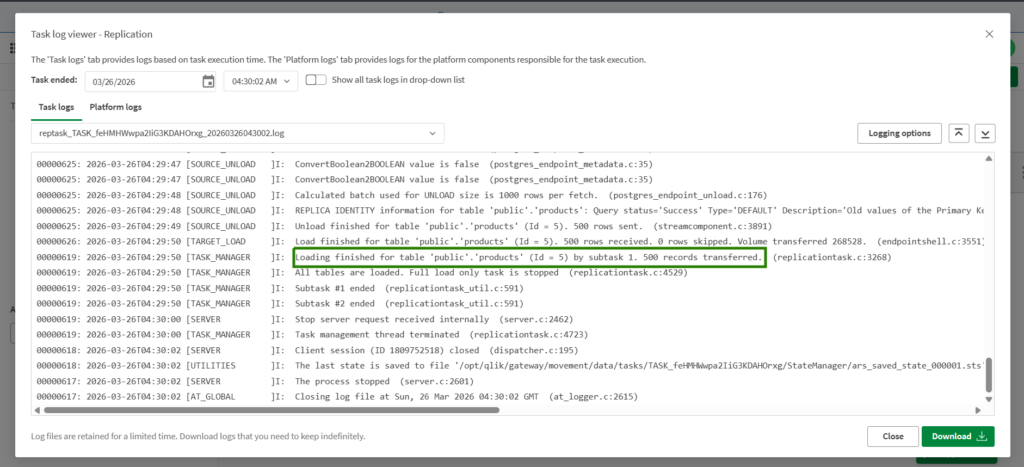
You have to dig into the detailed logs to look for rows transferred, like the one above.
G2/Capterra Rating
The following are the G2 and Capterra ratings at the time of writing:
- G2 : 13 reviewers rated 4.6/5
- Capterra : 24 reviewers rated 4.3/5
Best For
Enterprises and teams in need of a comprehensive, hybrid data integration platform capable of handling complex ETL workflows across both cloud and on-premises environments.
Ideal for users who value an all-in-one solution with strong governance and management features, and who can manage a more involved installation and setup process.
Key Features
Below are the key features of Qlik Talend:
- Unified platform for data integration, quality, preparation, governance, and cataloging, all in one suite.
- Flexible support for ELT, ETL, batch, and streaming pipelines with built-in CDC and Spark-based transformers.
- Drag-and-drop pipeline designer paired with low-code and developer-friendly options for reuse and fast deployment.
- Strong data governance and profiling with real-time quality monitoring, metadata management, and automated rule-based sanitization.
Pricing Deep Dive
Pricing is not publicly listed, but plans include Starter, Standard, Premium, and Enterprise. General benchmarking suggests:
Cloud Starter: ~$12,000–30,000/year.
Cloud Premium: $50,000–100,000+/year.
Enterprise (Data Fabric): $150,000–$500,000+/year.
Note: Hidden costs often include implementation services, training, and infrastructure overhead, which can significantly raise total spend.
A simplified per-user option starts at $1,100 per user per month on AWS Marketplace for Talend Cloud DI.
Security & Compliance
- Fully audited with SOC 2 Type II, HIPAA, and other enterprise-grade compliance standards.
- Designed to handle sensitive and regulated industries, with built-in support for GDPR, CCPA, SOX, and others, powered by real-time governance and risk management tools.
Strengths & Limitations
Below are the things I consider the strengths and limitations of Qlik Talend:
Strengths
- Drag-and-drop pipeline design
- All-in-one data management – data integration, data quality, automations, analytics
- Very detailed processing logs that you can still configure and lessen, if desired.
- Handles streaming and batch at scale; tight governance. Ideal for enterprise use cases.
Limitations
- No free tier or developer account option
- Username/Password authentication does not work in Snowflake. Only Key Pair.
- Less friendly for lightweight or low-touch use cases where simpler tooling could suffice.
- Expensive for startups and midsize business
7 – Informatica Data Loader
Informatica offers a wide range of data management tools. In this test, I used the simple data loader for ELT scenarios. It’s free, and it follows the same pattern as we did with the other tools.
I used my free Gmail to register for Informatica. But when I need to do data pipelines, it asked me for a business email.
Creating the Data Pipeline
Like the others, I defined the source, the tables, and the destination with a wizard. Below is the PostgreSQL connection:
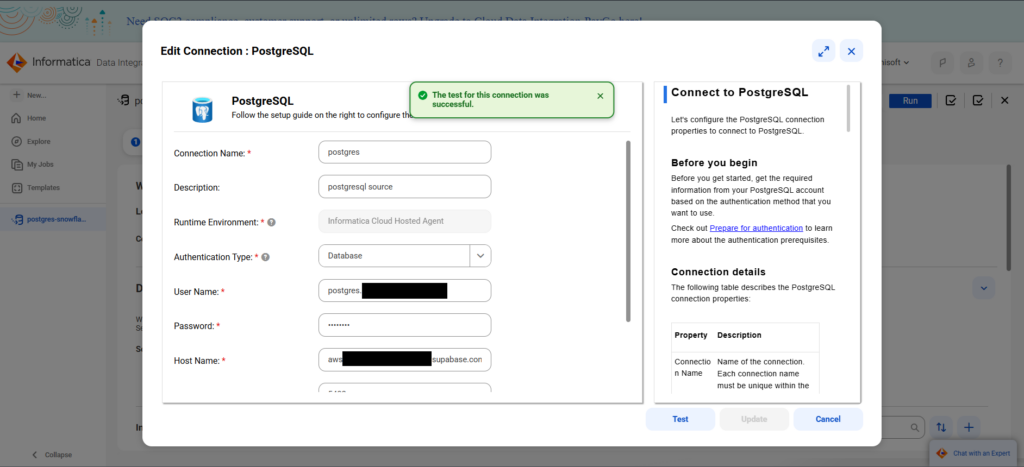
And below is my Snowflake connection:
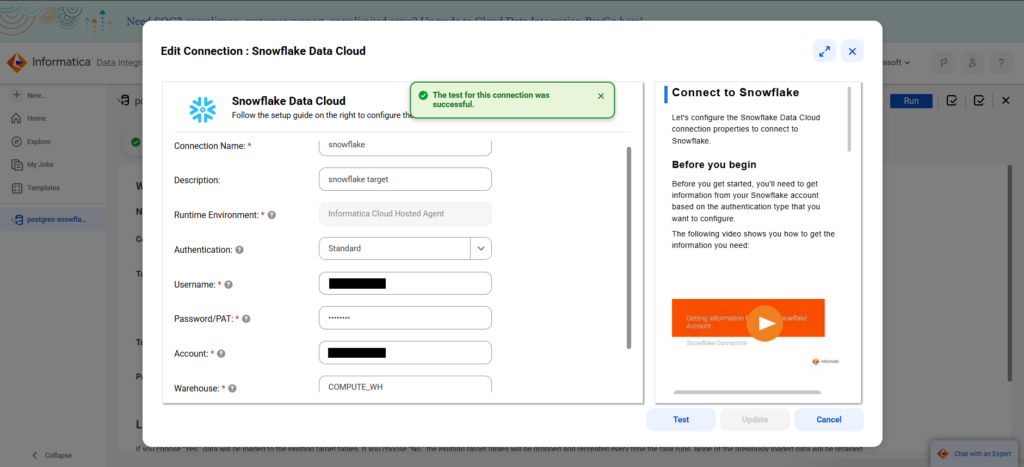
Though there are instructions at the right, the configuration page is much lighter compared to Hevo and similar tools. Also, as you move to each text box, the instructions also move, so newbies don’t have to dig into the whole set of instructions every time.
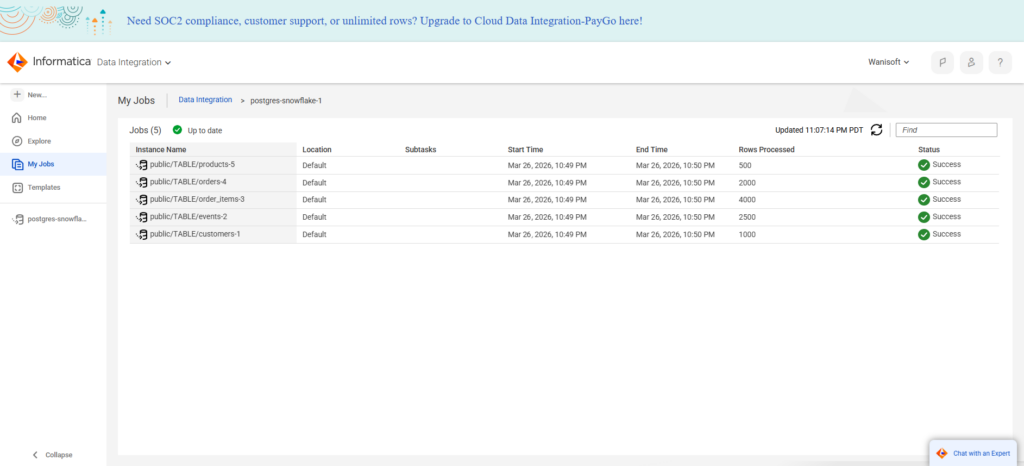
Then, I chose the same tables to ingest as the other tools. Below is the result of the Informatica job:
G2/Capterra Rating
Below are the G2 and Capterra ratings at the time of writing:
- G2 : 105 reviewers rated 4.3/5
- Capterra : None for Informatica Cloud Data Integration
Best For
Informatica has been focused on Enterprise offerings, though lately, they have options for SMBs too with the free data loader and data integration.
It is ideal for teams with simple to complex data pipelines that supports ELT, ETL, and reverse ETL, and from small to large data volumes.
Key Features
- Fast, reliable data pipelines for loading billions of rows in minutes.
- Simple wizard-based data loader or a graphical data pipeline designer.
- Hundreds of ready-to-use data connectors.
- Support for data fabric, data mesh, and data lakehouse.
Pricing Deep Dive
The pricing plan is not publicly listed. It only tells you to pay for what you need or volume-based pricing. Generally, it starts in the five-figure range annually. Though both the Informatica Data Loader and the Cloud Data Integration are free.
Pricing is based on Informatica Processing Units for paid plans. For more information, visit their pricing page.
Security & Compliance
- Compliance: SOC2 Type II, SOC# Type III, GDPR, and FEDRAMP compliant.
- Security: SSL/SSH, Single Sign On, AES-256 encryption for data at rest, TLS 1.2+ for data in-transit
- Multi-tenant environment, hosts customer instances in a dedicated private environment.
Strengths & Limitations
From what I have tested, I can say the following strengths and limitations:
Strengths
- Free tiers with simple and easy user interface.
- “Wide” variety of connectors, though not clear about the exact number.
- Built for performance, security, and reliability with a data transparency report.
- Low-code, no-code pipelines
Limitations
- Pricing can be confusing for paid tiers and may get high if not fully understood.
- I didn’t see a free trial for the paid plan. You need to ask for a demo.
Best for Developer-Heavy Teams (Open-Source & Orchestration)
Developer-heavy data pipeline tools focus on high flexibility. Below are the tools for code lovers and open-source advocates.
8 – Airbyte
Airbyte is an open-source data replication platform for consolidating hundreds of sources into your data warehouses, data lakes, and databases. It also supports reverse ETL to move data back to operational systems.
Airbyte can be used by small to large organizations or an individual analyst consolidating data. It comes with Airbyte Core, the free, open-source part, where you deploy Airbyte to your own infrastructure. Or if you want a fully-managed cloud solution, you can buy a suitable plan in Airbyte Cloud.
In this comparison, I used the fully-managed cloud version and got a free trial.
Creating the PostgreSQL and Snowflake Connections
In Airbyte, sources and targets are reusable.
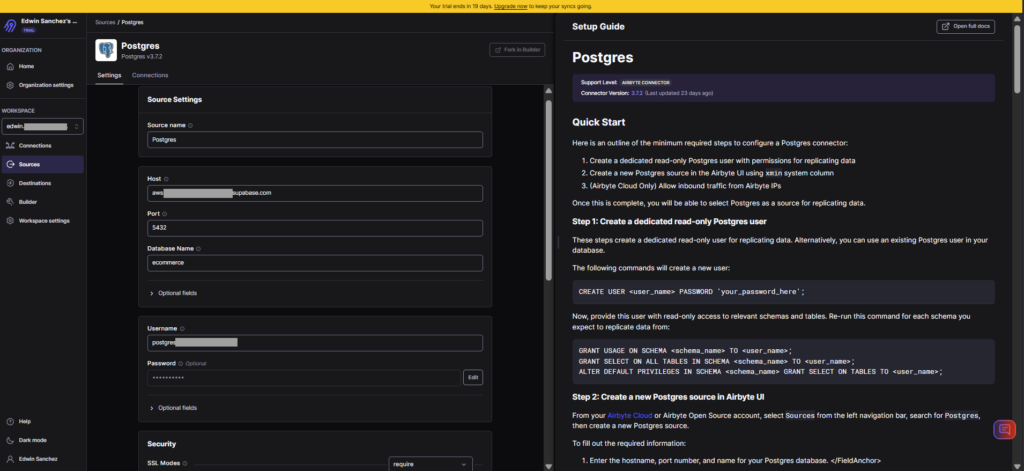
Below is my PostgreSQL connection:
Below is my Snowflake configuration:
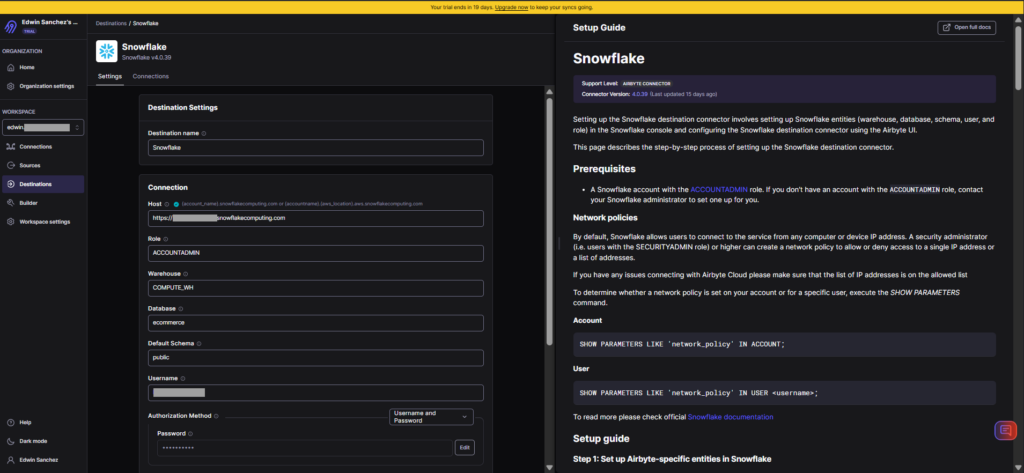
The user interface approach is very similar to others, where instructions appear in the right part of the page.
Creating the Data Pipeline
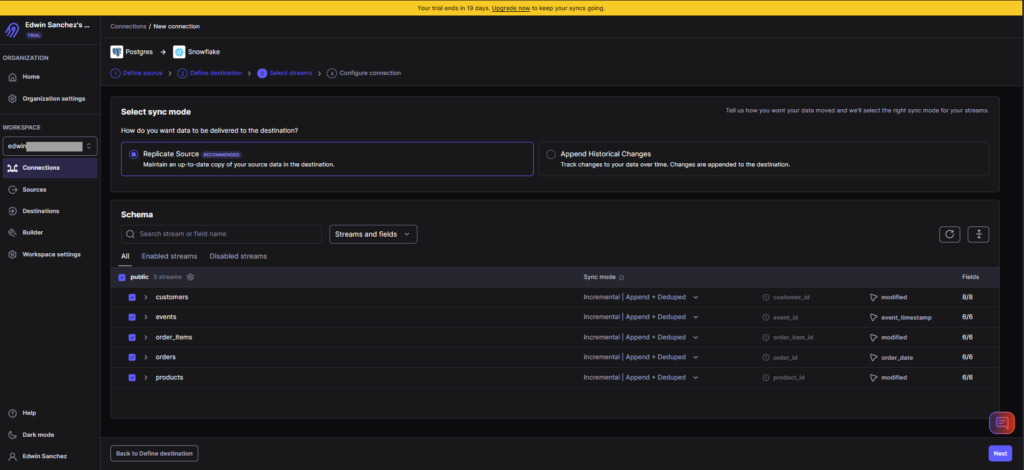
Creating data pipelines in Airbyte is through Connections. So, I set the source, provide the tables and sync modes, and set the destination. If you need transformations before loading, you can use dbt. I didn’t use a transformation here because it’s a direct replication. I also didn’t set a schedule, but manually ran the pipeline.
Below is the setup:
And below is the result of the pipeline:
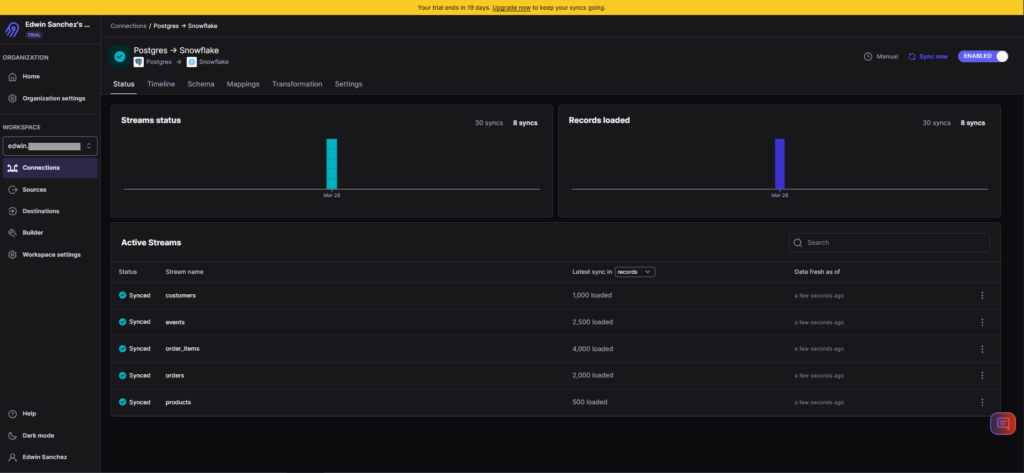
It’s consistent with the results of the other tools.
G2/Capterra Rating
Below are the G2 and Capterra ratings at the time of writing:
- G2 : 76 reviewers rated 4.4/5
- Capterra: no reviews
Best For
The Airbyte Cloud is best for SMBs and enterprises that need an open-source but low-code/no-code integration solution.
Airbyte Core, on the other hand, is ideal for businesses with skilled developer teams who can set up and configure Airbyte on their preferred infrastructure.
Key Features
- Available in both self-managed and fully-managed solutions
- Easy, no-code setup for data replication.
- dbt for transformations
- Supports ETL, ELT, and reverse ETL.
Pricing Deep Dive
Airbyte Core is free forever and open source.
Airbyte Cloud pricing plans include Standard, Plus, and Pro, using capacity-based pricing. You need to contact sales for a tailored quote. For mode details, visit the Airbyte pricing page.
Security & Compliance
- Cloud deployment with PrivateLink and multiple data regions
- Single Sign-On (SSO), SCIM provisioning, fine-grained RBAC, audit logs, and enterprise encryption standards.
- SOC 2 Type II certified, GDPR and HIPAA support, with tools to help you meet internal and external regulatory requirements.
Strengths & Limitations
Here’s what I think is Airbyte’s strengths and limitations.
Strengths
- Open source roots and developer-friendly.
- Offers both self-managed and fully-managed solutions.
- Easy, no-code replication for non-developers.
- Custom connectors (build your own)
Limitations
- Connector fragility: APIs change often; community connectors may lag. If you’re a developer, you will fix this yourself.
- Infra burden: If you self-host, expect to manage scaling, monitoring, and upgrades. Costs can escalate.
9 – Apache Airflow
Apache Airflow is an open source platform to programmatically author, schedule and monitor workflows. Anyone with Python skills can do ETL, ELT, or reverse ETL using a task-based approach to data pipelines.
It’s my first time using Apache Airflow. I tried version 3.1.8, but it wasn’t successful in installation and configuration. I can’t see the DAG I created in the web UI, so I downgraded to 2.9.3, and it went smoothly.
If you have time for setting it up, configuring it, and hardening its security, then this is for you.
Creating the Data Pipeline
Airflow is task-based, and you organize tasks through a DAG – a collection of tasks, a roadmap for your workflow. You make a DAG using Python code.
So, for replicating PostgreSQL tables to Snowflake, you need a DAG like this:
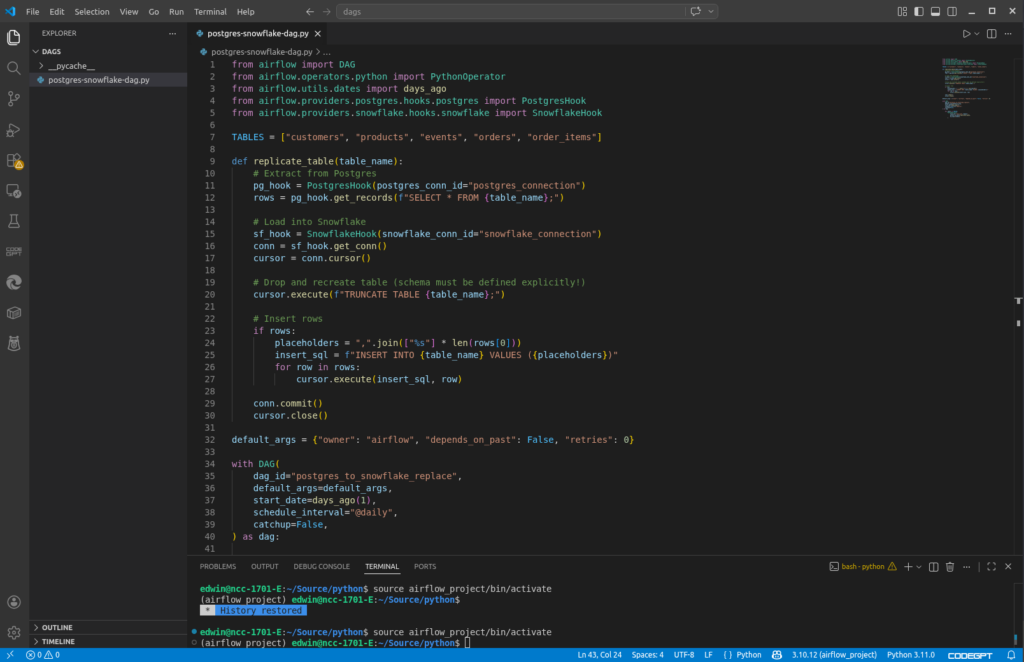
It extracts PostgreSQL table rows and load it to Snowflake. It has a daily schedule defined in the schedule_interval of the DAG. But using the Airflow web UI, you can run it manually, like I did to run the DAG above.
Creating the PostgreSQL and Snowflake Connections
There’s still a need to define a PostgreSQL and Snowflake connection, and this is done in the web UI. Here’s my PostgreSQL connection for Airflow:
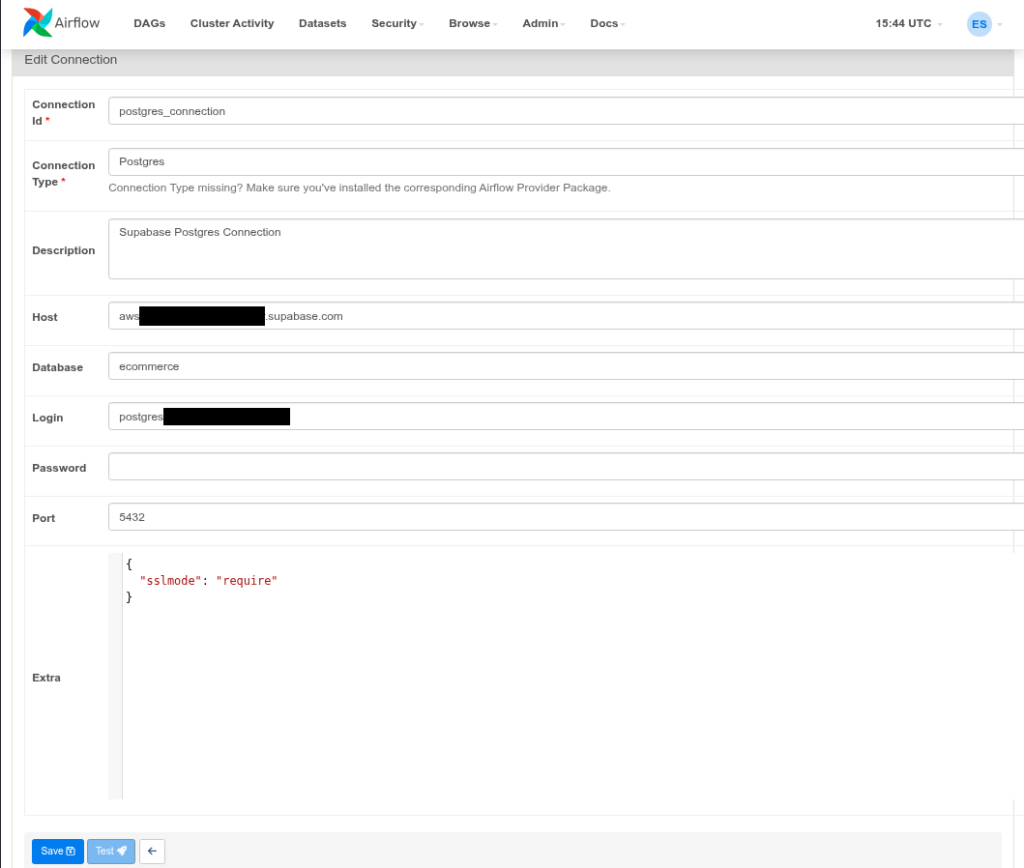
The important part that will link this to my code is the Connection Id. There’s a PostgresHook in Airflow that uses the postgres_connection Id above.I used the SnowflakeHook to connect, and it uses the Snowflake connection below:
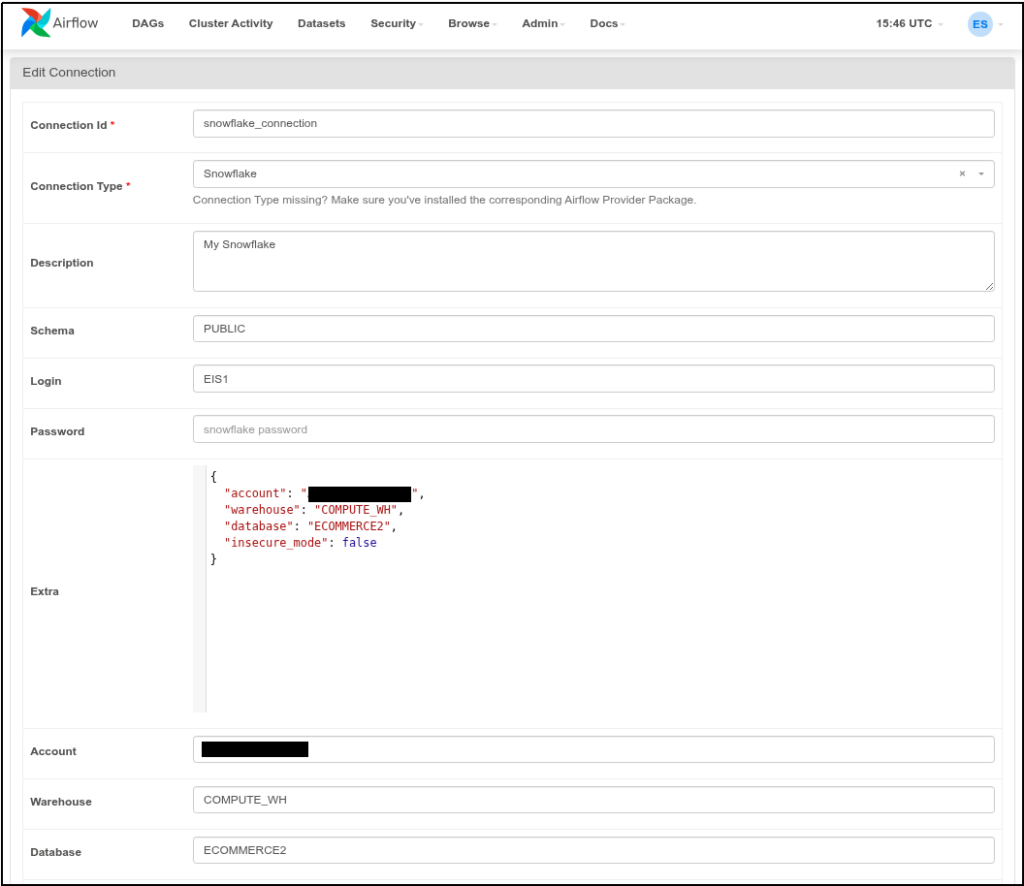
It’s the same credentials we’re using since the beginning.
If you know Python, the code loops using a list of tables, connect to PostgreSQL, get the table rows, truncate the Snowflake table copy, and load the rows to Snowflake. It’s not so elegant because it makes round trips and fully loads the data every time. But this is enough for our example.
I manually ran the DAG in a Python script in the Airflow web UI. See it below:
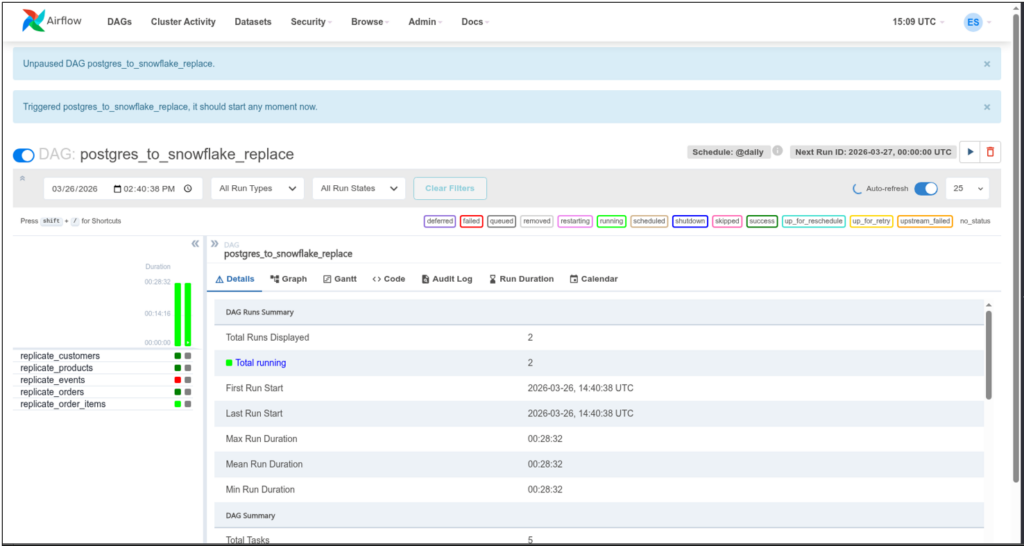
Notice the colors for each replication of a table. Dark green means it’s done and successful. Light green means it’s running, and red means it failed. I checked the details of the failure, and it relates to the JSONB column in PostgreSQL. But I intentionally left it at that so you can see what happens when a DAG had a failure.
I spent more time installing and configuring than making the actual DAG. You can consult the Airflow official documenation on how to install this in your server.
G2/Capterra Rating
Below are the G2 and Capterra ratings for Airflow:
- G2 : 123 reviewers rated 4.4/5
- Capterra : 11 reviewers rated 4.6/5
Best For
Good for organizations with strong coding teams skilled in Python, and the steep learning curve is a good sacrifice for them.
Key Features
- Workflows as Code (Python-based) All workflows (DAGs) are defined in Python, making Airflow highly flexible and developer-friendly.
- Scalability Modular architecture and can scale from a single machine to a distributed system with many workers, handling massive workloads.
- Extensibility Users can create custom operators, sensors, and hooks to integrate with virtually any technology. This extensible framework adapts to diverse environments.
- Web-based UI Airflow’s web UI is good to visualize DAGs, monitor task progress, and debug workflows, making management more intuitive.
- Dynamic & Parametrized Pipelines Pipelines can be generated dynamically using Python logic and Jinja templating, allowing for reusable, parameterized workflows.
Pricing Deep Dive
It’s open source, and it’s free. It’s up to you how much setup you want to do. In that case, the spending will come from infrastructure, software licenses (if any), and professional salaries and benefits.
Security & Compliance
- Security: Role-Based Access Control, supports LDAP, OAuth, and Kerberos for authentication, secrets management, and audit logging. Security depends on both Airflow’s configuration and the underlying infrastructure (cloud provider, Kubernetes cluster, etc.). Companies must harden their Airflow deployments.
- Compliance Frameworks: Airflow itself is not certified for frameworks like HIPAA or PCI-DSS, but its features can help organizations build compliant workflows.
Strengths & Limitations
Below are what I consider Airflow’s strengths and limitations:
Strengths
- Workflows as Code: DAGs defined in Python make pipelines flexible, dynamic, and version-controllable.
- Scalability: Can scale from single-node setups to distributed clusters with many workers.
- Extensibility: Custom operators, sensors, and hooks allow integration with almost any system.
- Rich UI: Web interface for monitoring, debugging, and visualizing DAGs.
- Community & Ecosystem: Large open-source community with many prebuilt integrations.
Limitations
- Complex Setup: Initial configuration and deployment can be challenging, especially for beginners. I vouch for the truthfulness of this fact.
- Steep Learning Curve: DAG-centric design requires careful structuring and can feel unintuitive at first.
- Not Real-Time: Best suited for batch workflows; lacks native support for streaming pipelines.
- Operational Overhead: Requires ongoing maintenance (scheduler, workers, database, webserver).
- Performance Bottlenecks: Metadata database and scheduler can become bottlenecks at very large scale if not tuned properly.
10 – dbt
dbt is the industry standard for data transformation. It transforms raw warehouse data into trusted data products that power analytics, operations, and AI. Unlike the other data pipeline tools here, dbt handles the “T” (transform) in ELT.
Data pipeline tools like Fivetran or Skyvia can connect to dbt using a dbt Cloud API Service token. You must be using a dbt Team or Enterprise plan to create Service tokens.
Creating the Data Pipeline
In simple terms, you create a dbt project in dbt Cloud that connects to your warehouse, like Snowflake. You create dbt models in the form of SELECT statements saved in .sql files. When you run your models, it may create a materialized table depending on your configuration, that contains the result of the SELECT statement.
Here’s an example:
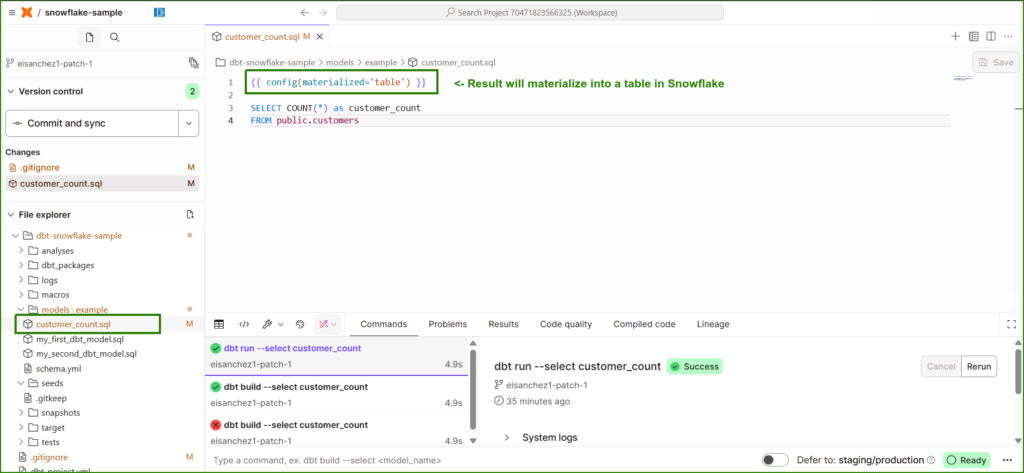
Since it’s set to materialized as a table in Snowflake, I expect a new table there. Check it out below. It is boxed in green.
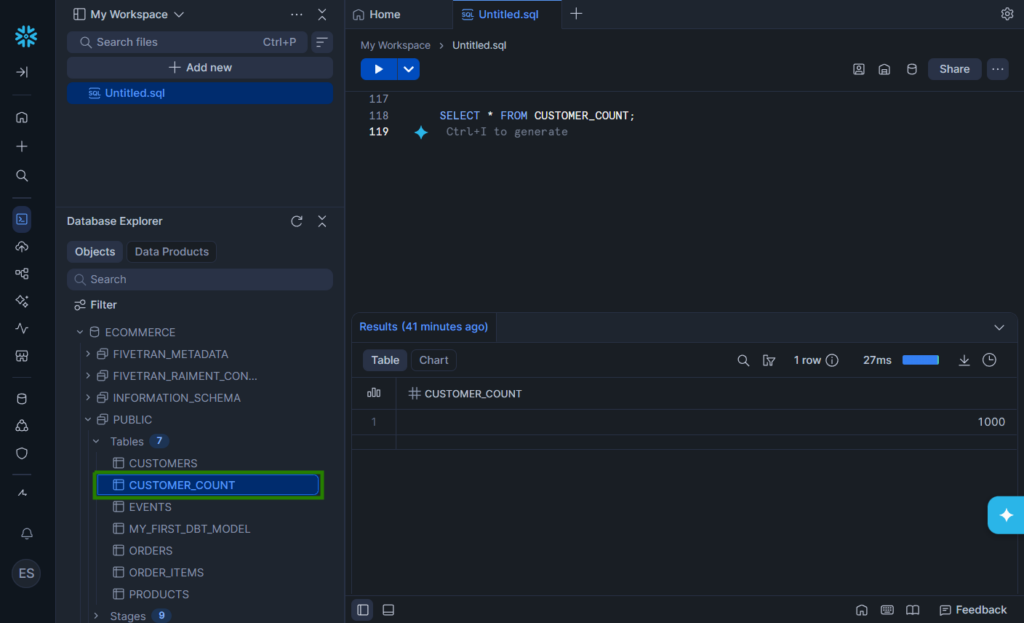
Now, what can we do with this? If the dbt results contains stats of product sales, we can use this for reports. To update the materialized table, create a job in dbt Cloud that will run on your preferred schedule. On the other hand, the updates on the warehouse will depend on your chosen ELT or ETL tool like Fivetran, Airbyte or Skyvia.
G2/Capterra Rating
- G2 : 198 reviewers rated 4.7/5
- Capterra : 4 reviewers rated 4.8/5
Best For
Best for teams who already have an ELT or ETL tool and want to take their data transformations to the next level by bringing the best of software engineering practices to the analytics workflow.
Key Features
- Transform data from a warehouse with SQL.
- Integrate your SQL models with Git.
- Job runner and scheduler to update materialized models.
Pricing Deep Dive
dbt’s pricing model includes Developer (which is free but limited to one project), Starter, Enterprise, and Enterprise+. Pricing startts at $100 per user per month for 5 developer seats.
Security & Compliance
- Multi-factor authentication
- Audit logging for Enterprise and Enterprise+
- SSO, RBAC, and SCIM user access for all paid plans
- PrivateLink and IP Restrictions for the Enterprise+ plan.
Strengths & Limitations
The following are the strengths and limitations that I see in dbt:
Strengths
- SQL-first approach: Lets analysts and engineers write transformations in SQL with Jinja templating.
- Version control: Models are stored as code, enabling Git workflows, CI/CD, and collaboration.
- Modularity: Encourages reusable models and dependency graphs (DAGs).
- Testing & documentation: Built-in data tests and auto-generated docs improve reliability.
- Warehouse-native: Pushes transformations down to Snowflake, BigQuery, Redshift, Databricks, etc., leveraging their compute power.
- Community & ecosystem: Large open-source community, dbt packages, and integrations with orchestration tools.
Limitations
- No ingestion: dbt only transforms data already in the warehouse. You need ETL/ELT tools (Airbyte, Fivetran, Skyvia) for loading.
- SQL/Jinja requirement: Users must be comfortable with SQL and templating; not ideal for non-technical teams.
- Orchestration gaps: dbt Cloud offers scheduling, but complex workflows often require Airflow or Dagster.
- Performance tuning: Large projects can produce heavy queries; optimization depends on warehouse skills.
- Cost visibility: Since dbt pushes work into the warehouse, query inefficiency can drive up compute costs.
- Learning curve: Concepts like materializations, macros, and testing can be challenging for beginners.
11 – Dagster
Another code-heavy data pipeline is Dagster. It’s open source, so you can install Dagster in your infrastructure. Though you have the option to use Dagster+, where it’s fully managed, and you don’t need to do setups and configuration for your machine. But you still need to code and use Git. Then, Dagster+ will access your Git repo to run the pipeline.
Like Airflow, this pushed me to learn the concepts first, install it in my local machine, and then make pipelines using Python.
Creating the Data Pipeline
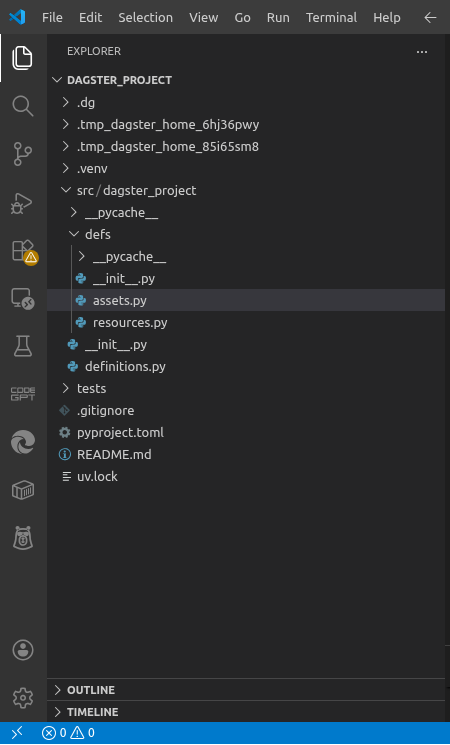
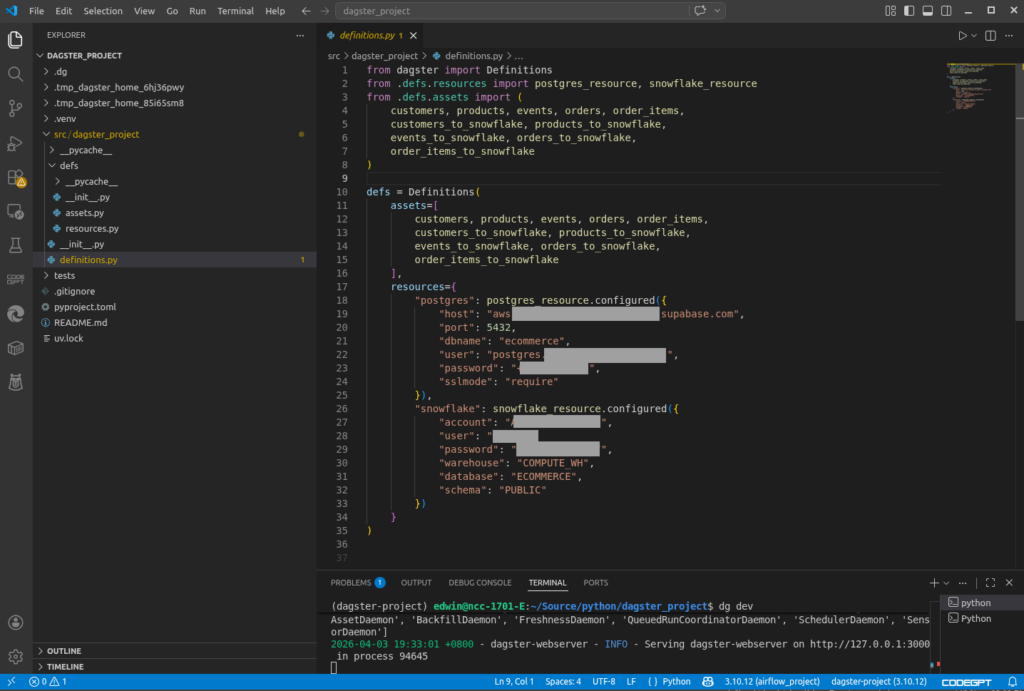
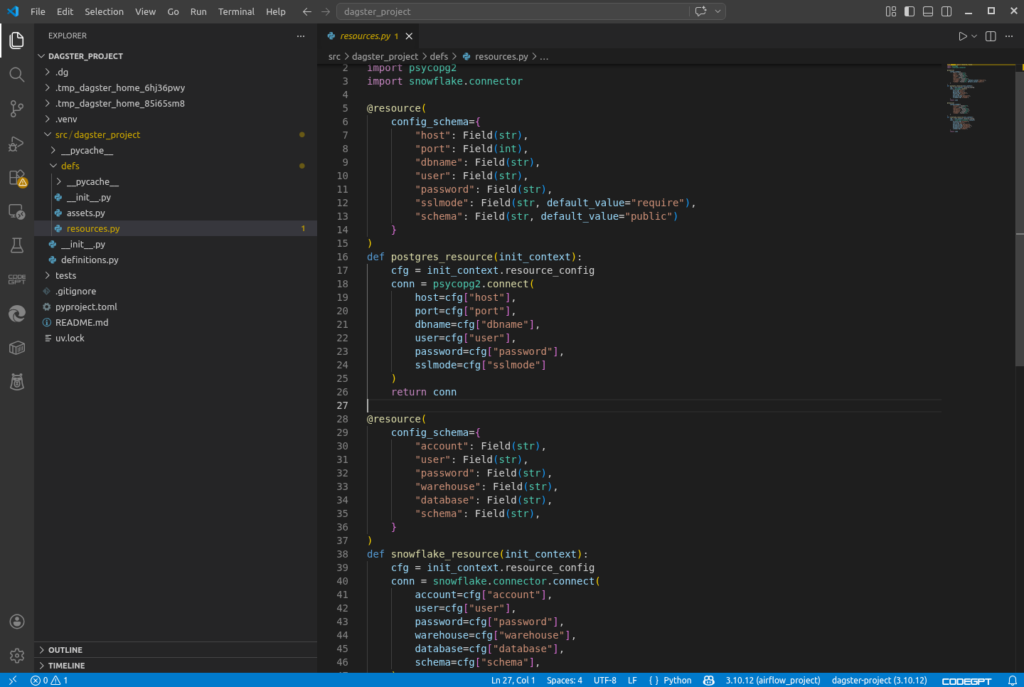
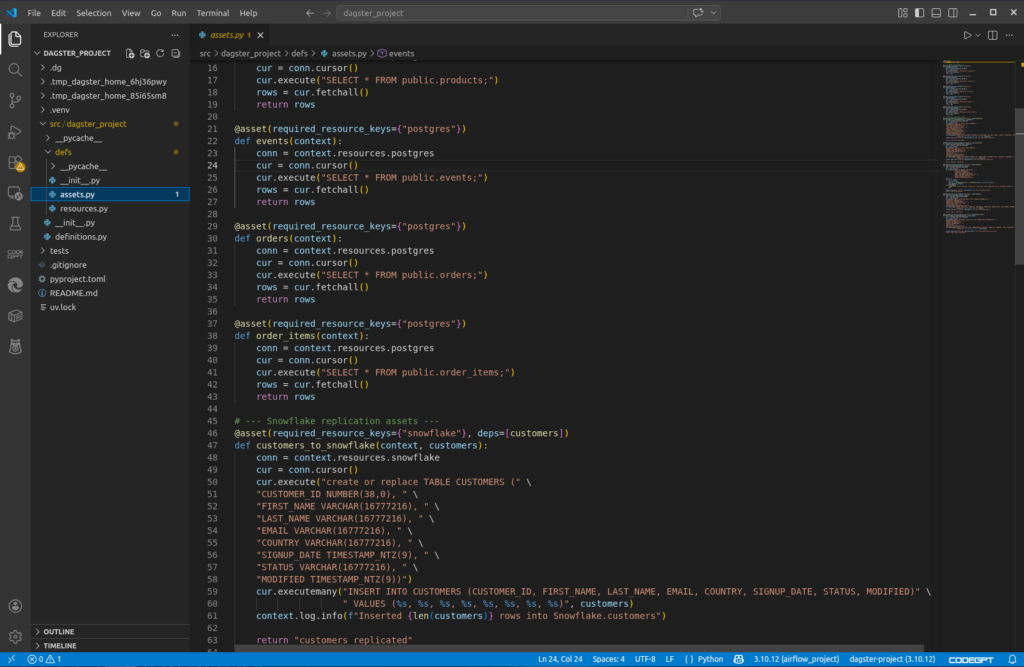
The basics of data pipelines in Dagster include Projects, Definitions, Assets, and Resources. A Project is your entire data pipeline. You define database connections in Resources and the tables or database objects in Assets. You also set the list of your assets and the connection parameters in Definitions.
I like the part that Dagster has CLI commands to scaffold the project folder structure and files. You don’t need to guess what projects look like and which part goes to which folder.
Below is the project structure generated by Dagster as seen in Visual Studio Code:
Below is my Dagster Definitions. It uses the same connection properties we’ve been using from the beginning.
Then, below are my Resources where functions to connect to PostgreSQL and Snowflake are defined.
And below is my Dagster Assets, where functions to read and write to tables are defined. A portion of them is seen below:
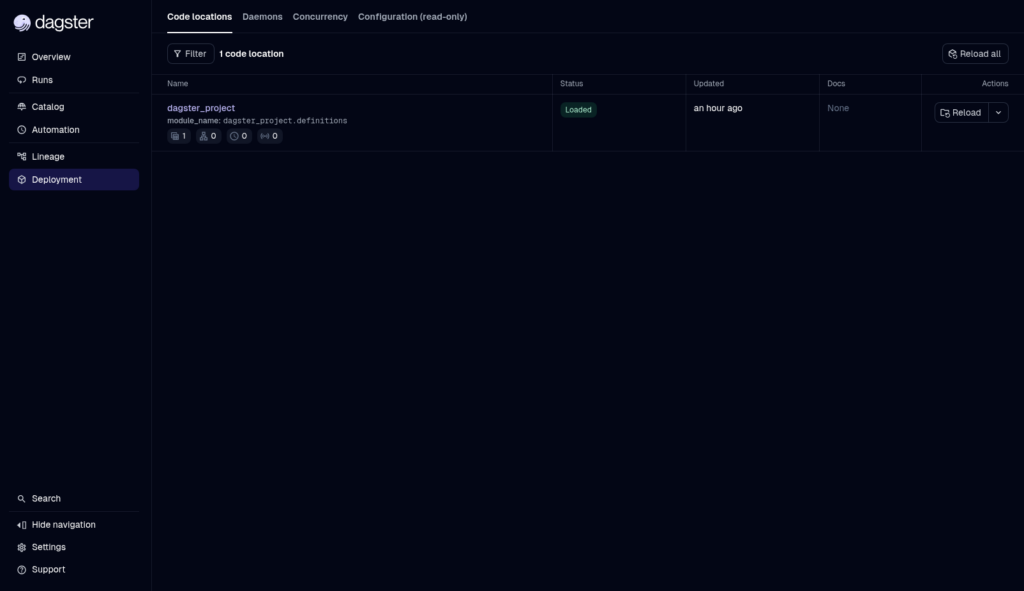
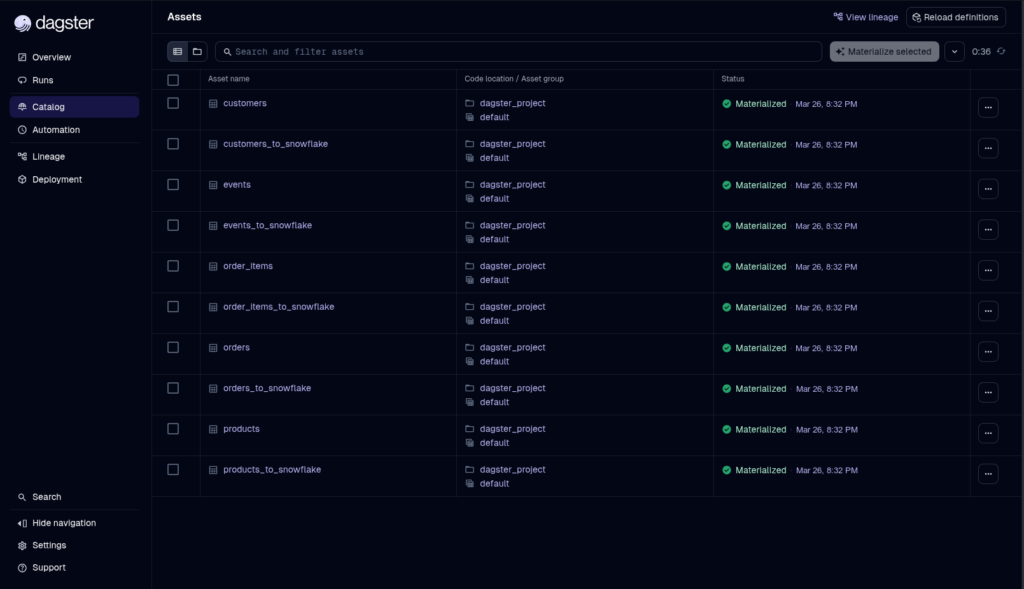
That’s only the project part. Running, scheduling, and monitoring are available in the Dagster web UI. Below is a successful status of a manual run of this project:
And below are the details for each asset:
G2/Capterra Rating
Below are the G2 and Capterra ratings:
- G2 : 2 reviewers rated 4.5/5
- Capterra : none
Best For
Dagster is ideal for Python teams who want more control over their data pipelines and a more disciplined take on approaching pipeline development.
Key Features
- Natively provides observability, lineage, and reliability
- Asset-based approach to data pipelines.
- Broad reach in connectors and libraries, including (pandas, numpy), ML (scikit-learn, tensorflow), cloud SDKs (boto3, google-cloud-storage), visualization (matplotlib, plotly), natural language processing (transformers, nltk), and more.
Pricing Deep Dive
Dagster has an open-source offering that is free, and Dagster+ with plans including Solo, Starter, and Pro. Price starts at $10 with 7.5k credits/month for 1 user. Free 30-day trial for the paid plans.
Security & Compliance
- Security for Dagster+: Built-in user management, role-based access control, and SSO (e.g., Okta, Google). Also, audit logs, secrets management, and data isolation. Security of the open-source option depends on your setup.
- Compliance: SOC 2 Type II, GDPR, HIPAA readiness (depending on plan).
Strengths & Limitations
Here’s the good and the bad for Dagster:
Strengths
- Asset-based model: Treats datasets, models, and files as first-class “assets,” making lineage and dependencies explicit.
- Observability built-in: Rich UI with logs, metrics, asset health checks, and metadata visualization without extra tooling.
- Lineage tracking: Automatic graphs showing how assets depend on each other, useful for debugging and governance.
- Flexibility: Can use any Python library or connector (data, ML, cloud SDKs, etc.), not limited to pre-built operators.
- Reliability features: Retries, backfills, partitioning, and sensors are native, reducing custom reliability code.
- Modular design: Encourages clean separation of assets, resources, and definitions for maintainable pipelines.
Limitations
- Steep learning curve
- Smaller ecosystem: Fewer pre-built integrations compared to Airflow’s huge operator library.
- Relatively new: Less battle-tested in very large enterprises compared to Airflow, which has a decade of adoption.
- Operational overhead (open source): If you self-host Dagster, you must manage deployment, scaling, and security yourself.
- Community maturity: Documentation and tutorials are improving, but not as extensive as Airflow’s.
- Not “plug-and-play” SaaS: Unlike Fivetran/Skyvia, you still need to write Python code for connectors and transformations.
- Complexity for simple jobs: For small, one-off ETL tasks, Dagster’s abstractions may feel heavier than a cron job or Airflow DAG.
Best for Real-Time & Event Streaming
If your insights can’t wait for tomorrow or next week, real-time and event streaming data pipeline tools could be your answer. I tried one tool for this category.
12 – Striim
Striim is a real-time data pipeline tool. Unlike ETL tools, there’s no scheduling. When your pipeline runs, it continiously runs waiting for changes in your source. I can stop the runtime, though, so I can edit the pipeline if needed.
Striim offers a drag-and-drop interface to design pipelines. It calls data pipelines apps.
Creating the Data Pipeline
First, I choose either a wizard or do it myself with drag and drop of components. Since I’m new, I chose the wizard. Then, I have to choose a source (PostgreSQL). Then, I select a Snowflake target. After I named the app, I configured the Postgres source.
Below is my PostgreSQL configuration:
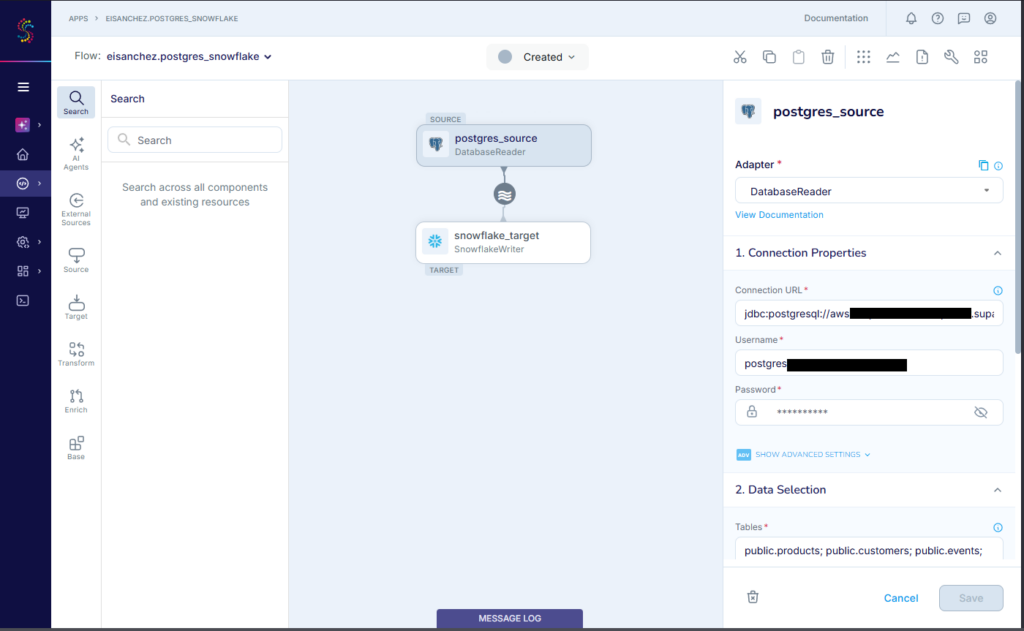
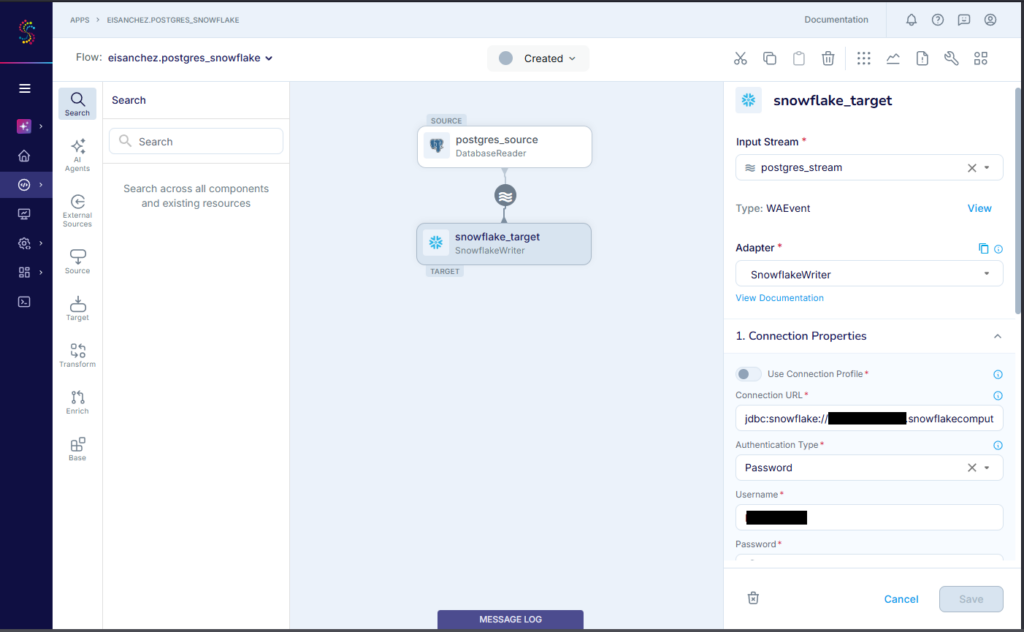
Then, I specify a schema and the tables to include. Finally, I configured the Snowflake target. Below is my Snowflake config:
The replication of the 5 tables started. When it’s done, below is the result:
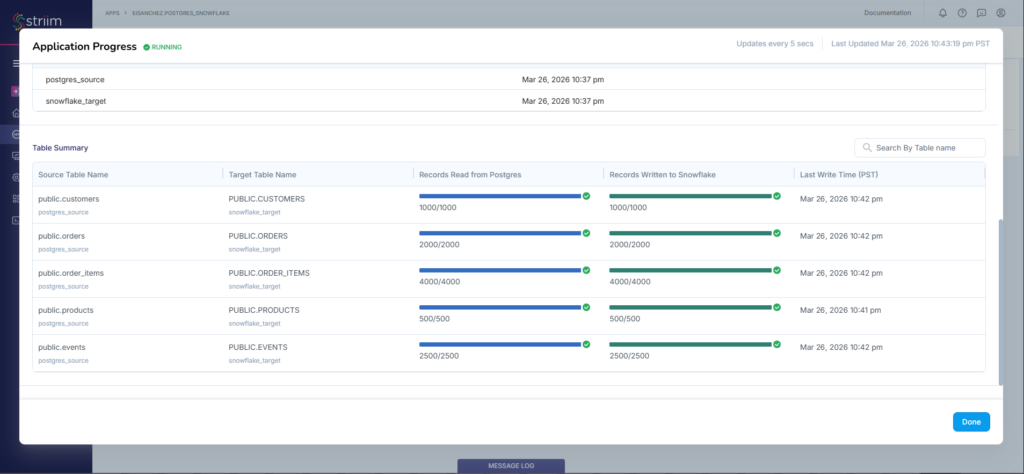
It checks out fine in Snowflake. Any new PostgreSQL rows from this point will also be copied to Snowflake.
G2/Capterra Rating
Below are the G2 and Capterra ratings:
- G2 : 1 reviewer rated 5/5
- Capterra : 3 reviewers rated 5/5
Best For
Organizations requiring real-time data movement where data freshness is a big deal.
Key Features
- Real-time data pipelines
- 100+ high-performance connectors and Change Data Capture.
- Built for a distributed, streaming SQL platform.
Pricing Deep Dive
Striim offers a free Developer account for learning and small-scale use cases and up to 25 million events/month. Then, a free trial for Striim Cloud (fully managed) or Striim Platform (self-hosted). Prices are not published for both Cloud and Platform plans.
You pay only for the data you moved. You need to contact sales for a price quote.
For more details, visit the Striim pricing page.
Security & Compliance
- Compliance: SOC 2 Type 2, HIPAA Security Compliance, PCI-DSS 4.0, UK Cyber Essentials
- Encrypted data at rest and in-transit using customer-managed encryption keys.
- Offers self-hosted deployments, including a strictly air-gapped, on-premise installation with no internet access.
Strengths & Limitations
The following are the strengths and limitations of Striim:
Strengths
- Real-time data pipeline design using a graphical designer or wizard.
- 100+ high-performance connectors.
- Free developer account with access to 200+ preview application connectors.
- A choice between fully-managed and self-hosted deployments.
Limitations
- Striim is an enterprise-grade platform, and the pricing reflects that.
- Complex setup and tuning for self-hosted deployments
- Connector library is narrower compared to competitors
- Teams without prior streaming experience may face a steep learning curve.
13 – Snowflake Snowpipe
Snowpipe is Snowflake’s way of loading data from files as soon as they’re available from a defined storage location called a Snowflake stage. Now, since it involves files like CSV or JSON, the input won’t be coming from PostgreSQL.
A pipe is a first-class object in Snowflake. It defines the location (a Snowflake stage) from where the file will come from and the format of the file. Then, it needs the Snowflake table as the target. It will use the COPY command to copy the data from the file into the table.
Files may come from AWS S3 buckets, Azure Blob Storage or Data Lake, or GCS storage buckets. In this guide, I used a GCS bucket.
Creating the Data Pipeline
First, you need a Snowflake Stage.
Creating the Snowflake Stage
But to define a Stage, you need a Storage Integration and a File Format. Both are also defined in Snowflake.
Let’s start with the File Format. I’m using a CSV file for this guide.
CREATE OR REPLACE FILE FORMAT my_csv_format1
  TYPE = CSV
  FIELD_OPTIONALLY_ENCLOSED_BY = '"'
  SKIP_HEADER = 1;
Note the name of the File Format: my_csv_format1.
Then, I created a Storage Integration using a GCS bucket with one allowed location:
CREATE OR REPLACE STORAGE INTEGRATION my_gcs_integration
  TYPE = EXTERNAL_STAGE
  STORAGE_PROVIDER = GCS
  ENABLED = TRUE
  STORAGE_ALLOWED_LOCATIONS = ('gcs://edwin_snowpipe_bucket');
Note that you can define more allowed locations or buckets in a storage integration.
Below is my GCS bucket with one CSV file for CUSTOMER table later.
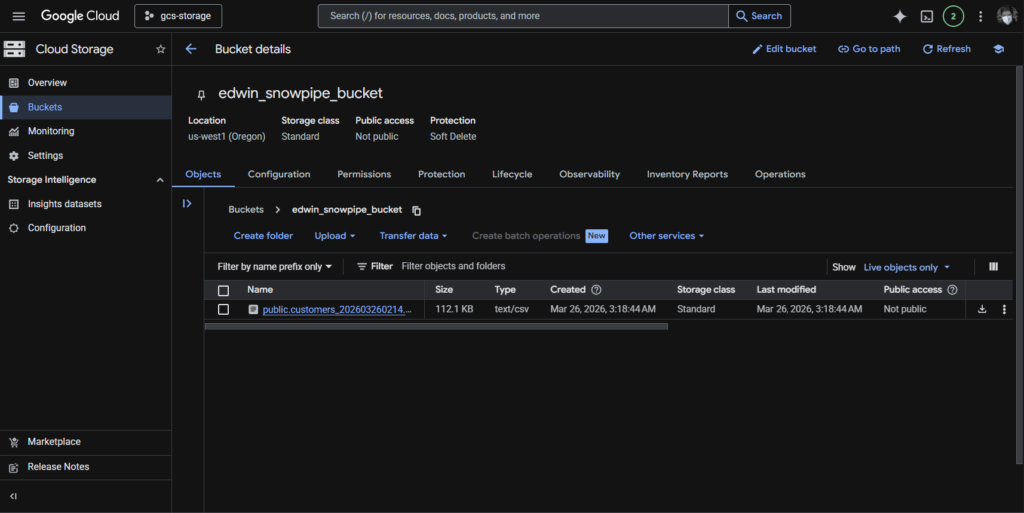
Finally, I created the Stage:
CREATE OR REPLACE STAGE my_gcs_stage
  URL = 'gcs://edwin_snowpipe_bucket'
  STORAGE_INTEGRATION = my_gcs_integration
  FILE_FORMAT = my_csv_format1;
It used the File Format my_csv_format1 and the Storage Integration my_gcs_integration and specified a fixed URL location that is allowed in my_gcs_integration.
Then, the new File Format and the Stage become available in Database Explorer:
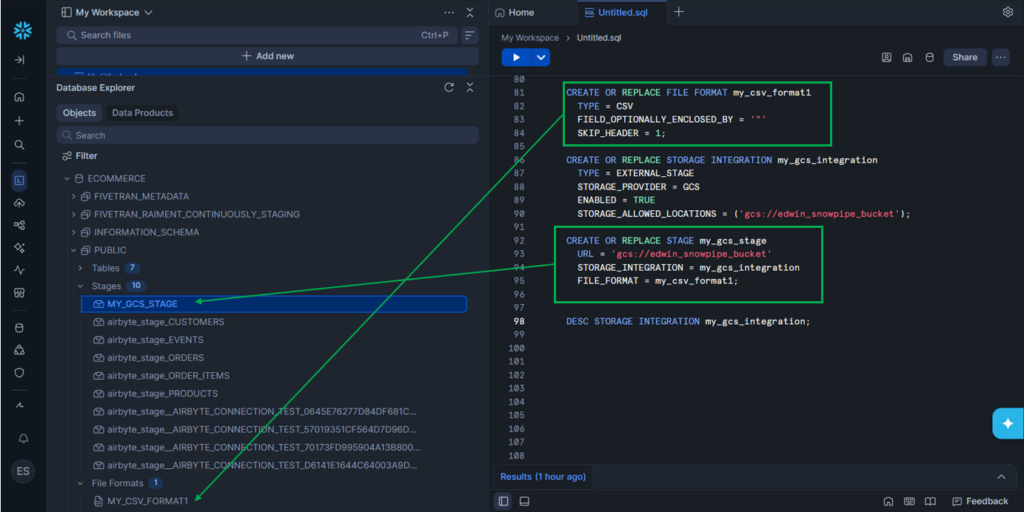
But GCS doesn’t know about this Storage Integration my_gcs_integration yet. You need to provide permissions in GCS. To do that is to get the STORAGE_GCP_SERVICE_ACCOUNT in Snowflake. Run the DESC STORAGE INTEGRATION my_gcs_integration;. See below:
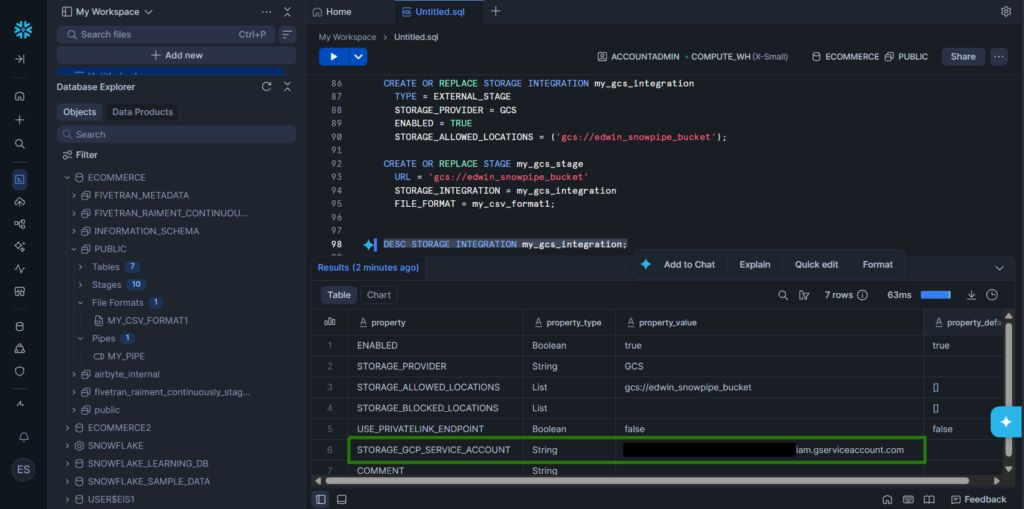
Copy the property value of the STORAGE_GCP_SERVICE_ACCOUNT. Then, go to Google Cloud Console to provide permissions. Below is the one I set for my GCP bucket:
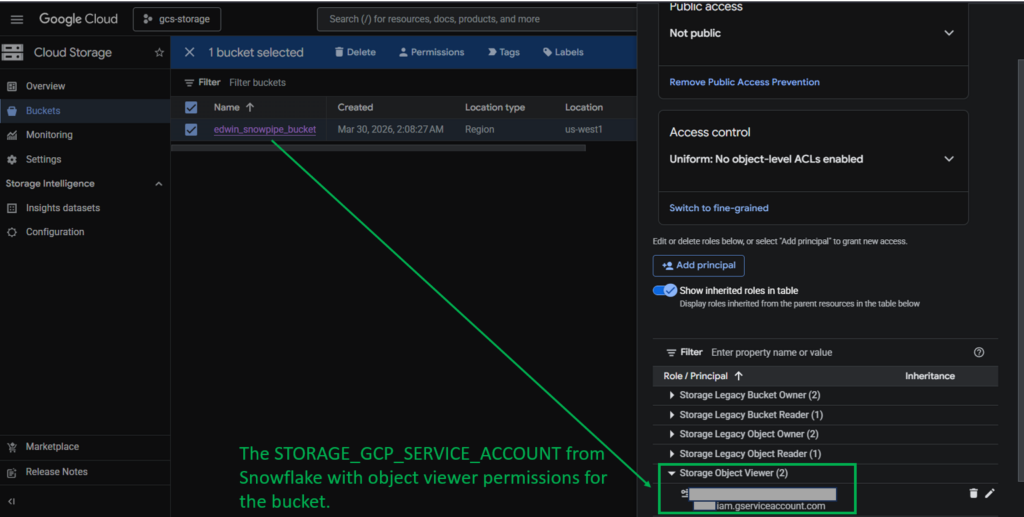
Note that this is a simplified step. I spent more time creating and configuring the GCS bucket than working on Snowflake for this. For more information, check out how this is done from the official documentation.
The next step is to create the Pipe.
Creating the Pipe
I created the Pipe using this command:
CREATE OR REPLACE PIPE my_pipe
AS COPY INTO customers
FROM @my_gcs_stage
FILE_FORMAT = (FORMAT_NAME = my_csv_format1);
Then, my new Pipe is available in Snowflake’s Database Explorer. See below:
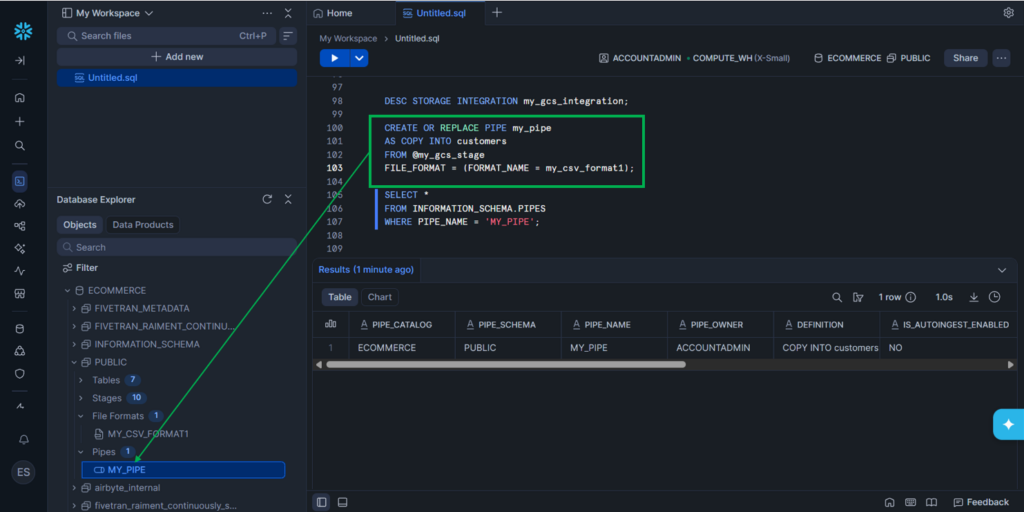
Once a new CSV file arrives in the GCS bucket, Snowflake will get notified and execute the COPY command defined in the Pipe. You can query the result yourself in Snowflake and/or query the status of the upload, like this one:
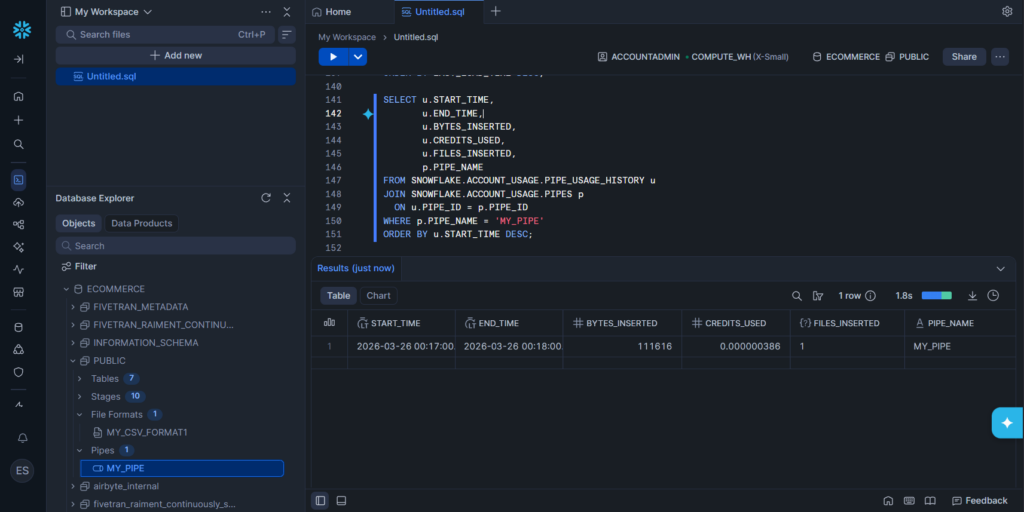
Now, I notice that the upload log in the PIPE_USAGE_HISTORY table doesn’t populate completely on time. The PIPE_NAME was null, but in time, it appeared. A SELECT * FROM SNOWFLAKE.ACCOUNT_USAGE.PIPE_USAGE_HISTORY should be enough. But when the PIPE_NAME is null, you need to join it in SNOWFLAKE.ACCOUNT_USAGE.PIPES.
G2/Capterra Rating
The rating for Snowflake in G2 and Capterra is for Snowflake in general, not just Snowpipe. Below are the ratings at the time of writing:
- G2 : 692 reviewers rated 4.6/5
- Capterra : 96 users rated 4.7/5
Best For
Snowflake users who need file uploads from GCS, AWS, or Azure into their data warehouses.
Key Features
- Supports CSV, JSON, AVRO, ORC, PARQUET, and XML.
- Supports AUTO_INGEST for automatic data loading. Default is false. Our example earlier did not use AUTO_INGEST, but manually triggered.
- Available for AWS S3, Google Cloud Storage, and Azure Blob Storage
Pricing Deep Dive
Here’s how pricing works for Snowflake Snowpipe:
- Billed based on compute credits consumed by Snowpipe.
- You’ll see usage in PIPE_USAGE_HISTORY under CREDITS_USED.
- This is separate from warehouse credits — Snowpipe runs on Snowflake-managed compute, not your warehouse.
For more details, check here.
Security & Compliance
- Security: Secure authentication, encryption, and role-based access to protect ingestion pipelines. It relies on secure stages, key-based authentication for REST API calls, and Snowflake’s managed compute isolation to ensure data is loaded safely.
- Compliance: Snowflake (and Snowpipe as part of it) is certified for major compliance frameworks, including GDPR, HIPAA, SOC 1/2, PCI DSS, FedRAMP, HITRUST
Strengths & Limitations
Below are the strengths and limitations of Snowflake Snowpipe at the time of writing:
Strengths
- Continuous ingestion: Automatically loads files from cloud storage (S3, Azure Blob, GCS) into Snowflake within minutes of arrival.
- Serverless compute: Auto ingestion runs on Snowflake-managed compute, so you don’t need to provision or manage warehouses.
- Integration with cloud events: Supports event notifications (AWS S3 events, Azure Event Grid, GCS Pub/Sub) for fully automated ingestion.
- Supports semi-structured data: Handles JSON, Avro, Parquet, and other formats natively (if these are the only formats you need)
Limitations
- Stage-only ingestion: Snowpipe can only load files from stages; it doesn’t connect directly to APIs or databases.
- Cost model: Auto ingestion is billed separately per GB ingested. For high-volume continuous streams, costs can add up compared to batching.
- Operational visibility: While usage views exist, debugging ingestion errors can be less intuitive than manual COPY commands.
Real-World Use Cases
Let’s have some real-world scenarios and see what tool fits.
| Scenario | Right Tool |
|---|---|
| “I have a small analytics team and need data from HubSpot and Stripe in BigQuery” | Skyvia, Hevo Data, Rivery |
| “I have a massive engineering team and need to build a custom connector for a proprietary internal API.” | Airbyte |
| “I need strict SOC2 governance for 500 million rows a month with zero schema maintenance.” | Fivetran, Informatica Intelligent Data Management Cloud, Qlik Talend |
| “I’m a solo data engineer who needs to quickly replicate Salesforce data into Snowflake without writing code.” | Skyvia, Informatica Data Loader |
| “I have a mid-size team that wants to orchestrate Python transformations and ML models alongside data ingestion.” | Dagster |
| “I need to move IoT sensor data continuously from Kafka into BigQuery with sub-second latency.” | Striim |
| “My company has strict budget limits and we only need basic SaaS connectors like HubSpot → Redshift.” | Skyvia |
| “We want to build custom pipelines with complex branching logic and integrate with dozens of internal systems.” | Apache Airflow |
| “I need to run dbt transformations every 15 minutes after Fivetran loads data into Snowflake.” | dbt Cloud, Fivetran |
| “Our compliance team requires HIPAA-ready, SOC2-certified ingestion for healthcare data into Azure Synapse.” | Fivetran, Informatica Intelligent Data Management Cloud |
| “I need to continuously ingest semi-structured JSON logs from S3 into Snowflake with minimal engineering overhead, and I’m fine with a few seconds to minutes of latency.” | Snowflake Snowpipe |
Conclusion
Choosing the right data pipeline tool comes down to your engineering resources. If you have the budget and Python expertise, Airflow and Airbyte are incredibly powerful.
But if you want to eliminate maintenance, empower your analysts, and get your data moving in minutes without writing a single line of code, try Skyvia. Set up your first integration for free today.
F.A.Q. for Data Pipeline Tools

What is the difference between ETL and ELT?
ETL extracts, transforms, then loads data into a warehouse. ELT extracts, loads raw data first, then transforms inside the warehouse for scalability.
Can I build a data pipeline without coding?
Yes. Tools like Fivetran, Skyvia, and Informatica offer no-code interfaces to design pipelines, making data integration accessible without programming.
Which tools support real-time data streaming?
Kafka, Striim, and Estuary support real-time streaming. Airbyte and Fivetran offer near-real-time CDC for databases and SaaS sources.