Summary
- Every pipeline has the same layers: sources, ingestion, processing, storage, consumption, and monitoring with orchestration.
- Batch ELT with incremental loads covers most SaaS and database reporting.
- Streaming, lambda and kappa earn their extra cost only when data must be seconds fresh.
- Plan the order of steps and the monitoring as carefully as the tools.
- Skyvia covers the batch side of the reference architecture, with real limits on streaming and change capture.
Overnight, the dashboard decided revenue hit zero. The panic doesn’t last. Everyone knows how this goes: some sync failed, some table quit updating, and one unlucky person will burn the morning hunting for the step that broke. That lost morning is the bill for skipping design.
Data pipeline architectures are how you avoid paying it. Get the design right and you’ve decided the layers your data passes through, the pattern wiring them together (batch, streaming, lambda, kappa, ELT, medallion) and how you’ll watch each step. Which one fits you? Two things decide it, mostly: how fresh the data must be and who gets stuck maintaining it.
Below we go layer by layer, then through the common patterns (each with a “use it when”), a decision table and a reference architecture for SaaS and database data. After that, we’re honest about where Skyvia fits and where it doesn’t.
What Does Data Pipeline Architecture Mean?
We’d describe data pipeline architecture as the design that decides how data travels from the systems creating it to whoever, or whatever, depends on it downstream. That design lists the stages too, from collection and processing through storage and delivery. So do their order, how often each one runs, and what’s supposed to happen when one breaks.
And the need isn’t shrinking. MuleSoft’s 2026 Connectivity Benchmark Report puts the average organization at 957 applications, with only 27% of them connected.
You can look at any architecture two ways. The logical view tracks what happens to the data itself: raw orders come in, get cleaned up, get joined to customers and end up in a reporting table. The physical view is about the tools and schedules doing that work. Begin with the logical one. Tools come and go much faster than the flow does.
Most of the decision comes down to freshness. How stale can a number get before it misleads someone? When the reports run on SaaS apps and databases, a scheduled batch job that only picks up new and changed records each hour (or every few minutes) usually covers it. Streaming starts to justify its price once a decision must happen within seconds, for instance blocking a fraudulent payment before it goes through.
The Layers of a Data Pipeline
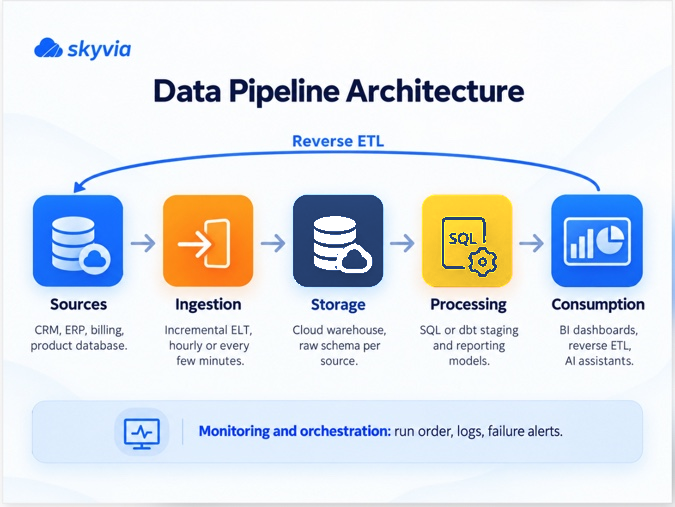
Tools vary wildly, yet most data pipeline architectures end up with the same layers. IBM lists five of them: ingestion, storage, processing, consumption, and monitoring and orchestration. Throw in the sources the data starts from and the picture’s complete.
| Layer | What it does | Typical choices | What breaks here |
|---|---|---|---|
| Sources | Create the data | CRM, ERP, billing, product databases, files, devices, event streams | API limits, renamed fields, deleted records |
| Ingestion | Moves data into the pipeline | Scheduled batch loads, incremental loads, streaming | Missed changes, duplicate rows on retries |
| Processing and transformation | Cleans, validates, joins and reshapes data | SQL, dbt models, visual transformations | Wrong joins, silent type conversions |
| Storage | Keeps data for querying | Data warehouse, data lake, lakehouse | Costs that grow with every full reload |
| Consumption | Puts data to work | BI dashboards, ML models, reverse ETL to apps, AI assistants | Stale numbers nobody notices |
| Monitoring and orchestration | Runs steps in order and watches them | Schedulers, run logs, alerts | Failures that only show up in a meeting |
Sources, as AWS puts it, can be an application, a device, a database or a stream. In a typical company all four run side by side, so you’ll find an order database next to a CRM, a payment system and a stream of website events.
Ingestion either runs on a timer in batches or keeps going nonstop, taking events in as they show up. Since big batch jobs weigh on the source systems, teams tend to schedule them for quiet hours.
Raw records only become useful downstream after Processing and transformation has done its part. That part includes filtering, masking, standardization and aggregation (IBM’s list), and in practice also deduplication and joining data from different sources. With ETL, all this happens before the load. ELT flips that and does the work inside the warehouse after loading.
What you can ask of the data later depends on Storage. A warehouse checks every record against a schema at write time. That strictness is exactly why it handles structured data and fast SQL so well. A lake is cheaper and doesn’t care about shape, so logs and documents go in raw. The lakehouse sits in between, running warehouse-style analytics on top of lake storage. Lots of teams never need more than the warehouse, though unstructured data or a machine learning project often changes that.
Consumption used to mean dashboards. Data now flows back out as well: reverse ETL feeds the CRM or the support tool from the warehouse, while AI assistants read through endpoints such as MCP.
Then there’s Monitoring and orchestration, which keeps the rest of the layers honest. Steps go in order, a failed one gets another try, and somebody hears about it the moment a table stops updating.
How Many Stages Does a Data Pipeline Have?
Ask three people and you might hear three, five or six. IBM, for one, treats ingestion, processing and storage as the three fundamental stages, yet elsewhere it describes five layers by adding consumption and monitoring. Some people treat sources as a stage too. The exact count doesn’t change much in practice. Missing a layer does, and monitoring is the one teams leave out most often.
Common Data Pipeline Architectures
A pattern is just a way of wiring the layers together. Real pipelines usually combine two of them.
Batch. Batch is the old workhorse: on a schedule (nightly, hourly, every few minutes) the pipeline grabs whatever came in since last time and processes it. No other pattern is as forgiving to build, test or rerun. If your reports can sit minutes or hours behind reality (and most finance, sales and marketing reports can), batch is the obvious pick.
Streaming (event-driven). Events get processed one by one, as they arrive, without stopping. (IBM notes the same pipelines are also called event-driven architectures.) It’s the pick for anything where seconds matter, like fraud checks, live inventory or sensor alerts.
Lambda. Here you get two paths running in parallel. Microsoft’s Azure Architecture Center describes a batch layer (the cold path) that stores all the raw data and processes it in batches, plus a speed layer (the hot path) that analyzes data in real time, with a serving layer merging the two. The catch? Two codebases that have to agree with each other. Jay Kreps, who built real-time infrastructure at LinkedIn, didn’t sugarcoat it: keeping code that must give the same answer in two distributed systems “is exactly as painful as it seems like it would be.” Only pick lambda if you need full historical accuracy and real-time views at once, and you have the people to run both sides.
Kappa. Everything goes through a single streaming path. Need to recompute history? Replay the stream. That kills lambda’s duplicated logic, though it needs a platform that holds onto the event log long enough to replay it. It’s a good match when most of your data already arrives as events.
ETL and ELT. These two differ in the order of the work, not in how often it runs. ETL cleans and reshapes data on the way in, then loads it; ELT drops raw data into the warehouse and does the reshaping there. ELT tends to win on cloud warehouses, which happily run heavy SQL against raw tables. ETL still earns its place when data has to be masked or trimmed down before it lands anywhere. For more, see our comparison of ELT and ETL.
Medallion. Databricks documents it as a way to layer lakehouse tables by data quality. Raw data sits in bronze tables. Silver is for validated data, while gold holds the enriched tables the business actually reads. Your analysts query clean tables, and the raw history is still there the day a model needs rebuilding. It isn’t tied to Databricks, by the way, since raw, staging and reporting schemas give you the same layering.
Incremental and change data capture. There’s little point copying entire tables on every run, so the pipeline moves only what’s new or changed since the previous one. Log-based change data capture reads the database’s change log. Timestamp-based loads compare against a modified-date column instead. With anything beyond a few thousand rows, pick one of the two, because full reloads quietly eat time, API calls and warehouse credits.
How to Choose a Data Pipeline Architecture
Start from the simplest pattern that still meets your freshness needs. Ben Rogojan, a data engineering consultant who writes the Seattle Data Guy newsletter, boils the real-time debate down to a single test:
“Ask the business: what decisions become impossible if this data is five minutes old? If they can’t give you a clear answer, then they probably don’t have a real-time use case.”Ben Rogojan, Seattle Data Guy
Here’s how the options stack up on the points that decide most projects.
| Pattern | Data freshness | Running cost | Build and maintenance effort | Good fit |
|---|---|---|---|---|
| Batch ELT, full loads | Hours to a day | Grows with table size | Low | Small tables, a first pipeline |
| Batch ELT, incremental | Minutes to an hour | Low | Low to medium | SaaS and database reporting, most teams |
| ETL (transform before load) | Minutes to a day | Medium | Medium | Masking or filtering before data lands |
| Streaming / event-driven | Seconds | High | High | Fraud, live operations, IoT |
| Lambda | Seconds plus accurate history | Highest | Highest (two paths) | Large platforms needing both views |
| Kappa | Seconds, history by replay | High | High | Event-first products |
| Medallion layers | Follows the ingestion pattern | Adds storage | Medium | Teams that need raw history and clean tables |
Four questions usually settle it:
- How fresh must the data be? When nobody acts on a number within minutes, batch will do.
- How much changes per hour? A few thousand changed CRM records in an hour is plain batch territory, while millions of events an hour start pointing you at streaming.
- Who maintains it? One or two analysts have no business running lambda. Hand-built integrations eat team time too; the same MuleSoft benchmark found IT teams spend an average of 36% of their time designing, building and testing new custom integrations.
- Does data have to go back into apps? Then reverse ETL goes into the first version of the design, not into a later patch.
Overengineering trips up more teams than anything else. An hourly incremental load that just works beats a streaming system no one on the team can debug.
A Reference Architecture for SaaS and Database Data
Picture a small or mid-size company reporting on its apps and databases, and you’ll usually find a setup much like this one. Each step below gets a one-line job description; the table after the list fills in a schedule and an owner.
- Sources: the CRM (Salesforce or HubSpot, say), an ERP or accounting system like NetSuite or QuickBooks, billing, support, and of course the product’s own database.
- Ingestion: ELT replication does one full load into the warehouse and runs incremental loads from then on. Hourly is plenty for most objects (the few that sales or support stare at all day can refresh every few minutes).
- Storage: one cloud warehouse, whether Snowflake, BigQuery, Redshift or a SQL database, with a separate raw schema for every source.
- Processing: SQL or dbt models turn raw tables into staging tables (renamed, typed, deduplicated), and staging tables into reporting tables (joined, aggregated). Yes, that’s medallion, only with labels people outside data engineering understand.
- Consumption: dashboards run against the reporting tables, reverse ETL hands scores or account health to the CRM, and AI assistants get to approved data through an endpoint.
- Monitoring and orchestration: replication runs first, the models second and reverse ETL last, all on one schedule, with an alert if any of them fails.
TitanHQ offers a real example of this architecture. The cybersecurity company needed to combine data from SugarCRM, Maxio and its support systems to track customer retention and identify accounts at risk of churn. It moved from Redshift to Snowflake and used Skyvia to automate data loading from SugarCRM into the warehouse, with Tableau handling reporting. That left its engineers with less custom extraction code to maintain and more time for analytics. See the TitanHQ case study for the full setup.
| Layer | Choice | Schedule | Owner |
|---|---|---|---|
| Ingestion | Incremental ELT replication | Hourly, or every few minutes for hot objects | Data or ops engineer |
| Storage | Cloud warehouse, raw schema per source | Always on | Data engineer |
| Processing | SQL or dbt staging and reporting models | After each load | Analytics engineer |
| Consumption | BI, reverse ETL, AI assistants | On demand or after models | Analysts, RevOps |
| Monitoring | Run logs, failure alerts, freshness checks | Every run | Whoever owns the pipeline |
Teams trip over the ordering more than anything else. Run reverse ETL too early and your sales team opens the CRM to yesterday’s numbers.
Design Principles for Dependable Pipelines
Whether you trust a pipeline or babysit it every morning mostly comes down to habits. Eight of them do most of the work.
Data quality isn’t a small concern, either. In the 2026 State of Data Integrity and AI Readiness report from Precisely and Drexel University, 38% of surveyed data and analytics leaders named it among their leading data-integrity challenges. A pipeline can finish every run successfully and still deliver numbers nobody should trust.
- Make every load safe to rerun. If a failed job starts over, you don’t want the same records showing up twice. Use upsert with a unique key so retries won’t create duplicates.
- Load incrementally. A full load makes sense when you’re starting out or dealing with a small table. Once the data starts growing, there’s no point copying everything again when only a handful of records have changed.
- Set a freshness target per table. You can test “Opportunities updated within one hour.” You can’t test “Real-time where possible.”
- Plan for schema changes. A renamed or newly added CRM field is enough to break a mapping. Spot source changes before production does, and decide up front who reviews them.
- Keep raw data. Land source data untouched before you transform it. When a model turns out wrong, you’ll be glad you can rebuild the table.
- Build in small steps. Keep ingestion, models and reverse ETL separate so a single failure doesn’t take down the lot, and so each piece can be fixed by itself.
- Limit access and encrypt. Every connection gets only the permissions it needs. Data is encrypted in transit and at rest, and personal data analysts have no use for gets masked.
- Test with bad records. Feed a new pipeline a sample containing a duplicate, a null key and a malformed date, then confirm each one gets rejected or logged.
How to Monitor a Data Pipeline
Some pipeline failures are easy to spot. Others go unnoticed until someone opens a report and finds numbers that don’t add up. That’s why it’s worth checking six things:
- Run status: every step finished, or not?
- Row counts: is today’s load moving roughly as many rows as yesterday’s did?
- Error rows: which records failed, and what was the reason?
- Freshness: check when each reporting table last got updated.
- Data quality: null keys, duplicates and out-of-range values deserve a check, above all in the tables people base decisions on.
- Volume anomalies: a count that drops to zero overnight is almost never a slow day (look for a broken connection or an expired token).
A successful run doesn’t always mean a complete load. Ben Rogojan describes an API pipeline that started returning exactly 10,000 records per run, even though the source contained more. Nothing crashed, so the problem went unnoticed until someone checked the results. It’s a good reason to watch for suspiciously consistent row counts, not just failed jobs. See his article on silent pipeline failures.
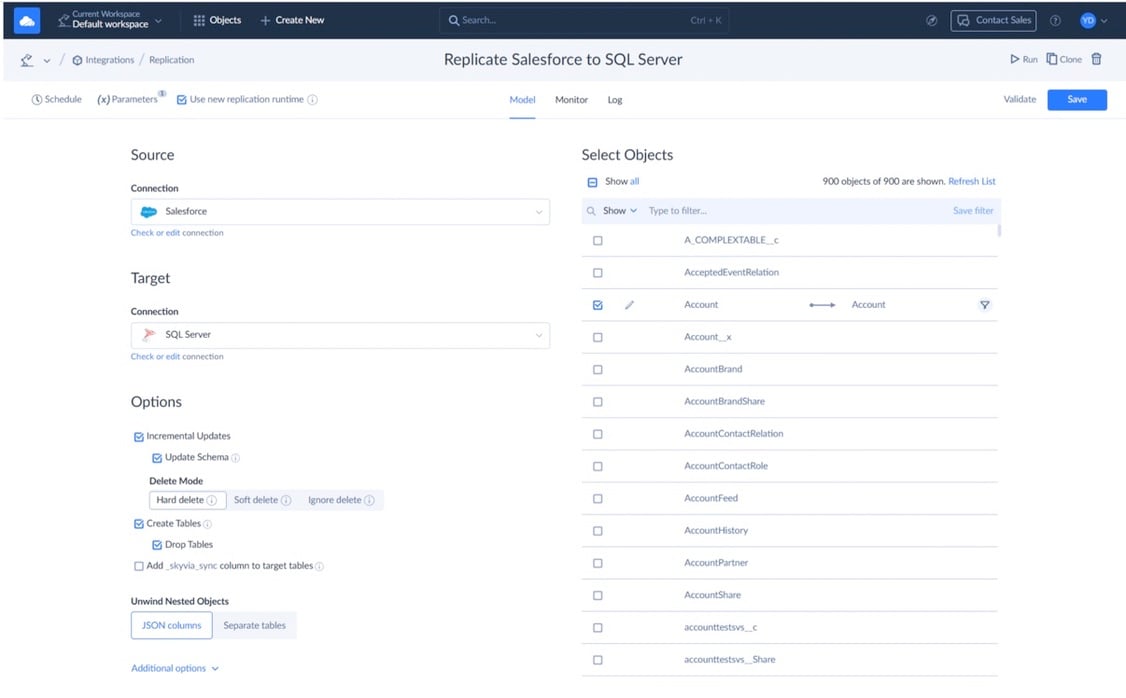
In Skyvia, open any integration’s Monitor tab and you’ll see its current status and the five latest runs, with success and error row counts for each. Older runs sit in the Log tab, where a filter shows only the failures and each run keeps its per-record error details and result files.
Error email notifications start out switched off. Once enabled, they alert you when an integration or one of its tasks fails completely. Skyvia limits these emails to one per hour, and for integrations that run several times a day, usually one per integration per day.
How to Build a Data Pipeline Architecture with Skyvia
Skyvia is a no-code cloud data platform whose 200+ connectors reach cloud apps, databases, warehouses and file storage. On the batch side of the reference architecture, its products map like this:
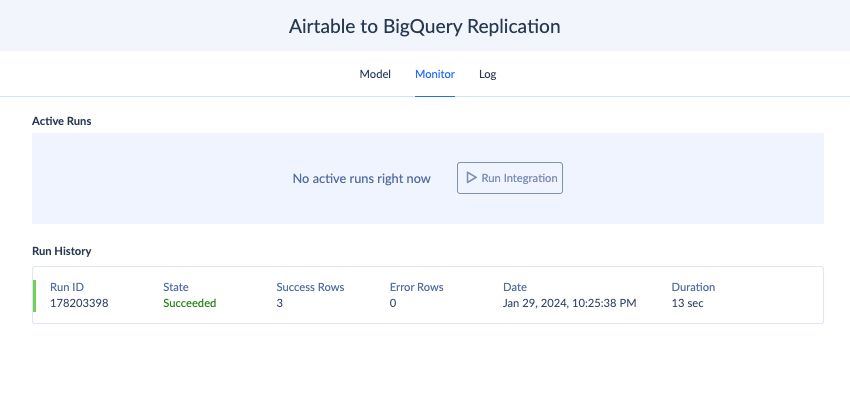
- Ingestion: Replication takes data from apps and databases and lands it in BigQuery, Snowflake, Redshift, Azure Synapse, Databricks or a database. You don’t build the target tables yourself; it does, then runs a full load and keeps up with new and changed records after that. Deleted source records are up to you (delete them in the target, flag them or keep them), and history mode keeps every version of a record around.
Want to see how replication works in Skyvia? This five-minute walkthrough shows the setup from start to finish.
- Processing: Data Flow (Standard plan and up) lets you wire several sources and targets into one multi-step pipeline, with lookups and conditional splits in between. Already have a dbt Core project? Skyvia runs it from your Git repository, either on its own schedule or as soon as replication finishes.
- Reverse ETL: Import takes warehouse data back to the apps, using insert, update, upsert or delete.
- Orchestration: Control Flow (Professional plan and up) chains integrations one after another or side by side, with If and Try Catch, so replication, dbt and reverse ETL behave like a single job.
- Consumption: Connect publishes data as OData and SQL endpoints for BI tools, and as MCP endpoints for AI assistants.
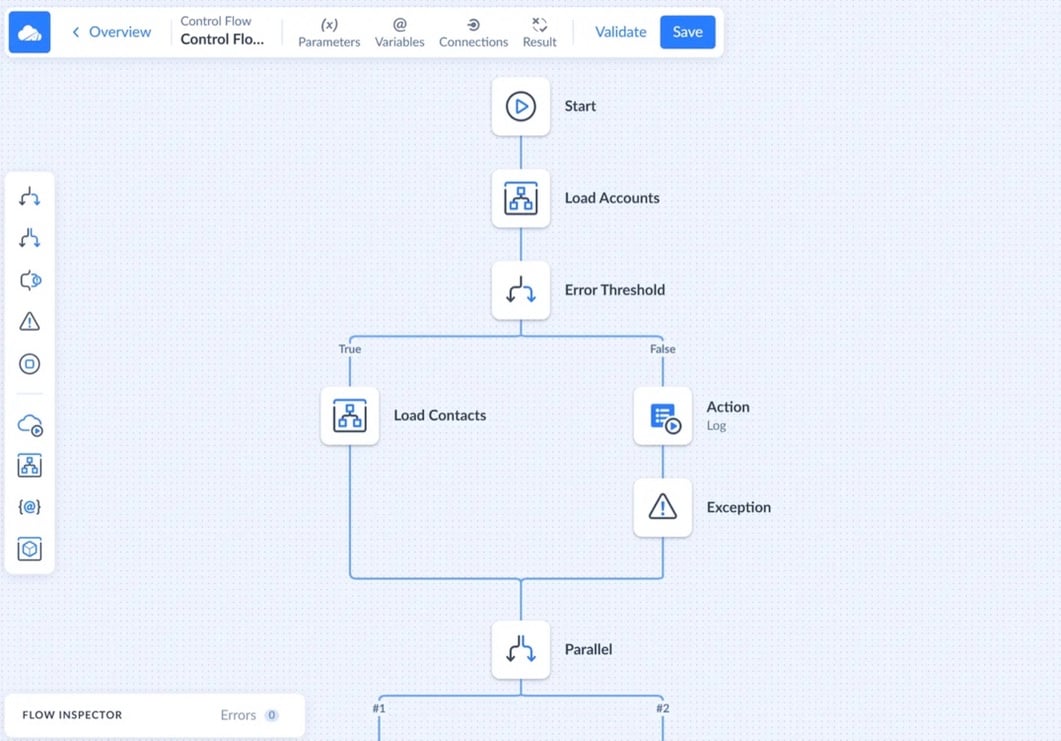
- On-premise sources: if a database sits behind a firewall, the On-premise Agent reaches it over outbound HTTPS.
There are limits worth knowing before you design around Skyvia. It handles batch and scheduled jobs, so don’t expect a streaming engine. Change capture is built on SQL Server’s Change Tracking and only works with SQL Server, while every other source uses timestamp-based incremental updates. It won’t notice schema changes in a source on its own, either. Your plan sets the shortest schedule. That’s once a day on Free and Basic, hourly on Standard, and every minute on Professional and Enterprise.

Curious how the reference architecture holds up on your data? Go ahead and start with Skyvia’s free plan, hook up a CRM and a warehouse, set up an incremental replication, and watch the first few runs come through in the Monitor tab.
FAQ for Data Pipeline Architecture

Is a data pipeline just another name for an ETL pipeline?
No. Think of a data pipeline as any designed route data takes from its sources to the people and tools that use it. ETL is one possible order of steps on that route (extract, transform, load), which is why ELT and streaming pipelines are data pipelines too.
Why does a failed pipeline run leave duplicate rows behind?
More often than not, the load inserts records instead of upserting them on a key. So when a run dies halfway and restarts, the rows it had already written go in again. Switch to an upsert on a unique ID and reruns stop hurting.
When is batch a better choice than streaming?
When no one acts on the data within minutes, which is true of most finance, sales and marketing reporting. On top of that, an hourly incremental load is cheaper to run and a lot easier to debug. Save streaming for fraud checks, live inventory and sensor alerts, where paying more for seconds makes sense.
How is kappa architecture different from lambda?
With lambda you run two paths (a batch layer for accurate history, a speed layer for real-time views) and merge them in a serving layer. Kappa gets by with one streaming path, replaying the stream whenever history needs recomputing. The upside of kappa is that you don’t maintain the same logic twice.
What kinds of data storage do pipelines write to?
Mostly a data warehouse, a data lake or a lakehouse. Warehouses check data against a schema on write, and that’s what makes them good at structured data and fast SQL. Lakes take raw data of any type at low cost, while a lakehouse adds warehouse-style analytics on top of lake storage.
Can a small team refresh analytics every 15 minutes from an on-premises SQL Server?
Yes, provided the pipeline runs on a schedule and loads incrementally instead of streaming. SQL Server’s Change Tracking does the heavy lifting, since each run reads only rows changed after the previous run. In Skyvia, the On-premise Agent gets to the server over outbound HTTPS, though going below an hourly schedule takes the Professional or Enterprise plan.
What belongs on a data pipeline architecture diagram?
Show every layer from sources to consumption, the direction data moves, each step’s schedule and where monitoring happens. Data going back into apps? Add the reverse ETL arrows. Leave out the schedules and you hide the question behind most failures: what runs before what?
Thinking about building the batch side of your architecture without code? Skyvia Data Integration replicates app and database data into your warehouse, runs Data Flow or dbt on top, and pushes results back to the CRM, on schedules you pick.