Summary
- Skyvia – no-code integration built for teams that need results without the maintenance saga.
- Airbyte – open-source flexibility, at the cost of owning your own infrastructure.
- Estuary – the closest thing to genuine real-time CDC in this list.
- Talend – the enterprise choice when governance and on-premises execution aren’t optional.
Another Fivetran invoice, another increase, but your data barely shows growth. Maybe someone turned on history mode for a few busy tables, or a dozen small connections each started carrying a minimum charge. Now, everyone suspects everyone.
If that sounds familiar and you’re now hastily comparing Fivetran alternatives before the next month’s bill arrives, don’t worry. Plenty of teams are in the same spot.
This guide checks each vendor’s own pricing and documentation pages, puts the pricing units side by side with Fivetran as the baseline, and runs three of the tools through the same Salesforce-to-Snowflake load. Along the way, we also correct several claims about Fivetran that roundups still repeat.
The plot twist nobody saw coming (except everyone): we work at Skyvia, which is one of the tools below, so we list its limits next to its strengths. Here is how the options compare.
Fivetran Alternatives at a Glance: Which Tool Fits Which Job
Since everyone has their own reasons to leave, there’s no one tool that can replace it for everyone. This rule applies to any “Y alternatives” conversation.
| Tool | Pricing Unit | Entry Price | Fastest Sync | Where it Runs |
|---|---|---|---|---|
| Fivetran | Monthly active rows (MAR), counted per connection | Free up to 500,000 MAR; paid plans are usage-based | 1 minute on Enterprise and Business Critical; 15 minutes on Standard | Cloud; Hybrid Deployment on Enterprise and Business Critical |
| Skyvia | Records written per month | Free: 10,000 records a month. Basic: $79 a month billed annually ($99 monthly) for 5M records | 1 minute on Professional and up; hourly on Standard; daily on Free and Basic | Cloud on Azure; On-premise Agent for databases behind a firewall |
| Airbyte | Credits on Cloud; self-hosted Core is open source | Standard: $20 a month with 5 credits. Plus: from $189 a month for 40 credits | 1 hour on Standard, 15 minutes on Plus, 5 minutes on Pro | Cloud or self-hosted; on-premises and hybrid on Enterprise Flex |
| Estuary | GB moved plus connector instances | Free up to 10 GB and 2 connector instances. Cloud: $0.50 per GB plus $100 per connector a month | “Millisecond latency or batch,” per Estuary | Cloud, BYOC or private (annual contract) |
| BladePipe | Rows, priced per million | Community edition is free. Cloud: $0.01 per million ETL rows, $10 per million CDC rows | CDC latency under 5 seconds, per BladePipe | Self-hosted Community, cloud or BYOC, Enterprise in your own VPC |
| Qlik Talend Cloud | Data volume, plus job executions and duration on higher tiers | Quote only | Log-based CDC from the Standard tier; no latency figure published | Cloud, client-managed or hybrid |
How We Tested and Evaluated These Fivetran Competitors
Our data engineering team ran Skyvia, Airbyte, and Estuary side by side, in a little over 30 hours of hands-on work. The setup was the same each time: about 20,000 Salesforce rows loaded into a fresh Snowflake warehouse, with only the tool in between changing. We did not run BladePipe, Qlik Talend Cloud, or Fivetran in that test, so those sections rest on the vendors’ own pages and say so.
We score every tool on three criteria:
- Pipeline setup time: the clock runs from creating an account until the first row lands in Snowflake.
- Sync latency: how long a Salesforce change takes to appear in the warehouse.
- Pricing predictability: whether you can estimate next month’s bill from this month’s usage.
We apply the same criteria to every tool, Skyvia included.
Before You Switch: How Fivetran Pricing Works and How to Audit Your Bill
Your Fivetran bill might have more to do with a handful of connections than the size of your data. Before migrating everything to another platform, it’s worth finding out where the money goes.
MAR is the number of distinct primary keys Fivetran syncs during one calendar month, counted separately for each connection and each table. A row counts once a month, however many times it syncs. Fivetran’s docs put it plainly: a key synced 30 times in a month is one MAR.
Here’s where costs tend to creep up:
- Busy tables: The more distinct records that change, the higher your MAR.
- Too many connections: Each gets its own discount curve, plus the $5 minimum where applicable.
- Deletes and history mode: Deleted records count, and history mode can charge several times for one frequently updated row.
- Missing primary keys: Fivetran may build a hashed key from column values. Change those values, and the record can look brand new.
- Monthly resets: The MAR counter starts fresh each month. Resuming a paused connection can also bring accumulated changes into the bill.
How to Give Your Fivetran Bill a Checkup
Before pulling the plug, find out whether you’re paying for useful data or just feeding the meter.
- Go to Account Settings → Billing & Usage → Usage and find your most expensive connections.
- Open each connection’s Usage tab. Which tables are responsible for the bulk of MAR?
- Check when exactly the costs jumped.
- Stop syncing tables nobody uses, where the connector allows it. Check whether history mode is actually needed.
- Compare what’s left against the current pricing tiers, including the Free plan’s 500,000 MAR allowance.
If the bill still looks unreasonable without any clear explanation (eg., a few forgotten tables are running up the tab), the pricing model itself may be the problem. That’s when shopping for a Fivetran alternative starts to make sense.
What Changed in 2025 and 2026
A lot of roundups are still describing the Fivetran of two years back. Here’s what changed:
- March 1, 2025: Fivetran began applying volume tiers per connection instead of per account. If you have one large connection, you may pay less. However, if you’re curating dozens of smaller ones, it can push the total up. Unchanged re-syncs became free, while the Starter and Private Deployment plans disappeared.
- January 1, 2026: A $5 minimum charge for every Standard-plan connection that produces between 1 and 1M paid MAR in a month. Twenty low-volume connections that each sync some paid rows now cost at least $100 a month between them. Deletes count toward paid MAR, like inserts and updates. With history mode on, repeated updates to the same row are billed. A row that changes three times in a month counts three times.
- February 1, 2026: Census became Fivetran Activations: reverse ETL on the same contract and invoice, measured in MAR on its own cost curve.
- June 1, 2026: Fivetran completed its merger with dbt Labs.
Fivetran now has four plans: Free, Standard, Enterprise, and Business Critical. Free gives you 500,000 MAR a month to work with. Need faster updates? Standard runs every 15 minutes, while Enterprise and Business Critical bring that down to just one.
Types of Fivetran Alternatives
Not every tool in this list replaces the same part of Fivetran. Sort them first:
- Managed ELT into a data warehouse, with a flat or volume-based price: Skyvia, Hevo, and Stitch below.
- Open-source ELT: Airbyte, which you can also buy as a managed cloud service.
- Real-time streaming and CDC: Estuary.
- Database migration and replication: BladePipe.
- Enterprise integration suites: Qlik Talend Cloud.
Skyvia: A No-Code Fivetran Alternative With Costs You Can Predict
Beyond ETL and ELT, Skyvia handles reverse ETL through Import and two-way sync. Orchestration and live data access are in the mix too, all through a no-code interface with 200+ sources and destinations.
Salesforce was ready in under a minute. A click, a sign-in, and authorization did the trick. Snowflake was more particular: it needed an account domain plus a username and password. OAuth and key-pair authentication are also available, which is worth noting in 2026 as Snowflake phases out single-factor passwords for service users.
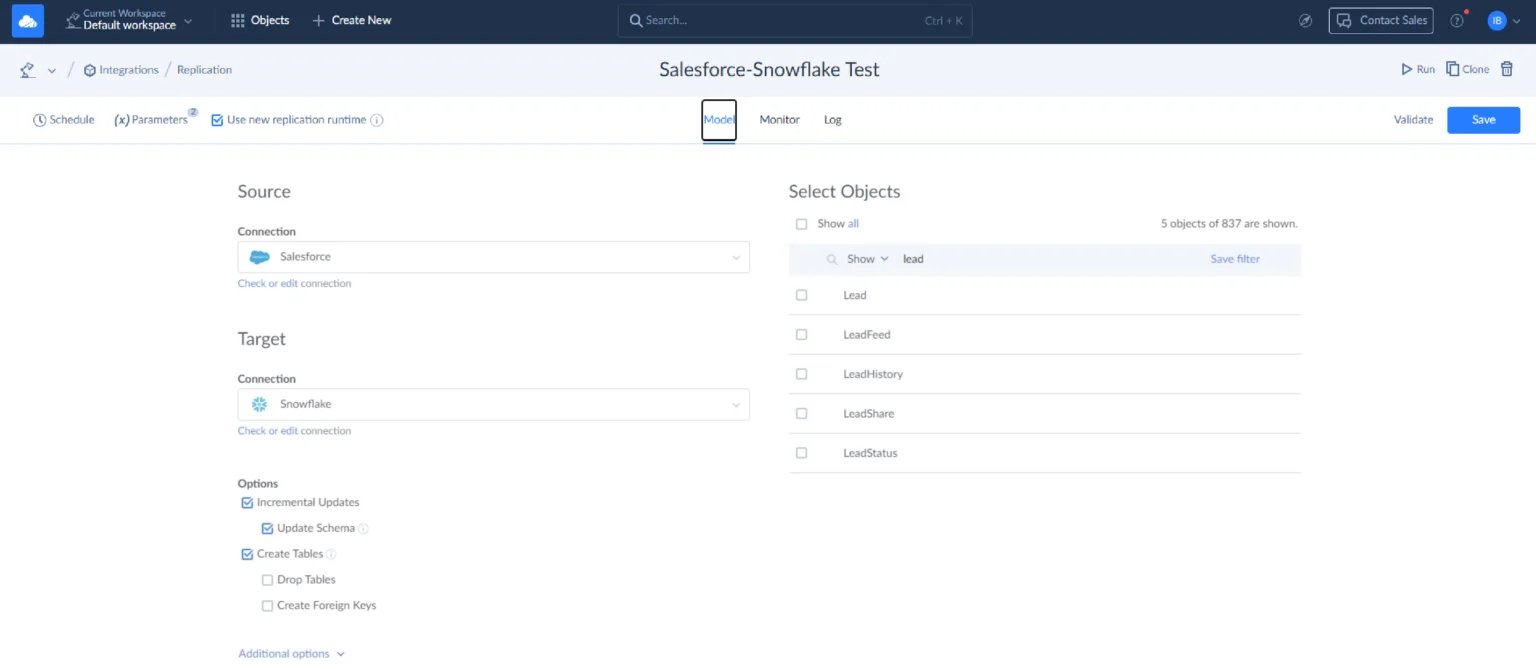
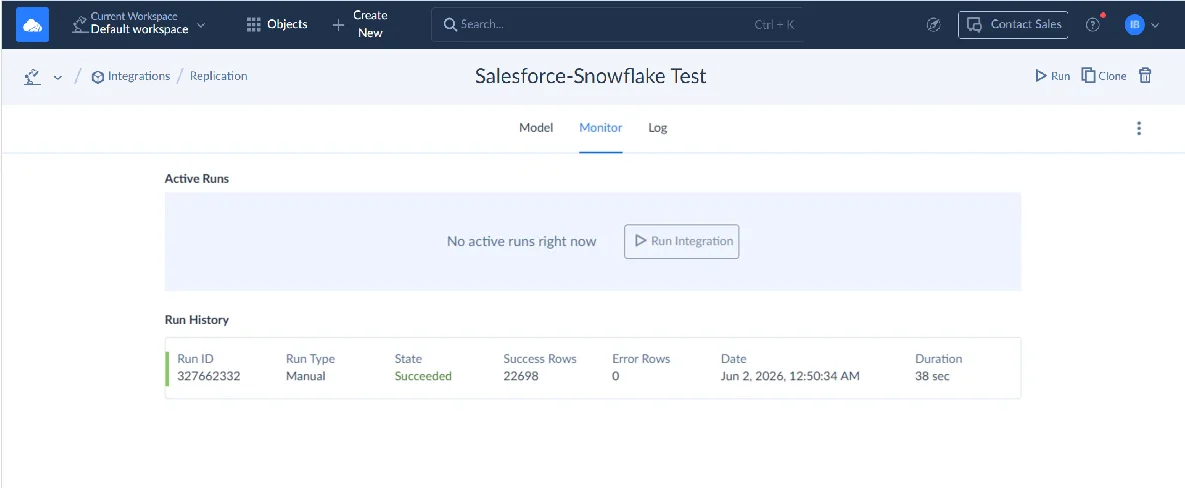
Then we gave Skyvia something to do. The assignment: replicate the Salesforce Lead object to Snowflake. It picked up every field automatically, although we could have narrowed the selection. We ran it manually to see what happened, then set it to run hourly. Monitor showed 22,698 rows processed in 38 seconds. Nothing failed, so there was nothing to troubleshoot.
We never opened a terminal, edited a config file, or patched anything afterward.
Best for
If you’re an engineer who’d rather stop maintaining pipelines by hand, or an analyst, ops, marketing, or finance person with no engineer to ask, this one is for you. Say your real need is “when a file lands, branch into three HubSpot actions depending on its contents.” That is an automation problem. Skyvia’s Automation product handles it, not replication.
Pricing
Skyvia prices Data Integration by records written per month, in plans from Free to Enterprise. Every price below is per month on annual billing, and the figure in brackets is what you pay when billed monthly.
- Free: 10,000 records a month and one run a day.
- Basic: $79 ($99) for 5M records, one run a day.
- Standard: $159 ($199) for 5M records, hourly runs, and Data Flow. Its entry point is $79 ($99) for 500K records.
- Professional: $399 ($499) for 10M records, with runs every minute and Control Flow.
- Enterprise: a custom annual package that adds unlimited records, higher processing capacity, and a dedicated virtual machine.
Also, Skyvia lets you increase the cap without moving up a tier. Basic can stay Basic, just with more records. Extra records are opt-in, so once you hit the limit, new runs wait for the next period instead of continuing beyond it. Check the live figures on the Skyvia pricing page.
Rating
G2: 4.8/5 based on 321 reviews | Capterra: 4.8/5 based on 116 reviews
Pros
- A visual setup that gets a first pipeline running in minutes.
- It handles the whole data warehouse workflow, from replication into Snowflake, BigQuery, Redshift, and others to dbt Core runs from your Git repository and reverse ETL through Import.
- MCP endpoints give an AI assistant read and write access to data through a Skyvia connection. An endpoint exposes everything its connection can see, so limit the connection’s own user.
- A run history with failure details. After the September 2026 release, a failed run tells you how bad it was: the whole integration, one or more tasks, or only some records. Error alerts by email are available, and you turn them on per account.
- Security covers SOC 2 and GDPR compliance, along with encryption in transit and at rest and audit logs.
Cons
- Schedules bottom out at one minute, and they poll rather than stream. Native change tracking covers SQL Server only, through SQL Server Change Tracking; other sources use timestamp-based incremental updates. For sub-second streaming, Estuary fits better.
- Skyvia does not detect source schema changes automatically, so check the integration after a source adds fields.
- Skyvia runs in its own cloud on Azure. Is your database behind a firewall? The on-premises Agent connects to it, though the data is still processed in Skyvia’s cloud.
Airbyte: An Open-Source Fivetran Competitor With Plenty of Connector Flexibility
Lives in the terminal more than the browser? Then no-code can feel like a limit, not a perk. This is where open-source Fivetran alternatives earn their keep. Skyvia has a separate guide to Airbyte alternatives if you want to compare further.
We ran the open-source version first. Airbyte’s current local install uses abctl, which deploys Airbyte into a local Kubernetes cluster through Docker Desktop. Airbyte’s docs recommend at least 8 GB of memory.
Our first attempt sat on “waiting for Airbyte to become ready” for almost nine minutes. kubectl get pods showed two pods restarting, and Docker Desktop had only 4 GB allocated. We raised it to 10 GB and reran abctl local install, and the cluster was ready in under three minutes.
And when we thought that everything could run now, the Salesforce sandbox connection brought the next problem. The sync returned a generic invalid_grant error. So, we compared Airbyte’s Salesforce requirements with the Connected App settings and Salesforce’s audit data to trace the perpetrator. Turned out the Connected App needed API access and the “Perform requests at any time” permission (refresh_token, offline_access) so the connection could renew its token.
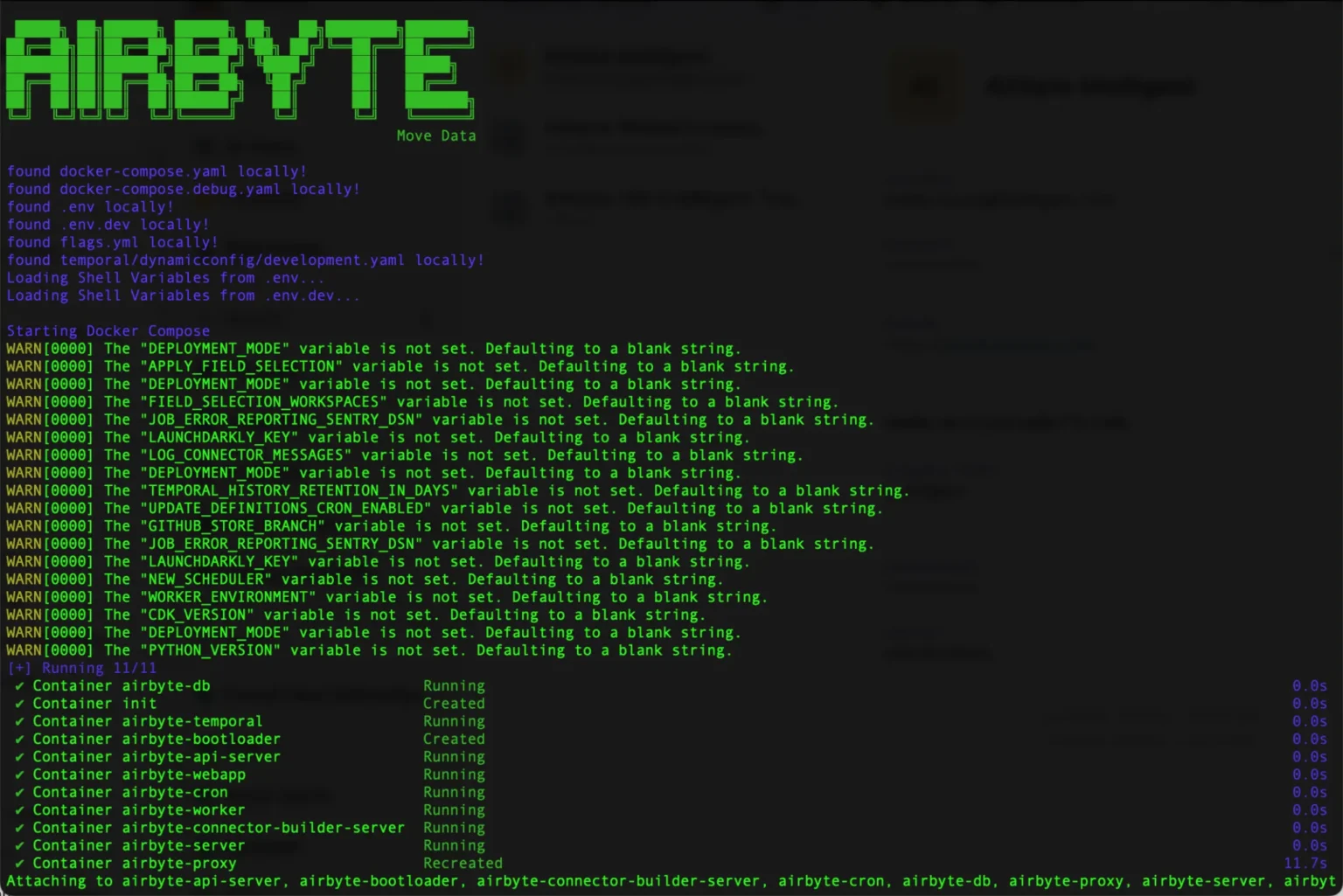
One permission fix later, Airbyte suddenly remembered how to do its job.
Best for
A team that already runs Kubernetes for something else can add Airbyte at little extra cost. Start a cluster from scratch just for this, and “free” stops being free once you count the setup week.
The other clean case is a source with no vendor connector, such as an internal billing API. Airbyte answers with a Connector Builder and CDK, Fivetran with a Connector SDK, so put both side by side.
Pricing
The self-hosted version, Airbyte Core, is open source. The cluster, database, monitoring, and backups still cost money, and so do the engineering hours spent keeping it patched. At high volume, this usually beats Fivetran on raw cost. At low volume, engineering time can eat the savings.
Airbyte Cloud bills in credits:
- Standard costs $20 a month and includes 5 credits, and each extra credit is $5. That pricing took effect on September 23, 2026.
- Next up is Plus, from $189 a month for 40 credits, which adds 15-minute syncs, SSO, and two workspaces.
- Pro and Enterprise Flex use capacity-based pricing and are quote-only. Both Standard and Plus come with a 14-day trial.
Rating
G2: 4.4/5 based on 78 reviews | Capterra: n/a
Pros
- Open source, with a self-hosted option.
- 700+ connectors across every plan, and a Connector Builder on top.
- If you don’t want to run infrastructure, Airbyte offers a managed cloud, and Enterprise Flex handles in-boundary or on-premises deployment.
Cons
- Self-hosting means you’re responsible for everything, all the time, and the only support you get is the community built around the tool.
- Syncs on Standard run at most hourly. Plus gets you down to 15 minutes, and Pro to 5.
- Credit metering varies by source type, which makes Cloud bills harder to predict than a flat plan.
Estuary: The Real-Time Streaming and CDC Alternative to Fivetran
Fivetran isn’t purely batch, since the Enterprise and Business Critical plans sync every minute. Still, data that has to flow continuously suits a streaming tool better than a scheduled timer.
We gave Estuary the same assignment: Salesforce to Snowflake. But there’s a small plot twist. This is not the log-based CDC people picture when they hear “Estuary.” For the initial backfill, Estuary’s Salesforce connector calls Bulk API 2.0, and it switches to the REST API for incremental updates. Formula fields get refreshed on a schedule, daily by default.
The pipeline has three stages, starting with a capture that reads the Salesforce objects. Those objects land in a durable Estuary collection, and a materialization loads the collection into Snowflake. Setup took a scoped Salesforce connected app aimed at our sandbox, with Account, Contact, and Opportunity as the objects, and a backfill. Incremental updates started after that.
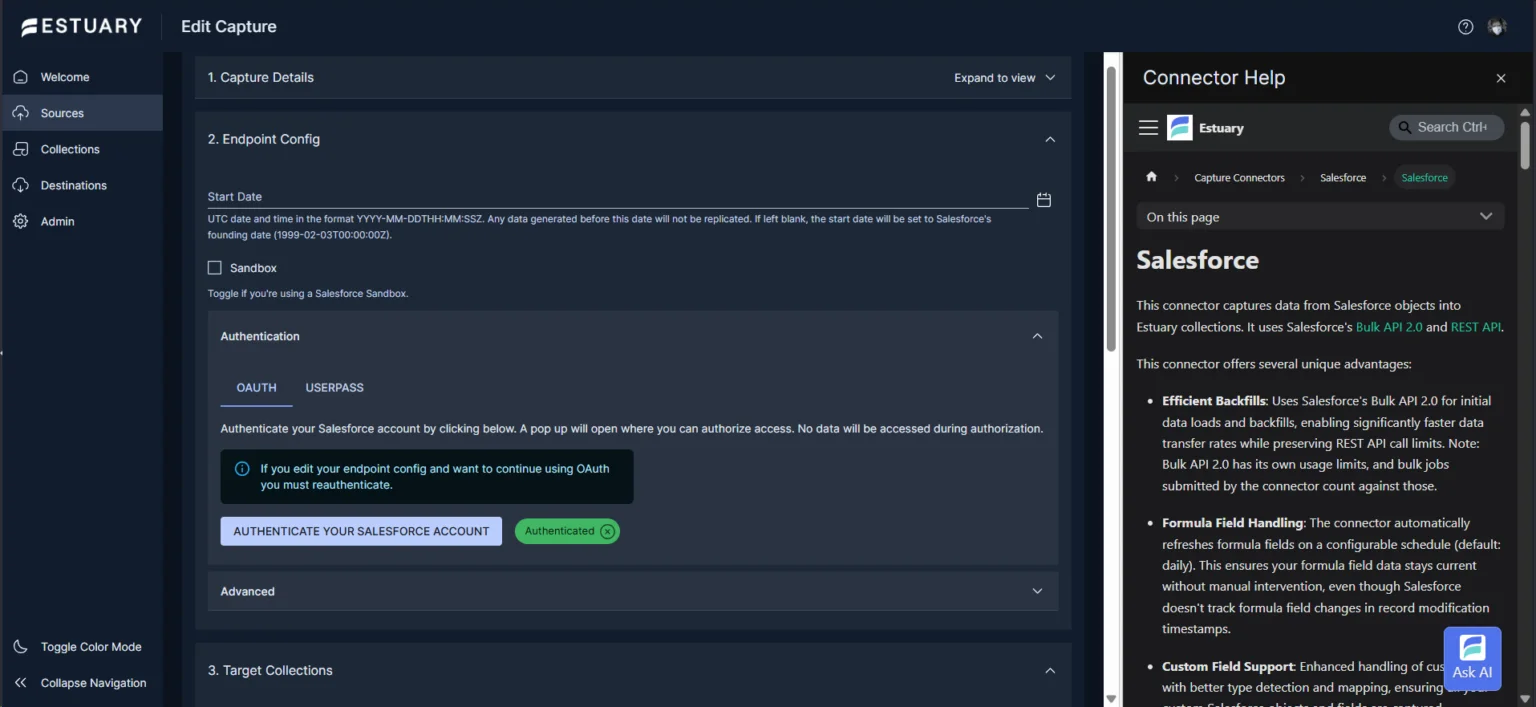
Since the capture goes through Salesforce’s own APIs, it competes for API limits with everything else hitting that org. Standard objects gave us no surprises. Formula fields, custom objects, and deletes needed separate checks.
Best for
When “the dashboard is five minutes stale” costs real money. Live financial dashboards, inventory, or fraud checks that must fire before a transaction clears will clearly benefit from using Estuary. It also works for teams that want streaming but don’t want to operate a Kafka cluster of their own.
Pricing
Estuary has a free Developer plan up to 10 GB a month and 2 connector instances. On the Cloud plan, you pay $0.50 per GB plus $100 per connector instance each month, and the price drops to $50 for every instance after the sixth. Take 200 GB a month across two always-on connectors: that’s $100 for the data and $200 for the connectors, roughly $300 in all. A 30-day free trial comes with Cloud.
However, there’s a pricing detail that is worth considering before you replace Fivetran with Estuary. On Snowflake, compute is billed per second with a 60-second minimum, so a warehouse that sits idle costs nothing. Estuary’s own Snowflake docs suggest setting auto-suspend to 60 seconds. Because of that minimum, even a tiny load costs 60 seconds of compute. Near-real-time intervals belong with operational data, while analytical tables are fine syncing less often.
Rating
G2: 4.7/5 based on 35 reviews | Not listed on Capterra so far
Pros
- Streaming and batch in one platform, with “millisecond latency or batch, no extra charge,” per Estuary’s pricing page.
- You don’t have to re-extract everything every time thanks to collections that are durable and replayable.
- You can run Estuary as SaaS, BYOC, or private, and its API is Kafka-compatible.
Cons
- Connector-instance billing means always-on pipelines cost money even when there are little changes.
- CDC health depends on source setup. A stalled replication slot on Postgres, for example, can grow the write-ahead log.
- A learning curve might be a bit steeper than some other tools discussed in this article if your usual workflow is scheduled jobs, not captures, collections, and materializations.
BladePipe: Best Fivetran Alternative for Database Migration and CDC
For teams that need more than managed warehouse ingestion, BladePipe focuses on databases. Full migration, log-based CDC, and continuous delivery come in one product, and sensitive data can stay in your own environment. BladePipe wasn’t part of our test, so what follows comes from its pricing and product pages.
BladePipe lists 60+ data sources, schema migration, DDL sync, visual transformations, verification and correction, monitoring and alerts, and checkpoint recovery. CDC latency is under 5 seconds on every edition, according to BladePipe.
Best for
If you need to move data between different databases, real-time warehouses, queues or search systems, this might be your stop. Some bonus points if your workflow involves low-latency replication, zero-downtime migration, or any case where you need control over where data lives.
Pricing
BladePipe offers three different pricing tiers:
- The self-hosted Community edition is free, and gives you 5 sync tasks.
- Cloud, as managed SaaS or BYOC, costs $0.01 per million ETL rows and $10 per million CDC rows, counting rows added, edited, or deleted, with volume discounts.
- Enterprise runs in your own VPC under a contract, with a 90-day free trial.
Rating
G2: no reviews | Capterra: no reviews
Pros
- Cloud-only services offer less choice: BladePipe also runs self-hosted, as SaaS, as BYOC, or inside your own VPC.
- It covers the one-time database migration and the ongoing replication after it.
- Since the Community edition costs nothing, you can test the core features before paying.
Cons
- Its strength is in databases, warehouses, queues, and lakehouses, so look through the source list before planning SaaS-app syncs.
- Community is limited to 5 sync tasks and 500 tables per task.
Talend (Qlik): Best Enterprise Fivetran Competitor for Hybrid and On-Prem Workloads
At some point, “just sync it to the cloud” stops being an option: the data may not be allowed to leave the building, or a mainframe predates half your engineers. That is a different problem from the one Airbyte or Estuary solves.
Talend is now sold as Qlik Talend Cloud, in four tiers: Starter, Standard, Premium, and Enterprise. From the Standard tier, you get real-time synchronization using log-based CDC, and hosting can be in the cloud, client-managed, or hybrid. Premium is where ELT or ETL transformations, column-level lineage, data quality, and profiling show up. Enterprise adds SAP and mainframe connectivity. We did not run it in our test, so this section relies on Qlik’s pages.
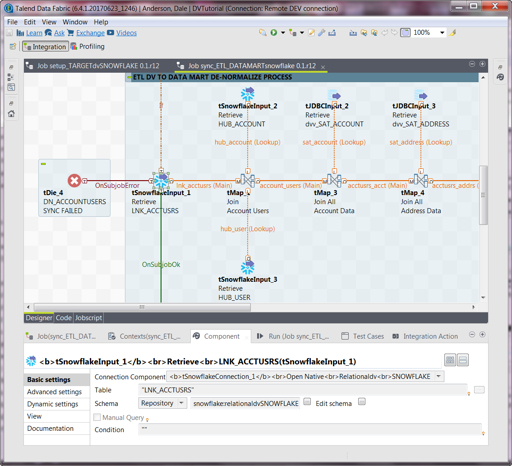
The free, open-source Talend Studio was deprecated in January 2024. If that’s your perfect solution, check our guide to Talend alternatives.
Best for
It’s a good fit for large organizations where legacy mainframes or SAP still share the stage with modern cloud systems. The same goes for regulated industries where compliance dictates where data can live. It’s also worth considering when a single pipeline needs to reach deep into multiple internal systems.
Pricing
Every tier hides behind “Contact Us.” The only thing about Qlik pricing we know for sure is that Starter and Standard are priced by data volume. Premium and Enterprise are priced by data volume plus job executions and duration.
The license quote tells you less than the total cost of ownership does. It can pay for itself if it replaces several separate ETL, quality, and governance tools. For one lightweight pipeline, it’s overkill.
Rating
G2: 4.3/5 (105 reviews) | Capterra: 4.3/5 (24 reviews)
Pros
- Hybrid and client-managed hosting keep sensitive or legacy data close to home.
- Governance included: lineage, profiling, quality rules, and stewardship on Premium.
- On Enterprise, you also get SAP and mainframe connectivity.
Cons
- Add up infrastructure and implementation, and the bill grows, so a $99-a-month budget is not realistic here.
- Don’t expect a quick sign-up: you’ll go through architecture, a security review, environments, and testing first.
- Qlik doesn’t publish a latency figure for its CDC, so run your own freshness test before you commit.
Other Fivetran Competitors Worth a Look
Three more names come up in almost every roundup.
- Hevo Data: a no-code managed ELT service. The Free plan covers 1M events a month with hourly scheduling. Starter costs $299 a month billed monthly, or $265 billed annually, for 5M to 50M events and 150+ connectors. Skyvia’s guide to Hevo Data alternatives compares it further.
- Stitch: simple row-based ELT. Standard starts at $100 a month for 5M rows, with 10 standard sources and one destination, after a 14-day trial. Our guide to Stitch alternatives has more.
- Matillion: credit-based, with credits consumed by pipeline execution time and active capacity. Matillion lists no price on its pricing page and offers a free trial. See our Matillion competitors guide.
Choosing the Right Fivetran Alternative for Your Data Stack
No one alternative suits every team, though the order you evaluate them in carries over. Work through six questions.
Start with where the data may live. If a source cannot reach the public internet, check the “Where it runs” row of the table first. Talend, Fivetran’s Hybrid Deployment, Airbyte Enterprise Flex, BladePipe Enterprise, and Estuary’s private option all keep data inside your boundary, on the plans described above. Skyvia can reach databases behind a firewall with its on-premises Agent, though the processing still runs in Skyvia’s cloud.
Next, how fast must the data move? An hourly CRM refresh is one job and catching fraud is another. For example, if you buy streaming you never needed, you’ve wasted money. On the other side of this coin is a pipeline that technically works but runs too slowly to matter, and you’ve wasted it again.
Then what has to happen to the data before it lands? Joining three tables, deduplicating, and validating before anything moves downstream ≠ renaming one column. A visual mapper handles the first. That second case needs a transformation layer: in the stream with Estuary, or in a dedicated engine with Talend.
Who fixes it when it breaks? Suppose no one on your team can debug a stalled container or a stuck replication slot. Then skip self-hosting. A no-code or low-code tool that runs without a data engineer on call is the safer pick.
What reaches analytics and AI workloads: which warehouse you load, whether you can send data back to apps, and how an AI assistant gets to the data. Fivetran Activations and Skyvia Import cover reverse ETL, and Skyvia’s MCP endpoints cover assistants.
Last, the cost at three times your volume. Plenty of tools look cheap today and pricey at scale, since each meters something else: rows, credits, gigabytes, or records.
| Ask yourself | Points toward |
|---|---|
| Data cannot leave your network, or legacy and mainframe systems are involve | Talend, or Fivetran Hybrid Deployment |
| Source is a database and minutes of staleness cost money | Estuary or BladePipe |
| Team already lives in Docker or Kubernetes and wants full control | Airbyte |
| Predictable pricing and no infrastructure to maintain | Skyvia |
| The bill comes from one or two high-churn connections | Audit first, as described above |
When Staying with Fivetran Makes Sense
Sometimes Fivetran is the answer, plain and simple. Need the broadest managed connector library (700+ on its pricing page), 1-minute syncs from production databases, or Hybrid Deployment inside your own network? The alternatives above may not match it. A bill driven by a few fixable connections is also an audit problem, not a migration one.
A Checklist for Migrating Off Fivetran
Plan these steps:
- Inventory: note each Fivetran connection, its sync frequency, and whatever depends on it downstream.
- Check parity: does the new tool have every connection? Flag on-premises or custom sources early.
- Backfill: pull the history into the new tool, and check that row counts and schemas line up with the old setup.
- Run in parallel: write to separate schemas in the same warehouse from both tools for one to two weeks, then reconcile.
- Cut over: switch off the Fivetran syncs and point downstream references at the new tool, with a rollback trigger agreed before you start.
Steps 2 and 3 are what replication does in Skyvia. You connect, choose your objects, and the tables get built and loaded for you.
You’ve just read almost 4,000 words about Fivetran alternatives. At some point, that has to become a pipeline running in front of you. Try Skyvia free: connect one real source and see how much more your data can tell you than a demo.

FAQ for Fivetran Alternatives

Can Airbyte replace Fivetran without changes?
No. You run the platform yourself with the open-source version, and on Standard Airbyte Cloud syncs once an hour at best. Pick Plus for 15-minute syncs or Pro for 5-minute ones, depending on how fresh the data must be.
Is Fivetran free to use?
Yes. It covers up to 500,000 monthly active rows for connections. Past that, paid plans are usage-based.
Does Fivetran handle real-time data?
Not in the streaming sense. On Standard, syncs run every 15 minutes, while Enterprise and Business Critical go down to every minute. Need data in milliseconds? Estuary, which describes its own latency as milliseconds, is the one to look at.
Can Fivetran do reverse ETL?
Yes, as a separate product. Fivetran Activations sends data back to apps, with 200+ destinations, and bills separately by MAR. Skyvia covers reverse ETL through Import.
Can I keep data on premises with Fivetran or its alternatives?
Fivetran offers Hybrid Deployment on its Enterprise and Business Critical plans, which keeps data inside your network. Airbyte Enterprise Flex, BladePipe Enterprise, Estuary’s private option, and Qlik’s hybrid tier also keep data inside your boundary. For databases behind a firewall, Skyvia offers the On-Premise Agent, but the processing still happens in Skyvia’s cloud.
Why is my Fivetran bill higher than expected?
To see which tables drive the count, open the Usage tab of each connection. A recreated connection, a new column or table in the source, a paused connection that was resumed, or just a fresh month can all push the count up. Sync frequency does not change monthly active rows.
How do I leave Fivetran, and where do I begin?
Start with a bill audit, because one or two connections often make up most of it. If it turns out to be the pricing model, list your connections, check that the new tool covers each source, backfill, and run both tools in parallel for one to two weeks. Agree on a rollback trigger before you cut over.