Summary
- AI data pipelines extend ETL with features or embeddings, training or indexing, serving, and monitoring.
- Predictive ML and RAG share the same foundation but split into features for models versus chunks and embeddings for retrieval.
- Training-serving skew, leakage, drift, and stale data can hurt model quality even when the pipeline still runs.
- Most teams can reuse their existing stack and add tools like Feast, MLflow, KServe, pgvector, and Evidently where needed.
- Skyvia can handle the data side with replication, visual transformations, scheduling, and dbt Core orchestration.
Most teams already have plenty of data moving around. The harder part is deciding whether that data is good enough to feed a model. A dashboard can survive the occasional duplicate, stale field, or inconsistent label. A model usually cannot, because it will learn from whatever you give it.
Once the data lands, AI adds a few more jobs. A predictive model needs features it can use again later when scoring new records. A RAG app needs documents broken into searchable pieces and refreshed when the source changes. The warehouse is still useful, but it is no longer where the pipeline ends.
If you already know ETL, most of the foundation is familiar. The new work begins after the load.
What is an AI data pipeline, in plain terms?
Take the ETL you know by heart and just keep going after the warehouse. Extract, transform, load: none of that goes away. Who reads the output is what changes, since it’s a model or an LLM app now (not your manager with a chart). So the job doesn’t end at the load. You prepare features or documents, feed training and inference, keep an eye on the model, and send new data back around.
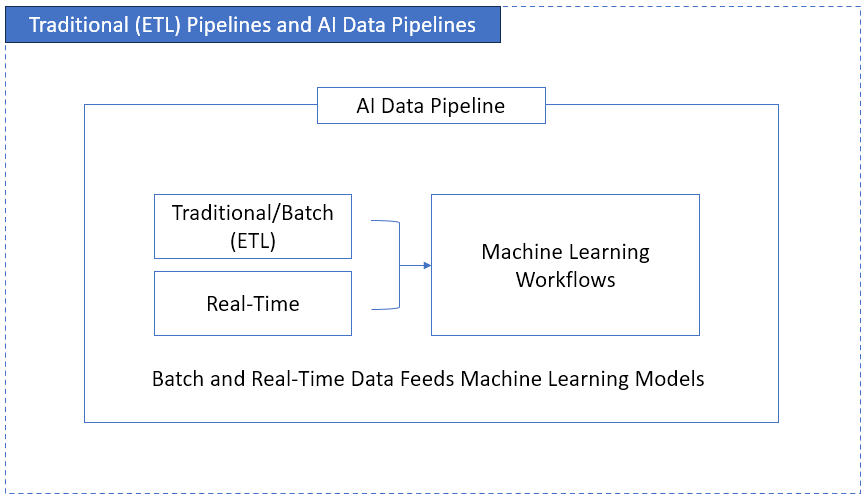
That consumer changes the rules. A manager who sees a strange number on a chart asks a question. A model just uses it. Here’s how the two kinds of pipeline compare:
| Aspect | Traditional ETL | AI data pipeline |
|---|---|---|
| Workflow | Linear: extract, transform, load, done | A loop: ingest, prepare, train or index, serve, monitor, retrain |
| Data types | Mostly structured: tables, CSVs, API responses | Structured plus semi-structured (JSON, logs) and unstructured (documents, images, sensor feeds) |
| Processing | Batch, on a schedule | Batch for training, streaming or on-demand for inference |
| Consumer | Dashboards and reports | Models, LLM apps, agents |
| What you monitor | Did the job finish? Do row counts match? | Drift, accuracy, freshness, and whether inputs still mean what they meant in training |
| Team | Often one data engineer | Data engineers, ML engineers and app developers sharing definitions |
| Output | What happened | What will probably happen, or an answer grounded in your data |
None of this makes ETL obsolete. The extract, clean, and load work is still the backbone. AI simply makes the chain longer than the warehouse.
Predictive ML or RAG: two flavors of AI data pipeline
Say AI data pipeline in 2026 and people picture one of two setups, which happen to share most of their plumbing.
- A predictive ML pipeline is the classic one, where raw records become features (days since the last order, say, or usage averaged over 7 days) that a model trains on and then uses for live predictions. Churn scores, demand forecasts, and fraud flags are all products of this kind of pipeline.
- A RAG pipeline is the newer flavor, and its whole job is getting documents ready for a large language model. Retrieval-augmented generation comes from a 2020 research paper, and the trick is easy to grasp: hand a language model a searchable index of your own content. In practice, the pipeline parses each document, breaks it into chunks, turns every chunk into a vector embedding, and keeps the whole index current. We go much deeper on that branch in our guide to building a RAG pipeline.
Up to the cleanup step, the two kinds look identical. Transformation is where they split, since one produces features for a model while the other produces chunks and embeddings for retrieval.
Key stages of an AI data pipeline
If you’ve shipped ETL jobs before, the rhythm here won’t surprise you. An AI pipeline plays the same beat, then adds a couple of loops. Here are the six stages, with what changes when the consumer is an LLM app.
Stage 1: Data ingestion
You’re still writing connectors, only the sources get messier. Alongside SQL databases, CSVs and APIs, expect event streams, IoT readings, logs and plain files. On a utility-consumption project, the daily meter reading wasn’t enough: real-time voltage events had to stream in too, which meant Kafka or Spark streaming instead of a nightly cron. SaaS apps and databases? A batch data ingestion tool handles those fine.
For RAG: you’ll ingest documents as well, such as PDFs, wiki pages, tickets and CRM notes, and you should keep their modified dates, because that’s how you’ll know what to re-index.
Stage 2: Storage and data prep
The data lands first. Cleanup comes next.
That usually means fixing formats, removing duplicates, and dealing with records that should not be there in the first place. We saw this in an insurance project where duplicate policy rows stopped the next step from running correctly.
For reporting, messy data may only distort a chart. For a model, the same issue can become part of the training data.
For RAG: remove boilerplate, keep the titles and section headings, and write down who’s allowed to see each document.
Stage 3: Feature engineering, or chunking and embedding
In predictive ML, a lot of the work is just turning existing fields into better inputs. A timestamp might become days_since_last_order; a usage table might become a 7-day average. The math is often simple. The important part is calculating the feature the same way every time.
SQL, dbt, Pandas, or NumPy can handle that work. A feature store such as Feast becomes useful when several models need to reuse the same features.
For RAG: documents are split into chunks and converted into embeddings. Chunk size needs some testing because it affects how much context the retriever can return with each match.
Stage 4: Training, or indexing
With ETL, you load into a warehouse and call it done. Here you load into a model, which means splitting the history (say 80% for training and 20% for validation), training, checking, tweaking features, and training once more.
For RAG: there’s usually no training. You write the vectors and their metadata to an index, such as pgvector in PostgreSQL or a managed search service.
Stage 5: Deployment and inference, or retrieval
ETL publishes a dashboard. What gets published is a model behind an endpoint, or a batch job that writes its predictions back into a table. The dashboard stops showing a refreshed report and starts showing tomorrow’s estimated consumption, pulled straight from the model.
Managed platforms such as Amazon SageMaker AI or GreenNode AI Platform cover this step: you push a model from a registry and get an autoscaling REST endpoint without running the serving stack yourself.
For RAG: the app retrieves a few matching chunks from the index and adds them to the prompt before the LLM answers.
Stage 6: Monitoring and the feedback loop
A pipeline can keep running even when the model is getting worse. That is why monitoring has to go beyond failed jobs.
A household adds a new appliance and the model starts underpredicting. The pipeline is still running, so there is no obvious error to catch. That is why you need to watch how inputs change over time and compare predictions with real outcomes. Those outcomes can then be used in the next training cycle.
For RAG: watch freshness. If a source document changed and its chunks didn’t, the assistant confidently quotes the old version.
AI data pipeline tools by stage (2026)
Tool names have changed a lot in the past few years. Here’s what’s worth knowing at each stage, as checked against every vendor’s own documentation in October 2026:
| Stage | Tools | What changed |
|---|---|---|
| Ingestion | Kafka, Spark, Apache NiFi, Skyvia, Fivetran | No change |
| Storage and prep | Snowflake, BigQuery, Databricks, dbt | Snowflake ML and BigQuery ML run ML next to the data |
| Features | Pandas, NumPy, Feast | Feast handles point-in-time joins for training sets |
| Training | scikit-learn, TensorFlow, MLflow | MLflow now also evaluates and monitors LLM apps and agents |
| Serving | KServe, Amazon SageMaker AI | KFServing was renamed KServe in 2021; Amazon SageMaker became SageMaker AI in December 2024 |
| RAG index | pgvector, Snowflake Cortex Search | Cortex Search handles embedding and index refresh for you |
| Monitoring | Evidently, Arize AX, whylogs | Amazon Lookout for Metrics ended support on October 10, 2025; the WhyLabs platform became open source on January 23, 2025 |
| Orchestration and MLOps | Kubeflow, Kubernetes, MLflow | No change |
Still following an older tutorial that sets up KFServing or Lookout for Metrics? Go with KServe and an open-source monitor like Evidently. For a side-by-side comparison of ingestion and orchestration options, see our roundup of the best data pipeline tools.
Training-serving skew and leakage: the bugs ETL pros don’t expect
ETL bugs are loud: a job fails, a row count is off. The nastiest AI pipeline bugs don’t make noise, and two of them start on the data side.
Training-serving skew. Google’s machine learning guide puts it simply: it’s a gap between how a model performs in training and how it performs when serving. Usually, either the two pipelines treat the data differently, or the data shifted somewhere between training and serving.
Suppose the training pipeline calculates revenue in dollars, but the application later sends the same feature in thousands. Both values are valid numbers, so the pipeline keeps running. The problem is that the feature no longer means the same thing at training and serving time. The safest approach is to define the feature once and reuse that logic in both places. It also helps to log the features actually served so future training uses the same values the model saw in production.
Leakage from the future. Training data should only include information that would have been available at the moment of prediction. If a March 1 churn label is joined to support tickets with no date condition, tickets created later in March can slip into the training row. Validation may look excellent, but production cannot reproduce that setup.
Feature stores solve this with a point-in-time join. In SQL, that means adding date bounds to the join:
-- Feature: support tickets in the 30 days before each prediction date

SELECT l.customer_id,

      l.as_of,

      COUNT(t.ticket_id) AS tickets_last_30d

FROM training_labels AS l

LEFT JOIN support_tickets AS t

 ON  t.customer_id = l.customer_id

 AND t.created_at <  l.as_of                       -- nothing from the future

 AND t.created_at >= l.as_of - INTERVAL '30 days'  -- only the feature window
GROUP BY l.customer_id, l.as_of;
We kept the test sample tiny. Customer 1 has a label dated March 1 and three tickets (February 20, January 10 and March 15); customer 2 has none. With the date bounds, it’s 1 ticket for customer 1 and 0 for customer 2, exactly right. Take the two date conditions out and customer 1 suddenly has 3, since the join now grabs a ticket from 50 days earlier and one from two weeks in the future. It runs as is on PostgreSQL and DuckDB; anywhere else, you’ll just tweak the interval syntax.
7 benefits of an AI data pipeline
An AI pipeline does more than move data from one place to another. The main benefit is that fewer steps depend on manual checks, and the same data can support models, predictions, or LAG/RAG apps instead of only reports.
- Fewer manual fixes. A broken file or unusual batch can be caught before it reaches the next stage. Ingestion can still be scheduled in a visual tool, while a monitor such as Evidently checks whether the incoming data looks different from what the pipeline normally sees.
- Better handling of missing data. Instead of only flagging nulls, some workflows can fill gaps from historical patterns or other available fields. That can keep both reports and models usable when a source arrives incomplete.
- Shorter path from data to model. Once the data is cleaned and prepared, it can move directly into training or scoring. Tools such as MLflow help keep track of experiments and model versions along the way.
- Easier scaling. New sources and larger workloads do not always require a redesign. Managed connectors can add more inputs, while platforms such as Kubernetes can scale compute for heavier jobs.
- Fresher predictions. When events arrive continuously, the model can respond to what is happening now instead of waiting for the next daily batch. Kafka can carry the events, while a serving layer such as KServe returns predictions.
- More structure around model releases. Models can use the same versioning, CI/CD, and monitoring practices already common in software development. A model registry also makes it easier to see which version is running.
- More than historical reporting. A dashboard explains what already happened. A model can estimate what is likely to happen next. Snowflake ML and BigQuery ML make it possible to start some of that work inside the warehouse, including training models with SQL.
Challenges you’ll hit, and how to fix them
AI pipelines inherit many of the same problems as ETL. The difference is that bad data can affect model behavior even when the pipeline itself still looks healthy.
Data silos
Different teams often keep the same business information in different places. Finance may use one database, HR another, while marketing still relies on spreadsheets.
The first step is usually consolidation. Bring the sources into one common destination and make sure the same entity is defined the same way across systems. For AI work, that may also include logs, documents, and other semi-structured or unstructured data.
Data quality
Nulls, duplicates, inconsistent names, and broken dates are still basic pipeline problems. The model just makes the consequences harder to spot.
Catch those issues as early as possible. Validate data during ingestion, keep simple quality checks around important fields, and stop bad records before they become part of training or retrieval data. Gartner has also warned that poor AI-ready data remains a major reason AI projects are abandoned.
Scale
Larger AI workloads usually do not need a completely different playbook. Incremental loading still matters, especially when full reloads start taking hours.
Beyond that, heavier processing may move to distributed systems such as Spark, while Kubernetes or cloud services handle additional compute when demand grows.
Governance, lineage and who can see what
At some point, someone will ask exactly which data produced a model result. You need to be able to answer that.
Store the data version, code version, and feature definitions used for each model. Keep lineage from the source through the final feature or document chunk. Permissions matter too: a model should not learn from restricted data, and a RAG index should preserve who is allowed to see each document.
Collaboration
ETL was often a solo job. Now data engineers, ML engineers and app developers are all reading the same inputs. That’s why shared definitions, version control and a model registry matter, since they keep one team’s change from quietly wrecking a model someone else relies on.
AI data pipeline use cases
You’ve probably met every one of these problems before; the only twist is that the output is a decision now, not a report.
E-commerce: recommendations that feel personal
That “top 10 products last month” report turns into something like “you might also need socks with those sneakers.” Orders, product views and clickstream data come in; per-customer features get built; recommendations go out in real time. The data engineer’s job in this case is keeping product, order and activity data clean and on time.
Finance: fraud detection in real time
Fraud detection needs fresh events, not just a nightly file. Card transactions, login activity, and similar signals can be scored as they arrive. Kafka or Amazon Kinesis can carry the stream, while the model returns a risk score for each event.
Healthcare: pipelines for medical images
Medical-image pipelines work with files such as DICOM rather than normal tables. The steps are still familiar: ingest the images, resize or normalize them, send them to the model, and retrain as new labels or clinician feedback arrive. DICOM
Support: an assistant that answers from your own data
A RAG pipeline can index help articles, past tickets, and CRM notes. When someone asks a question, the app retrieves relevant content and gives it to the LLM as context. The pipeline also has to re-index documents when they change and keep access permissions intact.
How to build an AI data pipeline: seven steps
Most teams can reuse part of the stack they already have.
- Start with the output. Decide whether you are building a churn model, a forecast, or an LLM assistant. That choice affects what comes next, from features versus chunks to batch versus real-time processing.
- List the sources and their owners. For most teams that’s the CRM, billing, product events and a pile of documents. Write down which of them change, and how you’ll notice when they do.
- Land raw data in one place. Replicate the sources into the warehouse with incremental updates, and training and serving end up reading the same tables. Skyvia replication can do that part with no code, loading 200+ sources into Snowflake, BigQuery, Redshift, Azure Synapse, Databricks or a database.
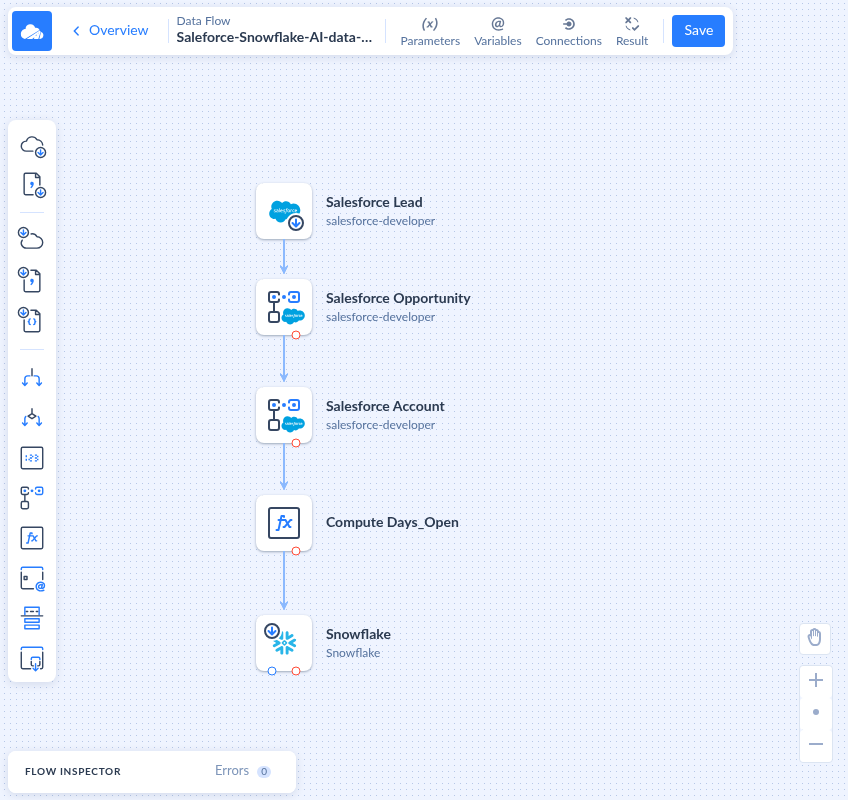
- Build features or chunks, with one definition each. Calculated fields, joins and lookups belong in one transformation layer that both training and serving use. Here’s an example in Skyvia’s Data Flow: Salesforce leads, with their opportunities and accounts looked up, a calculated Days_Open field from an Extend component, and Snowflake as the target, ready for a model that predicts which leads will turn into closed deals.
- Make training data reproducible. Lean on point-in-time joins like the SQL above, snapshot or version each training set, and write down which version trained which model.
- Serve and write back. Put the model behind an endpoint like KServe or SageMaker AI, or score in batch and drop the predictions into a table your apps and dashboards already read.
- Monitor inputs as well as accuracy. Track freshness, null rates and distributions on the features, plus accuracy once real outcomes arrive. Then those outcomes flow into the next training run.
Wiring that Salesforce-to-Snowflake flow by hand in Python took more than two hours. In Skyvia? Under 10 minutes. Data Flow requires Skyvia’s Standard plan or above. Skyvia handles the data side (ingestion, transformation, scheduling, and running your dbt Core project after each load), while training and serving stay in your ML tools.
Will AI replace ETL anytime soon?
Unlikely, though AI is definitely moving into the pipeline itself. Plenty of integration tools ship assistants that write transformation expressions now, and agents can go query the data themselves instead of waiting on an export. Skyvia does both, with an AI assistant in the mapping editor and MCP endpoints through which an AI assistant can read and update data over a connection.
The judgment calls stay human, though: which source owns the truth about a customer’s status, what “active” means, and whether a feature still means the same thing in production as it did in training. Call it ETL thinking. Nobody automates that part of the AI data pipeline away.
Want to try this with your own data? Start with the part you’re best at, which is getting your sources replicated and cleaned in one place. Start a 14-day Skyvia trial (it runs on the Professional plan, so Data Flow is included) and rebuild the Salesforce-to-Snowflake flow above on your own data.

FAQ for AI Data Pipeline

Is a feature store necessary?
Not always. Say checkout must score fraud while the customer waits: that’s where Feast pays off, since it materializes feature values into an online store meant for low-latency reads. A churn model that scores the whole customer table overnight is a different story. It can read the warehouse directly, and you skip keeping a second store in sync.
How do you detect data drift in an AI data pipeline?
We’d compare this week’s feature values with the training data, column by column, using a statistical test. Evidently chooses the test for you, based on the column’s type and its value count, and its default says the dataset has drifted when half the columns have. It’s a warning rather than proof, since only real labels show the model got worse.
What chunk size works best for a RAG pipeline?
Start at 512 tokens per chunk with a 25% overlap (128 tokens), as Microsoft’s Azure AI Search guidance suggests. A catalog in neat tables usually gets by with less overlap, while chatty support threads can use more. And stay under your embedding model’s input limit, since anything past it gets cut off.
How can I keep personal data out of training sets and RAG indexes?
Remove it before training or embedding. Otherwise a phone number from an old support ticket can turn up word for word in an assistant’s reply. Presidio, an open-source library, finds names, credit card numbers and similar details, then replaces or redacts them. Skyvia replication can also hash personal fields with SHA-256 during the load.
Is code required to train a model on warehouse data?
Not necessarily. BigQuery ML has a Google Cloud console interface, still in Preview, for working with models through a UI instead of queries. Its CREATE MODEL defaults let you build one without much ML knowledge. Google does add that knowing the basics of feature engineering and training helps you end up with a better model.