Summary
- Skyvia is the no-code alternative that covers most data pipeline needs at a price you can approve yourself, built for teams who'd rather ship than maintain.
- Fivetran is what you graduate to when a broken pipeline has stopped being an inconvenience and started showing up in conversations you’d rather not be part of.
- Airbyte is the alternative for the teams who read “open-source, self-hostable, fully customizable” and heard a promise rather than a warning.
- Estuary Flow is the one you reach for when the rest of this list’s definition of “real-time” stopped being real-time enough.
- Talend is the alternative that enterprises choose when data governance has its own team, its own budget, and its own seat at the table.
Your data stack is growing, the pipelines are multiplying, and someone in a meeting says “scalability,” and suddenly you’re staring at your Integrate.io invoice thinking: Why me?
You’re just outgrowing a tool, and that’s a healthy thing that indicates that your data has ambitions. Integrate.io is genuinely good at what it does. But “good at what it does” and “right for your team right now” are two different sentences.
Before we dive in, full disclosure: we are the engineering and product team at Skyvia. We built our own ETL tool, so naturally, we are biased. However, in this guide, we aren’t going to pretend we are an independent reviewer, nor will we tell you Skyvia is perfect for everyone.
We know the Integrate.io competitors landscape inside out – not because we read about it, but because we’re part of it. What follows is a no-spin breakdown of the best alternatives, organized by real use cases and real trade-offs.
How Did We Actually Test These Integrate.io Alternatives?
Our data integration engineers spent 35 hours running hands-on tests across every platform on this list – the unglamorous, roll-up-your-sleeves work that reveals what a tool is like to use.
Our core test was consistent across every platform: migrating 1 million records from a PostgreSQL database to Snowflake. We evaluated each tool on setup speed, API complexity, error handling, and sync frequency limits because “real-time” means something very different depending on which vendor’s landing page you’re reading.
During testing, I specifically looked at how each tool handles schema drift – the quiet villain of data pipelines. It tells you more about its production readiness than any feature checklist ever could.
One final note on methodology: we didn’t just test, we compared. Every finding in this Integrate.io competitors and alternatives guide is held up against what Integrate.io itself does in the same scenario. That’s the only way a comparison earns its name.
How Do the Top Alternatives Compare by the Numbers?
| Tool | Best for | Pricing Model | Sync Frequency | API Complexity |
|---|---|---|---|---|
| Skyvia | SaaS-heavy teams, non-technical teams | Free tier: 10K records/mo. Paid from $79/mo (annual). 20% discount on annual plans | Up to 1 min on Professional. Daily only on free/basic plans | Visual wizard, no-code interface. Public REST API available. Custom REST connectors supported. dbt Core integration |
| Fivetran | Middle market, SaaS-heavy teams | MAR-based, billed per connector | 15 min on Standard. 1 min CDC on Enterprise+ only | No-code visual setup. Transformations require dbt or SQL externally. REST API available |
| Airbyte | Engineering teams that need connector breadth and cost control | Open-source (you pay for infra). Cloud Standard: $10/mo minimum (4 credits included), $2.50/credit. Plus: capacity-based plans | 5 min on Cloud. 1 min on self-hosted. Not truly real-time – CDC runs in sync intervals, not continuously | Low-code connector builder for REST APIs. Python CDK for custom sources. Native dbt Core integration. Requires some engineering comfort |
| Talend (now Qlik) | Large orgs with complex compliance, MDM, and legacy systems | Custom quote only. Data Fabric starts ~$12K/year; enterprise deployments often $50K–$200K+. Professional services extra | Batch-oriented. Real-time CDC available on higher tiers, but setup complexity is significant | Visual Studio (Eclipse-based IDE). Java knowledge needed for custom components. 1,000+ connectors. Steep learning curve |
| Estuary Flow | Teams needing sub-second CDC without building a Kafka stack | $0.50/GB moved. Connectors: $0.14/hr (first 6), $0.07/hr beyond. Free: 10 GB/mo, 2 connectors | Millisecond-latency CDC by default. Truly continuous streaming – not scheduled sync intervals | No-code UI for standard flows. CLI (flowctl) for advanced control. Proprietary Gazette/Flow architecture has a learning curve for non-engineers |
Which Alternative is Best for SMBs and No-Code Data Teams?
Not every data team has a staff of engineers who dream in Python and consider YAML a love language. Some teams are two analysts, a Salesforce admin, and a shared Google Sheet. And even if you’re quite skilled with data but don’t have time to play with custom scripts, or the tasks don’t require them, this section is for you, too.
Skyvia
Skyvia occupies an interesting corner of the market. It’s a fully cloud-based no-code platform that handles ETL, ELT, Reverse ETL, data sync, and workflow automation across 200+ sources and destinations – the kind of tool that makes a business user feel like a data engineer, without making them suffer like one.
Key Features:
- Automated sync, migration, and replication that runs on schedule and largely supervises itself.
- Change Data Capture (CDC) that catches updates as they happen.
- In-transit filtering, mapping, and transformation – data arrives at its destination clean, not as a compatibility puzzle for someone downstream to solve.
- dbt Core integration for destination-side transformations, so your data arrives shaped the way you actually need it.
- It also ships an MCP server, which means your AI tooling can query and act on live business data without anyone writing custom API logic.
- SOC 2, HIPAA, PCI DSS, and ISO compliance baked in.
When testing pipelines for smaller data teams or marketing ops, I noticed that the first mention of a CLI in the onboarding docs correlates almost perfectly with the moment someone starts Googling alternatives. Skyvia is what you reach for when the word “enthusiastic” is the best description for your data team’s engineering capacity. That’s why it is so important to have a tool that meets you where you are instead of where you wish you were.
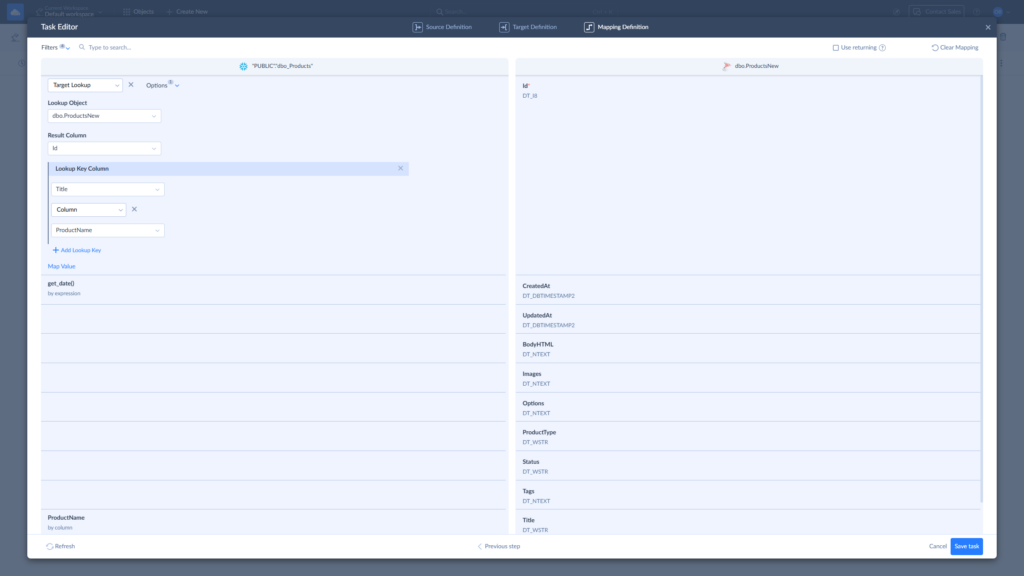
The interface makes the argument better than any description could – here’s what a typical mapping setup looks like in practice.
Best for
- You’re a Salesforce admin tired of filing tickets and just want the data where it needs to be.
- Your analytics stack depends on warehouse data that needs to stay fresh without someone checking its pulse every hour.
- Your integration wishlist is real and urgent, but your engineering bandwidth is neither.
- You want as many integration scenarios as possible handled by one platform, so your vendor list doesn’t need its own spreadsheet.
Rating
G2 – 4.8/5 based on 311 reviews | Capterra – 4.8/5 based on 116 reviews
Pricing
There’s a free plan for the skeptics – 10,000 records per month, no credit card required, no sales call to unlock it. If it wins you over, paid plans start at $79/month on annual billing, scaling with your record volume, sync frequency, and feature requirements. The kind of pricing model you can explain to a CFO without a flowchart.
Pros
- The no-code promise holds up under pressure.
- The visual pipeline wizard is the kind of interface that makes non-engineers feel competent rather than patronized.
- ETL, Reverse ETL, sync, migration, replication, which means one login, one support team, and one line on the expense report.
- Pipelines run on schedule, monitor themselves, and send alerts when something goes wrong, so you find out about problems from Skyvia, not from a confused colleague asking why the dashboard looks weird.
Cons
- Skyvia is cloud-hosted only, with no on-premise deployment option. On-premise data sources are still reachable through Skyvia’s Agent, but if your security policy requires zero cloud involvement at any point in the pipeline, we’re not the right fit. Talend handles that scenario better.
- The free plan caps at 10,000 records per month with daily syncs only – enough for a proof of concept, not much beyond it. Yet, we offer a 14-day free trial where you can try absolutely everything Skyvia has to offer without limits.

Which Alternative is Best for Developer-Heavy Teams?
There’s a certain kind of data engineer who looks at a no-code visual interface and feels a vague, hard-to-explain sense of loss. This Integrate.io alternatives section was written with them in mind.
Airbyte
Most data integration tools are built around the assumption that pipelines should be invisible. Airbyte is built around the assumption that some people very much want to see what’s inside and should be allowed to.
It’s an open-source ELT platform with 600+ connectors, full deployment flexibility, and a philosophy that can be summarized as: the pipelines are yours, the connectors are forkable, and nobody is going to charge you more because your data had a good month.
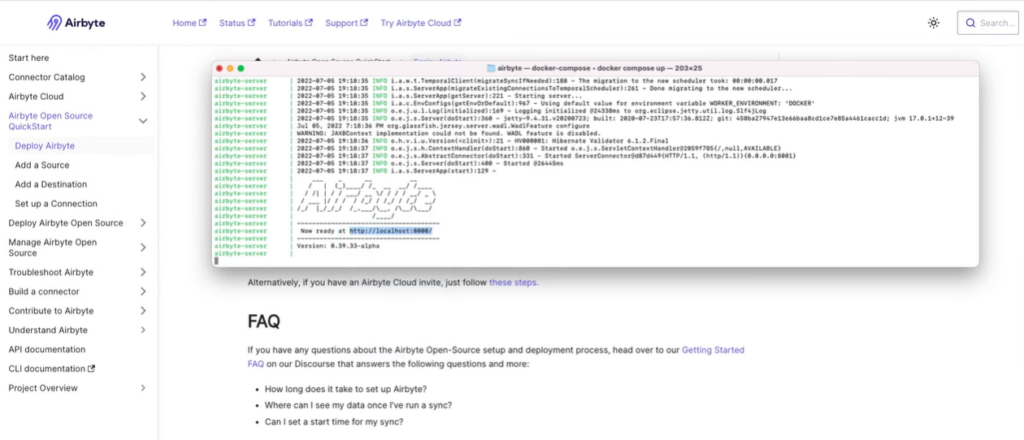
I hit a slight snag with the Docker deployment when I tried to set up a custom connector. It was a port conflict that took twenty minutes and one very specific Stack Overflow thread to resolve. Obviously, not a dealbreaker, but a good reminder that Airbyte rewards curiosity and punishes indifference, which is either exciting or exhausting depending on your team.
Key Features:
- Over 600 source and destination connectors, with a community that keeps adding more.
- CDC-powered incremental syncs that keep downstream consumers current without treating the source database like a punching bag.
- Deployment across cloud, Kubernetes, local VM, and air-gapped environments – whatever your infrastructure team has decided to defend with their life, Airbyte will work within it.
- Native dbt integration for teams that want transformations to happen where they belong, in the warehouse.
- Python SDK, Terraform provider, and a full API for orchestration that slots into how your team already works.
- SSO, RBAC, and SOC 2-aligned controls for when the security team starts asking questions.
Best for
- Your stack includes enough niche data sources that no managed ELT vendor’s connector list will ever fully cover it.
- Your infrastructure team has strong feelings about cloud-only deployments – legal, security, or otherwise.
- You want full ownership over your pipeline behavior, not a support ticket and a waiting game.
- CDC-powered syncs are feeding fast-refresh dashboards or ML models that can’t afford to be stale.
- The idea of forking a connector and shipping your own fix sounds appealing rather than alarming.
Rating
G2 – 4.4/5 based on 76 reviews | Capterra – n/a
Pricing
The open-source version is free; beyond that, expect custom pricing. Cloud and enterprise tiers are not, and on the Cloud Standard plan, costs scale with data volume in ways that tend to surprise teams who estimated based on current usage rather than growth.
Pros
- Open-source licensing means zero vendor lock-in – your pipelines don’t belong to anyone but you.
- A connector library that covers almost anything, backed by a community that keeps extending it before you even know you need something.
- Total deployment flexibility: cloud, Kubernetes, local VM, air-gapped – your infrastructure, your rules.
- Fork it, extend it, build your own connector without asking anyone’s permission.
Cons
- Self-hosting means owning everything that comes with it: uptime, scaling, maintenance, and the occasional community connector that nobody has patched in the last four months.
- Community-built connectors vary in quality – some are production-ready, some require a generous interpretation of that word.
- Transformations happen downstream, so dbt or an equivalent isn’t optional – it’s a line item.
- Cloud pricing can quietly escalate with sync volume if nobody’s watching; the bill has a way of growing faster than expected.
Which Integrate.io Alternative is Best for Enterprise Budgets and Massive Scale?
Some data problems don’t fit in a pricing tier. They require a phone call, a proof of concept, a security review, and occasionally a separate meeting just to discuss the previous meeting. This section was built for exactly that level of complexity – and priced accordingly.
Fivetran
It’s a fully managed ELT platform that moves data from 700+ sources into your warehouse of choice, handles schema changes automatically, and does all of it without requiring a single engineer to stay up past midnight nursing a broken connector.
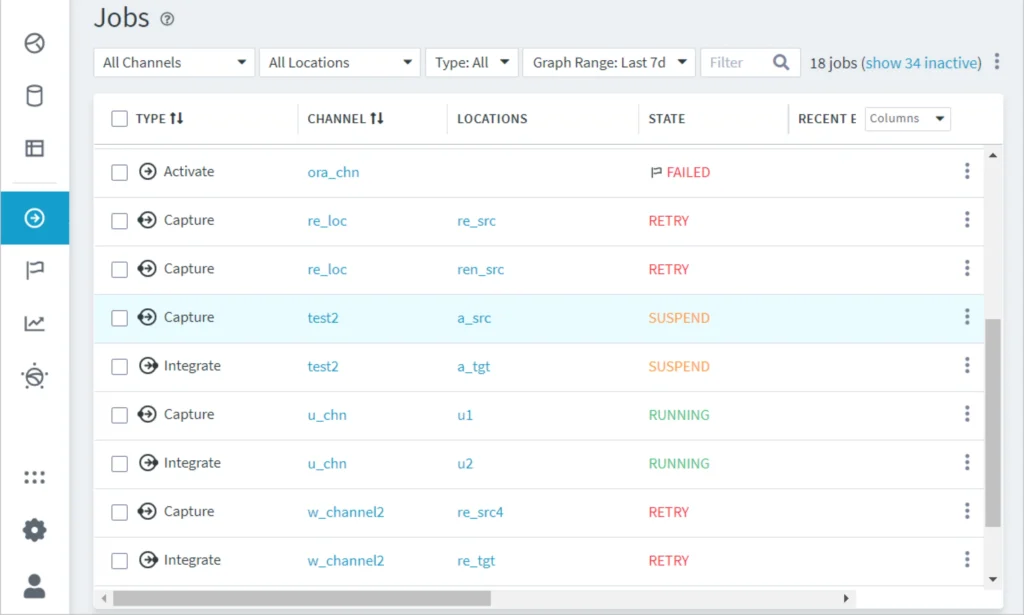
The Fivetran jobs monitor during a test run – FAILED, RETRY, and SUSPEND states are visible across active pipelines. In fairness, this snapshot caught a moment mid-recovery rather than a stable state. But it illustrates something worth knowing: when things go wrong, Fivetran surfaces it clearly and centrally. You’re not hunting through logs to find out why the dashboard looked weird this morning.
Key Features:
- Automated schema drift handling that doesn’t treat changes like they are emergencies.
- Fully managed pipeline operations – no infrastructure to maintain, no deployment scripts, no on-call rotation for a broken connector.
- CDC that captures changes as they happen, so your source database isn’t getting interrogated every time an analyst refreshes a dashboard.
- dbt Core integration for transformation logic that lives in the warehouse where it belongs.
- Sync frequency down to one minute on the Enterprise tier, with 15-minute intervals on the Standard.
Best for
- Data engineers and analysts would genuinely rather spend their time on insights than on keeping pipelines alive.
- Your source systems change frequently enough that manual schema management would become a part-time job.
- Downtime or data lag has a number attached to it – revenue, compliance, or both.
- Your stack is heavy on SaaS sources that Fivetran’s connector library covers out of the box.
Rating
G2 – 4.3/5 based on 793 reviews | Capterra – 4.4/5 based on 25 reviews
Pricing
The shift to per-connector billing in March 2025 was the headline change, but the Fivetran pricing changes didn’t stop at that. Since January 2026, every standard connection generating between 1 and 1M MAR also carries a $5/month floor charge. On its own, $5 sounds trivial. Run it through a realistic stack, and it stops sounding trivial.
We did exactly that, using Fivetran’s own pricing estimator with six connectors, a typical mid-market SaaS team would actually use, and here’s what we get. We encourage you to run your own numbers before the renewal conversation happens rather than during it.
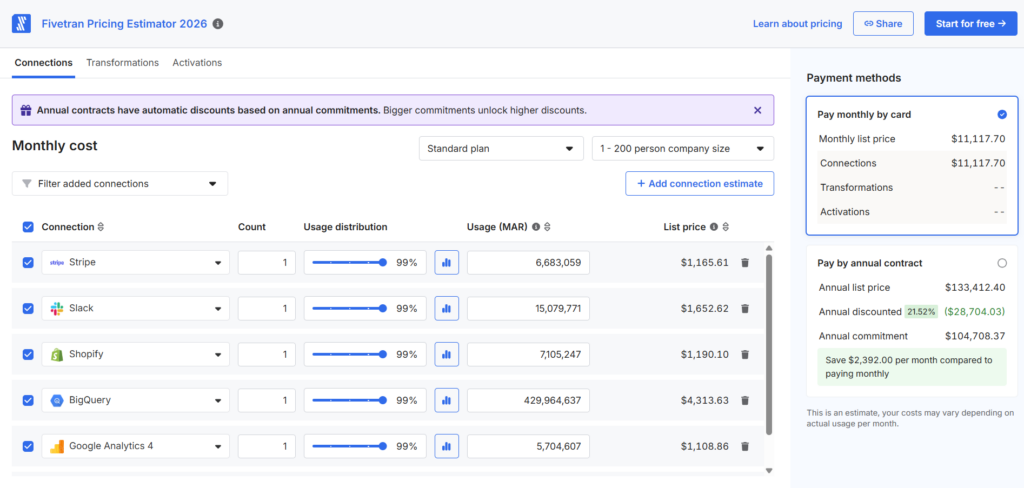
Also, effective January 2026: deleted rows now count toward paid MAR. Previously, they didn’t. For pipelines with high churn data, like CRM records, transactional tables, event logs, that’s a line item.
Pros
- Pipeline reliability is genuinely hard to argue with.
- Connectors are maintained in-house and rarely break.
- Clean, beginner-friendly UI that non-technical stakeholders can navigate without a tutorial.
- Fully managed infrastructure means zero operational overhead once connectors are running.
Cons
- The MAR pricing model – now calculated per connector rather than per account – has made cost optimization significantly more complex and less predictable, particularly for teams with multiple active data sources.
- Transformation capabilities are limited to post-load dbt or SQL – meaningful in-pipeline reshaping isn’t on the menu.
- When something breaks, tracing the root cause isn’t always straightforward; the platform’s black-box nature makes debugging opaque.
- 1-minute CDC sync frequency is locked behind the Enterprise tier – Standard users get 15 minutes, which isn’t always enough.
Which Alternative Should You Choose for Real-Time Streaming?
There’s a specific kind of pain that comes from watching your pipeline sync schedule and your business reality drift slowly apart, like two ships that started at the same dock and are now in different time zones. This section exists because some data problems don’t have the patience to wait for the next scheduled run.
Estuary Flow
Most data integration tools treat real-time as a premium feature – something you unlock on the Enterprise tier after a call with sales. Estuary Flow built the whole platform around it and worked backward from there.
It’s a streaming-first ELT platform with millisecond-latency CDC, unified batch and streaming pipelines, and a configuration-driven workflow that feels less like clicking through a UI wizard and more like shipping code. Users report going from sign-up to a running pipeline in minutes, which is impressive for a tool with this much horsepower under the hood.
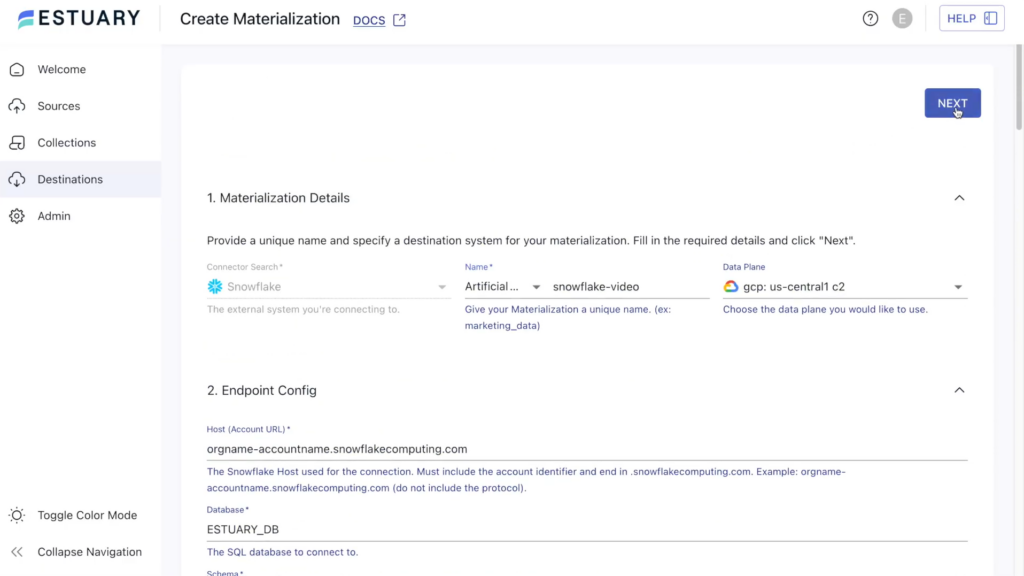
Materialization is one of the things that makes Estuary’s pipeline model genuinely different from standard ELT: rather than extracting data, loading it, and transforming it in three separate steps, Estuary maintains a continuously updated, live view of your data at the destination. The materialization stays current because it’s designed to, updating the moment the source changes. For teams running real-time dashboards or operational data products, that distinction is the whole point.
Key Features:
- Millisecond-latency CDC that captures changes as they happen, not on a schedule someone set and forgot about.
- Unified batch and streaming pipelines backed by a single cloud-storage layer, so you’re not maintaining two separate architectures for two different use cases.
- Captures, Materializations, and Derivations as the core pipeline model: ingest the data, deliver it where it needs to go, transform it continuously along the way.
- Git-friendly, config-driven workflow that integrates with CI/CD and version control – pipelines that live in a repo, not in a UI, only you know how to navigate.
- Eliminates the need to stand up and maintain costly infrastructure like Kafka topics and custom data pipelines.
- BYOC and private deployment options for teams whose cloud infrastructure has strong opinions about where data is allowed to travel.
Best for
- Your dashboards, alerts, or operational tools need to reflect what’s happening in your database right now, not fifteen minutes ago.
- You’re running both analytical batch loads and streaming workloads and would prefer not to maintain two entirely separate platforms to do it.
- Your team is comfortable with declarative, config-based pipelines and considers Git a natural habitat rather than a last resort.
- You’ve done the math on building your own streaming stack, and the TCO conversation didn’t go well.
Rating
G2 – 4.8/5 based on 31 reviews | Capterra – n/a
Pricing
Free tier covers 2 connectors and up to 10 GB per month. Estuary paid pricing runs at $0.14/hour per connector for your first six, then drops to $0.07/hour beyond that, so the platform gets cheaper per connector as your pipeline count grows, which is a more honest scaling model than most tools in this category offer.
That said, teams running many high-frequency connectors simultaneously should model the math before committing. The per-GB and per-connector combination has a way of compounding faster than the individual numbers suggest.
Pros
- Genuine millisecond-latency CDC – not “near real-time” as a marketing term, but as an architectural reality.
- Batch and streaming on a single platform means less infrastructure and fewer moving parts.
- Git-native, config-driven pipelines that version-control like code and deploy like code.
- No Kafka or Flink stack to maintain – the streaming infrastructure complexity stays Estuary’s problem, not yours.
- Usage-based pricing tends to reward efficiency rather than punish growth.
Cons
- The learning curve is real, and the pipeline model takes some getting used to.
- The connector library is smaller than Fivetran’s or Airbyte’s; niche sources may require custom configuration or a workaround.
- Observability features are still maturing – when something goes wrong, the debugging experience isn’t always as smooth as the pipeline setup was.
- Per-GB and per-connector-hour pricing is simple in principle but requires careful monitoring at scale.
Which Alternative is Best for Complex, On-Premise Enterprise Architectures?
Not every data stack gets to be a SaaS-native, cloud-first, deploy-in-minutes success story. Some of them live in data centers, answer to regulators, and have architecture diagrams that require a second monitor. This section is for those teams, and the one tool in this roundup that actually takes that reality seriously.
Talend
Talend is what happens when a data integration tool grows up, gets acquired, raises its prices, and stops pretending it’s for everyone. Brutal? Maybe. But there’s something almost refreshing about a platform that has fully committed to the enterprise tier and stopped hedging – it knows exactly what it is, who it’s for, and what it costs, even if that last part requires a phone call to find out.
Enterprise capabilities bring a need for certain skills and knowledge to make things run smoothly. However, if you’re prepared and armed to deal with that, even Talend’s tMap editor is less “intimidating interface” and more “exactly the level of control you came here for.”
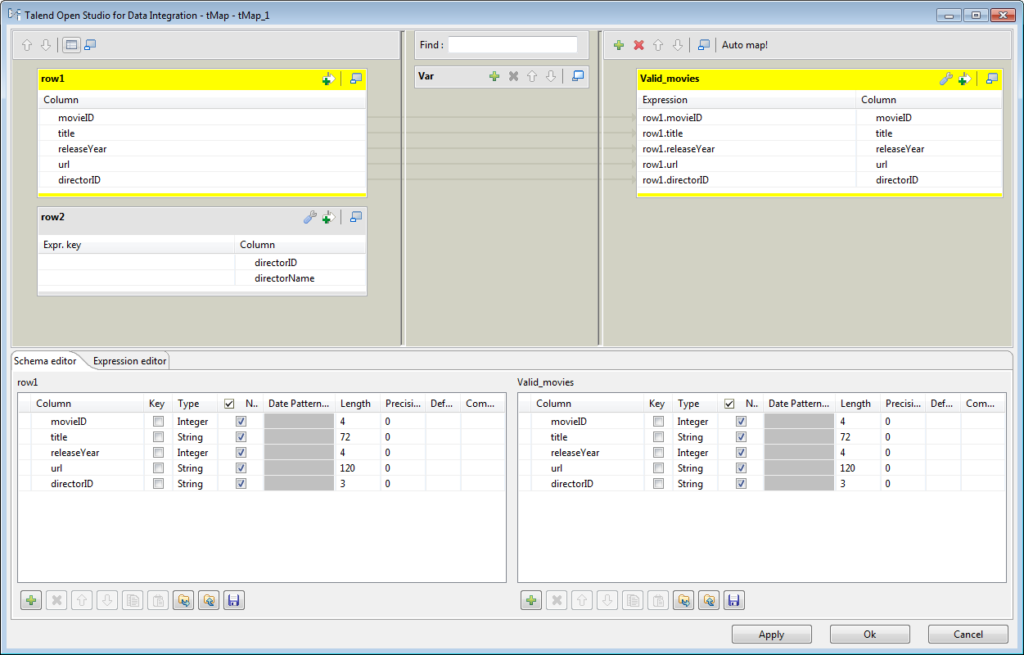
It was acquired by Qlik in 2023, discontinued its free Open Studio version in January 2024, and has been moving steadily upmarket ever since. If you were one of the teams running Open Studio, that decision was made for you.
What remains is Qlik Talend Cloud – a mature, enterprise-grade data integration and quality platform that does a lot of things very well, for a price that requires its own budget conversation.
Key Features:
- Hundreds of connectors covering cloud apps, databases, and legacy systems that other tools politely pretend don’t exist anymore.
- Built-in data quality, profiling, and the Talend Trust Score™ – a 0-5 quality rating assigned to datasets so your analysts know whether to trust what they’re looking at before they build a report on it.
- End-to-end data lineage and metadata cataloging for teams that need to answer “where did this number come from” without a three-day investigation.
- On-premise, cloud, and hybrid deployment – the tool that doesn’t ask your compliance team to compromise.
- Studio-style graphical designers for developers and more self-service interfaces for data product owners — different entry points for different roles.
Best for
- Large organizations running complex, multi-source ETL across legacy systems that nobody wants to touch, but everyone needs data from.
- Regulated industries – banking, healthcare, government – where lineage, auditability, and data quality aren’t nice-to-haves.
- Teams already invested in the Qlik analytics ecosystem, where Talend, as the integration layer, creates a genuinely unified stack.
- Data platform teams building reusable, governed data products rather than one-off pipelines.
Rating
G2 – 4.3/5 based on 105 reviews | Capterra – n/a
Pricing
Qlik Talend Cloud runs on capacity-based pricing organized into bands based on data movement volume, transformation complexity, and the editions you need – Data Integration, Data Quality, Data Governance, or some combination. Qlik does not publish list prices; every deal requires a custom quote, which makes it genuinely difficult to budget before you’ve had the sales conversation. However, there’s a 14-day free trial to estimate the tool.
Pros
- A connector library deep enough to handle legacy systems that other tools list as “coming soon” indefinitely.
- Data quality and governance are baked into the platform rather than bolted on as an afterthought.
- Genuine hybrid and on-premise deployment for organizations that can’t move everything to the cloud on someone else’s timeline.
- Talend Trust Score™ gives data consumers a way to assess dataset reliability before they build anything on top of it.
- Extensible enough to plug into existing orchestration, CI/CD, and toolchain ecosystems without forcing a full rearchitecture.
Cons
- The learning curve is steep by any honest measure – new users regularly report weeks of ramp-up time before building anything close to a production pipeline.
- Pricing opacity is a real operational problem: you can’t model the cost without a sales call, which makes budget planning a sport.
- The discontinuation of Talend Open Studio in January 2024 removed the free entry point that introduced most teams to the platform – what replaced it costs significantly more.
How Should You Make Your Final Decision?
You’ve read this far. You know your stack, you know your team, and you probably knew the answer three sections ago. But just in case:
- If the words “Docker deployment” make someone on your team quietly close their laptop, then Skyvia. No-code, no surprises on the invoice, no tribal knowledge required to keep it running.
- Fivetran is for when reliability isn’t a preference but a condition of employment. The bill will be real. So will the peace of mind.
- Airbyte rewards the teams that actually enjoy owning their infrastructure. If your engineers treat a broken connector as an interesting problem rather than a personal affront, you’ll get along fine.
- Talend shows up when the organization has outgrown the question of “does this work” and graduated to “can we prove it works, document why it works, and audit who changed it last Thursday.”
- Estuary Flow is for when the gap between “data was generated” and “data is usable” has officially become someone’s KPI.
At some point, every comparison article has to admit that no amount of reading replaces ten minutes of doing. That’s what Skyvia’s free trial is for. No credit card. No sales choreography. Just you, a live pipeline, and the quiet satisfaction of having finally picked a tool.

FAQ for Integrate.io alternatives

What is the best open-source alternative to Integrate.io?
Airbyte, without much competition. 600+ connectors, self-hostable, genuinely free at the core, and a community large enough that someone has usually already solved whatever problem you’re about to have.
Which alternative is easiest for non-technical teams or marketing ops?
Skyvia. The visual interface was built for the person who knows exactly what data they need moved and where, and has better things to do than learn why a connector is throwing a 403 error.
I need real-time data streaming. Should I stick with Integrate.io?
Probably not. Integrate.io’s streaming capabilities exist, but real-time is Estuary Flow’s entire reason for being – millisecond-latency CDC, no Kafka stack required, built from the ground up for the teams where “close enough” isn’t close enough.
How difficult is it to migrate my existing pipelines away from Integrate.io?
Depends on complexity, but most standard connectors rebuild faster than expected. The real work is documenting transformation logic before you start – pipelines that only exist inside someone’s head have a way of becoming everyone’s problem on migration day.
What if my compliance team requires a strictly on-premise alternative?
Talend. It’s the only tool on this list that takes hybrid and air-gapped deployment as seriously as the industries that require it, and has the governance framework to back up the conversation your compliance team is about to have with you.