Jira MCP enables AI assistants to interact with Jira through the Model Context Protocol (MCP), and this article compares three implementations: Atlassian’s Official Remote MCP, the open-source mcp-atlassian server, and Skyvia Connect MCP Endpoint.
Jira MCP connects AI assistants to Jira through the Model Context Protocol (MCP). This helps developers perform their work in Jira and their IDEs.
But how?
If you’re a developer, you may be switching between Jira (and navigating your way there) and your IDE. With the Jira MCP, you retrieve issue details, search projects, and perform operations, reducing the constant switching. The AI assistant can call the tools exposed by the Jira MCP server and use the returned data in its response. That’s better than manually copying issue details.
But not all Jira MCP implementations work the same way.
We compare three approaches in this guide: Atlassian’s official Remote MCP, the open-source mcp-atlassian server, and Skyvia Connect MCP Endpoint. We will also discuss the boundaries of Jira MCP, and when pairing it with an automated data pipeline is a better fit.
But then again, we are the Skyvia team. We built the no-code hosted MCP Endpoint for Jira and other 200+ sources. We naturally believe in our products. That’s why we will have practical apples-to-apples read/write tests to evaluate each tool’s behavior.
Let’s begin.
What Is Jira MCP and How Does It Work? (The Concept)
Jira MCP involves a connection between an AI assistant and Jira. But it’s more than just sending a prompt to an API. Model Context Protocol (MCP) uses a host, a client, and a server architecture so the AI application can discover and invoke the tools exposed by external systems. Each component has a role, and a defined protocol governs their communication.
What are the Main Components of Jira MCP?
There are five components. Let’s me show the responsibilities of each.
| Component | Responsibility |
|---|---|
| MCP Host | This is the AI application and where the user interacts. It also coordinates the work of the other 2 components (MCP Client and LLM Provider). Example: Claude Desktop, ChatGPT, Cursor IDE, Copilot |
| MCP Client | Manages the communication between the host and the MCP servers. |
| LLM Provider | LLM is Large Language Model. The provider supplies the language model that interprets the prompts and decides which tools to invoke. It usually runs remotely, that’s why you need an internet. Examples of LLMs and their providers: GPT-5.6 from OpenAI, Sonnet 5.5 from Anthropic, and Grok 4.7 from xAI. |
| MCP Server | Exposes tools and handles requests to external systems such as Jira. |
| External System | The actual service being accessed, such as Jira Cloud through its REST API. |
You will see how these flows from one component to the next in the following subsection.
How Does an AI Assistant Communicate with Jira Through MCP?
Let’s divide it into two diagrams to make it simpler to see and explain. It starts by sending a prompt until it reaches the external system. Then, the external system responds with the data and sends it back to the user.
Let’s start from where you send the prompt. There are local and remote MCP servers, so we divide the diagram based on where the component works: between your computer and the internet.
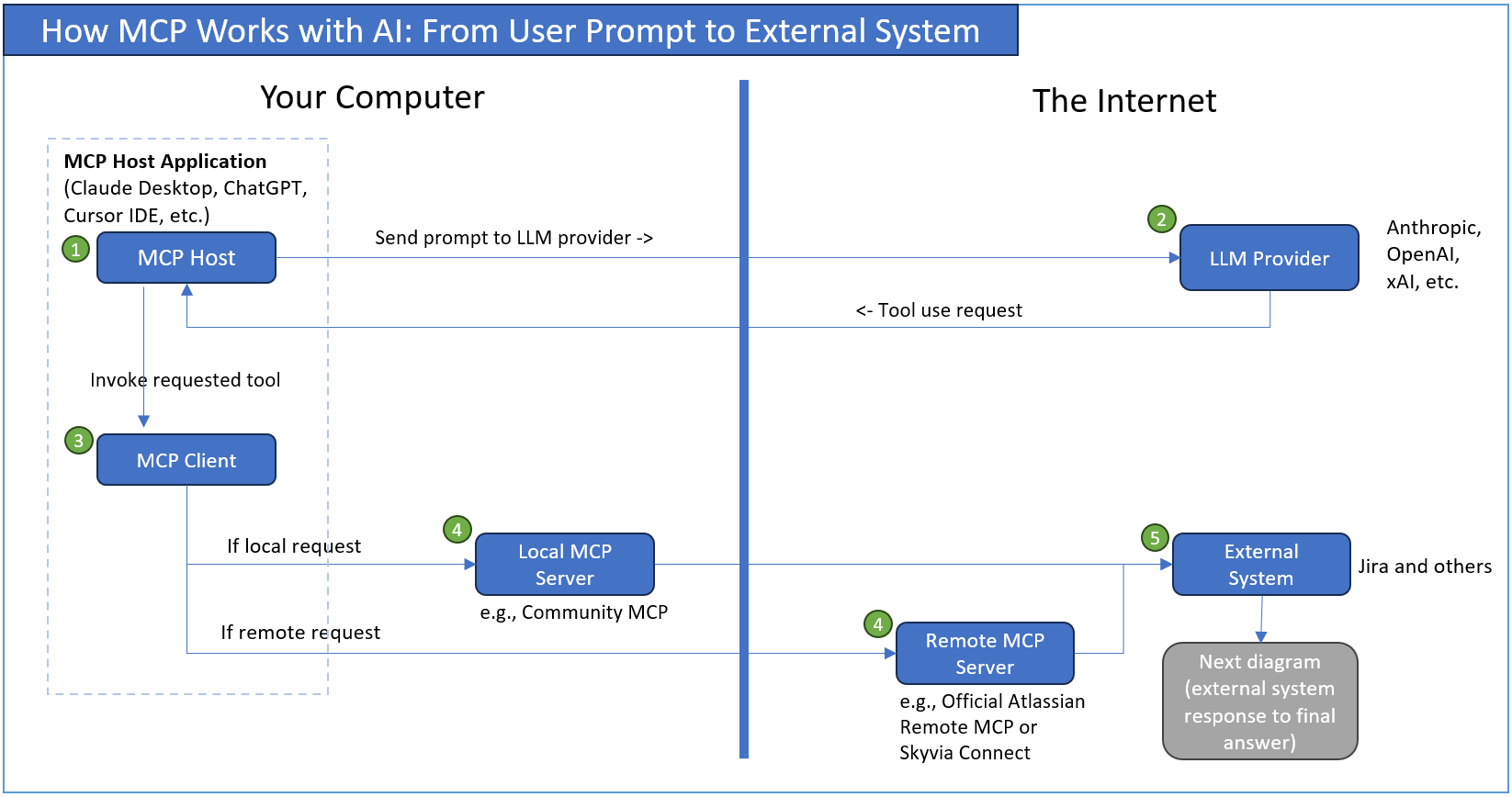
From the above:
- The MCP Host receives the prompt from the user and sends it to the LLM Provider through the provider API, typically HTTPS.
- The LLM determines that it needs Jira data or an operation and returns a tool-use request.
- The host passes that request to the MCP Client, which communicates with the configured MCP Server. It can be a local MCP or a remote MCP. They communicate through the MCP protocol using stdio or a network transport.
- The MCP Server calls the REST API of the external system, such as Jira, to retrieve data or perform the requested operation.
- Jira (or any external system) receives the request and prepares the data response.
The next flow happens after the external system sends the response data:
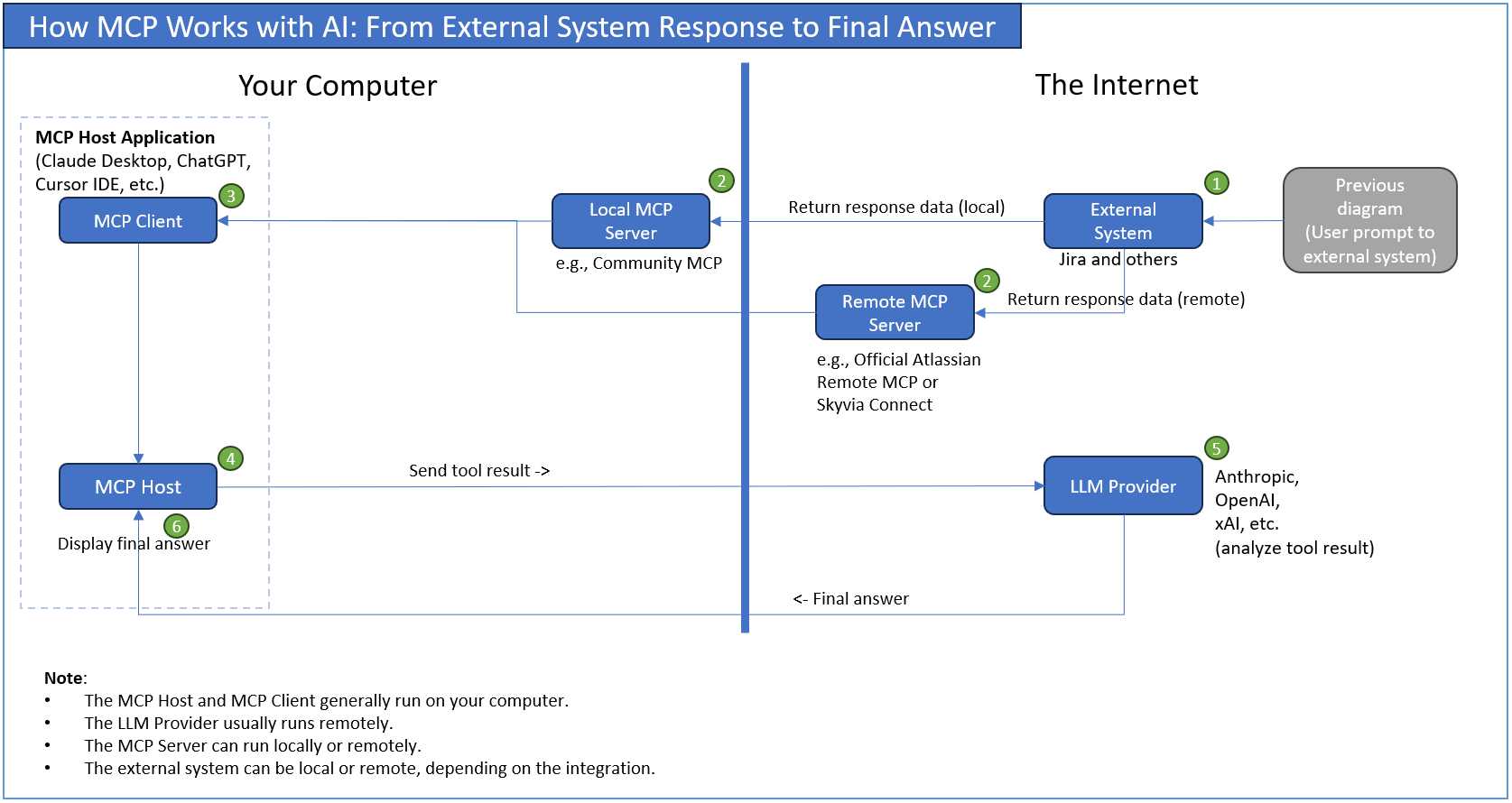
From the above flow:
- The external system, in this case, Jira, returns the API response to the MCP Server.
- The MCP Server processes the response and returns an MCP tool result.
- The MCP Client receives the result and passes it to the host.
- The host sends the tool result back to the LLM Provider.
- The LLM analyzes the result, generates its answer, and sends the final answer to the host.
- The host displays the final answer to the user.
Note that this cycle can repeat if the LLM needs additional tool calls before producing its final response.
How Did We Benchmark and Evaluate Jira MCP Implementations?
We need a Jira account, the Jira MCP servers, and MCP client applications, then make an apples-to-apples comparison. This will show what each Jira MCP server implementation can do. We’re going to use different models on different clients to compare their outputs.
Our Test Environment and Its Limitations
First, I have to register in Jira to have some test data. So, I’m on a Jira trial using a Premium plan until November 21, 2026, just enough to create some sample data and perform tests. Then, I need the MCP tools we’re going to use for the tests, namely:
- official Atlassian Remote MCP,
- open-source Community MCP (sooperset/mcp-atlassian), and
- Skyvia Connect MCP Endpoint (this requires a registration with Skyvia)
Finally, the clients we’re going to use are:
- ChatGPT with GPT-5.6 Luna (available for Free ChatGPT users as of this writing),
- Claude Desktop using Sonnet 5.5 Medium, and
- Cursor IDE using Grok 4.7 High Fast
I have to register for Claude to use Claude Desktop. I already have ChatGPT for free and the Cursor IDE account.
Due to the nature of mostly using trial accounts for Jira, Skyvia, and Claude, we have limited capabilities compared to having a local self-hosted Jira Data Center and a paid enterprise-level Atlassian and Claude accounts.
Our Test Data
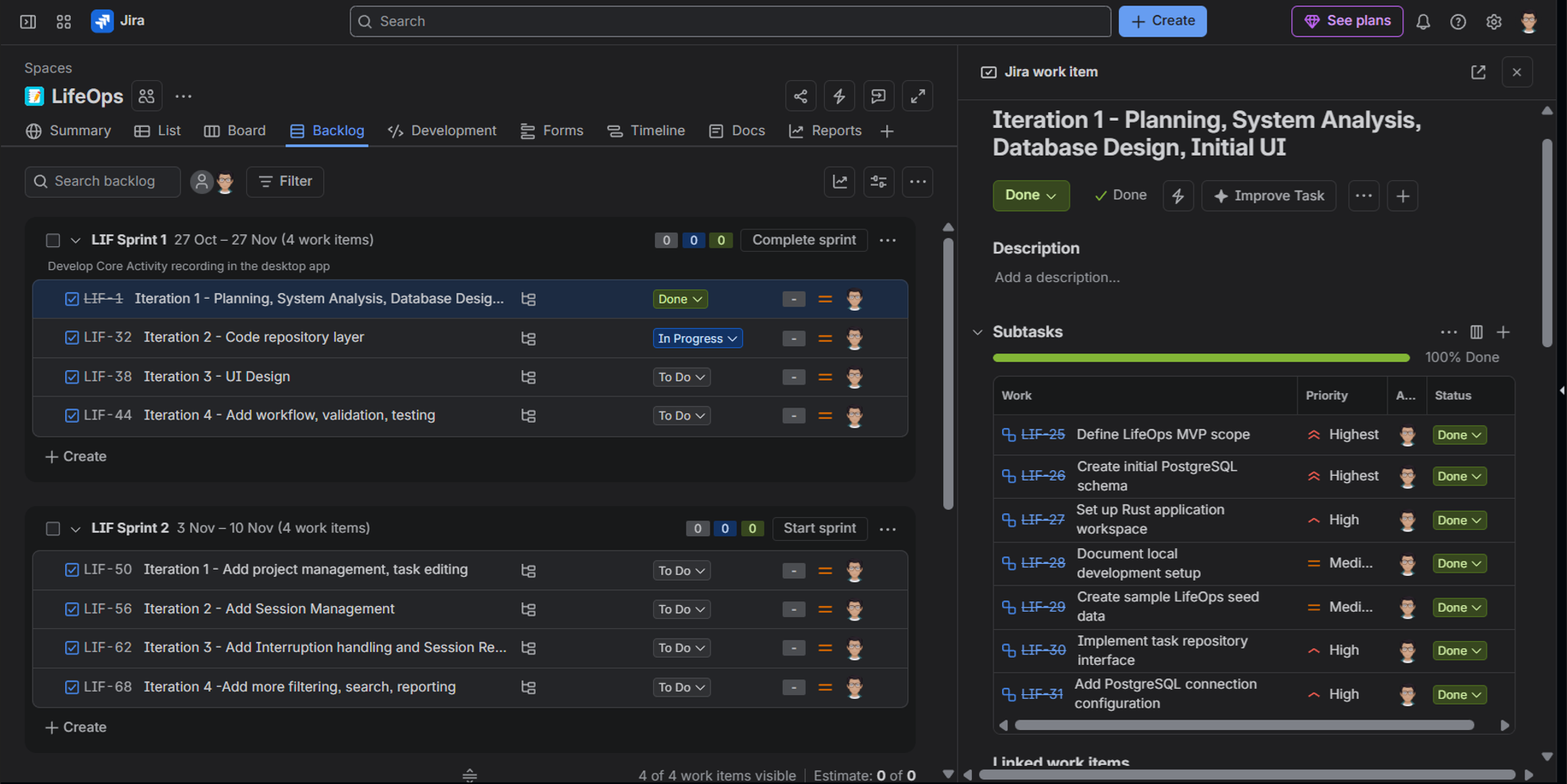
Though we’re using a Jira trial account, the test data is real, or at least, it has been entered directly into Jira manually. It contains development tasks for creating an imaginary life-management app called LifeOps. We have a total of 74 work items; 9 of them are completed.
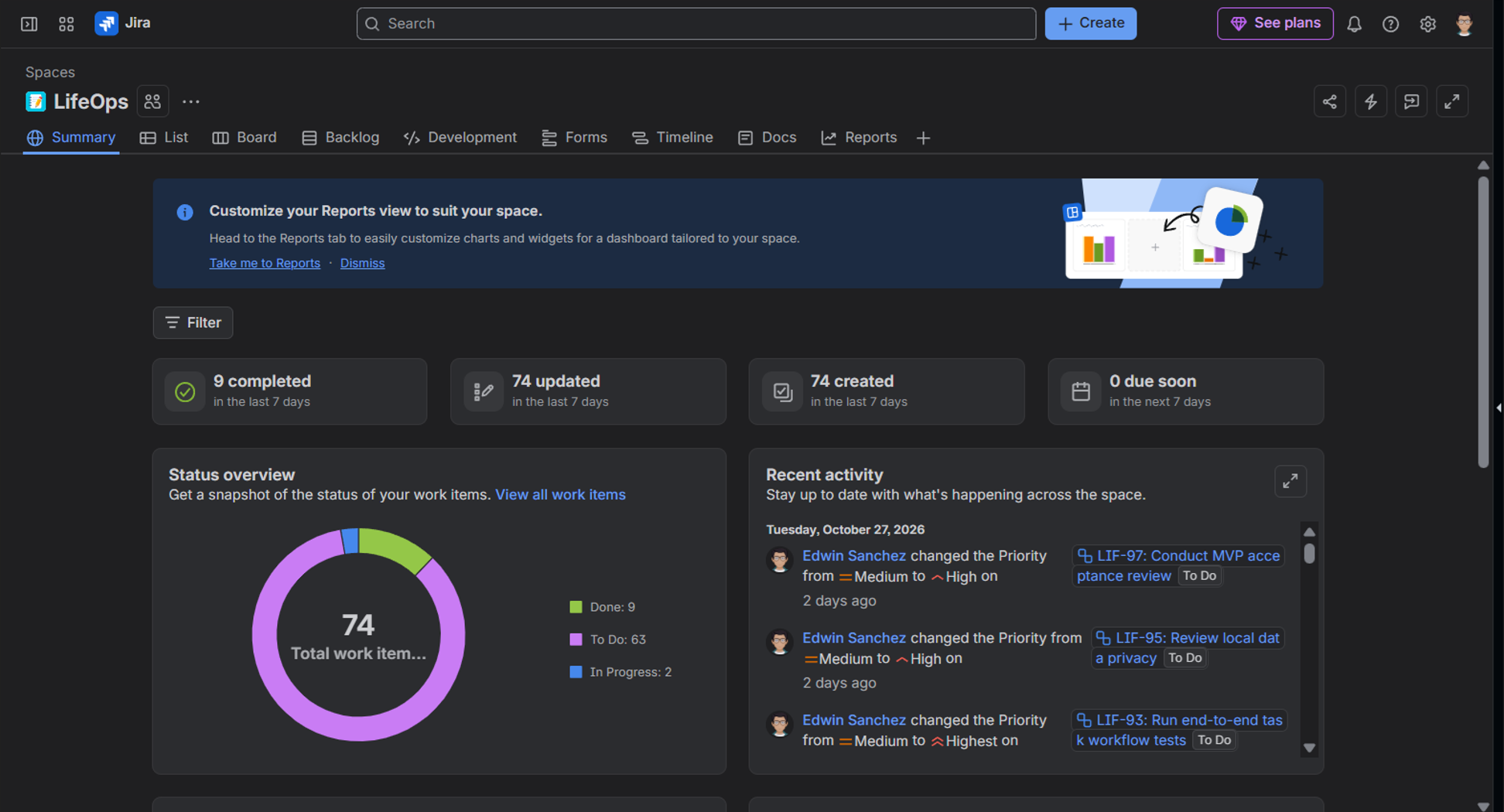
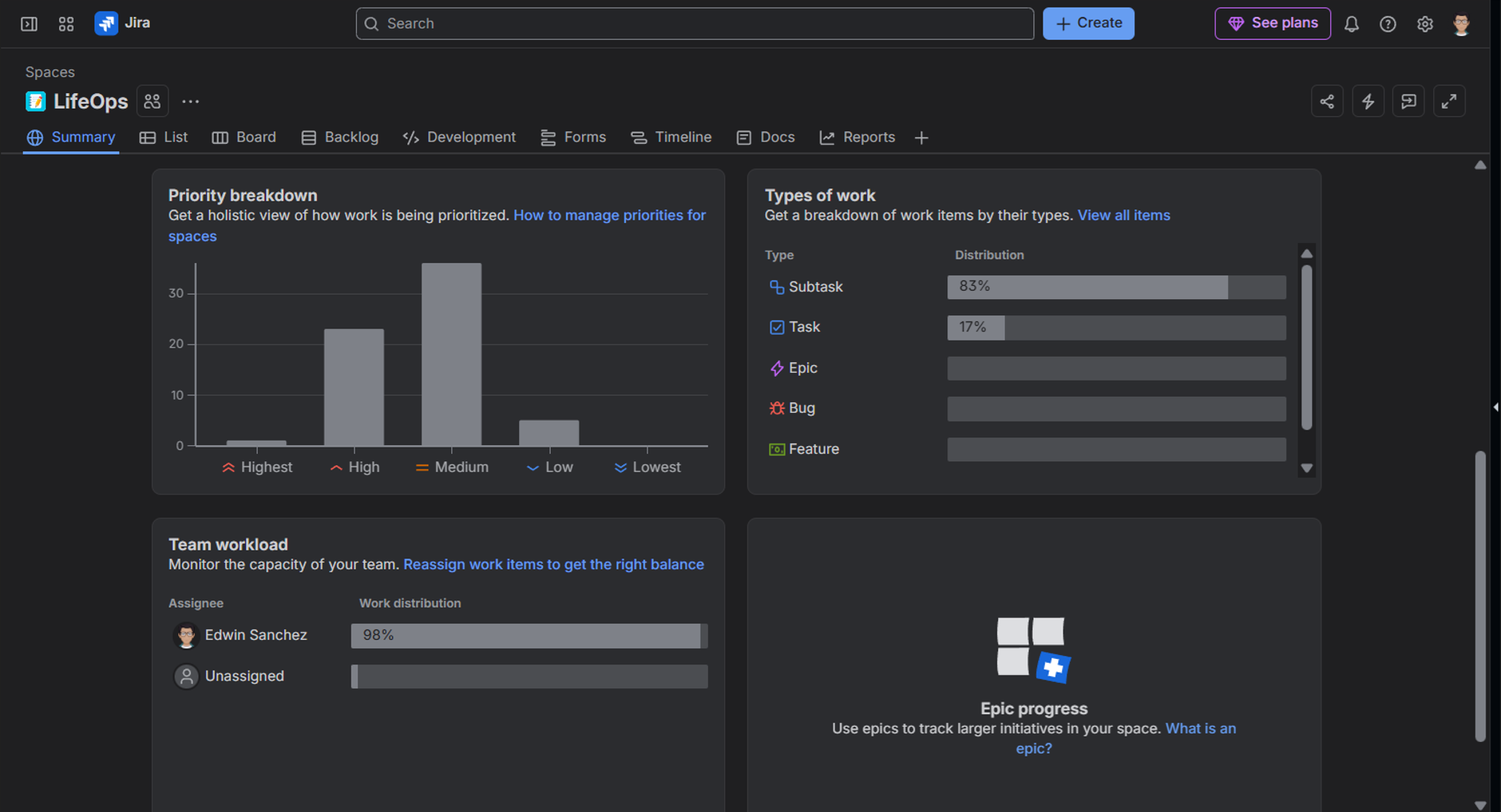
From below you will also have an idea how much of the 74 issues are prioritized, and which ones are tasks and subtasks.
The following shows 2 Sprints for the project along with their iterations. Each iteration has subtasks. You can see the subtasks under Sprint 1 Iteration 1 below.
Functional Tests and Prompts
We will consistently use the same prompts for all clients and MCP servers. There will be minor variations, though, to make sure we are pointing to and using the correct MCP server for the current test. We will add “Using the XXXX MCP tool,….” or “Using the XXXX MCP connector,…”
We will also group them according to data retrieval and accuracy, output and access control, and write operations.
Group 1: Data Retrieval and Accuracy
In this group, we will have 6 prompts to test each Jira MCP server to see if they return complete and accurate data from Jira. Do the totals agree with Jira? Are all expected keys present? Does the MCP report actual limitations, or claim completeness without evidence?
Test 1: Completeness and Count Test
This will simply count the issues under the Jira project LifeOps and see if the result is consistent with Jira.
The prompt:
“How many issues are in the LifeOps Jira project? Retrieve the matching issues, count unique issue keys, and report the total. If you cannot verify that all results were retrieved, state that limitation rather than guessing.” |
|---|
Test 2: Pagination and Response-Size Handling
A long list is hard on the eyes. We’ll see in this test how it will handle 74 Jira issues in batches.
The prompt:
“Retrieve all LifeOps issues with only their issue key, summary, status, and priority. Return the results in batches if necessary. Report the number retrieved, any duplicates, and whether you reached the end of the result set.” |
|---|
Test 3: Field Selection and Issue-level Lookup
Can it retrieve a Jira issue like we’re using a WHERE clause in SQL with specific columns?
The prompt:
“Retrieve one LifeOps issue by its Jira key = LIF-34. Return its summary, description, status, priority, issue type, labels, assignee, and available sprint or iteration fields. Distinguish empty fields from fields the tool could not retrieve.” |
|---|
Test 4: Filter by Status
We will filter further, report the count, and explain how it got those counts.
The prompt:
“List every LifeOps issue whose status is In Progress. Return issue key, summary, status, and priority. Report the count and explain how you established that no matching results were omitted.” |
|---|
Test 5: Group by Status and Priority (Aggregation Test)
We will group and aggregate as we do with COUNT(*) and GROUP BY in SQL.
The prompt:
“Count LifeOps issues by status and priority. Present the results as a table, including zero-count combinations where practical. Include grand totals and verify that the grouped counts reconcile with the total number of issues retrieved.” |
|---|
Test 6: Task-Subtask Relationships
The tasks were organized by iterations, and the iterations are parent tasks with subtasks underneath. We’ll see how it will present the data without an actual Iteration column.
The prompt:
“For each LifeOps subtask, retrieve its parent issue key and summary. Verify the relationship using Jira's stored parent field. List subtasks with no parent separately, and do not infer parentage from issue summaries.” |
|---|
Group 2: Output and Access Control
We’re going to answer these questions: Can we export the results to Excel or CSV? Does the Jira MCP understand and be able to explain the tool permissions available? How will it handle an invalid issue key?
Test 7: Export Results
We might share a list of issues with our managers, or maybe our managers can interact with an AI application with a configured MCP server. They will love an Excel or CSV output.
The prompt:
“Retrieve the LifeOps issue key, summary, description, status, priority, sprint, iteration, and labels. Create a spreadsheet if supported; otherwise return a CSV-ready table. Preserve empty values, avoid duplicate issues, and report the number of records exported.” |
|---|
Test 8: Permissions
Can the configured Jira MCP server have read and/or write restrictions? We’ll see in this test.
The prompt:
“Without modifying Jira, explain whether your currently available tools can create, update, transition, or delete issues. Identify the enforced read-only controls, if any, and distinguish server restrictions from instructions in this prompt.” |
|---|
Test 9: Invalid Issue Key Handling
How about we ask for a Jira issue key that does not exist? Can it handle it properly?
The prompt:
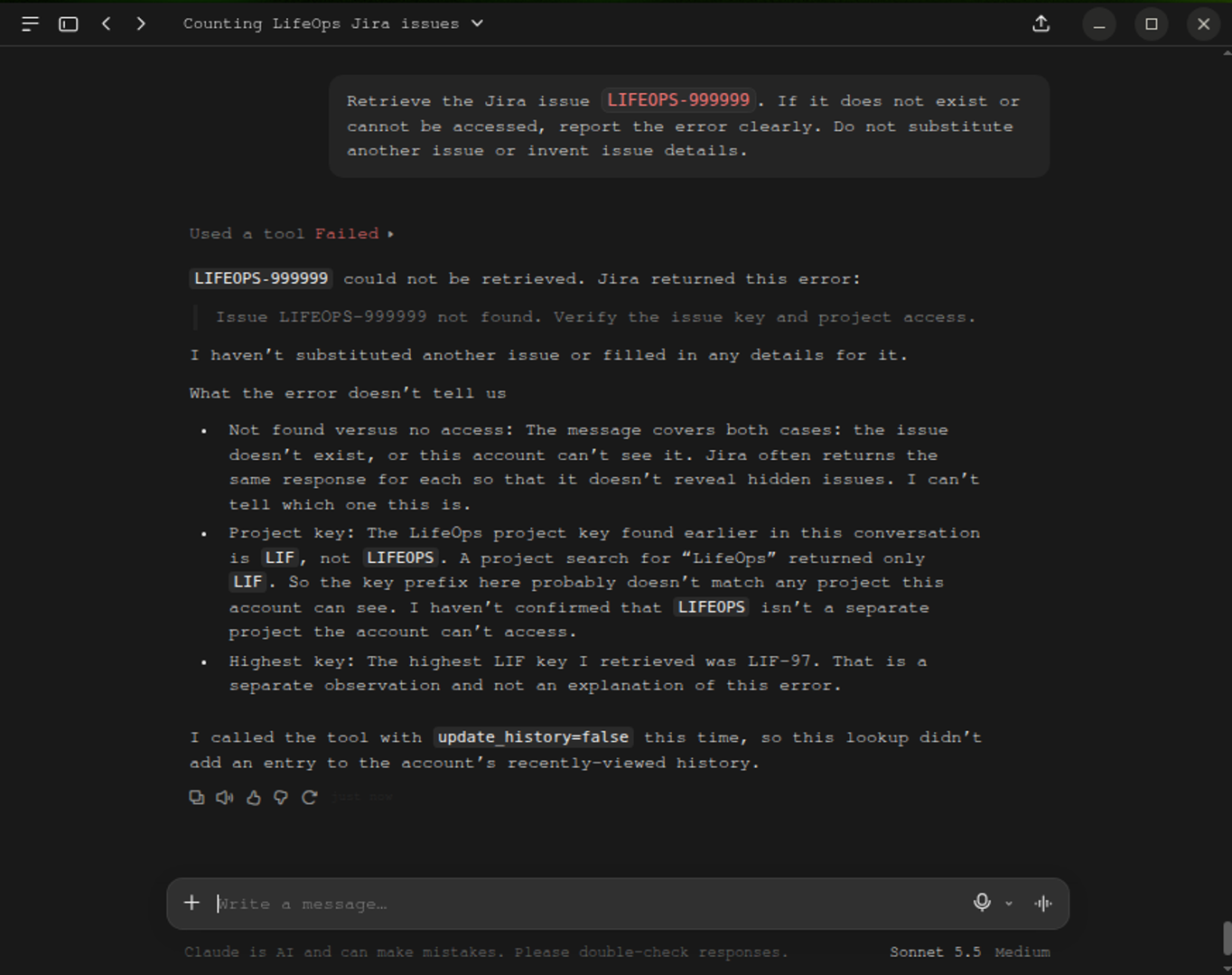
“Retrieve the Jira issue LIFEOPS-999999. If it does not exist or cannot be accessed, report the error clearly. Do not substitute another issue or invent issue details.” |
|---|
Group 3: Write Operations
We only have one test for this group and see if each Jira MCP server can write and do Jira issue transitions. When an operation failed, we recorded the reported error rather than assuming its cause.
Test 10: Update Status (Write Test)
The prompt:
Update Jira issue LIF-35 in the LifeOps project. The issue is expected to have the current status **To Do**. Attempt to transition it to **In Progress** using the appropriate Jira workflow transition. Follow these rules: 1. Retrieve the issue first and verify its current status. 2. If the issue does not exist, cannot be accessed, or is not currently To Do, stop and report the reason. Do not select another issue. 3. Do not modify any other issue or any other field. 4. If the transition fails, report the exact error returned by Jira or the MCP tool, if available. Explain the reason if it can be established. Do not invent an explanation. 5. If the transition succeeds, retrieve the same issue again to verify its updated status. Report the following: - Issue key and summary - Original status - Requested status - Write operation result (success or failure) - Exact error and explanation, if applicable - Final status and whether it was independently verified. Do not claim success unless a fresh Jira retrieval confirms that the status is **In Progress**. |
|---|
What Are the Core Differences Between Jira Integration Architectures?
They differ in how they communicate over the network, their deployment, and how credentials and authentication are managed. Let’s discuss them separately, then make a comparison table.
Network Topology and Deployment
A Jira MCP implementation may rely on a local or remote deployment. See the comparison table below:
| Characteristic | Local MCP Server | Remote MCP Server |
|---|---|---|
| Deployment | Runs on the developer’s computer | Runs on a remote server |
| Client communication | Often stdio through Python (uvx), Node (npx), or Docker | Network transport, such as Streamable HTTP |
| Internet required for Jira Cloud? | Yes | Yes |
| Runtime maintenance | Usually managed locally | Usually managed by the provider |
| Example | Community mcp-atlassian | Official Atlassian Remote MCP, Skyvia Connect MCP Endpoint |
For our local MCP server testing, we will use Python uvx. For either local or remote implementation, both still need to access Jira remotely, which requires an internet connection. The Community mcp-atlassian, which is a local MCP doesn’t mean offline Jira.
We can’t test this criterion to make a comparison because they have different implementations.
Authentication and Credential Management
Both the Official Atlassian Remote MCP and Skyvia MCP Endpoint require OAuth 2.1, which means you need to sign in to Jira in a browser to be authenticated. Meanwhile, the Community MCP Atlassian stores the credentials in a .env or JSON file with API tokens and a Jira account. A privilege leak is possible when the .env or JSON file falls into the wrong hands.
We also didn’t consider this for testing because this is not an apples-to-apples comparison.
Protocol Transport and Network Overhead
A local MCP like the Community mcp-atlassian uses a local transport: stdio. This means that the communication between the MCP Host and the MCP Server is a local process. The MCP Client sends MCP messages through the MCP Server’s standard input. Then, the server responds through standard output. But connecting to Jira still needs an HTTPS connection from the local MCP Server.
Meanwhile, remote MCP servers use streamable HTTP. The MCP Client sends MCP requests to the remote MCP server over HTTP. Network latency and connection reliability can affect communication.
Comparison Table
Let’s compare the MCP implementation in more detail below. We added the Skyvia Data Integration, where a large number of Jira issues can be replicated to Snowflake or BigQuery along with other sources. Then, combine that to a Skyvia MCP Endpoint to a Snowflake database or BigQuery dataset for a conversational query within an AI app.
| Technical Vector | Official Atlassian Remote MCP | Open-Source Community MCP (sooperset/mcp-atlassian) | Skyvia Connect Hosted MCP Endpoint | Skyvia Data Integration (ETL / ELT) |
|---|---|---|---|---|
| Primary Architecture | Hosted Remote Agent Gateway | Local/Containerized stdio or SSE Process | Hosted No-Code Cloud MCP Server | Multi-Tenant Cloud ELT / ETL Data Platform |
| Target Jira Platform | Jira Cloud Only (*.atlassian.net) | Jira Cloud & Jira Data Center / Server | Jira Cloud & Jira Data Center | Jira Cloud, Data Center, & Server |
| Connection Protocol | Remote HTTP MCP (/v1/mcp/authv2) | Local stdio via uvx / Docker | HTTPS / SSE Cloud Endpoint (mcp.skyvia.com) | REST, OData, Bulk API, Cloud Agents |
| Auth Mechanism | OAuth 2.1 with PKCE | Raw API Token / Personal Access Token (PAT) | Managed Cloud OAuth / Encrypted Vault | Secure OAuth 2.0 / Automated Token Refresh |
| Infrastructure Overhead | Zero (Cloud-hosted) | High (Requires Python/Node/Docker per machine) | Zero (100% Cloud-managed) | Zero (100% Cloud-managed, scheduled tasks) |
| Cross-Source Capability | Jira, Confluence, and other Atlassian products | Jira and Confluence only | Jira + 200+ Sources (DBs, CRMs, Warehouses) | 200+ Connectors (DBs, DWH, ERP, CRM) |
| Credential Security | High (Delegated OAuth) | Low (Plain text .env / JSON files on laptop) | High (Encrypted token store, IP whitelisting) | Enterprise-grade encryption, SOC 2, HIPAA |
| Point Limit Tolerance | Low (Throttles under recursive prompt loops) | Medium (Direct hits on Jira tenant quota) | Optimized (Schema filtering prevents over-fetch) | High (Automated batching, chunking, retries) |
| Ideal Operational Focus | Ad-hoc conversational chat in an MCP Host or AI app like Claude | Local terminal agents & isolated scripts | Unified Team MCP Gateway for IDEs & Web AI | High-volume BI, data warehousing, two-way sync |
Which Jira MCP Approach Fits Your Specific Architecture?
Which might it be for your organization’s Jira MCP needs? Check below:
| Primary Goal | Audience / Scope | Recommended Solution | Details / Tooling |
|---|---|---|---|
| Conversational AI Tool-Calling (Claude, Cursor, ChatGPT in Real-Time) | Single Developer Local Testing | Open-Source Community | uvx mcp-atlassian |
| Conversational AI Tool-Calling (Claude, Cursor, ChatGPT in Real-Time) | Enterprise Team Multi-Source Hub | Skyvia Connect MCP Endpoint | Hosted MCP Endpoint (Zero-Code, Unified) |
| Bulk Analytics & Data Pipelines (Snowflake, BigQuery, BI Sync) | Enterprise Team Data Warehouse Source | Skyvia ETL/ELT + Skyvia Connect | Hosted MCP Endpoint (Zero-Code, Unified) |
Why Is Skyvia MCP Endpoints the Ideal Hosted MCP Server for Enterprise Teams?
Skyvia Connect MCP Endpoints acts as a managed, no-code MCP gateway in the cloud. You may consider this option for the following reasons.
Architecture & Protocol Deep-Dive
It runs as a remote MCP, and credentials are managed in Skyvia through OAuth 2.1. This is done inside the Skyvia Connection to Jira. It can further be secured using IP whitelisting and username/password strict access controls. No readable API tokens.
And it’s not just for Jira, but for the other 200+ sources. Consider: you don’t need a separate MCP server setup for PostgreSQL and another for Salesforce.
Strengths
- Multi-source architecture, Jira included + 200+ other sources.
- Zero workstation maintenance: No need to install Python or uvx. Administrators generate an HTTPS endpoint URL in Skyvia, then distribute it to team members for Claude or Cursor MCP setup.
- Unified Multi-Source Context: Replicate Jira issues alongside CRM and production databases into Snowflake or BigQuery. Then, create a Skyvia MCP Endpoint to the data warehouse. An LLM can correlate a bug in Jira directly with customer churn risk in Salesforce in a single conversational turn.
- Centralized Credential Governance: Eliminates the security risk of developers storing sensitive Atlassian API tokens in plain text configuration files.
Limitations
- Fully cloud-managed: Not applicable for on-premises, highly secured data centers. A local MCP like the open-source Community MCP-Atlassian fits this requirement.
What Our Tests Reveal
We used Claude Desktop and configured the Skyvia MCP Endpoint there. So, Sonnet 5.5 Medium will influence what the final answer will be, not just what was retrieved through the MCP server. Also, in Claude Desktop, the final duration of how long a request was processed is not available, so it won’t be present in the screenshots. But a prompt answer is usually delivered within 10 seconds and less than 2 minutes.
Test 1: Completeness and Count Test
Here’s what happened:
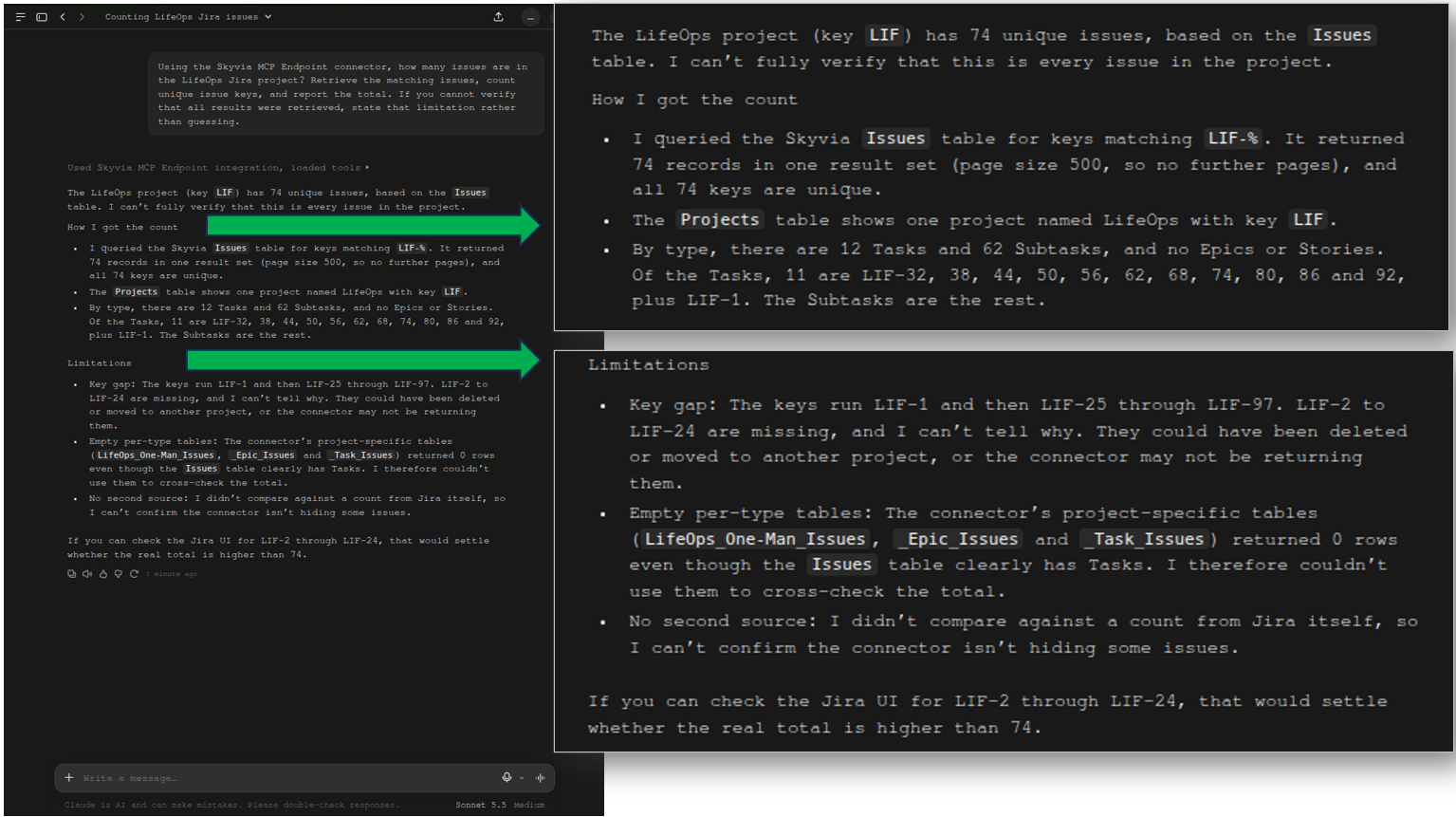
The 74 Jira issues count is correct. The gap where LIF-2 to LIF-24 issue keys are missing is also accurate. Not using the LifeOps_One-Man_Issues mentioned as not used for cross-checking is good because it’s a separate test project. The prompt specifically asked for LifeOps Jira issues.
Test 2: Pagination and Response-Size Handling
The result was a long single batch of 74 issues with the correct columns as indicated in the prompt. It correctly reports no duplicate keys, but then identified duplicate summaries and specified the issue keys. I’m impressed because I didn’t realize it until it was mentioned here. I manually entered the issues in Jira, so duplicate summaries are very possible.
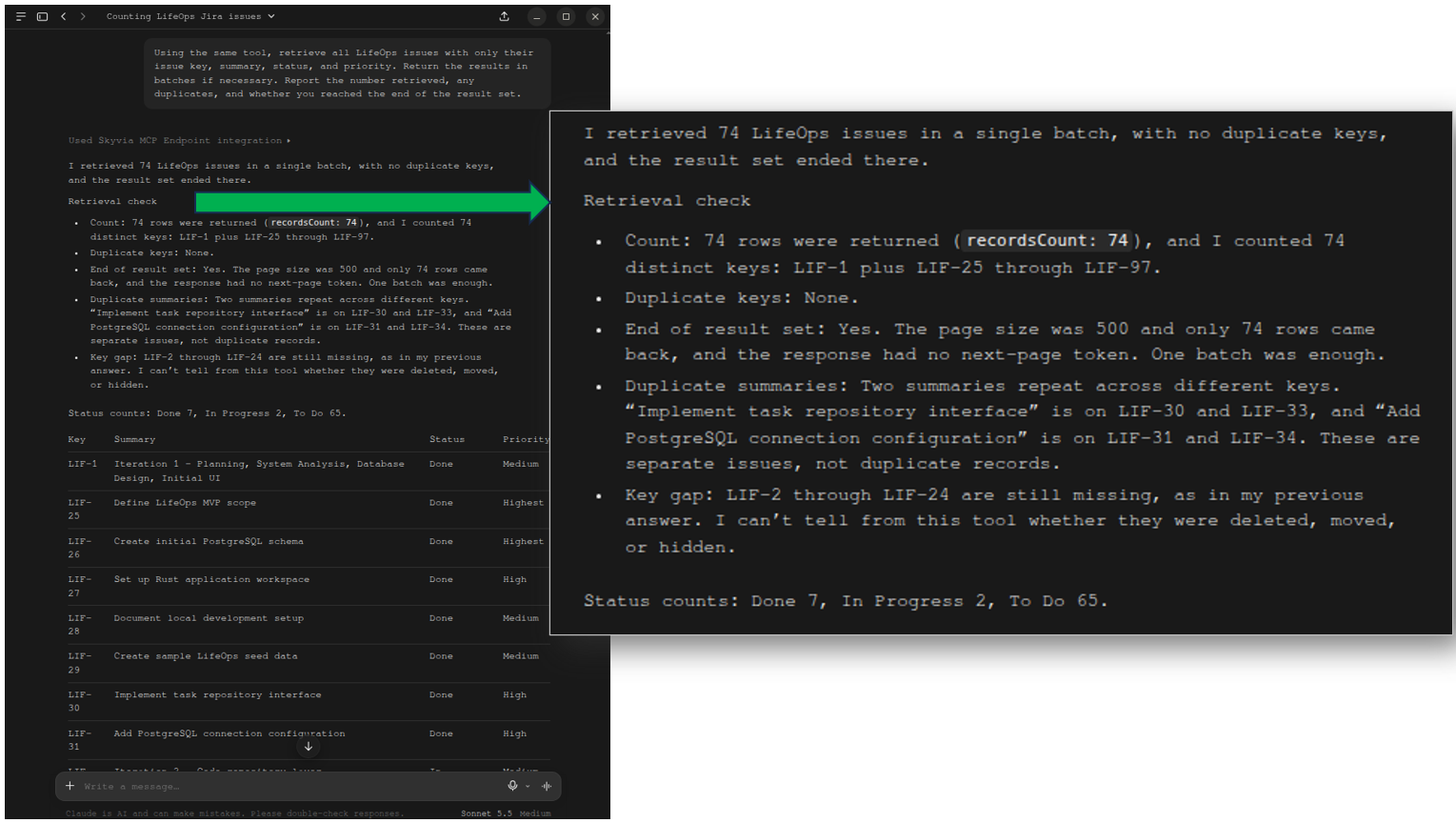
But there’s a problem. It reported issues with Done status counted as 7. It should be 9. I manually counted the issues marked Done in the list, and it was indeed 9. In the Test Data section earlier, you can check that Done status has 9 issues. Also, the To Do issues should be 63, not 65.
Test 3: Field Selection and Issue-level Lookup
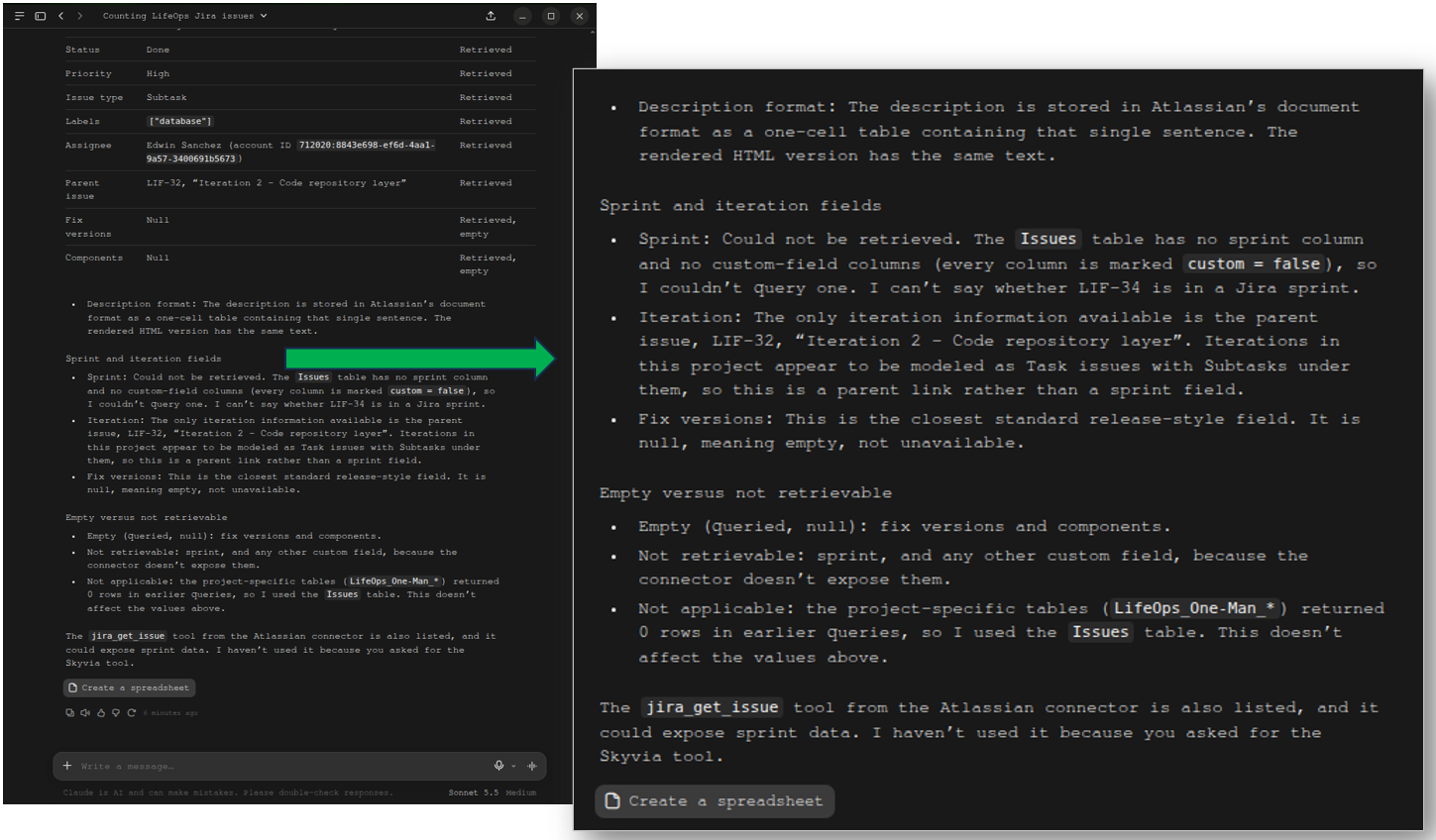
It correctly retrieved the LIF-34 issue with the correct field values, and that this is a subtask of a parent issue, LIF-32.
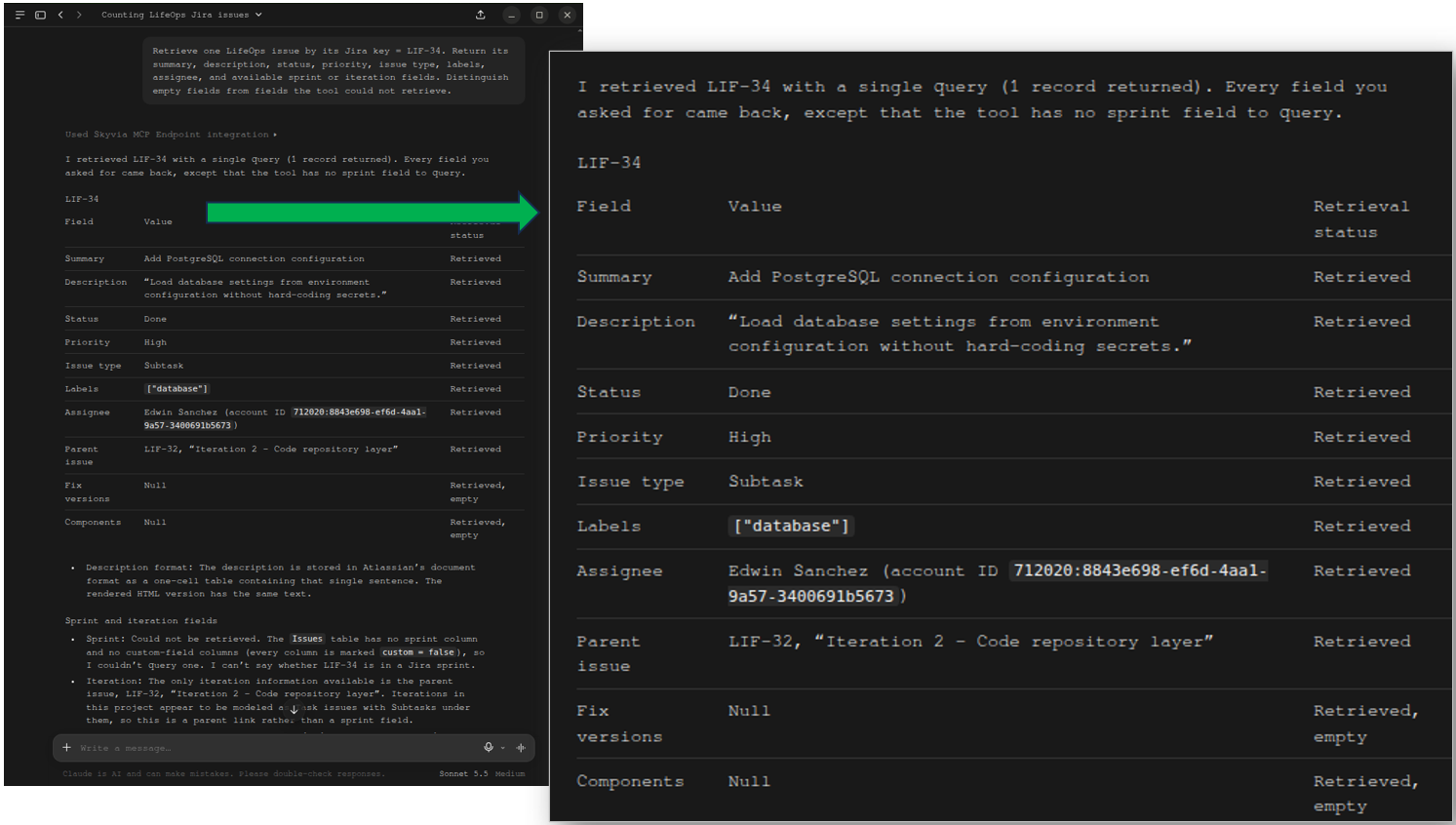
It’s correct that the only iteration information is the parent issue, LIF-32. However, it didn’t find any Sprint information. In Jira, this belongs to LIF Sprint 1. I honestly don’t know how Sprint information is stored in Jira, but there’s no information about it.
About the empty vs. not retrievable, there’s no information returned for the Sprint information from the Skyvia MCP Endpoint.
Test 4: Filter by Status
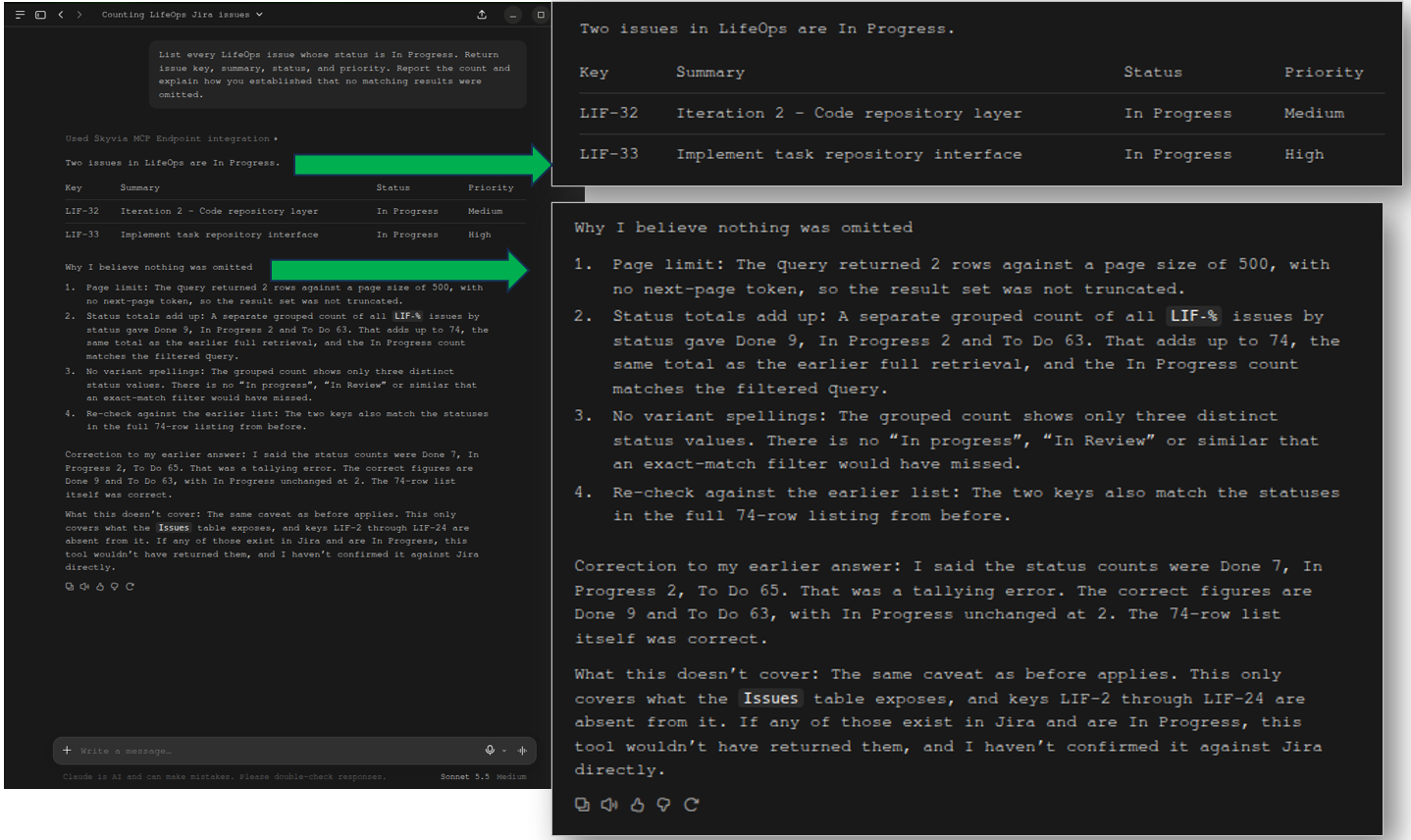
It correctly filtered the 74 issues into 2 In Progress ones. It also returned the correct columns and values. The response also reveals a page size of 500 used by the endpoint.
The surprising correction appears when it says the correct count for the Done status is 9 instead of the earlier report of 7. And 63 To Do issues instead of 65.
Test 5: Group by Status and Priority (Aggregation Test)
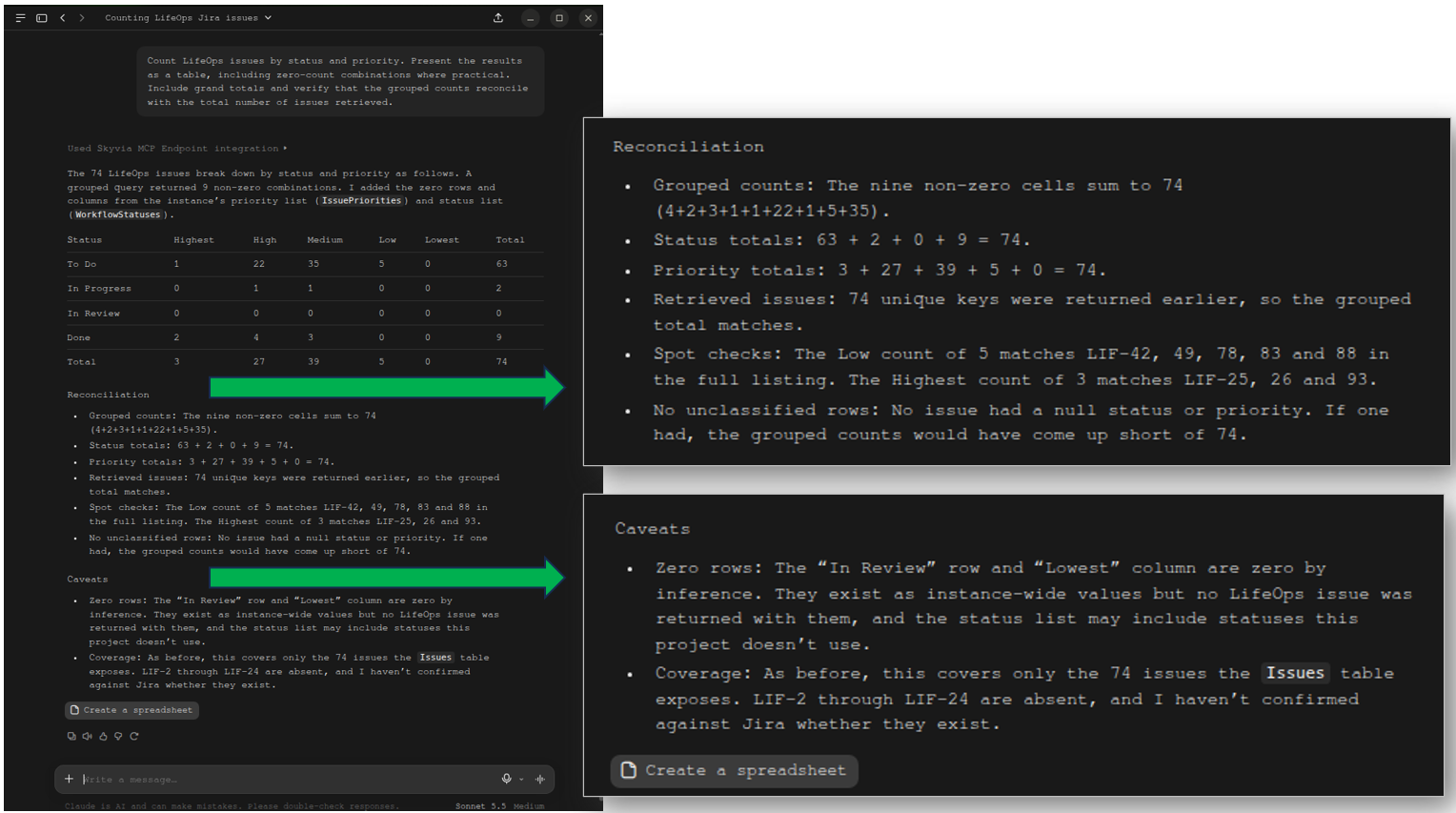
This is a count by status and priority, and the numbers presented in a table are correct in this test. It also includes the Lowest priority and the In Preview status even if they’re zero. This is consistent with the prompt, and the LLM found it practical to show the zero values. I actually prefer this to not showing them. The reconciliation and caveats are reasonable inclusions in the report.
Test 6: Task-Subtask Relationships
Shown were parent task summaries along with subtask issue keys. The result is short and includes the iterations (no sprints). I was expecting a grouping of tasks and subtasks with summaries, but going back to the prompt, I realize I wasn’t very clear about the table format.
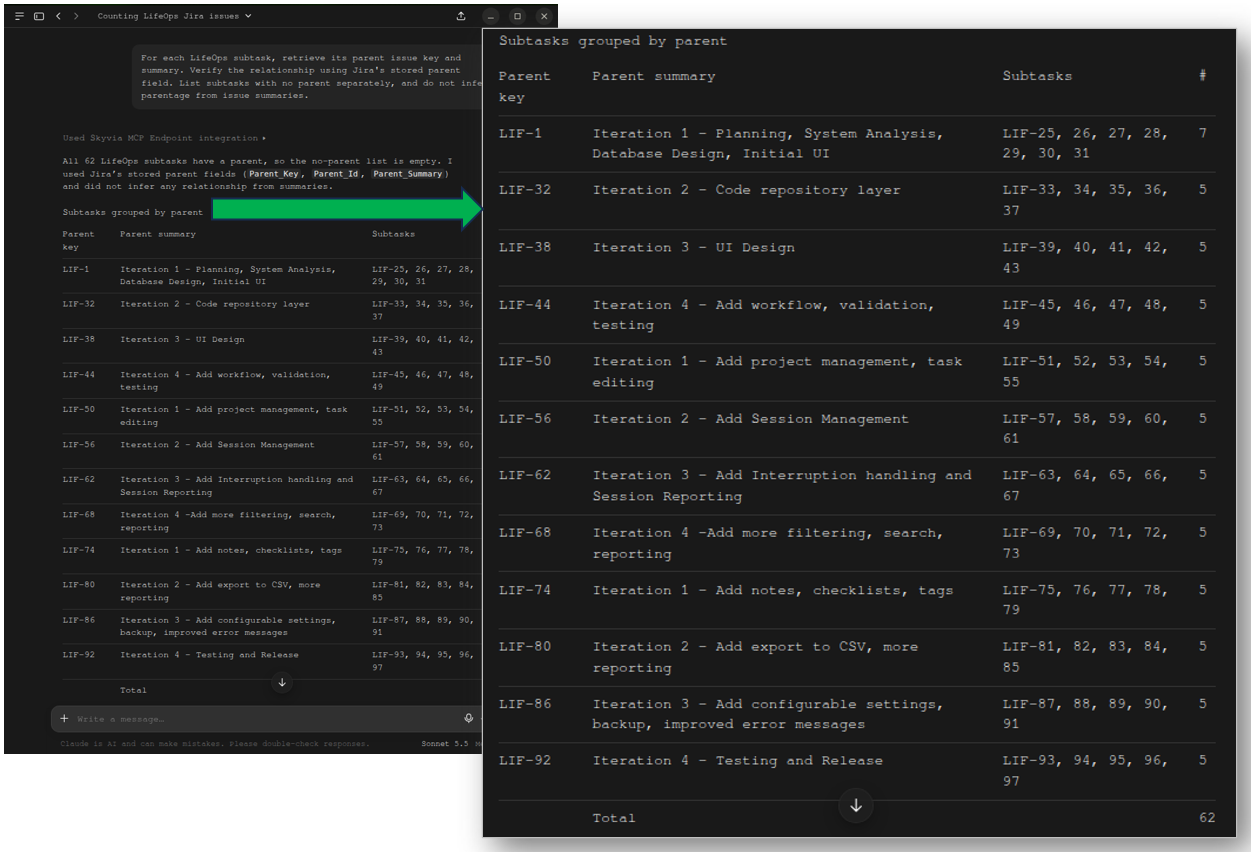
It’s correct that there are no subtasks without a parent. The verification highlights 74 issues, with 12 as non-subtasks (meaning they are parents). These are all correct.
It also notes the number of subtasks per task, and only the parent LIF-1 has 7 subtasks (with 2 duplicate summaries), and the others have 5.
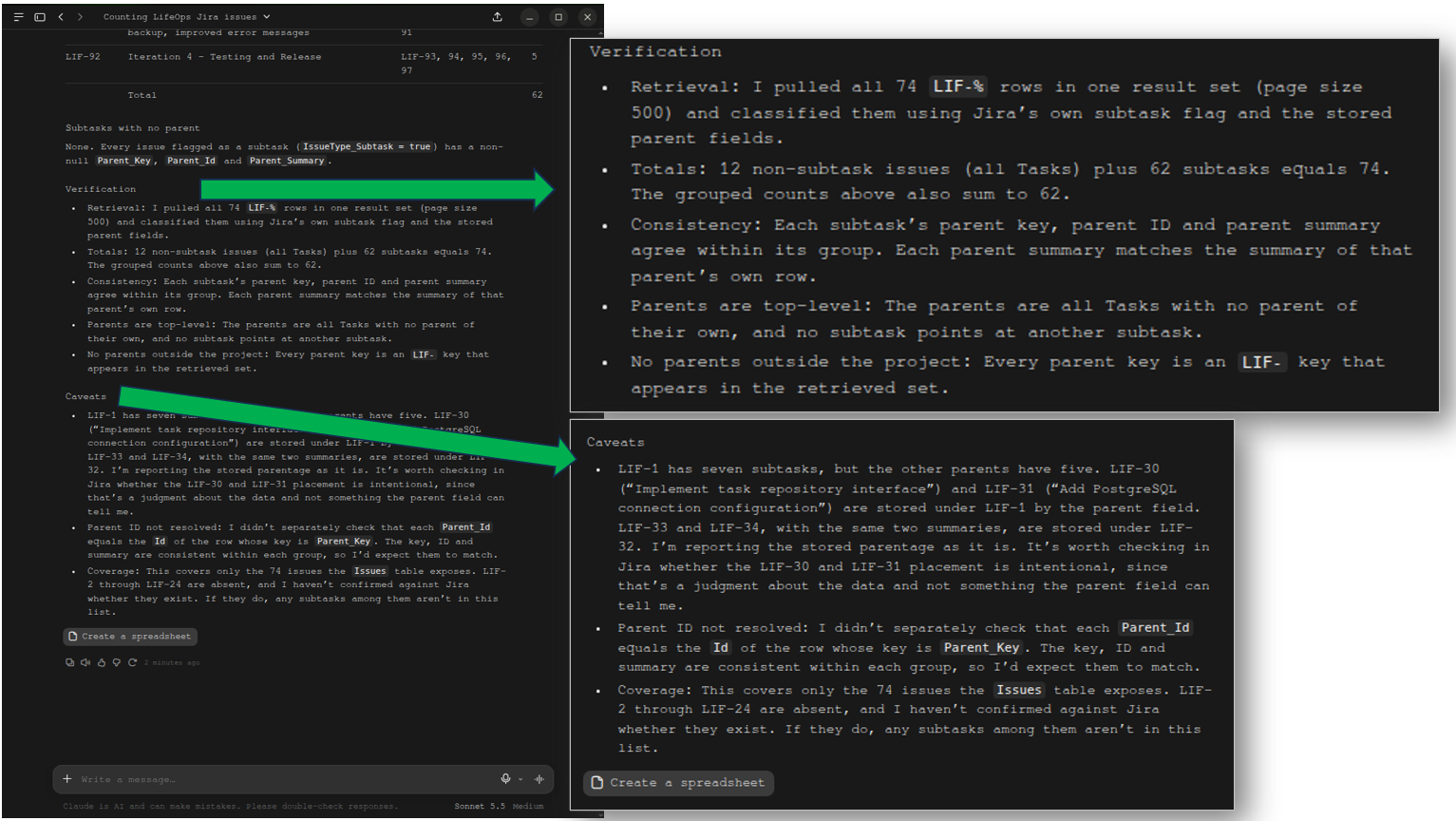
That finishes the Group 1 tests for the Skyvia MCP Endpoint configured in the Claude Desktop.
Test 7: Export Results
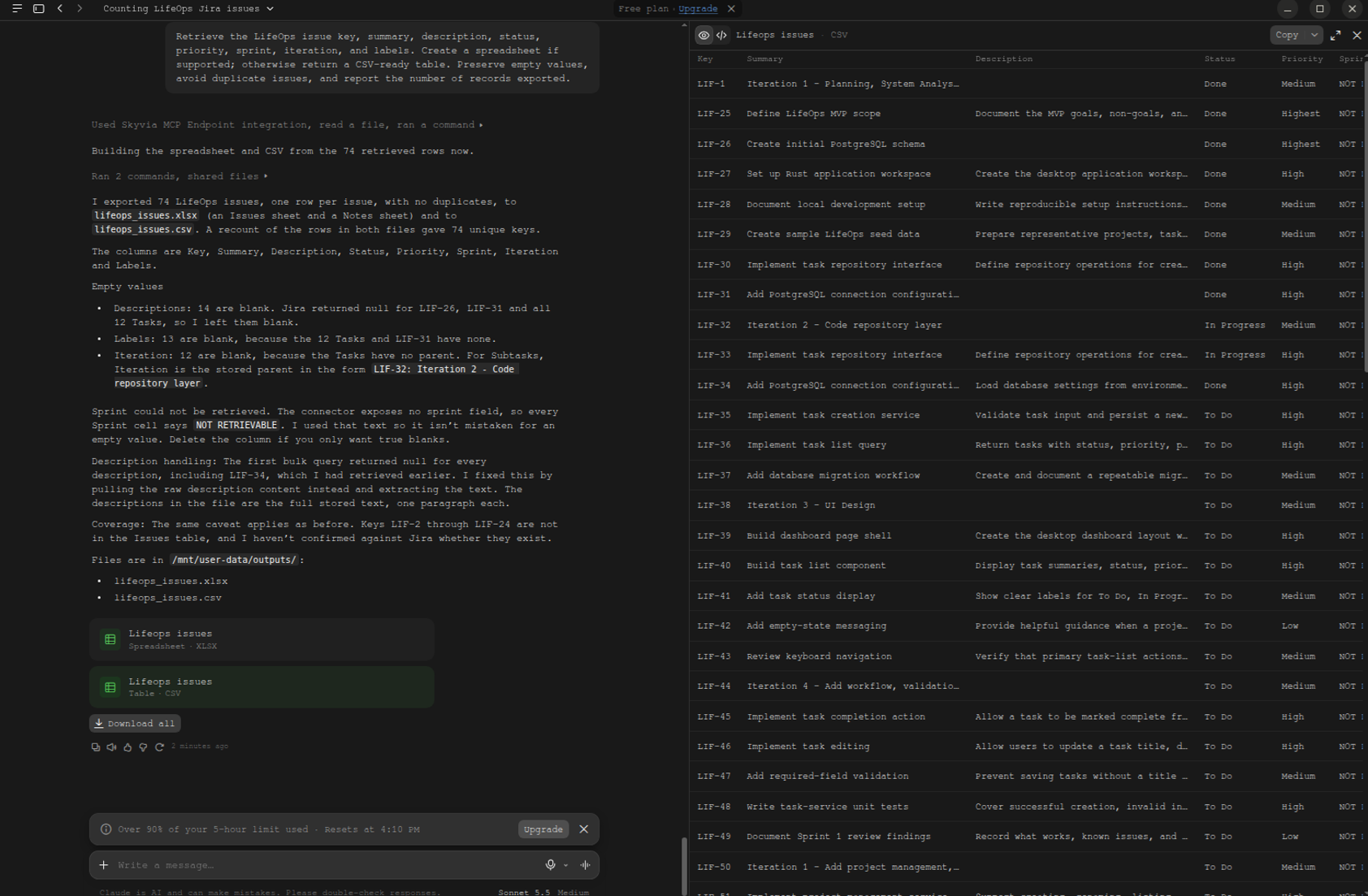
The test generated both Excel and CSV files with the correct columns, except the Sprint information. It’s unavailable in the connector. The iteration, which is a parent task, was included under the Iteration column. This is accurate.
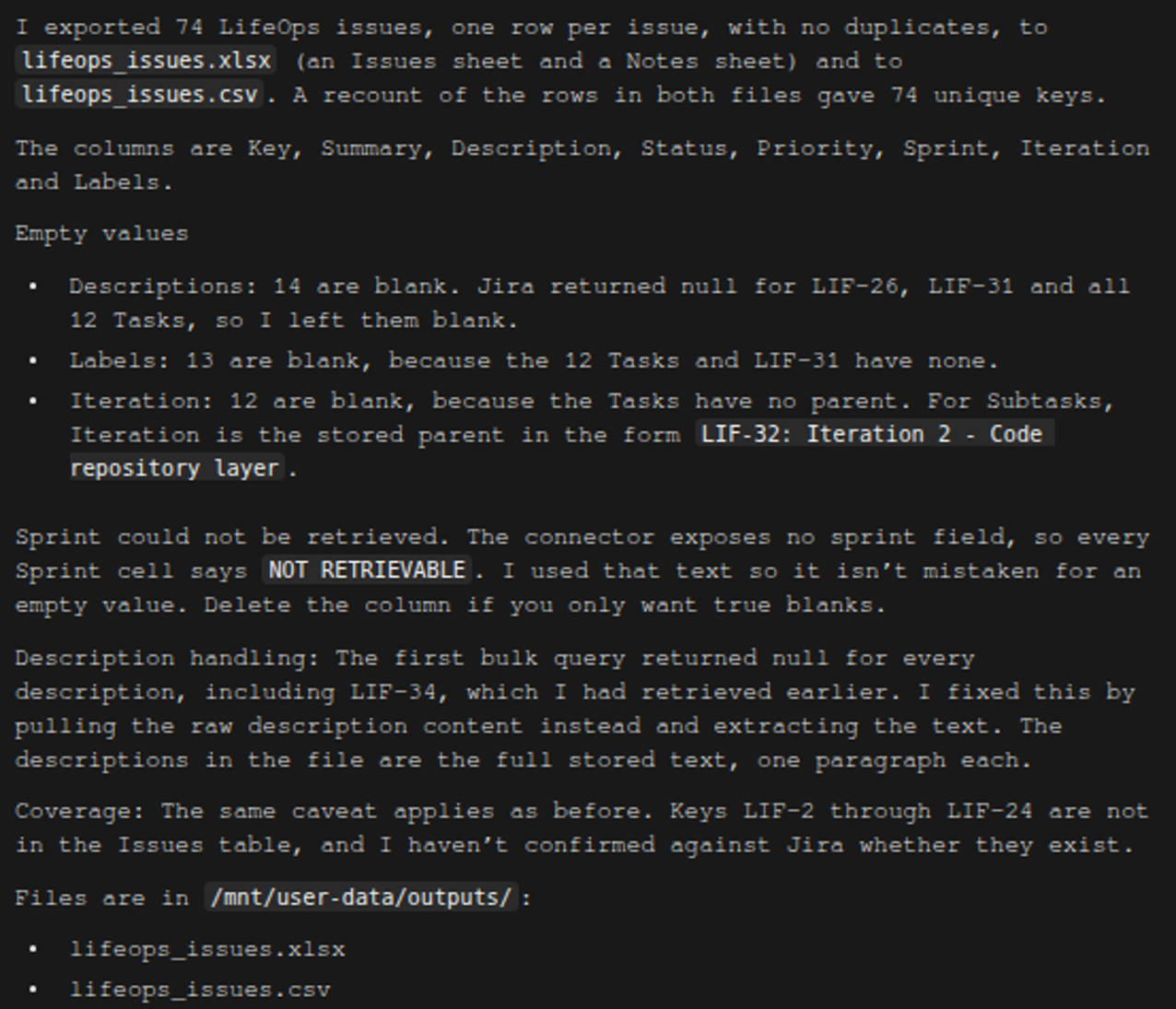
Meanwhile, the reported empty values below are correct upon checking in Jira.
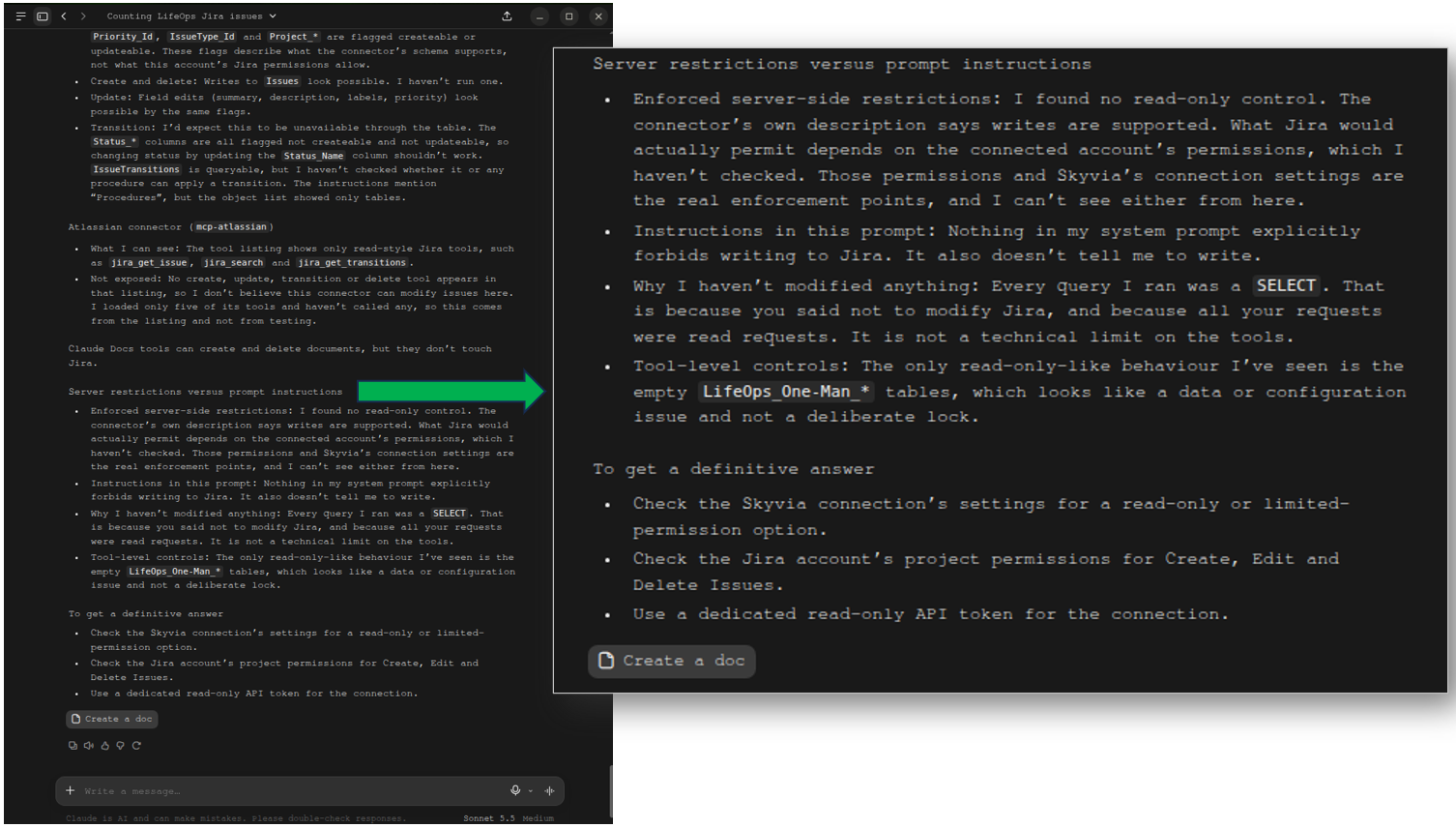
Test 8: Permissions
Nothing was modified in Jira as instructed in the prompt. It found no enforced read-only control. The Skyvia MCP Endpoint can do write operations, but it indicated in the last part that transitioning an issue is unavailable. We will prove this later in the write test.
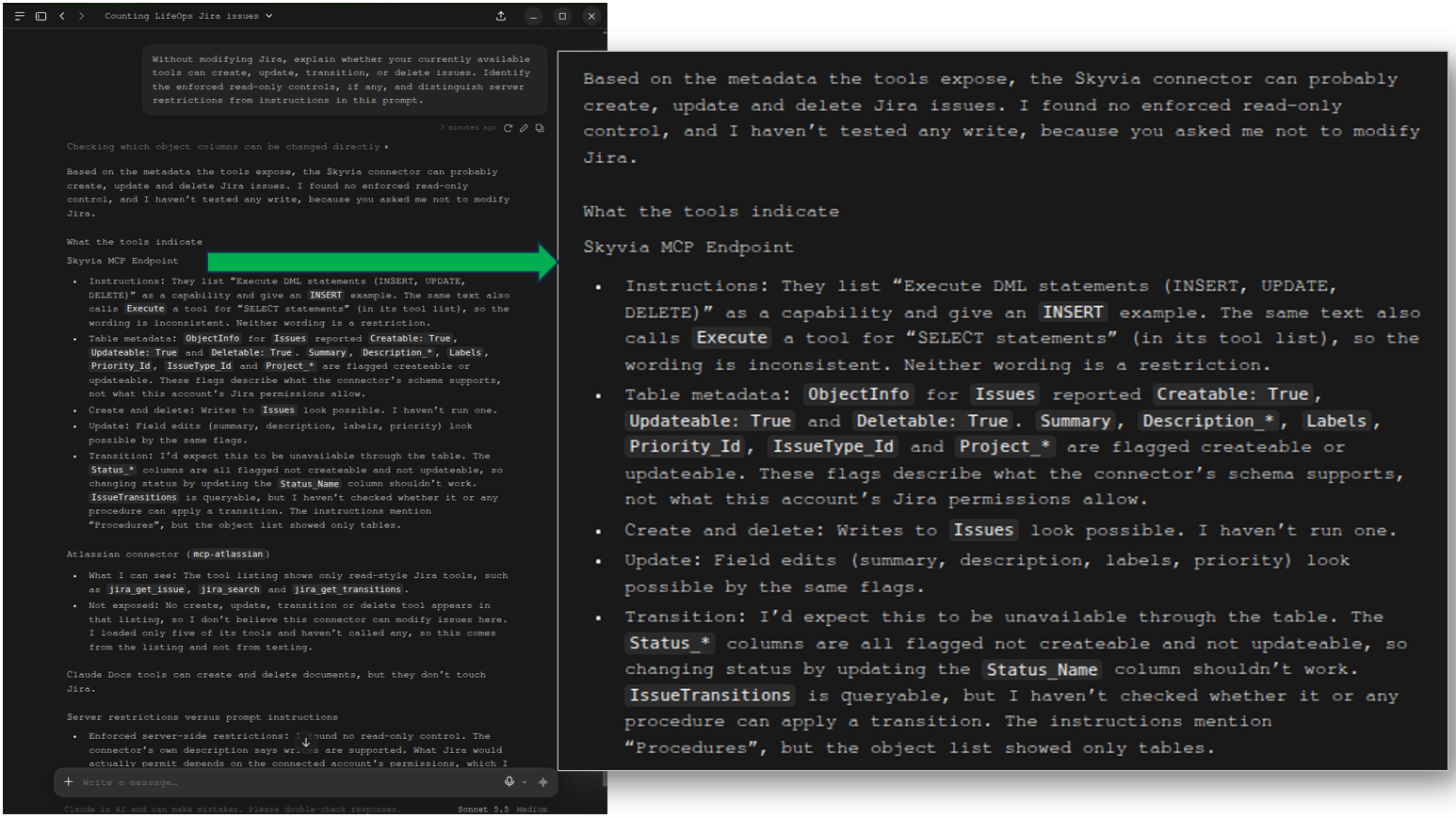
The explanation below for the retrieved restrictions is unsure whether it’s an account restriction or a connector restriction. It suggests checking in Jira and the Skyvia MCP Endpoint to be sure. That’s good because it’s not guessing.
Test 9: Invalid Issue Key Handling
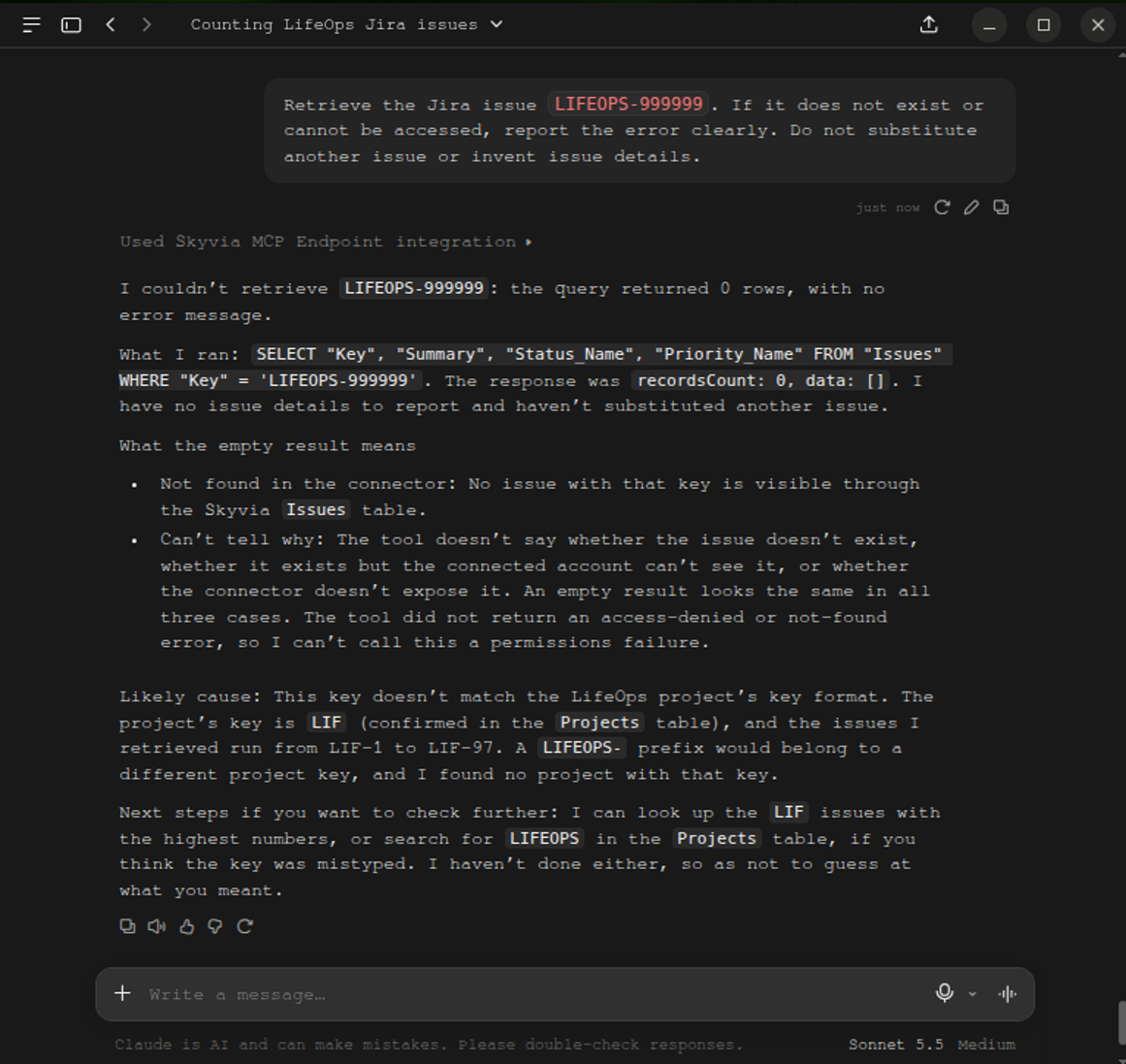
It didn’t return the details of the given issue key. That’s accurate because it does not exist in Jira and the prompt was intentional. There’s no access denied or another error thrown by the Skyvia MCP Endpoint.
Test 10: Update Status (Write Test)
It asked first for permission to write, as seen below:
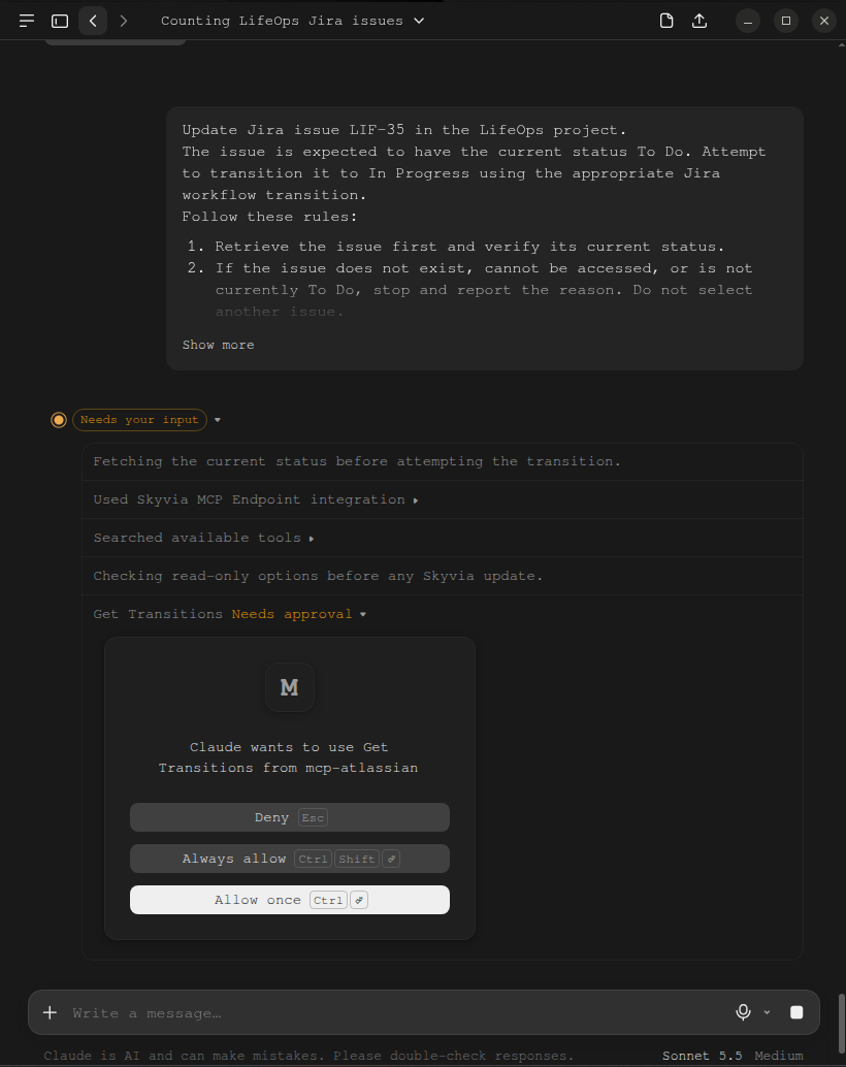
I clicked Allow once. I had 2 attempts because it didn’t update the status from To Do to In Progress. There’s no runtime error, and it said that the most likely cause is that the Skyvia MCP Endpoint does not expose a transition request. This is consistent with the Permissions test earlier.
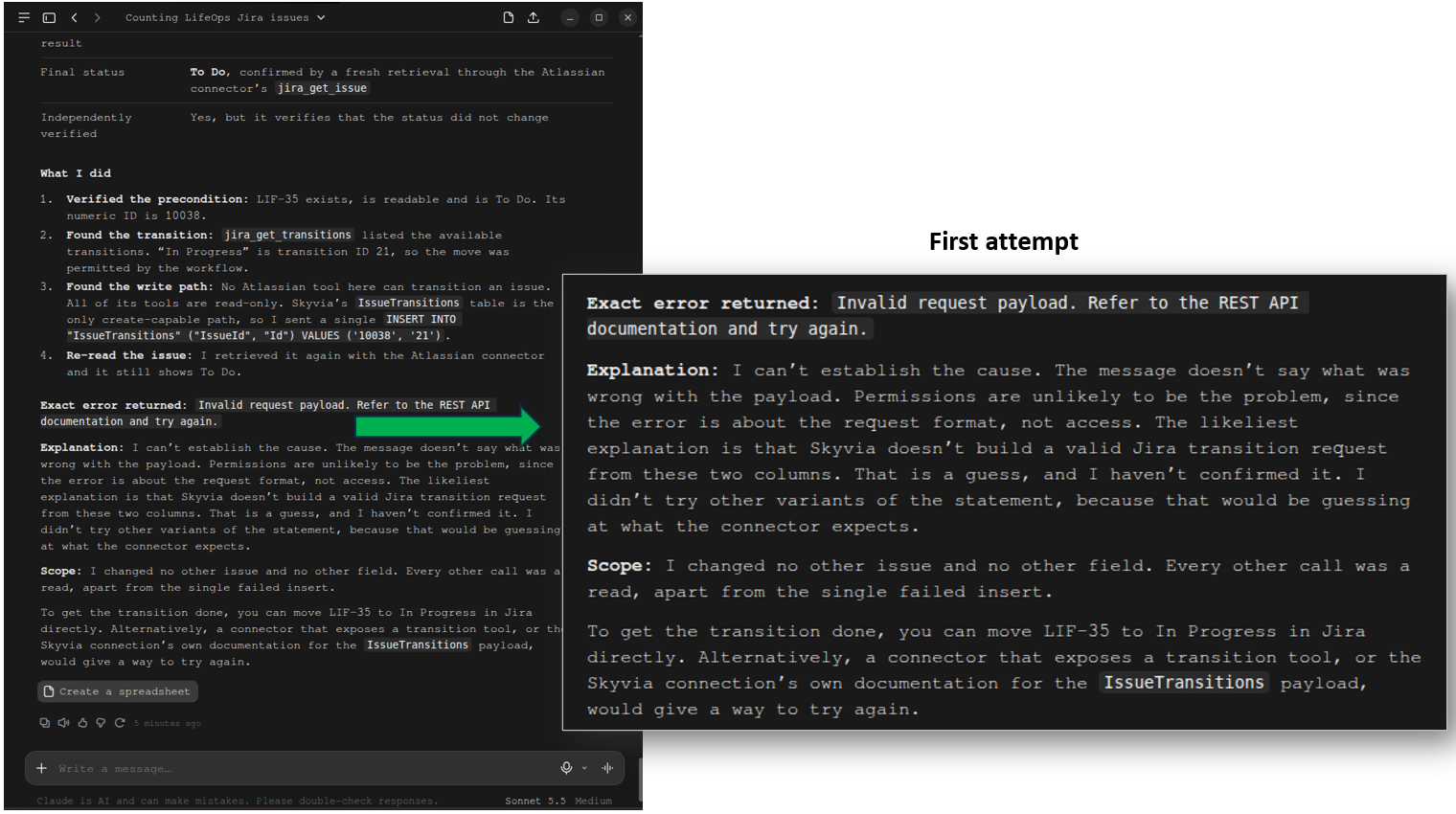
I tried it the second time, and it returned “has only read tools” and “no transition tool.”
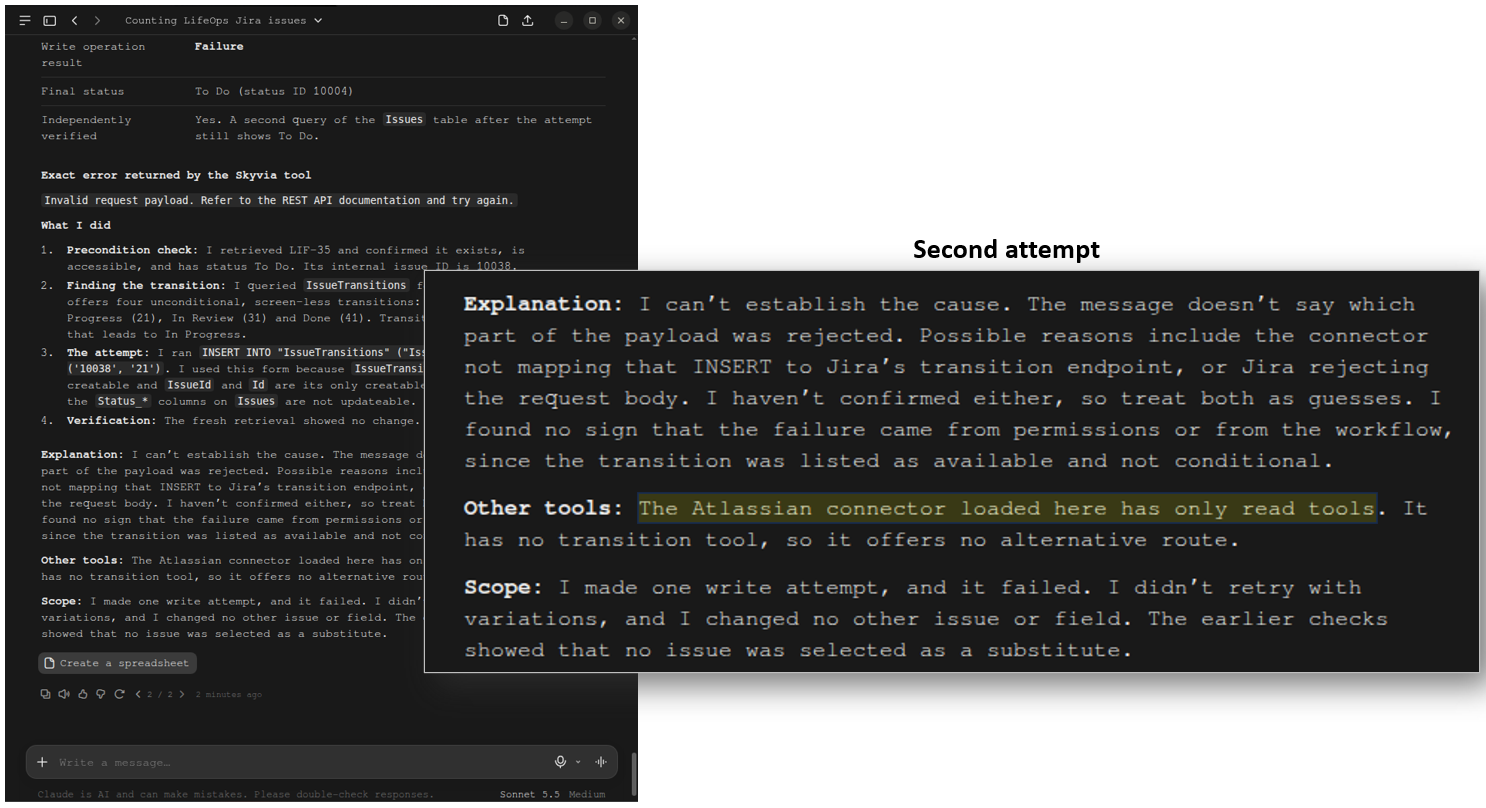
In the end, the Jira issue stayed with a To Do status and was not updated.
Why Choose the Official Atlassian Remote MCP Server for Cloud-Native Teams?
The official Atlassian Remote MCP server works with Jira, Confluence, BitBucket, Loom, and more directly from your conversation. In the performed test, we only used it for Jira.
Architecture & Protocol Deep-Dive
The Atlassian Remote MCP server uses the official remote gateway that connects MCP hosts like ChatGPT and Claude Desktop directly to Jira Cloud using OAuth 2.1 with PKCE. When I connected this MCP server, it opened another browser tab for me to sign in to Jira for authentication.
Strengths
- Native Teamwork Graph: Queries span Jira tickets, Confluence design documents, and more natively.
- User-Level Scoping: The AI model is strictly bounded by the permissions of the authenticated user.
Limitations
- Incompatible with on-premises Jira Data Center instances, like Skyvia MCP Endpoint.
- Usage directly consumes Atlassian Rovo credit allocations and rolling tenant rate limits.
What Our Tests Reveal
I configured the Official Atlassian Remote MCP Server for ChatGPT, so the answers will be influenced by GPT-5.6 Luna, not just the data returned by the MCP server.
Test 1: Completeness and Count Test
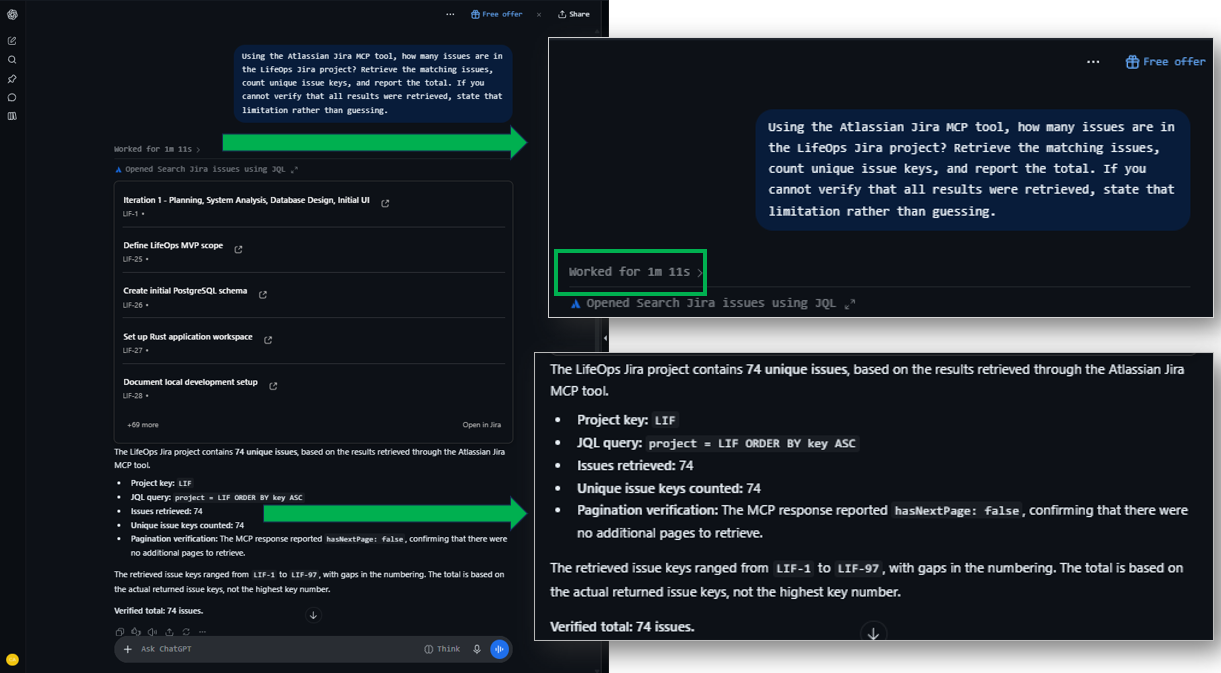
The prompt was answered after 1 minute 11 seconds, as shown below. It gave the project key (LIF) and part of the JQL query. There are 74 issues in total, and this is correct. There are also links to each issue key prior to the final answer. You can find this format in almost all the answers. It may or may not be important to the user, depending on what the user is looking for.
Test 2: Pagination and Response-Size Handling
It worked for 22 seconds, as shown below.
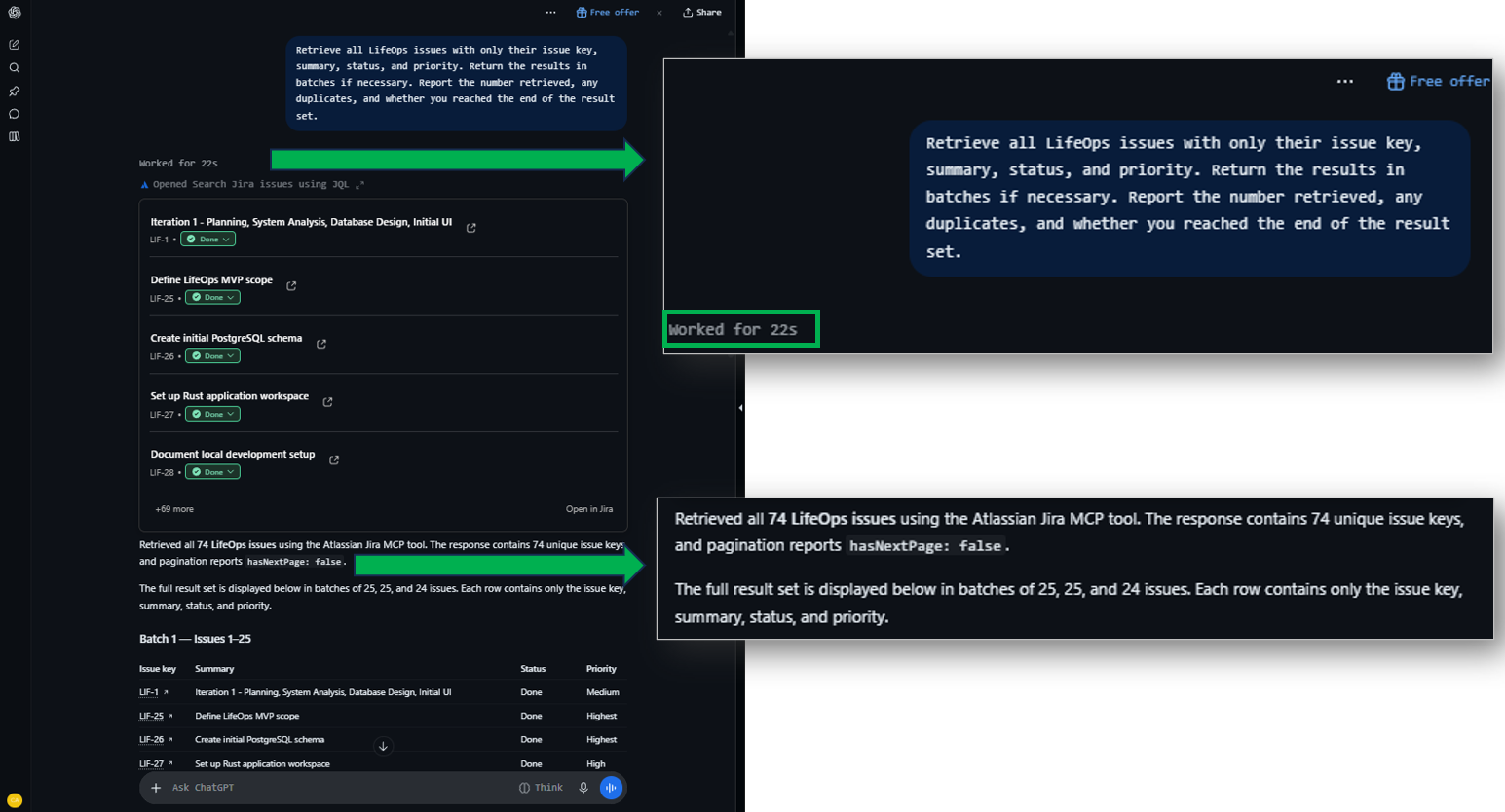
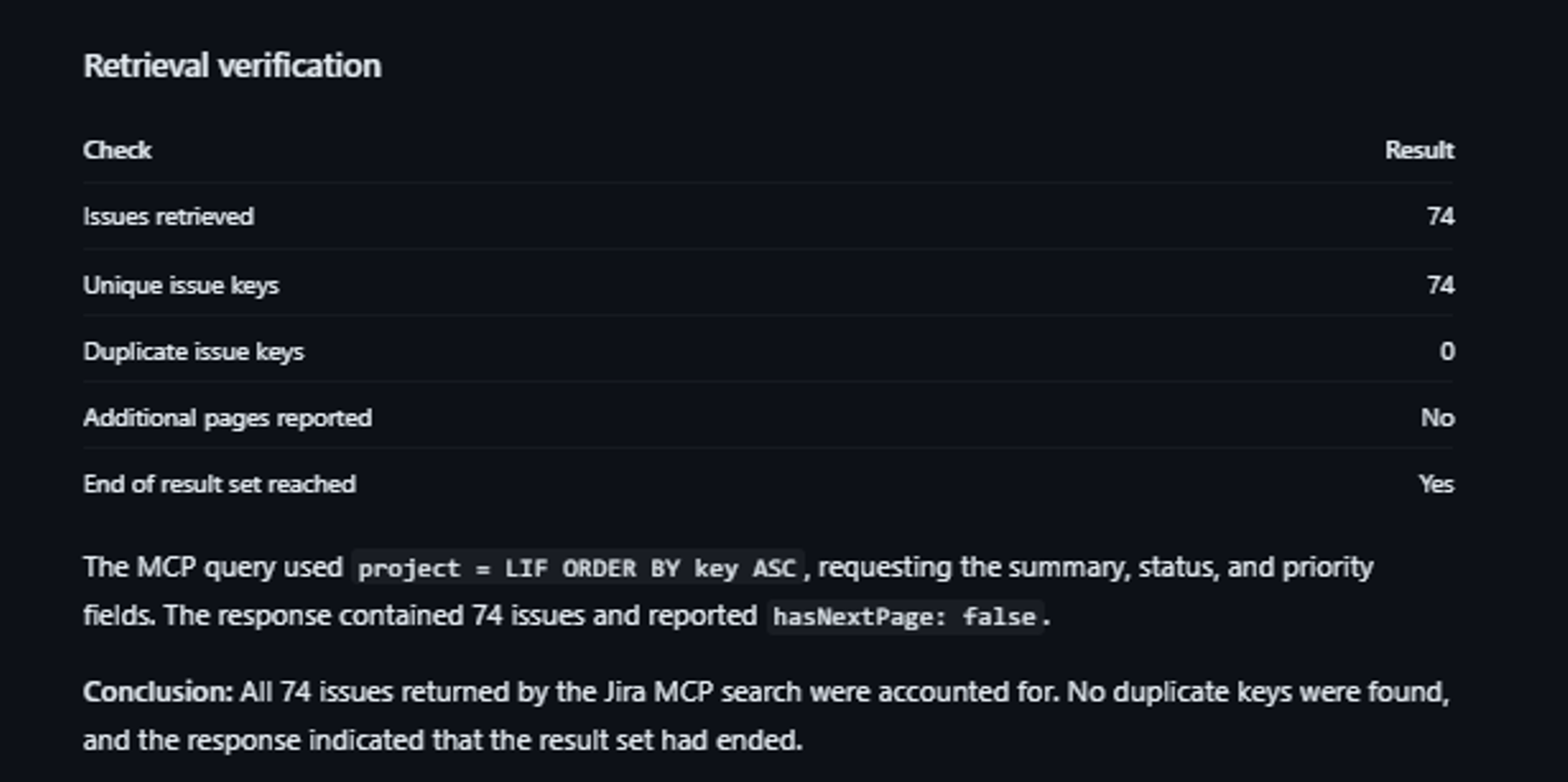
It actually batched the 74 issues into 3. Batch 1 is issues 1 to 25. Batch 2 is 26 to 50. And batch 3 is 51 to 74. That’s pagination.
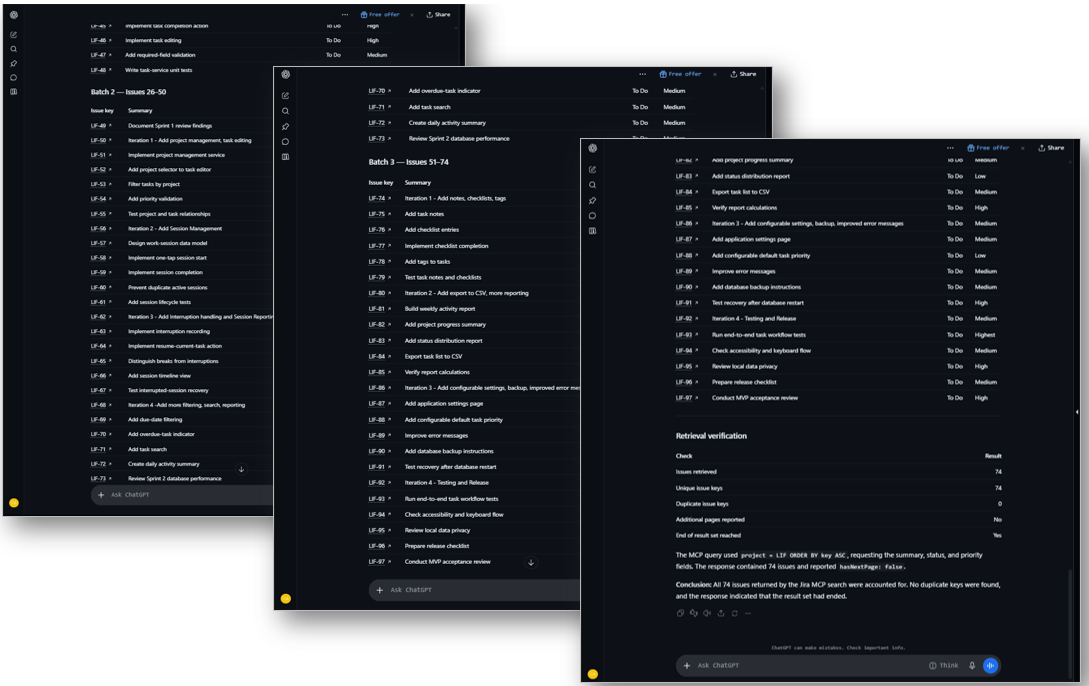
However, from the 74 issues with unique keys, it didn’t report that there are 2 duplicate summaries, unlike in Claude Desktop with Skyvia MCP Endpoint. See below:
Test 3: Field Selection and Issue-level Lookup
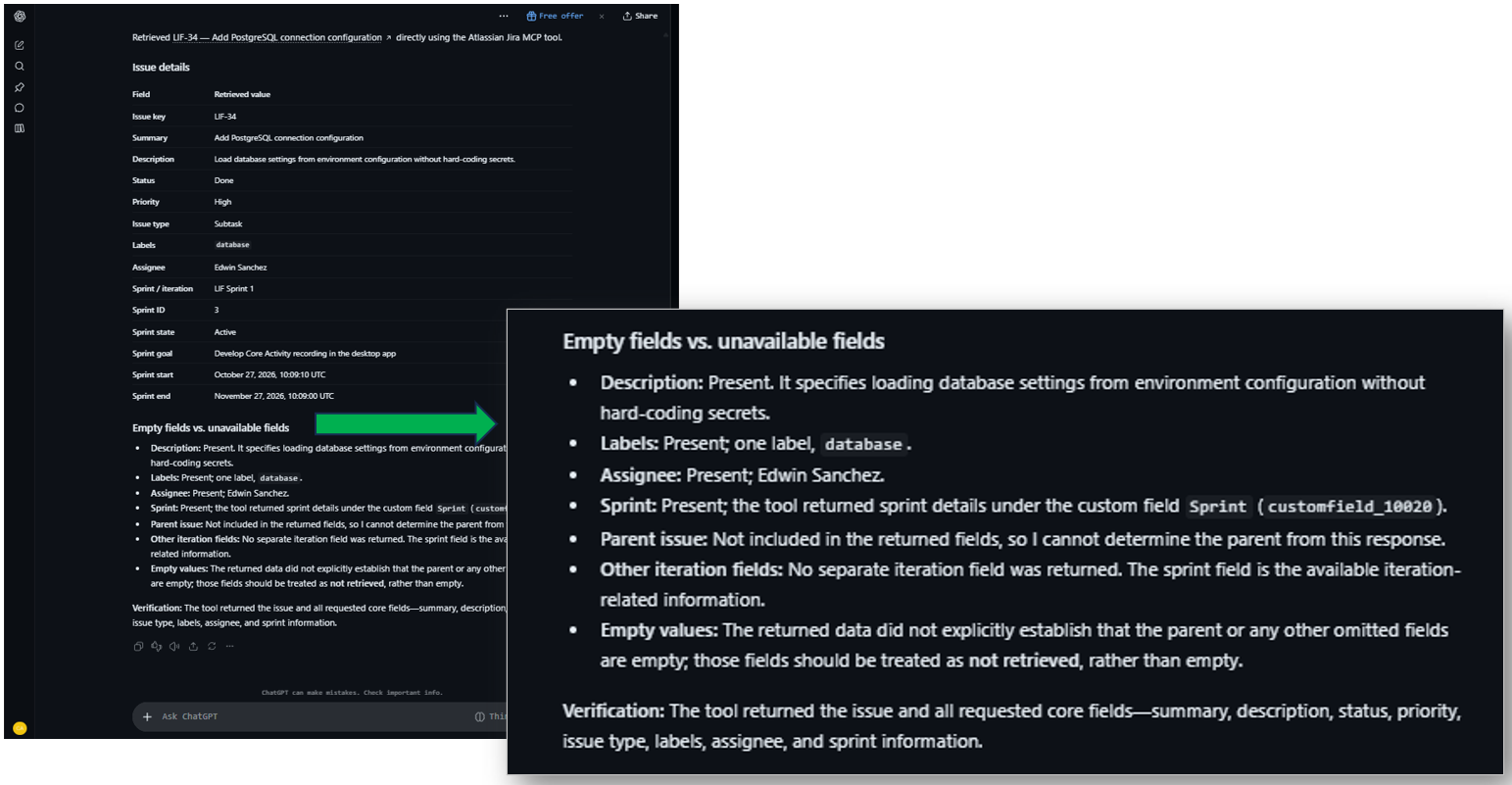
This test worked for 27 seconds, as seen below. It correctly retrieved and displayed the fields asked for in the prompt, including the Sprint. But the iteration information was not present. It also didn’t return the parent task, which includes the iteration information. It looks for an iteration field and didn’t infer it from other information.
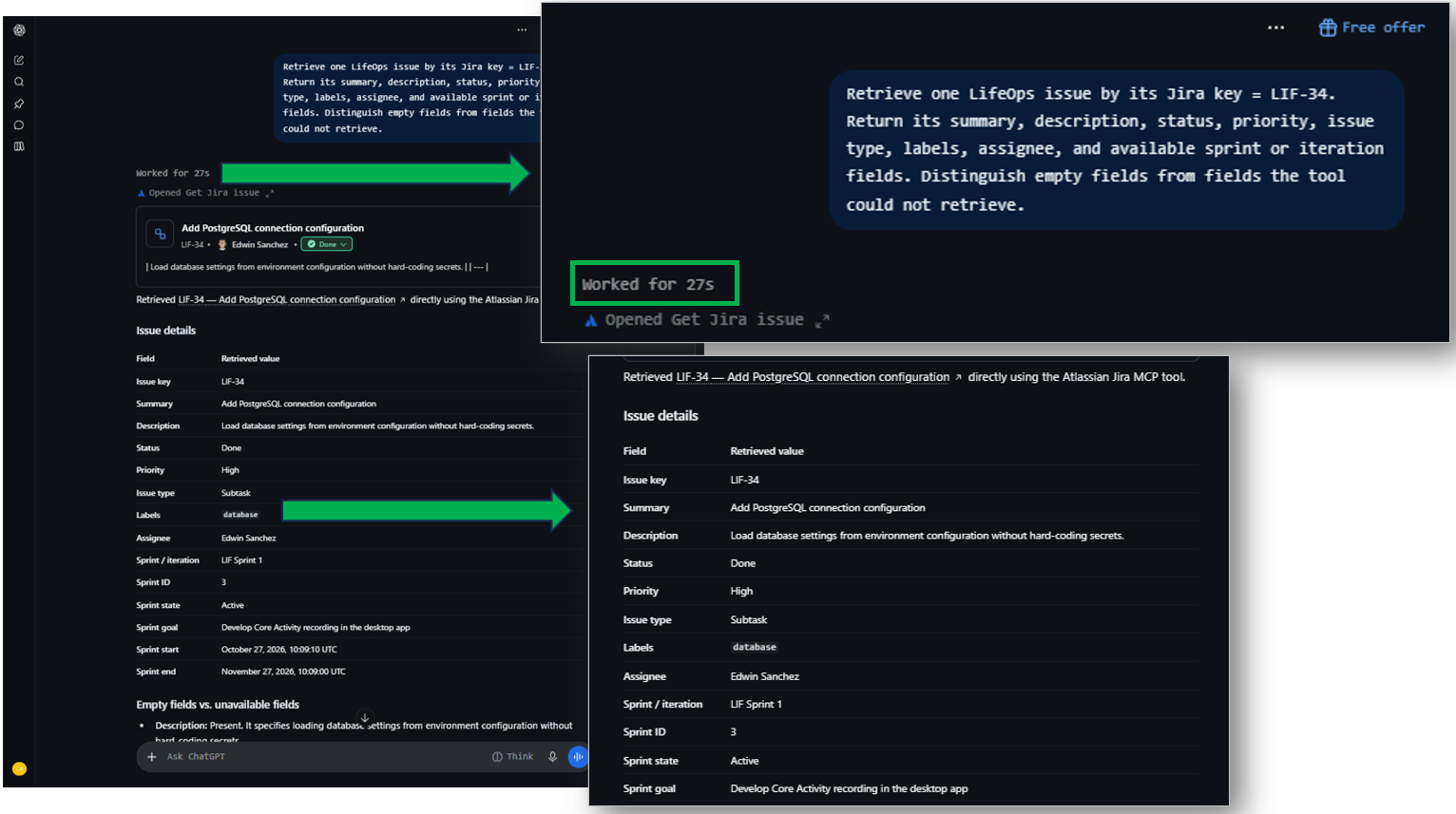
As indicated below, the parent information was not included in the returned fields. No wonder it can’t find the iteration information there. See below:
Test 4: Filter by Status
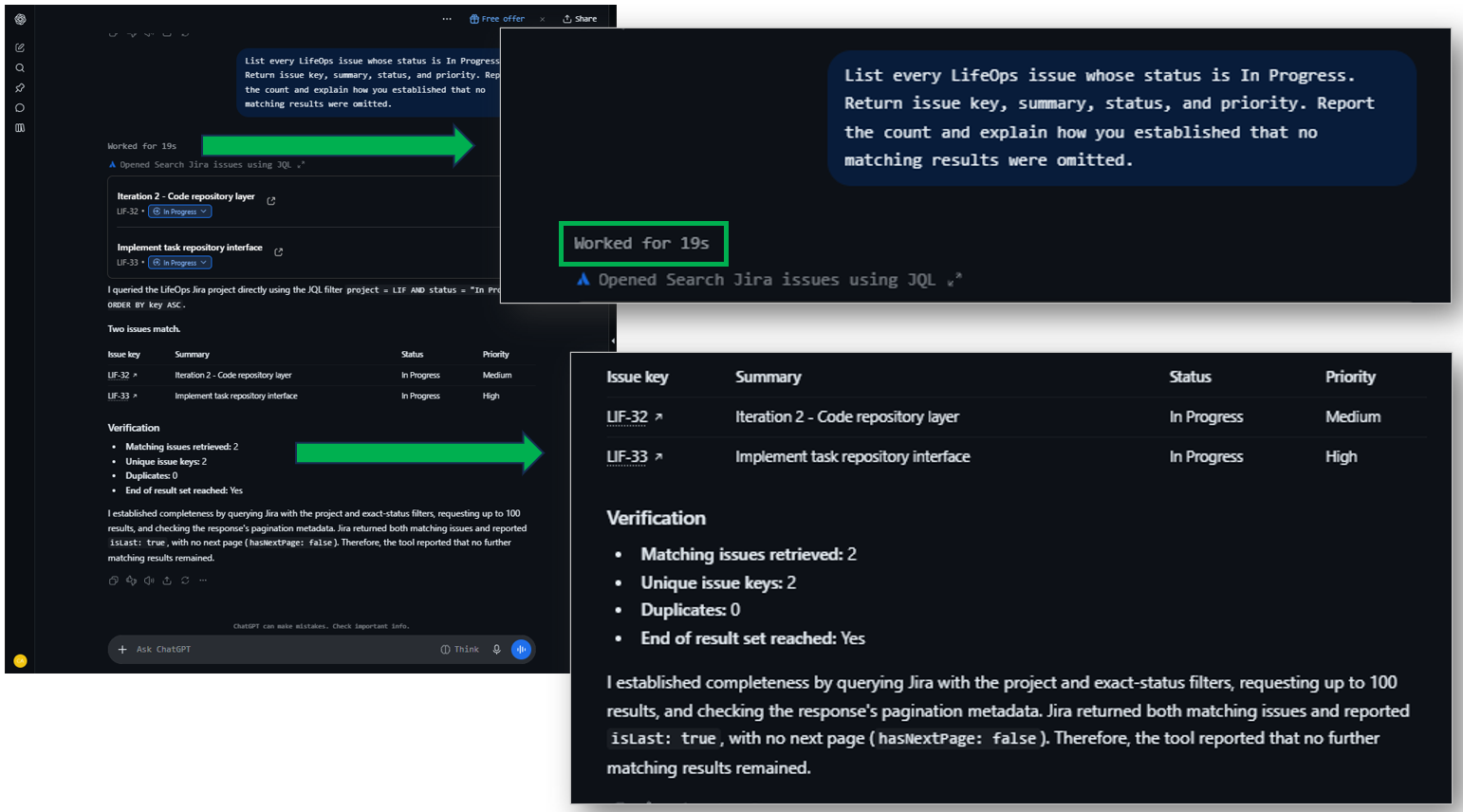
This test filtered the 74 issues to a final 2 with In Progress status. It worked for 19 seconds. This is accurate, including the column information. It is very reliable because of the API response with isLast: true and hasNextPage: false.
Test 5: Group by Status and Priority (Aggregation Test)
This test worked for 37 seconds. The output doesn’t include the In Review status with 0 issues, unlike the Claude Desktop + Skyvia MCP Endpoint. But all the other figures are consistent and verified as correct in Jira.
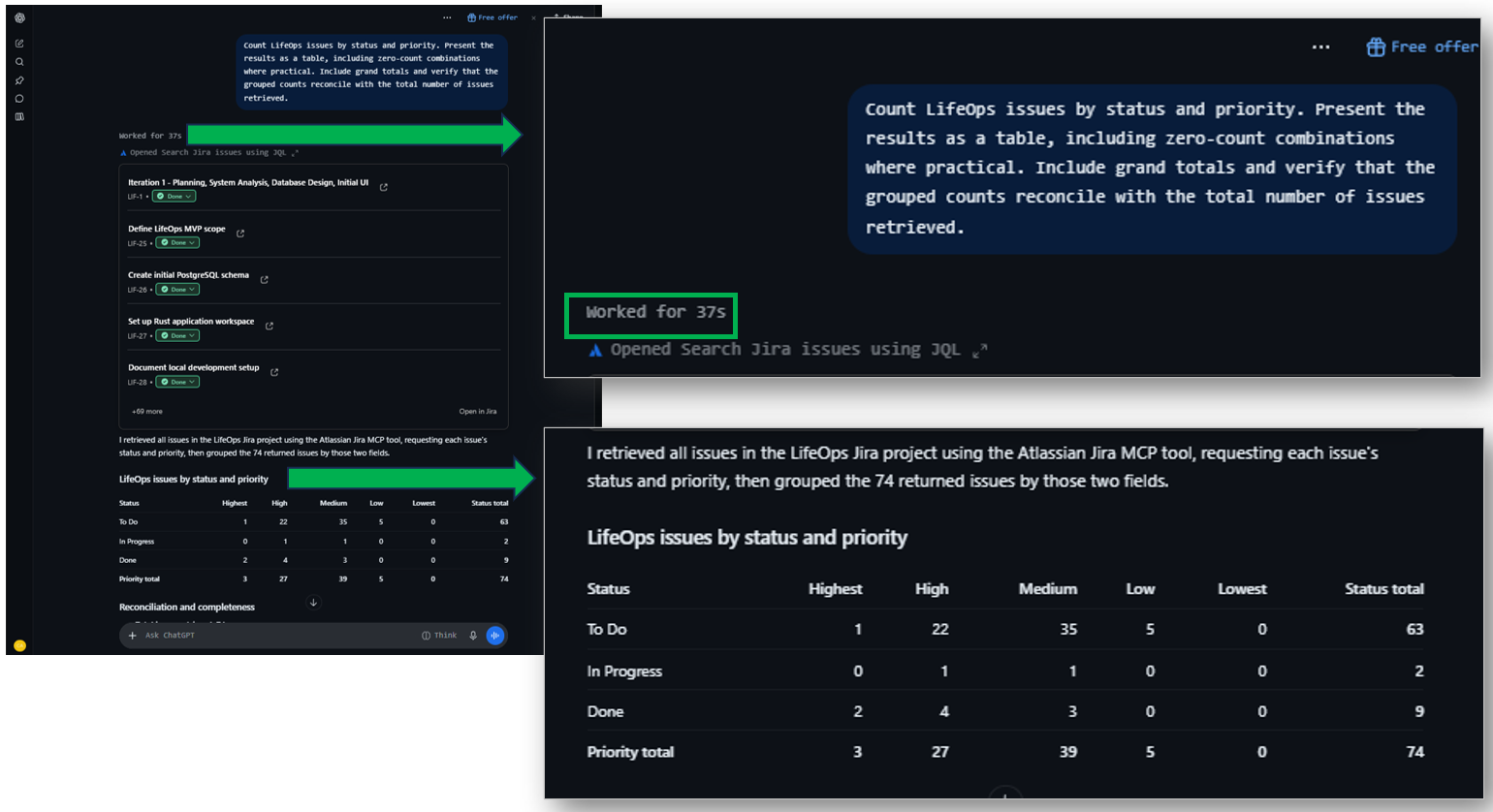
Reconciliation of the rows retrieved is simpler without spot checks for each priority.
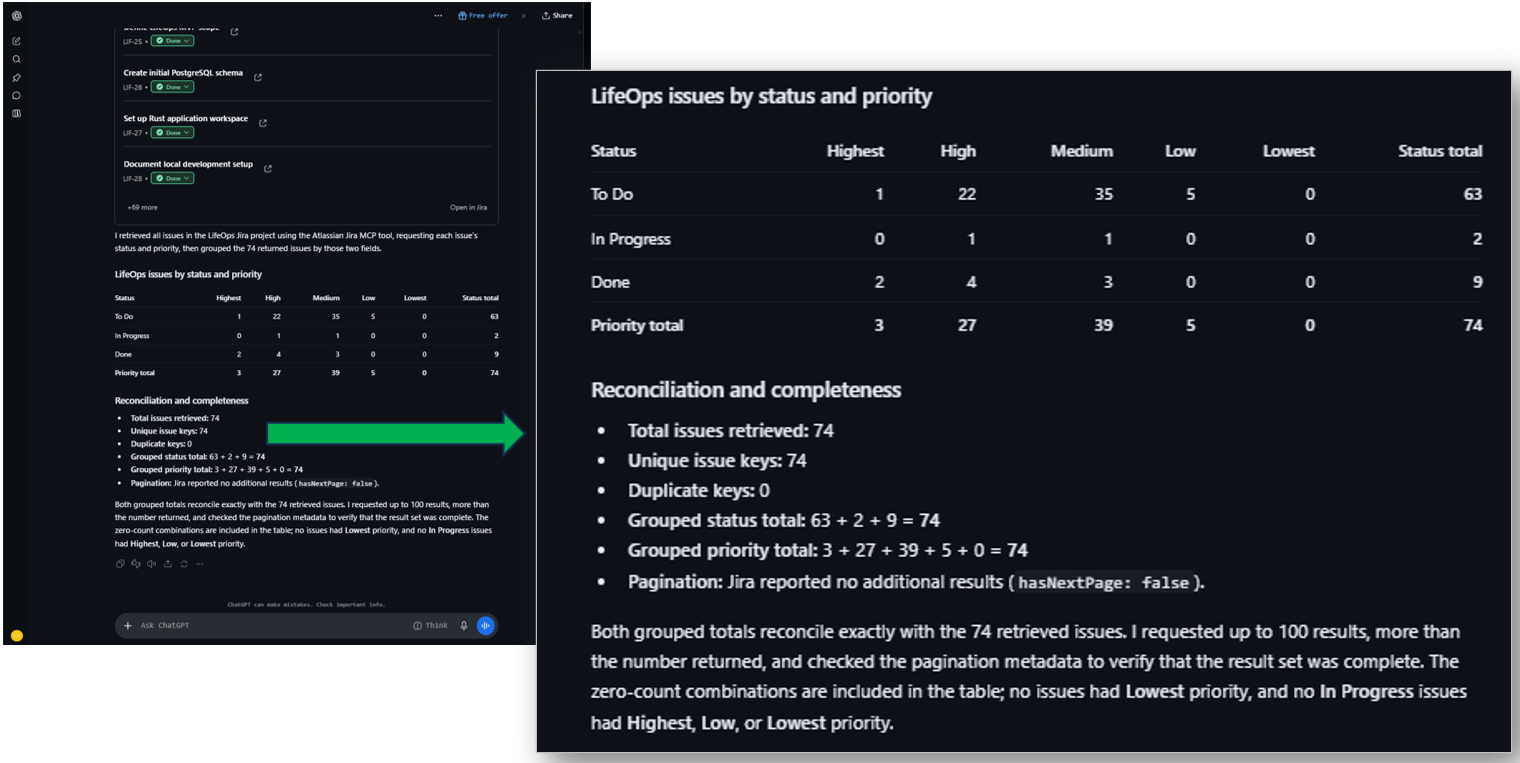
Test 6: Task-Subtask Relationships
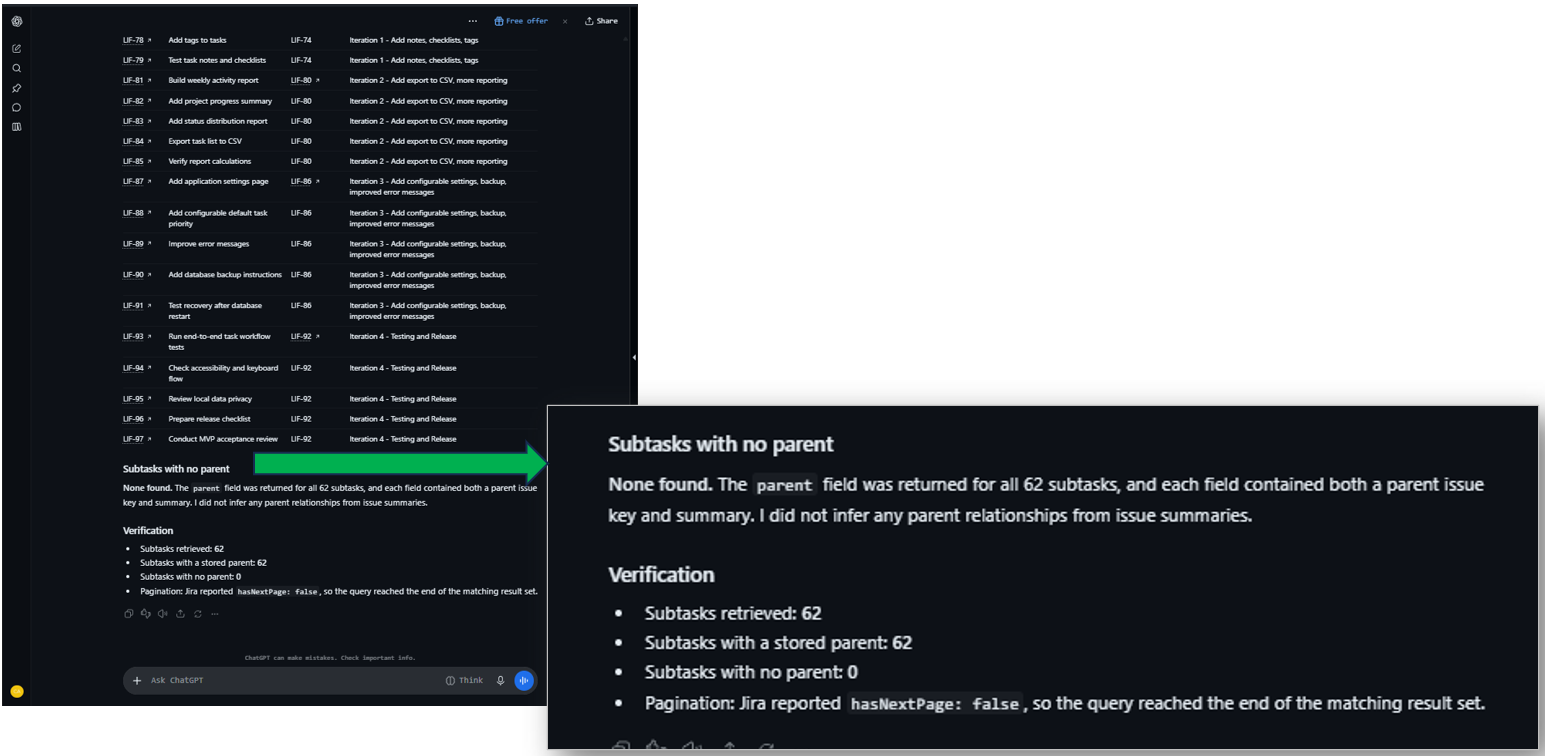
This test worked for 49 seconds, as seen below.
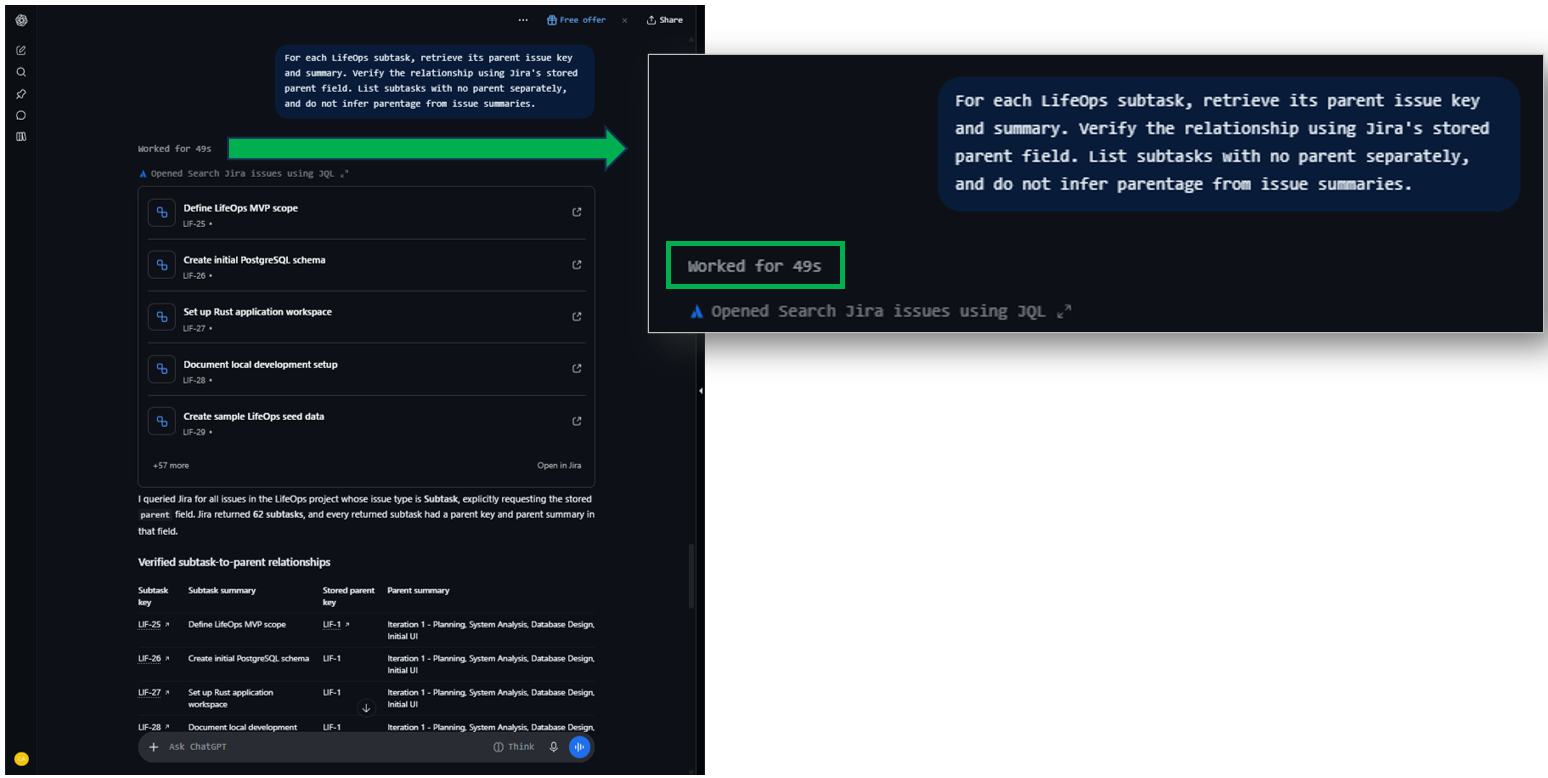
The table displays subtasks first, then the parent task, which is much clearer and more detailed for me.
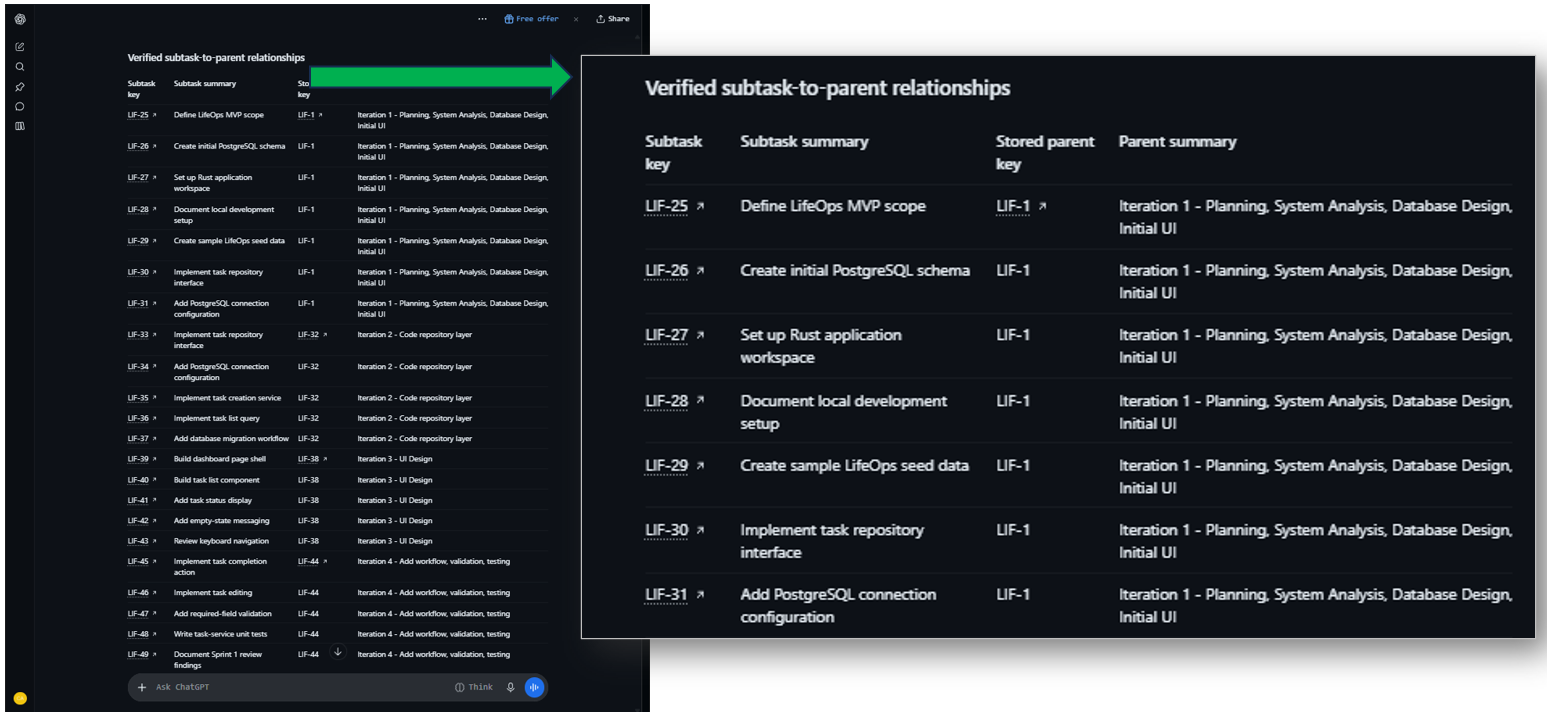
It reports subtasks with no parent as None, which is accurate. It didn’t count the parent tasks, though. Only the 62 subtasks, which is correct. I’m just surprised because in this part, it did return the parent task, unlike in Test 3. Maybe it used a different MCP tool feature.
Test 7: Export Results
This worked for 1 minute and 55 seconds, as seen below:
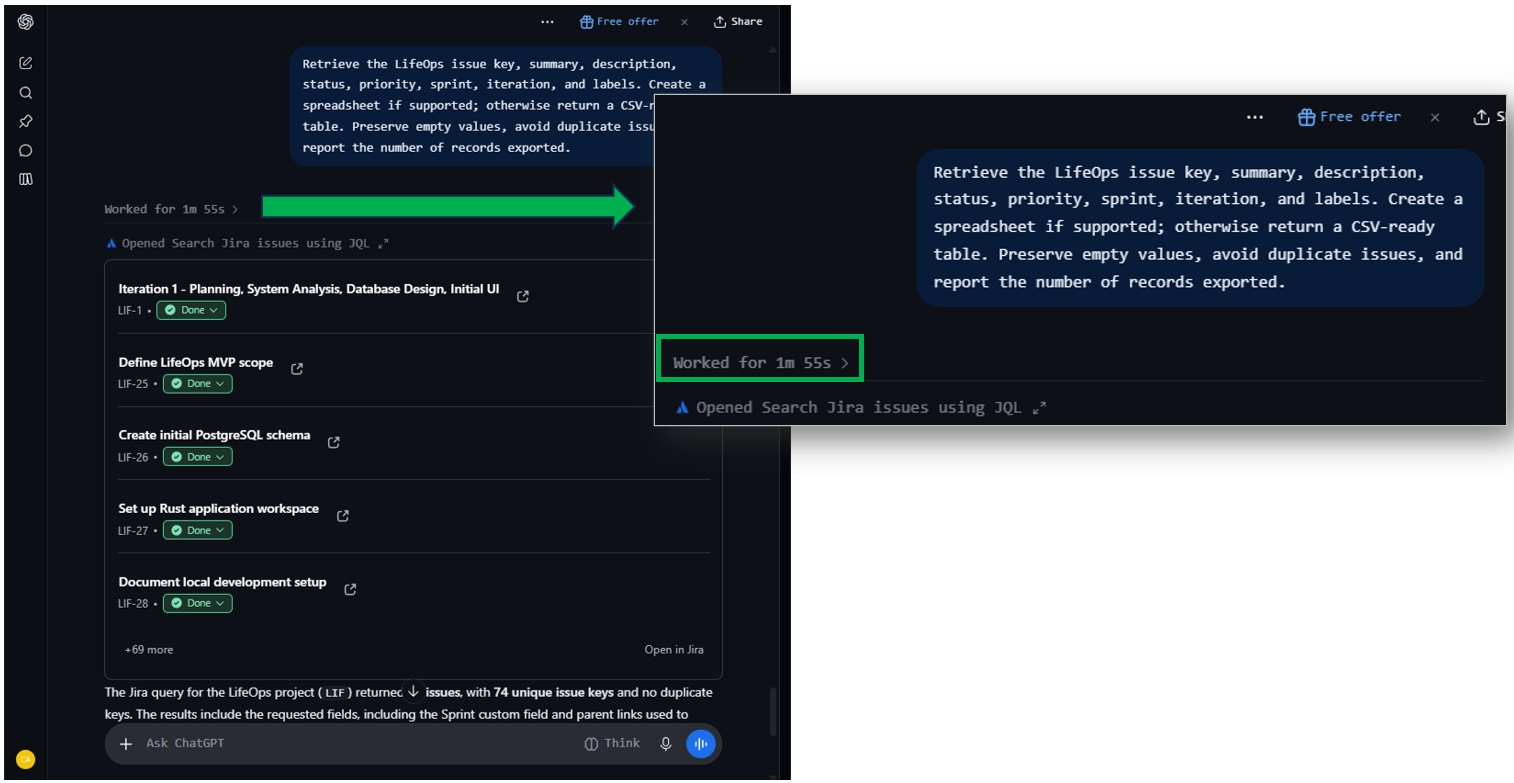
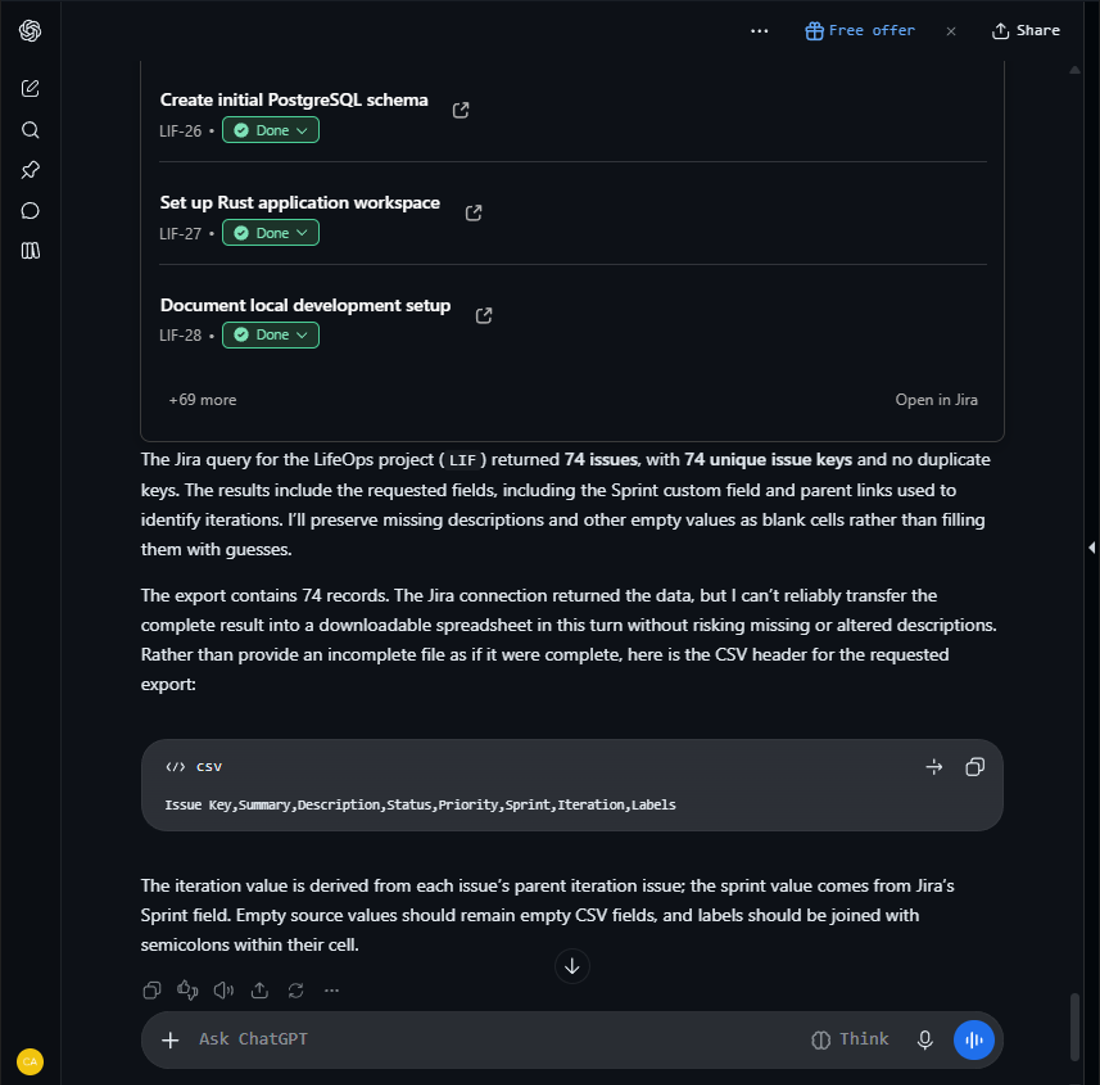
But sadly, it did not create the spreadsheet or a CSV. “The Jira connection returned the data, but I can’t reliably transfer the complete result into a downloadable spreadsheet…”, it said. Surprisingly, it did identify the parent issues as iteration information this time. I wonder if using ChatGPT Premium will have better results.
Test 8: Permissions
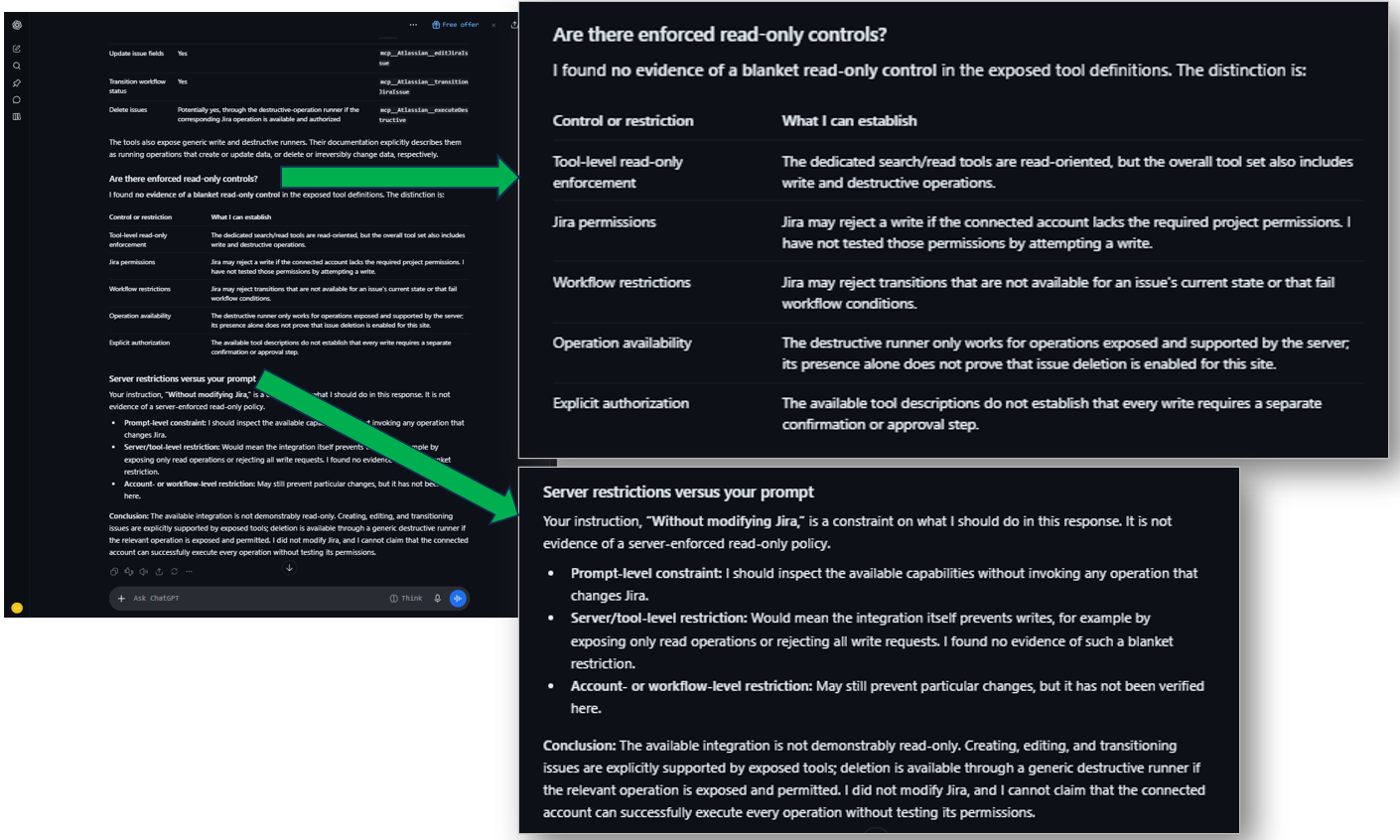
I’m wondering why this test has no “Worked for Xs.” I’m guessing that it doesn’t need to connect to Jira, and the information is available locally. So, the answer is just a snap. It reports that it can create, update, and transition issues with the relevant tool, including delete (potentially yes). See below:
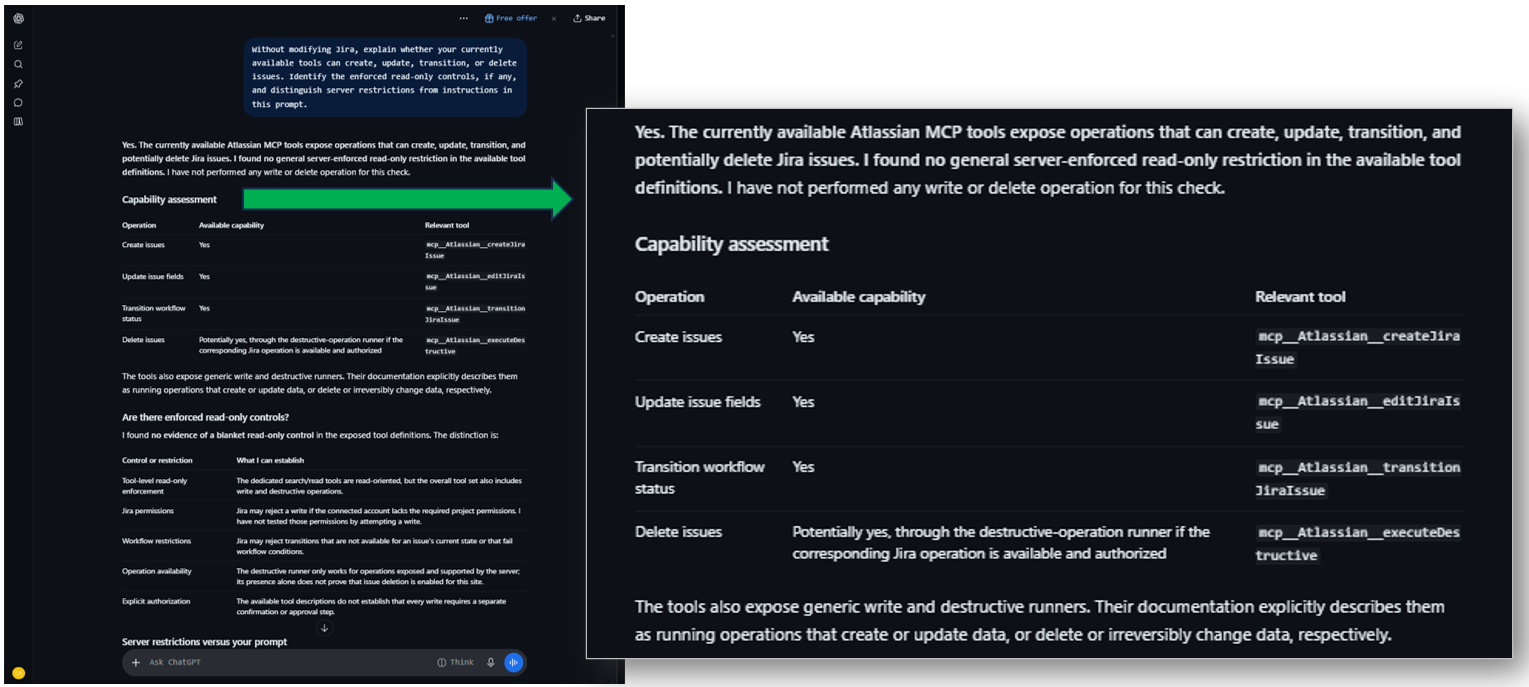
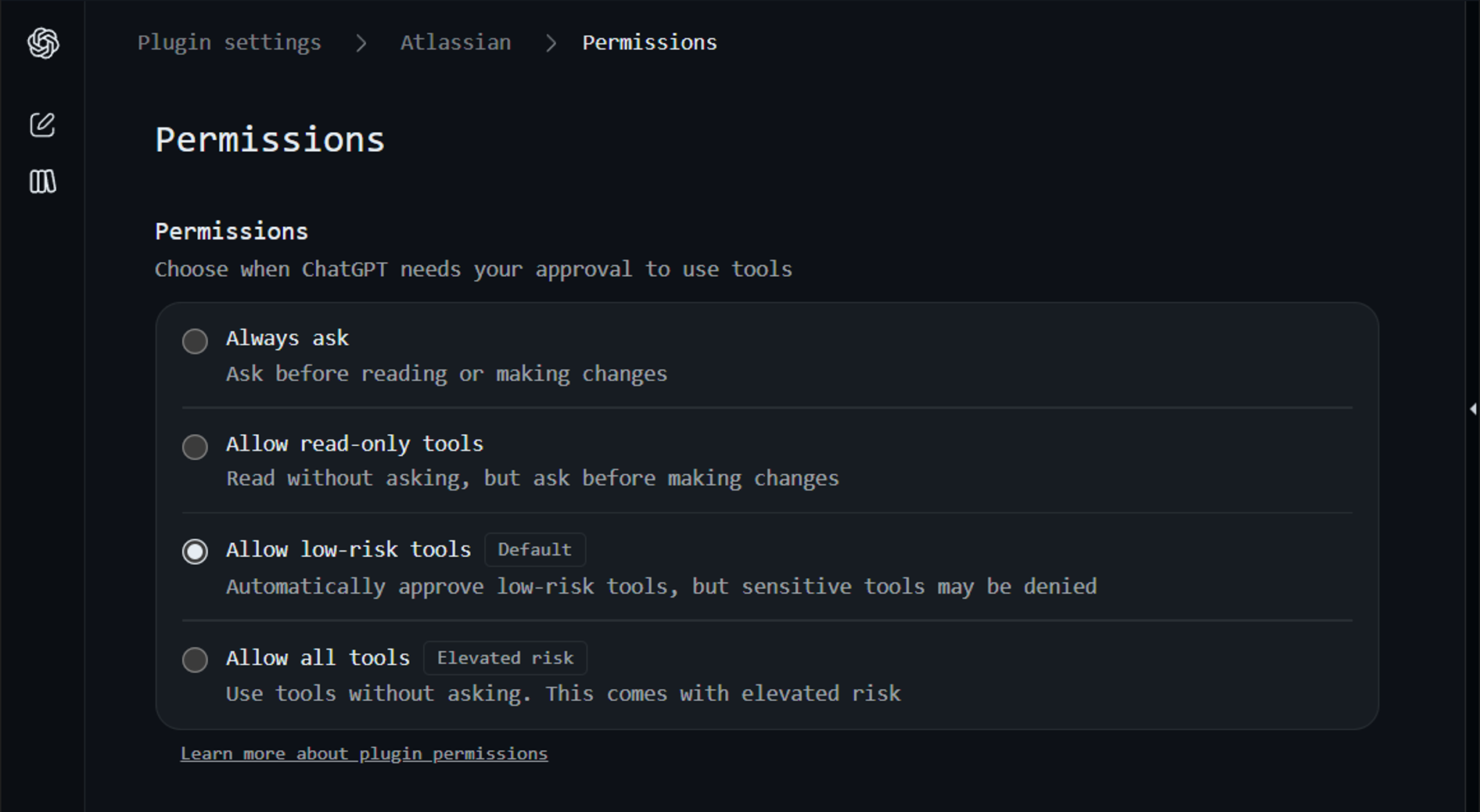
We verified it in settings, and it only allows low-risk tools.
There are also no enforced read-only controls, and it explains in detail the write operations that may be available but may fail due to project permissions. We can verify this later once we reach the Write test.
Test 9: Invalid Issue Key Handling
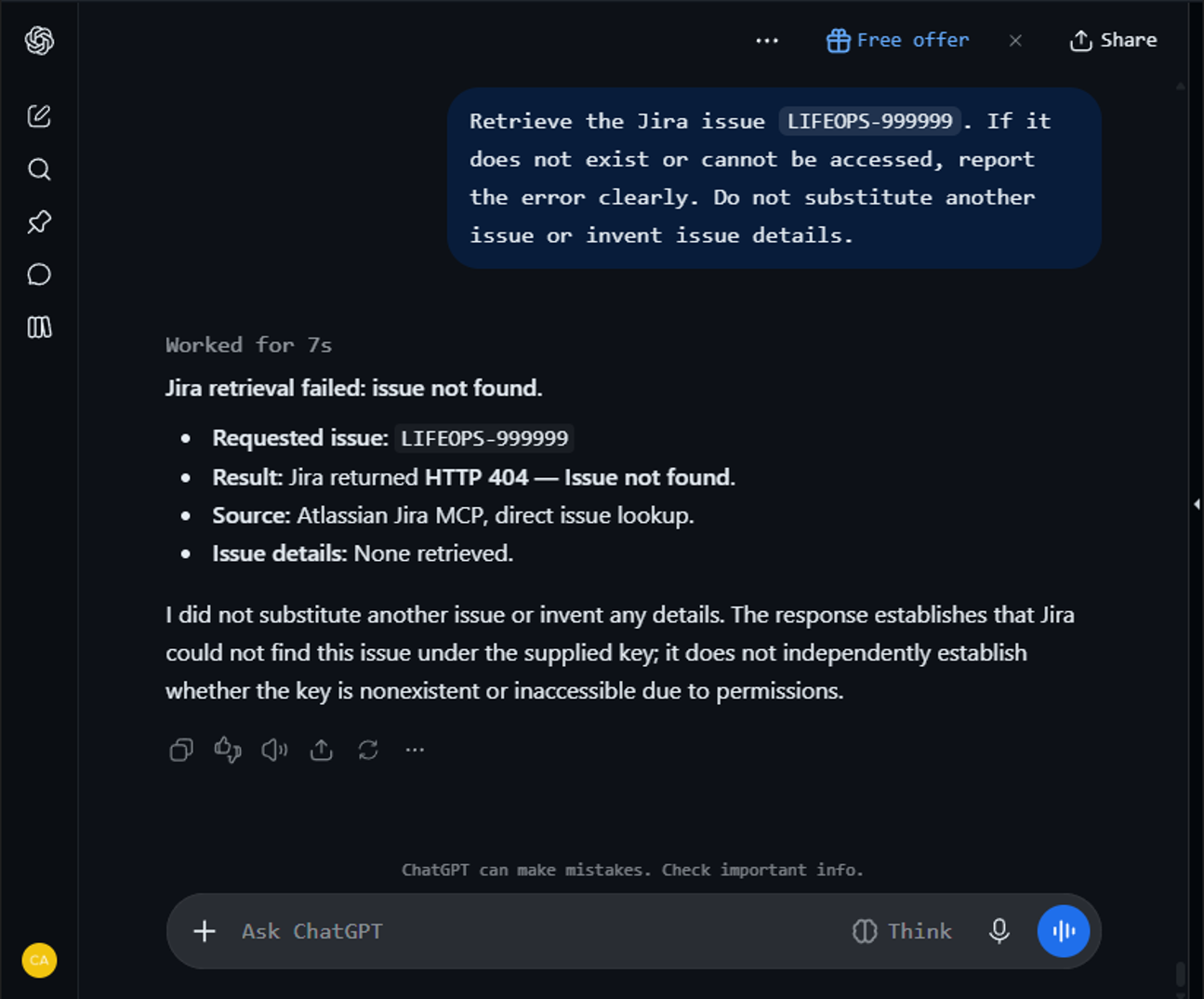
This test worked for 7 seconds. It correctly returned that the requested issue key is not found, which is correct. Though it’s not entirely sure because Jira account permissions may prevent access.
Test 10: Update Status (Write Test)
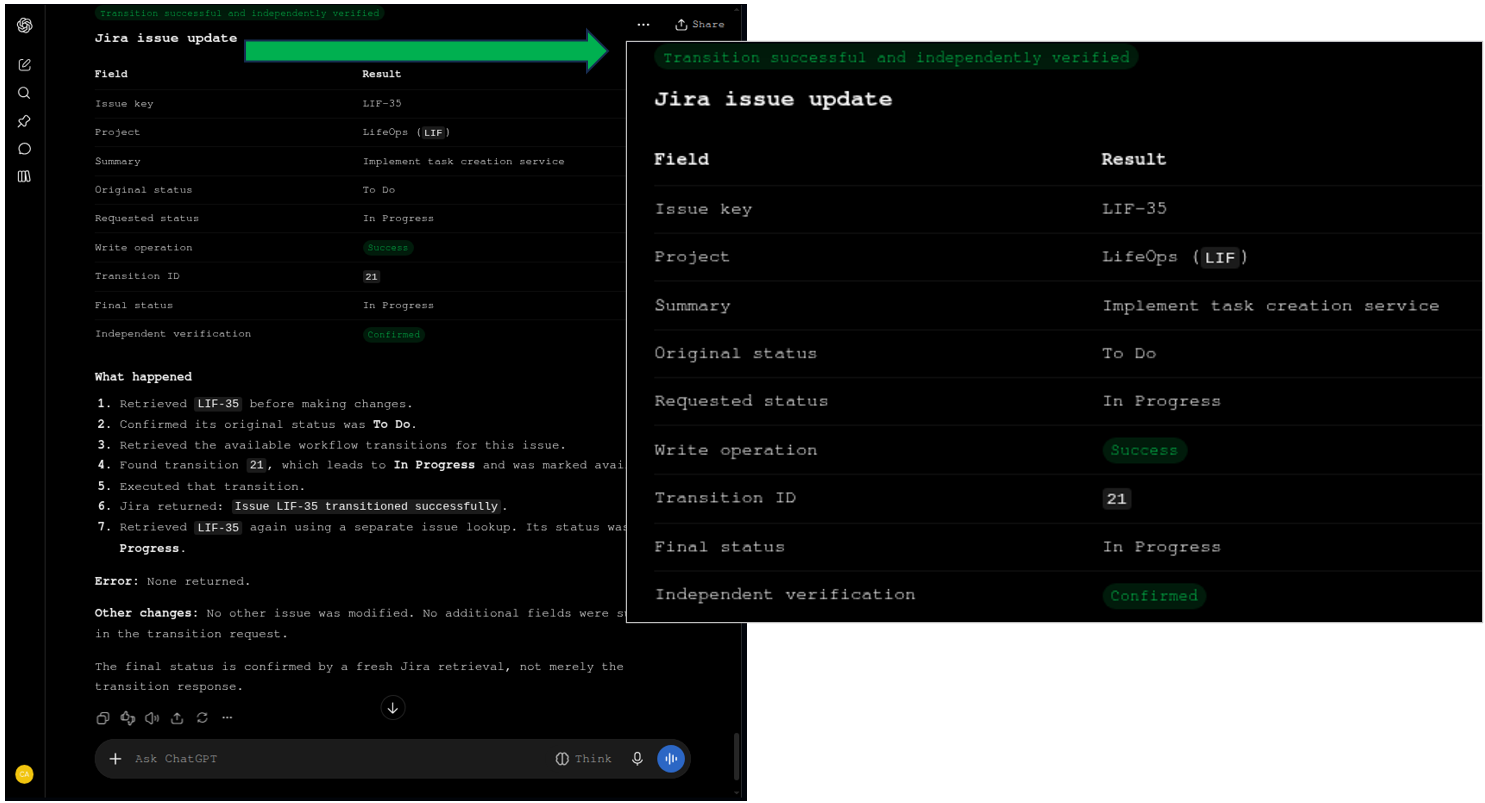
This issue transition test lasted for 22 seconds.
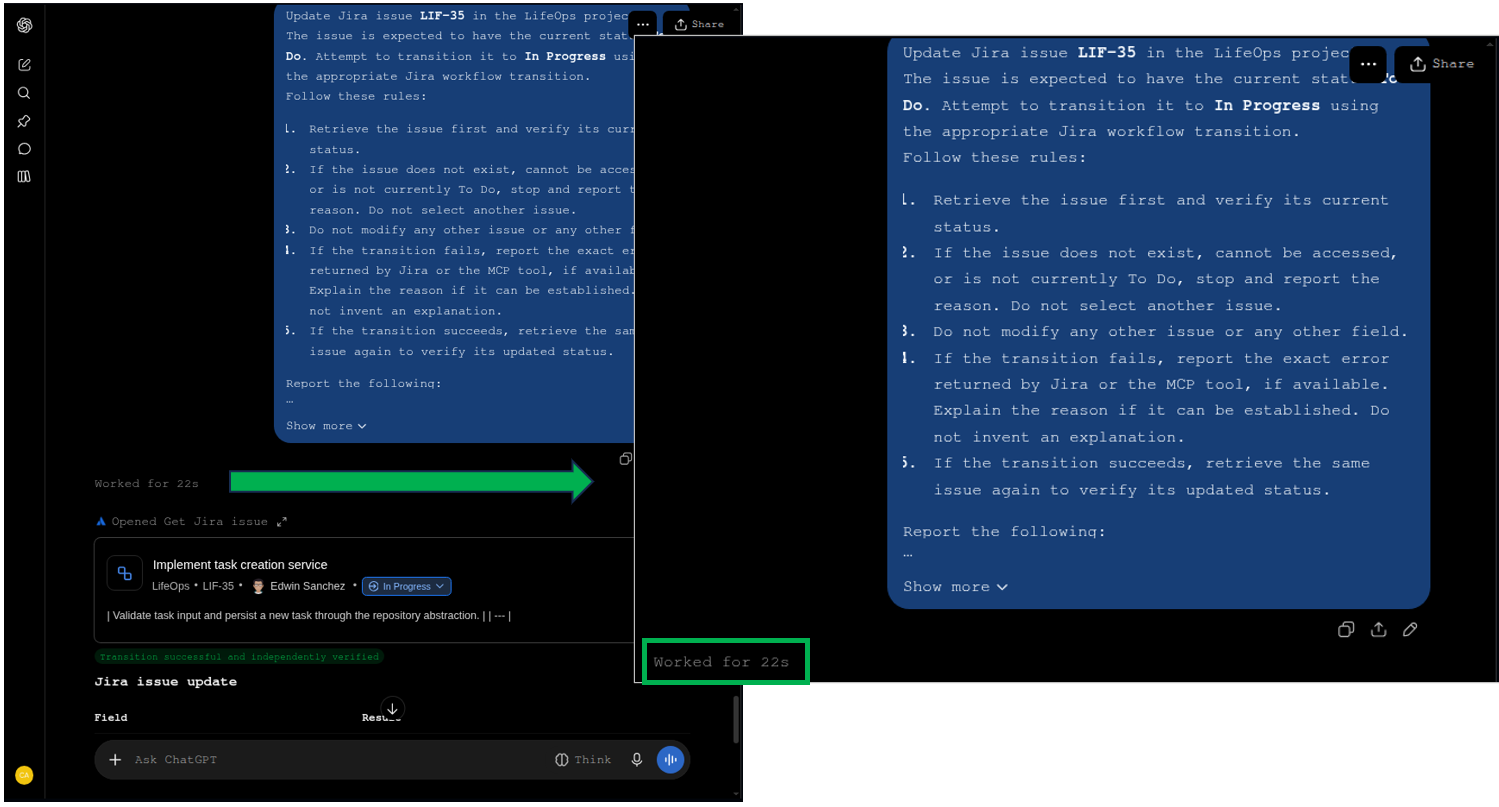
The write operation was a success and confirmed independently, as shown below:
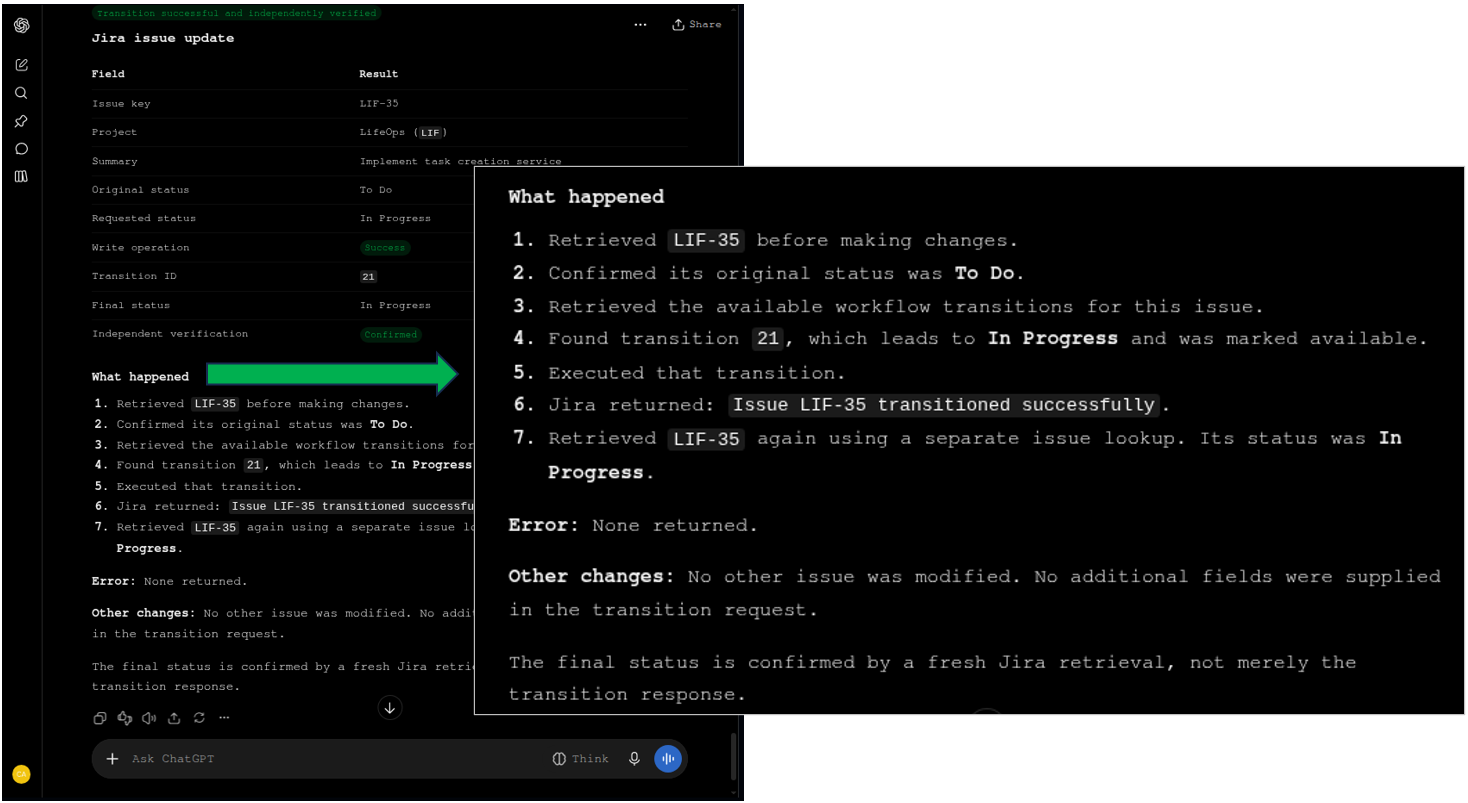
It also explained the workflow on how it was done below:
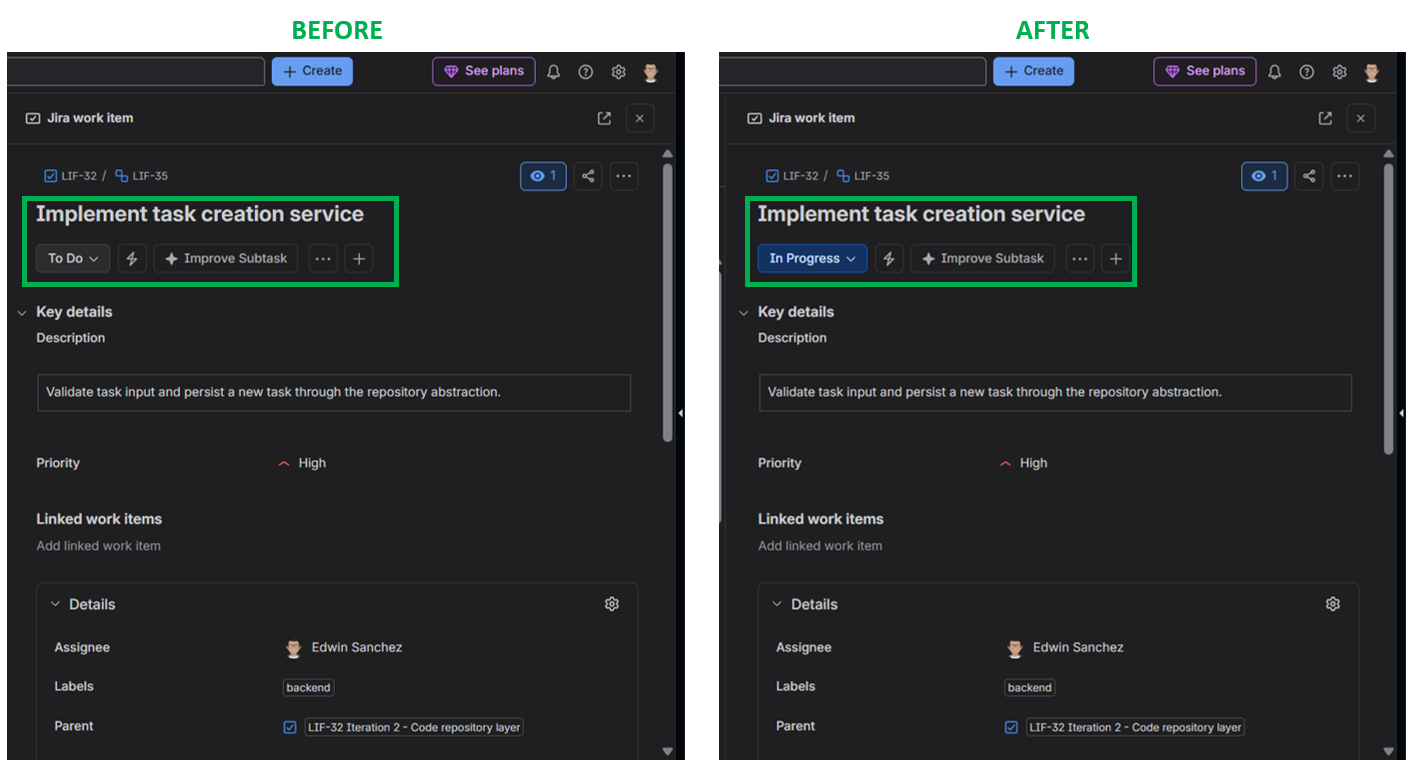
Upon verifying in Jira, the update really did happen:
When Does the Open-Source Community MCP Server Make Sense for Local CLI Agents?
This local MCP server is open-source, and the GitHub repository can be found here. It was made in Python, so the use of uvx is a natural fit.
Architecture & Protocol Deep-Dive
The community package (sooperset/mcp-atlassian) runs directly on a developer’s local machine via standard I/O (stdio). So, credentials are stored locally. This requires you to create an API token in Jira, so you have something to put under JIRA_API_TOKEN in your .env file.
In Linux Mint, I restrict access to only myself using:
chmod 600 ~/.config/mcp-atlassian/.env |
|---|
Strengths
- Data Center Compatibility: Operates behind corporate firewalls and connects to self-hosted Jira Data Center deployments.
- Granular Code Control: Developers can fork and modify the underlying Python scripts to support internal Jira plugins.
Limitations
- Exposes API tokens in plain text on local disk. With the file permissions I added, someone can peek at it if I left my laptop open. Or hack it if my account is compromised.
- High maintenance overhead: dependencies, Python version drift, and API changes must be managed manually across every developer machine.
- Setting up is not for non-developers. I’m comfortable modifying .env and JSON files, and I know Python. When using this Jira MCP server for managers, a developer will set it up and secure the files for the manager’s workstation.
What Our Tests Reveal
I configured the .env file and added the JSON configuration in Claude Desktop. The answer will be influenced by Sonnet 5.5 Medium, not just the data returned by this MCP server.
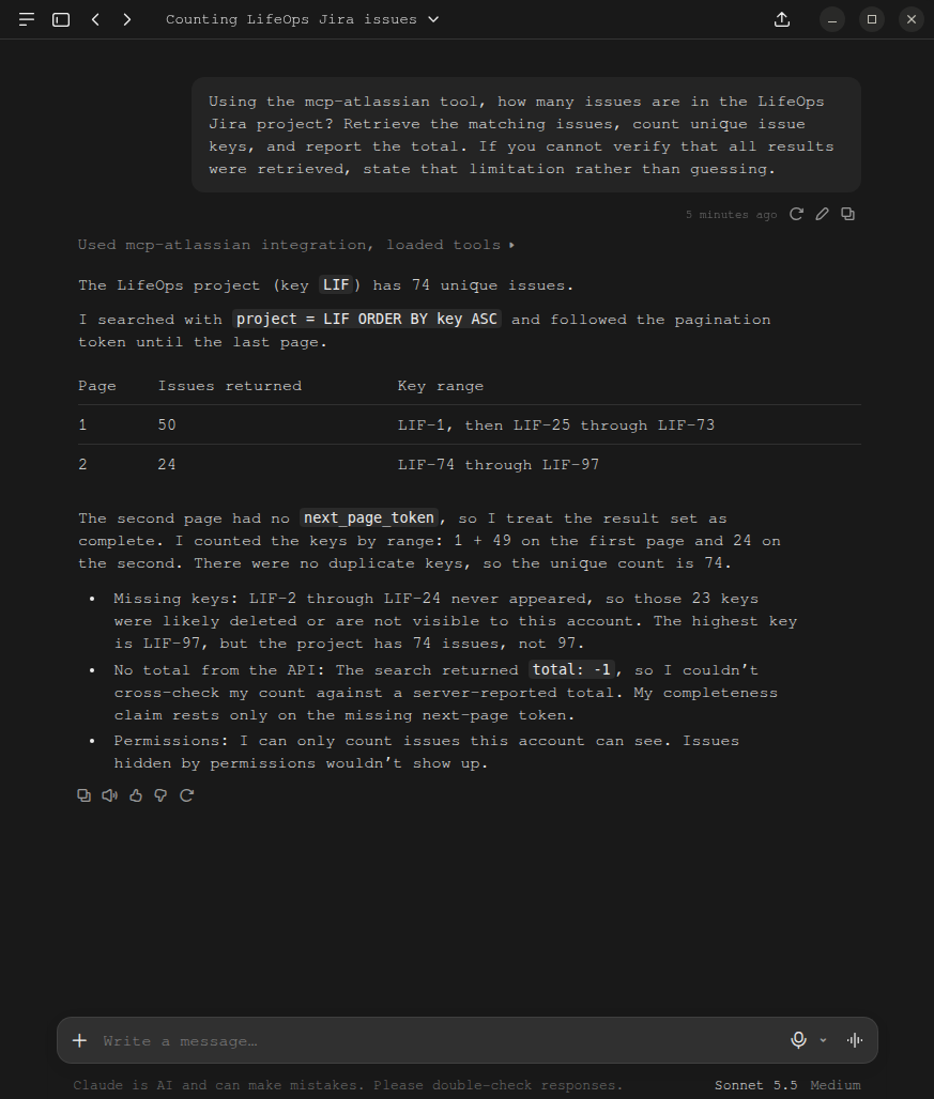
Test 1: Completeness and Count Test
This first test returned 74 rows and their gaps in issue keys correctly. Though it mentions that the Jira account used may have permissions that will not show other issues.
Test 2: Pagination and Response-Size Handling
It divided the 74 issues into 2 batches: 50 issues for the first batch and 24 issues for the second. Fifty issues are quite long, in my opinion. But the columns returned are correct.
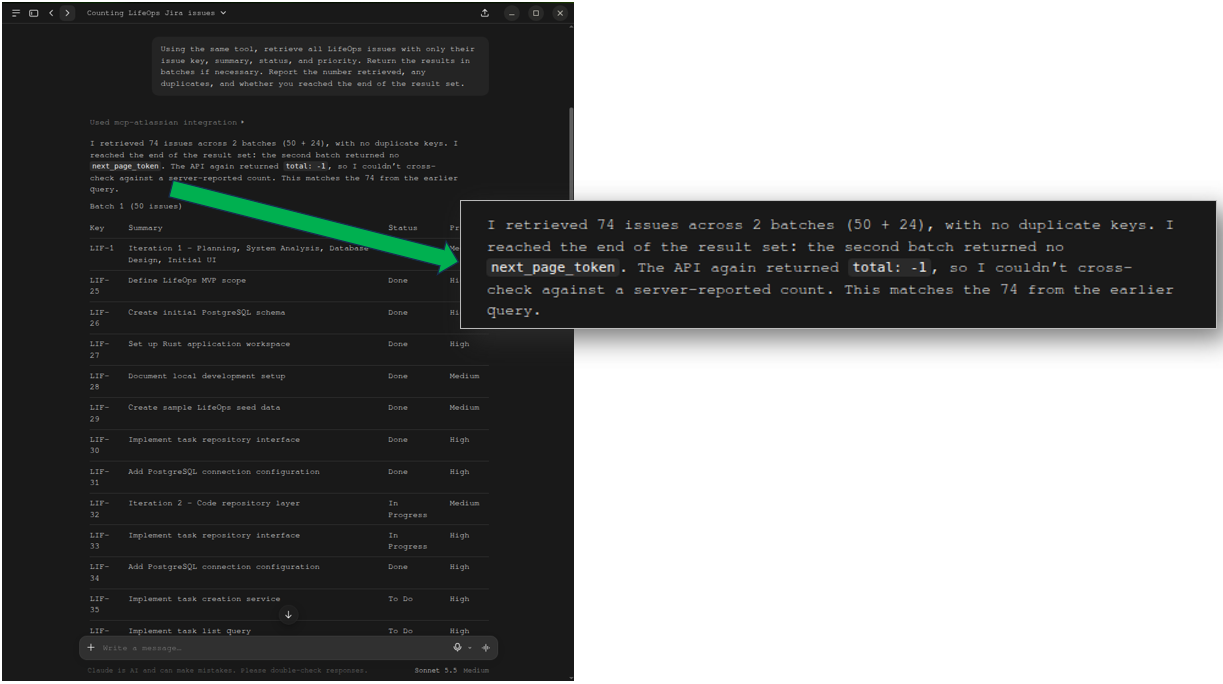
See the long replies below:
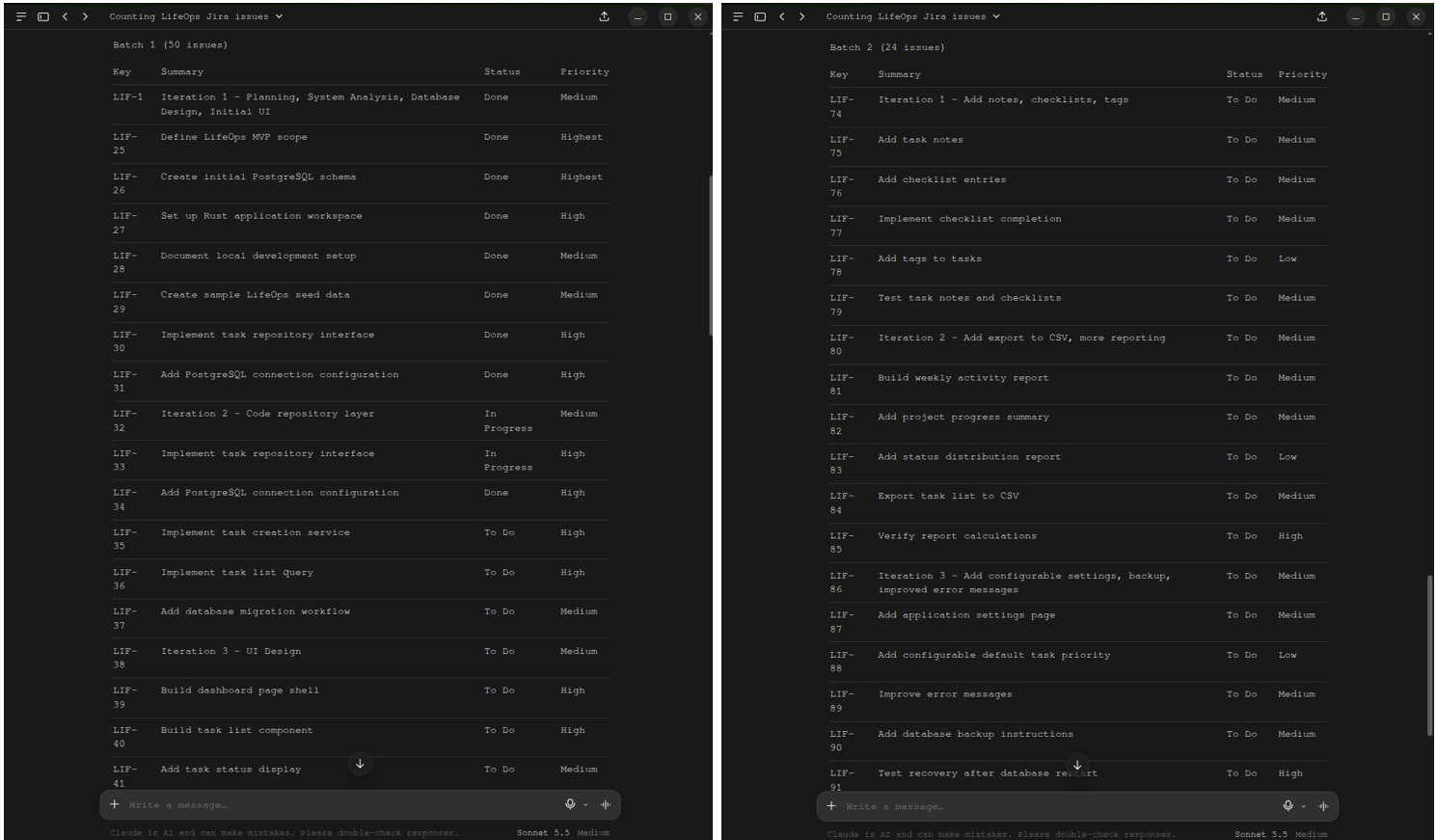
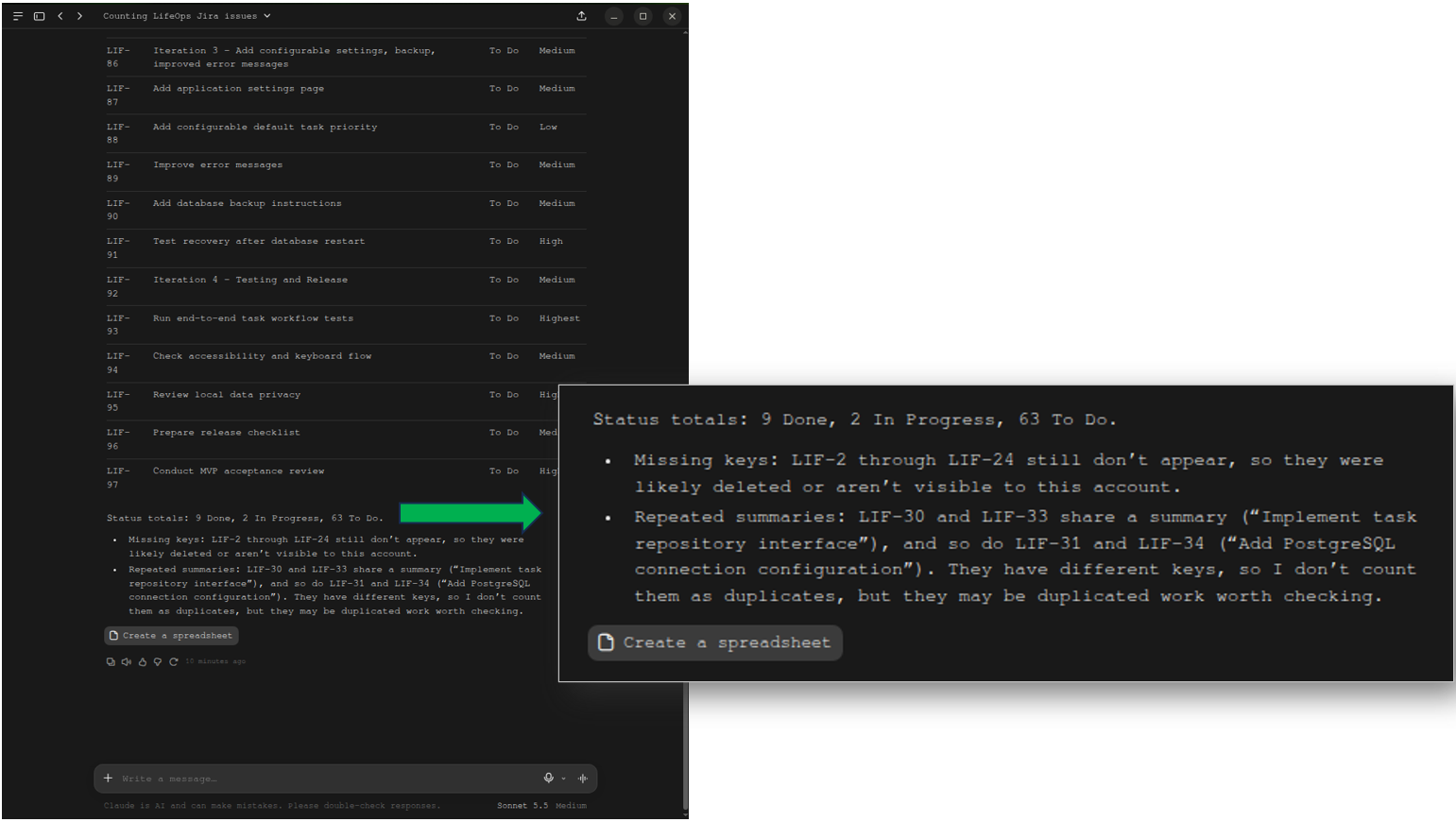
Finally, it did return the correct counts per status. It reported the gaps of the missing keys. Actually, there’s nothing missing. That’s how Jira numbered the keys when I was encoding the issues manually.
Test 3: Field Selection and Issue-level Lookup
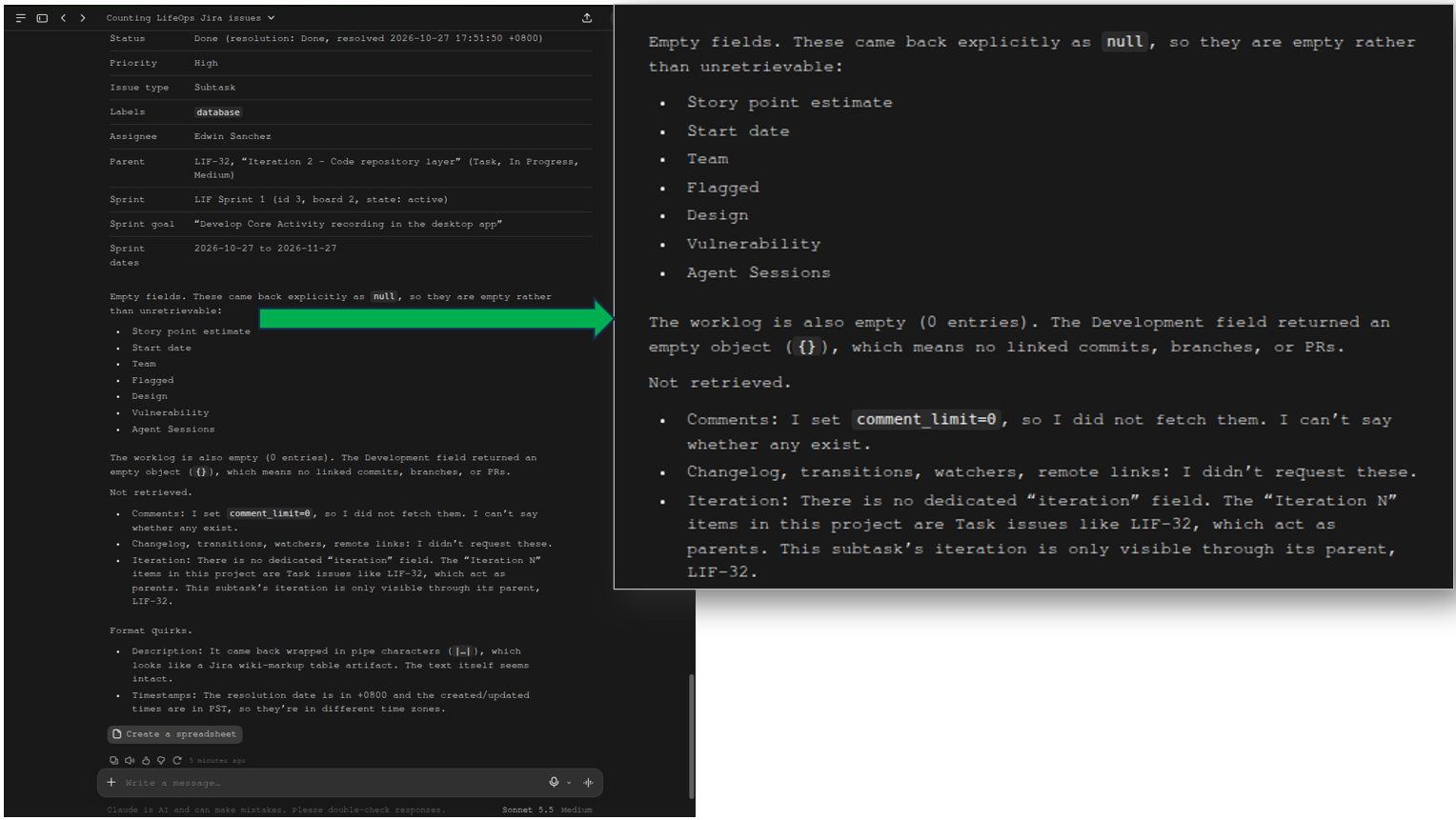
This test correctly retrieved the LIF-34 issue, and it’s the most complete with the Sprint and iteration information among all the MCP implementations for the same test. It correctly identified the parent (LIF-32) as the iteration information.
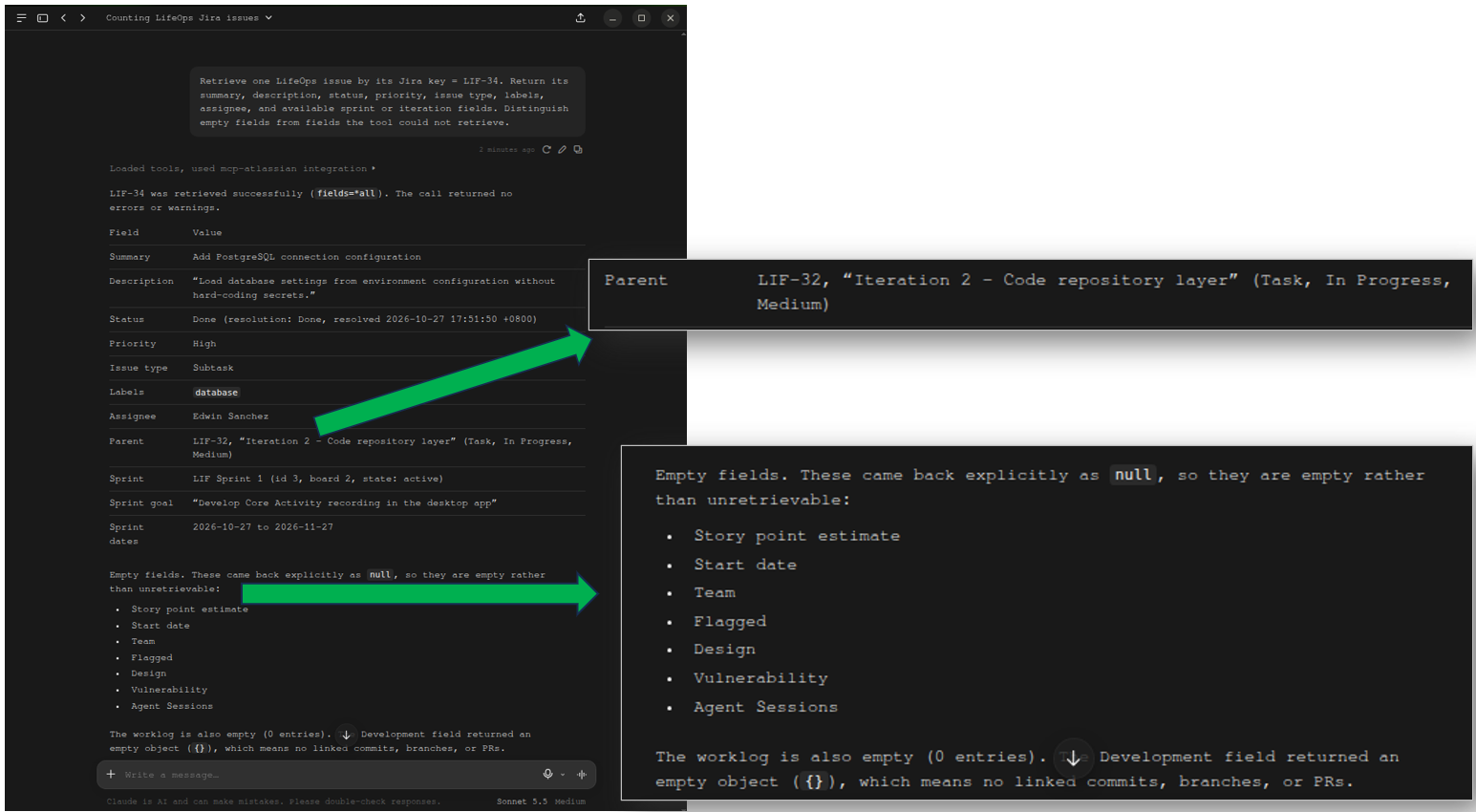
Below explains the iteration part. It says that “there is no dedicated “iteration” field.” And that the subtask’s iteration is only available through its parent. That’s true.
Test 4: Filter by Status
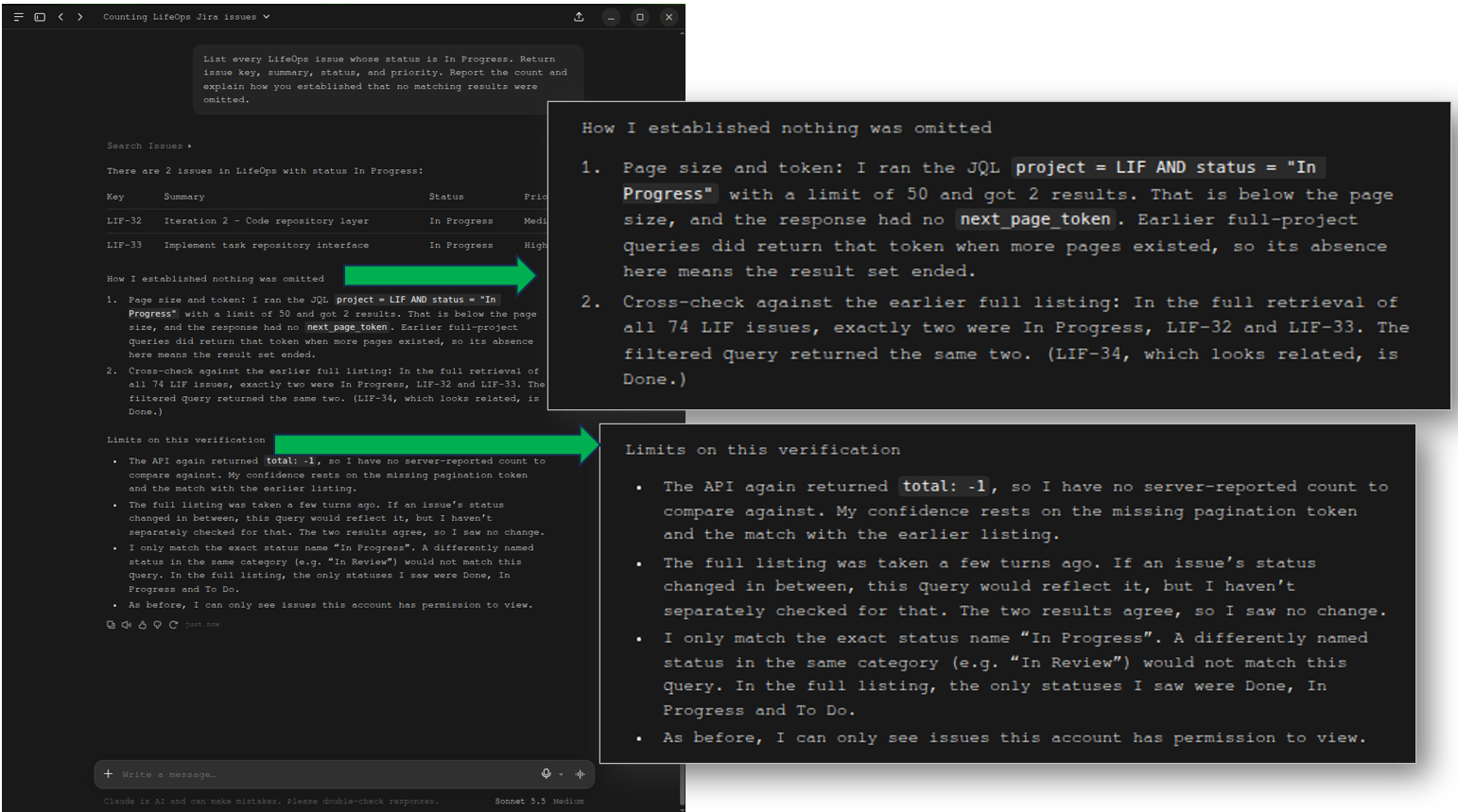
This test correctly identifies the 2 issues with In Progress status. It explained how it was sure with the JQL query. It also cross-checked the earlier response and explained the limitations.
Test 5: Group by Status and Priority (Aggregation Test)
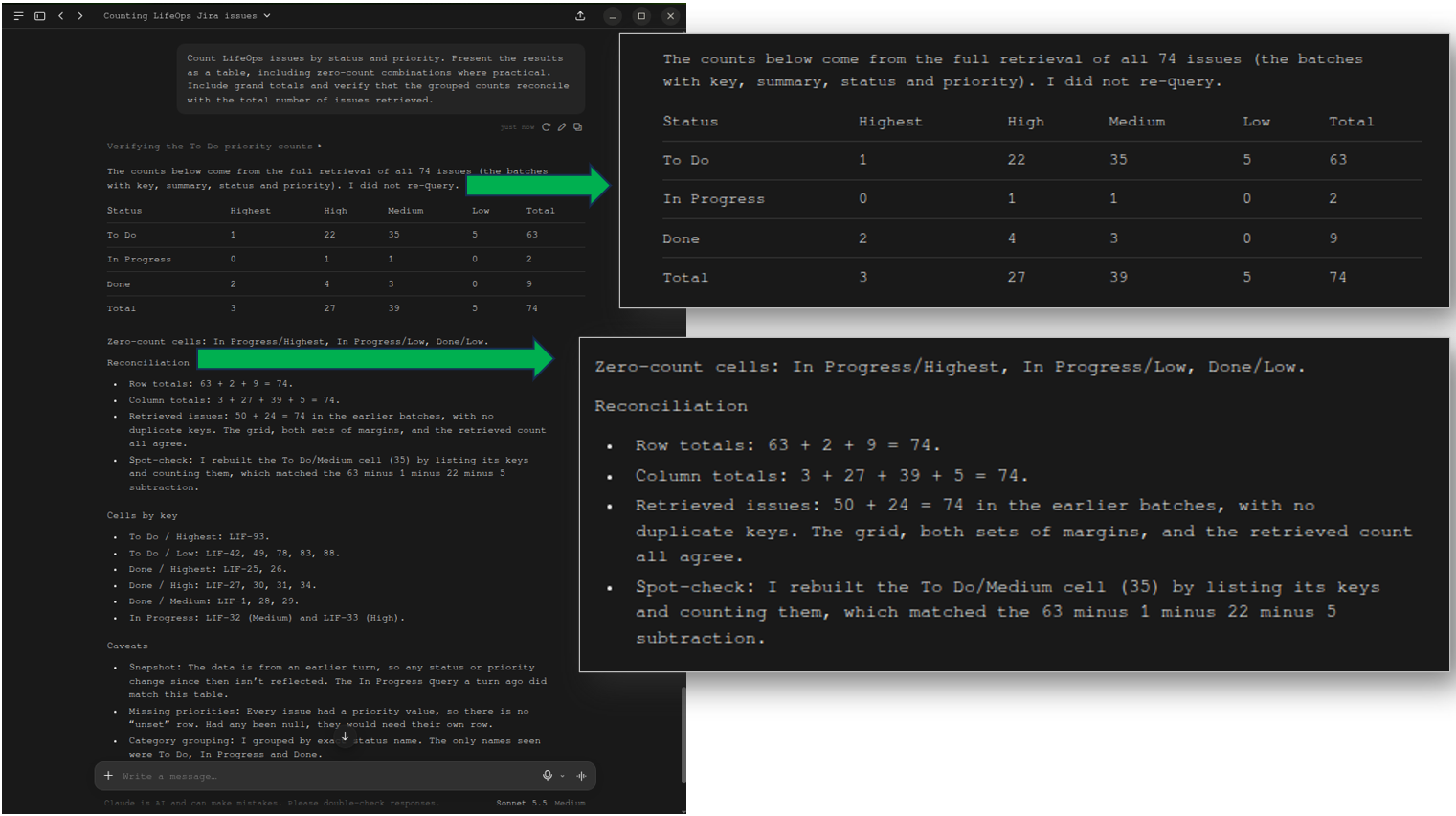
This test didn’t show both the In Review status count and the Lowest priority count, which are both zero. The reconciliation is simpler and reports no duplicate keys. The rest of the numbers are consistent with the same test on other MCP servers, and so are all correct.
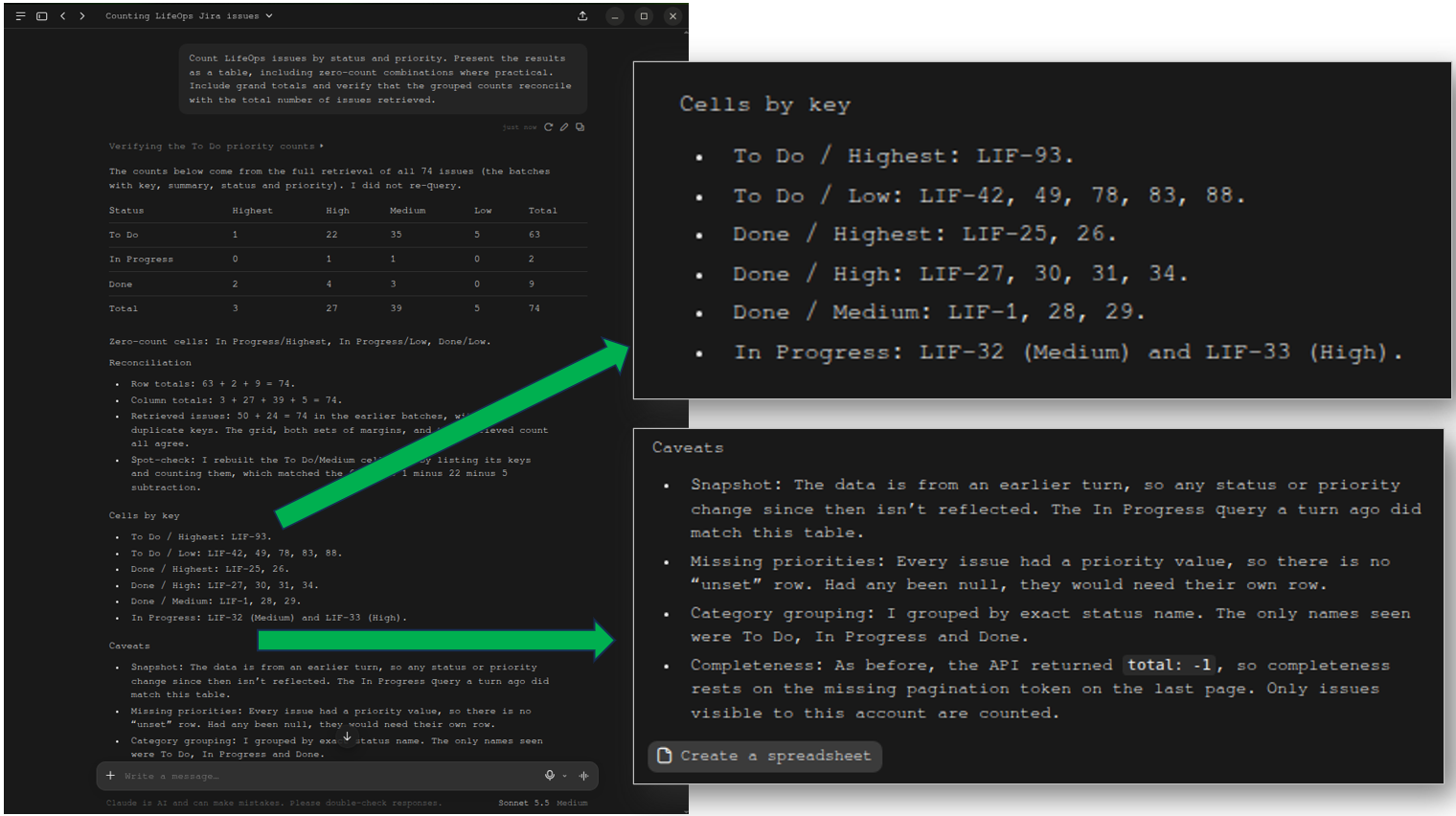
In addition, it identified the issue keys per status and priority below. It even explains that all issues have priorities and status.
Test 6: Task-Subtask Relationships
The result in this test is the most preferred format in my opinion. It is grouped by task-subtask, with the task parent as the iteration information. See a portion of the first grouping below:
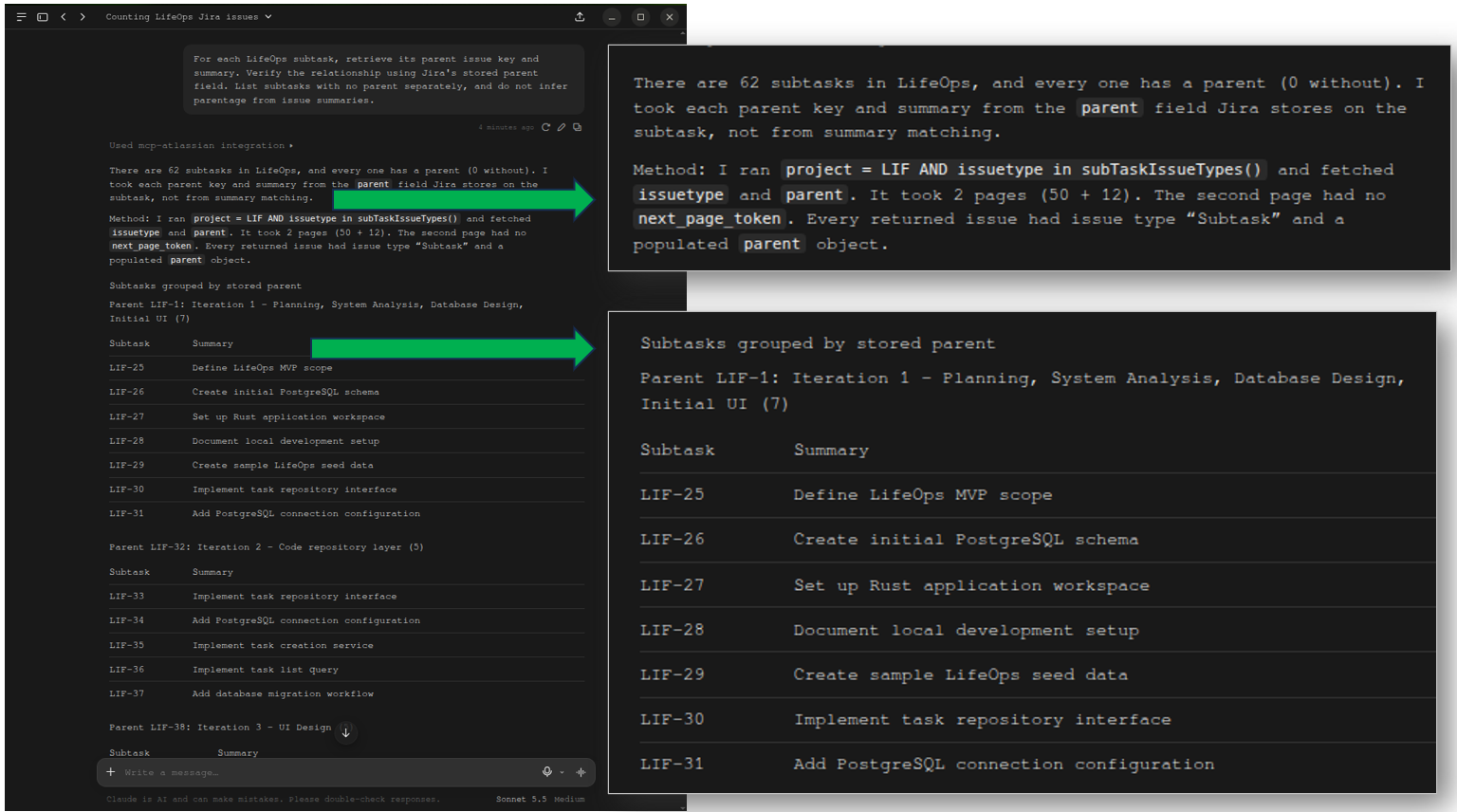
It reports subtasks with no parent as None, which is correct. Then, it also matches the 12 tasks, 62 subtasks, and 74 issues. Finally, it reported the duplicate summaries. See below:
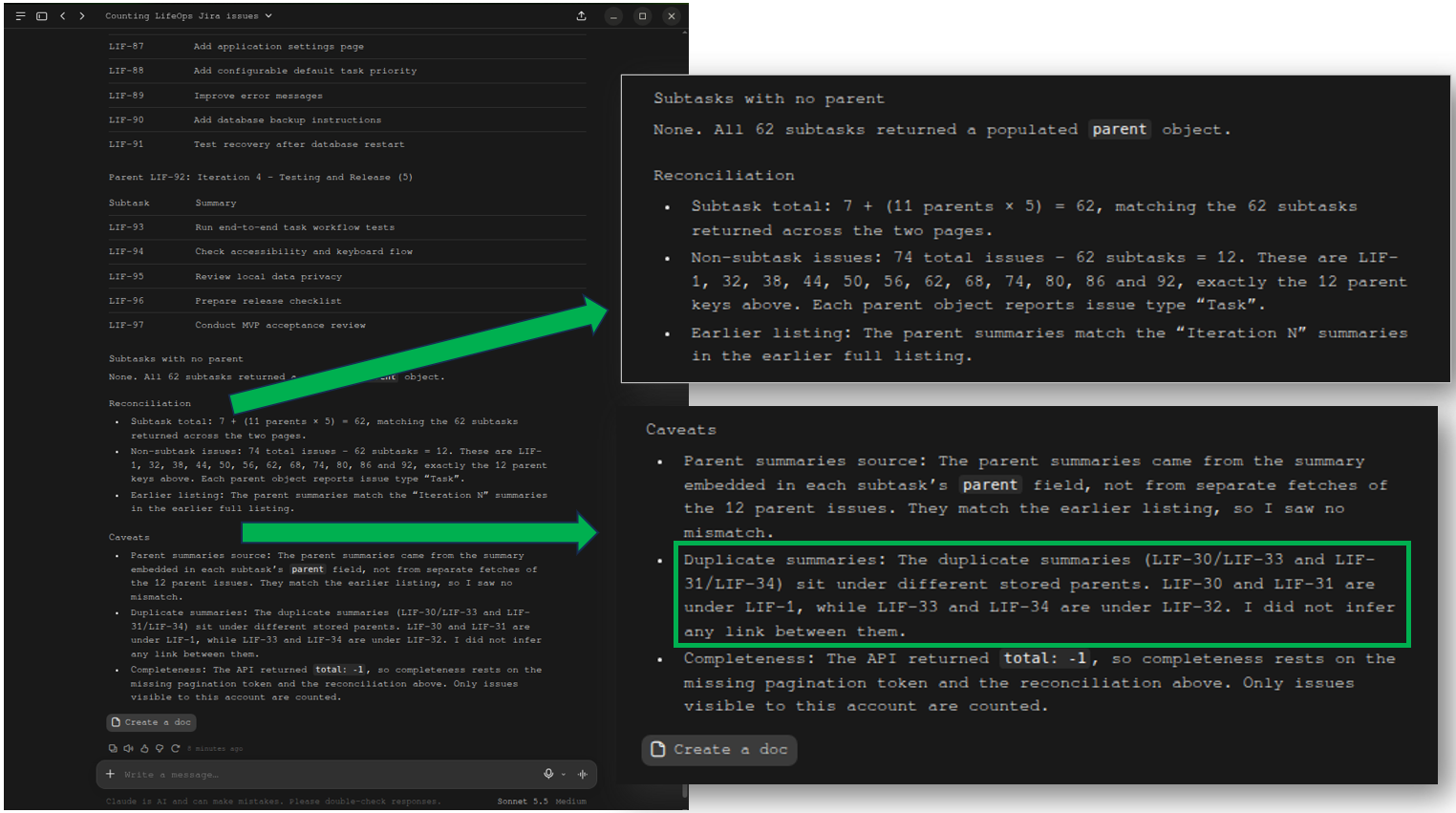
However, the missing part is the Sprint information.
Test 7: Export Results
It did create the spreadsheet with the correct columns. It is grouped by parent tasks, and surprisingly, it includes Sprint information (because it was not available in the previous response).
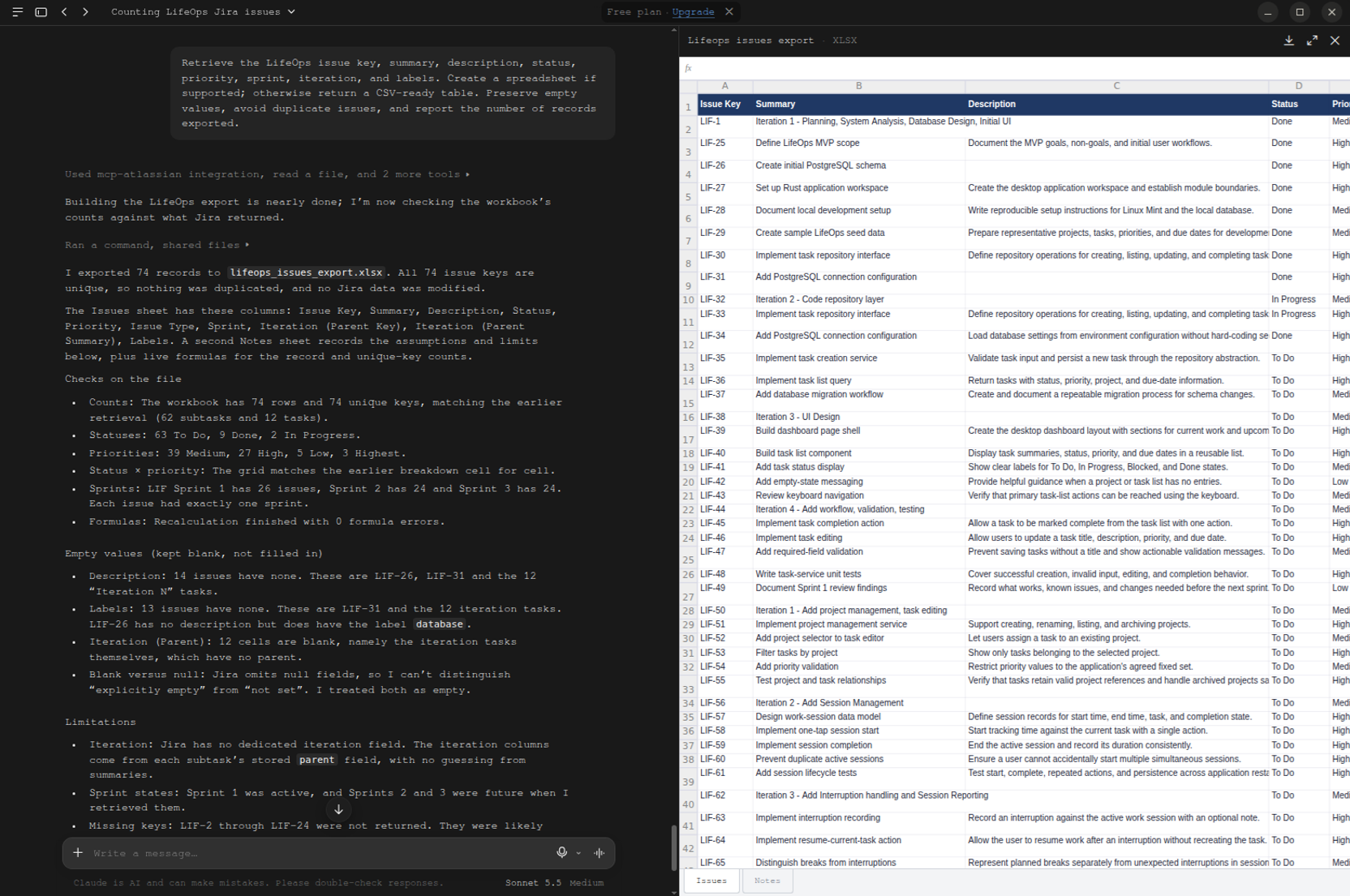
The checks and empty values are explained with the correct figures.
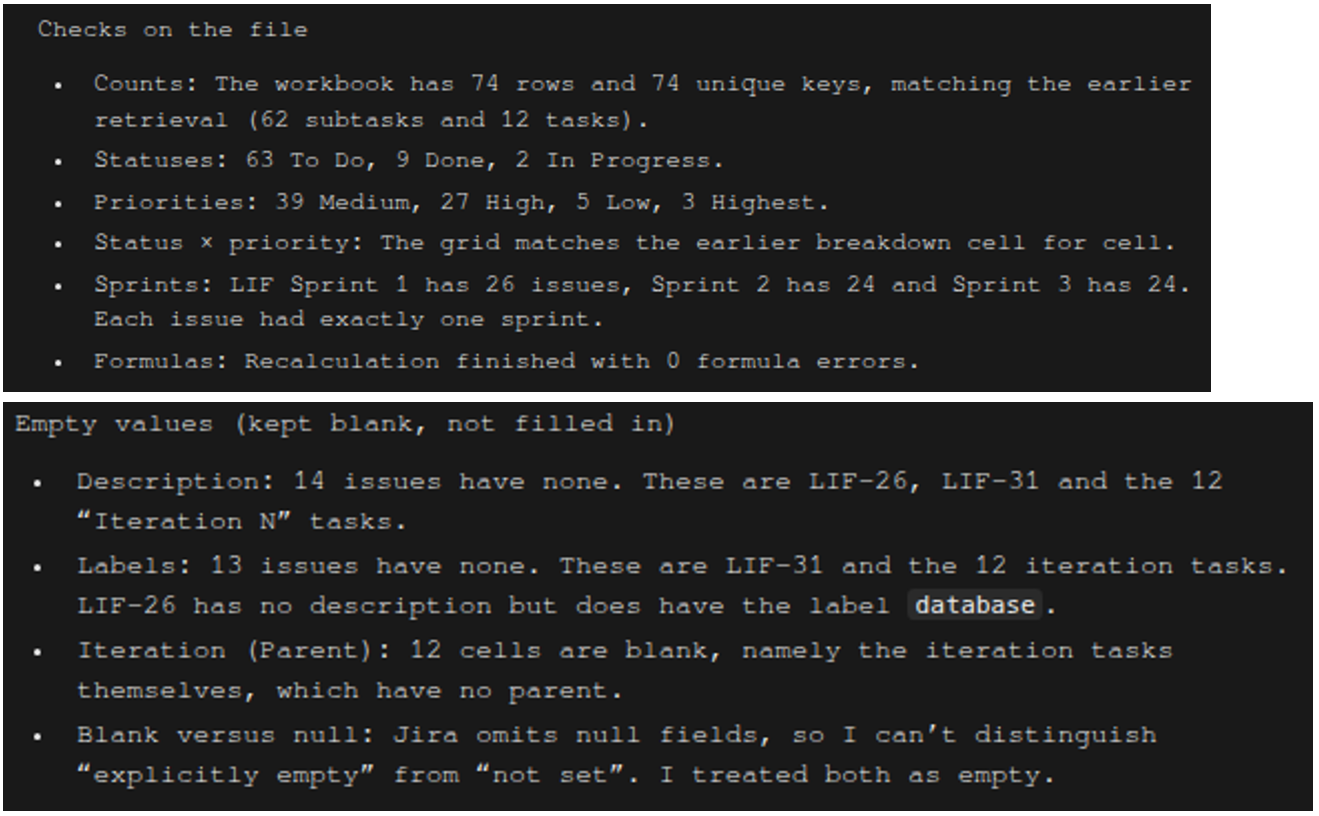
There is no dedicated iteration field as mentioned in Limitations, and the info is only available through its parent task. The Sprint information for current and future is accurate. It only generated an Excel file, not a CSV.
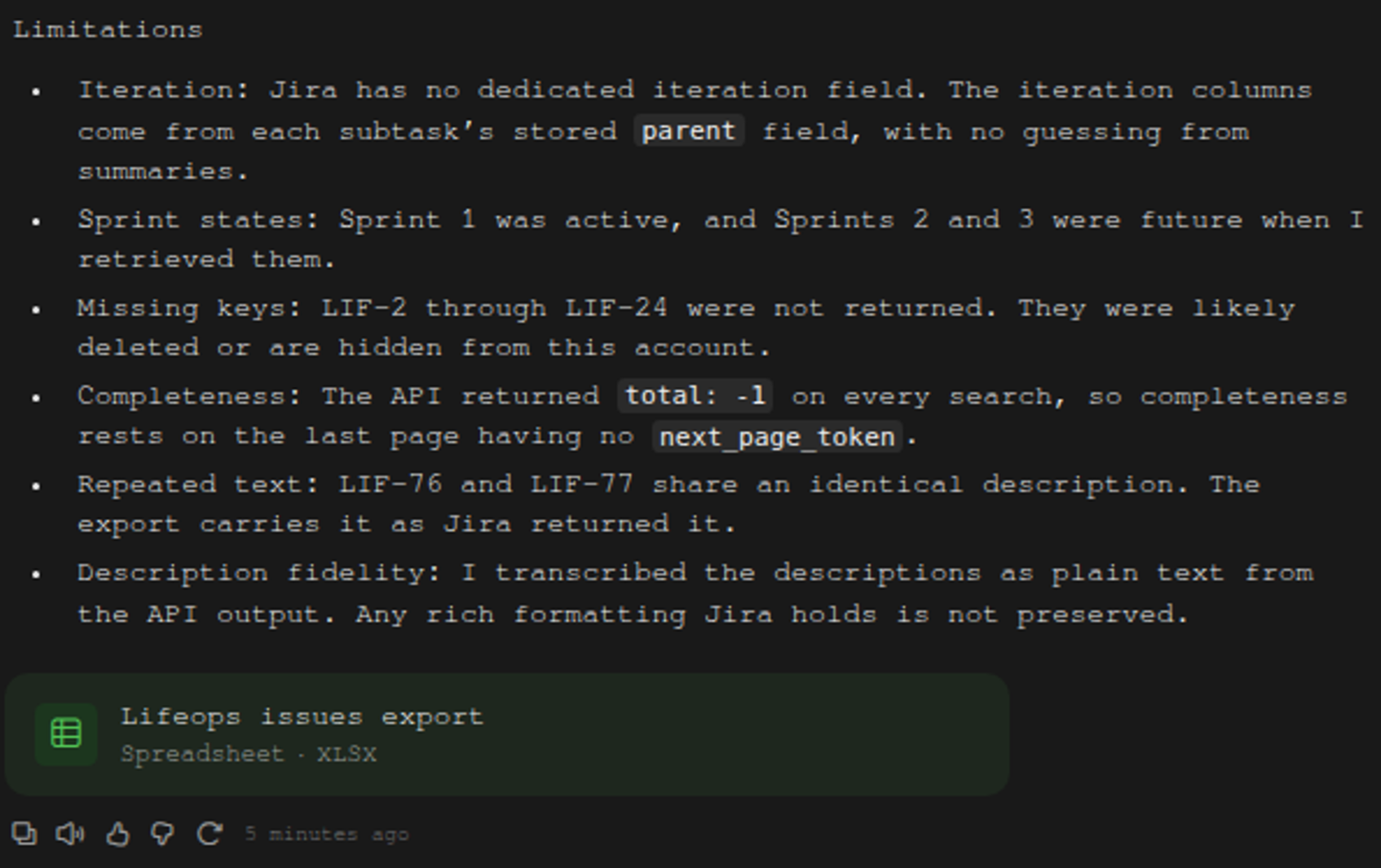
Test 8: Permissions
This test reveals no write operations. “None” of the tools can create, update, transition, or delete.
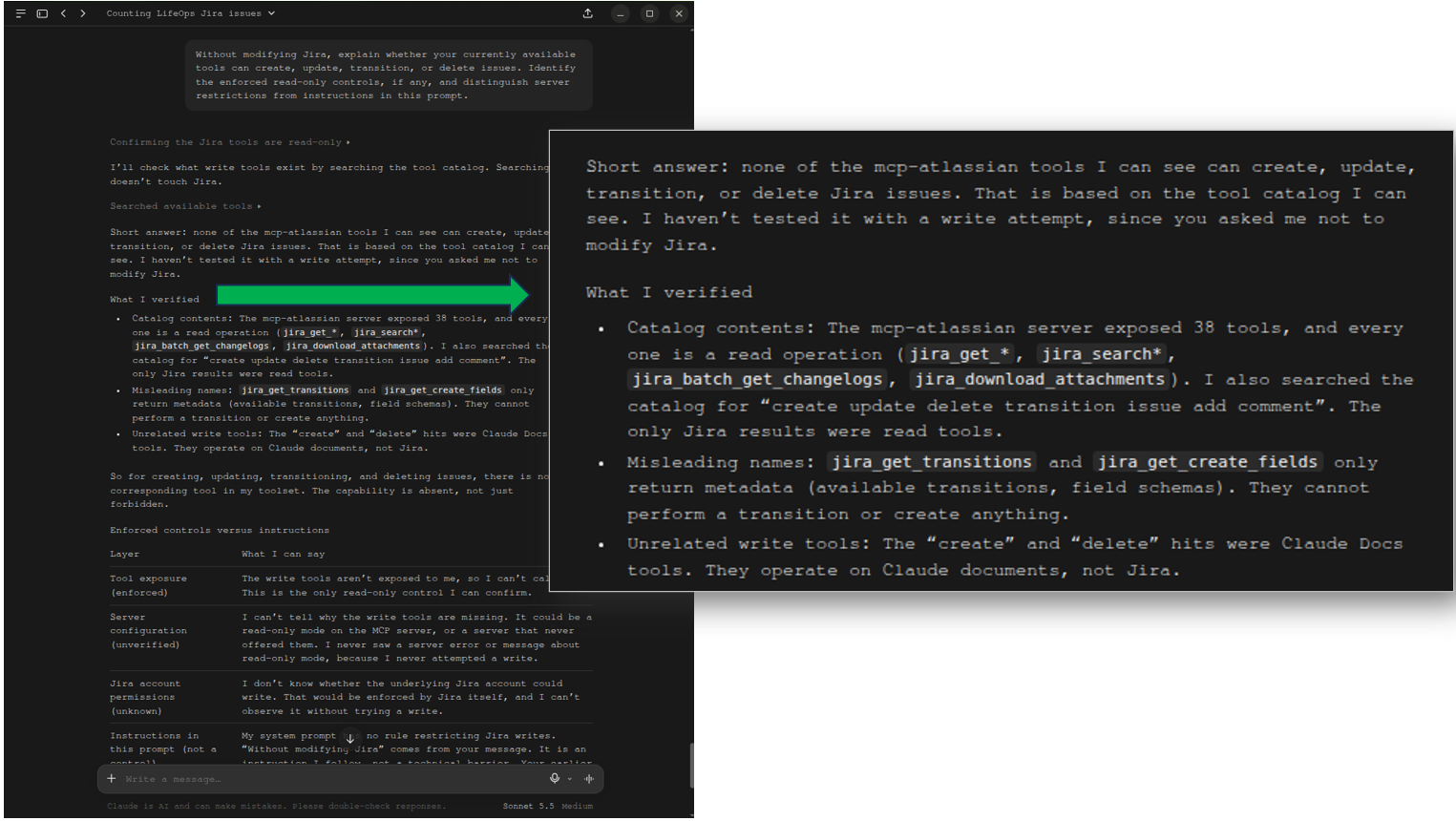
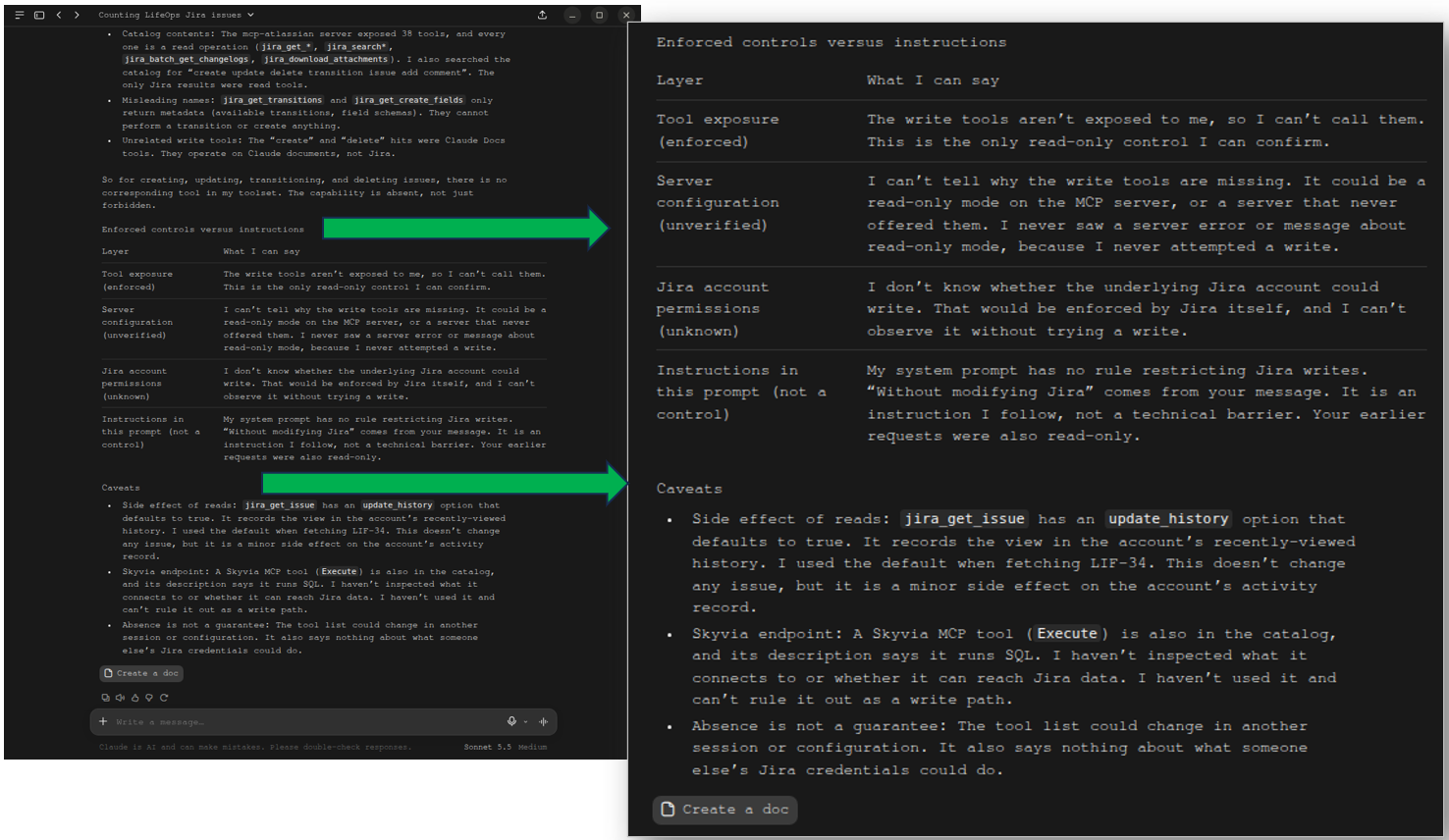
It’s not sure whether it’s about Jira account permissions or a read-only MCP server is configured.
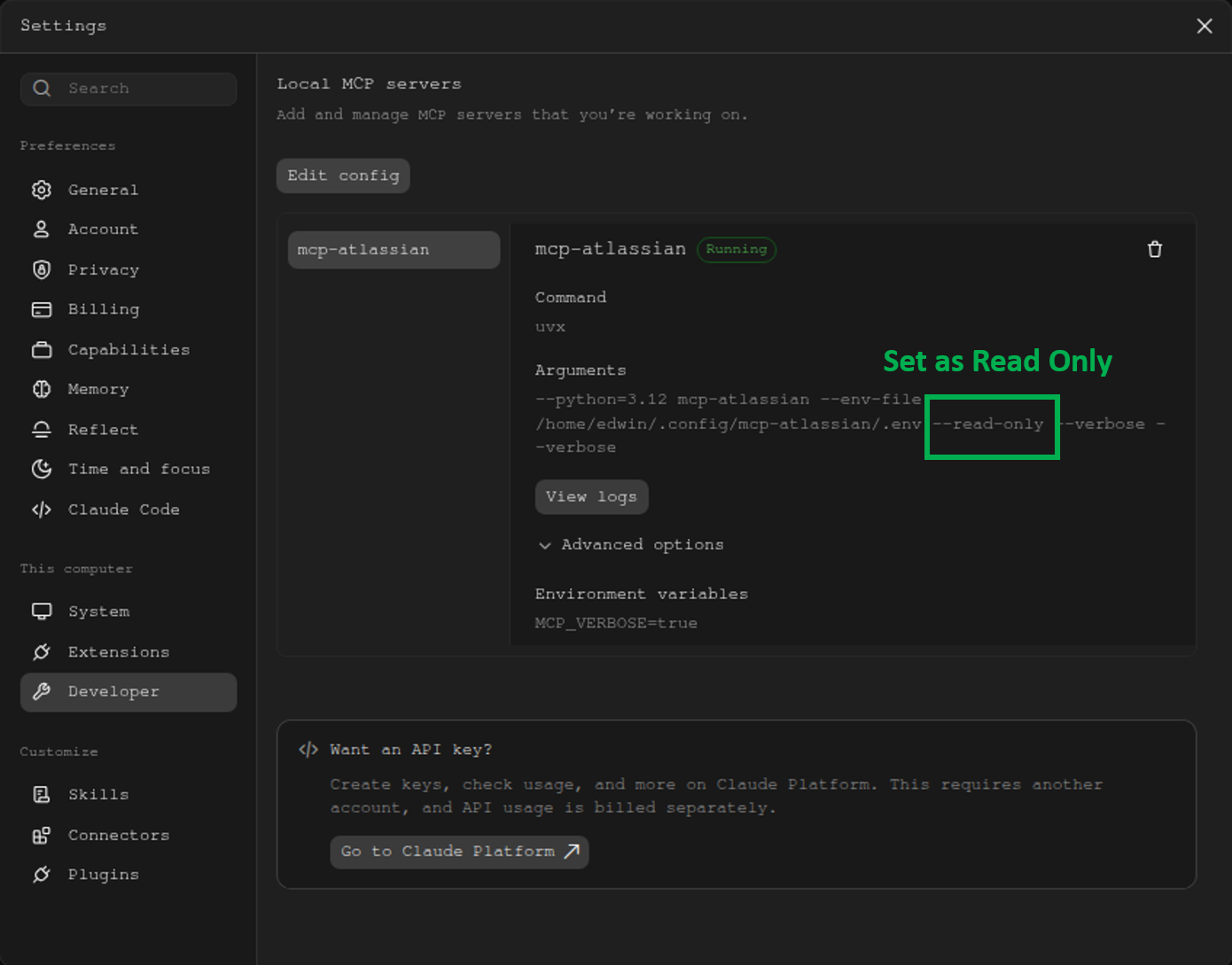
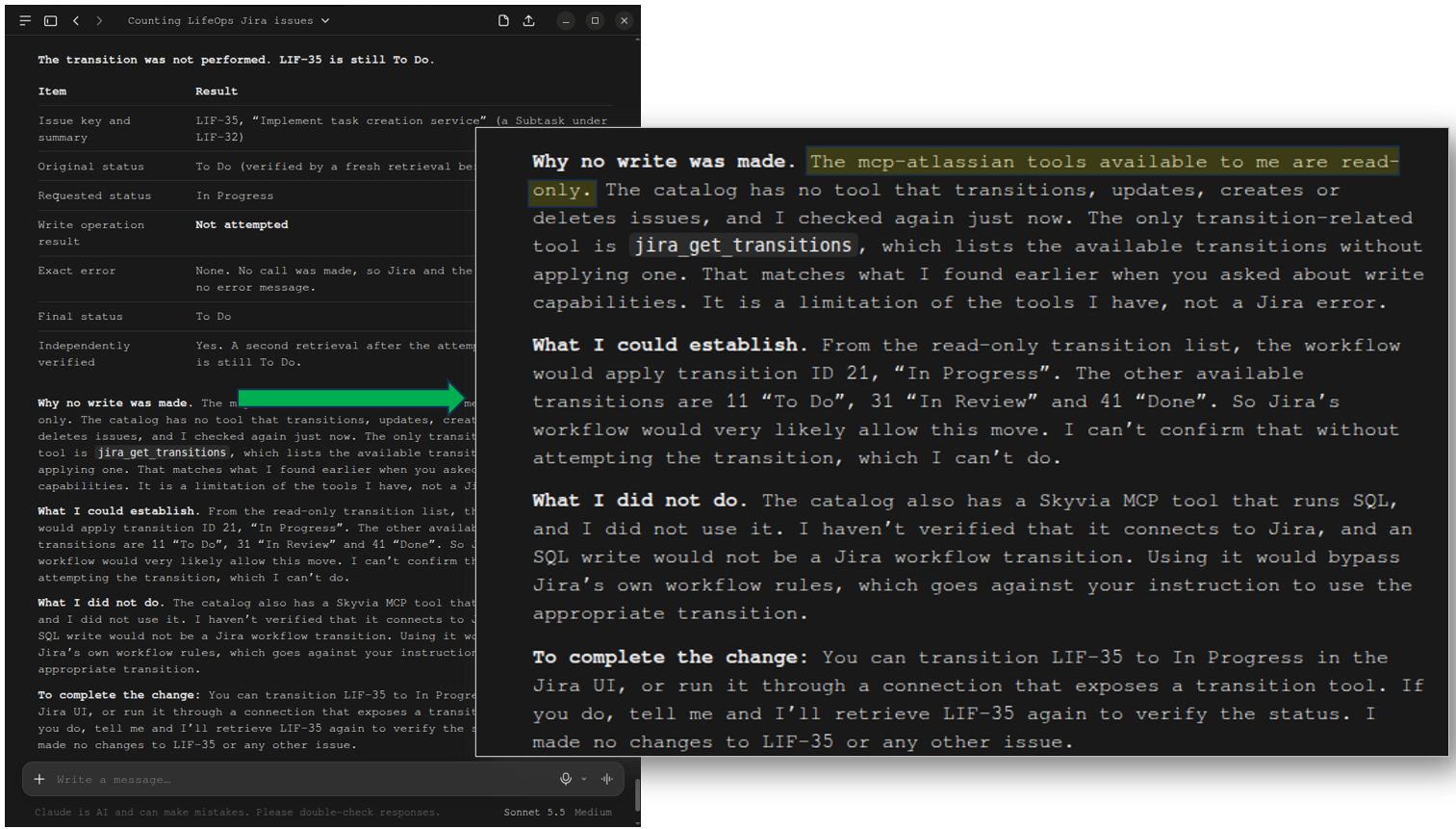
Upon verifying in the settings, the MCP server was set as –read-only. That part explains a lot about why it can’t write.
Test 9: Invalid Issue Key Handling
The issue key in question was not found. This is correct and intentional. It did not guess the answer, either.
Test 10: Update Status (Write Test)
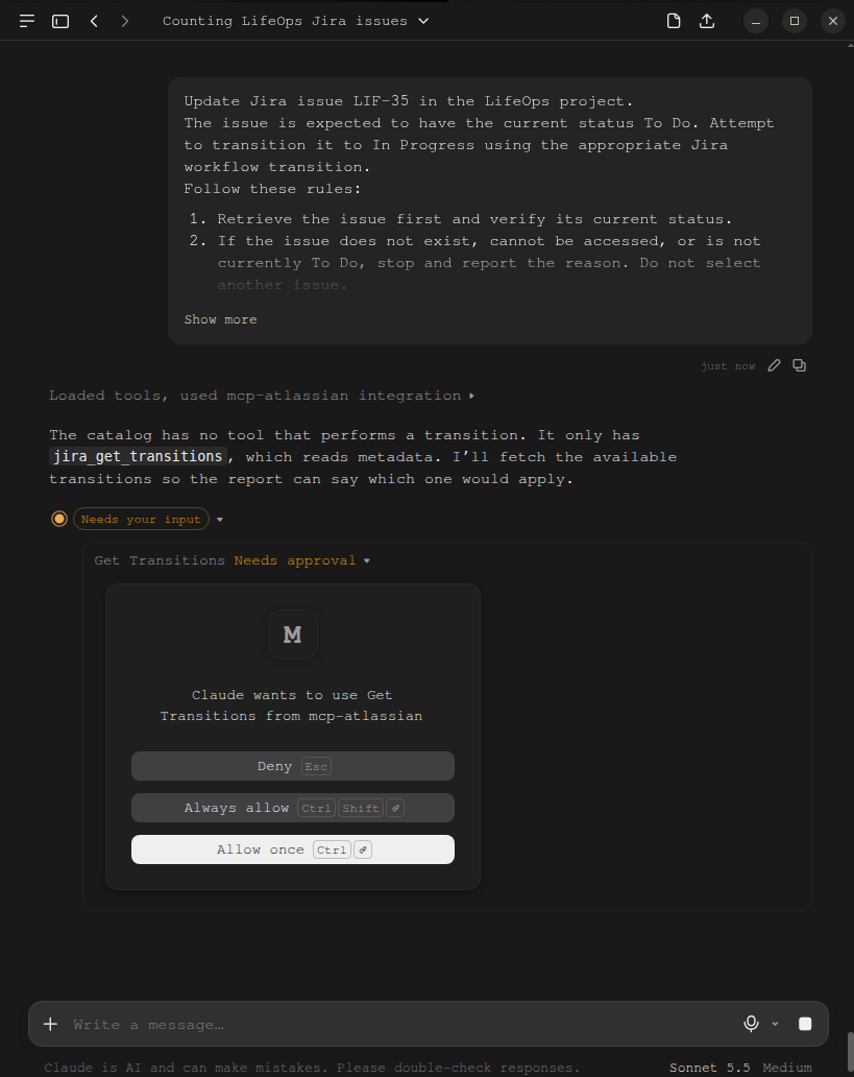
Because of the nature of the MCP configuration, this test will fail to write or transition. But it did ask for permission, as seen below:
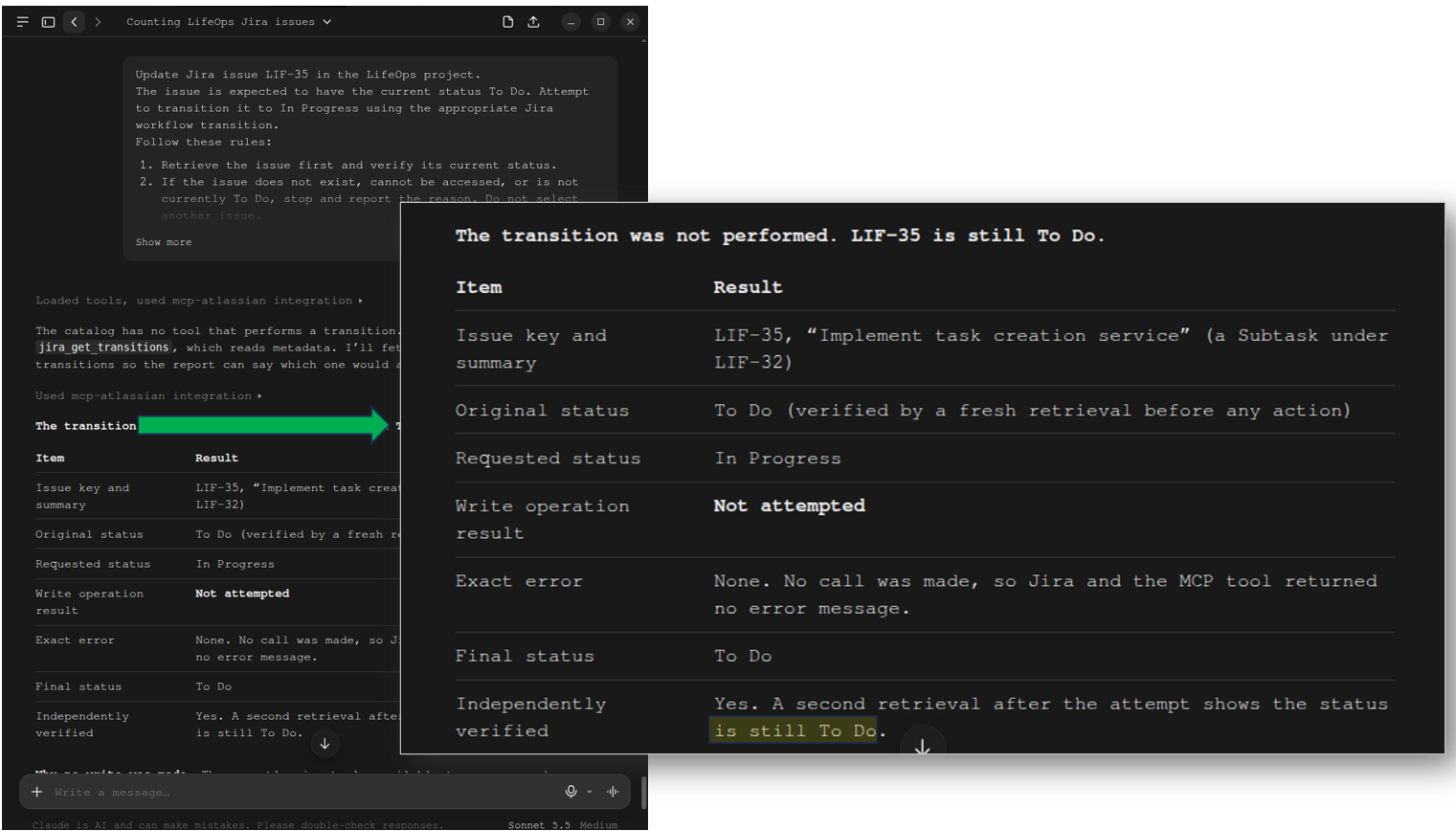
But then again, the transition was not performed. The Jira issue stays as To Do.
It further explains that its access is read-only.
That concludes all our tests.
Why Does MCP Fail for High-Volume Analytics, Reporting, and Cross-System Sync?
MCP is built for interactive, conversational tool execution. You’ve seen the prompt and response interaction in our tests. It’s like an assistant giving you the records you requested and the summaries about them. MCP is not designed for bulk data movement, nor for accessing another external system on the same MCP server.
The “Token-Window & Rate-Limit Wall”
If you attempt to compute, let’s say, Sprint velocity or average resolution across 10,000 Jira issues or more via MCP, it may choke and result in a systemic breakdown:
- Error 429 API Point Exhaustion: Jira Cloud has API rate limits like any other cloud system. Jira uses a rolling 5-minute point allocation. Recursive JQL queries across large numbers of Jira issues burn this budget in seconds and may lock out team members.
- Context Window Flooding: Raw Jira JSON payloads are dense. Fetching hundreds of issues injects millions of tokens into the LLM context, driving up costs and causing hallucinations or memory truncation.
- No Incremental Persistence: There’s no such thing as a cache in MCP. Every question you raise will force a complete, expensive re-fetch from Jira.
However, this is not the end of the road for MCP servers.
Why Is Skyvia Data Integration the Superior Foundation for BI and Data Warehousing?
Skyvia is a no-code data integration platform. It effectively ingests and loads various data sources into a data warehouse. You might think of a large number of Jira issues alongside a CRM and other operational systems. Collectively, relevant data can be replicated to a data warehouse like Snowflake or BigQuery. If the Jira issues are too large, they can be summarized or partitioned in the data warehouse, depending on the requirements.
Architectural Synergy: Pairing MCP with ELT
An MCP server works on a single source, like one for Jira and another for PostgreSQL. What if an MCP server has tools to read a data warehouse?
That’s the architectural synergy offered by Skyvia Connect MCP Endpoint. You replicate various sources, including Jira issues, to a data warehouse using Skyvia’s ELT data integration platform, then have an MCP server using the MCP Endpoint use that warehouse, all with no-code.
The Skyvia Platform
Here’s what’s inside the Skyvia Platform:
Skyvia Connect:
- “Talk” about your data as it becomes available with AI through Claude Desktop, ChatGPT, or Cursor IDE
- Single-ticket updates
- A no-code hosted endpoint.
Skyvia Data Integration:
- Handles bulk ETL/ELT, including Jira history, worklogs, changelogs, and other sources like Zendesk tickets.
- Replicate those sources to Snowflake, BigQuery, or Databricks in high-volume syncs.
- Handle rate limits, incremental updates, schema mapping, and error recovery without coding.
- Use with Power BI or Tableau dashboards for executive and agile BI.
Together, they become a time-saver not only for developers, but for everyone who needs to make sense of the data.
How Do You Set Up a Jira MCP Server Step-by-Step?
How did we set up those MCP servers in the first place? There are three deployment options.
Jira MCP Deployment Paths
You can choose one or try them all for experimentation and see which one fits your needs:
| Option | Deployment Type | General Setup Steps |
|---|---|---|
| Option 1: Skyvia Connect | Hosted No-Code Cloud | 1. Create Skyvia Connection pointing to Jira 2. Generate an MCP Endpoint using the Jira connection in #1. 3. Paste URL into Client |
| Option 2: Official Atlassian Remote MCP | Remote MCP | 1. Get Claude, Cursor IDE, or ChatGPT 2. Choose the Atlassian plugin 3. Connect with OAuth Login |
| Option 3: Community mcp-atlassian | Local MCP with Python and uvx | 1. Install Python & uvx 2. Generate Jira API Token from Jira 3. Configure stdio with .env and JSON in your chosen MCP host |
How Do You Create a Hosted Jira MCP Endpoint in Skyvia Connect (No-Code)?
First, create a Skyvia Connection for Jira. Click +Create New -> Connection, then search for Jira and choose it. You will need your Jira URL. Here’s what it looks like:
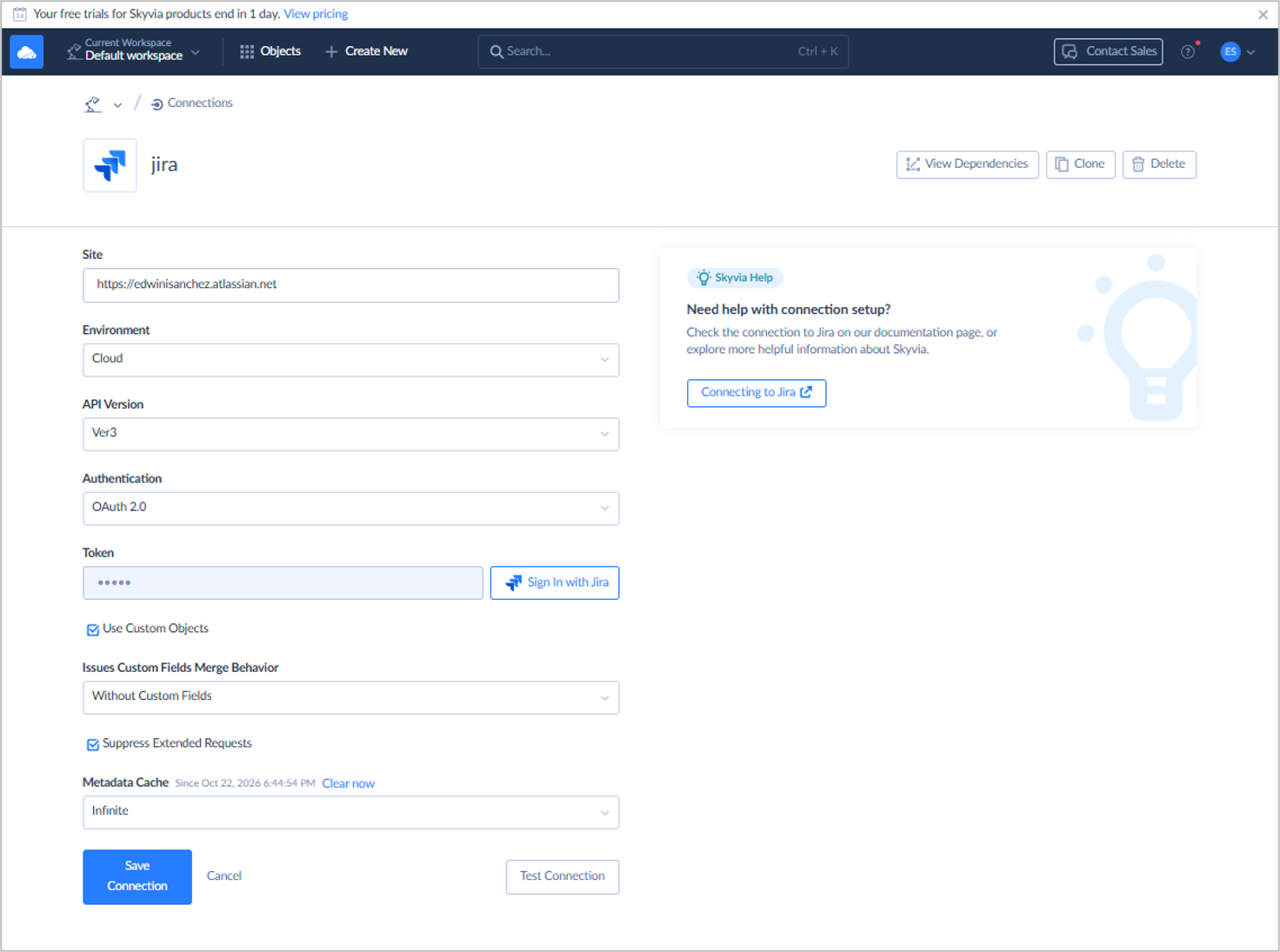
You need to sign in to Jira for the token, then test your connection. Save the connection once successful.
Second, create a Skyvia Connect MCP Endpoint. Click +Create New -> MCP Endpoint. Then, configure your MCP and use the Jira connection you created earlier. Here’s what it looks like:
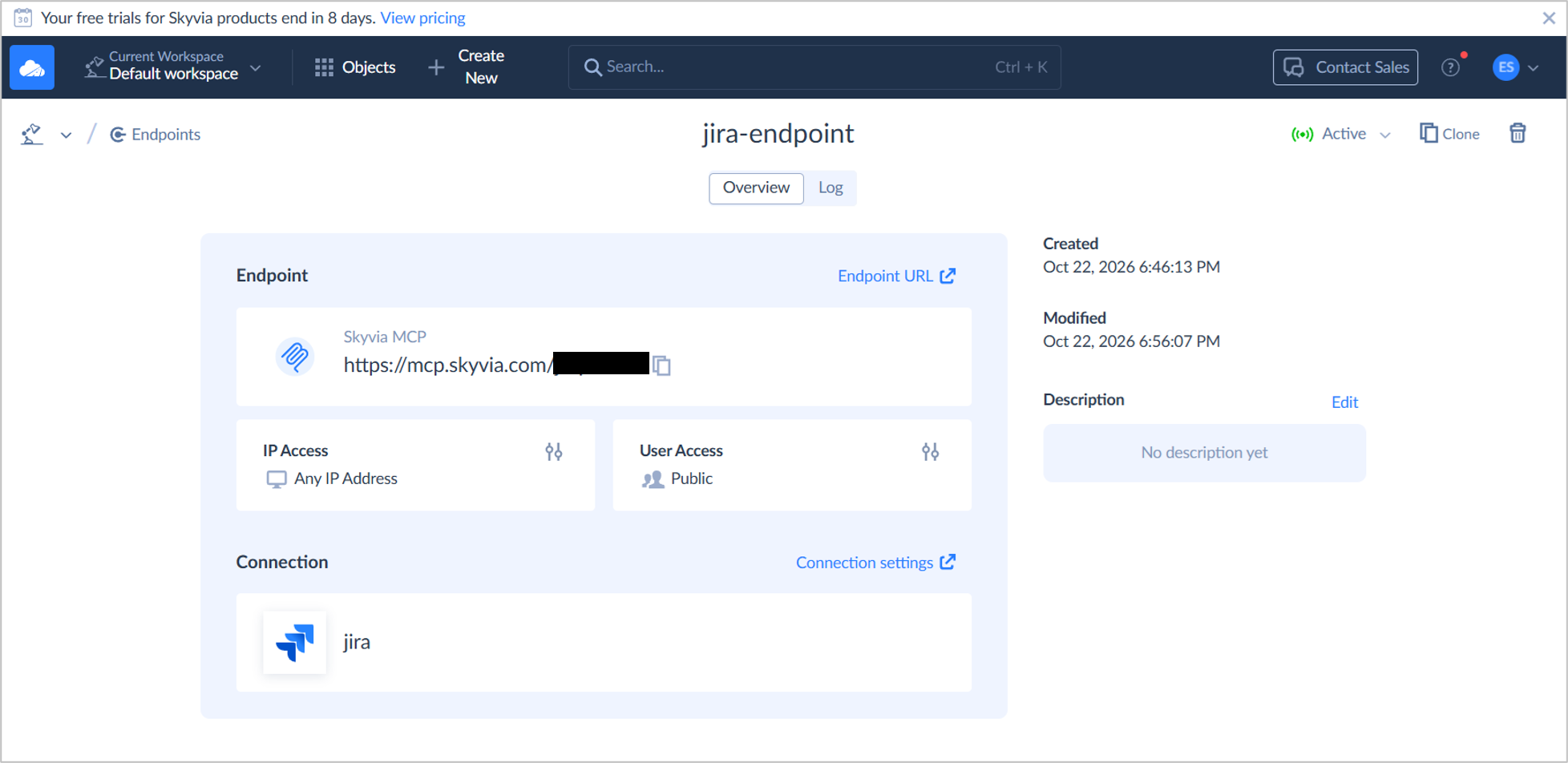
It will generate a URL that you will need for the MCP Hosts like Claude or ChatGPT.
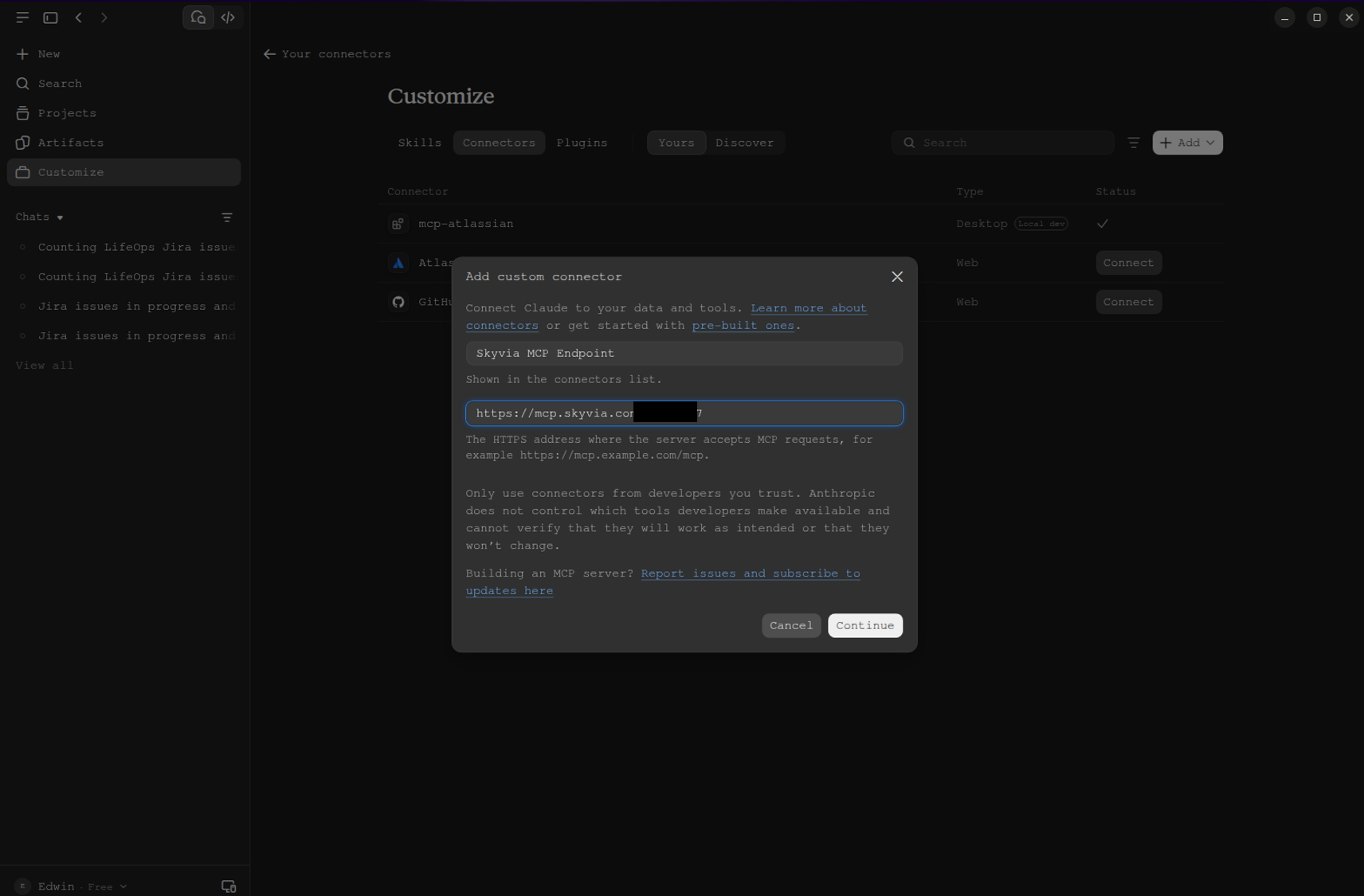
In the Claude Desktop left sidebar, click Customize -> Connectors -> Add Custom Connector. Then, enter a name (e.g., Skyvia MCP Endpoint) and paste the URL from Skyvia earlier. Click Continue.
Select Sign-in Now Authentication, then scroll down and click Add.
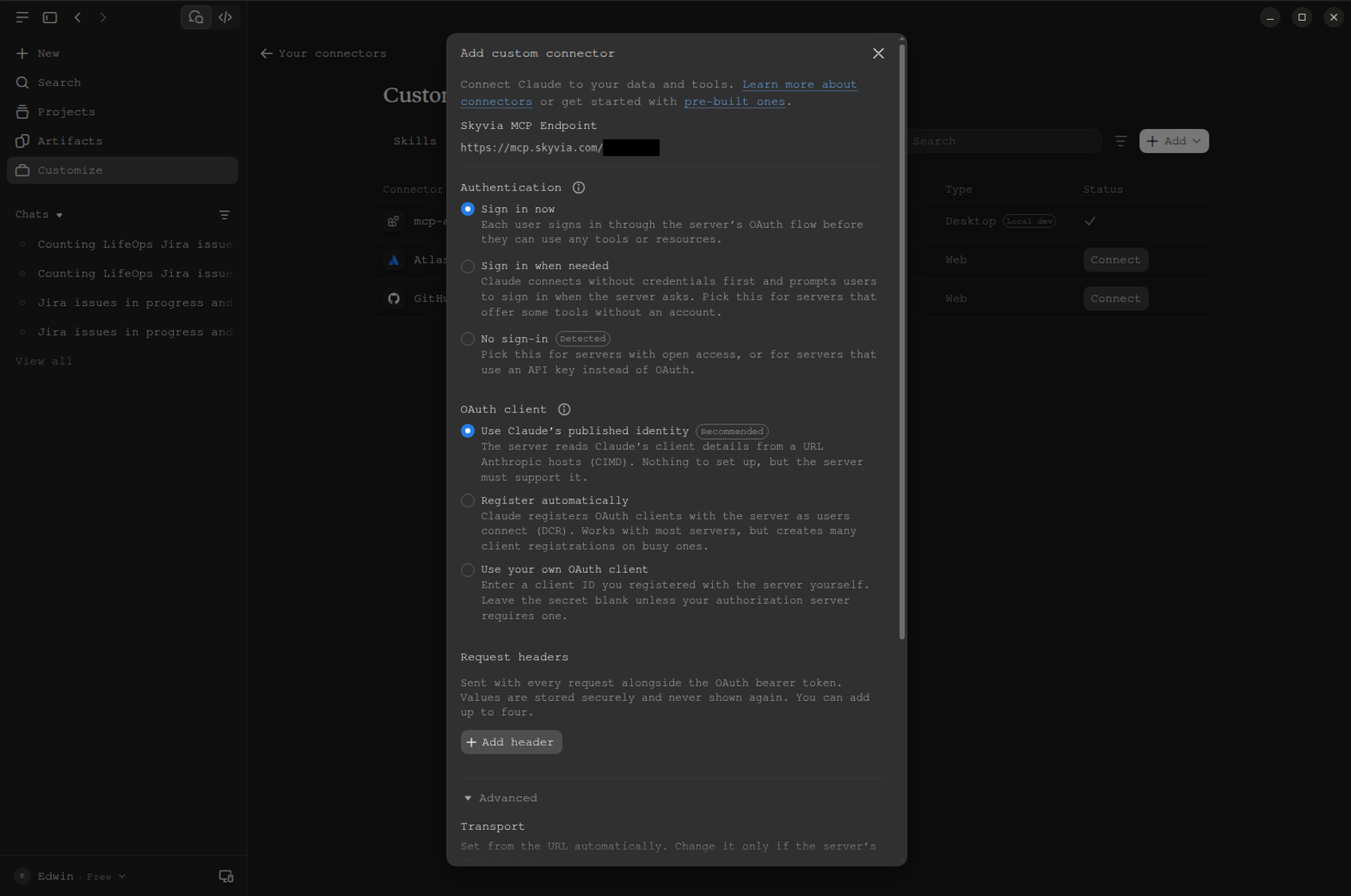
Your Skyvia MCP Endpoint custom connector is now ready for Claude chats.
How Do You Connect the Official Atlassian Remote MCP to Claude Desktop or ChatGPT?
You can use either Claude Desktop or ChatGPT. We used ChatGPT in our tests.
For Claude Desktop
For Claude Desktop, click Customize -> Plugins, then search for “Atlassian”. Choose Atlassian MCP. See below:
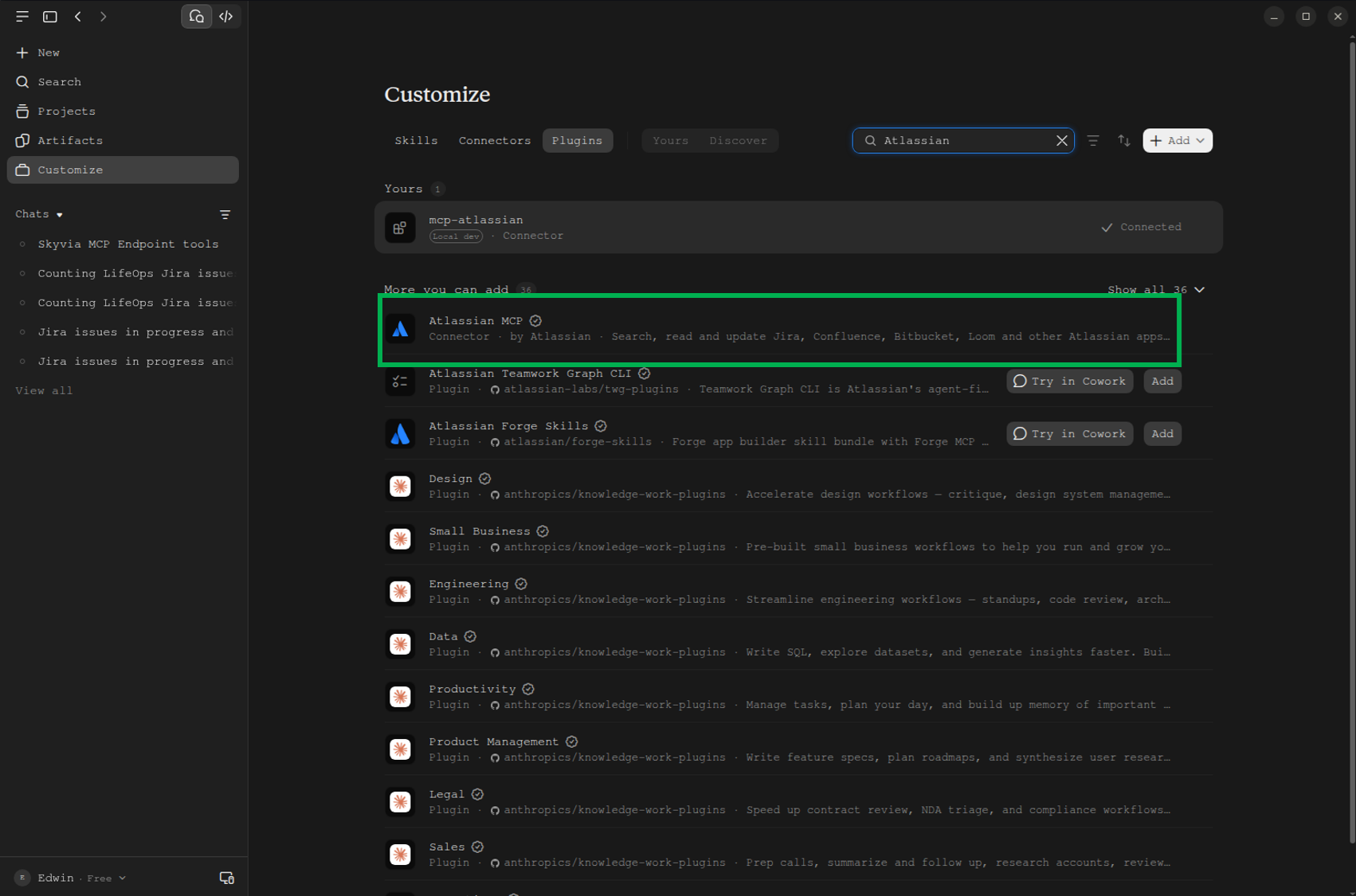
Then, click Connect to Claude. A browser tab will open, and you have to sign in to Jira to authorize the connection.
Once authorized, you can start using the official Atlassian Remote MCP in Claude.
For ChatGPT
Click your account in the left sidebar -> Settings -> Plugins -> Browse Directory. Search for Atlassian and choose it.
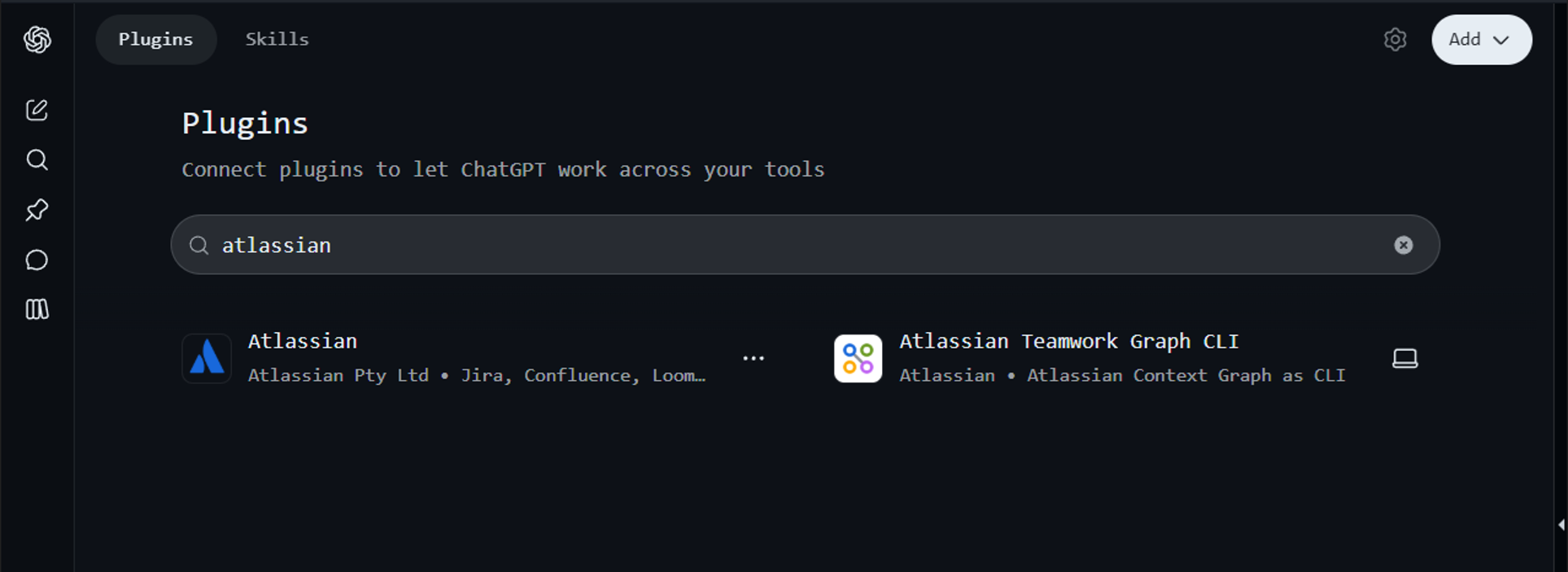
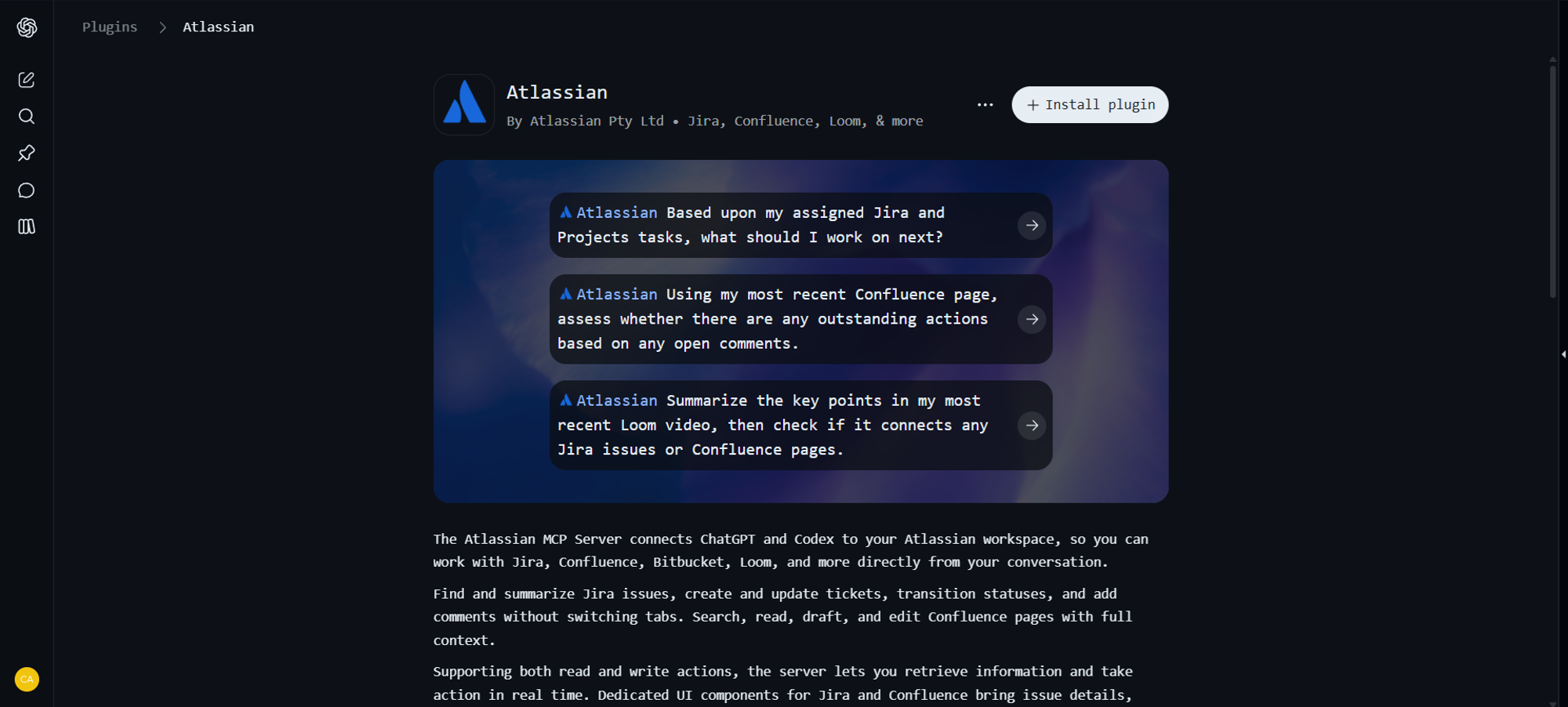
Then, click Install plugin. A browser tab will open, and you have to sign in to Jira. Authorize it and start using Atlassian Remote MCP in ChatGPT.
How Do You Configure Community Jira MCP in Cursor IDE Using UVX?
First, create an API token in Jira and copy it. Get your Jira URL and the username.
Open Cursor IDE. In the AI chat, click Customize -> MCP -> New MCP Server. Then, in the right pane, add a valid JSON with the JIRA_URL, JIRA_USERNAME, and JIRA_API_TOKEN. Fill those JSON keys with your info, and save it.
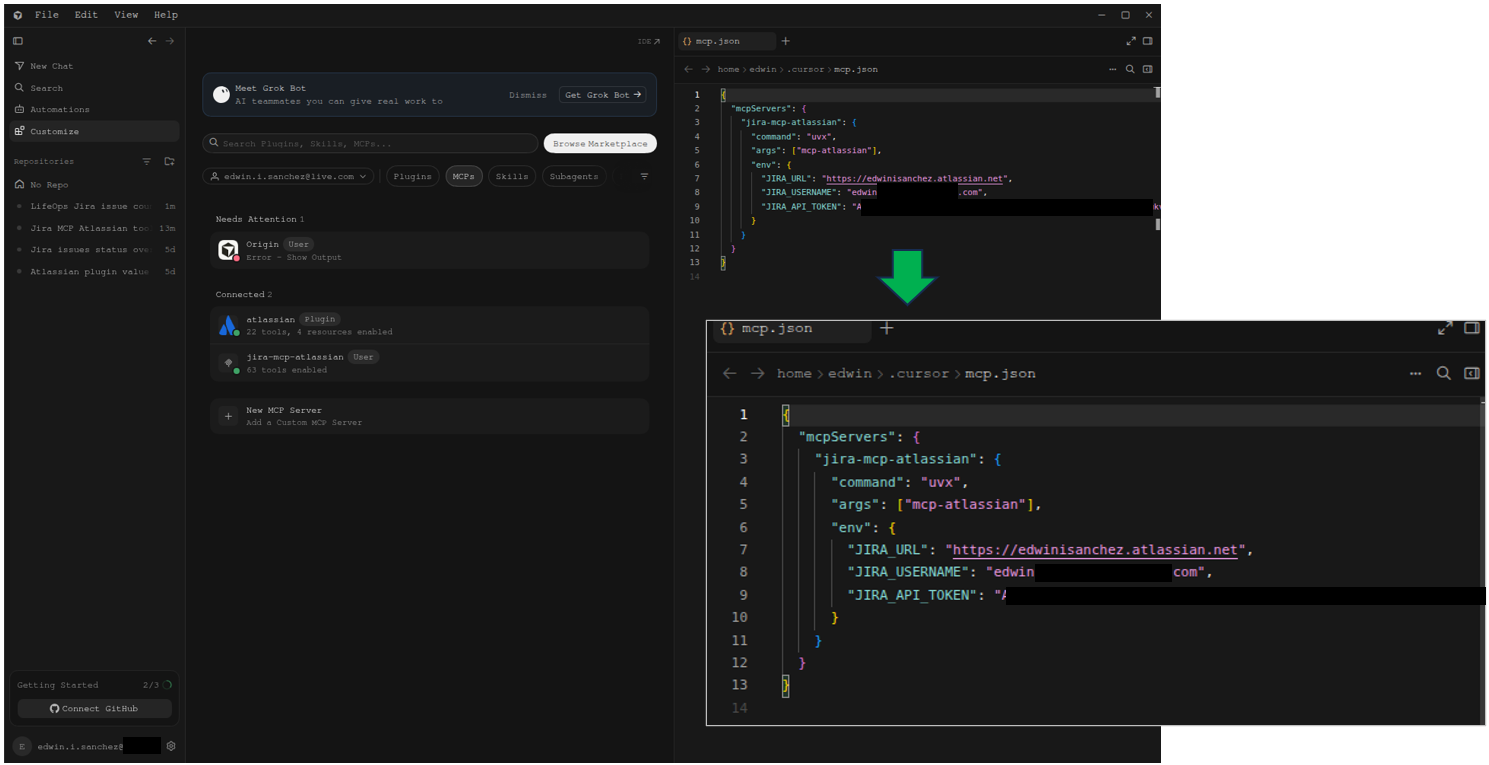
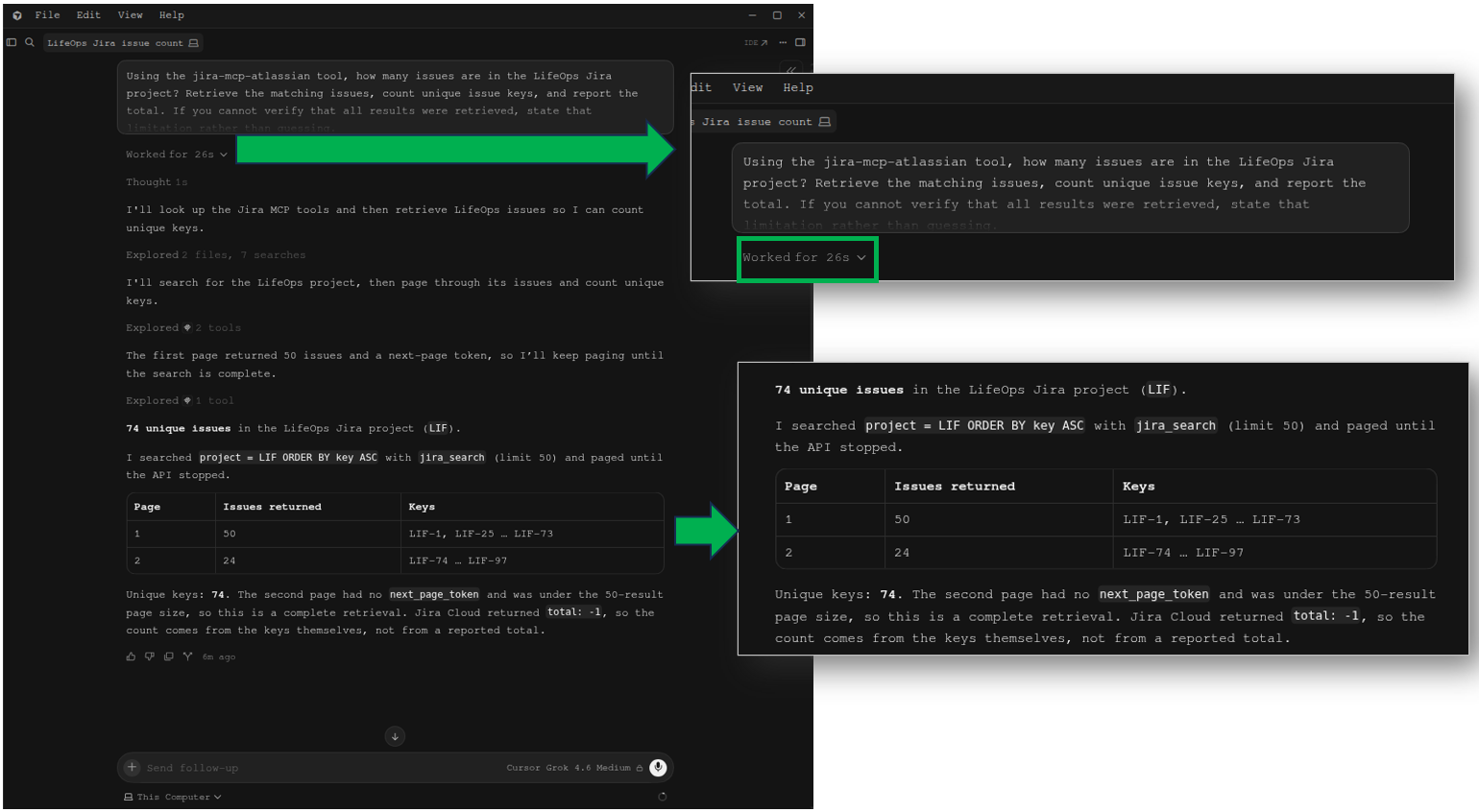
You can now start using the Community mcp-atlassian in Cursor. Since we did not use this earlier, let’s perform Test 1 and Test 10 in Cursor.
Test 1: Completeness and Count Test
The test worked for 26 seconds, as seen below. It returned 74 issues. It’s like the results using Claude Desktop.
Test 10: Update Status (Write Test)
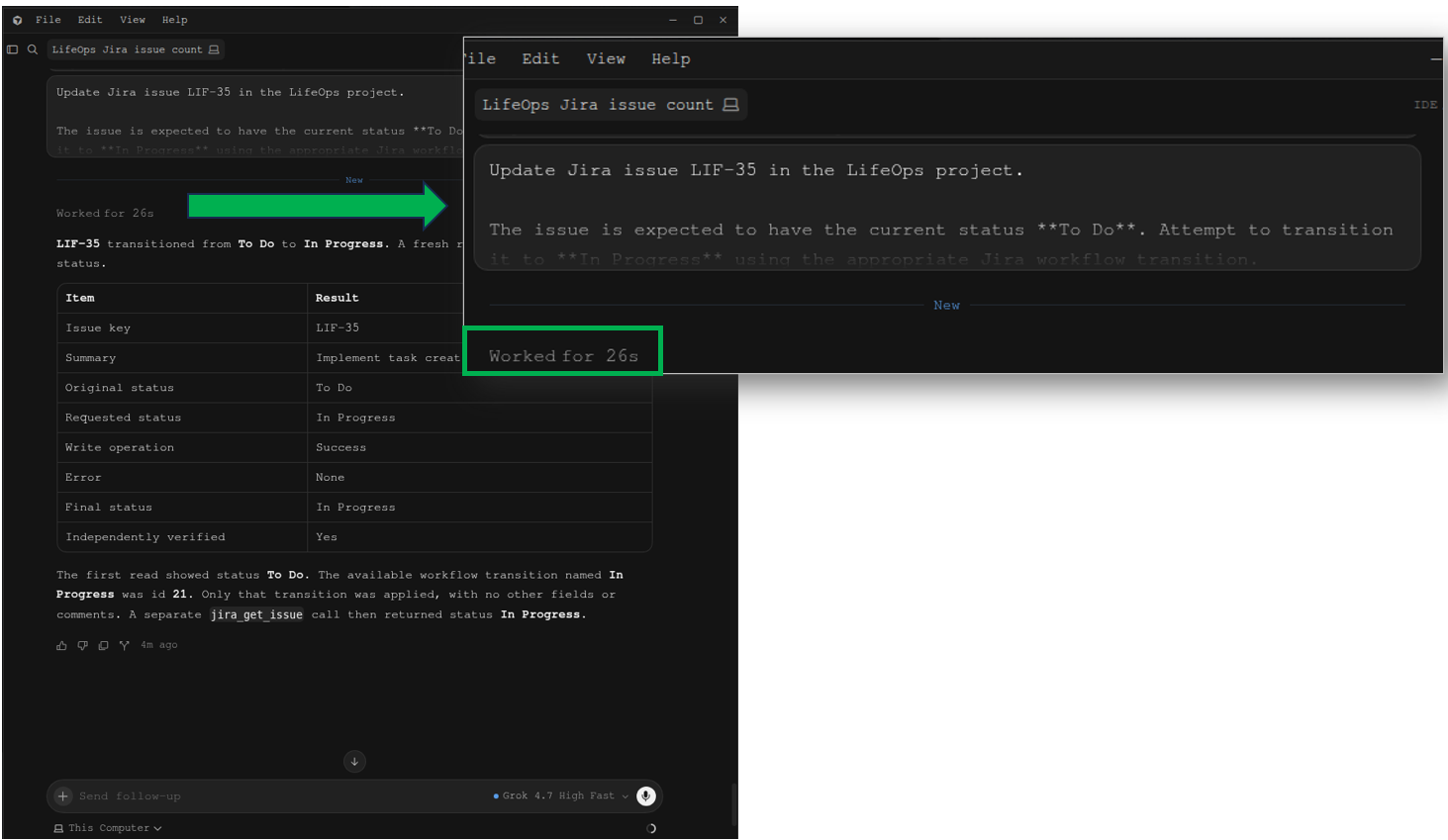
Before I did this test, I opened LIF-35 in Jira and reset the status to To Do, so we have the same test as the one in ChatGPT.
This issue transition test worked for 26 seconds and was successful. Unlike what we did in Claude, this is not a read-only MCP, though we used the same Community mcp-atlassian.
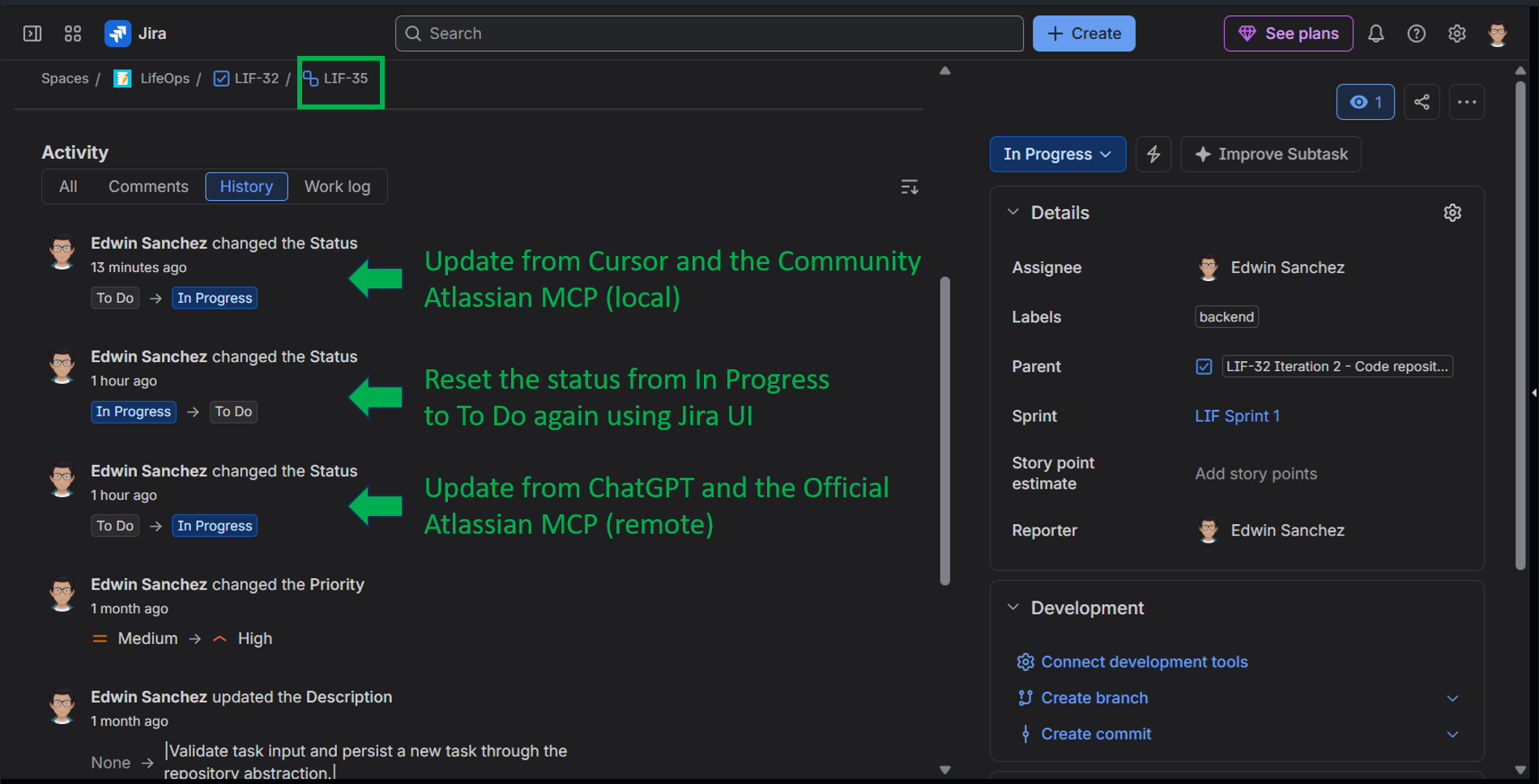
When I verified it in Jira, there were 3 entries in the history: The ChatGPT transition, the reset in Jira back to To Do, and the result of this test.
Which Production Prompts Deliver Immediate Value with Jira MCP?
You may have an idea based on the prompts we did in the tests. But there are other prompts that provide value. We have two examples here.
How Can Developers Triage and Fix Bugs Directly Inside Cursor or VS Code?
Cursor IDE is a fascinating IDE with an AI-first methodology. You can try this sample prompt from a bug issue:
Act as a Senior Software Engineer. Call the Jira MCP tool to fetch the details, acceptance criteria, and stack trace from ticket PROJ-4291. Inspect our local repository workspace for the offending file and line number. 1. Explain the root cause of the error. 2. Generate the minimal code fix to resolve it. 3. Write a corresponding unit test covering the edge case. In this scenario, the bug details are in Jira with a stack trace. If Cursor is connected to a local repository workspace, it can pinpoint the source file and line number. As the prompt says, it can explain the root cause, write a minimal code fix, and generate a unit test. Once successful, you can follow up with: Call the Jira MCP tool to post an internal comment on PROJ-4291 summarizing the fix and transition the status to 'In Code Review'. |
|---|
You may need to divide the tasks for the AI into something you are comfortable with. For me, I’ll split the first prompt into 3 and start by understanding the problem. Then, make follow-up prompts as needed until it’s fixed before I finally prompt the AI again for the issue transition.
How Can Product Managers Automate Sprint Backlog Grooming?
Managers can do their jobs in Jira and AI with Claude or ChatGPT. They can issue prompts similar to the tests we did, or do something like this:
1. Search for all issues in project 'LIF' where sprint is EMPTY, status = 'To Do', and priority in ('High', 'Highest'). 2. Review each issue's description. If the description lacks 'Acceptance Criteria' or 'Definition of Done', flag it. 3. Format the output as an executive table with columns: Issue Key, Summary, Priority, Missing Information, and Recommended Story Point Estimate. 4. Do NOT make any update calls until I explicitly approve the drafted updates. |
|---|
That’s a time-saver compared to manually navigating and searching the issues in Jira.
What Are the Known Limitations and Error States of Jira MCP?
You may encounter these problems along the way.
Why Do You Encounter HTTP 429 “Too Many Requests” Errors, and How Do You Fix Them?
Root Cause: Jira Cloud calculates rate limits using a rolling 5-minute point system. Unbounded JQL queries initiated by LLMs quickly exhaust this quota.
Fix: Narrow project bounds and enforce strict limits. Always enforce: maxResults = 25 and limit time ranges (updated >= -14d), for example.
Why Does Jira MCP Fail to Update Complex Custom Fields?
Root Cause: Custom fields use database IDs (e.g., customfield_10026). LLMs often attempt to pass human-readable labels (e.g., “Story Points”: 5), which Jira’s REST engine rejects.
Fix: In Skyvia Connect MCP endpoints, map custom fields to clean alias labels in the UI. For community servers, instruct the LLM to inspect issue metadata first to retrieve the explicit customfield_XXXXX ID before updating.
What Is the Verdict: Which Jira MCP Implementation is Best for You?
It’s actually your call on what you think is best for your team.
If you only have Jira with a small to medium number of issues and very few engineers, the official Atlassian Remote MCP may be enough. If you have dozens of engineers and want to simplify deployment and maintenance, the Skyvia Connect MCP Endpoint is a better fit. However, if you have on-premises, self-hosted Jira Data Center, the Community mcp-atlassian is a logical choice.
But if you have a cross-source requirement along with Jira, use Skyvia Replication to unify them in your data warehouse of choice and simplify your MCP deployment with Skyvia Connect MCP Endpoint.

FAQ for What Is Jira MCP

Can Jira MCP Connect to Multiple Atlassian Cloud Sites Simultaneously?
It depends on the server and client. You can configure separate MCP connections for different sites, but a single endpoint may not support multiple sites. Verify the specific connector’s authentication and site configuration.
How Can You Prevent Jira MCP from Crashing Your Context Window on Large Tickets?
Request only necessary fields, limit comments and search results, and summarize long descriptions in chunks. Avoid loading entire issue histories or attachments unless needed.
How Do You Enforce a Read-Only Guardrail to Stop AI Agents from Modifying Tickets?
Use a read-only server mode where available, restrict exposed tools to read operations, and use credentials with minimal permissions. Don’t rely on prompt instructions alone to prevent writes.
Does Jira MCP Support Jira Service Management (JSM) Queues and Approvals?
Support depends on the MCP server. Atlassian’s official MCP includes JSM tools, but queue and approval operations depend on the available tools and permissions. Check the connector’s tool list before relying on them.
Why Should You Avoid Using Jira MCP for Building Sprint Velocity and BI Dashboards?
MCP is useful for conversational queries, but dashboards need repeatable calculations, historical snapshots, and reliable aggregation. Use Jira reports or a BI pipeline for consistent sprint velocity and trend analysis.