
Summary
- For pipeline and integration tests, rule-based mock data is usually enough and costs nothing.
- Model-based synthetic data is worth it when someone will read the numbers, as in analytics, ML or demos.
- Hashed and masked copies are still personal data under GDPR, so they need production's access rules.
- A fixed seed and a pinned library version make generated test data repeatable.
- Plant the edge cases on purpose: orphans, duplicates, empty required fields and odd characters.
The request sounds simple: test the new sync before Friday, and don’t copy production. Then you open the Developer sandbox and find the objects, the fields and the validation rules, and not a single record. Something has to go in there, and it can’t be your customers.
That something is usually synthetic data. The word covers four different things, though: rule-based mock rows, model-generated records, masked copies and full production clones. Two of the four are still personal data under the law.
The short version: for testing a pipeline, mock data with the bad rows planted on purpose beats the fancier options on cost, and a hashed copy isn’t the privacy shortcut it looks like.
What is synthetic data?
Synthetic data is data that a program generated instead of recording it from real events. Rules, a simulation or a trained model produce it, and it copies the shape of real data (the columns, the formats, sometimes the statistics) while no row belongs to a real person or a real transaction.
A fake phone number is the simplest case. It has ten digits and a real area code, so every validation rule accepts it, but nobody answers it.
The US Census Bureau points out that the term means different things to different people. In programming, it usually means data simulated from scratch for testing. In statistics and data confidentiality, it means modeled data released in place of confidential records, the way the Bureau’s own SIPP Synthetic Beta stands in for survey responses it can’t publish.
So what’s the difference between synthetic data and real data? Real data is a record of something that happened: an order, a support ticket, a sensor reading. Synthetic data only looks like that record. It can be good enough to test a load, train a model or run a demo, and it can’t tell you anything about your actual customers.
Is synthetic data always made by AI? No. A script with a list of rules and a random seed makes synthetic data too, and for testing a pipeline that’s usually all you need.
Outside testing, most synthetic data goes into machine learning. A fraud model needs thousands of fraudulent transactions, while a real-world dataset holds a handful. Computer vision teams generate labeled images instead of labeling photos by hand, and healthcare researchers work with synthetic patient records when the real ones can’t leave the hospital. There’s a catch: a model trained on a skewed dataset generates the same skew, so bias in the original data carries straight into the synthetic copy.
How practitioners see it
“Testing throughput, testing systems capabilities, well, we have been using synthetic data that way for decades now.”
Fabiana Clemente, senior director and distinguished engineer at KPMG
Mock data, synthetic data, masked data or a production copy?
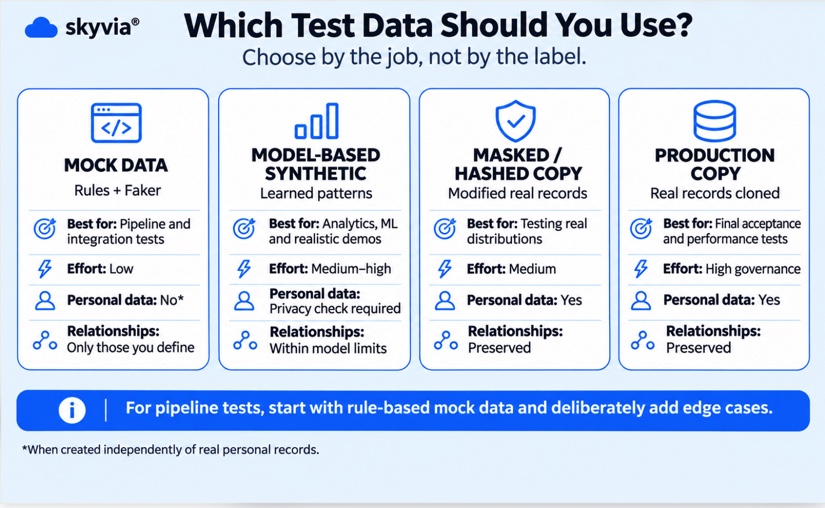
“Synthetic” gets used for four different things, and they behave differently once you load them. Pick by the job, not by the label.
| Option | How it’s made | Still personal data? | Keeps relationships | Effort | Good for |
|---|---|---|---|---|---|
| Mock data | Rules and random values (Faker, Mockaroo) | No | Only the ones you code | Low | Integration and pipeline tests, demos |
| Model-based synthetic data | A model trained on your real data (SDV, commercial generators) | Usually not, if a privacy check passes | Yes, within the model’s limits | Medium to high | Analytics, ML, demos where the numbers must look right |
| Masked or hashed copy | Real records with sensitive fields replaced or hashed | Yes | Yes | Medium | Tests that need real distributions, under data protection rules |
| Production copy | A Full sandbox, a cloned database or warehouse | Yes | Yes | Low to set up, high to govern | Performance tests and final acceptance |
Our take: for testing a pipeline or an integration, start with mock data. Mapping errors, type mismatches, required fields and error handling don’t care whether the numbers follow a realistic distribution. They care about the shape of the rows and about the strange ones.
Model-based synthetic data earns its cost when someone will read the numbers: a dashboard demo, an analytics prototype, a model in training. SDV, the Synthetic Data Vault from DataCebo (source-available under the Business Source License), trains on your real tables, runs on your own machines and ships reports that compare the synthetic output with the original.
Masked copies feel like a shortcut. They’re still personal data, as the section on hashing below explains. A production copy belongs in exactly one place: the final check before go-live, under the same access rules as production.
Adoption is lower than the noise suggests. In Perforce’s 2026 State of Synthetic Data report (Perforce sells synthetic data through Delphix), 66% of software leaders said their organizations don’t use synthetic data in development and testing.
Types of synthetic data and how it’s made
Three types come up in every definition:
- Fully synthetic: every value is generated. No real record goes in.
- Partially synthetic: real records, with the sensitive columns (names, emails, account numbers) replaced by generated values.
- Hybrid: real and generated records mixed in one set.
Synthetic data generation methods range from simple to heavy. Rules and random sampling fill a template (“a first name, a last name, an email at example.com”). Statistical methods fit a distribution to the original data and sample from it, so the result keeps its statistical properties.
Generative models (GANs, variational autoencoders, transformers and LLMs) learn the patterns in a real dataset and produce new records. Simulations and agent-based models generate data by running a system, such as traffic or the spread of a disease.
For test data, the first method covers most needs. The others matter when the statistics of the synthetic data have to hold.
A worked example: test data for a CRM pipeline
Say you’re testing a new load of accounts and contacts into a staging database or a Salesforce sandbox. You need related records (contacts that point at existing accounts), and you need the rows that break things. A generator script gives you both, and it gives you the same rows every time.
This example uses Faker, a Python library for generating test data. We ran the script with Faker 40.1.2 and a fixed seed:
import csv
from faker import Faker

fake = Faker("en_US")
Faker.seed(42)  # same seed + same Faker version = the same rows every run

accounts = [
    {"external_id": f"ACC-{i:03}", "name": fake.company(), "city": fake.city()}
    for i in range(1, 51)
]

contacts = []
for i in range(1, 201):
    account = fake.random_element(accounts)
    contacts.append({
        "external_id": f"CON-{i:03}",
        "account_id": account["external_id"],
        "first_name": fake.first_name(),
        "last_name": fake.last_name(),
        "email": fake.unique.email(domain="example.com"),
    })

# Five deliberate edge cases to test pipeline behavior
contacts += [
    {**contacts[0], "external_id": "CON-901"},                      # duplicate email
    {**contacts[1], "external_id": "CON-902", "last_name": ""},     # empty required field
    {**contacts[2], "external_id": "CON-903", "last_name": "X" * 300},  # too long
    {**contacts[3], "external_id": "CON-904", "account_id": "ACC-999"},  # no such account
    {**contacts[4], "external_id": "CON-905", "first_name": "Zoë", "last_name": "O'Brien"},
]

for name, rows in (("accounts.csv", accounts), ("contacts.csv", contacts)):
    with open(name, "w", newline="", encoding="utf-8") as f:
        writer = csv.DictWriter(f, fieldnames=rows[0].keys())
        writer.writeheader()
        writer.writerows(rows)
The run writes two files: 50 accounts and 205 contacts (200 regular rows plus five deliberately challenging records). We ran the script twice and compared checksums. Both runs produced identical files, which is exactly what the fixed seed is for.
Faker’s docs state the condition: the same seed gives the same result with the same methods and the same version of Faker. Pin the version in your requirements file, or an upgrade can change your test data without warning.
Three details make this data useful for a pipeline:
- Stable external IDs.
ACC-001andCON-001are keys you control. An import can upsert on them, so you can load the same files twice and check that nothing doubles. - Real relationships. Every regular contact points at an account that exists in
accounts.csv. OnlyCON-904doesn’t, on purpose. - Deliberate edge cases. A duplicate email, an empty last name, a 300-character name, an orphan contact, and a name with a diacritic and an apostrophe. These test different behaviors: some should trigger validation errors, while valid special characters should survive the import unchanged.
Then load the files the way production will. With Skyvia Import, that’s a CSV source, an upsert by external ID into the target, and a run log that lists each failed row with its error.
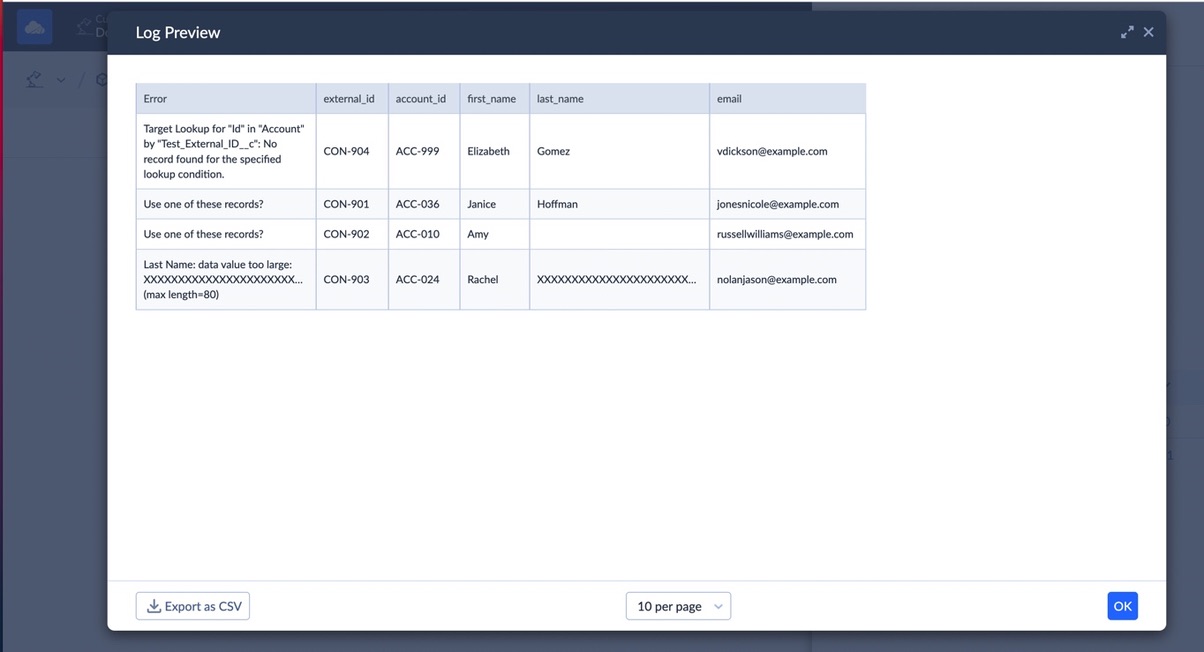
We tried it with 50 accounts and 205 contacts in a Salesforce Developer Edition org. All accounts loaded successfully, along with 201 contacts. Four contacts failed: two triggered Salesforce’s “Use one of these records?” message, one exceeded the 80-character limit for last names, and one referenced an account that didn’t exist. The fifth test case, with an apostrophe and a diacritic, loaded without errors.
If you turn on Replays in the import options before the run, you can fix the cause (a mapping, a validation rule) and retry only the failed rows instead of loading everything again.
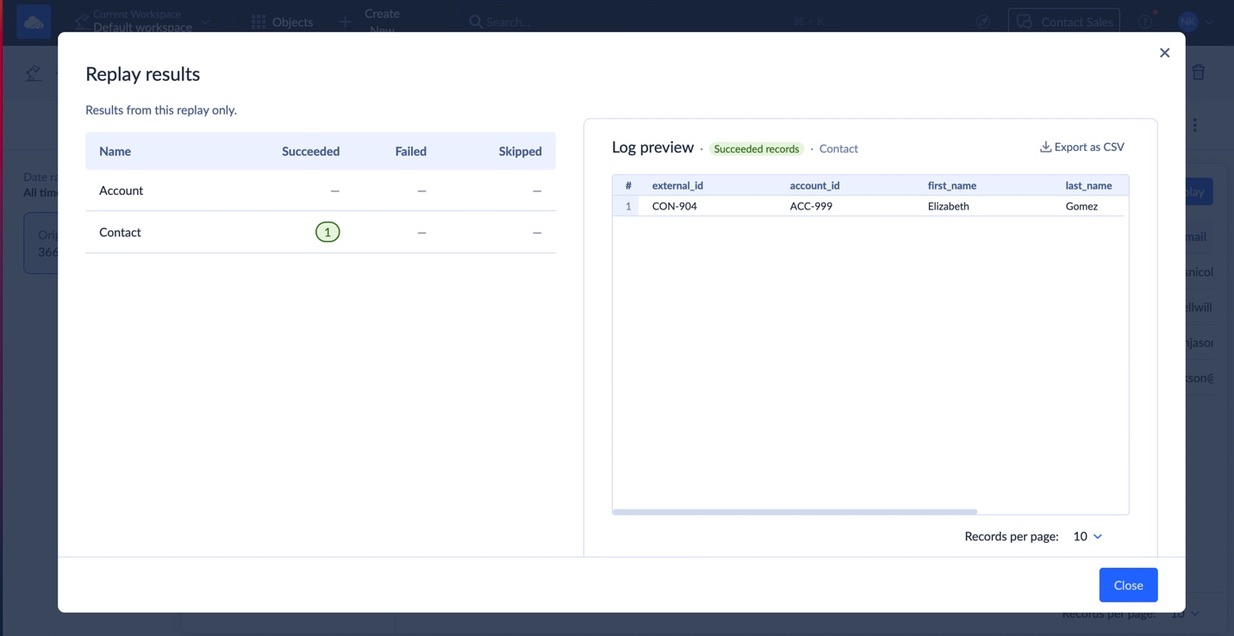
We then created the missing account and temporarily disabled the Salesforce duplicate rule. Replaying CON-904 succeeded without reloading the other contacts.
One check remains: repeatability. Running the same files again should update the existing records rather than create duplicates, since both imports use upsert by external ID.
Edge cases your test data needs: a checklist
Generators produce tidy synthetic data by default. Real sources don’t. Chris Garzon, who runs Data Engineer Academy, puts the failure mode plainly: “It fails when the data is too clean, too random, or too simple to expose what production will do.”
The same Perforce survey found that only 36% of respondents said synthetic data provides data realism, and only 34% said it provides referential integrity. Add these on purpose:
- Child rows whose parent doesn’t exist (an orphan contact, an order line without an order)
- Duplicates on the match key (the same email, the same external ID twice)
- Empty values in required fields, and
NULLversus an empty string - Maximum lengths, plus one character over
- Apostrophes, quotes, commas inside values, diacritics and non-Latin names
- Picklist or enum values the target doesn’t accept
- Dates at midnight, in other time zones and on daylight saving changes
- Zero, negative and huge amounts, and more than one currency
- The same record updated twice between loads (for incremental syncs)
- A record deleted in the source after the first load
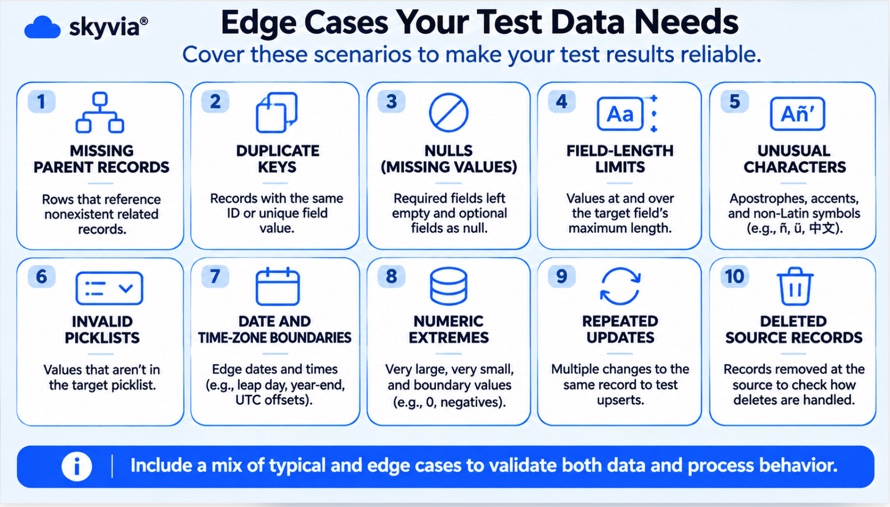
Keep the list next to the generator, and add a row every time production surprises you.
How to fill a Salesforce sandbox with test data
Most Salesforce testing happens in a sandbox, and the cheap sandboxes start empty. Salesforce Help lists what each type copies from production:
| Sandbox | What’s copied | Data storage | Refresh interval |
|---|---|---|---|
| Developer | Metadata only | 200 MB | 1 day |
| Developer Pro | Metadata only | 1 GB | 1 day |
| Partial Copy | Metadata and a sample of data, defined by a sandbox template | 5 GB | 5 days |
| Full | Metadata and all data | Same as production | 29 days |
So you get a choice. Developer sandboxes need test data loaded into them. Partial Copy and Full sandboxes arrive with real records, which means real personal data in an environment more people can reach. For that second case, Salesforce offers its own tools, Data Mask & Seed and Anonymize.
For the first case, generated CSV files plus an import do the job. Data Loader works. In Skyvia, Import upserts Salesforce records by External ID, can split one CSV across parent and child objects, and can copy records from one org to another, so you can seed one sandbox and reuse the set. Our comparison of Salesforce data loaders covers the other options.
One habit pays off here: load accounts first and contacts second, or let the tool resolve the relationship through the external ID. That’s exactly what the orphan row CON-904 is there to test.
Is hashed or masked data anonymous?
Hashing or masking sensitive fields doesn’t make a dataset anonymous by itself.
GDPR Recital 26 says that personal data which has been pseudonymised, and could be linked back to a person with additional information, should be treated as information about an identifiable person. Only truly anonymous data falls outside the regulation.
The FTC put it more bluntly in a July 2024 post: hashes aren’t anonymous and can still be used to identify users. The reason is simple. The same email always produces the same hash, so anyone with a list of emails can hash them and match.
Masking has the same weakness. Remove the name from a card transaction and the date, place and amount can still point to one person.
This matters for how you read your own tools. Skyvia replication can hash personal fields with SHA-256 on the way into the warehouse, which keeps raw emails and phone numbers out of plain sight for everyone who queries the tables. It doesn’t make the copy anonymous, so a hashed table still needs the access rules of the original. Mock data never derived from real people sits outside the question. Model-based synthetic data needs its privacy check before you call it anonymous.
Where synthetic data falls short
Synthetic data proves that a pipeline handles the cases you thought of. It can’t prove much beyond that.
Performance is the clearest gap. Salesforce notes that only Full sandboxes support performance and load testing. That makes sense: volume and the real mix of records change how a load behaves. Outliers are another: generators rarely reproduce the odd records a real system collects over years, unless you plant them.
And repeatedly training AI models on data produced by earlier models can lead to model collapse, where the quality and diversity of their outputs deteriorate.
So use synthetic data to build and break the pipeline, then run one controlled load against real data before go-live, with production’s access rules. When you’re ready to move real records, Skyvia Import runs the same CSV-to-Salesforce or CSV-to-database load you tested, on a schedule, and you can start on the free plan.

FAQ for synthetic data

How much test data do I need to test an integration?
For correctness, a few hundred rows is often plenty, as long as they include every edge case on your list and the relationships between objects. Volume only matters for performance and load tests. Keep the two apart: a small, seeded set you can rerun in seconds, and a separate load test against realistic volume.
Can I just copy production data into a Developer sandbox?
A Developer or Developer Pro sandbox copies metadata only, so you’d have to export production records and load them yourself. That works technically, but the sandbox then holds real personal data, and everyone with access to it can see it. Generated records avoid that, and a masked or hashed copy doesn’t: it’s still personal data.
Should generated test data go into version control?
Commit the generator script and pin the library version, not the CSV files. With a fixed seed and the same version, the script rebuilds identical files on every run, so the script is the test data. When a production incident shows a new edge case, add it to the script and the next run includes it.
Is synthetic data GDPR compliant?
It depends on how it was made. Mock data generated from rules, with no real records as input, contains no personal data. Model-based synthetic data is trained on real records, so it needs a privacy check before you treat it as anonymous, and hashed or masked copies count as personal data under GDPR.
Need to load your generated test files, then the real thing? Skyvia Import takes CSV files from your computer or cloud storage into Salesforce and databases, with upserts by external ID and Replays for the rows that fail. Create a free account and run your first test load.