Summary
- To load Salesforce and other systems without paying per user, pick Skyvia.
- For free, large one-off loads on your desktop, pick Salesforce Data Loader.
- For a cloud loader that bills sandboxes separately from users, pick Dataimporter.
- If your team lives in Google Sheets or Excel, pick Coefficient.
Picture an HR system that exports a CSV of every current employee. Every other week, someone loads that file into Salesforce. It’s exactly the job dataloader.io was made for (a clean file, one Salesforce org, a schedule), and it handles it well.
Then the job changes. A sandbox shows up, and suddenly it counts as a second user. A partner starts dropping files on SFTP, which only the $299 Enterprise plan can read. One big file runs past the two-hour task limit and gets cancelled.
Then someone asks for HubSpot, or a database. dataloader.io only talks to Salesforce. Any one of these can start a team looking for dataloader.io alternatives, and each points toward a different tool.
So we sorted the ten tools below by the limit each one fixes. For every tool you’ll find what it fixes compared with dataloader.io, what the bill actually counts, the entry price and its billing basis, and two strengths next to two limits. Some fix one problem and leave the rest alone. We say which.
How we chose and checked these tools
What it fixes vs dataloader.io carries the most weight here; it’s the deciding criterion. Our starting point was the seven limits that send teams shopping, as dataloader.io states them on its own pricing page and in its docs:
- Salesforce is the only target. Imports use CSV files, whether uploaded from a computer or read from supported storage services.
- Production and a sandbox count as two users. In the vendor’s words, “dataloader.io treats users in production and sandbox environments as two separate users”.
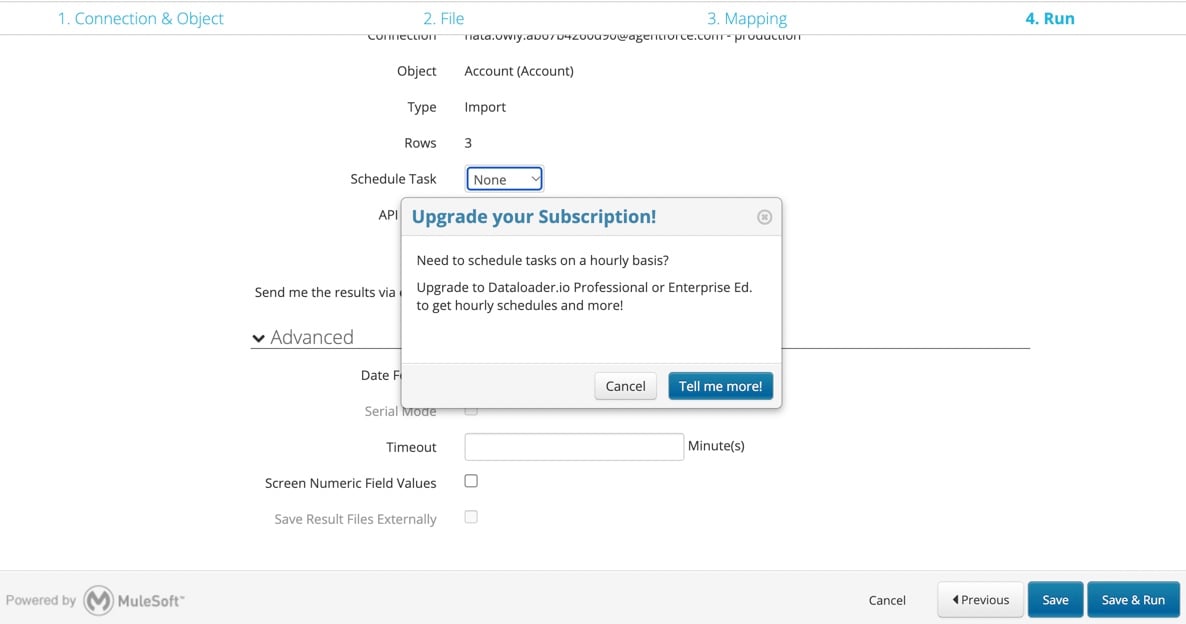
- SFTP? That’s Enterprise, at $299 per user a month.
- Every task has a ceiling of 2 hours, and then it stops.
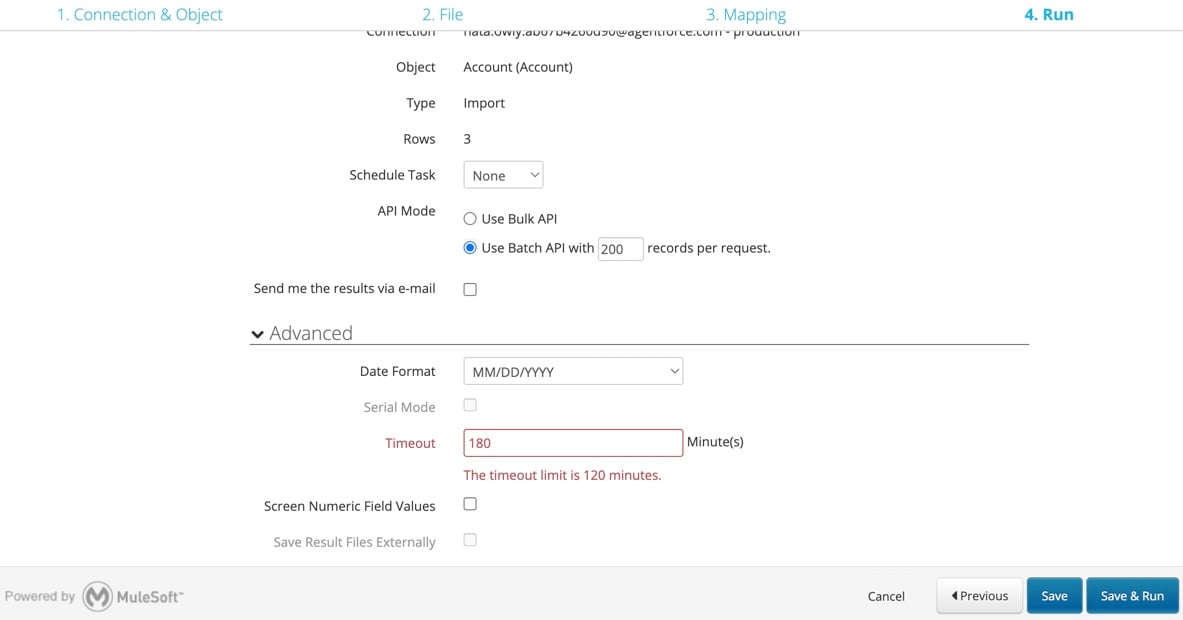
- The docs describe no transformations. Apart from lookups and date formats, whatever sits in the CSV is what gets written.
- Each plan is priced per user and billed monthly.
- Scheduled imports want the same file name every time, and wildcards aren’t supported, so a partner’s dated file (orders_2026-11-03.csv) won’t get picked up on any plan.
Here’s what that means for a bill. A single admin loading up to 100,000 records a month pays $99 a month on Professional. Need hourly schedules for a three-person team? That’s 3 × $99 = $297 a month. And one admin who works in production and a sandbox pays for two users, so $198 a month.
The Salesforce-only limit stings more every year, too. MuleSoft’s 2026 Connectivity Benchmark Report puts the average organization at 957 applications, with only 27% of them connected.
Every entry covers the same ground: who it’s best for, what it fixes compared with dataloader.io, what the bill counts, the entry price with its billing basis, and where it runs. All prices, plans and limits come from the vendors’ own pages, viewed from the US, and they’re accurate as of November 3, 2026.
A disclosure, since it matters here: we make Skyvia. We judged every tool on this list, ours included, by the same criteria and the same fields.
Who’s missing? MuleSoft Anypoint Platform comes from the same vendor as dataloader.io, but it’s where you go once you’ve grown into API-led enterprise integration, and it doesn’t replace a CSV loader. Jitterbit’s Data Loader for Salesforce was retired from general availability in November 2025.
Google’s Data Connector for Salesforce is a Sheets add-on, and Coefficient (below) covers that job. Zapier and n8n automate tasks rather than run bulk loads. Fivetran and Airbyte load warehouses, which is another job entirely. For a broader look at Salesforce loaders, not only for dataloader.io users, see our comparison of Salesforce data loaders.
The 10 best dataloader.io alternatives
Best for loading more than Salesforce: Skyvia
Skyvia is our no-code cloud data platform. Its Import takes CSV files, plus data from other apps and databases, and loads them into Salesforce on a schedule, with mapping and lookups along the way.
- Best for: teams whose loads have outgrown one CSV into one org.
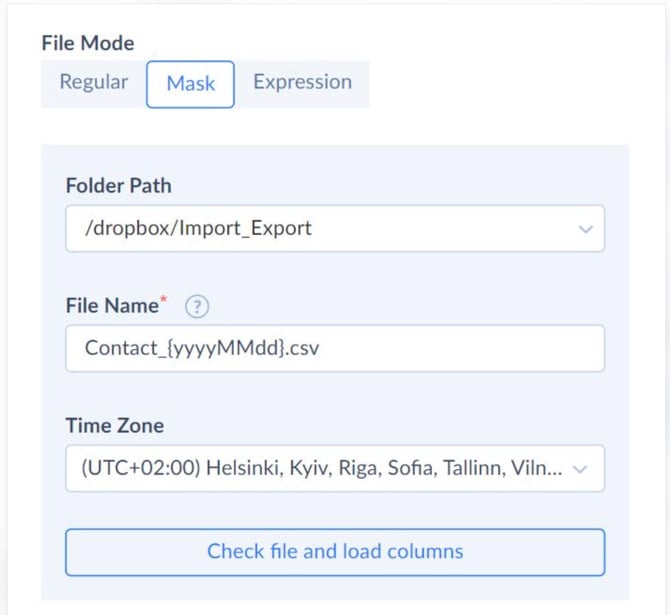
- What it fixes vs dataloader.io: a second system, since the source can be an app or a database. Per-user pricing, because users and connections are unlimited (a sandbox is just another connection). SFTP, which is on every plan, Free included. Dated file names, through a file mask such as
Contact_{MM_dd_yyyy}.csvon Standard and up. Transformations, with expression mapping and source lookup on Standard and up. Replays (October 2026) retry failed records without rerunning the whole import. - Pricing: the bill counts records written per month. For 5M records a month, Basic is $99 billed monthly ($79 billed annually) with daily runs, and Standard is $199 billed monthly ($159 billed annually) with hourly runs. For smaller loads, Standard for 500K records a month is $99 billed monthly ($79 billed annually), with hourly runs and unlimited users. On dataloader.io, $99 is the price of one user, and a three-person team pays $297 a month. The Free plan covers 10K records a month.
- Deployment: cloud, plus an on-premises Windows agent.
Strengths
- Your team can grow and the bill won’t, because users and connections are unlimited.
- External ID upserts, Bulk API v1 and v2, and one file split across parent and child objects.
Limitations
- Free and Basic run once a day and Standard runs hourly. For runs every minute you need Professional.
- It won’t notice schema changes in a source on its own; you refresh the metadata and remap.
Best for free, large one-off loads: Salesforce Data Loader
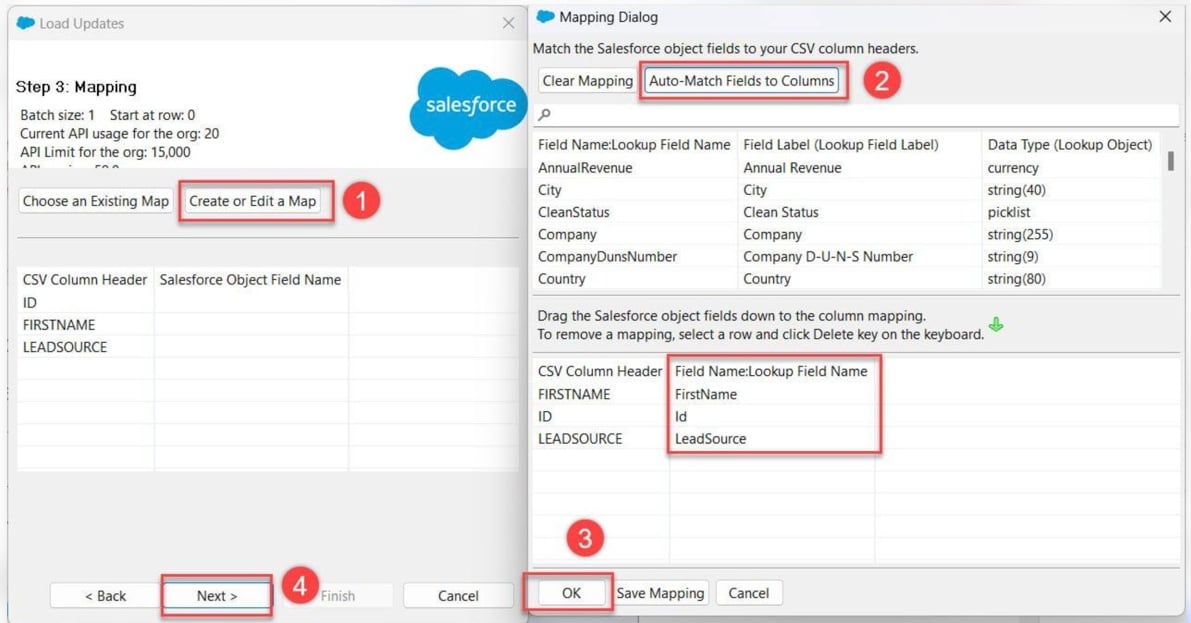
Salesforce Data Loader is Salesforce’s own desktop client for bulk import and export. Through the Bulk API it handles large loads, and it covers every object, custom ones included. It suits admins who want volume and can live with installing software.
- Best for: admins running big one-off loads, migrations or exports from their own machine.
- What it fixes vs dataloader.io: there’s no per-user fee, and no 2-hour task limit is described. With Bulk API 2.0 it loads up to 150 million records per rolling 24 hours, the org’s ingest limit.
- What it leaves alone is a second system (it’s Salesforce only, from CSV or a database connection) and scheduling inside the app.
- Pricing: Salesforce doesn’t publish a price. It’s a download for orgs on Enterprise, Performance, Unlimited and Developer editions, and every load counts against the org’s API limits.
- Deployment: a desktop app for Windows and macOS that needs its own Java runtime (JRE 17 or later).
Strengths
- Every object is supported, custom objects too, and you get CSV success and error logs.
- It’s open source and gets updated with each Salesforce release (v68.0 for Winter ’27).
Limitations
- There’s no built-in scheduler. Automation goes through the command line, and that’s Windows only.
- Salesforce’s own guide doesn’t list it for Professional Edition.
Best for simple imports inside Salesforce: Data Import Wizard
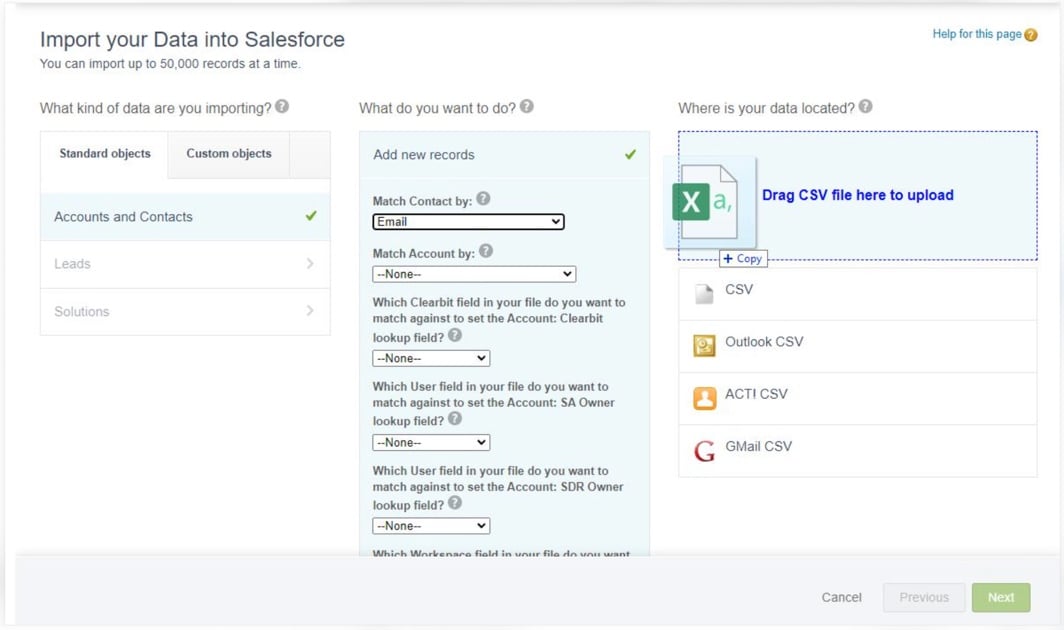
The Data Import Wizard lives in Salesforce Setup and pulls CSV files into common objects right from the browser. Think small, occasional imports where catching duplicates matters more than automating anything.
- Best for: admins and users who import accounts, contacts, leads or custom objects a few times a month.
- What it fixes vs dataloader.io: no per-user fee, nothing to connect, and duplicate-aware matching for standard objects. Scheduling, other systems and large files stay unsolved.
- Pricing: it’s part of Salesforce, with no price on any page, and it’s available in most Salesforce editions.
- Deployment: the browser inside Salesforce Setup.
Strengths
- You don’t install or buy anything, and workflow rules and processes can fire during the import.
- Incoming rows get matched to existing records, which keeps duplicates out.
Limitations
- It tops out at 50,000 records at a time. Opportunities, cases, campaigns, assets, contracts, documents and products can’t be imported at all.
- It only imports. Export, delete and scheduling aren’t described.
Best for a like-for-like cloud replacement: Dataimporter
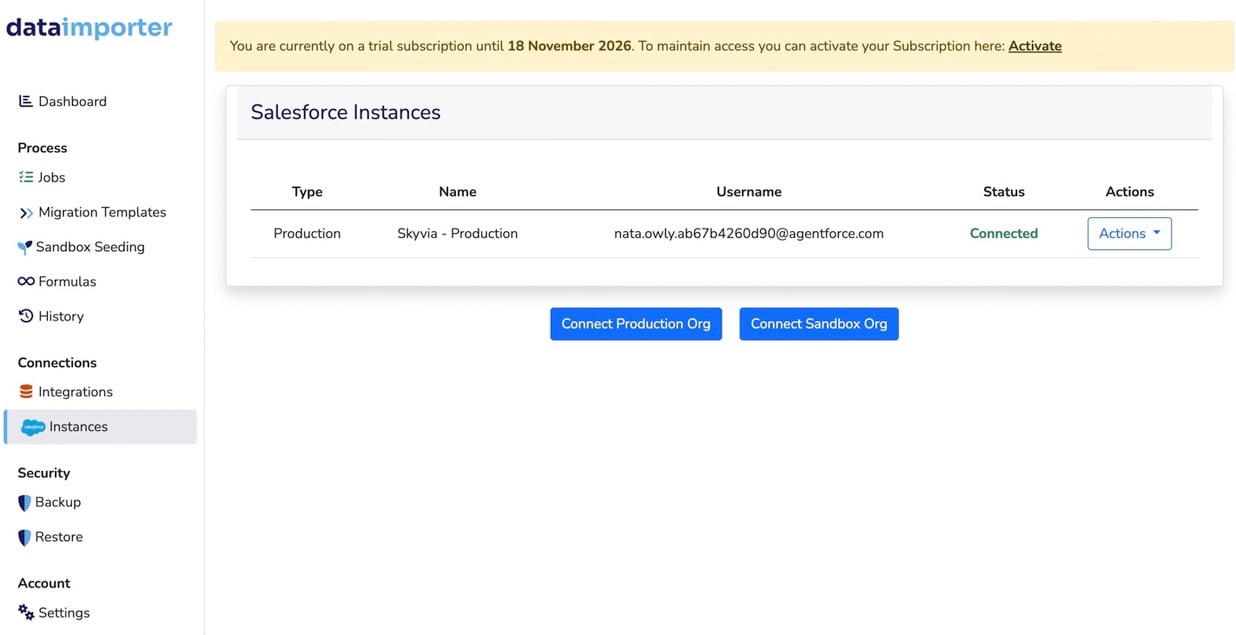
Dataimporter is a cloud tool for Salesforce imports and Salesforce-to-Salesforce migration, and since February 2026 it handles backup as well. It works a lot like dataloader.io, only with more file sources and with sandboxes that don’t count as extra users. If you like the dataloader.io model and keep bumping into its plan limits, this is the closest match.
- Best for: Salesforce teams that want a browser loader with more sources and more schedules.
- What it fixes vs dataloader.io: sandbox billing first, because sandboxes don’t count as extra users and Premium includes 2 production and 3 sandbox orgs. Then SFTP and other sources (S3, Azure Blob, Google Drive, SharePoint, Snowflake, PostgreSQL and more), dated files (SFTP imports accept wildcard file names), transformations (formulas, filter and deduplicate on Premium and up) and schedules every 15 minutes. Two things don’t change, though. Salesforce is always one side of the job, and pricing is still per user.
- Pricing: per user per month. Premium costs $129 per user a month billed monthly ($109 billed annually) for 150,000 records a month, and the Free plan covers 20,000 records, 1 schedule and 1 integration.
- Deployment: cloud on AWS, in a US, Germany or Sydney region of your choosing.
Strengths
- Rollback and Retry come with every plan, Free included, so inserted records can be deleted straight from the results page.
- Premium and up handle multi-object imports (say, inserting leads and adding them to a campaign).
Limitations
- Its per-user pricing starts above dataloader.io’s Professional.
- SFTP with an SSH key, SSO and customer-managed storage all need Enterprise or Custom.
Best for admins who live in Excel: XL-Connector (Xappex)
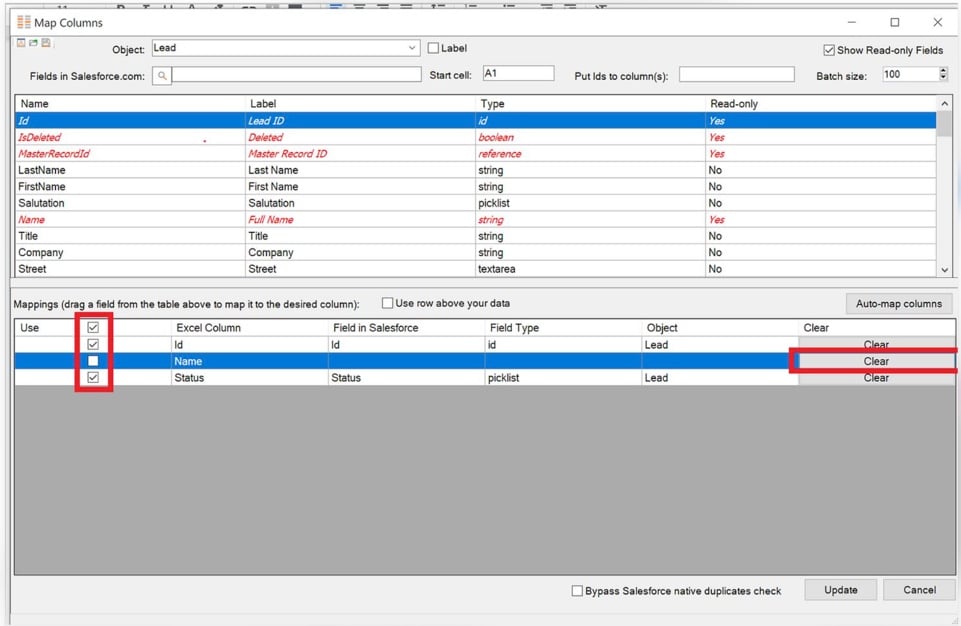
XL-Connector is an Excel add-in: you pull Salesforce data into a sheet, edit it there and push it back. XL-Connector 365 runs in the cloud and can schedule refreshes and updates. Admins who already clean data in Excel will feel at home.
- Best for: Salesforce admins who prep and fix data in Excel.
- What it fixes vs dataloader.io: transformations, since Excel formulas run before you push, and schedules as often as every 5 minutes in XL-Connector 365 (Enterprise Admin). HubSpot gets added in 365, though no other systems do, and pricing stays per user.
- Pricing: per user per month. Team Player is $12 per user a month billed monthly ($10 billed annually), and Enterprise Admin is $36 per user a month billed monthly ($30 billed annually). The Free plan exports reports up to 2,000 rows but can’t write to Salesforce.
- Deployment: an Excel add-in in two forms, a Windows desktop add-in and XL-Connector 365 for Excel on Windows, Mac and the web.
Strengths
- Nothing on this list has a lower per-user entry price, and a single license covers both the desktop and 365 versions.
- Enterprise Admin throws in admin tools that go past loading (field-level security, picklist and validation-rule managers, mass merge).
Limitations
- On Team Player, you can push data only through flows that an Enterprise Admin user built.
- Excel’s row limits and Salesforce API limits put a ceiling on large loads.
Best for Google Sheets and Excel users: Coefficient
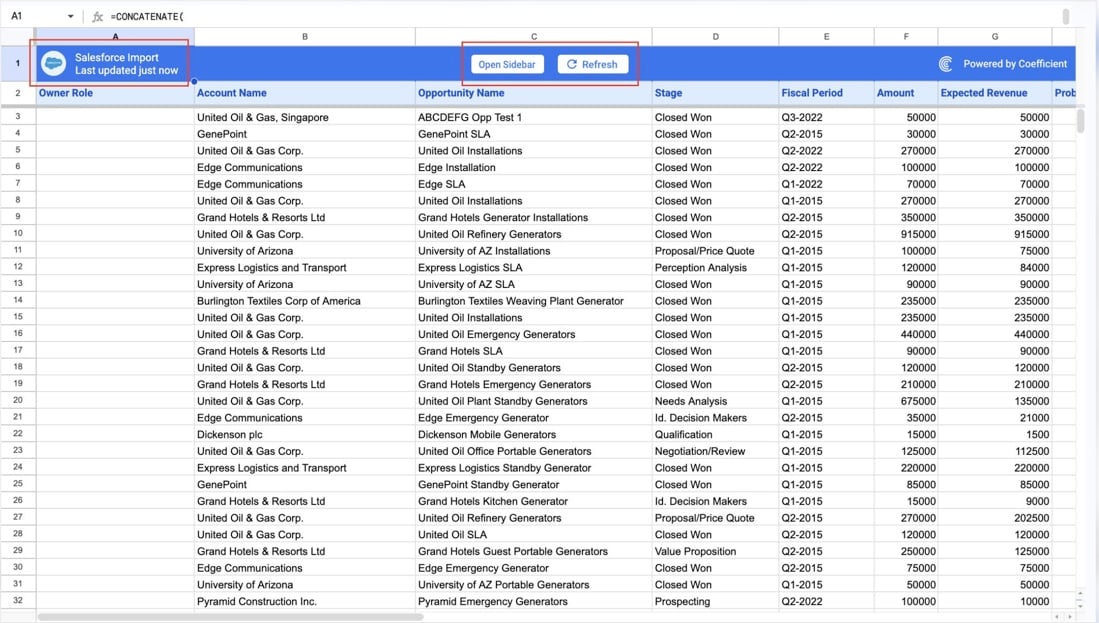
Coefficient is an add-on for Google Sheets and Excel. It imports live Salesforce data into a sheet and writes your changes back, which makes it a natural pick for RevOps people and analysts who work in spreadsheets and want scheduled refreshes.
- Best for: RevOps and finance teams editing Salesforce data in Sheets or Excel.
- What it fixes vs dataloader.io: transformations (spreadsheet formulas run before export), and the source can be another system, because it imports from many business apps into the same sheet. Per-user pricing isn’t fixed, and scheduled exports to Salesforce stop at update and upsert.
- Pricing: per user. Starter runs $59 a month billed monthly ($49 billed annually) for one user. Pro is $119 per user a month billed monthly ($99 billed annually), for up to 5 users. On the Free plan you can import up to 5,000 rows and export up to 100 rows.
- Deployment: a Google Sheets add-on and an Excel add-in.
Strengths
- Writeback covers insert, update, upsert and delete, and a Preview Changes screen shows you an update before it’s written.
- Pro schedules imports and exports hourly and sends Slack and email alerts.
Limitations
- Free exports up to 100 rows with no automation. Starter goes to 500 rows, on daily schedules.
- Monthly caps on refreshes and export runs include manual runs, too.
Best for deduplication and mass cleanup: DemandTools (Validity)
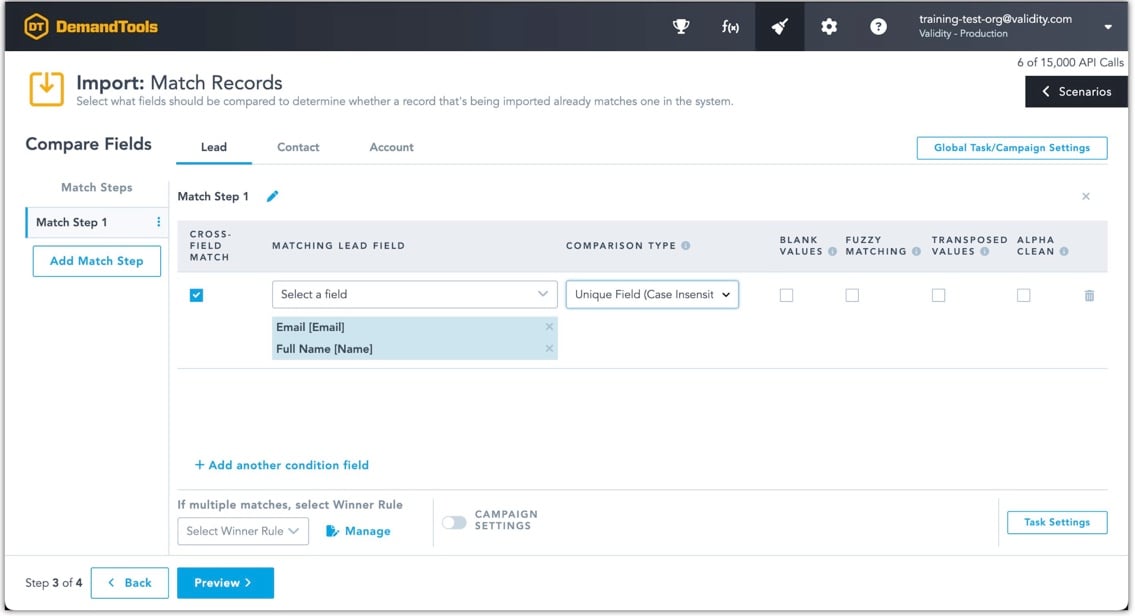
DemandTools is Validity’s data-quality suite for Salesforce, covering dedupe, import, mass update and monitoring. Before anything gets inserted, its import checks incoming rows against existing records. If duplicates are your real headache (and loading isn’t), start here.
- Best for: Salesforce teams that clean and dedupe data before or after big imports.
- What it fixes vs dataloader.io: imports that know about duplicates and can match on any field set before insert, plus mass updates and dedupe. dataloader.io doesn’t even try those. Other systems stay out of reach (it’s Salesforce only), and so do file sources like SFTP.
- Pricing: unpublished. You get a sales quote.
- Deployment: an installed client application.
Strengths
- Import, mass update, dedupe, monitoring and email validation all sit in one product.
- You can put saved scenarios on a schedule.
Limitations
- There’s no published price and no self-serve trial (the trial button opens a demo request).
- Salesforce only.
Best for cleanup across HubSpot and Salesforce: Insycle
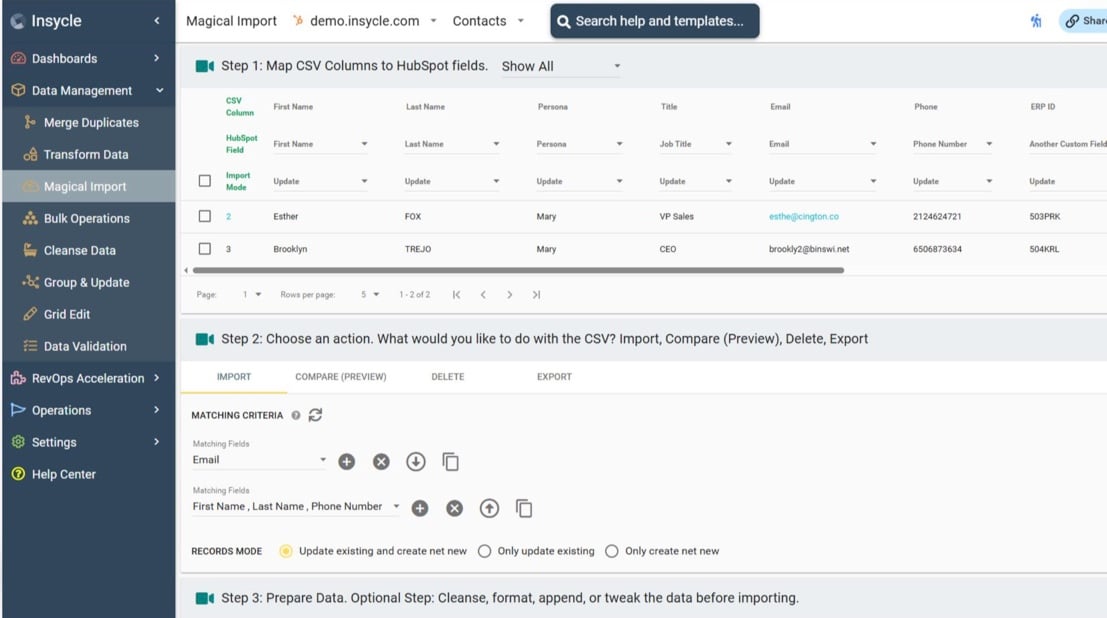
Insycle works on the data inside the CRMs you connect: dedupe, bulk updates, transformations and CSV imports into HubSpot, Salesforce and other systems. It makes sense for teams that run more than one CRM and clean data all the time.
- Best for: RevOps teams on HubSpot and Salesforce that want cleanup and imports under one roof.
- What it fixes vs dataloader.io: a second system (HubSpot, Salesforce, Pipedrive, Marketo and others), transformations (60+ functions on the staged CSV) and per-user pricing, since users are unlimited. SFTP isn’t covered, and imports only come from CSV files.
- Pricing: this one counts records in the connected CRM, not the records you import. Starter is $1 per 1,000 records a month billed annually (1.25x billed monthly), from $25 a month billed annually or $31 billed monthly at 25,000 records. The 14-day trial updates up to 500 records.
- Deployment: cloud, hosted on Google Cloud Platform in the US.
Strengths
- Match rules decide which CSV rows update existing records, and a read-only Compare report runs before a single thing is written.
- Every plan comes with unlimited users and operations.
Limitations
- The bill tracks the size of your CRM. A HubSpot with 100,000 contacts pays for 100,000 records even if you import only 2,000 a month.
- Starter comes with one module, and Magical Import is one of eight.
Best for heavy transformations and pipelines: Integrate.io
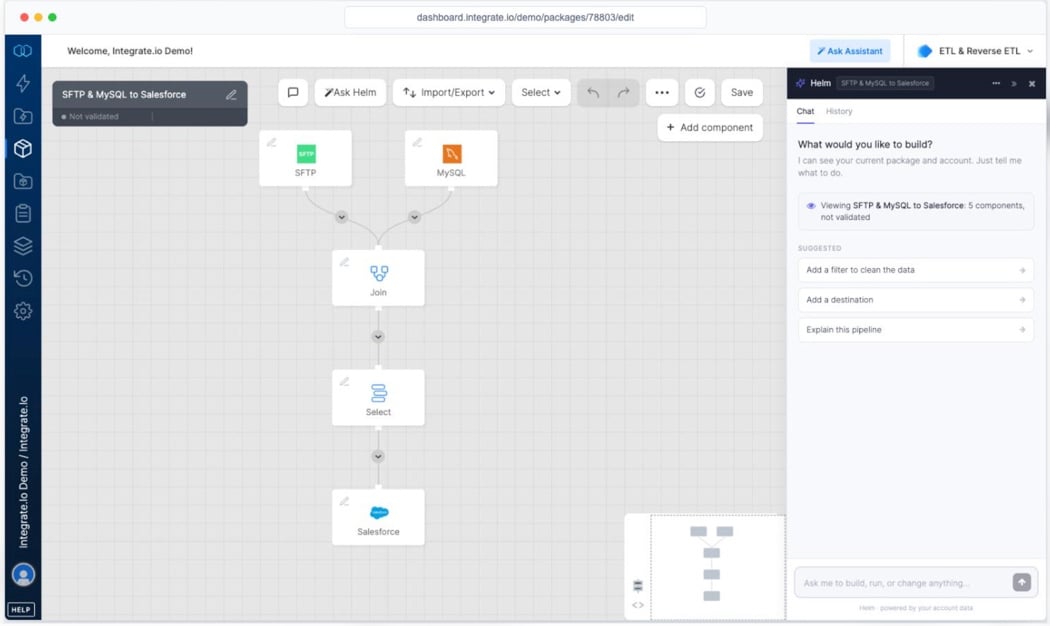
Integrate.io is a cloud data pipeline platform for ETL, reverse ETL and CDC, with Salesforce on both the source and the destination side. It’s built for teams that have outgrown loading entirely and need pipelines with heavy transformations.
- Best for: data teams building pipelines into and out of Salesforce with complex transformation logic.
- What it fixes vs dataloader.io: most of the list. You get many systems, SFTP, 220+ transformation functions, a flat fee with unlimited users and connectors, and a 24-hour default job timeout for new accounts. It’s a platform, and it’s priced like one.
- Pricing: a flat fee. Core is $1,999 a month, and the page doesn’t say whether that’s billed monthly or annually. The 14-day trial needs no credit card.
- Deployment: cloud.
Strengths
- You pay one fee whatever the row count, with unlimited data volume, connectors and users.
- Its Salesforce destination handles insert, update, upsert, delete and hard delete on Bulk API 1.0 or 2.0.
Limitations
- For a team that only imports files, $1,999 a month is far more than a per-user loader costs.
- No deduplication or merge module is described.
Best for quick, free admin loads in the browser: Salesforce Inspector Reloaded
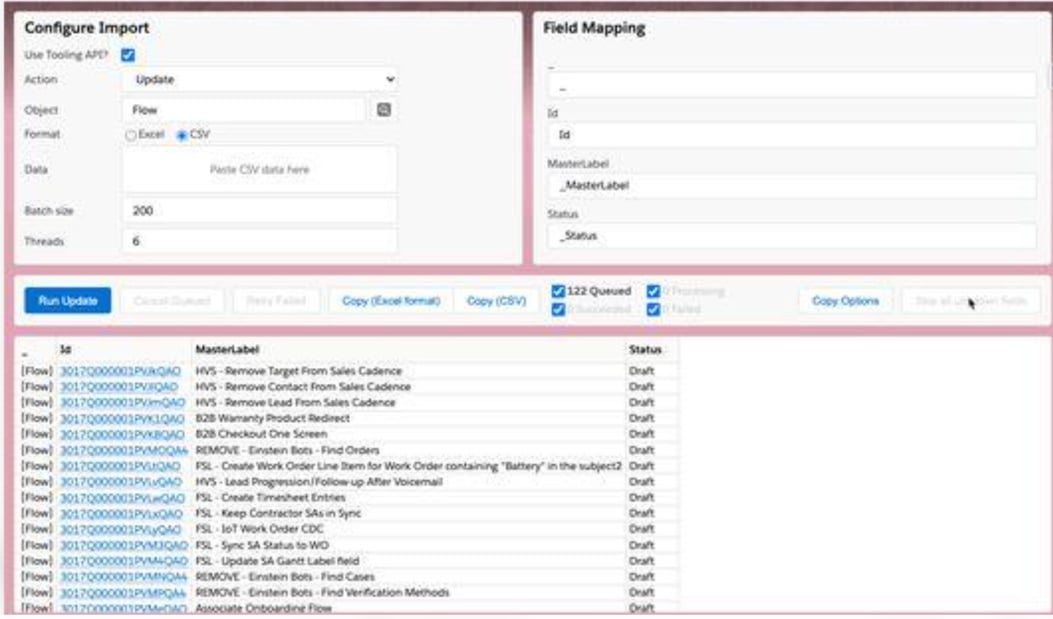
Salesforce Inspector Reloaded is a free, open-source extension for Chrome, Firefox and Edge, maintained by the community. It packs a lot of admin tools, and one of them imports and exports records without you ever leaving the Salesforce tab. Quick manual fixes are where it earns its keep.
- Best for: admins who have to insert, update or delete a few hundred records right now.
- What it fixes vs dataloader.io: cost and per-user pricing, because it’s free. Scheduling isn’t fixed (automation is a stated non-goal), and neither are other systems, SFTP or transformations.
- Pricing: free, under the MIT license.
- Deployment: a browser extension for Chrome, Firefox and Edge.
Strengths
- From inside Salesforce you can insert, update, upsert, delete and undelete, Tooling API updates included.
- It’s actively maintained, with version 2.0 out in 2026 and 600,000 Chrome users.
Limitations
- Forget a file picker. You paste CSV, JSON or Excel cells into a text box, and it loads them through the SOAP API in batches of 200.
- Because it relies on internal APIs, the project itself warns that it can break Salesforce functionality.
Which dataloader.io alternative fits which job
- If your data now sits in a second system, or the source is an app and not a file, that’s Skyvia.
- Paying for sandbox logins as extra users? Skyvia (unlimited connections) and Dataimporter (sandboxes don’t count as extra users) both get you out of that.
- For a partner who drops dated files on SFTP, pick Skyvia (file mask, Standard) or Dataimporter (wildcard file names).
- Want free and big, and a desktop app doesn’t bother you? Salesforce Data Loader.
- Small, occasional imports that need duplicate matching belong in the Data Import Wizard.
- A team that fixes data in Excel will get along with XL-Connector; for Google Sheets or Excel with scheduled refreshes, it’s Coefficient.
- When the real problem is duplicates, go with DemandTools, or Insycle if HubSpot is in the mix.
- Full pipelines with heavy transformations call for Integrate.io.
- And for a quick manual fix from the browser, Salesforce Inspector Reloaded does the job.

dataloader.io alternatives compared: what they fix and what they cost
For reference, here’s dataloader.io itself: Salesforce only, cloud, Professional at $99 per user a month billed monthly, and a free plan with 10,000 records a month.
| Tool | What it fixes vs dataloader.io | Systems | Deployment | Entry price (billing basis) | Free plan |
|---|---|---|---|---|---|
| Skyvia | Other systems, per-user fees, SFTP, dated files, transformations | Salesforce + 200+ | Cloud + agent | Basic $99 a month billed monthly ($79 billed annually) for 5M records | 10K records a month |
| Salesforce Data Loader | Per-user fees, volume | Salesforce | Desktop | No price published | n/a |
| Data Import Wizard | Per-user fees | Salesforce | Browser (Setup) | No price published | n/a |
| Dataimporter | Sandbox billing, SFTP, dated files, transformations | Salesforce + storages and databases | Cloud | Premium $129 per user a month billed monthly ($109 billed annually) | 20,000 records |
| XL-Connector | Transformations (Excel) | Salesforce, HubSpot (365) | Excel add-in | Team Player $12 per user a month billed monthly ($10 billed annually) | Exports up to 2,000 rows |
| Coefficient | Transformations (sheets), other sources | Many apps into sheets | Sheets and Excel add-on | Starter $59 a month billed monthly ($49 billed annually) | 5,000-row imports |
| DemandTools | Duplicates | Salesforce | Installed app | Sales quote | No |
| Insycle | Other CRMs, transformations, per-user fees | HubSpot, Salesforce and more | Cloud | Starter $1 per 1,000 records a month billed annually | No (14-day trial) |
| Integrate.io | Other systems, SFTP, transformations, per-user fees, run time | Many | Cloud | Core $1,999 a month | No (14-day trial) |
| Salesforce Inspector Reloaded | Cost | Salesforce | Browser extension | Free | Free |
FAQ for dataloader.io alternatives

Is dataloader.io the same as Salesforce Data Loader?
No, and the difference matters. dataloader.io is a cloud app from MuleSoft (a Salesforce company); it runs in the browser and you pay per user. Salesforce Data Loader is Salesforce’s desktop client, which you install on Windows or macOS, and its only automation goes through the Windows command line.
Can I use dataloader.io with a sandbox?
You can, though dataloader.io treats users in production and sandbox as two separate users, and Free and Professional allow one Salesforce connection per account. So an admin working in both environments on Professional either pays for two users or moves to Enterprise for several connections.
Can I schedule SFTP imports into Salesforce without dataloader.io Enterprise?
Yes. Skyvia reads FTP and SFTP on every plan, and its file mask (Standard and up) catches dated file names. Dataimporter handles SFTP with wildcard file names as well.
What happened to Jitterbit’s Data Loader?
Jitterbit retired its Data Loader for Salesforce from general availability in November 2025. If you already have it installed, it keeps working. You just can’t download it or install it fresh.
Have your loads outgrown one CSV and one org? Skyvia’s Salesforce data loader imports files and data from other systems on a schedule, with unlimited users and SFTP on every plan. There’s a free plan, too, so you can try it on your own data.