Summary
- Skyvia is a good fit when you want a visual, no-code way to move Zendesk data into Amazon S3 on a schedule without maintaining custom scripts.
- Amazon AppFlow makes the most sense when your stack already lives in AWS, and you want the whole pipeline to stay inside that ecosystem.
- Custom Python with Boto3 gives developers the most control over pagination, retries, transformations, and how files are written to S3.
- Estuary Flow is better suited to teams that need real-time streaming rather than hourly or daily batch exports.
- Airbyte works well when you want an open-source or self-hosted option and have engineers who are comfortable owning the deployment.
Zendesk is great at keeping support work in one place. The problem starts when you want that data somewhere else.
Maybe finance wants ticket volume next to revenue. Product wants support trends next to feature usage. The data team wants a longer history of comments, custom fields, or SLA events than anyone wants to pull out by hand.
That is where a Zendesk to Amazon S3 pipeline starts to make sense. Once the support data lands in S3, it is much easier to use it outside Zendesk. You can query it with Athena, stage it for Snowflake or Redshift, keep a cheaper long-term archive, or prepare it for internal AI and analytics work.
Getting the data there is the part that deserves some attention. Zendesk can push back with HTTP 429 responses when requests come too quickly. Comments and custom fields are not always nice flat tables. And if everything is dumped into one S3 folder with no structure, you create a different problem for yourself later.
So for this guide, we looked at the options the way we would if we were actually choosing one for a project: how much setup they need, what happens when the API starts throttling, how they deal with nested Zendesk data, and how much work is still left once the first successful sync is over.
One bit of transparency before we get into it: we are the Skyvia team. We built one of the tools in this comparison, so obviously we know it better than the others. But that does not make it the right answer for every setup. If you want to stay entirely inside AWS, Amazon AppFlow may fit better. If the requirement is real-time streaming into formats such as Iceberg, Estuary Flow is solving a different problem entirely.
The useful question here is not which tool has the longest feature list. It is which one gives you the kind of Zendesk-to-S3 pipeline your team can actually live with.
How Did We Test and Benchmark These Zendesk to Amazon S3 Solutions?
Testing Dataset
We wanted enough data to expose the things that usually stay hidden in a small demo.
The test set covered 500,000 Zendesk tickets from the previous 24 months, plus more than 1.8 million comments, private notes, and SLA audit records. We also included 12 custom fields, including multi-select values and nested dropdowns.
That mix mattered. Moving a basic ticket ID and status is easy. Comments, tags, custom fields, and long histories are where the pipeline starts doing more interesting work.
Target Environment
Everything landed in an Amazon S3 Standard bucket in us-east-1.
We organized the test output by object and date, using a structure like:
/zendesk/tickets/year=2026/month=08/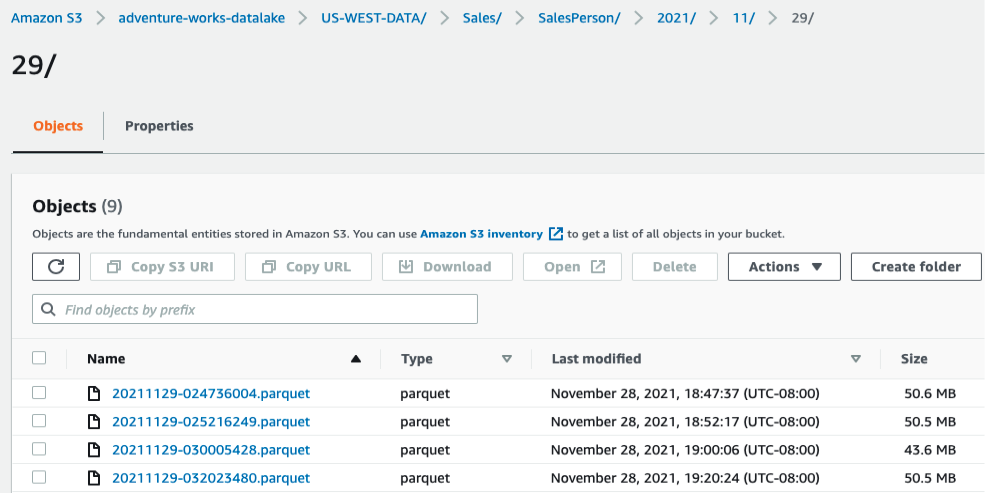
The idea was not just to see whether a file appeared in S3. We wanted something still usable later for Athena queries, warehouse staging, or long-term storage.
What We Checked
For the first run, we measured how long it took to go from authentication to the first 10,000 Zendesk records in S3.
Then we pushed harder on the parts that usually cause problems. We watched what happened when the Zendesk API approached its request limit, how each option handled comments and nested fields, and whether the output arrived as something useful or as a large JSON structure that still needed work.
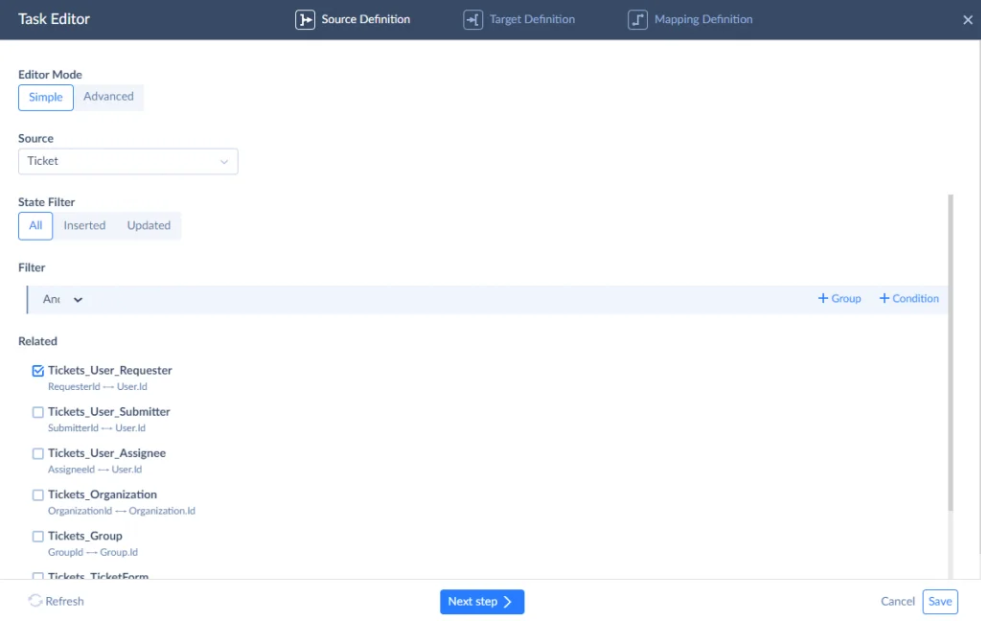
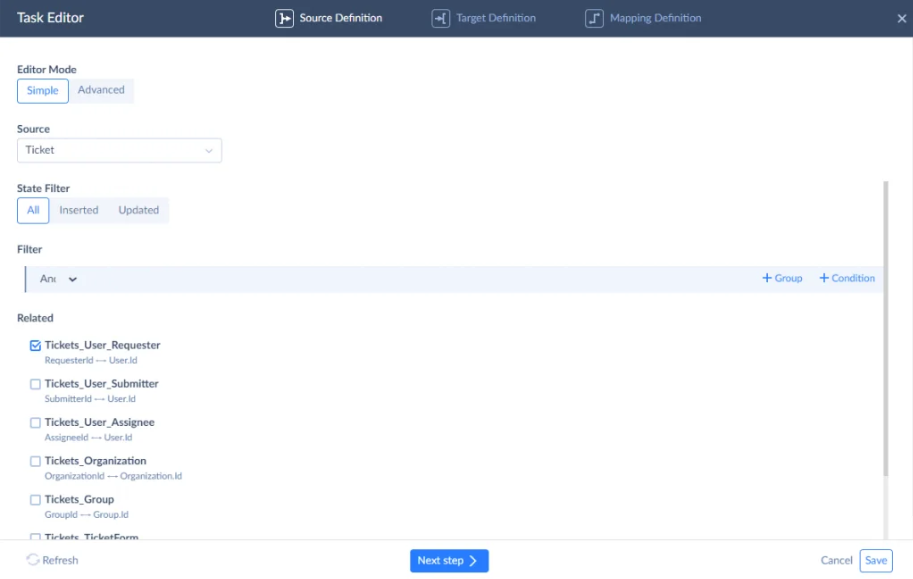
The Skyvia screen shows how Zendesk Ticket data and related objects are exposed before the data moves to the destination.
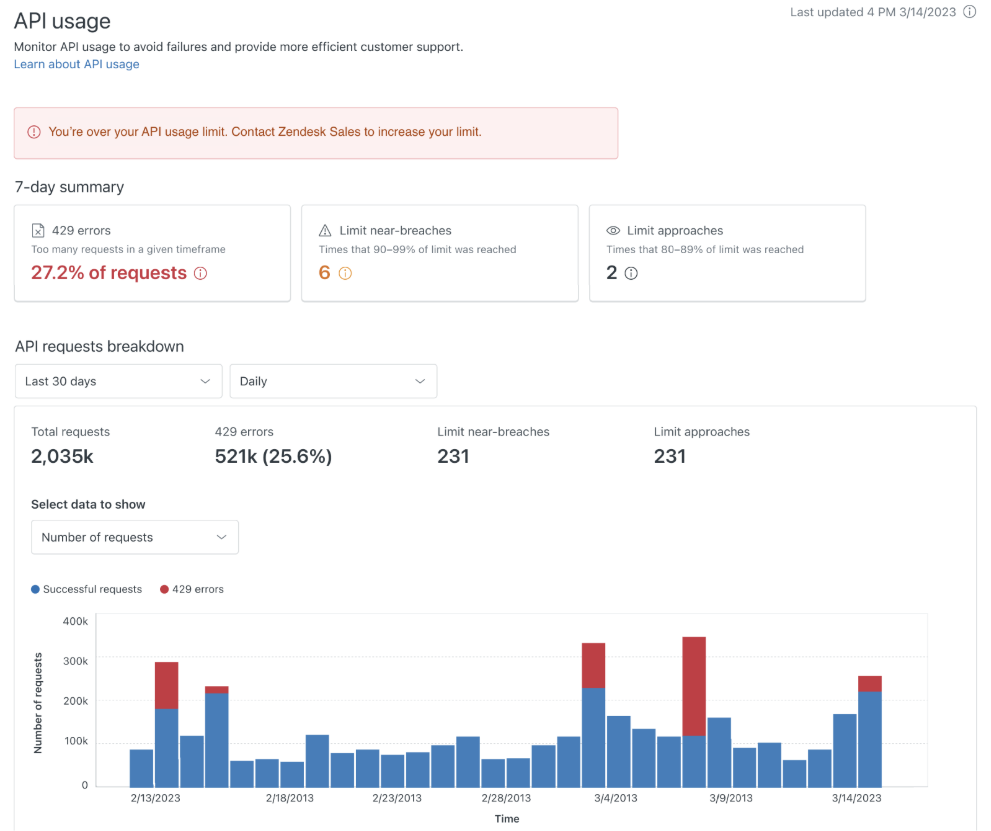
Zendesk documents HTTP 429 Too Many Requests responses together with a Retry-After header. Its documentation also uses a 700-request-per-minute account limit as one example, although the actual limit depends on the account and endpoint.
We also compared the output formats. CSV and JSON are easy to inspect, while Parquet makes more sense when the files are going straight into an analytical S3 workload.
What Are the Crucial Comparison Criteria When Evaluating Zendesk to S3 Pipelines?
A lot of tools can move Zendesk data into S3 once. The more useful question is what happens on the tenth, hundredth, or thousandth run.
1. Zendesk API Rate-Limit Handling & Cursor Pagination
This is one of the first things I would check.
Zendesk exports can get large quickly, especially once comments, audits, and related objects are involved. The tool needs to keep moving through the dataset without hammering the API or getting stuck on older pagination patterns.
Cursor-based pagination is the better sign here. I would also look at what happens after a 429 response. Does the job wait and continue, or does somebody have to restart it?
2. Storage Formats & Athena Query Performance
Getting the data into S3 is only half the job.
A folder full of raw JSON may be fine for archiving, but it is not always what you want for regular analytics. If Athena or another query engine is going to read the data often, file format and folder structure start to matter.
CSV is easy to inspect. Parquet is usually a better fit for larger analytical workloads because it is columnar and compresses well. I would check what the tool can write before deciding how much cleanup will be needed later.
3. Incremental Replication vs. Full Reload
Reloading the entire ticket history every time is hard to justify once the dataset gets large.
A better setup only pulls what has changed since the previous run. For Zendesk, that may mean working from update timestamps or incremental export endpoints rather than starting over with every sync.
This saves API calls, transfer volume, and a lot of unnecessary work in S3.
4. Schema Drift & Custom Field Adaptation
Zendesk admins change things.
A new custom field appears. A dropdown gets another value. Someone renames something because the old label no longer makes sense.
I would want to know what the pipeline does next. Does it ignore the new field, fail the job, or give you a clear place to update the mapping?
This matters more than it sounds, especially in support environments where the ticket schema keeps evolving with the business.
5. Pricing Model & Total Cost of Ownership
The pricing page is only part of the cost.
Some tools charge by rows, others by data volume, runs, or infrastructure usage. That difference can become very noticeable with Zendesk because comments and audit histories add a lot of records without necessarily adding much business value per row.
I would compare the bill together with the maintenance work. A cheap pipeline that needs an engineer every time pagination, authentication, or schema changes can stop being cheap pretty quickly.
Which Zendesk to Amazon S3 Method Fits Your Architecture?
Why Is Amazon AppFlow Best for Pure AWS-Native Environments?
If most of the data stack already lives in AWS, Amazon AppFlow is probably the first option I would look at.
The setup stays inside the AWS Console. You connect Zendesk, choose Amazon S3 as the destination, and select the Zendesk data you want to move. The flow can run on demand or on a schedule. For scheduled runs, AppFlow can check for new data as often as every minute, and you can choose to transfer only new data instead of loading everything again.
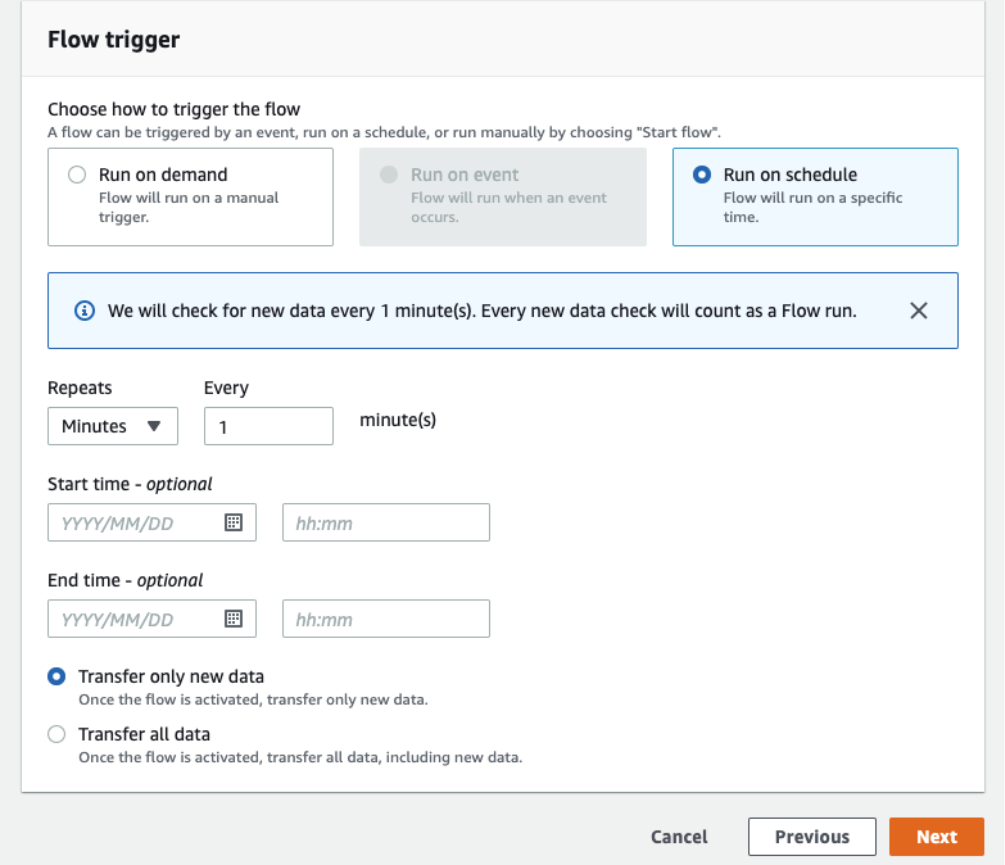
On the S3 side, AppFlow can write JSONL, CSV, or Apache Parquet. You can also configure partitions and register the output in the AWS Glue Data Catalog, which is useful if Athena or other AWS analytics services are going to work with the files later.
Best for
AWS teams that want Zendesk ingestion handled as another managed AWS service rather than adding a separate integration platform to the stack.
Rating
- G2: 4.7/5 from 19 reviews.
- Capterra: There is currently no user rating yet.
Pricing
AppFlow uses pay-as-you-go pricing rather than a monthly subscription. AWS charges for successful flow runs and the amount of data processed, with separate S3 and KMS costs where applicable. AWS currently uses $0.001 per flow run and $0.02 per GB processed in its US East pricing examples.
Pros
- Fits naturally into an existing AWS environment, with IAM permissions, AWS KMS encryption, S3, Glue, and CloudWatch around the same pipeline.
- No servers or integration runtime to deploy and maintain.
- S3 output can be written directly as CSV, JSONL, or Parquet and partitioned for later analytics.
- Glue cataloging can be enabled as part of the same flow instead of adding a separate crawler step.
Cons
Troubleshooting is very AWS-shaped. When a flow fails, you may end up moving between AppFlow, CloudWatch, IAM policies, Zendesk permissions, and S3 settings before finding the real cause.
Transformations are also fairly modest compared with a full ETL platform. AppFlow supports mapping, filtering, concatenation, masking, and other field-level operations, but more complex reshaping of Zendesk comments or nested data may require another step.
Cost is worth watching if you schedule many flows frequently. Every successful check counts as a flow run even when there is no new data, and larger transfers add data-processing charges on top.
Why Is Skyvia Best for No-Code Simplicity and Predictable Cost?
Skyvia is a good fit when you want the Zendesk-to-S3 pipeline without turning it into an AWS engineering project.
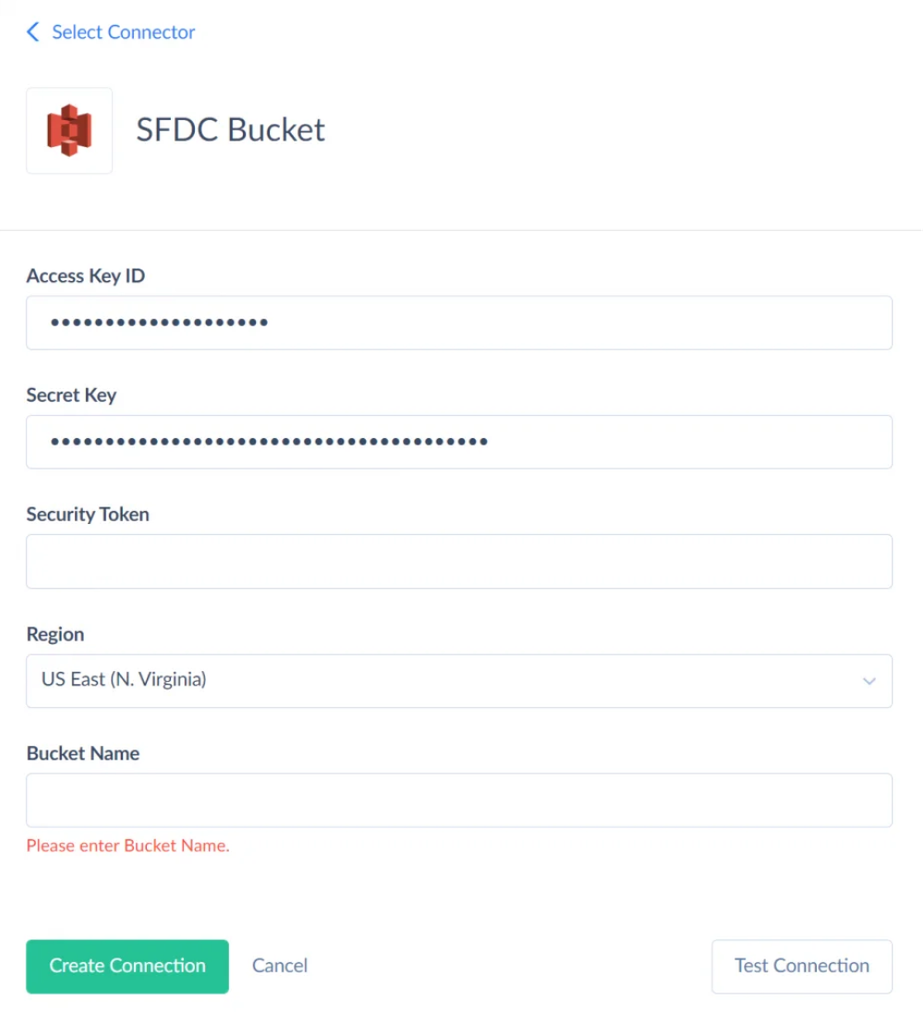
The connection setup is fairly direct. Zendesk can be authenticated through OAuth 2.0 or an API token, while the Amazon S3 connection uses an AWS Access Key ID, Secret Key, region, bucket name, and an optional security token for temporary credentials. You can also set a working directory if the integration should only use a particular part of the bucket.
For Zendesk Tickets, there is an Incremental Export option in the connection settings. When enabled, Skyvia uses Zendesk’s Incremental Export API and can filter tickets by the Updated field. That becomes useful on repeat runs because you can avoid pulling the entire ticket history again and cut down the number of API calls.
Skyvia offers a few ways to build the pipeline, depending on what needs to happen between Zendesk and S3. A simple archive does not need the same setup as a workflow that reshapes fields, handles nested data, or prepares files for analytics.
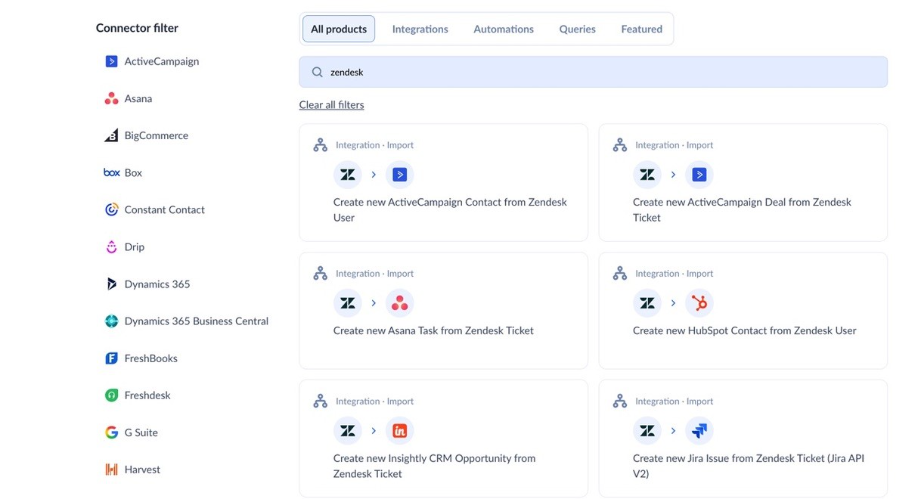
For a straightforward archive or scheduled export, Skyvia can write Zendesk data to CSV files in S3. If the pipeline needs more work in the middle, Data Flow gives you transformation components for things like nested properties and calculated fields, and its File Target can write CSV, JSON, Avro, or Parquet.
Best for
Data analysts, RevOps teams, and engineers who want a visual cloud service for recurring Zendesk exports without maintaining Python scripts or building the pipeline from several AWS services.
Rating
- G2: 4.8/5 from 321 reviews.
- Capterra: 4.9/5 from 116 reviews.
Pricing
Skyvia Data Integration is priced around the number of records processed each month and the scheduling level you need. The current Basic plan starts at $99/month, or $79/month with annual billing, while higher tiers add more frequent scheduling and advanced integration scenarios.
The important part for a Zendesk workload is how records are counted. Skyvia charges against a monthly processed-record allowance rather than monthly active rows. That makes the bill easier to estimate once you know roughly how many tickets, comments, and other records the pipeline will process.
Pros
- The whole pipeline can be configured visually, without writing the Zendesk extraction and S3 upload logic yourself.
- The Zendesk connector has an Incremental Export option specifically for retrieving tickets through Zendesk’s Incremental Export API.
- Zendesk custom fields are exposed by the connector and can be included in the integration.
- Amazon S3 works both as a source and a destination, so the direction is not limited to Zendesk → S3. You can also use files in S3 as a source when data needs to go back into Zendesk.
Cons
Skyvia is a cloud-hosted SaaS platform, so it is not the right choice if the requirement is to run the entire integration stack inside an isolated, air-gapped environment.
More advanced scenarios take a little more setup. A simple Zendesk-to-S3 CSV export is quick to configure, but if you need Parquet output, nested-data transformations, or more complex field processing, you’ll need to build a more advanced visual pipeline rather than use the basic export workflow.

Why Is a Custom Python Script (Boto3) Best for Custom In-House Pipelines?
Sometimes the team does not want another integration platform at all. If you already have Airflow, Prefect, or Dagster running jobs, a Python script can fit into that setup without adding much architectural overhead.
Zendesk’s cursor-based Incremental Export API works well for this. The first request starts with a timestamp, and every response gives you an after_url and after_cursor for the next page. Once end_of_stream becomes true, you save the last cursor and use it to continue from the same point on the next run. Zendesk recommends cursor pagination for incremental ticket exports because it gives more consistent response sizes and performance than the older approach.
Rate limiting is the part you need to own yourself. Zendesk returns HTTP 429 when the limit is reached and includes a Retry-After header telling the script how long to wait. Ignore that logic and a large export can turn into a failed job surprisingly quickly.
On the AWS side, Boto3 can write each batch straight to S3 with put_object, or you can use upload_fileobj for file-like objects and managed multipart transfers.
Code Example: Cursor Pagination and 429 Handling
A simplified production-style loop looks like this:
import json

import os

import time

from datetime import datetime, timezone


import boto3

import requests


ZENDESK_SUBDOMAIN = os.environ["ZENDESK_SUBDOMAIN"]

ZENDESK_TOKEN = os.environ["ZENDESK_TOKEN"]

S3_BUCKET = os.environ["S3_BUCKET"]


START_TIME = 1756684800  # Replace with saved checkpoint


headers = {

   "Authorization": f"Bearer {ZENDESK_TOKEN}",

   "Accept": "application/json",

}


s3 = boto3.client("s3")


url = (

   f"https://{ZENDESK_SUBDOMAIN}.zendesk.com"

   f"/api/v2/incremental/tickets/cursor.json"

   f"?start_time={START_TIME}"

)


page = 1


while url:

   response = requests.get(url, headers=headers, timeout=60)


   if response.status_code == 429:

       wait_seconds = int(response.headers.get("Retry-After", 60))

       time.sleep(wait_seconds)

       continue


   response.raise_for_status()

   data = response.json()


   tickets = data.get("tickets", [])


   if tickets:

       now = datetime.now(timezone.utc)


       key = (

           f"zendesk/tickets/"

           f"year={now:%Y}/month={now:%m}/"

           f"tickets_{page:05d}.jsonl"

       )


       body = "\n".join(

           json.dumps(ticket, separators=(",", ":"))

           for ticket in tickets

       )


       s3.put_object(

           Bucket=S3_BUCKET,

           Key=key,

           Body=body.encode("utf-8"),

           ContentType="application/x-ndjson",

       )


   # Save this cursor externally as a checkpoint for the next run

   after_cursor = data.get("after_cursor")


   if data.get("end_of_stream"):

       print(f"Finished. Save cursor: {after_cursor}")

       break


   url = data.get("after_url")

   page += 1
The important parts are not really the number of lines. It is the state around them: persist the final cursor, retry 429 responses, log failed pages, protect credentials, and make sure a retry does not create duplicate S3 objects. Zendesk explicitly recommends saving the final cursor and using it as the starting point for the next export.
Best for
Senior data engineers who already maintain an orchestrator and need something specific, such as custom PyArrow transformations, unusual partition rules, proprietary masking logic, or very precise control over what gets written to S3.
Rating
Not applicable. A custom Python pipeline is an in-house implementation rather than a commercial integration product, so there is no useful G2 or Capterra rating to compare here.
Pricing
There is no software license fee for Python or Boto3. The real cost comes from the infrastructure around the script: compute, S3 storage and requests, monitoring, orchestration, and the engineering time required to maintain it.
Pros
- Complete control over pagination, retries, batching, and checkpoints.
- You decide the S3 folder structure, compression, content type, and object metadata.
- Easy to add custom transformations with libraries such as PyArrow or pandas before upload.
- Fits naturally into an existing Airflow, Prefect, or Dagster workflow.
Cons
The flexibility comes with maintenance. Your team owns authentication, rate-limit logic, cursor state, retries, logging, alerts, schema changes, and failed-run recovery.
That can be completely reasonable when the pipeline already sits inside a larger engineering platform. For a team that simply needs Zendesk data in S3 every few hours, though, maintaining all of that code may be more work than the pipeline itself.
Why Is Estuary Best for Real-Time Streaming and Apache Iceberg Lakes?
Estuary is the option I would look at when S3 is doing more than storing a nightly Zendesk export.
The platform can capture Zendesk tickets, comments, audits, users, organizations, groups, SLA policies, and other objects through its Zendesk Support Real-Time connector. For changing records, it uses Zendesk’s Incremental Export API, so the pipeline can keep moving forward without reloading the full ticket history every time.
From there, the data can be sent to Amazon S3 as Parquet or materialized into Apache Iceberg tables.
For the S3 Parquet destination, Estuary batches collection updates, converts them to Parquet, and uploads the files according to a configurable interval. The default interval is five minutes, so I would describe this as a near-real-time lakehouse pipeline, not a guaranteed sub-second Zendesk-to-S3 flow.
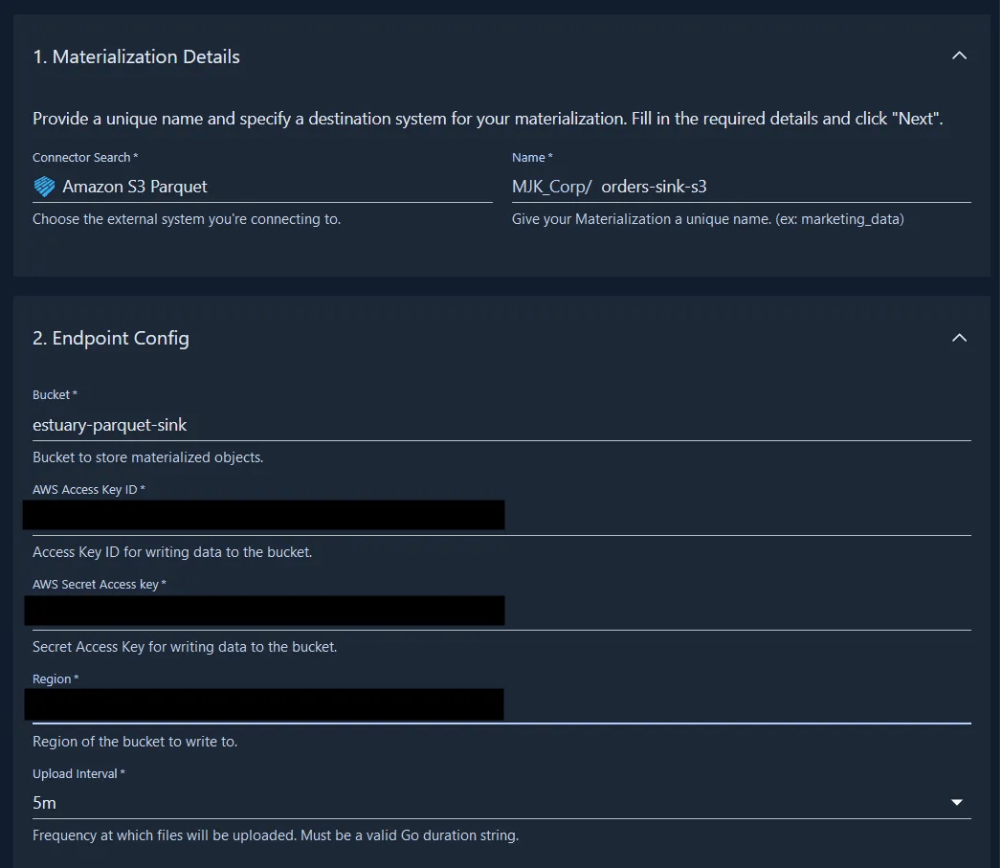
Estuary also supports Apache Iceberg when the S3 environment is being used as a lakehouse rather than simple object storage.
Note: for 2026: Estuary Flow is now simply Estuary. The company changed the product name, but existing pipelines, connectors, and pricing were not changed as part of the rename.
Best for
Data engineering teams that want Zendesk changes available quickly for operational analytics and already use S3 as a data lake or lakehouse.
It is especially relevant when the end goal is Parquet or Apache Iceberg, rather than a folder of CSV files that someone queries once a day.
Rating
- G2: 4.7/5 from 35 reviews.
- Capterra: There is currently no user rating yet.
Pricing
Estuary uses usage-based pricing.
The Developer tier is free for up to 10 GB per month and two concurrent connector instances. The Cloud plan is currently $0.50 per GB moved plus $100 per connector instance per month for the first six connectors. Additional connector instances are $50 per month.
Pros
- Designed for continuous and low-latency data movement rather than only scheduled batch exports.
- Dedicated Amazon S3 Parquet output for analytical workloads.
- Supports lakehouse architectures, including Apache Iceberg.
- Zendesk updates can be captured incrementally instead of repeatedly loading the whole account.
- Parquet output is schema-aware, and upload intervals and file sizes can be tuned for the workload.
Cons
For a team that only needs a Zendesk export once every few hours or once a day, Estuary can be more infrastructure than the job really needs.
There is also a bit more platform terminology to learn. Captures, collections, and materializations make sense once you work with Estuary, but they are a bigger conceptual jump than setting up a simple scheduled export.
Pricing also grows with throughput. If comments, audits, and other high-volume Zendesk objects are moving continuously, the amount of data passing through the pipeline becomes part of the monthly bill.
Why Is Airbyte Core Best for Self-Hosted Control?
Airbyte Core is the one I would consider when keeping the integration inside your own infrastructure matters more than avoiding infrastructure work.
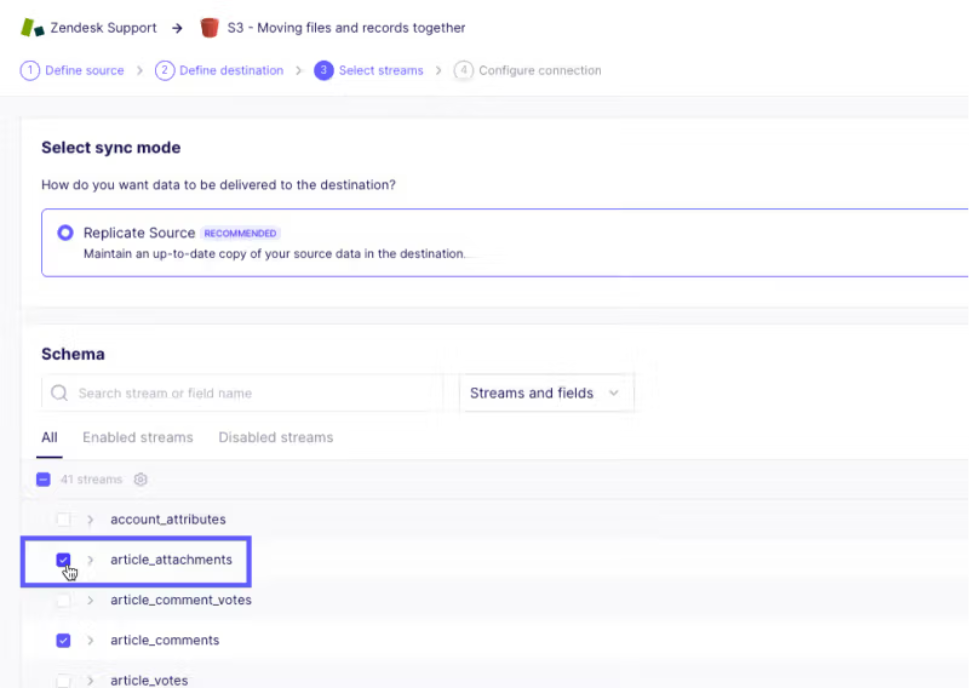
The Zendesk-to-S3 setup itself is pretty straightforward. You add Zendesk Support as the source and authenticate with OAuth or an API token. Then you configure Amazon S3 with a Role ARN or AWS access credentials, choose the bucket and directory, and select the output format. Airbyte currently supports JSON Lines, CSV, Avro, and Parquet for this S3 workflow.
Once both sides are connected, you choose which Zendesk streams should move and whether they should use a full refresh or incremental sync. This is incremental API replication rather than database-style log CDC, which is an important distinction for a Zendesk source. Airbyte exposes both Full Refresh and Incremental modes where the connector supports them.
One interesting part of this particular combination is that Airbyte can move more than the usual ticket records. Its own Zendesk-to-S3 example also sends Zendesk article attachments together with their metadata, so structured records and files can stay in the same connection.
Best for
Data engineering teams that already run their own infrastructure and want the integration service to stay under their control.
It makes the most sense when the team is comfortable handling deployment, upgrades, monitoring, and troubleshooting itself. If Kubernetes and pipeline infrastructure are already normal parts of the stack, that trade-off may be perfectly reasonable.
Rating
The ratings cover Airbyte as a product overall, rather than Airbyte Core specifically.
- G2: 4.4/5 from 78 reviews.
- Capterra: There is currently no user rating yet.
Pricing
Airbyte Core is free to self-manage. There is no Airbyte subscription fee for that edition.
But “free” does not mean the pipeline has no cost. You still provide the compute, storage, networking, monitoring, and engineering time needed to keep the Airbyte instance running.
That difference becomes important in this comparison. A team that already has the infrastructure may see Core as a cheap way to get Zendesk into S3. A smaller team may spend more time maintaining Airbyte than it would spend on a managed integration service.
Pros
- Runs in infrastructure you control, which is useful when Zendesk data should not pass through another vendor’s hosted integration environment.
- No Airbyte Core subscription fee.
- Zendesk Support can be authenticated with OAuth or an API token.
- S3 output supports JSON Lines, CSV, Avro, and Parquet.
- You can select individual Zendesk streams and use incremental synchronization where supported.
- Airbyte can move Zendesk attachments and their metadata along with structured records, which is useful if S3 is also becoming a support data lake.
Cons
The downside is the reason some teams eventually move away from self-hosted Airbyte: you own it.
Upgrades, connector issues, scaling, failed jobs, infrastructure monitoring, and platform troubleshooting stay with your engineering team. Airbyte itself makes the same point when discussing teams moving from OSS/Core to its managed offering: as production workloads grow, upgrades and operational work can start to outweigh the savings from self-hosting.
There is also a licensing detail worth knowing. Airbyte moved its platform and strategic connectors, including Zendesk Support and S3, to Elastic License 2.0. You can still run and modify them internally, but Airbyte describes ELv2 as source-available rather than OSI-defined open source.
How Do the Top Zendesk to S3 Methods Compare Side-by-Side?
There is no single best setup here. The choice mostly comes down to how often the data needs to move, how much infrastructure your team wants to own, and what you plan to do with the files once they reach S3.
| Evaluation Dimension | Skyvia | Amazon AppFlow | Custom Python (Boto3) | Estuary | Airbyte Core (Self-Hosted) |
| Best-Fit Scenario | No-code scheduled Zendesk exports and visual transformations | AWS-native, serverless ingestion | Bespoke pipelines inside Airflow, Prefect, or Dagster | Near-real-time Parquet or Iceberg lakehouse pipelines | Self-hosted pipelines where the engineering team wants control of the runtime |
| Pricing Model | Tiered plans based on monthly processed-record volume | Per successful flow run + data processed | No software license fee, but infrastructure and engineering time still apply | Data moved ($/GB) + connector instances | Airbyte Core is free to self-manage; you pay infrastructure and operations |
| Sync Frequency | On-demand or scheduled; up to once per minute on Professional and Enterprise plans | On-demand or scheduled, up to once per minute for Zendesk | Whatever the orchestrator or cron schedule supports | Continuous capture; S3 Parquet output is batched on a configurable interval | Manual, cron, or scheduled; Core supports sub-5-minute sync frequency |
| S3 Storage Formats | Export: CSV. Data Flow: CSV, JSON, Avro, Parquet | JSONL, CSV, Parquet | Whatever you build, such as JSON, CSV, Parquet, or Avro | Parquet, CSV, or Apache Iceberg tables on S3 | JSON Lines, CSV, Avro, Parquet |
| Zendesk Rate-Limit Handling | Connector-level throttling and retry handling | Managed by AppFlow, but Zendesk API quotas still apply | You must implement 429 + Retry-After handling yourself | Handled inside the managed Zendesk capture connector | Handled by the connector, although Zendesk API limits still apply |
| Nested Data Handling | Visual mapping plus Data Flow components such as Unwind and Extend | Basic field mapping and transformations | Completely custom, usually Python/PyArrow logic | Schema-aware collections and destination typing | Stream schemas are handled by the connector; complex flattening may still need downstream work |
| Deployment Model | Managed cloud SaaS | Fully managed AWS service | Your own code, containers, or compute | Estuary Cloud, with Private/BYOC options on Enterprise | Fully self-managed in your infrastructure |
| Setup Time to 1st Sync* | < 5 minutes | 15–30 minutes | 2–4 days | 15–20 minutes | 1–2 hours |
How to Connect Zendesk to Amazon S3 with Skyvia in 4 Simple Steps
The basic setup is pretty short. You create the Zendesk and Amazon S3 connections, choose what should be exported, and decide when the package should run. Skyvia supports Zendesk → Amazon S3 through its Export scenario, where Zendesk data is written to CSV and uploaded to S3.
Step 1: Authenticate Zendesk
Start by creating a Zendesk connection in Skyvia.
You can authenticate with OAuth 2.0 or use an API token. With OAuth, enter your Zendesk subdomain and click Sign In with Zendesk. If you use an API token instead, provide your Zendesk URL, user email, and token.
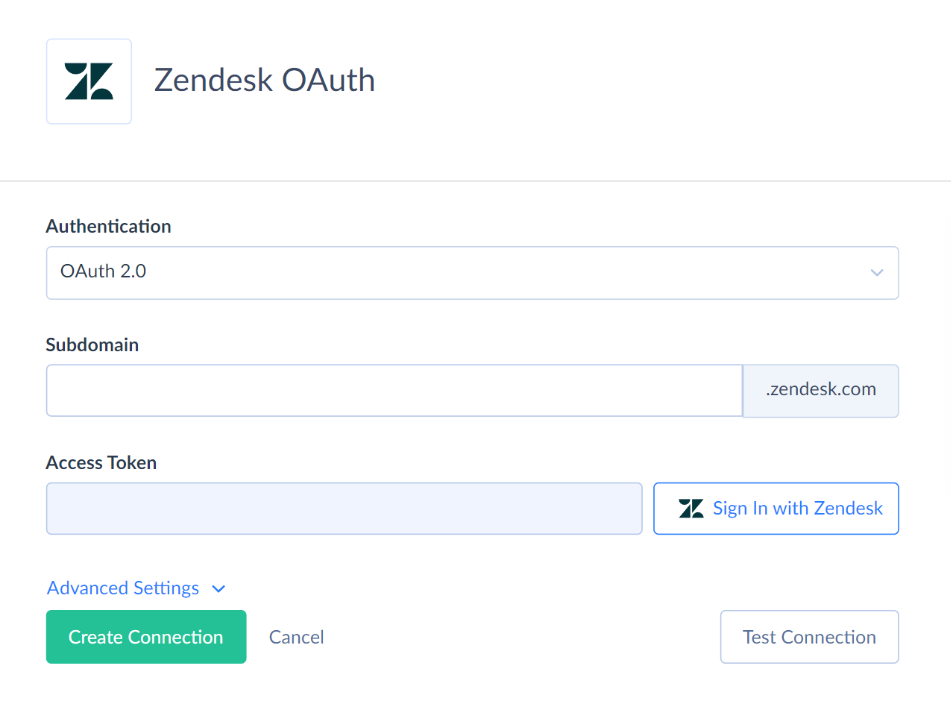
Once the connection is saved and tested, it can be selected as the source for the export.
Step 2: Authenticate Amazon S3
Next, create the Amazon S3 connection. As it was shown previously.
Add your Access Key ID, Secret Key, AWS region, and target bucket. Skyvia also supports a security token for temporary AWS credentials and a working directory if you want the integration to work only with a particular part of the bucket.
Once both connections are ready, you can configure the actual export.
Step 3: Define the Export Package and Zendesk Data
Create a new Export integration and select your Zendesk connection as the source.
For the destination, choose CSV to storage service, select the Amazon S3 connection, and specify the folder where the result files should be placed. Skyvia’s Export setup provides the storage connection and folder directly in the package settings.
Choose the Zendesk data you need. Depending on the pipeline, that may include Tickets, Users, Organizations, Satisfaction Ratings, and related ticket data. Skyvia also lets you select individual fields, apply filters, and include fields from related Zendesk objects.
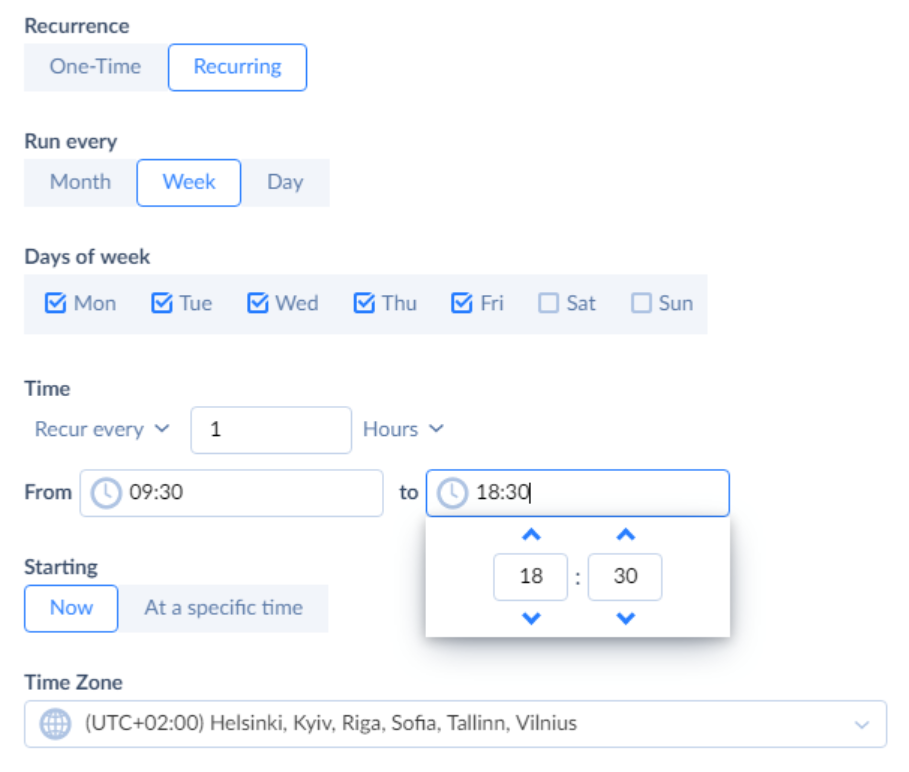
Step 4: Schedule and Run
The last step is deciding how often the export should run.
Skyvia supports one-time and recurring schedules. For example, you can choose Recur every 1 hour and use time restrictions if the export should run at a particular minute or only during certain hours.
What Are the Technical Best Practices for Storing Zendesk Data in Amazon S3?
Once Zendesk data reaches S3, the next question is what the bucket looks like six months later. A little structure at the beginning saves a lot of cleanups once tickets, comments, audits, and historical exports start piling up.
1. Structure Your S3 Partition Keys for Athena Performance
Try not to put every export into one flat folder:
s3://company-analytics-lake/zendesk/all_tickets.jsonThat works for storage, but it becomes less convenient when Athena needs only a week or month of data.
For an analytical dataset, a date-based structure is usually much easier to work with:
s3://company-analytics-lake/zendesk/tickets/year=2026/month=08/day=24/tickets_001.parquetAthena understands Hive-style partitions such as year=2026/month=08/day=24. If those partition fields are included in the query filter, Athena can scan only the relevant partitions instead of reading the entire dataset. That reduces the amount of S3 data scanned and can improve both query time and cost.
There is no universal percentage of savings here: the profit depends on how the dataset is partitioned and what the query asks for, so there is no useful universal percentage.
2. Choose the Right File Format for Your Workload
There is no reason every Zendesk export has to use the same format.
CSV or JSON Lines are convenient when the files are mainly for archiving, inspection, or later loading into another database. Someone can open a CSV without much preparation, and JSON is useful when preserving more of the original Zendesk structure matters.
For a larger data lake that Athena, Spark, or EMR will query regularly, Parquet is usually the more interesting option. It stores data by column and supports compression and predicate pushdown, which lets Athena avoid reading columns and blocks that a query does not need.
Snappy is supported for Parquet and is a reasonable choice when fast compression and decompression matter. AWS also supports other codecs, so I would not present Snappy as the only correct option.
One Skyvia detail matters here. The standard Export scenario is the simpler CSV-to-S3 route. If you want Skyvia to produce Parquet, use Data Flow with a File Target rather than assuming the basic Export package does it.
3. Configure S3 Lifecycle Rules for Older Zendesk Archives
Not every support record needs to stay in S3 Standard forever.
For example, recent ticket exports may still feed reporting, while two-year-old audit archives may exist mostly for compliance or the occasional investigation. An S3 Lifecycle rule can move those older objects into a lower-cost archive storage class without somebody doing it manually.
A reasonable rule might keep current Zendesk data in S3 Standard and transition older audit files after 90 days to S3 Glacier Flexible Retrieval or S3 Glacier Deep Archive, depending on how quickly you might need them again. AWS specifically supports Lifecycle transitions into both archive classes.
The trade-off is retrieval time. Glacier Flexible Retrieval is intended for data that can wait minutes to hours for restoration, while Deep Archive is aimed at very cold data and can take considerably longer to restore. Deep Archive also has a 180-day minimum storage duration.
So I would not blindly send every 90-day-old Zendesk file to Deep Archive. Do it for data that is genuinely unlikely to be queried again.
4. Implement Least-Privilege IAM Scoping
This is one place where being restrictive is worth the extra few minutes.
Do not use AWS root credentials for an integration. Give the pipeline its own IAM credentials and limit them to the bucket, or ideally the specific zendesk/ prefix it actually needs.
ListBucket applies to the bucket ARN, while object operations such as PutObject and GetObject apply to object ARNs, so separating them makes the permissions clearer and tighter. AWS uses the same pattern in its IAM examples.
For example:
{
  "Version": "2012-10-17",
  "Statement": [
    {
      "Sid": "ListZendeskPrefix",
      "Effect": "Allow",
      "Action": [
        "s3:ListBucket",
        "s3:GetBucketLocation"
      ],
      "Resource": "arn:aws:s3:::company-analytics-lake",
      "Condition": {
        "StringLike": {
          "s3:prefix": [
            "zendesk/*"
          ]
        }
      }
    },
    {
      "Sid": "WriteZendeskExports",
      "Effect": "Allow",
      "Action": [
        "s3:PutObject"
      ],
      "Resource": "arn:aws:s3:::company-analytics-lake/zendesk/*"
    }
  ]
}

Note: For a write-only Zendesk export, I would start with PutObject rather than automatically adding GetObject. If the same integration later needs to read files back from S3, then add GetObject to the object-level statement.

That is closer to least privilege than giving the integration broad access to the whole bucket.
What Is the Final Verdict on Choosing the Right Zendesk to Amazon S3 Method?
Moving Zendesk data into S3 is useful for much more than backup. Once support data is outside Zendesk, it can sit next to product, billing, CRM, and warehouse data for Athena queries, Snowflake pipelines, long-term analysis, or internal AI projects.
The harder part is choosing how much of the pipeline your team actually wants to own. The five options in this guide solve that problem in very different ways.
Choose Amazon AppFlow if most of your stack already lives in AWS and keeping the pipeline inside that ecosystem is a priority. It fits teams that want IAM, KMS, S3, Glue, and CloudWatch around the same workflow without bringing in another integration platform.
Choose Skyvia if the goal is to get a recurring Zendesk-to-S3 pipeline running without writing or maintaining extraction code. The visual setup is a good fit for teams that want scheduled exports, incremental Zendesk loads, field mapping, and the option to use S3 in the other direction later. Pricing is based on monthly processed-record allowances, so the important thing is to estimate the volume of tickets, comments, and other records the pipeline will actually process.
Choose a custom Python + Boto3 pipeline if you already have engineers maintaining Airflow, Prefect, Dagster, or a similar orchestration layer. It gives you complete control over cursor checkpoints, retries, PyArrow transformations, encryption, object metadata, and the final S3 layout. You just have to be comfortable owning all of that logic when something changes.
Choose Estuary if Zendesk data needs to become part of a continuously updated lakehouse rather than a scheduled export folder. It makes the most sense for teams working with Parquet or Apache Iceberg on S3 and wanting Zendesk changes captured incrementally with relatively low latency. I would still call this near-real-time rather than sub-second Zendesk-to-S3 delivery because the S3 materialization itself is batched.
Choose Airbyte Core if self-hosting is the priority. It gives engineering teams control over where the integration runtime lives, supports Zendesk-to-S3 incremental syncs, and avoids a managed SaaS layer. The trade-off is that upgrades, connector issues, infrastructure, and monitoring stay with your team.
There is no winner for every architecture. If the pipeline belongs inside AWS, AppFlow is the natural starting point. If the team wants to own the code, Python or Airbyte Core gives more control. Estuary fits the lakehouse and continuous-data end of the spectrum. And if the requirement is simply to move Zendesk data into S3 without turning it into another engineering project, Skyvia is the easiest place to start.

FAQ for How to Export Zendesk to Amazon S3

How does incremental replication work from Zendesk to S3 without duplicating data?
Incremental exports pull only records changed since the previous run, using timestamps or saved cursors. Keep the last successful checkpoint and use stable object names or deduplication keys to avoid duplicate records.
What is the most cost-effective file format and partitioning layout for Zendesk data in Amazon S3?
For analytics, Parquet with date-based partitions such as year=2026/month=08/day=24 usually reduces Athena scans. CSV or JSON is simpler when the files are mainly for archiving or inspection.
How should nested Zendesk data (comments, audits, and custom fields) be structured in S3?
Keep large one-to-many objects such as comments and audits in separate datasets linked by ticket ID. Flatten frequently queried custom fields, while preserving raw JSON when the original structure may be needed later.
How do you maintain GDPR and HIPAA compliance when storing Zendesk tickets in S3?
Encrypt data in transit and at rest, restrict IAM access, mask unnecessary PII, enable audit logging, and apply retention rules. For HIPAA workloads, also verify that every service involved is covered by the required BAA.
Is it possible to sync data in reverse—from Amazon S3 back into Zendesk?
Yes. Tools such as Skyvia can use files in S3 as a source and load records into supported Zendesk objects. Custom scripts can do the same through the Zendesk API, provided the target object supports the required write operation.