Summary
- A BigQuery MCP server unlocks conversational AI analytics; you can build a custom solution using Google's open-source tools or deploy a secure, no-code endpoint in minutes with a platform like Skyvia.
A BigQuery MCP server lets an AI assistant such as Claude list your datasets, read table metadata and run SQL in BigQuery when you ask a question in plain English. You have three ways to get one: Google's own remote endpoint, an open source server you host yourself, or a no-code MCP endpoint from a platform like Skyvia.
The idea isn't new to me. Back in 2001, when I was just starting in IT project management, users wanted to query our seafarer database in plain English, and English Query in SQL Server 2000 promised exactly that. It was too far ahead of its time.
People still want the same thing ("Give me the summary of Black Friday sales"). What changed is where the data lives, BigQuery, and that AI with MCP can finally answer. So I'll walk through all three routes. You'll see what Google's server gives you and where it stops, what self-hosting takes, and how the Skyvia endpoint works, plus the roles, limits and cost controls I'd check first.
What is the Model Context Protocol (MCP)?
Model Context Protocol, or MCP, is an open standard for bridging AI to external data, tools, and services. It allows AI models, like Claude, and Integrated Development Environments (IDEs), like Cursor, talk to external tools and data. It’s like a translator. It’s also an extension to AI’s internal intelligence, providing better context to avoid hallucination.
MCP servers, on the other hand, use the MCP standard to enable the flow between AI and your external data. The diagram below shows how it works in general:
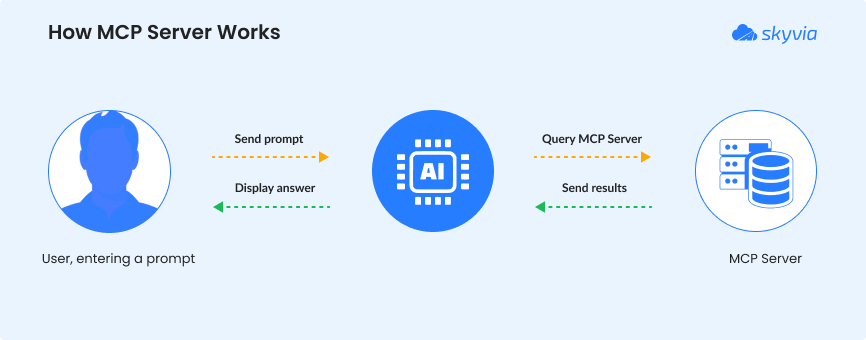
This makes the BigQuery MCP server bridge AI to your BigQuery cloud data warehouse.
So, instead of using SQL to “ask” BigQuery, natural language fits in your workflow to unearth the story behind your data – all done securely.
How can one tool make BigQuery easier, faster, safer, and cheaper for everyone?
Why You Need a BigQuery MCP Server
With BigQuery MCP servers, you can let your users ask AI without SQL – yes, not starting the prompt with SELECT – all done securely and reduces accidental cost bombshells. Here are the pluses I found when I learned about this.
Democratize Data Access
It’s alright to teach SQL to newbie developers. But users? They never had the schooling for the concepts behind it. So, I never attempted it. It’s simply going to be hard.
Back in the day, when users want querying facilities, we gave them all the columns they need and let them choose what they need at the moment. Then, they hit the Run button. When English Query came to SQL Server, it handled a narrow set of sentences. So, if “Show me the top 10 customers in London” may succeed, “Which top 10 customers are based in London?” may fail. Users should use a set of words and sentences only.
It’s burdensome for developers to set up, and if there are schema changes, they have to do it again.
But with LLMs today, differences in sentence structure and choice of words are handled for us – developers and users alike. Suddenly, the need to query BigQuery data doesn’t always need SQL anymore.
Accelerate Development
Again, back in the day, we set the columns needed by users for their querying needs. But when they need a new one, we have to code again to add that column. So, there’s a time gap before users get what they need. It will have to pass coding -> testing -> deployment. Then, if there are bugs, back to coding again.
Today, developers can build AI-powered apps that can intelligently query and analyze data – even produce charts and tables. That’s a time-saver if users want a different angle in data presentation.
So, let’s say the initial prompt is “Give me the top 10 customers in London and rank them.” Then, a follow-up like “Now, give me the most bought product of those 10 customers.” AI can handle the pronoun resolution (“those 10 customers”) and apply contextual chaining. As long as the bought products are available in the MCP features of the server, AI can deliver what the user wants.
Of course, realistically, if users ask for something not there, AI will block or deny those requests (if properly configured). This takes us to the next benefit.
Enhance Data Security
If users ask, “Give me the list of customers and their contact information,” what now?
That prompt, if allowed in the BigQuery MCP server, will expose sensitive information. If I’m the one to implement this project, I have two choices:
- Add all the guardrails to filter out results with sensitive information, or
- Create a safe copy of the BigQuery warehouse that doesn’t include sensitive info, and let MCP access it.
The easier approach for me is the second one. It also avoids any guardrails I may forget. Of course, it depends on your exact requirements. Make sure that your project team or committee will agree on what AI can access before adding this MCP bridge to your BigQuery warehouse.
If there will be layers of user access, this adds to the problem, but it’s doable. You can add user roles, maybe restrict by IP addresses, to avoid unauthorized access to the BigQuery MCP server.
Control Costs
Here’s the big deal: AI can run a $2000 query if not controlled, because BigQuery bills by data scanned. With a BigQuery MCP server, you can control that with specific actions AI can use.
Under the hood, SQL still runs the show in querying data. But the actions you define for the MCP server will help avoid a SELECT * FROM TABLE to return billions of rows – a costly mistake.
Now that you know the benefits of using MCP for BigQuery, how can you build one? You have two options.
Google's Official BigQuery MCP Server: Endpoint, Tools and Limits
Good news first: Google itself now runs a remote MCP server for BigQuery, and you don't have to host a thing. Setup is mostly configuration. Your MCP client gets the global endpoint https://bigquery.googleapis.com/mcp with Streamable HTTP as its transport, and you sign in with Google Cloud credentials over OAuth 2.0. Which assistants? Google's docs mention Claude, ChatGPT and Antigravity by name.
The server exposes nine tools to the model:
| Tool | What it does |
|---|---|
list_dataset_ids | Lists the datasets (and BigLake namespaces) in a project |
get_dataset_info | Returns a dataset's metadata |
list_table_ids | Lists the tables in a dataset |
get_table_info | Returns a table's metadata |
execute_sql_readonly | Runs SELECT queries only; Google recommends it over execute_sql |
execute_sql | Runs any query BigQuery supports, AI and ML functions such as AI.FORECAST included |
get_query_results | Polls a long-running query or pages through more rows |
cancel_job | Cancels a query job that is still running |
get_job | Checks a job's status, statistics or configuration |
Access runs through IAM. Three roles have to be on the project for your account. MCP Tool User (roles/mcp.toolUser) lets it call the tools, while BigQuery Job User runs the jobs and BigQuery Data Viewer reads the data.
I'd read the limits before any business team gets near it. A query gets cut off after three minutes of processing by default, you'll see 3,000 rows at most, and Google Drive external tables are off the table entirely. Every query is charged to the project you name and carries the job label goog-mcp-server: true, so you can tell agent queries apart from the rest.
Our advice for a first rollout: let the assistant use execute_sql_readonly only (an IAM deny policy can block execute_sql, the only tool that isn't read-only), and set a custom quota on data processed per day, per project or per user. Then a model that writes a careless query hits a ceiling instead of your budget.
The catch is scope. Google's server covers BigQuery and nothing else, so when the assistant also needs your CRM or support desk next to the warehouse, you're adding a server per source. That's the gap the self-hosted route and Skyvia's MCP endpoints fill in different ways.
How to Set Up a BigQuery MCP Server: The Technical Approach
Let’s start with the flexible option, where you build the bridge for AI and Google BigQuery, configure stuff, and self-host it.
General Steps
Ready your technical chops when dealing with self-hosted MCP servers. Here are the general steps:
- Pick a server. This can be a machine on premises or a cloud virtual machine – your choice.
- Choose an open source BigQuery MCP server. Your options include the MCP Toolbox for Databases from Google or a community OSS called mcp-bigquery-server. Most are built on Node.js or Python. Don’t worry, you won’t build from scratch. You will just piece things together, or maybe add features yourself.
- Then go to Google Cloud and create a GCP service account with roles like Data Viewer and Job User.
- Download the JSON key file. This is your digital access card.
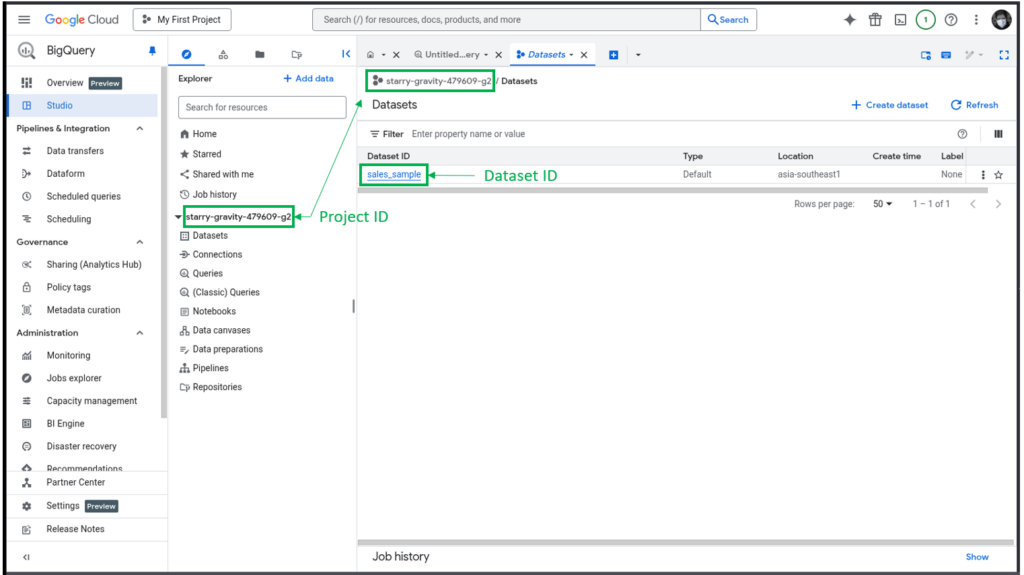
- From your BigQuery setup, get the Project ID and Dataset name. Note the allowed tables in the dataset. But if you already filtered out any personal or sensitive info, then it means all tables. Check out a sample below from my own GCP account for identifying the Project and Dataset IDs.
- Configure the MCP server with the Project ID, Dataset name, allowed tables, and query limits.
- Add guardrails. Block dangerous commands like DROP and ALTER. Or if you will use the MCP Server as read only, also block DELETE, UPDATE, INSERT, and MERGE commands.
- Test and run the MCP server. Running it will read the JSON key file.
For more detailed setups, check the documentation of your chosen open source MCP server. Once it’s running, you can configure your MCP client, like Claude Desktop, to use your new BigQuery MCP server.
Pros
If you choose this route, the following benefits await you:
- Full control – No black boxes. You decide who can access what, when, and how.
- Custom security rules – You can add your own filters, validation, and guardrails before a query ever hits BigQuery.
- Flexible deployment – You run it on a VM, Docker, Kubernetes, or on-prem. It fits what you already have instead of the other way around.
- Better governance – Log every request, track costs, and audit usage the way you want it — like putting cameras in every hallway.
- Scales with your needs – You can scale your server as usage grows.
Cons
You may think, “Full control is good. I want that!” But there are gotchas:
- More engineering time, more setup work – You’re handling credentials, IAM roles, network security, API limits, everything.
- You own the maintenance – You have a new baby. You monitor, patch it, and fix it if it breaks.
- Higher security risk if done wrong – Misconfigured service accounts or open endpoints = data leak potential. One wrong switch, and the door’s unlocked.
- Steeper learning curve – You have to be THE tech guy – GCP, BigQuery, networking, security best practices – it’s on you.
- Costs can sneak up – it can be like a shopping cart that keeps piling up items, if not controlled. This means bad queries or abuse that will fire up BigQuery costs.
That’s how it is for the technical approach. But what if there’s an easier approach? Something done in as little as a few minutes or so under ideal conditions?
The No-Code Alternative: Connecting BigQuery with Skyvia’s MCP Endpoint
A few minutes? That’s crazy.
But yet, here you are reading this section, because you also want an easier path. There’s nothing wrong with that. It won’t make you a lesser developer than everyone else.
Making your own self-hosted BigQuery MCP Server needs a lot of your time, energy, and effort. It’s undeniable. But there’s Skyvia – a cloud data platform that has an MCP Endpoint for any data connection it supports, including BigQuery, that is ready to use.
Key Benefits
What can you get out of a ready-to-use MCP Endpoint from Skyvia? Follow along as I list it down.
1. Zero Configuration
No server for you to set up and manage. No GitHub repositories to clone, nor other CLI commands to use. Skyvia manages that for you.
2. Broad Compatibility
It’s not just BigQuery. Use a vast ecosystem of other data sources using the same web graphical interface. Think of Snowflake, MySQL, SQL Server, even Salesforce, HubSpot, and more.
3. Visual, User-Friendly Interface
It’s point and click. No memorizing CLI commands, no checking of syntax from docs. Just a simple form that even newbies can understand. You only need two things:
- A Skyvia connection to your data source (In this case, BigQuery), and
- The Skyvia MCP Endpoint that will use that Skyvia connection.
Here’s what the Skyvia connection to BigQuery looks like:
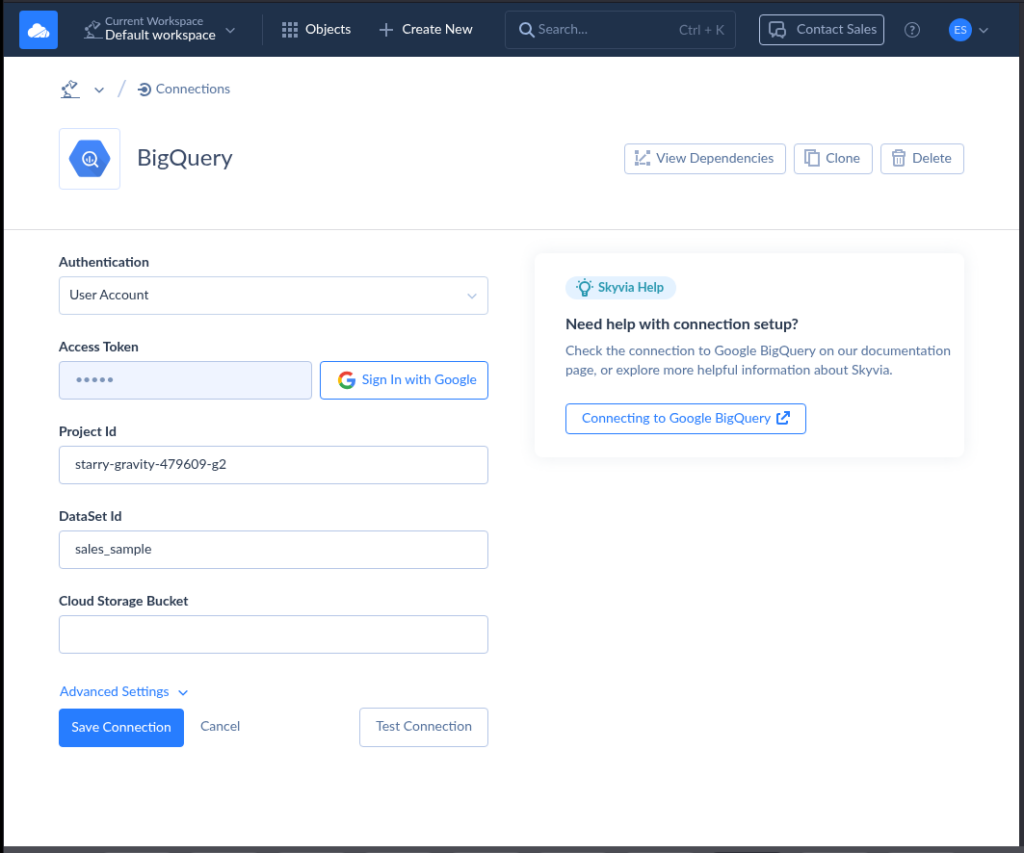
When I tried this myself, it only took less than 2 minutes to setup a Skyvia BigQuery connection – given I already have the Project and Dataset IDs. Note that this is the same Project and Dataset IDs used in the BigQuery screenshot earlier.
How about the MCP Endpoint? Here’s a sample using the above connection:
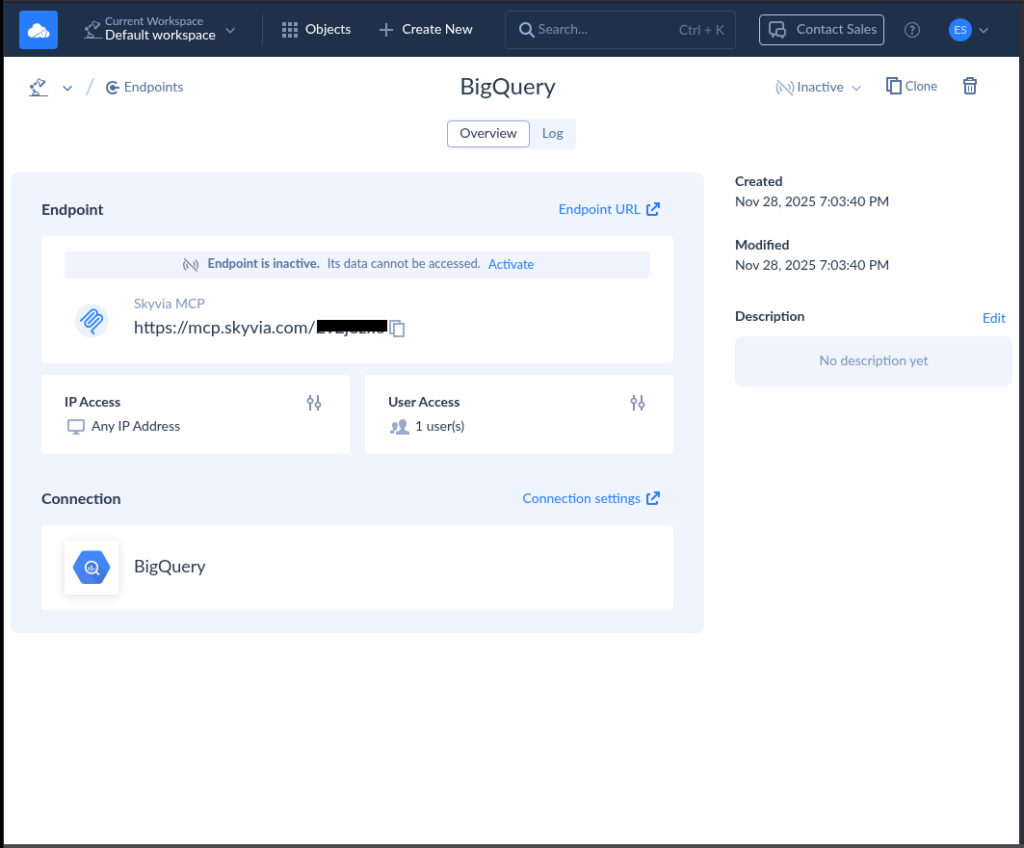
Isn’t it very straightforward? You can do this in 3 minutes or less.
At this point, you can configure the MCP client like Claude Desktop to talk to this BigQuery MCP server. You can get the details on how to do that from here.
4. Managed and Secure
You don’t need to set up logging. Skyvia takes care of that. You only need a Google Access Token (You sign-in to Google, and Google will provide the access token) and your Project and Dataset IDs. Then, your allowed IP addresses and user credentials.
Notice the sample Skyvia MCP Endpoint earlier. It has a section for Logs, IP Access, and User Access.
Not only that, Skyvia supports workflows aligned with GDPR, HIPAA, and PCI-DSS requirements.

Practical Use Case: Answering Business Questions with AI and BigQuery
Let’s say you’re a sales manager. You want to know the top-performing products for the last quarter. Without MCP, this will happen:
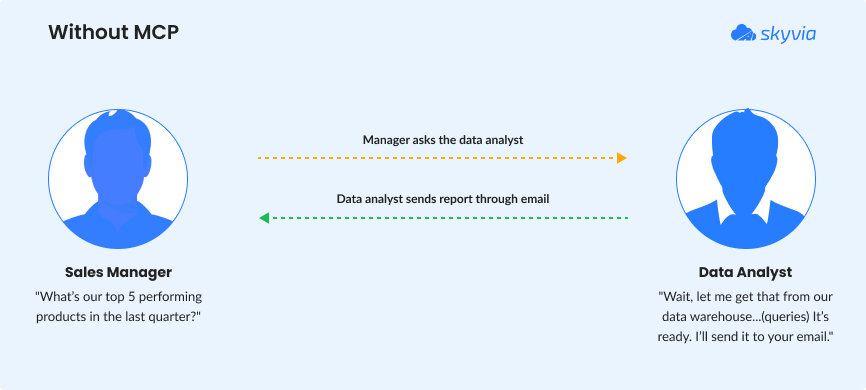
We’ve seen the above scenario before. That’s how it was in pre-MCP days. You ask a technical person, usually a data analyst, to give you a report of what you want out of a database or warehouse.
But with a BigQuery MCP Server like Skyvia’s MCP Endpoint, it becomes like this:
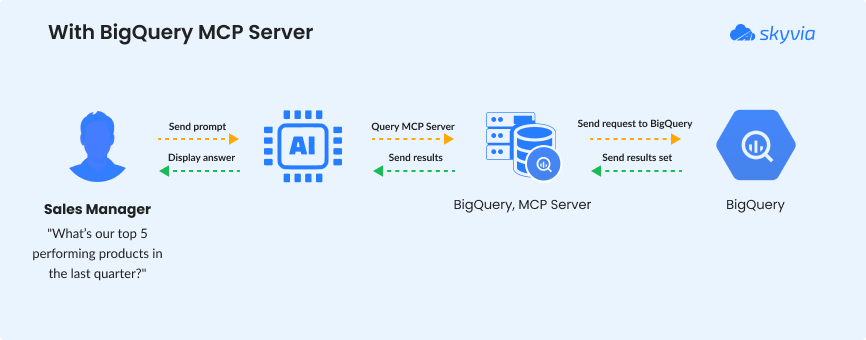
Very convenient, isn’t it? The AI translates the question to SQL, gets the data, and provides the answer in seconds.
And it doesn’t end there. The sales manager can add follow-up questions, and AI will give it through the MCP server. No more back-and-forths to a tech person. The technical guy (that’s you) can now focus on improving the BigQuery MCP server for more features.
Amazing!
The next section will give you a glimpse of the future where data analysis is conversational.
The Future of Conversational Data Analysis
We just love conversations with nice people. What if we take that conversation to AI for data analysis?
So instead of crafting SQL statements, you just ask. You can type, or you can talk – whichever suits you. You can ask something like “Which store is underperforming for the last quarter?” or “What products have below sales expectations?” Then, AI answers back in plain language or with charts and tables. Then, you can make follow-up questions – just like a conversation.
Large Language Models (LLMs) are the engines that made this possible. They can understand context, translate questions into SQL, and explain results in everyday words. The dashboard becomes a dialogue. It also lowers the barrier for non-technical teams like marketing, finance, and operations.
MCP is impressive – and also practical. Instead of letting an AI guess, MCP gives it controlled, structured access to real systems like BigQuery. This opens the door to:
- Near real-time insights using natural language, depending on your pipeline.
- Self-service analytics without SQL skills
- Faster, AI-assisted decision-making
- Embedded analytics inside chat tools and apps
Before MCP became a thing, it seems that data was in a locked room for non-technical users. SQL is the key to unlock that door. But now with MCP and AI, you just “knock”.
With this, the future is no longer a comprehensive, static dashboard. It’s a clearer conversation with AI and MCP.
Conclusion
A BigQuery MCP server turns your data warehouse into something you can actually talk to. It removes the friction of SQL and opens the door for faster, smarter questions from anyone on the team.
Yes, you can build it yourself. But that road takes time, setup, and ongoing care. For many teams, a managed option like Skyvia is the smoother path. Less overhead. More focus on insights.
If your goal is simple, secure, AI-driven access to BigQuery, this is your moment. Ready to skip the setup hassle? Explore Skyvia’s MCP endpoint and start your free trial today.

FAQ for BigQuery MCP Server

What tools does the BigQuery MCP server provide?
Google’s BigQuery MCP server has nine tools: list_dataset_ids, get_dataset_info, list_table_ids, get_table_info, execute_sql_readonly, execute_sql, get_query_results, cancel_job and get_job. The first four explore datasets and tables, the two execute tools run SQL (one allows only SELECT), and the last three manage long-running query jobs.
Which IAM roles does the BigQuery MCP server need?
To use Google’s BigQuery MCP server, a user needs three IAM roles on the project: MCP Tool User (roles/mcp.toolUser) to call MCP tools, BigQuery Job User to run query jobs, and BigQuery Data Viewer to read the data. Custom roles with the same permissions also work, and some tasks need more BigQuery permissions.
How do I connect Claude to BigQuery?
You can add Google’s remote BigQuery MCP server to Claude as a remote MCP server with OAuth credentials, or create a Skyvia MCP endpoint on a BigQuery connection. A Skyvia endpoint without user accounts connects to Claude on the web and Claude Desktop as a custom connector; an endpoint with user accounts works only in Claude Desktop.
Is the BigQuery MCP server read-only?
Not by default. Google’s BigQuery MCP server includes execute_sql, which can run any query BigQuery supports, next to execute_sql_readonly, which allows only SELECT statements. Want the assistant read-only? Block execute_sql with an IAM deny policy, since it’s the only tool that can change data, and grant BigQuery Data Viewer instead of an editor role.
How can I keep an AI agent from running costly BigQuery queries?
Start with limits Google already applies to the BigQuery MCP server: queries stop after three minutes of processing and return at most 3,000 rows. Then set a BigQuery custom quota on data processed per day, per project or per user: once it’s reached, no more queries run that day. Every MCP query is billed to the project you name.
Do I need coding skills to set up a BigQuery MCP server?
Not for every route. Google’s remote BigQuery MCP server needs IAM roles and client configuration but no code, and Skyvia creates an MCP endpoint in three steps: pick a BigQuery connection, optionally add user accounts and IP ranges, and name it. Self-hosting an open source server means running Node.js or Python and managing a service account key.