Picture a web form that has to save a new customer straight into Oracle, over plain HTTP. Oracle's own version of an Oracle REST API is Oracle REST Data Services (ORDS), and it's what makes this work. Hand ORDS a table, a view, some SQL or a PL/SQL block and it returns endpoints for GET, POST, PUT and DELETE. The answers come back in JSON. Your data is then open to anything that can send an HTTP request, and the client's language never enters into it.
Oracle rarely works alone. Web apps, mobile apps and reports all pull from it, so some kind of REST layer in between is a natural fit. We'll install ORDS first (the setup has a few steps), then call the endpoints with cURL and sort out the responses. Right after that sits an AutoREST example, where a few lines of PL/SQL expose a table.
Hand-building that layer eats programmer hours, and plenty of teams would happily skip the job. Only need Oracle data reachable from other apps? Skyvia Connect publishes an OData endpoint for your database, with no coding and no hosting on your side. Moving data between Oracle and other business apps is a different job, and there Skyvia connects Oracle to 200+ sources through a visual wizard. At the end we line the two routes up so you can pick.
What Is a REST API?
Representational State Transfer Application Programming Interface, better known as REST API, is a set of rules and guidelines for interaction between web services. REST APIs conform to the following standards:
- A client-server architecture with clients, servers, and resources.
- HTTP protocol is used for managing requests.
- Stateless communication doesn’t preserve client information between GET requests; each request is an independent process.
- Cacheable data for streamlined interactions.
- Unified interface for standardization of the data exchange between clients and servers.
REST uses the HTTP methods for communication:
- GET – to retrieve data from a server.
- POST – to send data to a server to create/update a resource.
- PUT – to update or replace existing data on a server.
- DELETE – asks a server to remove a specified resource.
Exchanging information between client and server via API implies that data is encapsulated in a file. JSON is the most commonly used format since it’s readable by humans and computers, lightweight, and suitable for speedy data transfer. Sometimes, XML files are also used to exchange data.
Overview of Oracle REST APIs
Oracle REST APIs have characteristics similar to those of all REST APIs. Let’s have a look at them in detail:
- Stateless communication provides a possibility to scale without considering the previous interactions. Each API call is independent and doesn’t store any session state on a server.
- OAuth 2.0 and API keys are used for authentication by Oracle REST APIs.
- JSON file format is common for request and response bodies in the data exchange process, though XML is also supported.
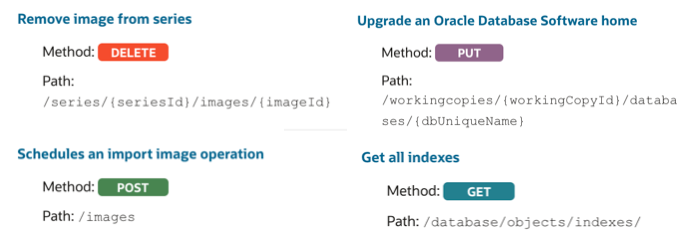
- Standard HTTP methods for communication are used: GET, PUT, POST, and DELETE.
- Data and services come as resources, each coming with a unique resource identifier (URI).
The URIs or URLs within API are endpoints that specify where a client can access a particular resource. Endpoints often correspond to actions like retrieving, creating, updating, or deleting resources, and they typically work with HTTP methods such as GET, POST, PUT, or DELETE. See the list of all REST endpoints for Oracle databases.
Setting Up Oracle REST APIs
To use Oracle REST APIs, follow the detailed step-by-step instructions provided below.
Prerequisites:
Before installation, make sure you have the following tools at your disposal.
- Oracle Database (Enterprise Edition, Standard Edition, or Standard Edition One) release 11g Release 2 or later, or Oracle Database 11g Release 2 Express Edition.
- Oracle Java 8 or later.
- Web browser:
- Microsoft Internet Explorer 8.0 or later.
- Mozilla Firefox 3.0 or later.
- Google Chrome 2.0 or later.
Step 1. Install and Configure Oracle REST Data Service (ORDS)
ORDS is a Java-based service used to expose data from an Oracle database via RESTful endpoints.
NOTE: Install ORDS on the service with access to your Oracle database.
- Download the file ords.version.number.zip from the ORDS official website.
- Extract data from the downloaded zip file into a chosen directory.
- Select the installation option:
- An advanced mode requires a user to enter CLI prompts manually.
- A silent mode doesn’t require a user intervention. The installation is done using the parameter specified in the <path-to-params-file>/ords_params.properties file under the location where ORDS is downloaded and extracted.
- To perform installation in the advanced mode, execute the command:
java -jar ords.war install advanced- To verify the ORDS installation is successful, go to the directory with the ords.war file and enter the following command:
java -jar ords.war validate [--database <dbname>]- Enable ORDS Database API since this feature is disabled when installing ORDS for the first time.
- Run ORDS in a Standalone Mode.
- REST-enable the Oracle database SCHEMA and grant the DBA and PDB_DBA roles to the schema user.
Step 2. Deploy ORDS on a Web Server
Oracle REST Data Services supports the following Java EE application servers:
| Application Server | Supported Release |
|---|---|
| Oracle WebLogic Server | 12g Release 2 (12.2.1.3) or later |
| Apache Tomcat | Release 8.5 or later |
In this example, we show how to deploy ORDS as a web application on the Apache Tomcat web server.
- If not yet installed, download Apache Tomcat.
- Copy the ords.war file into the webapps directory where Apache Tomcat is installed.
- Access Oracle Application Express by typing the following URL in your web browser:
http://<hostname>:<port>/ords/<hostname> is the name of the server where Apache Tomcat is running.
<port> is the port number configured for the Apache Tomcat application server.
Step 3. Define Oracle REST APIs
Create REST APIs and expose them from your Oracle database. This is possible with SQL Developer or by simply using PL/SQL. In this example, we use SQL Developer since it offers a graphical UI for administering Oracle REST APIs.
- Configure administrator user.
java -jar ords.war user adminlistener "Listener Administrator"- Enter the password for the adminlistener user.
- Confirm the password for the adminlistener user.
- In the SQL Developer, connect to your Oracle database and navigate to REST Data Services under the Connection tab.
- Right-click on the RESTful Services and select New RESTful Service.
- Define the REST API endpoint, HTTP method (GET, POST, PUT, DELETE), and SQL query or PL/SQL logic.
Step 4. Test APIs
To test the recently created REST API endpoint, try accessing it via a web browser.
Check Oracle’s official documentation website for more detailed information on ORDS deployment and API endpoint creation.
Integrating Oracle REST APIs with Applications
REST APIs allow you to access and manipulate data in the Oracle database from an app. To integrate Oracle REST APIs with your application, follow the detailed step-by-step instructions.
Step 1. Install cURL
To access Oracle Database REST API, install and download the cURL command-line tool. Make sure that the selected version supports SSL to establish a secure connection to the server. Once the zip package with cURL is downloaded, extract its contents and put them in the preferred folder.
Step 2. Authentication
To access Oracle Database REST API resources, you need to authenticate.
- Provide an SSL certificate authority (CA) certificate file. You can download an SSL CA certificate bundle or provide your own.
- Verify the SSL CA certificate using the cURL tool.
- Provide name and password credentials for your Database REST API account. For that, use the -u command in cURL to pass the username and password.
Specify the custom header X-ID-TENANT-NAME to identify the identity domain ID. Use the -H command in cURL to pass X-ID-TENANT-NAME.
Example:
curl -i -X GET -u <username>:<password>
-H <request-header>:<value> https://<subdomain>.<domain>.com/<path>/<resource-path>
Step 3. Make API Calls
Start sending HTTP requests to Oracle Database API endpoints. You can also do this with the cURL tool.
Example:
curl -X POST https://<db_rest_api_url>/ords/schema/table/ \
-H "Authorization: Bearer <access_token>" \
-H "Content-Type: application/json" \
-d '{ "column1": "value1", "column2": "value2" }'
Step 4. Handle API Responses
After calling Oracle Database REST API endpoints, the Response header returns standard HTTP status codes in JSON format. Write programming code within your application to handle these responses properly. Parse JSON and implement business logic that would handle each response appropriately.
Step 5. Error Handling
In case the status code returned signals an issue, you need to implement an error-handling mechanism.
Here are some HTTP status codes that report a problem:
- Unauthorized access (HTTP 401)
- Forbidden access (HTTP 403)
- Not Found (HTTP 404)
- Internal server error (HTTP 500)
Oracle REST API Example: Expose a Table with AutoREST
Need a working Oracle REST API example without much fuss? Try AutoREST. Enable a table once the schema is ready for ORDS, and ORDS serves it as a REST resource with zero handler code. GET, DELETE, POST and PUT all work on a table or view enabled that way.
- Enable the schema first. In SQL Developer, right-click the connection, pick REST Services, then Enable REST Services.
- Enable the table next. Run the PL/SQL below as the schema owner, though
DEMOandORDERSare only sample names, so swap in your own:
BEGIN
  ORDS.ENABLE_OBJECT(p_enabled        => TRUE,
                     p_schema         => 'DEMO',
                     p_object         => 'ORDERS',
                     p_object_type    => 'TABLE',
                     p_object_alias   => 'orders',
                     p_auto_rest_auth => TRUE);
  COMMIT;
END;
/- Then call it. The address has the form
https://<host>:<port>/ords/<schema alias>/<object alias>/. Send a GET request to/ords/demo/orders/and the rows come back as JSON.
Before you ship this, there's one catch. The p_auto_rest_auth parameter locks the object down for every HTTP method together. Want people to read the table but never delete from it? AutoREST can't split those, so you'd write a resource module instead.
| AutoREST | Resource module | |
|---|---|---|
| Setup effort | One PL/SQL call or a wizard | You write the SQL and PL/SQL for each handler |
| Input and output formats | Fixed | Custom fields and formats |
| Joins and validation | Not available | Joins across tables and PL/SQL validation |
| Best for | Fast CRUD access to one table or view | APIs shaped for a specific app |
And if you run Oracle AI Database 26ai, ORDS 26.1 and later adds a /vectorSearch endpoint to AutoREST-enabled tables that have vector columns.
Benefits of Using Oracle REST APIs
No doubt, REST APIs facilitate integration with Oracle databases and other applications. Here are some of the notable advantages of using Oracle Database REST APIs:
- Scalability. ORDS is designed to handle large volumes of requests. Even with the increasing number of API calls, the performance remains stable and optimal.
- Customization. You can create custom queries with Oracle REST APIs to fetch only the data you need. This positively impacts performance since no useless data is retrieved.
- Security. ORDS grants secure access and manipulation of data since it supports OAuth 2 for authentication, role-based access control (RBAC), and data encryption. This helps companies to secure their sensitive data.
- Versatility. REST APIs are platform-independent, allowing developers to integrate Oracle services into applications running on any mobile, web, or desktop platform.
- Documentation. Oracle provides comprehensive documentation on REST APIs, which makes the lives of developers easier.
Skyvia’s Integration with Oracle REST APIs
Skyvia provides a pre-built connector for the Oracle database. You can configure it by providing the necessary details in the visual wizard. Then, use the Oracle connector to build zero-code integration scenarios with Skyvia to transfer data to and from your database.
Skyvia is a universal cloud platform for various data-related tasks. It connects to 200+ sources, including Oracle services, and allows you to perform various operations on data, starting from integration to OData endpoint creation. All this is done within an intuitive graphic user interface with no programming language requirements.
How Skyvia Enhances Oracle REST APIs
Skyvia has five core products, four of which can work with Oracle databases:
- Data Integration. Use a set of tools to transfer data to/from the Oracle database with ETL, ELT, and Reverse ETL pipelines.
- Automation. Reduce manual work on repetitive tasks and streamline workflows with event-based integrations.
- Query. Use a visual SQL query builder or write SQL queries to retrieve data from an Oracle database.
- Connect. Create OData and SQL endpoints without coding and obtain ready-to-use endpoint URLs with no need to manage hosting and administration.
Before using Skyvia products on Oracle data, connect to your database. Skyvia supports both on-premise servers and Oracle Cloud.
- Log into your Skyvia account or create a new one.
- Click + Create New in the top menu and select Connection.
- Select Oracle from the list of available data sources and click on it.
- Provide all the requested information in the window.
- Server – name or IP address of the Oracle server host.
- Port – Oracle server connection port; the default value is 1521.
- Connection Syntax – this parameter determines whether to use Service Name or SID to connect.
- Service Name – alias to an Oracle database instance (or many instances).
- SID – a unique name for an Oracle database instance.
- User – user name to log in with.
- Password – password to log in with.
- Connect as – this parameter specifies how you want to connect to the Oracle server. This parameter is set to ‘Normal’ by default. Alternatively, you can select administrative privileges, such as SYSDBA, SYSOPER, SYSASM, SYSBACKUP, SYSDG, and SYSKM.
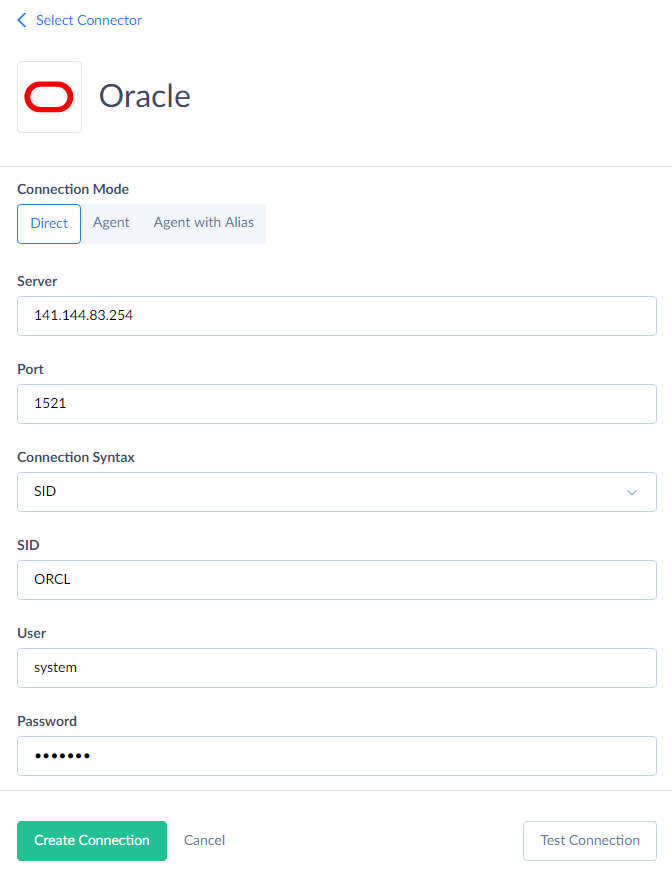
Learn other details on how to create an Oracle connection in Skyvia.
Business Benefits with Skyvia Integration
Skyvia has enormous potential when it comes to various data integration scenarios and operations. This tool greatly facilitates data retrieval from your database, transfer of new or updated information, and even deleting unnecessary instances. Overall, using Skyvia is associated with such tangible advantages for your business:
- Simplicity. Connect to Oracle service with no coding, which is much faster and simpler than API integration.
- Connectivity. Set up data integration between Oracle and 200+ sources, including cloud applications, databases, data warehouses, legacy systems, storage services, and flat files in a standardized format.
- Data transformation. Cleanse and organize data with Skyvia’s powerful data transformation capabilities.
- Affordability. Skyvia is suitable for businesses with any workload, from startups to enterprises. There are several pricing plans at reasonable prices.

Conclusion
Both Oracle REST APIs and Skyvia aim to integrate Oracle databases with other tools. However, each does it in its own way, which makes each method suitable for a different scope of tasks.
Oracle REST APIs would be an excellent option for enabling database interactions within your custom app. If you need to send data from other corporate apps, such as HubSpot, Dynamics CRM, QuickBooks, etc., to your Oracle database, then Skyvia would definitely be a better choice.

FAQ for Oracle REST API

Can you explain what ORDS is in Oracle?
Picture ORDS as the web front door to Oracle Database. It’s a Java EE based data service that adds RESTful web services, file caching and extra security features. ORDS can run standalone. Prefer an application server? Both Oracle WebLogic Server and Apache Tomcat are fine as hosts.
What’s the way to expose an Oracle table through a REST API?
Step one is enabling the schema for ORDS. Step two is the table: use the ORDS.ENABLE_OBJECT procedure, or pick the Enable REST Services option in SQL Developer if you’d rather click. When both steps are through, you’ll find the table at an address like /ords/schema-alias/object-alias/, where GET, POST, PUT and DELETE calls all work.
Oracle ORDS has a feature called AutoREST: what is it?
With AutoREST nobody writes handler code. ORDS turns the table or view into a REST resource by itself. The speed costs you control, though. AutoREST fixes the input and output formats and adds no extra validation. Need custom fields, joins or checks? Build an ORDS resource module with your own SQL and PL/SQL.
How can you secure an Oracle REST API?
ORDS covers OAuth 2.0, JWT and role-based authorization. With AutoREST, the p_auto_rest_auth parameter of ORDS.ENABLE_OBJECT is what protects the object, and it does so for all of the object’s HTTP methods at once. Different rules for reads and deletes? That calls for a resource module.
Can I get an Oracle REST API without writing any code?
Yes. Skyvia Connect publishes an OData endpoint, which is a REST-style API, for your Oracle database. Nobody writes code, and Skyvia hosts it. When the job doesn’t need a custom API, Skyvia Data Integration still moves data between Oracle and other apps, through a visual wizard.
ORDS or Skyvia: which one suits an Oracle project?
If your own application has to call the Oracle database directly through custom endpoints, ORDS is the better fit. Syncing Oracle with business apps such as HubSpot, Dynamics CRM or QuickBooks is Skyvia territory, since there’s no programming and no ORDS server to keep running.