Summary
- PostgreSQL MCP servers let AI agents safely connect to live database data, but Skyvia's no-code MCP Endpoint makes it easy, safe, and ready for business use in minutes, so you don't have to deal with complicated, self-hosted setups.
Picture Claude reading your Postgres tables on its own (and, with the right setup, writing to them): that’s what a PostgreSQL MCP server is for, using the Model Context Protocol as the go-between. So the answer comes from rows sitting in your database today, not from whatever the model half remembers. There are three ways to get one. Host an open-source server, take the one your cloud vendor ships, or click a managed endpoint together in Skyvia, where there’s no code at all.
Anthropic opened MCP as a standard in November 2024 and shipped a few pre-built servers with it, Postgres among them. That first server was small and read-only, and it has since been archived. The choice is much wider now, and the trade-offs come down to who hosts the server and what the AI is allowed to run.
We’ll tell it the way it came up over lunch. Sato looks after a few PostgreSQL systems and keeps hearing about MCP. Steve, a friend of his, has been using it at work for a while, and one day Sato just asks: “Hey, Steve. Have you heard of the PostgreSQL MCP server?”
What is the Model Context Protocol?
Model Context Protocol (MCP) is an open standard that lets AI applications securely communicate with external data, tools, and services. It adds live, external context that the Large Language Models (LLMs) can use when responding. Without it, AI applications are blind to this external data. They will guess confidently, causing hallucinations.
And what about PostgreSQL MCP Server?
“It is the use of MCP to let AI applications communicate with your PostgreSQL database,” Steve explains as he relates MCP to a PostgreSQL target. “Can you imagine ChatGPT or Claude answering questions about your data? That’s amazing!”
Sato had PostgreSQL systems he needed to maintain and upgrade. Steve is filling him in because he already has experience with MCP from his company. And he hopes this informal lunch meeting will be fruitful in some way.
“It’s like this,” Steve sketches it to a piece of paper available.
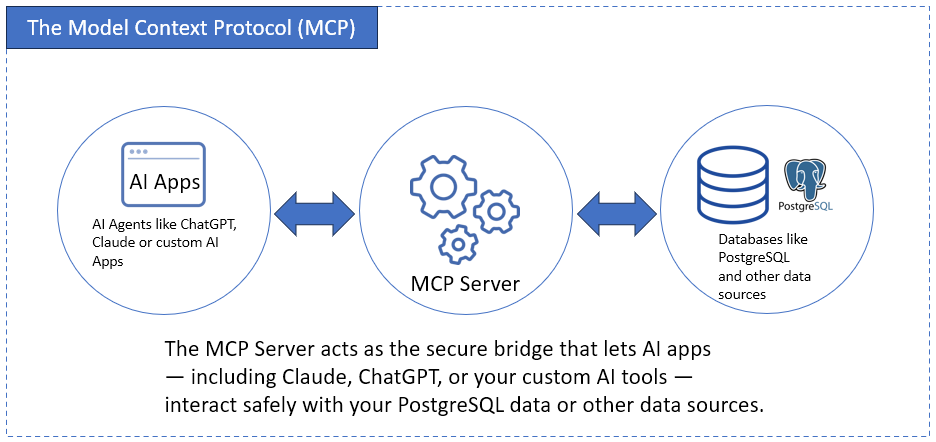
“Alright. This flow looks simple. I can even use my own custom AI apps too. So, how do you set this up?” asked Sato.
“Enterprises want AI agents to have a secure, real-time access to business data with the ability take actions—not just generate answers,” said Oleksandr Khirnyi, Chief Product Officer at Skyvia. “MCP Endpoints provide teams with a secure, no-code way of letting AI assistants, such as Claude, discover, query, and act on data, while Skyvia handles the hard parts behind the scenes.”
How to Set Up PostgreSQL MCP Server
“There are open source samples like this one from FreeCodeCamp.”, Steve shows Sato from his tablet.
“Basically, it shows that you need to code the server and the tools that the AI app will use to get answers from your database”, Steve continues.
To explain this further, Steve provided the details of the interaction:
- Define one or more tools: You define a tool (e.g., GetSalesPerRegion) with a schema describing its inputs and outputs—often using JSON Schema or TypeScript types. Each tool will handle the query to PostgreSQL (e.g., SELECT * FROM sales WHERE region = ‘APAC’)
- LLM sends a request: A prompt from the AI app will trigger a tool call. The LLM decides which appropriate tool to use from your registered tools. For example, “Give me the sales figures for the APAC region”, then LLM calls the GetSalesPerRegion.
- Tool server executes: Your PostgreSQL database receives the request, retrieves the rows, and returns the result.
- LLM uses the result: The model processes the result set into its response. The user will now receive a humanlike answer.
“But this requires coding,” notes Steve. “And this creates challenges along the way.”

PostgreSQL MCP Server Options: Open Source, Cloud Vendor or Managed
Coding a server from a sample is one route. You can skip it now, because ready-made PostgreSQL MCP servers fall into four groups.
The original reference server (@modelcontextprotocol/server-postgres) gave the model a single query tool and ran every statement inside a READ ONLY transaction. Plenty of tutorials still copy its npx command. Don’t start a new project on it, though. The MCP project archived the repo on May 29, 2025, and npm now flags the package as no longer supported.
Then there’s Postgres MCP Pro, open source and built by Crystal DBA, which you run in Docker or on Python 3.12 or later. Its unrestricted mode is for development, because there the AI may read, write and even change the schema. Once real customer data is involved, we’d flip it to restricted mode, which keeps every transaction read-only and stops any query that runs too long. There’s a DBA side to it as well, though: ask about vacuum or a slow page and it can check health, suggest indexes and go over EXPLAIN plans.
Cloud vendor servers cover their own Postgres. The AWS Labs server works with Aurora PostgreSQL and RDS for PostgreSQL, runs on the same host as your AI client and needs AWS credentials; writes stay off unless you add --allow_write_query. The Azure MCP Server can list Azure Database for PostgreSQL servers and tables, run queries and read or set server parameters.
Skyvia MCP Endpoint runs in Skyvia’s cloud. Setup is a three-step wizard on top of a PostgreSQL connection (endpoint users and IP ranges are optional), and Claude just gets the URL. Whatever that connection’s database user may read or write, the AI may too. Trim the user’s grants before you hand anything over.
| Option | Who hosts it | What the AI can run |
|---|---|---|
| Reference server (archived) | You, as a local process | Read-only queries |
| Postgres MCP Pro | You (Docker or Python) | Read and write, or read-only in restricted mode |
| AWS Labs and Azure servers | You, with cloud credentials | Queries; writes depend on flags and your cloud role |
| Skyvia MCP Endpoint | Skyvia | Reads and writes the database user allows |
Want index advice on a dev database? Take Postgres MCP Pro. If everything already lives in AWS or Azure, the vendor’s server fits. Pick Skyvia MCP Endpoint when nobody wants to host or patch a server. The free Connect plan takes cloud connectors only, so a PostgreSQL endpoint needs Basic, at $15 a month billed annually ($19 billed monthly). The pricing page lists security features from Standard, at $39 billed annually ($49 billed monthly).
The Challenge with Self-Hosted MCP Servers
“If you do all these with coding and host it somewhere, you need to face these realities,” Steve adds. Then, he enumerated the risks if Sato chooses this path.
Security Gaps
“First is security. Now, I know we sometimes use credentials and hardcode them for testing purposes. Then, time goes by, and we forget. So, we leak the credentials, right? We sometimes use a high-privileged account like an admin or the postgres account, right?” Steve asks Sato with a smile.
Sato laughs and says, “Haha…Not anymore…But we both did it at least once. And it’s plain text – no encryption.”
“Haha…I know that,” Steve replies. “But remember, if MCP is misconfigured, your data is open. A user can even do some SQL injection. So, you need to guard those endpoints, including sanitizing the input parameters to your tools.”
Maintenance Overhead
“You also need to monitor and update the server yourself,” Steve adds. “That’s added manhours, not to mention the trouble it will give you one day. Do you want that?”
Sato just sighs.
Lack of Governance
“You also need to handle the logging, and you can’t run this without that,” Steve explains. “Or you’ll be blind to who did what when something wrong happens.”
“And I get a call from the auditors,” Sato replies.
“That’s right. Doing this yourself through coding needs a lot of considerations,” Steve added.
Complexity
“Now, I know you have the technical expertise for this,” Steve assures Sato. “But you also need to handle some other stuff from your work. This MCP thing adds complexity if you code this throughout.”
Then, Steve switches to his main point. “But there’s a cloud-based, no-code solution for that. Let me tell you about Skyvia’s MCP Endpoint. You’ll see why I chose this route.”
Skyvia’s Solution: The No-Code, Secure MCP Endpoint
Steve tells Sato, “It takes time and skills to code a secure solution – the connections, tokens, everything. Skyvia changes that.”
“It’s the first no-code, cloud-based solution for creating secure MCP endpoints that connect your AI apps to PostgreSQL. No command lines. No YAML, JSON, or TypeScript. Just a few clicks,” Steve explains.
Then, Steve explains the benefits.
Point-and-Click Setup
“How long do you think you can code this in Python, Sato?” asked Steve.
“I have no idea at the moment,” Sato answers. “I have yet to know the details on what to code.”
“That’s true. But with Skyvia, you only do the setup in minutes, not hours nor days,” Steve follows up. “And you have a working MCP server, because this is a simple point and click, fill in the boxes, and you’re done. Easy.”
“Alright,” said Sato.
Enterprise-Grade Security
“Arming your Python code with enterprise-grade security is another timeline for you, right?” asked Steve. “You can’t just copy-paste some code and you’re done.”
Sato agrees.
“But Skyvia is a managed service. Infrastructure? Checked. Encryption? Checked. Secured credential storage? Checked. Every endpoint is protected by secure tokens and runs inside a hardened cloud environment. You don’t manage keys or patch servers — Skyvia does that for you,” Steve assures.
Full Integration
“But note that Skyvia is not just an MCP Endpoint service. There’s more to it – data integration, backup, automation, replication. It’s a data platform for all your data needs,” Steve explains.
Then, he added this: “This means your MCP Endpoint can easily tie into your existing data flows, without extra setup or new infrastructure.”
A huge blessing for Sato – he nods and smiles as he agrees with his trusted friend.
Scalability and Reliability
“I assume performance and uptime are managed by default?” asked Sato.
“Yes, as a managed service, Skyvia ensures high performance and uptime by design,” Steve assures. “The platform scales on demand. You can focus on building smarter AI interactions — Skyvia keeps the lights on.”
Sato says, “Good!”
How to Create a PostgreSQL MCP Endpoint in Skyvia
“I’ll give you the high-level tutorial. But connecting the endpoint to your AI agent or app is still your responsibility,” Steve tells Sato. “The MCP Endpoint in Skyvia becomes your PostgreSQL MCP server.”
STEP 1: Connect Your PostgreSQL Database
“The first step is to create a Skyvia connection to your PostgreSQL database,” Steve points out. “It goes like this…” Steve enumerates next on how to create a Skyvia connection with its clean web interface. Then, he shows it on his device.
“The PostgreSQL connection should be similar to this,” Steve shows the actual Skyvia PostgreSQL connection page, like the one below:
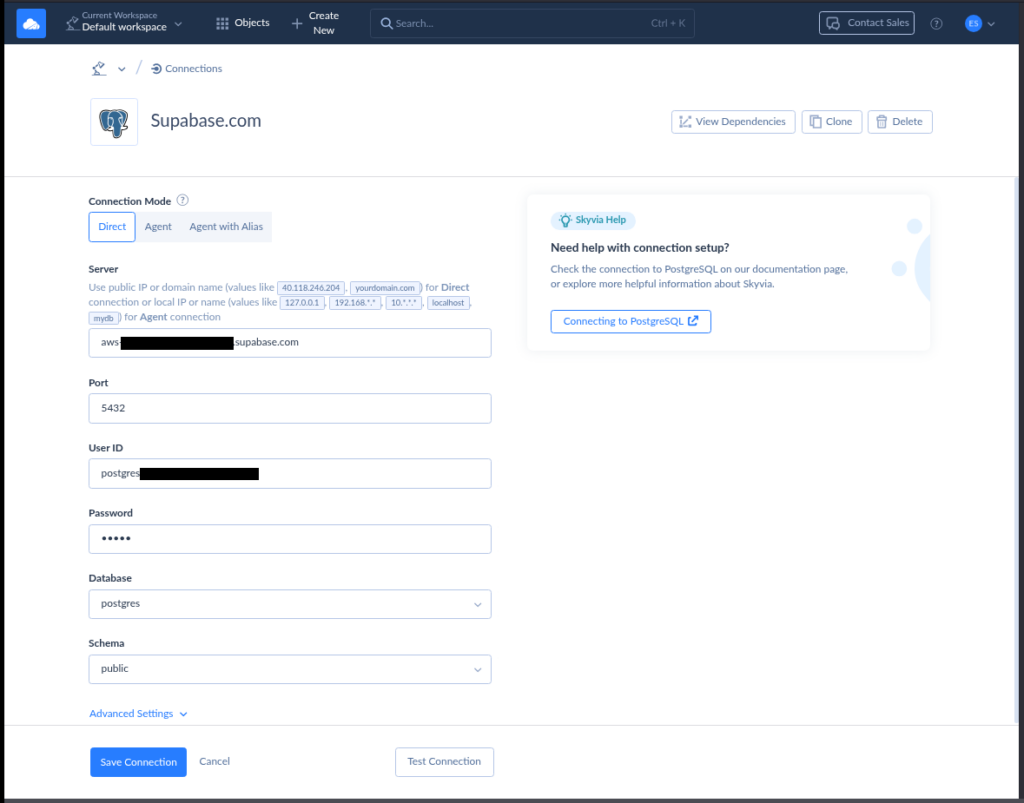
Then, Steve itemized the steps to create a PostgreSQL connection:
- Click + Create New, and select Connection.
- Select a Connector from the list, or search for it by typing PostgreSQL.
- Click the PostgreSQL connector. A new setup page will appear.
- Enter your credentials in the boxes.
- Click Test Connection to test it.
- Once the test is good, name your PostgreSQL connection and click Save Connection.
“It’s just fill in the blanks by following a wizard. This shouldn’t be a problem for you,” Steve tells Sato.
“Yes, I can handle that. Looks pretty straightforward,” Sato agrees.
STEP 2: Create the MCP Endpoint
“Creating the MCP is just as easy as the connection,” said Steve.
Then, he itemized the steps to Sato:
- Click + Create New, then select MCP Endpoint.
- Choose the PostgreSQL connection you created in STEP 1.
- Configure security by defining access. Choose between Public or Any IP Address, then set up accordingly.
- Click Next Step, then name your endpoint.
- Click Save Endpoint.
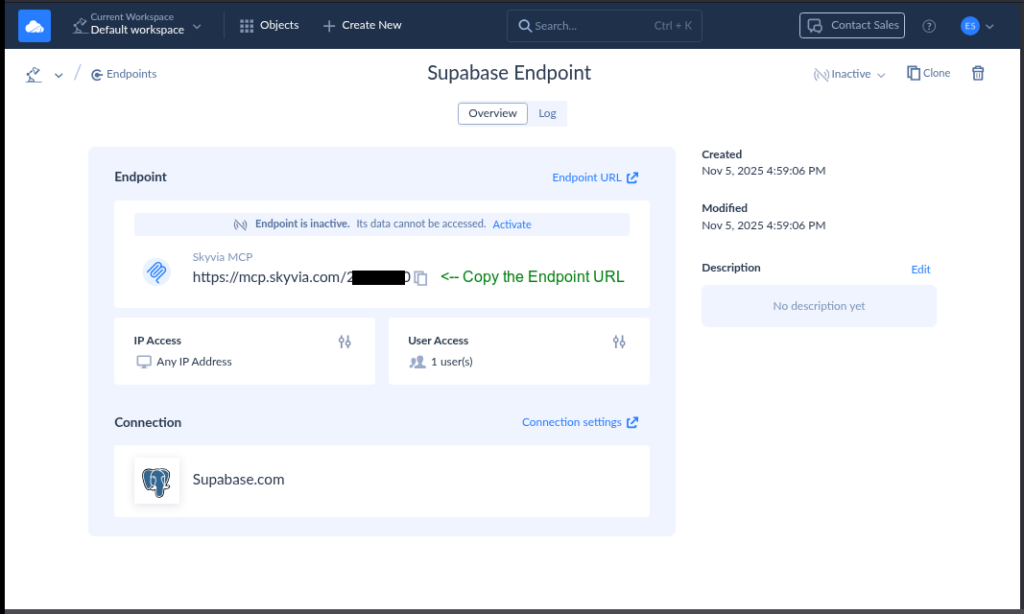
At this point, the PostgreSQL MCP Endpoint is ready. Use the generated Skyvia endpoint URL for your AI app to call. The setup should be similar to the one below:
“That’s it?” Sato asked in amazement.
“Yes, that’s all there is to it,” Steve replied with a smile.
STEP 3: Use the Endpoint in Your AI App
“You can test this using your browser or configure the endpoint in the Claude Desktop app,” says Steve. “Just copy the Skyvia MCP URL by clicking the copy icon beside the URL.”
Then, Steve itemized the steps to configure it in Claude Desktop:
- Click the hamburger menu in the top left corner of the Claude Desktop app.
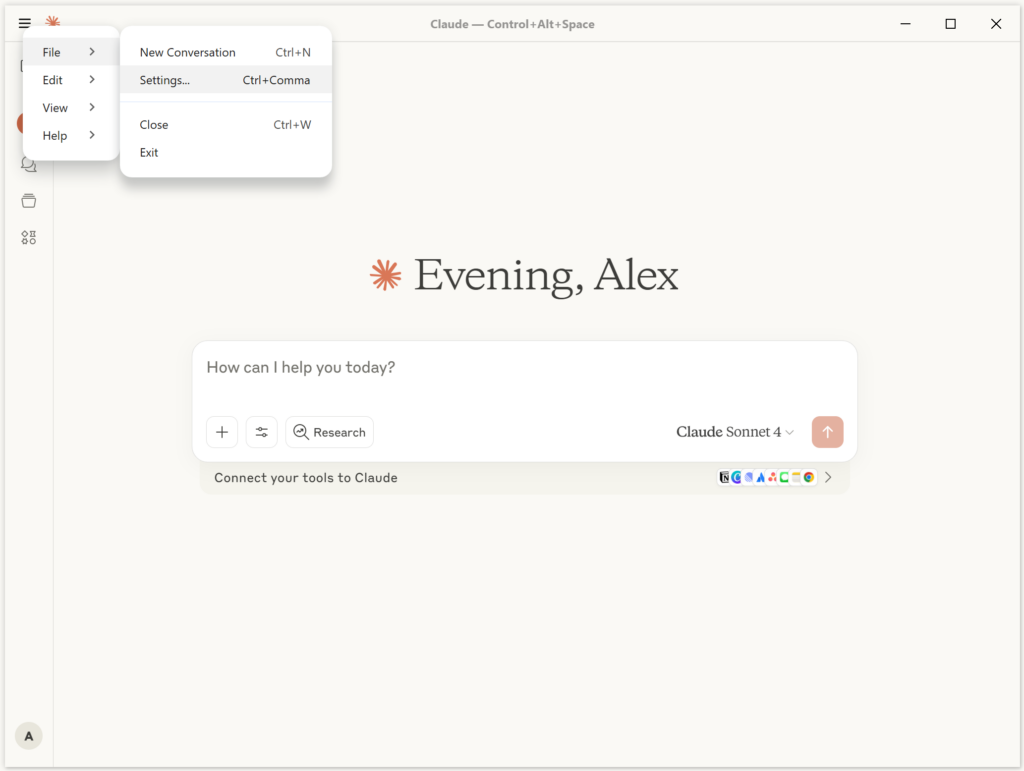
- Click File, and then click Settings.
- In the Settings window, click Developer.
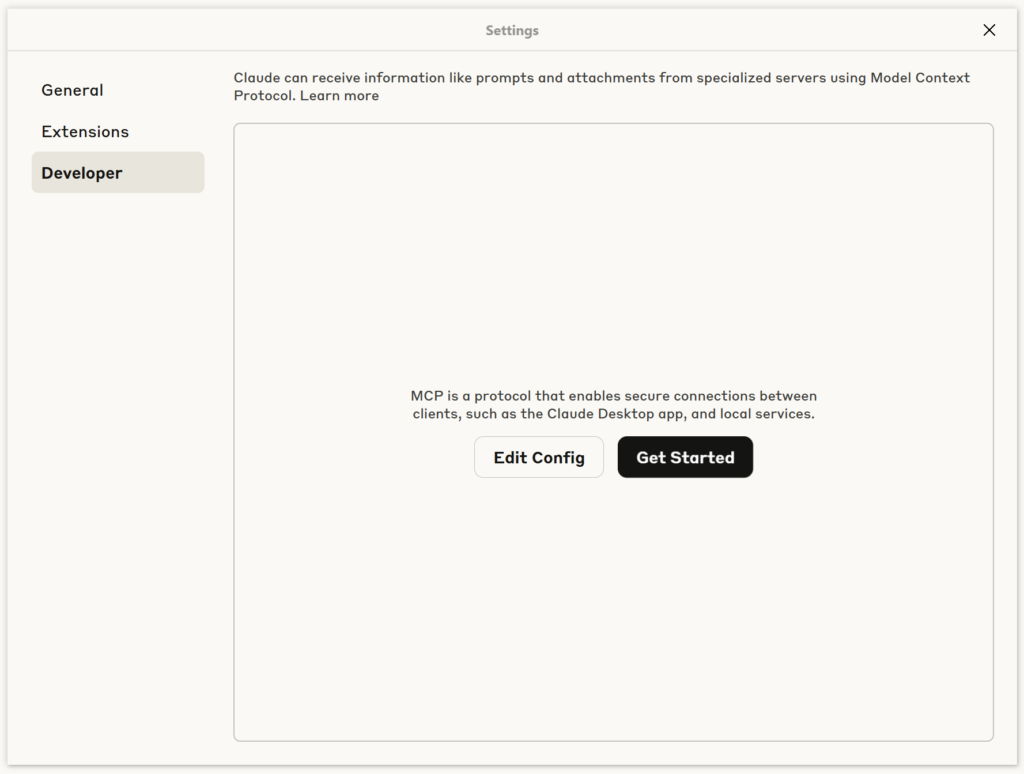
- Click Edit Config. Replace the https://mcp.skyvia.com/XXXXXXXX with your MCP endpoint URL and YYYYYYYYYYYYYYYYYY with your authorization header. See a sample below:
{
  "mcpServers": {
    "dev-mcp-test": {
      "command": "npx",
      "args": [
        "mcp-remote",
        "https://mcp.skyvia.com/XXXXXXXX",
        "--allow-http",
        "--debug",
        "--header",
        "Authorization:${AUTH_HEADER}"
      ],
      "env": {
        "AUTH_HEADER": "Basic YYYYYYYYYYYYYYYYYY=="
      }
    }
  }
}
“Where will you get that authorization header?” Steve asked a rhetorical question. “You need to encode the userid and password combination into a base64 encoding. The format should be user:password. Note the separation of the two by a colon. So, for example, your userid is user and your password is password, the base64 encoding for that is dXNlcjpwYXNzd29yZA==. You can use a base64 encoding tool like https://www.base64encode.org/ for that,” Steve explains.
“So, what can you say, Sato? I gave you 2 options,” Steve asked.
“Looks like I’ll try the Skyvia PostgreSQL MCP server solution first. It looks very promising,” replies Sato.
“One last thing…But I think you already know this. Don’t connect your entire database. Allow only access to data that the AI needs to know. Do not include sensitive data,” reminds Steve. “If you need to replicate only the data you want AI to see, Skyvia has data replication too.”
“I’ll remember that. I’ll ask questions along the way. Thanks for everything,” Sato’s grateful reply.
Conclusion
MCP is turning the tables in how we access data from an AI app. While your talent allows you to build your own MCP server, Skyvia lets you do it quickly, so you can focus on other important project matters.
If you’re company is serious to adapt MCP, use a faster, secure, and scalable by default setup with Skyvia MCP Endpoint. You’ll never be ready until you try it out. Skyvia is free to try, so create your PostgreSQL MCP server with Skyvia today.

FAQ for PostgreSQL MCP Server

Is @modelcontextprotocol/server-postgres still maintained?
No. That reference Postgres MCP server, @modelcontextprotocol/server-postgres, has sat in an archived repository since May 29, 2025, while npm shows its package as no longer supported. It offered one read-only query tool. Existing setups may still start with npx, but nothing will fix its bugs, so move to a maintained PostgreSQL MCP server.
What can I use instead of the archived Postgres MCP server?
Postgres MCP Pro is a maintained open-source replacement for the archived Postgres MCP server, with a restricted mode for read-only, time-limited queries. On AWS or Azure, the vendors’ own MCP servers cover Aurora, RDS and Azure Database for PostgreSQL. And if nobody on the team wants to run a server at all, Skyvia MCP Endpoint is hosted and needs no code.
What’s the first step with PostgreSQL MCP?
Oddly enough, PostgreSQL MCP starts in the database: we’d create a role for the AI that has SELECT on just the tables or views it should see. The server comes after that, maybe Postgres MCP Pro in restricted mode on a laptop, or a Skyvia MCP Endpoint when hosting isn’t something you want to own. Hook it up to Claude, then ask something whose answer you already know.
Can Claude read a PostgreSQL database, and how do I connect them?
Yes, Claude reads PostgreSQL through an MCP server. In Skyvia, create a PostgreSQL connection, turn it into an MCP endpoint and copy the endpoint URL. An endpoint without users can be added to Claude web or Claude Desktop as a custom connector. An endpoint with users works only in Claude Desktop, through claude_desktop_config.json and mcp-remote.
Can an AI agent change data through a PostgreSQL MCP server?
Whether an AI agent can change PostgreSQL data depends on the MCP server and the database role. The archived reference server was read-only. Postgres MCP Pro writes only in unrestricted mode, and the AWS Labs server only with –allow_write_query. A Skyvia MCP endpoint can do whatever its connection’s database user may, so give that user read-only grants for production.
Does MCP work with PostgreSQL running on-premises?
Yes. Self-hosted servers like Postgres MCP Pro can sit right inside your network, on a machine near the PostgreSQL database. For Skyvia MCP Endpoint, install the Skyvia Agent on a computer that has internet access and can reach the database server, and Skyvia connects through it. Skyvia’s PostgreSQL connector also supports SSL and SSH connections.