Summary
- ER/Studio and erwin Data Modeler suit enterprise teams that need governance and shared repositories.
- SqlDBM fits teams that model Snowflake, Databricks or BigQuery warehouses in the browser.
- DbSchema, Navicat Data Modeler and dbdiagram.io cover developer teams on a budget, MySQL shops included.
- Oracle SQL Developer Data Modeler and pgModeler are the strongest free choices, and Hackolade Studio leads for NoSQL.
- SAP PowerDesigner faces end of life (Idera dates it to December 2027), and MySQL Workbench 26 lists no modeling features, so plan around both.
Your schema began as 20 tables and a photo of a whiteboard. Today it’s 300 tables spread over two databases and a warehouse, and nobody can tell you which foreign keys still matter. That’s usually the week a team starts shopping for data modeling tools. Pick badly, and you pay a year of license fees for a model that slowly stops matching the database it’s supposed to describe.
Drift is the part most lists skip. And modeling is a sore spot to begin with: in the Practical Data Community’s 2026 State of Data Engineering Survey, 89% of 1,101 data professionals reported at least one pain point with their modeling approach. Every tool here can draw a diagram, so that’s no help. The real question is how the model travels to the database and back. Can the tool read an existing schema? Generate DDL? Compare the model with the live database and write the ALTER script? Keep the model in Git?
That’s the lens we used on eleven data modeling tools, next to model levels, database coverage and price. Every price and limit comes from the vendor’s own pages, checked in November 2026.
Ready to make your model and your database agree on something again?
How we chose and checked these tools
How it reaches the database came first. One manual column change is all it takes: if the model can’t be checked against the live schema, it’s out of date. That’s why every entry covers both directions, reverse engineering (database to model) and forward engineering (model to DDL), along with compare and sync against the live database, and Git or some other version history.
Two more things we kept apart from the diagram. One is impact analysis: before you rename a column, you want to know which models, reports and dashboards read it, and that takes lineage, which drawing tools don’t keep. The other is version control. A shared canvas lets several people edit at once, but a production schema change also needs a branch, a review, an approval and a record of what was deployed, so each entry says where Git or a check-in repository comes in.
Each entry follows the same fields:
- Best for: the team and the job it suits.
- How it reaches the database: reverse and forward engineering, compare and sync, Git, plus the edition each one requires.
- Pricing: what the bill counts, the entry price and its billing basis (or “not published”), and whatever free edition or trial exists.
- Deployment: desktop, browser, or both.
We went through each vendor’s pricing pages, documentation and release notes in the US view. We didn’t run trial accounts for this version, so nothing here claims to describe how the tools behaved in our hands. Prices and plan limits are accurate as of November 4, 2026.
We make Skyvia, a data integration platform, and every tool below, Skyvia included, was judged on the same fields, limitations and all. Skyvia doesn’t design models, so it isn’t one of the eleven. It shows up after the list, for the step that follows the model: loading the data.
Some tools we left out on purpose:
- SAP PowerDesigner is one, since its mainstream maintenance is ending: SAP Note 3280082 covers the date for PowerDesigner 16.7, and Idera, ER/Studio’s vendor, puts it at December 31, 2027.
- MySQL Workbench is another, because its version 26 lists no modeling features.
- Redgate Data Modeler (formerly Vertabelo) retired its tool for reverse engineering a live database on October 31, 2026.
- IBM InfoSphere Data Architect is sold through IBM sales for IBM integration projects.
- Sparx Enterprise Architect is a UML and enterprise architecture suite where data modeling is one diagram type among many.
- And Visio is a general diagramming tool.
Data modeling tools that keep the model and a live database in step
All six data modeling tools here pull an existing database into a model, write the DDL, and diff the model against the live schema until an ALTER script falls out. Where they part ways is price, how many databases they cover and which edition you need for the round trip.
Best for enterprise models with a shared repository: ER/Studio
ER/Studio, from Idera, is a desktop modeler for architects who look after large conceptual, logical and physical models across many database platforms. You can buy it as one of three editions. Climbing the tiers buys you teamwork and governance; the modeling itself barely changes.
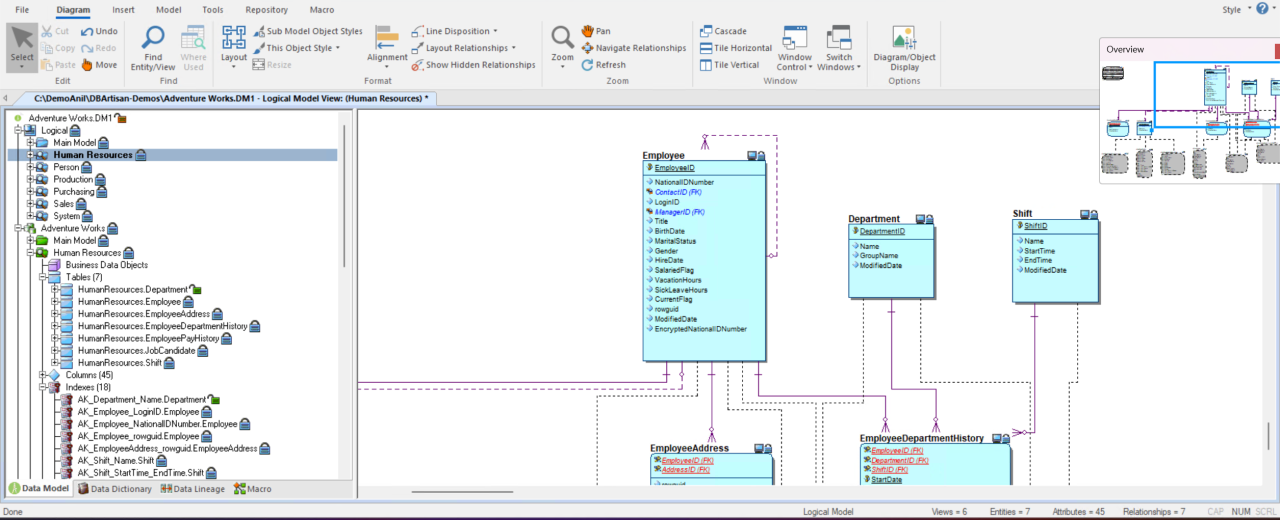
- Best for: enterprise data architects who juggle big models, enforce naming standards and answer to a governance team.
- How it reaches the database: every edition does forward and reverse engineering. Compare & Merge diffs the model against a live database and generates the ALTER script, and the entry edition has it too. A shared repository with check-in and check-out begins at Data Architect Pro, while Git integration is Enterprise only.
- Pricing: per user. Data Architect runs $2,687 and Data Architect Pro $3,693, and Idera calls each one a total subscription price per user without saying for how long. Enterprise? That’s a sales quote. There’s a 14-day trial with no credit card required.
- Deployment: a desktop workstation license, and Enterprise layers Team Server Core, a web portal, on top.
Strengths
- The cheapest edition already includes the live-database compare and ALTER script.
- SQL Server, Oracle, Db2, Teradata, Snowflake, PostgreSQL, Microsoft Fabric, Azure Synapse, Databricks, BigQuery and MongoDB are all on its list, and that’s not the whole of it.
- SAP PowerDesigner models import directly.
Limitations
- Data Architect is single-user, so no repository or version control until Pro.
- Want Git, the Collibra and Microsoft Purview catalog hooks, or most governance features? You need Enterprise, and a few of those ride on Team Server Core, which costs extra.
Best for linking models to a data catalog: erwin Data Modeler
Like ER/Studio, erwin Data Modeler works across all three model levels. The difference is the link to Quest’s erwin Data Intelligence catalog, which maps each logical name to a business term. Conceptual modeling got rebuilt in 15.2. AI drafting from prompts arrived in 15.1 for reverse-engineered models, and 15.2 extended it to new ones.
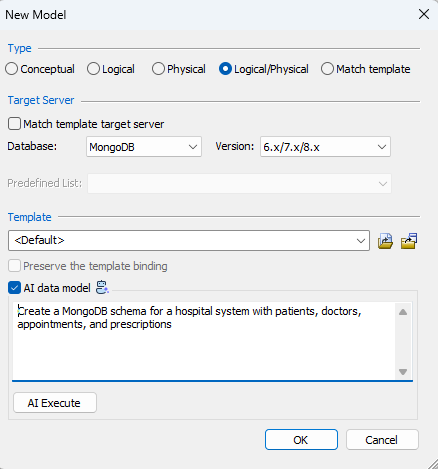
- Best for: companies already on Quest’s erwin governance stack, or heading there.
- How it reaches the database: a Forward Engineering Wizard, reverse engineering from a database or a script, a complete compare with alter-script generation, and “Commit to Git” with GitHub Enterprise and Azure DevOps repositories. erwin Mart Portal stores shared models with check-out.
- Pricing: not published. The product page offers a free trial and “Buy online”; licenses are managed in the Quest Licensing Portal.
- Deployment: desktop for Windows and macOS, with erwin Mart Portal and the ER360 web portal as server components.
Strengths
- Its targets go beyond relational databases to MongoDB, Cassandra, Neo4j, Couchbase and DynamoDB.
- The 15.2 Patch added bulk migration of SAP PowerDesigner models through the erwin API.
- Paired with erwin Data Intelligence, a separate Quest product, your models feed lineage down to the column, so you can see what a change to a table or column would affect before you make it.
Limitations
- The page shows no price, and the edition list isn’t public.
- AI features need AI credentials configured in erwin Mart Portal. One catch before you upgrade to 15.2: your licenses have to move to the Quest Licensing Portal first.
Best for syncing a model and a database on a budget: DbSchema
Wise Coders built DbSchema to read a live database into a model file, let you rework it on a canvas, then push the changes back. If the database has a JDBC driver, SQL or NoSQL, DbSchema can talk to it.
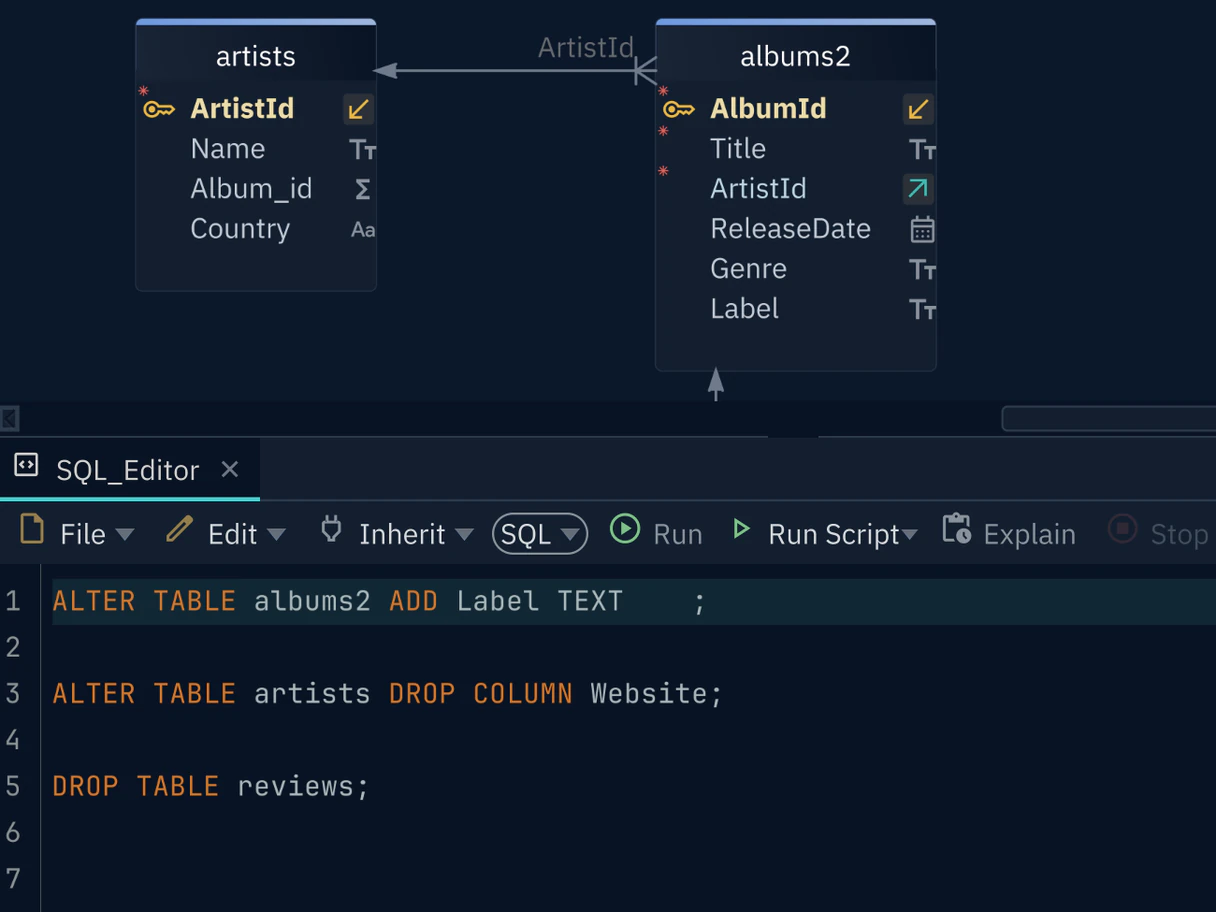
- Best for: developers and small data teams that need the model and database to agree, and won’t pay enterprise prices for it.
- How it reaches the database: reverse engineering comes in every edition, Community included. Pro’s schema synchronization is the part worth paying for: you see each mismatch between the model and the database, decide which side wins, and read the generated SQL before it touches anything. The design lives in one .dbs file with Git built in.
- Pricing: per developer license. For business use, Pro is $29.40 a month billed monthly, or $294 one-time if you’d rather own a perpetual license. Architect adds logical and conceptual design at $47.04 a month or $470.40 perpetual. Personal-use prices are lower ($19.60 a month for Pro). Each download begins as a 15-day trial; once that ends, you’re on the free Community edition.
- Deployment: it installs on Windows, macOS or Linux, and since the model is a local file, nothing goes to a cloud account.
Strengths
- Nothing else at this price makes the round trip as plain: sync one difference at a time and preview the SQL first.
- 101 database engines are reachable through JDBC, so the range runs from PostgreSQL and SQL Server all the way to Snowflake, BigQuery, MongoDB and Cassandra.
Limitations
- Community can’t save a design to a file or open a saved project, so you need Pro for offline work, Git and sync.
- As of 10.4.0 (July 2026), Pro covers only physical design; logical and conceptual design moved to Architect.
Best for a single desktop app over MySQL, PostgreSQL and MongoDB: Navicat Data Modeler
Version 5, out in September 2026, gave Navicat Data Modeler a hybrid canvas, naming standards and a glossary. Underneath the new features, it’s still a desktop app that walks a model from a conceptual sketch to a physical schema, with relational, dimensional and Data Vault 2.0 methods to choose from.
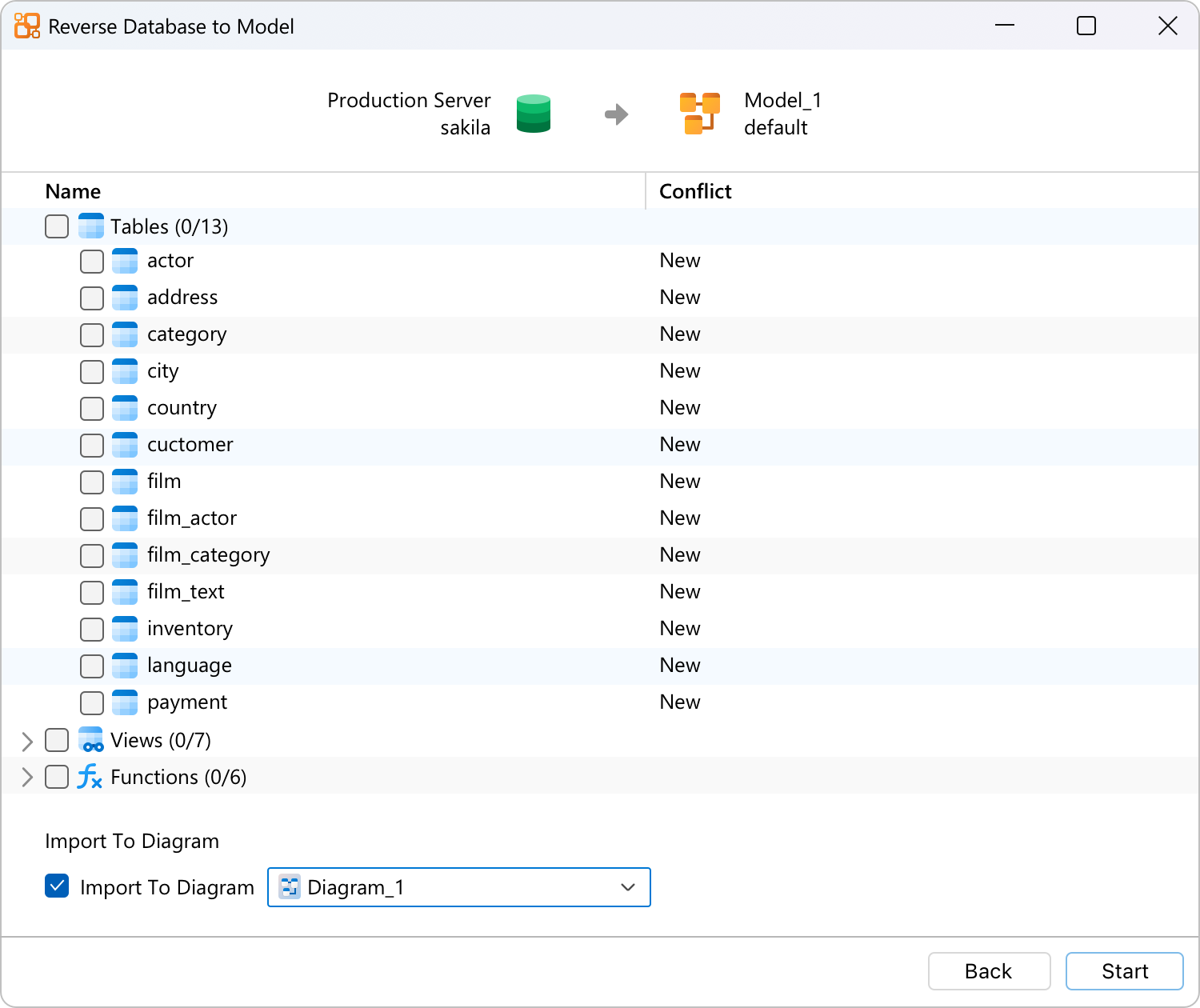
- Best for: a team whose handful of relational databases, plus MongoDB, should live in one desktop modeler.
- How it reaches the database: Enterprise reads the structure of a live database (no data comes across), imports and exports SQL, and pushes changes either from the model to the database or back the other way. Shared workspaces sit in Navicat Cloud, or on an On-Prem Server if you’d rather host them.
- Pricing: per user. Enterprise costs $37.99 a month when you pay monthly or $379.99 for a year, and $749 buys a perpetual license that includes a year of maintenance. Navicat Data Modeler Lite costs nothing, and the paid edition can be tried for 14 days.
- Deployment: desktop only, on Windows, macOS or Linux.
Strengths
- Sync runs in both directions, and the conversion from a conceptual model to a logical and then a physical one is built in.
- Every price is on the store page, with monthly, yearly or perpetual billing to choose from.
Limitations
- Lite can’t reverse-engineer, import or export SQL, or sync. That leaves a diagramming tool, nothing more.
- Only eight database targets make the list (MySQL, PostgreSQL, MongoDB, MariaDB, SQL Server, Oracle, SQLite, Snowflake), and Git doesn’t appear at all.
Best for a free modeler with a full round trip: Oracle SQL Developer Data Modeler
Oracle’s free desktop modeler handles logical, relational, physical, multidimensional and data type models. Among the free options here, it’s the only one that does forward engineering, reverse engineering and a comparison with the live database.
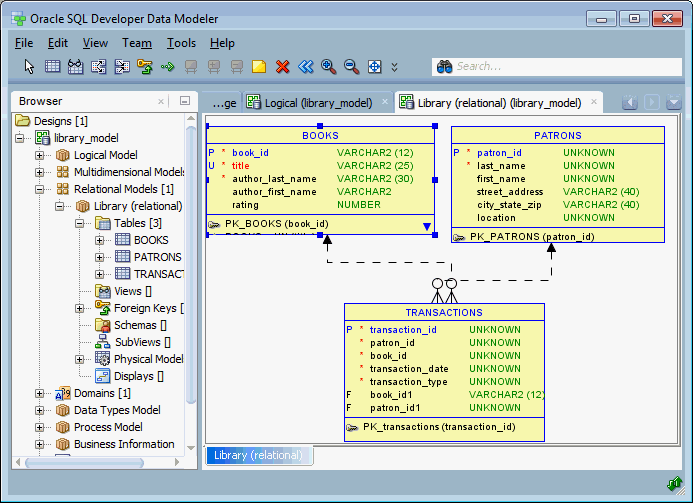
- Best for: Oracle shops and anyone with no budget who works mostly with Oracle, SQL Server or Db2.
- How it reaches the database: full forward and reverse engineering. You import from the data dictionary, then use “Swap Target Model” to compare a relational model with the database and view the DDL that updates it. Versioning is built in for both Git and Subversion.
- Pricing: free ($0 per user) under the Oracle Free Use License, with no paid edition. Support through My Oracle Support needs an Oracle Database license.
- Deployment: desktop (Java) for Windows, macOS and Linux.
Strengths
- It’s free and still gives you the whole round trip, compare and generated ALTER DDL included.
- Models from other tools import fine, including CA Erwin 4.x and 7.x and Oracle Designer.
Limitations
- Coverage beyond Oracle is thin and old, because the release notes go no further than SQL Server 2012 and Db2 v10 and v11, and you install other JDBC drivers yourself.
- The current build is still 24.3.1 from December 2024, and PDF reports were dropped.
Best for PostgreSQL shops with no other database: pgModeler
PostgreSQL is the only database pgModeler knows, though it knows it well, down to row-level security policies and custom types. On October 30, 2026, version 2.0 went stable and split the product in two: a free Community edition and a paid Plus edition.
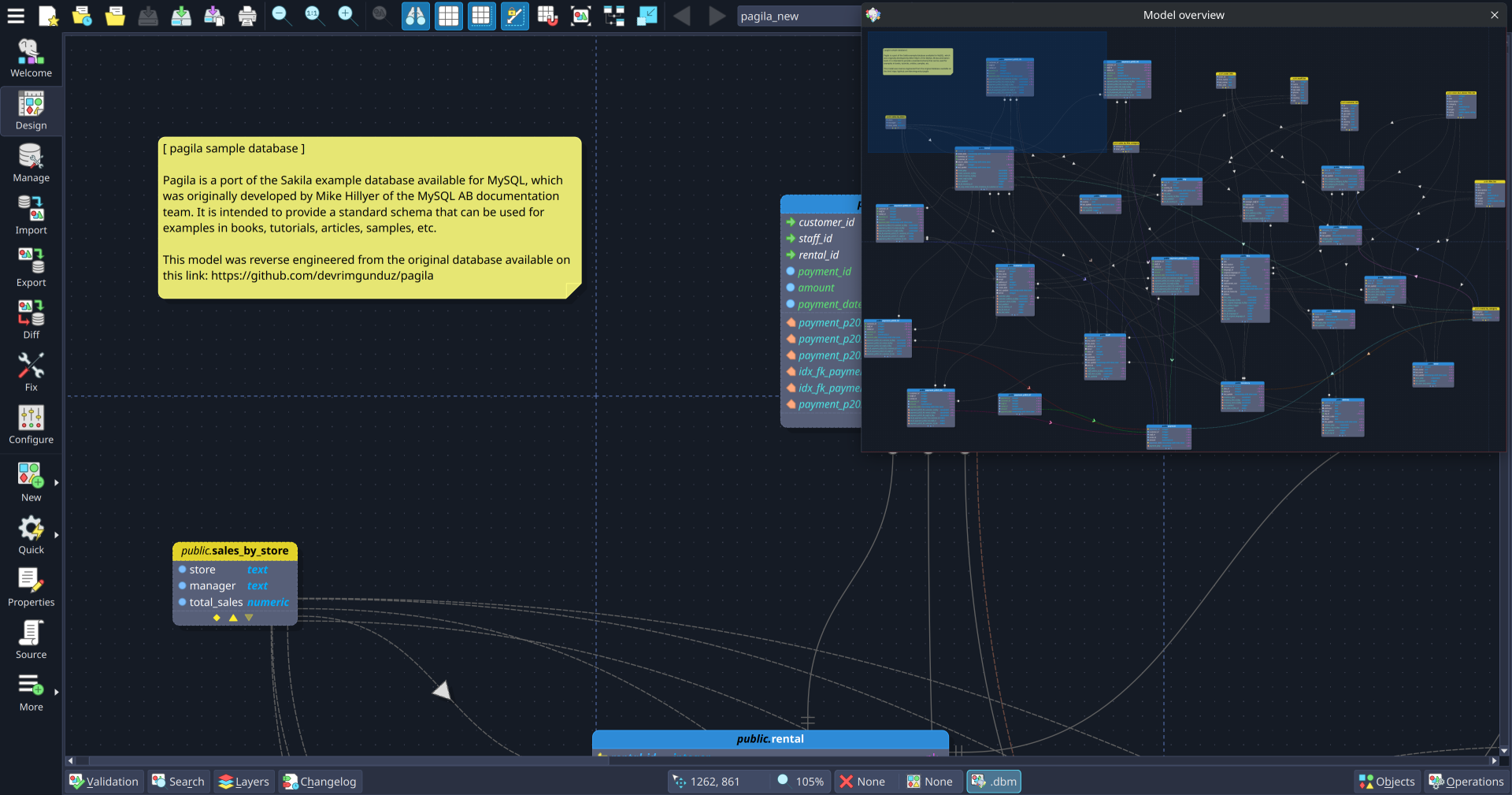
- Best for: PostgreSQL teams that want every object type the database has inside the model.
- How it reaches the database: both editions generate SQL or deploy straight to a PostgreSQL server. Since 2.0, reverse engineering, incremental diff and sync against a live server, and the built-in Git client are Plus-only.
- Pricing: per seat. Plus costs $65.90 for 6 months and $123.74 covers 12 months (one seat, billed once), while $425.58 one-time gets you a perpetual license with 2 seats. The Community edition is free and open source, though nobody hands you an installer: you build it from the source code. Want to try Plus? The trial key lasts 3 days.
- Deployment: desktop for Linux, Windows and macOS; models are open XML files on your machine.
Strengths
- 2.0 supports PostgreSQL 18, temporal keys included, along with 30+ PostgreSQL object types.
- Both editions have a command-line interface for DDL export and diffs in CI.
Limitations
- PostgreSQL only.
- The free Community edition has had no reverse engineering or live diff since 2.0, and it ships only as source code.
Cloud and polyglot data modeling tools
This pair of data modeling tools works from a shared cloud workspace or a polyglot model, and writes schemas for data warehouses and NoSQL stores on top of relational databases. If you’re still choosing the warehouse itself, see our list of data warehouse tools.
Best for cloud warehouse models a team edits together: SqlDBM
Cloud data platforms shaped SqlDBM, a browser tool. Its main targets are Snowflake, Databricks, BigQuery, Redshift, Azure Synapse and Microsoft Fabric, although PostgreSQL, SQL Server, Oracle, AlloyDB and MySQL work too. Table data never reaches it; SqlDBM only touches metadata (DDL).
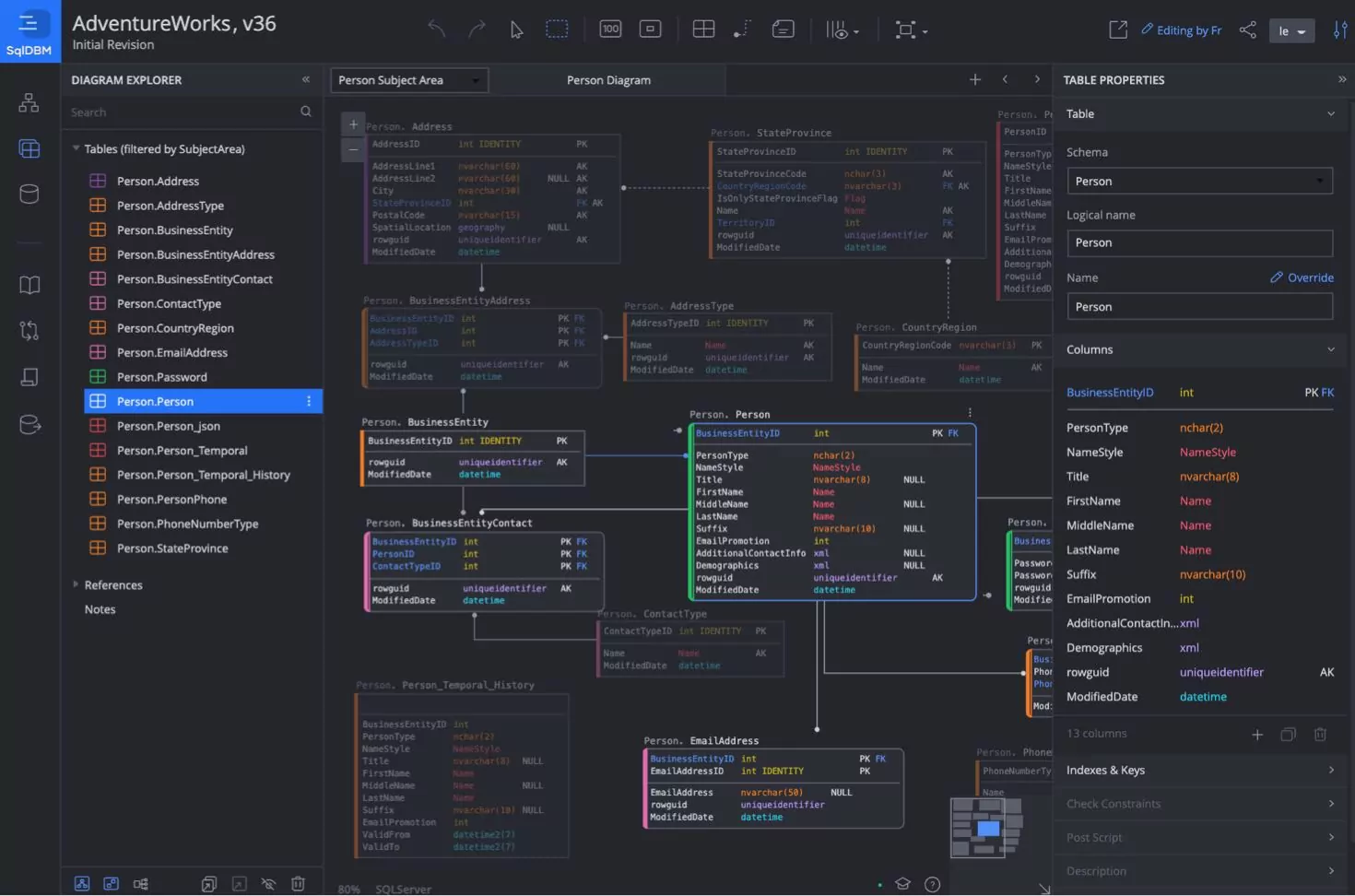
- Best for: analytics engineering teams editing one cloud warehouse model together, usually with dbt next to it.
- How it reaches the database: you get forward and reverse engineering with alter scripts, a dbt manifest as a starting point (October 2026), and Snowflake Schema Monitoring, which runs on a schedule and notifies subscribers when a schema changes. For Git, you get branching, merging and a GitHub App.
- Pricing: per user. No price on the site; you ask sales for a quote. Everything comes in one package, and only the AI Copilot credits are billed on top. Neither a free plan nor a trial shows up.
- Deployment: cloud, hosted on AWS, and customer-hosted or regional storage costs nothing extra.
Strengths
- It runs scheduled drift checks on Snowflake, which you won’t find in most modeling tools.
- It plugs into dbt, Git, Jira, Confluence, Collibra, Atlan, Alation and Microsoft Purview.
Limitations
- No published price and no listed trial.
- MongoDB and the other NoSQL targets are missing.
Best for NoSQL and mixed SQL and NoSQL schemas: Hackolade Studio
Hackolade Studio keeps one technology-agnostic model, and from it derives physical schemas for 45+ targets: MongoDB, Cassandra, DynamoDB, Neo4j and Couchbase, warehouses such as Snowflake and Databricks, and formats such as Avro, Parquet and OpenAPI.
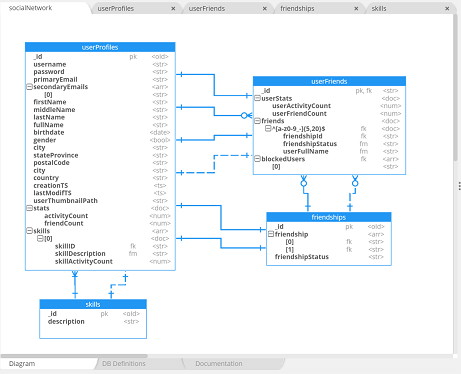
- Best for: teams whose data sits in MongoDB or event streams, or is split across SQL and NoSQL.
- How it reaches the database: forward and reverse engineering start at Professional. Reverse engineering infers the schema of JSON stored in relational columns (Snowflake VARIANT and Redshift semi-structured columns). Comparing and merging model versions, and native Git integration, come only with Workgroup.
- Pricing: per seat, in euros only. Expect €150 per seat per month or €1,500 per year for Professional; Workgroup is €175 per seat per month or €1,750 per year. Nothing to pay for Community, which opens in the browser. If you want to test a paid edition, the trial lasts 14 days and doesn’t ask for a card.
- Deployment: a desktop app for Windows, macOS and Linux, or Studio in the browser, and the models stay on your machine or in your own Git repositories.
Strengths
- No tool on this list covers more NoSQL and data-in-motion targets, and all of them come from the one polyglot model.
- Conceptual, logical and physical levels are all there, and models from PowerDesigner, erwin and ER/Studio come in through import.
Limitations
- The free Community edition can’t forward- or reverse-engineer, and it stops at 50 objects, with every entity and every attribute counting toward that limit.
- Git integration needs Workgroup, and prices are in euros only.
Diagrams and models as code
These three data modeling tools are lighter. Two of them draw ER diagrams, one that the business can read and one that developers type as code. The third, dbt, models the warehouse in SQL and draws no ER diagrams at all. Keep in mind that a diagram isn’t a data model. If nothing ties it to the schema, the DDL or a sync, it goes stale with the first change after deployment.
Best for schema diagrams written as code: dbdiagram.io
dbdiagram.io, from Holistics, draws ER diagrams from DBML (Database Markup Language), an open-source language for tables, fields and relationships. Since October 2026, a single plan covers dbdiagram and dbdocs, its documentation site.
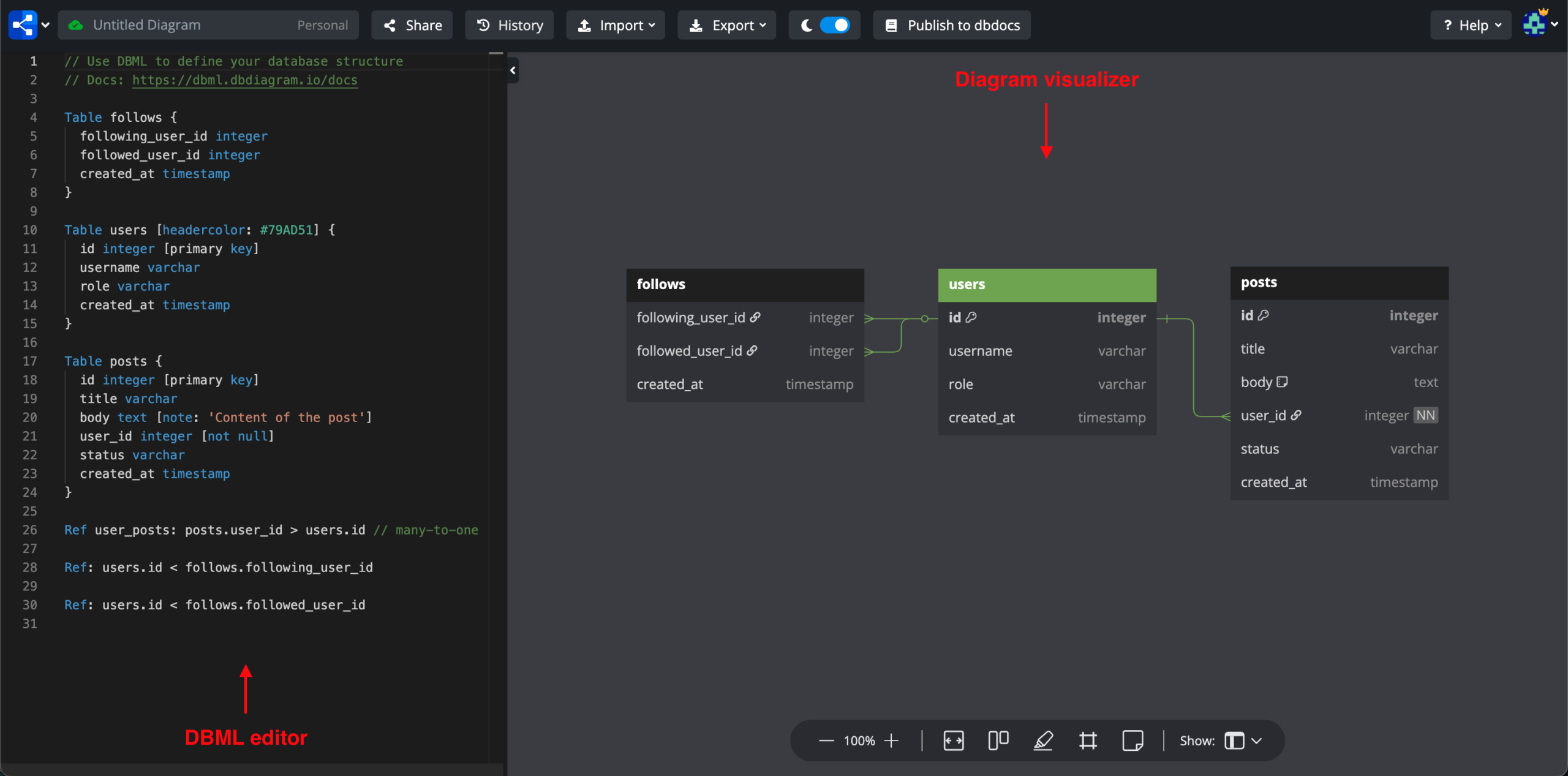
- Best for: developers who would rather type a schema than drag boxes, and want it in Git.
- How it reaches the database: every plan, Free included, can import from a database or a SQL dump and export SQL scripts. Connecting to a database directly needs the open-source CLI, which supports PostgreSQL, MySQL, SQL Server, Snowflake and BigQuery only. Since July 2026, the CLI also keeps .dbml files in version control, so you push and pull them between Git and the diagram. No comparison with a live database.
- Pricing: per editor. Personal Pro is $8 a month billed annually, or $14 billed monthly. Team covers 3 editors for $75 a month billed annually ($100 billed monthly). Free gives one editor 10 diagrams, and Team comes with a 7-day trial.
- Deployment: cloud in the browser, along with a VS Code extension and the CLI.
Strengths
- Reverse and forward engineering on the Free plan.
- Schema as code: DBML files reviewed in pull requests and synced with the CLI.
Limitations
- No compare with the live database and no migration script; export writes full CREATE scripts.
- Free and Personal Pro have one editor, so team editing needs Team.
- No lineage or impact analysis, so it can’t tell you what breaks if a column changes.
Best for diagrams the business can comment on: Lucidchart
Lucidchart is a browser diagramming tool with an entity relationship shape library. It isn’t a dedicated modeler. Where it shines is review: people outside the database team can open the diagram in a browser and comment, without installing anything.
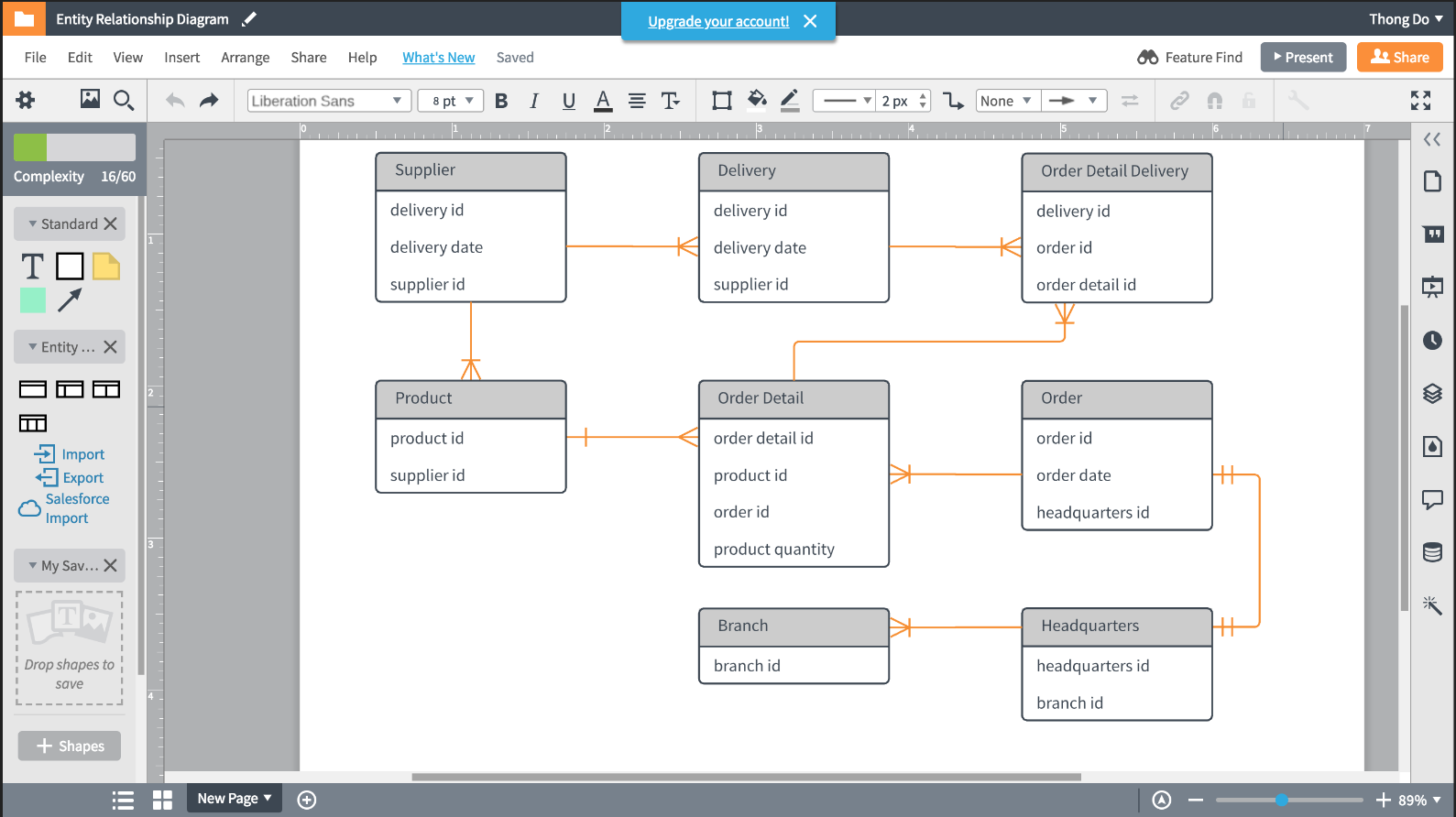
- Best for: analysts and architects who present an ERD to business stakeholders.
- How it reaches the database: never directly. To import, you run a query Lucid gives you against your database and upload the result, which works on every plan. Export ERD writes DDL for whichever DBMS you choose, although the connections between tables are left out. No compare and no Git.
- Pricing: per user. You’ll pay $9 a month billed annually for Individual or $10 per user a month billed annually for Team, and sales quotes Enterprise. The free tier stops at 3 editable documents. And the 7-day trial? It asks for payment details before it starts.
- Deployment: browser-only, in the cloud.
Strengths
- Real-time collaboration and comments for people who never open a database tool.
- Import works from a query result, so Lucid never gets database credentials.
Limitations
- Because the exported SQL carries no foreign keys, the DDL needs finishing by hand.
- Free stops at 3 editable documents with 75 shapes each.
- The diagram doesn’t follow the database. A column added after deployment never reaches it until someone runs the import again, and there’s no lineage to show what a change would break.
- Real-time editing isn’t version control: there’s no Git, branch, or review step for a schema change.
Best for warehouse models kept as SQL in Git: dbt
dbt treats warehouse transformations as code. Each model is a SQL SELECT statement, with Jinja for reuse, and you configure it and its tests in YAML. dbt compiles the project, works out the build order from the dependencies between models, and creates each one as a table or view in the warehouse. Since the merger closed on June 1, 2026, dbt has been part of Fivetran + dbt Labs. It’s a data modeling tool only in a looser sense, since there are no ER diagrams and no conceptual or logical layer.
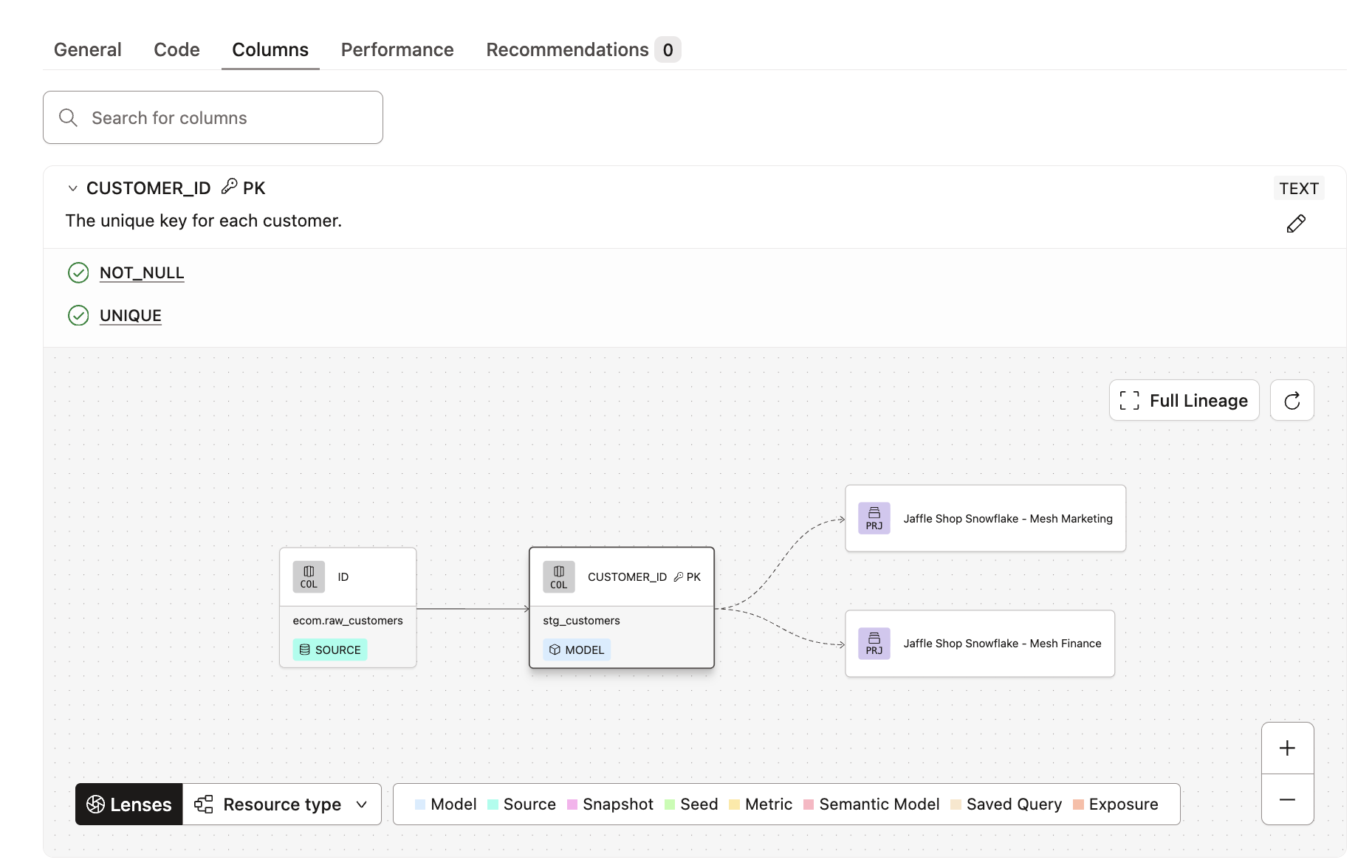
- Best for: analytics engineers in charge of a warehouse’s transformation layer who want every change reviewed in Git.
- How it reaches the database: only from code to the database. dbt compiles the models and runs the DDL itself, and when a model contract is enforced, it checks column names and data types first and adds the constraints to the DDL. Each run rebuilds the objects rather than diffing a model against the live schema, and no feature turns an existing database into a diagram.
- Pricing: developer seats plus models built a month. Starter is $100 per developer seat a month, billed monthly, with 15,000 models a month and one project; Enterprise is a custom price billed annually. The Developer plan is free for one seat and 3,000 models a month; the platform trial lasts 14 days, and the CLI is free to run.
- Deployment: the hosted dbt platform, or the CLI on your laptop or servers.
Strengths
- Models and docs are plain SQL and YAML in Git, with CI and scheduling on every plan, the free one included.
- Model contracts and model versions give downstream users a warning period before a breaking change.
- Column-level lineage shows which downstream models read a column before you change it, on Enterprise plans with Catalog. It follows SELECT statements, so joins and filters don’t show up in it.
Limitations
- It only transforms data already in the warehouse, and draws no ER diagrams.
- dbt v2, the new engine, supports only Snowflake, BigQuery, Databricks and Redshift as generally available platforms (plus DuckDB on the CLI); PostgreSQL or SQL Server projects stay on dbt v1 for now.
After the model: loading the data
A model describes the target. The data, though, still needs to come in from your apps and databases, stay up to date, and get through the next schema change. That job belongs to the integration layer, which is where Skyvia comes in.
Best for loading app and database data into the modeled warehouse: Skyvia
Skyvia is a no-code platform that runs in the cloud. Its Data Integration product replicates SaaS and database data into a warehouse, imports into the tables you defined in your model, and starts your dbt Core project after each load.
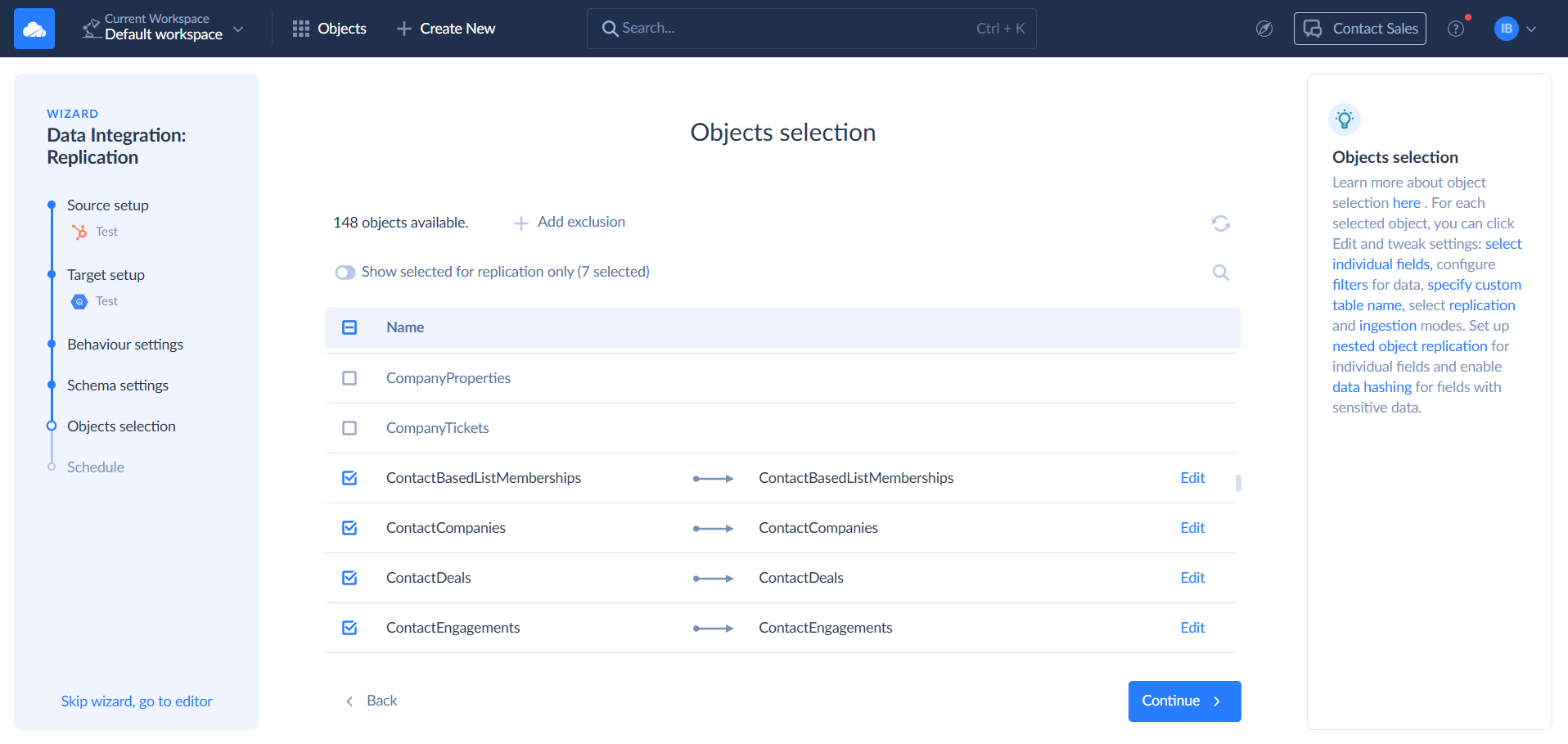
- Best for: teams with a physical model ready, who need data from 200+ apps and databases to arrive in it on a schedule.
- How it reaches the database: it doesn’t model. Replication builds the target tables by itself in BigQuery, Snowflake, Redshift, Azure Synapse, Databricks or a database, and after a full first load, it moves only new and changed records. If you created the tables yourself, Import writes into them with insert, update, upsert or delete. Your dbt Core project can run from Git on a schedule, or straight after a replication inside a Control Flow.
- Pricing: records written per month. The Basic plan is $99 a month billed monthly ($79 billed annually), with 5M records and daily runs. Standard starts at that same $99 monthly ($79 annually), although for 500K records, since what you’re buying is hourly runs and Data Flow. On the Free plan, you get 10K records a month.
- Deployment: cloud, with an agent for databases behind a firewall.
Strengths
- Replication builds the tables itself, so the first load shows quickly how the source data fits your design.
- The dbt Core runs keep modeling-as-code in your repository.
Limitations
- It doesn’t design or diagram models.
- Source metadata changes aren’t detected automatically, so when the model or the source changes, you update the mapping.

Which data modeling tool fits which job
- Enterprise models with governance and a catalog: ER/Studio, or erwin Data Modeler for teams that already run Quest’s governance stack.
- Impact analysis before a column change: erwin Data Modeler paired with erwin Data Intelligence, or dbt’s column-level lineage for warehouse models built in dbt.
- Leaving SAP PowerDesigner: ER/Studio imports PowerDesigner models as they are, and erwin and Hackolade provide import paths too. Try one large model first.
- A model and a database that must stay in sync, small budget: DbSchema Pro.
- Cloud warehouse, dbt already in use: draw it in SqlDBM and let dbt handle the transformations.
- MySQL, now that Workbench lists no modeling: either DbSchema or Navicat Data Modeler, because each one reverse-engineers and syncs a MySQL database.
- No budget: Oracle SQL Developer Data Modeler, or dbdiagram.io for anyone who prefers to write the schema as code.
- PostgreSQL only: go with pgModeler.
- MongoDB, JSON or NoSQL: Hackolade Studio is built for that.
- Stakeholders review the model: Lucidchart.
Data modeling tools compared: how they reach the database and price
| Tool | Model levels | How it reaches the database | Entry price (accurate as of November 4, 2026) | Free option |
|---|---|---|---|---|
| ER/Studio | Conceptual, logical, physical | Reverse and forward, live compare with ALTER script in every edition; Git in Enterprise | $2,687 per user (Data Architect, total subscription price) | 14-day trial |
| erwin Data Modeler | Conceptual, logical, physical | Reverse and forward, complete compare with alter script, Commit to Git | Not published: buy online or sales | Free trial |
| DbSchema | Physical (Pro); logical, conceptual (Architect) | Reverse in every edition; model-to-database sync and Git in Pro | $29.40 a month (Pro, business use) or $294 perpetual | Community after a 15-day trial |
| Navicat Data Modeler | Conceptual, logical, physical | Reverse, SQL import and export, two-way sync (Enterprise) | $37.99 a month, $379.99 a year or $749 perpetual | Lite (no reverse engineering) |
| Oracle SQL Developer Data Modeler | Logical, relational, physical, multidimensional | Reverse and forward, compare with generated DDL, Git and Subversion | Free | Free |
| pgModeler | Physical (PostgreSQL) | SQL export and deploy in both editions; reverse, live diff and Git client in Plus | $65.90 for 6 months (Plus, 1 seat) | Community, source code |
| SqlDBM | Conceptual, logical, physical | Reverse and forward with alter scripts, dbt manifest import, Snowflake schema monitoring, Git | Not published: sales quote, per user | None listed |
| Hackolade Studio | Conceptual, logical, physical | Reverse and forward from Professional; Git in Workgroup | €150 per seat a month (Professional) | Community in the browser |
| dbdiagram.io | Tables and relationships in DBML | SQL import and export on every plan; CLI syncs DBML with Git; no live compare | $8 a month billed annually (Personal Pro) | Free plan, 10 diagrams |
| Lucidchart | ER diagrams | Import from a query result; DDL export without relationships; no compare | $9 a month billed annually (Individual) | Free plan, 3 documents |
| dbt | Models as SQL SELECTs | Forward from code with model contracts; Git; no reverse engineering or live compare | $100 per developer seat a month (Starter) | Developer plan, 3,000 models a month |
| Skyvia (loading, after the list) | Doesn’t model | Replication creates the target tables; Import writes into existing ones; runs dbt Core | $99 a month billed monthly ($79 annually), Basic | Free plan, 10K records a month |
What changed in data modeling tools in 2026
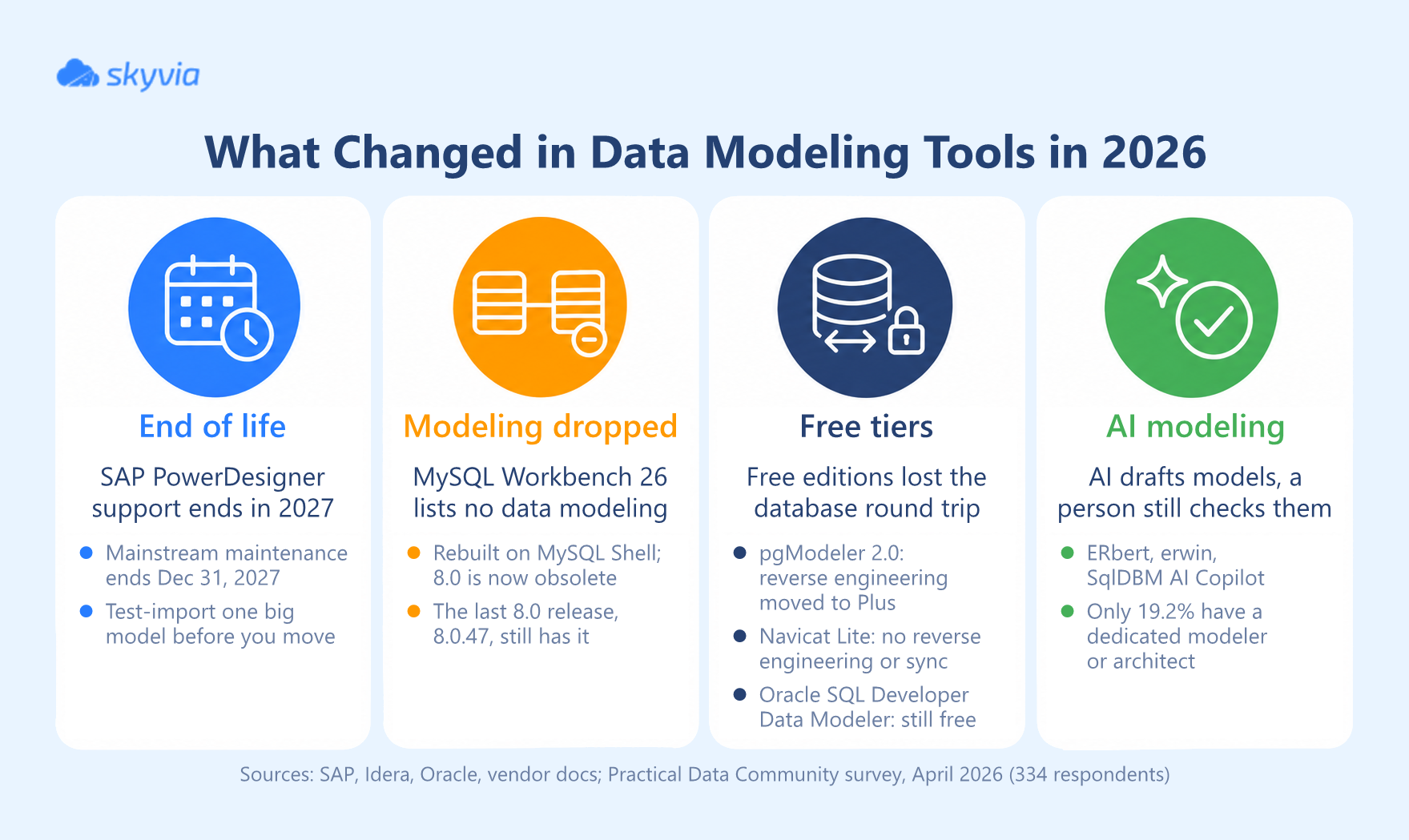
SAP PowerDesigner is heading to end of life. Mainstream maintenance for PowerDesigner 16.7 ends on December 31, 2027, according to Idera, which makes ER/Studio, calls it the end of support and updates, and positions ER/Studio as an alternative. Hackolade puts the end in 2027 too. SAP’s own note on the date sits behind the SAP for Me login. The software won’t stop working on January 1, 2028, but standard fixes and updates stop. Still running it? Before you plan the move, export one big model and see how it imports into your likely replacement.
MySQL Workbench 26 lists no data modeling. Workbench was rebuilt on MySQL Shell. Oracle released 26.7 in September 2026 and 26.10 a month later, and Workbench 8.0 is now obsolete, with no further releases. The new feature list covers the SQL editor, notebooks, Visual Explain, administration and HeatWave migration. EER diagrams and forward and reverse engineering aren’t on it. Workbench 8.0.47, the last 8.0 release, still has the modeling chapter.
Free editions lost the database round trip. pgModeler 2.0 moved reverse engineering and live diff to Plus. Hackolade’s Community edition has no forward or reverse engineering, Navicat Lite can’t reverse-engineer or sync, and DbSchema Community can’t save a model file. Oracle SQL Developer Data Modeler is still free with all of it.
AI drafts models now. ER/Studio ships ERbert, erwin builds models from prompts, and SqlDBM has an AI Copilot plus an MCP server. dbdiagram.io’s AI assistant is still in beta, and DbSchema charges $9 a month for its AI add-on. Somebody who knows modeling still has to check the keys, data types and names before the DDL reaches production, and that person is often missing. In Joe Reis’s April 2026 Practical Data Community pulse survey of 334 self-selected respondents, only 19.2% said their organization has a dedicated modeler or architect, and 4.8% picked better tooling as the change that would most improve their modeling. Reis himself took that last number as a warning to vendors:
“And if you’re a vendor selling a modeling tool (or frankly any tool), this is the kind of number that should keep you up at night.”
Joe Reis, author of Practical Data Modeling
What a data modeling tool is for
Data modeling tools sit between business requirements and the database: you get a design you can build, check and change, and the DDL that developers once wrote by hand comes out of it. You sketch the entities and relationships, set keys and data types, and the DDL for your platform gets generated from that. The reverse works too. Pointed at an existing database, the tool draws the diagram for you, and that’s how most organizations document a legacy system before they change it.
A spreadsheet or a whiteboard is enough while the schema stays small. Complex structures that span multiple systems are another story, since then you need a data dictionary, naming standards, version history and impact analysis for every column change. Data governance and database management teams lean on data modeling tools for exactly that, and so do data warehouse projects, where a dimensional or Data Vault model connects the sources to the reports.
Still choosing the database itself? Our PostgreSQL vs MySQL comparison covers the trade-offs, and the ETL vs ELT guide explains where transformation happens once the model is built.
With the model in place, the quickest way to test the design is to fill it with real data. Skyvia loads data from 200+ cloud apps and databases into the tables you designed, on a schedule, and you’ll see quickly whether the model fits what your sources actually send. Create a free Skyvia account and run your first replication into the new schema.

FAQ for Data Modeling Tools

Does SQL count as a data modeling tool?
No. SQL builds and queries the database, whereas a data modeling tool designs the structure and generates the SQL (DDL) for your platform. Most modeling tools also work the other way around and turn an existing database into a diagram.
Can I model a database in Excel?
For a few tables, it works: a spreadsheet will hold tables, columns, types and keys. What it won’t do is generate DDL, reverse-engineer a database, compare the model with the live schema or draw the relationships. That’s why teams move to a modeling tool once several people edit the schema or it passes a few dozen tables.
Can a data modeling tool update an existing database?
Yes, provided it can compare the model against the live schema. That’s what ER/Studio, erwin Data Modeler, DbSchema Pro, Navicat Data Modeler Enterprise, Oracle SQL Developer Data Modeler and pgModeler Plus do: they diff the two and write the ALTER script for you. dbdiagram.io and Lucidchart can only hand you full CREATE scripts.