
Summary
- SAP’s migration tools exist for the initial data load into S/4HANA; they don’t sync systems after go-live or move historical data.
- ECC mainstream maintenance ends at the end of 2027, extended maintenance at the end of 2030, and a paid transition option runs past 2030 only for RISE customers on the private edition.
- The Migration Cockpit is the default tool; Data Services fits heavy cleansing, and LSMW is not recommended for S/4HANA.
- Staging tables, filled from XML or CSV templates or by ETL, are the place to clean data before the load.
- Data from systems outside SAP needs its own preparation pass, repeated for every test cycle.
Somewhere in your ECC system there’s a customer master with three versions of the same company, a vendor list nobody has cleaned since the last audit, and fields whose purpose left with the consultant who created them. SAP data migration decides the fate of all of it (what goes to S/4HANA, how it looks when it lands, and what you leave behind).
SAP gives you the tools for the load itself, and the Migration Cockpit handles most of it. The calendar is SAP’s too: mainstream maintenance for ECC runs to the end of 2027, extended maintenance runs to the end of 2030, and a paid transition option runs past 2030 only under strict conditions.
We go through those dates, the migration approaches, the SAP tools, and how data actually gets into the Cockpit today. Then the part most guides skip: getting data from systems outside SAP ready for the load, and checking that it arrived intact.
What Is SAP Data Migration?
SAP data migration is the job of moving business data out of SAP ECC, or out of a system that was never SAP, and into SAP S/4HANA. In most projects, that means master data (customers, vendors, materials, business partners) plus the transactional data a new system needs on day one: open items, balances, stock levels.
SAP’s migration tools were built for one thing. Their aim, in SAP’s words, is to “populate a newly set up SAP system with the necessary data”, which SAP also calls the initial data load. Two jobs sit outside that scope, and SAP says so: keeping the old and new systems in sync after go-live, and moving historical data. For history, the Migration Cockpit makes a single exception: G/L balances. Closed orders from 2016 belong in an archive or a reporting store.
Migration objects also only create data. SAP says you can use them to create records, but not to change or update existing ones. For on-premise migration objects, SAP puts it plainly: no updates of existing fields or records are possible. So a mistake that reaches the target system can’t be fixed by loading a corrected file over it. Catch it in staging and in the test loads.
The load itself is the short part. The rest of the weeks? Cleansing, mapping, and test load after test load until the totals match.
SAP ECC End of Support: 2027, 2030 and Beyond
Most articles on this topic stop at “ECC support ends in 2027.” That’s the first of three dates, and the third one comes with conditions.
| Period | What SAP offers | Who it’s for |
|---|---|---|
| To end of 2027 | Mainstream maintenance for SAP Business Suite 7 core applications, including SAP ERP 6.0 (ECC) | Every ECC customer |
| 2028 to end of 2030 | Optional extended maintenance at a premium of two percentage points on the maintenance basis | Customers who sign up for it by the end of 2027 |
| 2028 onward, without extended maintenance | Customer-specific maintenance: problem solving for known issues at unchanged fees | Customers who choose nothing |
| From 2031 (to 2033 at launch; up to December 31, 2035 under SAP’s October 2026 update, with further prerequisites) | SAP ERP, private edition, transition option: a time-bound subscription | RISE customers whose systems already run as SAP ERP, private edition on SAP HANA by December 31, 2030, for systems of 2 TB or more |
| To end of 2040 | Maintenance commitment for SAP S/4HANA | The target system |
The transition option isn’t extra maintenance for an on-premises ECC. SAP launched it for 2031 to 2033, and on October 13, 2026, it said subscriptions may run until December 31, 2035, with further prerequisites spelled out in SAP Note 3591251. SAP sells it only together with the max success plan and prices it at an uplift over the private edition subscription. Early adopters get a break, though. If you signed the private edition by the end of 2025, you move over at commercially equivalent terms. Sign in 2026, and you pay a standard 20% uplift; anyone later waits until 2028 to learn the price.
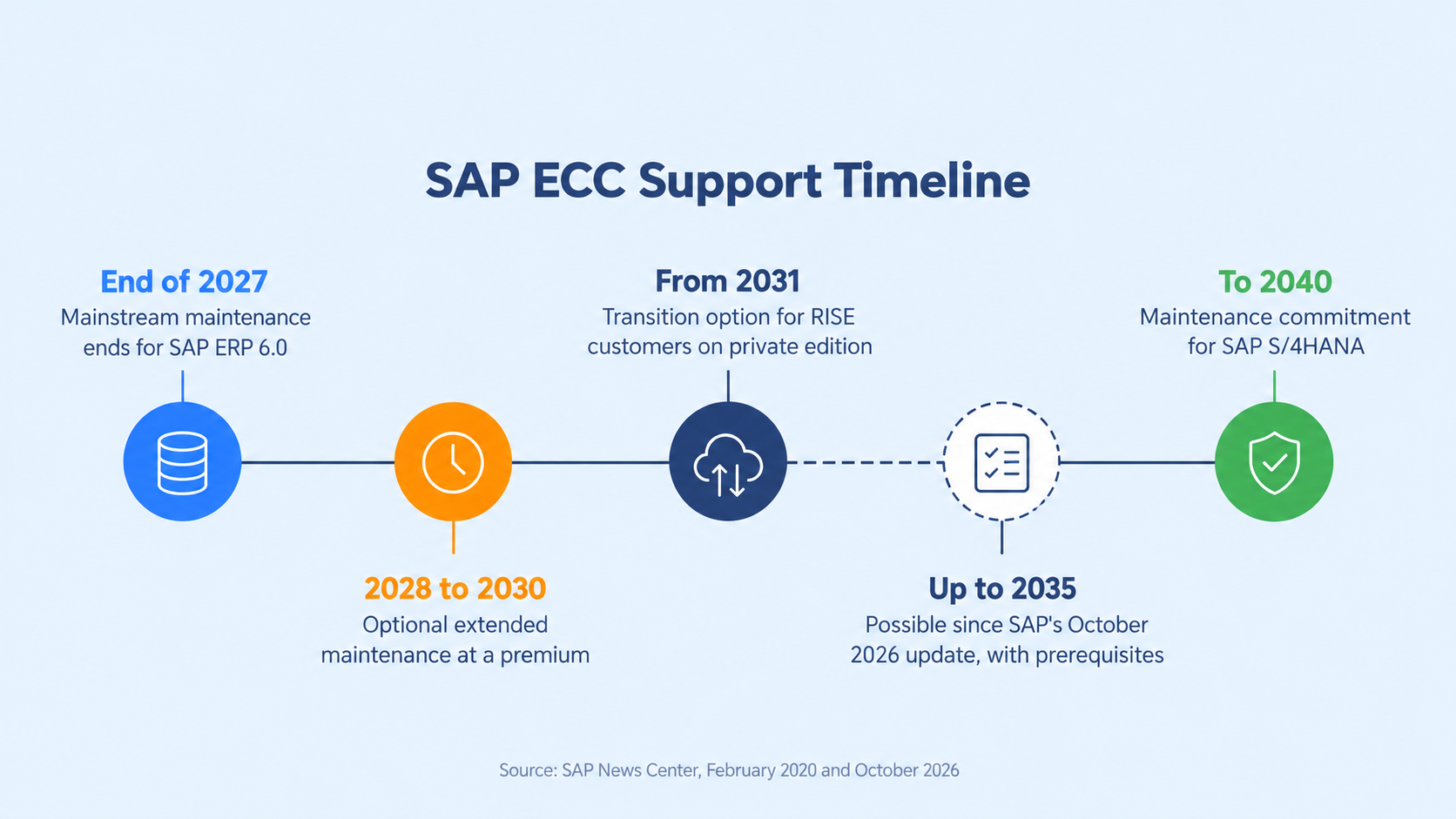
For the data team on an SAP migration project, none of this changes the work. Whichever date applies to you, the cleansing and mapping have to be done before the first test load, and they take longer than the load.
Greenfield, Brownfield or Hybrid: Choosing the Migration Approach
Migration taxonomies look tidy on paper. Real projects have other plans. Moving from ECC to S/4HANA counts as an application migration, but the database may be changing too, with a cloud move thrown in for good measure. Those labels won’t get you far when choosing tools. Your migration approach will: it determines how much data makes the trip and what you’ll need to get it there.
Pick it with room to change course because who knows what the future might bring. In the Natuvion and NTT DATA Business Solutions 2026 Transformation Study, 71% of organizations had to adapt their migration strategy mid-project.
Greenfield
A new implementation of S/4HANA with fresh processes, followed by a load of cleansed data from the old system. This is where the Migration Cockpit does most of its work. It takes longer, but it’s the chance to leave behind custom code nobody can explain, and customer records nobody has touched since 2011.
Brownfield
A system conversion of the ECC you already run. Configuration, custom code, and data come along, so there’s far less data to load and far more technical conversion work. Nearly half of projects take this path: in ASUG’s 2026 S/4HANA research, 47% of members chose brownfield, with projects averaging 15.8 months.
Unfortunately, data quality doesn’t magically improve during migration, at least so far. Your duplicates and dead master records convert just as faithfully as good ones. The step teams underestimate most is Customer-Vendor Integration (CVI), which turns every customer and vendor record into a business partner before the conversion.
“CVI synchronises and converts Customers and Vendors into Business Partners, and SAP S/4HANA migration cannot happen until the CVI is complete.”
Tracy Gore, senior SAP consultant at BTEC Consulting
Hybrid
Convert first, then redesign selected areas the greenfield way. Common when finance wants a clean start, and logistics doesn’t.
Legacy and non-SAP systems
SAP can’t convert what was never SAP in the first place. Data from Oracle or Microsoft systems has to take the greenfield route, and homegrown business applications are in the same boat. Everything goes through the load tools. The catch? These records have spent their lives ignoring SAP’s data rules, so getting them into shape can be quite an undertaking.
Cloud editions
SAP S/4HANA Cloud comes as a Public Edition (SaaS in a shared environment) and a Private Edition (a dedicated environment with more room to customize). The Migration Cockpit serves on-premises, Private, and Public alike, so the data preparation described below doesn’t change with the edition.
One thing does differ for old projects: as of SAP S/4HANA Cloud Public Edition 2105, SAP no longer allows data migration with the old Migration Cockpit app (the “old” version of Migrate Your Data) (SAP Note 2988692). New projects use the current “Migrate Your Data” app.
SAP Data Migration Tools Compared
SAP names three tools that teams typically use for the initial load: the Migration Cockpit, SAP Data Services (through its Rapid Data Migration content), and LSMW. The Cockpit and Rapid Data Migration bring ready content for master data and open transactional data. LSMW, in SAP’s own description, “is just a technical framework.”
| Tool | What it is | Best fit | Watch out for |
|---|---|---|---|
| Migration Cockpit (Fiori app “Migrate Your Data”, F3473) | Part of S/4HANA; predefined migration objects for master data and open transactional data | New implementations and non-SAP sources with standard objects | The old transaction LTMC is deprecated; LTMC projects can only be displayed |
| Migration Object Modeler | Companion to the Cockpit | Custom fields, custom objects, SAP objects the standard content lacks | Every change is something you retest |
| SAP Data Services | Separate data integration and data quality product, deployed on-premises | Many sources, heavy cleansing, matching and deduplication before the load | Quote-based license; built for developers |
| LSMW | Older framework from the ECC era | Loads into existing ECC systems | In S/4HANA on-premise SAP calls it “possible, but not recommended and no SAP support provided” |
| SAP Advanced Data Migration and Management by Syniti | Cloud service sold by SAP | Large programs that need waves, validation workflows and sign-offs | Price on request; licensed in blocks of 1,000 GB |
SAP S/4HANA Migration Cockpit
SAP recommends the SAP S/4HANA Migration Cockpit for the initial data load into S/4HANA and both of its cloud editions, and it ships with S/4HANA. Each of its migration objects is a prebuilt package for one kind of data (a bank, a customer, an open AP item) with its fields, dependencies, and checks already defined. You fill the data, map values, run a simulation, then migrate.
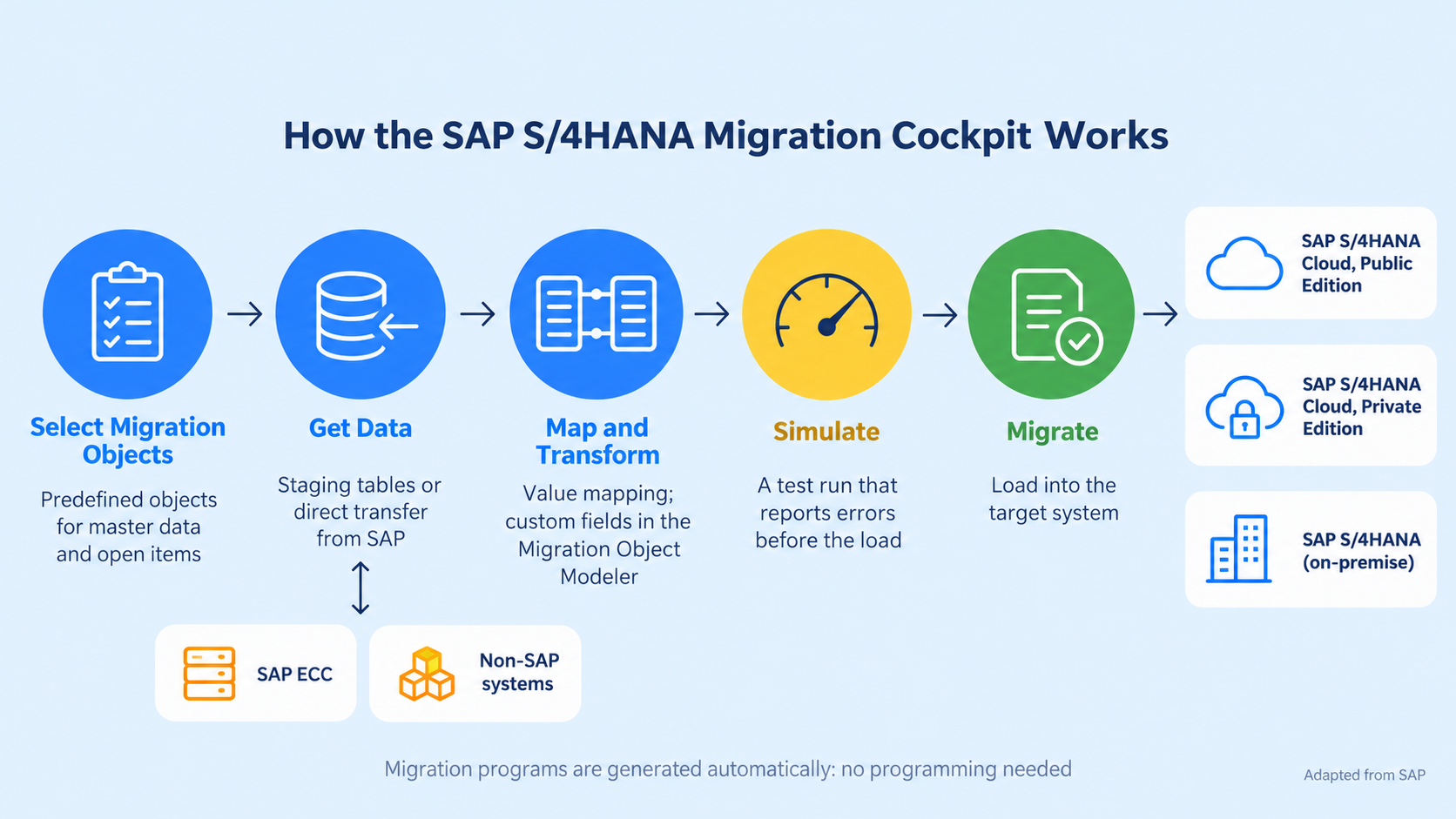
SAP’s own estimate is that business experts can learn to run it within three days, while developers need under 10 days for the Migration Object Modeler.
SAP Data Services
Data Services is a full ETL and data quality product: universal data access to SAP and third-party systems, standardizing and matching to cut duplicates, parallel processing, and bulk loading. It earns its license when the data needs real work before it fits SAP, such as merging customer masters from three systems. It’s also one of the ways to fill the Cockpit’s staging tables (more on that below).
LSMW
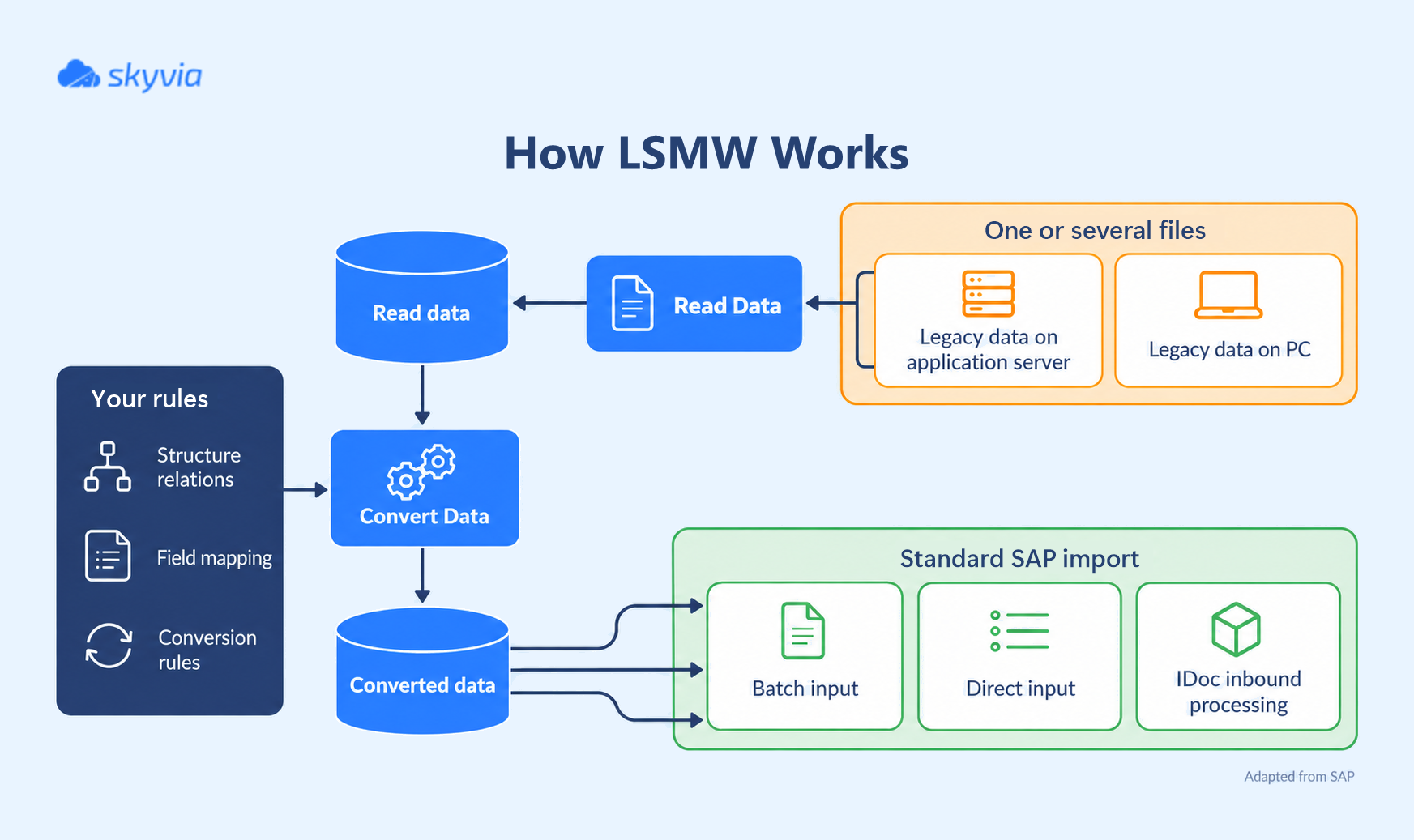
LSMW reads legacy data, converts it with mapping rules you define, and imports it into SAP. It still does that job in ECC, with no predefined content: you build every mapping. For S/4HANA, SAP put it on the simplification list (SAP Note 2287723) and recommends the Cockpit instead, so new projects shouldn’t start with it.
Our order of choice: the Migration Cockpit first. Add the Migration Object Modeler when a standard object lacks a field you need. Bring in Data Services, or Syniti, once merging and cleansing across sources outgrows spreadsheets and SQL. For tools outside the SAP ecosystem, see our list of data migration tools.
How Data Gets Into the Migration Cockpit
Many guides that rank for this topic still walk through transaction LTMC and its file upload. That’s out of date. The Fiori app “Migrate Your Data” replaced LTMC. It offers two approaches, and the staging one comes in two variants.
| Approach | Source | How the data arrives | Choose it when |
|---|---|---|---|
| Migrate Data Using Staging Tables, local schema | Any system, SAP or not | You download a template per migration object in XML or CSV, fill it, and upload it into staging tables in the S/4HANA database | Volumes are moderate and the data needs cleansing before the load |
| Migrate Data Using Staging Tables, remote schema | Any system | A separate SAP HANA database holds the staging tables; your own ETL process or SAP Data Services fills them | Volumes are large or the same loads repeat across test cycles |
| Migrate Data Directly from SAP System | ABAP-based SAP systems such as ECC (available since S/4HANA 1909) | The Cockpit selects the data from the source over RFC | The source is SAP and the data is already clean |
SAP’s migration product team gives a clear rule of thumb: if the data needs heavy cleansing, use the staging approach, because there you can prepare the data any way you want. Data selected by direct transfer can’t be pushed back into staging tables to be cleaned.
Think of staging tables as a waiting room where records can still get their paperwork sorted. A wrong country code doesn’t have to make it into the migration, and a missing tax number can be fixed on the spot. The data stays accessible until preparation, migration, or simulation begins. Before putting too much faith in this arrangement, though, SAP has two rules you should know:
- Data is locked while a job runs. SAP says you can’t adjust staging-table data while preparation, migration, or simulation is in process. If a canceled job or an unexpected event leaves a table locked, SAP provides a Reset Table Settings option.
- Every record needs a parent. To migrate from staging tables, each record must be associated with a record at a higher level in the hierarchy, for example, a child record with no matching header. SAP provides a function to check whether those associations exist, so run it before you start the migration.
Preparing Data From Systems Outside SAP
Most of the rework on these projects starts outside ECC. Trouble tends to come from the CRM that sales used for contacts, from an accounting tool a subsidiary kept to itself, or from the SQL Server database under an old order system. SAP’s rules never applied to those systems, which is why their records have to be reshaped before the Cockpit’s templates will take them.
We’d run each object through these steps:
- Start with an inventory. Which systems hold this object, who owns it, how many records it has (and how many of those anyone still uses).
- Get it all into one place before the cleanup starts. Five spreadsheets give you five cleanups, each a little different.
- Kill the duplicates. Only then normalize country and region codes, units of measure, payment terms, and tax categories to the values your S/4HANA configuration expects.
- Next comes the column matching against the template you downloaded from the Cockpit (field by field, no shortcuts).
- The export follows the template’s format, and a log records each dropped record along with why it was dropped.
- Since mock load three has to follow the rules of mock load one, the same pipeline runs again for every test cycle.
A worksheet that keeps this honest, filled in with example data:
| Object | Source system | Records (active) | Cockpit template | Owner | Checks before upload |
|---|---|---|---|---|---|
| Customers | Salesforce accounts | 18,400 (12,100) | Customer | Sales ops | Duplicates by tax ID, country codes, mandatory fields |
| Vendors | QuickBooks Online | 2,300 (1,650) | Supplier | AP team | Bank details complete, payment terms mapped |
| Open orders | SQL Server order database | 940 | Sales order (only open) | Order management | Customer exists in the customer file, quantities and units valid |
Skyvia can handle steps 2 through 6, but let’s get one thing straight: it doesn’t connect directly to SAP. The final load into S/4HANA is still SAP’s job. Everything leading up to that is where Skyvia comes in.
Start with Salesforce or QuickBooks. SQL Server works too, along with the other 200+ connectors. A Data Flow takes care of the cleanup, using lookups to match records and conditional splits to route them. Calculated columns handle the reshaping. Once the data is ready, a scheduled export produces a CSV for download or delivery to FTP, SFTP, or cloud file storage.
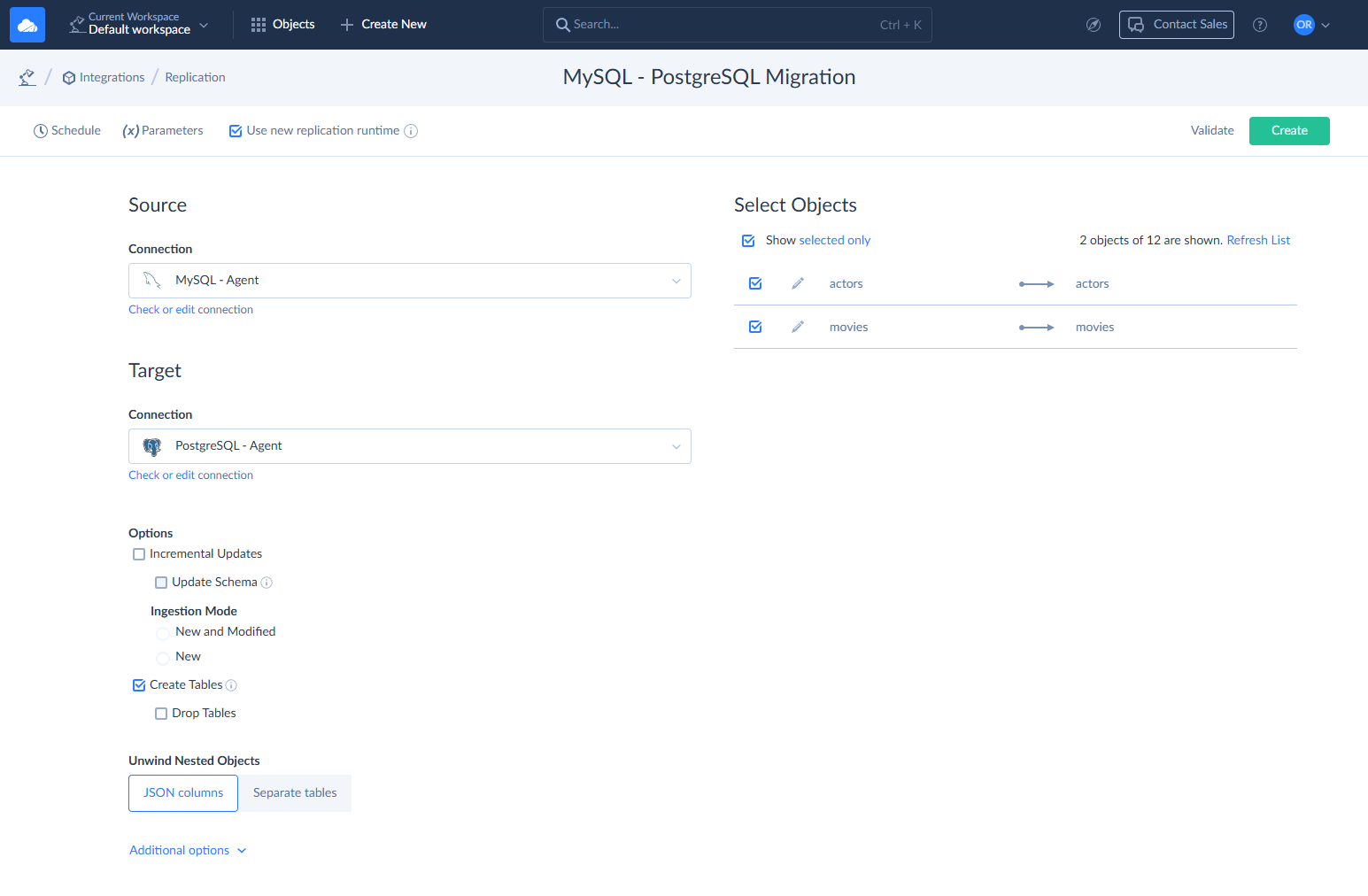
The payoff is consistency. Instead of relying on whoever remembers last month’s cleanup rules, every test cycle gets a new file prepared the same way.

SAP Data Migration Process in Four Phases
Approach and project size don’t change the phases; there are four of them either way. What changes is where the effort lands, and the migration objects in scope get planned around it.
Prepare
Profile the data before anyone writes a mapping: empty mandatory fields, invalid values, duplicates in customers, vendors, and materials. Survey data backs this up. In SAPinsider’s ERP Migration and Transformation 2026 survey, 75% of respondents rated cleansed and harmonized operational data across systems as important to their S/4HANA plans.
Then settle what stays behind. Inactive customers, closed documents, and materials nobody orders anymore belong in an archive or a reporting store, and the new system is better off without them. Borderline records are a business decision. A tool points at them, and the owner of the data says yes or no.
Map
This is where each legacy field meets its S/4HANA counterpart. Values get translated on the way, so the old payment term “N30” lands as the term configured in S/4HANA. The Cockpit’s migration objects bring the target structure and value mapping. Each migration object also comes with mapping tasks, such as value mappings and fixed-value tasks. SAP says these must be processed before migration can proceed, so plan the time for them in every test cycle and don’t leave them for the day of the load. The Migration Object Modeler covers custom fields. Write the mapping down per object, because three test cycles later someone will ask why a field was left empty.
Test loads
Plan several mock loads into a test system before the production load, with the later ones using the full data volume of the objects in scope.
- Unit tests per migration object, with the Cockpit’s simulation run first.
- Mock loads in the planned order (master data before open items).
- Full test cycles in the quality system, timed, so the cutover plan has real durations.
- User acceptance testing on migrated data, by the people who’ll use it.
Reconcile
A load that finished without errors isn’t proof. Reconcile after every mock load and after go-live:
- Record counts per object, source against target, with the dropped records explained by the log.
- G/L balances per account and company code.
- Open AR and AP totals per customer and vendor.
- Stock quantities and values per plant.
- A field-by-field spot check of a sample of records per object, done by the business owner.
SAP’s standard migration scenario sets the bar for production: first run the test migration and data check in the quality system, the test copy of your landscape. Move on to the production migration only when that test run is 100% error-free and reconciliation shows no deviations from the legacy data. Make this your go/no-go criterion and write it into the cutover plan, so the decision to proceed at cutover is settled in advance rather than debated under time pressure.
Common SAP Data Migration Challenges
Nobody remembers what the legacy fields mean
Old systems carry fields with no documentation and records from half-abandoned processes. Teams end up chasing data owners instead of mapping. Fix it early: name an owner per object in the plan and profile the data before the mapping workshops, so the questions come with examples.
Interfaces that the migration doesn’t touch
S/4HANA rarely lives alone. Your CRM, payroll, e-commerce platform, and BI tools all read from it or write to it, and none of them is kept in sync by SAP’s migration tools. That’s why we’d treat each interface as its own cutover task. It needs re-pointing and retesting, plus a named owner for the sync after the old system goes dark.
Data quality surprises
Duplicates, gaps, and outdated records are tolerable in the old system because people work around them. In S/4HANA, they turn into failed postings and wrong financials.
And they slow projects down, because members in ASUG’s 2026 research whose projects ran late named testing (37%) and data issues (34%) among the causes. Fixing it isn’t glamorous: you profile, clean at the source or in staging, and load again. The test cycles exist for this.
Cloud upgrades that interrupt the Cockpit
If you load into S/4HANA Cloud Public Edition, remember that the system upgrades on SAP’s schedule. SAP Support Note 2996675 documents Migration Cockpit errors during Public Edition upgrades, including object-generation failures, inconsistencies, and system errors. Check the upgrade calendar before you schedule a mock load or cutover, and avoid starting a load close to an upgrade window.
Migration users with too many rights
Technical users for the load tend to get broad permissions “for now.” Give migration users only the roles the objects in scope need, log what they do, and lock them after cutover.
Your Migration Cockpit templates have standards. Your source data may have other ideas. Skyvia Data Integration helps close that gap, preparing customer data from Salesforce or vendor records from QuickBooks. SQL Server is another option, and order data can follow the same route.
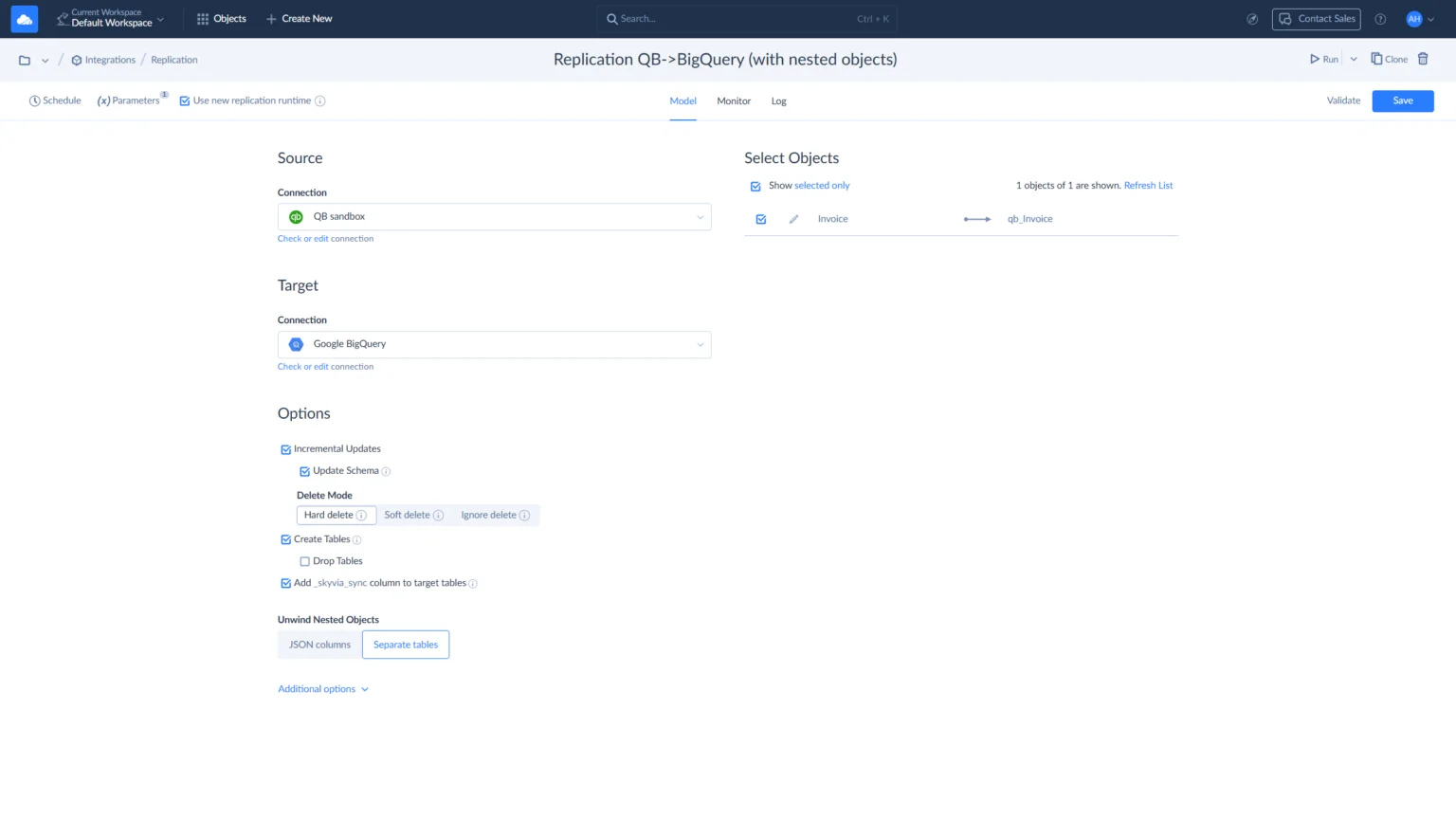
Once you’ve set up the extraction and cleanup, schedule a CSV export before each mock load. No rebuilding the same preparation steps every time. Start with a free Skyvia account.

FAQ for SAP Data Migration

Is SAP BODS still supported for S/4HANA migrations?
Yes, but not on open-ended terms. BODS is what people still call SAP Data Services. SAP’s KBA 3789470 says mainstream maintenance for Data Services 4.3 ends on December 31, 2026, and a customer-specific maintenance phase comes after it. So if your test cycles run into 2027, we’d ask SAP what that phase covers first.
Does SAP charge extra for the S/4HANA Migration Cockpit?
No. SAP’s own training material calls the Migration Cockpit an embedded tool included at no additional cost. Access is another matter. Each person who runs loads needs authorization for the Migrate Your Data app and for every type of data they touch, so we’d raise that with security early.
Is there a file size limit for Migration Cockpit uploads?
Yes: each XML template going into the Migrate Your Data app must stay under 100 MB, and a zip of several files carries that same cap. Public Edition 2602 loosened that a bit (an XML inside a zip can now reach 400 MB), though only on SAP S/4HANA Cloud. Bigger vendor file? We’d split it by company code.