Summary
- Skyvia is the best no-code choice for seeking fast automated exports.
- Airbyte (via PyAirbyte) provides unmatched pipeline flexibility for developer-heavy teams.
- Talend is a robust enterprise platform, once its BigCommerce integration matures.
- BackupMaster is the top choice if your goal is secure store recovery rather than active data analytics.
The process of exporting from BigCommerce to Google Drive should never feel like a chore. Sadly, all too often, you have to spend hours downloading data into CSV files, uploading them into Google Drive manually, and watching as the process of exporting data becomes interrupted at an absolutely inconvenient moment.
Connecting BigCommerce to Google Drive with automation makes things completely different. Real-time syncing of orders, scheduling of data exports, and easy sharing with logistics partners without going through tedious and long processes — these are just some of the advantages that senior developers cherish the most.
It should be mentioned upfront that we at Skyvia built no-code integrations on a daily basis. Thus, we might admit our bias while discussing the topic. In this article, however, we will try to take an objective position and analyze our solution in comparison with such tools as Airbyte, Talend, and BackupMaster.
Let’s dive in.
How Did We Test These Integration Tools?
Like what I did with the Databricks review, I spent 40 hours doing BigCommerce to Google Drive exports with known data integration tools.
Can they deliver our intended BigCommerce to Google Drive exports? Find out in the next sections.
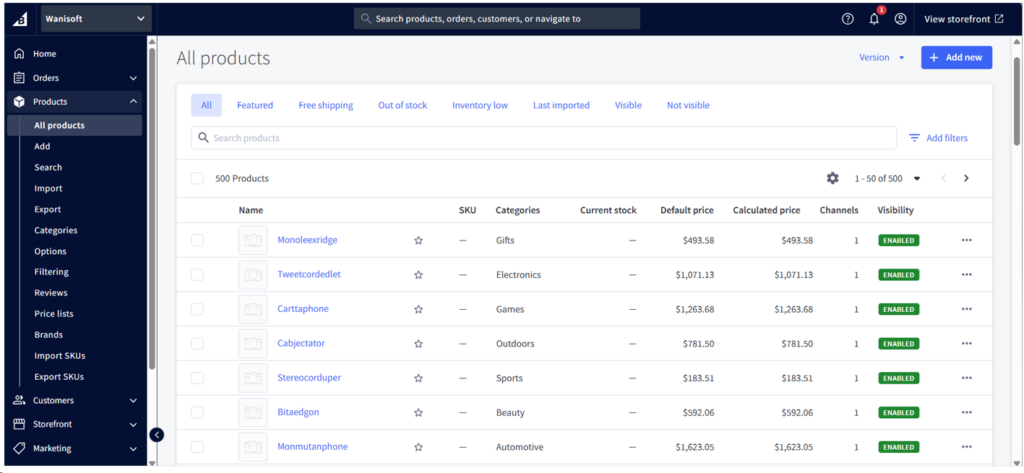
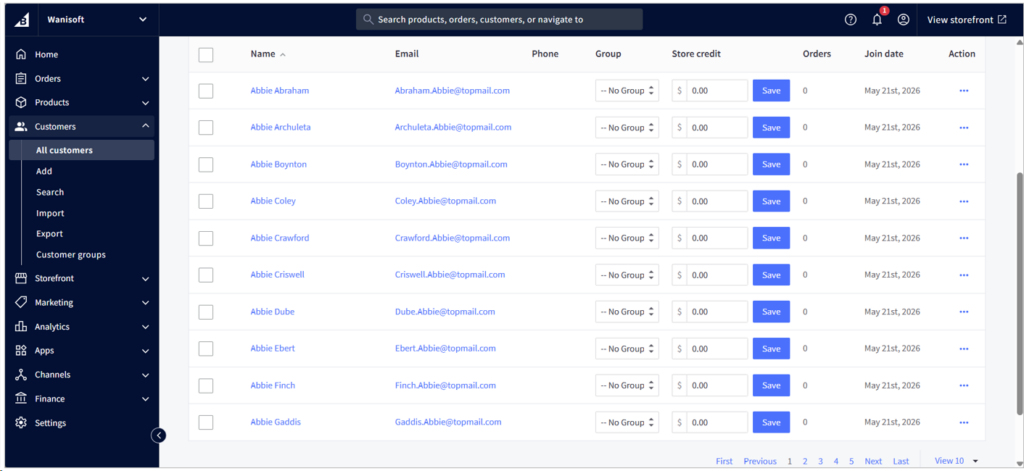
In my trial BigCommerce account, I have 500 products, 9000+ customers, and almost 10,000 orders. As a prerequisite to products, I also have categories for my test data, and I have 30+ of them. We will export products, customers, and orders to CSV files, then move these files to Google Drive.
Below is a portion of my 500 products in BigCommerce:
Below is my fictitious customer list:
And finally, check out my sample orders:
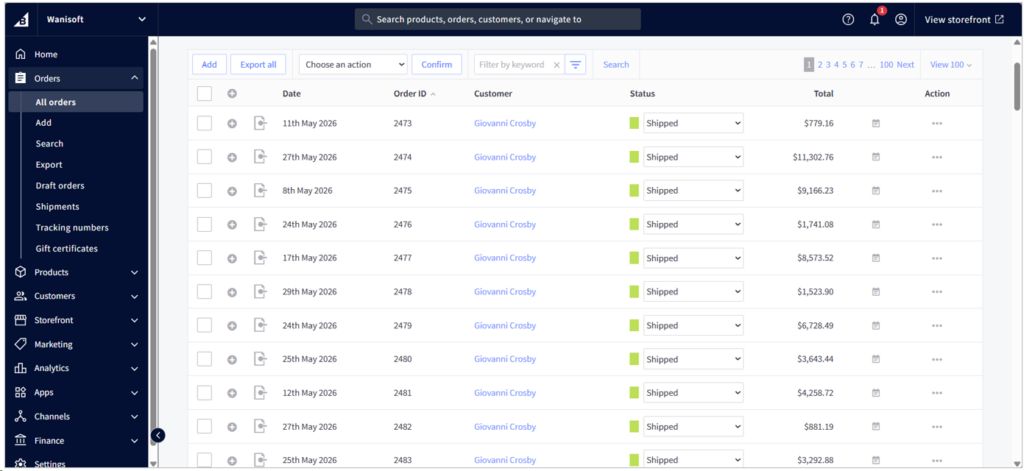
I got this test data from a test PostgreSQL database. I have to export the product category IDs, so I need categories, download them as CSVs, and use them for my product test data. Then, I export to CSVs from PostgreSQL products and customers. But I need to use the BigCommerce API and Python to upload the orders. It’s easier to do it in Skyvia, but I already hit my row limits for my free account.
What Are the Core Comparison Criteria?
I’ll show you real outputs from real data pipelines through screenshots. Then, I’ll tell you my experience about the following:
- How long it took me to finish the data pipeline for each tool
- Did it work? How long it took the pipeline to export?
- What’s the sync frequency? Does it allow flexible sync frequency?
- Transformation complexity – Do you need Python coding or is there a visual tool?
- Output to Google Drive.
- Pricing model – per row, per connector, etc.
First, take a glance at how the tools compare in a quick table format.
How Do the Leading BigCommerce to Google Drive Tools Compare?
Find below a side-by-side comparison of the tools we will use:
| Integration Tool | Best For | Pricing Model | Sync Frequency | Setup Complexity | JSON Flattening |
|---|---|---|---|---|---|
| Skyvia | SMBs & No-Code Teams | Flat rate (Data Volume-based) | Up to 1-minute intervals | Visual Wizard (No-code) | Automated Visual Mapping |
| Airbyte Core/PyAirbyte | Developer-Heavy Teams | Free (Infrastructure costs only) | Customizable (Cron) | High (Docker/CLI setup/Python coding) | Can be dbt, Python, or SQL |
| Talend | Enterprise High-Volume | Custom Enterprise Pricing | Real-time & Batch | Visual and low code | Advanced Developer Tools |
| BackupMaster | Automated Store Backups | Flat monthly fee | Daily backups | Low (1-click app install) | N/A (Creates ZIP archives) |
Which Tool Is Best for Your Specific Use Case?
Do you need to deliver quickly? Or do you want to be flexible in doing BigCommerce to Google Drive exports? Maybe you just need backups, or you want an enterprise-grade product and costs don’t matter much?
Check out the tests I did in the following sections.
Why Is Skyvia the Best Option for SMBs & No-Code Teams?
Skyvia is a cloud-native data platform designed for sales, marketing, and analytics teams who need data pipelines without asking IT for help. It’s a no-code tool where you fill boxes and drag and drop items to configure pipelines. So, if today is Thursday and you need the pipeline early Friday, this is for you.
You’re going to need your BigCommerce and Google credentials to make two Skyvia connections for them.
My BigCommerce and Google Drive Connections
Here’s my BigCommerce connection with a successful test:
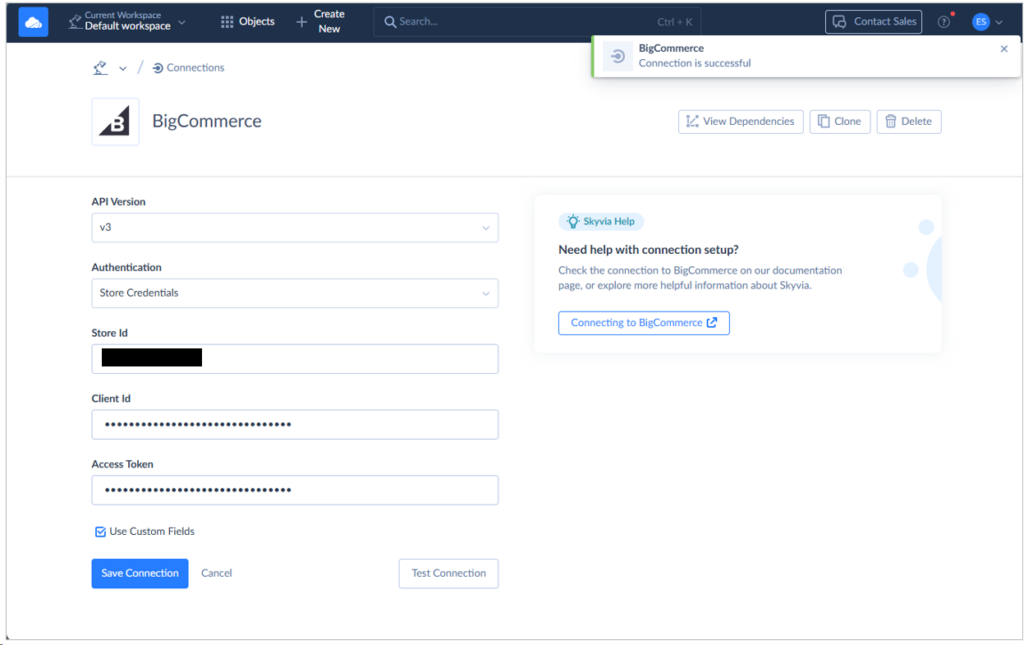
I got the Store ID in my BigCommerce URL in this format: https://store-<store ID>.mybigcommerce.com/. It is also available in my BigCommerce API path. For the Client ID and Access Token, I created a Store-level API Account in BigCommerce to get them. I just gave it a name and OAuth Scopes, specifically for Products, Customers, and Orders. Below is a sample:
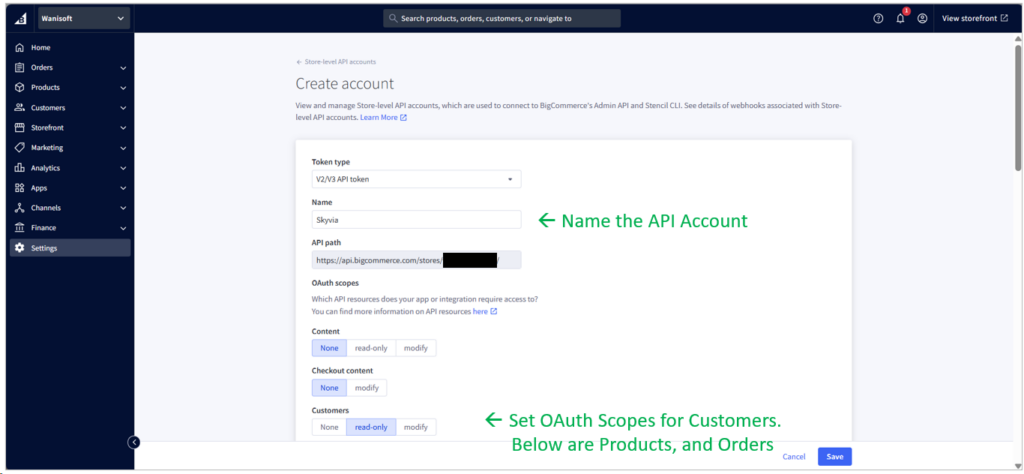
I set mine to MODIFY for Orders because I need to upload test data using the BigCommerce API. Meanwhile, it’s READ-ONLY for Products and Customers since I will use the BigCommerce web UI to import CSV files for both. After saving, I got the Client ID and Access Token.
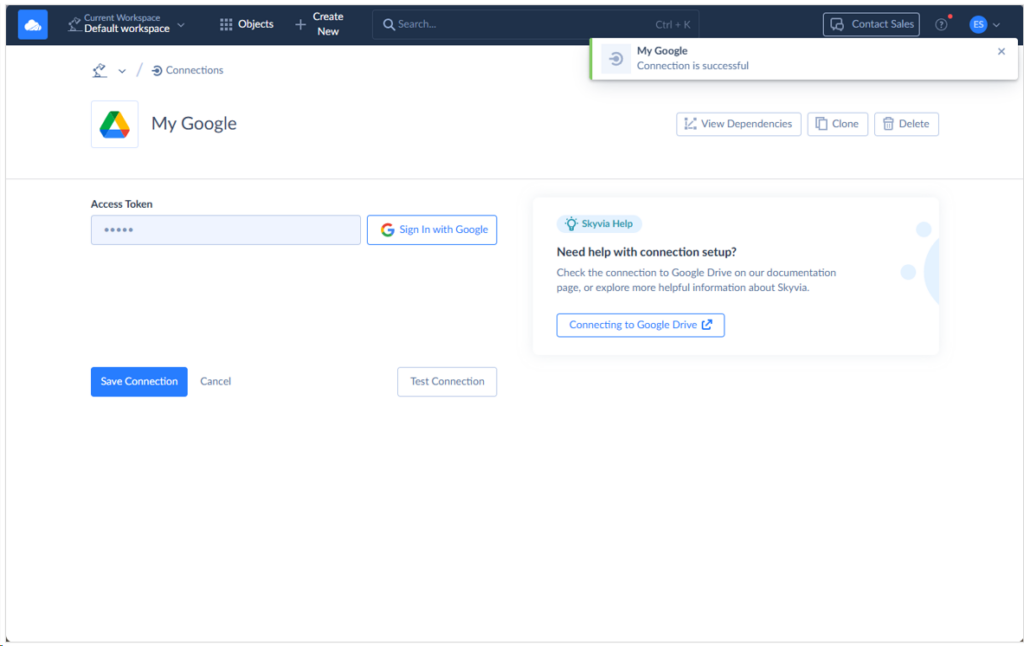
All I need is to sign in to Google to get the Access Token.
Creating the Skyvia Export Pipeline
I created an Export integration in Skyvia, but there are other ways to do it, like the Data Flow and Control Flow. For simple and fast setup, the Export integration is the easiest. Check out my setup below where BigCommerce is the source and Google Drive is the target with CSV as the file format. I also created a task for each BigCommerce table, so one for Customers, one for Products, and one for Orders.
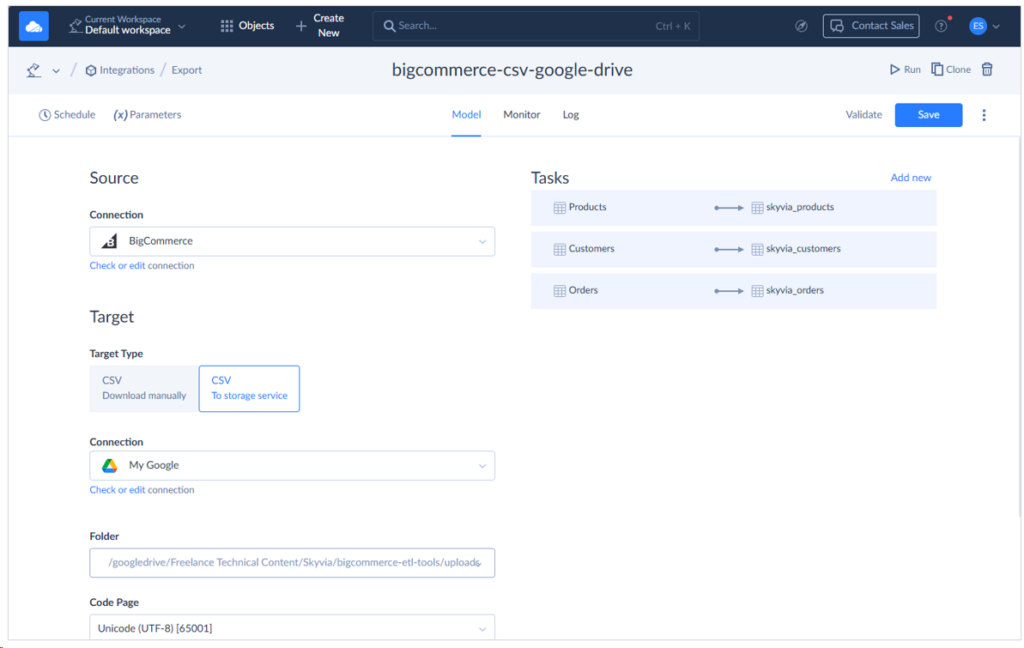
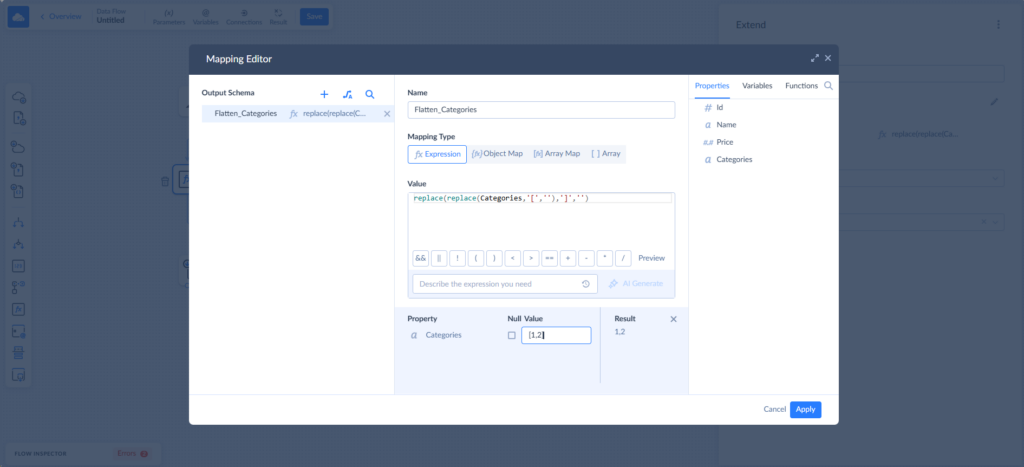
This will use the 2 connections I set up earlier. This is the simplest method, with a straightforward export without transformations. If you need to flatten JSON columns, you will need the Skyvia Data Flow to transform it before writing to the CSV file. For example, the Categories column may have a value of [12,13], which means the product has two categories 12 and 13. To flatten that, you may want it to be a string value “12,13”. In that case, the following formula will remove the square brackets:
The Export Results
Here’s the result of my first run:
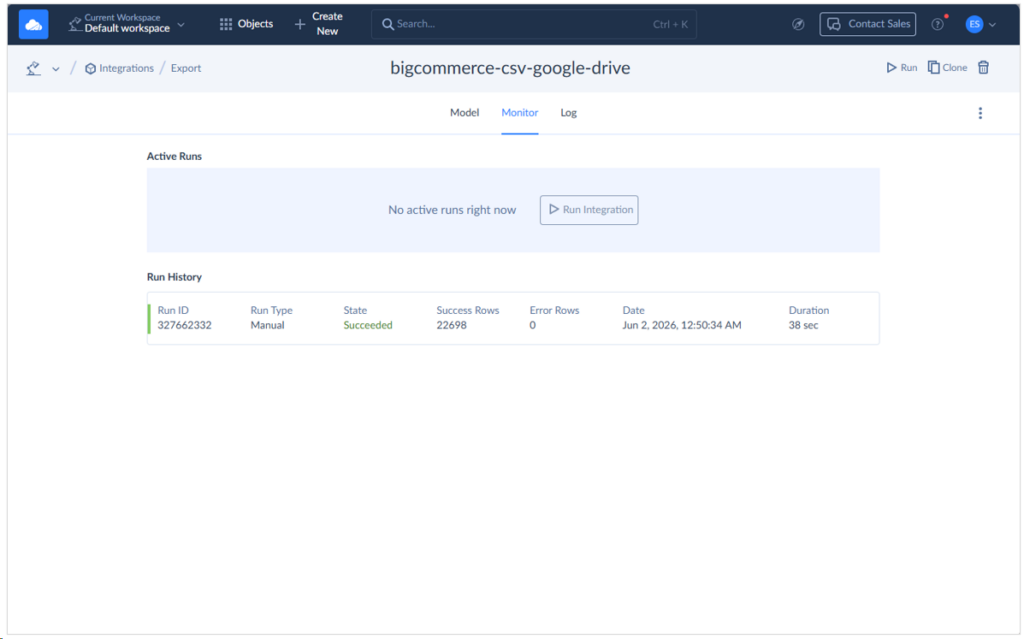
It took 38 seconds to create the 3 CSV files in Google Drive.
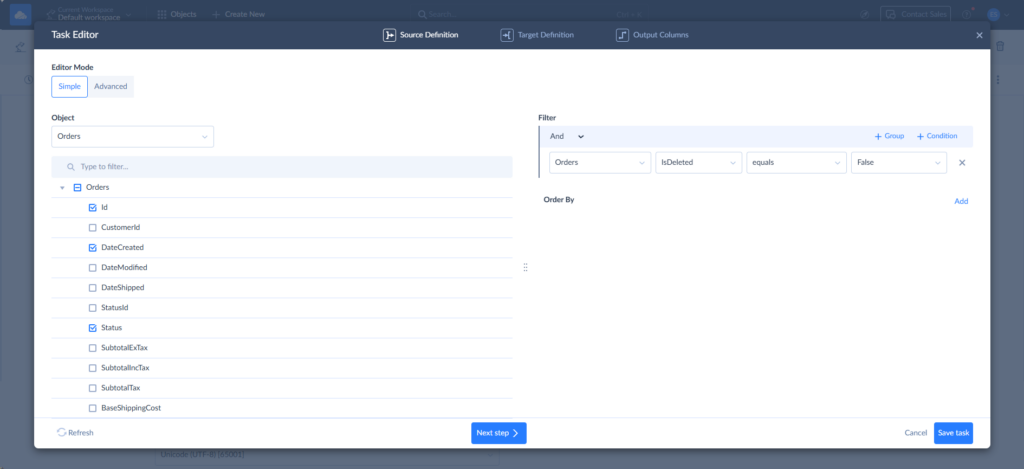
But there’s a problem. The orders I got are more than 12k. I’m expecting 9,930. Due to a power failure during my test data upload to BigCommerce, I have to clean up and re-upload again. But I later learned that BigCommerce only does a soft delete of order records. So, I have to go back to the Skyvia Export and add a filter to orders (isDeleted = false). See below:
After that, I got a corrected export in 31 seconds. See below:
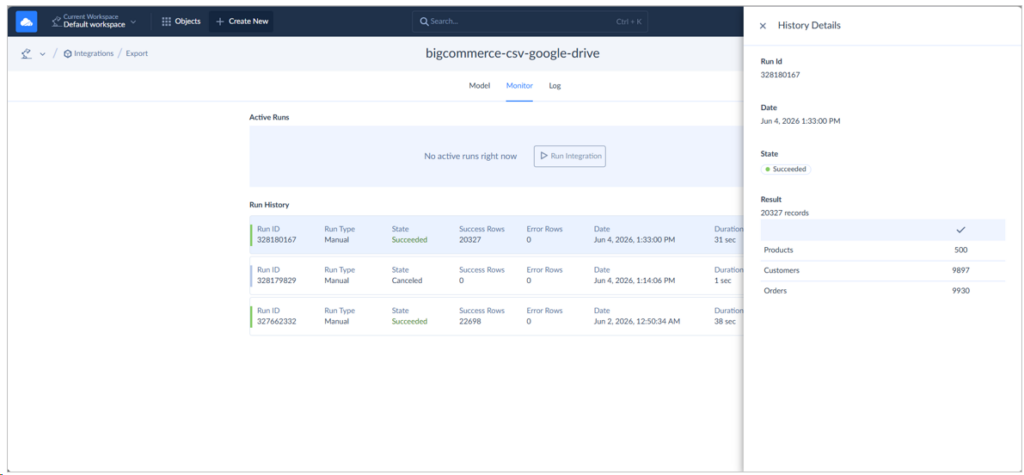
Finally, this is the result in Google Drive:
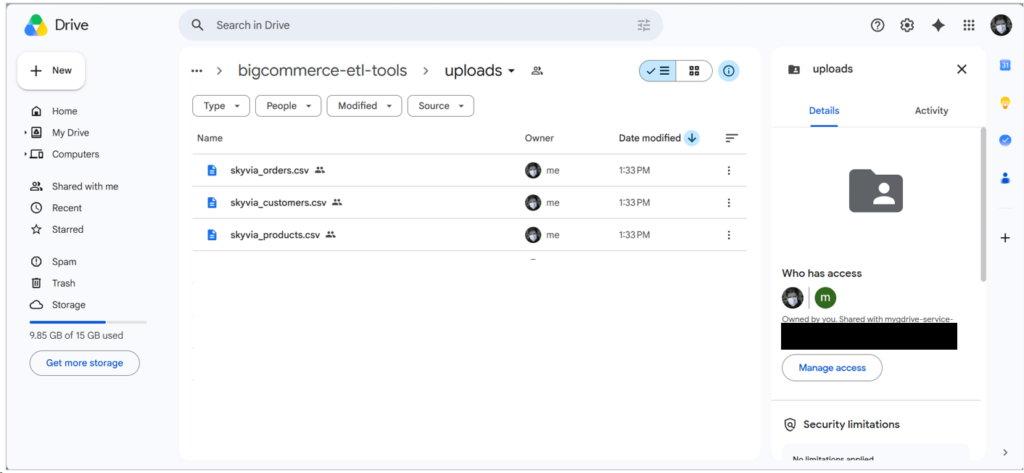
The following is a preview of the products CSV file:
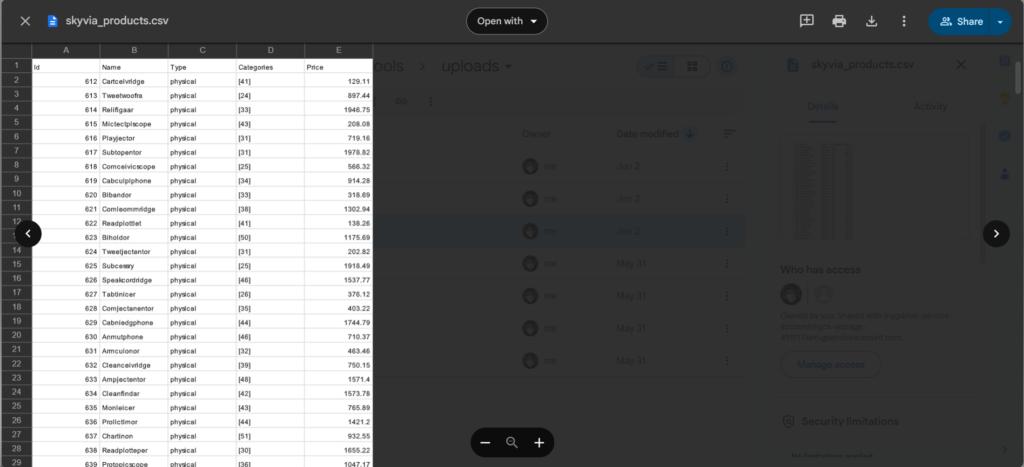
Scheduling this export allows for a 1-minute sync frequency. See below:
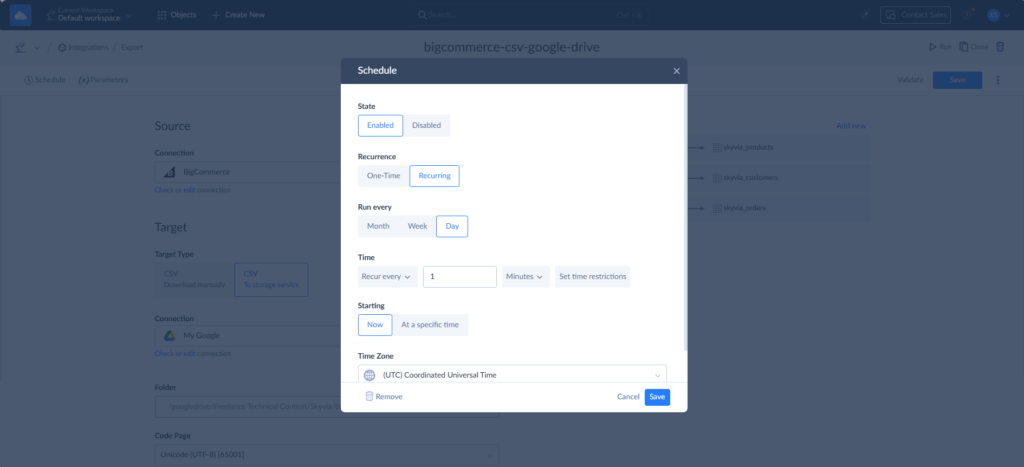
Since I’m used to creating data pipelines in Skyvia, it took me less than 5 minutes to set up the Export integration. This plus the export runtimes means I have results in less than 7 minutes.
Best For
Skyvia is best for SMBs and no-code teams aiming for quick delivery of data pipelines. As you can see from the real pipeline above, I’m done in less than 7 minutes.
Skyvia supports ETL, ELT, and reverse ETL with various methods from simple to complex pipelines.
Rating
Skyvia is mostly favored by their customers with the following G2 and Capterra ratings:
- G2 : 300 reviewers rated 4.8/5
- Capterra : 116 reviewers rated 4.9/5
Pricing
Skyvia’s price plan options include Free, Basic, Standard, Professional, and Enterprise plans. As you move up to the higher level, you will have more rows allowed monthly, more scheduled integrations, better integration scenarios, and improved mapping functionality.
The number of rows starts from 10,000 in the Free version (which was used for this Skyvia evaluation), and the Basic plan comes with a cost of $79/month.
In my case, though I can’t use it to upload test data to BigCommerce, it’s a separate item to export data to CSV. So, I was able to export 3 CSV files.
Refer to the Skyvia pricing page for additional information.
Pros
- Visual Expression Editor to map and transform data from BigCommerce, even JSON columns.
- Learning curve is minimal with a clean, intuitive user interface.
- The sources and targets I need are supported by their broad connector library.
- Supports ETL, ELT, reverse ETL, backups, replications, import/export, syncs, automation, and API support.
Cons
- Not suitable for a bank or healthcare provider requiring a strictly air-gapped, on-premise installation with no internet access because of its cloud-first nature. You should look at Airbyte Self-Hosted for these needs.
- The 10k limit for a free account didn’t allow me to create test data. I need to go for the paid plans for higher row limits.

When Should You Use Airbyte for Developer-Heavy Teams?
If you need high flexibility in your data pipelines, Airbyte is a good choice because it has an open architecture and it’s open source. Airbyte offers Airbyte Cloud, where you pay for the cloud services, and a no-code pipeline is supported depending on your needs. It also has Airbyte Core, where you can install Airbyte to your own infrastructure, and it’s free. You can also create your own connector. I used both Airbyte Cloud and Core in my previous reviews.
But today, I’ll be using PyAirbyte.
Why PyAirbyte?
Coding is a reliable way to do the pipeline in Airbyte. Here’s why:
- Airbyte Cloud doesn’t support Google Drive as a target, only as a source.
- BigCommerce is not an Airbyte native connector, but a Marketplace connector. I can’t search for it in Airbyte Core.
- Airbyte Core uses Docker, which consumes a lot of resources in my Linux virtual machine. I experienced a few VM freezes.
- The BigCommerce connector, though downloadable, relies on an older Airbyte Python library, and I experienced errors in newer releases.
- PyAirbyte can address the above shortcomings, and it shows clearly why it’s developer-heavy.
But what is PyAirbyte? It’s a Python library that allows you to use Airbyte’s connectors and its underlying architecture to create your own data pipelines. It doesn’t rely on both Airbyte Cloud and Core. So, you don’t need to install the full Airbyte Core, and you don’t need an Airbyte Cloud account. Just Python and the Airbyte Python packages.
It’s my first time using PyAirbyte, and I don’t consider myself a Python expert. So, if you’re a better Python developer, you might see some areas for improvement.
However, with this, I was able to do the following:
- Create my own BigCommerce connector using the latest Airbyte Python packages.
- Upload CSV files in Google Drive, but using the Google Drive API, which is not a big deal.
And I said goodbye to Docker, which causes my VM to freeze.
Preparing the Development Environment
The full source code and instructions can be found on GitHub. It’s working code, so give it a try.
You need a folder for the Python project and a Python environment. I used Python 3.12.3.
mkdir airbyte_env
python3 -m venv airbyte_env
Then, I need to download PyAirbyte with the Airbyte package using pip. Also, google-api-python-client, google-auth, google-auth-oauthlib, google-auth-httplib2.
pip install airbyte
pip install google-api-python-client google-auth-httplib2 google-auth-oauthlib
I also used Visual Studio Code, so I also need the Python Extension for VSCode and Pylance for code IntelliSense. I also set operating system environment variables to store the BigCommerce Store ID, Client ID, Access Token, and the Google Drive Folder ID and Client Secret. Below is what I did in my Linux Mint VM. Just replace the values with yours:
export BIGCOMMERCE_STORE_HASH=your_store_hash
export BIGCOMMERCE_ACCESS_TOKEN=your_access_token
export GOOGLE_CLIENT_ID=your_client_id
export GOOGLE_CLIENT_SECRET=your_client_secret
My BigCommerce Connector
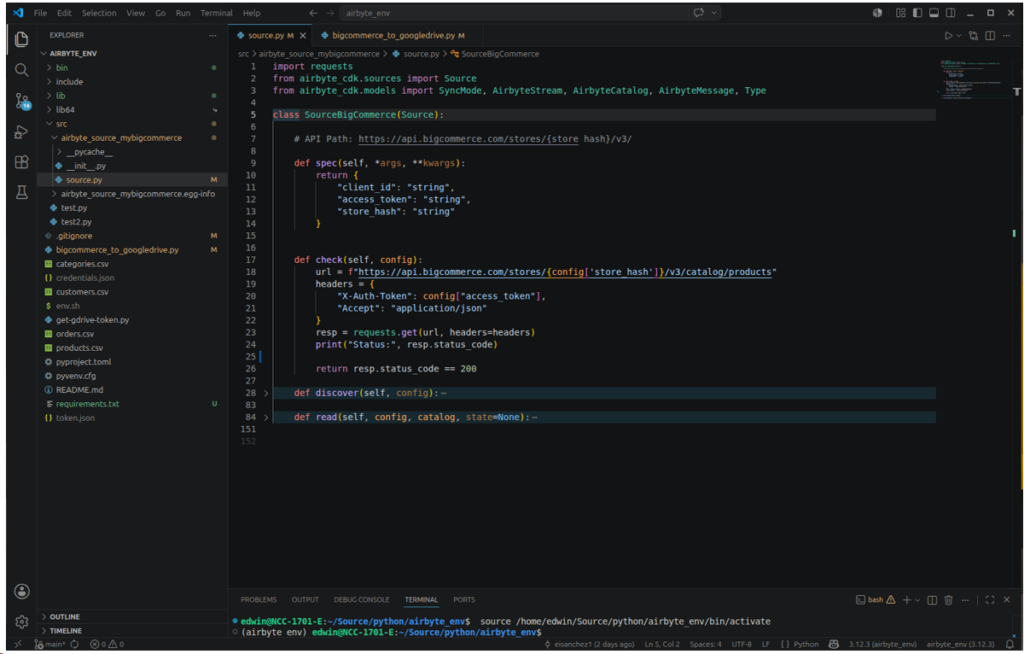
This is about my custom BigCommerce connector. PyAirbyte requires that there’s a source.py. In it, there should be a class with the following methods:
- spec: to set the BigCommerce Client ID, Store ID, and Access Token.
- check: for checking my BigCommerce connection. This basically check any BigCommerce stream using the requests object. It should return a status code = 200, or it’s a failure.
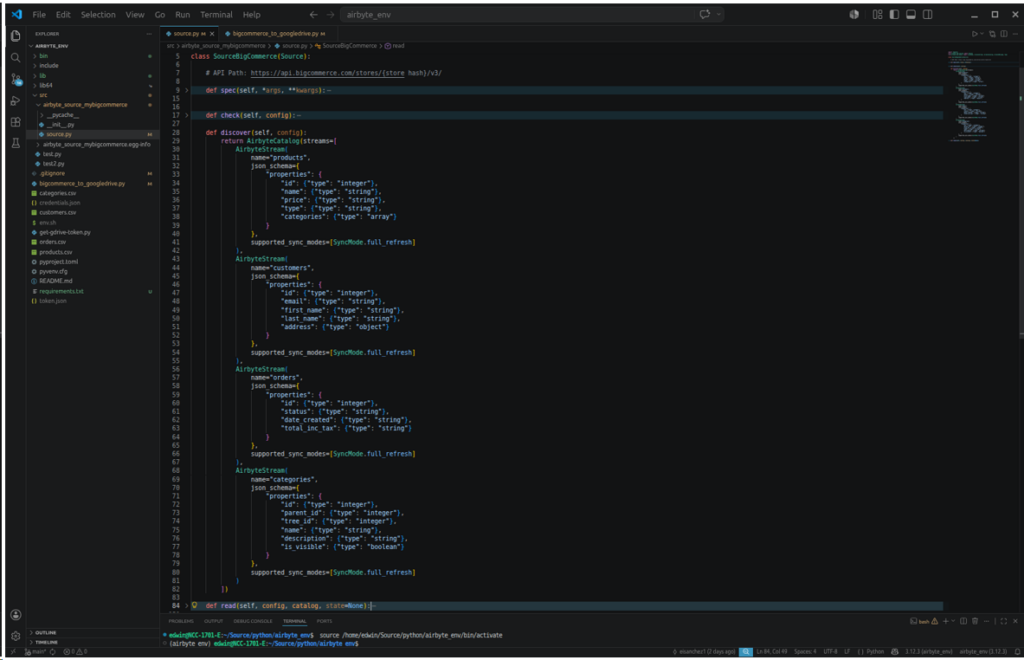
- discover: to set which BigCommerce AirbyteStream to use. In our case, these are products, customers, and orders. I also added categories since it’s a prerequisite for products. Discover also sets the properties or columns I need for each AirbyteStream. In your BigCommerce Store-level API account, it should at least have read permission to access a stream.
- read: Given the stream or object name, it allows reading and returning the rows for the given object. It returns nothing if I ask for a stream not defined in discover, or if I have no permission.
This uses Airbyte CDK, or Connector Development Kit, for creating source connectors for Airbyte.
Below is the screenshot of the definition of spec and check inside Visual Studio Code:
Below is the definition of discover:
Finally, read:
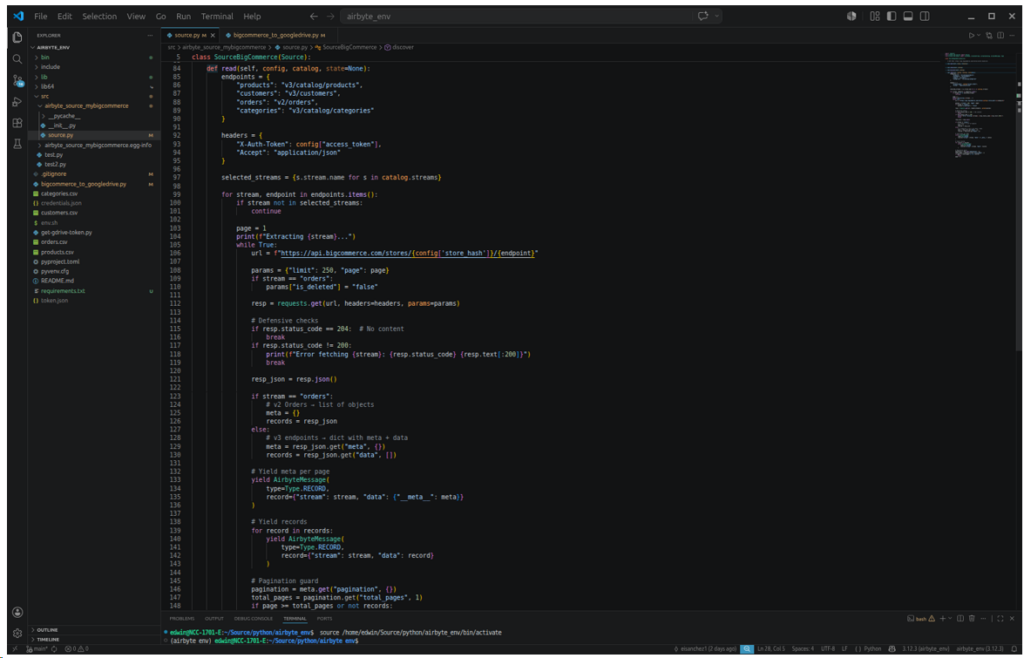
Note that orders need BigCommerce API v2, and the rest are v3. So, the endpoint and handling of returned rows for orders are different than the others.
This custom BigCommerce connector is specific for the needs of my data pipeline example. It could have been done better, but it follows Airbyte requirements already, and it does what is intended to get the point across to you.
Consult the PyAirbyte documentation for more details on using the CDK.
The BigCommerce Export in PyAirbyte
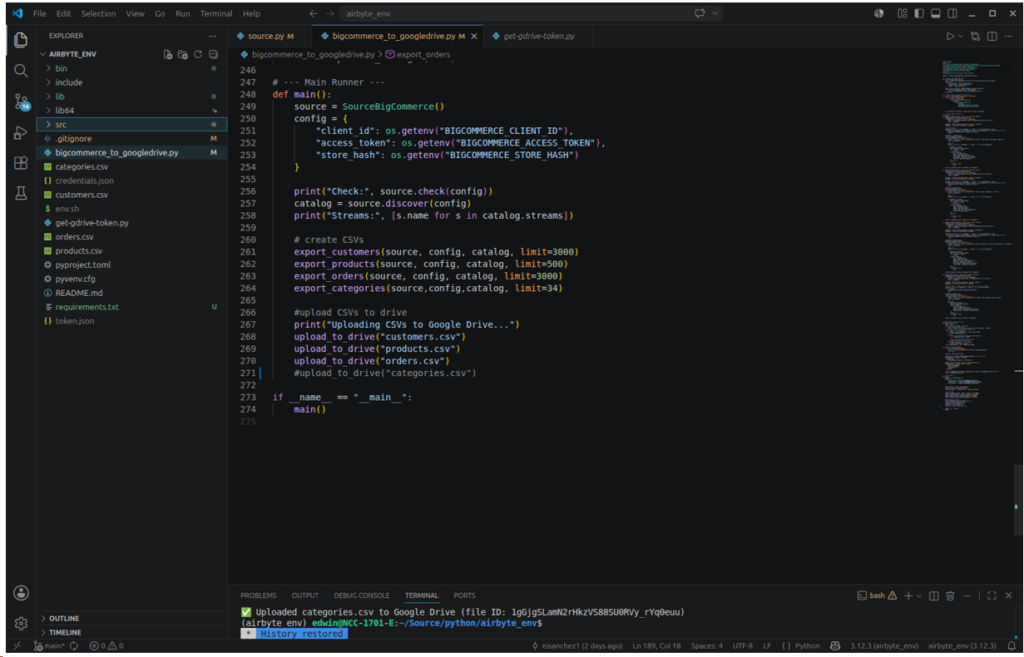
The flow of my export code using PyAirbyte is the following:
- Initialize my custom BigCommerce connector
- Set the credentials from OS environment variables.
- Perform a BigCommerce connection check and show available streams.
- Export customers, products, and orders. Also, categories for my test data.
- Upload the 3 CSVs one by one into Google Drive.
This flow is seen in the main function below:
Export Function Features
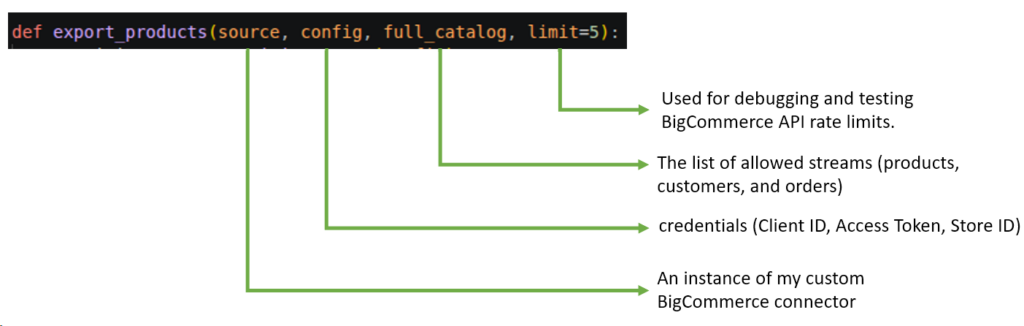
Each export function accepts parameters needed to interact with PyAirbyte.
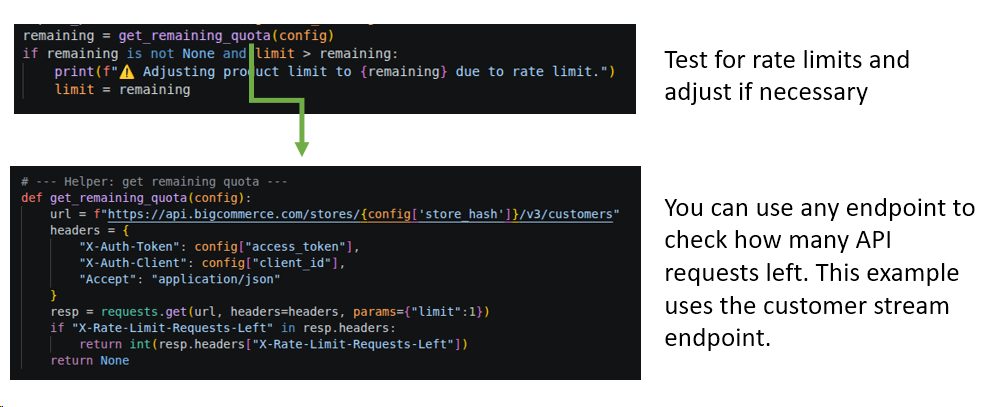
It also tests for API rate limits and adjusts the limit value as needed.
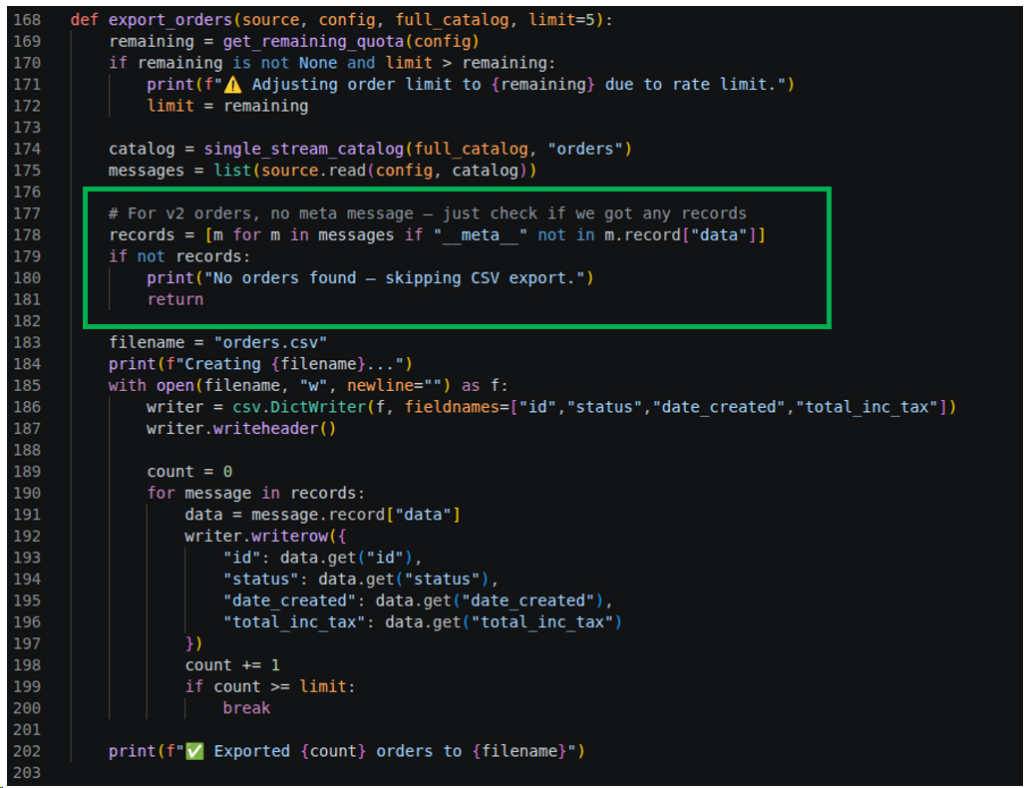
Then, it will check if there are rows returned by the connector. Testing it depends on whether the endpoint is API v2 (returns a list) or v3 (returns a Python dictionary with meta information). Otherwise, it will print a message that there are no rows and skip CSV file writing.
Here’s the export_orders function using API v2:
And here’s the export_products using API v3:
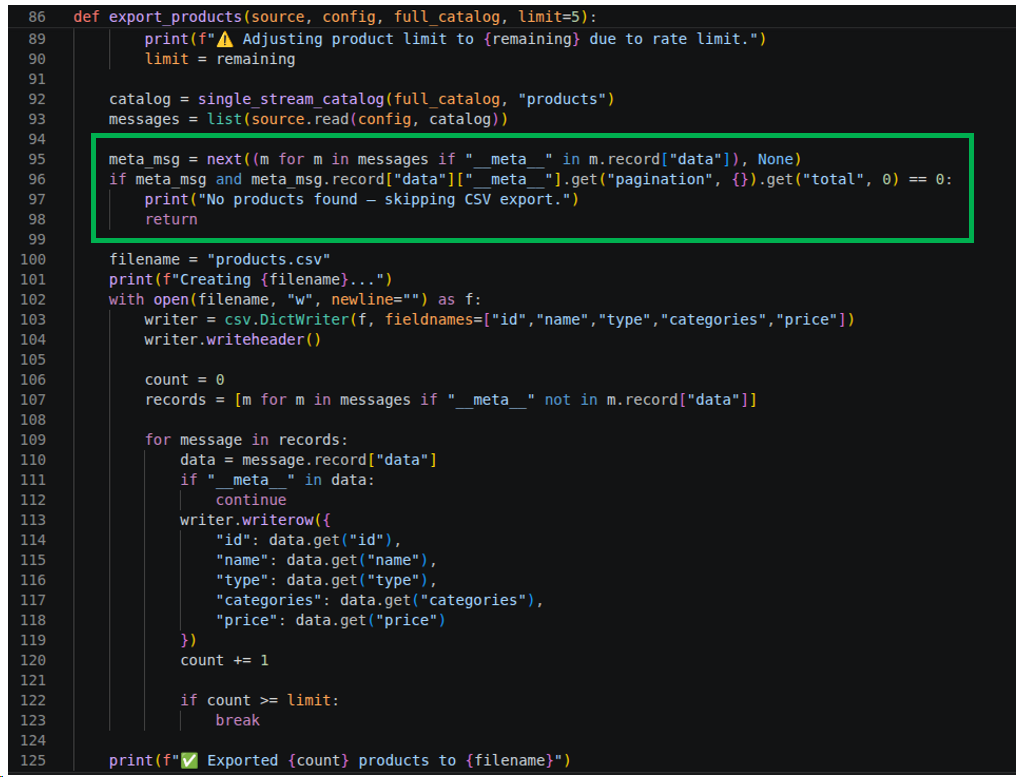
BigCommerce Products, Customers, and Categories use API v3, so their individual export functions have similar logic. I didn’t flatten the categories column above. But if needed, Python has a text.replace if you just need to remove the square brackets. You can also loop through it and store each item in a separate table, if needed.
Google Drive Target Features
Meanwhile, I used the Google Drive API to write the CSV files to a designated folder ID in Google Drive. It uses a security token (found in token.json) that will be generated once and used in subsequent runs. I have to run that part separately given a Google credentials.json file. Here’s the code:
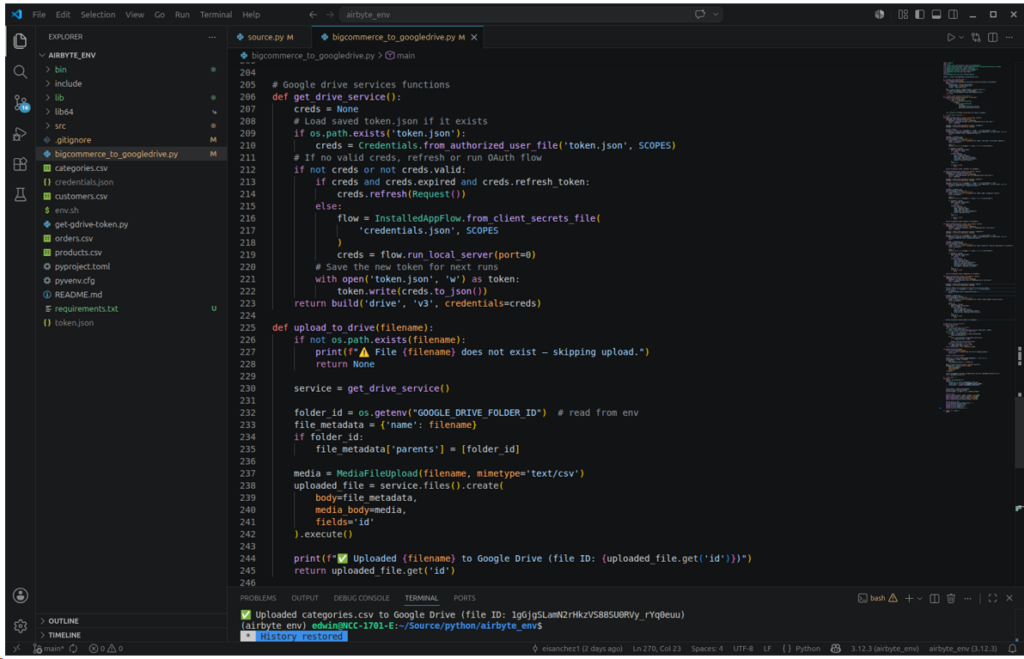
Below is a sample output from one of my runs:
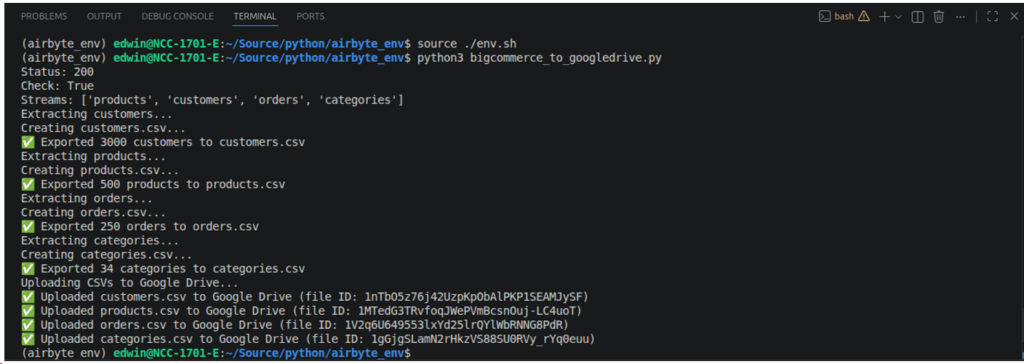
You might wonder why only 3000 customers and 250 orders. I fixed the limit to 3000 customers (See the main() function) because this will surely hit the rate limit. The code also adjusts the rows to write in CSV files based on the remaining number of API requests (for orders). A much better solution is to have pacing in getting rows so as not to reach the limits very fast.
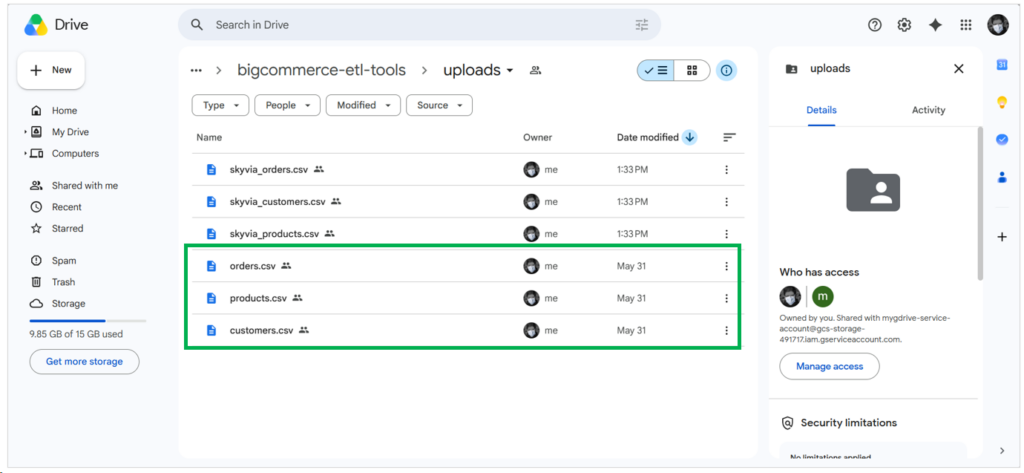
Most of my 40-hour tests went to Airbyte. I studied how it works, created the pipelines, and debugged the problems. Still, it has limits on the written rows. Running the code took a minute until files were uploaded to Google Drive. Boxed in green below are the uploaded CSV files by this program:
If I’m going to run this regularly, I can make a cron job with the following command:
0 2 * * * /home/edwin/projects/bigcommerce/env.sh && python /home/edwin/projects/bigcommerce/bigcommerce_to_googledrive.pyThis means it will run every 2:00 AM.
This one is both exhausting and exciting for me. It took time to build this, but it worked.
Best For
Airbyte Cloud is more suited to SMB and enterprise-level organizations that require an open-source solution that is either low-code or no-code.
Airbyte Core, however, would be preferable to businesses with professional development teams capable of configuring Airbyte on their preferred infrastructure.
Meanwhile, PyAirbyte is good for developer teams looking for the highest flexibility without dependency to both Airbyte Cloud and Airbyte Core.
Rating
Below are the ratings for Airbyte:
- G2 : 76 reviewers rated 4.4/5
- Capterra: no reviews
Pricing
Both PyAirbyte and Airbyte Core are always free and open source.
Airbyte Cloud pricing plans include Standard, Plus, and Pro, using capacity-based pricing. You need to contact sales for a tailored quote. For more details, visit the Airbyte pricing page.
Pros
- Offers the highest flexibility in developing data pipelines with PyAirbyte.
- Open source and developer-friendly.
- Offers both self-managed (Airbyte Core) and fully-managed (Airbyte Cloud) solutions.
- Easy, no-code replication for non-developers using Airbyte Cloud/Core.
- Custom connectors (build your own) using the Connector Builder or using PyAirbyte.
Cons
- High Maintenance: Coding takes time. You will manage API rate limits, error handling, debugging, and more.
- Connector fragility: APIs change often; community connectors may lag. You may have to make a connector as I did.
- Infra burden: If you self-host, expect to manage scaling, monitoring, and upgrades. Costs can escalate.
Why Consider Talend for Enterprise ETL Pipelines?
Qlik Talend is a data platform with an enterprise positioning. It has strong support for governance, and it offers both cloud and on-prem deployment models. Regulated industries commonly choose enterprise tools like Talend for these reasons.
I already use Talend a few times in my review, and I commonly make a successful data pipeline. But BigCommerce is still in preview as of this testing, and Talend needs some fixing for this connector.
Here’s why: Though I can connect to my BigCommerce trial account, choose the products, customers, and orders datasets, I can’t continue configuring the pipelines because it can’t retrieve the columns properly. Either it’s missing, or it disappears after marking the checkbox. And it has duplicate columns that cause dataset validation errors. See what I mean below:
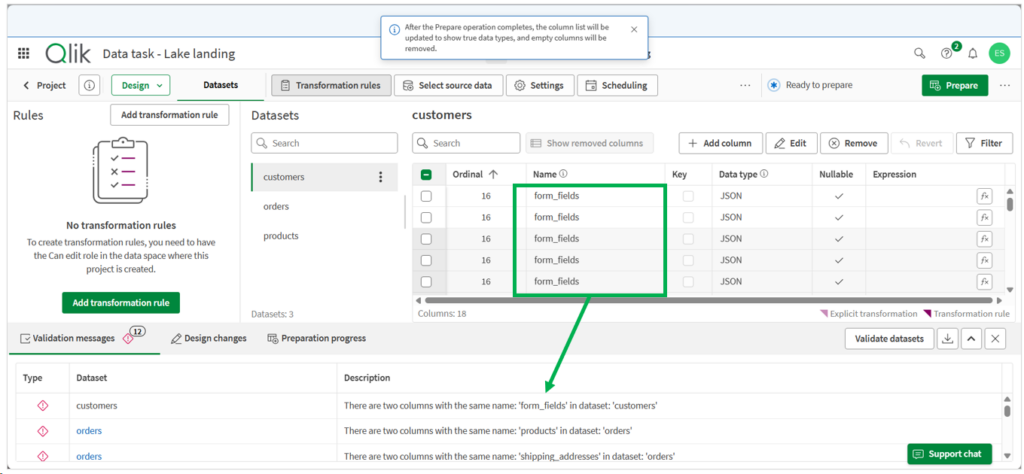
So, configuring the pipeline stops here. Also, I can’t make a Google Drive destination to write the CSV files. Google Drive is for source connection only. In the image above, I tried a workaround to write the CSV files to Google Cloud Storage first (that’s why it’s a Data task – Lake landing), and figure out later how to copy the files to Google Drive. But the errors above stopped me.
So, that’s it. Although it’s an enterprise-grade data platform for huge amounts of data (which makes it qualify as a top tool), it’s not for BigCommerce to Google Drive just yet.
Best For
Enterprises and teams in need of a comprehensive, hybrid data integration platform capable of handling complex ETL workflows with large datasets across both cloud and on-premises environments.
Ideal for users who value an all-in-one solution with strong governance and management features, and who can manage a more involved installation and setup process.
At the time of writing, Talend is not yet an option for connecting BigCommerce to Google Drive. But for other connectors that work, this is an enterprise-grade option.
Rating
The following are the G2 and Capterra ratings at the time of writing:
- G2 : 13 reviewers rated 4.6/5
- Capterra : 24 reviewers rated 4.3/5
Pricing
There’s no publicly listed pricing, but plans include Starter, Standard, Premium, and Enterprise. General benchmarking suggests:
- Cloud Starter: ~$12,000–30,000/year.
- Cloud Premium: $50,000–100,000+/year.
- Enterprise (Data Fabric): $150,000–$500,000+/year.
Note: Hidden costs often include implementation services, training, and infrastructure overhead, which can significantly raise total spend.
A simplified per-user option starts at $1,100 per user per month on AWS Marketplace for Talend Cloud DI.
Pros
- Drag-and-drop pipeline design
- All-in-one data management – data integration, data quality, automations, analytics
- Very detailed processing logs that you can still configure and lessen, if desired.
- Handles streaming and batch at scale; tight governance. Ideal for enterprise use cases.
Cons
- No free tier or developer account option
- Not working for BigCommerce yet
- Less friendly for lightweight or low-touch use cases where simpler tooling could suffice.
- Expensive for startups and midsize businesses
How Can BackupMaster Help with Automated Store Backups?
BackupMaster is an app in BigCommerce to do just that – backups. If the user intends only to do backups, ETL tools are the wrong choice.
It’s my first time trying this, and setting it up starts with a BackupMaster plan, which means entering credit card information or a PayPal account. Then, I got a 7-day trial. I will have to cancel before that. Since I have thousands of orders, the Essentials and Pro plans are locked for me. Only the Plus plan is available for my BigCommerce trial.
When the short setup is complete, it did a full store backup. Below is the result:
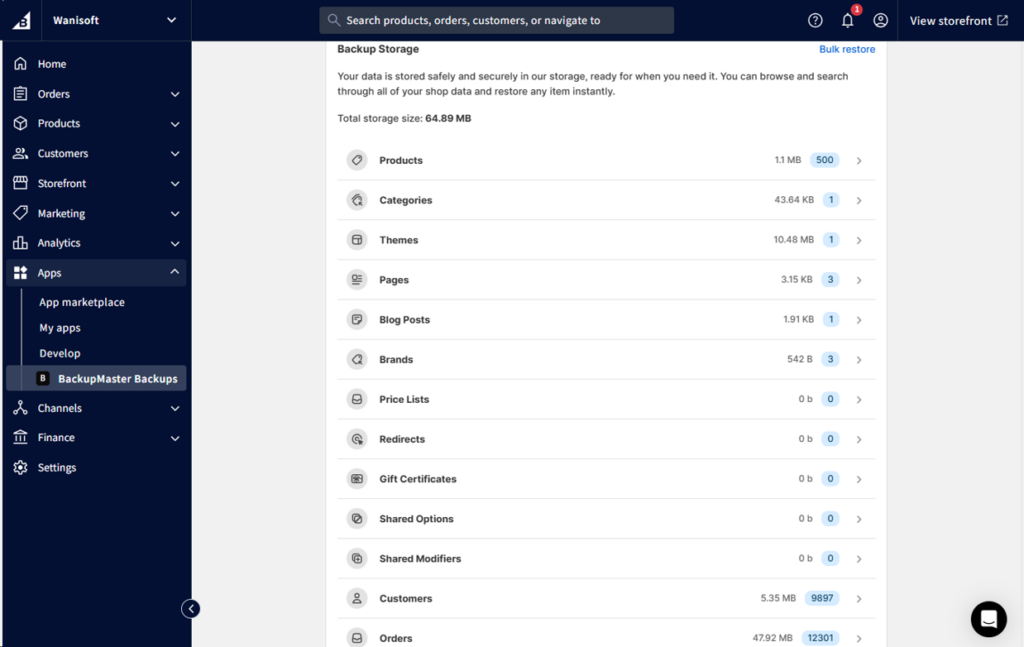
The setup is easy. It can be done in 3 minutes or less. The full backup, though, took 15-20 minutes. It includes soft deletes in Orders. Remember this is a backup.
Can BackupMaster Export to Google Drive?
There are two types of export in BackupMaster: One is stored in BackupMaster’s own servers, and the other is in Google Drive. Check it out below:
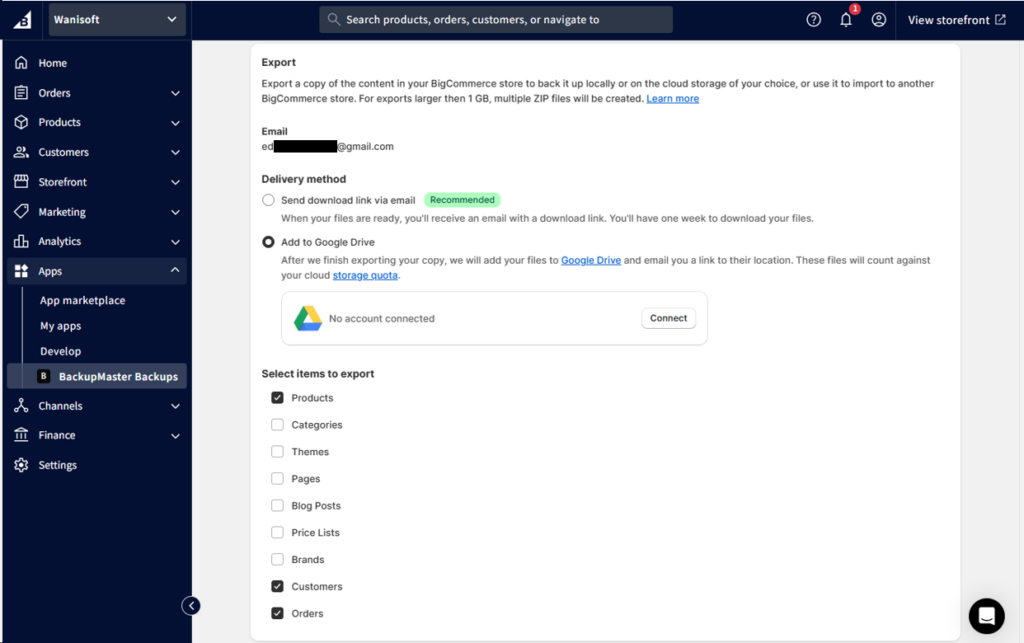
I chose Google Drive and marked Products, Customers, and Orders for export. Then, I need to connect BackupMaster to my Google Drive, but I got this after clicking Connect:
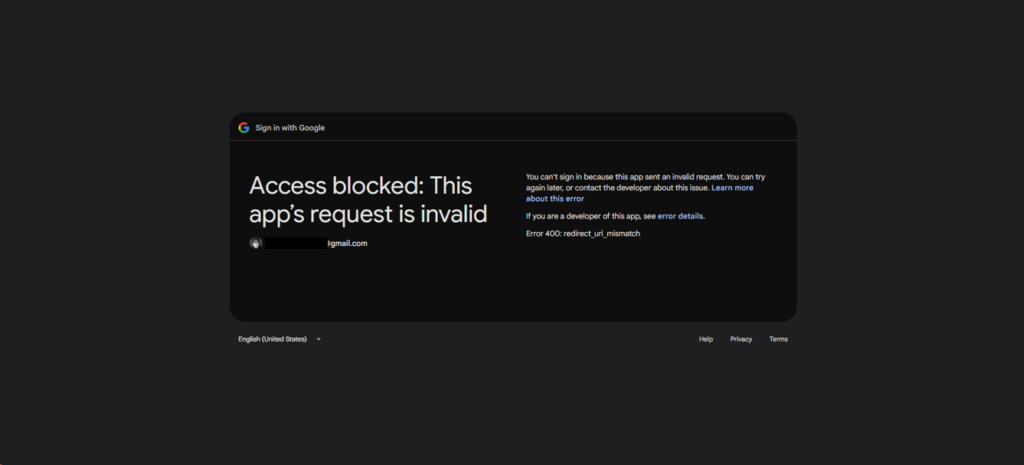
I repeated the same process, and BackupMaster is blocked by Google. So, I was left to use the first option. It worked, as seen below:
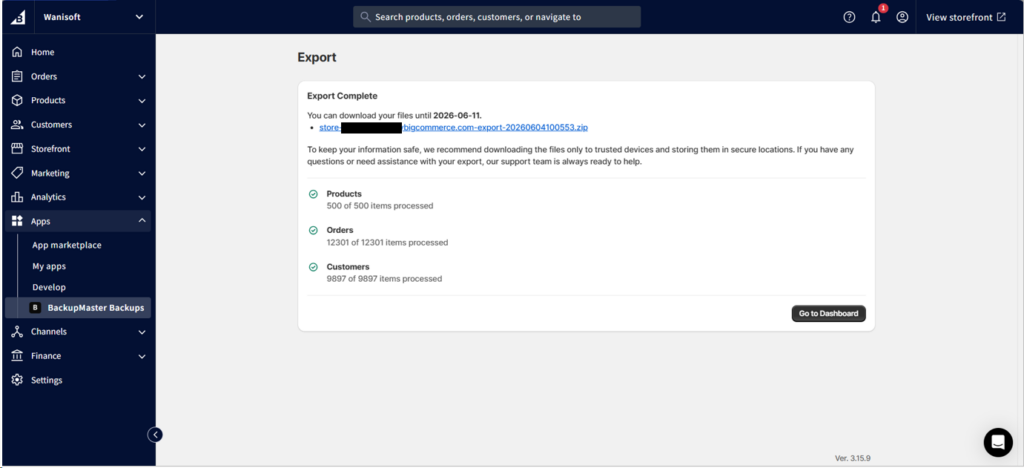
It results in a downloadable ZIP file. But this means I have to manually upload to Google Drive!
The Zip file includes folders and JSON files. Using this output for reporting purposes is not recommended.
Best For
Full store backups and selected BigCommerce data, like customers and products. Allows restore of full or selected items in your store or into another store. It does automatic daily backups and manual exports.
Rating
BackupMaster has reviews in its own app market and in Capterra.
- BigCommerce App Market: 7 reviewers rated 5/5
- Capterra: 339 reviewers rated 4.4/5
Pricing
BackupMaster pricing plans include:
- Essentials: $19/month for up to 300 orders per month
- Pro: $39/month for up to 600 orders per month
- Plus: Starts at $79/month for up to 1500 orders per month
For more information, please visit their pricing page.
Pros
- Great for backups and restores of full or selected items in BigCommerce
- Good for accidental deletes
Cons
- Google Drive exports not working; needs manual upload
- Output Zip file backup not ready for plain reporting
- Exports all columns; no option to choose the columns you need.
How to Export Files from BigCommerce to Google Drive Manually?
If you just need a one-time export to CSV of any BigCommerce data, there’s an Export tool within BigCommerce. You don’t need an external tool to do this.
Here are the steps I did:
- From the sidebar, I chose the item I want to export. Tried it with products, so I expanded Products and clicked Export.
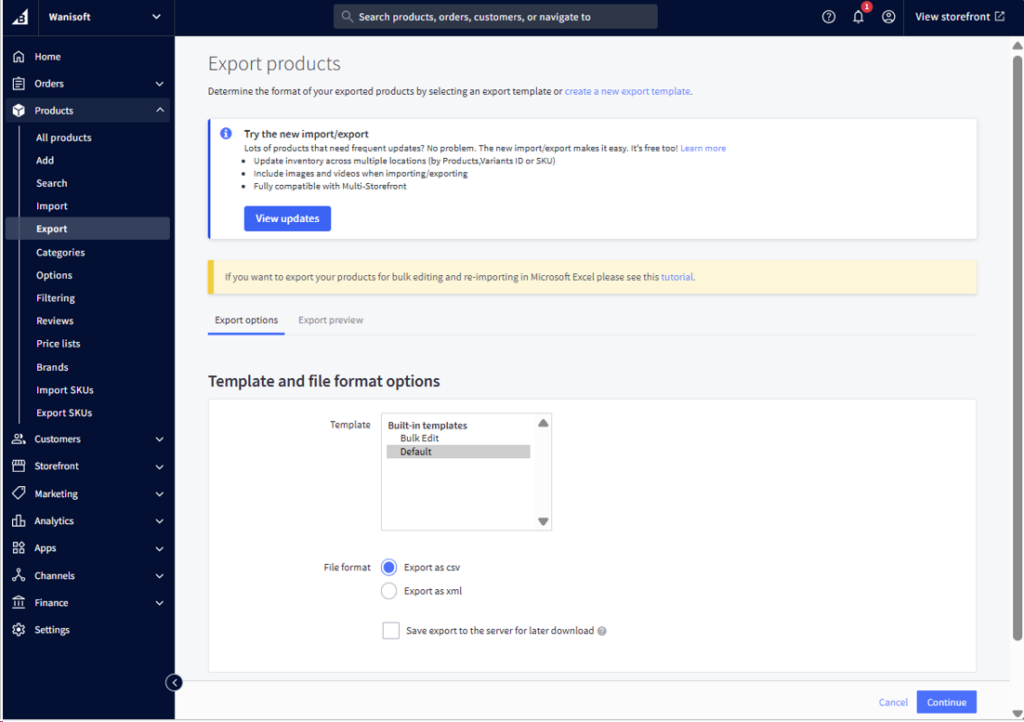
- Then, I chose the CSV file format and clicked Continue.
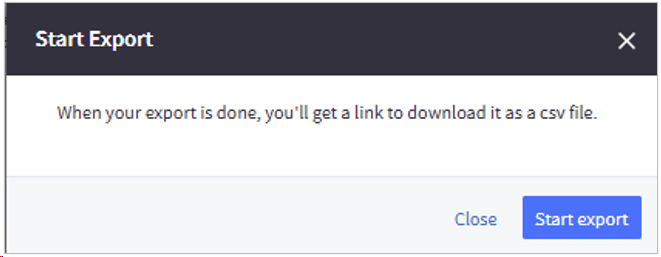
- I clicked Start Export to start the export.
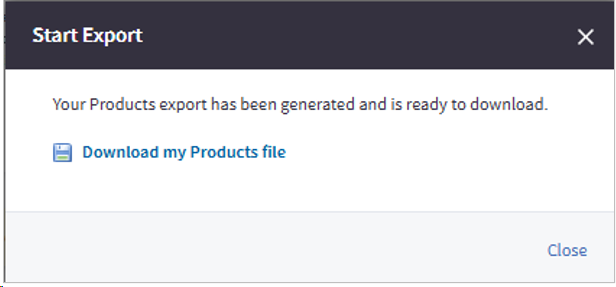
- And when done, I clicked the link to the downloadable CSV file and saved it to my preferred local folder.
- Finally, I uploaded the CSV file to my chosen Google Drive folder.
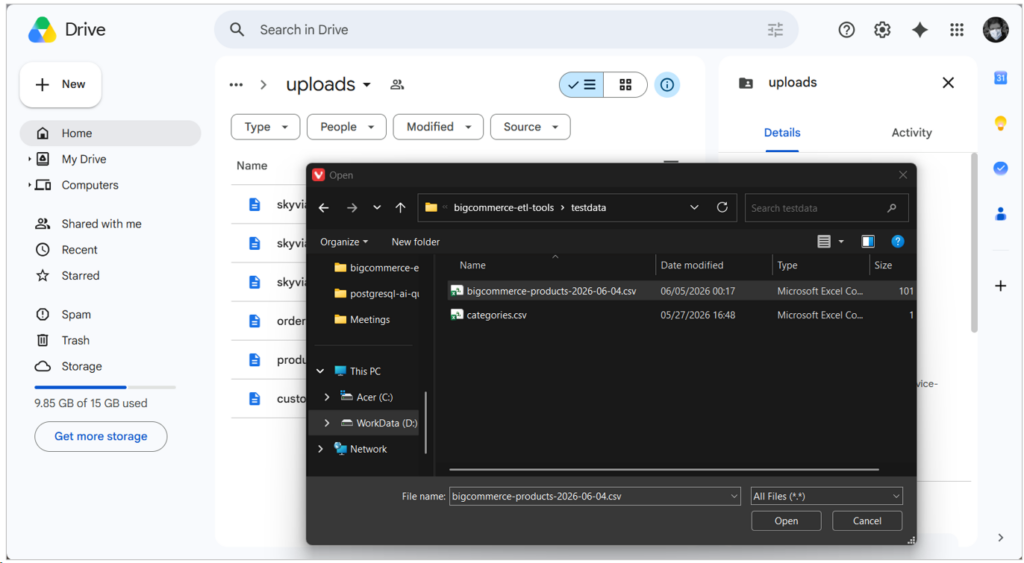
This is totally manual, and I don’t recommend this for regular reporting updates.
How Do You Set Up an Automated Pipeline in Skyvia?
If you find Skyvia to fit your CSV export needs, here are the steps I followed:
- Create 2 Skyvia Connections: one for BigCommerce and another for Google Drive.
- Then, from the top of the page, click + Create New, then click Export.
- Set the export Source to the BigCommerce connection created in #1.
- Choose CSV to storage service as the Target Type.
- Set the Target connection to the Google Drive connection created in #1.
- Add tasks for customers, products, and orders. Choose the columns to export. Add a filter to the Orders task to include only active records (IsDeleted=false).
- Click Validate to check the Export integration.
- Name the Export integration and save.
- Click Run to test the Export integration.
- If all is good, create a schedule if needed.
You can revisit the screenshots earlier to match the steps above.
The soft deletes in Orders made me come back and revisit the Orders task. The fix is not so difficult, though.
Conclusion
This review put the top tools I know to a real test for BigCommerce to Google Drive exports. We bumped into issues in Talend, but the BigCommerce connector is still in preview. BackupMaster is good, but it’s manual to upload to Google Drive. BigCommerce also has export options for one-time CSV dumps.
Meanwhile, Airbyte is best if you want it self-hosted or you have a team of experts who can configure and code. But if project schedules are tight, you can try Skyvia. Register for free today, and start creating pipelines immediately.

FAQ BigCommerce to Google Drive

How do I handle nested JSON data (like multiple line items) when exporting to a Google Drive CSV?
Flatten nested JSON using ETL mapping or dbt/sql/Python transforms. Each line item becomes a separate row, preserving order IDs for relational context.
Will API rate limits crash my daily BigCommerce data export?
Not if you paginate and respect limits. Tools like Airbyte Cloud handle retries; large exports may need batching to avoid 429 errors.
Can I export BigCommerce data directly into a Google Sheet instead of a CSV file in Drive?
Yes, via Google Sheets API or ETL tools with Sheets connectors. Sheets live in Drive, so you can skip CSV if your workflow allows.
Is there a completely free way to automate BigCommerce to Google Drive exports?
Airbyte Core is free if self-hosted. Also, PyAirbyte. Otherwise, manual CSV export from BigCommerce to Drive is the no-cost option, or use an ETL tool’s free tier, like in Skyvia.
How secure is my customer data when using third-party ETL tools?
Security depends on the vendor. Reputable ETL tools use encryption, OAuth, and compliance (GDPR, SOC 2). Always review their data handling policies.