Summary
- Skyvia – the fastest way to get Snowflake talking to your CRM without hiring an engineer or writing a line of SQL.
- Matillion – built for enterprises that need Reverse ETL governed and transformed inside Snowflake itself, not bolted on beside it.
- Confluent – the right call when sub-second latency is a hard requirement and batch syncs simply aren't fast enough.
- RudderStack – a code-first, Git-versioned pipeline for engineering teams who want to own every step of the data flow.
Your data team spent months building immaculate customer segments inside Snowflake. Then your marketing colleague asks to “just quickly push that list to HubSpot.” So you export a CSV. Upload it. The segment logic updates overnight. You export again. Somewhere in the third round of this, a small piece of your soul leaves your body.
Snowflake Reverse ETL exists specifically to murder that workflow. It is the bridge that stops your warehouse from being a beautiful, sealed vault nobody can use.
Before we go further: we’re the team at Skyvia. We built a data integration tool that does Reverse ETL, so the bias disclaimer writes itself. What we’re promising here is something rarer than objectivity – honesty. That means telling you when Matillion, RudderStack, or Confluent will serve you better than we will. Because they will, for some of you.
This isn’t a vendor comparison dressed up as journalism. It’s the breakdown we’d want to read ourselves.
Why Should You Trust This Review?
Here’s what we actually did to earn some credibility.
Our engineering team logged 40+ hours testing these reverse ETL tools. Actual setup, configuration, breakage, and recovery hours. We spun up a Snowflake warehouse, built a real test dataset of 1,000 customer records, and pushed it into a Salesforce sandbox using every tool in this guide. Some runs were smooth. Some made us question our career choices.
What we measured:
- Sync speed – how long each tool actually takes to move data at scale, not what the marketing page claims.
- API rate limit handling – what happens when Salesforce says “slow down” and whether the tool panics, queues, or just drops records.
- Setup complexity – how long before you get a working sync, measured in hours, not “minutes” (we’re looking at you, every product that claims “set up in minutes”).
- Error logging – because things break, and the difference between a good tool and a nightmare is whether you can tell what broke and why.
How Do the Top Snowflake Reverse ETL Tools Compare?
Before the deep dives, here’s the aerial view. One thing you’ll notice immediately: these tools aren’t really competing for the same customer. They’re more like four different restaurants on the same street, and the table below reflects that.
| Skyvia | Matillion | Confluent | RudderStack | |
|---|---|---|---|---|
| Best for | Teams that need a no-code approach to Reverse ETL | Enterprises running analytics-heavy, Snowflake-native ELT pipelines | Real-time streaming architectures where sub-second latency is non-negotiable | Developer-first teams who want code-level control over every pipeline step |
| Pricing model | Tier-based with volume overages; free plan available, paid plans start at $79 and scale by record volume and features | Credit-based consumption (vCore-hours); starts ~$1,000/month, scaling to $20K-$300K+ annually for enterprise | Throughput-based (Confluent Cloud); platform pricing requires a sales consultation | Free: up to 250K events/month (Reverse ETL included); Growth: from $265/month for 1M events/month (Reverse ETL included) |
| Sync frequency limit | Scheduled, near real-time | Minimum 1-15 minutes; no sub-minute syncs | Sub-second via Kafka streaming | Real-time, with sub-100ms latency possible |
| Setup complexity | Visual wizard; connection-to-first-sync in under 30 minutes, no code required | Drag-and-drop GUI, but warehouse-native – transformations run inside Snowflake and require SQL for anything beyond basics | Kafka connector setup; requires Kafka architecture knowledge and ongoing infrastructure management | SQL, CLI, Terraform, and infrastructure-as-code built for data engineers, not marketing ops |
Which Tool is Best for Fast No-Code Setup?
Enterprise tools are built on the assumption that you have an engineering team, a procurement process, and six to eight weeks to spare before the first sync runs. Most companies don’t have any of those things. What they have is a data analyst who already did the hard part (modeling clean segments inside Snowflake) and business users on the other side who just need that data inside the CRM to do their actual jobs.
Skyvia
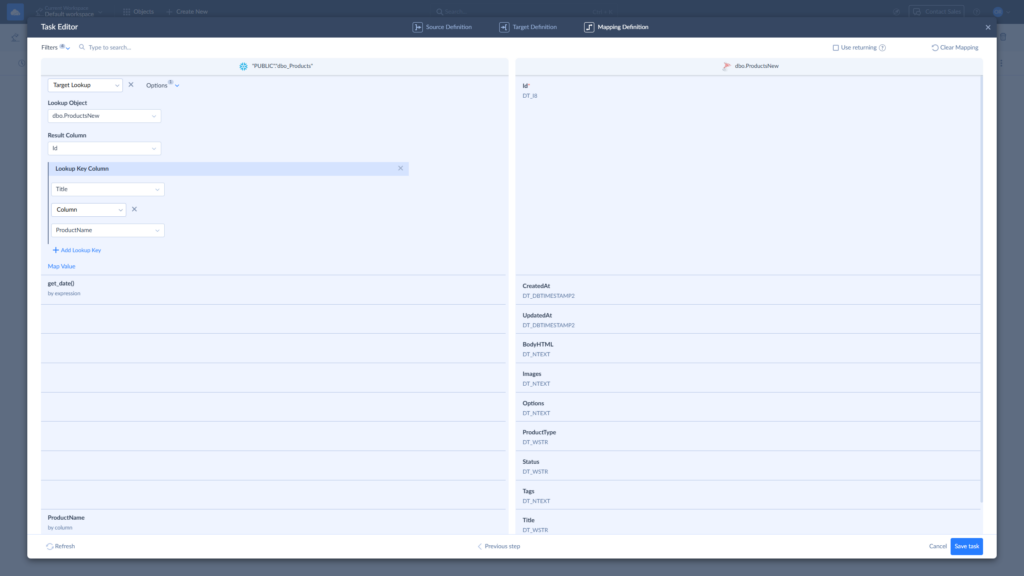
The core scenario Skyvia was built for is this: a marketing or sales ops team needs Snowflake data flowing into HubSpot or Salesforce, and they need it done before their next campaign launch. No code, no infrastructure setup. You connect your Snowflake source, map the columns to your CRM fields visually, set a sync schedule, and that’s the whole process.
Skyvia covers the full loop: ingest data from 200+ sources into Snowflake via ETL/ELT, run dbt Core models warehouse-side for transformations, then push the results back out to operational tools via Reverse ETL.
One tool, one billing surface, one place to check when something needs attention. For teams that have previously stitched together three separate vendors to achieve this, the consolidation alone saves much more than money.
During internal testing, mapping Snowflake columns to Salesforce fields in the visual UI took under three minutes from a blank canvas. Not “under three minutes if everything goes perfectly” – just genuinely three minutes. The interface shows your Snowflake source on the left, your destination fields on the right, and you drag, match, and move on.
Best for
Data analysts, engineers, IT managers, revops, and analytics leaders who spend their days pulling data from SaaS apps, databases, and operational systems into a cloud data warehouse. Then pushing it right back out to the CRMs, ad platforms, and marketing tools that run the business. And would very much like those processes to stop being the most stressful part of their job.
Rating
G2: 4.9/5 (based on 332 reviews) | Capterra: 4.8/5 (based on 116 reviews)
Pricing
Volume-based: you pay for records moved, not for how many systems you connect or how many people log in. Unlimited users on every plan, a real free tier at 10,000 records/month with no credit card required, and paid plans starting around $79/month.
Pros
- The visual mapping interface removes the dependency on technical resources for standard activation workflows. A marketing ops manager can build a working Snowflake-to-HubSpot sync in the time it takes to file an engineering ticket.
- 200+ pre-built connectors mean most stacks are covered out of the box, and the REST connector handles custom or internal sources that don’t appear on the standard list.
- Automatic schema handling adapts to source changes without manual remapping, which is the kind of thing you don’t appreciate until the alternative is a broken pipeline discovered on a Monday morning.
- The full ETL → dbt transformation → Reverse ETL loop running inside one platform keeps the billing, the monitoring, and the troubleshooting in one place rather than spread across three vendor dashboards.
- SOC 2 Type II certified, GDPR-compliant, with encryption in transit and at rest – the compliance baseline that regulated industries need without requiring a dedicated security review of a three-vendor stack.
Cons
- Skyvia runs entirely in the cloud. For organizations in highly regulated sectors requiring strictly on-premises, air-gapped infrastructure with no internet access, Skyvia falls outside what compliance mandates will allow.
- Teams with deeply customized SAP environments or the most complex enterprise ERP installations may find connector depth a bit thin.

Which Tool is Best for Enterprise Data Consistency?
At enterprise scale, a pipeline that “probably works” tends to surface its uncertainty at the worst possible moment – usually inside a board deck, usually on a Friday. Governance, auditability, and controlled data movement are the actual product here. Everything else is decoration.
Matillion
Matillion sits comfortably in the “does one thing exceptionally well” category – that thing being warehouse-native ELT for Snowflake-first enterprises. When our engineers evaluated its Reverse ETL capabilities, what stood out was how it handles Snowflake’s own compute to prepare the data before it ever leaves the warehouse. The transformation logic runs inside Snowflake, not in some intermediate layer you have to trust blindly. For governance-heavy teams, that’s not a small thing.
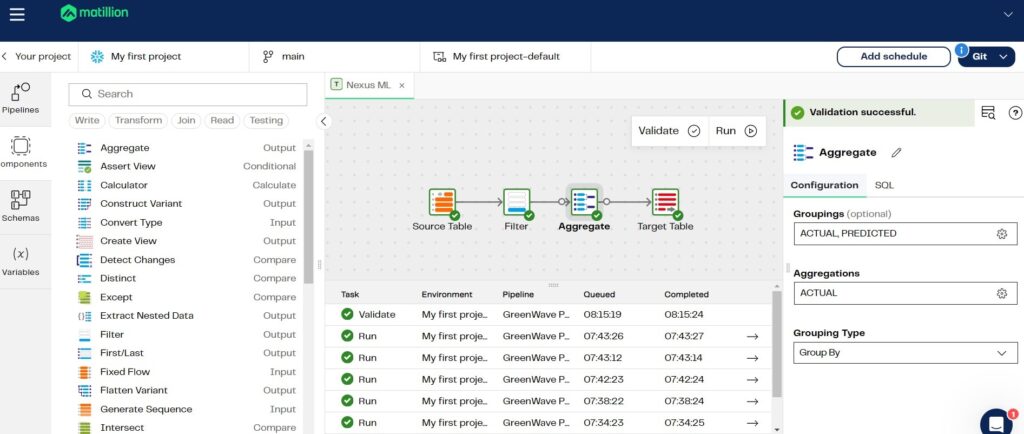
Matillion is a full data productivity platform that happens to do Reverse ETL, not a Reverse ETL tool that happens to be powerful. If you came here looking for something to sync a Salesforce cohort in under an hour with no engineering involvement, it’s not here.
Best for
Large enterprises already running Snowflake as their primary warehouse, with complex transformation logic that needs to stay governed, auditable, and warehouse-native before data gets pushed to operational systems. Not for teams who want fast, lightweight activation without engineering overhead.
Rating
G2: 4.5/5 (based on 125 reviews) | Capterra: 4.3/5 (based on 111 reviews)
Pricing
We know that Matillion pricing is a credit-based consumption model (vCore-hours), but there’s no public pricing page – you’ll need to contact sales for a quote. Factor in your Snowflake compute costs separately.
Pros
- Transformations run natively inside Snowflake – the warehouse stays the authoritative system of record throughout.
- Drag-and-drop pipeline builder with serious transformation depth.
- Mature enterprise controls around security, least privilege, and pipeline validation.
- Strong fit when Reverse ETL is one piece of a broader, orchestrated data pipeline rather than a standalone activation task.
Cons
- The “two-bill” problem is real: platform credits plus Snowflake compute costs scale independently, and the combined invoice can surprise finance teams at volume.
- Not purpose-built for Reverse ETL – connector breadth on the output side is narrower than dedicated activation tools.
- Overkill and cost-prohibitive for teams whose Reverse ETL needs are simple point-to-point CRM syncs.
Which Tool is Best for Real-Time Event Streaming?
Most Reverse ETL tools move data the way postal mail moves packages – scheduled runs, predictable batches, a slight but acceptable delay between reality and your destination system. For fraud detection, real-time personalization, or abandoned cart triggers firing in milliseconds, that lag window costs money. This is a different problem category entirely, and it needs a different animal.
Confluent
Sub-second latency for Reverse ETL may sound like marketing, but that impression changes quickly when you need it. Like the moment a Snowflake record update flags a transaction as high-risk, and your fraud service needs to know right now. During our research into Confluent’s Snowflake Source Connector, we watched how it streams changes directly into Kafka topics the moment they happen, bypassing the batch cycle altogether. It was quite elegant.
The catch – and it’s a significant one – is that Confluent is a streaming platform, not a Reverse ETL app. Getting from Snowflake to, say, a Salesforce field via Confluent means you’re assembling an architecture, not configuring a sync. You’ll need Kafka topics, schema registry, connectors on both ends, and likely a transformation layer like Flink SQL or dbt sitting in the middle.
Here’s what a Kafka topic configuration for a Snowflake source connector looks like in practice:
{

  "name": "snowflake-source-connector",

  "config": {

"connector.class": "com.snowflake.kafka.connector.SnowflakeSinkConnector",

    "tasks.max": "1",

    "topics": "customer_risk_scores",

    "snowflake.topic2table.map": "customer_risk_scores:RISK_SCORES",

    "snowflake.url.name": "https://<account>.snowflakecomputing.com",

    "snowflake.user.name": "<username>",

    "snowflake.private.key": "<private_key>",

    "snowflake.database.name": "PROD_DB",

    "snowflake.schema.name": "PUBLIC",

    "key.converter": "org.apache.kafka.connect.storage.StringConverter",

    "value.converter": "com.snowflake.kafka.connector.records.SnowflakeJsonConverter",

    "buffer.flush.time": "10",

    "buffer.count.records": "10000",

    "buffer.size.bytes": "5000000"

  }

}
That 10-second flush interval alone syncs more often than most batch Reverse ETL tools do in a full day. Scale that down further for genuinely latency-critical use cases, and you understand why teams building real-time personalization engines or fraud pipelines reach for Confluent first.
Best for
Teams treating Reverse ETL as an event stream rather than a scheduled data push – particularly those already running Kafka as their event bus and wanting Snowflake to participate in that streaming fabric as both an analytical brain and an occasional data producer.
Rating
G2: 4.4/5 (based on 114 reviews) | Capterra: 4.4/5 (based on 8 reviews)
Pricing
Pricing is consumption and tier-based via Confluent Cloud – you pay for data processed, partitions, connectors, and cluster capacity, not per seat. The model works well when you scale gradually; it requires close monitoring when Reverse ETL workloads spike. Most enterprise teams budget Confluent as core infrastructure spend rather than a line-item SaaS tool. Pricing details and calculators are available here – contact sales for enterprise quotes.
Pros
- When milliseconds separate a fraud alert from a fraudulent transaction going through, Confluent’s sub-second Kafka streaming is the only architecture that seriously belongs in the conversation.
- The Snowflake Source Connector reads changes as they happen and pushes them into Kafka topics continuously – your downstream systems stop waiting for the next batch window and start reacting to the world as it moves.
- Throughput scales without rebuilding anything; the same setup that handles today’s volume handles the volume your growth team is promising for next quarter.
- Confluent Cloud handles the infrastructure management that used to make Kafka a dedicated engineering project – cluster sizing, scaling, availability – so your team can focus on the pipeline logic rather than keeping the lights on.
- Tableflow and tighter Snowflake-native integrations are actively closing the gap between streaming infrastructure and analytical context, pointing toward a future where the two layers genuinely stop feeling separate.
Cons
- Configuring an end-to-end Reverse ETL workflow requires engineering resources, Kafka knowledge, and typically additional tooling (Flink SQL, dbt, or a dedicated activation layer) to complete the picture.
- Operational complexity scales with ambition: topics, partitions, schema registry, SLAs, consumer lag monitoring – all your problems to manage, even on the managed cloud offering.
- Usage-based pricing tied to streaming volume can compound fast if high-throughput Reverse ETL scenarios aren’t governed carefully.
Which Tool is Best for Customer Data Infrastructure & Developers?
Most Reverse ETL tools hand marketers a dashboard and call it done. RudderStack took a different philosophical position: what if we built this thing for the engineers who will actually maintain it?
The result reads less like a SaaS product and more like a well-designed piece of infrastructure, which, depending on who you are, is either exactly what you wanted or a polite way of saying your marketing team won’t touch it.
RudderStack
Going through RudderStack’s documentation for setting up Snowflake as a Reverse ETL source felt less like reading a product manual and more like reviewing a system architecture, and we mean that as a compliment.
The platform treats Reverse ETL as a natural extension of an event-routing ecosystem that was already built for developers – complete with SDK support, configuration-as-code, dbt compatibility, and Git integration. Your Snowflake models feed directly into the same pipeline infrastructure your engineers already control.
The JSON payload RudderStack sends to a destination API reflects that precision. Here’s how enriched Snowflake data arrives at, say, Salesforce:
{

  "type": "identify",

  "userId": "usr_4f8a92bc",

  "context": {

    "traits": {

      "email": "john.doe@example.com",

      "account_tier": "enterprise",

      "lifetime_value": 24750.00,

      "last_purchase_date": "2026-06-01",

      "total_orders": 47,

      "pql_score": 87,

      "segment": "high_value_churning"

    }

  },

  "timestamp": "2026-06-15T09:14:32.000Z"

}
That pql_score field – a product-qualified lead score computed entirely inside Snowflake – going directly into Salesforce without a single CSV handoff or manual mapping step is the whole point. Sales acts on the same number the data team computed. No version drift, no export lag.
Best for
Engineering teams building a Composable CDP around Snowflake, where developers need full control over data routing and governance, and business teams need a reliable feed of modeled customer data into 200+ downstream tools – without anyone having to reconcile three different definitions of what a high-value customer actually means.
Rating
G2: 4.7/5 (based on 52 reviews) | Capterra: 5/5 (reviews here are still sparse – 1 to date)
Pricing
RudderStack uses usage-based pricing with a Free plan and self-serve Growth tiers, and its published docs show Free, Growth, and Enterprise as the current plans. The Free plan is capped at 250K events/month, while Growth is available in monthly and annual tiers starting at $265/month for 1M events/month; the older Starter plan is deprecated for new signups.
Reverse ETL destinations are capped per tier (10 on Free, 25 on Growth), separate from the event-volume pricing.
Pros
- Your data engineers version-control the entire pipeline in Git, model transformations in dbt, and deploy configuration changes the same way they deploy code – Reverse ETL stops being a separate concern and becomes part of the infrastructure they already own.
- Snowflake sits as a first-class source, meaning enriched tables and SQL models flow into 200+ destinations with explicit mapping and schema control rather than hoping the sync figured out what you meant.
- A SaaS company computing PQL scores in Snowflake can push those scores simultaneously to Salesforce, HubSpot, and an in-app messaging tool – all teams acting on one number, one definition, one Snowflake query.
- Open-source core means you’re not locked into a black box; teams that want to inspect, fork, or extend the routing logic can.
- Support, consistently flagged in reviews as a genuine differentiator – responsive through Slack workspaces, not just a ticketing queue that replies in three business days.
Cons
- A marketing ops manager who wants to self-serve a new audience sync on a Tuesday afternoon will hit a wall fairly fast – this tool needs an engineer in the loop for most meaningful configuration changes.
- Per-connection pricing is honest and predictable, but teams running many micro-segmented syncs across dozens of tools will watch that cost compound quickly.
- Observability is still developing – tracking exactly what happened to a specific record mid-pipeline requires more manual digging than mature platforms offer out of the box.
- Optimized specifically for customer and event data; if your Reverse ETL needs to run outside that domain (finance pipelines, operational metrics, non-customer data), the infrastructure-as-CDP architecture is solving a problem you don’t actually have.
How Do You Actually Set Up a Reverse ETL Pipeline?
Enough theory. Here’s what the process looks like when you sit down and build one – using Skyvia, a Snowflake source, and a Salesforce destination, from blank canvas to running sync.
Step-by-Step
Connecting the Warehouse
- Sign in to your Skyvia account. If you don’t have it yet, create one. As experience shows, it takes only a second or two longer than logging in.
- In Skyvia, click on Create NEW and choose a Connection. Find Snowflake in the list.
- Provide Snowflake credentials.
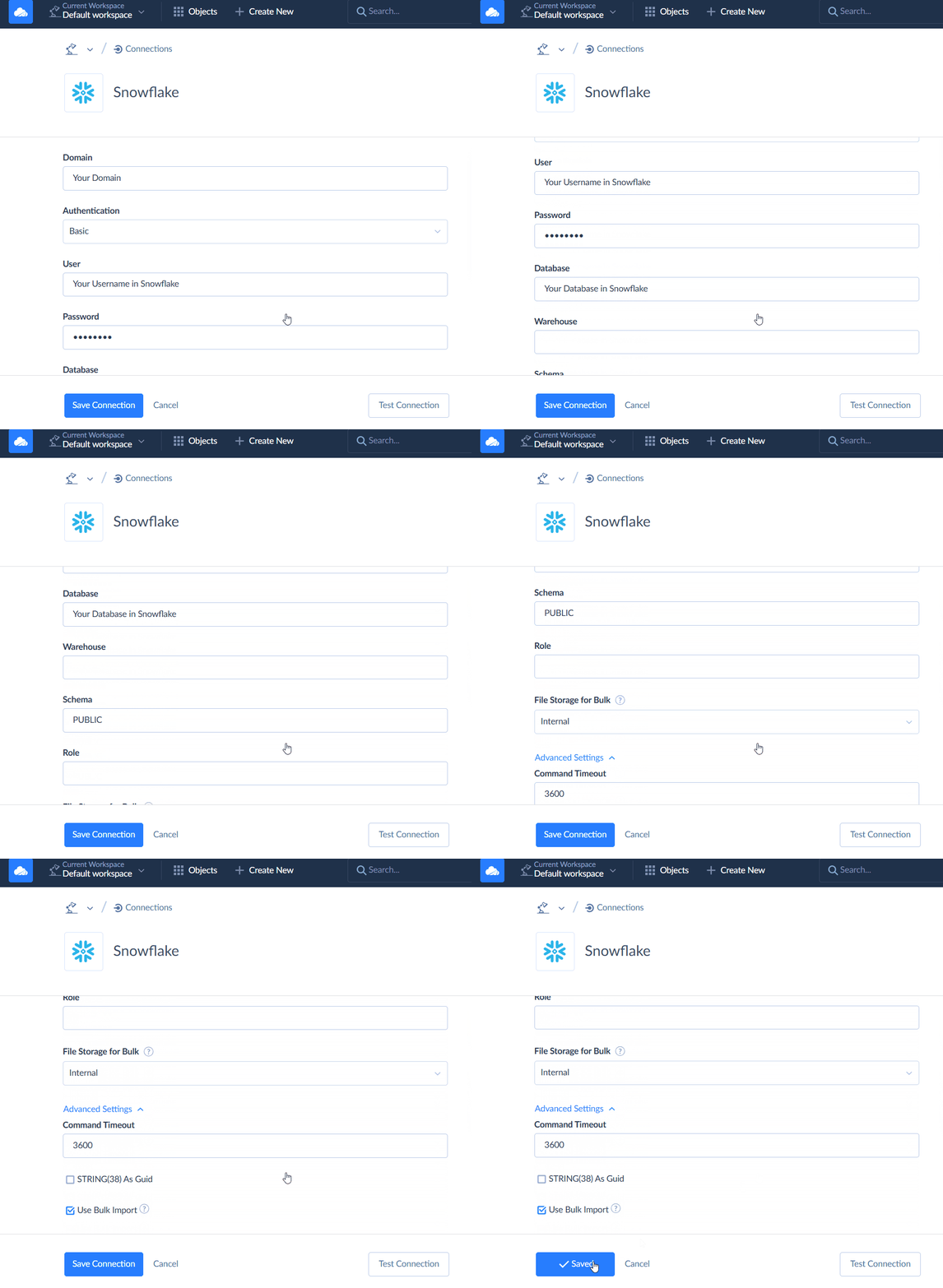
Note: We used the Basic authentication method. Skyvia offers two more methods for connecting to Snowflake: OAuth Authentication and Key-pair Authentication.
- For this case, we will use Salesforce as a target. So, let’s create the connection following a similar pattern.
Defining the Query
- Now, click +Create NEW one more time and choose Import.
- Select Data Source, which is Snowflake, as the Source Type.
- Then, click on Add new in the upper right corner to create the first task for this reverse ETL run.
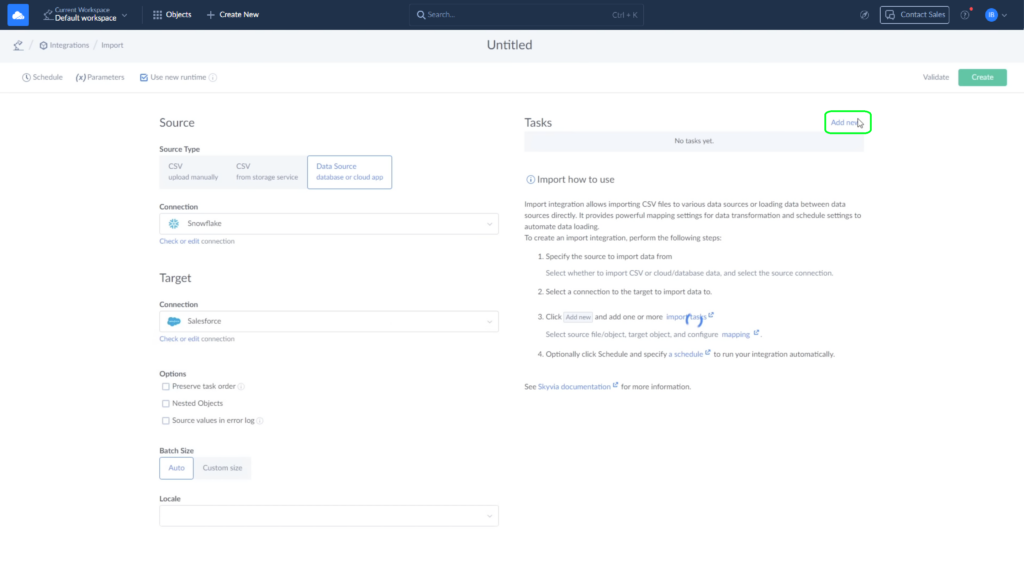
Note: You can add any number of tasks to your integration. For example, one to import contacts, another one for accounts, etc.
Mapping to Destination
- Now, let’s configure a query using the Task Editor. Today, we’re importing account data. Choose them from the dropdown list on the Source Definition tab.
Note: You can apply filters to the source data. For example, let’s move only those accounts that are active.
- In the corresponding field, choose the needed parameter from the dropdown menu.
- Specify that you want it to be equal to true.
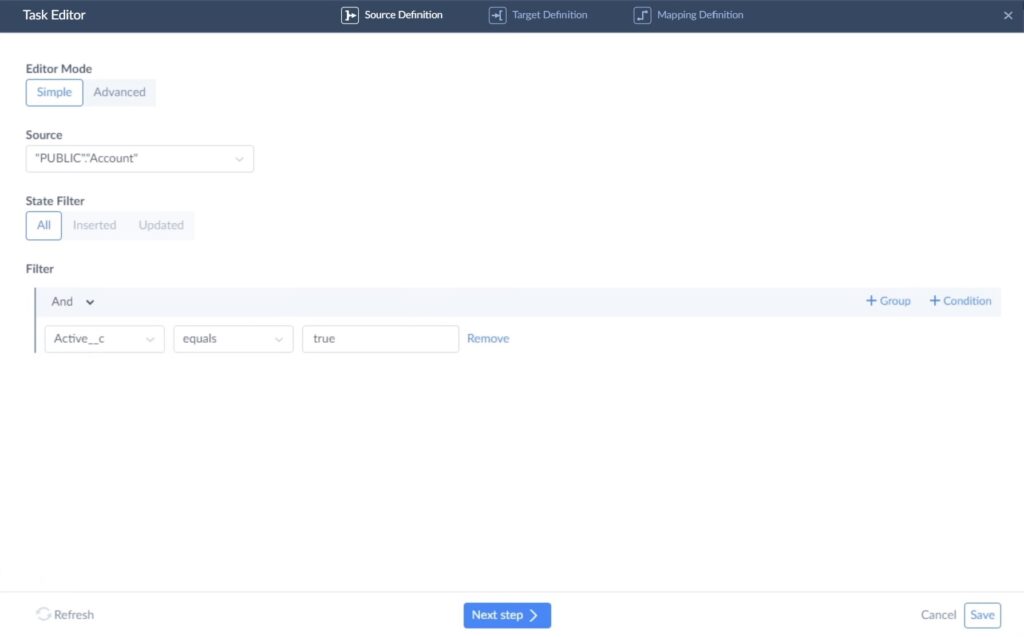
- On the Target definition tab, select the Account object in Salesforce to load data into.
- Also, choose one of the available operations: insert, update, upsert, or delete. We need to update Salesforce records, so our best shot is the Update operation.

- Skyvia tries to map fields automatically, but you still have the final say on how to map them as you see fit. You can use four available mapping types: column, constant, lookup, and expression.
- Let’s use the column type to map the Client status field in Salesforce. Choose it from the dropdown menu and set the account status to updated.
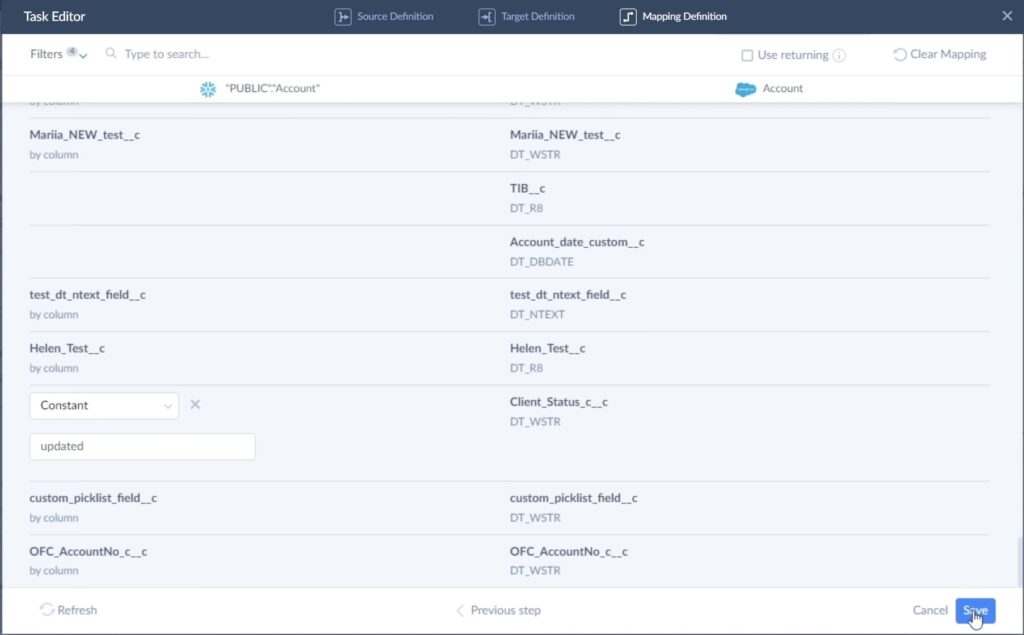
- When you’re done, click Save.
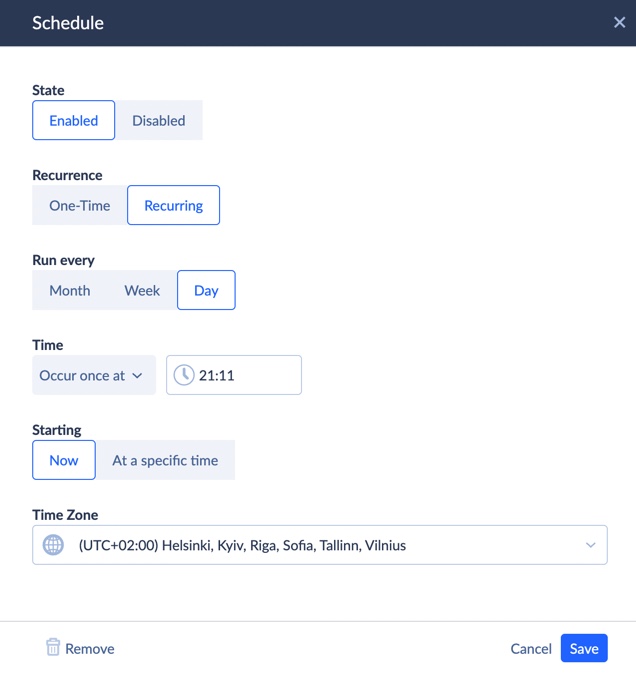
- The next step is scheduling. You can decide how often this integration should run and whether it should be automatic or manual.
- When all the parameters are set, click Save.
Handling Errors
- Skyvia provides detailed logs of what succeeded and what failed during the integration.
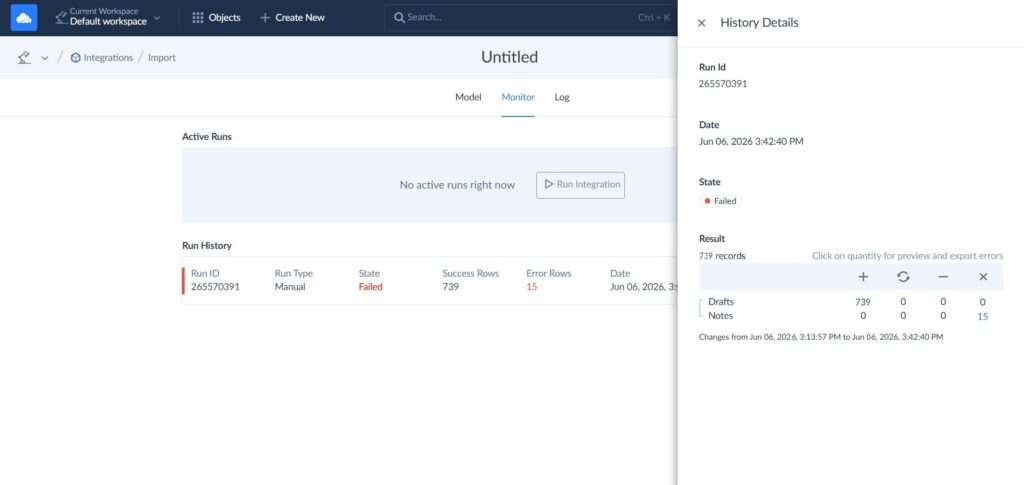
- As you can see, during our run, 15 stubborn rows didn’t make it all the way into Salesforce. However, there’s no need to compare source and target manually to find those needles in a haystack.
- Click Run in the log, and you will get the History Details. From there, click on the failed rows.
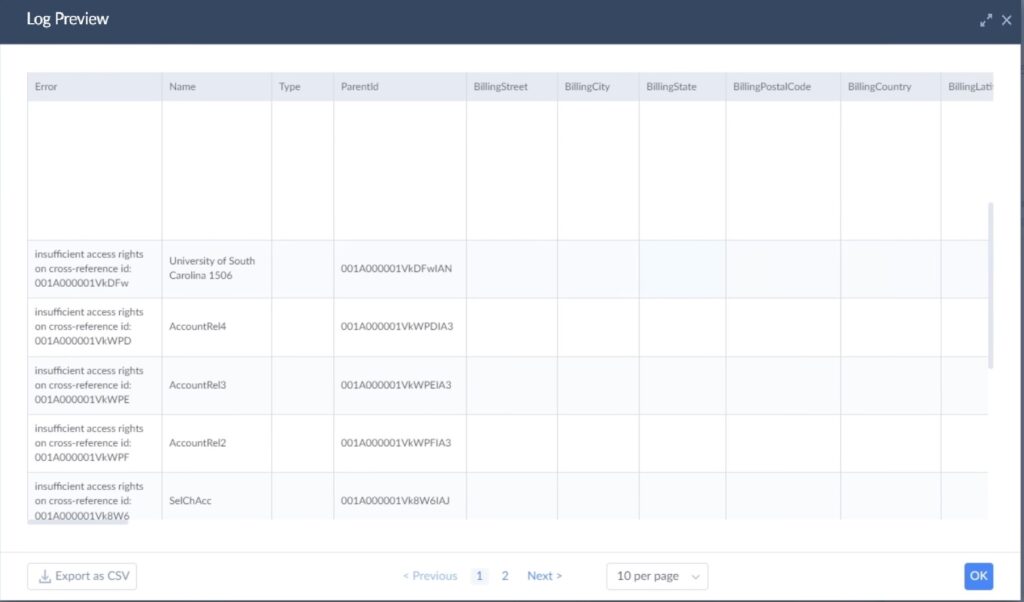
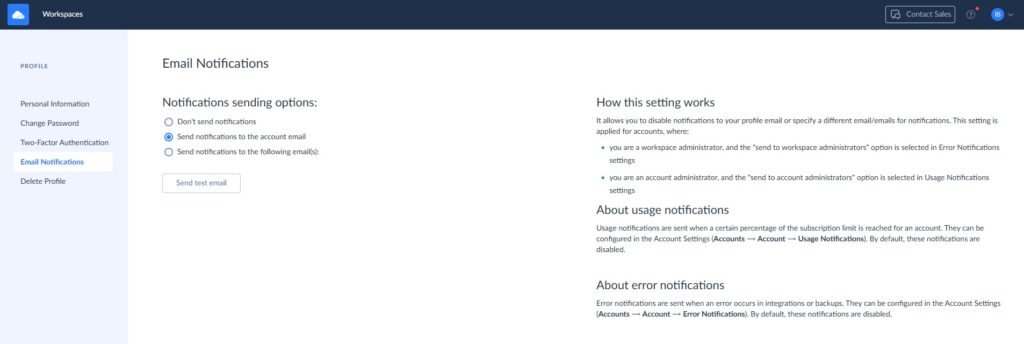
Note: You’ll get an email the moment something goes wrong – whether the sync failed completely or only part of the data made it through.
- Click on your account avatar in the upper right corner and choose Profile Settings.
- Go to Email Notifications and choose the option that suits you.
What Are the Final Thoughts on Snowflake Reverse ETL?
After 40+ hours of testing and more documentation than any person should read voluntarily, here’s what it comes down to: there’s no wrong answer here, only wrong fits.
- Matillion is for enterprises where data governance is a board-level conversation and the Snowflake compute bill already has its own line item.
- Confluent is for teams where the word “batch” triggers a visible flinch and sub-second latency is a product requirement, not a preference.
- RudderStack is for engineers who want to own the entire customer data pipeline in code and trust nobody’s drag-and-drop interface with something this important.
- And Skyvia is for everyone who just needs Snowflake talking to their CRM before the next campaign goes out, without filing a ticket, writing a script, or explaining to a salesperson why they don’t need an enterprise contract for that.
Four different restaurants, and now you know which one matches your appetite.
Ready to see what Snowflake Reverse ETL looks like when it doesn’t require a PhD to configure? Build your first pipeline in under 10 minutes – no credit card, no Python, no stretching your patience thin required.

FAQ for Snowflake Reverse ETL

What are the most common use cases for Snowflake Reverse ETL?
Syncing customer segments to HubSpot, pushing lead scores to Salesforce, updating ad platform audiences, and triggering personalization engines with warehouse-computed product recommendations.
Can I just write a Python script instead of buying a Reverse ETL tool?
You can. Teams do it all the time. However, prepare for API changes, someone leaving, the script breaking, etc. A dedicated tool handles maintenance, error logging, and retries so your script doesn’t become somebody’s full-time job.
Will running Reverse ETL pipelines increase my Snowflake compute costs?
Slightly. Reverse ETL queries run against your warehouse, so compute costs apply. Scheduling syncs during off-peak hours and using incremental loads rather than full-table scans keeps the impact minimal.
How secure is extracting data from Snowflake to third-party tools?
With the right tool – very. Look for SOC 2 Type II certification, encryption in transit and at rest, role-based access controls, and credential vaulting. The weakest link is usually misconfigured permissions, not the pipeline itself.
How often should I schedule data syncs from Snowflake to my CRM?
Depends on how quickly your data changes and how time-sensitive the downstream decisions are. Hourly covers most CRM use cases. Real-time streaming is only worth the infrastructure cost when the delay genuinely costs money.