Summary
- Data governance is the rules, roles and processes that decide who owns data, what it means, who may use it and how you prove it.
- It rests on four pillars: people, policies, processes and technology.
- On a small team one person can hold several roles, as long as each domain has a named owner.
- Governance is enforced in the pipelines, through access control, field mapping, checks at the point of entry and audit logs.
- Start with one domain, its owner and the few definitions people argue about, then add the next.
The sales dashboard says 4,812 active customers. Finance swears it’s 4,390. Same CRM, two syncs, two answers, and not one person can say which is correct or whose call it is. Now picture that across every table your team looks after. That mess is what data governance exists to clean up.
Most write-ups on data governance assume a Chief Data Officer and a governance council. We wrote this one for the people who actually run the pipelines. We’ll cover what governance is, the parts it’s built from, how to split the jobs when your whole team fits at one table, and where the controls sit in the syncs you run daily.
What is data governance?
Data governance is how a company settles four questions about its data: who owns each kind, what it has to look like, who gets to use it (and for what), and how you’d prove all of that held up. Its scope begins the moment data gets collected. From there it tags along into every system the data lands in, and it only lets go once that data is deleted.
Data governance sets the rules, but someone still has to apply them. That’s where data management and engineering come in. They build the pipelines, assign permissions and check whether the data meets the agreed standards. Without that work, even a well-written governance policy won’t change much.
Say a manager questions the 4,812 active customers shown on a dashboard. The data team should be able to trace that number back to its source, explain how “active” was defined and identify who approved that definition. They should also know what happened to the data between the source and the report.
This also makes data easier to access. Once permissions are agreed and applied across systems, analysts know which datasets they can use without having to request access every time.
Why data governance matters
Problems with data governance often show up as ordinary data issues. Sales and finance report different numbers, an overnight sync fails with no clear owner, or an analyst keeps a separate customer table because the shared version can’t be trusted. Fixing the pipeline might solve the immediate problem, but the disagreement usually comes back if nobody has agreed on the definitions or assigned responsibility for the data.
That difference shows up in the numbers, too. In a 2026 study by Precisely and Drexel University’s LeBow College of Business, 71% of organizations with both a data strategy and a governance program reported high trust in their data. Among organizations without both in place, the figure was 50%.
Few companies have closed that gap. In Redgate’s 2026 State of the Database Landscape report (a vendor survey of 2,150 IT professionals), only 23% of firms said they use formal data governance or quality frameworks.
Compliance is the next reason. At some point a regulator, an auditor or a customer’s security team will want to know who opened a record, when they did it, and which policy allowed it. No owners, no logs? Then you’re in for a week of searching old email threads.
AI makes all of this more pressing. An assistant or agent hooked up to your CRM reads whatever its connection allows. Nobody picked the fields it should see? So the model ends up choosing for you, prompt by prompt. Breach data backs this up: according to IBM’s 2025 Cost of a Data Breach Report, 97% of breached organizations that had an AI-related security incident said they lacked proper AI access controls.
Data governance vs data management, data quality and data observability
You’ll hear these four terms swapped around freely. That’s a mistake, and it’s exactly how a team ends up buying an observability tool and telling itself governance is now covered.
| Discipline | What it covers | The question it answers | Who usually owns it |
|---|---|---|---|
| Data governance | Rules, roles, definitions, access policies, accountability | Who decides, and what are the rules? | Data owners, a governance lead or council |
| Data management | Building and running the systems: storage, integration, pipelines, backups | How does the data get where it needs to be? | Data engineering and IT |
| Data quality | Whether data is accurate, complete, consistent, timely and valid | Can we trust this table today? | Data stewards and analysts, with checks in pipelines |
| Data observability | Monitoring pipelines for freshness, volume, schema and distribution changes | Did something break, and where? | Data engineering |
Of the four, data governance is the layer that sets direction. Say it rules that an “active customer” is anyone who bought something in the last 90 days. Management then builds the pipeline that produces that figure. Quality makes sure nothing’s missing from it, and observability pings someone if the feeding pipeline goes quiet.
The four pillars of data governance
Nearly every data governance framework splits the work into four pillars, and pull one out and the others wobble. A policy with no owner decays. A tool with no policy enforces nothing.
People. Customer data, revenue, product usage: each of these domains needs one accountable person. It takes a person’s name; a department won’t do.
Policies. The rules, in writing, for defining, classifying, accessing, keeping and sharing data. Short is fine. A one-page access policy gets read and followed; a 40-page version gathers dust.
Processes. This is the routine work that brings policies to life, like approving access requests, vetting a new data source before it’s connected, dealing with a quality issue, or deleting data when its retention period ends.
Technology. Here the controls take over and enforce the other three without anyone lifting a finger: permissions, validation rules, logs, lineage, plus catalogs holding the metadata that describes each dataset.
Inside those pillars sit the components you’ll find in every framework:
| Component | What it means in practice | Pillar |
|---|---|---|
| Ownership and stewardship | A named owner per domain sets the rules; a steward keeps them working day to day | People |
| Definitions and standards | One agreed meaning for each business term, plus formats (UTC timestamps, ISO country codes) | Policies |
| Classification | Labels such as public, internal, confidential, personal data | Policies |
| Access control | Roles and permissions that follow the classification | Technology |
| Data quality rules | Required fields, valid values, duplicates, freshness | Processes, Technology |
| Metadata and catalog | A searchable inventory: what each dataset is, who owns it, where it lives | Technology |
| Lineage | Where each field came from and what changed it on the way | Technology |
| Audit logs | A record of who accessed or changed what, and when | Technology |
| Retention and deletion | How long each kind of data is kept, and how it’s removed | Policies, Processes |
Data governance tools
You’ll find data governance tools in four broad groups. First, data catalogs, which list your datasets along with their owners and definitions. Then come quality and observability tools, watching pipelines and alerting when checks fail. Access and policy tools decide who can see which columns and rows. Lineage tools, the last group, follow data from one system to the next. For that last group, see our list of data lineage tools.
Small teams almost never kick off by purchasing a data governance tool. They don’t need to yet: the warehouse comes with roles and column-level permissions, and the integration platform brings access control and run logs. Use those first. Add a catalog once people can’t find or explain the datasets they have.
Who is responsible for data governance?
In bigger organizations, the work usually splits across these roles:
- Executive sponsor or Chief Data Officer: secures the budget and steps in when departments can’t agree on a decision.
- Governance council: brings senior stakeholders together to agree on policies and settle conflicting definitions.
- Data owners: take responsibility for specific areas of business data. Revenue might belong to the head of finance, while the sales pipeline belongs to the head of sales.
- Data stewards: keep definitions up to date, review access permissions and investigate data quality issues.
- Data engineers: they translate rules into actual permissions, validation and logs in the systems you run.
With five people on the data team, it’s normal for one of them to cover three of these roles. That’s fine, provided three things stay explicit. Every domain has a named owner. A specific person approves access to sensitive data. And if a number looks wrong, nobody has to ask who’s chasing it.
What breaks is the vague setup where “everyone owns the customer table.” In practice, that means nobody does.
Data governance in your data pipelines
A policy might restrict access to customer phone numbers in your CRM. But what happens when those records are copied into a warehouse? The CRM’s permissions don’t necessarily carry over, and people who couldn’t see the numbers before may now have access to them. That’s one reason governance needs attention at each stage of an integration, not just in the source system.
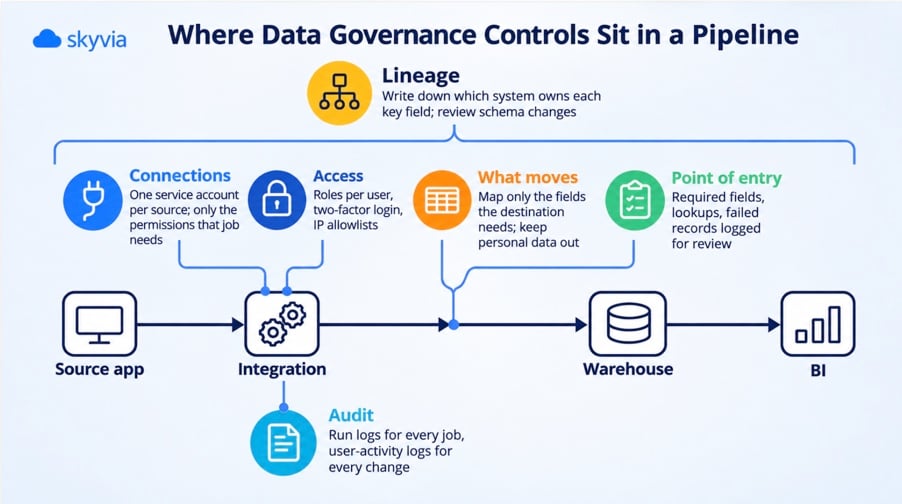
Here’s what to check as data moves from one system to another:
| Pipeline step | What can go wrong | The control |
|---|---|---|
| Connections and credentials | A shared admin login, reused across jobs, that nobody can rotate safely | One service account per source, with only the permissions the job needs; decide who may create or edit connections |
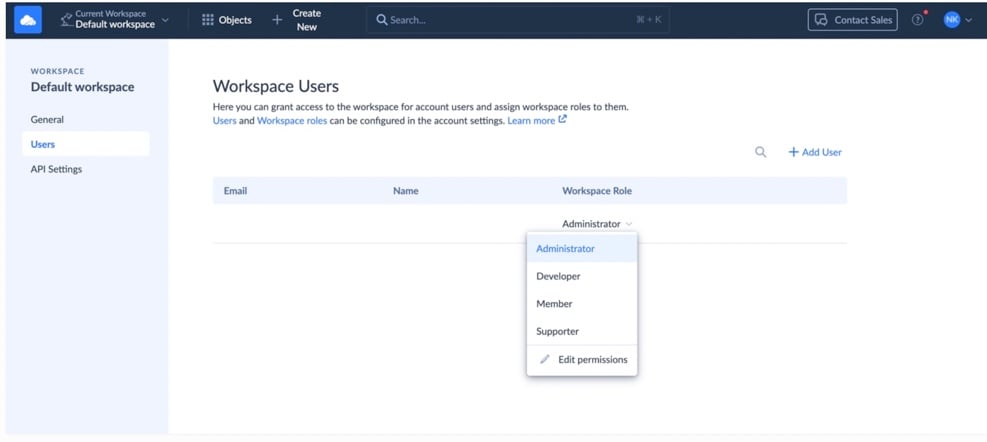
| Access to the integration tool | Anyone on the team can open, change or rerun any job | Roles per user, two-factor login, IP allowlists for sign-in |
| What moves | Whole objects copied “just in case,” personal data included | Map only the fields the destination needs; keep personal data out of destinations that don’t need it |
| Quality at the point of entry | Bad rows load and spread to every report downstream | Required-field checks, lookups against reference data, failed records logged for review instead of silently dropped |
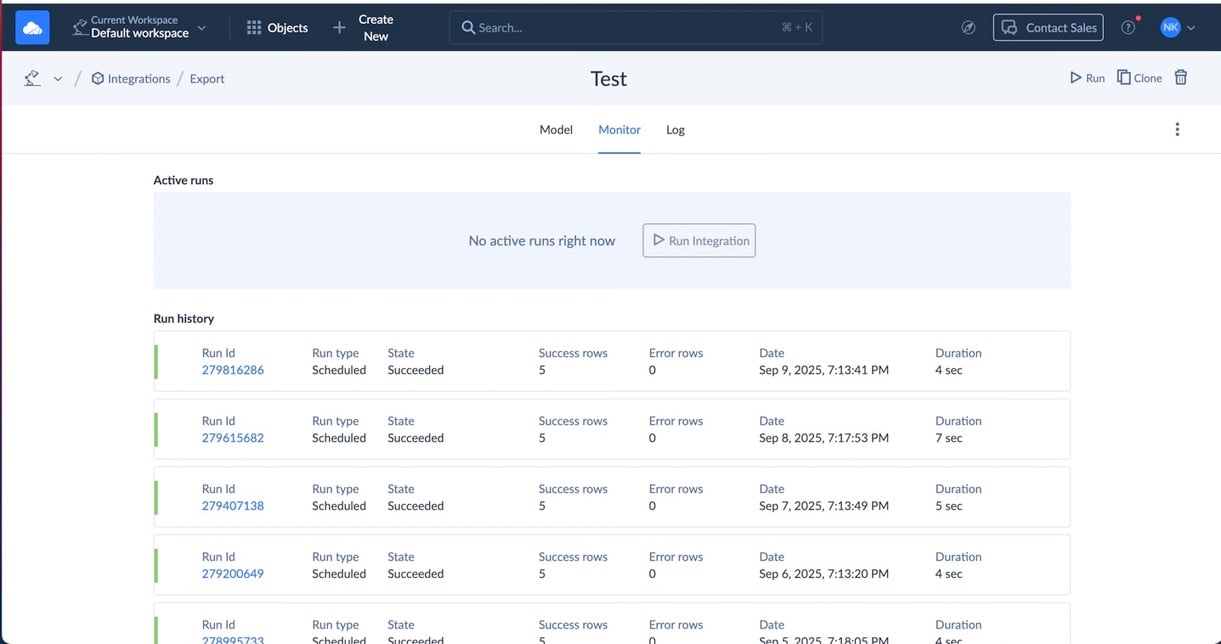
| Audit | Nobody can say what ran, what changed or who changed it | Run logs for every job and user-activity logs for every change |
| Lineage across systems | Two systems both claim to be the source of truth for the same field | Write down which system owns each key field, and review schema changes before they reach the pipeline |
A couple of those rows are worth more than a table cell.
Take field mapping. It looks like plumbing, but underneath it’s a data governance call. Imagine a sync that copies the entire Contact object, just in case “we need it later.” Suddenly personal data lives in a warehouse table open to 30 analysts. Mapping eight fields instead of 80 is one of the simplest privacy controls you can apply.
There’s a real example of selective field mapping in our TWOFOUR Digital Agency case study. The team used Skyvia to bring data from several applications into BigQuery, selecting the fields needed for analysis rather than copying everything from each source.
Schema changes are the other one. A source adds a column, renames a field or changes a type. The pipeline then breaks or, worse, keeps running with the wrong meaning. Some integration tools, Skyvia included, don’t pick up source schema changes on their own, so put a human review of those changes into the process.
Where Skyvia fits
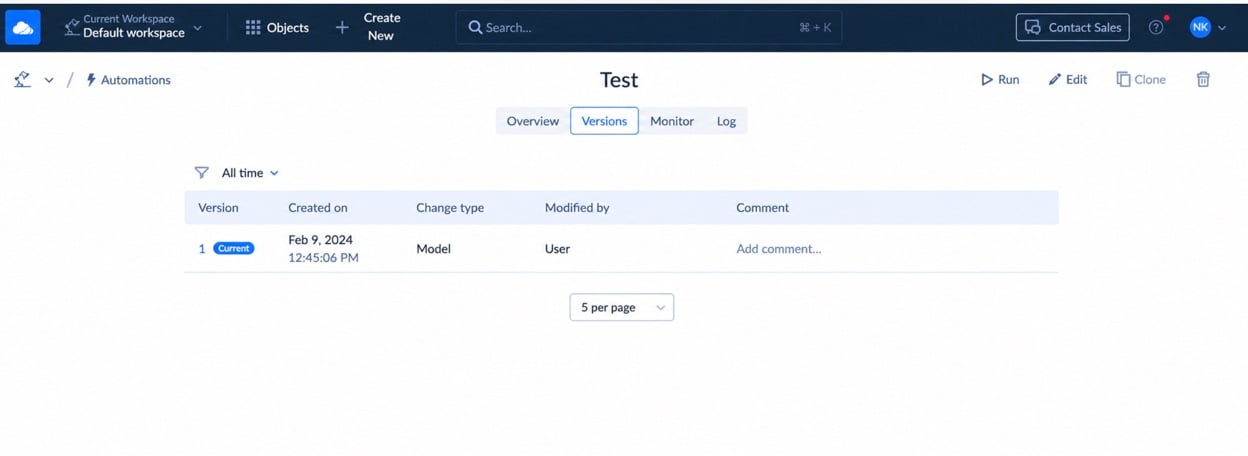
A word on our own product: Skyvia is a data integration platform, and it isn’t a governance or catalog product. What it covers is the pipeline half of the table above, with role-based access control and audit logs for user activity, execution logs and version history in Automation.
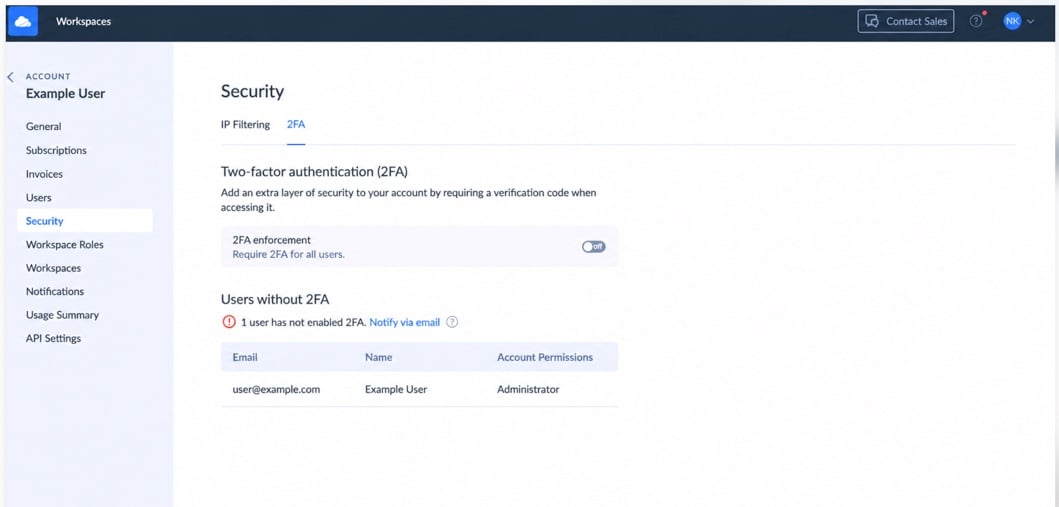
Skyvia also offers IP allowlists and two-factor authentication. On the compliance side, Skyvia has completed a SOC 2 Type 2 examination, supports GDPR and HIPAA (with a BAA), is hosted on Microsoft Azure, and encrypts data with AES-256 at rest plus TLS in transit. Our security page has the full details.
Don’t expect a data catalog or lineage tool from it, though, and it won’t notice source schema changes by itself. Combine it with your warehouse’s permissions now, and add a catalog when you outgrow that.
Data governance examples
Here are three situations most data teams run into, and what governance changes in each.
Two systems, two “active customers.” The CRM calls an account active if it has an open opportunity. Billing counts it active if it paid within 90 days. So the board sees one number, sales sees the other, and each quarter kicks off with the same fight. Here’s how governance settles it. The revenue owner approves a single definition, both systems get mapped to it in the sync, and the old field is renamed so the two can’t be confused. From then on the numbers match, and the debate moves to what the number actually tells you.
Personal data in a shared spreadsheet. Marketing sets up a sync that sends CRM contacts to a spreadsheet for a campaign. It copies every field, home phone numbers and all. A week later, that spreadsheet goes out to an agency. Mapping and access fix most of this. The sync sends only the fields the campaign uses, and access to the spreadsheet follows the same classification as the CRM data.
“Who changed this pipeline?” Sooner or later, a customer’s security questionnaire (or an auditor) asks who is able to modify the jobs moving customer data, and how you’d find out if someone did. You answer it with three things: user roles in the integration tool, user-activity logs, and version history for automated workflows. Have those in place and it takes an afternoon. Without them, expect a week of guesswork.
How to start a data governance program
No council required. Here’s what a small team’s first month might look like:
- Pick one domain. Customer data or revenue data, whichever starts more arguments. Don’t try to govern everything in one go.
- Name an owner and a steward. Small team? One person can be both. Write the names somewhere everyone will see them.
- Write the definitions people fight over. There are usually three to five of these terms, such as active customer, churn and monthly recurring revenue. Each gets one sentence, approved by the owner.
- Review access from source to destination. Check who can access the original data, change integration jobs or query the destination tables. If someone no longer needs access, remove it.
- Add checks to the pipeline. Limit the fields you copy, validate incoming records and keep execution logs. Set aside time each week to look through failed records rather than leaving them unresolved.
After the first month, review any issues that came up and whether the controls caused unnecessary work. Use what you’ve learned before starting on another data domain.
With more domains in play, you’ll have to decide how the work is organized:
| Model | How it works | Fits |
|---|---|---|
| Centralized | One person or team makes every governance decision | Small companies and heavily regulated ones; it slows down as the number of domains grows |
| Federated | Each business unit governs its own data under shared standards | Companies with strong, independent domains; needs coordination to avoid silos |
| Hybrid | Central standards, access policies and catalog; domain-level stewardship | Most mid-size and large companies |
Data governance, regulations and AI
Regulations are often what gets a data governance program funded. They map neatly onto the pillars too, because they want an owner, a policy and a record.
The EU’s GDPR is the blunt example: the most serious violations can cost up to €20 million or 4% of a company’s total worldwide annual turnover, whichever is higher. In California, the CCPA gives consumers rights over their personal information and makes covered businesses answer their requests. In the US, HIPAA governs health data, while PCI DSS governs payment card data. Every one of these rules assumes you can say where regulated data sits, who can get to it, and what’s been done with it.
AI adds a newer layer. The EU AI Act, in force since 1 August 2024, kicks in step by step through 2028. Even if you’re nowhere near the EU, you face the same question: which data can each model, assistant or agent read, and who signed off on that? That’s an access call, which makes it part of data governance rather than a side effect of whoever set up the connection.
One caveat: none of this is legal advice. Your legal or compliance team can tell you which rules cover your data.
Skyvia connects 200+ cloud apps, databases and warehouses, with role-based access, audit logs and field-level mapping built in, so your rules actually travel with the data. Start with Skyvia’s data integration on the free plan.

FAQ for data governance

How long does data governance take to set up?
Plan on roughly a month for a first version covering one domain. That’s enough to name an owner, agree on the three to five disputed definitions, review access along the pipeline, and add checks where data enters. Company-wide takes longer, because domains get added one by one. There’s no finish line; treat it as a habit, not a project.
How can you tell if data governance is working?
Look at the arguments. There should be fewer of them, and answers should come faster. Dashboards that used to clash now agree, failed records get looked at instead of stacking up, and “who changed this pipeline?” gets answered in minutes. If each domain has an owner with a name and access reviews take place on schedule, it’s working.
Is data governance only for regulated industries?
No. GDPR, HIPAA and PCI DSS add urgency, no doubt. But a team with two systems that disagree, or an AI assistant hooked up to company data, needs owners, definitions and access rules just as much. Companies without a regulator usually begin for trust and speed rather than for an audit.
Rules on paper don’t count until your pipelines follow them. Skyvia lets you choose who can edit each integration and which fields leave each system, and it logs every change. The free plan is a good place to start.