Summary
- Airbyte Standard starts at $20 a month with 5 credits, and extra credits cost $5.
- At that rate, a million API rows costs $30 and a gigabyte of database data costs $20.
- Above about 40 credits a month, the Plus plan costs less than Standard and syncs faster.
- Pro and Enterprise Flex are priced by capacity through sales.
- Self-hosted Airbyte Core is free software, but servers and engineer time are not.
If you priced Airbyte from a guide, then opened the pricing page and found different numbers, it isn’t your math. Airbyte pricing changed at the end of September 2026, and many of the guides that rank for it still show the old plans.
We rebuilt the math from Airbyte’s current pricing page and billing docs. You’ll see what a credit buys in dollars, where Plus beats Standard, three example stacks, and what the free, self-hosted version costs once it runs on real servers.
Every calculation is labeled as ours, so you can swap in your own volumes. Here’s where the money goes.
How Much Does Airbyte Cost? The Short Answer
Airbyte has two cloud pricing models and one free, self-hosted option. Standard and Plus are volume-based: you pay for data moved, through credits. Pro and Enterprise Flex bill by capacity and go through sales.
| Plan | Price | How you pay |
|---|---|---|
| Airbyte Core (open source) | $0 for the software | You run and pay for the infrastructure |
| Standard | $20 a month, 5 credits included | $5 for each extra credit |
| Plus | From $189 a month for 40 credits | Credit packages up to 2,000 credits |
| Pro | Custom | Capacity (Data Workers), contract through sales |
| Enterprise Flex | Custom | Capacity, with in-boundary and hybrid deployment |
A note on dates. The first thing to check is your monthly volume: rows from API sources and gigabytes from databases and files. Those two numbers decide the credit bill on Standard and Plus.
That change is why older Airbyte pricing guides can show different numbers. Check the date before using any quoted price.
What changed in September 2026
Airbyte changed its cloud pricing at the end of September 2026. Standard moved from the older $10 starting price to $20 a month with 5 credits included, while extra credits now cost $5 each. Airbyte also introduced the self-serve Plus plan, starting at $189 for 40 credits.
How Airbyte Pricing Works: Credits
On Standard and Plus, every sync spends credits. Airbyte uses them to put API, database and file sources on one bill.
What a credit buys
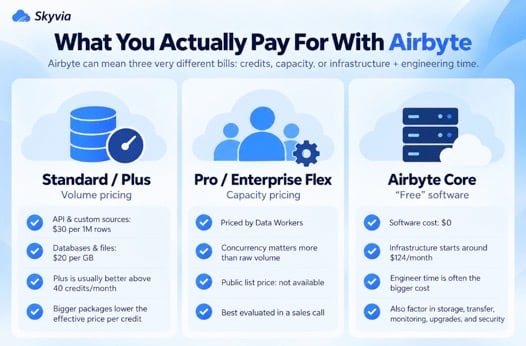
Airbyte bills different source types at different credit rates. At the current $5 per extra credit, that means $30 per million API rows and $20 per GB from databases or files.
| Source type | Billed by | Credits | Cost at $5 a credit |
|---|---|---|---|
| APIs | Million rows | 6 | $30 |
| Custom sources | Million rows | 6 | $30 |
| Databases | GB | 4 | $20 |
| Files | GB | 4 | $20 |
Why your database GB can be higher than you expect
For databases and files, Airbyte bills the data volume it sees during the sync. In transit, records are serialized into the Airbyte Protocol format. Airbyte’s docs say as much: that serialized volume probably runs larger than a direct database query would show, and how much larger depends on how the database stores and compresses data.
So don’t estimate database credits from the table size on disk alone. Run a trial sync and use the volume Airbyte actually reports.
What happens when you run out of credits
Nothing stops. Airbyte Cloud keeps running your syncs and bills the extra usage at the end of the month, in arrears. If credit usage passes $10,000 in one billing period, Airbyte charges the saved card right away and issues an invoice.
Airbyte takes credit cards only; ACH goes through sales. The trial starts after your first successful sync and lasts 14 days or 400 trial credits, whichever runs out first.
Airbyte Plans Compared
| Plan | Pricing model | Max sync frequency | Notable features | First-response support SLA |
|---|---|---|---|---|
| Core | Free software (Elastic License 2.0) | Not set by a plan | Full platform on your own Kubernetes | Community |
| Standard | Credits | Every hour | 700+ connectors, fully managed | None (portal support, 7am to 7pm EST) |
| Plus | Credit packages | Every 15 minutes | SSO, field renaming, 2 workspaces | 24 hours |
| Pro | Capacity (Data Workers) | Every 5 minutes | Role-based access, row filtering, field hashing and encryption, multiple data regions | 12 hours for severe issues, 24 hours otherwise |
| Enterprise Flex | Capacity | Every 5 minutes | Everything in Pro, plus on-premises, multi-region and hybrid deployment | 12 hours for severe issues, 24 hours otherwise |
Standard and Plus are self-serve: you can switch between them yourself and choose the Plus package size. Pro and Enterprise Flex are contracted plans you buy through Airbyte’s sales team.
Standard or Plus? Where the Break-Even Sits
Airbyte’s own advice is that Plus is typically cheaper once you use 40 or more credits a month. You can check it yourself in a minute.
Rule of thumb: once you use about 40 credits a month, Plus is usually the better buy.
- Standard: $20, plus $5 × (credits − 5)
- Plus, 40-credit package: $189 flat, and $5 per credit beyond 40
Take 39 credits: $190 on Standard, $189 on Plus. Past that line, the 40-credit Plus package undercuts Standard by $6 a month no matter how much you sync (and you get 15-minute syncs, SSO and a 24-hour support SLA on top). Airbyte pitches it as predictable billing through fixed monthly credits.
Bigger packages lower the price per credit:
| Plus package | Monthly price | Effective price per credit |
|---|---|---|
| 40 credits | $189 | $4.73 |
| 100 credits | $449 | $4.49 |
| 250 credits | $999 | $4.00 |
| 500 credits | $1,799 | $3.60 |
| 1,000 credits | $3,199 | $3.20 |
| 2,000 credits | $4,999 | $2.50 |
Airbyte says larger packages come with a lower overage rate than the 40-credit package’s $5, but it doesn’t list those rates on the page. Size the package to your normal month, and check the overage rate on the Plan page before you rely on it.
What Airbyte Costs: Three Worked Examples
These are our own example stacks at current list prices, paid monthly. Swap in your volumes and the same formulas apply.
A small team
Say your team moves 1.5M rows a month from three API sources, which here are a CRM, a billing tool and a support desk, and another 2 GB out of PostgreSQL. The APIs come to 9 credits and the database to 8, which makes 17.
On Standard that’s $20 + 12 × $5, or $80 a month. Plus would start at $189 for the same work, and the only reasons to pay that here are 15-minute syncs or SSO.
A growing SaaS company
Here the monthly volume is 8M API rows and 10 GB from databases, which adds up to 48 + 40 = 88 credits.
| Option | Monthly cost |
|---|---|
| Standard | $435 |
| Plus, 40-credit package + 48 overage credits | $429 |
| Plus, 100-credit package | $449 |
Cheapest? The 40-credit Plus package with overage, and it syncs faster too. Once volume climbs past roughly 92 credits, switch to the 100-credit package.
A mid-size business
This one syncs 40M API rows and 60 GB of database data a month: 240 + 240 = 480 credits.
On Standard, that’s $2,395 a month. The 500-credit Plus package covers it for $1,799, about $600 less, with headroom left.
Older guides put a similar workload, 50M API rows plus 50 GB, at $1,250 a month. At current prices, those 500 credits cost $2,495 on Standard or $1,799 on the 500-credit package.
Plan for the first sync as well. If a history load of 50M rows from an API source is billed like any other rows, it comes to 300 credits, or $1,500 at $5 a credit, so check how your first load is metered on the trial.
Is Airbyte Free? What Self-Hosting Core Actually Costs
The software is free. Airbyte Core is released under the Elastic License 2.0 (ELv2), which lets anyone use it at scale on their own infrastructure, with no limits on volume, users or connections. The catch is that you can’t offer it to others as a managed service. Airbyte Core itself uses ELv2, while Airbyte’s connectors remain open source under their own licenses.
Running it isn’t free. Airbyte’s quickstart asks for a machine with 4 or more CPUs and at least 8 GB of memory, or 2 CPUs and 8 GB in low-resource mode, which drops the Connector Builder. Airbyte runs on Kubernetes, either on a single VM or in a managed cluster.
Here’s what that hardware costs at AWS on-demand list prices (Linux, US East, October 2026), at 730 hours a month:
| Setup | AWS resources | Monthly cost |
|---|---|---|
| Low-resource single VM | t3.large (2 vCPU, 8 GiB) | $60.74 |
| Recommended single VM | c6i.xlarge (4 vCPU, 8 GiB) | $124.10 |
| Managed Kubernetes | Amazon EKS cluster + 2 × m6i.xlarge (4 vCPU, 16 GiB) | $353.32 |
The EKS line is $73.00 for the cluster itself (AWS charges $0.10 per cluster per hour on standard support) plus two nodes. Storage, backups, a load balancer and data transfer come on top and depend on your setup.
Then there’s the time someone spends upgrading, monitoring and fixing it. Labor is the harder number to pin down, though the US Bureau of Labor Statistics gives $64.44 an hour as the 2025 median pay for software developers, QA analysts and testers. Use whichever row looks most like your team:
| Engineer time a month (our assumption) | Cost at $64.44 an hour |
|---|---|
| 5 hours | $322.20 |
| 10 hours | $644.40 |
| 20 hours | $1,288.80 |
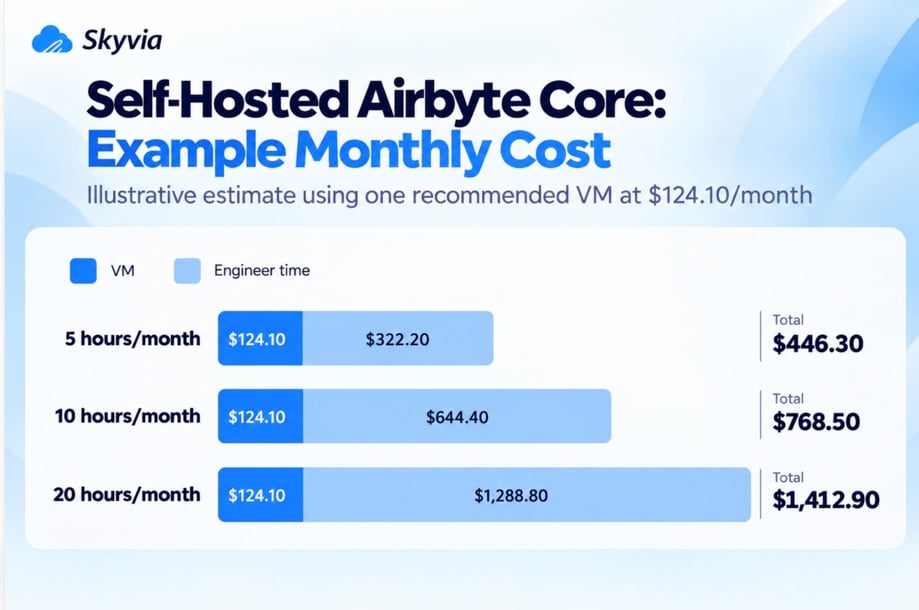
Add it up and one recommended VM with 10 hours of engineer time a month runs about $768.50, and that’s before storage or transfer. That puts it between two Plus packages, more than the 100-credit one at $449 and less than the 250-credit one at $999. Self-hosting starts to make sense when volumes get big, when your team already runs Kubernetes for other things, or when the data isn’t allowed to leave your network.
Write down each cost before you commit:
- Compute for the Airbyte platform (VM or cluster nodes)
- Kubernetes control plane, if managed (EKS, GKE, AKS)
- Storage, database for Airbyte’s own state, backups
- Load balancer and data transfer
- Monitoring and alerting
- Engineer hours for upgrades, connector issues and on-call
- Security work: access control, secrets, audit
What Pushes Your Airbyte Bill Up
On Standard and Plus, these are the documented drivers:
- Full Refresh syncs. Every row is charged on every run, so a daily Full Refresh of a large table bills the whole table daily.
- Reloading a source. Every row a reload or Full Refresh moves is billed again.
- Database and file volume in transit. Billed GB can be larger than the data’s size on disk.
- Running past your credits. Syncs never pause, so a busy month shows up only on the invoice.
How to keep the bill in check
- Turn on billing alerts. You can ask for a notice when one sync spends past an amount you choose, when the next invoice grows by more than a set percentage, or when it crosses a total you set.
- Read the invoice notices. You also get an email about the upcoming invoice 3 days and 7 days before it’s finalized.
- Prefer incremental syncs wherever the connector allows it, and save Full Refresh for the small tables.
- Move to Plus once you pass about 40 credits, and pick the package that covers a normal month.
- Measure database volume on the trial instead of trusting table sizes.
Use this worksheet to estimate credits before you start:
| Source | Type | Monthly volume | Credits per unit | Credits |
|---|---|---|---|---|
| (your CRM) | API | ___ million rows | 6 | ___ |
| (your app database) | Database | ___ GB | 4 | ___ |
| (your files) | Files | ___ GB | 4 | ___ |
| Total | ___ |
Pro and Enterprise Flex: Capacity-Based Pricing
Pro and Enterprise Flex don’t bill by rows or gigabytes. They’re priced by Data Workers, the compute units that run your pipelines. Each Data Worker typically runs about three syncs at once, and Airbyte sets the price through sales, based on several variables it doesn’t publish.
For these plans, the key number is peak concurrency, not monthly data volume.
That model suits teams with big or spiky volumes, because a sync that moves more data doesn’t cost more. What costs more is concurrency. Bring these numbers to the sales call:
- How many connections you run and on what schedule
- How many syncs overlap at peak
- Which features force the move: role-based access, row filtering, field hashing and encryption, multiple data regions (Pro), or on-premises and hybrid deployment (Enterprise Flex)
How Airbyte Pricing Compares With Fivetran
The two price different things. Fivetran charges each connection by monthly active rows, counting a changed row once a month: on its Standard plan, one connection with 1M monthly active rows lists at $500 a month. On Airbyte Standard, 1M rows from an API source is 6 credits, or $30.
That gap is smaller than it looks for busy tables. Airbyte bills the rows each incremental sync moves, so a row edited in five different syncs is billed five times, while Fivetran counts it once that month. Hourly syncs of a table where the same rows keep changing narrow the difference, so price your own tables in both before deciding.
For a wider look, see our Fivetran vs Airbyte comparison.
When a Different Pricing Model Fits Better
Airbyte’s credits work well for API-heavy stacks with modest volume, and capacity plans protect large teams from volume spikes. The gap is in the middle: a team with growing database volume on Standard or Plus watches the bill rise with every gigabyte, and the capacity plans need a sales contract.
A fixed monthly record allowance is another option. We build Skyvia, so here’s how ours works. Data Integration plans are priced by records written per month, with unlimited users and connections on every plan.
Standard is $159 a month if you pay annually ($199 billed monthly) for 5M records, or $239 ($299) for 10M, and it runs hourly. For minute-level schedules there’s Professional, at $399 a month on annual billing ($499 billed monthly) for 10M records. Overage is off by default, so runs pause at the limit unless you turn on extra records.
The units differ, so compare carefully: Airbyte counts rows synced from APIs and gigabytes from databases, while Skyvia counts every record written. For a wider comparison, see our guide to Airbyte alternatives and the Airbyte and Skyvia comparison. You can try replication into your warehouse free for 14 days, no credit card needed.
FAQ for Airbyte Pricing

How much does Airbyte Cloud cost per month?
Standard starts at $20 a month with 5 credits included, and each extra credit costs $5. Plus starts at $189 a month for a 40-credit package and goes up to $4,999 for 2,000 credits. Pro and Enterprise Flex are priced by capacity through Airbyte’s sales team.
How many Airbyte credits does a million rows use?
A million rows from an API source or a custom source uses 6 credits, which is $30 at $5 a credit. Database and file sources are billed by volume instead, at 4 credits per GB, or $20 per GB.
What happens if I run out of Airbyte credits?
Your syncs keep running, and Airbyte bills the extra usage at the end of the month. It doesn’t pause anything. There’s one ceiling: pass $10,000 of credit usage in a billing period and Airbyte charges your saved card on the spot, then invoices you, so turn billing alerts on early.
At what point should I move from Standard to Plus?
Switch once you use about 40 credits a month. Above that point, the 40-credit Plus package costs $6 a month less than Standard for the same usage, and you get 15-minute syncs, SSO and a 24-hour support SLA as well.
Why is my Airbyte database sync using more credits than expected?
Airbyte bills database and file sources on the volume it sees in transit, after converting records to its own protocol format. That volume is often larger than the table size you’d see in the database itself. Full Refresh syncs add to it, because they bill every row on every run.
Is self-hosted Airbyte cheaper than Airbyte Cloud?
It depends on your volume and your team. At Airbyte’s recommended spec, one AWS server lists at about $124 a month, yet engineer time tends to cost more: 10 hours a month at the US median developer wage comes to about $644. Cloud usually comes out ahead at small volumes, though big volumes, or rules that keep data inside your own network, can make self-hosting the better deal.
Would you rather skip the credits math the next time someone asks about the budget? Create a free Skyvia account, connect one source and see how many records your pipelines write in a normal month.