A CRM on its own only knows half the story, and CRM integration tools are how you plug it into the email, marketing platform, online store and accounting software that know the rest. Take a customer who types a new email address into their account on your website. If the integration is doing its job, that address shows up in the CRM as well, and no one in sales ends up copying it across.
They do four jobs. Keeping data in sync across systems is the first, and automating tasks is the second, whether that's a welcome email for a new customer or an inventory update once a purchase goes through. They also put data from many sources in one place for reporting, and they give sales and support the history they need to personalize service, such as a promotion based on what someone bought before.
Below, we go through the main types of CRM integrations, how to choose between a native app, the CRM's API and an integration platform, and six tools side by side: Zapier, MuleSoft, Jitterbit, Boomi, Coupler.io and Skyvia.
Key Types of CRM Integration Tools
Let’s explore the main types of CRM integration platforms that turn standalone systems into a powerful, interconnected business hub.
Sales and Prospecting Integrations
These systems link your CRM with platforms like Salesforce Sales Cloud, Mailchimp, or ZoomInfo, helping you find and manage leads effortlessly. Imagine a magic wand that imports prospect data, tracks interactions, and reminds you to follow up because forgetting a lead is like leaving pizza in the oven for too long.
Use Cases
- Lead Enrichment. Automatically pull detailed prospect data from LinkedIn or ZoomInfo to populate CRM records.
- Pipeline Management. Sync opportunities from Salesforce Sales Cloud to monitor sales progress.
- Cold Outreach. Integrate tools like Outreach.io or SalesLoft with Mailchimp to send personalized prospecting emails and track responses directly in your CRM.
- Activity Tracking: Log calls, emails, and meetings from tools like Zoom or Microsoft Teams into your CRM.
Marketing Automation Integrations
Modern businesses thrive on omnichannel strategies, and these integrations make it seamless. They connect CRMs with marketing platforms like Reply, Marketo, or Mailchimp to unify customer interactions across channels, automate campaigns, nurture leads, and track complete customer journeys for a cohesive experience. They’re behind-the-scenes marketing wizards, ensuring your messaging hits the right person at the right time.
Use Cases
- Lead Nurturing. Automate email campaigns using Mailchimp or Brevo and sync results with your CRM.
- Targeted Campaigns. Data from CRM (such as purchase history) can be used to create highly targeted ads on platforms like Facebook or Google Ads.
- Omnichannel Campaigns. Deliver consistent campaigns across email, SMS, social media, and web notifications by syncing your CRM data for a seamless customer experience on every channel.
- Behavioral Retargeting. Combine website analytics and CRM data to retarget users with personalized offers or ads, boosting conversions and building loyalty.
- Performance Analytics. Sync campaign performance metrics from marketing tools to your CRM, providing a centralized view of ROI and other metrics to enable data-driven decision-making for future strategies.
Customer Service and Support Integrations
These integrations are all about making customers feel like VIPs. Tools like Zendesk, Freshdesk, or Intercom connect to your CRM, giving the support team instant access to customer history and preferences. It’s like having a cheat sheet to wow your customers. No more awkward “Can I put you on hold while I sort this out?” moments.
Use Cases
- 360-Degree Customer View. Provide your support team with a full view of customer interactions, ensuring personalized service.
- Customer Feedback. Sync post-interaction surveys (e.g., NPS, CSAT) with your CRM to view the product’s roadmap, analyze satisfaction trends, and identify areas for improvement in the service strategy.
- Escalation and Routing Automation. Set up rules to route tickets to the right teams or escalate high-priority issues based on criteria like customer value, urgency, or topic.
- Self-Service Portals. Integrate self-service portals with CRM, enabling customers to view order statuses, track ticket progress, or update their details without direct support.
Accounting and Finance Integrations
Who loves crunching numbers? Probably not you. That’s where these integrations step in. Users can track invoices, payments, and customer financial histories in one place by linking tools like QuickBooks or Xero to the CRM. No more toggling between tabs or getting lost in spreadsheets.
Use Cases
- Invoice Tracking. Automatically generate and sync invoices from platforms like QuickBooks or Xero with CRM contacts.
- Payment Reminders. Send automated payment reminders via email triggered by CRM data.
- Financial Health Monitoring. Combine customer payment history with sales data to assess revenue trends.
- Subscription Management. Integrate solutions like Stripe to track customer billing cycles, automate renewal processes, and ensure accurate payment histories for better financial insights and customer retention.
E-commerce Integrations
Running an online store? Tools like Shopify, WooCommerce, or BigCommerce play nice with your CRM, syncing sales data, customer purchases, and abandoned carts. It’s like having a sales assistant who whispers, “Hey, this customer might want that matching pair of shoes.”
Use Cases
- Order Tracking. Sync systems such as Shopify or WooCommerce orders with CRM records for customer-specific purchase histories to streamline post-purchase support, enable personalized upselling opportunities and provide customers real-time updates on their orders.
- Abandoned Cart Recovery. Trigger follow-up emails for abandoned carts and track conversions directly in the CRM to increase revenue and reduce lost sales by re-engaging customers with personalized offers, reminders, or discounts to complete their purchases.
- Personalized Recommendations. Use CRM data to create tailored upsell or cross-sell offers addressing the challenge of generic marketing by delivering highly relevant product suggestions that enhance customer satisfaction and drive additional revenue.
- Customer Loyalty Programs. Integrate loyalty platforms like Smile.io, Yotpo, or LoyaltyLion to reward repeat buyers and address the challenge of retaining customers by offering points, discounts, or exclusive perks.
Communication Tools Integrations
Imagine automatically logging every conversation or meeting into your CRM so everyone is in the loop. This approach eliminates manual updates and ensures that all interactions are accurately tracked.
For instance, you may integrate the CRM with services like Slack, Zoom, and Microsoft Teams. With a centralized communication history, teams can collaborate more effectively, avoid duplicate efforts, and provide a seamless customer experience.
Use Cases
- Team Collaboration. Automatically share CRM updates, like new leads, in Slack channels to keep teams aligned.
- Meeting Scheduling. Sync tools such as Zoom or Microsoft Teams calls with CRM to log meeting notes, create meeting scripts, automate follow-ups, and track attendee participation directly within the CRM, ensuring seamless collaboration and comprehensive meeting documentation.
- Follow-Up Automation. Use CRM-triggered alerts to remind sales reps to send follow-ups after calls or chats.
- Activity Logging. Auto-log all email communications and attachments from services like Gmail or Outlook to relevant CRM records. Extend this functionality with tools like Microsoft Teams, Slack, HubSpot Email, Zoho Mail, and Apple Mail. These integrations enable seamless communications logging from various platforms, ensuring a comprehensive activity history within your CRM.
Event Management Integrations
Tools like Eventbrite or Cvent connect with your CRM to manage attendees, registrations, and post-event follow-ups. It’s perfect for tracking who showed up and is interested. These integrations also help streamline event promotion by syncing invitation lists, automating email campaigns, and personalizing communication based on attendee engagement. Additionally, they provide valuable insights by linking attendee feedback, session participation, and post-event surveys directly to CRM records, enabling businesses to identify leads and improve future events.
Use Cases
- Attendee Tracking. Sync event registrations with CRM leads to track attendance and post-event engagement. Automate sending thank-you emails, sharing event resources, scheduling sales calls, etc., for high-priority attendees. Gain insights into attendee behavior by analyzing session participation, feedback forms, and interactions, which can help tailor future outreach efforts and enhance event effectiveness.
- Event Campaigns. Send personalized invites and reminders using CRM-based customer lists.
- Lead Generation. Gather leads from event registrations and seamlessly route them into your sales pipeline.
- Post-Event Feedback. Distribute surveys to attendees and analyze their responses to evaluate the event’s success, gather insights, and identify areas for improvement. Use the feedback to enhance future events and tailor follow-up communications to address attendee needs and interest results in your CRM.
Live Chat Integrations
When customers need help ASAP, live chat tools like LiveChat, Drift, or Tidio come to the rescue. Acting as a virtual concierge, these tools welcome customers and help direct them to the right solutions. They also gather important customer details during conversations, such as contact information and the purpose of their inquiry, which can be seamlessly integrated into the CRM for easy follow-up. Beyond convenience, these tools enhance real-time interactions, boosting customer satisfaction and equipping companies with valuable data to resolve issues and tailor future communications.
Use Cases
- Real-Time Lead Capture. Automatically create CRM leads from live chat conversations on your website. For instance, when a new user asks a question to the chatbot, an event is immediately triggered, capturing their details and creating a new lead in the CRM.
- Customer Support Logs. Store chat transcripts directly in CRM for future reference and service improvement. For example, LiveChat’s integration with CRM platforms enables chat transcripts to become part of the customer’s profile, allowing agents to access previous interactions and provide more precise support.
- Proactive Engagement. Use live chat data to identify high-value leads and trigger immediate follow-ups.

Native App, API or Integration Platform: How to Connect Your CRM
There are three ways to connect a CRM to another app, and every tool reviewed below belongs to the third. Picking the route first saves you a lot of demos.
| Route | What it is | Good fit | Watch out for |
|---|---|---|---|
| Native app | An integration from the CRM's or the other vendor's marketplace, such as Salesforce AppExchange or HubSpot's marketplace | One common pair of tools, like a CRM and an email client | Mapping and logic limited to what the app offers |
| The CRM's API | Your developers write code against the CRM's API | Unusual logic, or a product you build yourself | Code to maintain whenever either side changes its API |
| Integration platform | A tool with prebuilt connectors for many apps: Zapier, MuleSoft, Jitterbit, Boomi, Coupler.io, Skyvia | Several apps, with data moving on events or on a schedule | Pricing that grows with tasks, records or connections |
Inside the third route, the split that matters most is events versus schedules. Zapier reacts to events. A new lead lands in the CRM, the trigger fires, the Zap runs, and every action it takes uses up a task (you get 100 of those a month on the Free plan). Skyvia's Import and Synchronization work the other way, on a timer, which you can set to daily on the Free and Basic plans, hourly on Standard and down to every minute on Professional. If you'd rather react to events, Skyvia Automation can kick off from a webhook or by polling for records that are new or changed.
A newer case is AI assistants that read and update the CRM. Skyvia's MCP endpoints turn a connection, a Salesforce one for instance, into an endpoint an assistant like Claude can query and write to. The endpoint sees everything its connection's user can see, so connect it with a dedicated CRM user that holds only the permissions the assistant needs.
Top CRM Integration Tools
In this section, we’ll explore the top platforms and their capabilities, helping you find the perfect fit to integrate data with the CRM.
Zapier
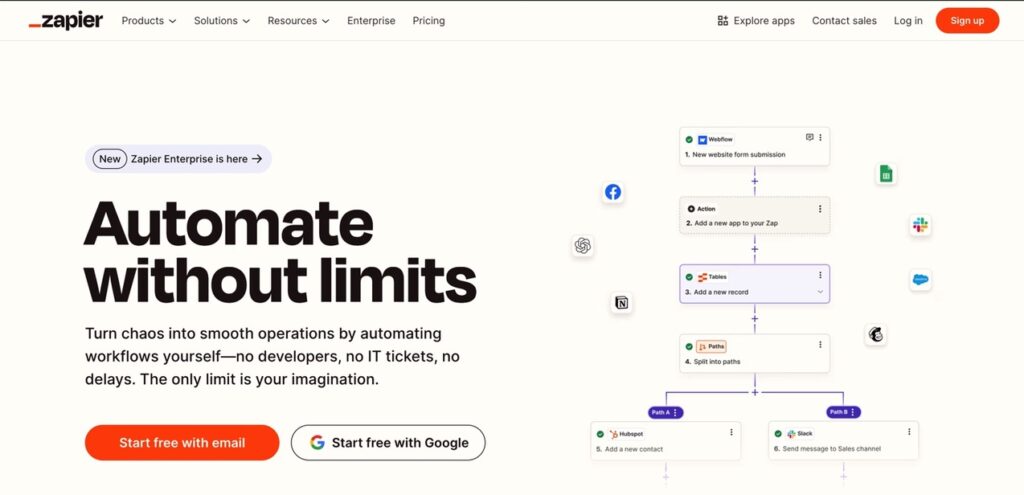
Zapier is an integration platform that connects over 7,000 apps, including CRM systems. By streamlining repetitive tasks, it enables users to create “Zaps”—custom workflows that trigger actions across different applications without the need for coding.
The extensive app integrations make it a go-to solution for handling complex workflows. By connecting disparate systems, businesses can ensure cohesive operations, minimize manual data entry, and reduce errors.
Zapier simplifies lead management, data synchronization, and cross-platform communication. It is especially valuable for small to medium-sized businesses looking to integrate multiple applications without relying heavily on technical expertise.
Rating
G2 Crowd 4.5/5 (based on 1324 reviews)
Pros
- User-friendly interface accessible to users without programming skills.
- It supports a vast array of applications and facilitates diverse integrations.
- Provides real-time data synchronization, ensuring up-to-date information across systems.
Cons
- Advanced features may require higher-tier subscriptions.
- Complex workflows can become challenging to manage without proper organization.
- Some integrations may experience occasional delays or require troubleshooting.
Pricing
The pricing plan is flexible and includes:
- A free model offers 5 Zaps and 100 tasks per month, suitable for basic automation needs.
- A 14-day free trial for premium features allows users to explore its capabilities before committing to a subscription.
MuleSoft
MuleSoft is a comprehensive integration platform that connects 400+ applications, data, and devices across on-premises and cloud environments. Its Anypoint Platform offers API management and integration capabilities, allowing the building of application networks.
MuleSoft shines in large enterprises that juggle multiple complex systems and need robust API management. If your business deals with diverse legacy and modern applications, this tool can be the backbone of your integration strategy, handling both cloud and on-premises scenarios effortlessly.
Rating
G2 Crowd 4.5/5 (based on 690 reviews)
Pros
- Robust API management and integration capabilities.
- Support of complex enterprise-level integrations.
- Extensive library of connectors for various applications and systems.
Cons
- A steep learning curve may require specialized knowledge.
- Higher cost compared to some other integration tools.
Pricing
MuleSoft offers custom pricing based on specific business needs and usage. A free trial is available for evaluation.
Jitterbit
Jitterbit is an integration platform that connects applications, data, and APIs. It offers pre-built templates and 170+ connectors, facilitating quick integrations without extensive coding.
The tool is perfect for small to medium-sized businesses and works best for those needing quick and straightforward integrations. It’s great for companies looking to automate tasks like syncing CRMs with marketing tools or pulling e-commerce data into reporting dashboards without diving into complex setups.
Rating
G2 Crowd 4.8/5 (based on 553 reviews)
Pros
- Intuitive, user-friendly interface.
- Pre-built templates and connectors for rapid integration.
- Support of both cloud and on-premises integrations.
Cons
- Limited advanced customization options.
- It may not be suitable for highly complex integration scenarios.
Pricing
Jitterbit offers various pricing tiers based on features and usage.
- The standard plan includes 2-3 standard connections, essential Harmony features, and a 48-hour support response time.
- The professional plan provides five standard connections, additional features like optional add-ons, and a 24-hour support response time.
- The enterprise plan offers 8 or more connections, comprehensive Harmony features, and a 6-hour support response time, including a 24-hour emergency hotline.
- A free 30-day trial is available for new users.
Boomi
Boomi, formerly known as Dell Boomi, is a cloud-based integration platform that connects applications and data across various environments. The solution is low-code and offers 240+ connectors, allowing businesses to build integrations quickly.
Boomi is a perfect choice for businesses of all sizes that want a balance of user-friendliness and advanced capabilities. It’s handy for quickly scaling companies that need a reliable tool to automate processes, whether for CRM synchronization, financial reporting, or customer service workflows.
Rating
G2 Crowd 4.5/5 (based on 411 reviews)
Pros
- Low-code platform with drag-and-drop interface.
- Extensive library of connectors.
- Scalable to accommodate growing business needs.
Cons
- Pricing can be high for smaller businesses.
- Some users report a steep learning curve for complex integrations.
Pricing
Boomi offers tiered pricing based on the following features:
- The pay-as-you-go plan starts at $99 per month plus usage fees. It provides full access to the Boomi Enterprise Platform without requiring a long-term contract.
- The professional plan is priced at $2,000 per month.
- The pro plus plan offers additional functionality to support real-time integration requirements and is available at $4,000 per month.
- The enterprise plan is tailored for large-scale organizations with complex integration needs and is priced at $8,000 monthly.
- The 30-day free trial provides limited access to the Boomi Enterprise Platform.
Coupler.io
Coupler.io is a data integration tool that automates data flows between various applications and services. It allows users to import data into Google Sheets, Excel, or BigQuery from multiple sources, facilitating real-time data analysis and reporting.
It’s a good choice for individuals and small to medium businesses that need to centralize data from various sources for reporting or analysis. The tool is especially handy for marketing teams, e-commerce sellers, or analysts who need fresh data to make quick decisions.
Rating
G2 Crowd 4.8/5 (based on 65 reviews)
Pros
- User-friendly interface with easy setup.
- Support of a variety of data sources.
- Automated data refresh schedules.
Cons
- Limited advanced data transformation features.
- Primarily focused on data import rather than full-scale integration.
Pricing
The pricing is flexible enough and includes:
- The free plan offers limited functionality with basic connectors and up to 100 runs per month, which is ideal for testing and small-scale automation.
- The 14-day free trial provides access to premium features, enabling users to explore advanced automation and integrations before committing.
Skyvia
Skyvia is a versatile cloud-based data integration platform that connects CRM systems with 200 + cloud applications, databases, and more. It’s no-code and suitable for non-techs, allowing users to build simple and complex workflows and ensuring seamless connectivity between CRM systems and other business applications.
The platform’s robust tools for ETL, ELT, reverse ETL, data replication, and transformation make it ideal for maintaining accurate and up-to-date data across systems, eliminating manual data entry errors.
Skyvia stands out for its robust data integration capabilities. It enables seamless CRM data synchronization by connecting customer records, unifying sales and marketing data, and ensuring secure data backups to meet compliance requirements.
Rating
G2 Crowd 4.8/5 (based on 242 reviews)
Pros
- Advanced data transformation capabilities, including filtering, mapping, and aggregation, to tailor data integrations to specific business needs.
- No-code platform with an intuitive interface.
- Support for over 200 data sources.
- It offers data backup features.
Cons
- Advanced features may require higher-tier subscriptions.
- Compared to larger platforms like Zapier or MuleSoft, Skyvia’s smaller user community means fewer third-party tutorials and integration guides are available.
Pricing
Skyvia offers flexible pricing with a focus on affordability and scalability:
- The Free Plan includes up to 10k records per month and access to core data integration features, making it great for testing and small-scale automation.
- A 14-day Free Trial lets users explore premium functionalities like advanced data transformations and higher record limits, providing a risk-free opportunity to evaluate the platform.
How to Choose The Best CRM Integration Tool
Given the many options available, selecting the right solution can be overwhelming. The key is to align the tool with your business needs and goals. Let’s explore the key factors to consider.
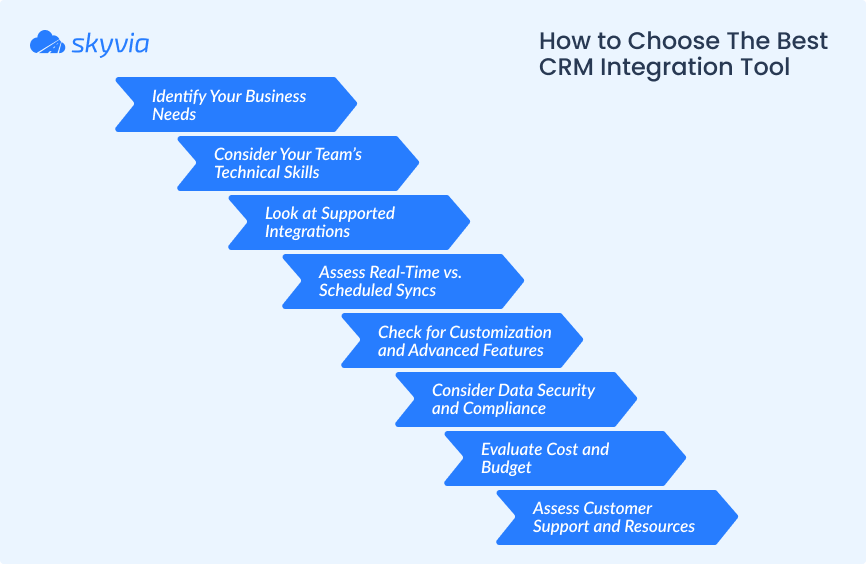
Identify Your Business Needs
- What problems are you trying to solve with integration (e.g., syncing data, automating workflows, real-time updates)?
- Which tools must be integrated with your ecosystem (e.g., marketing platforms, accounting software, e-commerce stores)?
- Are you handling simple data sync tasks or need advanced API management?
For basic integration, tools like Skyvia, Zapier, or Coupler.io may suffice. For complex workflows or enterprise-grade needs, MuleSoft or Boomi might be better.
Consider Your Team’s Technical Skills
- If your team has little to no coding experience, look for no-code or low-code tools like Skyvia, Jitterbit, or Zapier.
- On the other hand, platforms like MuleSoft or Boomi are better suited for businesses with IT resources or developers, offering powerful customization and scalability.
Look at Supported Integrations
- Verify that the tool supports all the apps, ecosystems, and service architectures you need to connect. Tools like Zapier and Skyvia offer extensive integration libraries, while others like MuleSoft and Boomi are better for custom or legacy systems.
Assess Real-Time vs. Scheduled Syncs
- Real-time integration is essential for businesses needing instant data updates (e.g., customer support or live inventory tracking). If periodic updates suffice, a tool like Skyvia or Coupler.io can meet your needs at a lower cost.
Check for Customization and Advanced Features
- Do you need to create custom workflows or logic for specific use cases? Tools like Jitterbit, Boomi, and MuleSoft excel in offering advanced features like API orchestration and data transformation.
Consider Data Security and Compliance
- Ensure the tool meets your industry’s security standards, such as GDPR, HIPAA, or SOC 2 compliance. Enterprise-focused tools like MuleSoft and Boomi often provide robust security features.
Evaluate Cost and Budget
- Compare pricing plans to find a tool that fits your budget. To test before committing, look for features like free trials or free plans (e.g., Zapier, Skyvia, Coupler.io).
Assess Customer Support and Resources
- Check for support options like live chat, email, or phone. A solid knowledge base or community forum can be invaluable.
CRM Integration Tools Comparison Summary
Now that we’ve covered the checklist, let’s review the comparison table.
| Tool | Benefits | Limitations | Key Takeaways |
|---|---|---|---|
| Zapier | User-friendly interface; real-time data synchronization; minimal setup. | Advanced features behind premium plans; limited for complex workflows; occasional delays in integration. | Best for small to medium businesses needing straightforward automations without technical expertise. |
| MuleSoft | Robust scalability; extensive connector library; powerful API management tools. | Steep learning curve; high cost; better suited for enterprises. | Tailored for enterprises with complex integration and API management needs. |
| Jitterbit | Easy to use; fast deployment. | Limited customization for complex workflows; lacks advanced features for large-scale needs. | A fast and easy solution for small to medium businesses requiring quick integrations with pre-built templates. |
| Boomi | Easy scalability; strong reliability; extensive system compatibility. | Pricing can be high for smaller businesses; It requires training for complex integrations. | Scalable for growing businesses; suitable for medium to large enterprises. |
| Coupler.io | Simple setup; automatic refresh schedules; affordable plans for small teams. | Focused on data import rather than full-scale integration; limited transformation options. | Perfect for simple data import tasks and reporting needs. |
| Skyvia | Comprehensive solution; intuitive interface; advanced transformation capabilities. | Advanced features require premium plans; fewer third-party tutorials and support options. | Suitable for businesses of all sizes with a focus on data sync, transformation, and backup. |
Conclusion
Choosing the right CRM integration tool depends on your business size, goals, and technical expertise.
Each tool has its strengths, from automation and synchronization to real-time updates and backups. By carefully assessing your requirements, like integration scope, data security, and budget, you can select the perfect solution to streamline operations and enhance customer relationship management. Regardless of the choice, the right CRM integration tool is a game-changer for improving efficiency and driving growth in today’s interconnected business world.

FAQ for Best CRM Integration Tools

What are the best CRM integration tools in 2026?
We’d put six CRM integration tools on a 2026 shortlist: Zapier, MuleSoft, Jitterbit, Boomi, Coupler.io and Skyvia. They’re good at different things, though. Zapier is quick for event-based automations, MuleSoft and Boomi fit enterprises that have developers and a lot of systems, Coupler.io is for reporting in spreadsheets, and Skyvia handles no-code data sync, import and backup between a CRM and other apps or databases.
Are there free CRM integration tools?
Yes. Zapier’s Free plan includes unlimited two-step Zaps and 100 tasks a month, which covers simple automations such as sending new form leads to a CRM. Skyvia’s free plan covers 10,000 records a month with daily runs. Most paid platforms, including MuleSoft and Boomi, offer free trials instead of a free plan.
How is a native CRM integration different from an integration platform?
You install a native CRM integration from a marketplace, and it’s built for exactly one pair of tools, like your CRM and your email client. With an integration platform, whether that’s Zapier, Boomi or Skyvia, you get prebuilt connectors to lots of apps, so your CRM, accounting, e-commerce and support systems can all run through the same mapping and scheduling.
Can CRM integration tools sync data in real time?
It depends on the tool and how you set it up. Zapier, for one, runs a Zap when its trigger fires, a new CRM lead, for example. Skyvia’s Import and Synchronization don’t run in real time; they follow a schedule, and every minute on the Professional plan is as fast as it gets. Skyvia Automation is different, since it can start a flow the moment a webhook comes in.
How do I hook up a CRM to an ERP or accounting system?
We’d go with an integration platform that has connectors for both of them. Then you map the things both systems track (customers, products, invoices, payments) and agree on which one owns each field, ideally before anything syncs. In Skyvia’s case, that’s Salesforce syncing with QuickBooks or NetSuite on a schedule, no code involved.
Can I connect an AI assistant to my CRM?
Yes. AI assistants connect to a CRM through an API or an MCP server that exposes CRM data as tools. Skyvia’s MCP endpoints, for example, turn a Salesforce or HubSpot connection into an endpoint Claude can query and update. Keep in mind that the endpoint can see anything the connection’s CRM user can see, which is why that user should only get the permissions the assistant needs.
Which CRM integration tool works best for a small business?
For a small business, we’d start with no-code CRM integration tools that have a free plan, Zapier if the job is event-based automation or Skyvia if it’s scheduled data sync. Make sure there are connectors for your CRM and the apps around it, and price the tool at the number of tasks or records you actually move each month.