Summary
- BigQuery Data Transfer Service (DTS) is the best native, free option for Google Cloud-centric teams that need daily syncs and are comfortable modeling raw Google Ads schemas in SQL.
- Skyvia is ideal for marketing and analytics teams that want a managed, no-code pipeline with visual mapping, flexible field selection, and predictable subscription pricing without infrastructure overhead.
- Airbyte (Self-hosted) suits developer-heavy data teams that require open-source flexibility, self-hosting, and granular control over custom connectors and infrastructure.
- Fivetran fits enterprise organizations managing numerous data sources that prefer hands-off, automated connector maintenance and are comfortable with usage-based (MAR) pricing.
Most teams start moving Google Ads to BigQuery just to stop exporting CSVs by hand. The reason they keep going is different. BigQuery holds performance history far longer than the Google Ads interface will, and it lets you put spend next to revenue. Once campaign, ad group, keyword, conversion, CRM, and GA4 data sit in one warehouse, analysts can calculate what the business actually asks for.
June 1, 2026 made that urgent. Google now keeps hourly, daily, and weekly reporting data for 37 months. Monthly, quarterly, and yearly data stays available for 11 years, but granular records outside the 37-month window are gone from both the Google Ads interface and the APIs. BigQuery Data Transfer Service also rejects daily backfill requests older than 37 months. Anything you have not already copied into your own warehouse will age out of reach.
We are the team behind Skyvia, a cloud-based data integration platform. We built it because writing ETL pipelines from scratch is miserable work, so yes, we are biased. We are still not going to pretend Skyvia is the right answer for every team. This comparison puts it next to a native tool (BigQuery DTS), a self-hosted one (Airbyte), and an enterprise service (Fivetran), and judges all four on architecture fit, real limits, and cost.
How did we test these Google Ads to BigQuery integration methods?
Our Testing Methodology
Our integration engineers spent about 30 hours setting up and running pipelines across BigQuery DTS, Skyvia, Airbyte, and Fivetran. We tried to answer four questions:
- How long does it take to reach a successful first load?
- Can the pipeline select the reports, streams, fields, or rows that the reporting model needs?
- What happens when authentication expires, the Google Ads API throttles requests, or a warehouse job fails?
- How much work is required when Google adds fields or the team changes its reporting schema?
Time to first sync matters, but it is not the whole test. A pipeline that launches quickly can still leave analysts with dozens of tables, nested fields nobody can read, and costs that aren’t unpredictable. A self-hosted tool can take longer to deploy but still be the right call if you need network control or your own connector code.
We checked product documentation, pricing, and reviews in July 2026. Prices and ratings move, so treat the numbers below as a snapshot rather than a scorecard.
The Test Environment
The test account was production-sized: four dynamic search campaign groups, more than 1,500 active keywords, and roughly five million historical performance and attribution rows. The destination was Google BigQuery, tested on both a sandbox-style setup and a billing-enabled project.
Why should you export Google Ads data to BigQuery?
Unified Attribution modeling
In most setups the customer journey is split across systems. Google Ads records impressions, clicks, spend, and platform-attributed conversions. The CRM records qualified opportunities and offline wins. Without stable identifiers and a join between the two, you cannot trace a closed deal back to the campaign.
BigQuery is where those records can finally sit together, with Google Ads performance data alongside GA4 events, CRM stages, billing records, and offline conversions. Analysts join on Google click IDs, or on campaign, ad group, and keyword IDs, and follow them through to revenue events. Makes it possible to compare platform-reported conversions against qualified pipeline, closed revenue, renewals, or margin at the level the business actually reports on.
The Looming 37-Month Expiration
Since June 1, 2026, Google has limited hourly, daily, and weekly Google Ads reporting data to a rolling 37-month window. Monthly, quarterly, and yearly data can stay available for up to 11 years, but an aggregate cannot stand in for the granular rows you need for pacing, seasonality, and campaign-level analysis.
Once granular rows fall outside that window, neither the Google Ads API nor a native transfer tool can bring them back. BigQuery Data Transfer Service rejects daily backfill requests older than 37 months, and no connector can fetch data the source will not serve. If you want year-over-year comparisons that reach back more than three years, the archive has to exist before the data expires. Start at the oldest date still available and keep the pipeline running.
Complex Custom Calculations
The Google Ads interface reports standard metrics, and its formulas cannot express every company’s revenue model. Return on ad spend might need booked revenue, recognized revenue, gross profit, or contribution margin instead of the conversion value the ad platform reports. Lifetime value usually needs renewals, refunds, churn, and CRM history that Google Ads never sees.
In BigQuery you define ROAS and LTV in SQL or dbt, with your own business rules. The formulas can be documented, the joins tested, the changes versioned, and the same governed metric reused in Bi tools.
How does the native BigQuery Data Transfer Service (DTS) handle Google Ads?
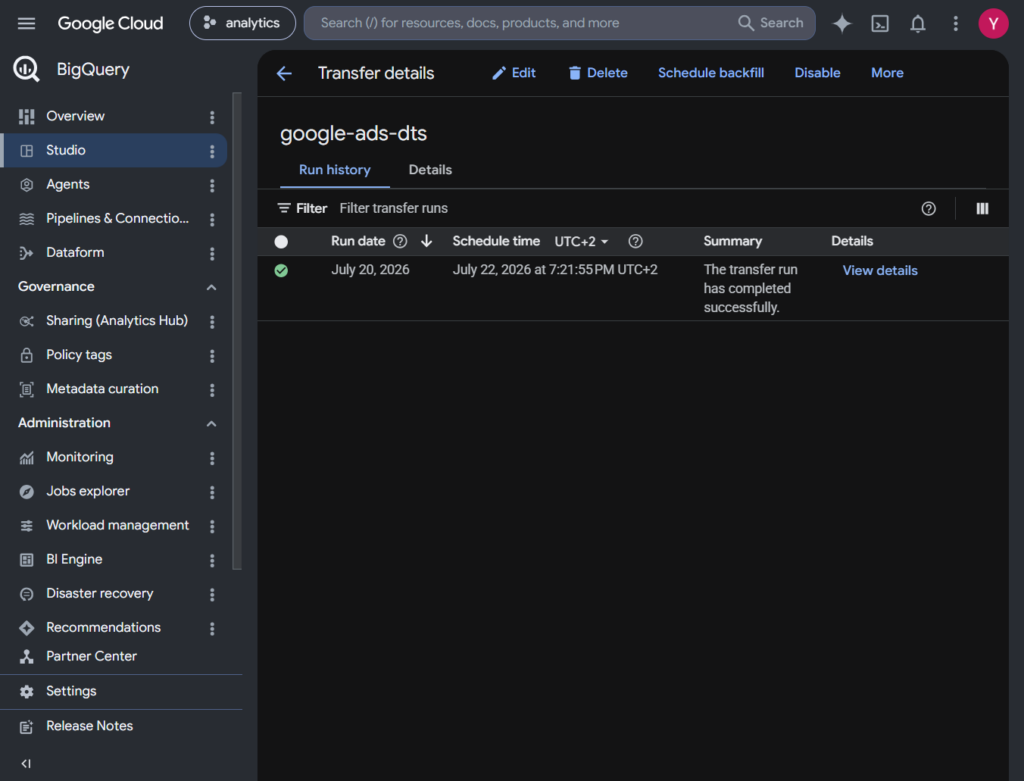
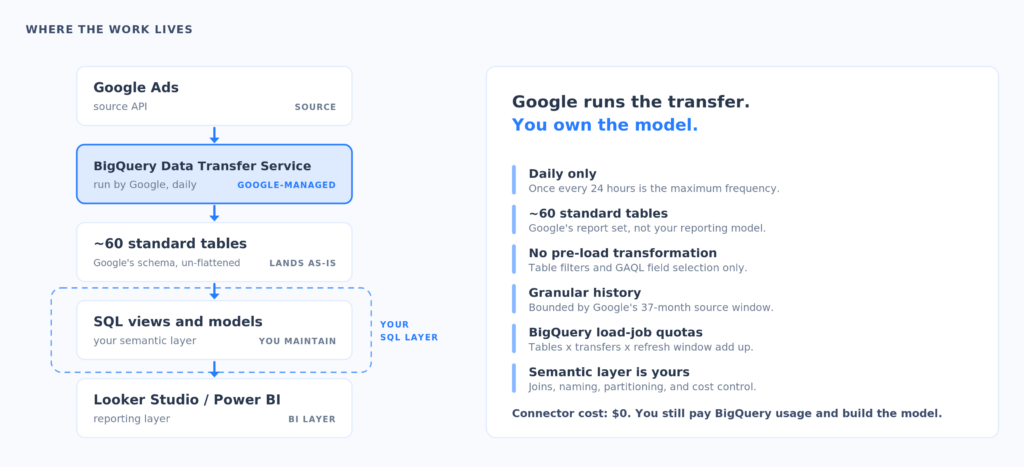
DTS is the shortest path from Google to Google. In the Cloud console you create a transfer, pick Google Ads, authorize a user or service account, enter a customer or manager account ID, choose a BigQuery dataset, and set a schedule. It runs daily, and once every 24 hours is as frequent as it goes.
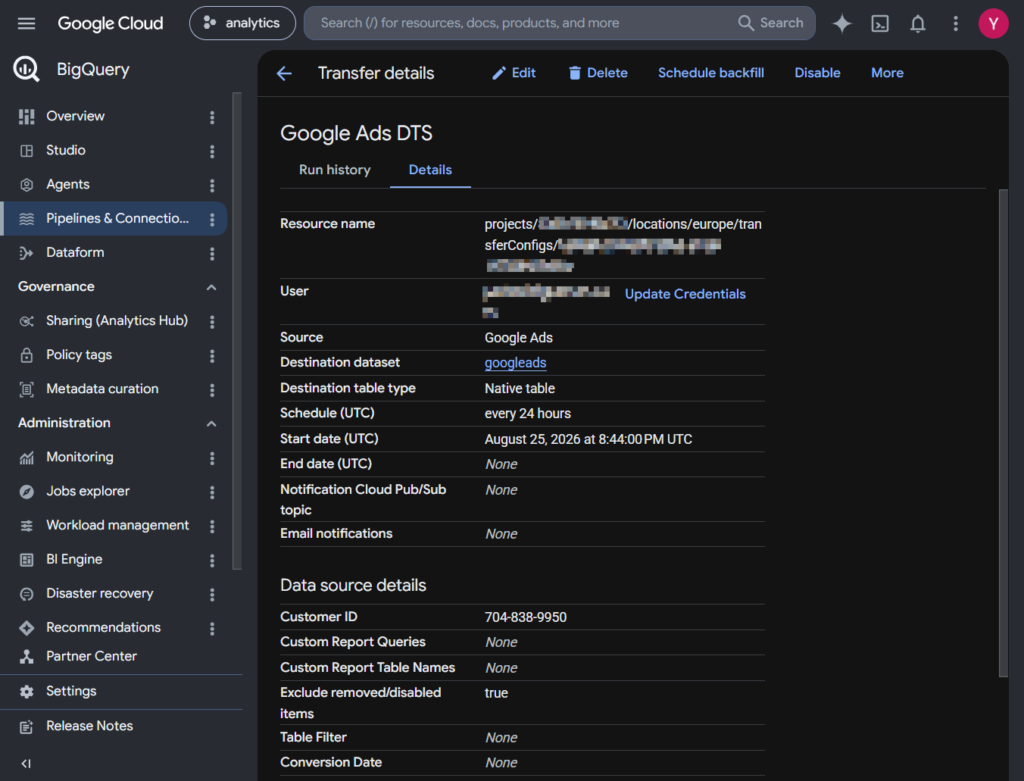
For standard reports, DTS builds the whole set of tables and views Google defines for you. Google’s quota documentation puts that at roughly 60 tables per Google Ads transfer. Useful if you want a faithful copy of the account. Not so much if you opened the dataset expecting one campaign-performance table.
It is more configurable than all or nothing, though. You can include or exclude named standard tables, and you can define custom reports with selected fields using Google Ads Query Language (GAQL).
Those custom-report queries come with limits. The connector rejects WHERE, ORDER BY, and LIMIT clauses, and DTS appends its own date filter whenever a core date segment appears. Treat custom reports as a way to choose columns rather than a place to transform anything.
From our test notes:
Authorization took only a few clicks, but the destination quickly filled with Google-defined tables. The transfer itself was simple, but we still have to understand the schema and build reporting models.
The Reality of DTS Limitations
- The schedule is daily and only daily, which is fine for reporting and useless for intraday optimization.
- There is no incremental transfer for a single date. When DTS processes a date it moves everything available for that date.
- The refresh window runs from 1 to 30 days and defaults to seven, which catches most late attribution changes.
- Granular backfill stops at 37 months. Older daily requests fail under the current Google Ads retention policy.
- There are no pre-load joins or business transformations. Table filters and custom reports narrow the scope, but enrichment and modeling still happen after the data lands.
- Load-job quotas still apply. The connector is free, but every transfer creates BigQuery jobs, and multiple transfers times roughly 60 tables times your schedule and refresh window adds up quickly.
Calling DTS free is nearly right. Google Ads is a free DTS connector for transfer orchestration, while BigQuery storage, queries, and related processing are billed as usual.
What you get is minimal middleware and a path Google manages itself.
What you give up is intraday freshness, and you take on most of the modeling for the standard report set.
Which Google Ads to BigQuery tools fit your specific scenario?
Best Native & Free Option: BigQuery Data Transfer Service (DTS)
Pick DTS when cost and operational simplicity matter more than transformation flexibility. It suits a small analytics team that already lives in BigQuery, needs one refresh a day, and does not mind maintaining SQL views over Google’s tables.
Its strengths are native authentication, managed execution, and no extra subscription. Its limit is that the pipeline stops at ingestion. The semantic layer, the joins, the naming conventions, and the cost of your reporting queries all stay with your team.
Best for
Teams already standardized on Google Cloud that need daily extracts and are comfortable modeling Google’s schema in SQL.
Rating
G2 lists Google BigQuery Data Transfer Service at 4.6/5 from 14 reviews. We found no separate Capterra profile with a review-based score.
Pricing
No charge for the Google Ads connector itself. BigQuery usage is billed normally.
Pros
- Google manages setup and daily execution.
- Standard tables, optional table filters, and custom GAQL reports.
- Data already transferred stays in BigQuery after the source ages out.
Cons
- No intraday schedule.
- No pre-load transformations or cross-source joins.
- Roughly 60 standard tables to model, plus quota overhead.
Best for No-Code Pipelines: Skyvia
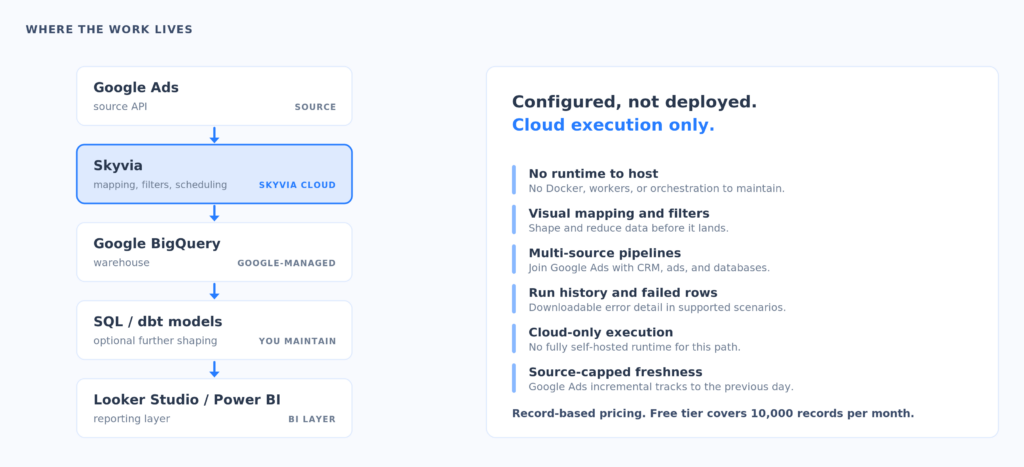
Skyvia is a no-code platform that lets you upload data from Google Ads to Google BigQuery without building a pipeline from scratch. The replication process was easy and took only a few configuration steps. We connected Google Ads and BigQuery, picked the objects and fields we wanted, chose how the destination tables would be named, and set a schedule. Skyvia created the tables on the first run and reused the same configuration afterwards.
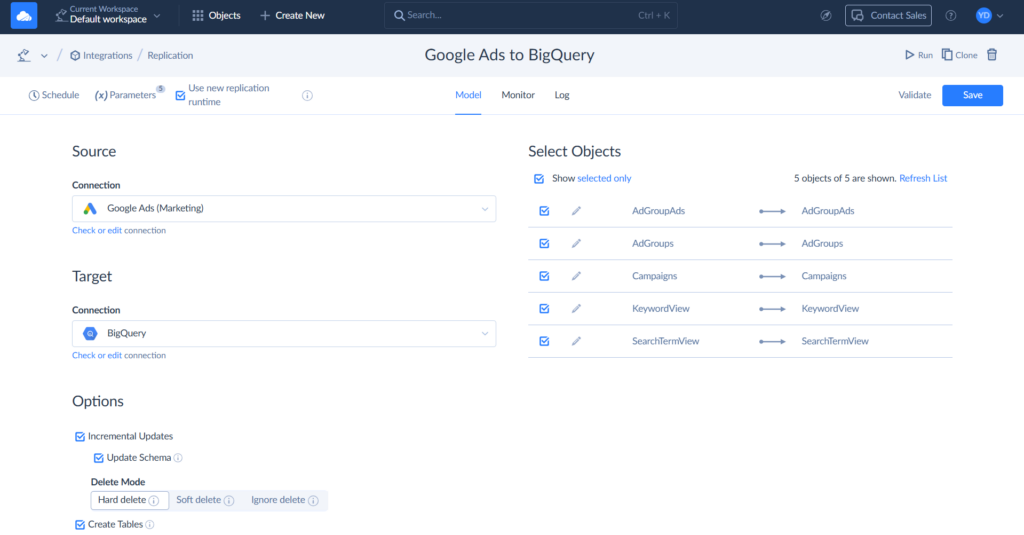
You can filter records, rename destination tables, and decide how the destination schema reacts when the source changes. Skyvia keeps its connectors current as APIs shift, and if a run fails you get an email.
You can point other sources at the same warehouse too (there are more than 200 connectors available!), then use Skyvia dbt Transformation to join warehouse tables and work out metrics such as ROAS and LTV.
Skyvia will not give you intraday Google Ads data. Changes are tracked through the Segments_Date field and processed only through the previous day, so scheduling the replication more than once a day buys you nothing.
Best for
Marketing operations, analytics, and data teams that want a managed no-code pipeline for keeping Google Ads data in BigQuery without maintaining custom extraction code or pipeline infrastructure.
Rating
G2 lists Skyvia at 4.8/5 from 321 reviews, and Capterra lists it at 4.9/5 from 116 reviews.
Pricing
Skyvia pricing is tiered by record volume, schedule, and feature set. The Free plan covers 10,000 records a month with daily scheduling, and paid Data Integration plans start at $99 a month, less per month on annual billing.
Pros
- No-code setup with guided configuration and scheduling.
- More than 200 pre-built connectors for SaaS apps, databases, files, and major cloud data warehouses.
- Object- and field-level control over what Google Ads data is replicated.
- Incremental replication for recurring warehouse loads without rebuilding the pipeline each time.
- Schema handling for supported source changes, with connector updates as APIs evolve.
- Warehouse-side transformation with hosted dbt Core or BigQuery-native SQL.
- Detailed execution monitoring with row counts, per-object logs, error details, and email notifications.
- Transparent volume-based pricing with unlimited users and no per-connector fees.
Cons
- Skyvia is a cloud-native SaaS platform, so it does not provide a fully self-hosted or air-gapped runtime.
- Google Ads replication is limited by the source connector to data through the previous day, so more frequent scheduling does not provide intraday freshness for this pipeline.

Best for Developer-Heavy Teams: Airbyte (Self-hosted) + dbt
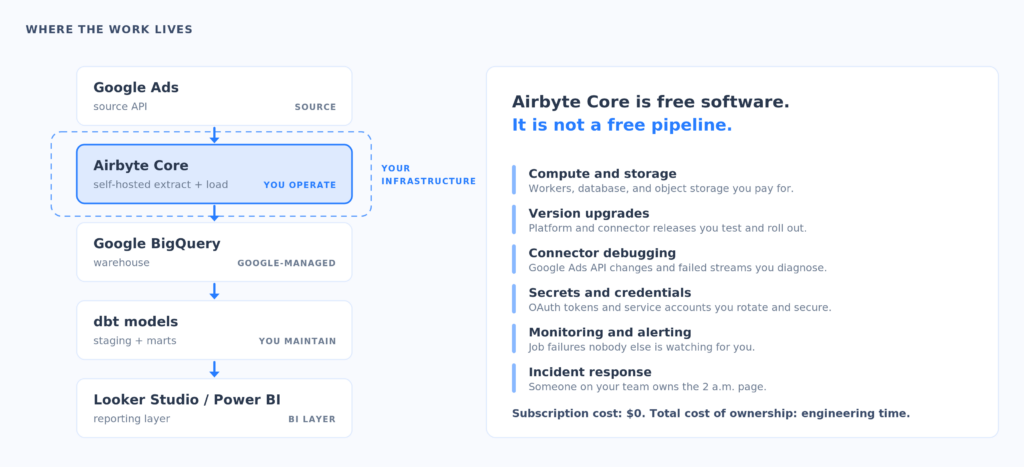
Airbyte Core is self-managed data movement platform. The software costs nothing, and the compute, storage, upgrades, monitoring, credential handling, and operational ownership are yours. Airbyte also sells managed plans, so the word Airbyte can describe two very different cost and maintenance profiles.
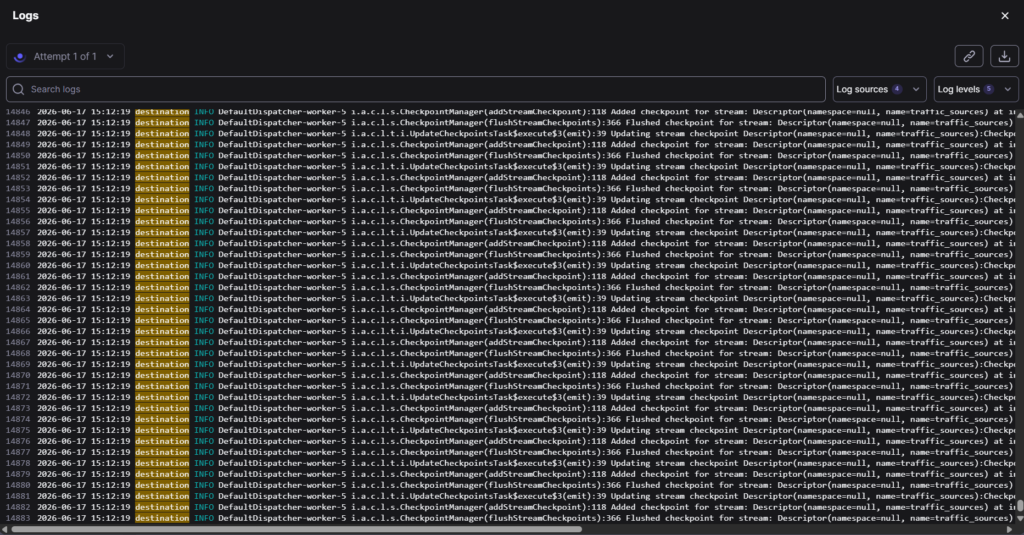
For a Google Ads to BigQuery integration, you configure Google Ads as a source and BigQuery as a destination, choose streams and columns, and pick full-refresh or incremental mode where the connector allows it. Airbyte moves the data. dbt or plain SQL turns what lands into something reportable.
This is the right choice when you need control over networking, deployment, connector code, or orchestration. It is also the easiest option to underestimate. Airbyte is free, but someone still patches the platform, upgrades connectors, sizes workers, chases failed jobs, and checks schema changes. While trying to set up Airbyte, we ran into connection problems with no errors: the pipeline got stuck on preflight check.
Best for
Data engineering teams that value self-hosting, extensibility, and infrastructure control over no-code convenience.
Rating
G2 lists Airbyte at 4.4/5 from 76 reviews. Capterra’s current Airbyte profile has no user reviews, so there is no meaningful review-based score.
Pricing
Airbyte’s current pricing page describes Core as always free and self-managed. Its comparison matrix lists maximum sync frequency below five minutes for Core, hourly for managed Standard, and 15 minutes for Plus, which starts at $500 per month. Real Google Ads freshness still depends on connector behavior, API limits, data volume, and how long a job takes.
Pros
- The Core edition is free and self-managed.
- Flexible deployment, and you can extend the connectors yourself.
- Stream and column selection before anything loads.
- Fits teams already using dbt and infrastructure as code.
Cons
- Infrastructure, upgrades, security, and incident response are yours.
- Connector troubleshooting can eat engineering time.
- Free software is not the same thing as a free production pipeline.
Best for Enterprise & Multi-Cloud Ingestion: Fivetran
Fivetran sells managed extraction and loading: automated schema handling, retries, and consistent operations across a large connector catalog. It is built for teams that would rather pay someone than run ingestion themselves.
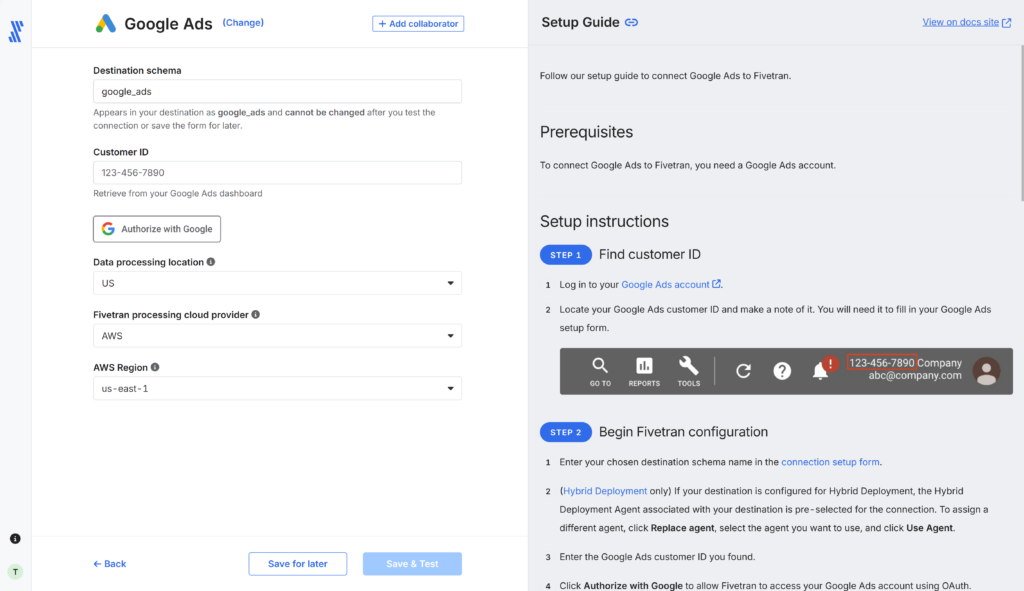
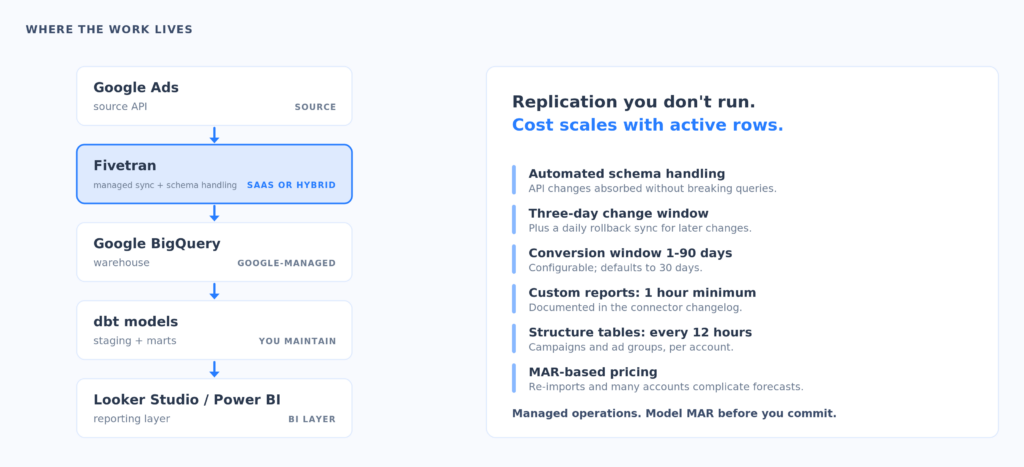
The Google Ads connector syncs incrementally, captures a rolling three-day change window, and runs a rollback sync once a day for changes that fall outside it. The conversion window is configurable from 1 to 90 days. Fivetran also publishes connector-specific limits: custom Google Ads reports sync no more often than hourly, and account-structure tables such as campaigns and ad groups refresh at most once every 12 hours per account.
Calling Fivetran SaaS-only is out of date. Its Google Ads documentation lists both SaaS and Hybrid deployment, though Hybrid needs an Enterprise or Business Critical plan. That helps large organizations, but it is not the same thing as Airbyte Core, which you can run yourself for nothing.
Best for
Enterprises with many sources, formal operational expectations, and the budget to buy connector maintenance rather than staff it.
Rating
G2 lists Fivetran at 4.3/5 from 793 reviews, and Capterra lists it at 4.4/5 from 25 reviews.
Pricing
Pricing runs on monthly active rows (MAR). The Free plan covers up to 500,000 connector MAR. Standard adds 15-minute platform schedules, though the Google Ads connector limits still apply. MAR can be cheap for stable dimensions, since a row is generally counted once a month however often it changes. It gets harder to forecast once you add re-imports, rollback behavior, many accounts, or datasets that churn.
Pros
- Heavily managed ingestion with automated schema handling.
- Mature monitoring, retries, re-syncs, and rollback behavior.
- SaaS, plus Hybrid on eligible enterprise plans.
Cons
- MAR cost is hard to predict across many active or re-imported rows.
- Little pre-load transformation compared with a visual ETL tool.
- Connector floors can be slower than your plan’s schedule implies.
How do the top Google Ads to BigQuery integration tools compare side-by-side?
| Tool | Pricing model | Practical Google Ads frequency | Selection and transformation | Error handling and operations | Deployment |
|---|---|---|---|---|---|
| BigQuery DTS | Free Google Ads connector; BigQuery usage costs | Daily | Standard-table filters and restricted custom GAQL reports; no general pre-load transformation | Google-managed transfer runs and notifications; BigQuery quotas still apply | Google Cloud managed |
| Skyvia | Tiered subscription by records, features, and schedule | Plan supports up to one minute; incremental Google Ads replication is practically daily | Visual mapping, filtering, expressions, lookups, and multi-source data flows | Run history, failed-row details, downloadable logs in supported scenarios, optional email alerts | Skyvia cloud-managed path |
| Airbyte Core | Free self-managed software plus infrastructure and labor | Custom schedules; Core lists below five minutes, subject to connector and workload | Stream and column selection; transformations usually continue in SQL or dbt | Logs and retries with operational tuning owned by the team | Self-managed; paid managed plans also available |
| Fivetran | MAR-based usage; free allowance and paid plans | Platform schedules vary; Google Ads custom reports minimum one hour and structure tables up to 12 hours | Table and column controls with limited pre-load shaping; strong automated replication | Managed retries, rollback syncs, re-syncs, monitoring, and schema handling | SaaS; Hybrid on eligible enterprise plans |
That is why there is no single best connector. DTS wins on native simplicity. Skyvia moves more of the shaping into a managed visual pipeline. Airbyte trades operational effort for deployment control. Fivetran removes most of the routine work at a price you need to model first.
How can you transform raw Google Ads schemas to make them usable?
The Complexity of Raw Tables
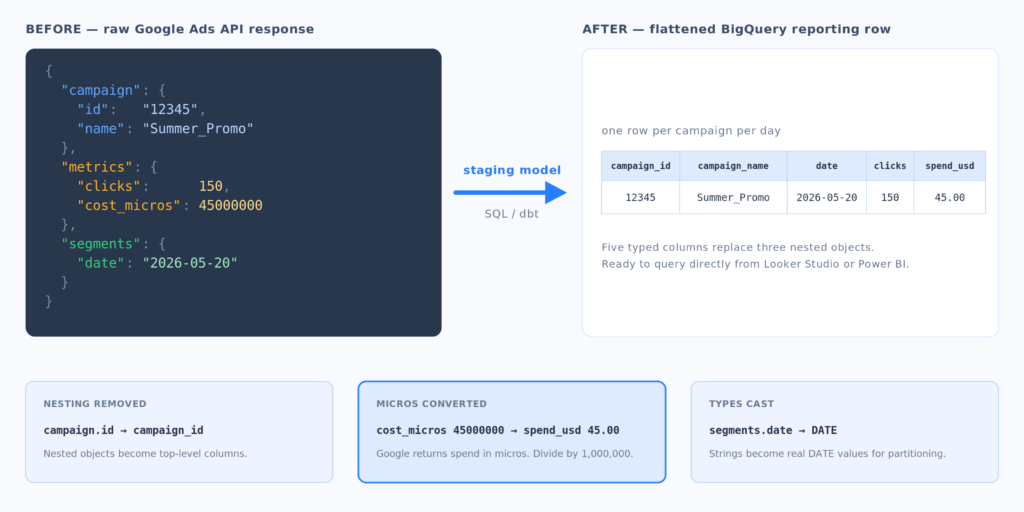
Raw advertising data does not arrive as one clean spreadsheet. Campaign metadata, ad groups, keywords, search terms, targeting, daily metrics, and conversion segments land in separate resources or tables. Fields like cost_micros need converting before anyone in the business can read them.
Using dbt to Flatten the Mess
Take a simplified API record:
{
  "campaign": {"id": "12345", "name": "Summer_Promo"},
  "metrics": {"clicks": 150, "cost_micros": 45000000},
  "segments": {"date": "2026-05-20"}
}
A reporting model might flatten it to this:
| campaign_id | campaign_name | date | clicks | spend_usd |
|---|---|---|---|---|
| 12345 | Summer_Promo | 2026-05-20 | 150 | 45.00 |
Turning 45,000,000 micros into $45 is the easy part. Production modeling also has to define keys, deduplicate rows, absorb late conversion updates, keep historical names, join customer and campaign dimensions, and stop a many-to-many join from multiplying spend.
Most warehouses end up with three layers:
- Raw ingestion keeps source-aligned tables and ingestion metadata.
- Staging models rename fields, cast types, convert micros, flatten nested structures, and standardize keys.
- Business marts join advertising, analytics, CRM, and revenue data into tested models for ROAS, CAC, LTV, and attribution.
Point Looker Studio or Power BI straight at a pile of raw Google Ads tables and you get slow dashboards and the same logic reimplemented in several places. One consolidated, partitioned, documented model gives every report the same definition of spend and conversions. It also means you can change ingestion tools later without rebuilding every dashboard.
What is the final verdict on selecting your Google Ads to BigQuery pipeline?
Choose BigQuery DTS when there is no budget for middleware, daily freshness is enough, and your team is happy building the model in SQL.
Choose Skyvia when your team wants managed no-code configuration, visual mapping, cross-source enrichment, and record-based pricing without running infrastructure.
Choose Airbyte Core with dbt when deployment control and connector extensibility are worth the ongoing engineering ownership.
Choose Fivetran when you need mature managed ingestion across many sources and can forecast or govern MAR spend.
Whatever you pick, start with the backfill. Find the earliest daily date still available, get it into your own dataset, and re-test a recent window to see how late conversions behave. The connector is the small decision. Retention, schema design, cost controls, monitoring, and the reporting model decide whether any of this still works in three years.

FAQ for Google Ads to BigQuery

Is the BigQuery Data Transfer Service (DTS) completely free to use?
Google Ads is a free DTS connector for transfer orchestration. You still pay for BigQuery storage, queries, and processing, and the load jobs each transfer creates count against your BigQuery quotas.
Why does Google Ads output over 60 tables in BigQuery, and how do you simplify them?
DTS maps each Google Ads resource and report grain to its own table or view. Narrow the standard table set or define custom reports, then build staging models and reporting marts in SQL or dbt.
How should you handle Google Ads API rate-limit errors during high-volume syncs?
Cut concurrency, load incrementally, add backoff and retries, and watch for failed runs. Do not keep restarting a full history load; resume from a known date or state when the connector allows it.
When is Skyvia a better choice than the native BigQuery DTS?
Skyvia fits when you want visual mapping, filtering, cross-source joins, managed logs, and no code at all. DTS is simpler for a daily Google-only extract you plan to transform entirely inside BigQuery.
Can you backfill historical Google Ads data into BigQuery?
Yes, though granular hourly, daily, and weekly backfills are limited to the rolling 37-month window at the source. Backfill the oldest dates first and keep the pipeline running so your archive keeps growing.