Summary
- AI data integration covers two jobs: AI that does integration work, and integration that gives AI clean, current data.
- AI drafts connectors, field mappings and transformation logic, but a person still reviews and owns each pipeline.
- Gartner expects organizations to abandon 60% of AI projects without AI-ready data through 2026.
- MCP gives assistants live access to business systems; analytics over history still runs on a warehouse.
- Microsoft Fabric, AWS Glue, Informatica, Matillion, Airbyte, Fivetran and Skyvia have released named AI features, some still in beta or preview.
Ask an AI assistant which customers might churn and it needs to know who they are. The CRM gives each one an ID. Billing assigns another. Support uses a third, and someone still matches them in a spreadsheet, by eye. Point a model at that and it answers instantly, confidently, about an account that shows up as three.
AI data integration fixes this from both ends: AI that does the integration work, and integration that gives AI one ID to read.
We checked what integration vendors have actually shipped as of October 2026 against their own docs and release notes. We also went through Gartner’s research on AI-ready data and the official announcements for the Model Context Protocol.
So, we’re about to cover what hides behind the term and how assistants get their digital hands on live data. Also, we will look at some data integration tools and what AI features they ship nowadays. And a cherry on top of this – situations where you still need a human.
What is AI data integration?
AI data integration is machine learning and large language models doing part of the integration job: connecting systems, mapping fields, transforming records and delivering them. It runs the other way too, though. Building pipelines that hand business data to AI models and assistants counts as well.
These look alike on the shelf and cost nothing alike at checkout, so work out which one you’re shopping for.
| Meaning | What it looks like | Example | Check first |
|---|---|---|---|
| AI inside the pipeline | The tool suggests mappings, writes transformation logic, flags bad records | An assistant turns “join first and last name” into an expression | Can you review and edit every suggestion before it runs? |
| AI that builds the pipeline | You describe the job in plain language; the tool generates the flow, script or connector | Amazon Q data integration in AWS Glue writes a PySpark job from a prompt | Who reviews generated code, and where is it tested? |
| Integration that feeds AI | Pipelines and endpoints that give models, agents and assistants clean, current data | An assistant reads CRM records through an MCP endpoint | Is the data fresh, complete and limited to what the assistant should see? |
Our view: most teams have to get the third one working before the other two earn anything. A model fed last quarter’s export stays wrong, however good the mapping suggestions happen to be.
Traditional vs AI-driven data integration, side by side
Whichever route you take, data still goes from source systems to somewhere people can use it (software too, these days). The real difference is who gets stuck with the boring work, because somebody has to read the APIs, line fields up across formats and write that same date conversion yet again.
| Stage | Traditional approach | AI-driver approach |
|---|---|---|
| Source discovery | An engineer reads API docs and lists objects and fields | The tool reads the docs or the schema and proposes objects, fields and relationships |
| Connector building | Hand-written code per API | Generated connector configuration or code, reviewed by an engineer |
| Field mapping | Manual matching in a spreadsheet or mapping editor | Suggested matches based on names, types and sample values |
| Transformation logic | Expressions, SQL or scripts written by hand | Generated from a plain-language request, then edited |
| Quality checks | Fixed rules written in advance | Learned patterns flag outliers, duplicates and gaps, plus rules |
| Unstructured data | Mostly skipped or keyed in by hand | Language models extract fields from PDFs, emails and tickets |
| Monitoring | Alerts on failures and row counts | Anomaly detection on volumes and values, with suggested fixes |
The pipeline doesn’t go away, though. AI cuts down the build and the cleanup. Somebody still has to own the schedule, the target tables and the access rules.

What AI does at each stage of a data pipeline
Discovery and ingestion
Adding a new source used to start with days of reading API documentation. Connector builders now do part of that reading. Airbyte has an AI Assistant for the Connector Builder (it’s still in beta) that pre-fills connector fields from the API documentation and suggests settings while you build. Fivetran went another route: its Connector SDK ships plugins for AI coding agents like Claude Code and GitHub Copilot CLI, which means an engineer can build, test and deploy a custom Python connector by prompting in plain language.
Somebody still tests the connector at the end, of course. The gain is the first draft, not the sign-off.
Schema and field mapping
Mapping eats a lot of integration hours, and it’s where AI suggestions help most. The model looks at field names, data types and sample values in each system, then guesses which ones belong together.
Here’s what it might look like, pure fiction, in case anyone asks. Your CRM, billing tool, and support desk all keep the customer key, but everyone has its own approach to naming.
| Target field | CRM source | Billing source | Support source | Suggested rule |
|---|---|---|---|---|
| customer_id | AccountNumber | acct_no | customer_ref | Trim spaces, uppercase, match on the shared format |
| customer_name | Account.Name | company | org_name | Prefer the CRM value when names differ |
| Contact.Email | billing_email | requester_email | Lowercase; keep billing_email for invoices | |
| created_at | CreatedDate | signup_ts | first_ticket_at | Convert to UTC; earliest date wins |
A suggestion engine often gets the source matches right. That last column, though, is a business call, so that’s where your review time goes.
Transformation logic in plain language
Writing expressions and scripts is the second big time sink. These days a few tools accept a plain-English request and give back logic you can run:
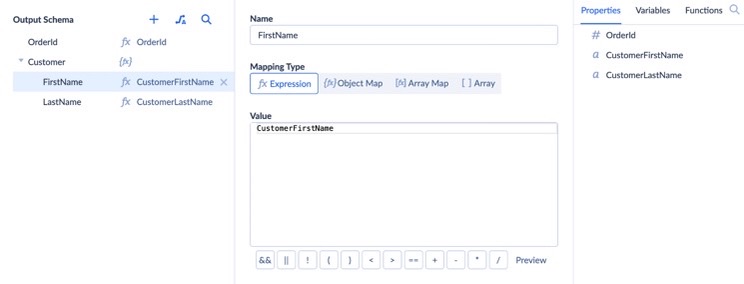
Skyvia’s version shipped in August 2026: an AI Assistant for Expressions that you’ll find inside the Expression Editor and Mapping Editor, in Data Integration as well as Automation. It works like a conversation – you ask, it answers. Follow-up messages refine the result until it matches what you have in mind. Then, just copy it out or apply it straight in the editor.
AWS Glue has Amazon Q data integration, which writes PySpark ETL scripts. AWS’s own sample prompt asks for a script that reads from Snowflake, renames fields and writes to Redshift. And yes, AWS tells you to review the generated code first.
Fabric’s take is Copilot in the Data Factory workload, where you explain what you need in natural language and get a Dataflow Gen2 solution back.
Spotting anomalies and broken records
Feed history to a machine learning model and, after a while, it learns a normal day for that feed (volumes, value ranges, how many nulls). It flags a day when order counts drop by half or a currency field fills with zeros. Informatica goes a step further. With its CLAIRE Data Quality Agents (in public preview since the Fall 2025 release), you write business specifications in natural language, and the agents create data quality rules from them and evaluate those rules.
So you catch the stuff nobody ever thought to write a rule for. False alarms come with it, mind you, especially after a real business change such as a product launch, so somebody needs to keep an eye on the alert channel.
Unstructured data
Most of what businesses know is scattered through invoices, contracts, emails, and support tickets, written for readers, not databases. Only imagine how much human resources you would need to gather it all together. Probably way more than a lot, but language models can dig it out. Treat those rows like any new source, with suspicion and a quality check. Models misread smudged scans, but so do clerks.
AI-ready data: why AI projects stall without integration
Here’s the uncomfortable part for anyone buying AI first. In a Gartner survey, 63% of organizations either didn’t have the right data management practices for AI or weren’t sure whether they did. Then comes the prediction: through 2026, organizations will abandon 60% of AI projects that aren’t backed by AI-ready data.
It’s not a one-time fix. Gartner calls AI-ready data a practice, which in budget terms means continued spending on metadata management, data observability and governance. For whoever runs integration, it means pipelines that are still running well past the end of the pilot.
Before anyone points a model or assistant at a dataset, we’d walk through this list:
- Fresh: the data refreshes as often as the question demands (daily is fine for trends, operations usually need hourly or faster).
- Complete: every system holding a piece of the answer lands in one place (the spreadsheet finance keeps on the side counts too).
- Joined: in every system, a given customer, product or order has the same key, as the mapping table earlier shows.
- Described: table names, field names and descriptions are readable by a model, and nothing like fld_07 is left unexplained.
- Scoped: unless the use case needs personal data, it gets hashed, masked or left out completely.
- Observed: failed loads, row-count drops and schema changes raise an alert someone reads.
For the pipeline side of this, see our guide to building an AI data pipeline.
How AI assistants reach business data through MCP
A warehouse pipeline is great for analytics and for training models. Assistants and agents want something different, namely live access to the systems where the work happens and a way to act on it. That’s the job of the Model Context Protocol (MCP). By December 2025, Anthropic counted more than 10,000 active public MCP servers.
MCP came from Anthropic on November 25, 2024, released as an open standard for two-way connections between data sources and AI tools. On one side, developers expose data through MCP servers; on the other, AI applications plug into those servers as MCP clients. One protocol replaces a custom integration per assistant. In December 2025, Anthropic donated MCP to the Agentic AI Foundation, a fund under the Linux Foundation that Anthropic co-founded with Block and OpenAI.
MCP doesn’t replace ETL. The two answer different questions:
| Question | Better path | Why |
|---|---|---|
| “What’s the status of the Acme renewal?” | MCP endpoint on the CRM | Needs the current record, one lookup |
| “How did churn change by region over three years?” | Replicate into a warehouse, then query | Needs history, joins and heavy aggregation |
| “Create a follow-up task for every open deal over $50K” | MCP endpoint with write access | The assistant acts on records, with a person approving |
| “Train a model on support tickets” | Pipeline into a warehouse or lake | Needs a stable, versioned dataset |
Security follows the connection. An MCP endpoint usually exposes everything its underlying account can see, so create a dedicated, read-only user for assistants that only need to answer questions. Our explainer on what an MCP server is covers the protocol in more depth, and our roundup of MCP servers compares ready-made options.
AI features in data integration tools (2026)
Vendors throw around “AI-powered” pretty freely. So the table below sticks to named features that have shipped, plus the scope you’ll need when planning around them. It isn’t a ranking.
| Tool | AI feature | What it does | Scope and caveat |
|---|---|---|---|
| Microsoft Fabric | Copilot in the Data Factory workload | Builds Dataflow Gen2 solutions from natural-language requirements | Paid F2 or P1 capacity and up, not trial SKUs; an admin enables it; off by default outside the US and EU |
| AWS Glue | Amazon Q data integration | Answers Glue questions; generates PySpark ETL scripts from prompts | Built on Amazon Bedrock; generated code is reviewed before you run it |
| Informatica IDMC | CLAIRE GPT, CLAIRE Agents | CLAIRE GPT plans and runs data tasks from natural language; CLAIRE Agents discover data, build pipelines and fix quality issues | First CLAIRE Agents released in Fall 2025; Data Quality Agents in public preview |
| Matillion | Maia | An agentic “data team” that works through data tasks, with people giving direction and approval | Positioned as autonomous; plan the approval points |
| Airbyte | AI Assistant for the Connector Builder | Pre-fills and suggests connector configuration from API docs | Beta |
| Fivetran | Connector SDK plugins for AI coding agents | Build, test and deploy custom Python connectors through Claude Code, Codex CLI, Gemini CLI or GitHub Copilot CLI | For custom connectors; you maintain the code |
| Skyvia | AI Assistant for Expressions; MCP endpoints | Writes and fixes mapping expressions in conversation; exposes connections to AI assistants over MCP | Assistant in Data Integration and Automation (August 2026); an endpoint exposes its whole connection |
For the wider tool market, without the AI filter, see our comparison of data integration tools.
AI data integration challenges, and the calls a human still makes
With AI, your team writes less and reviews more. That’s a good trade only if the review happens.
| Challenge | What goes wrong | What to do |
|---|---|---|
| Plausible but wrong mappings | amount maps to a net value when finance reports gross | Approve every suggested mapping on a sample of real rows |
| Generated code | A script runs but drops nulls or duplicates a join | Test generated jobs on data that includes edge cases before scheduling |
| Privacy and data location | Prompts and samples go to a model provider, sometimes across regions | Check where the vendor processes prompts; Fabric, for example, has a tenant setting for processing outside your capacity’s region |
| Poor input data | The model learns from duplicates and stale records | Fix keys and freshness first (the checklist above) |
| Governance and compliance | Personal data reaches a model that doesn’t need it, against GDPR or CCPA obligations | Classify personal fields, mask or hash them in the pipeline, and keep access logs |
| Cost and capacity | AI features sit on higher plans or paid capacity | Price the AI feature separately from the base product |
| Previews and betas | Behavior changes between releases | Keep preview features out of pipelines that feed finance or customers |
| Legacy systems | Older systems have no API for an AI tool to call | Put an integration layer or an on-premises agent between them |
| Skills | Nobody owns the review | Name an owner per pipeline before turning on generation |
Regulated industries care about explainability as well. If a model discards a record as an anomaly, a healthcare or finance team is going to ask for the reason. That’s why it pays to log each flag along with what was done about it.
Benefits of AI data integration
You’ll see these benefits when AI does the manual parts of the data integration process and people keep making the decisions:
- Quicker first drafts. Engineers begin with a generated connector, mapping, or expression to review, which beats a blank editor.
- Fewer cleanup cycles. Because learned checks spot duplicates, gaps and weird values early, you clean them up before they reach analytics, not after a report has already gone out looking odd.
- Documents become data. Once a model can pull fields out of PDFs, email and other formats, that data is usable too.
- Analysts get a say in the logic. Business people who’d never write expression syntax can say what the logic should do and then check the output.
- One set of numbers for people and models. Since the same pipelines feed both the dashboards and the models and assistants, decisions come from a single version of the numbers.
Though AI can do a lot (seems like it learns something new every day), it’s not a magic wand. For example, how fresh the data is comes down to how the pipeline runs (schedules, streaming, webhooks or live endpoints). And be ready that AI features often sit on a pricier tier.
AI data integration use cases by industry
The examples below are patterns, not case studies. Each one depends on integration as much as on the model.
| Industry | What AI does | What the integration layer has to deliver |
|---|---|---|
| Retail and ecommerce | Demand forecasts, dynamic pricing, product recommendations | Sales, inventory and web events joined by product and refreshed daily or faster |
| Finance and banking | Transaction monitoring for fraud, reconciliation of accounts across systems | Transactions from every channel with matching account keys |
| Healthcare | Unifying patient records across EMR, lab and billing systems | Records matched on patient identifiers, with personal data protected in transit and at rest |
| Manufacturing | Predictive maintenance from machine and sensor data | Machine readings joined to maintenance logs and parts inventory |
| Logistics | Route and delivery-time optimization | Orders, vehicle positions and delivery events in one place |
| SaaS and B2B sales | Lead scoring, churn signals, assistants that answer account questions | CRM, billing and support data joined on one customer key |
First steps with AI data integration
- Pick one job you can measure. A goal such as “cut the weekly revenue report from four hours to 30 minutes” can be measured, unlike “use AI for data.”
- Map out the systems behind that job and who owns each one.
- Land the data in one place, on a schedule. Start by replicating the sources into a warehouse or database, because AI features tend to do better on data that’s already joined and current.
- Switch on AI help where the hours go. For most teams, that’s mapping and transformation logic, and every suggestion gets checked on real rows.
- Scope what assistants can reach. An MCP endpoint over a read-only connection covers questions; add write access later, and only for named actions.
- Give it a month. Over those weeks, track failed runs, row counts and how often someone overrules the AI (that last one is telling).
Success looks like this: no more hand fixes, the report builders have become report checkers, and the assistant’s numbers match the warehouse.
Where Skyvia fits in AI data integration
Skyvia is our no-code cloud data platform, with 200+ connectors for cloud apps, databases, and data warehouses. It covers the integration side of the job and gives AI assistants a way in. It isn’t an AI model or an agent platform.
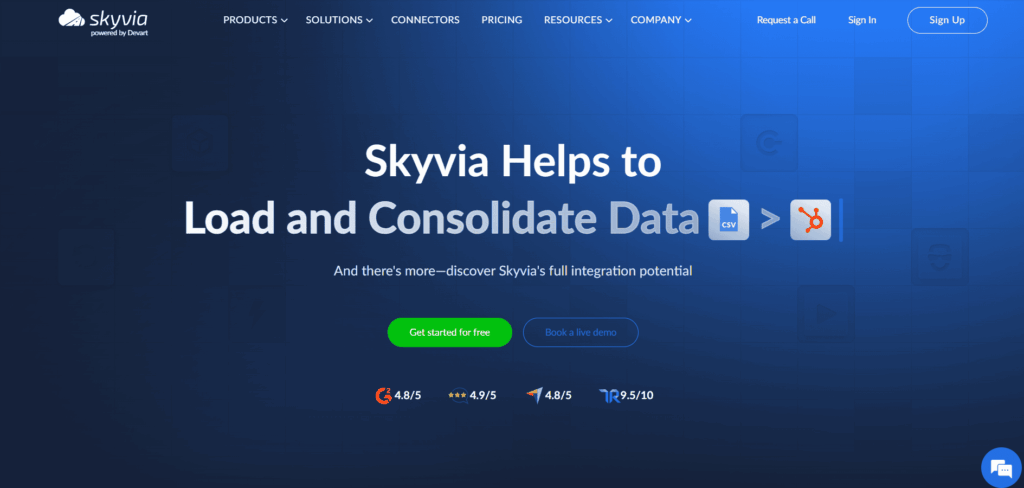
Centralize the data. Replication comes first: it loads app data into BigQuery, Snowflake, Redshift, Azure Synapse, Databricks or a database, and after that first full load, it only picks up new and changed records. Personal data can be hashed with SHA-256 as it arrives, if you need that. How often? That depends on the plan: every minute on Professional and Enterprise, hourly on Standard, daily on Free and Basic.
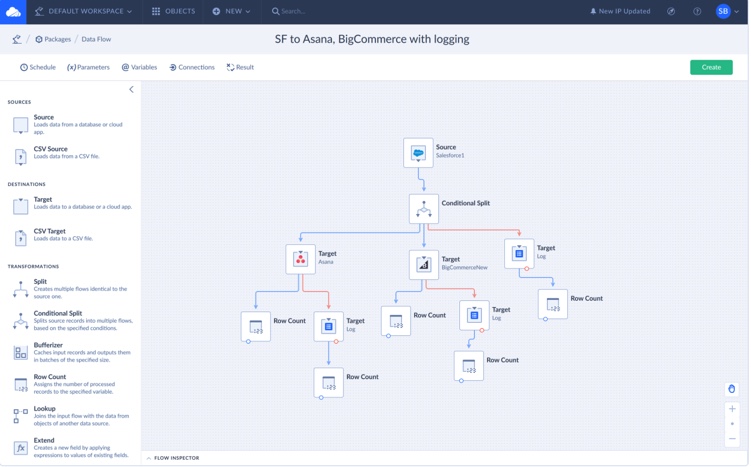
Design bigger pipelines on a canvas. With Data Flow (Standard and up), several sources and targets share one pipeline, along with lookups, conditional splits, calculated columns and an error output for the rows that fail. Control Flow (Professional and up) sits above that, running integrations one after another or in parallel, with If and Try Catch to deal with errors.
Write transformation logic with AI help. Look for the AI Assistant for Expressions in the Expression Editor, and in the Mapping Editor as well. Say what the expression needs to do, let the assistant fix anything that breaks, and apply it when it’s right.
Let assistants work with live data. It takes three steps to set up MCP endpoints in Skyvia Connect (choose a connection, add security settings, name the endpoint). After that, your assistant can read the data and also create or update records.
Access follows the connection’s own user, with optional endpoint passwords, IP allowlists and a request log. The docs describe Claude as the client.
Now the limits, because they matter here. An endpoint exposes everything its connection can see, and there’s no per-object scoping, so that read-only user is doing the heavy lifting. Skyvia doesn’t detect source schema changes automatically. Scheduled integrations aren’t real-time; only webhook triggers in Automation fire instantly.
Every Skyvia product has a free plan, Connect included. For a cheap first test, replicate a single CRM into a database, open an MCP endpoint on a read-only connection, and quiz your assistant with a question you can already answer.

F.A.Q. for AI Data Integration

What does AI-ready data look like?
It’s fresh, complete and joined on shared keys. A model can follow how it’s described, and it doesn’t carry anything the use case doesn’t need. Gartner treats getting there as ongoing work instead of a single cleanup, and it predicts that through 2026, organizations will abandon 60% of AI projects that lack it.
Can AI map fields between two systems without help from a person?
Partly. From field names, data types and sample values, it proposes matches, and the obvious pairs are often right. Business rules are a different animal, though (which system wins when two customer names disagree, for example), so a person makes those calls. Before the pipeline runs on its own, check each suggested mapping on real rows.
So what is AI ETL?
It’s normal extract, transform and load work with AI drafting pieces of it, such as the connector, the field mapping, or the transformation script. Amazon Q data integration in AWS Glue is a good example, since a prompt goes in and a PySpark job comes out. The generated job still gets tested on real data before it goes on a schedule.
Does MCP replace ETL?
No. MCP is for live access: an assistant looks something up in the systems where people work, or acts on a current record. If you need history, joins across several sources, or a stable training dataset, you’ll still be replicating data into a warehouse or lake.
Will AI take data engineers’ jobs?
Not on what the tools ship today. Their time moves around instead, away from writing connectors, mappings and scripts and toward reviewing them, testing edge cases and owning pipelines once they’re live. If nobody’s named as reviewer, a generated mistake turns up in a report rather than in testing.
Is connecting an AI assistant to company data safe?
It can be, but only once you’ve scoped the access. Since an MCP endpoint usually sees whatever its underlying account sees, we’d set up a dedicated read-only user per assistant and grant write access only for specific actions. Ask the vendor where prompts and samples get processed, too, and mask or hash personal fields the assistant has no use for.
How should a small team start out with AI data integration?
Start small, with one job where you can measure the result, like a weekly report that takes somebody hours. Replicate the systems behind it into one database or warehouse on a schedule, let AI draft the mappings and expressions for you to check, and hook up an assistant over a read-only connection. After a month of tracking failed runs and overruled suggestions, you’ll know whether to expand.