Summary
- Skyvia – proof that a reverse ETL pipeline doesn't have to come with a learning curve attached.
- Fivetran or Airbyte – enterprise-scale replication, whether you'd rather rent the infrastructure or own it yourself.
- Hightouch – an amplifier for your warehouse, turning clean customer data into a chorus across every marketing tool.
- Estuary or Hevo – for when "near real time" isn't fast enough, or is exactly fast enough, depending on which one you pick.
- Custom Python + Airflow – free on day one, a part-time job by the third quarter.
A warehouse and a database walk into a stack. The warehouse has spent all night doing math: who’s about to churn, who’s worth keeping happy, who just qualified for a discount. The database, meanwhile, is the one actually talking to customers, and it has no idea any of this happened.
That’s the whole problem Snowflake-to-MySQL integration tools solve. Somebody has to carry the warehouse’s homework over to the database running the show, on a schedule the business can live with.
Seven tools claim they’re the right messenger. Some are built for a quick, no-code errand. Some assume you already run Kubernetes and enjoy it. One is just a Python script, which is free right up until it isn’t. This guide sorts out which one actually fits your data, your team, and your patience.
Why Do Modern Data Teams Need to Move Data from Snowflake Back into MySQL?
Snowflake is the research department. It has the whiteboard space, the caffeine budget, and the patience to comb through years of orders, tickets, and clickstreams looking for a pattern. MySQL is the front desk. It doesn’t want your research. It wants one clean answer, delivered before the customer on the other end of the API call taps their foot twice.
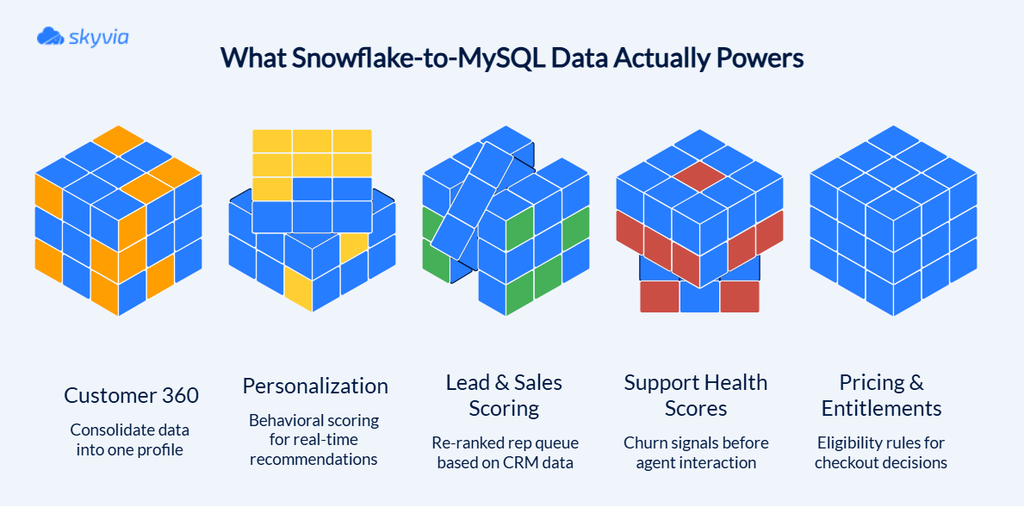
What Are the Top Operational and Reverse ETL Use Cases for Snowflake to MySQL Integration?
Every use case is the same move: Snowflake correlates, MySQL delivers the verdict – fast enough that nobody clocks the machinery behind it.
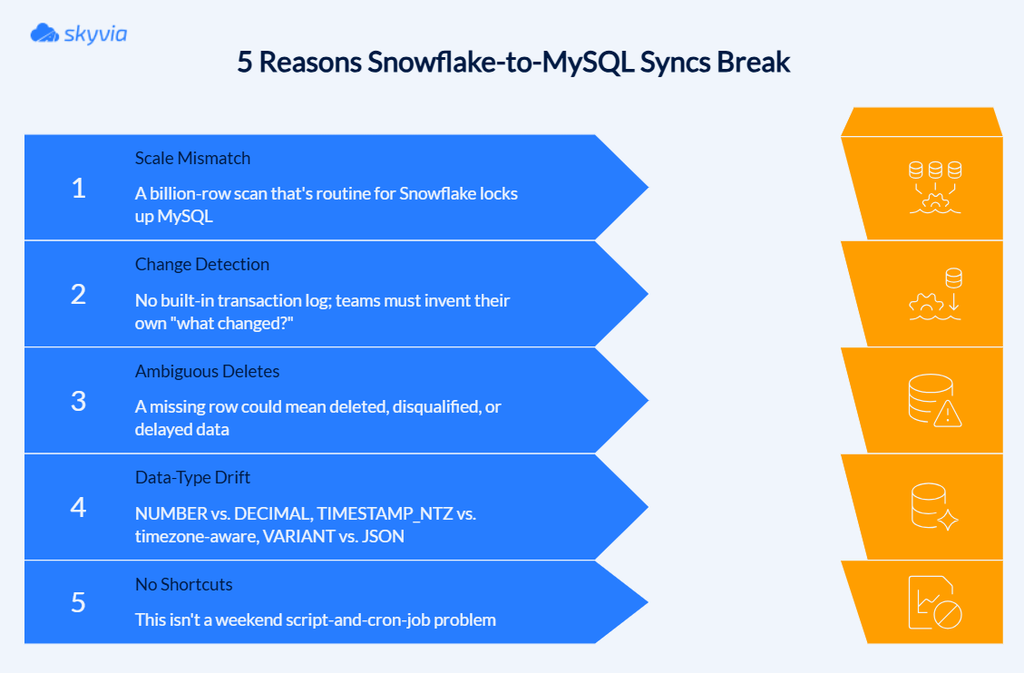
What Technical Challenges Arise When Syncing Cloud Warehouses to Relational Databases?
Snowflake and MySQL don’t speak the same dialect, and pretending otherwise is how syncs break.
What Key Criteria Should You Use to Evaluate Snowflake to MySQL Integration Tools?
A tool with two hundred connectors can still choke on one duplicate key or one firewall rule nobody remembered to mention. Judge it on five things instead:
- How fast it gets off the ground?
- Whether it writes data correctly?
- Whether it can reach MySQL without leaving a door propped open?
- What happens when it inevitably breaks?
- What does the invoice look like once your data starts behaving like real data instead of a demo dataset?
How Do Setup Complexity and No-Code Capabilities Impact Operational Speed?
“No-code” is a promise about the interface, but you still have to decide where the things go, and if you get that part wrong, the whole Snowflake-to-MySQL thing wobbles.
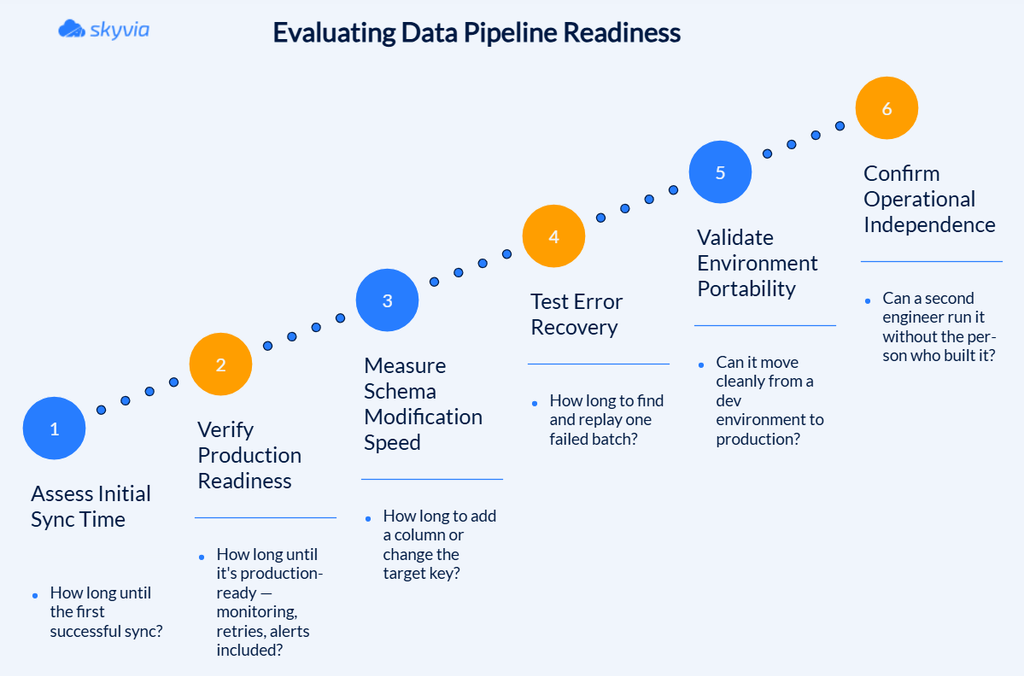
By the way, here’s what answering that checklist for one real tool looks like – take Skyvia: a simple sync is usually running within an hour, a failed batch shows up in the logs without much digging, and handing the pipeline to a different engineer doesn’t require a briefing. Production hardening and the dev-to-production move take longer. We’ll walk through the full picture in Skyvia’s own section below.
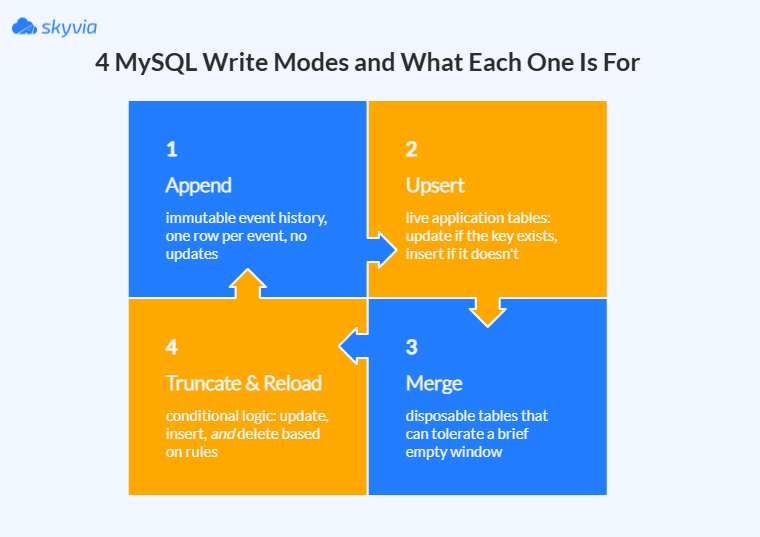
Which Tools Support Essential Write Modes: Upsert, Merge, Append, and Truncate?
Every write mode is really answering one question – “What am I allowed to forget?” And each one answers it differently.
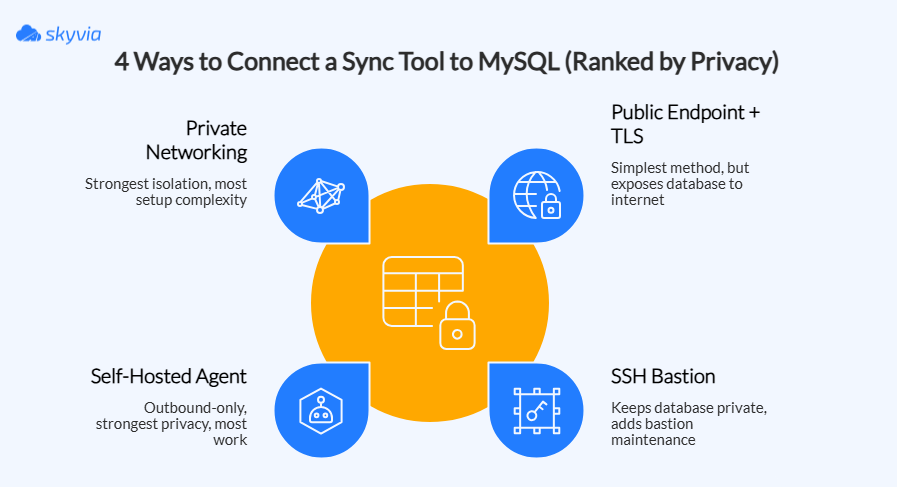
How Do Network Security, SSH Tunneling, and On-Premises MySQL Connectivity Compare?
A tool that happily connects to a MySQL instance sitting wide open on the public internet can be completely useless against a database that lives behind three layers of corporate firewall and a security team with opinions.
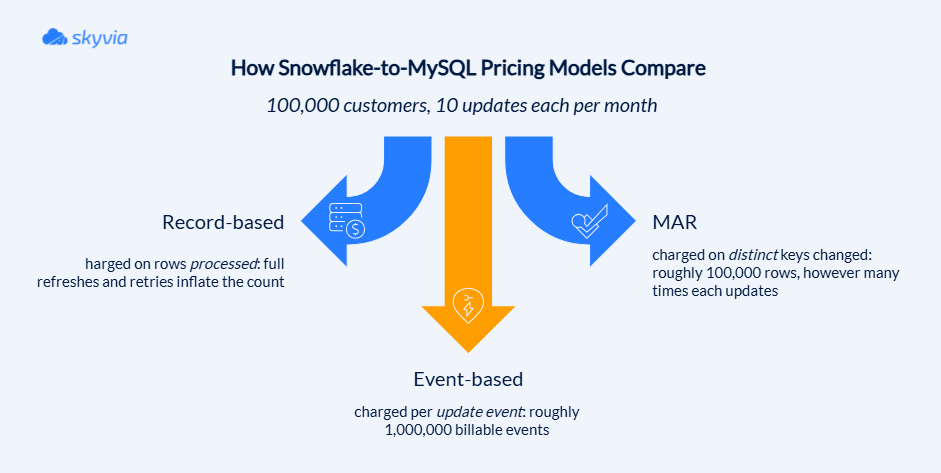
How Do Pricing Models (Record-Based vs. MAR vs. Event-Based) Affect Your Total Cost?
None of the three is the honest one, and none is the crooked one. They’re just different meters, and the only way to know which fare you’ll end up paying is to run your own trip through all three before you sign anything.
What Are the Top Snowflake-to-MySQL Integration Tools Compared Side-by-Side?
| Tool | Key Strengths | Write Modes Supported | Latency/Scheduling | Pricing Models |
|---|---|---|---|---|
| Skyvia | Fast, low-code setup with minimal maintenance, full cycle in one tool | Insert, update, delete, upsert, full refresh | Scheduled; near real time | Volume/record-based; free tier available |
| Fivetran | Broad enterprise connector coverage with managed reliability | Upsert/merge, append, overwrite; connector-dependent | Scheduled CDC; intervals from about 1 minute on eligible connections | Monthly Active Rows (MAR) |
| Hightouch | Lets marketers activate governed warehouse data without relying on engineers for every audience | Insert, update, upsert, audience sync; destination-dependent | Scheduled and real-time activation for supported destinations | Usage-based; no MTU limit |
| Airbyte | Keeps runtime and connector logic under engineering control | Overwrite, append, deduplicated append; connector-dependent | Scheduled, incremental, CDC, or event-based | Free self-hosted Core; Cloud usage-based |
| Estuary Flow | Delivers durable, replayable data streams with very low latency | Merge, delta, append, update, delete | Continuous streaming, CDC, and batch; sub-100 ms for native CDC sources (Snowflake as a source: polling at a set interval) | GB moved ($0.50/GB) plus per-connector monthly fee |
| Hevo Data | Combines no-code setup with CDC, webhooks, and built-in failure handling | Append, merge, history tracking | Near real time, CDC, webhooks and scheduled syncs on supported sources; Snowflake is a destination in standard pipelines | Event/credit-based |
| Python + Airflow | Provides complete control over business logic, recovery, and destination behavior | Any custom mode, including merge, upsert, append, truncate | Fully configurable; usually scheduled unless streaming is built | Infrastructure and engineering costs |
Which Snowflake-to-MySQL Integration Tool Fits Your Specific Architecture and Budget?
Globally, every tool that follows solves the same problem – connecting Snowflake to MySQL. However, how they do it is an entirely different matter. Let’s see.
Why Is Skyvia the Best No-Code Tool for Fast, Predictable Reverse ETL from Snowflake to MySQL?
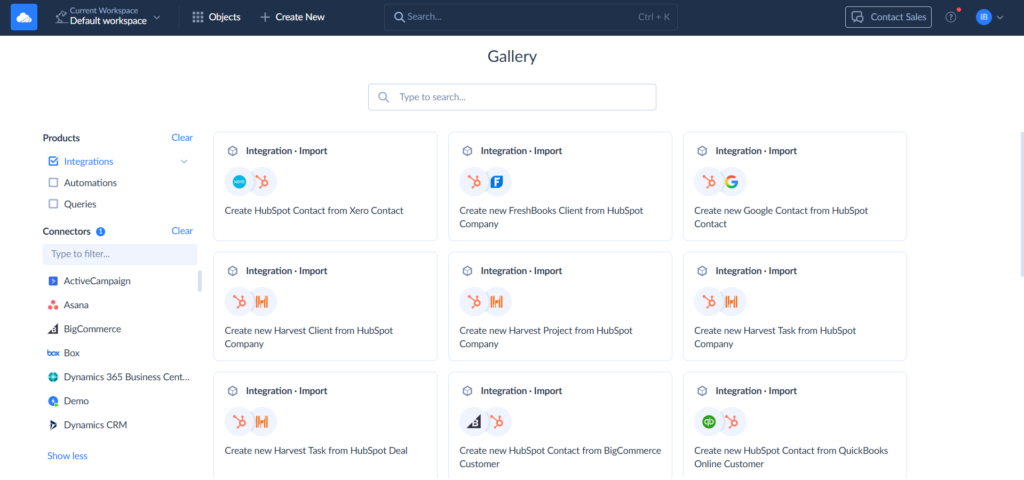
Almost every other tool in this list will ask you to hire around it: an engineer for Airbyte, a platform team for Fivetran, a DBA on speed dial for Estuary. Skyvia asks for half an hour and a login. It covers the same ground, Snowflake in, MySQL out, scores served fresh, without treating a reverse ETL pipeline like a construction project. The pitch isn’t that it does more than the others. It’s that it does the job an ordinary data-driven team already has, without handing them a second job in the process.
Best for
Data teams of all sizes and solo data people, an analyst, a RevOps manager, an IT generalist, who need Snowflake scores landing in MySQL on a schedule, without an engineer to build it or a six-figure contract to sign for it.
Pros
- No-code setup runs in minutes.
- Automatic schema handling keeps the pipeline alive when a column gets added or a type changes.
- Volume-based pricing with unlimited users on every plan, plus a free tier.
- SOC 2 and GDPR coverage, PII hashing, and role-based access, without needing an enterprise contract to get there.
- Room to grow into: REST API, custom connectors, an on-premises agent, and Control Flow orchestration once the pipeline needs more than the basics.
Cons
- Built for minutes, not milliseconds. The fastest interval is one minute on the Professional plan, so sub-second CDC belongs to a streaming-first tool instead.
- Extraction from Snowflake runs on polling, not a database change log, which is the right tradeoff for most reverse ETL but the wrong one for a strict real-time requirement.

When Is Fivetran the Right Fit for Large Enterprise Data Engineering Teams?
Fivetran’s whole pitch rests on one bet: your engineers are worth more building data models than reinventing pagination logic for the fortieth SaaS API. It treats data movement as something you rent, not something you build, and draws a hard line between extraction and loading and everything downstream – transformation happens in dbt or SQL, not inside Fivetran itself.
It isn’t trying to be the whole stack, just the pipe that works while you’re busy with something else.
Best for
Central data platform teams pulling many standard sources into a cloud warehouse – the kind of team that cares more about compliance, audit trails, and never touching connector code than about controlling exactly how each sync behaves.
Pros
- A connector library is deep enough that most standard sources never need custom code.
- The platform absorbs the schema drift, retries, and monitoring upkeep.
- Security checks the enterprise boxes: private networking, customer-managed keys, audit logs, compliance coverage.
- Operational databases sync through CDC and incremental replication that holds up under real load.
- Business-critical pipelines get a support model with real SLAs behind it.
- Custom sources are possible through the Connector SDK, minus the burden of owning the runtime.
Cons
- MAR-based pricing can balloon with high-change or event-heavy data and is genuinely hard to forecast.
- Less low-level control than code-first tools. API behavior, pagination, and retries stay a black box.
- Complex transformations still require dbt, SQL, or an orchestration tool bolted on separately.
- Custom connectors reduce infrastructure work but not the engineering effort of building them.
- Schema and metadata conventions create real switching costs down the line.
When Does Hightouch Make Sense for Advanced Composable CDP and Marketing Activation?

If your warehouse already knows your customers better than any marketing tool does, why pay to build a second brain? Traditional CDPs ask you to copy customer data into their own store. Hightouch skips the copy and points the marketing stack straight at the warehouse you already trust.
Where Fivetran fills the warehouse, Hightouch is the one that opens the doors back outward. It’s an amplifier, and amplifiers don’t judge what you plug into them: feed it a clean, well-modeled warehouse, and your customer intelligence reaches every tool marketing touches; feed it a mess, and the mistakes travel just as far, only faster.
Best for
The team with a warehouse worth trusting. Data engineers write the menu, marketers order whatever they like from it, and nobody files a ticket to get a segment.
Pros
- Keeps the warehouse as the single source of truth, with no second copy of customer data to maintain.
- No-code audience building for marketers, on top of models the data team controls.
- Identity resolution and Golden Records built directly from warehouse data.
- Activation across 300+ destinations, with sync modes matched to each one (upsert, insert, event streaming).
- Real-time audience entry and exit for supported events and destinations.
Cons
- You need to bring a tidy warehouse. If there are no clean models, stable keys, and consistent identifiers, Hightouch has very little to work with.
- It’s a CDP without the “collect everything” part. Raw event collection and standalone profile storage remain your problem.
- Real-time is narrower than it sounds, with a 24-hour lookback, event-count conditions, and select destinations only.
- The price tag is a group project: Hightouch’s usage fees, your warehouse’s compute bill on every sync, and a higher plan tier for extras like identity resolution all chip in.
- No-code for marketers, plenty of code for everyone else: data engineers still build the models up front and get pinged the moment a sync fails.
Why Consider Airbyte for Engineering Teams Requiring Self-Hosted Infrastructure?
Airbyte is free the way a puppy is free: no price tag at the door, then a steady stream of food, vet bills, and chewed-up furniture. What you get in return is something managed platforms can’t sell you at any price, which is full control over where your data runs, from the cluster to the network route. For teams with a real reason to keep the data plane inside their own walls, and the engineers to look after it, that’s a bargain. For everyone else, it’s an enthusiastic way to acquire a second job.
Best for
Engineering-led platform teams that already run Kubernetes, answer to strict data-residency rules, and would rather build a connector for that odd internal API than wait for a vendor to get around to it.
Pros
- Runs anywhere you can boot a server, from a laptop to an on-premises rack.
- Your data stays home.
- No meter on rows or seats in Airbyte Core, so a huge backfill costs compute.
- You can build your own connectors with Connector Builder or the CDKs.
- Git, CI/CD, infrastructure-as-code: it fits into your workflow like any other service.
Cons
- Free license, but pricey upkeep.
- Not every connector is a star; some are community-built.
- Append modes deliver at least once, which leaves the repeat-catching to you.
- Build a custom connector, and it’s yours for life, along with every change the source API throws at it.
- When a sync fails, the suspects are the connector, Airbyte, Kubernetes, Temporal, the network, or last week’s upgrade. Enjoy the lineup.
When Should You Choose Estuary Flow for Sub-Second Real-Time Streaming Pipelines?
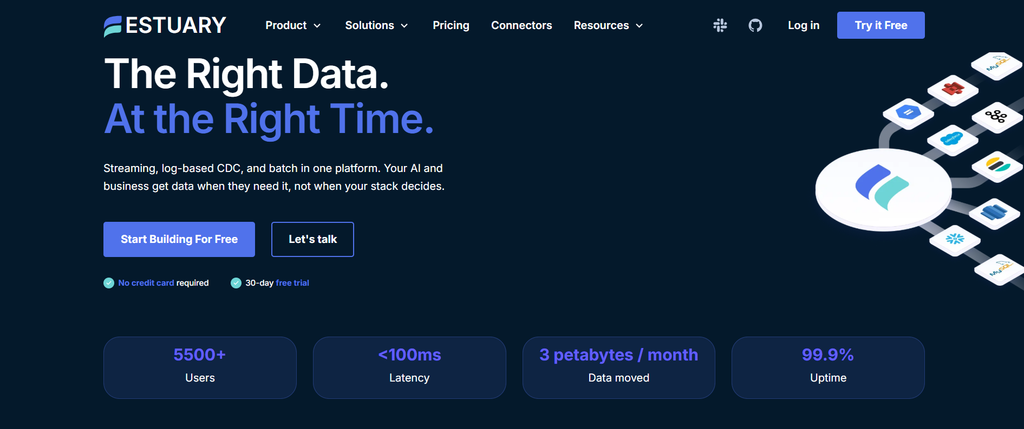
Estuary treats every change in the source database as news worth delivering now, not a parcel to be collected at the next scheduled pickup, and that opens up jobs a batch tool can’t do: fraud checks, live personalization, AI features that need to know what happened a moment ago rather than an hour ago.
It’s also a sports car, and a sports car is wasted on a commute. If a daily load keeps the business happy, Estuary is a lot of engine for a very short drive. The only question worth answering before you start is whether your data is truly in a hurry.
Best for
Teams that are already streaming CDC from operational databases and want Snowflake in the same system. For Snowflake to MySQL on its own, expect a polling interval, not milliseconds.
Pros
- Native CDC and streaming connectors aim for sub-100-millisecond delivery, with no scheduled run to wait for.
- Capture a source once and feed as many destinations as you like. The database gets read once, not five times.
- Collections keep the history, so backfills and replays don’t need to bother the source again.
Cons
- Speed is a privilege reserved for native connectors.
- Real CDC isn’t a checkbox, it’s a setup project.
- Two bills arrive at once: a rate per GB moved, and a fee for every connector instance. String together enough small connectors and they’ll outcost the data.
- Batch SQL was calm. Out-of-order events, late arrivals, and replays make sure that calm doesn’t survive the move to streaming.
How Does Hevo Data Compare for Automated Event-Driven Operational Data Syncs?
“Event-driven” sounds like a solid promise that can solve all of your troubles, yet in reality, it is a slippery phrase similar to “fast delivery” on a takeout menu. Until you know which courier shows up, it means nothing.
Hevo has two kinds of couriers. Webhooks push events in the moment they happen, and database CDC picks up inserts, updates, and deletes without anyone building Kafka pipes. Some pipelines, though, run in micro-batches, and full streaming can need a higher plan and a call with sales. Read the fine print first, then decide whether it’s the courier you need.
Best for
Syncing database changes and application events into MySQL or PostgreSQL, without the side quest of deploying Kafka first.
Pros
- No-code setup.
- Log-based CDC replicates inserts, updates, and deletes with no Debezium to run.
- Webhook sources push events in the moment they happen.
- Merge keeps the current state, Append keeps the history, and schema changes get handled and flagged.
- Retries, failed-event inspection, and alerts come built in.
Cons
- “Event-driven” isn’t always streaming. The real thing may need a higher plan and a chat with sales.
- Billing counts every insert, update, and delete, so a record that changes twenty times is billed twenty times.
- Failed events vanish after seven days. Fix them, or lose them.
- Missing primary key, missing guarantee: Merge falls back to Append, and your one customer becomes several.
- Writes land directly on the destination with no staging layer, so a burst of changes is a burst your application feels too.
Why Do Custom Python Scripts and Airflow DAGs Fail to Scale for Snowflake to MySQL Syncs?
A Python script is free exactly once: the day you write it. After that, it starts sending you a bill in a currency called engineering hours. The script that runs fine today might break tomorrow because a Snowflake column changed type, or because a retry decided to write the same customer twice.
Nothing about Python or Airflow is broken here; SELECT and INSERT still work exactly as advertised. What’s missing is everything a real replication system handles on your behalf, without being asked.
Best for
One-off Snowflake-to-MySQL migrations, small backfills, and a handful of tables syncing hourly or daily: the kind of workload a data engineer who already owns Airflow can watch over by hand. It fits best when MySQL isn’t the kind of database that notices a bad night.
Pros
- Every line of SQL, every batch size, and every retry rule are yours to write, yours to change.
- dbt, tests, approvals, downstream jobs – the whole orchestration stack can live inside the same DAG.
- The same code runs on a laptop, in Airflow, or in a container, no vendor to carry from one to the next.
Cons
- Duplicates arrive uninvited.
- A source column changes type, and the pipeline doesn’t warn you.
- Deletes are usually invisible to a timestamp-based extract, so MySQL keeps serving customers who no longer exist in Snowflake.
- Airflow schedules the work, but it never promises the work is correct.
Which Snowflake to MySQL Integration Tool Should You Choose for Your Stack?
We don’t have the “best ETL tool for Snowflake-to-MySQL” trophy. Just pick the one that matches the size of the problem in front of you, not the one with the longest feature list.
- If you just need Snowflake talking to MySQL, without a project plan → Skyvia. No-code setup, a real free tier, and pricing that won’t surprise you in month three.
- If you’re an enterprise with hundreds of sources and a platform team → Fivetran. You’re paying to never think about connector maintenance again.
- If marketing needs to activate warehouse data without filing tickets → Hightouch. The warehouse stays the source of truth; the audiences build themselves.
- If your data has to stay inside your own walls → Airbyte. Self-hosted, self-owned, and exactly as flexible as your team can handle.
- If milliseconds genuinely matter → Estuary. Fraud checks and live personalization don’t wait for the next scheduled run.
- If you want CDC and webhooks without deploying Kafka → Hevo. Just read the fine print on what “real time” means on your plan.
- If it’s a one-time migration and you already live in Airflow → A custom script. Just remember: free today, a part-time job by next quarter.
Whichever one you land on, the test is the same. Run a real proof of concept – real tables, real updates, real deletes – before your data ever sees production. A demo tells you what a tool can do. Your own messy data tells you what it will do to you.
Or skip the proof of concept and just go build the thing. Try Skyvia free – no credit card, no sales call, no engineer required. Your Snowflake data has somewhere to be. Let it get there.

FAQ for 7 Best Snowflake to MySQL Integration Tools in 2026

How do Snowflake-to-MySQL integration tools prevent duplicate records during syncs?
Through upserts keyed on a stable primary key: match an existing row and update it, or insert a new one. Deduplication rules and idempotent retries stop the same record from landing twice.
How can you securely connect Snowflake to a MySQL database hosted behind a private firewall or VPC?
Options include an SSH tunnel through a bastion host, a self-hosted agent that only makes outbound connections, or private networking like a VPN or private link, so MySQL never faces the public internet.
How does incremental syncing reduce Snowflake compute costs?
It extracts only changed rows instead of rescanning the whole table every run. Less data read means less warehouse compute burned, especially compared to a full refresh on every sync.
What is the difference between Monthly Active Row (MAR) and volume-based pricing for Reverse ETL?
MAR counts each distinct changed key once per month, regardless of how many times it updates. Volume-based pricing charges by data moved, so it scales more directly with actual sync activity.
Can non-engineers build a Snowflake to MySQL pipeline without writing Python or SQL?
Yes, with a no-code tool. Pick a source, pick a destination, map the fields, and the platform handles connections, scheduling, and schema changes without a line of code.