Write the extract, transform and load steps of a pipeline in SQL, and that's SQL ETL. A SELECT grabs the rows. Functions and joins scrub them, and an INSERT or UPDATE drops them into the target. Plenty of drag-and-drop ETL tools quietly hand SQL to the database too.
Think of a typical company, with customers kept in the CRM, orders in some internal database and billing off on its own. Getting those records out, patching what's broken and putting them in one database or data warehouse is the whole point of ETL (Extract, Transform, Load). And SQL? Relational systems read and change data through it, so it shows up in each of those steps.
First up is the SQL behind each stage, shown with example queries. After that comes the part teams argue about: when plain SQL scripts will do and when one of the ETL tools is worth adding. Practices for keeping SQL pipelines fast and the queries that test a load close out the guide.
What is ETL?
ETL stands for Extract, Transform, Load, three core steps that define how raw data becomes usable business intelligence.
It’s a foundational process in data integration, helping organizations pull data from different systems, prepare it for analysis, and deliver it to a centralized repository. Let’s break it down.
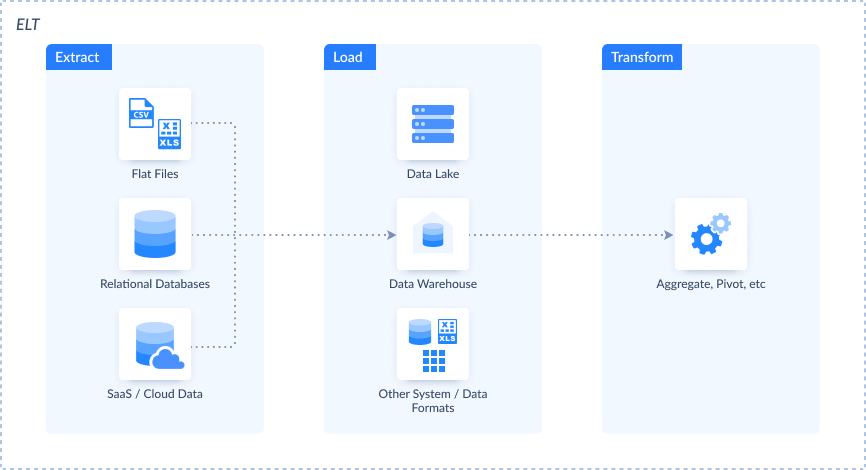
Extract
This is the starting point that involves collecting the raw data. It is gathered from one or multiple sources, such as CRMs, spreadsheets, APIs, cloud apps, or legacy systems.
Transform
Once extracted, the data might be incomplete, inconsistent, or in the wrong format. During transformation, the data is cleaned, validated, deduplicated, and restructured.
On this stage, you can apply business rules, map fields, and prepare the data to match the target schema.
Load
Finally, the transformed data is moved to a relational database or a cloud data warehouse like Snowflake, BigQuery, or Amazon Redshift. Once loaded, the data is ready for querying, reporting, or powering dashboards.
Together, these three steps form the automated workflow. Without ETL, teams would be stuck stitching spreadsheets and exporting CSVs by hand.
ETL ensures that decision-makers work with accurate, timely information, whether they’re tracking KPIs, forecasting trends, or building machine learning models.
What is SQL?
Structured Query Language is the standard language used to interact with relational databases. Be it pulling sales data from a customer table or updating inventory records, SQL is a way of instructing a database to do something.
It’s been around since the 1970s, and even after decades of developments in the data realm, SQL is still the foundation of data management due to its reliability, ease of use, and cross-platform support for all databases like MySQL, PostgreSQL, SQL Server, and Oracle.
To understand how to implement SQL ETL integration, it is helpful to have knowledge of the fundamentals. These commands are the base of ETL operations, particularly when SQL is utilized in or with ETL tools:
- SELECT – gets records from a single or multiple tables.
- INSERT – adds a new record into a table.
- UPDATE – modifies existing records in a table.
- DELETE – removes records from a table based on criteria.
JOIN – Combines rows from various tables based on matching columns, which enables more sophisticated queries and transformations.
SQL is the mechanism that makes databases worthwhile. It allows you to interact with structured data: query it, filter it, modify it, and move it. In the context of ETL, SQL powers the transformation logic. It helps enforce data integrity and supports analytical queries once data is loaded.

How SQL and ETL Work Together: A Symbiotic Relationship
While ETL defines the what, SQL generally defines the how. Most ETL processes are dependent upon SQL behind the scenes to shape, convert, and validate data in every stage of the pipeline. It’s the language that gives precision and sequence to ETL processes.
SQL is the script that tells the ETL pipeline what to do, how to filter data, how to transform it, and how to load it into the destination system. By embedding it directly into ETL pipelines, you gain control, flexibility, and performance.
Let’s look at several examples of using SQL on each stage of ETL:
Extraction
Extraction means getting data from the source and usually involves the SELECT command. This command pulls only the data you need from the source system, often with filters to narrow down the dataset.
In the statement below, we extract customer records created after January 1, 2024.
SELECT id, name, email
FROM customers
WHERE created_at >= '2024-01-01';
Transformation
On this stage, SQL shines the most. From simple cleaning tasks to advanced aggregations and joins, it offers a rich toolbox for reshaping data before it’s loaded.
The following statement selects customer data, removes the unnecessary spaces, and brings values to the specific format.
SELECT
  id,
  TRIM(LOWER(email)) AS cleaned_email,
  UPPER(country) AS country_code
FROM customers;
Another example demonstrates how data can be shaped. The statement counts the orders in each country and calculates their average value.
SELECT
  country,
  COUNT(*) AS total_orders,
  AVG(order_value) AS avg_order
FROM orders
GROUP BY country;
The following statement shows getting data from the customers and orders tables at once.
SELECT
  o.order_id,
  c.name,
  o.order_value
FROM orders o
JOIN customers c ON o.customer_id = c.id;
These transformations prepare the data for downstream analysis by ensuring consistency, removing duplicates, enriching with joins, and summarizing with aggregations.
Loading
The final step is loading transformed data into the destination, and again, SQL commands do the heavy lifting. Depending on your setup, this might involve INSERT, UPDATE, or other operations.
For example, the statement below adds a new record in the target table.
INSERT INTO analytics.customers_cleaned (id, email, country)
VALUES (123, 'jane.doe@example.com', 'US');
The statement below updates the existing target record with new data.
UPDATE analytics.customers_cleaned
SET email = 'john.new@example.com'
WHERE id = 456;
SQL ETL Scripts or an ETL Tool: Which One Fits?
A folder of SQL scripts can run the exact pipeline a dedicated ETL tool runs, often with the queries untouched. Then why pay for a tool at all? For the plumbing around them: getting data out of the source, kicking off each run, and telling someone when the 3 a.m. load breaks.
| Situation | SQL scripts or stored procedures | An ETL tool |
|---|---|---|
| Where the data lives | Source and target are databases one server or warehouse can reach | Data comes from SaaS APIs, files or several separate systems |
| Who maintains it | Engineers who read SQL and keep it in Git | A mixed team, or analysts who prefer a visual editor |
| Scheduling and alerts | You already run a scheduler (cron, SQL Server Agent, an orchestrator) | You want schedules, run logs and failure alerts built in |
| Typical transform | Set-based work inside one database, such as INSERT … SELECT | Paging through an API, retrying failed calls, mapping fields between apps |
Here's the test we'd use. Can every source be reached with a database connection? If yes, go with SQL; it may be all you ever need. An API call before the first SELECT changes the math, because code for connectors, paging and retries piles up faster than the SQL (that pile is what a tool writes for you).
Plenty of teams don't pick one, though. They let a tool do extract and load, so raw data piles up in the warehouse, and then write SQL to transform it in place. That order has a name, ELT, and our ETL vs ELT comparison explains where it wins over the classic one.
Skyvia fits that split too. Its replication copies cloud app data into a warehouse, and after the first full load it can bring over only new and changed records. On Professional and Enterprise plans, a Control Flow can run your dbt project's SQL models right after each replication.
Top ETL Tools that Leverage SQL
Modern ETL tools are designed to simplify and automate the process of moving and transforming data. Instead of writing long scripts manually, users can build ETL pipelines using visual interfaces, reusable components, and scheduling options.
But behind the scenes, many of these platforms still rely on SQL to extract data, apply transformations, and load it into the destination.
In other words, even if you’re dragging and dropping in a no-code environment, SQL is used under the hood.
List of Popular Tools
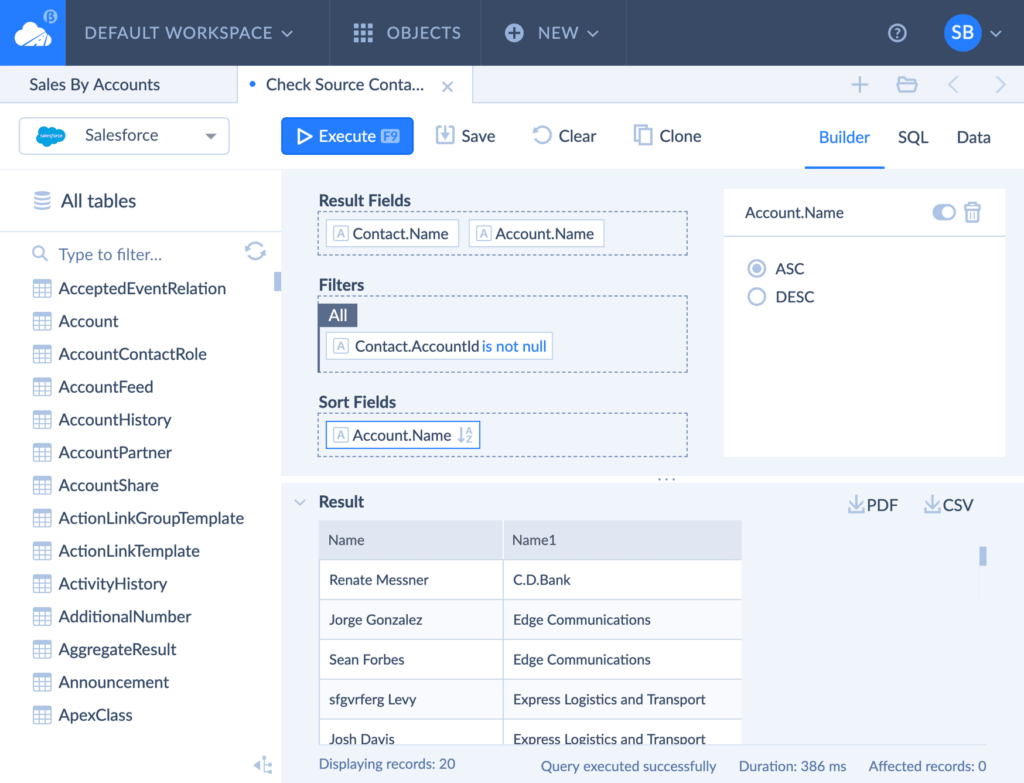
Skyvia is a no-code cloud data platform that handles diverse data integration methods and scenarios for 200+ data sources. With Skyvia, you can connect to any supported app and execute an SQL query against it.
If you are not a tech savvy, it’s not a problem for Skyvia. Its Visual Query Builder and Gallery with predefined queries will help you. Additionally, Skyvia allows you to write custom SQL commands for advanced use cases.
Microsoft SQL Server Integration Services (SSIS) is an enterprise-grade ETL platform deeply integrated with SQL Server. SSIS uses SQL statements in data flow tasks and provides powerful transformation components for manipulating structured data.
AWS Glue is a serverless data integration service that allows developers to write transformations in SQL, Python, or Scala. Glue supports SQL queries over S3 and integrates tightly with AWS data lakes and warehouses.
Google Cloud Dataflow is a fully managed stream and batch processing service that can run SQL through Apache Beam SQL in the Beam SDK. Dataflow SQL, the BigQuery SQL dialect in Dataflow, was retired in 2025. It’s ideal for complex transformations in Google Cloud environments.
Informatica PowerCenter, a long-standing leader in the ETL space, supports SQL-based transformations and pushdown optimization, allowing SQL to be executed directly on source or target systems for better performance.
ActiveBatch. While more focused on workload automation, ActiveBatch supports ETL orchestration and SQL execution steps, making it a flexible choice for managing complex, multi-system workflows.
These tools vary in complexity and use case, but they all share a common thread: SQL is at the core of their ability to extract, transform, and load data reliably.
Best Practices for Using SQL in ETL Pipelines
When SQL is used in ETL workflows, it becomes part of your data infrastructure. That’s why writing clean, optimized, and maintainable queries is essential for scalability, accuracy, and performance. Below are some best practices to keep in mind when working with SQL in your ETL pipelines.
Optimize Your Queries
Performance matters. A poorly written command can result in poor performance, especially when dealing with large datasets. Make sure you:
- Use indexes appropriately to speed up searches and joins
- Avoid
SELECT *in production pipelines: select only the columns you need - Minimize full table scans by filtering early with
WHEREclauses. - Monitor query execution plans to spot bottlenecks.
Even small improvements in query design matter.
Modularity and Reusability
Avoid having a huge single script to try everything at once. Divide your logic into modular pieces:
- Utilize views or Common Table Expressions (CTEs) to logically structure queries.
- Write reusable SQL snippets or stored procedures for operations used across pipelines.
- Parameterize and structure each module by its purpose (i.e., staging, cleaning, enriching).
Data Validation and Testing
SQL also can be a great tool to test and validate. Use intentional queries to:
- Confirm row counts in source tables versus destination tables
- Identify duplicates, nulls, or out-of-range values.
- Compare before-after transformation aggregate values (e.g., sums or averages).
Having validation steps at every level of ETL assures finding issues early and allowing only high-quality information to your reporting layer.
Error Handling
Your scripts should be resilient. Use error handling techniques to manage unexpected issues gracefully:
- Implement conditional checks (
IF EXISTS, TRY...CATCH, etc.) - Log failed rows to a separate table for review.
- Include rollback logic for critical updates or inserts
This level of control is fundamental when working in production environments where silent failures can compromise entire datasets.
Documentation
Clear documentation makes your ETL SQL future-proof. Comment your code to explain:
- The purpose of each step or transformation
- Any assumptions or business rules applied
Known limitations or dependencies
Well-documented SQL helps collaborators understand your pipeline and speeds up maintenance and troubleshooting down the line.
SQL and ETL Testing: Ensuring Data Accuracy
No matter how polished your ETL pipeline is, it’s only as good as the results it generates. That’s why testing is necessary. SQL is the tool of choice for checking data integrity at every stage of the ETL process.
Did everything make it to the destination? Are there missing values? Were transformations performed as expected? These are key to building trust in your data and catching problems before they land on dashboards or decision-makers.
Types of ETL Testing with SQL
Data Completeness Testing
This type of testing is used to make sure that no records were lost during the ETL process. By comparing row counts between source and target systems, teams can confirm that data was extracted, transformed, and loaded without omissions.
For example,
Source
SELECT COUNT(*) FROM legacy_orders;Target
SELECT COUNT(*) FROM warehouse.orders;Data Quality Testing
Quality checking can detect duplicate records, null values for required fields, or inconsistent formats. SQL makes the definition and enforcement of these rules easy so that only clean, valuable data moves forward along the pipeline.
For example, the statement below checks if any null email values or emails are missing the @ character.
SELECT *
FROM customers
WHERE email IS NULL OR email NOT LIKE '%@%';
Transformation Testing
Once business rules are applied at the time of transformation, one must ensure whether the logic was used appropriately. This involves comparing the data before and after the transformation to make sure that values were calculated, mapped, or aggregated as planned.
For example, the query below checks if the total_price = quantity * unit_price.
SELECT *
FROM sales
WHERE total_price <> quantity * unit_price;
Incorporating these SQL-driven tests into your ETL workflows helps build confidence in the data and the decisions based on it.
Conclusion
ETL and SQL form the backbone of data operations in the present day. ETL gives the structure on how data moves from one system to another, and SQL introduces the logic and control that makes every step meaningful and consistent.
Throughout this guide, we’ve shown how the two go together hand in glove. SQL powers the extraction of target datasets, shapes raw inputs into structured insight within transformation, and controls loading into data warehouses.
We also reviewed popular tools that leverage SQL internally, best practices for crafting clean and modular SQL, and employing it for verification and testing of your ETL flows.
If you’re working with data, mastering SQL is non-negotiable. It’s a key driver of clean, efficient, and trustworthy ETL pipelines.
Looking to simplify and strengthen your ETL process? Explore how Skyvia’s no-code integration platform can help you build powerful, SQL-enabled workflows without the overhead.

FAQ for SQL and ETL

Why load into a staging table before the final table?
So you get to see the batch before your dashboards do. When a supplier’s file arrives half broken, nothing in the real table moves: you clear staging and load the fixed file. On PostgreSQL we’d make staging an UNLOGGED table, which skips the write-ahead log and loads much faster. A crash empties it, and you simply reload the file.
How do you schedule SQL ETL jobs on MySQL or PostgreSQL?
MySQL can do it alone. Its Event Scheduler runs the SQL you define with CREATE EVENT, and in MySQL 8.4 it’s switched on by default. PostgreSQL is a different story, because there we’d install the pg_cron extension, which tracks jobs in a cron.job table and writes every run to cron.job_run_details.
How can SQL load just the new or changed rows?
That’s what an incremental load is for. Save the timestamp of the last successful ETL run. Next time, select only rows modified after it, and update or insert those in the target. Deletes are trickier, since a timestamp filter can’t find a row that’s gone, so they need a check of their own.