Takeaway:
- A RAG pipeline searches your own data for passages that answer a question and adds them to the prompt before the LLM replies.
- It runs in two phases: indexing (load, clean, chunk, embed, store) ahead of time, then retrieval and generation for each question.
- Answer quality depends on the data: clean, integrated and current sources matter as much as the model.
- Keep the vector index current incrementally: re-embed new and changed records, and delete the vectors of removed ones.
Ever asked a chatbot about your company's return policy? The answer comes back polite, fluent and invented. A RAG pipeline fixes that. It does this by searching your data first, so the policy page, the price list or last week's tickets reach the model before it writes anything.
Dan knows the made-up-answer problem well. He's a developer, the AI assistant is his project, and right now it invents product specs and quotes numbers from last year. Maria, his manager, has a demo on Thursday. And the model, honestly, was never the weak link. Nobody cleaned, joined or refreshed the data it retrieves from.
Below, we follow the route Dan's team took, mistakes included. You'll get the definition of a RAG pipeline, its two phases, the stack, and then the thing that bit them a month later, an index slowly drifting out of date.
What is a RAG Pipeline?
A RAG (Retrieval-Augmented Generation) pipeline is a system that combines the knowledge of large language models with your own trusted data sources to deliver a more factual answer. Instead of relying only on what the model “memorized” during training, it can retrieve the most relevant, up-to-date information from your databases, documents, and cloud apps before generating a response.
Think of RAG like a research assistant for the LLM. Without this clever assistant, the LLM will answer questions from its memory. Sometimes it will guess but confidently answer (that’s hallucination). LLM can use this assistant, the RAG, to get verified facts about your company and its products and services through internal documents and records before it answers.
For Dan, a dev, it’s like getting the right data in a script before using them in a function. But for Maria, the manager, RAG is like a dependable team member who verifies facts first before presenting results, so things are grounded and in the right places.
LLMs like GPT, Claude, and Llama are trained on a massive pile of public text. So, it’s good at understanding language, answering fluently, and explaining general knowledge. Cool, isn’t it? But its greatest weakness is accessing new and private information. It’s simply not part of its training data.
You supply that new and private information through RAG, so LLMs can use it to generate factual answers. And here’s the crucial part: your data prep, cleansing, integration, and orchestration should be strong to supply clean answers for LLMs. Without that, you’re just providing garbage data, so don’t expect correct answers.

How RAG Works with LLM
To understand where RAG and LLMs fall in this process, consider the following diagram:
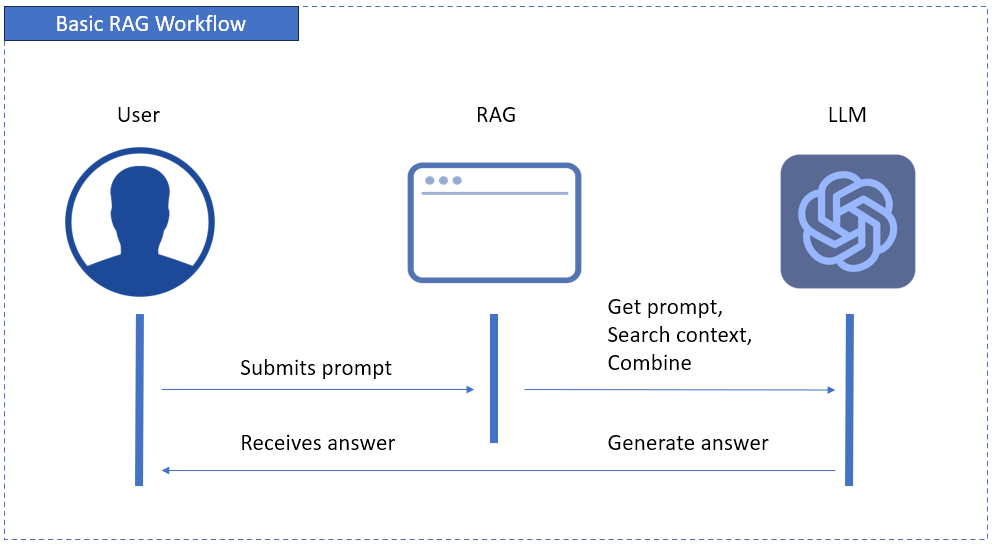
The above diagram starts when the user submits a prompt. This prompt is handled by an app. The app gets the prompt and performs a semantic search for context from your data.
The combined prompt and context are sent to the LLM, which then generates and submits the answer. Finally, the user receives the generated answer.
This means RAG complements LLMs to produce the best answer for the user.

The Business Case: Why Your Company Needs RAG
After ChatGPT’s generative AI went viral in 2022, many companies want to jump to AI too. But it’s not about getting there for the sake of “We have AI too!”. It’s also not more AI, but more accurate AI.
Dan and Maria want to take their company there. So, they want their RAG pipeline to work. But it’s not giving trustworthy answers yet. One thing is clear to them – their company needs RAG.
So, why would you jump there, too?
Create Trustworthy AI
LLMs hallucinate, even the best of them. They sound so confident, so you can get fooled if you know nothing about the question you’re asking.
The moment you add RAG to the mix, LLMs can use verified company data, so it reduces errors and hallucinations. Your approved internal documents, CRM records, or data warehouses feed LLMs so each answer comes from a trusted source.
Unlock Your Corporate Brain
Where will RAG get data from your company? Where do you store product specs, project docs, company events, support tickets, or any info you want answered by customers or employees?
RAG will use these silos and transform them into a searchable intelligence layer, so AI can answer questions it couldn’t before.
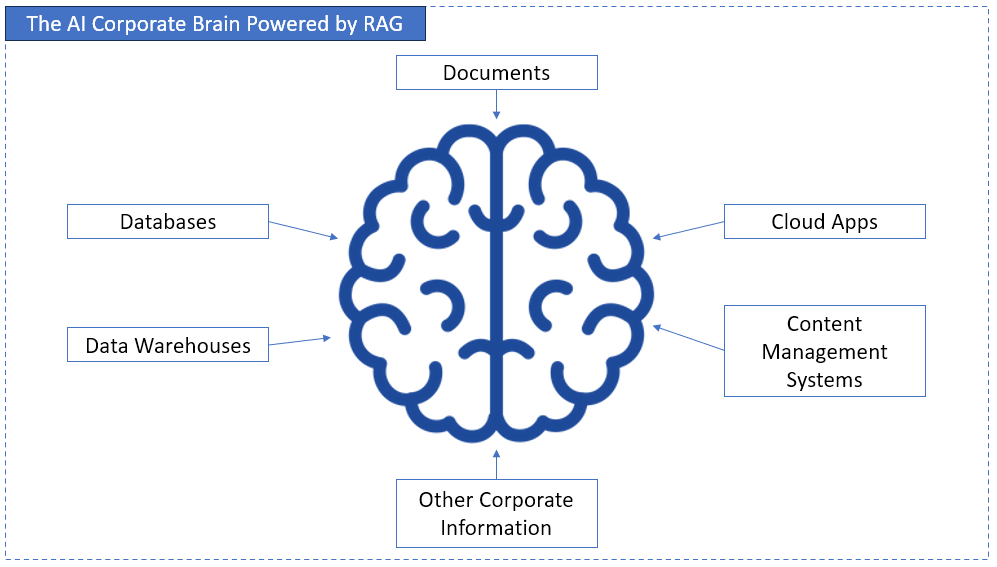
So, instead of digging through files and databases manually, AI can provide answers. It becomes a corporate brain.
Stay Agile and Current
When asking ChatGPT in 2023 about your country’s current president after an election, the answer is just off. It doesn’t know that there was an election. You don’t want something like that to happen to your company.
Models are time-consuming to retrain, but RAG bypasses that, so it gives you answers that are always fresh and relevant. As your data changes, RAG evolves too – no need to train models every time a change comes.
The Anatomy of a RAG Pipeline: A Two-Phase Breakdown
Dan and his teammate, Alice, a data architect, best understood the RAG pipeline as a two-phase system – like watching an AI-powered ETL flow.
The first phase is about building knowledge from their company’s data sources. It involves preparing and indexing data so AI will “know” where to look. The second phase is about using that knowledge in real time. That means retrieving, augmenting, and generating factual answers.
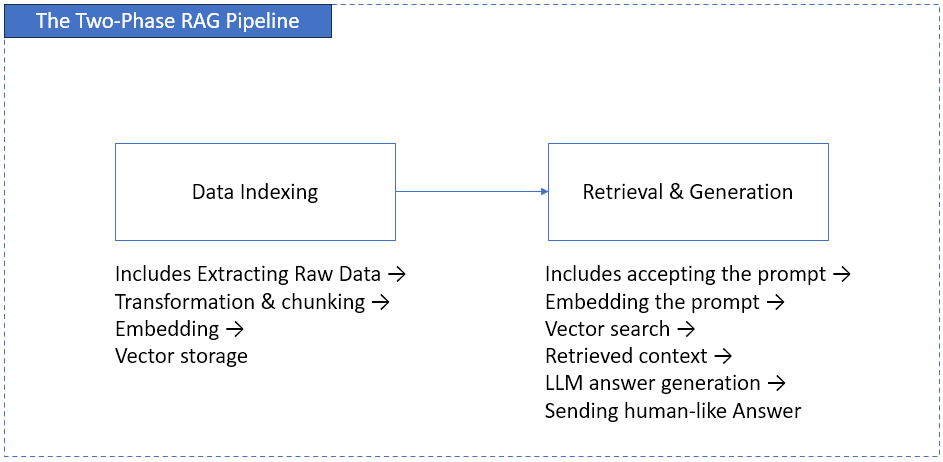
In data engineering terms, indexing is the ETL for AI, and retrieval is query and augmentation. You will use the same best practices in ETL to make data clean and efficient. But this time, it’s not for your dashboard. It’s for AI.
Let’s expand more on these two phases.
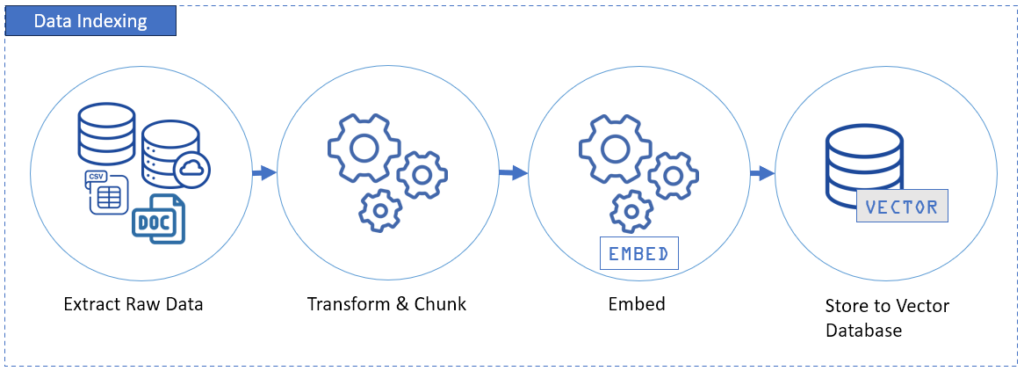
Phase 1: Data Indexing (The “ETL” for Generative AI)
This is Alice’s turf, but Dan is supporting. Their data engineering talents will meet AI. And stepping back and reviewing concepts are the next steps to fix their mess. This is also the foundational step of RAG pipelines.
This part starts with extracting data from your data sources – databases, cloud apps, CSVs, and more. This is where tools like Skyvia shine in automating integrations, so data is clean before it reaches the target.
After extraction, RAG needs 3 more important steps
Transformation and Chunking
This step involves cleaning the data first and forming smaller chunks of info. Once a size is set, it’s fixed. These chunks should be meaningful, not just dividing a column or row data by character sizes. For Alice, this is not like a substring extraction with a fixed size.
Example: Let’s say in an inventory system, Alice has 3 left for bike pedals as of October 17, 2025. A chunk should have a text like “Bike pedals left as of 2025-10-17 is 3.” Alice used Skyvia because it has an Expression Editor to generate this kind of chunk. See our sample text converted below:
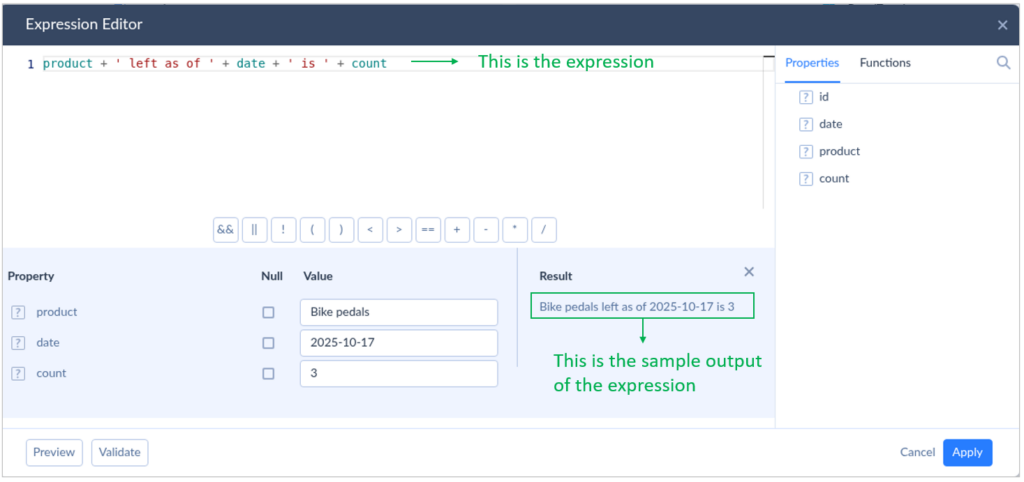
Embedding
This step turns the text chunks into numerical vectors using an embedding model like OpenAI’s text-embedding-3-large. It will convert the chunk of text into mathematical or numerical representations of its meaning.
Example: The chunk of text “Bike pedals left as of 2025-10-17 is 3.” might look like [0.021, -0.134, 0.876, …, 0.004] after embedding using text-embedding-3-large.
Vector Storage
You store those numerical vectors in a vector database like Pinecone, Weaviate, or Qdrant. Once you do this, it is now searchable.
Much like choosing PostgreSQL for relational data, you need to choose one vector storage for your embeddings. When storing, you can add structured metadata to describe the embedding.
Example: In an experiment, Dan chose the open-source Qdrant installed on his laptop. He stored the embedding [0.021, -0.134, 0.876, …, 0.004] with the following payload or metadata:
{
 "id" : 673,
 "name" : "inventory",
 "product" : "bike pedals",
 "date" : "2025-10-17",
 "count" : 3
}
With continuous integration, you convert your company’s latest information to vectors. The result? askers can expect up-to-date answers.
Phase 2: Retrieval & Generation (The Real-Time Answer Engine)
Now, this fun part is Dan’s playground.
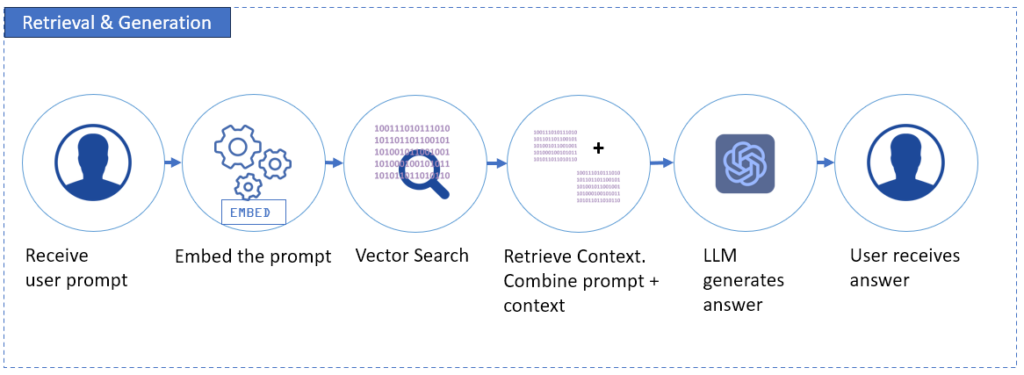
This part involves a user submitting a prompt. This prompt is then converted into a query embedding (a vector), using the same embedding model as the chunks. Why? The search runs on vectors, not on words. After conversion, searching the vector database follows to get the most relevant vector chunks as context.
Then, the text of those chunks is added to the original prompt. Finally, this enriched prompt goes to the LLM, which then produces the answer grounded in your real data, not from the LLM’s memory.
See the diagram below:
How to Build Your RAG Pipeline: The Tech Stack
Let’s talk about the RAG pipeline’s tech stack. For Dan and Alice, building it means four core RAG components: Integration, Vector DB, Embeddings/LLMs, and Orchestration. And for Maria, she wants the needs of her team to be provided to make this thing work.
It starts from a good foundation.
Data Integration Platform
This layer ensures that data is clean before it reaches the vector database. Though this is old news for Dan and Alice, this time, they have to get serious about this. This means getting to the basics of extracting and cleaning.
A data integration platform like Skyvia connects to databases using clicks and a few keystrokes, not coding. So, connecting to databases, data warehouses, cloud apps, and others should be a walk in the park. For other options at this layer, see our list of data pipeline tools.
A little bit challenging part is the transformation, but Skyvia got it covered with the Expression Editor to form a chunk of text. It’s like Excel formulas, if you are familiar with that.
With automation, AI won’t get stale or incomplete data.
Vector Databases
If relational databases have SQL tables, vector databases have vector indexes. Depending on the vector database product, they may refer to this using a different term (an index in Pinecone, a collection in Qdrant and Milvus, etc.). And if SQL tables have rows, vector indexes have points.
A vector database stores embeddings — those numerical fingerprints of text — and lets the system search them by similarity. When a query comes in, the vector DB finds the closest matches based on meaning, not just keywords.
Popular options include Pinecone, CrateDB, Weaviate, and Qdrant — each designed for high-speed similarity search and scalability.
This layer is the “memory” of your RAG pipeline.
Embedding Models & LLMs
This layer is the “brain” of your RAG setup. It’s responsible for understanding and responding.
- Embedding models (like OpenAI’s text-embedding-3-large or Cohere’s) convert text into dense vectors.
- LLMs (like GPT, Claude, or open-source models on Hugging Face) give you the final human-like answers.
Always use the same embedding model for both documents and queries. Because if they’re different, it’s like using two different coordinate systems — your AI will never find the right spot on the map.
Orchestration Frameworks
Finally, Alice will glue things together through orchestration. Tools like LangChain or LlamaIndex can be used to define the flow between query embedding, retrieval, augmentation, and generation.
They also help integrate evaluation tools (like RAGAS or TruLens) to create feedback loops for continuous accuracy improvement.
Orchestration turns your components into a living system — one that doesn’t just answer, but learns to answer better over time.
How to Keep a RAG Pipeline's Vector Index Up to Date
On Monday, the bike pedal goes up from $40 to $45. If the index still holds Friday's chunk, the assistant will happily quote $40, and it'll sound sure of it. Alice learned this the hard way: loading the vector database once is the easy part. Keeping it honest afterwards means dealing with four kinds of change.
| Change in the source | What to do in the index |
|---|---|
| New record | Chunk it, embed it and upsert it under an ID derived from the source record's key. |
| Changed record | Re-embed the changed text and upsert it under the same ID. Pinecone and Qdrant both overwrite an entry when you upsert an existing ID, so you don't get duplicates. |
| Deleted record | Delete its vectors by ID, or by a metadata filter such as the source key. Both Pinecone and Qdrant support deleting by filter. |
| New embedding model | Re-embed everything into a new collection, then point queries at it. In Qdrant, every vector in a collection must have the same dimensionality, and models differ: OpenAI's text-embedding-3-small returns 1,536 dimensions by default, text-embedding-3-large 3,072. |
None of that works until you can tell which records changed, though. Small source? Re-embedding all of it each night is fine. As the source grows, however, that habit means paying for embeddings of text that hasn't changed since yesterday, and the bill grows with it. Alice's fix was a staging database between the sources and the embedding job, so the job only touches rows that moved since its last run.
Keeping that staging copy current is plain data integration, and Skyvia Replication handles it. Each scheduled run brings over only new and changed records (daily on Free and Basic, hourly on Standard, as often as every minute on Professional). Deleted source records don't just vanish, either: Skyvia can flag them in an _is_deleted column, which tells the embedding job exactly which vectors to remove. Our guide to incremental load strategy covers the change-detection side in more depth.
One last habit worth keeping: put an updated_at value in each vector's metadata. When an answer looks off, it shows you in seconds whether the chunk behind it was stale.
Conclusion: A Great AI Starts with Great Data
The message is clear after they’ve learned their lesson: Maria, Dan, and Alice must work on data quality and retrieval strategy. It can be boring as they’ve been doing it for years, and AI is kind of a new toy. But their RAG pipeline will collapse without it.
No matter how good and advanced the LLM is, if you feed it with outdated, fragmented, and inconsistent data, the AI will just make you crazy. RAG pipelines are a data integration project first, then an AI project second. The closer your AI to clean, trusted data, the better it will give everyone the answers they’re looking for.
So, start with what truly matters – clean, updated, and consistent data. Your users will love you for the factual answers.

FAQ for RAG Pipeline

Should a RAG pipeline use keyword search as well as vectors?
Usually it should, because a part number or an error code is an exact string that keyword search catches directly, while embeddings may drift to something merely similar. Hybrid search fuses both result lists. Weaviate lets you tune the mix with alpha, where 1 is pure vector search and 0 is pure keyword (BM25F) search.
Does a RAG pipeline replace fine-tuning?
No, since the two fix different problems. Fine-tuning teaches a model a specific task or style from your examples, whereas RAG hands it facts at question time, and you can run both. What did change is OpenAI winding down its fine-tuning platform (new users can’t get in), so on OpenAI models we’d lean on RAG and prompts.
How can you tell if a RAG pipeline is answering correctly?
Test retrieval and generation separately. If a bike shop’s bot gets a pedal price wrong, either retrieval missed the right chunk or the model ignored it. RAGAS scores context precision and context recall for the first case, faithfulness and response relevancy for the second. Run it against a fixed list of real questions after every RAG pipeline change.
How do you stop a RAG pipeline from showing users documents they can’t open?
Filter at retrieval time instead of trusting the prompt. When you index a chunk, copy who may see it into its metadata, say a group ID from the source system. Each search then carries a metadata filter built from the asking user’s groups, Pinecone’s $in operator for example, so restricted chunks never come back and the LLM can’t repeat them.
How do you extract data from PDFs for a RAG pipeline?
With a document parser before chunking, and the kind of PDF decides the settings. Unstructured’s partition_pdf reads text-based PDFs with its ‘fast’ strategy, but scanned pages have no extractable text and need ‘ocr_only’. Tables are the catch: ‘hi_res’ is the only strategy that extracts them from PDFs, though it’s slower. Check a few parsed pages before embedding anything.