For a while, a nightly reload of the full table does the job; the trouble is that tables keep growing. An incremental load gets around this, since it only copies rows that somebody added, changed or deleted after the previous run and leaves the others alone. Imagine your warehouse has an orders table of 50 million rows, and today maybe a few thousand of them changed. Why touch the rest?
We still like full loads for some jobs, to be fair. Nobody has to puzzle over what they did, they clear out any drift between the source and the target, and honestly, a small lookup table that hardly ever changes needs nothing cleverer. The pain shows up when the reload stops fitting in its window, or when your cloud bill begins to rise with every row you scan.
If an incremental load strategy for a data warehouse is what you're after, this is the route we take. We start with the four usual ways of spotting changes (high watermark, change data capture, triggers and snapshot comparison), and then build it in five steps, including a SQL example we tested with a watermark table and MERGE. After that come the things that tend to break these pipelines in production, with deletes and schema changes near the top of the list, and how to run the whole setup in Skyvia without writing code.
What is Incremental Loading in a Data Warehouse?
It’s a data ingestion pattern that moves only data deltas (new additions, updates, and deletes) since the previous pull, rather than refreshing the whole dataset each time.
If, for example, you have 15 new customers on Monday and load them all into the warehouse, then on Thursday, when you have 13 new customers (what a productive week), a full load will replace yesterday’s load with a new full data set. A few months of hard work, and you spin in your office chair longer and longer while waiting for the update.
Let’s see what the incremental data load vs full load comparison reveals about each approach:
| Feature | Full Loading | Incremental Loading |
|---|---|---|
| Scope | Everything everywhere all at once | Just the deltas since the previous sync |
| Speed | Slower, especially for large datasets, as it processes everything | Faster, since it processes just the differences |
| Resource Usage | Consumes high CPU, memory, and storage; resource-intensive | More efficient; lower resource usage due to smaller data volumes |
| Data Consistency | Delivers complete consistency via total data overwrite | Requires additional logic to sync and maintain consistency |
| Load Frequency | Lower due to the burden on resources | Can run more often, even near real-time |
| Implementation Complexity | Simple to set up; easy for initial loads or smaller datasets | More complex; requires change tracking (timestamps, CDC, etc.) |
| Historical Data | Does not support keeping previous historical data in the warehouse | Can preserve a full history for auditing and analytics |
| Use Cases | Initial setups, periodic overhauls, or small, rarely-changed datasets | Large, dynamic systems; frequent updates; real-time analytics |
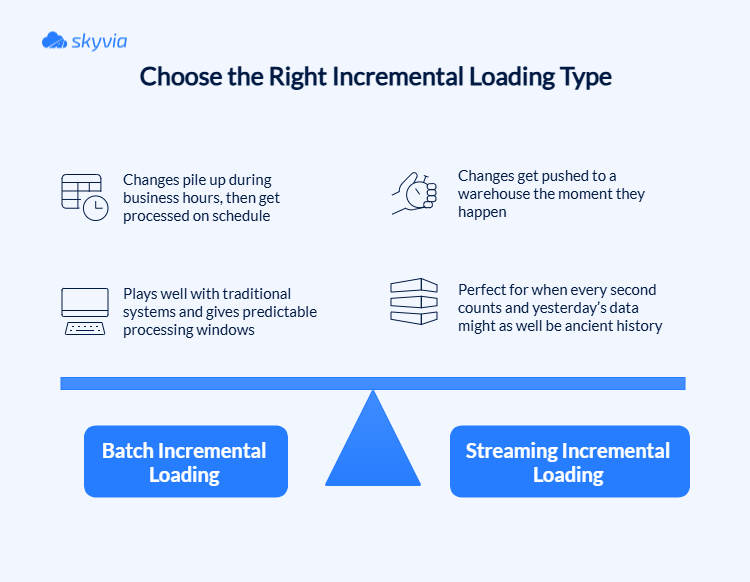
Depending on how urgently you need updates and how much the infrastructure can tolerate, you can choose between two different approaches to incremental load:
- Batch incremental loading.
- Streaming incremental loading.
Here’s how they differ:
Mechanically, any incremental loading follows a three-step dance:
- Change Detection
This most critical step determines what has changed since the last ETL run by using timestamps, change data capture (CDC), triggers, or by comparing data (row-by-row, hashes, upsert logic).
- Selective Transfer
Once you’ve nailed down what’s changed, it’s time to cherry-pick. Only the data that made it onto the “modified” list gets the pass into a DWH.
- ETL Process
ETL tools flag these differences, transform them as necessary for analytics or schema alignment, and update the target efficiently.
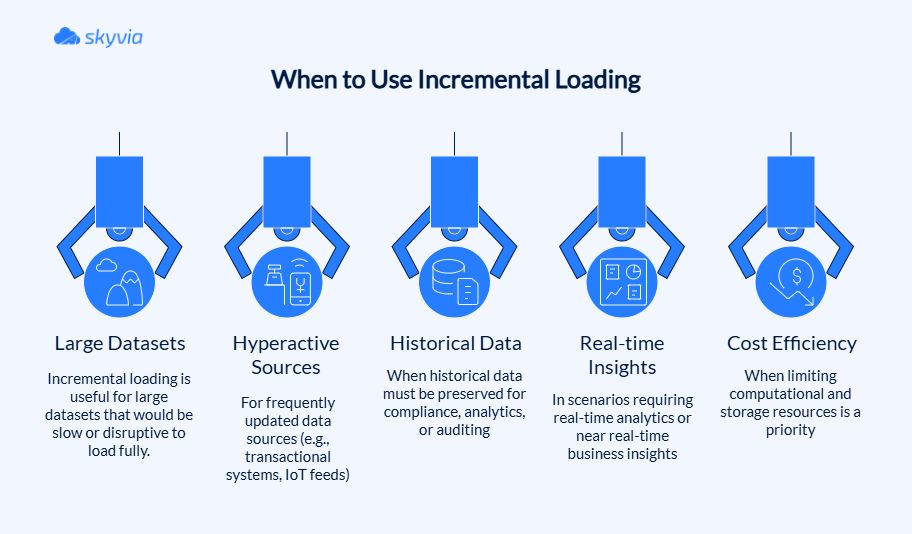
Although far from a panacea, incremental loading demonstrates exceptional performance in scenarios that would cause full loading to give up because of mounting pressures.
Key Benefits of an Incremental Load Strategy
Now, the good part – rewards to see why teams that now move only the delta rarely look back. Spoiler: because the theory not only sounds promising on paper but can become a catalyst for operational transformation. And here are the details:
- Lightning-fast processing. No more processing marathons that leave your team wondering if the job crashed or is just taking a nap.
- Fresh-as-morning-coffee data. Regular refreshes (even with streaming data) keep dashboards current with today’s events.
- Network traffic doesn’t create digital gridlock. Moving only the data deltas keeps a network working smoothly and leaves bandwidth for other critical operations.
- Cloud bills that won’t trigger panic attacks. Incremental load slashes computational and storage costs by processing smaller data volumes.
- Error recovery that doesn’t ruin your weekend. When things go sideways (and there’s always a chance they might), you’re only reprocessing small incremental batches instead of starting from scratch with terabytes of data.
- Historical data that sticks around. Audit trails and historical records are intact even if something is removed or modified in the source. Compliance teams love this, and so do analysts who need to track trends over time.
- Scalability that grows with ambitions. Incremental load handles datasets that balloon from gigabytes to petabytes easily. The number of records grows, but processing time stays manageable.
- Real-time analytics that work. Data is always fresh enough to act on, perfect for fraud detection, dynamic pricing, or any scenario where yesterday’s insights are worthless.
Many companies already enjoy the benefits of the ETL incremental load strategy they built with Skyvia. For example, Redmond Inc. ditched the daily data races when it switched to incremental loads for syncing thousands of Shopify orders with its Acumatica ERP.
American Health Care Association (AHCA) keeps its SQL Server and Dynamics 365 in perfect sync with automated incremental updates. Their dashboards stay current, and no one has to watch the data pipeline without blinking or wonder if they’re looking at yesterday’s news.

Choosing Your Incremental Load Strategy: Key Techniques
Every approach has its special talents balanced with drawbacks that invade the play when conditions aren’t perfect. Though when you find the right match, you can enjoy pipeline poetry, while with the wrong one, you will have to put out a digital dumpster fire. So, what do we have?
| Method | How It Works | Pros | Cons | Ideal Use Case |
|---|---|---|---|---|
| High Watermark / Timestamp | Track max timestamp, load changes | Simple, efficient, minimal overhead | Miss deletes, timestamp sync issues | Append-only or timestamped datasets |
| Change Data Capture (CDC) | Various: log, trigger, timestamp | Near real-time, tracks all changes | Complex, some types add source load | Real-time replication, audit trails |
| Trigger-Based | DB triggers log each change | Precise per-row change tracking | Source overhead, maintenance complexity | When log-based CDC unavailable, need row level granularity |
| Differential / Snapshot | Compares full snapshots for changes | Detects all changes, no source features required | Resource heavy, high latency | Small datasets, batch sync, no native incremental support |
Important: The available methods will depend not only on the source structure but also on the ETL tool you pick. For example, Skyvia, the ETL and data integration platform, allows for the implementation of all of them with the process logic.
High Watermark/Timestamp-Based Method
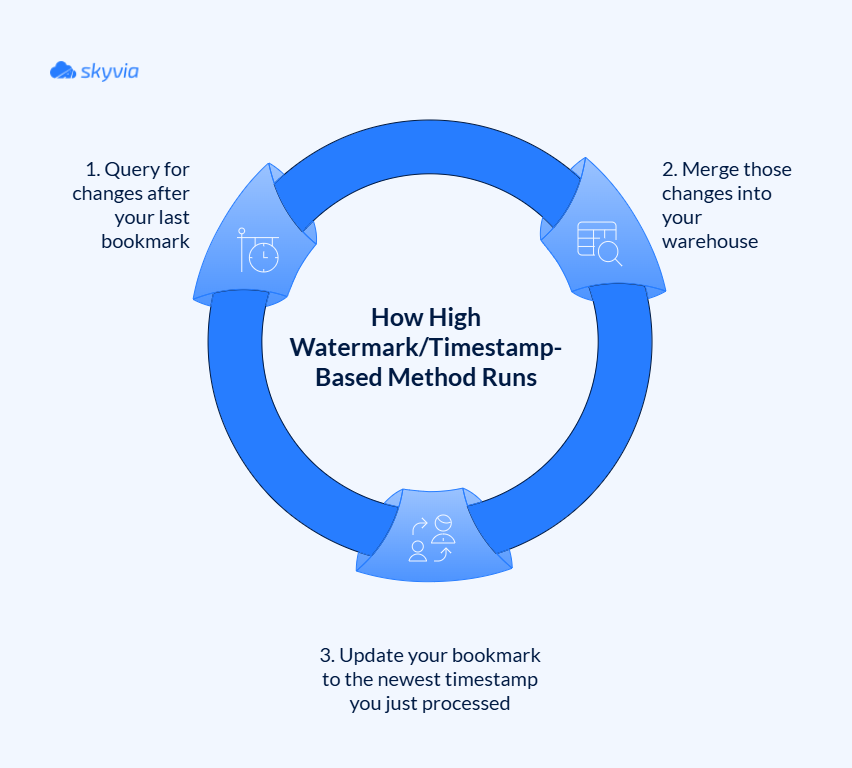
Meet the veteran technique of incremental loading. Refreshingly direct and trustworthy, but only when stars align perfectly. To apply it, you need timestamp columns or sequential IDs in the source that automatically update when records are altered. An ETL process keeps track of the highest value it’s seen (the “high watermark”), then grabs only data with timestamps greater than that mark.
It’s like a bookmark, but the story never ends; on the contrary, it only becomes longer and with more plot twists.
The process runs in a predictable loop:
Pros:
- Dead simple to implement if the source already has reliable timestamps.
- Low overhead that won’t slow down source systems.
- Easy to monitor since you can always check your current watermark position.
- Efficient execution targeting only what’s genuinely new.
Cons:
- Deletes disappear into thin air since they don’t update timestamps.
- Timestamp precision matters because simultaneous changes might escape detection.
- Cross-system sync issues when dealing with distributed databases.
- Reliability depends entirely on a source updating timestamps consistently.
Skyvia provides incremental data loading by examining specified columns (timestamp or sequential identifier types) that document row-level change activity, enabling teams to establish monitoring fields such as “ModifiedDate” for capturing modifications since the previous run.

Change Data Capture (CDC)
It comes in several flavors, but they all share the same goal of tracking every single change that hits a database. The gold standard is log-based CDC, which taps directly into a database’s transaction logs (the same logs used for database recovery).
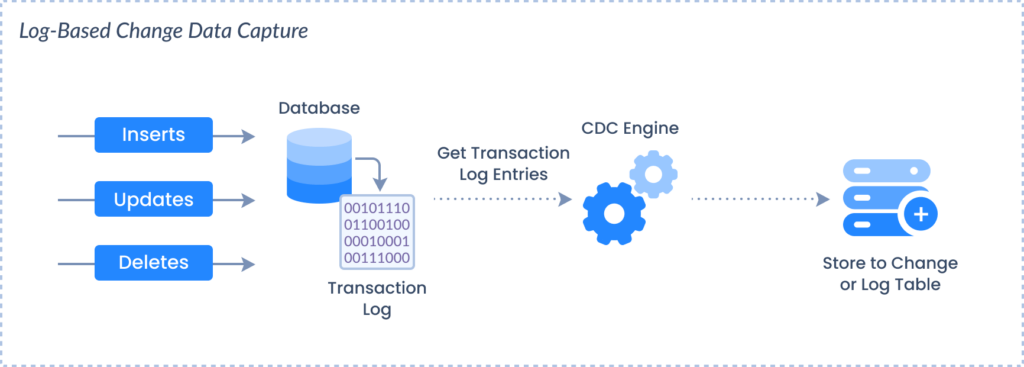
Other CDC variants include trigger-based approaches that fire custom code on changes, and snapshot-based methods that compare before-and-after pictures of your data. Each has its trade-offs, but they all deliver comprehensive change tracking.
Pros:
- Catches everything – inserts, updates, deletes, nothing can hide.
- Near real-time processing that keeps a warehouse up to date.
- Maintains a complete audit trail for compliance and debugging.
- Guarantees transactional consistency as it “reads” changes in the order they occurred.
Cons:
- Setup can be a bit torturous, especially when diving deep into database internals.
- Database-specific implementations that don’t play nice across different systems.
- Ongoing maintenance demands attention from skilled engineers.
For SQL Server sources, Skyvia captures changes through SQL Server’s Change Tracking feature. Every other source gets timestamp-based incremental updates, with deletes applied where the source exposes them, and you configure all of it in a no-code editor instead of digging into database internals.
Trigger-Based Method
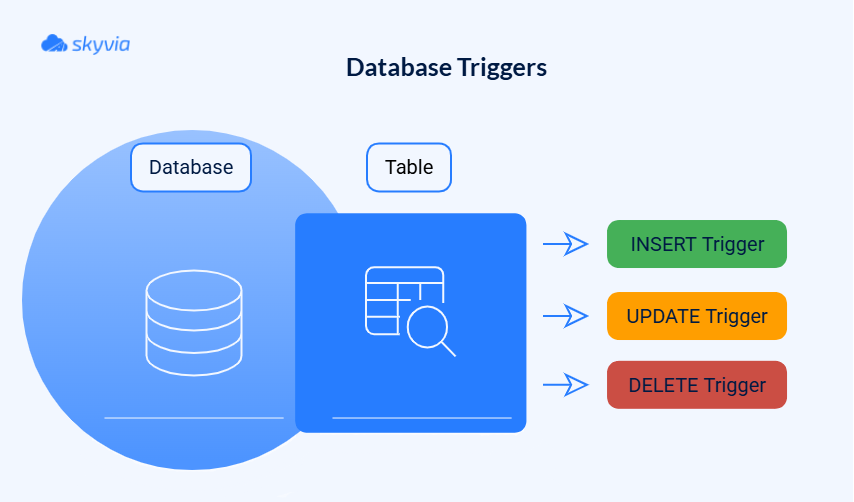
Database triggers are like motion sensors for your data. They spring into action the moment someone touches a record. These triggers write change details into separate “shadow” or “audit” tables, creating a detailed log of who changed what and when. Your ETL process then reads from these audit tables to figure out what needs updating in your warehouse.
Pros:
- Granular change tracking that captures every modification detail.
- Works everywhere that supports database triggers.
- Reliable change detection without missing edge cases.
- Customizable logging to capture precisely what you need.
Cons:
- Source database overhead since triggers fire on every transaction.
- Maintenance complexity grows exponentially with the number of tables.
- Potential performance bottlenecks during high-traffic periods.
- Trigger management challenges requiring careful version control.
Skyvia doesn’t directly support the trigger-based method. Yet, if the tool is already a part of your pipeline and you don’t want to set up any new ones, you can go the manual way, which, too, won’t be traumatic due to the platform’s no-code interface and a wide gallery of connectors.

1. Manually create database triggers on source tables.
2. Configure Skyvia to connect to these change log tables as your source for incremental extraction.
3. Schedule ETL pipelines to query only the change log tables and load new or updated records into the target system.
Differential/Snapshot Comparison (Diffsnapshot)
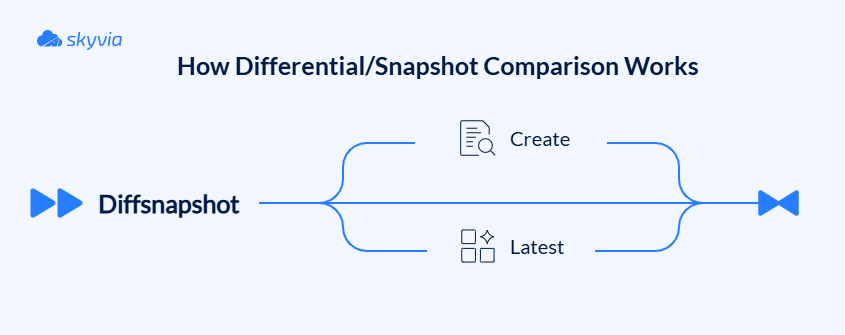
That is the brute-force approach to change detection, which involves taking a full snapshot of the source data, comparing it against the previous snapshot, and then identifying what has changed. The differences are applied incrementally to a target.
Pros:
- Works with any source, regardless of timestamps or logging capabilities.
- Catches all change types, including sneaky deletes.
- No source system modifications required; it’s completely non-invasive.
- Simple concept that’s easy to understand and debug.
Cons:
- Computationally expensive since you’re comparing entire datasets.
- Storage-intensive due to maintaining full snapshots.
- Higher latency between changes occurring and detection.
- Doesn’t scale well with massive datasets.
Skyvia equips users with snapshot comparing capabilities, monitoring row modifications including upserts, updates, and removals between snapshots, and investigating detailed data changes between two snapshot points.
A Step-by-Step Guide to Implementing Incremental Loads
If your data pipeline is currently bulldozing through full loads like there’s no tomorrow, it’s time to trade in your sledgehammer for a scalpel – same job done, but now it won’t break either your budget or sanity.
Step 1: Identify Change Data
We’re extracting diamonds from the rough, but where to dig? Fill up your arsenal with preferred techniques:
- Use a high watermark/timestamp-based method or append-heavy systems like logging platforms and transaction records for any data source where deletions are rare and timestamp discipline is rock-solid.
- For mission-critical systems where every change matters (financial transactions, inventory management, or any scenario where missing a delete could spell disaster), go for CDC.
- The trigger-based method is best for cases where log-based CDC isn’t in the cards. If you work with the moderate-traffic systems that can handle the trigger overhead, this method will work well.
- The differential/snapshot comparison method is often the last resort for smaller datasets or legacy systems if they don’t support modern incremental loading techniques. Ideal for batch-oriented processes where latency has a minimal impact on operations.
Spoiler: You’re not limited to one method. Depending on your needs, you can go from one to another. CDC won’t have hard feelings if you use high watermark and vice versa. Besides, you’ve already seen that Skyvia can help identify changes through various techniques, so no more switching between tools, only between approaches.
Step 2: Extract the Delta
Now, the task is to get inserts, updates, and deletes without bringing a source system to its knees.
These data extraction methods come to the rescue:
- Filtered queries using change indicators (high watermark/timestamp-based method)
Verify your source has reliable “last modified” timestamps or incremental numeric IDs. Then, create SQL queries filtering for rows where these values exceed your last successful extraction watermark. Example:
SELECT * FROM source_table WHERE last_modified > @last_loaded_timestamp
- CDC or Change Log Tables
In this case, your ETL extracts data from specialized CDC tables that track the delta (even deletes, which timestamps alone may miss).
- Snapshot/Differential Extraction
When no change metadata exists, periodic full snapshots of the source data can be taken and compared against the last snapshot to identify delta records. The extracted delta set is derived from the differences found (i.e., rows added, changed, or removed).
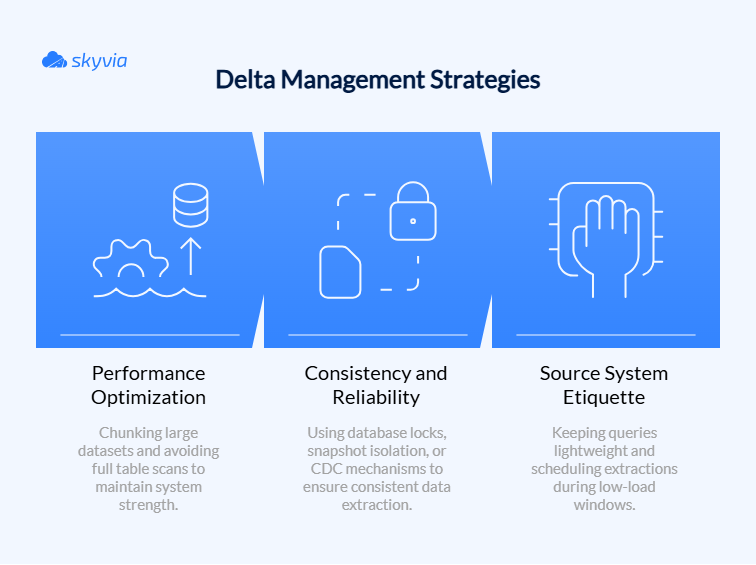
Breathe easy, we have a few practices that will offer relief during the delta haunting:
Step 3: Transform the Data
Welcome to the data spa, where your raw extracts get the complete makeover treatment to conform to the target schema and business rules.
Transformation checklist:
- Cleanse and standardize data formats.
- Derive calculated columns and new fields.
- Apply business rules and validation.
- Handle data quality issues.
Incremental-specific tips:
- Avoid full table transformations and focus only on changed data subsets (why wash already clean dishes?).
- Make sure the transformation logic can handle partial data changes and maintain integrity.
Step 4: Load and Merge the Data
Now, the changed data must move to the target smoothly, without disrupting the existing order.
Your loading arsenal:
UPSERT/MERGEoperations – updates existing rows, inserts new ones- Marking records as deleted or removing them in the target to handle delete operations explicitly.
- Batch transactions to carefully to maintain atomicity and rollback capability.
A few more tips on how to bulletproof loading:
- Use primary/unique keys for matching.
- Apply consistency checks post-load.
- Monitor performance metrics.
- Plan for error recovery.
Step 5: Metadata Logging and Auditing
Keep a detailed diary of your ETL adventures (runs, data volume, success/failure status, and auditability for compliance and monitoring) – future you and other users will be delighted.
Essential metadata to capture:
- Timing details – start time, end time, duration.
- Volume metrics – records inserted, updated, deleted.
- Watermarks – last processed timestamp/ID for next run.
- Error logs – every hiccup, exception, and “that’s weird” moment.
- Execution context – who or what triggered the load.
And remember, it’s not about moving mountains of data – it’s about moving the right data at the right time.
Incremental Load in SQL, Step by Step: Watermark Plus MERGE
Take the tools away, and what's left of nearly every method above is three SQL statements. One reads anything newer than the last watermark. Another merges it into the target, and the last one moves the watermark, which happens only after the merge. The version below is stripped down on purpose: it works on an orders table that has an updated_at column, and it stores the watermark in a tiny control table with one row per source table.
-- Control table, created once:
-- CREATE TABLE etl_watermark (table_name TEXT, last_loaded_at TIMESTAMP);

BEGIN TRANSACTION;

-- 1. Pull only rows changed since the last successful run
CREATE TEMP TABLE delta AS
SELECT s.*
FROM src_orders s
WHERE s.updated_at > (SELECT last_loaded_at FROM etl_watermark
                      WHERE table_name = 'orders');

-- 2. Update matching rows, insert new ones
MERGE INTO dw_orders t
USING delta d ON t.order_id = d.order_id
WHEN MATCHED THEN UPDATE SET status = d.status, amount = d.amount, updated_at = d.updated_at
WHEN NOT MATCHED THEN INSERT (order_id, status, amount, updated_at)
  VALUES (d.order_id, d.status, d.amount, d.updated_at);

-- 3. Move the watermark to the newest row actually loaded
UPDATE etl_watermark
SET last_loaded_at = (SELECT MAX(updated_at) FROM delta)
WHERE table_name = 'orders' AND EXISTS (SELECT 1 FROM delta);

DROP TABLE delta;
COMMIT;
We ran it against three sample orders. The one older than the watermark got skipped, the changed one was updated in place, and the new one landed as an insert. A second run did nothing at all, which is exactly what you want, because the delta came back empty and the watermark didn't budge. SQL Server, Snowflake, BigQuery and PostgreSQL all support MERGE. What changes from engine to engine is how you write temp tables and transactions, so those lines will probably need a small edit.
Some habits keep the pattern from quietly losing rows:
- Set the watermark from the data, not the clock. Store
MAX(updated_at)from the batch of rows you've just loaded, because that's the last thing you actually saw. WithNOW()in its place, though, a row committed in the middle of the run never gets picked up. - Keep all three steps in one transaction. If the MERGE then fails, nothing moves the watermark, which means the next run picks up those same rows again.
- Re-read a small overlap when commits land late. A long transaction may commit a row with an
updated_atthat's older than the watermark you just saved. To catch those, subtract a few minutes from the watermark in step 1, and MERGE handles the duplicates without complaint, since seeing a row twice changes nothing. - Plan for deletes separately. Inserts and updates are all this query will ever see. You'll need a soft-delete flag or a periodic key comparison too, and the next section gets into both.
Rather not babysit control tables? With Skyvia Replication, the creation and modification timestamps of each object are tracked for you, and the incremental loads run on the schedule you pick.
Common Challenges in Incremental Loading and How to Solve Them
Incremental loading promises perfection, then life happens. Sure, these optimized pipelines deliver stellar performance, but they smuggle in sneaky complications that can derail your pristine ETL into chaos if you’re not prepared.
- Handling Deletes
Most incremental methods only catch inserts and updates, while timestamp-based tracking misses deleted records entirely, causing data discrepancies.
CDC is a gold standard solution for when records deleted in the source aren’t reflected in the target, but are very much needed for consistency. It captures all mutations, including deletes, by reading database transaction logs, guaranteeing you won’t miss any vanishing acts.
For systems lacking robust CDC, implement soft delete flags that mark records as deleted rather than physically removing them. Your ETL can then update the target based on these status indicators.
When neither option works, fall back to reconciliation snapshots – perioding comparisons between source and target to spot missing records. Though more resource-intensive, this safety net catches everything other methods miss.
- Schema Evolution: When Tables Decide to Reinvent Themselves
Source systems can change and won’t notify anyone. New columns appear, data types shift, and field names get creative makeovers, all while the ETL pipelines work, blissfully unaware.
The smartest defense involves dynamic schema detection using ETL tools that automatically discover changes and adapt mappings on the fly. Pair this with schema version control that documents evolution with timestraps and maintains backward compatibility whenever possible.
For maximum resilience, design flexible targets using “wide” tables that absorb new columns gracefully, or use JSON columns for semi-structured additions. When changes do break through, the schema-on-read patterns will deliver.
- Data Integrity and Error Handling
Failures seem to choose the worst moments to strike – network timeouts during extraction, target crashes mid-load, or out-of-order processing creating dependency disasters. The best solution is to lock all the doors to prevent errors that threaten data integrity.
The first line of defense – checkpointing and watermarks. Maintain a breadcrumb trail of your last processed record so you never lose ground. Engineer idempotent operations with UPSERT/MERGE statements that act like a safety net – run them once, run them a hundred times, your data stays pristine.
Implement comprehensive monitoring with automated alerts to failures and maintain detailed run metadata for forensic analysis.
- Initial Data Load
Before running elegant incremental loads, establish a rock-solid baseline. The initial full load sets the foundation for everything that follows and validates the entire ETL logic with a complete dataset.
Right now, you’re dealing with potentially massive volumes of legacy data, inconsistent schemas, and quality issues nobody talks about. Volume and performance constraints, downtime requirements, schema misalignments, and recovery complexity are yet to be fought. And here’s how to go through initial load with minimal issues:
- Use staging areas – load, validate, and transform in controlled stages rather than direct migration.
- Break datasets into manageable chunks through partitioning and parallel processing for speed and recovery options.
- From day one, establish proper change tracking by setting CDC bookmarks, populating timestamps, and documenting high-water marks carefully.
Automate Your Incremental Loads with Skyvia
The only thing that Skyvia’s automation of the ETL incremental load can’t provide is popcorn to enjoy data streams from the source to the target. Who knows, maybe such a feature should be added to our roadmap.
Skyvia offers various solutions, but for the case we gathered today to discuss, Replication is the best option. It automates both initial full loads and incremental syncs that follow, with features such as built-in change detection, schema auto-handling, scheduling, and monitoring.
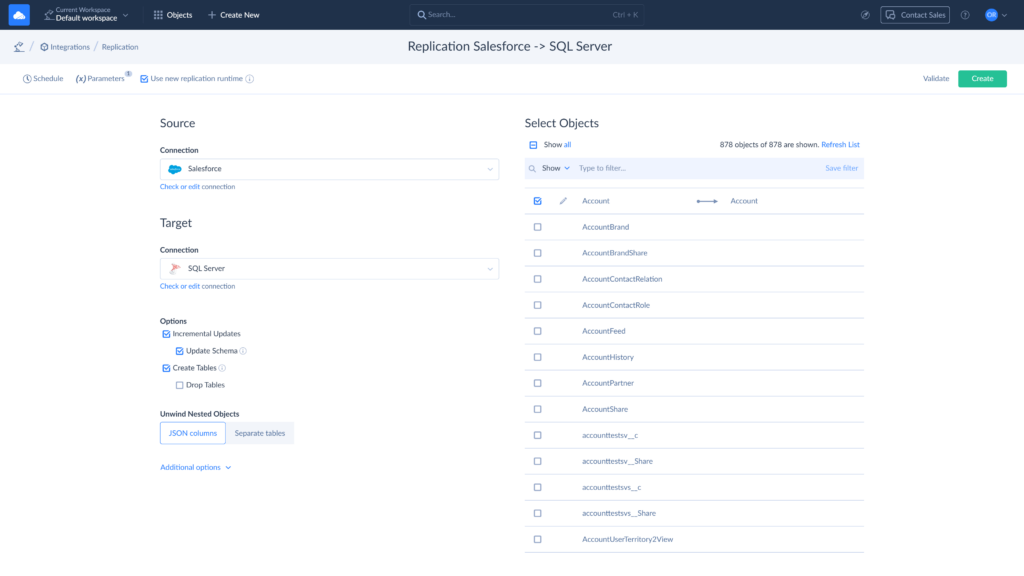
Here’s the process step-by-step:
- Sign in or create a Skyvia account if you don’t have one yet. You have a 14-day free trial to test how well it suits your incremental load needs. Click on “+Create New” and choose the Replication Scenario.
- Assign a name to this Replication for easier management later.
- Connect the source and target. Quick tip: You can create connections separately or directly from the Replication setup.
- Don’t forget to check the Incremental Load box. Also, specify the Ingestion mode – New or New and Modified.
- Also, if you use Skyvia for Initial Load, you can benefit from the Create Tables option. The tool will create the source tables in the target. If the table with the same name already exists, Skyvia will check whether it allows upserts.
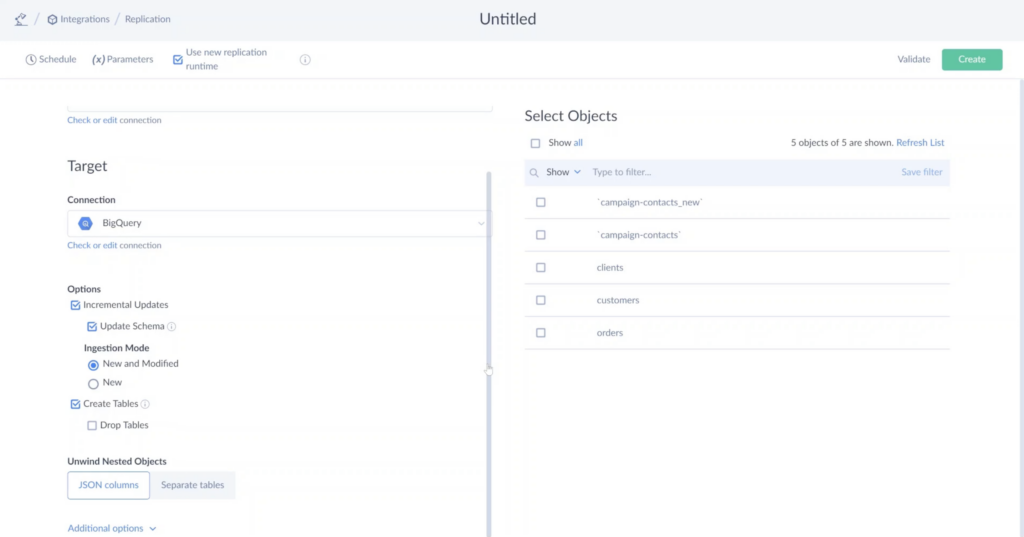
- Choose whether you want the data to be in JSON or separate tables.
- You can use the additional options to manage table and column names, such as changing the case or adding a prefix.
- Now, select the objects you need to move on the list to the right. It can be all or specific ones.
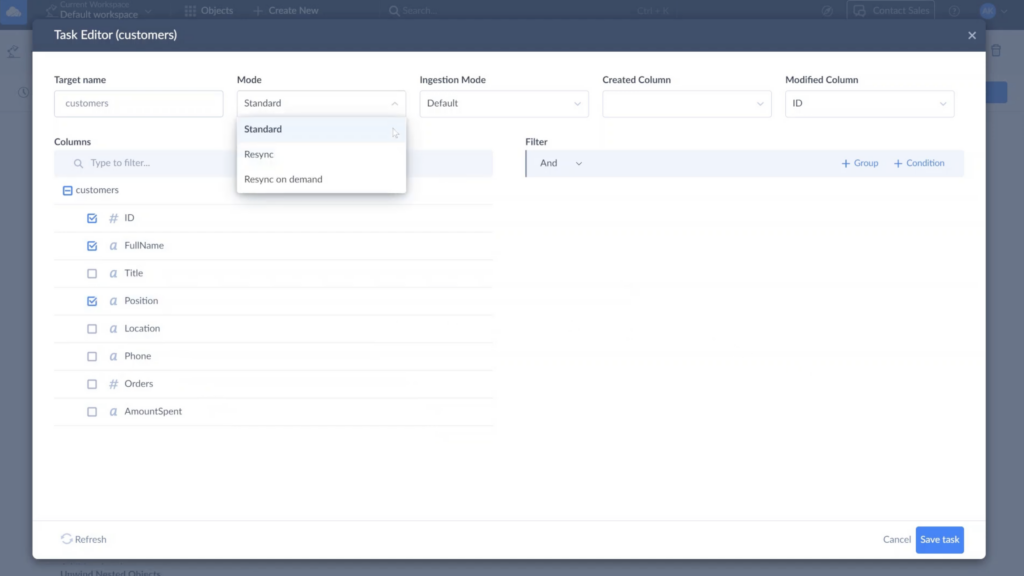
- By default, Skyvia replicates all selected objects’ fields. However, you can configure Replication for each object by clicking on the pen icon that appears when you hover over the needed object (exclude certain fields, anonymize textual or binary fields with hashing).
- Choose the needed mode on the Task Editor. For incremental load, it will be Standard.
- Once everything is set up, schedule the process depending on your data needs – every day, every few hours, on specific days, etc. Also, when needed, you can run it manually.
- Click on Create in the upper right corner and enjoy the changed data appearing in the target system.
Conclusion
Incremental loading becomes simple once you get the foundation solid. If we strip away the complexity, it all comes down to:
- Choose the technique that matches your data sources’ architecture.
- Implement proper change detection.
- Don’t skip the metadata logging.
Once these factors are considered, the payoff is more than real: faster ETL, lower costs, and data that’s current when your business needs it. Most teams see immediate improvements once they make the switch.
Ready to leave the full-load stone age behind? Your data warehouse transformation starts with that first incremental step. Take it with Skyvia, and your infrastructure, your team, and your weekend plans will never look back.

FAQ for Data Warehouse Incremental Load Strategies

How is a full load different from an incremental load?
A full load copies the whole source table every time and replaces whatever the target had. An incremental load, by contrast, copies only rows changed after the last run and merges them into what’s already there. Full loads are easier and clear up drift. Incremental loads, on the other hand, finish sooner on big tables, so you can run them every hour or even more often.
Are delta load and incremental load the same thing?
For most data teams the two names mean the same thing: load only what changed since the last run. Microsoft’s Azure Data Factory docs even use them side by side. A few writers separate them: for them, a delta load is changed records only, and an incremental load covers any new or updated data. It’s worth checking how your tool’s docs use the words.
How is CDC different from an incremental load?
Think of change data capture (CDC) as the detector and the incremental load as the truck that hauls away what it finds. Because log-based CDC reads the database’s transaction log, inserts, updates and deletes all show up. You can run a timestamp-based incremental load with no CDC at all, but hard deletes will slip past it. That’s why plenty of pipelines use CDC to feed their incremental loads.
How do I set up incremental loads in an ELT pipeline?
Every incremental load starts from somewhere, so the first job is one full load, after which you save a watermark (the highest updated_at value that load brought in is a good choice). After that, the runs pick up rows above the watermark and merge them into the warehouse table by primary key, either with MERGE or with an upsert. Don’t move the watermark until the merge has committed. Deletes need their own signal on top of that.
How do you handle deleted records in an incremental load?
A timestamp filter can’t see a row that no longer exists, so deleted records need a signal of their own. You can get one from log-based CDC, which records deletes, from a soft-delete flag in the source, or from comparing source and target keys now and then. Skyvia Replication can delete those rows in the target, flag them in an _is_deleted column, or keep them, where the source exposes deleted records.
What’s a high watermark in incremental loading?
You can think of the high watermark in incremental loading as a bookmark, because it records the biggest value of a change-tracking column that the last load reached, which is normally a last-modified timestamp or an increasing ID. The next run reads only rows above it. Store it in a control table and update it inside the load’s transaction, so a run that fails will simply retry the same rows.
What tools can run incremental loads into a data warehouse?
Plenty of ETL and ELT tools can do incremental loads. Where they differ is in how they detect what changed. Azure Data Factory works from a watermark column or SQL Server Change Tracking, while dlt offers cursor-based loading with a merge write disposition. Skyvia Replication runs a full load first and then loads new and changed records using timestamp fields, or Change Tracking for SQL Server sources.