Articles • by Edwin Sanchez • January 08, 2026
Most companies are drowning in data but starving for insights. Customer records sit in SaaS apps, transactions hide in legacy databases, invoices live in PDFs, and critical updates flow through websites and internal tools. The information is there. It's just locked inside dozens of scattered systems. That's why data extraction has become such a pivotal part of modern data work.
In ETL and ELT pipelines, extraction is the "E" that everything else depends on. If you can't pull clean, reliable data out of the sources, downstream analytics, dashboards, AI models, and even basic reporting start to fall apart. Strong extraction is the foundation on which the rest of the data strategy stands.
And the way we extract data has evolved fast. What used to mean manual re-entry or messy copy-paste jobs turned into handwritten scripts and API calls. Now, teams are leaning on no-code automation platforms like Skyvia that take the heavy lifting out of the process.
In this guide, we'll walk through the core types of data extraction, the challenges teams run into, and how to choose the right approach and tooling for your stack.
What Is Data Extraction?
Data extraction means retrieving data from source systems, such as:
- SaaS applications.
- Databases.
- Files.
- APIs.
- Web sources.
You may ingest or replicate such data into a target environment, such as a DWH or data lake. It directly impacts downstream latency, data quality, and overall throughput.
Extraction pulls information out of systems that often weren't built to work together. That might mean ingesting SaaS records via APIs, capturing changes from transactional databases, parsing semi-structured files, or collecting data from legacy platforms that still support core business functions. Each source brings its own constraints around access patterns, schema drift, update frequency, and performance.
Modern extraction has come a long way. What once required manual entry or brittle custom scripts has evolved into API-driven ingestion and, increasingly, no-code automated pipelines that handle
- Scheduling,
- Schema changes,
- Error handling,
- Scaling behind the scenes.
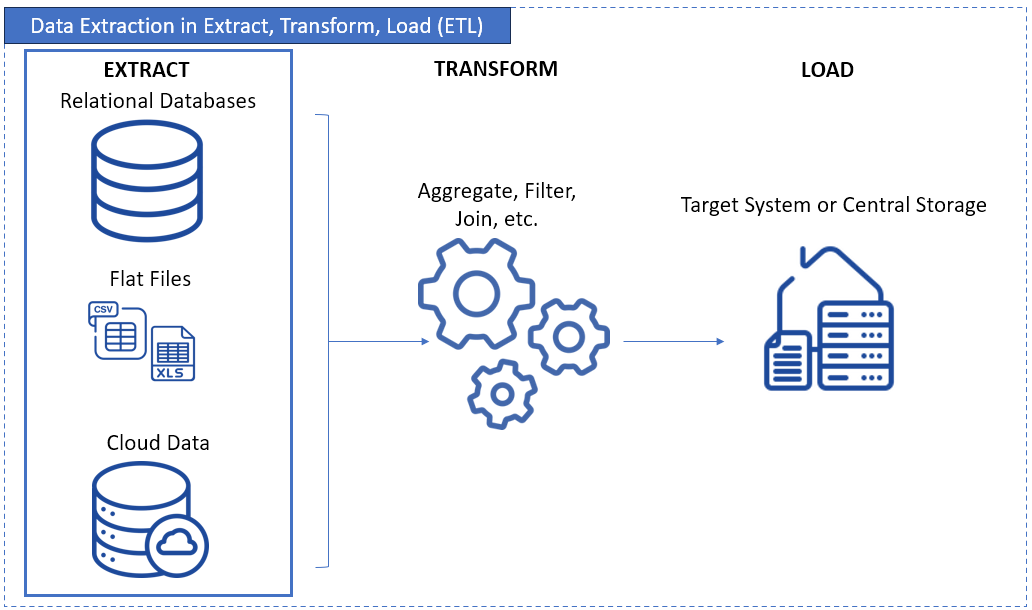
It ensures that analytics, reporting, machine learning, and operational decision-making aren't held back by siloed or outdated data. When the extraction layer is reliable; everything built on top of it, from dashboards to AI models, becomes more accurate, timely, and trustworthy.
Structured vs. Unstructured Data
Before diving deeper into extraction methods, it helps to set the stage by outlining the types of data organizations deal with, as the extraction approach varies depending on what you're pulling in.
Structured and semi-structured data are where modern ETL and ELT tools, including Skyvia, really shine. This includes data from:
- SaaS APIs like Salesforce, HubSpot, or Shopify.
- Relational databases such as SQL Server, PostgreSQL, or MySQL.
- Semi-structured formats like JSON, XML, and CSV.
These sources provide predictable schemas or consistent patterns, which means you can ingest them with low latency, handle schema drift gracefully, and move them into a warehouse with minimal friction.
Unstructured data, on the other hand, is a different story. This category includes:
- PDF documents and scanned files.
- Images, videos, and audio.
- Raw web HTML, web scraping outputs, or freeform text.
Extracting value from unstructured data often requires a completely different toolset — OCR engines, scrapers, NLP models, or custom pipelines built for pattern recognition. It's meaningful work, but it's not traditional ETL and shouldn't be confused with the structured extraction layer that tools like Skyvia automate.
By understanding the distinction early on, teams can choose the right extraction strategy for the right data, instead of forcing everything through the same pipeline.

Why Data Extraction Matters: 6 Key Use Cases That Drive Business Value
Data extraction isn't just about grabbing data from storage. It's about unlocking what data can do. When done right, it makes systems smarter and teams faster. Decisions are better with a good step one.
See below why you would want to consider it in your data management.
Enabling Accurate BI and Analytics
Dashboards are only as good as the data feeding them. If records live in six different apps, reports end up incomplete or flat-out wrong. Extraction brings it all together so teams can trust what they see.
Example: A retail chain has scattered data. From in-store systems, online orders, and third-party delivery apps — they're not talking to each other. So they extracted them into one place. With everything in one place, their regional managers can now spot which stores need help and which ones are crushing it.
Centralizing Data for Warehousing
There can't be a warehouse without data extraction. It gets the data there, clean and structured, ready for deeper analysis and historical tracking.
Example: A hospital network pulls visit logs, test results, and billing records from separate apps into a central structured data called a data warehouse. With that full picture, they can track treatment trends and improve patient care over time.
Facilitating Cloud Migration
Moving from an old system to something better? Data needs to move too, but not the clutter. Extraction helps grab the good stuff and leave the rest behind.
Example: A company switching from an old CRM to Salesforce uses extraction to pull only the current, active customers. No duplicates. No zombie records from 2010.
Operational Efficiency & Automation
Manual data work slows people down. When extraction is automated, teams are happier with more time doing and less time digging. It helps different tools talk to each other without a copy-paste chaos.
Example: A shipping company extracts tracking data from multiple carriers into one live dashboard. Dispatchers now spot delays quickly. So they rerouted deliveries before customers even notice.
Fueling AI & Machine Learning Models
Machine Learning(ML) models are hungry — and data extraction is how to feed them. The more relevant data it feeds from, the smarter predictions get.
Example: An online store pulls past purchases, browsing habits, and return history. That data helps train a model that suggests products customers actually want — not random stuff.
Ensuring Regulatory Compliance
Audits, reports, compliance checks — they all demand accurate records. Data extraction helps gather what regulators want, without the last-minute scramble.
Example: A financial firm needs to show how user data is stored and accessed. By extracting log files and customer records regularly, they stay audit-ready all year round.
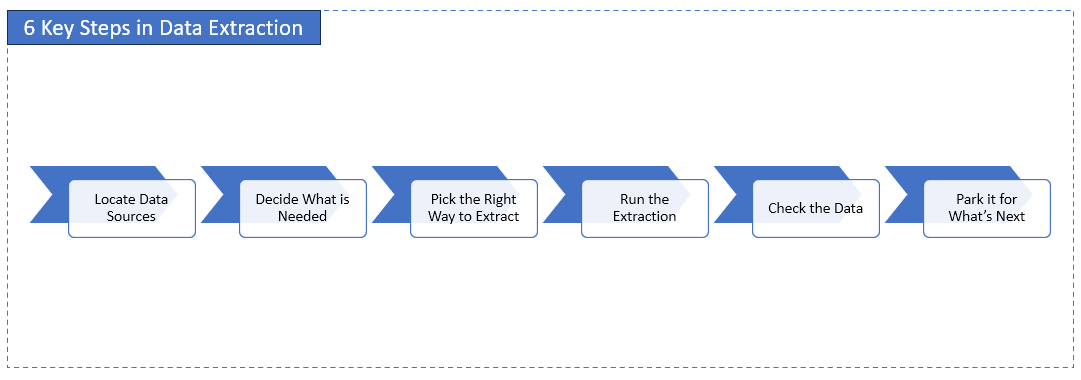
How Data Extraction Works: 6 Key Steps in the Process
Before data can show up in reports or dashboards, it has to be pulled out somewhere. That's what data extraction is all about. Here's how it goes, step by step.
SQL Server provides built-in tools for managing ETL processes and can interact with external third-party tools to expand its capabilities.
1. Locate Data Sources
The first move? Figure out where all your company's data lives. It might be tucked away in SQL databases, floating in spreadsheets, coming from APIs, or buried inside cloud apps.
Examples: Think of a retail chain grabbing sales data from their registers, Shopify orders, and those weekly Excel reports their store managers still love to send.
2. Decide What Is Actually Needed
Not all data is useful. Choose what to pull — and how often. Just the latest stuff? A full copy? Only certain fields?
Examples: A support team might only want open tickets from the past week — just the ticket ID, the issue summary, and who's handling it. No need for the whole back-and-forth.
3. Pick the Right Way to Extract
Different data sources call for different methods. One might use full dumps, incremental updates, or pull data through an API. It depends on how much data there is and how fresh people need it.
Examples: The finance team doesn't want to yank the entire billing table every night. So, they use Change Data Capture to grab just the rows that changed.
4. Run the Extraction
This is where the pipeline actually executes. The extraction tool connects to the source system and begins ingesting data according to the schedule you've set. For API-based sources, this step also includes handling pagination (looping through multiple pages of results to ensure complete data retrieval without gaps or truncation). A mature extraction process manages throughput, respects rate limits, and retries gracefully when needed.
Examples: A data team schedules its Salesforce extraction to run nightly at 2 a.m. The pipeline connects to the API, processes each page of lead records, and loads the full dataset into their data warehouse without missing any rows.
5. Check the Data
Once the data's in, check it out. It may save hours of cleaning up any messy data. So check early. Look for duplicates, unformatted text, or anything missing.
Examples: An analyst notices the "price" column is suddenly zero. This is a red flag. The source might have changed, or the extract failed altogether.
6. Park It for What's Next
It's not done yet. Most teams send the raw data to a "staging" area first before it's cleaned, transformed, or loaded somewhere else.
Examples: A marketing team pulls web traffic data, drops it in a temporary table, and then transforms it before pushing it into their dashboard app.
Key Data Extraction Techniques and Methods
Data extraction isn't one-size-fits-all. The right method depends on where the data lives, how often it changes, and what tools are available. Let's break it down by categories.
By Extraction Logic
These define how much data is pulled and when:
1. Full Extraction
This pulls everything, every time. And it's about emptying your database first then reloading data daily — not efficient, but simple when change tracking isn't possible.
Example: A legacy CRM exports the whole contact list daily because it can't flag what's new.
2. Incremental Extraction
It focuses on pulling only the data that has changed since the last run. Instead of re-ingesting entire tables, the pipeline checks which records were newly created or updated and ingests just those. This approach reduces latency, cuts down compute costs, and helps systems scale as data volumes grow.
A common pattern here is Change Data Capture (CDC). This technique is used by databases and ETL tools to detect inserts, updates, or deletes. CDC can rely on transaction logs or dedicated change tables to identify exactly what shifted in the source system.
Another widely used method is tracking a High Water Mark. Often, a field like LastModifiedDate or UpdatedAt. The extraction tool stores the highest value from the previous run and uses it as a filter next time, ensuring only new or modified rows are processed.
Example: A sales system includes a LastModifiedDate column. Each night, the extraction pipeline checks for records with timestamps greater than the last run and ingests only updated entries, ensuring efficient, accurate syncing.
By Extraction Approach
These define how the data is accessed technically:
1. Logical Extraction
Here, the system uses business rules to decide what to extract. It filters data before pulling it in.
Example: "Get all orders over $10K from the past month." The extraction logic is doing some thinking before moving data.
2. Physical Extraction
This is low-level. It reads data straight from files or binary logs, no filtering, no fuss.
Example: Pulling data directly from Oracle redo logs or database snapshots.
By Source Type or Access Method
These describe where the data comes from and how to connect to it:
1. API-Based Extraction
This one has become the modern standard for pulling data from SaaS platforms and cloud services. Instead of querying a database directly, you interact with the system through its exposed API — whether that's REST, SOAP, or GraphQL. Each API defines how to authenticate, which fields you can retrieve, and how to request data efficiently.
Because most SaaS applications paginate results, enforce rate limits, and require incremental filters, a reliable extraction process needs to handle all of that automatically. Well-designed tools manage retries, backoff logic, schema drift, and throughput, so your pipelines stay stable even as source systems evolve.
API extraction also supports more structured change tracking. Many APIs expose fields like updated_at, or even built-in endpoints for deltas, making incremental updates far more efficient than full table pulls.
Example: A marketing team uses a REST API to extract campaign performance data from HubSpot. Their extraction tool loops through each page of results, respects rate limits, and only pulls records updated since the last successful run.
2. Web Scraping
That's a technique for extracting publicly available data from websites, typically when no official API exists. It pulls information directly from HTML pages rather than structured, documented endpoints.
Scraping tools parse web pages, locate the relevant elements, and extract text, tables, or links. But it's sensitive to layout changes, requires careful throttling to avoid blocking, and often needs cleanup work because the data isn't delivered in a structured schema. This technique is useful for competitive research, public datasets, pricing comparisons, or open-source intelligence — not operational system integration.
Because it works outside formal contracts or SLAs, scraping should never be treated as a replacement for API-based extraction in enterprise pipelines.
Example: An analyst scrapes product information from a public e-commerce page to track price changes over time because the site doesn't offer an API for this data.
3. Database Queries
This is the old faithful. SQL queries target exactly what is needed from a structured database.
Example: SELECT * FROM customers WHERE signup_date > '2024-01-01'
4. Getting Files from Storage
Sometimes, the source is just a good old file. CSVs, Excels, JSON — whether local or in cloud buckets, files still run the world.
Example: Importing Excel-based inventory updates from a shared Google Drive folder.
Log File Parsing
Logs are gold mines for tracking what happened and when. Parsing them lets data experts extract user activity, errors, or transactions.
Example: Reading login events from Apache logs to detect suspicious behavior.
Comparison Table: Data Extraction Methods
| Method | Category | Best For | Needs Change Tracking? | Notes |
|---|---|---|---|---|
| Full Extraction | By Extraction Logic | Simple, small datasets | No | Easy to set up, heavy on data |
| Incremental Extraction | By Extraction Logic | Frequently updated data | Yes | Efficient, but needs timestamps or CDC |
| Logical Extraction | By Approach | Business-specific filters | Optional | Rules-based, flexible |
| Physical Extraction | By Approach | Raw access to data | No | Fast, low-level |
| API-Based Extraction | By Access Method | SaaS apps and cloud platforms | No | Stable, structured |
| Web Scraping | By Access Method | Public websites without APIs | No | Fragile, may break with site changes |
| Database Queries | By Access Method | SQL/NoSQL systems | Optional | Direct and powerful |
| Files from Storage | By Access Method | Flat files from storage systems | No | Still widely used |
| Log File Parsing | By Access Method | Audit trails, security data | No | Needs a good parser setup |
How to Choose the Right Data Extraction Tools
Not all tools are built the same — and not all teams have the same needs. Whether you're syncing cloud apps, migrating databases, or scraping websites, the right data extraction tools depend on a few key things.
Factors to Consider
Before committing to any tool, ask yourself:
- Source/Target Compatibility: Does the tool connect to your data sources and destinations? Cloud apps, databases, flat files — check the list of supported connectors.
- Scalability & Performance: Can it handle your data volume as you grow? Some tools slow down with large datasets or frequent jobs.
- Ease of Use: Do you need a no-code tool for business users? Or a scripting-friendly tool for developers?
- Automation & Scheduling: Can you run extractions automatically — daily, hourly, or in real-time?
- Error Handling & Monitoring: Does the tool notify you when something breaks? Can you retry failed jobs?
- Cost & Licensing Model: Flat rate or pay-per-use? Monthly or annual? Is there a free tier? Consider your budget and growth.
- Security Features: Look for things like encryption, secure credentials, audit logs, and compliance (e.g., GDPR, HIPAA).
Types of Tools
Each type of tool fits a different use case. Here's a quick guide.
ETL/ELT Platforms
These are the all-in-one suites — extract, transform, and load data from almost anywhere to anywhere. Great for teams managing multiple pipelines across cloud and on-prem.
Pros:- End-to-end workflows
- Built-in transformations
- Often visual UI
- May be overkill for small tasks
- Pricing can scale fast depending on the tool
Standalone Data Extraction/Replication Tools
These tools focus on pulling or syncing data, often in real-time. Think of them as specialized workers who only extract or replicate data and leave the rest to other tools.
Pros:- Lightweight and focused
- Easier to manage
- Often good at CDC (Change Data Capture)
- No built-in transformation layer
- May require combining with other tools
Cloud Provider Services
AWS Glue, Azure Data Factory, and Google Cloud Dataflow all offer data extraction as part of a bigger ecosystem.
Pros:- Deep integration with cloud services
- Scalable and secure
- Native to the cloud stack
- Steeper learning curve
- Pricing models vary
- Less visual; more config-based
Custom Scripts (Python, etc.)
For developers, writing extraction code is flexible and powerful. They control the logic, schedule, and error handling.
Pros:- Full control
- Custom logic
- Works even when no tool supports your use case
- Time-consuming
- Needs testing and maintenance
- Not friendly for non-devs
Web Scraping Tools
When there's no API, get the data from websites using web scrapers. These tools extract structured data from HTML pages.
Pros:- Grabs public data from any website
- Automates tedious tasks
- Fragile if the website layout changes
- Legal/ethical gray areas in some cases
- Needs regular updates
How Skyvia Simplifies Data Extraction
Most extraction problems boil down to the same set of headaches:
- API limits.
- Schema drift.
- Brittle scripts.
- The constant pressure to keep data fresh.
Skyvia tackles these issues head-on with a platform designed for data teams that want reliable pipelines without wrestling with code.
Skyvia Key features
- Intelligent API Handling (Solves: API Limits & Pagination)
Modern SaaS APIs throttle requests or paginate results across hundreds of pages. Skyvia takes this off your plate. It automatically handles pagination, retries, rate limits, and token refreshes so your flows don't break when sources slow down or reshape their endpoints. - 200+ Maintained Connectors (Solves: Maintenance & Schema Drift)
Instead of babysitting scripts every time Salesforce, HubSpot, Shopify, or SQL updates their schemas, Skyvia's managed connectors keep integrations stable. You plug in the source once, and Skyvia stays in sync behind the scenes. - No-Code Visual Builder (Solves: Extraction Complexity)
The screenshot below shows a Skyvia Data Flow in action. A clean, drag-and-drop pipeline that extracts Salesforce Contacts, applies transformations, and loads the data into Azure SQL. No Python scripts, no CURL commands, no debugging JSON payloads. You just build the steps visually.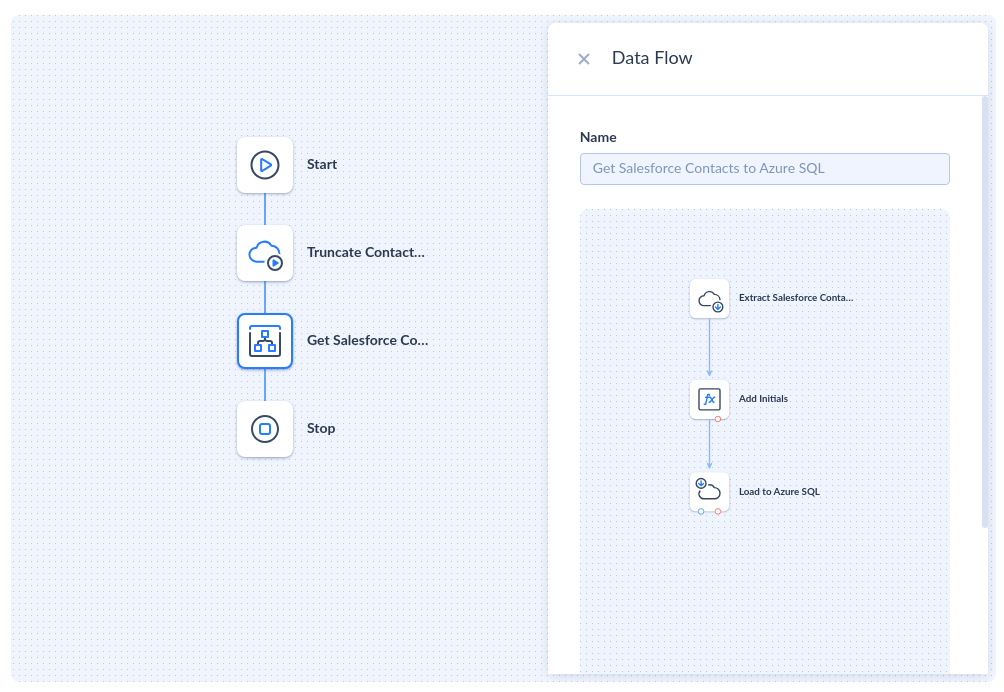
- Automated Incremental Loads (Solves: Data Freshness & Pipeline Latency)
Skyvia supports incremental extraction using timestamps, High Water Mark fields, or source-side CDC feeds. Instead of pulling everything every time, you only ingest what changed — reducing load time, cost, and warehouse strain. - Built-In Orchestration (Solves: Scheduling & Reliability)
Scheduling, monitoring, and alerting are built in. Set flows to run every 5 minutes or once a day. Add pre-steps like a table truncate, as shown in the pipeline, or chain multiple flows into a reusable Control Flow.
Top Data Extraction Challenges and How to Solve Them
Extracting data sounds simple — until your team runs into real-world roadblocks. Here's what usually goes wrong (and how smart teams tackle it).
Handling API Rate Limits & Throttling
The problem: Most SaaS APIs aren't thrilled when you hammer them with requests. When you go over the allowed quota, they respond with HTTP 429 Too Many Requests, forcing your pipeline to cool off. If your script doesn't handle this gracefully, the whole job falls over.
How to solve it: Engineers typically implement exponential backoff — spacing out retries by increasing intervals until the API lets you back in. It works, but it's tedious to build and maintain.
Skyvia angle: Skyvia handles retries, backoff, and rate-limit recovery under the hood, so you never have to hand-code loops or error handlers.
Pagination Complexities
The problem: Most APIs won't give you everything in a single response. They break data into pages (limit, offset, nextPageToken). If your script doesn't follow the next-link correctly, you'll silently miss thousands of records.
How to solve it: Robust extractors loop through every page until the API says "we're done." But pagination rules vary wildly: offset paging, cursor paging, token paging, etc.
Skyvia angle: Skyvia automatically navigates pagination for every supported connector. It follows the API's rules, keeps track of tokens, and ensures nothing slips through the cracks.
Data Source Complexity & Heterogeneity
The problem: Data lives everywhere — in databases, SaaS apps, spreadsheets, even old FTP servers. And every source speaks a different "language."
How to solve it: Use tools that support a wide range of connectors and protocols. Bonus points if they normalize data formats for you. Skyvia, for example, can connect to cloud apps, on-prem databases, and files without extra coding.
Data Quality and Consistency Issues
The problem: Dirty data sneaks in — missing fields, duplicate records, mismatched formats. Do it wrong, and garbage is loaded.
How to solve it: Add basic validation rules right inside the extraction pipelines. Some platforms allow automapping, filtering, and cleaning data before it moves downstream — so messing with the warehouse is impossible.
Source System Performance Impact
The problem: Heavy extraction jobs can make production systems crawl. The result is disgruntled users.
How to solve it: Schedule jobs during off-peak hours. Use incremental extraction instead of full dumps. If possible, extract from read replicas or backup instances to avoid choking the live system.
Evolving Schemas and API Changes
The problem: Data sources aren't static. APIs change. Database fields get renamed, added to, or deleted. Suddenly, your extraction jobs start breaking.
How to solve it: Pick tools that can adapt to schema changes automatically or send alerts fast when something breaks. Good monitoring and flexible mapping options can save hours of detective work.
Security and Compliance Constraints (GDPR, CCPA, etc.)
The problem: Moving data around isn't just a tech issue — it's a legal one. Privacy laws expect companies to protect customer data every step of the way.
How to solve it: Choose extraction tools with strong encryption (at rest and in transit). Look for compliance certifications for handling sensitive data. Also, keep access controls tight — not everyone should pull everything.
Scalability for Large Data Volumes
The problem: It's easy to extract a few thousand rows. Not so easy when dealing with millions or billions of records daily.
How to solve it: Use tools designed for big data workloads. Think parallel processing, batch extraction, and incremental updates instead of brute force. Also, make sure pipelines can scale horizontally as needs grow.
Manual vs. Automated Extraction: The ROI Calculation
At some point, every team hits the same fork in the road: do we build our own extraction scripts, or do we lean on a platform that already solves these problems?
Both paths can work, but the long-term economics, risk, and engineering load look very different once you map them out.
The "Build" Route
Rolling your own solution feels appealing at first. Full control, no licensing costs, and the satisfaction of wiring everything together. But once the honeymoon period fades, the true cost kicks in.
You're not just writing scripts; you're maintaining them as APIs evolve, pagination rules change, and schemas drift. Every small change upstream becomes a fire drill downstream. And someone has to babysit the servers, monitor failures, retry broken jobs, and fix timeouts or 429 throttling errors at 2 a.m.
Hidden costs creep in from all directions:
- Compute/hosting for schedulers and workers.
- Error reporting and monitoring toolchains.
- Logging, retries, audit trails.
- Constant refactoring when source systems update.
What started as a "simple Python job" quietly turns into a small integration platform you never planned to build.
The "Buy" Route
Automated platforms flip the equation. You trade unpredictable maintenance for a predictable subscription fee — and suddenly your team isn't tied up writing glue code.
You get:
- Predictable cost structure instead of open-ended dev hours
- Zero-maintenance connectors that track API updates for you
- Built-in retry logic, pagination handling, and incremental extraction
- Visual pipeline design instead of hundreds of lines of brittle scripts
- Unified monitoring so you always know what ran and why
Instead of reinventing the wheel, your engineers focus on higher-value work: modeling, analytics, automation. Not debugging broken API calls.
Build vs. Buy: Quick Comparison
| Criterion | Custom Script | Skyvia |
|---|---|---|
| Development Time | High (weeks/months) | Low (hours) |
| Maintenance Load | Ongoing; breaks when APIs change | Zero-maintenance; connectors updated automatically |
| Handling API Limits/Pagination | Must code manually (loops, backoff, tokens) | Built-in retry logic & intelligent pagination |
| Infrastructure Costs | Servers, schedulers, monitoring tools | Included in platform |
| Scalability | Requires redesign for large volumes | Scales automatically |
| Reliability | Depends on engineer availability | Enterprise-grade orchestration |
| Total Cost Over Time | Grows unpredictably | Predictable subscription cost |
Best Practices for Effective and Efficient Data Extraction
Getting data out of systems is one thing. Doing it cleanly, safely, and at scale is another. Here are some key best practices that'll save a ton of headaches down the road:
- Understand your data sources thoroughly. Know what types of data you're pulling, where they live, and any quirks they have before starting.
- Prioritize data quality and implement validation checks early. It's way cheaper (and easier) to catch bad data at the start than to fix it after it's already moved.
- Choose the right extraction method for the source and frequency. Full dumps, incremental loads, real-time streams — pick what fits the situation, not just what's fastest.
- Automate and schedule extraction processes where possible. Nobody has time for manual runs — set it, schedule it, and let the system handle the heavy lifting.
- Monitor performance and implement robust error handling. Watch your pipelines like a hawk and make sure alerts are sent when something trips up.
- Plan for scalability from the beginning. Build with tomorrow's data volumes in mind, not just today's — future-you will thank you.
- Document your extraction logic and processes. If the go-to guy gets hit by a bus (or just takes a vacation), someone else should be able to pick up where he left off.
- Always adhere to security and compliance requirements. Encrypt sensitive data, respect privacy laws, and make sure your team knows the rules of the road.

Conclusion
Data extraction is the starting point for everything data-driven. If you can't reliably pull data from where it lives, you can't build dashboards, run meaningful analysis, train AI models, or make decisions you actually trust. Everything downstream depends on getting this part right.
We've walked through:
- How data extraction works.
- The main approaches teams use.
- The tools that make life easier.
- The common pitfalls to keep an eye on.
Once you understand those pieces, you're in a much better position to build pipelines that don't break the moment something changes.
And sure, writing scripts can be fun. They're great for experiments, quick wins, or learning how things work under the hood. But businesses run on automated, repeatable ETL processes that quietly do their job day after day without drama.
Get the extraction layer right, automate what matters, and the rest of the data stack suddenly becomes a lot easier to trust and scale.