Summary
- To connect SaaS apps and databases without code on a small budget, pick Skyvia.
- For API-led integration across a large enterprise, pick MuleSoft Anypoint Platform.
- For event streaming between many systems, pick Confluent
- For a free, open-source message broker, pick RabbitMQ
- To manage and secure APIs in front of your services, pick Kong Gateway.
Middleware software sits between your applications, databases and services, so they can trade data without each system wiring itself to all the others. There’s more than one kind. Buy the wrong kind and you’ve made the most expensive mistake on this page, because a message broker won’t map Salesforce fields to NetSuite (that’s not its job), and a no-code integration platform won’t push a million events a second through anything.
That’s why we grouped the ten tools below by the job they do. Seven of them are integration platforms (iPaaS) for connecting apps and data. Two are message brokers that carry events from one service to another, and the last is an API gateway parked in front of your APIs. For each one you’ll get the type of middleware, who builds with it, the entry price and how it’s billed, then two strengths and two limits. A short guide to middleware types follows the list, plus a table that puts all ten side by side.
How we chose and checked these tools
Middleware type decided everything else. First question: is it an integration platform, a message broker or an API gateway? Then the pattern it was designed around, whether that’s app-to-app sync, API-led work or event-driven flows. Last, how the building happens, in no-code tools, low-code designers or plain code. Tools of different types almost never stand in for each other, so we put type ahead of features and price.
Each entry answers the same four questions:
- Best for: who buys it, and for what job.
- Middleware type: the type itself, the integration pattern, and how you build with it.
- Pricing: what the bill counts, the entry price and its billing basis, plus any free plan or trial.
- Deployment: cloud, self-hosted or hybrid.
We took every price, plan and limit from the vendors’ own pricing pages and docs, viewed from the US. They’re accurate as of October 30, 2026.
A disclosure: we make Skyvia, so it’s on the list too, judged on the same fields as every other tool, limits included.
So who didn’t make the cut? JBoss EAP, WebSphere and Apache Tomcat are middleware too, in the runtime sense: they host applications rather than connect them, which makes them a different purchase. TIBCO, Oracle Integration, SAP Integration Suite and WSO2 usually come bundled with a stack you already pay for, so we left those suites out. Apache Camel and ActiveMQ are out as well, since the platforms and brokers below do the same work.
The 10 best middleware software tools
Best for connecting SaaS apps and databases without code: Skyvia
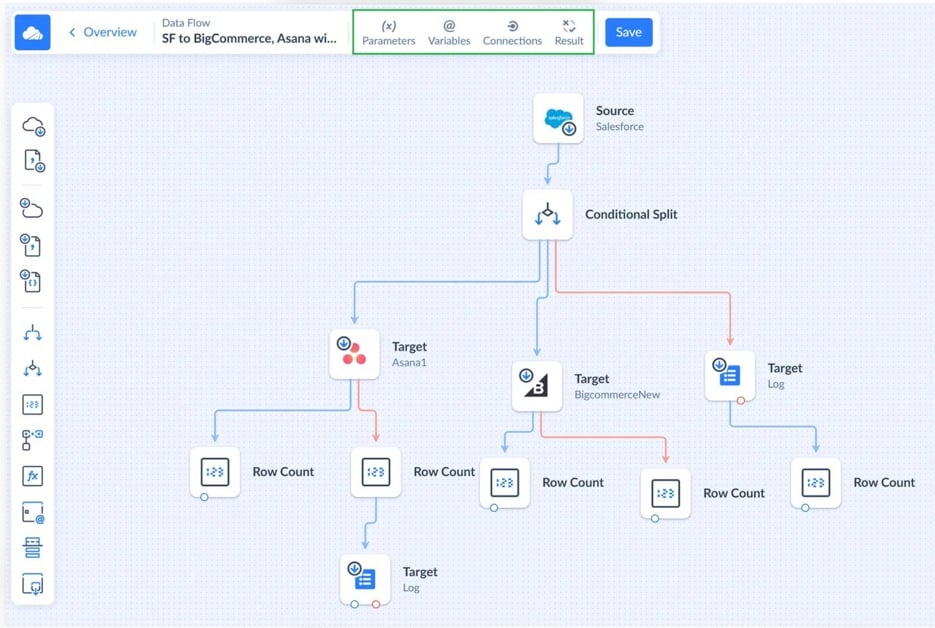
Skyvia is our no-code cloud data platform. Through its Data Integration product, Skyvia links 200+ cloud apps, databases and warehouses using replication, import (reverse ETL too), export, two-way sync and visual Data Flow pipelines.
NISO, an outsourced finance company, used to move data from MySQL into QuickBooks Online with custom scripts and Excel. With Skyvia, it connected the systems directly and cut out much of that manual work. Read the NISO case study or watch the video for the full story.
- Best for: teams that keep CRM, ERP, e-commerce and accounting apps in step with each other or with a warehouse.
- Middleware type: iPaaS that runs scheduled app-to-app and app-to-warehouse integrations; you work in no-code wizards and a visual mapping editor, with SQL there if you want it.
- Pricing: you pay by records written per month. Basic costs $99 a month billed monthly ($79 billed annually) and gives you 5M records with daily runs. Standard costs the same, but for 500K records with hourly runs and Data Flow. The Free plan covers 10K records a month.
- Deployment: cloud, plus an on-premises Windows agent that gets to databases behind a firewall over outbound HTTPS.
Strengths
- Every Data Integration plan has unlimited users and connections. Add another system and the bill stays put.
- Connect turns any connection into an OData, SQL or MCP endpoint, which lets BI tools and AI assistants read the data with no separate API layer in between.
Limitations
- It’s cloud only. The agent gets to local databases fine, but there’s no self-hosted edition for air-gapped environments.
- Don’t expect a streaming broker. Runs happen on a schedule (every minute on Professional, hourly on Standard, daily on Basic), and schema changes in a source aren’t picked up automatically.
Best for API-led integration in a large enterprise: MuleSoft Anypoint Platform
Salesforce owns MuleSoft Anypoint Platform, which keeps integration and API management under one roof. Developers design APIs and flows, run them in MuleSoft’s cloud or their own data center, and govern all of it through API Manager.
- Best for: big companies that build reusable APIs over many systems and employ developers to run them.
- Middleware type: iPaaS plus full API management for API-led and app-to-app integration, built by developers in Anypoint Studio and Design Center with code and DataWeave.
- Pricing: Mule Credits are the unit, and one pool covers flows, messages, APIs and agents. Entry packages cost $2,000 a month, billed annually; Pre-Commit contracts start at $50K a year. A 30-day trial asks for no card.
- Deployment: CloudHub (hosted by MuleSoft), Runtime Fabric, hybrid or on-premises runtimes, even a control plane you host yourself.

Strengths
- No other tool on this list offers as many hosting options: MuleSoft-managed cloud, Runtime Fabric, on-premises runtimes or a self-hosted control plane.
- Governance policies, SLA tiers and API analytics ship with API Manager out of the box.
Limitations
- That entry package works out to about $24,000 a year. How many credits each package includes isn’t published.
- Test and sandbox environments use credits at the same rate as production. An active managed API burns credits even when no calls come in.
Best for a full integration suite with a self-serve price: Boomi
Boomi has been independent since Dell sold it in 2021. One low-code platform holds integration, API management, Boomi Data Hub (master data), Flow apps and B2B/EDI. It’s also rare among enterprise iPaaS vendors in that you can see a monthly plan price on its site.
- Best for: mid-size and large companies that want integration, EDI and master data under one roof.
- Middleware type: an iPaaS for B2B/EDI exchanges, APIs and syncing apps with each other, built in a low-code visual process designer.
- Pricing: Pay-As-You-Go is $99 a month plus $0.05 a message, billed monthly, and covers the whole platform. Subscription editions are quoted and billed annually. Trying it costs nothing for 30 days.
- Deployment: Boomi’s own runtime cloud, or runtimes you host on-premises or in AWS, Azure or Google Cloud.

Strengths
- The entry price is public, and Pay-As-You-Go puts no cap on connections, users or processes.
- Schedules can fire every minute, and real-time listener processes handle the rest.
Limitations
- On Pay-As-You-Go you’re limited to Standard support plus one production and one test runtime. Test messages cost as much as production ones.
- Subscription prices stay private. The base subscription is production-only, so test and development environments aren’t part of it.
Best for low-code integration that reaches on-premises systems: Jitterbit
Jitterbit Harmony is a low-code iPaaS, and API Manager, EDI and App Builder each come as separate products. Describe a connection in plain English and its AI assistant drafts the connection and the mappings.
- Best for: mid-size companies linking a few core systems, part of them on-premises.
- Middleware type: iPaaS for app-to-app and workflow integration; the low-code designer includes a script editor when logic gets custom.
- Pricing: Jitterbit counts connections. Standard allows 2 to 3, Professional 5, Enterprise 8 or more. There’s no published price, every product needs an annual contract, and the trial is one Jitterbit staff guide you through on request.
- Deployment: cloud agents that Jitterbit manages, or private agents on your own servers (Windows, Linux or Docker).

Strengths
- On-premises systems are reached by private agents, using ODBC drivers, local files and Windows authentication.
- Its compliance badges run long: SOC 1, 2 and 3, ISO 27001, 27017, 27018 and 42001, HIPAA and GDPR.
Limitations
- There are no public prices and no self-serve trial, while API Manager and EDI are paid extras.
- The cloud agents Jitterbit hosts don’t support every connector. They also keep logs for just 30 days and kill an operation after 6 hours.
Best for business-led automation across many apps: Workato
Workato’s iPaaS is built around recipes, meaning triggers and actions that automate a process across apps. Its enterprise editions add an API platform, data integration and AI agents.
- Best for: operations, finance and IT teams automating cross-app processes who’d like business users to build some of them.
- Middleware type: iPaaS plus workflow automation, for event-triggered app-to-app integration in a low-code recipe editor.
- Pricing: it’s all credits. Free hands you 50,000 one-time credits, no card needed, and Pro starts at $75 a month for 2,500 credits, billed monthly. Enterprise editions are quoted.
- Deployment: cloud, with an on-premises agent on higher editions for systems behind a firewall.

Strengths
- Each user gets the 1,200+ prebuilt connectors.
- With Workbot for Slack and Microsoft Teams, people can look up and update app data right from chat.
Limitations
- Want the API platform or ETL/ELT data integration? Those start at the Business MCP edition, and that one’s quoted.
- Pro credits you don’t use expire when the month ends. Workato also doesn’t say how many credits a task burns.
Best for IBM and hybrid estates: IBM App Connect
With IBM App Connect, applications in the cloud and on-premises get linked up. It runs as self-managed software or as a managed service on AWS, and IBM also packs it into IBM Integration SaaS, the product once called webMethods Hybrid Integration.
- Best for: large firms that run IBM software or mainframe-era systems, or that face strict hosting rules.
- Middleware type: iPaaS and ESB for app-to-app, API and event-driven integration, with a no-code Designer for business users and a pro-code Toolkit (ESQL, Java) for developers.
- Pricing: App Connect Enterprise as a Service begins at $2,544 a year for 100,000 flow runs or $8,484 a year for 10,000 VPC hours, and IBM labels both figures indicative. Premium connector packs are extra. Its 30-day trial includes 1,000 VPC hours.
- Deployment: software you manage, SaaS that IBM manages on AWS, or a hybrid setup with secure agents.

Strengths
- Business users get the no-code Designer and developers get the pro-code Toolkit, so each audience has its own build tool.
- It runs where your data lives, self-managed, IBM-managed or hybrid.
Limitations
- There’s no free plan. The as-a-Service plans are annual entitlements, and going over them can stop your flows.
- On the flow-runs plan, a callable flow counts as a second run. One run can’t last longer than 10 minutes.
Best for teams already on Azure: Azure Integration Services
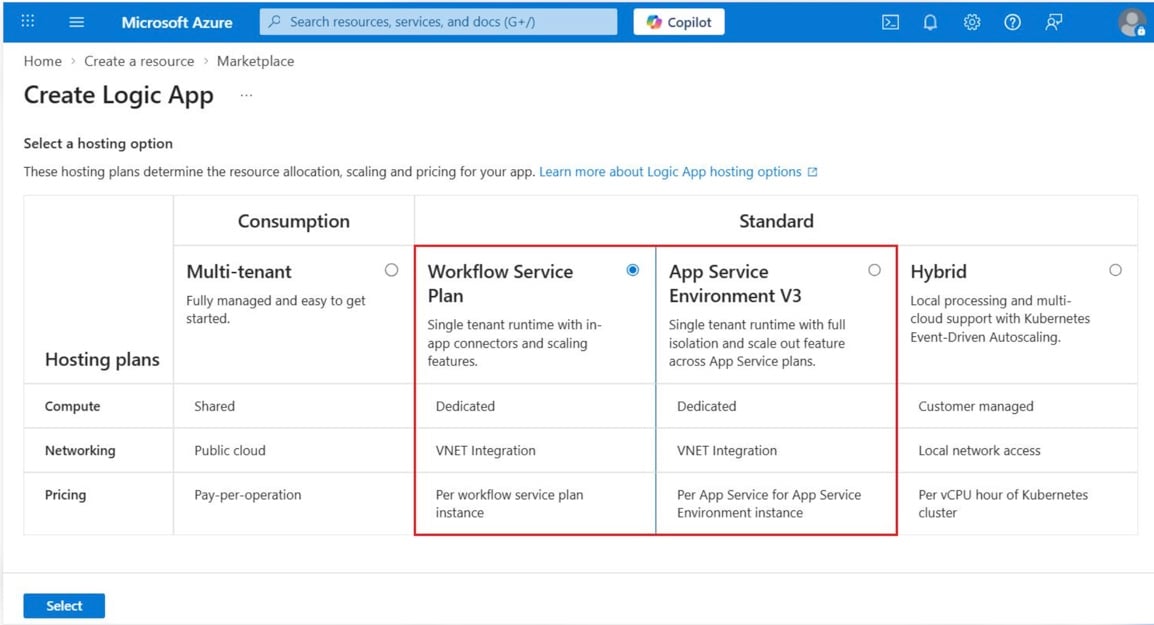
This one isn’t a single product. Azure Integration Services groups Microsoft’s integration services: Logic Apps for workflows, Service Bus for messaging, API Management for APIs and Event Grid for routing events.
- Best for: Azure customers who want integration billed alongside everything else.
- Middleware type: an iPaaS, a message broker and API management from one family, covering workflow, event-driven and API-led integration, built in the Logic Apps designer or in code.
- Pricing: each service bills by its own unit, pay as you go. Logic Apps Consumption gives you 4,000 built-in actions free, after which it’s $0.000025 per action and $0.000125 per Standard connector call, pay as you go. Service Bus Standard costs $0.0135 an hour with 13M operations a month included, and API Management Basic v2 is $150.01 a month (all East US list prices).
- Deployment: Azure cloud, with hybrid deployment for Logic Apps Standard and a self-hosted API gateway when traffic stays on-premises.
Strengths
- Logic Apps ships with 1,400+ Microsoft-managed connectors, and some of them reach on-premises systems.
- Starting small costs little: Logic Apps bills each execution, and Service Bus Basic and Event Grid Basic both stay under $1 per million operations.
Limitations
- Guessing the total is hard when several services bill separately in different units. On top of that, Logic Apps Standard charges for reserved capacity whether it runs or not.
- Service Bus Basic gives you queues and nothing else: no topics, sessions or transactions.
Best for event streaming between many systems: Confluent
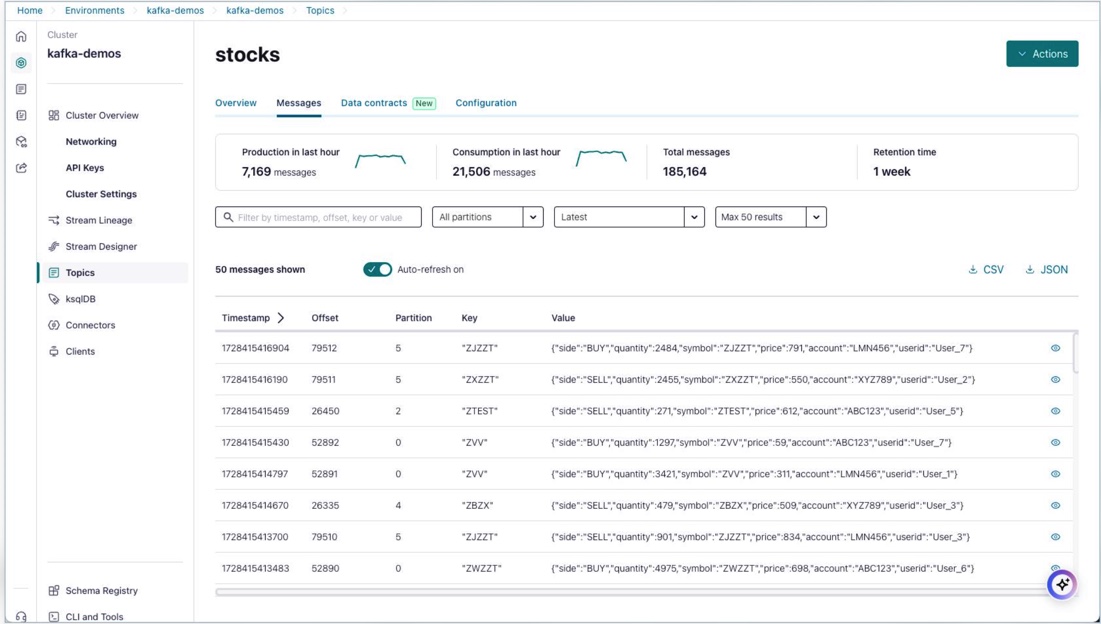
IBM has owned Confluent since March 2026. Confluent Cloud is managed Apache Kafka, Confluent Platform is the self-managed edition, and managed connectors and stream processing sit on top of both.
- Best for: engineering teams moving events in real time between services, databases and analytics.
- Middleware type: message broker and event streaming platform for event-driven integration, built with code (Kafka clients) and managed connectors.
- Pricing: Confluent Cloud charges for cluster capacity (eCKU-hours), networking and storage. A Basic cluster starts at $0 a month for the first eCKU, and Standard comes to about $385 a month by Confluent’s own estimate. New sign-ups get $400 of credit, a one-time grant. Apache Kafka on its own is free and open source.
- Deployment: managed on AWS, Azure or Google Cloud, or self-managed through Confluent Platform.
Strengths
- Basic, Standard, and Enterprise clusters adjust their eCKU capacity automatically as demand changes, so you don’t have to resize them manually.
- Standard and Enterprise clusters come with unlimited storage and an uptime SLA of up to 99.99%.
Limitations
- Managed connectors are extra, charged per task-hour plus $0.025 per GB.
- Anything under an hour gets billed as a full hour. Basic clusters also go without audit logs and private networking.
Best for an open-source message broker you can run for free: RabbitMQ
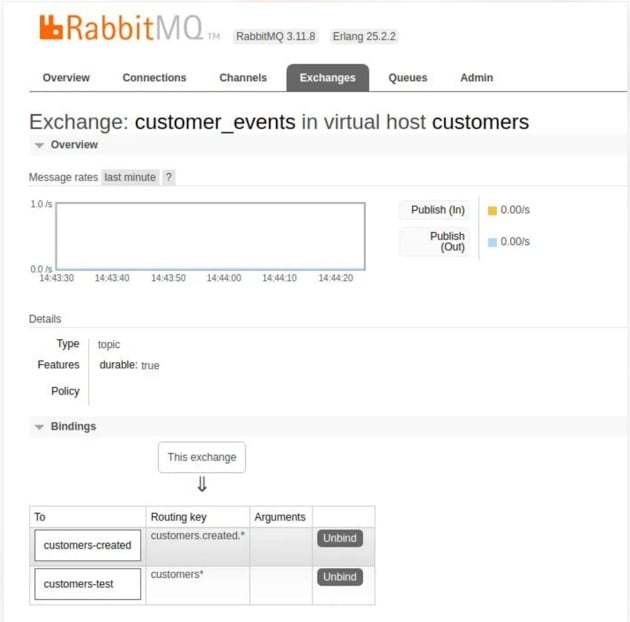
RabbitMQ is a message broker, and it’s open source. It holds messages in queues between services, uses standard protocols (AMQP 1.0, MQTT 5.0) and has client libraries for most languages. Broadcom sells the commercial version as VMware Tanzu RabbitMQ.
- Best for: developers who need dependable queues between services without running a whole streaming platform.
- Middleware type: a message broker (message-oriented middleware) for asynchronous, event-driven messaging, which you build with code.
- Pricing: the broker is free under the Mozilla Public License 2.0. If you’d rather not host it, CloudAMQP has a free shared plan, a larger shared plan at $19 a month and a dedicated broker at $50 a month, all billed by the second. Tanzu RabbitMQ is quoted.
- Deployment: host it yourself in any cloud, on-premises or on a laptop, or let a provider such as CloudAMQP or Amazon MQ run it.
Strengths
- Because it speaks open standard protocols and has many client libraries, switching vendors later stays possible.
- Acknowledgements help protect messages, while quorum queues provide replication across cluster nodes.
Limitations
- Remember it’s a broker. Connecting business apps to it takes code on both ends, which an integration platform would spare you.
- Each release series gets only a short window of community support (4.3’s closes in January 2027), and disaster-recovery replication and audit logging belong to the commercial edition.
Best for securing and managing APIs: Kong Gateway
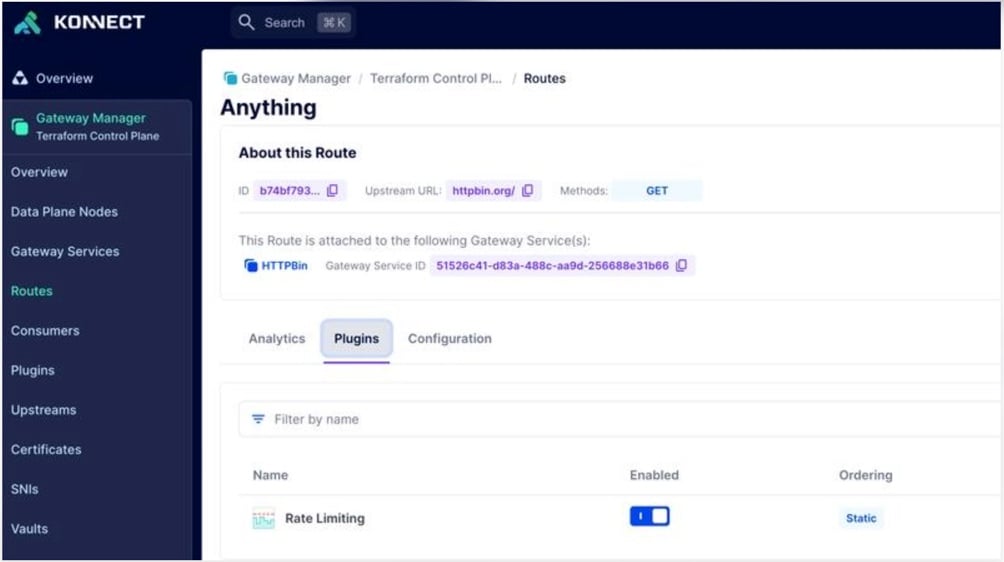
Placed in front of your services, Kong Gateway routes, secures and rate-limits API traffic, and plugins add more behavior. Konnect, Kong’s cloud control plane, manages gateways, developer portals and analytics.
- Best for: platform teams that publish internal or external APIs and want one place to secure them.
- Middleware type: API gateway and API management that routes requests for microservices and APIs; configuration is declarative, and plugins in Lua, Go, Python or JavaScript extend it.
- Pricing: Konnect Plus begins at $25 a month per serverless gateway plus usage, billed monthly. That includes 1M API requests a month, and each extra million is $200 a month. No card is needed for the 30-day trial; self-hosted Kong Gateway Enterprise is priced by quote.
- Deployment: serverless or dedicated cloud gateways run by Kong, hybrid data planes you manage, or on-premises.
Strengths
- Authentication, rate limiting and transformations all come as plugins. You can also write your own.
- Kong ships one LTS release a year and supports each for three years.
Limitations
- Konnect Plus caps out at 10 million API requests a month.
- The open-source gateway hasn’t seen a new minor release since 3.9. New features land in Enterprise and Konnect instead.
Which tool fits which job
- Sync CRM, ERP and e-commerce data without developers: Skyvia, or Workato if the job is automating processes across many apps.
- A reusable API layer across a large enterprise: MuleSoft Anypoint Platform.
- Integration, EDI and master data in one product with a monthly price: Boomi.
- A few core systems, some on-premises, under an annual contract: Jitterbit.
- IBM software or strict hosting rules: IBM App Connect.
- Everything already runs on Azure: then Azure Integration Services.
- Real-time events between dozens of services: Confluent.
- Simple, reliable queues you run yourself: RabbitMQ.
- One front door to secure and meter your APIs: Kong Gateway.
Middleware software compared: type and price
| Tool | Middleware type | How you build | Entry price (billing basis) | Free option |
|---|---|---|---|---|
| Skyvia | iPaaS | No-code | Basic $99 a month billed monthly ($79 billed annually) | Free plan, 10K records a month |
| MuleSoft Anypoint Platform | iPaaS + API management | Code and low-code | From $2,000 a month, billed annually | 30-day trial |
| Boomi | iPaaS | Low-code | $99 a month plus $0.05 a message, billed monthly | 30-day trial |
| Jitterbit | iPaaS | Low-code | Not published: annual contract | Guided trial on request |
| Workato | iPaaS + workflow automation | Low-code | Pro $75 a month, billed monthly | Free, 50K one-time credits |
| IBM App Connect | iPaaS + ESB | No-code and pro-code | $2,544 a year for 100K flow runs | 30-day trial |
| Azure Integration Services | iPaaS, broker, API management | Low-code and code | Pay per use (Logic Apps $0.000025 per action) | 4,000 Logic Apps actions free |
| Confluent | Event streaming | Code | Basic cluster from $0 a month; Standard about $385 a month | $400 credit |
| RabbitMQ | Message broker | Code | Free; CloudAMQP from $19 a month | Open source; free CloudAMQP plan |
| Kong Gateway | API gateway | Configuration and plugins | Konnect Plus from $25 a month plus usage, billed monthly | 30-day trial |
Types of middleware software
Ask five vendors what middleware is and you’ll hear five answers, because the word covers several different kinds of software. Four of them matter for integration, and every tool on our list belongs to at least one.
Integration platforms as a service (iPaaS) are where most business teams start. They come with prebuilt connectors, data mapping and monitoring, and they link SaaS apps, databases and on-premises systems. Seven of our ten live in this camp: Skyvia, MuleSoft, Boomi, Jitterbit, Workato, IBM App Connect and Azure Logic Apps.
The enterprise service bus (ESB) is the older idea. A central bus, usually on the company’s own servers, routes messages between applications, converts protocols and reshapes data on the way. IBM App Connect Enterprise can still run as one, and most ESB vendors have since added a cloud iPaaS.
Message-oriented middleware is the plumbing between services. Brokers and event streaming platforms such as RabbitMQ, Kafka (Confluent) and Azure Service Bus pass messages or events along asynchronously, so a sender never has to wait for its receiver to be ready.
API gateways guard the front door. Kong Gateway and Azure API Management route, secure, rate-limit and meter requests before they reach backend services, and MuleSoft and Boomi build API management into their platforms.
Two other things wear the label without integrating anything. Application and web servers like JBoss EAP, WebSphere and Tomcat host application components, and database middleware, meaning ODBC and JDBC drivers, gives an application one standard way into many databases.
In a modern architecture you rarely pick just one. Business-app data moves through an iPaaS, microservices talk over a broker, a gateway sits in front of the APIs, and quite often an old ESB is still keeping the legacy systems connected. The pressure isn’t easing either: MuleSoft’s 2026 Connectivity Benchmark Report counts 957 apps in the average enterprise, up from 897 a year earlier, with only 27% of them integrated together.
How to choose middleware software
Kai Waehner, who has worked at TIBCO and Confluent and is now Global Field CTO at Kestra, puts the first step better than we could: “If you are making a five-year platform decision, map which paradigms each candidate actually covers before you compare feature lists.”
So start with the pattern. Records that have to match between business apps call for an iPaaS; events flying between services call for a broker; APIs you hand to partners call for a gateway. Get this wrong and no feature list will save you. If you’re considering direct connections instead, our guide to point-to-point integration explains where that approach works and when it becomes difficult to maintain.
Then look at who will live with the tool. Analysts and admins can build in no-code platforms themselves, while a broker or a gateway needs developers to build on it and someone to keep it healthy after hours.
Before you sign anything, list every system the tool must reach, on-premises databases included, and check that a connector or an agent gets there. Price your real usage rather than the entry plan, too: records, messages, credits, flow runs and API requests each grow at their own pace once volume picks up. And settle early where it has to run, whether that’s the cloud, your own data center or both.
If moving data between systems is your main priority, our comparison of data integration tools covers more options, including what happens when usage exceeds your plan.

FAQ about middleware software

How is middleware different from an API?
An API is the door a system opens so others can call it. Middleware is what stands between systems and uses, combines or manages those doors: an iPaaS calls dozens of APIs to move data around, while an API gateway stands in front of APIs to route and protect the calls coming in.
How does an iPaaS differ from an ESB?
Mostly in where it lives. An ESB tends to run on the company’s own servers and push messages through a central bus, whereas an iPaaS is a cloud service with a managed runtime and ready-made SaaS connectors. IBM, for one, sells both.
Is Apache Kafka a type of middleware?
It is. Kafka is message-oriented middleware built for event streaming: producers write events, consumers read them, and Kafka stores them and hands them between services. If you’d rather not run it yourself, Confluent sells it as a managed service.
Can I use more than one middleware tool?
You can, and most larger companies do. A typical mix is an iPaaS for business apps, a broker for events between services and a gateway in front of public APIs, and since each one solves a different problem they seldom get in each other’s way.
Is middleware secure by default?
Not on its own. Integration platforms and gateways add authentication, encryption and access control, but with open-source brokers and gateways a lot of that setup falls to you, and extras like audit logging or disaster recovery may only come in paid editions.
Want CRM, ERP and warehouse data to agree without anyone writing integration code? Try Skyvia for free and set up the first integration between them.