Summary
- A data migration strategy is the approach to moving data, and a data migration plan is the work that carries it out.
- Choose between big bang, phased and parallel by downtime tolerance, data volume and complexity, and the way back.
- Cloud moves add a second choice for each application, the AWS 7 Rs.
- Write the strategy, the go and no-go criteria and the rollback conditions down before cutover.
- Skyvia fits SaaS and CRM migrations, and it is not a data quality tool.
Your cutover date is set and the source system is full of records nobody has cleaned. The open question: do you move everything over one weekend, or stretch it across months? Whichever way you go, that’s your data migration strategy. It sets the downtime you’ll accept and what you could lose if a step breaks.
Plenty of guides define the options and leave it there. This one gives you a decision table for choosing, the 7 Rs for cloud moves, a template for the strategy document and rollback criteria you can write down. From there it builds a seven-step plan and a checklist, and covers what changes for SaaS and CRM migrations. Here is how to choose.
So What Is a Data Migration Strategy?
Put simply, a data migration strategy is the way you’ve chosen to move data between systems: all at once, bit by bit, or with both systems live side by side. A data migration plan carries that choice out. It holds the scope, schedule, roles, steps, tests and the way back.
- Choose the strategy before you build the rest of the plan. It affects how long the migration will take, how much downtime you can allow, and how easy it is to recover if something goes wrong.
- Start with three practical questions:
- How much downtime can the business realistically accept?
- How large and complicated is the move, including relationships and format changes?
- If the cutover fails, how difficult would it be to return to the old system?
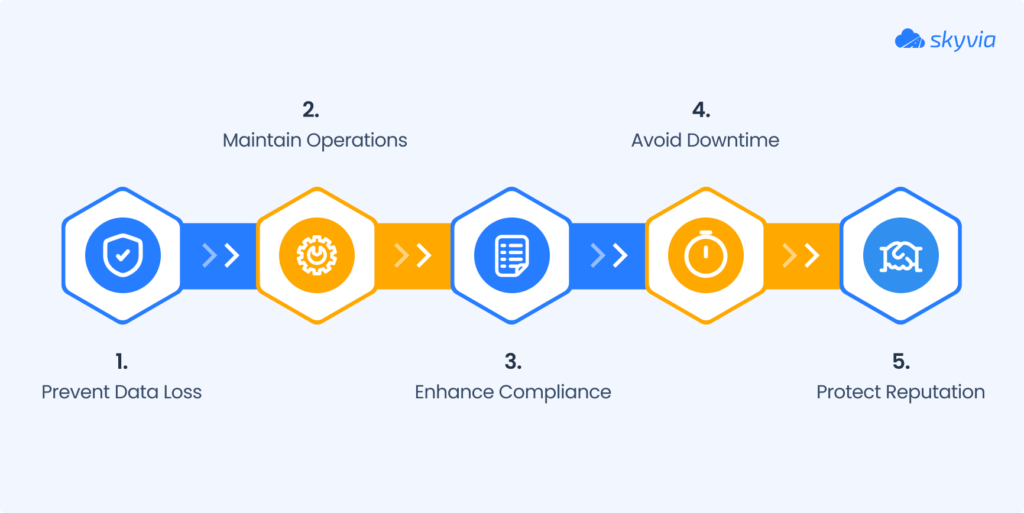
The image above lists five reasons to plan. With a plan, you avoid lost records and surprise downtime, daily work keeps running, compliance is covered and your reputation survives. Picture one bad cutover corrupting the records sales and support open every morning. Rebuilding that data later is a far bigger bill than the planning.
Which Data Migration Strategy Fits Your Case
Downtime comes first: how much can you live with? Volume and complexity come second. The table below lines up the three cutover strategies on the points that tend to settle the argument.
| Big bang | Phased (trickle) | Parallel | |
|---|---|---|---|
| Downtime | A cutover window; the systems are unavailable during it | Little or none; the source stays live | Little or none; both systems stay live |
| Best fit | Small datasets, a downtime window you can schedule | Large systems that must stay online | Large systems where even a short outage is not acceptable |
| Complexity | Lowest | Higher: old and new must stay in sync | Highest: two systems to run and reconcile |
| Way back | Hard once the cutover starts, unless you planned for it | Easier: each phase has its own scope | Easiest: the old system is still running |
| Effort and cost | Fastest and cheapest if it goes right | Longer, with more effort | Needs the most people and tooling |
| Main risk | One failure takes everything with it | Drift between the two systems | Conflicting edits and the cost of running both |
If you’d rather narrow the choice visually, this quick decision tree shows which migration strategy usually fits best.
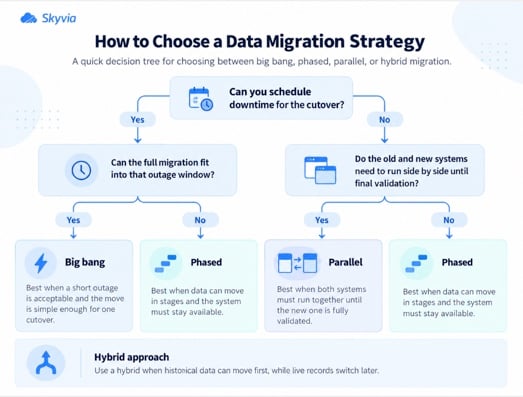
Now test the table against your own situation:
- A small dataset and a weekend window: choose big bang, and rehearse it fully first.
- A system nobody can stop: choose phased or parallel.
- Some data can wait and some can’t: run a hybrid. Load the stable history in bulk first, then sync the live records until cutover.
Three more checks come before the decision. Too much data for the network window? Then shipping storage devices, an offline transfer, could beat the wire. Changing formats mean a transformation step has to sit somewhere between source and target. Last, pick the outage hours with the people who use the system, and not only with the project team.
Big Bang, Phased and Parallel Migration Compared
Big Bang Migration
Big bang is the one-shot version: stop the source, move everything, start working in the target. When everything lines up, it wins on speed and cost. When it doesn’t, the whole thing breaks together, and the systems stay down until it’s fixed. Microsoft’s Azure Database Migration Service documentation notes that in an offline migration, application downtime starts when the migration starts.
Small datasets suit it, and so do cases where downtime can be scheduled. Before the real date, run the entire migration on a copy of production at least once.
Phased Migration (Also Called Trickle)
You move the data in parts. Each part has its own scope, schedule and test, and the old system stays in use until the part is checked. A mistake hits one part instead of the whole company.
Time is what you pay. You’re signing up for a longer project, with both systems kept in sync the entire time. Sequence the phases by dependency. Start with reference data, follow with accounts, and save the records that point to them, like contacts and orders, for last.
Parallel Migration
In a parallel migration the old and new systems simply run together, kept in line by a sync. After the new system passes validation, users switch over and the old one gets decommissioned. Even a short outage can be avoided this way.
Parallel runs cost the most. Also decide which system owns edits during the overlap. Leave that open and users will change the same record in two places.
Two techniques get confused with strategies: replication and ETL. Data replication covers the syncing for phased and parallel migrations: the target stays current while both systems run. ETL is for when the data needs reshaping on the way, say when several sources merge into one.
The 7 Rs Behind Cloud Migration Strategies
A cloud move needs a strategy per application, on top of the strategy for the data. AWS Prescriptive Guidance counts seven (the 7 Rs).
| Strategy | What it means |
|---|---|
| Retire | Decommission or archive the application |
| Retain | Keep it in the source environment, for now or for good |
| Rehost | “Lift and shift”: move it with no changes to the application |
| Relocate | Move servers or instances to a cloud version of the same platform, or to another VPC, Region or account |
| Repurchase | Replace it with a different product or version, often SaaS (“drop and shop”) |
| Replatform | “Lift, tinker and shift”: add some optimization during the move |
| Refactor or re-architect | Rebuild the application for the cloud; the most complex option |
Rehosting adds no cloud optimization, so by itself it won’t save time or money, says AWS. For large migrations, AWS suggests rehosting, relocating or replatforming first and modernizing afterward, since refactoring mid-migration gets hard to manage at scale.
The 7 Rs and the cutover strategies answer separate questions. The Rs say what happens to each system. Big bang, phased and parallel describe the switch from old to new. A real project picks one from each list.
Types of Data Migration
Guides group migrations by what moves. In real projects the types overlap, and each one changes what you test.
| Type | What moves | What to test first |
|---|---|---|
| Storage | Data from one repository to another, usually unchanged | File counts and sizes, access rights |
| Database | Data to another database vendor, or to a newer version | Data types, constraints, query results |
| Application | An ERP or CRM system to a new vendor or environment | Field mapping, workflows, integrations |
| Cloud | Data and applications to a cloud platform, or between clouds | Latency, cost, security settings |
| Business process | Databases and applications tied to customers, products and operations, often after a merger | Reports and the processes that read the data |
Some guides list four types and leave business process out. Either way, the strategy choice works the same.
Contents of a Strategy Document
Write the decision down early, before the plan grows around it. This is the document people skip. A short document signed by the owner, the IT lead and the business sponsor heads off arguments at cutover. It needs eight parts.
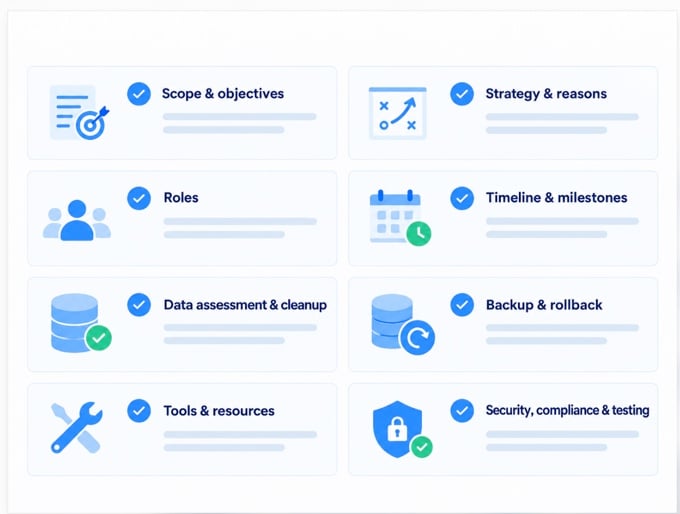
- Scope and objectives: the datasets, systems and users that are in or out, and the reason you’re migrating.
- Strategy and reasons: big bang, phased or parallel, and the way the three questions above pointed you there.
- Roles: who runs the migration, who approves cutover, and who answers user questions.
- Timeline and milestones: the phases, dates, dependencies and cutover window.
- Data assessment and cleanup: the audit findings, the known duplicates and bad records, and who’s fixing them.
- Backup and rollback: what gets backed up ahead of each step, and the conditions for going back.
- Tools and resources: the migration tool, test environments, budget and people.
- Security, compliance and testing: encryption, access, data residency, test plans, and who owns user acceptance.
Use a template to move faster, but fill each line with your own names, dates and numbers. A blank “rollback” row is the usual sign that nobody has thought about it.
Steps of a Data Migration Plan
The plan follows the strategy. All seven steps work with any of the three cutover strategies. Phased migrations run steps two to six again for every phase.
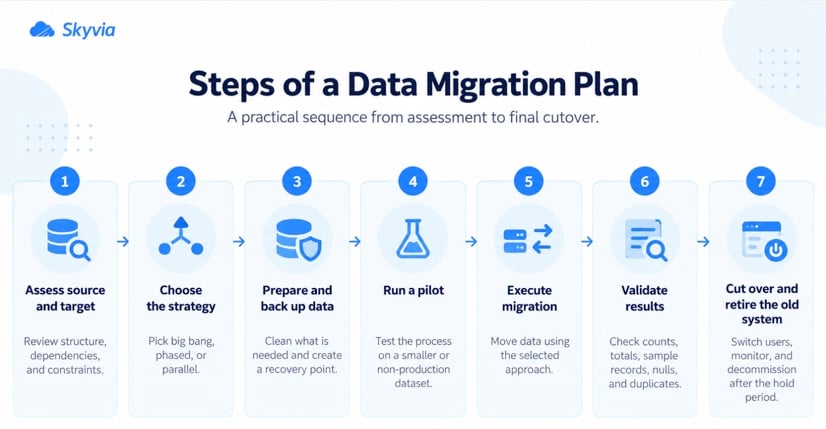
Step 1: Assessment and Planning First
Start with a clear inventory. What is moving, where does it live now, and which parts need more attention than others? Count records by object, map the relationships between them, and flag anything sensitive.
Then look at the target. Its limits, required fields, validation rules, and automations can all affect how the migration has to be run.
Step 2: Data Mapping and Transformation Work
Now get specific about how the source fits the target. Some fields map directly; others need work along the way, whether that means changing formats, translating picklist values, replacing owner IDs, or handling dates and time zones differently.
Keep the mapping in a table that both business and technical teams can review. Once the job goes beyond simple field renaming, data transformation tools start to make more sense.
Step 3: Data Cleansing and Validation Rules
Fix the obvious problems before anything moves. Duplicate records, broken values, and data nobody uses are much easier to deal with in the source than after they land in a new system.
At the same time, decide what a valid record should look like. Those rules will become your checks later, because a migration carries bad data over just as reliably as good data.
Step 4: Testing and Simulation Pilot
Run a pilot before the real migration. A production mirror is ideal, but a copy of live data, a smaller representative set, or dummy records can still expose mapping and dependency issues.
Compare the result with the source, fix what went wrong, and run it again. Time the pilot too. That gives you a much better idea of how long the real cutover window will need to be.
Step 5: Execution and Monitoring Day
With the backup done, start the migration and keep the logs open while it runs. One failed row may be harmless. The same error appearing across dozens or hundreds of records usually isn’t.
For a phased move, don’t treat the next batch as automatic. Check what just finished first, then decide whether it’s safe to continue.
Step 6: Post-migration Validation and Documentation Review
Check the target against the source before you sign off. Record counts are the obvious start, but also compare a few business totals and open a mix of old and recent records.
Then ask the people who use the data every day to check their usual reports and workflows. If something is wrong, note what failed and how it was fixed.
Step 7: Maintenance and Continuous Improvement Phase
Keep the old system read-only for the agreed hold period while the new one settles in.
Once the migration is stable, retire the legacy system and remove the temporary databases, files, and other resources used for the move. Update the documentation with anything that came up after cutover.
Rollback Plan and Cutover Criteria to Write Down
Before cutover, agree when you push ahead and when you turn back. Once the criteria are written down, nobody has to argue at 2 a.m.
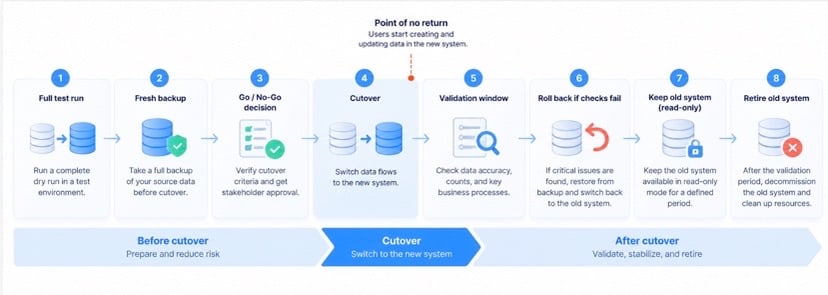
Go ahead only if all of these hold:
- The last full test run ended with no unexplained errors, inside the planned window.
- In the test run, record counts and key totals line up.
- There’s a fresh backup of the source (and of the target, if it holds data), and you’ve restored it at least once in a test.
- Users and support have been told when cutover happens and who to call.
Roll back when the post-migration checks fail and the cause hasn’t turned up within the time limit you set beforehand. Write that limit down, plus the name of whoever makes the call.
Then comes the point where going back gets messy. Once users begin creating or changing records in the target, a rollback means reconciling changes from both systems.
With a big-bang migration, that moment arrives at cutover. In a phased move, it happens separately for each phase. A parallel migration gives you more room: keep the old system running until validation is complete, then switch it off.
Google Cloud’s migration guidance also notes that teams may keep source databases available as a fallback if unexpected problems appear in the target.
SaaS and CRM Data Migration With Skyvia
Databases and servers dominate most migration guides. Yet many real migrations run between SaaS apps and CRMs, where API quotas, record IDs and the order of parent and child objects set the constraints. Skyvia is a no-code cloud data platform that handles this case, with limits worth knowing up front.
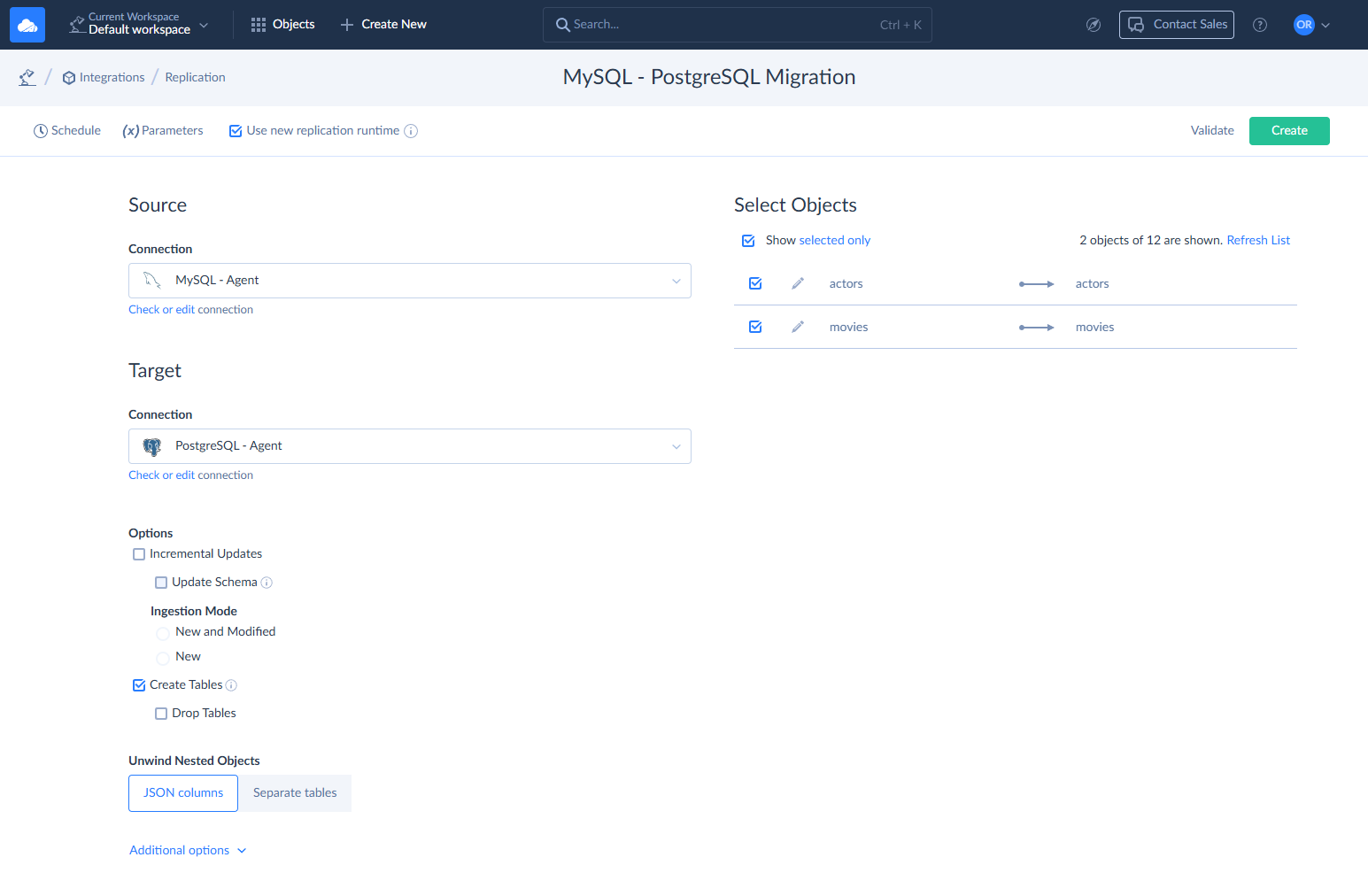
Here’s what Skyvia brings to a migration:
- Import takes a CSV file, a table, a view or a SQL query and writes to a cloud app or database through insert, update, upsert or delete. The Returning option writes new record IDs back to the source, which helps with relations in later steps.
- Salesforce specifics: Skyvia supports External ID upserts and Salesforce Bulk API v1 and v2. You can also split loads between parent and child objects, or copy data between Salesforce orgs and sandboxes.
- Replication runs a full load first and then incremental loads into a database or warehouse. It can keep a target current during a phased or parallel migration. Skyvia’s incremental updates are timestamp-based, except for SQL Server, which can use SQL Server Change Tracking.
- Data Flow (Standard plan and above) handles multi-source loads, lookups, conditional splits and calculated columns, with an error output for rows that fail.
- Backup takes daily backups of 36 cloud apps and restores them, also into another account. Take one before cutover.
- The on-premise Agent (Windows) connects to databases that sit behind a firewall, over outbound HTTPS on port 443.
- Run history lists successful and failed rows per table, and the failed rows can be downloaded as a CSV that includes each row’s error. Email alerts for failed integrations stay off until you switch them on.
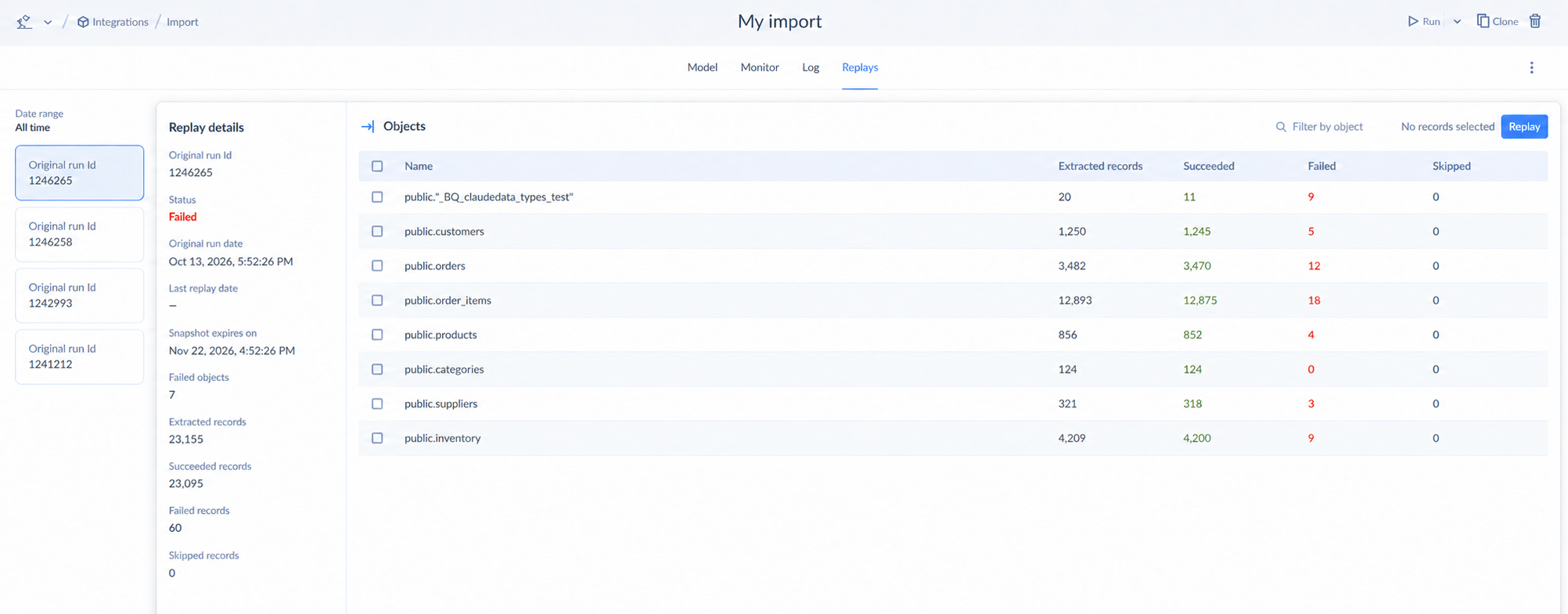
Plan for these limits. Skyvia doesn’t detect source schema changes automatically, so freeze schema changes during the migration. It isn’t a data quality tool either, so clean and deduplicate before loading. Schedules follow your plan: every minute on Professional and Enterprise, every hour on Standard, once a day on Free and Basic.
Every Skyvia product has a free plan, and signing up doesn’t need a credit card. The Data Integration free plan loads up to 10k records a month, enough to rehearse an import pilot from step four before paying for anything. Data Flow starts on the Standard plan.

Data Migration Checklist
| When | Check |
|---|---|
| Before | Scope, strategy and reasons are written down and signed off |
| Before | Source data audited; duplicates and unused records removed |
| Before | Field mapping approved by the business owner |
| Before | Backup taken and a test restore done |
| Before | Go and no-go criteria, rollback time limit and decision-maker named |
| During | Migration scripts and tool settings kept under version control |
| During | Logs watched live; stop on the first unexpected error pattern |
| During | Phased: the next phase starts only after the current one passes its checks |
| After | Counts, totals and samples compared against the source |
| After | Business users confirm their reports and processes |
| After | Old system kept read-only for an agreed period, then retired |
| After | Lessons written down; temporary databases and files deleted |
Choosing a Data Migration Tool
Pick the tool once the strategy is set. Four questions narrow the list:
- What does a failed migration cost? Sensitive or financial data? Look for encryption, access control and a clear audit trail.
- Then the data itself: how messy is it? A clean database is a different job from legacy systems and spreadsheets.
- What can your team run? A no-code tool or one that needs engineers: pick whichever your team can run.
- Budget matters too, a one-time move or an ongoing sync.
List the features you need, such as incremental loads, error handling and scheduling, and compare the candidates side by side. Our guide to the top data migration tools does that for the most common options, and what is data migration covers the basics if you are new to the topic.
If you are moving Salesforce data in particular, see our guide to Salesforce data migration.
Rehearse an import pilot on Skyvia’s free plan: create an account, connect the source and the target, and import a sample before you commit to a strategy.

FAQ for Data Migration Strategy

What are the four types of data migration?
The four types are storage, database, application and cloud migration. Some guides add business process migration as a fifth. The type tells you what to test first, while the strategy tells you how to cut over.
How Do You Go About a Data Migration?
Seven steps: assessment and planning, data mapping and transformation, data cleansing and validation, testing and simulation, execution and monitoring, post-migration validation and documentation, and maintenance. Pilot first, take a backup before the real move, and compare counts and totals after it. Phased migrations repeat the middle steps for every phase.
What Is the Difference Between a Migration Strategy and a Plan?
The strategy is your approach: big bang, phased or parallel. The plan covers the work that carries it out, from scope and schedule to roles, steps, tests and rollback. Strategy goes first, since it decides how long the plan runs.
Is big bang or phased better for a CRM migration?
A small dataset and a downtime window you can schedule make big bang the simpler pick. But if sales or support can’t stop working, go phased. Phase by dependency: reference data first, then accounts, then the records that point to them, like contacts and orders.
How Long Does It Take to Migrate Data?
Mostly it depends on data volume, how complex the mapping is and how many test runs you need. Time every test run; the pilot tells you how long the real cutover will take. On top of that, allow time for validating the result and keeping the old system on standby.
What if some records fail in a migration?
Stop at the first unexpected error pattern instead of letting the run finish. In Skyvia, run history lists successful and failed rows per table, and you can download the failed rows as a CSV with each error. Fix the mapping or the source values, then rerun just the failed rows.
Can You Roll Back a Failed Migration?
Before cutover, set the conditions and time limit for a rollback, and name who makes the call. You restore from the backup you took before the run, which should already have passed at least one test restore. Rolling back is harder once users have started entering new data in the target.
Moving data between cloud apps and databases? Skyvia Data Integration puts import, replication and synchronization into one no-code platform, and you can start free without a credit card.