Ask an LLM how your biggest customer is doing and it will happily answer. It sounds sure of itself, too. The problem is that LLM data integration hasn't happened yet, so the model is working from its training data and has never seen your CRM, your support tickets, your warehouse tables or that folder of contracts, which means a well-written answer can still be flat wrong.
Closing that gap is what we're after here. We cover RAG, fine-tuning, direct API access and the Model Context Protocol (MCP), because each of them connects a model to business data in a different way. After that we get to the groundwork, since the data needs cleaning and locking down before anything goes live. Maybe you run the pipelines, maybe you sign off on who can touch enterprise data, or maybe you're tired of what a chatbot says with nothing to go on. Some part of this guide is yours.
There's a four-phase framework, a comparison table of the connection methods, and a short run of checks so sensitive data stays put.
Why LLM Data Integration is a Game-Changer for Your Business
Everyone talks about how “AI will change everything.” Cool. But LLM data integration isn’t about hype. It’s about what happens when AI finally has access to the right users’ data.
We’re not talking about vague productivity boosts. But about real wins across users’ workflows, teams, and the bottom line.
Key Business Benefits
Hyper-Automation of Data-Driven Workflows
When LLMs are connected to clean, structured internal info, they can automate the parts of work that usually eat hours.
- Parsing unstructured files.
- Transforming messy spreadsheets.
- Prepping data for analytics or reporting.
- Automating handoffs between systems.
You go from “download, clean, upload” to “done.”
Enhanced Data Discovery and Analytics
Ever wish you could just ask the data a question and get an actual answer?
With integrated LLMs, you can.
Think:
- “What were our top-performing SKUs last quarter, broken down by region?”
- “Show me revenue trends year-over-year for new customers only.”
LLMs make data explorable in plain language, not SQL.
Improved Customer Experiences
Hook the LLMs into product, order, and support data, and suddenly your chatbot isn’t just friendly, it’s useful.
- Customers get faster, more accurate answers.
- Reps get AI summaries of interaction history.
- Recommendations become truly personalized.
It’s CX with context.
Accelerated Product Development
LLMs trained on internal dev docs, tickets, and codebases can help engineers:
- Generate boilerplate code.
- Draft API documentation.
- Auto-summarize feature specs.
- Answer technical questions instantly.
It’s like giving your dev team an intern who has already read the entire wiki.
Core Concepts in LLM Data Integration
If you want LLM to do more than just parrot the internet, you need to know what’s happening under the hood or at least enough to steer it in the right direction.
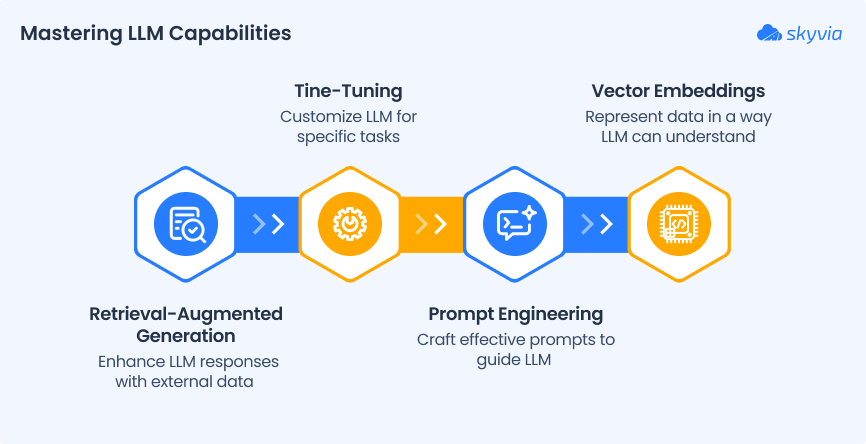
Here are the four core ideas that power real, useful LLM data integration.
Key Concepts to Cover
1. Retrieval-Augmented Generation (RAG)
You don’t want to retrain a model every time something changes in the database. That’s expensive, slow, and not how most businesses work.
RAG solves this. It lets the LLM pull in real-time data from external sources like the knowledge base, CRM, or product catalog, while it’s answering a prompt.
Think of it like this:
- The LLM is the brain.
- Your business data is the memory.
- RAG connects the two, on demand, without retraining.
It’s smarter, faster, and way more scalable.
2. Fine-Tuning
Sometimes, each business needs more than just retrieval.
Maybe your industry is niche. Maybe your language is full of acronyms, product codes, or customer quirks that generic models just don’t get.
That’s when fine-tuning is a good idea.
You take a pre-trained model and feed it examples from the domain emails, support chats, and docs, so it learns your tone, use cases, and expectations.
It’s like giving ChatGPT a crash course in your company culture.
Use it when you need precision, control, or super-specific outcomes.
3. Prompt Engineering
Even with great data, you only get great results if you ask the right way.
Prompt engineering is the art of crafting inputs that lead to useful, reliable, repeatable outputs from the LLM.
You don’t just say, “Write a summary.” You say:
“Summarize this for the product team. Focus on action items, customer quotes, and feature mentions.”
It’s not just wordplay; it’s UX for AI.
In a data integration context, prompt engineering makes sure the LLM understands what to do with the data it’s being fed, not just that it has access to it.
4. Vector Embeddings
LLMs don’t understand text like we do. They understand vectors: numerical representations of meaning.
Vector embeddings are how we turn chunks of data (like sentences, records, or documents) into formats that LLMs can search semantically.
So instead of looking for the word “contract,” your AI can find “signed agreement,” “renewal terms,” or “partnership deal” because it understands the concept, not just the keyword.
That’s what makes LLMs powerful for search, support, and analysis at scale.
A Practical Framework for LLM Data Integration
LLM data integration isn’t just about hooking ChatGPT into the data stack and hoping for the best. It’s a process. One that needs strategy, clean data, smart tools, and a plan to scale.
Here’s how to go from idea to impact, step by step.
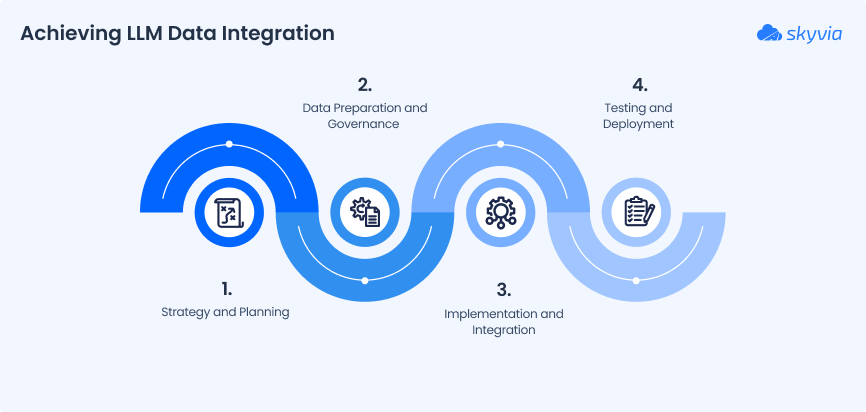
Phase 1: Strategy and Planning
Choosing the Right Use Case
Start small, but smart.
Look for bottlenecks where people already waste time doing repetitive data tasks:
- Manually generating reports.
- Digging through dashboards to answer simple questions.
- Rewriting the same customer responses again and again.
These are perfect opportunities for LLMs to shine with real ROI fast.
Selecting the Right LLM
Not every LLM fits every job.
- OpenAI (GPT-4): Strong generalist, great for language-heavy use cases.
- Anthropic (Claude): Safer, more steerable, good for regulated industries.
- Open-source models (Mistral, LLaMA, Mixtral, etc.): Ideal if you need to self-host or tweak under the hood.
The choice depends on data sensitivity, cost, customization, and how hands-on you want to be.
Phase 2: Data Preparation and Governance
The Critical Role of Data Quality
LLMs don’t fix messy data; they amplify it.
If the internal info is scattered, outdated, or full of inconsistencies, the results will be too. Clean, structured, well-labeled data is what turns “AI experiment” into “AI advantage.”
Data Security and Governance
When the LLM touches sensitive or proprietary data, governance can’t be an afterthought.
- Define what the model can and can’t access.
- Use masking or anonymization where needed.
- Stay compliant with regulations like GDPR, HIPAA, or SOC 2.
- Log everything, like prompts, outputs, and access patterns.
The smarter the AI gets, the tighter the guardrails need to be.
Phase 3: Implementation and Integration
Choosing the Integration Pattern
There’s no one-size-fits-all here. Pick the right pattern for your use case:
- RAG. Ideal for real-time, dynamic answers (e.g., customer support).
- Fine-Tuning. Best when your data is stable and domain-specific (e.g., medical, legal).
- Custom Builds. Combining multiple patterns or plugging into complex systems is great for enterprise-scale projects.
The Power of Orchestration
You’re not building this from scratch.
Use orchestration frameworks like:
- LangChain and LlamaIndex to manage flows, prompt logic, and memory.
- Apache Airflow to schedule, monitor, and connect everything.
Add an integration platform like Skyvia, and suddenly you’ve got the backend muscle to move data wherever and whenever the LLM needs it.
A Smarter Approach: Generating Code with LLMs
LLMs don’t just use data; they can help you shape it.
Prompt them to:
- Write Python scripts to clean or transform data.
- Generate SQL queries for analytics.
- Build pipelines or documentation.
- Convert spreadsheet logic into automated workflows.
It’s like having a junior data engineer on demand who never sleeps or misspells a JOIN clause.
Phase 4: Testing and Deployment
Testing and Validation
Before you roll anything out, test like it’s production:
- Use known inputs and compare outputs.
- Validate against real edge cases.
- Include humans in the loop for review.
- Monitor for hallucinations, bias, and drift.
Deployment and Scaling
Once it works, make it scale:
- Containerize the pipeline (e.g., Docker + Kubernetes).
- Use load balancing and monitoring.
- Set up versioning for prompts, models, and outputs.
- Automate feedback loops for continuous improvement.
And of course, start small and iterate fast.
How to Connect an LLM to Business Data: RAG, API or MCP
Picture a sales manager typing "which deals closed last week?" into an assistant. Where the answer comes from decides how fresh it is, who's allowed to see it, and how much engineering you've signed up for, and in practice you'll pick from three routes.
| Method | How the LLM gets the data | Best for | Watch out for |
|---|---|---|---|
| RAG over a vector index | Documents and records are embedded, stored and retrieved when a question arrives | Policies, wikis, tickets and other long text | The index goes stale until you refresh it |
| Direct API or SQL calls | Your code runs a query and places the result in the prompt | Fixed questions with a known query | You maintain every connector, query and login flow yourself |
| MCP server | The LLM client calls tools that the server exposes, such as reading or updating records | Live, ad hoc questions across several systems | Access is as wide as the connection behind the server |
Of the three, MCP is the newcomer to explain. MCP is an open standard from Anthropic for linking AI applications with outside systems. A data source's abilities (reading a record, running a query, updating a field) are exposed in the server as tools, and the model decides which to call. So the same assistant can answer from a database now and, a minute later, update a CRM record.
Skyvia MCP endpoints skip the code. To set one up, you pick a connection, add security and name the endpoint; an assistant such as Claude can then read data from that source and create or update records. Now for the part that catches people out. The endpoint exposes everything its connection can see, which means the database or app user behind it should have only the access the assistant needs. Endpoint passwords, an IP allowlist and the request log give you more control on top of that, and if you want the protocol itself explained, our guide to AI MCP servers goes deeper.
And since the routes aren't exclusive, nothing stops you from running two side by side. RAG can handle the documents while MCP or scheduled syncs cover the live records, and we'd pick by question type rather than by company.
Skyvia’s Role in Your LLM Data Integration Journey
When building LLM-powered data workflows, you need a solid foundation, and that’s where Skyvia steps in, quietly making everything cleaner, faster, and more trustworthy.
1. Data Preparation
Want your LLM to run on clean, consistent data? Skyvia’s visual tools make it easy to:
- Manage data in 200+ data sources (cloud, databases, storages ).
- Clean the duplicates, adjust data formats, eliminate noise.
- Build flows visually; no scripting required.
Check out this tutorial on ETL architecture best practices and how Skyvia streamlines the data preparation process.
2. Data Orchestration
LLM pipelines need reliable, repeatable data handoffs, and automation helps a lot:
- Schedule syncs, replication, and transformations effortlessly.
- Manage multi-step pipelines with condition logic and error alerts.
- Let ops drive the process, not developers.
Read how Skyvia powers modern pipelines with drag-and-drop logic.
3. Data Governance
You need data that’s not only integrated but also secure and audit-ready:
- Complete logging and error tracking per run.
- Role-based access, schedules, and audit trails.
- Built on Azure with industry-standard security (GDPR, ISO 27001, SOC 2).
Find best practices for migration planning with governance baked in.
Conclusion
Let’s be real.
You don’t need another AI trend piece. You need systems to work better together.
So, think about:
- Are the LLMs working with real, relevant business data, or just guessing?
- Is the data pipeline clean, synced, and actually trusted by the teams using it?
- Or are we still jumping between spreadsheets, tools, and disconnected sources?
If the answers are messy, it’s not your AI that’s broken. It’s the foundation underneath.
Skyvia helps fix that.
Just clean integration between the data and the intelligence you need.
- Prep and transform the data for LLMs.
- Automate syncs across apps, warehouses, and APIs.
- Control access, ensure consistency, and stay compliant.
- All without building custom pipelines from scratch.

FAQ for LLM Data Integration

How would you connect an LLM to business data?
Three routes are available, and the choice follows from what the assistant has to do. RAG suits documents, which are indexed in advance so the relevant pieces can be pulled in when someone asks. Direct API or SQL calls are plainer. You stay hands-on: your own code fetches a result and places it in the prompt. An MCP server goes a step further. It hands the model tools to query and update systems itself, which pays off when live questions touch several systems.
RAG vs fine-tuning: which one does what for LLMs?
RAG looks things up when the question arrives, and that’s the whole trick. So answers track your latest indexed records, and nothing needs retraining. Fine-tuning is the opposite bet. It trains on example data long before anyone asks a question. It sharpens tone and domain vocabulary and costs more, and the facts stay frozen at training time. Since they solve different problems, a split works: RAG for facts, fine-tuning for style.
What does MCP do for LLM data access?
MCP, short for Model Context Protocol, is an open standard that Anthropic created so AI applications can reach outside systems through one common interface. To the model, an MCP server shows a data source as tools. Given those tools, an assistant such as Claude can read records or run actions without anyone writing custom integration code for each system.
What keeps sensitive data safe when an LLM is connected?
First question: what may the model see? Answer it by creating a dedicated read-only database or app user with exactly that access. After that come masking or anonymizing personal fields, encryption in transit and at rest, and a log of every prompt, output and access. Skyvia MCP endpoints add endpoint passwords, IP allowlists and a request log on top of the connection’s own permissions.
What makes an LLM answer wrongly about company data?
An LLM with no route into your systems falls back on its training data and the prompt, which is why it guesses about internal metrics, customers and policies. Connect it to current data through RAG, APIs or MCP and clean that data first; the wrong answers drop. Testing and human review stay on the list, though.
Does Skyvia support LLM data integration?
Yes. Skyvia is a cloud data platform that needs no code. Skyvia offers connectors for 200+ cloud apps, databases and data warehouses. Cleaning data, syncing it into a warehouse for LLM use, running pipelines on a schedule, and exposing a connection to AI assistants through an MCP endpoint are all things it can do too. Skyvia is also SOC 2 certified, complies with GDPR and runs on Azure.