Summary
- Skyvia – the no-code pick for teams that want ingestion, sync, and Reverse ETL running from one platform without ever opening a code editor.
- Fivetran – the closest thing to autopilot for enterprise data pipelines, if you’re willing to pay for the privilege of not thinking about them.
- Airbyte – the developer’s toolkit: free to self-host, endlessly customizable, and only as smooth as the engineer running it.
- Talend – built for the messy reality of legacy and on-prem systems, with the governance depth to match, at a price and learning curve to match too.
- Apache Kafka – not really an ingestion tool at all, but the only real answer when milliseconds matter more than money or maintenance.
The wEvery company wants a single source of truth. Fewer companies enjoy the part where they have to collect data from twenty different systems before they can even start looking for it.
That’s where data ingestion tools stroll in. SaaS apps, databases, files, APIs – whatever the source, these platforms handle the trip into your warehouse or lake. Sounds very promising, but lots of stars (your architecture, your team’s technical comfort zone, autopilot batch loads or real-time data ingestion) must align so you can call a tool “the right fit.”
Before we begin, a confession: we’re the team behind Skyvia, so we’re naturally biased toward our own platform, but we have no intention of telling you Skyvia is the answer to every integration problem. Instead, we’ll size it up against other top data ingestion tools like Fivetran, Airbyte, and Talend, looking at real capabilities, pricing models, strengths, limitations, and the kinds of teams each product is built for.
How Did We Test These Data Ingestion Tools?
Our team got hands-on with each platform – setting up real connections, moving real data, and seeing what broke.
The core scenario: a mock e-commerce dataset (10K rows, mixing raw CSVs with nested JSON) pulled from a PostgreSQL database and a REST API into Snowflake. That’s the backbone every tool got tested against.
But “testing” doesn’t mean the same five steps for everyone: a no-code platform and a message broker aren’t evaluated the same way. So where it made sense, we went further, building a connector from scratch, spinning up local infrastructure, deliberately feeding a tool bad data to see how it reacted.
Here’s what we were paying attention to:
- How much friction is there between “sign up” and “first row landed”?
- What happens when the API throttles you mid-transfer, or the source schema changes underneath you?
- When something breaks, does the error message actually tell you what broke?
- How much of the setup requires reading docs vs. just clicking through?
A tool that can move millions of rows fast loses a few points if getting there takes three days of configuration, and a tool that’s effortless to set up loses points if it quietly breaks the moment something upstream changes.
What Comparison Criteria Actually Matter for Data Ingestion?
Instead of ranking checkboxes to see which tool has the longer list of features, we picked the three things that can predict whether you’ll be happy with your choice six months from now.
How you’re charged, not just how much. The pricing model matters more than the sticker price, because it decides whether next quarter’s invoice is a known number or a surprise.
- Monthly Active Rows (Fivetran): every row your destination inserts, updates, or deletes in a month gets counted. A backfill, a misfiring sync loop, or a busy launch week runs the counter up, and the invoice arrives weeks after the cause is forgotten.
- Volume tiers/credits (Skyvia, Airbyte): less flexible-sounding, but you know your ceiling in advance.
- Custom quote (Talend): no formula to game or misjudge, but also no number until someone gets on a call.
How fast “synced” actually means synced. “Real-time” gets stretched to cover anything faster than overnight, so we wrote down the actual minutes. Skyvia syncs as often as every 1 minute. Fivetran and Airbyte land around 5. Kafka isn’t on a schedule at all – it reacts the moment something happens, which is the only reason fraud detection or live inventory tracking is even possible on it. A five-minute gap is nothing for a weekly report and disqualifying for anything that needs to react in the moment.
Who’s expected to build it. A visual wizard assumes the person setting this up has never written a line of integration code and shouldn’t have to. A YAML file and a CLI assume the opposite – that there’s already someone on the team who’s comfortable reading a stack trace before their coffee’s done. Both are valid starting points that aim at completely different teams.
How Do the Top Data Ingestion Tools Compare?
| Tool | Best Use Case | Pricing Model | Connectors | How It Runs |
|---|---|---|---|---|
| Skyvia | Anyone who wants pipelines running without writing code | From $79/mo; free plan available, no credit card | 200+ | Cloud; syncs down to 1 minute |
| Fivetran | Enterprise SaaS, warehouse-native teams | Usage-based (MAR); free up to 500K MAR/mo | 700+ | Cloud-managed only; syncs every 5 minutes |
| Airbyte | Developer-heavy teams | Free self-hosted; Cloud from $10/mo | 600+ | Self-hosted, Cloud, or hybrid; syncs every 5 minutes+ |
| Talend | Legacy & on-premise systems | Custom quote; no free tier | 1,000+ (legacy catalog) | On-prem, cloud, or hybrid; batch or real-time, job-dependent |
| Apache Kafka | Real-time event streaming | Free (open source); managed options like Confluent cost extra | N/A – not connector-based | Self-managed or managed; syncs in milliseconds |
Which Data Ingestion Tool is Right for Your Specific Scenario?
Ranking these tools 1 to 5 would be a little dishonest – there’s no single scale where a real-time streaming platform and a no-code cloud tool can be fairly measured against each other. Also, there’s no version of reality where a five-person startup should pick the tool built for a bank’s mainframe.
So instead of a leaderboard, here’s a winner for each situation, based on what you’re actually trying to solve.
What is the Best Data Ingestion Tool for No-Code Teams?
Somewhere out there is a person whose job title contains the words “and more” and whose actual job is holding six different systems together with willpower alone. If that’s you, welcome – you’re not going to write a Python script tonight, and honestly, why should you?
Jokes aside, for a lot of use cases, a visual, point-and-click setup gets you there just as well as a hand-built script, without the maintenance that comes with owning custom code long-term.
Skyvia
Skyvia is a no-code data integration platform – ingestion is just where it starts. The same connection you set up to pull data from a source doubles as the foundation for sync, orchestration, and Reverse ETL, so getting data into your warehouse isn’t a separate tool with its own invoice and login, just the first step in a longer pipeline.
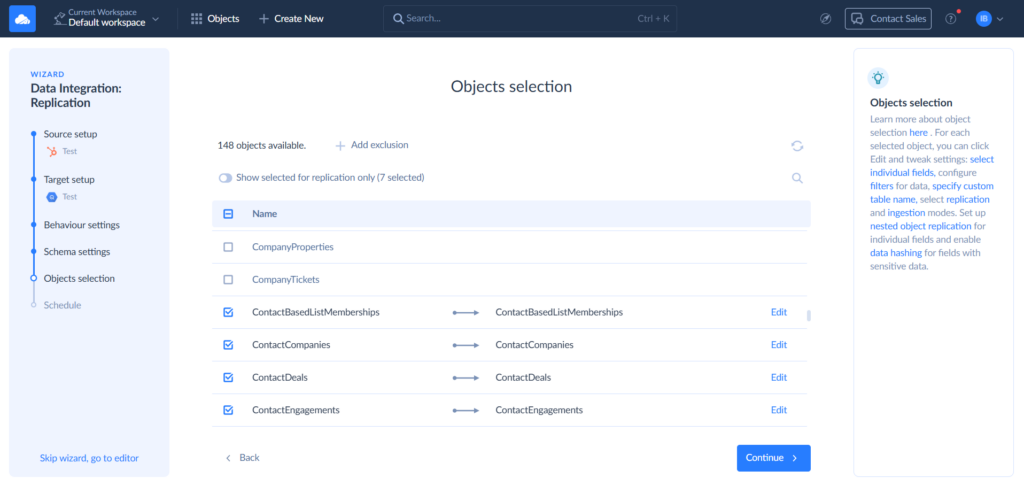
One thing I appreciate every time I build a new integration (this one wasn’t an exception) is how quickly the platform gets out of the way. Connect the source, connect the destination, select the objects, map the fields visually, choose a schedule, and you’re done. You might think that this sequence of steps description is a short version, but it is actually full. That’s all there is to creating an integration in Skyvia.
What makes Skyvia stand out among data ingestion tools is that ingestion is only the opening chapter. Instead of assembling a stack of specialized products that all have their own invoices, release cycles, and permission models, you get one platform that follows the data from the source system to the warehouse and back into operational applications.
Another pleasant surprise is how much usual routine maintenance gets swiped under the carpet. Skyvia reduces the maintenance required for many schema and API changes. Run History provides row counts and detailed error diagnostics, while optional email notifications alert you to failed integrations or tasks.
Best for
Solo data professionals, BI analysts, RevOps teams, IT managers, consultants, and growing data teams that need reliable pipelines without building and maintaining custom integration code. It’s especially attractive for organizations looking for one platform to cover ETL/ELT, Reverse ETL, synchronization, migration, and orchestration.
Rating
G2: 4.8/5 (324 reviews) | Capterra: 4.9/5 (based on 116 reviews)
Pricing
Skyvia uses transparent volume-based pricing instead of charging per connector or per user. Every paid plan includes unlimited users, and there’s a genuinely free plan that doesn’t require a credit card. Pricing starts at $79/month.
Pros
- No-code setup gets pipelines running in minutes.
- 200+ pre-built connectors for SaaS apps, databases, APIs, and cloud warehouses.
- Covers ETL, ELT, Reverse ETL, synchronization, migration, orchestration, and live data access in one platform.
- Guided, no-code setup – pick your source, destination, and objects, and the wizard handles the rest.
- Automatic schema and API changes handling.
- Detailed monitoring, execution history, and email alerts.
- Predictable, volume-based pricing with unlimited users.
- Enterprise features include SOC 2 Type II, RBAC, audit logs, encryption, and orchestration.
Cons
- If you operate in a highly regulated environment and require a completely air-gapped deployment with zero internet connectivity, Skyvia isn’t the right tool. In those cases, fully on-premises platforms are generally a better fit.
- Likewise, if your workload depends on sub-second, exactly-once streaming CDC across many databases, a specialized streaming platform may be a better solution.

What is the Best Data Ingestion Tool for Fully-Managed Enterprise Scale?
Some teams would prefer only to think about their pipelines if something goes wrong, which, ideally, is never. If that’s your team, this section is for you.
Fivetran
Setting up the PostgreSQL integration was quick, but under the hood, there’s a real mechanism doing the work. Fivetran’s Postgres connector reads the write-ahead log directly, a form of log-based CDC that means it’s watching the database’s own record of changes rather than running queries against your live tables. Your production system never even feels it’s working.
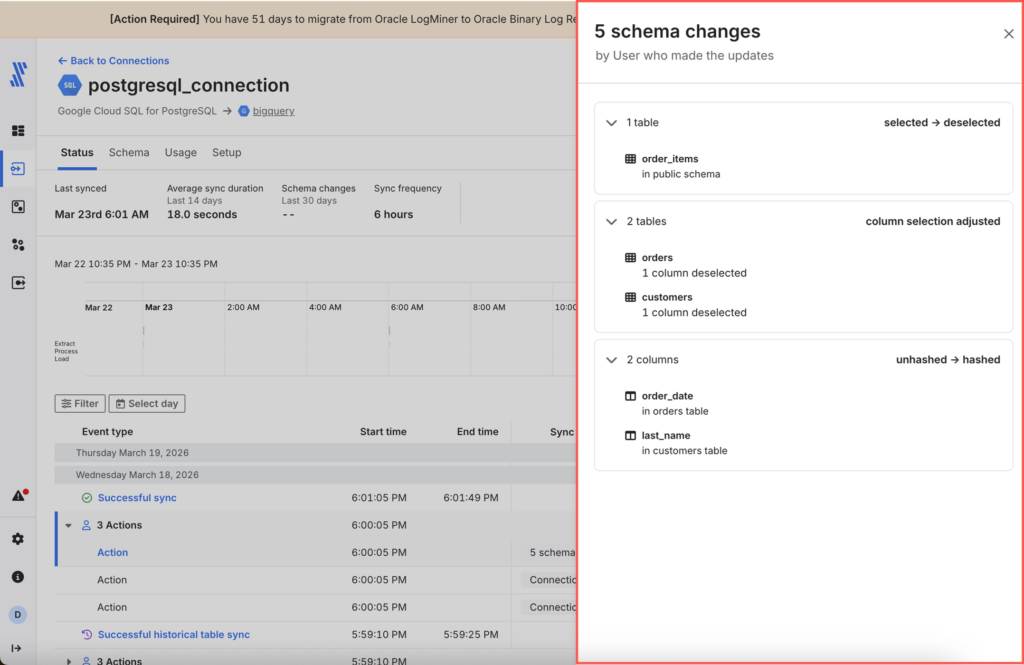
Schema drift (the fearsome part of any sync that has the power to ruin people’s workdays) got handled without me lifting any of my fingers. A new column appeared upstream; it appeared downstream.
Fivetran is one of the strongest enterprise picks available for those who want ingestion that runs itself while they’re busy with other tasks, but that autopilot has a fare, and it’s billed monthly. Many users report surprise cost spikes and little control over spend forecasting or caps.
Best for
Fivetran fits best when you’re loading into a modern warehouse – Snowflake, BigQuery, Redshift – and would rather spend engineering hours on transformation and analytics than on keeping connectors alive.
If the goal is controlling costs down to the row or customizing pipeline logic in detail, it’s worth lining up against the alternatives before committing.
Rating
G2: 4.3/5 (824 reviews) | Capterra: 4.4/5 (25 reviews)
Pricing
Fivetran charges by Monthly Active Rows. They count the number of rows that are added, updated, or deleted in your destination during a month. For example, if one customer record is inserted in January and then updated three times that same month, it still counts as 1 MAR for January. If it changes again in February, it counts again in February.
The platform offers a free tier up to 500K MAR, then Standard, Enterprise, and Business Critical plans that scale with usage and are quote-based beyond that point. Full details live on Fivetran’s pricing page.
Pros
- Over 700 connectors and 200+ destinations – a strong chance that whatever you’re pulling from is already supported.
- Syncing and schema handling run without manual intervention.
- Plays well with dbt and modern warehouse-native workflows.
- Higher tiers include serious security options: private networking, customer-managed keys, the works.
Cons
- Remember those impressive 700 connectors? Well, there’s a downside. Niche sources, special fields, or connector-specific limitations can pull you back to the technical territory you wanted to avoid so much.
- Support quality shifts depending on which tier you’re on.
- A handful of niche objects and edge-case fields aren’t as well covered as the core connectors.
What is the Best Data Ingestion Tool for Developer-Heavy Teams?
Not every team wants a finished product. Some want the raw parts, a terminal window, and full permission to bend, shape, and be creative. This one’s for the people who read documentation for fun.
Airbyte
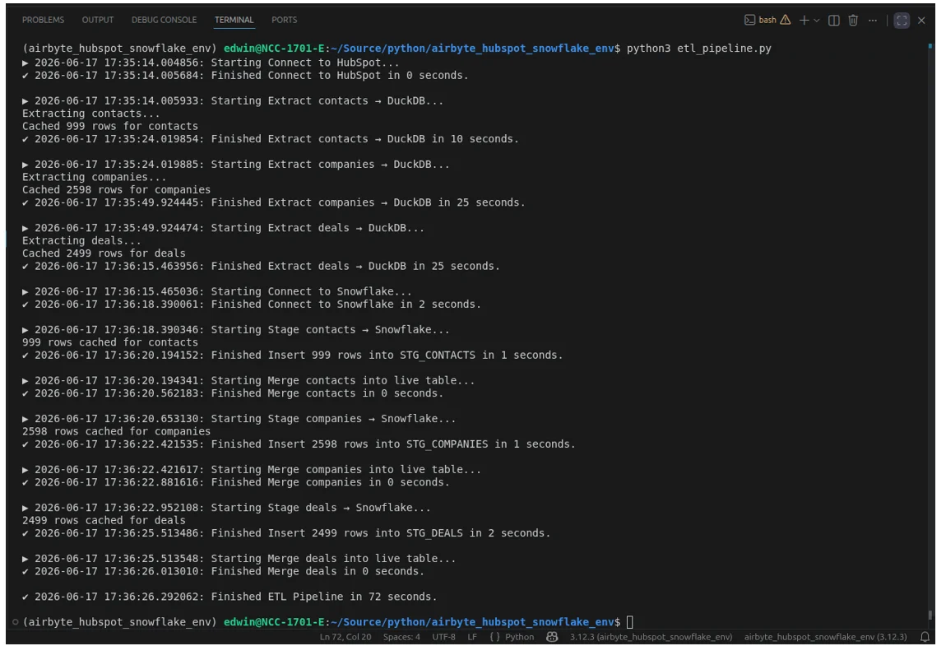
Getting Airbyte running locally was almost too easy: one Docker command, a short wait, and it was up. So I did what any reasonable person does when something works on the first try – I didn’t trust it and went to build something harder. I opened the connector builder and aimed it at an API that wasn’t already in Airbyte’s catalog. And things got honest.
Airbyte’s low-code CDK lets you describe a connector in YAML instead of writing it from scratch in Python. You define the streams, the endpoints, the auth method, and it assembles the rest. Clever, until the API in question turned out to be picky about how it wanted to authenticate.
My first attempt ended with a timeout. The second attempt was no better, but this time I got a slightly more specific error message. Probably, the API was losing patience with me personally and finally decided to save me from disgrace. Turned out I had the auth type right but the header name wrong – a five-minute fix once I found it. After that, everything became easy again.
Best for
If you’re brave enough to own your pipelines, and have engineers skilled enough to fix, patch, and create from scratch, Airbyte is your fighter. It also fits well when you need a connector for a source that is rare and niche, or when paying by the row stopped making sense a while ago.
Rating
G2: 4.4/5 (77 reviews) | Capterra: isn’t that popular on this platform, as it has zero reviews so far.
Pricing
Core is self-hosted and free – you bring your own servers and the know-how. If you want Airbyte to manage the infrastructure for you, then you’d look at paid Data Replication plans. They start at Standard from $10/month, Plus runs $25,000/year (roughly $2,083/month), and Pro depends on your use case and needs a conversation with their sales department. Details sit on the official pricing page.
Pros
- Core is free to self-host with no vendor lock-in whatsoever.
- Building custom connectors through the Connector Builder and CDK is genuinely flexible.
- 600+ connectors cover most standard warehouses and SaaS tools
- Can be self-hosted, cloud, or a mix of both, depending on what your infrastructure allows.
- Pro pricing scales with capacity instead of row count, so growth doesn’t quietly inflate the bill.
Cons
- If something breaks on the open-source version, the vendor’s support line won’t come to rescue you.
- New users without a data engineering background will feel the learning curve immediately.
- Community-built connectors vary in quality – some are polished, some are clearly someone’s side project.
- Failed syncs aren’t always easy to diagnose; the logs don’t hand you the answer.
- The stronger governance and reliability tools are locked behind paid plans.
What is the Best Data Ingestion Tool for Legacy Enterprise Systems?
Not every company got to start clean with a warehouse and modern APIs. Some are still connected to a mainframe that predates half the engineering team, and no amount of trendy ELT tooling is going to talk to it nicely. This is the section for those companies.
Talend
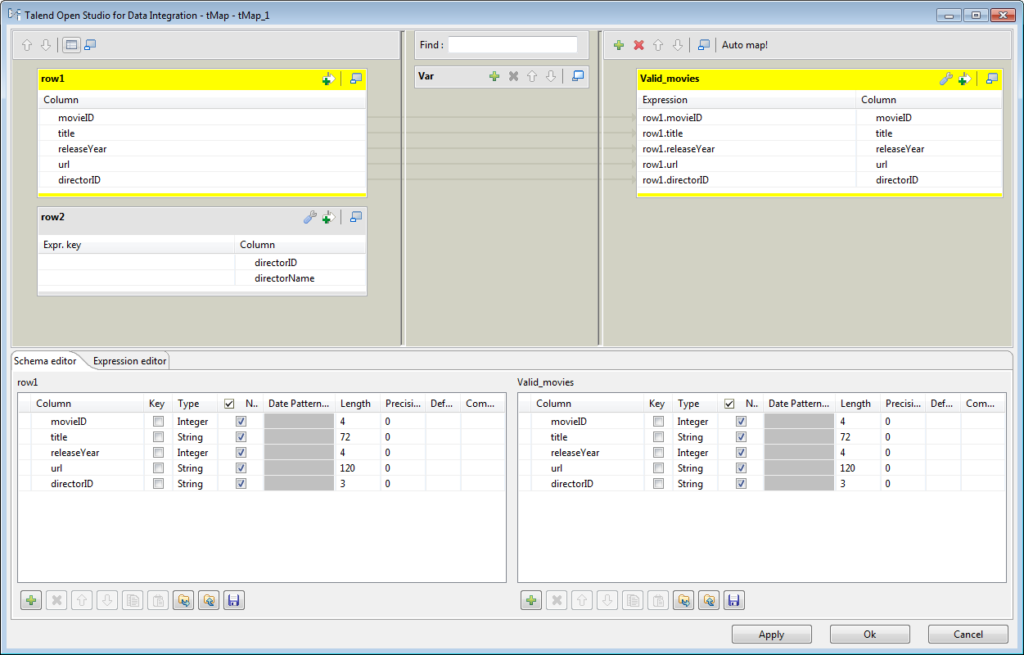
Every time I open Talend’s studio, I feel like walking into a building that was clearly designed decades ago but has been renovated enough to still function. There’s nothing Talend can’t do – governance, data quality, on-prem connectors most modern tools have never even met. There’s just very little it does fast.
Building even a modest mapping meant dragging components across a canvas. However, that point-and-click approach didn’t get me far, and I still had to switch to Java.
Best for
Enterprises with layered, older infrastructure – think hybrid cloud plus on-prem systems that aren’t going anywhere soon – and a genuine need for governance and data quality controls, not just a pipe from A to B. Talend reads less like an ingestion tool and more like a full integration platform that happens to include ingestion.
Rating
G2: 4.6/5 (13 reviews) | Capterra: 4.3/5 (24 reviews)
Pricing
Talend Open Studio, the old free entry point, was retired in 2024, so there’s no longer a no-cost way in.
Talend is sales-led, and quotes are built around modules, user count, and the services wrapped around them. Since we’re in the enterprise land, it’s almost safe to presume that price tags are somewhere between the tens of thousands and low hundreds of thousands annually.
Pros
- Deep governance and data quality tooling, well beyond what lightweight ingestion tools offer.
- Genuinely capable of handling large, on-premise legacy systems that newer tools simply can’t reach.
- Broad connector support across both cloud and older infrastructure.
- Includes low-code workflows for standard tasks, even if the advanced ones require more.
- It has a long track record inside large enterprises.
Cons
- Extremely steep learning curve, and Java knowledge isn’t optional for anything beyond the basics.
- High total cost of ownership, frequently landing north of $50k a year once modules and services are added in.
- Performance can lag on large datasets, particularly in local Studio setups.
- Error messages and documentation don’t always agree with each other, which slows down debugging.
- No free or open-source path left, now that Open Studio is gone.
What is the Best Data Ingestion Tool for Real-Time Event Streaming?
There’s a category of companies that genuinely cannot wait – a fraud attempt doesn’t schedule itself around your batch window, and neither does anything else worth catching in the act.
Apache Kafka
Setting up Kafka meant that I had to learn a whole new vocabulary before writing a single line – brokers, partitions, consumer groups, topics that aren’t really topics. I got it running on Windows using KRaft mode. Java 17 went in first, then the Kafka binary, unpacked into a short path because Windows and long file paths don’t get along.
From there, three commands did the real work: generate a cluster ID, format the storage directories with that ID, and start the broker. I left it running in its own window and opened a second one to create a topic called ingest-events, mostly to watch the partitioning in action. From there, Kafka Connect entered the stage to pull from a database or an API automatically.
Then it started running, and every event landed the second it happened, got written down in order, and stayed there. So, if some downstream service missed something the first time around, it could go back and read it again instead of begging IT for a re-send. I’ll admit that part felt a little like magic I didn’t deserve.
Best for
If milliseconds genuinely matter to your business, Kafka is one of the few tools built specifically for that reality. If a nightly batch would honestly get the job done, this is a considerably bigger commitment than most teams need to make.
Rating
G2: 4.5/5 (132 reviews) | Capterra: 4.5/5 (18 reviews)
Pricing
Kafka itself costs nothing – Apache 2.0, open-source, free to download. What isn’t free is everything wrapped around it: servers, cloud infrastructure, monitoring, and either an in-house team that understands distributed systems or a managed option like Confluent that takes the operational weight off your hands for a price.
Pros
- You can scale close to infinitely, provided the infrastructure underneath is willing to grow with it.
- True real-time streaming – data moves the moment it exists, not on a schedule.
- Fault-tolerant by design, with replication that keeps the system standing even when a broker doesn’t.
Cons
- Requires a dedicated DevOps team just to keep the ZooKeeper or KRaft infrastructure upright and behaving.
- Resource-hungry – brokers, JVM overhead, and storage all add up quickly.
- A steep enough learning curve.
How Can You Choose the Right Ingestion Strategy?
Here’s the shortcut version, before we get into the reasoning behind it:
- Stuck with on-premise or legacy systems? → Talend.
- Got a solid dev team and want to own your pipeline? → Airbyte, Apache Kafka.
- Want fast, predictable cloud ingestion without touching code? → Skyvia, Fivetran.
That covers most people. If you want the actual thinking behind it, here’s how to work it out for yourself.
Start with latency, because it quietly decides everything else. If a daily or hourly refresh is genuinely fine – and for most reporting and BI use cases, it is – you’re in batch territory, which is cheaper and far less to maintain.
If you’re watching for something the moment it happens, like fraud or live inventory, you need real-time data ingestion tools, and you should budget accordingly: streaming systems cost more in both dollars and attention.
Next, look at what you’re moving. A handful of SaaS APIs and a Postgres database is a very different problem from a stream of change events off a production system or a folder of oddly-shaped JSON files someone exports weekly.
Change Data Capture exists specifically for that middle case – replicating inserts, updates, and deletes out of a database in near real time without hammering it with full re-syncs. If your situation calls for a mix of both worlds, a micro-batch setup usually threads that needle better than trying to force everything into pure streaming.
Then there’s the honest question: who’s going to run this thing? A managed ELT tool – Fivetran, Airbyte Cloud, Skyvia – takes most of the operational weight off your team, which matters enormously if that team doesn’t have spare data engineers lying around.
Self-hosted options and streaming platforms like Kafka give you more control, but great power, as usual, comes with great responsibility. Neither is objectively better. One trades cost for convenience; the other trades convenience for control.
A few things worth checking before you commit to any tool, regardless of which category it falls into:
- Does it actually support your specific sources? Not “a large connector library” in general – your CRM, your database, your particular API.
- How does it handle schema changes? A new column appearing shouldn’t cause a crisis.
- What’s the real cost at your volume (don’t look at the demo volumes)? Per-row pricing especially deserves a calculator; a guess won’t serve you well.
- How much operational effort does it actually require, once the initial setup excitement wears off?
The fastest way to know for sure is to stop reading comparisons and start one small pilot. And if you’d rather run that pilot without writing a line of code or signing anything first: Skyvia has a free trial, so testing whether it fits your stack costs you nothing but the time it takes to connect a source and watch the first sync land.

FAQ for Best Data Ingestion Tools

Why is pricing so unpredictable for some data ingestion tools?
Usage-based pricing (per row, per connector) scales with your data, which is great until your data grows faster than expected and the bill grows right along with it, with little warning.
Should my team build custom data ingestion pipelines using Python instead?
Only if you enjoy maintaining it forever. Custom scripts work fine until an API changes or volume spikes – then someone’s rewriting logic instead of doing literally anything else.
Can data ingestion tools also transform data?
Some do light cleanup on the way in; heavier transformation usually happens after loading, inside the warehouse. Most modern tools follow ELT, not ETL – load first, transform later.
What happens when a source database schema changes (Schema Drift)?
Good tools catch it automatically and adjust – a new column just shows up downstream. Weaker ones break the pipeline entirely, usually right when you’re not looking.
Are cloud data ingestion platforms secure enough for healthcare or banking data?
The strong ones, yes – look for SOC 2, HIPAA compliance, encryption, and private networking on higher tiers. Not every plan includes it, so check before assuming.