Summary
- To load SaaS apps and databases into a warehouse with managed connectors, pick Fivetran, Airbyte, Hevo Data or Skyvia.
- For continuous change data capture instead of scheduled syncs, pick Estuary or Striim.
- For an ELT platform built around transformation, pick Matillion; for transformation inside the warehouse, dbt; to schedule and chain the steps, Apache Airflow.
- For enterprise integration with governance on top, pick Qlik Talend Cloud or Informatica.
Shopping for data pipeline tools gets confusing fast, because one label covers products that do almost unrelated work. Fivetran hauls data in. Once it’s sitting in the warehouse, dbt is what reshapes it. Airflow? It sets the timing and order of everything else. And Striim streams each change the second it happens. Rank all four on one list and you’re measuring a conveyor belt against a scheduler.
So we sorted this list by the stretch of the pipeline each tool covers. Every entry tells you what the tool does, how often it can sync on each plan, what the bill is based on, and the point where it stops being a good pick. Prices come from the vendors’ own pages. For eight of the tools there’s also a note on what happened when we pushed the same PostgreSQL to Snowflake load through them.
Two or three of these tools in one stack is the usual outcome, not one. So check the role before you check the price.
How we chose and checked these tools
We grouped tools by one thing only, the part of the pipeline each covers.
- Ingestion and ELT: managed connectors pulling app and database data into a warehouse.
- Streaming and CDC: tools that catch database changes as they land, with no timer involved.
- Enterprise integration: bigger suites, where you buy data quality, governance and hybrid deployment along with the movement.
- Transformation: tools that reshape data after it reaches the warehouse.
- Orchestration: the layer that runs the other steps on time and in sequence.
Every entry then went through identical checks. We recorded what you pay for and the entry price with its billing basis, the free plan or trial, the fastest sync on each plan, and how the tool deploys. All prices, plans and limits were read from each vendor’s own pricing pages and documentation, as seen from the US, and they are accurate as of November 6, 2026.
Eight tools also went through our hands-on test in September 2025. We took a PostgreSQL database on Supabase (five e-commerce tables, 10,000 rows) and loaded it into Snowflake. The findings below come from those tests, and we’ve retained screenshots of the tools in use.
Full disclosure: we make Skyvia, a no-code data integration platform. It sits in the ingestion group, its limits are listed the way everyone else’s are, and it was judged on the same fields as every other tool here.
Some names are missing on purpose. AWS Glue, Azure Data Factory and Google Cloud Dataflow belong to a single cloud, so pick them if you’re already all in on that cloud. Apache Kafka, Flink and Spark are building blocks for custom streaming and processing pipelines rather than direct replacements for the tools compared here.
Dagster and Prefect do the same job as Airflow, which is why only one orchestrator made the cut. Stitch is now part of Qlik, Rivery is now Boomi Data Integration, and BladePipe and Snowflake Snowpipe (a Snowflake loading feature) dropped off the list.
The 11 best data pipeline tools
Best for managed connectors at enterprise scale: Fivetran
Plenty of data teams start with Fivetran. Its managed connectors load apps and databases into a warehouse with little setup, and dbt-based transformations run after the load. Fivetran and dbt Labs have been one company since June 1, 2026.
- Best for: teams with budget who’d rather someone else maintain the connectors.
- Part of the pipeline: ingestion and ELT. It also covers transformation (dbt-based, in the destination) and reverse ETL (activations).
- Pricing: Fivetran bills by Monthly Active Rows (MAR), or the number of distinct rows synced each month. There’s no published per-row rate for Standard, so you’ll need the pricing calculator to estimate the cost. Since January 2026, each Standard connection with 1 to 1 million MAR has also carried a $5 monthly base charge. Annual contracts pick up that charge at renewal. The Free plan covers up to 500,000 MAR a month.
- Fastest sync: 15 minutes on Standard, and 1 minute on Enterprise and Business Critical.
- Deployment: managed SaaS. Enterprise and Business Critical add Hybrid Deployment, where pipelines run inside your network.
Strengths
- It ships 700+ managed connectors, enterprise database connectors included.
- The Free plan is a genuine one, and every new connection gets a 14-day trial.
Limitations
- The bill follows changed rows, and since 2026 deletes count toward paid MAR.
- Private networking and PCI DSS both sit behind the Business Critical plan.
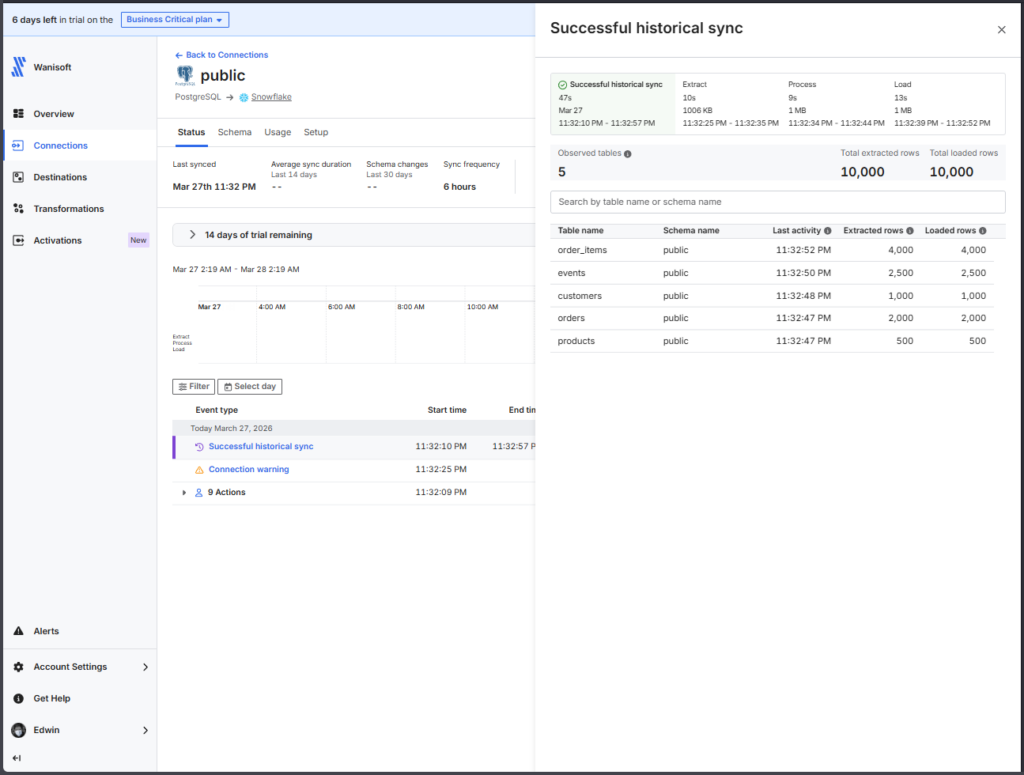
In our test, Fivetran wanted a deployment model and a data processing location before we could create the first connection. After the run, the report put rows processed and duration in plain view, and the counts in Snowflake matched.
Best for open-source connectors you can extend: Airbyte
Airbyte runs the same managed-connector model in the cloud. It also has Airbyte Core, which you can host yourself at no cost. If your engineers enjoy building or patching connectors, they’ll get the most from it.
- Best for: teams heavy on developers who want open source or to self-host.
- Part of the pipeline: ingestion and ELT. It also does log-based CDC on a schedule for databases like Postgres, MySQL and SQL Server, and reverse ETL comes included.
- Pricing: $20 a month gets you Standard with 5 credits, and each extra credit is $5. Plus is $189 a month for 40 credits. Both bill monthly. Pro and Enterprise Flex get quoted by capacity, and Core costs nothing to self-host.
- Fastest sync: hourly on Standard, every 15 minutes on Plus, and every 5 minutes on Pro and Enterprise Flex.
- Deployment: the cloud, self-hosted Core on Kubernetes, or hybrid on Enterprise Flex.
Strengths
- Self-hosting costs nothing, and every plan includes the Connector Builder for sources the catalog lacks.
- The cloud trial runs 14 days with 400 credits and needs no card.
Limitations
- Standard tops out at hourly syncs, so 15 minutes means moving up to Plus.
- Marketplace connectors are community-made and come with no SLA.
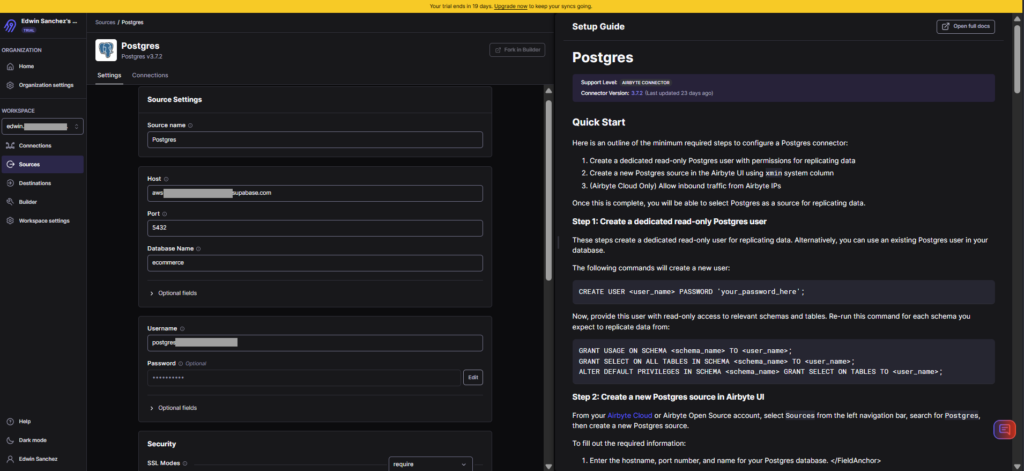
During our test on the cloud trial, we chose the tables and sync modes, started the sync by hand, and ended up with the same row counts as the other tools.
Best for no-code ELT on an event budget: Hevo Data
Hevo Data is a no-code ELT tool that charges by events, meaning the records it writes to your destination. A guided setup walks you through, and transformations now run as dbt and SQL models.
- Best for: small and mid-size teams who want a guided ELT tool with a price they can read.
- Part of the pipeline: ingestion and ELT, with SQL and dbt transformations.
- Pricing: Starter costs $299 a month billed monthly, or $265 a month billed annually, for 5M events. Professional begins at $849 a month billed monthly ($750 billed annually) for 20M events, and Enterprise is quoted.
- Fastest sync: hourly on Starter. Move off Starter and standard pipelines can go as often as every 30 minutes, while streaming pipelines need one of the higher tiers.
- Deployment: cloud SaaS (you choose a processing region during sign-up).
Strengths
- Nothing about the price is hidden, and nobody asks for a card during the 14-day trial.
- Its wizard goes source, then tables, then query mode for each table, then destination and schedule.
Limitations
- Since Release 2.51 (summer 2026), you can’t create new Python or drag-and-drop transformations. Existing ones still run and can be edited.
- RBAC, SSO and VPC peering come only with Enterprise.
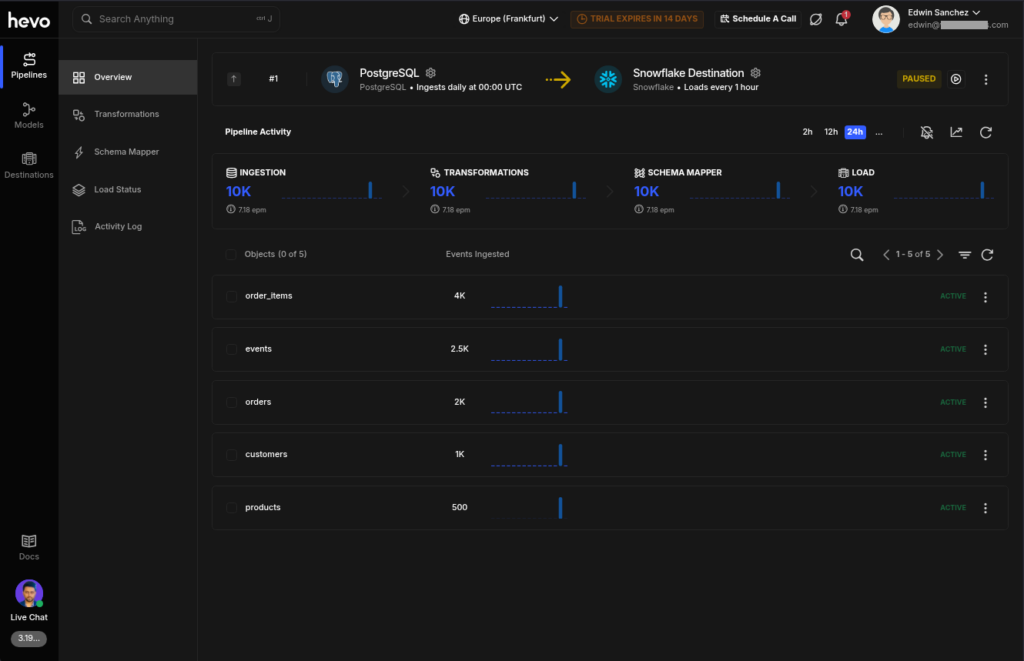
In our test, signing up took a work email, and the wizard asked for the schedule before the first run. Sources don’t get saved as separate objects. A second pipeline on the same database therefore begins with a blank form, unless you copy an existing source. The activity log agreed with our other runs.
Best for one platform from ingestion to reverse ETL: Skyvia
Skyvia is our no-code cloud data platform. One account handles replication of apps and databases into a warehouse, imports and syncs between apps, and sending warehouse data back to apps. Control Flow chains those steps. It all runs on schedules (no streaming).
- Best for: data teams wanting ELT, reverse ETL and app-to-app sync with no code to write.
- Part of the pipeline: ingestion and ELT through Replication, reverse ETL and sync through Import and Synchronization, transformation in Data Flow or a dbt Core project pulled from Git, and orchestration with Control Flow.
- Pricing: based on records written a month, with unlimited users. At 5M records a month, Basic is $79 billed annually ($99 billed monthly) with daily runs, and Standard is $159 billed annually ($199 billed monthly) with hourly runs. The Free plan covers 10K records a month.
- Fastest sync: once a day on Free and Basic, hourly on Standard, and every minute on Professional.
- Deployment: the cloud, plus an on-premises Agent for databases sitting behind a firewall.
Strengths
- It offers 200+ connectors, and one connection works across replication, import, sync and automation.
- SQL Server sources get change capture through Change Tracking, while other sources load incrementally by timestamp.
Limitations
- There’s no continuous streaming. The fastest schedule is once a minute, on Professional.
- Source schema changes don’t get picked up automatically, and Data Flow and advanced mapping begin on Standard.
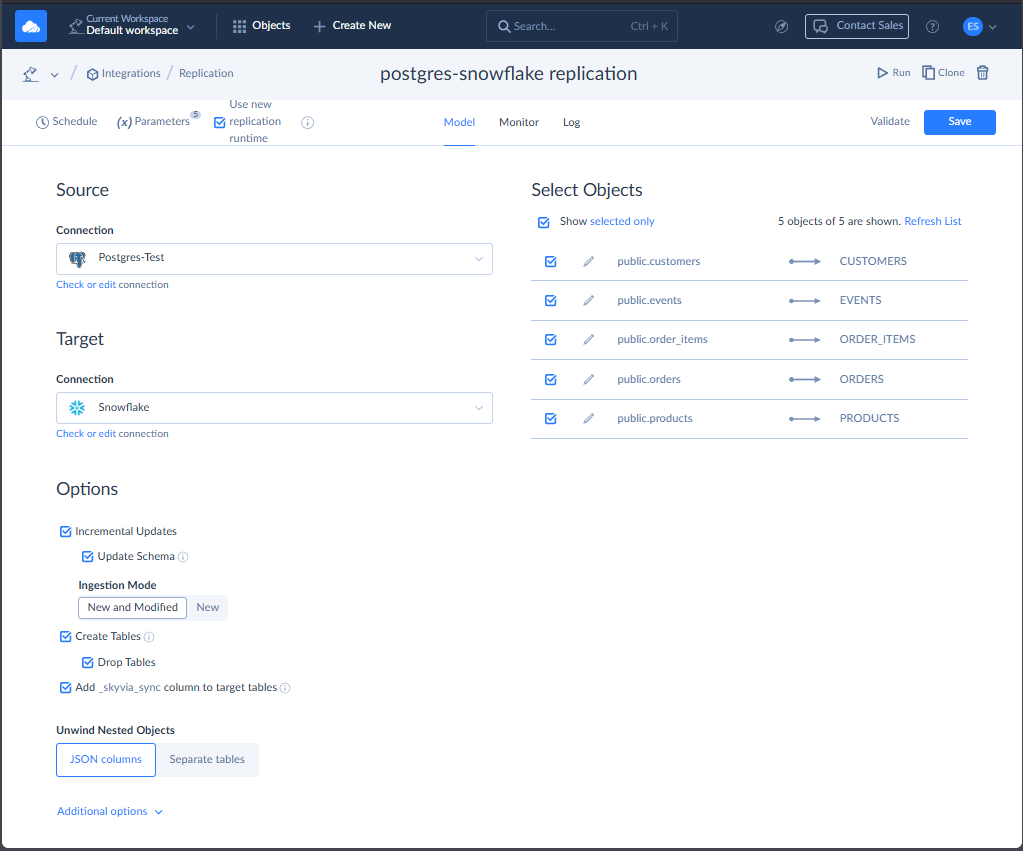
Our first run in the test failed. We’d created the Snowflake tables by hand, and the data didn’t fit them. Once Skyvia created the tables itself, replication finished, and the record counts in Snowflake lined up with Skyvia’s log.
The same pipeline pattern appears in production. Fintech company CashMe used Skyvia to synchronize PostgreSQL data with Snowflake and automate data collection from Microsoft Dynamics and other business systems. Its analytics team evaluated Talend, Pentaho and Matillion before choosing Skyvia, and had the pipelines running within three weeks.
Best for transformation-heavy pipelines in the warehouse: Matillion
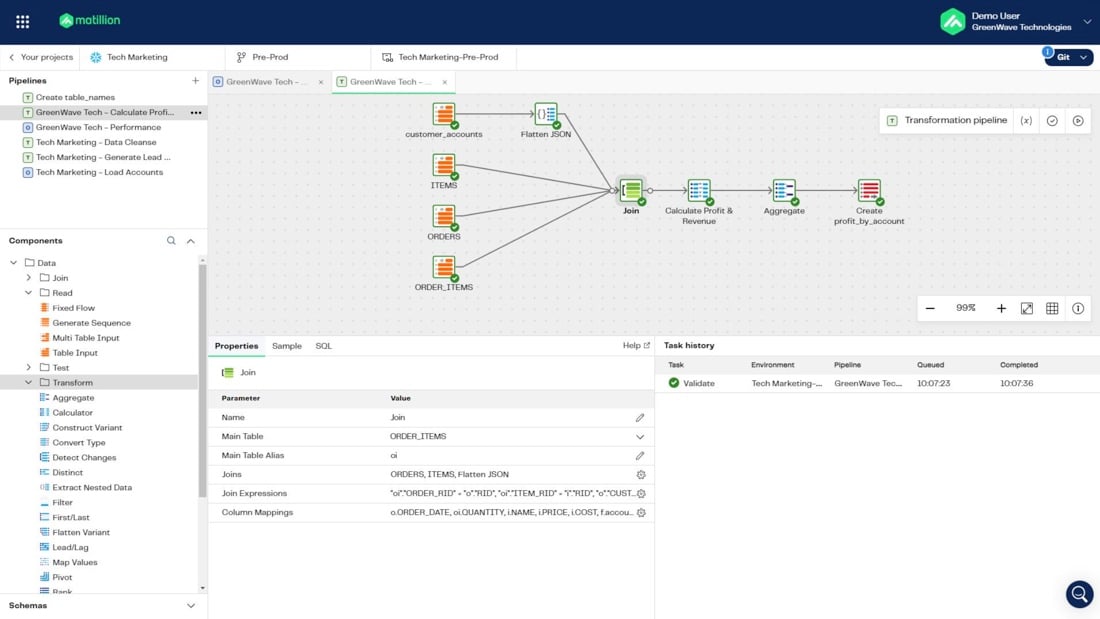
Matillion pushes transformations down into your warehouse and gives you a visual designer with dbt support. Its newer layer, Maia, brings AI agents that build and manage pipelines.
- Best for: warehouse teams whose work is mostly transformation and who like a visual designer.
- Part of the pipeline: transformation and orchestration come first, ingestion second. Streaming CDC is on the Scale edition.
- Pricing: not published. You pay in Matillion Credits: 1 credit per task hour for orchestration, 3 for transformation, plus credits per developer user. A 14-day trial includes 500 credits, and there’s no free plan.
- Fastest sync: schedules as tight as one minute, with streaming CDC on Scale.
- Deployment: full SaaS on every edition, and hybrid (your own runners) on Scale.
Strengths
- One designer holds SQL pushdown, Snowpark and dbt Core.
- Credits meter pipeline execution time (task hours) instead of data volume.
Limitations
- Neither a price nor a credit rate is published.
- Streaming CDC, hybrid deployment and lineage are Scale-only, and every streaming pipeline needs a runner of its own.
Best for continuous CDC billed as you go: Estuary
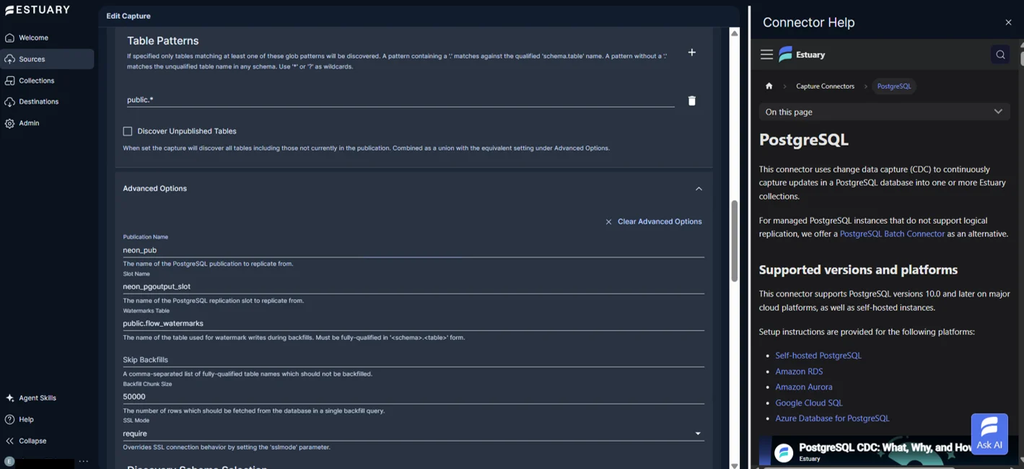
When a row changes in your database, Estuary catches it right away and passes it on to a warehouse or another destination. Batch and streaming share one product. You may know it as Estuary Flow, its name before March 2026.
- Best for: anyone whose scheduled syncs feel stale but who doesn’t want an enterprise contract.
- Part of the pipeline: streaming and CDC, plus batch ingestion.
- Pricing: you pay $0.50 per GB, plus $100 a month for each of your first six connector instances ($50 each after that), billed monthly and with no minimum. There’s a free Developer plan, too, good for 10 GB a month across 2 connector instances.
- Fastest sync: capture streams continuously. Warehouse loads, though, go out every 30 minutes by default, and you can shorten that.
- Deployment: a multi-tenant cloud by default, while Enterprise customers can get a private data plane or bring their own cloud.
Strengths
- The usage rates sit on the pricing page, and signing up for the free plan takes no card.
- You get real-time capture and scheduled batch from the same product.
Limitations
- Every GB is counted at capture and counted again at each destination, measured as uncompressed JSON.
- Want SSO, a HIPAA BAA or private networking? That’s Enterprise.
Best for real-time streaming in big enterprises: Striim
Instead of polling tables, Striim reads the database transaction logs, so every change streams out as it lands. Transformation happens in flight, and the output goes to warehouses, lakes or messaging systems.
- Best for: enterprises running operational systems or analytics that can’t wait more than a second for replicated data.
- Part of the pipeline: streaming and CDC.
- Pricing: striim.com lists no prices. Striim does publish one figure, on its own AWS Marketplace listing: Striim Cloud Enterprise from $45,000 a year, on a 12-month contract. The free Developer plan allows 25M events a month.
- Fastest sync: continuous CDC, though sources without logs fall back to an incremental batch reader.
- Deployment: Striim Cloud if you want it fully managed on AWS, Azure or Google Cloud, and Striim Platform if it has to run on your own servers.
Strengths
- It streams straight from database logs and transforms in flight.
- A free Developer plan lets you try it first.
Limitations
- The cheapest published paid entry is a $45,000 annual commitment.
- The Developer plan skips the high-performance SQL Server and Oracle CDC readers and runs in one US region.
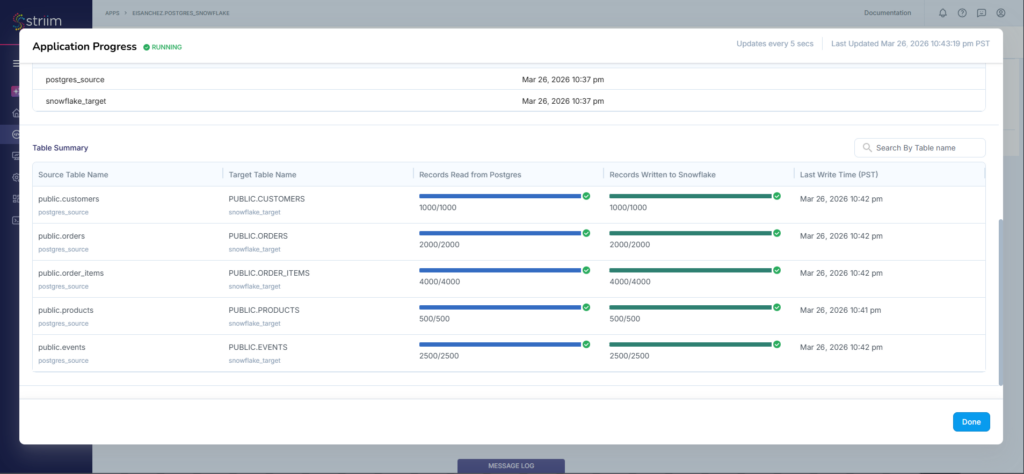
In our test, the PostgreSQL to Snowflake flow replicated all five tables.
Best for integration with data quality and governance: Qlik Talend Cloud
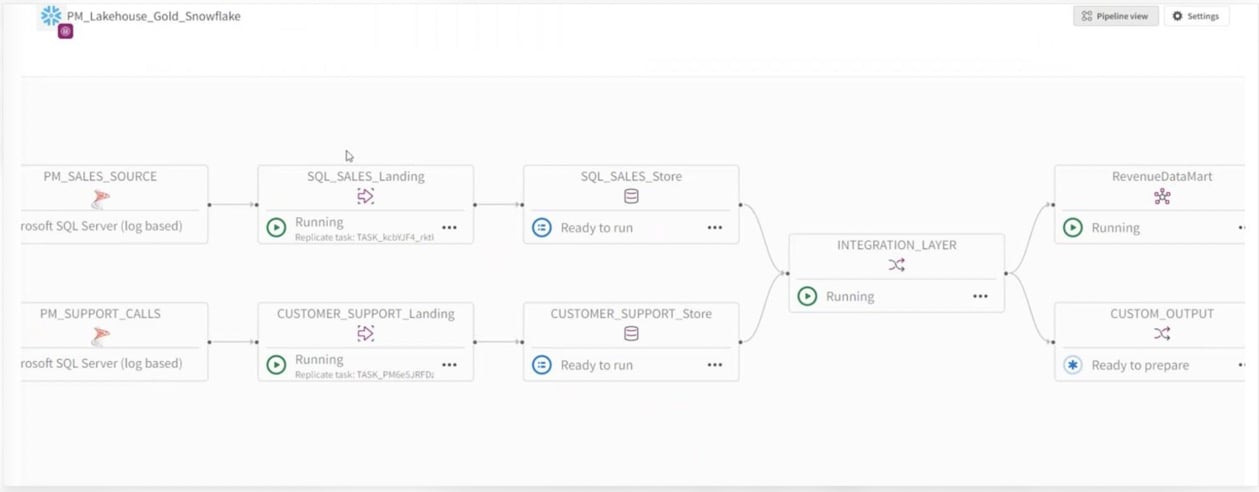
Qlik Talend Cloud puts data movement, transformation and data quality under one subscription. Hybrid options cover on-premises sources.
- Best for: mid-size and large companies that want movement and governance from a single vendor.
- Part of the pipeline: enterprise integration, meaning ingestion and CDC, transformation from Premium, and data quality.
- Pricing: qlik.com shows no prices. Qlik’s AWS Marketplace listing starts Starter at $6,000 a year on a 12-month contract, for up to 50 GB moved a month, and other editions are quoted. The 14-day trial needs no card.
- Fastest sync: hourly on Starter, and continuous CDC on Standard and up with the Data Movement gateway.
- Deployment: Qlik Cloud SaaS, with a customer-hosted gateway and hybrid deployment from Standard.
Strengths
- Data quality and governance come in the same subscription as data movement.
- Hybrid deployment handles on-premises databases.
Limitations
- Transformations start at Premium, and Starter has no low-latency CDC.
- Talend Studio isn’t part of the trial.
In our test, the Snowflake connection passed its check with a username and password. The Prepare step then demanded a private key file, and switching the connection to key-pair authentication fixed it. Qlik’s docs say password sign-in only rules out the Snowpipe Streaming loading method, so find out which method your task uses.
Best for enterprise data management in one cloud platform: Informatica
Integration, data quality, catalog and governance all live in Informatica’s Intelligent Data Management Cloud, and you pay for it in Informatica Processing Units. Salesforce bought Informatica in November 2025.
- Best for: enterprises that would rather run integration and data governance from a single platform.
- Part of the pipeline: enterprise integration, which here means ingestion, replication and CDC, plus transformation and quality.
- Pricing: in Informatica Processing Units, quoted on request. Cloud Data Integration-Free covers up to 20M rows or 10 compute hours a month (a work email is required), and the PayGo upgrade has no published rates.
- Fastest sync: scheduled batch on the free tier, with replication and CDC in the paid Data Ingestion and Replication service.
- Deployment: cloud, using Informatica-managed compute or a Secure Agent on your servers.
Strengths
- The free tier is roomy enough for a genuine first project.
- Integration, catalog and quality share one platform and one billing unit.
Limitations
- There’s no list price, because IPU pricing is quote-only.
- The free edition carries no SLA, sits outside the SOC 2 environment and gets community support only.
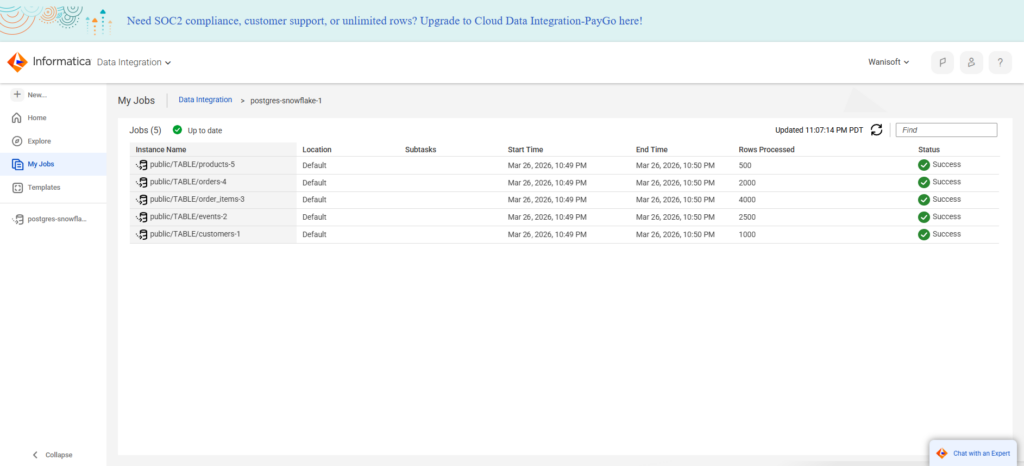
In our test, a Gmail address was fine for sign-up, but building a pipeline asked for a business email. Configuration help follows whichever field you’re on, so the forms feel lighter than most, and the job loaded the same tables.
Best for transforming data inside the warehouse: dbt
dbt turns SQL select statements into tested, documented models that run inside your warehouse. It doesn’t move data in. Think of it as the “T” that follows once an ingestion tool has done the loading. The hosted product is now called the dbt platform.
- Best for: analytics engineers who write SQL and want version control, tests and docs around their models.
- Part of the pipeline: transformation.
- Pricing: Starter is $100 per user a month, billed monthly, with 15,000 successful models built a month. The free Developer plan gives you one seat and 3,000 models a month, and Enterprise is quoted.
- Fastest sync: not applicable, since dbt doesn’t sync anything. You trigger jobs by cron schedule, on a merge, after another job finishes or from the API.
- Deployment: use the hosted dbt platform, or run the open-source CLI on machines you control.
Strengths
- Your models, tests and docs live in Git right next to the application code.
- And the open-source edition is free.
Limitations
- SSO, RBAC, SCIM and audit logging need Enterprise.
- Runs on the free plan halt after 3,000 models a month.
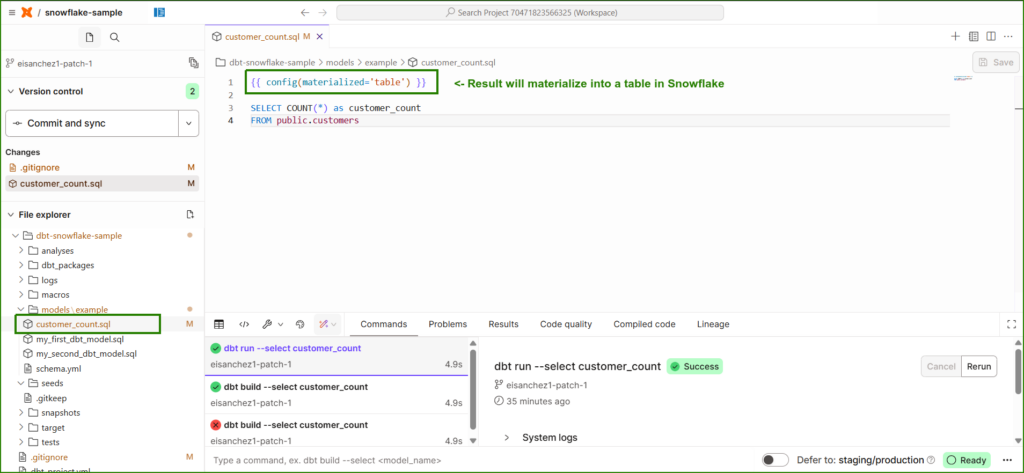
In our test, the sample model took the replicated data and built a materialized table from it in Snowflake.
Best for scheduling and chaining every step: Apache Airflow
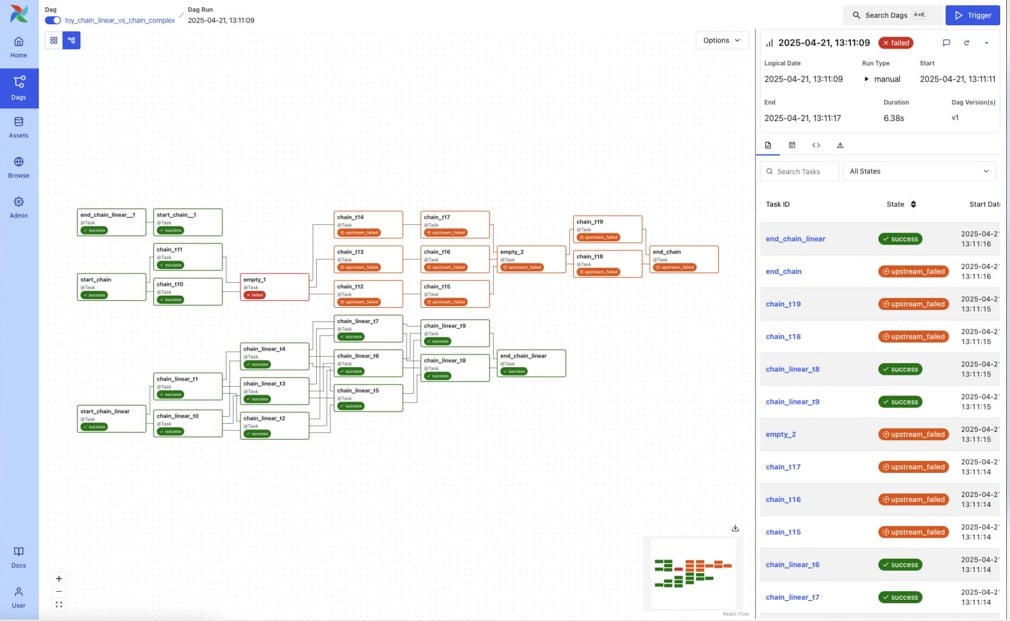
Apache Airflow is the conductor here: it runs ingestion, then the dbt models, then the checks, each step waiting on the one before. It’s open source and free, with workflows written in Python.
- Best for: engineering teams wiring custom dependencies across lots of systems.
- Part of the pipeline: orchestration, nothing else.
- Pricing: the software is free under the Apache license, but the servers aren’t. Managed options bill compute time. Amazon MWAA starts at $0.29 an hour for a micro environment, billed per second, and Astronomer’s deployments start at $0.35 an hour.
- Fastest sync: doesn’t apply, because Airflow moves no data itself. You can start runs on a clock or let events like an asset update or an API call kick them off.
- Deployment: on your own infrastructure, or as a managed service from Astronomer, Amazon MWAA or Google Cloud.
Strengths
- Any dependency you can express in Python works, across any system.
- The community is large, and every major cloud has a managed option. In Joe Reis’s 2026 State of Data Engineering survey, 22.9% of respondents run self-managed Airflow.
Limitations
- It isn’t a no-code tool, so some code comes with every workflow.
- Batch workflows are what it was made for, and streaming isn’t. Airflow 2 hit end of life in April 2026. Many tutorials still use it, so you’ll be adapting their code to Airflow 3.
Which tool fits each job
- For managed ingestion: Fivetran takes care of the connectors and their maintenance. Hevo Data is another option if you prefer published plan prices.
- Your team writes code and wants open source or self-hosting: Airbyte is the fit.
- You also need reverse ETL and app-to-app sync without code: that points to Skyvia.
- Most of your work is transformation inside the warehouse: dbt suits people who write SQL and keep it in Git, while Matillion suits people who prefer a visual designer.
- Dashboards need data as it changes, not every 15 minutes: Estuary if the budget is pay-as-you-go (set its warehouse sync frequency lower), or Striim if you’re operating at enterprise scale.
- Governance and data quality matter as much as movement: compare Qlik Talend Cloud with Informatica.
- You need one schedule that runs ingestion, dbt and checks in order: Apache Airflow does that.
Data pipeline tools compared: role, price and sync
| Tool | Part of the pipeline | What you pay for | Entry price | Fastest sync |
|---|---|---|---|---|
| Fivetran | Ingestion and ELT | Monthly Active Rows | Free plan, 500K MAR; $5 base charge per Standard connection a month | 15 min (Standard), 1 min (Enterprise) |
| Airbyte | Ingestion and ELT | Credits (cloud); free self-hosted | Standard $20 a month, billed monthly | 1 hour (Standard), 5 min (Pro) |
| Hevo Data | Ingestion and ELT | Events | Starter $299 a month billed monthly ($265 annually) | 1 hour (Starter) |
| Skyvia | Ingestion, reverse ETL, sync, orchestration | Records written a month | At 5M records: Basic $79 a month billed annually ($99 monthly) | 1 min (Professional) |
| Matillion | Transformation and orchestration | Credits (task hours, users) | Not published; 14-day trial | 1 min schedules; CDC on Scale |
| Estuary | Streaming and CDC | GB moved plus connector instances | $0.50 per GB + $100 a month per instance | Continuous capture; warehouse loads every 30 min by default |
| Striim | Streaming and CDC | Events, compute, transfer | $45,000 a year (AWS Marketplace) | Continuous CDC |
| Qlik Talend Cloud | Enterprise integration | Data volume | Starter $6,000 a year (AWS Marketplace) | 1 hour (Starter); continuous (Standard+) |
| Informatica | Enterprise integration | Processing Units | Quote; free tier 20M rows a month | Scheduled; CDC on paid service |
| dbt | Transformation | Seats and models built | Starter $100 per user a month, billed monthly | Not a sync tool |
| Apache Airflow | Orchestration | Free; managed by compute hour | MWAA from $0.29 an hour | Not a sync tool |
How the pieces fit together
Production stacks rarely stop at one tool, and moving data eats a good share of the effort: in Joe Reis’s 2026 State of Data Engineering survey of 1,101 practitioners, 48.1% named ingestion and pipelines among the areas that take most of their time. Typically an ingestion tool such as Fivetran, Airbyte, Hevo or Skyvia sits up front and loads the raw tables, and dbt models them once they’re in the warehouse. Running them in sequence is Airflow’s job, unless the ingestion tool’s scheduler already covers it. Fraud checks, inventory and operational dashboards are the cases where minutes are too slow, and that’s when a streaming tool takes over the first step.
Two traps come up again and again. First, people treat an orchestrator like an ingestion tool. Airflow is able to call an API and drop the result into a table. But do that for every source and you’re maintaining a pile of homemade connectors. The other is paying for streaming to feed a daily report. When the numbers only get checked every 15 minutes or every hour, syncing at that pace costs less and breaks less.

FAQ for Data Pipeline Tools

Is ETL the same as a data pipeline?
No. ETL (extract, transform, load) describes one specific pipeline type, in which data gets cleaned before it’s loaded. “Data pipeline” is the wider term. It also takes in ELT, where raw data lands first and gets transformed in the warehouse, along with streaming pipelines and reverse ETL back into apps.
Do I need Airflow if I already use an ingestion tool?
Not always. Most ingestion tools come with their own scheduler, and dbt’s hosted platform can kick off jobs after a sync. Airflow starts to pay off when you need one schedule spanning many tools, custom dependencies, or steps that no single product covers.
Which data pipeline tools are open source?
Three of them: Airbyte (its self-hosted Core), dbt (the command-line version) and Apache Airflow. They’re free and open source, though you still pay for the servers that run them and for the time it takes to maintain them.
Want ELT, reverse ETL and app-to-app sync in one no-code platform? Start with Skyvia’s free plan and schedule your first pipeline from PostgreSQL, Salesforce or 200+ other sources.