Summary
- Manual CSV exports – the zero-cost, zero-scale option for a single audit that will never happen again.
- Custom Python – full control and full maintenance for teams with engineers to spare.
- Skyvia – no-code setup and volume-based pricing for teams that want a working pipeline without hiring for it.
- Fivetran – enterprise-grade reliability and support, priced for teams where downtime costs more than the tool.
- Airbyte (self-hosted) and CData – full data-plane control inside your own VPC, in exchange for owning the infrastructure yourself or through licensing.
NetSuite runs the financial core of a business well, but it can’t tell you how ad spend, CRM pipeline, and product metrics relate to the revenue sitting in its own tables. It has no idea those systems exist. However, if you move that data into BigQuery, you finally get one source of truth instead of five disconnected reports.
One small detail, though. This pipeline fights back a little. NetSuite’s API doesn’t like too aggressive syncs. Every transaction splits into a header and a pile of line items that only make sense once properly joined. And don’t get me started on authentication, which is its own small project before any data makes the first step.
Quick disclosure: we build Skyvia, so we’re biased toward simple, no-code, volume-priced pipelines, the way a fish is biased toward water. Yet, we do know that you can’t compare the needs of a ten-person data engineering team doing push-down transformations inside an isolated VPC with the needs of a solo analyst or RevOps who just wants NetSuite talking to BigQuery.
What follows judges manual exports, custom scripts, and the major platforms on real performance, not vibes.
How Did We Test and Evaluate These NetSuite-to-BigQuery Methods?
Nobody trusts a comparison built on vendor marketing pages, so we didn’t build one that way. Every method in this piece ran against the same real setup, under the same load, for the same stretch of time.
Testing Environment
Source System
An Oracle NetSuite Sandbox on the Enterprise tier, loaded with 500,000+ transactional records across TRANSACTION, TRANSACTIONLINE, CUSTOMER, INVOICE, and ACCOUNT, plus 20+ custom entity fields. This is enough custom-field chaos to be a fair stand-in for a real production account (we checked – true), and enough to make at least one engineer mutter “who built this schema” (100% true) out loud, unprompted, more than once.
Target Warehouse
We moved data into BigQuery, and while doing so, we deliberately stayed on Standard Storage and Compute to avoid favoring any particular contestant.
Evaluation Timeframe
40+ long engineering hours were spent on extraction throughput and API error recovery. During this time, we also evaluated how fast schema changes actually made it into BigQuery. Somewhere around hour 30, “it’s probably a permissions thing” became an inner joke. Though it was, in fact, usually a permissions thing.
Comparison Criteria
API Protocol & Authentication
Does an approach use SuiteTalk REST, SuiteQL, SOAP, or SuiteAnalytics Connect ODBC? How does its connection method affect the process? Does it handle Token-Based Authentication cleanly or make you go dig through NetSuite’s setup menus? Answers to these and more questions are below.
Concurrency & Rate Limit Resilience
What happens when the pipeline hits SSS_REQUEST_LIMIT_EXCEEDED or an HTTP 429 under a 10-concurrent-request cap? Some of them backed off and kept going, and some just stopped and stayed helpless until we intervened.
Automatic Schema Evolution
Whether new custbody_ and custcol_ fields land in BigQuery on their own, or whether someone has to go update a mapping file by hand every time NetSuite changes something, again.
Incremental Sync Efficiency
Whether the tool tracks changes with something precise, like log-based capture, or falls back on polling lastmodifieddate and occasionally re-scanning half the database just to be sure.
Total Cost of Ownership (TCO)
A real 12-month cost comparison – volume-based pricing against Monthly Active Rows against the DevOps hours of running it yourself. We didn’t base this on the number on the pricing page, which, as it turns out, is rarely the number you pay in the end.
What Core Technical Hurdles Make NetSuite Data Extraction Complex?
NetSuite data extraction is a complex question because it has multiple answers – three fundamentally different APIs: SuiteTalk SOAP/REST, SuiteQL via REST, and SuiteAnalytics Connect (ODBC/JDBC). Each comes with distinct capabilities, authentication models, and governance rules, which means they can’t be alternatives to each other.
How Do SuiteTalk, SuiteQL, and SuiteAnalytics Connect Differ?
SuiteTalk REST / SOAP Web Services
This is NetSuite’s original API, and it comes in two versions that behave nothing alike.
- SOAP is the old one – XML, a WSDL contract, and the annoying part: that contract needs regenerating whenever custom fields change enough.
- REST is what most new integrations use now – JSON, OAuth 2.0, and custom fields show up without you having to regenerate anything.
Both versions were designed for transactional, record-level operations, including working with sublists (e.g., item lines on sales orders). Deeply nested structures often require multiple calls or careful handling of subrecords.
SuiteQL (REST Web Services)
SuiteQL is the one that finally lets you write something resembling SQL against NetSuite for analytical queries. You can join tables, filter, aggregate – actual queries instead of fetching one sales order at a time and stitching the pieces together yourself. It’s read-only, full stop, so anything that writes data still has to go through SuiteTalk.
There’s also a hard cap: 100,000 rows per query. Fine for a filtered monthly pull, but not fine for five years of order history in one shot. At that point, you need SuiteAnalytics Connect.
SuiteAnalytics Connect (ODBC/JDBC)
Connect skips the API entirely. You point a standard ODBC or JDBC driver at NetSuite’s analytics data source and query it like a database. Custom records and custom fields show up as real tables and columns.
Connect isn’t included by default. It’s a separate feature you have to turn on and pay for, and depending on your edition, that’s a conversation with your NetSuite rep.
How Do NetSuite Concurrency Limits and Governance Points Impact Data Ingestion?
Every account gets a cap on how many requests can run at the same time, and SOAP, REST, and RESTlets all draw from that same number. The starting point depends on your tier: about 5 concurrent requests on Standard, 15 on Premium, and 20 on Enterprise and Ultimate.
If you buy a SuiteCloud Plus license, you will get roughly 10 more. Let’s do the math: a Premium account with five of them ends up with something like 65 slots. That might sound like a lot, until every system you run reaches for it in the same ten minutes.
NetSuite returns CONCURRENCY_LIMIT_EXCEEDED or an HTTP 429 if you dare to exceed the limit, and it’s on your pipeline to handle. Anything that runs past 15 minutes gets killed automatically without an exception. Which means retry logic with backoff is a must if you’re moving real volume. Also, it’s worth pinging GET /services/rest/system/v1/governanceLimits before a large run to check how much room you’ve got.
How Should You Handle NetSuite Relational Line Items and Custom Schema Drift?
A NetSuite transaction isn’t a single row, but a header sitting next to a stack of line tables, TRANSACTION on one side, TRANSACTIONLINE and TRANSACTIONACCOUNTINGLINE on the other. Keep the same split on the destination side – one table for headers, one for lines, joined on transaction ID, and put custbody_ fields on the header table, custcol_ fields on the line table.
For the drift itself, five things work:
- Ask NetSuite what’s there
A field list from January is a rumor by June. Read the JSON metadata for SuiteTalk REST, since it already knows about new custom fields the second they’re created, and query the system tables for Connect to see what’s genuinely sitting there today.
- Teach the destination to keep up on its own
A new custom field that your BigQuery table can’t hold just moved somewhere else and will surface later as someone’s problem. Set up automated type inference and DDL migration so new columns show up unprompted and type changes get flagged.
- Give headers and lines their own tables
Put custbody_* fields on the header table and custcol_* fields on the line table, and let SuiteQL or Connect do the joining.
- Make sure your integration can see what you’re pulling
Confirm the role behind your OAuth token can see every custom field and record you need. A field can go invisible to an integration without so much as a warning.
- Don’t wait for a broken load to tell you something changed
Set alerts for new or removed fields, type changes, and SuiteQL or ODBC queries that suddenly start throwing invalid-field errors. Keep a short log of what changed in NetSuite and when.
What Are the 3 Best Ways to Move Data from NetSuite to BigQuery?
There are three ways to move NetSuite data into BigQuery: export it yourself, build it yourself, or let a managed platform do it. That third path splits into four tools (that’s how many we tested) depending on how much control you want to give up – Skyvia, Fivetran, Airbyte, and CData – so we tested all four head-to-head.
| Criterion | Method 1: Manual CSV Export & GCS Upload | Method 2: Custom Python Scripts (SuiteTalk / SuiteQL) | Method 3: Automated NoCode ELT Platform (e.g., Skyvia) |
|---|---|---|---|
| Technical Approach | Export NetSuite saved searches/reports to CSV → upload to GCS → batch load into BigQuery | Python scripts call SuiteTalk REST/SOAP and SuiteQL → handle auth, pagination, transforms → load to BigQuery via client library | Configure prebuilt NetSuite and BigQuery connectors in a cloud ELT tool; schedule packages; tool handles API calls and loads |
| Setup & Maintenance Overhead | Setup: very low. Maintenance: high (manual exports, uploads, loads every run) | Setup: medium–high (code, deployment, NetSuite integration). Maintenance: medium–high (schema changes, monitoring, retries) | Setup: low–medium (UI config). Maintenance: low–medium (monitor jobs, adjust mappings; platform handles most API issues) |
| Core Tradeoffs & Limitations | + No code, cheapest. – Not scalable, manual, errorprone, poor freshness, hard to handle drift/deletes | + Full control, low license cost, highly customizable. – High engineering effort; you own pagination, governance, schema drift, monitoring. | + Fast, no code, scheduled, repeatable. – Polling-based architecture (minimum 1-minute sync interval; not sub-second event streaming) |
| Best For | Oneoff analyses, tiny volumes, occasional snapshots | Developerheavy teams wanting maximum control and lowest license cost | Solo data analysts, BI teams, RevOps leads, and lean data teams wanting set-and-forget pipelines with predictable pricing |
Method 1. How Do You Move NetSuite Data to BigQuery Manually Using CSV Exports?
This is truly one of the pillars of moving data from one place to another. Lots of tools make the process easier and faster, but whether they can entirely exclude manual import/export is still a question, a philosophical one.
Best for
Small teams, one-off audits, or when you can’t/don’t want to pay for one more tool to be in the middle of these two. If your NetSuite footprint is a few hundred thousand rows and your reporting cadence is “once a quarter,” this method covers it just fine.
Pricing
NetSuite doesn’t charge per export. BigQuery doesn’t charge to load a CSV. What you actually pay for is storage and queries. BigQuery charges:
- Roughly $0.02-$0.023 per GB per month for active data, with the first 10 GiB free.
- $6.25 per TiB scanned for on-demand queries, with the first TiB free every month.
For a modest NetSuite dataset, that lands somewhere in the tens to low hundreds of dollars a month.
Step-by-Step Guide
- Export from NetSuite:
- Go to the Reports tab, choose Saved Searches, and then click on All Searches.
- Find the one that you need and click View.
- Above the file, you will see different export options. Click on CSV, and the file will land in your Downloads folder.
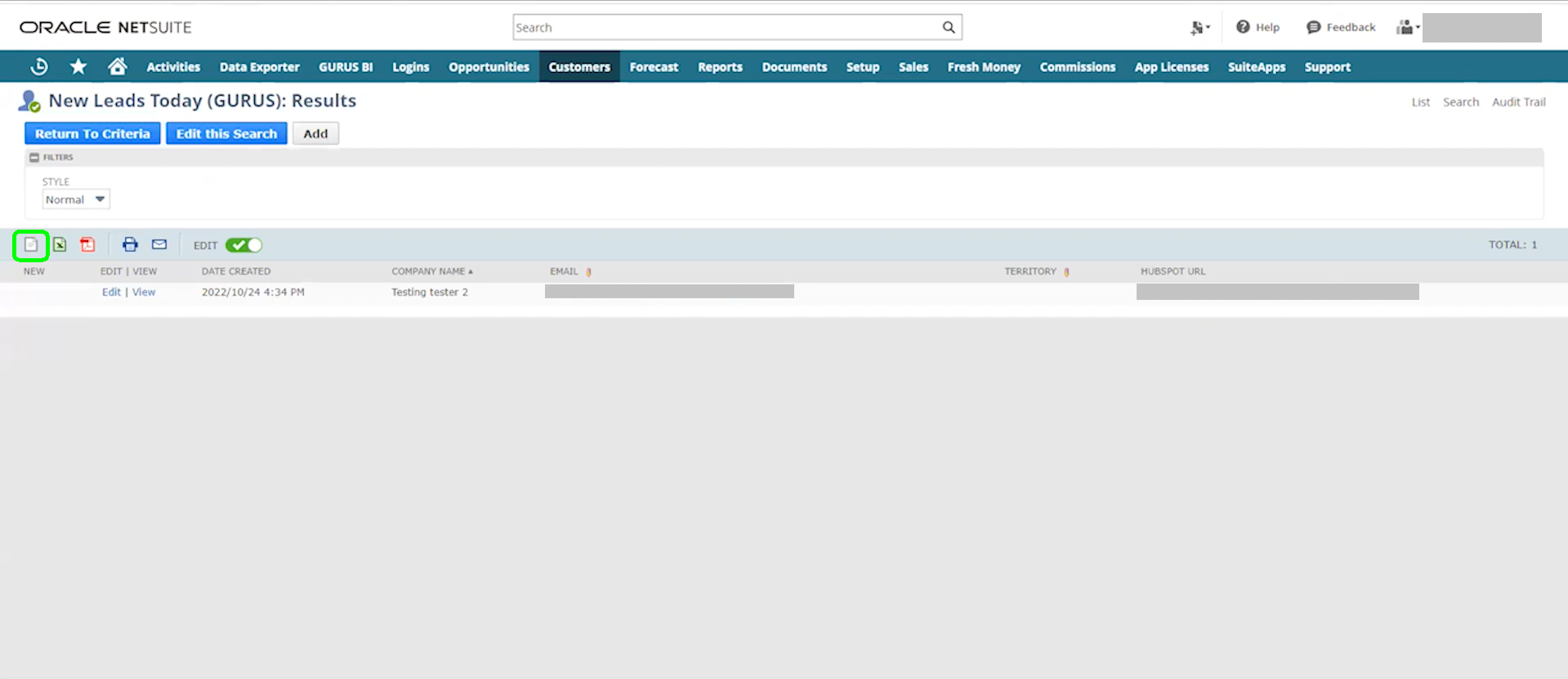
- For manual export, you can also use SuiteAnalytics Workbook if you’ve got one set up.
Note: Reports are capped at around 25,000 rows, but some financial reports can go up to 75,000 rows. If your dataset is bigger than this, split it by date or subsidiary and run it more than once.
- Validate the file before it goes anywhere:
Confirm UTF-8 encoding without a BOM.
- Check that column headers are clean.
- Standardize date formats.
- Strip out currency symbols that’ll confuse BigQuery’s parser.
Note: NetSuite truncates decimals to two places, so if precision matters, export from Excel instead.
- Load it into BigQuery:
- Option 1: Through the Console. Create a dataset (if you don’t have one) and upload the file. You can let schema auto-detection handle column types, or define them yourself for anything going to production.
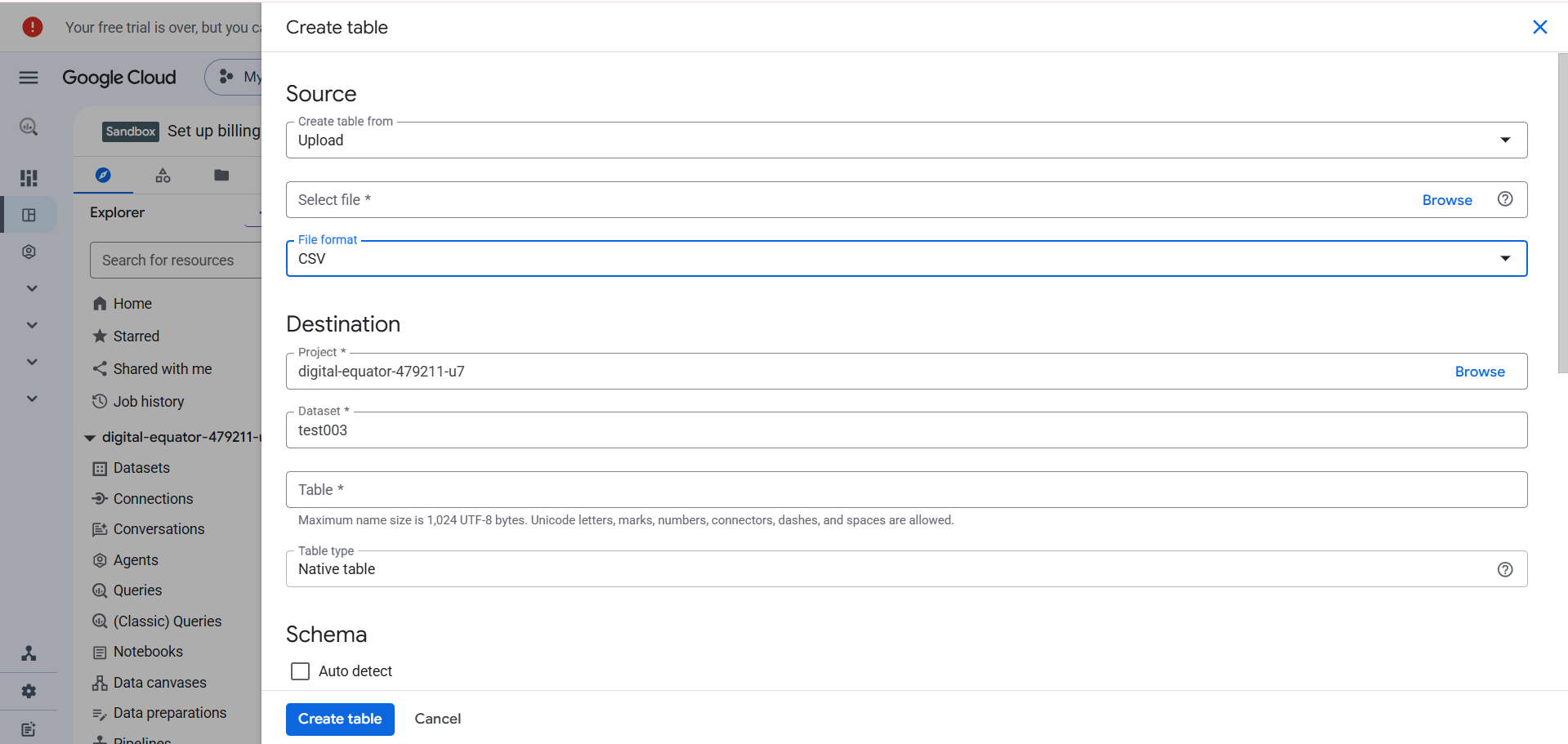
- Option 2: Through the
bqload command with autodetect if you’d rather script it and skip the clicking.
bq load \

--source_format=CSV \

--skip_leading_rows=1 \

--autodetect \

netsuite_raw.transactions_export_2026_09 \

gs://my-netsuite-exports/netsuite_transactions_export.csv - Transform once it’s in. Normalize headers, cast strings into proper types, split header and line-item data into separate tables, and if you’re doing this on a recurring basis, use MERGE statements to upsert instead of reloading everything from scratch each time.
Pros
- No third-party software licensing fees.
- Since you’re writing the saved search criteria yourself, you get full control over exactly what gets extracted.
- Doesn’t touch SuiteTalk or SuiteQL concurrency at all, which is useful if your account’s already tight on request headroom from other integrations.
Cons
- Zero real-time visibility. This is a snapshot method, and the snapshot ages the moment you take it.
- Unencrypted CSV files sitting on local machines are a security and GDPR problem waiting for an audit to find it.
- NetSuite doesn’t send a warning when a custom field gets added or renamed. Your pipeline just stops including it.
- It takes hours of manual labor if you’re doing this regularly, which is exactly the point where “free” stops being the right way to describe it. Also, there’s a human factor, so something might get lost, forgotten, or duplicated.
Method 2. How Do You Build a Custom Python Pipeline Using SuiteTalk and BigQuery APIs?
This is the option for teams who read Method 1 and thought, “Well, that won’t do for me because I didn’t learn all that Python for nothing.”
Best for
If your data platform is meant to be a long-term asset you control end to end, this is the method that gets you there. If you just need daily invoice numbers in a dashboard, this is a lot of engineering, coding, and some other –ings. Sometimes, even including suffering for that.
Go for this method when a pre-built connector can’t provide deep enough transformations or joins across multiple sources mid-pipeline. It is also a great option for cases when data has to go back into NetSuite.
And all of that only becomes possible with engineers already on the team, or with the budget to bring some on.
Pricing
The price here consists of details that mostly stay the same as any other method (SuiteQL access is included, BigQuery bills for storage and query scans as usual). The most pricey detail is engineering time.
Step-by-Step Guide
- We kept the scope tight. SuiteQL via REST became our only NetSuite API and we landed on five BigQuery tables:
customers,accounts,invoices,transaction_lines, andtransactions_headerfor the non-invoice stragglers. - Our project structure was boring on purpose.
   netsuite_to_bq/
     ├─ .env
     ├─ main.py
     ├─ netsuite_client.py
     ├─ bq_loader.py
     ├─ queries/
     │   ├─ customers.sql
     │   ├─ accounts.sql
     │   ├─ invoices.sql
     │   └─ transaction_lines.sql
└─ requirements.txt - We handled authentication with OAuth 1.0a and HMAC-SHA256 signing.
   oauth = OAuth1(

       client_key=NS_CONSUMER_KEY,

       client_secret=NS_CONSUMER_SECRET,

       resource_owner_key=NS_TOKEN_ID,

       resource_owner_secret=NS_TOKEN_SECRET,

       realm=NS_ACCOUNT_ID,

       signature_method=oauthlib.oauth1.SIGNATURE_HMAC_SHA256,

   )
Keys and tokens stayed in .env, never in the script itself.
- We built a paginator to work around SuiteQL’s limits. 1,000 rows per page, 100,000 rows per query, no offsetting past that ceiling.
   def fetch_all_suiteql(query, page_size=1000, max_rows=100_000):

       all_rows = []

       offset = 0

       while offset < max_rows:

           result = run_suiteql_query(query, limit=page_size, offset=offset)

           items = result.get("items", [])

           if not items:

               break

           all_rows.extend(items)

           if len(items) < page_size:

               break

           offset += page_size

       return all_rows
For anything that could realistically cross 100K rows (a full year of transaction lines, in our case) we split the query by quarter before the API split it for us with an error.
- We loaded into BigQuery with schemas we defined ourselves. You can always go for autodetect if you’re prototyping and just want to see the data land somewhere.
   job_config = bigquery.LoadJobConfig(

       source_format=bigquery.SourceFormat.NEWLINE_DELIMITED_JSON,

       write_disposition="WRITE_APPEND",

       schema=schema,

       autodetect=False,

   )

   BQ_CLIENT.load_table_from_json(rows, table_id, job_config=job_config)
We partitioned by date – trandate or lastmodifieddate, depending on the table – and clustered by whichever ID we’d filter on most, usually customer_id or account_id.
- We set up watermarks because we didn’t want to re-pull everything daily. A small
meta.watermarkstable held the last successful timestamp per entity. Each run read it, queried NetSuite for anything newer, and, on success, wrote the new max back with aMERGE:
   MERGE `project.netsuite.watermarks` T

   USING (SELECT @entity AS entity_name, @value AS watermark_value, CURRENT_TIMESTAMP() AS updated_at) S

   ON T.entity_name = S.entity_name

   WHEN MATCHED THEN UPDATE SET watermark_value = S.watermark_value, updated_at = S.updated_at

WHEN NOT MATCHED THEN INSERT (entity_name, watermark_value, updated_at) VALUES (S.entity_name, S.watermark_value, S.updated_at) - Concurrency limits got the respect they’re owed. We capped ourselves at 5-10 parallel requests, and loaded in order. Customers and accounts went first, since they’re smaller and change less. The invoices and transaction lines were next.
- For the sake of the experiment, we scheduled it to fail. Cron triggered the script daily. Each entity ran inside its own
try/exceptso one failure wouldn’t take the rest down with it, and every run logged row counts and watermarks to stdout, where we’d see them the next morning.
Pros
- Customization in its fullest and purest form. Nobody’s pre-built connector logic stands between you and the exact shape you want the data in.
Cons
- Realistically, 60+ engineering hours to build something that holds up.
- Maintenance becomes your hobby. Every time NetSuite modifies an API endpoint, deprecates a field, or changes how a custom record behaves, you have to act, and better act quickly.
- The real cost hides in engineering salary; commonly somewhere in the $500-$2,000/month range in equivalent engineering time.
Method 3 & Tool Comparisons: Which NetSuite-to-BigQuery Integration Tool Fits Your Specific Use Case?
And the third method is for those who want to automate their regular, large-scale syncs.
What Evaluation Criteria Did We Use to Compare Integration Tools?
We picked the things that break a NetSuite-to-BigQuery pipeline when they’re missing:
- NetSuite protocol support – SOAP vs. REST (SuiteTalk) isn’t a footnote. It decides whether custom fields and array data show up at all, or don’t.
- Automatic schema migration – someone adding a custom field sooner or later is the fate you can’t escape. Can your pipeline notice that, or will you find out during a broken dashboard?
- Sync frequency limits – the word “fast” has never meant more things at once than when it is used in vendors’ descriptions. What matters is the actual floor: minutes, hours, or a secret number that only shows up after you’ve signed the contract and built everything.
- Pricing transparency – can you predict next month’s bill from this month’s usage, or does it require a call with sales and a leap of faith?
- Reverse ETL / activation – data that stays in the warehouse is just expensive storage. We checked whether it can get back out and how easily.
Anything that failed one of these outright didn’t make the shortlist.
Detailed Comparison Matrix: NetSuite to BigQuery Integration Platforms
And here’s the shortlist itself.
| Evaluation Parameter | Skyvia | Fivetran | Airbyte (Self-Hosted) | CData Sync |
|---|---|---|---|---|
| Best-Fit Segment | Teams, solo analysts, RevOps, etc., wanting a lowcode, cloudhosted integration | Enterprise teams with dedicated data engineers & large budgets | Developer-led teams wanting VPC hosting & custom connector code | IT departments managing legacy on-prem infrastructure & ERPs |
| NetSuite Integration Protocol | NetSuite v2 (REST) connector (SuiteTalk REST); legacy SOAP connector | SuiteTalk Web Services / Suite Analytics Connect | NetSuite REST API (Community-built Connector) | SuiteAnalytics Connect (JDBC/ODBC) & SuiteTalk |
| Setup Complexity & Time | No-Code: Visual wizard (~10 min setup) | Low-Code: Configuration UI (~15 min setup) | High: Docker/Kubernetes infra management required | Moderate: Desktop/Server installation required |
| Sync Frequency | 1 min to 24 hrs (Flexible scheduling) | 1 min to 24 hrs (Plan dependent) | 1 min to 24 hrs (Cron dependent) | 1 min to 24 hrs (Scheduled jobs) |
| Schema Drift Automation | Automatic schema creation & column additions | Automatic schema creation & DDL evolution | Semi-automated (connector dependent) | Automated table alteration |
| Pricing Architecture | Volume-based (records moved, unlimited users & connectors, free tier available) | Monthly Active Rows (MAR) + per connector billing (Min. ~$12k/year) | Open-source software (Infra & DevOps cost) | Per-connector/Server licensing (Tiered annual licenses) |
| Reverse ETL Included? | Yes: Skyvia explicitly supports Reverse ETL (warehouse → SaaS) as part of its platform | Yes: Via Fivetran Activations (Census MAR billing) | No: Requires separate reverse-ETL tooling | Yes: Via CData write-back sync jobs |
| Transformation Model | Warehouse-side SQL/Hosted dbt Core | Warehouse-side via integrated dbt Labs | Warehouse-side via custom dbt integrations | Warehouse-side SQL scripting |
| G2 Usability Standing | G2 #1 Easiest to Use ETL Tool (2026) | Rated high for Enterprise, Moderate for Ease | Geared toward Software & DevOps Engineers | Geared toward IT & Database Administrators |
Why Is Skyvia Best for Lean Data Teams and No-Code Simplicity?
Skyvia is a no-code cloud data integration platform built to get data in and out of a warehouse without a line of code. It covers the full range of integration work – ETL and ELT, Reverse ETL, data sync, workflow automation, live data access – through more than 200 prebuilt connectors spanning SaaS tools, databases, and warehouses.
For NetSuite specifically, Skyvia provides two connectors – the legacy SOAP connector and the NetSuite v2 (REST) one, and only the second one is worth touching for this use case. It has proper support for arrays and custom fields and covers TRANSACTION, TRANSACTIONLINE, CUSTOMER, INVOICE, and ACCOUNT without issue.
Note: The following NetSuite objects billingaccount, priceplan, subscriptionchangeorder, subscription, subscriptionline, and usage aren’t supported.
BigQuery itself doesn’t have primary or unique keys. That’s just how it’s built, not a Skyvia limitation, and that absence ripples into what Skyvia can do there. Synchronization isn’t supported for BigQuery as a target, and neither is a true UPSERT. Insert works fine; update and delete work too, but only once you manually tell Skyvia which columns should act as the key, since BigQuery isn’t going to volunteer one.
For transactional data that keeps changing, that means designing packages with intent. You either insert-only, with deduplication handled downstream, or update/delete with a key you specify yourself – TransactionLine’s composite key included.
That’s the shape of it. The full walkthrough is coming up next.
Best for
Skyvia is built for anyone who’d rather solve the problem than manage it, whoever that happens to be on a given team.
- The data analyst who needs dashboards ready without waiting on engineering.
- The RevOps or marketing ops lead pushing CRM data into the warehouse and back out again.
- The IT manager who owns governance and access control and would like both to stay simple.
- The analytics lead who owns the budget and doesn’t want the stack choice to become its own project.
- Even the data engineer who wants configuration-as-code and API access. Everyone gets the same result with a point-and-click setup.
Rating
G2: 4.8/5 based on 321 reviews | Capterra: 4.8/5 based on 116 reviews
We’re also proud to hold G2’s #1 spot for the Easiest-to-Use ETL Tool.
Pricing
Skyvia’s pricing asks one question: how much data are you going to move? That’s the whole formula. A bit of math to see what you might pay for your NetSuite-to-BigQuery integration with us. Let’s take our test dataset as an example: 500K transactions plus their line items, customers, invoices, and accounts easily clears a million records a month, and that’s before counting a second weekly sync.
However, the Basic plan already covers 5M records a month at $79, which comfortably fits a weekly sync with room left over. If you double the volume to 10M for a twice-weekly sync, the same plan will cost $149 a month.
And before any money’s involved, the free tier is real enough to run your NetSuite data through it and watch what happens.

Full DWH Workflow
Start by doing nothing clever. Transactions, TransactionLines, Customer and Account land in BigQuery exactly as NetSuite kept them. No transformations, no shortcuts, nothing that could go wrong before the data’s even settled in.
Modeling happens next, and it’s worth pausing on where: this step runs in the warehouse, not in Skyvia. Once clean data has landed, you can shape it further with native BigQuery SQL or hosted dbt Core. Join transaction headers to line items, and you get something like a customer LTV and payment-health view:
SELECT
    t.EntityId AS netsuite_customer_id,
    SUM(-tl.Amount_TransactionCurrency_) AS total_lifetime_invoiced_amount,
    CASE WHEN MAX(t.Date) < DATE_SUB(CURRENT_DATE(), INTERVAL 90 DAY)
         THEN 'At Risk' ELSE 'Active' END AS payment_health_status
FROM `netsuite_skyvia.transactions` t
JOIN `netsuite_skyvia.transactionlines` tl ON tl.TransactionId = t.Id
WHERE t.Type = 'CustInvc'
    AND tl.MainLine = FALSE
    AND tl.TaxLine = FALSE
GROUP BY 1;
Then activate – push payment_health_status back via Reverse ETL, so sales and success teams see it on the Account record without ever needing a NetSuite login.
Pros
- Actually no-code, not “no-code-if-you-squint.” Pipeline running in minutes, and standard DWH scenarios that don’t need a developer.
- Custom fields work on their own. Skyvia picks up schema changes automatically and flags anything it can’t handle, instead of failing behind your back.
- 200+ connectors, and none of them cost extra. SaaS apps, databases, and warehouses are included on every plan.
- No juggling three vendors and three invoices to do one job. Ingest, model (hosted dbt Core or native SQL), activate back out with Reverse ETL, orchestrate the dependencies between pipelines.
- Unlimited seats, always. Add a teammate and the bill doesn’t change.
- Compliance doesn’t wait until you pay for the more expensive plan. SOC 2, GDPR, role-based access, and encryption at rest and in transit are already there.
- Built to scale past “solo analyst.” The same tool that gets one person running today holds up for an engineering-led team later.
Cons
- Skyvia’s quickest interval is one minute. If you need sub-second event streaming over Kafka or CDC, reach for a dedicated streaming engine like Estuary, or roll your own with Debezium instead.
Why Is Fivetran Best for Large Enterprise Teams with Multi-Million Row Budgets?
At its core, Fivetran does one thing – moves data from a source into a warehouse without transforming it along the way.
We started on the NetSuite side because Fivetran can’t do anything until NetSuite agrees to be watched. That meant connecting through SuiteAnalytics Connect with a token-based integration record. It also meant checking that the integration role could see every custom field we cared about. Skip this part, and you risk never seeing your fields in BigQuery.
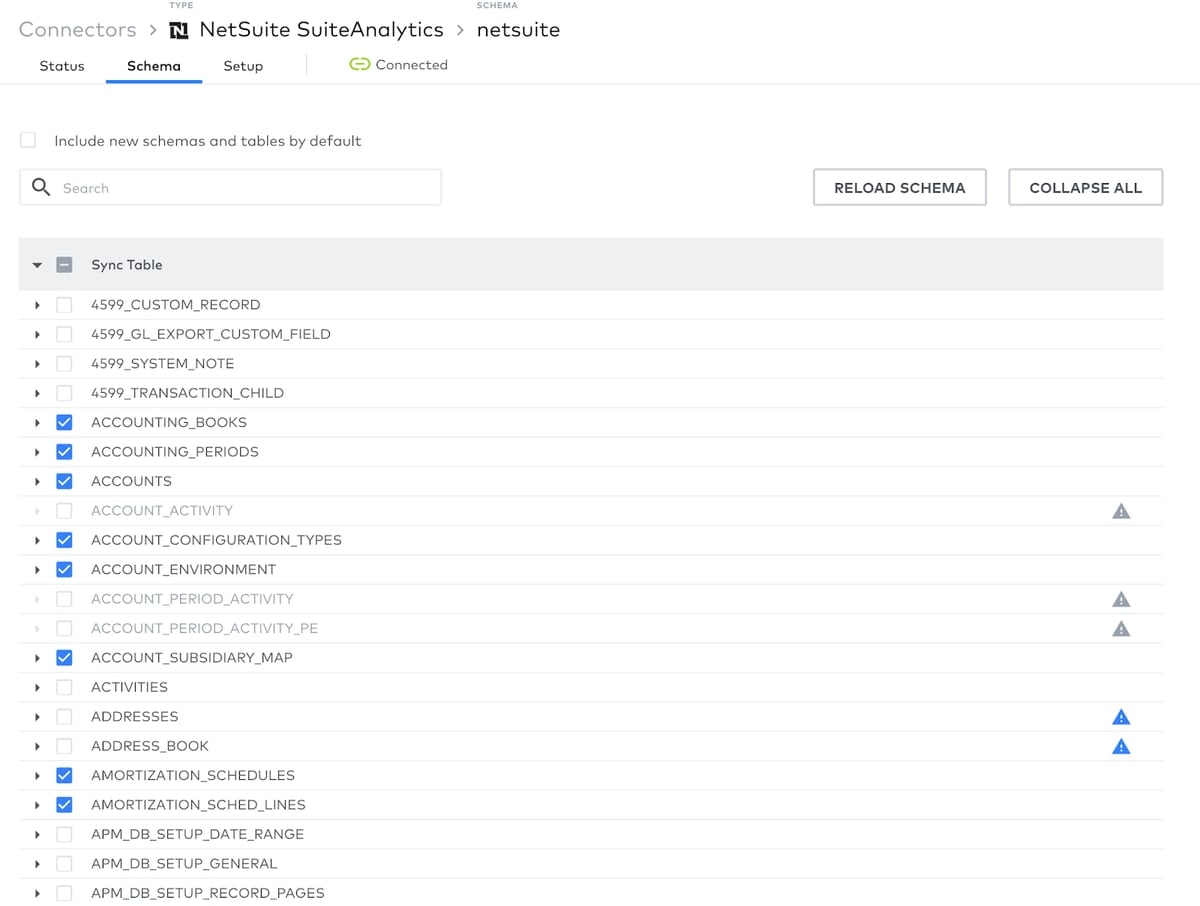
After that, we pointed Fivetran at NetSuite2.com (NetSuite’s analytics data source) and connected our BigQuery dataset. We selected TRANSACTION, TRANSACTIONLINE, CUSTOMER, INVOICE, and ACCOUNT. With those 500K transactional rows, the initial load took a while – a deserved coffee break for us after connecting these two.
Note: TRANSACTIONLINE and TRANSACTION are separate tables joined on transaction ID, so an inflated row count usually means a join issue, not a sync issue.
The 20+ custom fields were where we actually had to pay attention. A few weren’t exposed through the analytics schema. One shifted from text to list partway through and broke a downstream model until we caught it. None of these showed up as failures. They showed up as columns full of NULLs we had to go hunting for.
We also built our delete handling in straight away, filtering on _fivetran_deleted in every core view, and set up a recurring reconciliation against NetSuite’s own reports. The universal law of schema drift says that it is slow and quiet, but the dashboard that doesn’t match reality is quite fast and loud.
Best for
Best for use cases when you happen to operate NetSuite accounts large enough that a sync failure means a real business risk.
Rating
G2: 4.3/5 based on 793 reviews | Capterra: 4.4/5 based on 25 reviews
Pricing
Fivetran bills on Monthly Active Rows – any row that gets touched, however lightly, once in a calendar month. Update it fifty times before the month closes, and it still counts as one. NetSuite doesn’t know this metric exists, but your invoice does.
Fivetran doesn’t charge a flat monthly fee. Instead, what you pay shifts based on your monthly sync volume. Also, there’s a $12,000 commitment fee on the Enterprise plan, so no matter how many rows you sync, that’s your basic price. Though there is a free tier that tops out at 500,000 MAR with no connection fee, useful for a trial run, not for anything real.
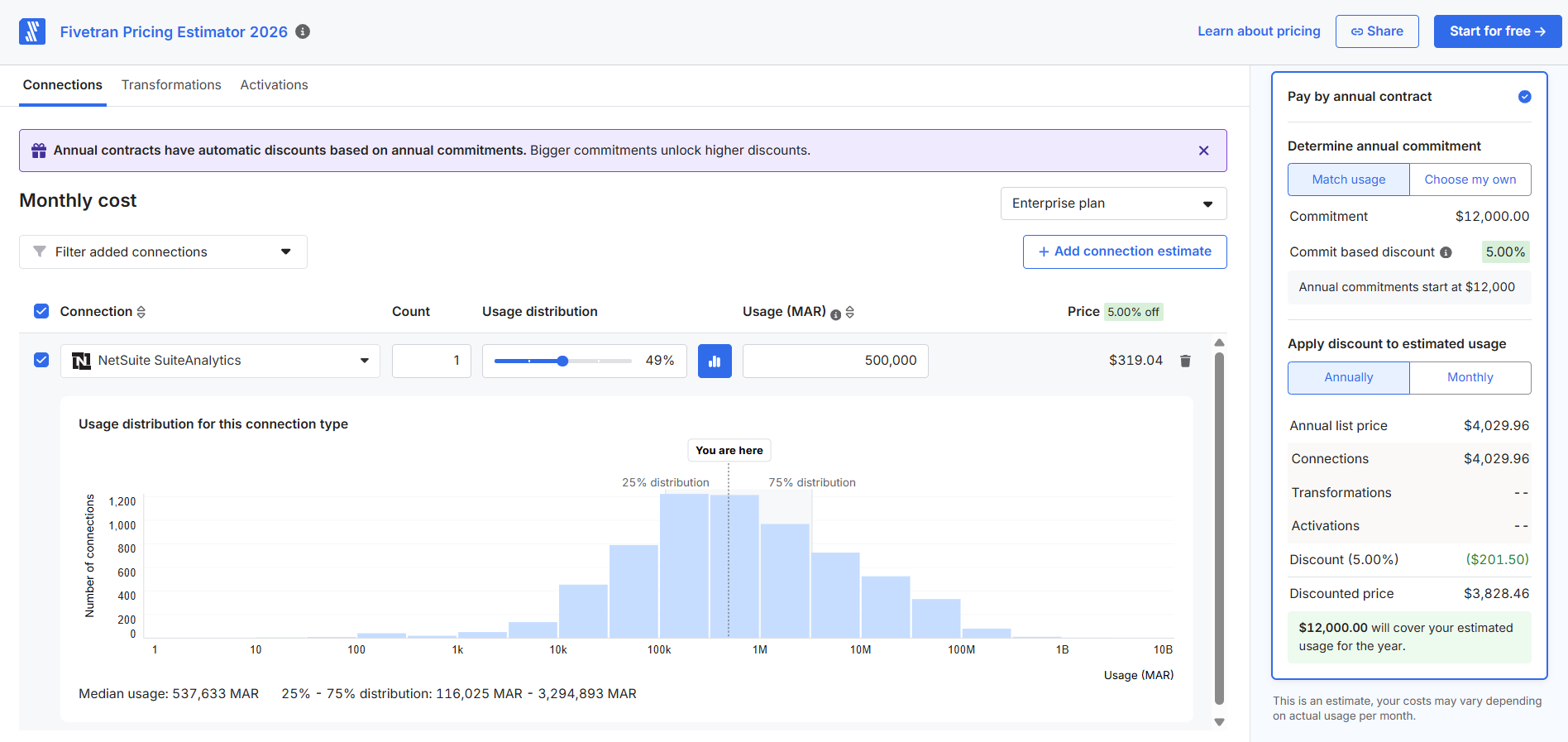
If your row count is modest, it might look like a Standard plan is quite enough. However, NetSuite isn’t a simple source to sync. It has giant tables like TRANSACTIONLINE, custom fields, and governance limits. The Standard plan leaves you mostly alone to handle all of these things that might suffocate any pipeline. The Enterprise plan, with its real support for setup, governance errors, schema evolution, and everything that might get messy, is a more reasonable choice here.
Pros
- You never write a line of SuiteQL. OAuth, pagination, retries – Fivetran handles all of it. Your job is picking objects.
- New custom fields show up on their own. Add a field in NetSuite, and it appears in BigQuery without anyone opening a ticket. With 20+ custom fields already in play, that’s real time back.
- Deletes don’t vanish into thin air. Rows get flagged through
_fivetran_deleted = TRUEand a timestamp, so your soft-delete logic in dbt has something to work with. - TRANSACTIONLINE stays intact. Headers and line items sync together, relational structure preserved. You’re not stitching half a transaction back together downstream.
- dbt models already exist for this. GL, AR, sales – official
dbt_netsuitemodels mean you’re building on top of something, not starting from a blank schema.
Cons
- The minimum commit ignores your actual usage. Your MAR might work out to a few thousand a year. The contract still wants $12K.
- You can’t see how it actually works. Query logic, retries, pagination are hidden. When something breaks, you’re describing symptoms, not fixing code.
- NetSuite only shows what NetSuite2.com knows. The connector reads through SuiteAnalytics, so some fields simply aren’t visible. It won’t create fields either, just select from what’s already there.
- One schema change mid-sync can trigger a full re-sync. For a table the size of TRANSACTIONLINE, that’s not a quick fix.
- The real price shows up after the sales call. The calculator gives you a number. Discounts and minimums get negotiated separately.
Why Is Airbyte (Self-Hosted) Best for Developer-Heavy Teams Needing In-VPC Control?
Airbyte is an open-source ELT platform, and the self-hosted version means exactly what it says: you run it, on your own infrastructure, inside your own network, instead of routing data through someone else’s managed cloud. No license fee for the software itself. What isn’t free is everything underneath it: the Kubernetes cluster, the monitoring, the engineer who now owns the thing.
We started with infrastructure, since Airbyte doesn’t run itself. A single VM did the job (8 vCPUs, 32GB of RAM, enough disk to not think about it again) running Airbyte through Docker Compose, sitting behind a reverse proxy so the UI wasn’t just hanging open on the internet.
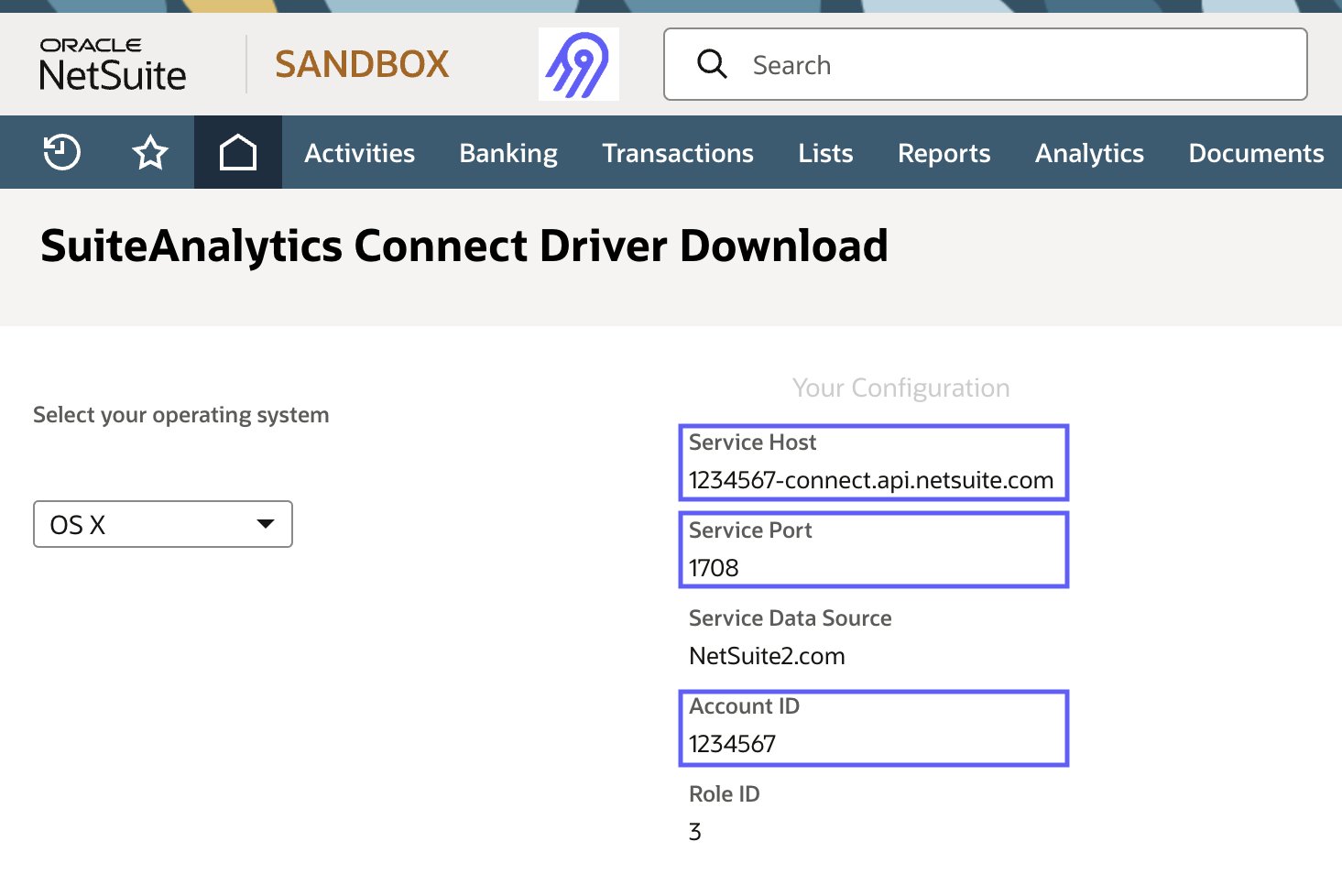
On the NetSuite side, the prep looked familiar:
- SuiteTalk REST enabled.
- A token-based integration record.
- A role with visibility into every object and custom field we needed.
Same rule as always applied: if the role can’t see a field, Airbyte can’t sync it, and nothing will tell you that’s what happened.
Wiring up the connection was mostly bookkeeping. NetSuite as source, BigQuery as destination, five streams authorized: transactions, transaction lines, customers, invoices, and accounts.
Note: Getting the primary keys right is the key (pun intended). Transaction lines require a composite key. A simple ID will cause the deduplication to fall apart.
For transactional data, just appending everything forever, is not going to end well. That’s why we picked Incremental Deduped + History as the sync mode.
The real surprise was deletes. Airbyte’s NetSuite connector doesn’t flag them for you. Nothing tells you a record disappeared in NetSuite. It just keeps sitting in BigQuery, looking valid. We ended up building our own check: pull a full ID list from NetSuite on a schedule, diff it against what’s in BigQuery, flag anything missing. Not hard, but it’s logic some tools give you for free, and Airbyte doesn’t.
The bill was infrastructure and the time we spend. A few hundred dollars a month for the VM, modest BigQuery costs, and an afternoon here and there for maintenance (minus the initial setup). Obviously, this is much cheaper than a Fivetran contract, but the exchange rate might be too high for some teams: you’re not paying for convenience; you’re supplying it yourself.
Best for
Organizations where the data can’t leave your VPC/onprem under any circumstance. Also, Airbyte is a go-to option when your customization needs or need for total control are too much to ask for from other platforms.
Rating
G2: 4.4/5 based on 76 reviews | Capterra: n/a
Pricing
Airbyte Core is open source. No per-row or per-connector charge anywhere in sight. The invoice just moves to infrastructure and engineering time mostly.
Cloud replaces that entirely with a credit system:
- API sources such as NetSuite land around $15 per million rows.
- Database sources around $10 per GB.
- A workload blending both (50 million API rows, 50 GB of database data) comes to roughly $15,000 annually.
Airbyte also offers a hybrid option – its Enterprise (also called Flex) plan that can split responsibilities: the tool owns the control plane, your VPC owns the data. Pricing isn’t published, which is normal when the word “enterprise” is used.
Pros
- Data and secrets stay inside unless someone deliberately opens a door out. Private subnets, firewalls, and VPC peering to reach NetSuite and BigQuery without ever touching the public internet.
- No cap on rows, connectors, or how often a sync runs. Pull NetSuite every five minutes if the job calls for it.
- Pick exactly which NetSuite objects come across instead of syncing a vendor’s predetermined bundle.
- Every line of connector code is readable. The public community is usually a step ahead on NetSuite’s stranger quirks, like its date formatting, before anyone else even hits them.
Cons
- Somebody owns this platform now, and that’s your team. Docker, Kubernetes, storage, networking, and monitoring are all deployed and maintained in-house, with upgrades and security patches included.
- The NetSuite connector is community-built, which means you depend on the goodwill of the community.
Why Is CData Sync Best for Legacy On-Premises Networks and Direct Driver Access?
CData Sync is a replication engine that treats NetSuite like a relational database instead of an API to be coaxed into cooperating. Under the hood, it runs on CData’s own ODBC/JDBC drivers, connecting through SuiteAnalytics Connect and exposing NetSuite objects (transactions, customers, invoices) as tables that a SQL query can hit directly.
The whole thing can live on a server behind your firewall, inside your own data center, with BigQuery (or an on-prem database first) as the destination it eventually writes to. No API client code required; a DBA who’s never touched NetSuite’s REST endpoints can still query it, because to the tool, it just looks like a database.
We ran CData Sync on our own infrastructure: the data moved from NetSuite to our server to BigQuery directly, with no third-party cloud sitting in the middle of that path. CData’s still a vendor, obviously, but nobody’s data plane except ours ever touched the actual data.
NetSuite prep meant getting SuiteTalk REST and SuiteAnalytics Connect switched on, creating a TBA integration record, and generating a consumer key/secret plus token ID/secret for a role with actual visibility into TRANSACTION, TRANSACTIONLINE, CUSTOMER, INVOICE, ACCOUNT, and all 20+ custom fields across them.
On the BigQuery side: a new project, a netsuite dataset, a service account with bigquery.dataEditor.
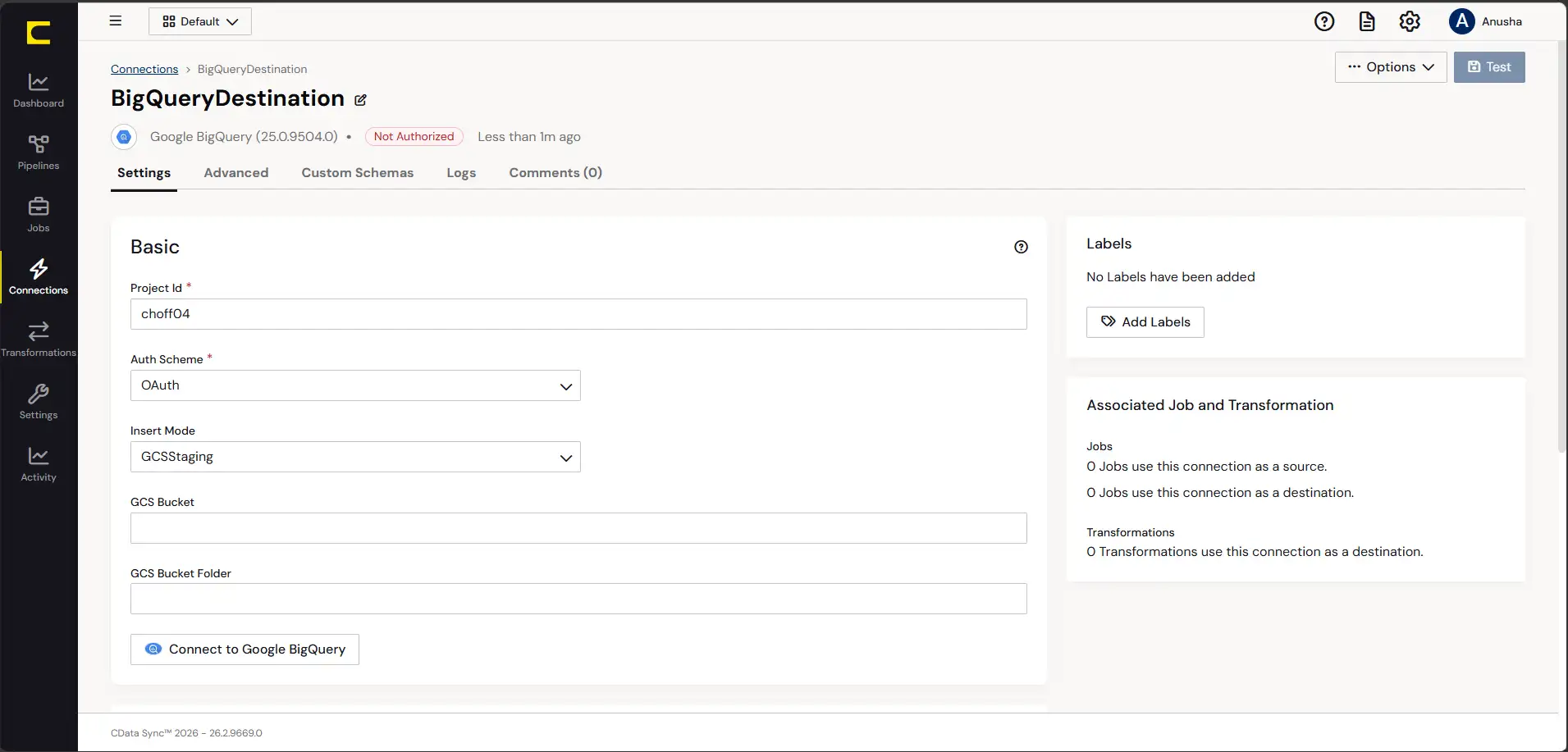
Under the hood, CData Sync runs on ODBC/JDBC; we just never had to see it. NetSuite shows up as SQL tables, BigQuery looks like another one, and the job UI handles everything in between. One job per source: Transaction, TransactionLine, Customer, Invoice, and Account, each mapped to their BigQuery counterpart. Primary keys mostly went fine, except TransactionLine, which doesn’t take a single ID. It wants a composite key, but we were ready after the Airbyte setup.
LastModifiedDate did most of the job for incremental loads. Once that was set, syncs started to grab only what’s changed. It’s the whole point, and it’s still satisfying to watch happen.
Deletes caused the same problem as we encountered when setting up Airbyte; thankfully, the issue was the same. CData’s delete detection varies by version and connector config, and ours simply didn’t hand us a reliable signal. So we built it ourselves again:
- Pull the full ID list from NetSuite on a schedule.
- Diff it against BigQuery.
- Flag whatever’s missing with an
IsDeletedcolumn.
Silence doesn’t mean nothing happened; it just means something did happen, but nobody told us. TransactionLine, once it got big enough to slow down every query, also got partitioned by TranDate. A fix we probably should have done straight away instead of waiting for it to hurt first.
Less to build than the Airbyte route, more to build than Fivetran, and way more to build than Skyvia.
Best for
IT departments running legacy infrastructure where “everything talks to the cloud directly” isn’t an option, and data has to move through servers the team already controls, often alongside other on-prem systems like SQL Server or Oracle. CData’s driver-level depth through SuiteAnalytics Connect makes that possible without writing custom connector code: NetSuite becomes just another SQL source in a stack a traditional IT team already knows how to operate.
Rating
G2: 4.2/5 based on 15 reviews | Capterra: 4.2/5 based on 9 reviews
Pricing
Standard tier starts at $7,999/year for up to five connections and 100 million rows/month, self-hosted or in CData’s own cloud. Enterprise is quote-based. Full breakdown on CData’s pricing page.
Pros
- Runs entirely inside your network. This is a real distinction for teams working under network segmentation rules that predate cloud ELT as a category.
- One connectivity layer to trust, not two. Same driver technology as CData’s standalone NetSuite connector, so a job that reads Leads, Transactions, or custom records via SQL in Power BI behaves the same way when Sync automates it.
- Configuration is GUI-plus-SQL, where you pick a source and destination, map columns, and write a filter clause if needed.
- Multi-hop routing is native to the tool. For example, NetSuite → on-prem SQL Server → BigQuery is a normal job design here, not something you’d have to stitch together with a second product.
Cons
- The user experience is rooted in desktop and server administration rather than a modern cloud UI. It lacks the guided ease of use that non-technical business analysts need.
- What CData calls incremental replication for NetSuite is check-column polling, not log-based CDC. Deletes and some schema changes still need a full refresh or manual handling.
- Self-hosted means the operational tail belongs to you: patching, backups, monitoring, everything.
How to Replicate NetSuite to BigQuery in Under 10 Minutes with Skyvia?
Now, it’s time to roll up your sleeves for a few minutes to build the integration in Skyvia.
Step 1: How Do You Configure NetSuite Token-Based Authentication (TBA)?
Note: TBA is not dead yet, but it’s dying:
- 2027.1 closed the door on new setups.
- 2028.1 closes it even for existing ones.
If you’re starting from zero, OAuth 2.0 or Machine-to-Machine will save you from migration later. If you’re just maintaining what’s already there, read on.
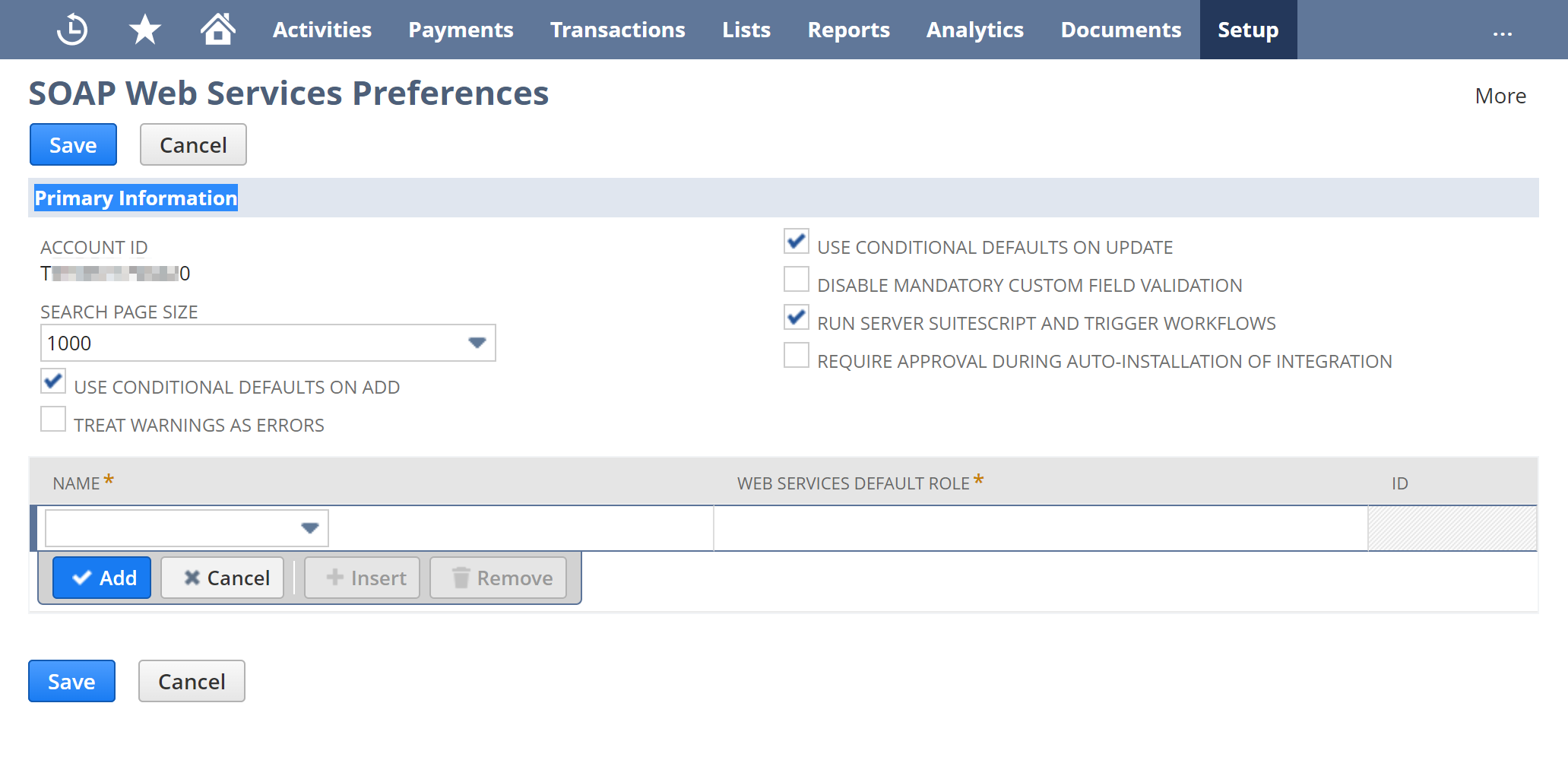
- Find your Account ID. Go to Setup → Integration → SOAP Web Services Preferences. Right there under Primary Information.
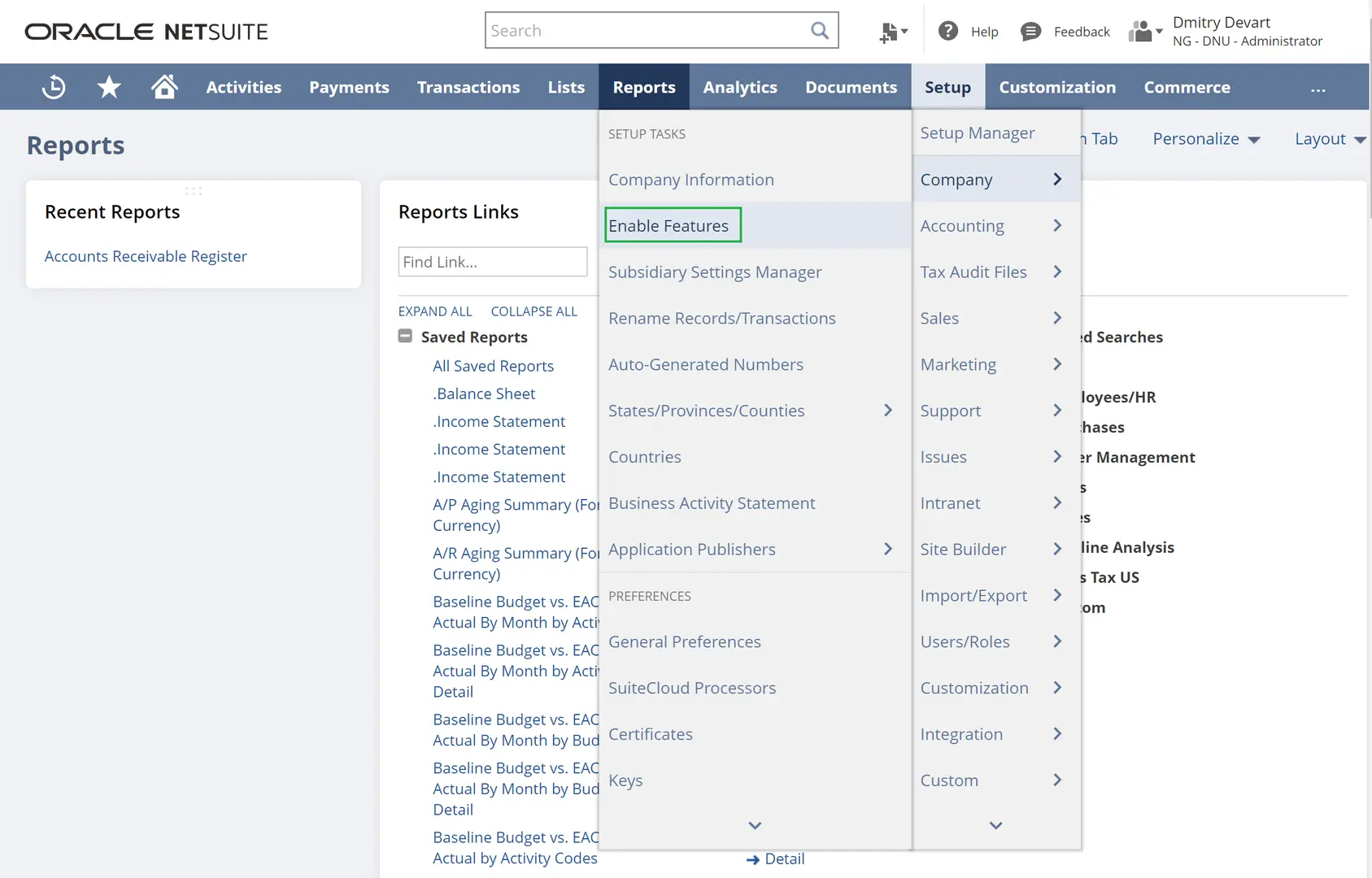
- Switch on token-based auth. Once more, go to Setup → Company → Enable Features → SuiteCloud tab → check Token-based Authentication under Manage Authentication.
- Go to Setup again, this time to build a role that can see your data. From there, choose Users/Roles → Manage Roles. Grant object permissions for whatever you’re syncing, plus REST Web Services (this one is a must), Custom Record Types, Custom Lists, and Custom Fields on the Setup subtab. Add User Access Tokens, and grant SuiteAnalytics Workbook under Reports.
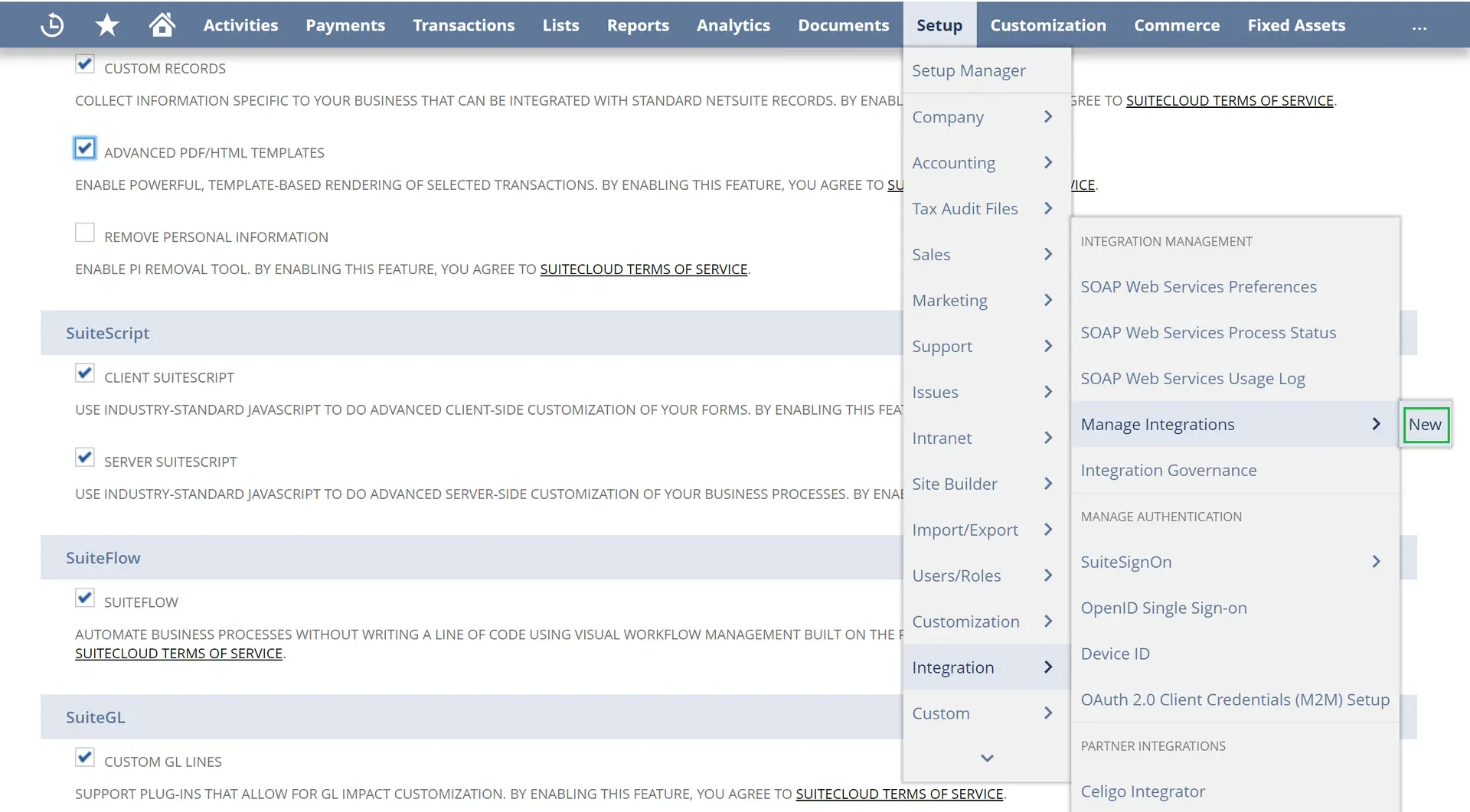
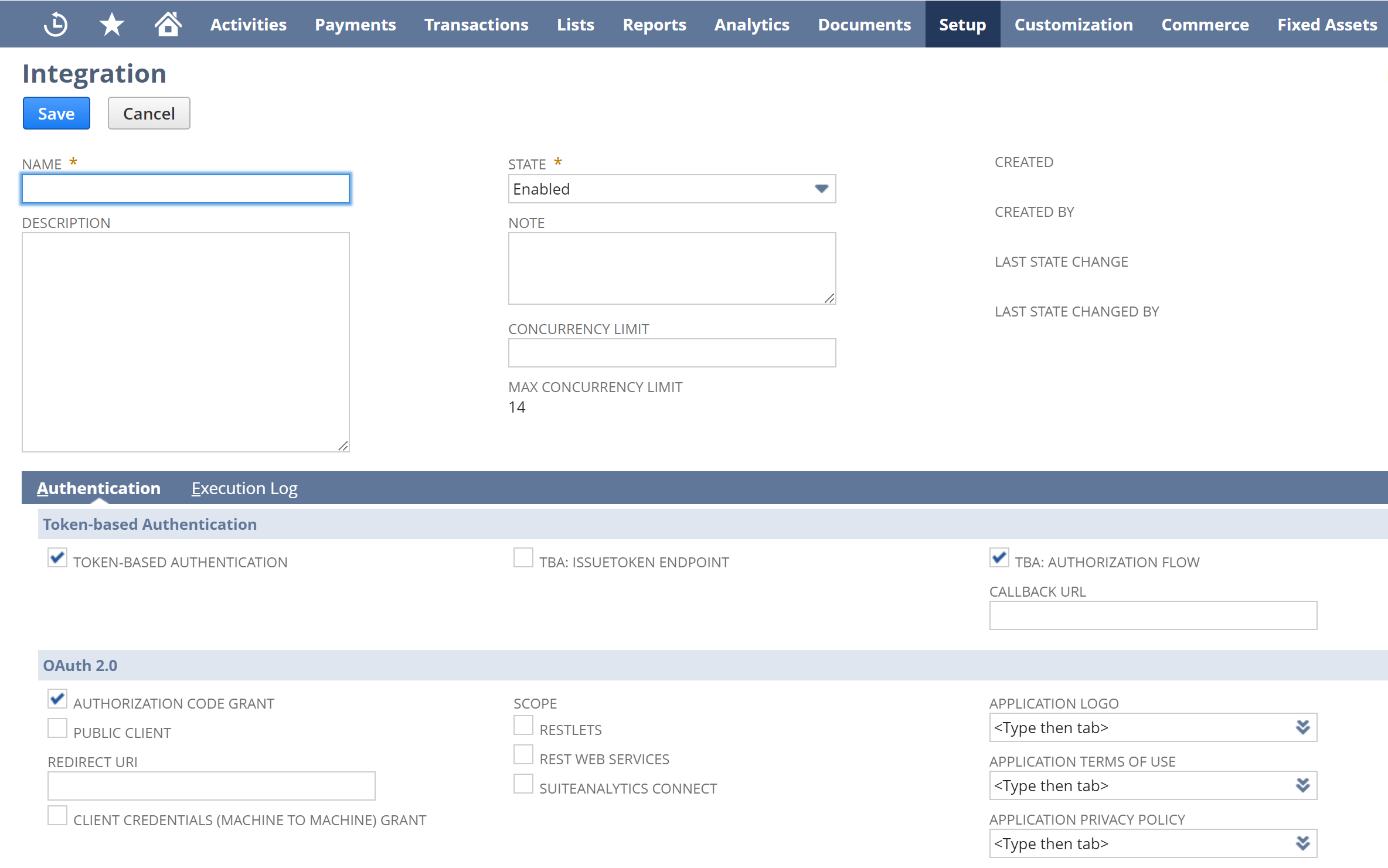
- Now, set up the integration record next, and grab your credentials while they’re still visible. Setup → Integration → Manage Integrations → New. Call it something you’ll recognize later.
- Under Token-based Authentication, pick Token-Based Authentication, leave TBA: Authorization Flow unchecked, and click Save. NetSuite will show you the Consumer Key and Consumer Secret exactly once. Copy them now, or generate new ones; the old pair will stop working.
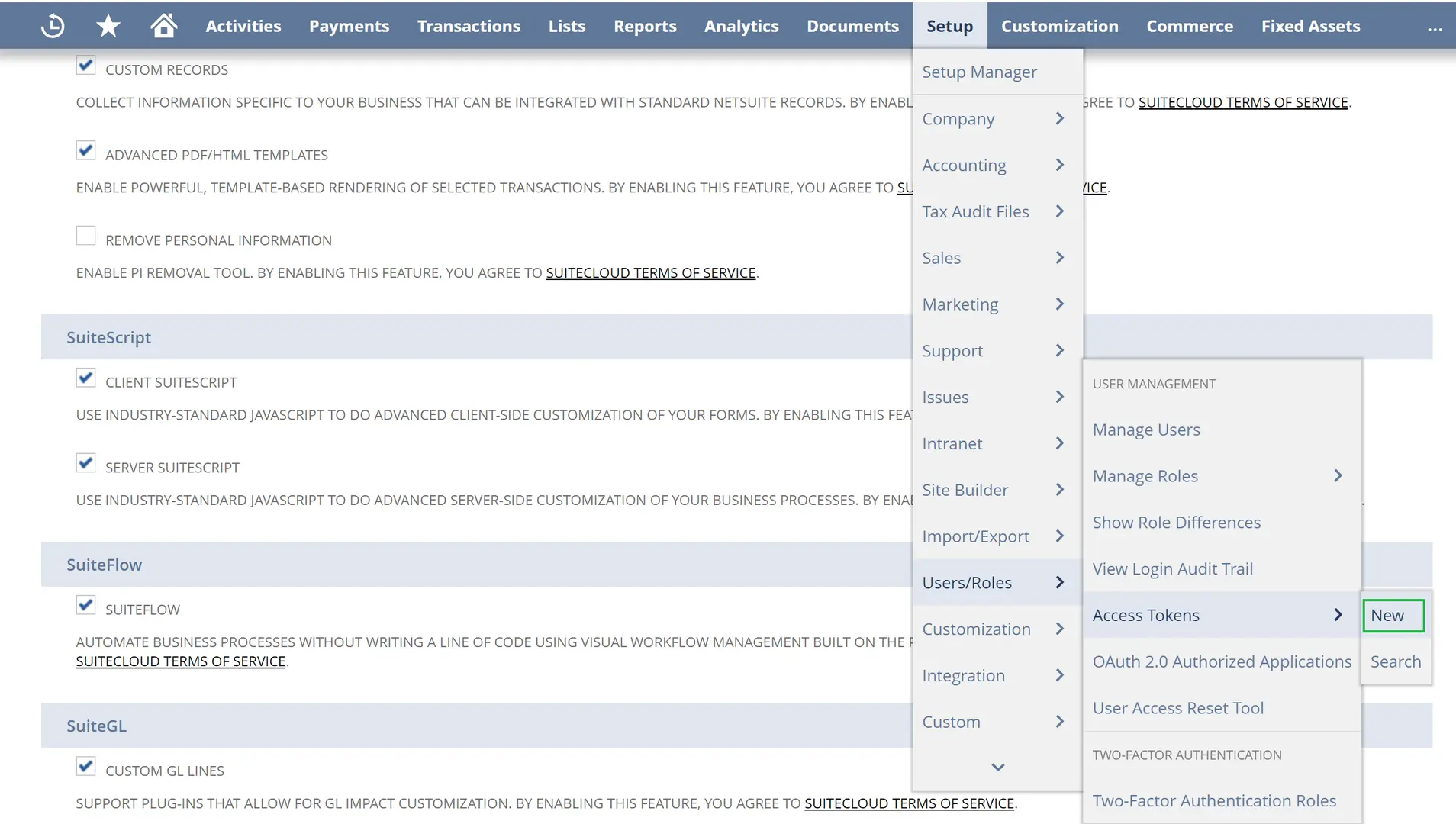
- Same deal, different token. Setup → Users/Roles → Access Tokens → New. Choose the integration record, user, and role from the step before, save, and copy the Token ID and Token Secret the moment they appear. One glance is all you get from NetSuite.
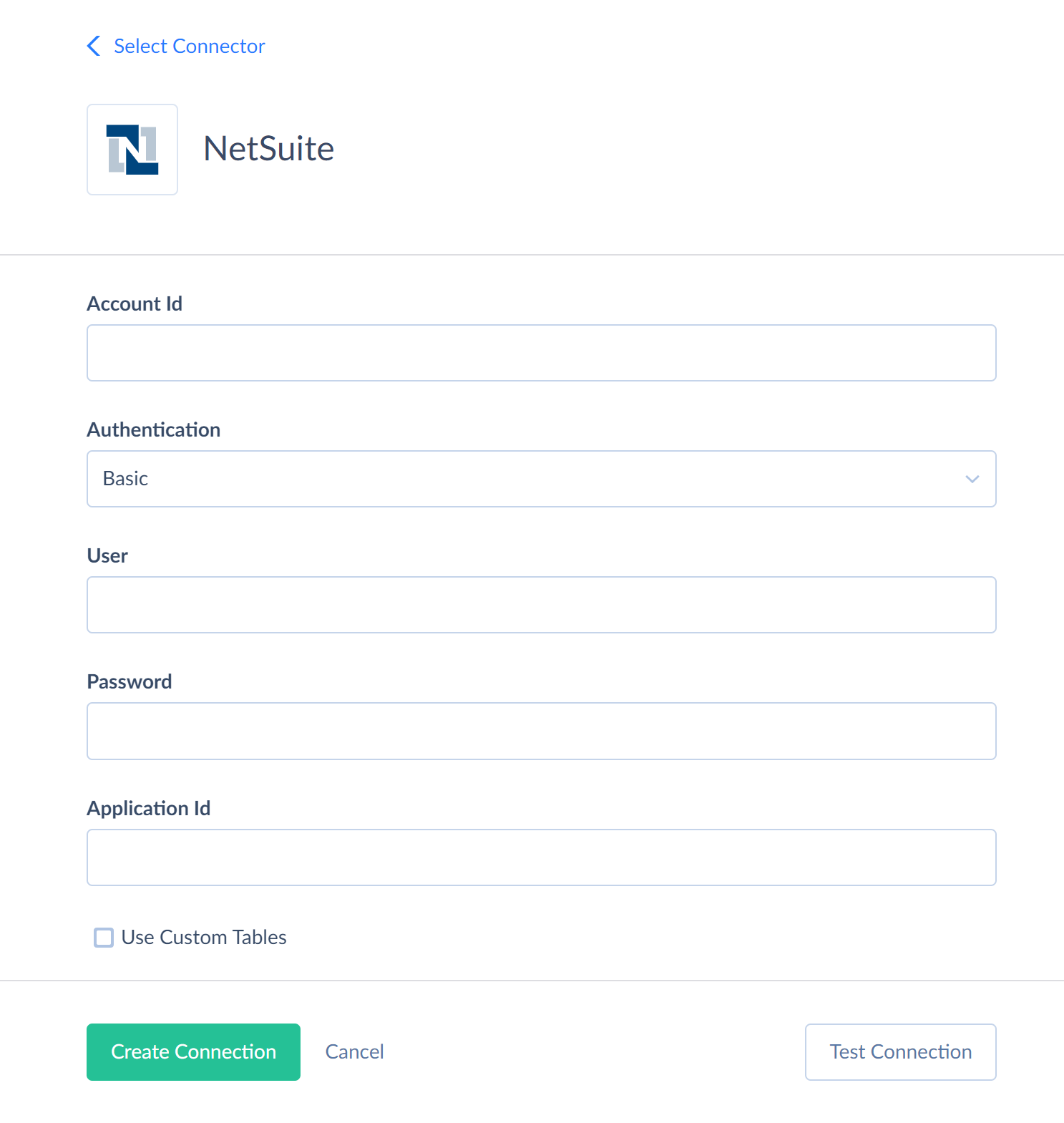
- To wire it all into Skyvia, click +Create New and choose Connection. Then, follow the form.
Step 2: How Do You Connect and Authorize Google BigQuery?
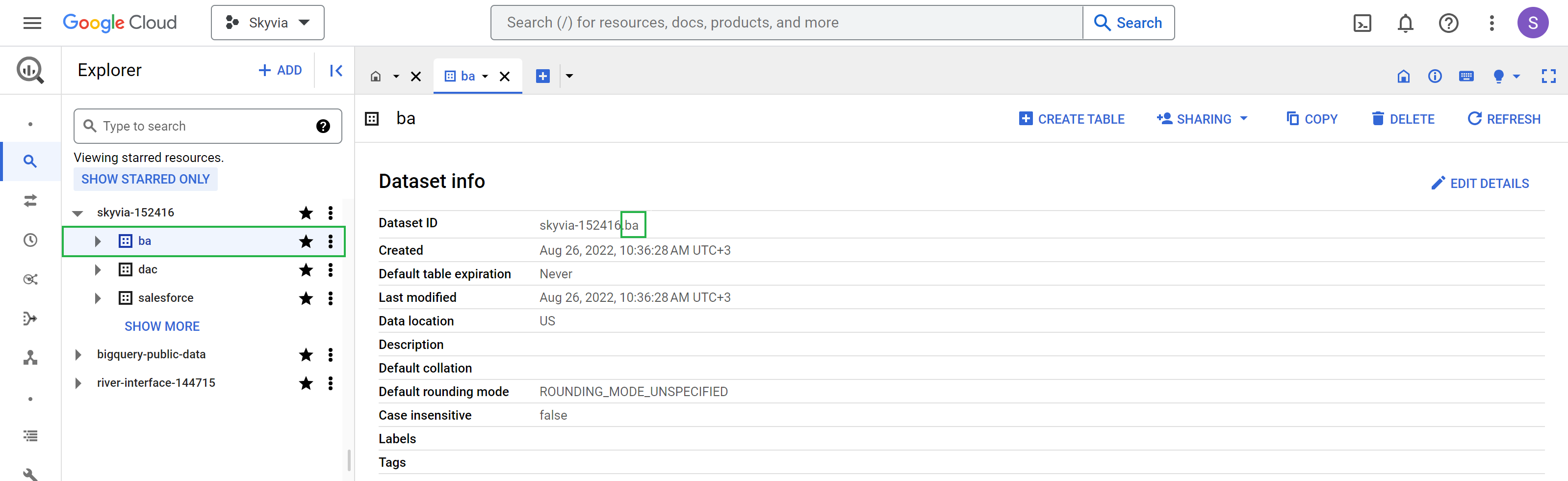
- Grab your Project ID and Dataset ID. Project IDs are in the Google API Console. Dataset ID needs one extra click through BigQuery Studio, and if it shows up prefixed like skyvia-152416.ba, you only need the part after the dot.
- Use a service account, not a personal login. Fine for poking around manually, but a scheduled NetSuite sync shouldn’t depend on someone’s password staying valid. If you don’t have one yet, create it: APIs & Services → Credentials → Manage Service Accounts → + Create Service Account. Grant BigQuery Data Editor and BigQuery User.
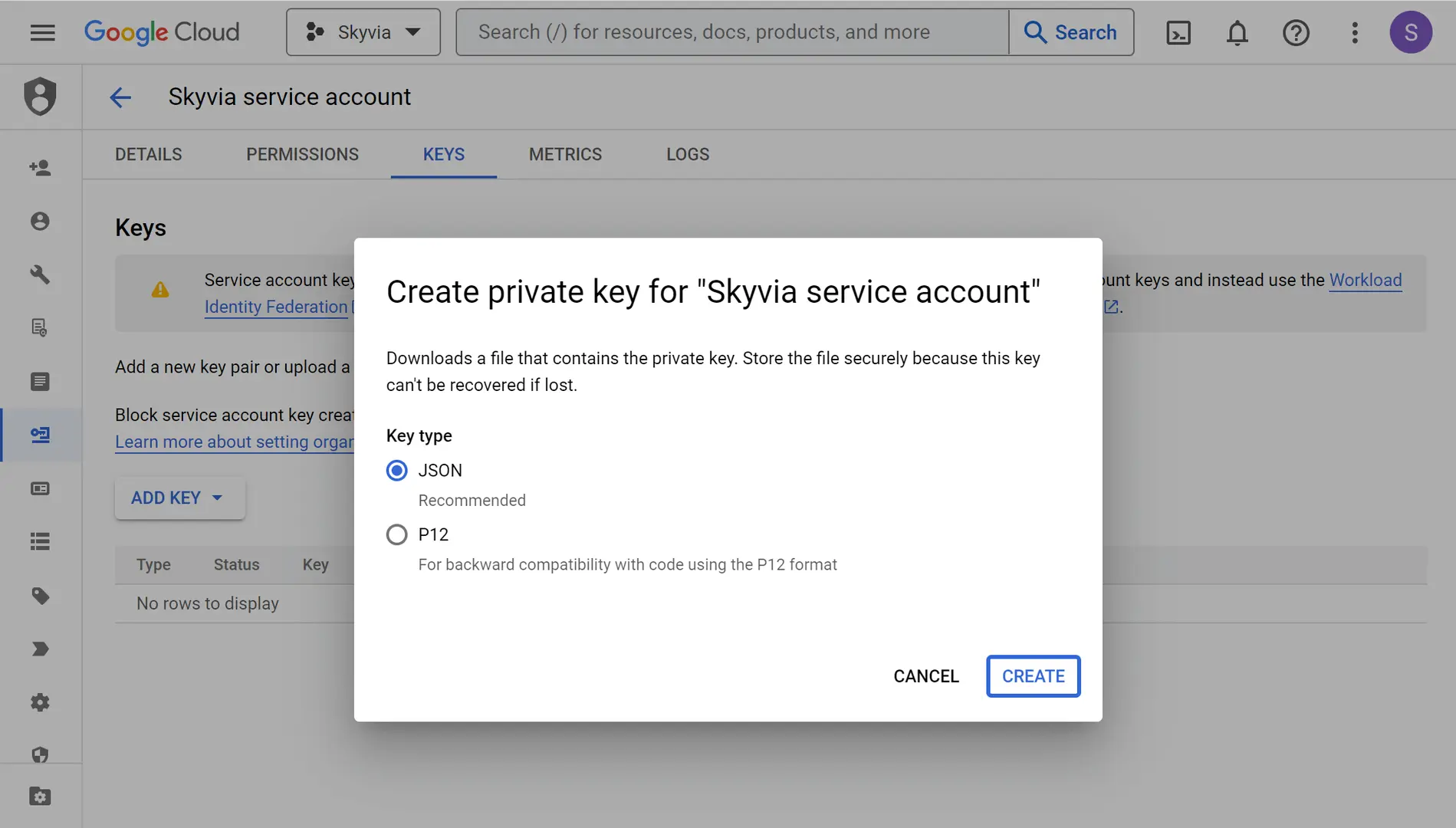
- Generate the Key. Go to Keys → Add Key → Create new Key → JSON. Download it once; guard it like a house key. If you lose it, you’ll have to make a new one.
- Wire it into Skyvia. Click +Create New and choose Connection. Find BigQuery and follow the form.
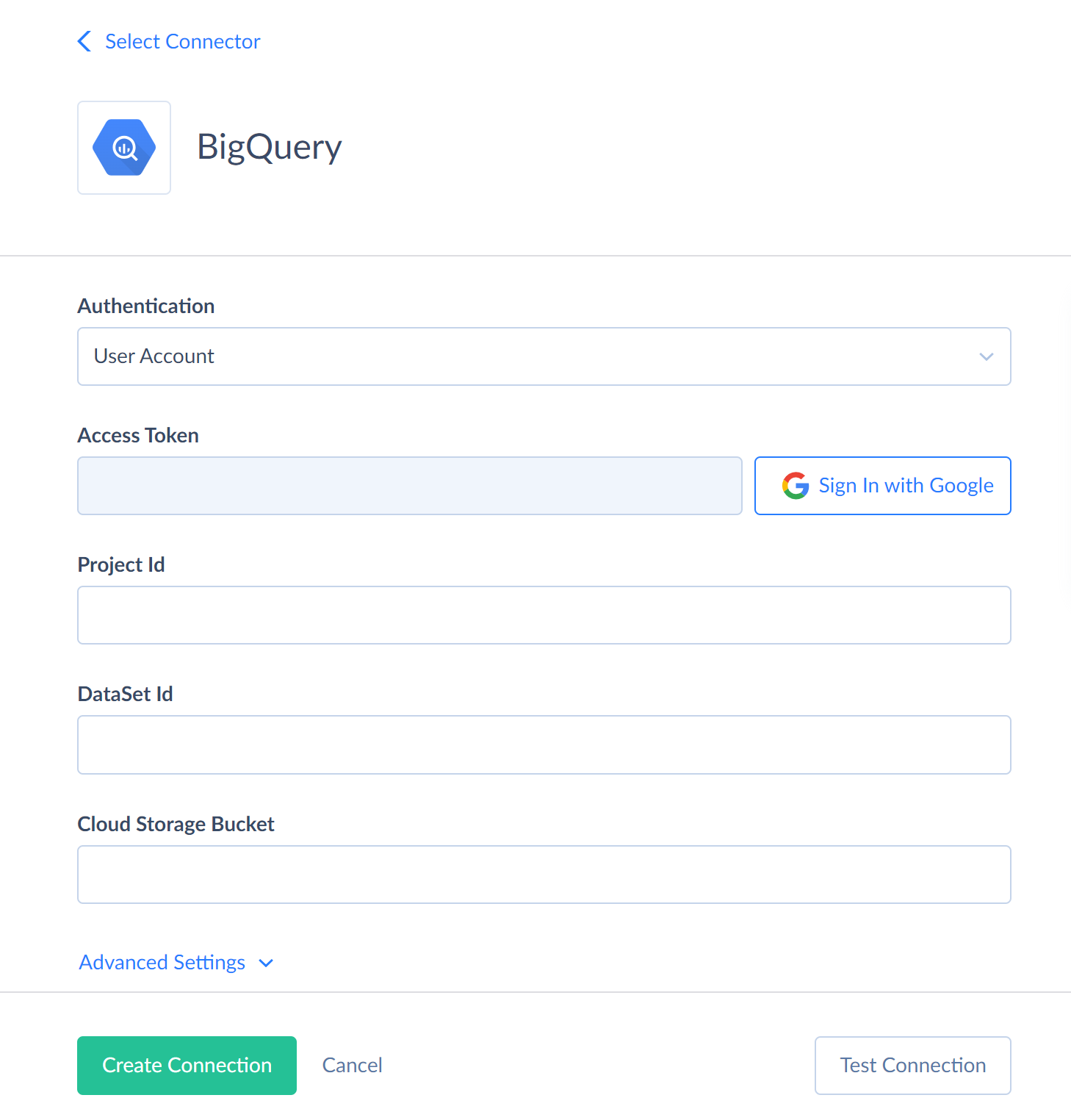
- Add a Cloud Storage bucket. At 500k+ records, you want bulk import to do the work. It stages via GCS instead of writing row by row.
Note: No primary keys mean no true sync, no automatic UPSERT. Insert is fine. Update and delete work too, but only once you manually specify the key columns.
Step 3: How Do You Configure Table Selection, Custom Fields, and Incremental sync?
- Create the integration. Click + Create new and select Replication. The wizard takes it from there: pick your NetSuite connection in Source setup and BigQuery in Target setup.
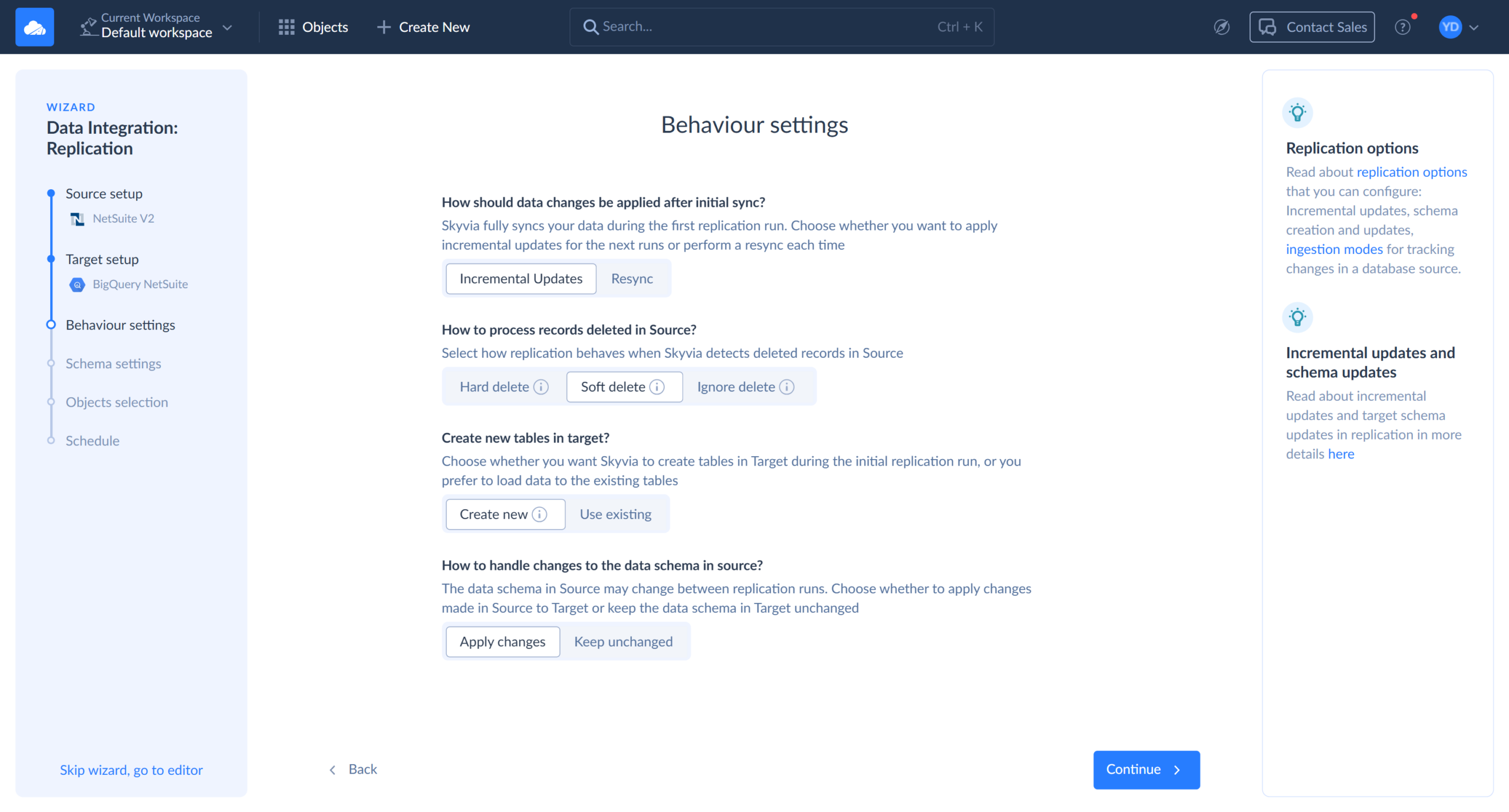
- Specify how Skyvia behaves after the first run.
- How should data changes be applied after initial sync? Choose Incremental Updates. The first run copies everything, and every run after that moves only what changed.
- How to process records deleted in Source? Choose Soft delete. The row stays in BigQuery with an _is_deleted flag, so the audit trail survives.
- Create new tables in target? Choose Create new, and Skyvia will take the BigQuery work away from you.
- How to handle changes to the data schema in source? Choose Apply changes, so new columns can reach BigQuery.
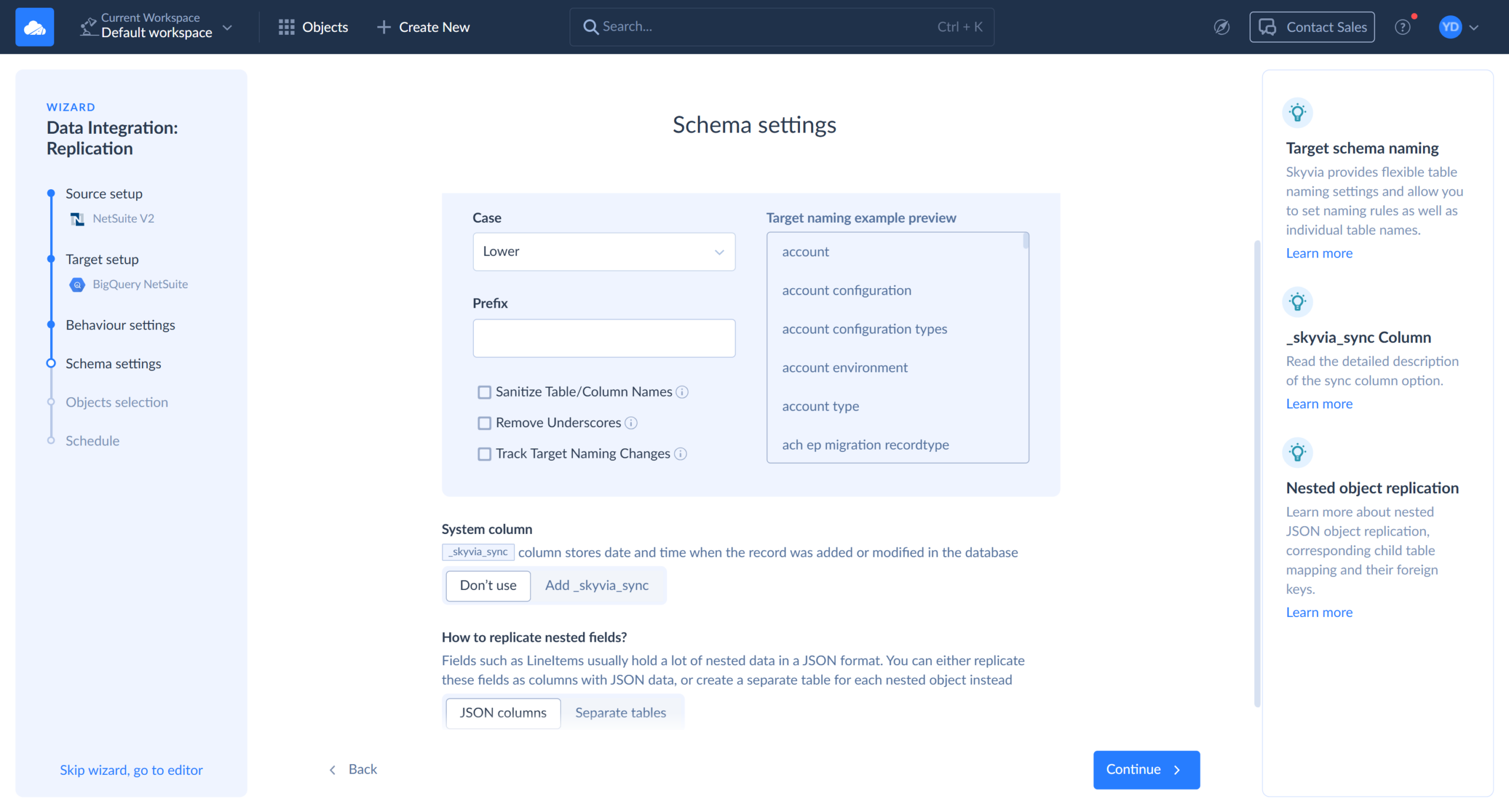
- Set naming in Schema Settings. Make table names lowercase so they land as transactions, transactionlines, account and customer.
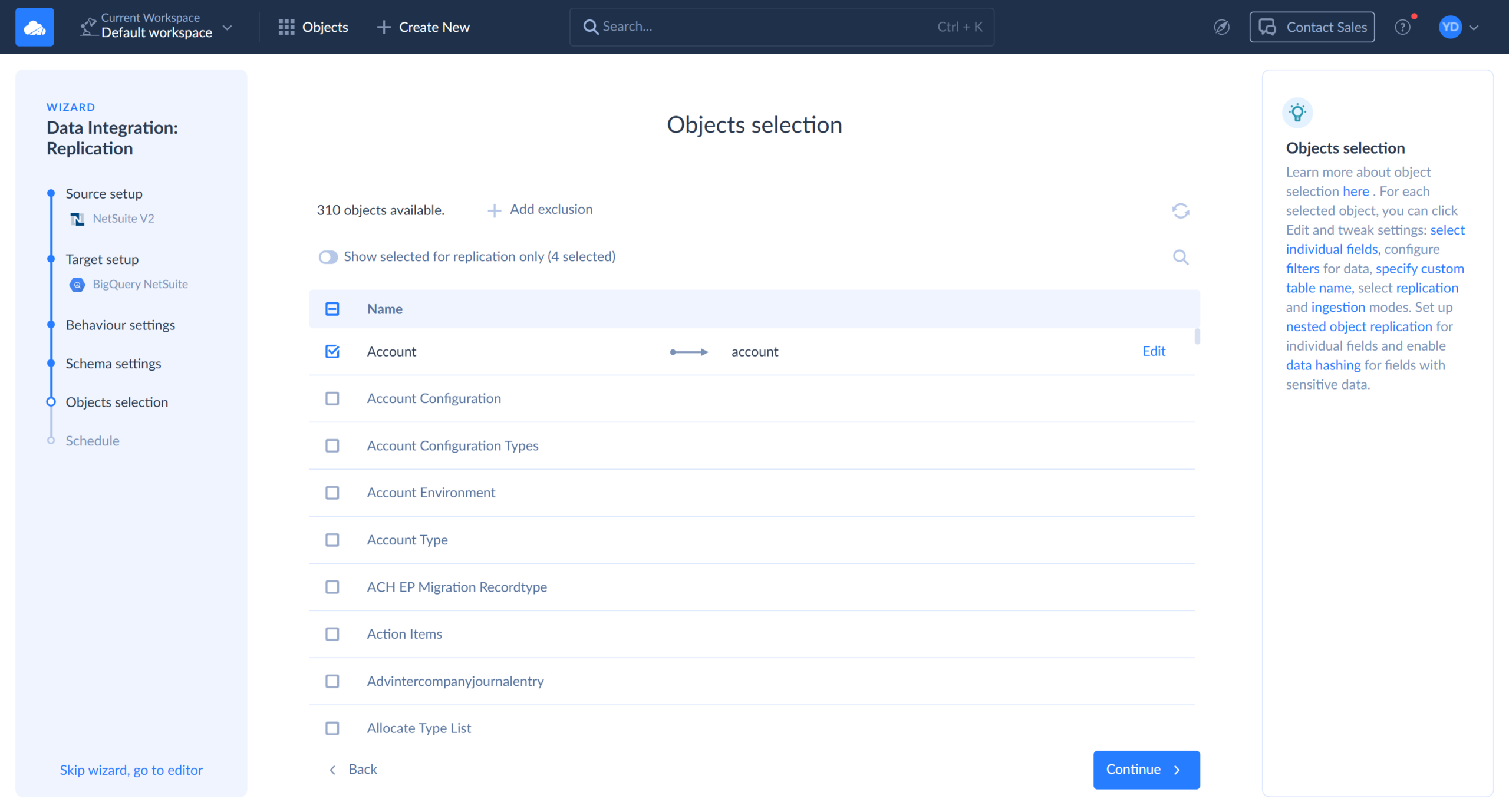
- Select the objects. In Objects Selection, check Transactions, TransactionLines, Customer and Account. No need to check invoices: they are already part of Transactions object.
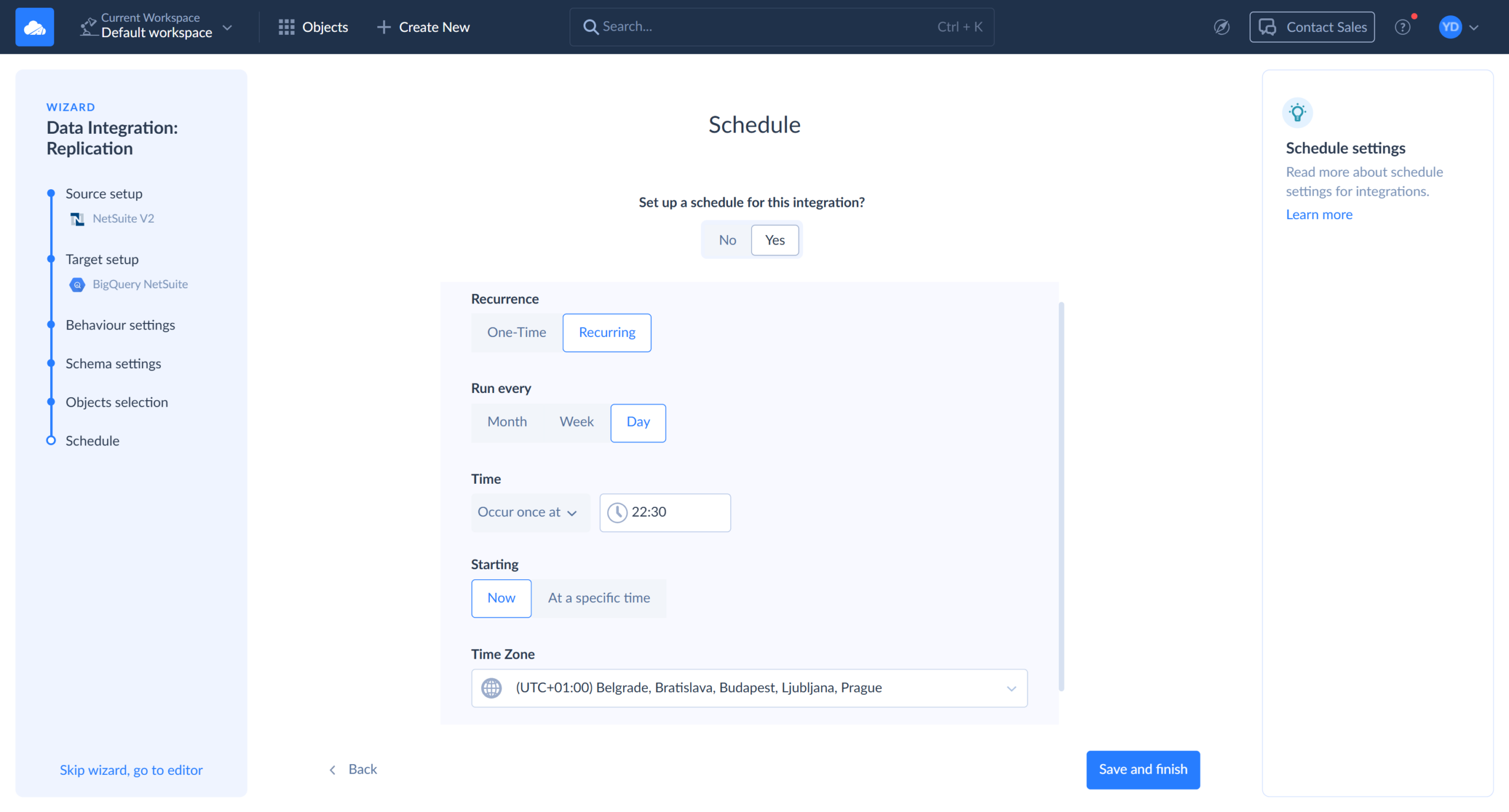
- Set a schedule. In the Schedule step, choose how often the replication runs, for example daily at 10 PM.
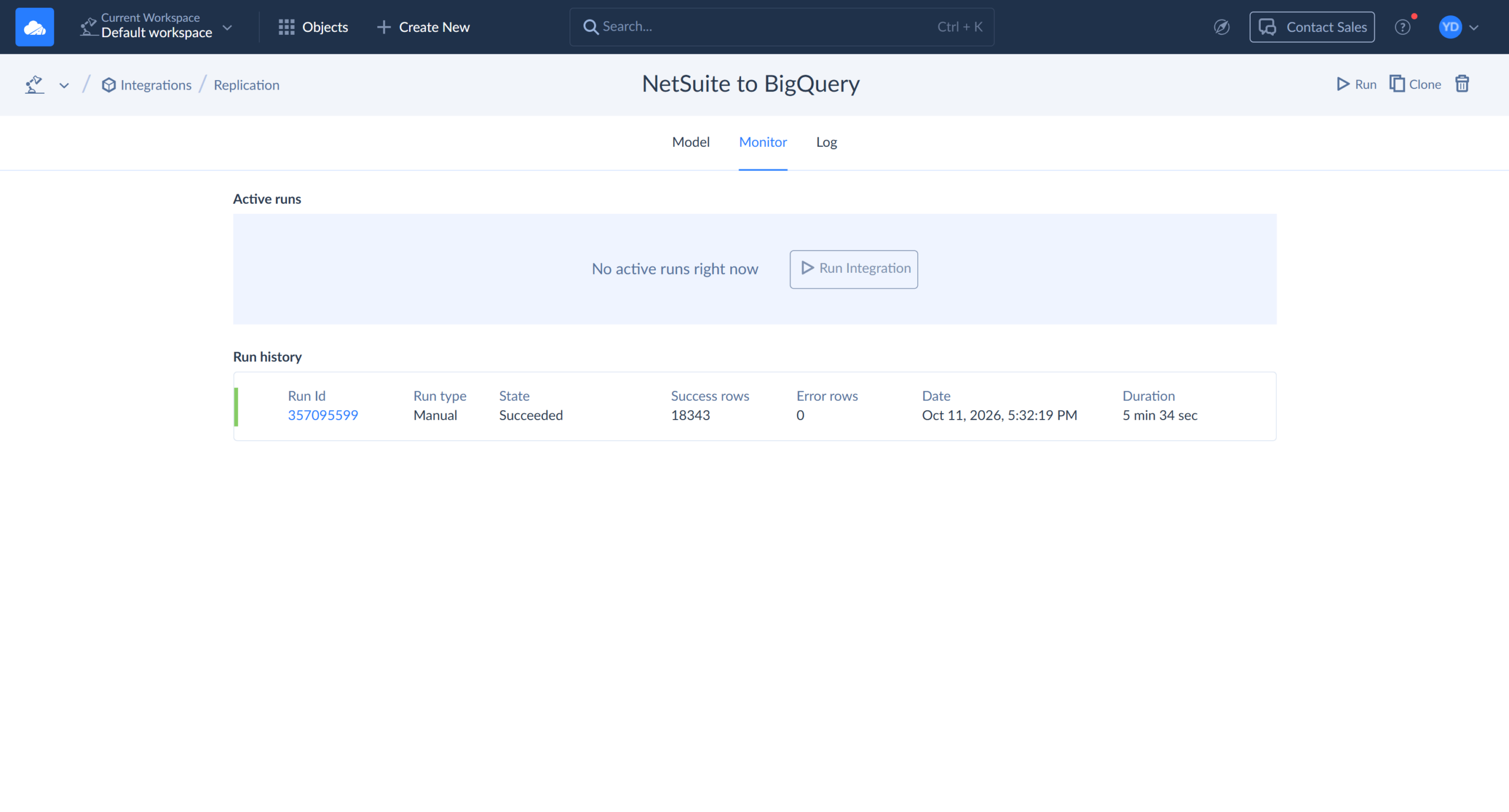
- Run and verify. Finish the wizard, click Run, and open the Monitor tab to see how many rows each object moved.
Step 4: How Do You Model NetSuite Financial Data Inside BigQuery (dbt / SQL)?
Raw NetSuite tables are honest, but they aren’t useful yet. Skyvia runs dbt for you, so there’s nothing to install: point it at your dbt project on GitHub, and the integration will build the models in BigQuery.
- Put the dbt project in Git. Skyvia runs dbt Core against a project in GitHub or any Git server reachable over HTTPS. Start with a source definition that points at the replicated dataset.
models/sources.yml:
version: 2
sources:
  - name: netsuite
    schema: netsuite_skyvia
    tables:
      - name: transactions
      - name: transactionlines
      - name: customer
- name: account - Model customer health. NetSuite stores an invoice’s total on its main line and repeats it on the item lines with the opposite sign. Sum every line, and each customer’s lifetime value comes out at zero. Keep only line items and flip the sign.
models/customer_payment_health.sql:
{{ config(materialized='table') }}

WITH invoice_lines AS (
    SELECT
        t.EntityId AS customer_id,
        t.Date AS invoice_date,
        -tl.Amount_TransactionCurrency_ AS line_amount
    FROM {{ source('netsuite', 'transactions') }} t
    JOIN {{ source('netsuite', 'transactionlines') }} tl
        ON tl.TransactionId = t.Id
    WHERE t.Type = 'CustInvc'
        AND tl.MainLine = FALSE
        AND tl.TaxLine = FALSE
)
SELECT
    c.Id AS netsuite_customer_id,
    SUM(il.line_amount) AS total_lifetime_invoiced_amount,
    MAX(il.invoice_date) AS last_invoice_date,
    CASE
        WHEN MAX(il.invoice_date) < DATE_SUB(CURRENT_DATE(), INTERVAL 90 DAY) THEN 'At Risk'
        ELSE 'Active'
    END AS payment_health_status
FROM invoice_lines il
JOIN {{ source('netsuite', 'customer') }} c
    ON c.Id = il.customer_id
GROUP BY c.Id
Note: This counts invoices only. If you also bill through cash sales, use t.Type IN (‘CustInvc’, ‘CashSale’).
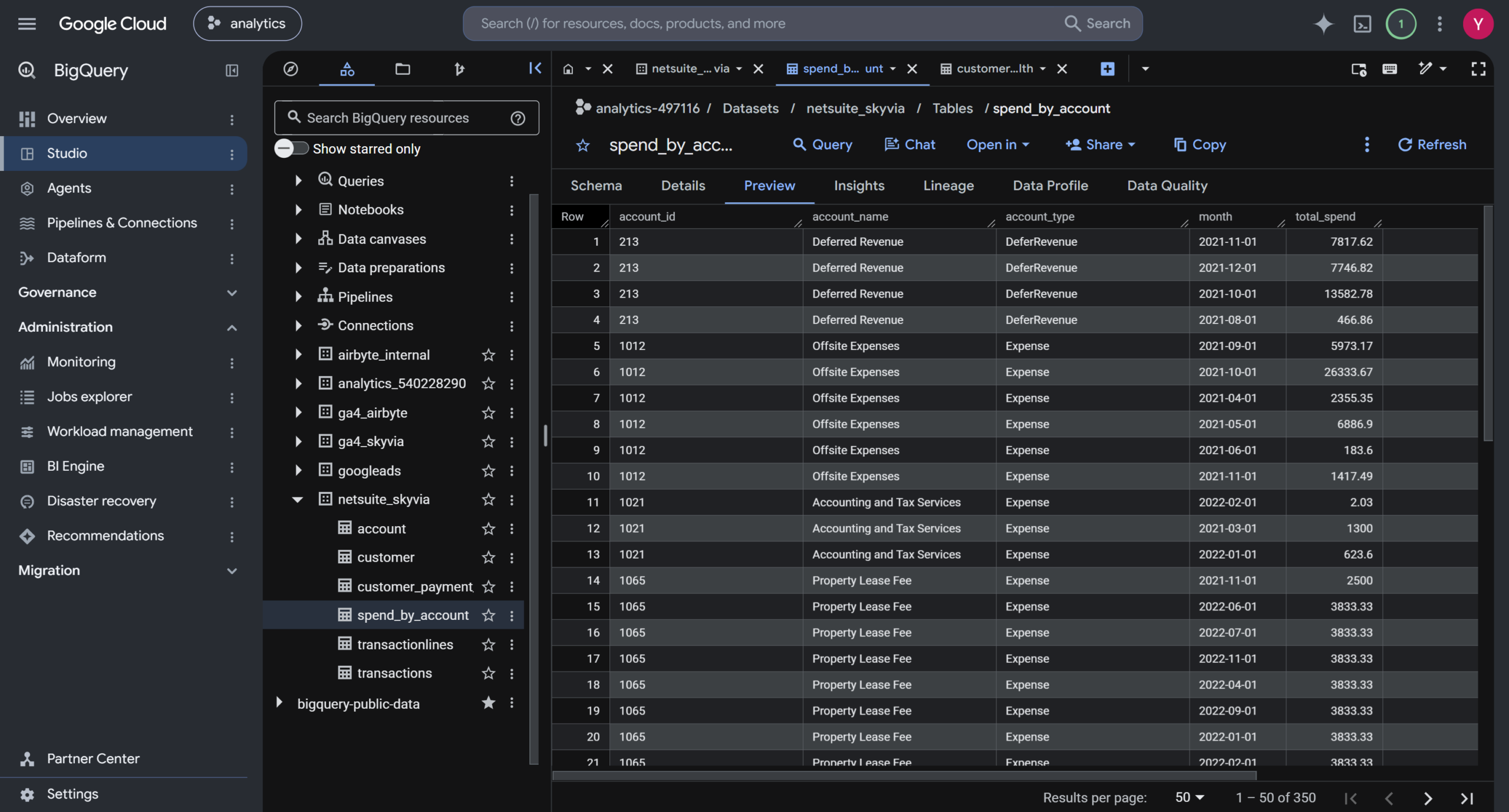
- Model spend by account. This is where the Account table earns its place. Vendor bill lines carry the expense account they were booked to, so a join turns raw lines into monthly spend per GL account.
models/spend_by_account.sql:
{{ config(materialized='table') }}

SELECT
    a.Id AS account_id,
    a.Name1 AS account_name,
    a.AcctType AS account_type,
    DATE_TRUNC(t.Date, MONTH) AS month,
    SUM(tl.Amount_TransactionCurrency_) AS total_spend
FROM {{ source('netsuite', 'transactionlines') }} tl
JOIN {{ source('netsuite', 'transactions') }} t
    ON t.Id = tl.TransactionId
JOIN {{ source('netsuite', 'account') }} a
    ON a.Id = tl.ExpenseAccount
WHERE t.Type = 'VendBill'
    AND tl.MainLine = FALSE
    AND tl.TaxLine = FALSE
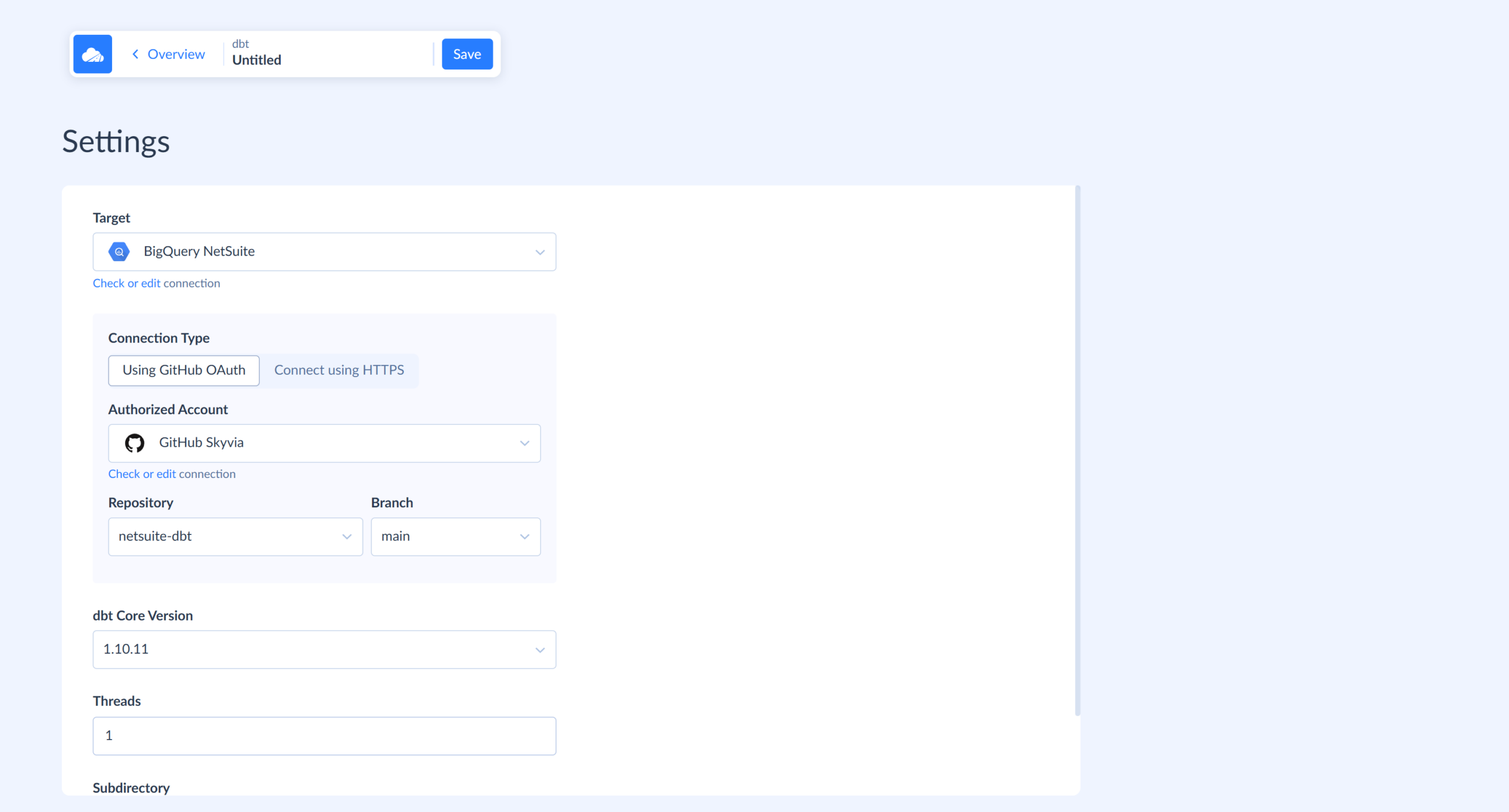
GROUP BY account_id, account_name, account_type, month - Create the transformation. Click +Create New and choose dbt. Connect your repo, pick your BigQuery connection as the target, and select your branch.
- Run it. When the run succeeds, customer_payment_health and spend_by_account will appear as BigQuery tables. You can use them in dashboards.
- Schedule it after the replication. Give the dbt run its own schedule, about an hour after the replication, so you always work with fresh data.
- Send it back where people work. A Reverse ETL import can push payment_health_status to the customer record in your CRM, so sales sees it without opening NetSuite.
What Common NetSuite-to-BigQuery Errors Occur, and How Do You Fix Them?
Three problems account for nearly every support ticket in a NetSuite pipeline:
- NetSuite gets tired of you.
- A record disappears without telling anyone.
- BigQuery opens a batch and finds a field wearing a different type than it wore last week.
None of them are rare, and none of them require a rebuild. Just the right fix applied in the right place, and you’re good to use the pipelines again.
How Do You Resolve NetSuite SSS_REQUEST_LIMIT_EXCEEDED and HTTP 429 Errors?
SSS_REQUEST_LIMIT_EXCEEDED means too many SuiteScript executions are running at once. HTTP 429 is the same story told by a different messenger: NetSuite’s plain HTTP way of saying slow down. Both come from the same well. Every NetSuite account has a concurrency ceiling tied to its service tier, roughly 20 slots for Enterprise plus about 10 more per SuiteCloud Plus license, and SOAP, REST, RESTlets draws from that one pool.
Three things usually cause the pile-up:
- Parallel workers all firing at once.
- A batch job opening more simultaneous connections than the task needs.
- Or separate integrations are competing for the same limited pool without any of them knowing the others exist.
The first fix has nothing to do with code quality; it’s concurrency:
- Cap it at around five to ten simultaneous requests, whether through a semaphore or a small worker pool, and that’s usually enough room to breathe.
- Combine smaller requests into fewer, larger ones.
- On a shared account, check whether another tool is running through the same limited slots before anyone else even connects.
Our second fix is to implement proper retry logic. Backoff has to accompany every retry, with each waiting a little longer than the last, climbing 1, 2, 4, 8 seconds instead of retrying immediately. Jitter has to accompany every backoff, too: nudge each of those delays with a bit of randomness, so a wave of retries doesn’t hit NetSuite at the exact same second and trip the same limit all over again.
Three to five attempts, then the job fails openly rather than looping unnoticed. A Retry-After header from NetSuite, when it shows up, is worth trusting over a calculated guess:
import time, random

def call_netsuite_with_retry(request_func, max_retries=5):
    for attempt in range(max_retries):
        try:
            return request_func()
        except RateLimitError as e:
            retry_after = e.headers.get("Retry-After")
            delay = float(retry_after) if retry_after else (2 ** attempt) + random.uniform(0, 1)
            time.sleep(delay)
    raise Exception("NetSuite rate limit exceeded after retries")
One more thing worth doing before touching any code: go look at Setup -> Integration -> Integration Management -> Integration Governance and see the actual number you’re working with. If the pipeline is well-tuned and still hitting the wall regularly, that’s not a bug to fix, that’s a sign the account needs more licenses or a tier upgrade.
How Do You Detect and Handle Deleted NetSuite Records?
NetSuite deletions don’t happen out loud. Your warehouse has to notice something’s missing on its own.
If SuiteAnalytics Connect is in play, there’s an actual solution waiting: a table called deletedRecordInConnect, queryable straight through SuiteQL.
SELECT *

FROM deletedRecordInConnect

WHERE UPPER(recordType) = UPPER('customer')
Managed connectors handle it their own way. For example, Fivetran marks deleted rows with a _fivetran_deleted = TRUE flag plus a timestamp, and leaves it to downstream models to respect that flag. In a custom pipeline, nothing arrives free. Somebody has to build the detection logic: query deletedRecordInConnect where it’s available, run periodic scans, or keep a table of what’s been seen before.
With hard deletes, when you need to look back on some data, suddenly it turns out you’re looking back in anger because there’s nothing to trace. That’s why soft deletes are almost always the better bet for ERP data.
Mark rows with is_deleted, set it FALSE on every record that is still current after a sync, and TRUE with a deleted_at timestamp attached for whatever shows up in the deleted feed. Downstream, everything reduces to WHERE is_deleted = FALSE OR is_deleted IS NULL.
Without access to deletedRecordInConnect, the solution is blunter but works nonetheless:
- Pull the full list of IDs for an entity on some cadence.
- Diff it against what BigQuery already has.
- Treat anything that’s dropped out as a deletion candidate.
- Keep a lightweight side table of previously seen IDs so that comparison is cheap instead of a full re-scan every single time.
Why Did Your BigQuery Job Fail Due to Schema Type Mismatches?
BigQuery’s error messages are blunt, and they’re usually right. A STRING that won’t become an INTEGER. A value that refuses to convert. A DATE column that shows up as STRING because every row in the batch happened to be null (a favorite trick of pandas and other Python clients). Three symptoms, one diagnosis: the incoming data broke the contract the table was holding it to. Often the culprit is plain mess. A numeric field that says “N/A” on a bad day. A date that arrives in a new format because someone upstream changed a setting. Autodetect makes it worse, because it builds a schema from whatever sample it happens to see. If that sample isn’t representative, the wrong type gets locked in, and the next batch is guaranteed to violate it.
Retire autodetect. For core tables, set autodetect=False and write the schema yourself. Where a field’s type truly can’t be relied on, store it as STRING and convert to NUMERIC or DATE in a view or dbt model. A bad guess in a view gets fixed with a query edit. A bad guess in a load means a failed job and a re-run.
Validate pre-load. Numbers should parse as numbers, not almost-numbers. Dates belong in ISO format, no exceptions. Booleans need one consistent form, TRUE/FALSE, not a patchwork of 1/0 and text. And an entirely null column in a given batch is worth a second look because some client libraries default to guessing FLOAT or INTEGER for it instead of STRING, and that guess is what shows up as a broken load the next day.
If schema is difficult, stage first. Something like netsuite_transactions_staging, flexible schema, loaded first, compared against the canonical table, then merged in with explicit casts. If a field’s type has changed for good, three real options follow:
- Alter the BigQuery table where compatible.
- Keep the existing type and cast around it.
- Build a new table version and migrate.
Which one wins depends on how much disruption the change causes.
Which NetSuite-to-BigQuery Integration Method Is Right for Your Team?
Three ways to get data out of NetSuite and into BigQuery, and four tools if you take the managed-platform road. None of them is wrong. They’re just built for different amounts of pain you’re willing to absorb. Some cost money. Some cost an arm and a leg, and a firstborn if your MAR climbs too high. Some cost you engineering hours.
Manual CSV exports are for the one-time audit with a budget that rounds to zero.
Custom Python belongs to teams with engineers to spare, transformation logic too specific for any connector to guess at, and a CI/CD pipeline this can plug straight into.
Skyvia fits the analyst, the RevOps lead, or a data team that doesn’t want to reinvent the wheel every time they need to connect something. No code, ten minutes to first sync, end-to-end DWH pipelines, 200+ ready-to-use connectors, and pricing that starts at $79 a month and scales with volume. No enterprise-priced plan required to unlock SOC 2, GDPR, and role-based access control.
Fivetran shows up once the question shifts from “can we afford this” to “can we afford it breaking.” Dedicated support, an SLA an auditor respects, enterprise everything that usually comes at $12K to $50K-plus a year.
Airbyte, self-hosted, is for the team whose security policy already rules out sending data anywhere but their own VPC. Someone’s already keeping a Kubernetes cluster alive, so keeping the data in-house too is barely an extra ask.
CData runs on the same instinct, but with a different invoice. You get licensing fees ($7,999) instead of open-source assembly, which buys you commercial support and driver stability instead of DIY.
You’ve read an entire article about ERP pipelines. That’s either deep professional dedication or excellent procrastination. Either way, you deserve the easy solution. Try Skyvia free.

FAQ for NetSuite to BigQuery

How Should You Partition and Cluster NetSuite Tables in BigQuery to Control Query Costs?
Partition large tables like TRANSACTIONLINE by date (trandate or lastmodifieddate), and cluster by fields you filter often, like customer or account ID. Unpartitioned tables at this volume get expensive fast.
How Does Incremental Replication Track Deleted NetSuite Records in BigQuery?
It depends on the tool. Some flag deletes automatically with a soft-delete column, while others don’t track them at all, leaving you to reconcile ID lists between NetSuite and BigQuery on a schedule yourself.
How Are Nested NetSuite Custom Fields (custbody_ / custcol_) Handled in BigQuery?
Most tools map them automatically as columns once the connecting role can see them. Array-type fields typically arrive as JSON and may need flattening depending on your target schema’s expectations.
Can You Achieve Real-Time Sub-Second Streaming from NetSuite to Google BigQuery?
Not through standard integration tools, since polling intervals bottom out around one minute even on top-tier plans. Genuine sub-second streaming needs a dedicated CDC or streaming engine like Estuary or Debezium.
How Can You Activate Modeled BigQuery Data Back into NetSuite or CRMs (Reverse ETL)?
Reverse ETL tools read modeled BigQuery tables and write fields, like a payment-health score or LTV, back into records in Salesforce, HubSpot, or similar systems, with no manual export or import required.