Summary
- Skyvia is a good fit for teams that want a visual way to extract data from SaaS apps and databases into warehouses and other systems without engineering overhead.
- Airbyte makes more sense for engineering teams that want more control over deployment and the option to run extraction pipelines in their own infrastructure.
- Talend fits large enterprise environments where legacy systems, hybrid deployment, and centralized governance are major requirements.
- Hevo Data is a good fit for teams that need managed, recurring data extraction and replication from SaaS apps and databases.
- Bright Data is the stronger choice for large-scale web extraction where proxy management, JavaScript rendering, and anti-bot handling matter.
Ever had a data extraction setup that worked perfectly for a few weeks, then suddenly broke because an API changed, a token expired, or somebody added one more field upstream?
That is usually where the trouble starts. A simple script turns into something you have to babysit, manual exports creep back in, and before long you are spending more time fixing extraction than using the data.
The other problem is that “data extraction tools” is a very broad category. Pulling Salesforce data into Snowflake, reading values from invoice PDFs, and scraping product pages are all extraction jobs, but they are not really the same problem.
For this update, our team tested tools across those different scenarios and paid attention to the things that usually become annoying in real use: setup time, failed requests, schema changes, error handling, and how much work is left after the first successful run.
One thing worth saying upfront: we are the team behind Skyvia. We know it well and use it a lot, but it is not the answer to every extraction problem. If you need document OCR, large-scale web scraping, or a fully isolated on-premises setup, there are tools in this list that make more sense.
So the point of this guide is not to pretend every tool competes for the same job. It is to figure out what kind of extraction problem you actually have first, then look at the tools that fit it.
How We Tested the Tools
We tested the tools against three extraction jobs rather than trying to compare them from feature pages.
For the SaaS and database group, we used Salesforce as the source and Snowflake as the destination, with a dataset of up to 1 million records. We ran the initial extraction, repeated the load with changed records, and watched what happened when the source schema changed.
Document extraction tools got a different test. We used multi-page invoice PDFs with line items, totals, tables, and layouts that were not identical from one file to the next. The useful result here was not simply “the PDF was processed.” We checked how much of the output arrived in a usable structured CSV and what still needed manual cleanup.
For web scraping tools, we used dynamic e-commerce pages where some of the product data was loaded with JavaScript. This gave us a more realistic test than extracting a static HTML table.
Across the tests, we recorded a few things that tend to matter once a tool is used for real work:
- Setup time: from creating the connection or project to getting the first usable output.
- Rate-limit handling: whether extraction recovered from throttling and what happened to failed records.
- Error logs: whether the error message actually helped us understand and fix the problem.
- Schema changes: how the pipeline reacted when we added or changed a source field.
- Output quality: how much work was still needed before the extracted data was ready to use.
Where it made sense, we also repeated the extraction rather than judging a tool from one successful run. A clean first run is nice. The more interesting part is what happens after the source changes or something fails.
What Is Data Extraction, and Why Do Buyers Pick the Wrong Category of Tools?
Data extraction sounds like one category, but in practice it covers several very different jobs.
Pulling Salesforce records into Snowflake is not the same as reading totals from a scanned invoice. And neither of those has much in common with scraping product data from a JavaScript-heavy website.
They all involve getting data out of a source, but the tools are built for very different kinds of sources and very different problems.
The simplest way to make sense of the market is to split it into three groups.
SaaS and Cloud Database Integration
This is the ETL/ELT side of extraction.
The source is already structured, usually a SaaS app, API, or database. The job is to extract those records and move them into a warehouse, database, or another business system.
For this kind of workload, I would look at connector coverage, incremental loads, API limits, schema changes, scheduling, and how easy it is to recover from a failed run.
In this article, Skyvia, Airbyte, and Talend represent this group.
Document Extraction and IDP
This is a different problem.
The source is usually a PDF, invoice, receipt, or scanned document where the useful information is not already exposed as clean fields or rows.
Document extraction tools use OCR and AI to identify things like invoice numbers, dates, totals, tables, and line items, then turn that content into structured data.
For this category, we are looking at Rossum.
Web Data Scraping
Web scraping starts with a website rather than an API, database, or document.
A scraper may need to deal with HTML, JavaScript-rendered content, pagination, proxies, CAPTCHAs, and anti-bot systems. A simple static page is one thing. Thousands of dynamic e-commerce pages are something else entirely.
For this category, we are using Bright Data as the main example.
This distinction matters because these products often end up in the same “data extraction tools” list even though they solve completely different jobs.
The better question is not “Which extraction tool is best?” It is “What exactly am I extracting, and from where?”
Once that is clear, the shortlist gets much smaller.
How Do the Top Data Extraction Solutions Compare Across Key Technical Criteria?
Once the tools are split by extraction type, the differences are easier to see. A one-minute sync matters for a Salesforce pipeline, but it tells you almost nothing about an invoice-processing platform or a web scraper.
| Tool Name | Extraction Category | Primary Pricing Model | Min Sync Frequency | Code Requirement | Setup Time | Deployment |
|---|---|---|---|---|---|---|
| Skyvia | SaaS & database ETL/ELT | Subscription based on monthly processed records | 1 min on Professional | No-code visual setup | ~8 min | Managed cloud |
| Airbyte | SaaS & database ETL/ELT | Free self-hosted Core, volume-based Standard, capacity-based Pro | Sub-5 min with Core, 15 min with Pro | Visual setup, but more developer-oriented for self-hosting and customization | ~35 min | Cloud, self-hosted, hybrid |
| Talend | Enterprise ETL & data integration | Enterprise subscription; some cloud pipeline editions use consumption-based billing | Real-time/event-driven options | Visual development, with Java/SQL available for advanced jobs | 2+ days | Cloud, hybrid, on-premises components |
| Hevo Data | SaaS & database replication | Subscription based primarily on Events processed | 30 min for new standard pipelines; continuous streaming available for supported database pipelines | Mostly no-code visual setup | <3–30 min | Managed cloud, with Edge options for database pipelines |
| Bright Data | Web scraping | Pay per successful record, page load, or GB depending on product | On-demand / scheduled | No-code scrapers or APIs, Puppeteer, Playwright, Selenium | ~20 min | Managed cloud APIs and browser infrastructure |
| Rossum | Document extraction & IDP | Annual subscription, with higher tiers quoted separately | Event-driven via upload, email, or API | Mostly no-code/low-code, with API and webhooks for integrations | ~45 min | Cloud SaaS; single-tenant option available commercially |
| Fivetran | SaaS & database ELT | Usage-based Monthly Active Rows (MAR) | 1 min on Enterprise and Business Critical for supported connectors | Managed visual setup, little code needed for standard pipelines | ~15 min | Managed cloud with hybrid deployment options |
Which SaaS and Database Extraction Tool (ETL/ELT) Fits Your Pipeline?
This is the part of the market where the tools start looking more similar on paper. Most of them can connect to SaaS apps and databases, move data into a warehouse, and run on a schedule.
The differences show up once you actually build the pipeline. How long does setup take? What happens after the first full load? Can somebody outside the data engineering team change a mapping without touching code?
Why Is Skyvia the Ideal Choice for No-Code SaaS and Database Integration?
For our test, we used Salesforce as the source and Snowflake as the destination. The setup took us under eight minutes, and we did not need to write SQL or build a custom extraction script.
Most of that time went into creating the two connections and choosing which HubSpot objects we wanted in Snowflake. From there, the workflow was visual. We selected the source objects, configured the replication, and let Skyvia create the destination tables and mappings.
That is where Skyvia makes the most sense to me. It is not trying to turn a straightforward extraction job into an engineering project. At the same time, it is not limited to a couple of simple SaaS connectors. Skyvia currently has 200+ pre-built connectors for cloud apps, databases, warehouses, and file storage.
For repeat runs, you can use incremental replication so the pipeline does not have to reload the whole source every time. The Salesforce-to-Snowflake workflow also gives you monitoring and run history rather than leaving you to figure out whether a background script actually finished.
Best for
Skyvia fits teams that regularly extract data from SaaS apps or databases but do not want every new pipeline to depend on custom code.
I would especially consider it when one analyst or a small data team owns several integrations and needs to be able to change mappings, schedules, or source objects without rebuilding the pipeline from scratch.
Rating
- G2: 4.8/5 from 321 reviews.
- Capterra: 4.9/5 from 116 reviews.
Pricing
Skyvia Data Integration uses tiered pricing based largely on the number of records processed each month and the scheduling level.
The current plans start at $99/month for Basic, $199/month for Standard, and $499/month for Professional, with lower prices on annual billing. Professional also reduces the maximum scheduling interval to once per minute.
That model is fairly easy to reason about for extraction workloads because you can choose the tier around expected record volume and how frequently the pipeline needs to run.
Pros
- Visual mapping and pipeline configuration without requiring code for standard extraction jobs.
- Incremental replication for workloads where full reloads would waste time and API calls.
- Built-in scheduling, monitoring, run history, and record-level error information.
- Several pricing tiers rather than a single enterprise contract.
Cons
Skyvia is still a managed cloud platform. It can work with data inside private environments, but the Skyvia platform itself is not something you deploy entirely inside an isolated, air-gapped network. If that is a hard infrastructure requirement, a self-hosted platform is a better fit.
It is also not a streaming engine. The fastest scheduled Data Integration interval is one minute, so if the requirement is sub-second event streaming similar to Kafka, this is the wrong category of tool.

When Should Data Engineering Teams Choose Fivetran Instead?
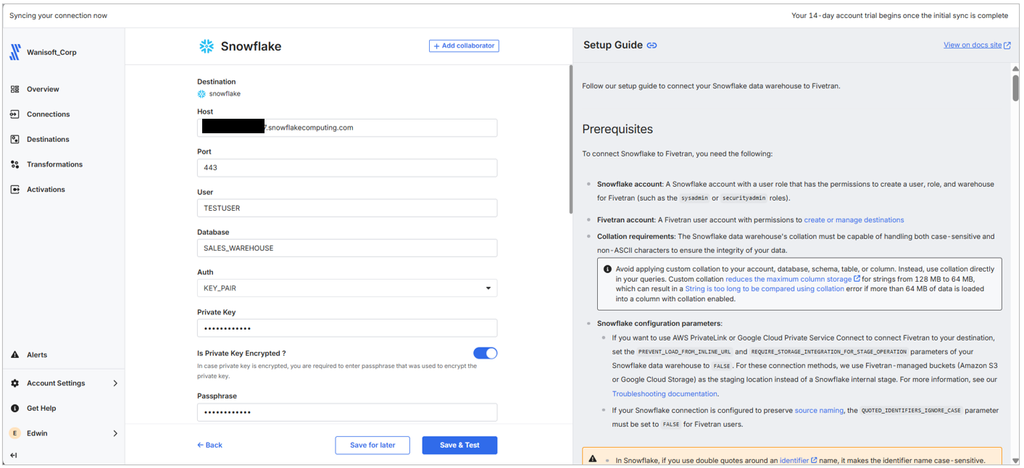
Fivetran starts to make more sense when the priority is not building the pipeline visually, but having a managed ELT service take care of as much of the ongoing maintenance as possible.
In our Salesforce-to-Snowflake comparison, the part I would pay most attention to is what happens after the first successful load. Fivetran is designed to propagate supported source schema changes into the connector and destination schema. New columns, for example, can be picked up according to the schema-change settings rather than requiring someone to rebuild the pipeline each time Salesforce changes.
That is useful in larger environments where dozens or hundreds of pipelines are running and schema changes are normal rather than exceptional. The trade-off is that Fivetran’s cost is tied to Monthly Active Rows (MAR), so the bill depends on how many distinct rows are inserted, updated, or deleted during the month.
Best for
Fivetran fits data teams that have a growing number of SaaS and database pipelines and would rather pay for a managed service than spend engineering time maintaining connector code, schema changes, and sync infrastructure.
I would look at it especially closely when automated schema handling and low day-to-day maintenance matter more than having a highly customizable visual pipeline.
Rating
- G2: 4.3/5 from 811 reviews.
- Capterra: 4.4/5 from 25 reviews.
Pricing
Fivetran uses usage-based pricing measured primarily in Monthly Active Rows (MAR) for connections.
A row counts as active when it is inserted, updated, or deleted during the month. Repeated updates to the same row generally still count as one MAR for that month, although history-mode behavior has its own rules.
There is a Free plan with up to 500,000 MAR for connections. Standard includes 15-minute syncs, while Enterprise adds syncs as frequent as one minute and hybrid deployment.
The important thing is that there is no single flat monthly price to compare with Skyvia. Cost changes with the number of active rows and the plan, so workloads with lots of frequently changing records deserve a closer look at the pricing estimator.
Pros
- Strong automated handling of source schema changes, including propagating supported changes into the destination schema.
- 700+ managed connectors on the Standard plan.
- Incremental synchronization reduces the need to reload unchanged data.
- Managed infrastructure means the team does not have to operate the extraction runtime itself.
- One-minute syncs are available on Enterprise and Business Critical plans.
- Hybrid deployment is available for organizations that need more control over where data movement runs.
Cons
The main drawback is cost predictability. MAR pricing can be harder to estimate when a source contains a lot of frequently changing rows, and inserts, updates, and deletes all contribute to paid MAR under the 2026 pricing rules.
Fivetran also gives you less control over the extraction logic than a self-hosted framework such as Airbyte Core or a custom pipeline. That is partly the point of the product, but it matters if your team needs unusual extraction behavior or wants to control the runtime closely.
When Does Hevo Data Make Sense for High-Volume Database Replication?
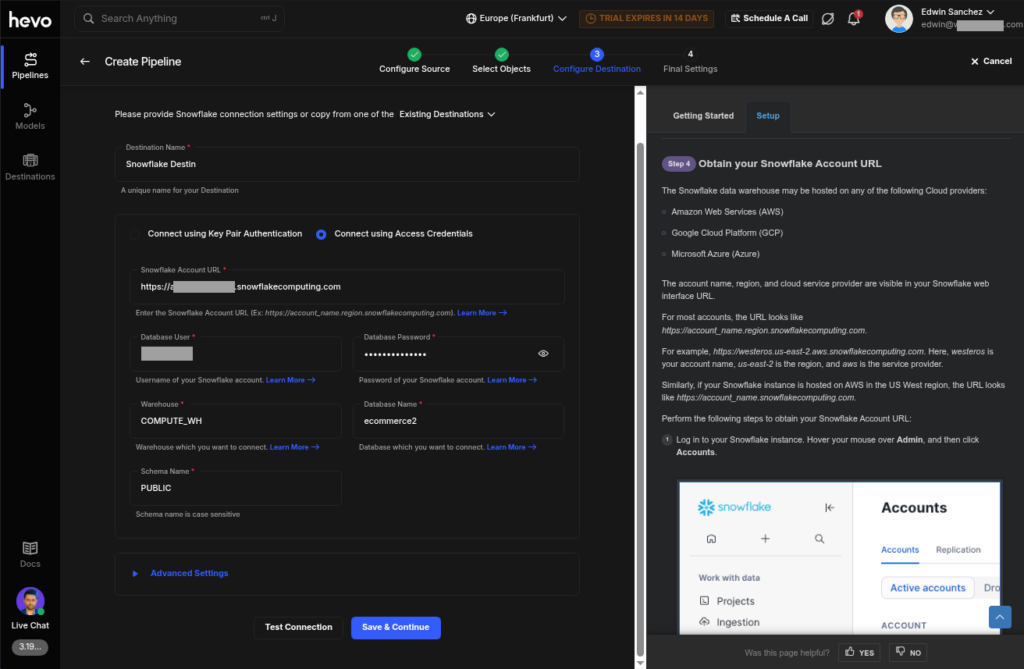
Hevo starts to look more interesting when the source is a busy operational database and the pipeline needs to keep up with changes without repeatedly scanning whole tables.
For databases such as MySQL, PostgreSQL, MongoDB, Oracle, and SQL Server, Hevo supports log-based incremental replication. Depending on the source, that means reading BinLog, logical replication, Change Streams, Redo Logs, or Change Tracking rather than querying the full dataset again. Hevo specifically recommends logical replication for PostgreSQL when transaction volumes are high.
Once the initial historical load is finished, the pipeline can keep moving inserts, updates, and deletes as they happen. Streaming pipelines are also available for several supported database sources on higher plans.
Hevo also has a Reverse ETL product called Activate, but there is an important limitation in 2026. Activate is currently available in the Hevo UI only to customers that already have Activations, and the supported targets are limited to Salesforce.
Best for
Hevo makes the most sense for data teams that regularly replicate changing database tables into a warehouse and want CDC-style ingestion without building and maintaining the replication logic themselves.
I would look at it particularly closely for MySQL or PostgreSQL workloads with a lot of ongoing changes, where log-based ingestion is a better fit than scheduled full-table queries.
Rating
- G2:4.4/5 from 292 reviews.
- Capterra: 4.7/5 from 110 reviews.
Pricing
Hevo prices its pipelines around Events, essentially records inserted, updated, or deleted in the destination. Its newer consumption model charges for changed data rather than the historical initial load.
The Free tier supports up to 1 million events per month with limited connectors. Starter begins at $299/month and includes 150+ connectors. Higher tiers add features such as streaming pipelines, APIs, advanced networking, and security controls.
That model is worth calculating against a real workload. A database with a modest number of rows but constant updates can consume Events much faster than a mostly static table of the same size.
Pros
- Log-based incremental replication for major databases, including MySQL, PostgreSQL, MongoDB, Oracle, and SQL Server.
- Streaming pipelines are available for supported database sources on higher tiers.
- 150+ connectors on paid plans.
- Historical loading can be separated from ongoing change replication, which is useful for larger databases.
- Visual pipeline setup reduces the amount of CDC and retry logic the team has to build itself.
- Reverse ETL is available through Hevo Activate for some existing HubSpot and Salesforce workflows.
Cons
The biggest thing to watch is event-based pricing. Inserts, updates, and deletes all count as billable Events, so a database with very high change volume can burn through its monthly allowance quickly.
Reverse ETL also needs a footnote. Hevo still documents Activate, but it is currently restricted to customers with existing Activations and only supports HubSpot and Salesforce as targets. That makes Hevo’s replication side much broader than its current Reverse ETL offering.
While Hevo handles common database replication patterns well, teams that need unusual CDC behavior or highly custom extraction logic may find a self-managed framework more flexible.
Why Does Talend Remain the Benchmark for Legacy Enterprise Architectures?
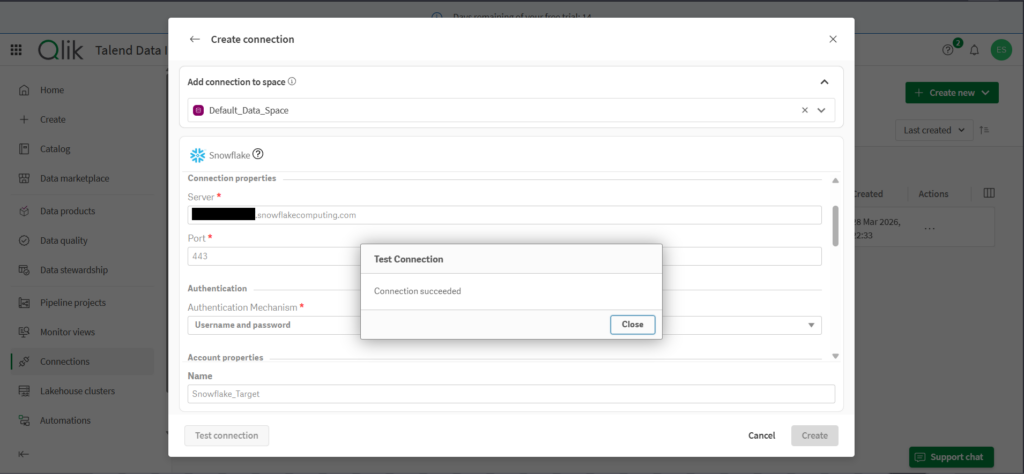
Talend starts to make more sense when the extraction problem is not just moving data from one SaaS application into a warehouse. I would look at it when the environment includes on-premises databases, private networks, older enterprise systems, cloud platforms, and governance requirements that all have to coexist.
That is where the Talend stack still stands apart from many cloud-first extraction tools. Talend Jobs can run on customer-managed Remote Engines inside an on-premises network or private cloud, while management remains connected to Talend Cloud. The data does not have to pass through Talend-managed Cloud Engines. Qlik also offers client-managed data integration, and its higher Qlik Talend Cloud tiers extend connectivity to sources such as SAP applications and mainframes.
The development model is also much closer to traditional enterprise ETL. Talend Studio gives developers a visual component-based canvas, but it does not hide the underlying technical work. Complex jobs can involve mappings, contexts, reusable components, Java, SQL, dependency management, and separate execution environments. That gives experienced integration teams a lot of control, but it also explains why Talend takes longer to learn than the more managed tools in this comparison. G2 reviews specifically call out the steep learning curve, while Capterra currently gives Talend Data Fabric 3.8/5 for ease of use.
So I would not pick Talend just to extract a few SaaS tables into Snowflake. Its value becomes clearer when the architecture is already complicated, and the team needs to keep that complexity under control.
Best for
Talend fits large enterprise data environments with a mix of legacy, on-premises, and cloud systems, especially when integration jobs have to run inside customer-controlled infrastructure.
I would consider it most closely when a dedicated data engineering team already manages complex ETL processes and needs deployment flexibility, centralized management, data quality, lineage, and governance around those pipelines.
Rating
- G2: 4.3/5 from 67 reviews.
- Capterra: 4.3/5 from 24 reviews.
Pricing
Qlik does not publish fixed prices for its current Talend data integration plans. Qlik Talend Cloud is sold in Starter, Standard, Premium, and Enterprise editions, with customers contacting Qlik for pricing.
The subscription is capacity-based. Usage can depend on data volume moved, the number of job executions, and execution duration. Standard adds CDC and hybrid or client-managed deployment, while Premium adds broader ETL/ELT transformation and governance capabilities. Enterprise extends the stack further for sources such as SAP and mainframes.
That makes Talend a much more enterprise-oriented purchase than a tool with a public monthly tier. The trade-off is that pricing is harder to estimate before discussing the architecture and expected capacity with Qlik.
Pros
- Strong fit for hybrid and on-premises enterprise environments.
- Remote Engines can execute integration workloads inside infrastructure controlled by the customer.
- Mature visual ETL development in Talend Studio, with Java and SQL available when jobs need deeper customization.
- Broad support for databases, cloud platforms, enterprise applications, files, and higher-tier SAP and mainframe sources.
- Data quality, lineage, cataloging, and governance capabilities are available alongside data integration.
- Supports batch processing as well as CDC and event-driven integration patterns.
Cons
The biggest drawback is the learning and operational curve. A visual Studio does not make Talend a simple no-code extraction tool. Teams still need to understand job design, mappings, contexts, environments, engines, deployment, and troubleshooting. That makes Talend harder to hand over to an analyst or a small team without dedicated integration expertise.
It is also a heavier commercial commitment. Qlik uses quote-based capacity pricing rather than publishing a simple monthly price, and many of the capabilities that make Talend attractive for enterprise architectures sit in the higher subscription tiers.
When Does Airbyte Make Sense for Self-Hosted, Developer-Controlled Pipelines?
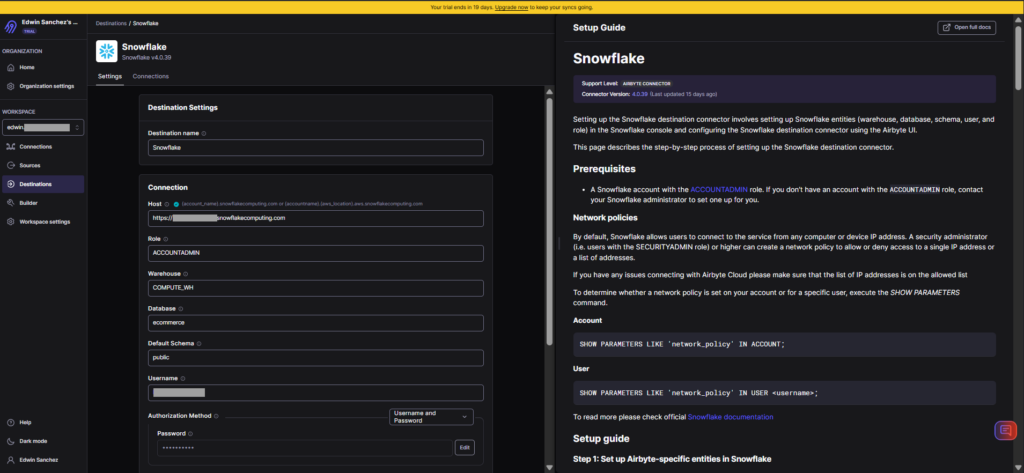
Airbyte starts to make more sense when the team wants more control over where extraction runs and how connectors behave. Unlike tools built primarily around a managed SaaS runtime, Airbyte gives engineering teams the option to run the open-source Airbyte Core themselves or use one of its managed cloud plans.
That flexibility matters when the standard connector is only the starting point. Airbyte includes a Connector Builder and development tooling for creating or modifying connectors, while its current catalog covers 700+ connectors. For teams with unusual APIs, internal services, or sources that need custom behavior, that is a useful middle ground between writing every extraction pipeline from scratch and accepting whatever a managed connector supports.
The trade-off is operational work. Running Airbyte Core gives the team more control over the runtime, but the team also takes responsibility for the infrastructure, upgrades, scaling, monitoring, and troubleshooting around that deployment. I would not choose that route just to avoid a SaaS subscription. It makes more sense when owning the data movement layer is itself a requirement.
Best for
Airbyte fits data engineering teams that want a self-hosted extraction platform, need to customize connectors, or prefer more control over the runtime than a fully managed SaaS tool provides.
I would look at it particularly closely when the team already has the engineering resources to operate data infrastructure and expects to connect to less common APIs or modify extraction behavior over time.
Rating
- G2: 4.4/5 from 78 reviews.
- Capterra: N/A.
Pricing
Airbyte has both self-managed and managed pricing options. Airbyte Core is the open-source, self-hosted option, while the current cloud offering is split across Standard, Plus, Pro, and Enterprise Flex.
Standard starts at $20/month with five credits included and additional credits at $5 each. Plus starts at $189/month for 40 credits and adds 15-minute syncs, SSO, field renaming, and two workspaces. Pro and Enterprise Flex use custom pricing, with Pro moving to capacity-based Data Worker pricing and Enterprise Flex adding hybrid and in-boundary deployment.
That gives Airbyte a wide pricing range, but the economics depend heavily on the deployment model. Core removes the software subscription cost, but not the infrastructure and engineering cost of running it yourself.
Pros
- Open-source Airbyte Core for teams that want to operate the extraction runtime themselves.
- 700+ connectors across the current Airbyte catalog.
- Connector Builder and development tooling for sources that need custom extraction logic.
- Supports CDC, schema propagation, column selection, APIs, Terraform, and orchestration integrations.
- Managed cloud options are available when the team does not want to operate the infrastructure itself.
- Enterprise Flex supports hybrid and on-premises data movement for environments with stricter deployment requirements.
Cons
The main trade-off is that self-hosting shifts infrastructure work back to the data team. Airbyte Core gives you more control, but somebody still has to operate the deployment, handle upgrades, monitor resources, and investigate failures. That can be a good trade for an engineering-heavy team but less attractive when the goal is simply to get a standard SaaS-to-warehouse pipeline running with minimal maintenance.
Connector maturity can also vary. Airbyte’s extensible ecosystem is one of its strengths, but G2 feedback includes reports of connector issues, difficult setup, and troubleshooting challenges alongside positive comments about flexibility and customization.
The managed editions reduce the infrastructure burden, but then the pricing model becomes another consideration. Standard and Plus are volume-based, while Pro and Enterprise Flex move to custom capacity-based pricing.
Which Document Processing Tool (IDP) Should You Use for PDFs and Invoices?
PDFs and invoices are a different extraction problem from SaaS apps and databases. The data may be spread across page layouts, tables, scanned text, and line items rather than exposed through a structured API.
For this category, we focused on whether the tool could recognize useful fields from multi-page invoices with varying layouts, how well it handled tables, and how much manual work was still required before the extracted data was ready to export.
How Does Rossum Automate Extraction From Unstructured Business Documents?
Rossum is built specifically for intelligent document processing rather than traditional ETL. Its Aurora Document AI combines OCR and AI-based document understanding to identify fields and table structures without requiring a fixed template for every invoice layout. Rossum describes Aurora as template-free, which is important when invoices from different suppliers put the same information in different places.
That was the useful part in our multi-page invoice test. We did not have to define a separate positional template before processing each layout. Rossum identified common invoice fields and line items, including tables that continued across document pages. Rossum processes data from all pages by default, and its pre-trained financial document engine recognizes fields such as invoice totals, tax details, item descriptions, quantities, unit prices, and line-item totals.
The result was not completely hands-off, though. When a table structure or individual value needed correction, we still had to review it in the Validation screen. Rossum’s Line Item Editor lets the reviewer adjust the detected table boundaries, rows, columns, and field labels instead of rebuilding the extraction logic from scratch. The corrected values then appear as structured line items in the validation interface.
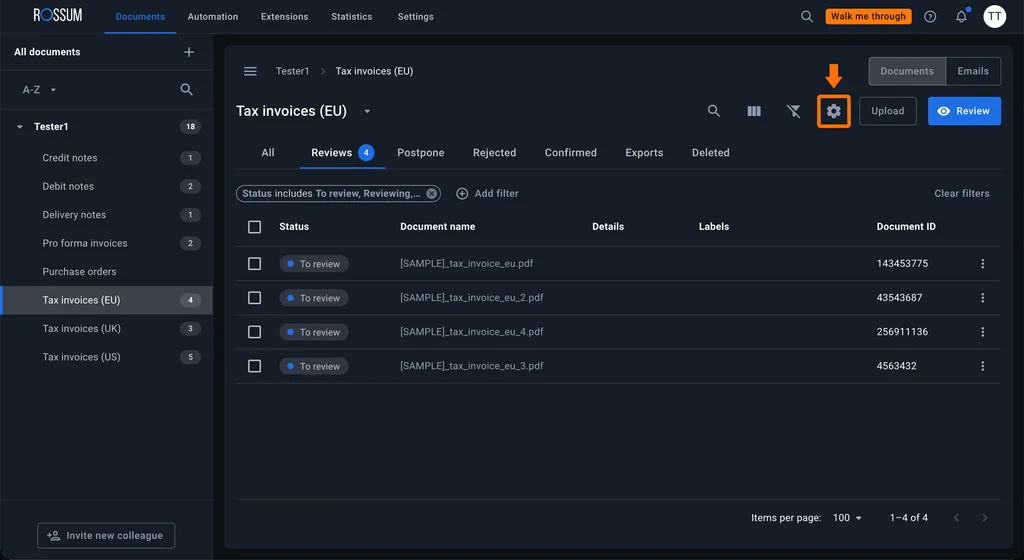
That is the main distinction I would make here. Rossum is not just OCR that converts a PDF into text. It tries to understand which pieces of that text represent the invoice number, supplier, total, tax, quantity, description, and other business fields, then turns them into structured data that can be exported as CSV, XLSX, XML, JSON, or passed through the API.
Best for
Rossum fits teams that process large numbers of invoices, purchase orders, and other transactional documents where layouts vary between suppliers.
I would look at it especially closely when template maintenance has become the bottleneck and the workflow needs both AI extraction and a human review step for exceptions.
Rating
- G2: 4.5/5 from 127 reviews.
- Capterra: 4.3/5 from 13 reviews.
Pricing
Rossum’s Starter plan begins at $18,000 per year and includes unlimited users, document ingestion through email, API, or manual upload, Aurora Document AI extraction, the validation interface, document archiving, and API access. The Business plan uses custom pricing and adds more advanced workflow and business-logic capabilities.
Pricing also depends on the volume of pages or documents processed and the complexity of the workflow, so $18,000 should be treated as the entry point rather than a predictable cost for every implementation.
Pros
- Template-free AI extraction is useful when invoice layouts vary between suppliers.
- Pre-trained extraction for common financial fields, tax information, and line items.
- Handles multi-page documents and extracts data from all pages by default.
- Line Item Editor supports table extraction and manual correction when the initial result needs adjustment.
- The workflow includes human validation for fields that require review.
- Extracted data can be exported as CSV, XLSX, XML, JSON, or accessed through the API.
Cons
Rossum still needs human review for exceptions. Different layouts do not require fixed templates, but unusual tables, poor scans, or incorrectly recognized fields may still need someone to correct the extracted values before the document can continue through the workflow. Rossum’s own documentation includes tools for adjusting detected grids, rows, columns, and values for this reason.
The other major drawback is cost. With Starter beginning at $18,000 per year, Rossum is a much larger commitment than basic OCR APIs or lightweight PDF parsing tools. That makes more sense for recurring document-processing workflows than for occasional invoice extraction.
Which Web Scraping Platform Is Best for Harvesting Public Web Data?
Web scraping has a different failure pattern from SaaS or database extraction. The source is a website, so the scraper may need to handle JavaScript-rendered content, pagination, changing page structures, CAPTCHAs, and blocked requests before it returns any useful data.
That is why I would separate enterprise web-data infrastructure from visual point-and-click scrapers. Bright Data is built around large-scale access, proxy management, browser rendering, and anti-blocking infrastructure. Octoparse and ParseHub approach the same problem from the other direction, making smaller scraping projects easier to build without writing a custom scraper.
When Do You Need an Enterprise Web Scraper Like Bright Data or Octoparse?
Bright Data makes more sense when scraping becomes an infrastructure problem.
For the dynamic e-commerce pages in our test, JavaScript rendering was the important difference from extracting a normal HTML table. The scraper has to load the page like a browser, wait for dynamic content, and still deal with blocking or CAPTCHA challenges. Bright Data’s Web Scraper API includes JavaScript rendering, residential proxies, automated proxy management, CAPTCHA solving, user-agent rotation, and geotargeting.
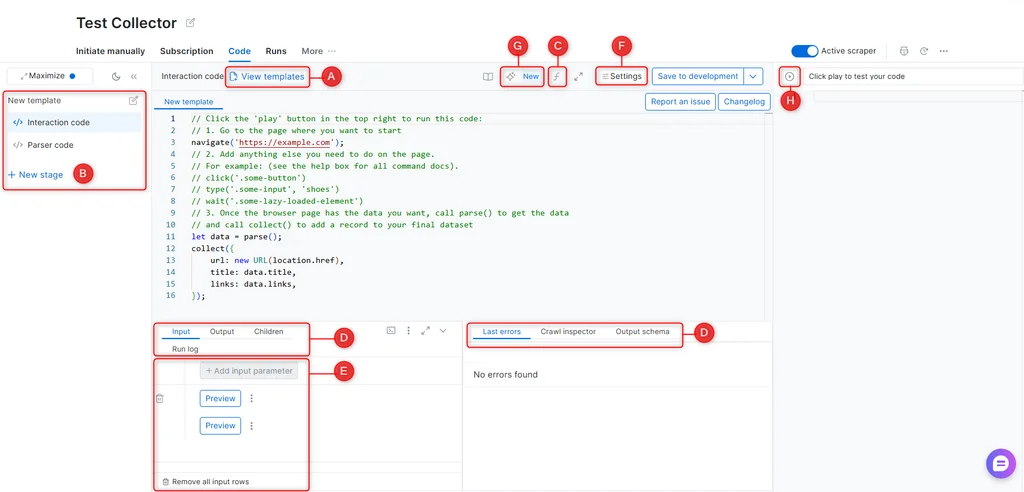
That is the main reason I would put it in the enterprise category. You do not have to build and maintain your own proxy pool or browser infrastructure. Bright Data handles proxy rotation, unlocking, rendering, retries, and concurrency behind the scraper, while Scraper Studio provides a browser-based environment for building, testing, debugging, scheduling, and monitoring extraction jobs.
But that is more infrastructure than most scraping jobs need. Octoparse is much closer to a visual workflow builder. You load the target page in its built-in browser, select the information you need, and Octoparse builds a workflow from actions such as pagination, clicking, scrolling, and extracting data. Its Custom Task mode can also work with JavaScript, AJAX, and other dynamic pages.
ParseHub follows a similar visual approach and can extract data from JavaScript and AJAX pages. I would keep both Octoparse and ParseHub in this comparison for analysts or smaller teams that want repeatable web extraction without maintaining scraping code, but I would not present them as direct equivalents to Bright Data’s proxy and web-access infrastructure.
Best for
Bright Data fits teams collecting public web data at scale where IP rotation, browser rendering, anti-bot handling, concurrency, and infrastructure maintenance have become part of the scraping problem.
I would look at Octoparse or ParseHub instead when the job is smaller, and the priority is to create a scraper visually, select fields from a webpage, schedule the task, and export structured results without developing a custom scraping stack.
Rating
Bright Data
- G2: 4.7/5 from 342 reviews.
- Capterra: 4.7/5 from 68 reviews.
Octoparse
- G2: 4.8/5 from 52 reviews.
- Capterra: 4.7/5 from 107 reviews.
ParseHub
- G2: 4.3/5 from 10 reviews.
- Capterra: 4.5/5 from 16 reviews.
Pricing
Bright Data’s Web Scraper API currently has a free tier with 5,000 records per month. Pay-as-you-go pricing starts at $1.50 per 1,000 successfully delivered records, while the Scale plan starts at $499/month for 384,000 included records. Enterprise pricing is custom. Proxies, JavaScript rendering, CAPTCHA solving, and automated proxy management are included rather than billed as separate scraper components.
Octoparse has a free plan, while Standard starts at $69/month when billed annually and Professional at $249/month when billed annually. Standard adds cloud extraction, scheduling, IP rotation, residential proxies, CAPTCHA solving, and API access.
ParseHub also has a free plan. Standard costs $189/month, while Professional costs $599/month. Paid tiers increase pages per run, project limits, speed, retention, and add features such as IP rotation and scheduling.
Pros
- Bright Data includes proxy management, residential proxies, JavaScript rendering, CAPTCHA solving, retries, and browser infrastructure in the scraping layer.
- Supports large concurrent scraping workloads without the team maintaining its own proxy pool or browser fleet.
- Scraper Studio provides an IDE with preview output, execution logs, network information, recent errors, and crawl inspection for debugging extraction jobs.
- Results can be delivered as JSON or CSV and, depending on the workflow, directly to destinations such as S3, GCS, Azure Blob, BigQuery, and Snowflake.
- Octoparse provides a more approachable point-and-click workflow for people who do not want to write scraping code.
- ParseHub offers another visual option for scheduled extraction from dynamic JavaScript and AJAX pages.
Cons
The main trade-off with Bright Data is complexity. Its infrastructure solves problems that matter at scale, but a team scraping a few predictable pages may not need proxy orchestration, browser infrastructure, an IDE, scraper APIs, and multiple delivery options. A visual tool such as Octoparse or ParseHub can be simpler for that type of job.
Pricing also becomes workload-dependent. Bright Data’s Web Scraper API charges by successfully delivered records, while other Bright Data scraping products use page-load or bandwidth-based pricing. That makes it important to estimate the actual number of pages or records rather than comparing only the starting price.
Octoparse and ParseHub have their own limits. Visual scraping removes much of the coding, but dynamic pages still require some understanding of pagination, page loading, selectors, and workflow logic. Octoparse’s documentation recommends testing each workflow step and adjusting settings when elements, infinite scrolling, or page loading don’t behave as expected.
What Are the Primary Data Extraction Methods and Sync Types?
No single “best” extraction method exists. The right choice depends on how much data you have, how often it changes, and how quickly the destination really needs an update.
A nightly reporting pipeline has very different requirements from an order system that needs fresh data every few minutes. In practice, the biggest mistake is usually using a more complex sync pattern than the workload actually needs.
Full Extraction
Full extraction means pulling the entire dataset every time the job runs.
This works well for small tables, one-time migrations, periodic snapshots, or sources that don’t expose a reliable change field. If you only have a few thousand rows, a full reload can be easier to maintain than adding incremental logic.
It becomes a problem when the dataset grows. Reloading millions of Salesforce records every hour wastes API calls, increases load on the source, and makes failed runs much more painful to restart.
For larger pipelines, I would normally use a full extraction only for the first load, then switch to incremental updates.
Incremental or Delta Extraction
Incremental extraction pulls only the records that changed after the previous successful run.
This is the pattern I would choose for most recurring SaaS and database pipelines. For example, if Salesforce data needs to reach a warehouse every 15 minutes, there is little reason to reload the whole object each time. It is much more efficient to use an update timestamp, incremental key, or another change marker.
That saves API calls and reduces both processing time and warehouse load. It also matters a lot with SaaS platforms where API limits can quickly become a bottleneck.
The difficult part is keeping track of state. The pipeline needs to know exactly where the previous run stopped. Deletes, late updates, or a lost cursor can also create gaps or duplicates if they are not handled properly.
Real-Time Extraction
Real-time extraction makes sense when waiting for the next batch would actually hurt the business process.
Think about fraud detection, inventory changes, order processing, or customer activity that needs to appear almost immediately in another system.
With databases, this is often handled through CDC, where the pipeline reads changes from transaction logs. APIs may use webhooks or event streams instead.
I would not use real-time just because it sounds better. It is harder to operate, monitor, and recover. If the business is perfectly happy with updates every 15 or 30 minutes, scheduled incremental loads are usually much simpler.
Batch Extraction
Batch extraction means running the pipeline on a schedule, such as every 30 minutes, every night, or once a week.
For analytics, this is still one of the most practical approaches. Finance reports, marketing dashboards, and daily warehouse refreshes rarely need every change to arrive instantly.
Batch also does not mean full reload. A pipeline can run every 30 minutes and still extract only new or changed records.
That combination, scheduled incremental extraction, is one of the patterns I would expect to see most often in SaaS-to-warehouse pipelines.
Hybrid Extraction
Most real environments eventually use more than one extraction pattern.
A common setup is a full historical load first, followed by incremental or CDC-based updates. Another option is to use different refresh rates for different data. Orders may need updates every few minutes, while reference tables can refresh once per day.
This usually works better than forcing every dataset into the same schedule.
The practical goal is simple: use the least complex extraction method that still keeps the data fresh enough for the people or systems using it.
What Technical Failures Happen During Data Extraction, and How Can You Prevent Them?
A pipeline can work perfectly during setup and still fail a week later because nothing about the extraction itself is static.
API limits change with traffic. Source schemas evolve. OAuth tokens expire. The useful question is not whether failures will happen, but whether the pipeline can recover without somebody restarting it manually every time.
API Rate Limiting
Rate limiting usually appears when the extraction tool sends more requests than the source API allows within a given period.
A typical response looks like this:
HTTP 429 Too Many Requests
{
"error": "rate_limit_exceeded",   "message": "Too many requests. Please retry later."
}
This is common with SaaS sources where the API has per-minute, per-hour, or daily request limits. It becomes especially noticeable during large initial loads or when several extraction jobs hit the same account at once.
The wrong response is to retry immediately in a tight loop. That normally creates more 429 errors.
A better approach is exponential backoff. After the first failed request, the pipeline waits briefly before trying again. If the next attempt also fails, the delay increases, for example:
Attempt 1: retry after 2 seconds
Attempt 2: retry after 4 seconds
Attempt 3: retry after 8 seconds
Attempt 4: retry after 16 seconds
If the API returns a Retry-After value, the pipeline should respect that as well.
For large SaaS pipelines, incremental extraction also helps. Pulling only records that changed since the last run can reduce the number of API calls dramatically compared with reloading the entire object every time.
What I would check: whether the tool retries 429 responses automatically, whether the delay increases between retries, and whether failed records can resume from the last successful point rather than restarting the whole load.
Schema Drift
Schema drift happens when the source structure changes after the pipeline has already been built.
Imagine a Salesforce object with these fields:
Id
Name
Email
CreatedDate
Then somebody adds:
Customer_Segment__c That looks harmless, but depending on how the pipeline is configured, several things can happen. The new field may simply be ignored. The destination table may be updated. Or the next run may fail because the source and target schemas no longer match.
Renamed or deleted fields can be even more disruptive because mappings may still point to columns that no longer exist.
Tools with schema discovery or schema propagation can reduce some of this maintenance. When a new field appears, the platform can detect the change and, where supported, add or map the corresponding target column instead of breaking the whole job.
I would still be careful with the word automatic here. Adding a nullable source field is much easier to handle than a changed data type, renamed key, or deleted column. Those changes may still need someone to review the mapping.
What I would check: whether new columns are detected, whether the destination schema can be updated safely, and whether the tool clearly flags changes that need manual intervention.
Token Expiration
OAuth failures are especially annoying because the pipeline itself may be completely correct.
The connection works during setup, then a long-running or scheduled job suddenly starts returning something like:
HTTP 401 Unauthorized
{
   "error": "invalid_grant",   "error_description": "The access token has expired or been revoked."
 }
Most OAuth-based connections use a short-lived access token and a longer-lived refresh token. The extraction platform should use the refresh token to obtain a new access token without requiring the user to reconnect manually.
The trouble starts when the refresh token is also expired, revoked, or invalidated. This can happen after a password change, an admin policy update, an app permission change, or a long period of inactivity.
For recurring extraction jobs, token handling needs to be part of the connection layer rather than something added after failures start appearing.
What I would check: whether token refresh happens without interrupting scheduled jobs, how the tool reports a failed refresh, and whether it alerts someone before multiple runs start failing.
How Should You Choose the Best Data Extraction Tool for Your Stack?
The right choice mostly comes down to what you are extracting and how much infrastructure your team wants to manage.
For SaaS apps and databases moving into a warehouse, Skyvia is a good fit when you want visual setup, managed execution, and incremental loading without building custom pipelines.
Choose Airbyte when self-hosting, open-source tooling, and connector customization matter more. Talend makes more sense in large hybrid environments with legacy systems, on-premises infrastructure, and stronger governance requirements.
For PDF invoices and other unstructured documents, Rossum is built for the job. For public web data, Bright Data is better suited to large-scale scraping with proxy rotation and browser infrastructure, while Octoparse is easier for smaller point-and-click scraping tasks.
The main thing is not to choose the most complex platform available. Pick the smallest tool that can handle the workload reliably and still fit how your team wants to operate it.
If your use case is SaaS or database extraction, you can test it with Skyvia’s free plan first. For a more complex setup, you can also talk through the architecture with a Skyvia integration engineer before committing to a pipeline design.

FAQ for Data Extraction Tools

What are the main data extraction techniques?
Data extraction techniques fall into three main categories:
– Full Extraction. Extracting the entire dataset without tracking changes.
– Incremental Extraction. Extracting only new or updated data since the last extraction.
– API-based Extraction. Using APIs to pull structured data from applications and platforms.
– Web Scraping. Extracting data from web pages using automated scripts or tools like BeautifulSoup or Scrapy.
– Database Query Extraction. Using SQL queries to fetch data from relational databases.
What are the different types of data extraction?
There are three primary types of data extraction:
– Structured Extraction. Extracting data from databases, APIs, and structured files (e.g., CSV, JSON).
– Semi-Structured Extraction. Extracting data from XML, JSON, or other loosely structured sources.
– Unstructured Extraction. Extracting text, images, and other unstructured data from documents, emails, and PDFs using AI or NLP techniques.
What challenges can arise in data extraction?
Some common challenges in data extraction include:
– Data Format Variability. Different formats (JSON, XML, CSV) are available across sources.
– Access Restrictions. API limitations or blocked scraping attempts.
– Large Data Volumes. Processing and storing massive amounts of data efficiently.
– Real-Time Needs. Ensuring data is extracted and processed quickly for real-time analytics.
How does data extraction work in ETL?
In ETL, data extraction is the first step. It involves:
– Identifying data sources like databases, applications, cloud platforms, or web sources.
– Extracting Data. Using APIs, SQL queries, or web scraping tools to collect raw data.
– Cleaning and Preprocessing. Handling missing values and formatting inconsistencies.
– Storing or Loading. Sending extracted data to a data warehouse, data lake, or another destination for analysis.