Picture two engineers arguing about a "data pipeline" and an "ETL pipeline" for twenty minutes, then realizing they meant the same nightly job. Short version? A data pipeline is any automated route your data travels between systems, and ETL is one particular route, which settles the data pipeline vs ETL debate: the data gets extracted, then transformed, and only after that loaded into the target.
People still swap the two words in planning meetings and Microsoft Teams chats. That costs more than it seems. Build ETL for a job that only needed a scheduled copy, and you'll babysit transformation logic nobody reads. Go the other way, a plain copy when finance wanted validated numbers, and guess who cleans it up? The analysts.
We'll put data pipelines, ETL and ELT side by side, sort out the other pipeline types you'll bump into (replication, change data capture, reverse ETL), then get to real use cases, tools, costs and security.
What is a Data Pipeline?
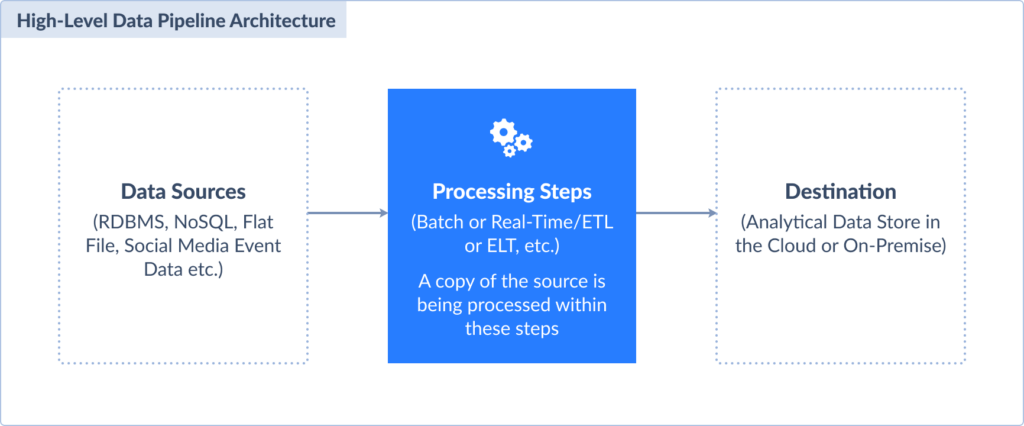
It is a general term meaning an automated system that continuously moves records from sources to destinations. If necessary, it applies transformations along the way to ensure, at the other end of this conveyor, you get clean, structured datasets. The best part is that this magic doesn’t need manual intervention.
Here is what a data pipeline looks like in the cut:
Data pipeline key characteristics:
- Automation-first design. After the initial configuration, pipelines are independent digital agents that dutifully carry out their assignments while maintaining constant vigilance for data events that trigger their specialized responses.
- Multi-source integration. Pipelines connect input from heterogeneous systems all within a single workflow.
- Built-in transformation logic. They correct malformed entries, unify presentation standards, supplement records with enriching points, and do everything to deliver analytics-ready datasets.
- Fault tolerance and recovery. When something breaks (and it most likely will), pipelines automatically start again, route around problematic data, and alert administrators without bringing the entire system to a halt.
- Scalability under pressure: A usual daily batch or a sudden influx from a viral marketing campaign, it doesn’t matter. The pipeline will handle the growth.
All of this may not sound impressive when considered in a vacuum. However, imagine a team running in vicious circles of manual labor, analysts aging while waiting for reports, and executives operating on information that’s already collecting dust. Now, it’s quite a miracle.
What is an ETL Pipeline?
It is a specific type of pipeline that extracts data, transforms it, and then loads it into the target – core steps that decipher the acronym. The order is important if your goal is that only validated records reach a destination.
And here’s how the ETL pipeline looks:

ETL is often a stage within a larger data pipeline. For example, a pipeline might gather raw data in real time, route it through an ETL process for cleaning and validation, and then deliver it to a target. This hybrid model is common in finance, healthcare, and compliance-heavy industries where real-time feeds must eventually conform to strict quality rules.
ETL pipeline key characteristics
- Transform-before-load approach. Raw input is inspected, sanitized, and shaped into consistent formats before delivery. No rogue elements can compromise analysis.
- Batch-oriented processing. Traditional ETL thrives on scheduled, high-volume processing.
- Schema-first approach. Consistency across all loads depends on a defined upfront data structure.
- Staging area dependency. ETL uses intermediate storage areas where records reside temporarily during transformation. Thanks to this stop, validation, deduplication, and multi-source joins don’t impact source systems.
- Quality gatekeeping. Failed transformations stop the pipeline in its tracks. That protects analytics from contamination but requires dedicated error handling.
- Resource-intensive transformations. ETL can be computationally expensive, especially when dealing with complex business rules or large datasets that need extensive processing.
The Rise of ELT: The Modern, Cloud-First Approach
ELT is new on this team. It flips the traditional script. Records go immediately into a destination in their raw form, and only then undergo transformations. Instead of doing the heavy computation on separate servers, ELT pushes all that work to platforms like Snowflake, BigQuery, or Redshift, where virtually unlimited transformation power awaits.
Here’s what ELT looks like:
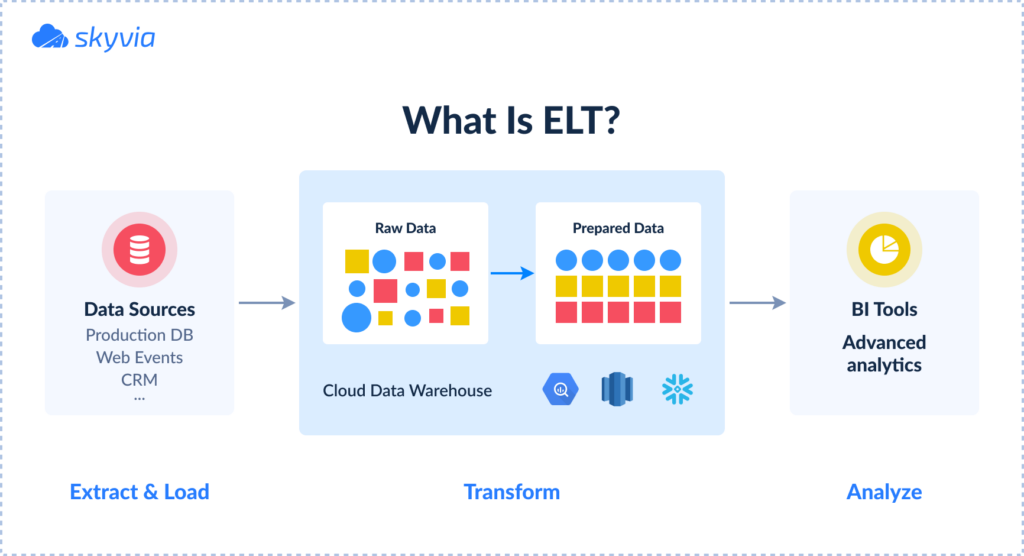
The ELT revolution rides on the coattails of cloud computing’s innovations:
- You can now afford to keep everything in its original form and transform it differently for various use cases without re-extracting records every time.
- ELT will deliver fresh input for real-time analysis, while ETL will still be chugging through its transformation checklist.
- No more maintaining expensive ETL servers that sit idle between processing windows. Cloud warehouses are much more budget-friendly.
For organizations that build modern, cloud-native architectures and prioritize agility, scalability, and real-time insights, the ELT becomes a go-to approach.
Is Every Data Pipeline an ETL Pipeline? Common Pipeline Types
No, and this is where most of the confusion starts. ETL is one pattern a pipeline can follow. Lots of pipelines never touch the shape of the data. That nightly job copying CRM tables into your warehouse? A data pipeline. The feed sending lead scores back into the CRM? Also one. Call either one ETL and a purist will correct you.
| Pipeline type | What it does | When the data changes shape | Where you'd see it |
|---|---|---|---|
| ETL | Pulls data out, reworks it on a separate engine, then loads it | Before loading | Finance numbers that must be validated before they reach the warehouse |
| ELT | Lands raw data first and reshapes it inside the warehouse | After loading, with SQL or dbt | Salesforce and ad data in Snowflake or BigQuery |
| Replication | Copies tables or objects as they are, then adds new and changed records on each run | Usually never | A reporting copy of a SaaS app |
| Change data capture (CDC) | Reads inserted, updated and deleted rows from a database's change log (in SQL Server, the transaction log) | Usually downstream, if at all | A warehouse table that tracks a production database closely |
| Streaming | Handles events one by one as they arrive, not in scheduled batches | In flight, if at all | Clickstream, IoT sensor readings, fraud signals |
| Reverse ETL | Sends modeled data from the warehouse back to business apps | Field mapping before the app gets it | Lead scores or customer segments in a CRM |
| Two-way sync | Keeps records matched between two systems, both directions | Field mapping only | A CRM and a support database sharing contacts |
Stuck on what to call your own job? Ask one thing: where does the data change shape? Before it lands, that's ETL. After it lands, ELT. And if nothing changes beyond field mapping, it's simply a pipeline that moves data (labeling it ETL just confuses whoever inherits it).
Good news: one row doesn't have to mean one more tool. Take Skyvia. Its Replication covers the ELT and replication rows. You don't create the warehouse tables yourself, and after the first full load it can grab just the new and changed records. Reverse ETL? That's Import. Feed it a warehouse table or a SQL query, and the rows get upserted into the app. Two-way jobs belong to Synchronization. And when one ETL pipeline has to pull from several sources and transform along the way, Data Flow does it, on the Standard plan and up.
Differences: Data Pipeline vs. ETL vs. ELT
| Aspect | Data Pipeline | ETL | ELT |
|---|---|---|---|
| Definition | A general system that transports, handles, and controls data flow | A pipeline for data extraction, transformation, and loading | A pipeline that extracts data, loads it first, and then transforms it |
| Transformation timing | It isn’t explicitly defined | Before loading | Within the target system, after loading |
| Data flow type | Batch or real-time/streaming data | Typically batch processing | Can support real-time or batch processing |
| Data type compatibility | Structured, semi-structured, unstructured | Mostly structured data | Structured, semi-structured, unstructured |
| Architecture flexibility | Very flexible for diverse workflows | More rigid; suited to legacy architectures | More flexible; suitable for modern cloud warehouses |
| Performance | Designed for continuous, incremental, or event-driven flows | May be slower due to the transformation step prior to loading | Faster ingestion and transformation due to parallel loading and transformation |
| Data storage | Backbone to move data into lakes, warehouses, or lakehouses | Typically used with warehouses or legacy systems | Best paired with data lakes and lakehouses |
| Cost and maintenance | Varies depending on implementation | May require more expensive upkeep | Lower cost and simpler maintenance by using the target’s computing power |
| Ideal use cases | Broad: analytics, ML, operational flows | Complex transformations and when the target cannot handle the transformation | For large data volumes, flexible querying, and evolving business needs |
| Data quality control | Integrated data validation and error handling | Data cleaned and validated before loading | Validation after loading |
| Security considerations | Depends on pipeline design | Enables pre-load data masking and privacy controls | Raw data storage might require additional privacy safeguards |
When to Choose Each Approach: Practical Scenarios
Now comes the moment of truth – selecting between the data pipeline, ETL pipeline, and ELT pipeline. The choice becomes even harder when you start thinking about what effect the decision will have.
Here’s a cheat sheet with all the use cases when these approaches work 100%.
Use a Data Pipeline When
- You want a dynamic, full-spectrum system capable of routing information both instantly and at intervals between multiple starting points and destinations.
- Your data origins span a broad spectrum of types and formats.
- Real-time or near-real-time processing and analytics are demanded for scenarios such as financial fraud prevention, active user journey monitoring, and continuous IoT data consumption.
- Automation and orchestration of complex workflows are necessary for reliable, repeatable data delivery.
- You want to build advanced use cases, such as ML pipelines, that require modular, scalable processing steps.
- Managing high-volume big data across hybrid or multi-cloud environments.
- You need anomaly detection, streaming change data capture (CDC), or predictive maintenance scenarios.
Use an ETL Pipeline When
- You require strict data quality and consistency before it reaches the target.
- Working primarily with structured data that fits well-defined schemas suitable for traditional warehouses.
- Your target system cannot efficiently handle heavy transformations or lacks large-scale compute capacity.
- Batch processing is acceptable or preferred, where input is processed at scheduled intervals.
- Legacy systems are part of the architecture, or compliance requires transformation before storage.
- You want to reduce the raw data footprint and make sure that only processed, high-quality data is stored.
Use an ELT Pipeline When
- You want to take advantage of scalable, cloud-based warehouses and lakes that can handle transformations internally.
- Fast ingestion of large volumes of raw data is critical for analytics.
- You deal with diverse data types, including semi-structured or unstructured data, and require schema-on-read flexibility.
- Real-time or near-real-time analytics use cases require dynamic transformation after loading.
- You want to minimize infrastructure and maintenance costs with the elasticity that cloud solutions are so generous in offering.
- Your use case involves complex, evolving transformations that benefit from centralized, on-demand processing.
We hope that by now you understand what exactly will help with your data movement needs. However, if you’re afraid that those needs may change or diversify over time, platforms like Skyvia have got you covered. It has dual citizenship in both ETL and ELT and offers 200+ connectors to unite a variety of systems.
Real-World Implementations
Theory’s great and all, but sometimes you need to see these approaches duke it out in the wild, where deadlines are real, budgets are tight, and no one will accept “it depends” as an answer.
Example 1: Retail (Scheduled Import Pipeline)
Bakewell Cookshop, a retail operation selling kitchen goodies both online and in a brick-and-mortar shop, decided to modernize by switching from its old Magento website to BigCommerce.
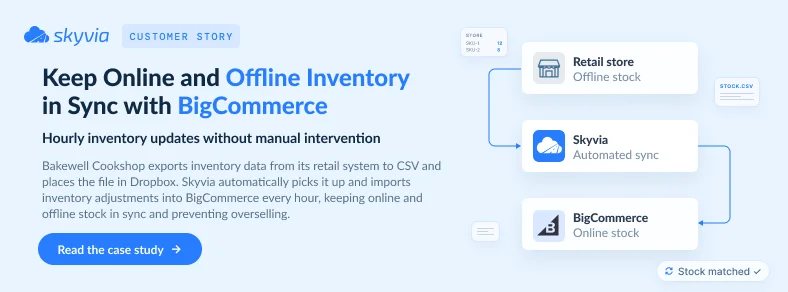
Challenge: Their automated inventory sync between physical and online stores suddenly broke. Magento consumed CSV files automatically, but BigCommerce’s import tools turned out to be unreliable for their scenario and couldn’t handle automation. Something that would stand between the source and target was needed.
Solution: The company set up a scheduled import pipeline in Skyvia, using Dropbox as cloud staging. They kept their existing CSV extraction process but redirected files to Dropbox. From this point, Skyvia automatically takes it from the Dropbox folder and uploads it to the BigCommerce instance.
Result: Bakewell’s physical and online stores now sync their inventories every hour without any manual work. Also, it is worth mentioning that since they did this work in-house, they saved money on custom development and kept their stock perfectly aligned across all channels.
Example 2: Healthcare (ETL Pipeline)
A global clinical trial services company was drowning in data chaos. It had to follow strict healthcare rules while running patient recruitment campaigns on Facebook Ads, Google Ads, Microsoft Dynamics CRM, and a lot of Excel spreadsheets and backend systems.
Challenge: Entering data by hand led to a terrible mix of duplicate records, mistakes, and problems with the law. The team spent most of its time keeping spreadsheets up to date, leaving very little time to look at how well the campaign was doing.
Solution: Since it’s healthcare data, it needed to be standardized and validated before reaching any dashboards. So, they implemented a structured ETL pipeline with Skyvia and chose Amazon Redshift as the target.
Result: Automated processes slashed operational costs, optimized advertising drove revenue growth, and personnel transitioned from maintenance tasks to strategic work, all while keeping adherence to healthcare regulations.
Tools & Technologies: A Market Overview
Each ETL and data pipeline tool promises to be your data’s best friend. However, the foundation for such relationships lies in tightly addressing your specific demands, like flexibility, integration with existing platforms, or real-time data processing.
No-Code/Low-Code Platforms
Best for speed & accessibility
In the data world, no-code platforms did what the Printing Press did to books – brought data pipeline creation to the masses. No more waiting months for the engineering team to free up a sprint; these tools let you drag, drop, and deploy.
Skyvia is one of these revolutionaries. With over 200 connectors in its arsenal, it speaks more data languages than a UN translator: Salesforce, sweet-talking PostgreSQL, or charming data of Google Sheets, and numerous others. A bit more on how Skyvia can simplify your entire data strategy, you will find below.
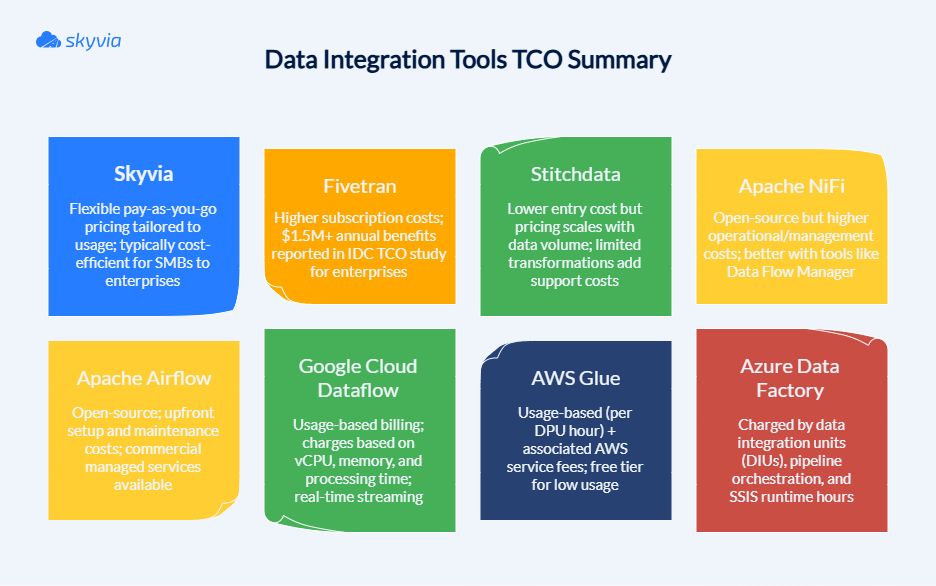
Through extraction and loading automation combined with simple configuration needs, Fivetran delivers streamlined ELT capabilities as another market player. Cloud-first ETL with extensive integration possibilities defines Stitchdata’s lightweight approach. Here’s how these platforms compare:
| Feature / Platform | Skyvia | Fivetran | Stitchdata |
|---|---|---|---|
| Type | No-code/low-code ETL & ELT | ELT | Cloud ETL |
| Ease of use | Visual workflow builder, intuitive UI | Minimal setup, low code | Simple UI, API-driven |
| Connectors | 200+ (DBs, SaaS, cloud storages) | 750+ sources (focus on cloud apps) | 10 Standard sources on the Standard plan; Enterprise sources on Advanced and Premium |
| Transformation Support | Built-in, broad, versatile, and user-friendly transformations | Limited (mostly in the target warehouse) | Basic |
| Pipeline Scheduling & Automation | Yes, with monitoring and alerts | Fully automated & managed | Scheduled syncs |
| Incremental Loading | Yes | Yes | Yes |
| Pricing Model | Volume-based and feature-based pricing. Has a free plan | Volume-based with a 14-day free trial. Has a free plan | Usage-based pricing with a 14-day free trial. No free plan |
| Best For | SMBs, mid-market, teams needing both ETL and ELT | Enterprises seeking scalable ELT | Small teams that need simple ingestion into a warehouse |

Open-Source Tools
Best for customization & control
Open-source tools are for teams that believe that if you want something done right, you’d better be prepared to roll up your sleeves and get your hands dirty. These platforms offer the kind of flexibility that would make a yoga instructor jealous, but everything comes with a price, and their price is the demand for technical chops in return.
Apache Airflow has become the darling of data engineers everywhere, and for good reason. Built on Python, it treats your data pipelines like sheet music – every task, dependency, and schedule written out in code that orchestrates your data symphony.
Apache NiFi operates differently by allowing you to design data flows using drag-and-drop tools. You build data highways instead of castles, like you would with digital Lego blocks. NiFi is ideal for real-time streaming situations where data needs to flow like a river, rather than sitting in batches like a pond.
| Feature / Platform | Apache Airflow | Apache NiFi |
|---|---|---|
| Type | Primarily ETL | Both ETL and ELT |
| Ease of use | Code-based; pipelines defined as Python DAGs; requires programming skills | GUI-based drag-and-drop visual flow editor; low-code, user-friendly for non-programmers |
| Connectors | 80+ | Unspecified |
| Transformation Support | Task-level transformations in Python tasks (via operators) | Inline transformations with built-in processors |
| Pipeline Scheduling & Automation | Yes, with cron-like triggers, sensors, and SLA monitoring | Yes |
| Incremental Loading | Yes | Yes |
| Pricing Model | Free to use; costs involve infrastructure and support | Free with enterprise options and paid commercial support |
| Best For | Batch ETL workflows, complex dependency pipelines, ML pipelines, and reporting tasks | Real-time data ingestion, streaming transformations, data routing, IoT data processing |
Cloud-Native Solutions
Best for deep integration with a cloud provider
They are fully managed, infinitely scalable, and so tightly integrated with their cloud ecosystems that they practically finish each other’s sentences. If you’ve already chosen your cloud allegiance, these native solutions offer the path of least resistance to data pipeline nirvana.
AWS Glue is a serverless ETL service that discovers your schemas, catalogs your data, and transforms it without you having to worry about spinning up servers or managing clusters. It’s like having a data team that never sleeps, never complains about overtime, and scales up faster than Black Friday shopping crowds.
Azure Data Factory brings Microsoft’s enterprise DNA to data integration. With over 90 connectors and a visual interface, ADF orchestrates data movements across hybrid environments with reliability.
Google Cloud Dataflow is built on Apache Beam’s unified programming model and treats batch and stream processing as two sides of the same coin, auto-scaling resources. It adjusts on the fly when pipelines need to handle everything from trickles to tsunamis of data.
| Feature / Platform | AWS Glue | Azure Data Factory | Google Cloud Dataflow |
|---|---|---|---|
| Type | Both, but primarily ETL | Both ETL and ELT | Both ETL and ELT |
| Ease of use | Moderate; coding often needed for advanced transformations | High; drag-and-drop UI, low-code data flows | Developer-centric; requires knowledge of Apache Beam SDK |
| Connectors | 100+ data sources, native AWS ecosystem | 90+ | Integration with Google Cloud services |
| Transformation Support | Apache Spark ETL engine; Python and Scala scripting | Visual Mapping Data Flows; supports code-free complex transformations | Apache Beam SDK for batch and stream transformations |
| Pipeline Scheduling & Automation | Job scheduler with triggers, dependency management | Yes, via triggers and event-based triggers | Yes, but it relies on integration with other Google Cloud services for this |
| Incremental Loading | Supports incremental crawlers and job runs | Yes, with control over triggers | Yes |
| Pricing Model | $0.44 per Data Processing Unit (DPU) hour for Spark jobs (US; varies by Region) | $1 per 1,000 orchestration runs (activities, triggers), plus data movement from $0.25 per DIU-hour | Pay-per-use by the second, plus resources used |
| Best For | AWS-centric environments needing serverless, scalable ETL | Hybrid and multi-cloud data integration with visual pipelines | Real-time streaming and batch processing in Google Cloud |
Cost Comparison: Total Cost of Ownership (TCO)
Money talks, but if you weigh all pros and cons, there’s a chance it won’t scream. Let’s put aside vendors’ shiny demos as they often fail to answer hard questions about Total Cost of Ownership – the true price tag of keeping data flowing smoothly.
Let’s pull back the curtain on the four horsemen of data integration expenses.
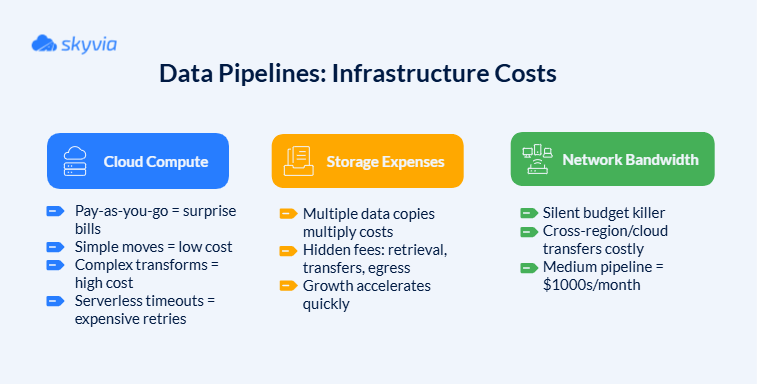
- Infrastructure Costs
Infrastructure costs are data pipelines’ rent – it’s due every month, no matter how active they were. These expenses include:
2. Tool Licensing/Subscription Fees
Platform costs represent the most visible line item on your data integration budget, but they also may be the most deceptive. For example, subscription tiers follow a predictable pattern: basic plans that work great for demos, professional plans that cover most real-world scenarios, and enterprise plans that are often not even mentioned on pricing lists to spare users.
Most platforms price based on data throughput, which sounds fair until your business experiences seasonal spikes or unexpected growth. Black Friday traffic or end-of-quarter reporting can push you into higher tiers.
And there are premium features hidden behind paywalls. When you see the costs for advanced transformation, real-time processing, improved security, and priority support, debates about necessity arise (spoiler alert: you’ll likely discover they’re indispensable).
Pricing ranges tell a story of market segmentation:
- SMB-focused tools start from about $1,000 a year and feel like bargains until you outgrow them.
- Enterprise platforms can easily reach $ 100,000 or more per year.
- Open-source shifts costs into skilled staff time.
- Personnel Costs
People cost more than technology, even though many companies still believe the opposite. While you’re trying to do everything that is in your power to make licensing fees a bit lower, your personnel costs are quietly eating your data integration budget.
- Maintenance Overhead
The maintenance burden correlates directly with pipeline complexity and source diversity. Here’s what may affect budgets:
- Pipeline fragility creates ongoing expenses that compound over time. Each source system represents a potential point of failure that requires monitoring, testing, and inevitable fixes.
- Schema evolution turns routine maintenance into an emergency response. When your CRM adds new fields or restructures existing ones, your carefully crafted pipelines can break.
- Error handling is a full-time job in complex environments.
Security Best Practices for Data Pipelines
Protecting pipelines has become as critical as the data itself. The main secret is finding a balance. Measures too tight, and your records become as useful as a car with no keys. Too loose, and you’re leaving a front door wide open, and the mat says, “Welcome, dear intruders.”
Data Encryption
Encryption transforms valuable input into digital gibberish that would make even the most determined hacker throw in the towel. Even if someone intercepts it, they can’t make heads or tails of what they’ve stolen.
TLS (Transport Layer Security) and SSL (Secure Sockets Layer) are armored transportation services when records hop from system to system. It works like a secret agent movie:
- Your systems exchange digital certificates (showing their credentials).
- They negotiate encryption algorithms (agreeing on the secret code).
- They create session keys (sharing the decoder ring).
- Data flows securely using an agreed-upon encryption method or methods.
Data in transit usually receives more protection since it’s more vulnerable, but the harsh reality is that hackers are not that picky when it comes to the data they want. Databases where records reside can also become a target. AES (Advanced Encryption Standard) encryption locks down stored records with military-grade security.
Modern database systems implement two-tier key management:
- Master encryption keys protect the key vault itself.
- Tablespace keys encrypt specific data containers.
- Regular key rotation ensures old keys don’t become permanent vulnerabilities.
Access Control
Role-Based Access Control (RBAC) knows exactly who belongs where and what they’re allowed to do. Instead of managing permissions for every user (imagine updating hundreds of employee access rights manually), RBAC groups permissions into roles that reflect real job functions. Here’s how it may look:
| Role Level | Pipeline Access | Data Visibility | Administrative Rights |
|---|---|---|---|
| Data Analysts | Read-only pipeline monitoring | Department-specific datasets | None |
| Data Engineers | Create, edit, and deploy pipelines | Full technical metadata | Pipeline configuration |
| Data Architects | Full pipeline management | Cross-functional data access | System-level settings |
| Compliance Officers | Audit logs and reports | Anonymized data patterns | Compliance configuration |
Key RBAC best practices include:
- Principle of least privilege – users get the minimum access needed for their roles.
- Regular access reviews – audits to remove unnecessary permissions.
- Automated provisioning – new employees get appropriate access based on job roles.
- Immediate deprovisioning – departing employees lose access before they clear security.
When all of this isn’t enough, add Multi-Factor Authentication (MFA). Even if intruders somehow get one part of the key, they’ll discover that possession doesn’t equal access.
Compliance
GDPR, HIPAA, and SOC 2 forge protective barriers shielding both customers and organizations from data mismanagement fallout.
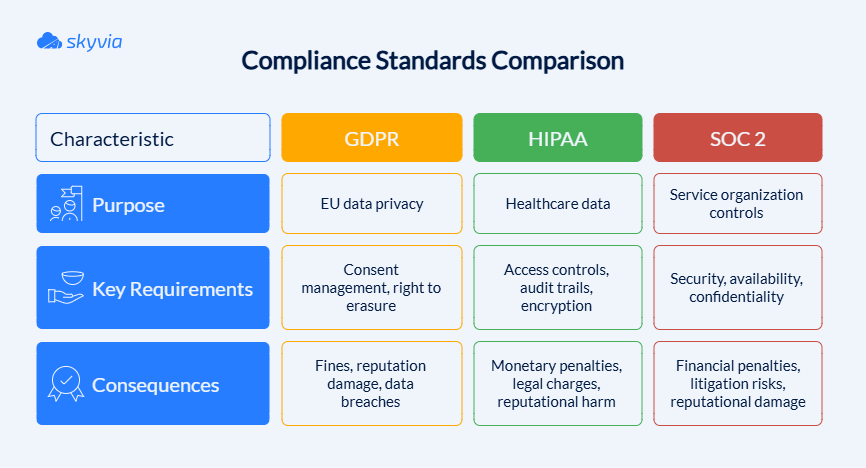
Automated compliance checking replaces manual regulatory sprints. Through DevSecOps integration, compliance violations face automatic detection during pipeline deployment, stopping problems long before production exposure.
Data Masking
It protects sensitive information by giving a pipeline a disguise that fools everyone except authorized users. It’s the difference between showing real customer data to developers versus giving them realistic test data that won’t land your company in legal hot water. The practice comes in various types:
| Masking Type | Description | Use Case Examples |
|---|---|---|
| Static Masking | Permanent, realistic fake data replacement | Development & testing with realistic but fake data |
| Dynamic Masking | Real-time masking on access | Production data access control |
| On-the-Fly Masking | Masking during transfer | Migrations, continuous delivery |
| Deterministic Masking | Consistent same input-output mapping | Consistent testing environments |
| Randomization | Random unrelated values | Full obfuscation |
| Substitution | Substitute with realistic fake data | Usernames, credit card numbers |
| Shuffling | Reorder data values within columns | Preserve distribution for tests |
| Encryption | Cryptographic protection | Strong security needs |
| Hashing | One-way transformations | Password storage |
| Tokenization | Replace with tokens linked to secure storage | Secure references |
| Nulling/Redaction | Remove or blank out data | When the data is not needed in testing |
| Statistical Obfuscation | Alter data but keep stats and distributions | Data analytics |
| Date Aging/Variance | Shift dates/numbers within ranges | Mask time-based data |
And remember, when you work with data, paranoia can be healthy and profitable because implementing security practices pales in comparison to the potential damage from data breaches, regulatory fines, and lost customer trust.
Maintenance & Management Best Practices
You might design the most sophisticated pipeline the world has ever seen. However, it lacks adequate maintenance protocols and management structures. Unfortunately, such a pipeline is prone to collapse during critical moments. Wise teams integrate visibility tools, system durability, and control mechanisms architecture from the very beginning.
Monitoring & Alerting
Without proper monitoring, dealing with pipeline issues becomes like diagnosing based on scattered symptoms only, rather than seeing the whole picture. To do it efficiently, you need a monitoring stack.
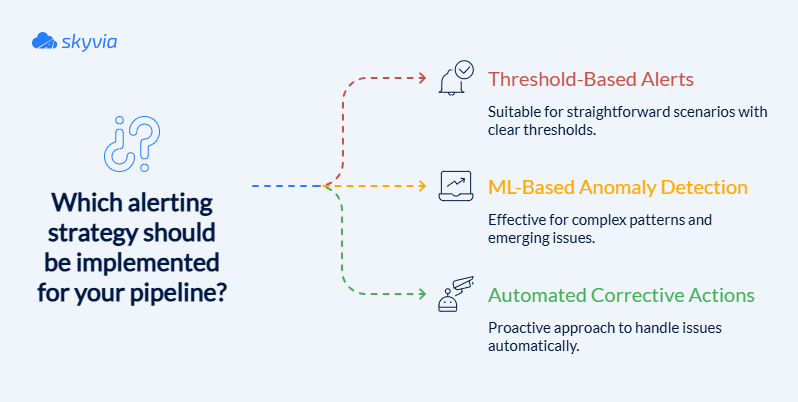
Best practices:
- Monitoring tools like Prometheus, Grafana, AWS CloudWatch, etc., collect metrics on data throughput, latency, error rates, and resource utilization.
- Implement centralized logging with aggregated logs from all pipeline components.
- When thresholds for failure rates or processing time are exceeded, automated alerts immediately inform teams.
- Visualization dashboards deliver complete views of pipeline wellness and performance trends.
- Predictive capabilities and early problem detection come from ML-based anomaly detection systems.
- Automate corrective actions such as auto-scaling upon detecting load spikes or transient errors.
Version Control
Version control transforms chaotic pipeline development into organized, collaborative engineering.
Best practices:
- Use source control systems like Git for all pipeline components, including scripts, configuration files, and infrastructure-as-code setups.
- Maintain separate branches for development, testing, staging, and production environments.
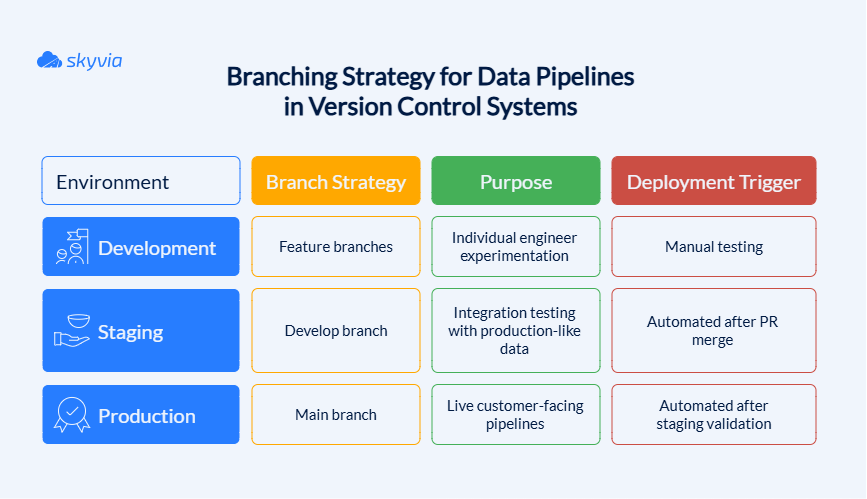
- Tag and document releases and changes to track pipeline evolution.
- Store and version control metadata and schema changes alongside code to keep transformations consistent.
- Incorporate CI/CD pipelines for automated testing and deployment of pipeline changes.
Error Handling
It doesn’t just prevent failures – it makes your pipelines stronger by learning from mistakes and adapting to surprises. The goal isn’t perfection (impossible in the real world), but graceful degradation that maintains business continuity even when things go sideways.
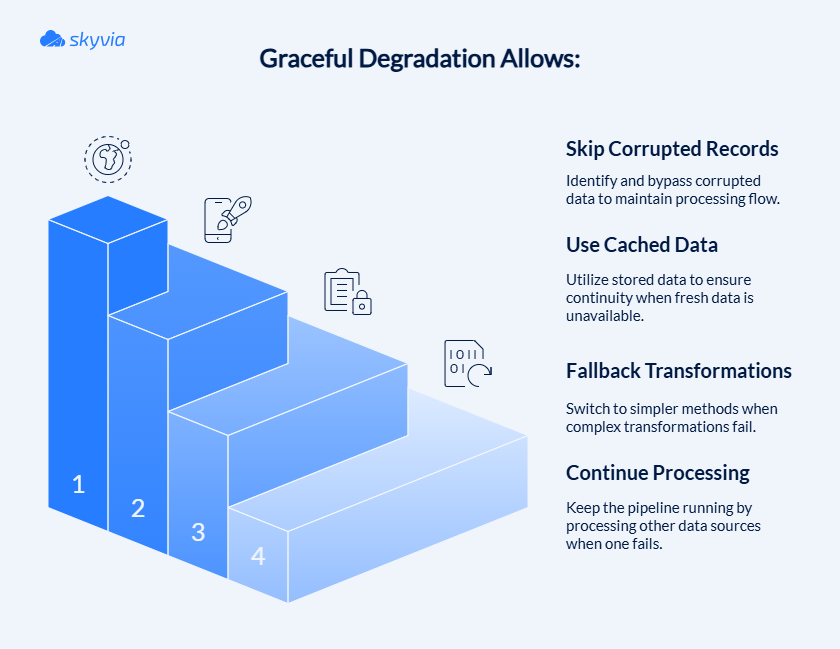
Best practices of error handling:
- Everything starts with design. Create pipelines that can handle common errors without stopping the entire process.
- Implement retry mechanisms with exponential backoff for transient failures.
- Use dead-letter queues or dedicated storage for failed records for later analysis without losing data.
- Track error types and frequency in monitoring dashboards for proactive troubleshooting.
- Integrate alerting to notify responsible teams immediately upon critical failures.
- Build automated recovery workflows where feasible, such as auto-retry or fallback logic.
Data Lineage
It provides the roadmap that shows exactly where your data came from, how it was transformed, and where it’s heading. Without lineage tracking, debugging quality issues becomes like solving a mystery novel with missing pages – you know something’s wrong and you’re 100% right, but tracing the problem back to its source is mission impossible.
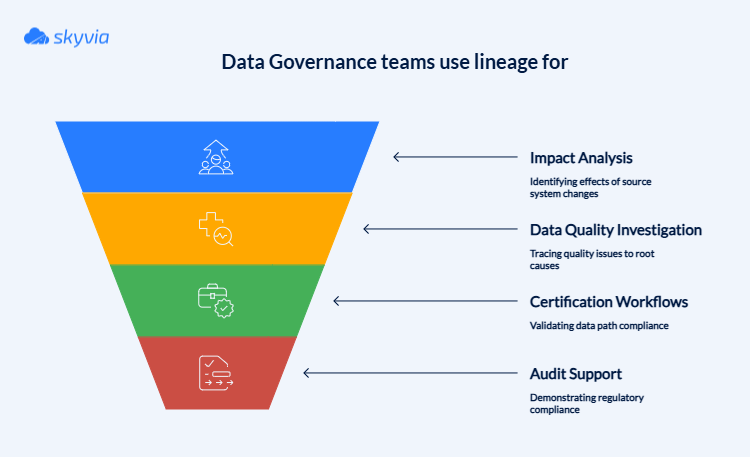
Best practices:
- Incorporate lineage tracking tools or metadata management systems that capture data flow at every pipeline stage.
- Maintain detailed records of sources, transformation logic, intermediate and final datasets.
- Use lineage information to trace data quality issues back to their root causes.
- Provide lineage visibility to consumers and auditors for transparency and compliance.
- Automate lineage updates as pipelines evolve to keep information accurate.
- Use lineage to support compliance with regulations like GDPR and HIPAA by demonstrating data handling and accountability.
Simplify Your Entire Data Strategy with Skyvia
As the Bakewell retail and healthcare compliance examples showed, Skyvia reduces TCO by collapsing ETL and ELT into one workflow. No need to pick sides in this great debate. The platform will adapt to a workflow like a data chameleon. In addition, the tool:
- Supports automated scheduling.
- Loads only new and changed records (incremental updates, with Change Tracking for SQL Server).
- Provides comprehensive monitoring and alerting capabilities.
- Supports integration scenarios involving multiple sources and targets within a single pipeline through Data Flow.
200+ connectors mean even those legacy systems that remember Y2K can talk with cutting-edge SaaS platforms launched last week. Everything can be achieved within one platform.
Reducing the TCO with Skyvia doesn’t stop here. Since it’s a no-code tool with drag-and-drop wizards, a marketing analyst can sync Salesforce records without opening a support ticket, a finance team can automate reporting workflows without waiting for the next development sprint, and so on.
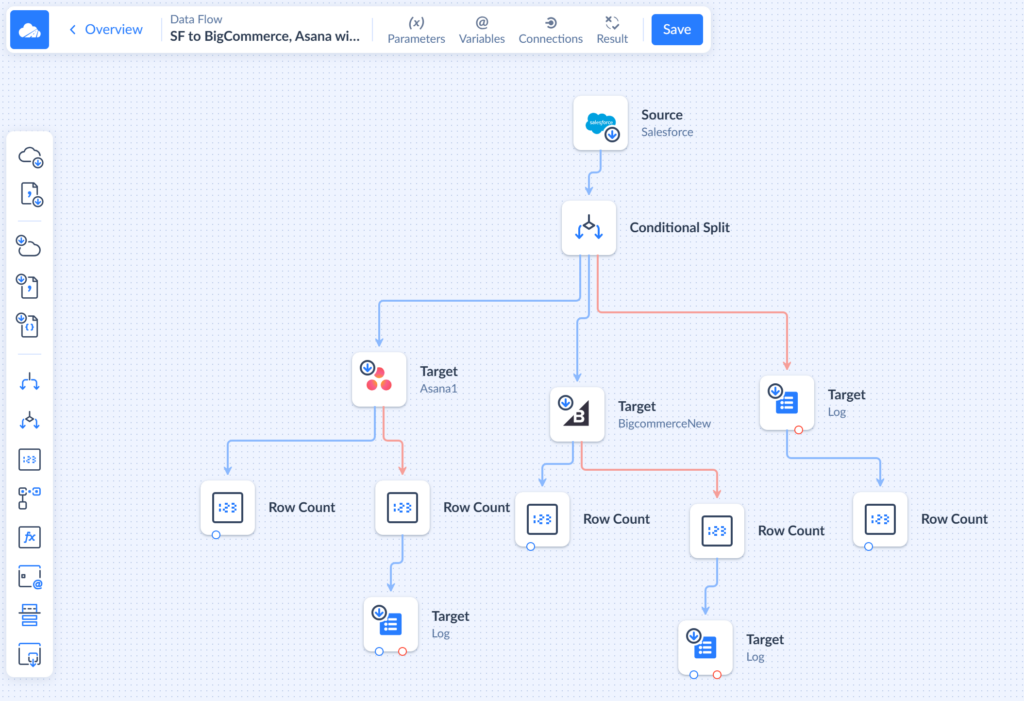
On average, custom ETL pipeline development for a small project takes around 2 to 4 weeks (days to a month). With Skyvia, it takes a few hours to configure.
| Data integration function | Traditional approach | Skyvia’s unified approach |
|---|---|---|
| ETL/ELT processing | Separate tools for each pattern | Single interface handles both seamlessly |
| Two-way sync | Custom scripts or a separate sync tool | Scheduled bi-directional synchronization |
| Data backup | Standalone backup solutions | Integrated backup & restore workflows |
| Workflow automation | Process orchestration tools | Visual workflow designer included |
| Data migration | Custom scripts or migration services | Drag-and-drop migration wizards |
Your data strategy deserves better than a collection of loosely connected tools held together with optimism. Try Skyvia for free and build your first automated pipeline in minutes. Because your data is too valuable to waste time fighting with the tools that should be helping you.
Conclusion
We’ve just explored the tactical trenches of data pipelines, dissected the true costs that hide behind demos, and mapped the security foundations that keep data safe from digital villains.
The main point of all of this is that it can be the simplicity of ETL, ELT’s raw power, or hybrid approaches; success lies in matching your tools to your reality – not the other way around. And the more elastic the tool you choose, the easier it will be at every stage.
Tired of running between paralysis and progress? Start where you are, use what works, and build toward what you need. Your data is waiting, and Skyvia is right here to assist.

FAQ for Data Pipeline vs. ETL

Is AWS Glue zero-ETL closer to ETL or ELT?
Nearer the ELT end. Most AWS Glue jobs are classic ETL, though zero-ETL for Salesforce works differently: AWS keeps a complete replica of your Salesforce data in an analytics store, and you write no job code. Archived records such as Events and Tasks come along, marked in an isArchived field. Any reshaping then happens in the target.
What happens if a source system fails mid-pipeline?
The run stops, and sometimes half the rows are in. We’d make every load safe to repeat by matching on a record ID and upserting, so a second attempt updates rows instead of doubling them. Skyvia’s Control Flow (Professional and Enterprise plans) has Try Catch blocks, which send a failed step down an error branch instead of halting.
Will AI replace ETL pipelines?
Not so far. AI assistants now write some logic inside ETL tools, mapping expressions for instance, but something still has to connect to the sources, run on a schedule, recover when a step fails and load the target. Skyvia’s August 2026 release is one example: it added an AI assistant that writes and fixes expressions in the mapping editor.