If you need to simply copy PagerDuty data to ClickHouse without mapping configuration, you can use Skyvia replication. It allows you to create a copy of PagerDuty data
PagerDuty and ClickHouse Integration
Skyvia offers you a convenient and easy way to integrate PagerDuty and ClickHouse with no coding.

PagerDuty
PagerDuty is a SaaS incident management platform designed to help businesses handle alerts, automate workflows, and notify teams about issues.


ClickHouse
ClickHouse is an open-source columnar database management system for fast, real-time analytical processing (OLAP) of large volumes of data.
Trusted by thousands of organizations around the globe







Replicate PagerDuty data to ClickHouse
PagerDuty replication to ClickHouse can be configured in under two minutes
Learn more about ReplicationAll you need is to specify the connections to PagerDuty and ClickHouse and select data to replicate, and Skyvia does the rest. It will copy the specified PagerDuty data to ClickHouse and maintain this copy up-to-date automatically with incremental updates.
Use Connectors to Import Data Between ClickHouse and PagerDuty
Skyvia offers a number of benefits for import PagerDuty data to ClickHouse or vice versa. With Skyvia import you can perform any DML operations for imported ClickHouse data in PagerDuty, import data from several PagerDuty objects at once, etc. These features are available for both directions.
Import PagerDuty to ClickHouse
Import data without writing a line of code!
Import ClickHouse to PagerDuty
Data import is simple for any direction!
How to integrate PagerDuty and ClickHouse
Integration of PagerDuty and ClickHouse with Skyvia is as easy as 1-2-3

You configure your data integration operation in convenient GUI wizards and editors.

Operation is executed in a cloud automatically on schedule or manually at any time.

You can view the integration operation results for each execution in the Run History.
Advanced Integration with Custom Mappings
Skyvia offers powerful visual editors which allow precise mapping configuration. It allows integrating data having different structure and offers the following mapping features.
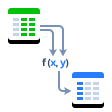
Expressions
Skyvia allows using complex mathematical and string operations and conditions for mapping data.
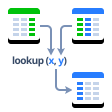
Lookup
You can use lookup mapping to map target columns to values, gotten from other target objects depending on source data.
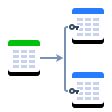
One-to-many
Skyvia allows you to map one ClickHouse table to several PagerDuty ones.
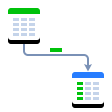
Constant
When integrating data, you can fill some PagerDuty fields that don't have corresponding ClickHouse fields (or vice versa) with constant values.
Integrate PagerDuty and ClickHouse with minimal effort and in only a few clicks!