Articles • by Nata Kuznetsova • July 16, 2026
If your company has ever hired a "data engineer" whose entire job turned out to be keeping one Python script alive — the one that moves Salesforce data into Redshift every night, breaks every time Salesforce updates its API, and has no documentation because the person who wrote it left eight months ago — you already know how this goes.
Getting data into Redshift or S3 reliably is harder than it looks on a vendor's pricing page. The tool that handles your use case perfectly costs more than your entire cloud bill. The free one needs a Docker cluster, a patient DevOps engineer, and about three weekends. And the AWS-native option assumes you're fluent in PySpark and have opinions about DPU allocation.
Most comparison articles don't help. They list ten tools, give everything four stars, and leave you exactly where you started.
We're the team at Skyvia. We built a no-code ETL platform, so yes, we're biased. We also know our product isn't the right answer for everyone. A team running petabyte-scale transformations needs AWS Glue. A budget-conscious engineer who wants full infrastructure control is probably better off with Airbyte. We'll say so when that's the case.
What follows is based on actual testing across all four tools — live pipelines, not documentation skimming. Here's what we found.
How Did We Test These AWS Integration Tools?
Real data pipelines don't run on clean databases with stable APIs. So we didn't test on one.
We pulled data that had been sitting in production for years. A million rows, give or take. Date formats all over the place, duplicates from three different import jobs, a schema nobody had documented since the person who designed it moved on.
We hooked up a live Salesforce feed:
- Real pagination
- Real rate limits
- Real responses that don't care about your testing schedule.
The destination was Redshift. The finish line wasn't "pipeline created" in the UI — it was actual rows in an actual table that we could query without cleaning up first.
The Stripe rate limit hit mid-test on most tools. We let it. That moment — when the API pushes back, and the tool has to decide what to do next — is honestly more useful than any setup time benchmark. Some tools backed off and kept going. Others just sat there.
That's what the sections below are based on.
What Are the Key Comparison Criteria for AWS Pipelines?
Most tool comparisons evaluate features. We cared about something different — the things that actually bite you once the pipeline is running, and someone on your team has to own it day to day.
| Tool | Best for | Pricing Model | Sync Frequency | API Complexity | CDC Support |
|---|---|---|---|---|---|
| Skyvia | Teams Needing No-Code Solutions | Per-Record & Data Volume | Down to 1 minute | Visual Wizard | Yes (Trigger-based) |
| Fivetran | High-Volume SaaS Replication | Monthly Active Rows (MAR) | Down to 5 minutes | Fully Automated | Yes (Log-based) |
| AWS Glue | Enterprise / Dev-Heavy | Compute Hours (DPU) | Batch / Event-driven | High (Python/Scala/Spark) | Via AWS DMS |
| Airbyte | Budget-Conscious Devs | Compute-based / Free (Self-hosted) | Down to 5 minutes | Medium (Requires infra) | Yes (Log-based) |
Which AWS ETL Tool Is Right for Your Use Case?
The wrong way to pick an ETL tool is by G2 rating. The right way is by asking who on your team is actually going to set this up, maintain it, and get it supported when it breaks at an inconvenient time.
Four tools. Four different kinds of teams. The one that fits depends less on feature lists and more on what your data stack looks like today and who owns it.
Is Skyvia the Best AWS ETL Tool for Lean and No-Code Teams?
Skyvia was built around a pretty ordinary problem: not every team has a data engineer available each time Salesforce, Shopify, or PostgreSQL data needs to land in AWS. Sometimes an analyst just needs the pipeline working today, without opening a PySpark project or waiting for someone to pick up an engineering ticket.
That matched what we saw in testing. We created a Salesforce-to-Amazon Redshift replication in Skyvia, selected the objects for the first load, added a schedule, and ran the package in under fifteen minutes. Everything stayed inside the visual interface, which is where Skyvia makes the most sense: teams that need a working pipeline, not a custom engineering project.
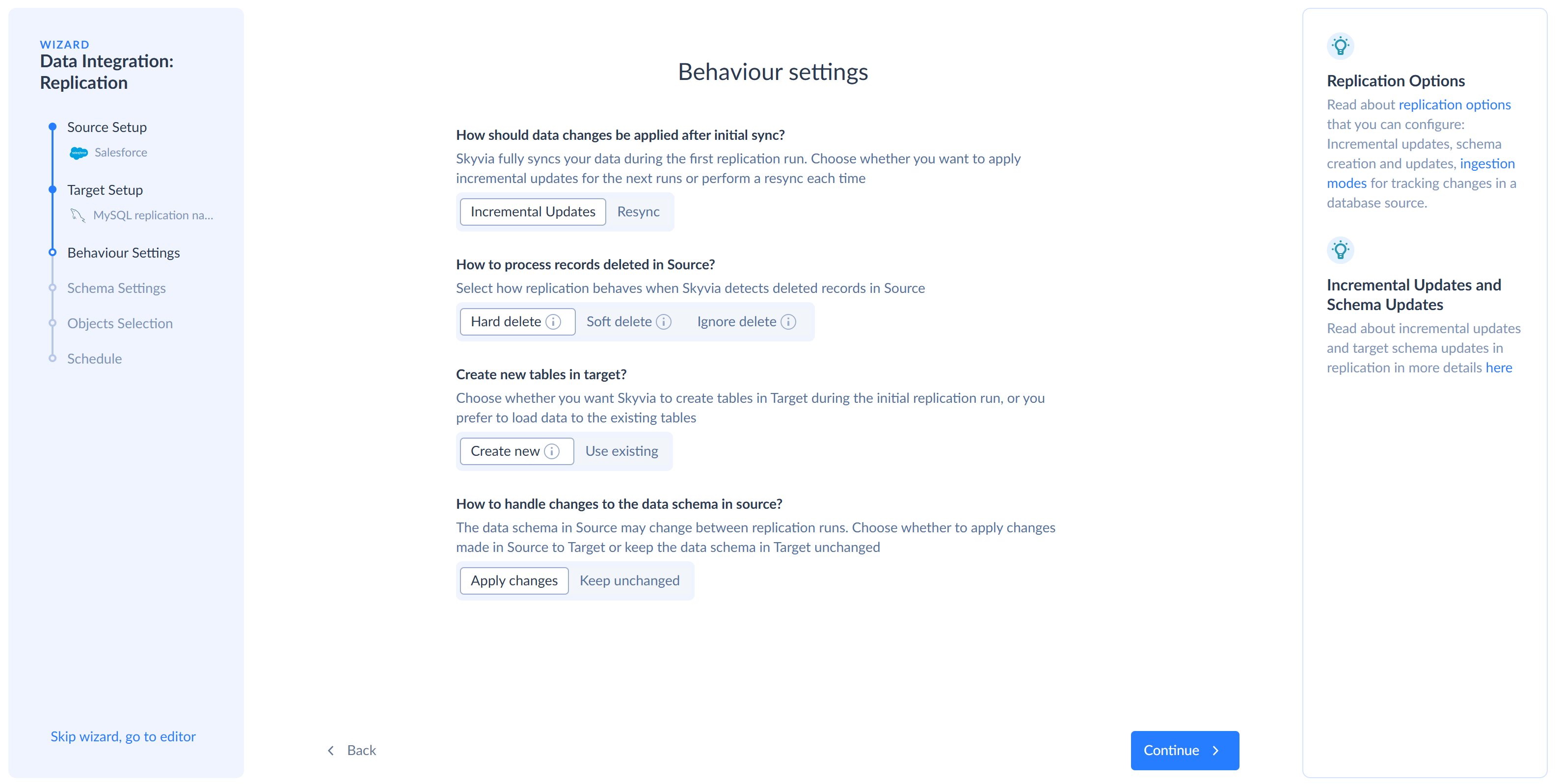
The 200+ pre-built connectors cover many of the sources most teams actually use — Salesforce, HubSpot, Shopify, Stripe, PostgreSQL, MySQL — and they're all vendor-maintained, which matters more than connector count when something breaks at an inconvenient time.
Where Skyvia fits less well is worth saying directly. If your workload requires sub-minute streaming CDC, Skyvia's minimum sync interval is one minute on the Professional plan. And if your corporate security policy requires a fully air-gapped, on-premise installation with zero external internet access — banking infrastructure, defense contractors — Skyvia won't fit that architecture. Informatica or a self-hosted solution is the honest recommendation there.
Best for
Data analysts, RevOps teams, and lean data teams who need AWS pipelines running without waiting on engineering resources.
Rating
G2: 4.8 / 5
Capterra: 4.9 / 5
Pricing
Free tier available. Paid plans start at $79/month for Basic. Standard is $159/month, and Professional starts at $399/month. See full pricing details on the Skyvia pricing page.
Pros
- You can get a working pipeline running without turning it into a development project.
- The interface is clear enough for non-engineers to handle routine changes.
- Scheduling, retries, and run logs are already part of the product.
- It covers more than basic ETL, including replication, export, import, and reverse sync scenarios.
Cons
- It is a cloud product, so it will not fit strict air-gapped or fully on-prem requirements.
- Teams with very custom event routing may outgrow the visual setup.
- It will not remove the need for good data modeling once the data reaches the warehouse.

Is Fivetran the Best Choice for High-Volume SaaS Replication?
During testing, Fivetran's log-based CDC was the most impressive thing we saw across all four tools. We changed a field in the source database mid-sync — the kind of thing that breaks pipelines and generates support tickets — and Fivetran caught it, updated the Redshift schema automatically, and kept going. No intervention, no failed job, no Monday morning cleanup.
That's the thing Fivetran is genuinely built for. Not flexibility, not transformation depth, not pricing predictability — reliability at scale. Once a pipeline is running, it mostly stays running. For teams that have been burned by brittle self-managed pipelines, that's worth a lot.
Pricing is where I would be careful. In one test, we ran a simple bulk update across CRM records. From the business side, it was nothing special: same records, one field changed. Fivetran synced the update correctly, but those records still counted toward Monthly Active Rows. That is expected for MAR-based billing, but it can surprise teams that do frequent cleanup, enrichment, or mass status updates.
The smaller pricing rules matter too. Connection minimums and paid MAR treatment for deleted rows can become noticeable with high-churn CRM data. I would treat Fivetran pricing as something to model with real update behavior, not just the number of connectors or total rows.
Fivetran handles extraction and loading very well, but transformations usually happen later in tools like dbt. If you need visual field mapping or pre-load changes, Fivetran may feel limited.
Best for
Engineering teams and data orgs with mature stacks that need hands-off, high-reliability SaaS replication into Redshift or Snowflake — and have the budget to match.
Rating
G2: 4.3 / 5
Capterra: 4.4 / 5
Pricing
Usage-based on Monthly Active Rows, with a Free plan available for low-volume use. Paid costs depend on MAR volume, plan, and connection usage, so teams with high-churn SaaS data should model pricing against real update patterns.
Pros
- Log-based CDC that handles schema drift automatically — pipelines keep running when source schemas change.
- True set-and-forget managed pipelines with minimal operational overhead.
- Large connector library across SaaS apps and databases.
Cons
- Pricing needs real usage modeling, especially if records change often.
- Mass CRM updates can count as a lot of row activity.
- Transformation work usually moves downstream to dbt or another tool.
Is AWS Glue the Go-To for Developer-Heavy Enterprise Teams?
AWS Glue felt best when we stayed inside AWS.
S3 as the source. Redshift as the target. Glue Data Catalog for metadata. IAM for permissions. Spark for the transformation.
That setup made sense.
The trouble started when the source was not already sitting neatly in AWS. SaaS data needed more preparation than the Glue UI suggests at first glance. Connector behavior, field cleanup, schema changes, retries, and Redshift loading all needed real decisions. At that point, it was not an analyst task anymore. It was engineering work.
That is not a weakness if your team has Spark engineers. It is exactly why large AWS-heavy data teams use Glue. You get serverless distributed processing, deep AWS integration, and serious transformation power. But this is not the tool I would hand to an analyst who just needs Shopify or Salesforce data in Redshift by the end of the day.
import sys
from awsglue.context import GlueContext
from awsglue.job import Job
from awsglue.utils import getResolvedOptions
from pyspark.context import SparkContext
from pyspark.sql.functions import col, trim, lower

args = getResolvedOptions(sys.argv, ["JOB_NAME"])

sc = SparkContext()
glueContext = GlueContext(sc)
spark = glueContext.spark_session

job = Job(glueContext)
job.init(args["JOB_NAME"], args)

source_df = spark.read.option("header", "true").csv("s3://company-raw-data/customers/")

clean_df = (
    source_df
    .withColumn("email", lower(trim(col("email"))))
    .withColumn("company_name", trim(col("company_name")))
    .filter(col("email").isNotNull())
)

clean_df.write.mode("overwrite").parquet("s3://company-curated-data/customers/")
job.commit()
Best for
Enterprise data teams already committed to AWS that need serverless Spark processing for large S3, Redshift, Athena, or Lake Formation workflows.
Rating
G2: 4.3 / 5
Capterra: Not enough public reviews for a reliable score.
Pricing
Pay-as-you-go pricing based on AWS Glue usage, including DPU-hours for ETL jobs. See full pricing details on the AWS Glue pricing page.
Pros
- Deep integration with S3, Redshift, Athena, Lake Formation, IAM, and Glue Data Catalog.
- Serverless architecture, so there is no idle cluster to provision or maintain.
- Strong fit for large batch transformations and Spark-based processing.
- Glue Data Catalog helps keep metadata management inside the AWS stack.
Cons
- The learning curve is steep if your team is not already comfortable with Spark and AWS.
- Not a good fit for analysts or RevOps teams that need visual SaaS-to-warehouse pipelines.
- Cold starts and batch-oriented execution make it less appealing for real-time use cases.
- SaaS connectivity and reverse ETL workflows usually require extra services or custom work.
Does Airbyte Self-Hosted Make Sense for Budget-Conscious Engineers?
Airbyte makes the most sense when the source is not perfectly standard. With a managed ETL tool, you mostly accept the connector as it is. With Airbyte, engineers can open things up, inspect how the connector works, adjust behavior, or build a new one with the CDK. That is useful when you are dealing with an internal API, a niche SaaS product, or a source that does not fit neatly into a vendor-maintained connector.
We tested the self-hosted version on an EC2 instance. The first sync was not the hard part. The harder question was what happens after that first successful run. Someone still has to watch the server, update Docker, deal with connector versions, check logs, and handle failed jobs. Airbyte Open Source may be free to install, but it still needs an owner.

Best for
Engineering teams that want open-source control, have DevOps support, and are comfortable maintaining their own pipeline infrastructure.
Rating
G2: 4.4 / 5
Capterra: No ratings yet.
Pricing
Airbyte Open Source is free to self-host, but infrastructure and maintenance are still your responsibility. Airbyte Cloud uses usage-based pricing with credits, while Enterprise pricing is custom. See full pricing details on the Airbyte pricing page.
Pros
- Good when a standard connector does not quite fit.
- Useful for internal APIs and niche SaaS sources.
- Engineers can see and change more of the pipeline.
- The CDK helps when your team needs to build the connector itself.
Cons
- The server does not maintain itself.
- When a sync fails, someone has to read the logs and figure out why.
- Connector quality is uneven once you move past the popular sources.
- It can be more infrastructure than you need for a plain SaaS-to-warehouse pipeline.
AWS ETL Best Practices
The worst AWS ETL cleanup usually starts with a harmless decision. Leave the full reload for now. Use the broad role so the test does not get blocked. Schedule the Glue job a bit too often and tune it later. Then the job works, the team moves on, and later never really happens.
The notes below are the things I would rather fix in week one than explain six months later.
Keep a Record of What Each Table Is For
When several jobs write into S3, Redshift, or Athena, people need a place to check what each dataset means. Which table is current? Who owns it? Are those columns still used? When did the schema last change?
AWS Glue Data Catalog can handle this if your team already uses it. Some teams keep the same information in the warehouse or in an internal data dictionary. The tool matters less than the habit. Someone new should not have to ask around just to find the right customer table.
Check the Cost After the Pipeline Has Been Running
The first test run does not tell you much about cost. It is too small and too clean. The real number starts showing up after the job runs on a schedule for a few weeks.
The tricky thing about AWS costs is that they rarely feel wrong during the first few runs. Then the job gets a little bigger, a few retries happen, someone leaves a full refresh on the schedule, and the monthly number starts to look less like the estimate.
I would not wait for finance to notice it. Check job duration, DPU usage, retries, and schedule frequency while the pipeline is still easy to change.
Be Strict With IAM From the Start
Broad IAM roles save time in the first hour and cost time later. They make the pipeline easier to launch, but harder to audit, debug, or hand over to someone else.
Each job should have access to the buckets, tables, secrets, and services it actually uses. That is not exciting work, but it prevents a lot of confused debugging later. When a job fails, you want to know what it can and cannot touch without opening half the AWS console.
Do Not Reach for Spark by Default
AWS Glue and Spark are great when the job is big enough to need them. Large joins, heavy transformations, big S3 datasets — that kind of work makes sense there.
But a lot of ETL work is smaller than that. A scheduled SaaS export, a file cleanup step, or a light warehouse load may not need a Spark job at all. We have seen teams make pipelines harder to change simply because they started with the biggest engine in the room. Pick the compute for the job you have now. Change it later when the data actually earns it.
Move Away From Full Reloads Before They Become Normal
Full reloads are easy to defend in the beginning. The table is small, the job finishes, and nobody wants to spend extra time building change tracking. So the full reload stays.
The problem shows up later. The table grows, the job takes longer, and a failed run means pushing the same old data again. Incremental loads require more upfront thought, but they are usually easier to live with. Use timestamps, CDC, or another change-tracking method so each run only handles what changed. When something fails, you are fixing a slice of the data instead of starting over.
Conclusion: Which AWS ETL Tool Should You Choose?
Do not pick an AWS ETL tool because it has the longest feature list or the best-looking rating badge. Pick the one your team can actually run six months from now.
Got Spark engineers and large AWS workloads? Choose AWS Glue. It makes sense when your data already lives in S3, Redshift, Athena, and Glue Data Catalog, and your team is comfortable owning PySpark jobs.
Need high-volume SaaS replication and have the budget for a managed platform? Choose Fivetran. It is built for reliable pipelines with minimal day-to-day maintenance, but pricing needs careful modeling if your data changes often.
Want open-source control and have developer time to spare? Host Airbyte. It can be a good fit when your team wants connector flexibility and is ready to manage the runtime, logs, upgrades, and failed syncs.
Need to move data into AWS quickly, map and filter fields visually, and keep pricing easier to predict? Try Skyvia. It is the better fit for teams that need working AWS pipelines without writing code or waiting on engineering for every change.
Ready to stop fighting with API endpoints and pipeline scripts? Start your free trial with Skyvia today and set up your first AWS pipeline in minutes.
FAQ
Which Is the Best ETL Tool to Migrate Data From Amazon S3 to Redshift?
AWS Glue is usually the best fit for large S3-to-Redshift migrations inside AWS. It handles Spark-based transformations well and integrates deeply with S3, Redshift, IAM, and Glue Data Catalog. For no-code setup, Skyvia is easier.
What Is the Best ETL Tool to Move Data From SaaS Apps to Redshift?
Skyvia is the best fit for moving SaaS data to Redshift without code. It connects Salesforce, HubSpot, Chargebee, Google Sheets, and other apps through visual setup, scheduled loads, field mapping, and predictable volume-based pricing.
Which Is the Best ETL Tool to Migrate Data From DynamoDB or SingleStore to Redshift?
AWS Glue is a strong choice for DynamoDB-to-Redshift pipelines if your team can work with Spark. For SingleStore or less standard sources, Airbyte or a custom connector may fit better, depending on connector maturity and maintenance capacity.
Which Is the Best ETL Tool to Migrate Data From Amazon S3 to Snowflake or BigQuery?
AWS Glue works well for S3-heavy transformations, but Skyvia is easier for no-code S3-to-warehouse loading. If your team needs visual setup and scheduling into Snowflake or BigQuery, Skyvia is usually faster to launch.
What Are the Leading Enterprise ETL Tools That Handle Unexpected Schema Changes?
Fivetran, Matillion, Informatica, AWS Glue, and Skyvia can all help with schema changes in different ways. Fivetran is strong for managed replication, Glue for engineering-led pipelines, and Skyvia for no-code schema handling with alerts.
What ELT Tools Integrate Well With Amazon Redshift?
Skyvia, Fivetran, AWS Glue, Airbyte, and Matillion all integrate well with Amazon Redshift. Choose Skyvia for no-code pipelines, Fivetran for managed replication, Glue for AWS-native Spark jobs, Airbyte for open-source control, and Matillion for SQL-heavy teams.